 MANSOQ
 Medication administration · VERSION 39b72767
Select a differing ordered dose and verify what actually saved
Choose between two different instructions on a new event and verify the persisted dose. The same lesson shows the current-release saved-dose edit mismatch: an enabled existing-event selector accepts a draft choice that the update does not persist.
Nurse
 12
12Select one differing prescribed dosage instruction
Capture details
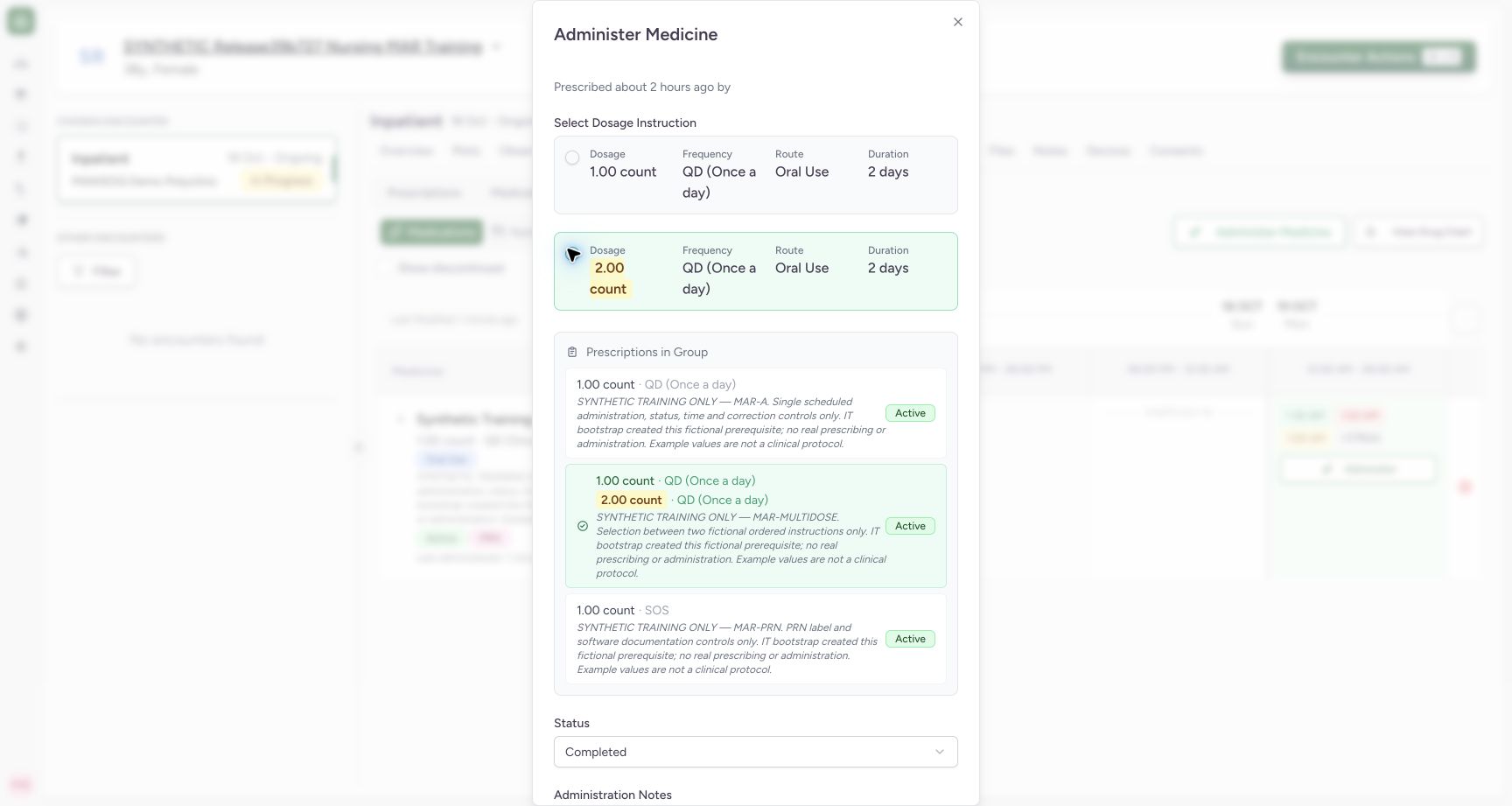
Exact committed release 39b72767 on an isolated nonproduction clone. Existing Nurse; fictional Polyclinic Inpatient software exercise only. Normal new-event form for MAR-MULTIDOSE request 45305066… displays two different ordered dose choices. The second radio is selected at 2 count, not the first 1 count default. Choice exists because the quantities differ; the separate prescription card remains selected.
Image SHA-256 d01a6af7120ddcde5a599b79962edf667984380d3b529a486961e1e4c28151ba
- Second ordered instruction: This radio selects the displayed 2 count instruction for this new event.
- Selected multi-instruction order: Check the exact prescription before choosing between its instructions.
 12
12Verify the persisted second-dose selection
Capture details
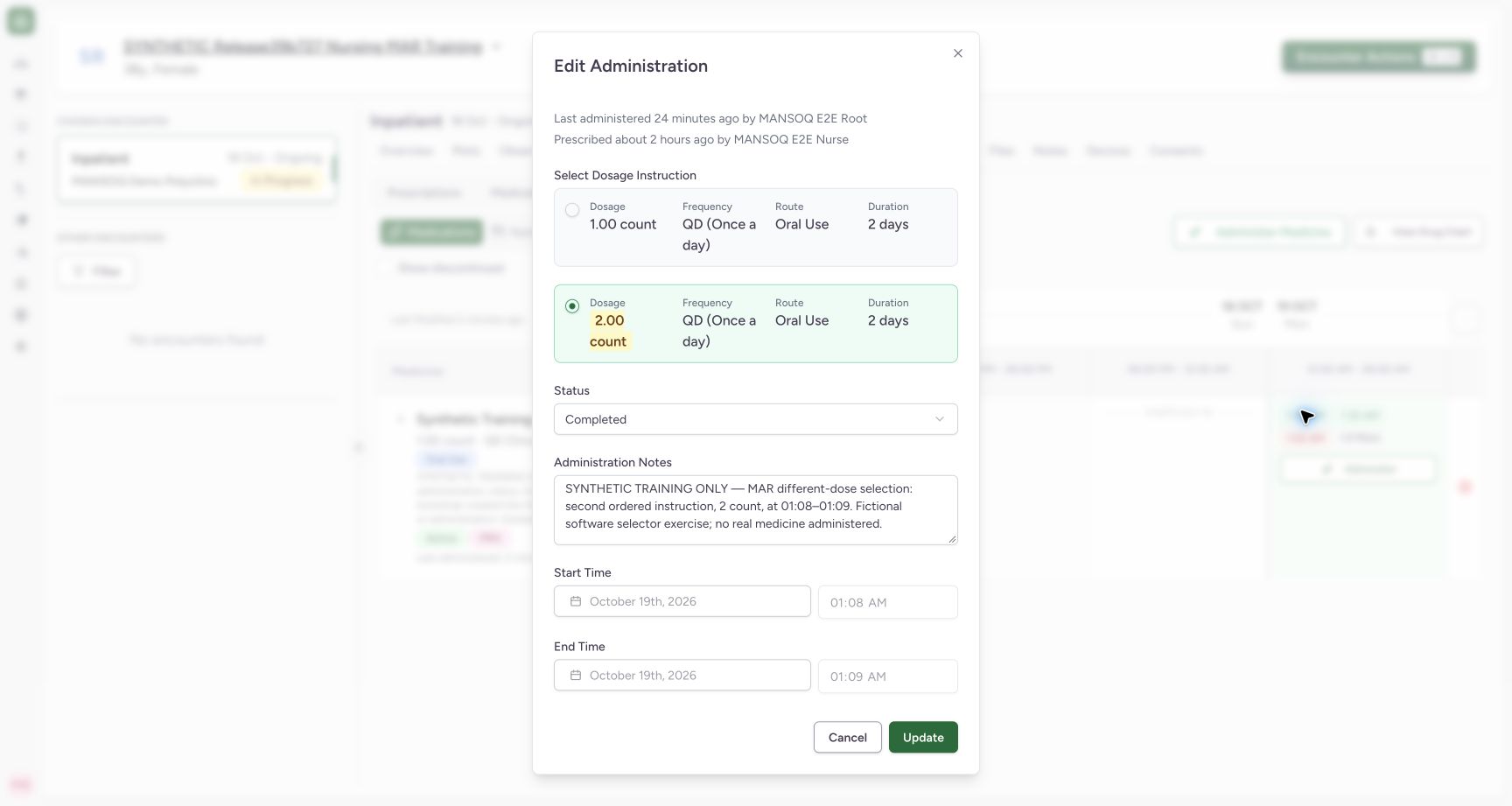
Exact committed release 39b72767 on an isolated nonproduction clone. Existing Nurse; fictional Polyclinic Inpatient software exercise only. Reopened saved event def2d34e… displays the second 2 count instruction selected, Completed, its note and 01:08–01:09. Independent Nurse/Doctor GET200 confirms request 45305066… and dose value2 with UCUM count. Enabled radios in this saved form are not yet proof that changing a saved dose is supported.
Image SHA-256 aecdebe4e790c8a1f1ab5f114d9c5523ab02358f06ac2ed892af75d9be338da5
- Persisted second instruction: The saved event reopens with 2 count selected.
- Saved selected-dose context: Confirm the intended saved event and its original occurrence.
9 of 9 content blocks have reviewed image alignment. Missing overview or prerequisite images remain open.
Before you begin
- Confirm the intended existing prescription and its ordered instructions before entering an event. The fictional MAR-MULTIDOSE order contains 1-count and 2-count choices; these values demonstrate the selector and are not a clinical dose recommendation.12
Recorded release 39b72767 · 2026-10-18T22:31:26.669Z · 1728 × 921 Select one differing prescribed dosage instruction
Capture details
Exact committed release 39b72767 on an isolated nonproduction clone. Existing Nurse; fictional Polyclinic Inpatient software exercise only. Normal new-event form for MAR-MULTIDOSE request 45305066… displays two different ordered dose choices. The second radio is selected at 2 count, not the first 1 count default. Choice exists because the quantities differ; the separate prescription card remains selected.
Image SHA-256
d01a6af7120ddcde5a599b79962edf667984380d3b529a486961e1e4c28151ba- Second ordered instruction: This radio selects the displayed 2 count instruction for this new event.
- Selected multi-instruction order: Check the exact prescription before choosing between its instructions.
- Use the existing authorized account and documentation policy. Administration Notes is optional in the software; the example note identifies the selected fictional instruction and occurrence.
 12
12Recorded release 39b72767 · 2026-10-18T22:31:33.424Z · 1728 × 921 Review the differing-dose event before saving
Capture details
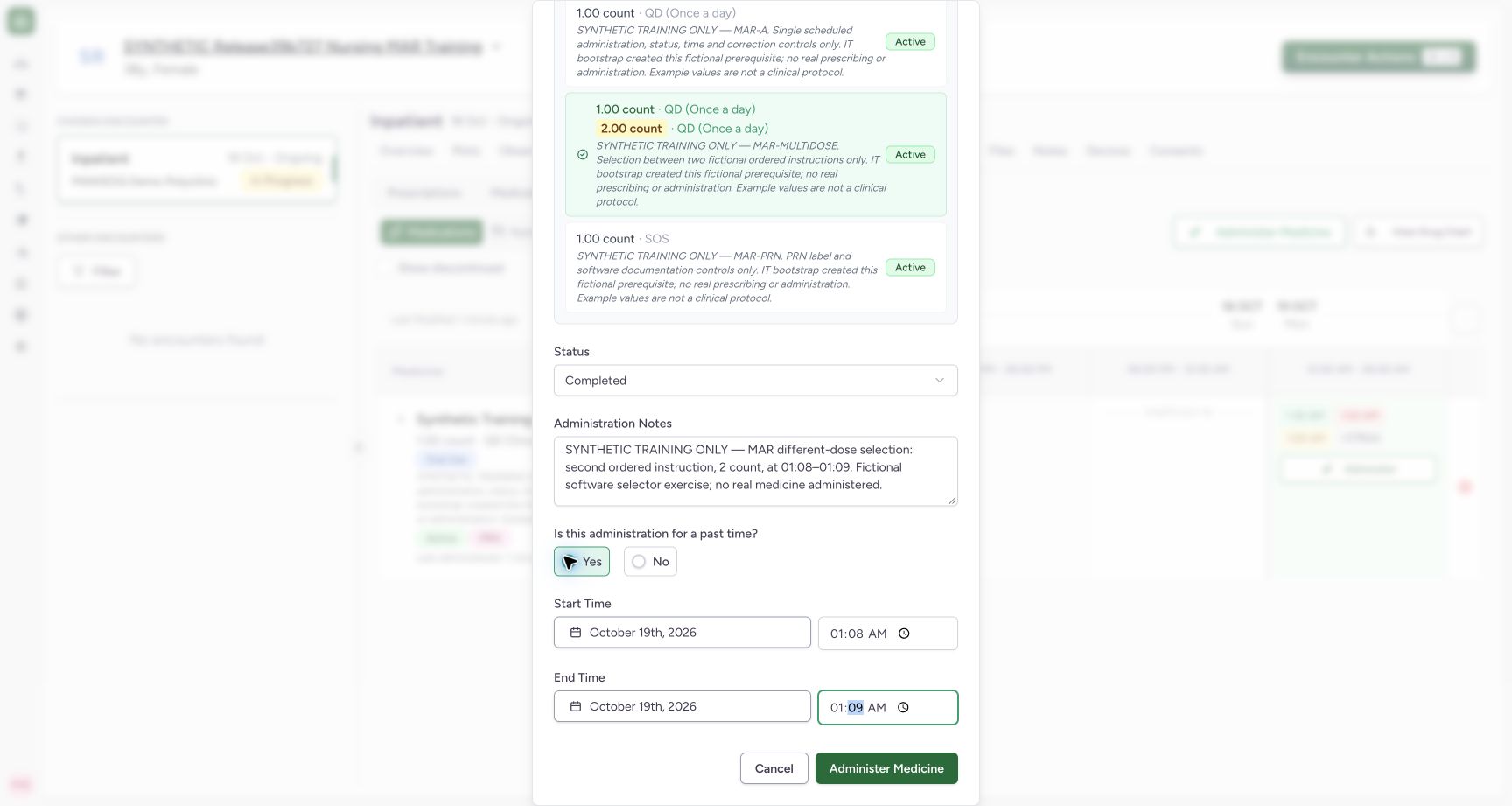
Exact committed release 39b72767 on an isolated nonproduction clone. Existing Nurse; fictional Polyclinic Inpatient software exercise only. The selected new-event dosage remains 2 count; lower draft shows Completed, explicit fictional note, past start 01:08 and end 01:09. This is a documentation example using an existing ordered instruction, not a new clinical dose recommendation.
Image SHA-256
0823280d06b3dab03c6ac393decf42571fd861d5116c6adb510e761a18348234- Event context and selected instruction: The optional note records which fictional instruction was selected.
- Save one selected-dose event: Submit once after reviewing the dose selection above and these occurrence fields.
1. Select the exact prescription and instruction
Open Administer and choose MAR-MULTIDOSE in Prescriptions in Group. Select Dosage Instruction shows two alternatives because the ordered quantities differ. Choose the intended radio option after checking dose, unit, frequency, route and duration. The example selects the second instruction, 2 count, rather than the first 1-count default.
12Select one differing prescribed dosage instruction
Capture details
Exact committed release 39b72767 on an isolated nonproduction clone. Existing Nurse; fictional Polyclinic Inpatient software exercise only. Normal new-event form for MAR-MULTIDOSE request 45305066… displays two different ordered dose choices. The second radio is selected at 2 count, not the first 1 count default. Choice exists because the quantities differ; the separate prescription card remains selected.
Image SHA-256 d01a6af7120ddcde5a599b79962edf667984380d3b529a486961e1e4c28151ba
- Second ordered instruction: This radio selects the displayed 2 count instruction for this new event.
- Selected multi-instruction order: Check the exact prescription before choosing between its instructions.
2. Review occurrence, status and context
Keep the intended instruction selected while reviewing the remaining event fields. The fictional example has Completed, past start 01:08, end 01:09 and an optional note identifying the second instruction. The selected instruction above and the occurrence below belong to the same new-event draft.
12Select one differing prescribed dosage instruction
Capture details
Exact committed release 39b72767 on an isolated nonproduction clone. Existing Nurse; fictional Polyclinic Inpatient software exercise only. Normal new-event form for MAR-MULTIDOSE request 45305066… displays two different ordered dose choices. The second radio is selected at 2 count, not the first 1 count default. Choice exists because the quantities differ; the separate prescription card remains selected.
Image SHA-256 d01a6af7120ddcde5a599b79962edf667984380d3b529a486961e1e4c28151ba
- Second ordered instruction: This radio selects the displayed 2 count instruction for this new event.
- Selected multi-instruction order: Check the exact prescription before choosing between its instructions.
12Review the differing-dose event before saving
Capture details
Exact committed release 39b72767 on an isolated nonproduction clone. Existing Nurse; fictional Polyclinic Inpatient software exercise only. The selected new-event dosage remains 2 count; lower draft shows Completed, explicit fictional note, past start 01:08 and end 01:09. This is a documentation example using an existing ordered instruction, not a new clinical dose recommendation.
Image SHA-256 0823280d06b3dab03c6ac393decf42571fd861d5116c6adb510e761a18348234
- Event context and selected instruction: The optional note records which fictional instruction was selected.
- Save one selected-dose event: Submit once after reviewing the dose selection above and these occurrence fields.
3. Save once and verify the persisted choice
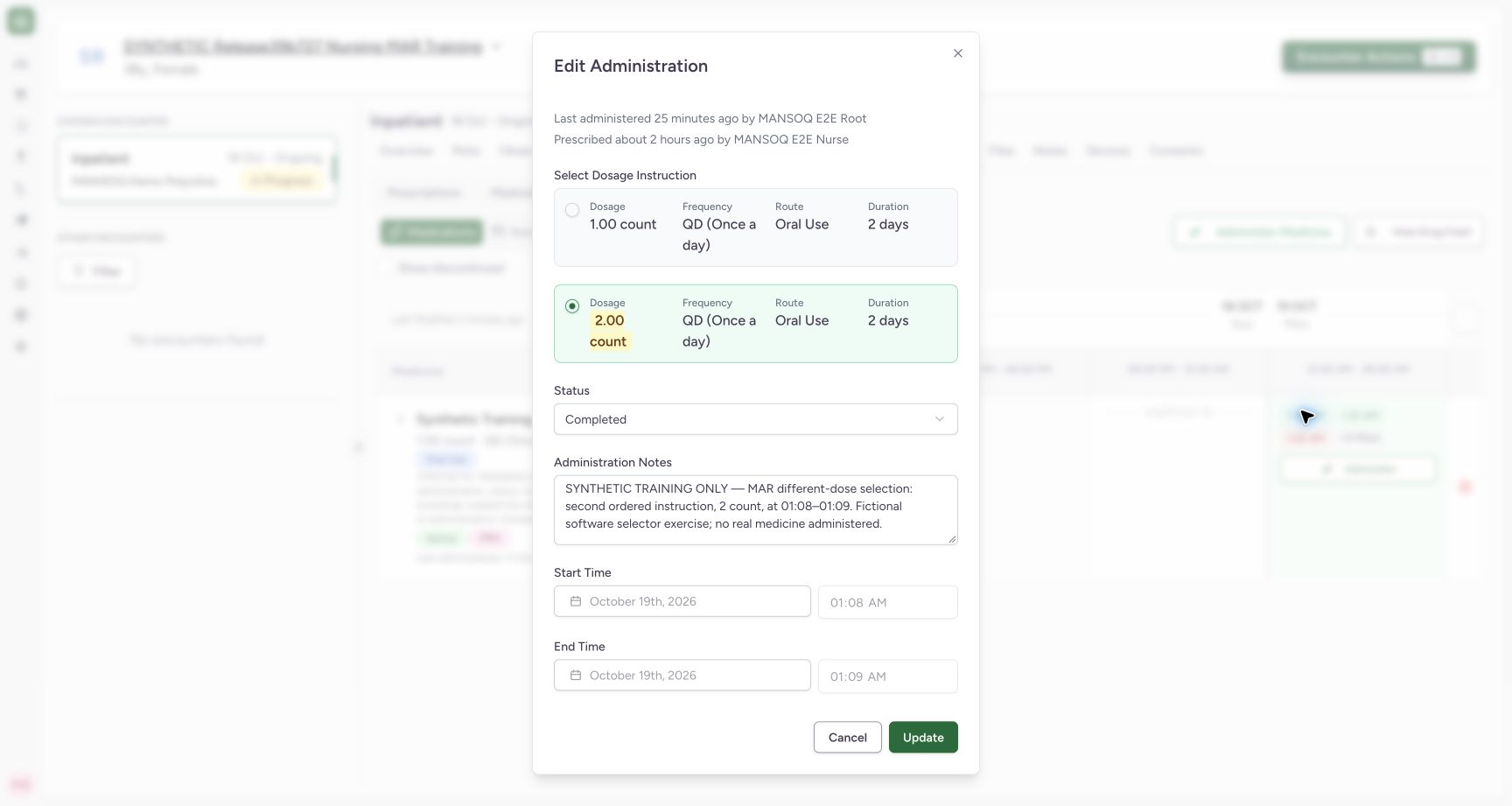
Select Administer Medicine once and wait for saving to finish. Open the saved 1:08 AM event and confirm the second instruction is still selected, with the intended note and occurrence. Independent normal Nurse and Doctor reads verified the exact MAR-MULTIDOSE request and a saved dosage of 2 count; the event count increased to seven.
12Review the differing-dose event before saving
Capture details
Exact committed release 39b72767 on an isolated nonproduction clone. Existing Nurse; fictional Polyclinic Inpatient software exercise only. The selected new-event dosage remains 2 count; lower draft shows Completed, explicit fictional note, past start 01:08 and end 01:09. This is a documentation example using an existing ordered instruction, not a new clinical dose recommendation.
Image SHA-256 0823280d06b3dab03c6ac393decf42571fd861d5116c6adb510e761a18348234
- Event context and selected instruction: The optional note records which fictional instruction was selected.
- Save one selected-dose event: Submit once after reviewing the dose selection above and these occurrence fields.
12Verify the persisted second-dose selection
Capture details
Exact committed release 39b72767 on an isolated nonproduction clone. Existing Nurse; fictional Polyclinic Inpatient software exercise only. Reopened saved event def2d34e… displays the second 2 count instruction selected, Completed, its note and 01:08–01:09. Independent Nurse/Doctor GET200 confirms request 45305066… and dose value2 with UCUM count. Enabled radios in this saved form are not yet proof that changing a saved dose is supported.
Image SHA-256 aecdebe4e790c8a1f1ab5f114d9c5523ab02358f06ac2ed892af75d9be338da5
- Persisted second instruction: The saved event reopens with 2 count selected.
- Saved selected-dose context: Confirm the intended saved event and its original occurrence.
4. Recognize the misleading saved-dose edit control
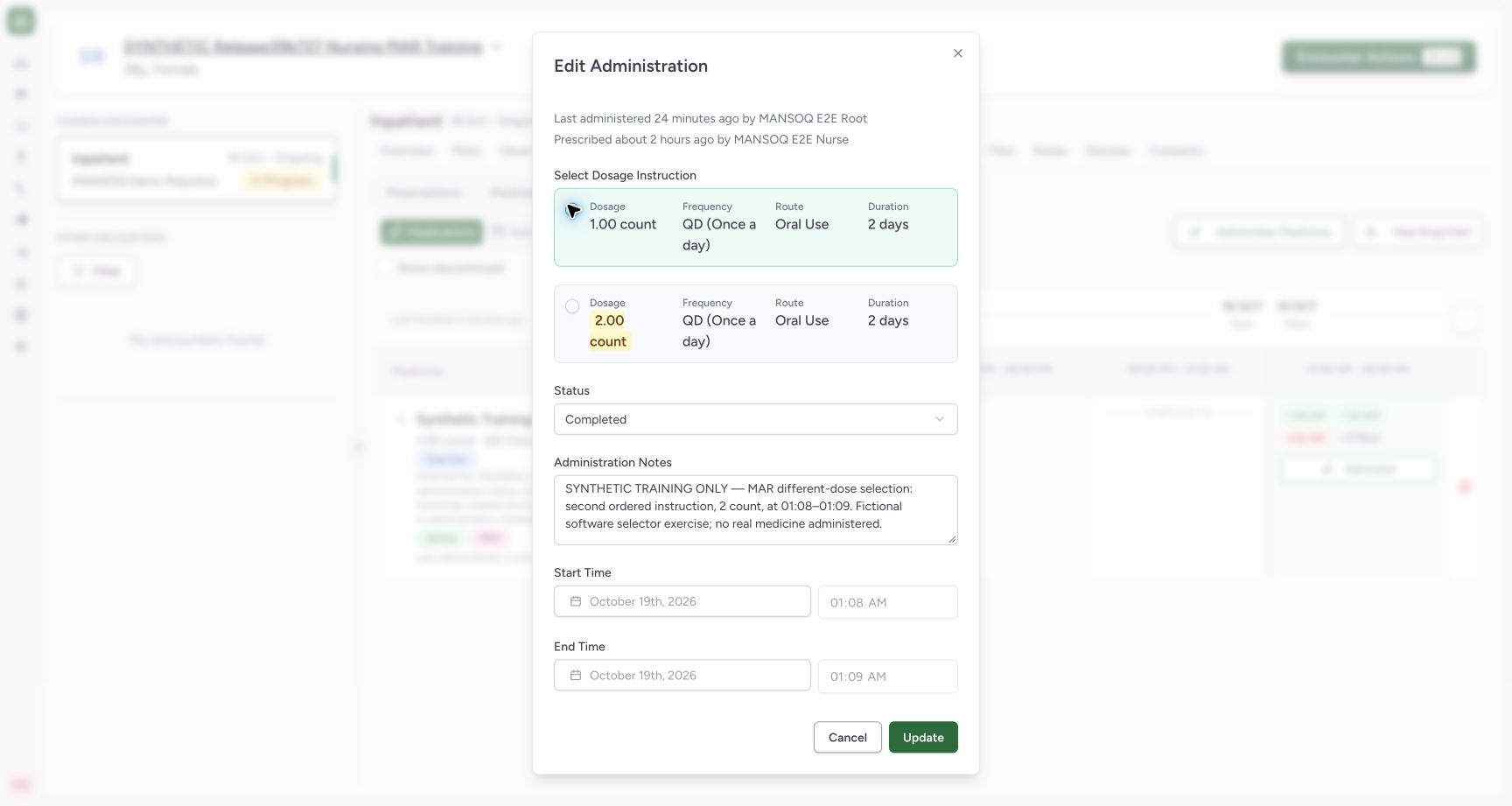
On this exact release, the saved event still displays enabled dosage radios. The isolated software check selected 1 count on the existing 2-count event and used Update without changing the note, status or occurrence. That apparent draft change must not be treated as a successful dose correction merely because the edit control was enabled or the dialog closed.
 12
12Inspect an apparent dose change on an existing event
Capture details
Exact committed release 39b72767 on an isolated nonproduction clone. Existing Nurse; fictional Polyclinic Inpatient software exercise only. Bounded fictional defect reproduction: existing event dose 2 count is changed locally to first 1 count using enabled saved-event radios. No note, status or occurrence is changed. This draft is not treated as a persisted dose change; one Update/readback will establish actual server behavior.
Image SHA-256 d10c61bb7e44d67847d328516fb10d78746c0b899a510f151f65de3baeba5ef5
- Apparent first-instruction edit: The existing-event UI allows this draft selection even though update support must be verified.
- Bounded verification update: This isolated synthetic update tests persistence; it is not a recommended clinical correction path.
5. Check the actual record before assuming a correction
Reopening the event after that check still shows the original 2-count instruction. Independent Nurse and Doctor reads confirmed the same ID, original dose, unchanged note/status/occurrence and unchanged count of seven events. The existing-event update contract does not support a dosage change here. Use the facility’s approved correction process; do not add another administration merely to compensate for an apparent edit that did not save.
 1
1Verify that the apparent existing-dose change did not persist
Capture details
Exact committed release 39b72767 on an isolated nonproduction clone. Existing Nurse; fictional Polyclinic Inpatient software exercise only. After one same-record Update with a draft 1 count choice, normal Nurse/Doctor GET200 and reopened UI still show original 2 count. Same event ID, total count 7, note/status/occurrence unchanged. Existing-dose correction is not supported by this update contract despite the enabled selector.
Image SHA-256 389d55ffdf87205e72e5cef46929ddd71c1a3c47a3a1db825fe49a109e15e729
- Actual persisted dose remains 2 count: Independent readback and this reopened selection agree; do not assume the prior draft choice was saved.
New-event choice and saved-event correction are different
The new-event selector successfully saved the chosen 2-count instruction. The enabled selector on the existing event did not change its saved dose through Update. These are distinct observed behaviors. This lesson does not qualify a different product version, dose correction by another interface, duplicate prevention, bulk-dose selection or a clinical decision to choose a particular instruction. The author-caption limitation remains separate.
12Select one differing prescribed dosage instruction
Capture details
Exact committed release 39b72767 on an isolated nonproduction clone. Existing Nurse; fictional Polyclinic Inpatient software exercise only. Normal new-event form for MAR-MULTIDOSE request 45305066… displays two different ordered dose choices. The second radio is selected at 2 count, not the first 1 count default. Choice exists because the quantities differ; the separate prescription card remains selected.
Image SHA-256 d01a6af7120ddcde5a599b79962edf667984380d3b529a486961e1e4c28151ba
- Second ordered instruction: This radio selects the displayed 2 count instruction for this new event.
- Selected multi-instruction order: Check the exact prescription before choosing between its instructions.
12Verify the persisted second-dose selection
Capture details
Exact committed release 39b72767 on an isolated nonproduction clone. Existing Nurse; fictional Polyclinic Inpatient software exercise only. Reopened saved event def2d34e… displays the second 2 count instruction selected, Completed, its note and 01:08–01:09. Independent Nurse/Doctor GET200 confirms request 45305066… and dose value2 with UCUM count. Enabled radios in this saved form are not yet proof that changing a saved dose is supported.
Image SHA-256 aecdebe4e790c8a1f1ab5f114d9c5523ab02358f06ac2ed892af75d9be338da5
- Persisted second instruction: The saved event reopens with 2 count selected.
- Saved selected-dose context: Confirm the intended saved event and its original occurrence.
12Inspect an apparent dose change on an existing event
Capture details
Exact committed release 39b72767 on an isolated nonproduction clone. Existing Nurse; fictional Polyclinic Inpatient software exercise only. Bounded fictional defect reproduction: existing event dose 2 count is changed locally to first 1 count using enabled saved-event radios. No note, status or occurrence is changed. This draft is not treated as a persisted dose change; one Update/readback will establish actual server behavior.
Image SHA-256 d10c61bb7e44d67847d328516fb10d78746c0b899a510f151f65de3baeba5ef5
- Apparent first-instruction edit: The existing-event UI allows this draft selection even though update support must be verified.
- Bounded verification update: This isolated synthetic update tests persistence; it is not a recommended clinical correction path.
1Verify that the apparent existing-dose change did not persist
Capture details
Exact committed release 39b72767 on an isolated nonproduction clone. Existing Nurse; fictional Polyclinic Inpatient software exercise only. After one same-record Update with a draft 1 count choice, normal Nurse/Doctor GET200 and reopened UI still show original 2 count. Same event ID, total count 7, note/status/occurrence unchanged. Existing-dose correction is not supported by this update contract despite the enabled selector.
Image SHA-256 389d55ffdf87205e72e5cef46929ddd71c1a3c47a3a1db825fe49a109e15e729
- Actual persisted dose remains 2 count: Independent readback and this reopened selection agree; do not assume the prior draft choice was saved.
Source evidence
Every citation uses this exact committed version. The private source repository requires access.
- repositories/platform/mansoq-web/src/components/Medicine/MedicationAdministration/MedicineAdminForm.tsx:82 ·
39b7276732f88bc07ad0abb61619f7aafe3c9e14Source file checksum
b6002675d4d8d1612494006f390203dd134699ab5b3d44876ed169db3e681e3a - repositories/platform/mansoq-web/src/components/Medicine/MedicationAdministration/MedicineAdminDialog.tsx:84 ·
39b7276732f88bc07ad0abb61619f7aafe3c9e14Source file checksum
c6ccd39c46d4093d346e97987eebd9dd1b51ffae1c8688f5305a7eed5336d6f2 - repositories/platform/mansoq-core/mansoq/emr/resources/medication/administration/spec.py:166 ·
39b7276732f88bc07ad0abb61619f7aafe3c9e14Source file checksum
b9549599f7137f28773491f3d79ced93730be81df46083248a9049e1ba3dd626 - repositories/platform/mansoq-core/mansoq/emr/api/viewsets/base.py:271 ·
39b7276732f88bc07ad0abb61619f7aafe3c9e14Source file checksum
6a287dd315b8a4957b29c58e4bbc1bef7b8d9d257f9149f93045ff0adbdcae6c