 MANSOQ
 Medication administration · VERSION 39b72767
Enter past administration times and resolve validation errors
Use the new-event past-time option, recognize future and end-before-start errors, correct the draft and verify the saved past event. This bounded lesson covers Completed timing on the same fictional Nurse inpatient case; other event statuses are separate teaching.
Nurse
 12
12Recognize future-time validation before saving
Capture details
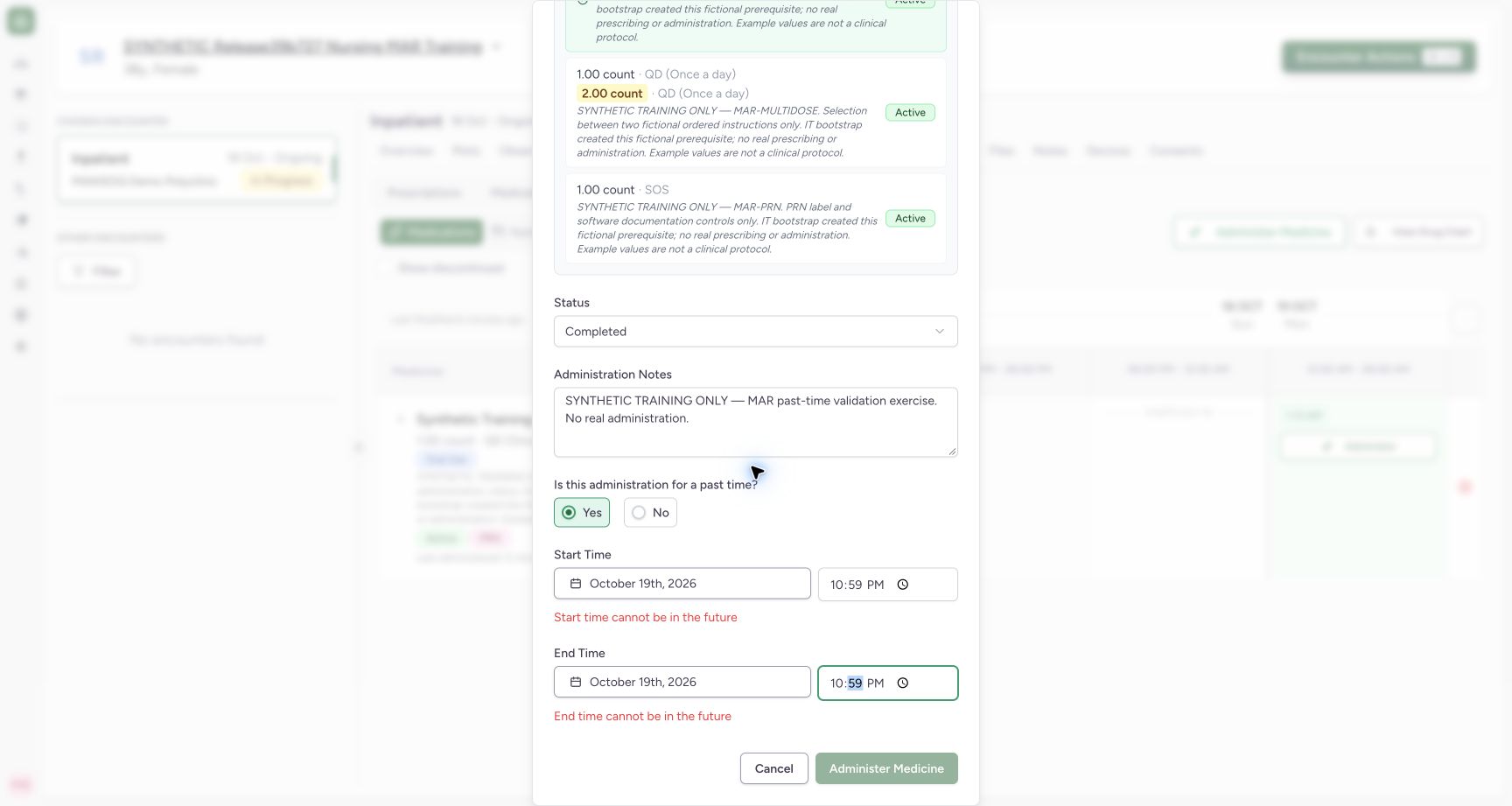
Exact committed release 39b72767 on an isolated nonproduction clone. Existing Nurse; fictional Polyclinic Inpatient software exercise only. Past-time Yes enables occurrence entry. A deliberate fictional future time 22:59 triggers both visible future-time errors and disables Administer Medicine. No request is submitted in this invalid state.
Image SHA-256 0a5b2c105980688f809e46dba872d0ce8c921ff5220f8d94859c7f81318a74c4
- Future start rejected: Correct the date/time before attempting to save.
- Save disabled: Invalid future occurrence prevents the normal submit control.
 12
12Verify both persisted events in the time slot
Capture details
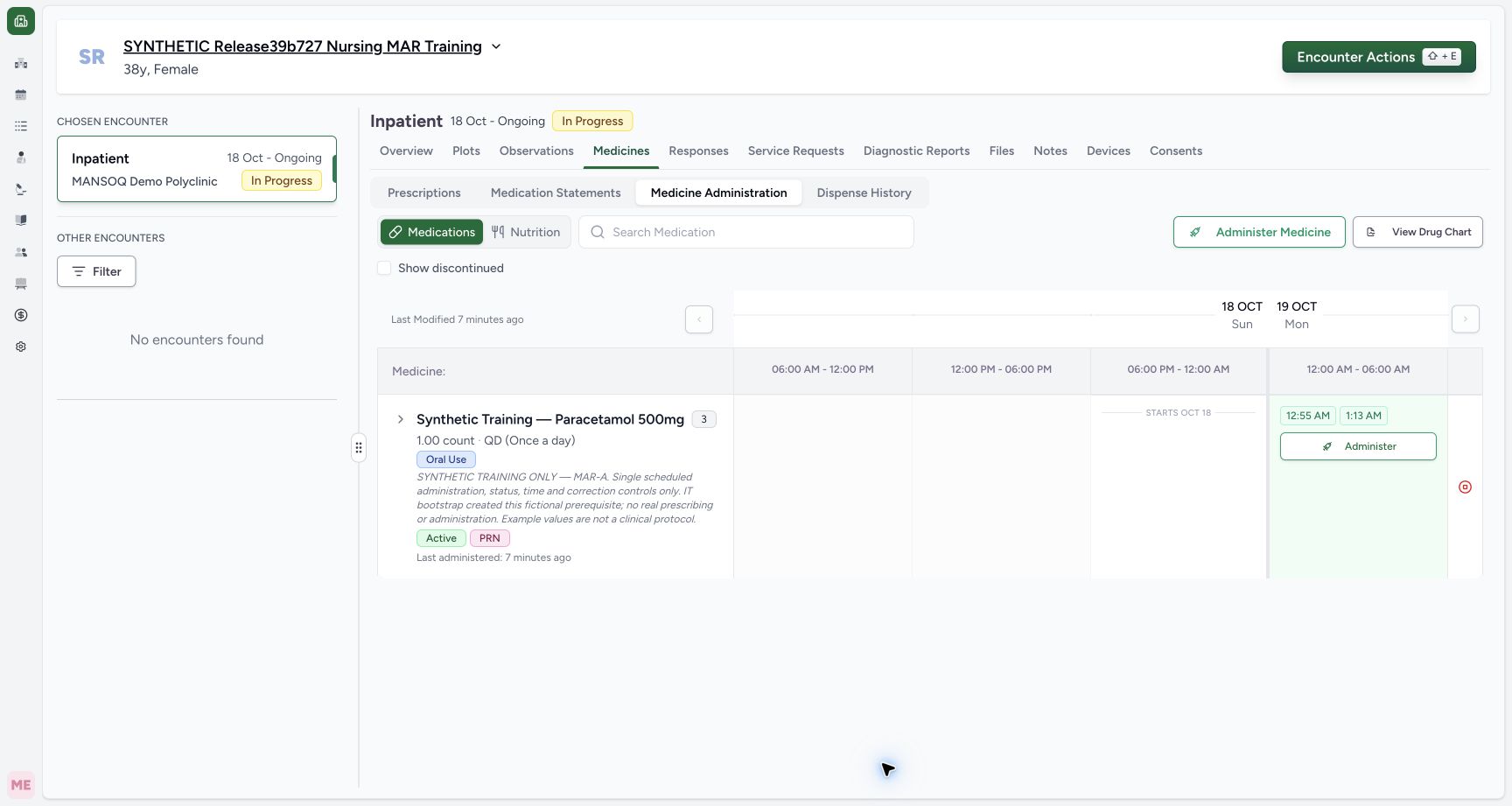
Exact committed release 39b72767 on an isolated nonproduction clone. Existing Nurse; fictional Polyclinic Inpatient software exercise only. Normal Nurse UI saved the corrected past Completed event. Independent Nurse and Doctor GET200 both confirm exactly two events, the current draft-initialization event at 01:13 and past 00:55–00:56 event, correct MAR-A request and Nurse actors. Invalid future/end-before-start drafts were never submitted.
Image SHA-256 ad4ed1930a087501d408000bb6acf2489d701274618b3ba24e3f5cad12dec7d1
- Saved past event: This chip opens the separately persisted past event.
- Earlier current-time event: The earlier saved event remains separate; this workflow does not merge them.
9 of 9 content blocks have reviewed image alignment. Missing overview or prerequisite images remain open.
Before you begin
- Confirm the intended patient, encounter and exact order before opening Administer. This example uses scheduled MAR-A in a three-order product group; it does not create or change the prescription.
 12
12Recorded release 39b72767 · 2026-10-18T22:13:48.669Z · 1728 × 921 Identify the fictional patient and existing medication orders
Capture details
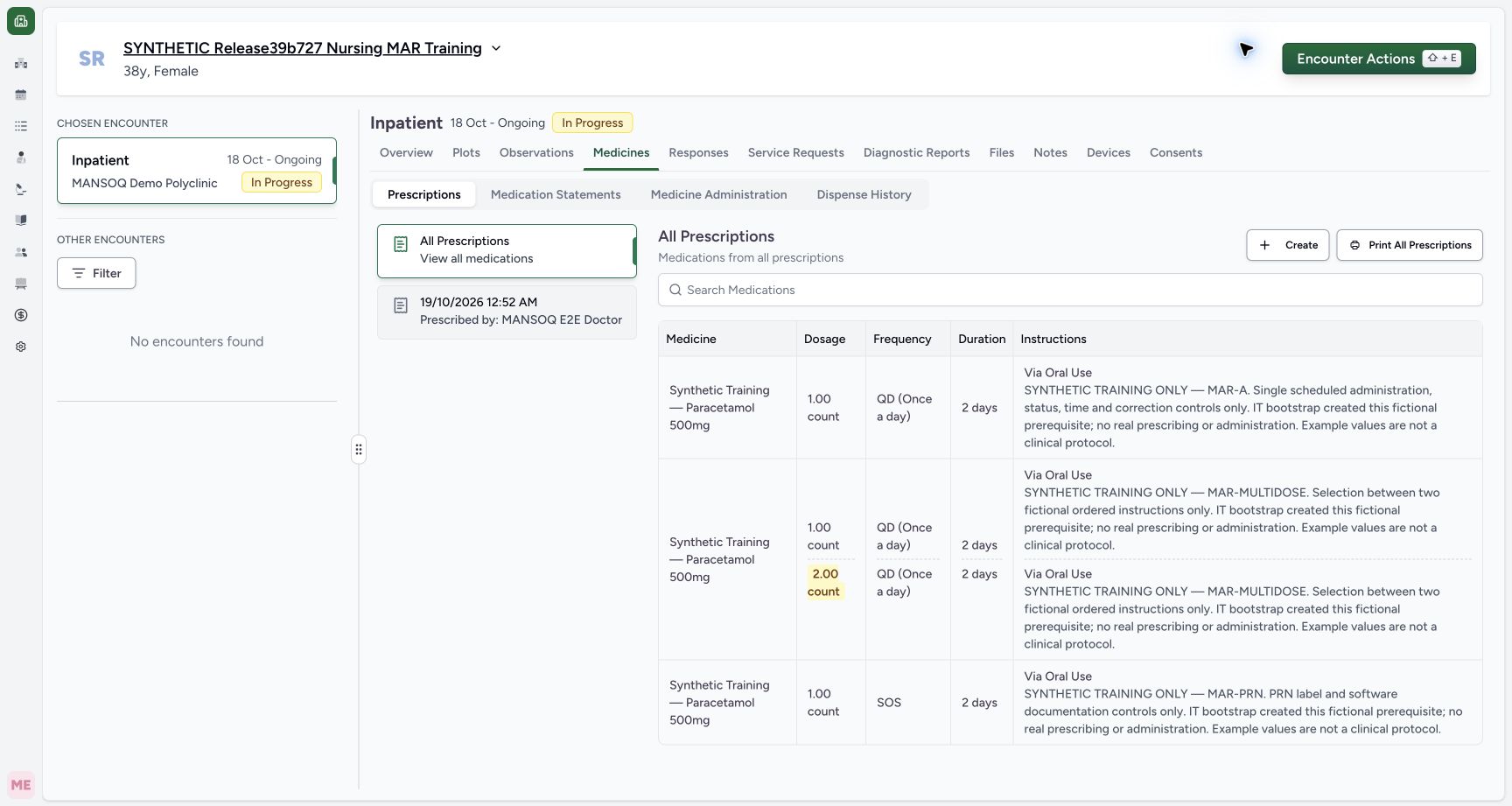
Exact committed release 39b72767 on an isolated nonproduction clone. Existing Nurse; fictional Polyclinic Inpatient software exercise only. The final-only synthetic training encounter contains three IT-bootstrapped orders. The page displays the requester Doctor; creation was prerequisite bootstrap, not observed Doctor prescribing. No administration exists yet.
Image SHA-256
6a360395468c593802972ab80b59d66a4a1c60b61981abab36c63e61d44b2000- Medicine Administration: Open the medication administration workspace for this selected encounter.
- Verify the patient: Confirm the fictional training patient before documenting an event.
 12
12Recorded release 39b72767 · 2026-10-18T22:14:13.535Z · 1728 × 921 Review the selected order and new-event status
Capture details
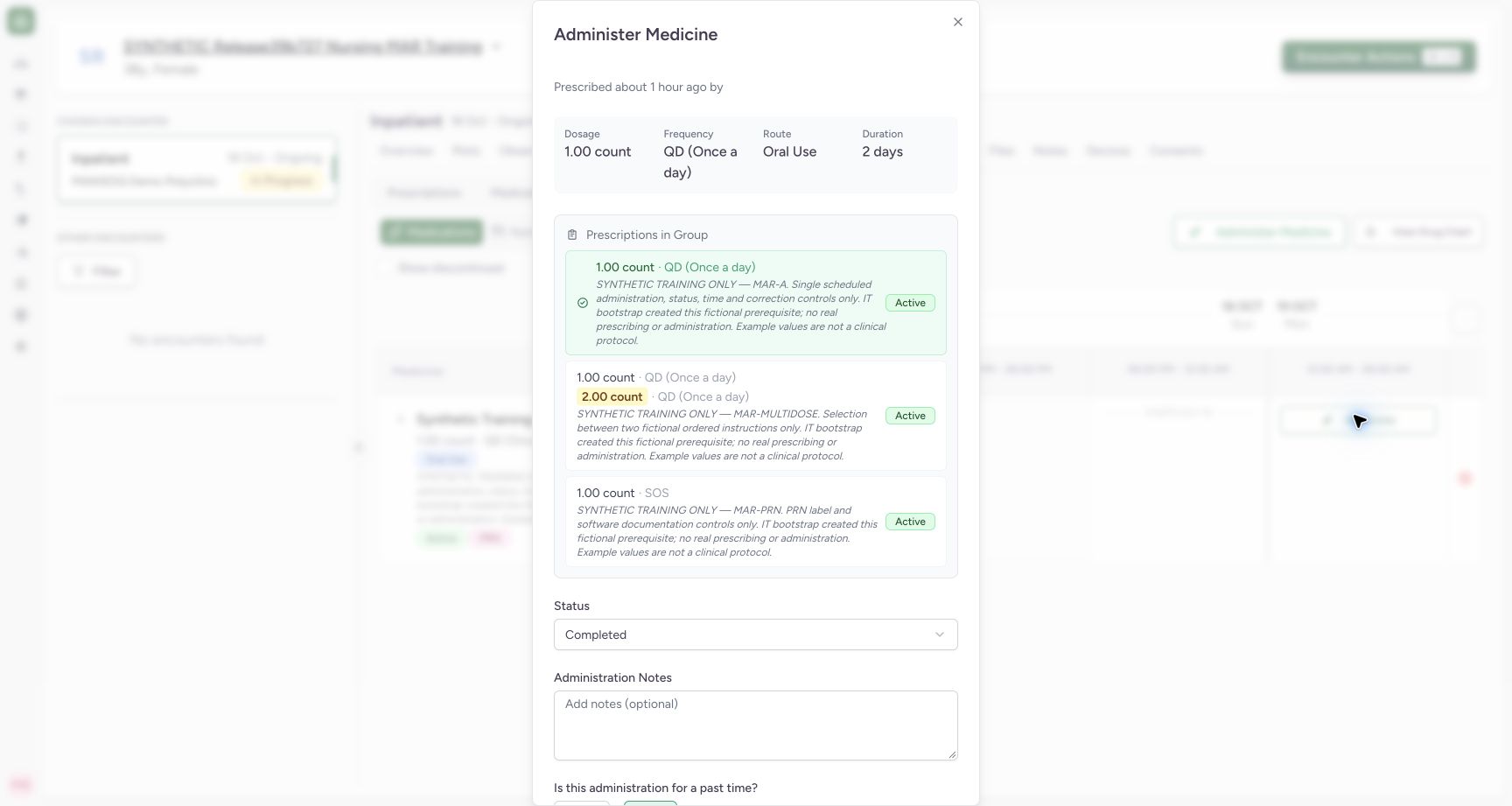
Exact committed release 39b72767 on an isolated nonproduction clone. Existing Nurse; fictional Polyclinic Inpatient software exercise only. Upper panel for scheduled MAR-A. Its disabled selected group button identifies the order. Completed is the new-event default. The empty product heading and incomplete prescriber subtitle are actual UI limitations; no actor claim is made from them.
Image SHA-256
b129d0f75ba506ba52012eb115ce9f65179db59deea1c35f10ab6f7526ad117e- Event status: Review the default status before entering an event.
- Selected scheduled order: The selected disabled card is the exact order receiving this event.
- Choose occurrence dates and times that truthfully describe the event under your facility policy. The dates and times in this exercise are fictional software examples; the clinical meaning and permitted retrospective-entry policy are not determined by the example.
 123
123Recorded release 39b72767 · 2026-10-18T22:19:56.509Z · 1728 × 921 Review corrected past start and end times
Capture details
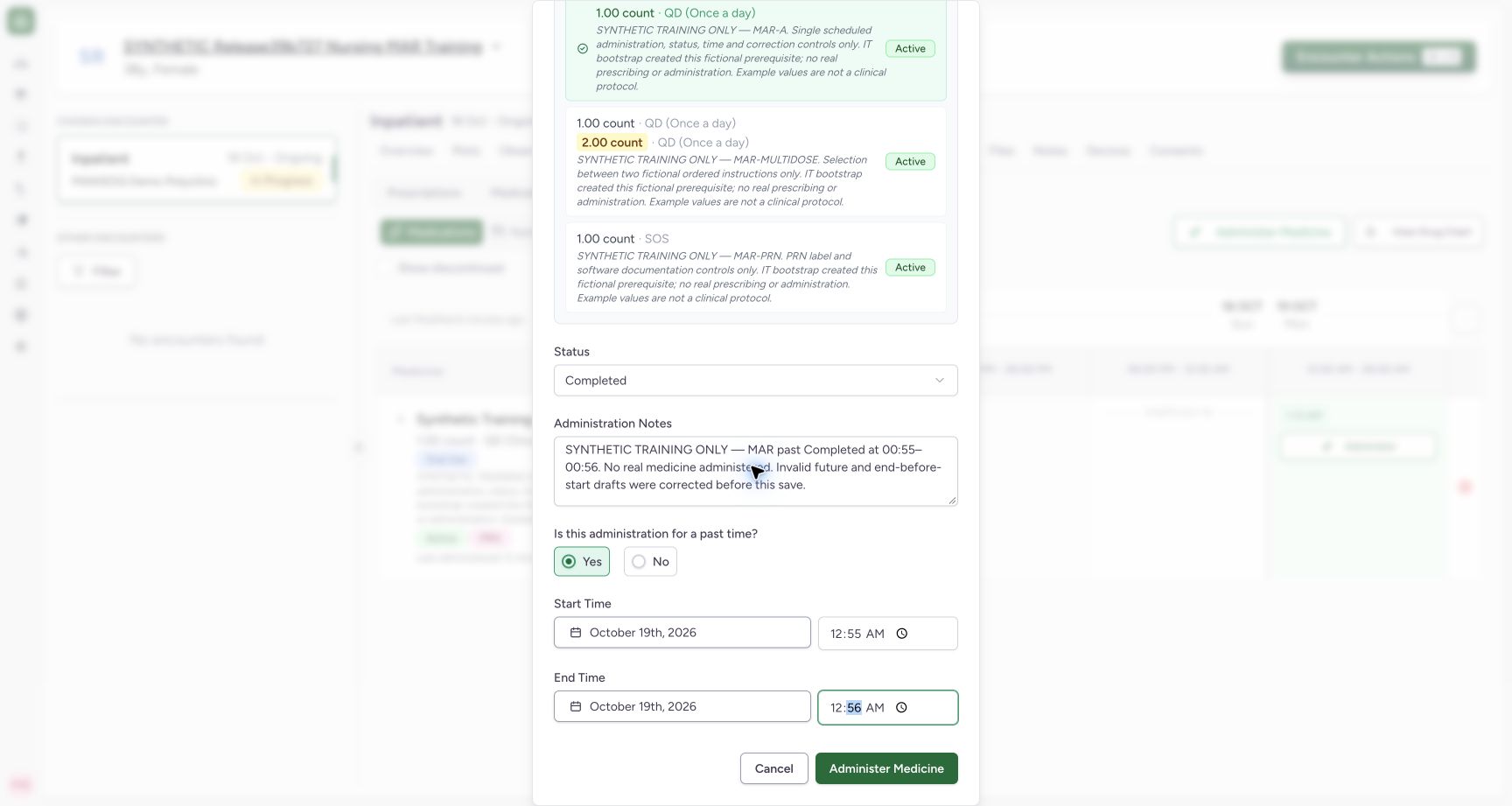
Exact committed release 39b72767 on an isolated nonproduction clone. Existing Nurse; fictional Polyclinic Inpatient software exercise only. Past-time Yes, Completed, start 00:55 and end 00:56 are now valid. The submit control is enabled. The example times are fictional software data and fall within the bootstrapped prescription window.
Image SHA-256
3da2a8fff2fc6831d4a703e5a030a48395967ea6e1327d713b932b945485c837- Past-time entry: Yes enables the new-event occurrence controls.
- Past start: Confirm the intended date as well as 00:55.
- Save the corrected event: Submit only after both occurrence fields are valid.
1. Enable occurrence entry for a new past event
Open Administer for the intended order. Select Yes under Is this administration for a past time? to enable the new-event date and time controls. Check both the calendar date and clock time. The date picker and the time field are separate controls. Changing a new start occurrence resets the end to that start, so review the end again afterward.
12Recognize future-time validation before saving
Capture details
Exact committed release 39b72767 on an isolated nonproduction clone. Existing Nurse; fictional Polyclinic Inpatient software exercise only. Past-time Yes enables occurrence entry. A deliberate fictional future time 22:59 triggers both visible future-time errors and disables Administer Medicine. No request is submitted in this invalid state.
Image SHA-256 0a5b2c105980688f809e46dba872d0ce8c921ff5220f8d94859c7f81318a74c4
- Future start rejected: Correct the date/time before attempting to save.
- Save disabled: Invalid future occurrence prevents the normal submit control.
123Review corrected past start and end times
Capture details
Exact committed release 39b72767 on an isolated nonproduction clone. Existing Nurse; fictional Polyclinic Inpatient software exercise only. Past-time Yes, Completed, start 00:55 and end 00:56 are now valid. The submit control is enabled. The example times are fictional software data and fall within the bootstrapped prescription window.
Image SHA-256 3da2a8fff2fc6831d4a703e5a030a48395967ea6e1327d713b932b945485c837
- Past-time entry: Yes enables the new-event occurrence controls.
- Past start: Confirm the intended date as well as 00:55.
- Save the corrected event: Submit only after both occurrence fields are valid.
2. Correct a future occurrence
A future Start Time displays Start time cannot be in the future. A future End Time displays its own error. The normal Administer Medicine control stays disabled while either error is present. In the screenshot the deliberate fictional 22:59 entry is invalid for the current date/time; no event was submitted in that state.
12Recognize future-time validation before saving
Capture details
Exact committed release 39b72767 on an isolated nonproduction clone. Existing Nurse; fictional Polyclinic Inpatient software exercise only. Past-time Yes enables occurrence entry. A deliberate fictional future time 22:59 triggers both visible future-time errors and disables Administer Medicine. No request is submitted in this invalid state.
Image SHA-256 0a5b2c105980688f809e46dba872d0ce8c921ff5220f8d94859c7f81318a74c4
- Future start rejected: Correct the date/time before attempting to save.
- Save disabled: Invalid future occurrence prevents the normal submit control.
3. Correct an end before the start
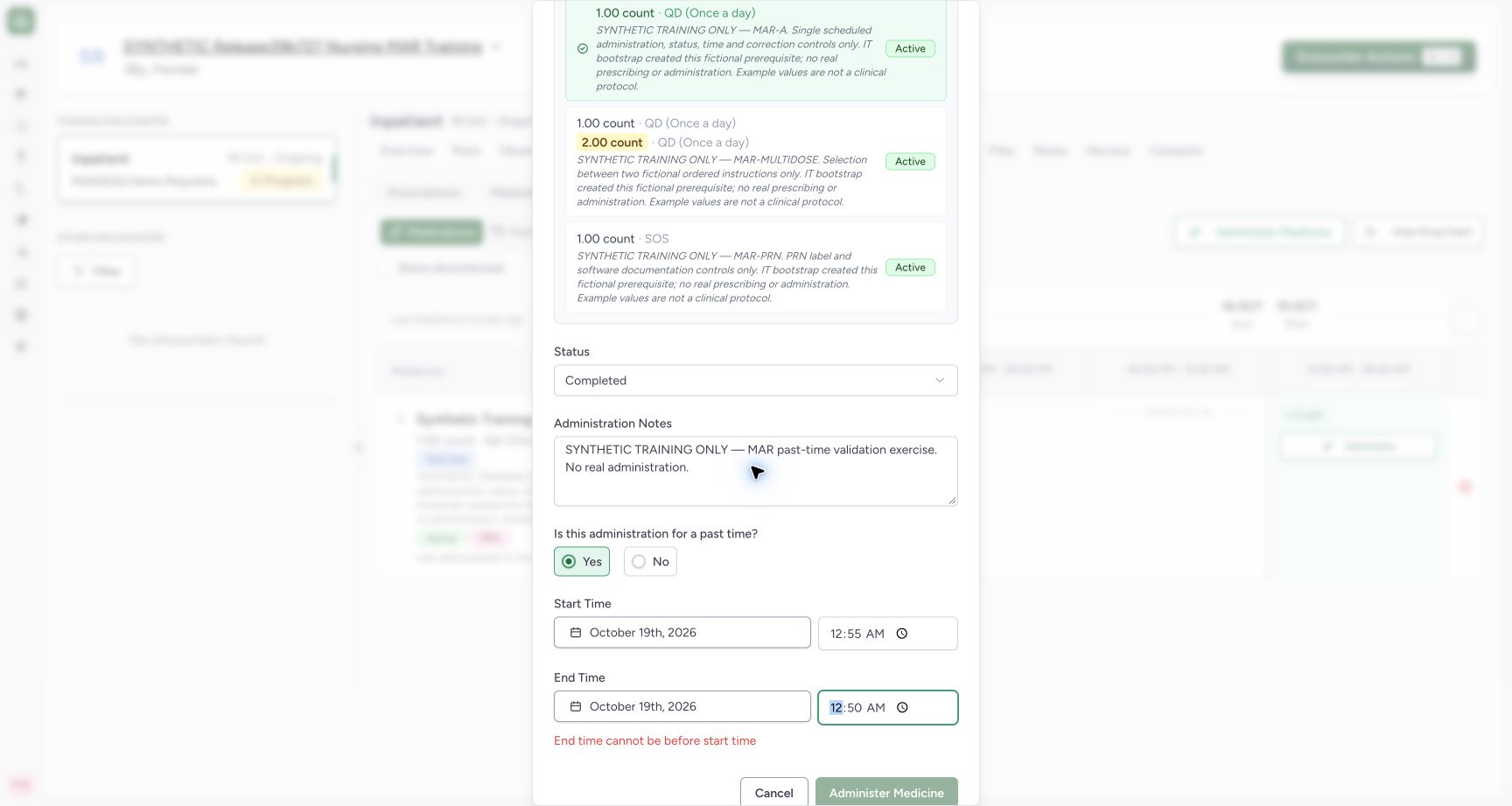
After choosing a past start, make sure the end is not earlier. The example start 00:55 with end 00:50 displays End time cannot be before start time and disables saving. Correct the occurrence rather than treating the visible input value as a saved record.
 12
12Recognize an end time before the start
Capture details
Exact committed release 39b72767 on an isolated nonproduction clone. Existing Nurse; fictional Polyclinic Inpatient software exercise only. In the same unsaved fictional draft, start 00:55 and end 00:50 show End time cannot be before start time and disable submit. This is separate from future-time validation; no invalid event is saved.
Image SHA-256 690886d191976cc611bf388df02c58c1f0f3380bba5d97021404ed32bd38c524
- Invalid time order: End must not be earlier than start.
- Save blocked: Resolve this error before submitting.
4. Review the valid draft and save
Check the selected order, Completed status, note, calendar date, past start and end together. The corrected example uses 00:55–00:56 on 19 October and has an enabled Administer Medicine control. Select it once and wait until the dialog closes and the event appears in the chart.
123Review corrected past start and end times
Capture details
Exact committed release 39b72767 on an isolated nonproduction clone. Existing Nurse; fictional Polyclinic Inpatient software exercise only. Past-time Yes, Completed, start 00:55 and end 00:56 are now valid. The submit control is enabled. The example times are fictional software data and fall within the bootstrapped prescription window.
Image SHA-256 3da2a8fff2fc6831d4a703e5a030a48395967ea6e1327d713b932b945485c837
- Past-time entry: Yes enables the new-event occurrence controls.
- Past start: Confirm the intended date as well as 00:55.
- Save the corrected event: Submit only after both occurrence fields are valid.
12Verify both persisted events in the time slot
Capture details
Exact committed release 39b72767 on an isolated nonproduction clone. Existing Nurse; fictional Polyclinic Inpatient software exercise only. Normal Nurse UI saved the corrected past Completed event. Independent Nurse and Doctor GET200 both confirm exactly two events, the current draft-initialization event at 01:13 and past 00:55–00:56 event, correct MAR-A request and Nurse actors. Invalid future/end-before-start drafts were never submitted.
Image SHA-256 ad4ed1930a087501d408000bb6acf2489d701274618b3ba24e3f5cad12dec7d1
- Saved past event: This chip opens the separately persisted past event.
- Earlier current-time event: The earlier saved event remains separate; this workflow does not merge them.
5. Verify the separate saved past event
The chart now shows the saved 12:55 AM event and the earlier 1:13 AM event as separate chips under MAR-A. Select the intended chip when inspecting or correcting an existing record. Independent normal Nurse and Doctor record reads confirmed exactly two saved events with the correct request and Nurse actors; the invalid drafts were not submitted.
12Verify both persisted events in the time slot
Capture details
Exact committed release 39b72767 on an isolated nonproduction clone. Existing Nurse; fictional Polyclinic Inpatient software exercise only. Normal Nurse UI saved the corrected past Completed event. Independent Nurse and Doctor GET200 both confirm exactly two events, the current draft-initialization event at 01:13 and past 00:55–00:56 event, correct MAR-A request and Nurse actors. Invalid future/end-before-start drafts were never submitted.
Image SHA-256 ad4ed1930a087501d408000bb6acf2489d701274618b3ba24e3f5cad12dec7d1
- Saved past event: This chip opens the separately persisted past event.
- Earlier current-time event: The earlier saved event remains separate; this workflow does not merge them.
Distinguish occurrence time from record-entry time
A chart chip represents the saved occurrence start, which can be earlier than the time the documentation was saved. The current-time example retained the draft’s initialized 01:13 occurrence; the past-time example retained the explicit 00:55–00:56 occurrence. Neither chip proves a particular dose was clinically due or that duplicate documentation is impossible. Inspect the intended event and follow the separate correction workflow when a saved record is wrong.
 12
12Review notes and current-time settings before saving
Capture details
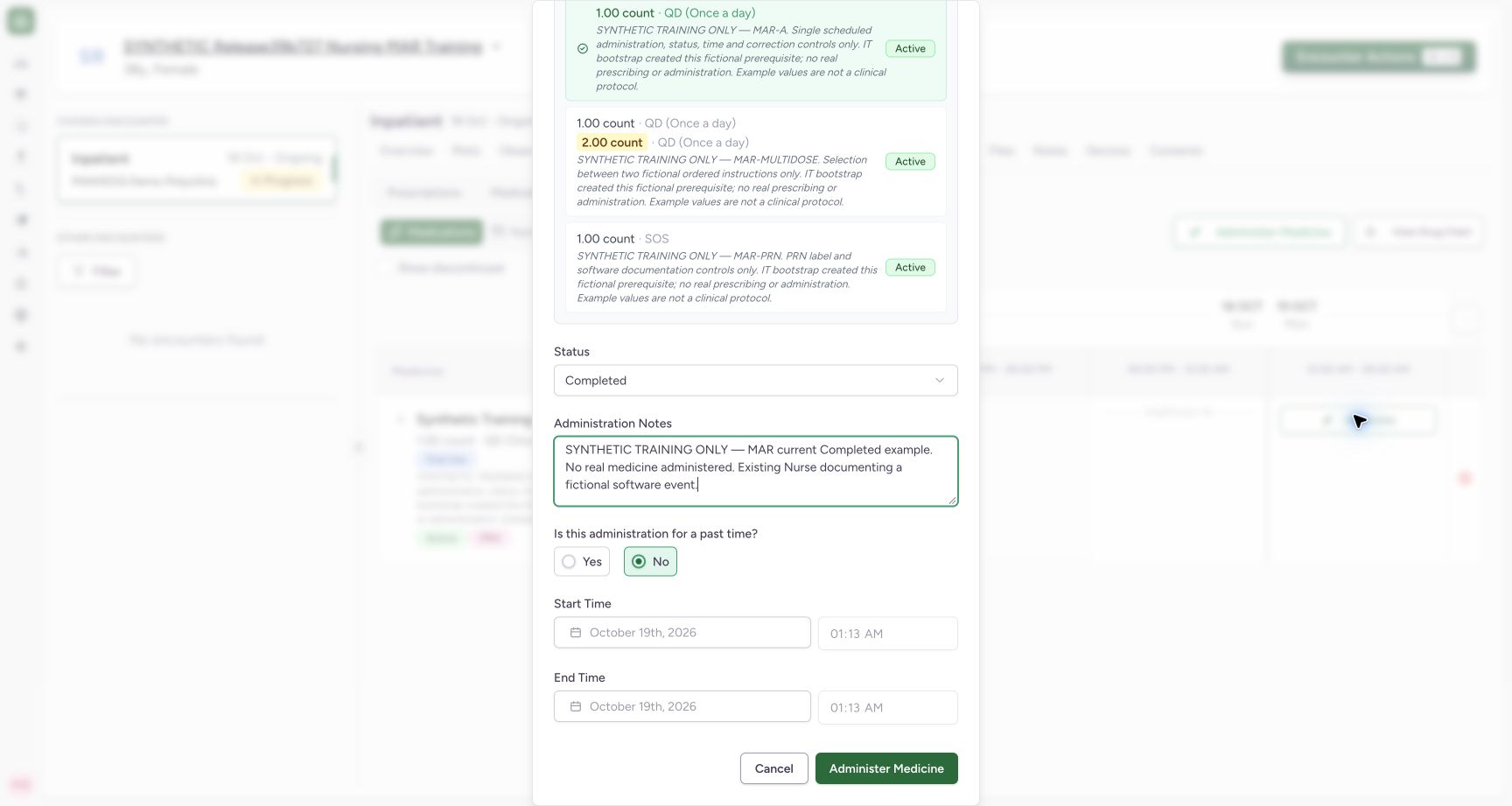
Exact committed release 39b72767 on an isolated nonproduction clone. Existing Nurse; fictional Polyclinic Inpatient software exercise only. Fictional MAR-A Completed draft with explicit synthetic note. Past-time No is selected; start/end are disabled. This is a draft only until the normal Administer Medicine save succeeds.
Image SHA-256 7efc473e1201eb44094f96f9a8027e68e551bcb889feb70a7626326033a77449
- Current-time entry: No keeps the occurrence inputs disabled for a new event.
- Save one fictional event: Submit only after reviewing order, status, note and occurrence.
 12
12Inspect persisted status, note and locked times
Capture details
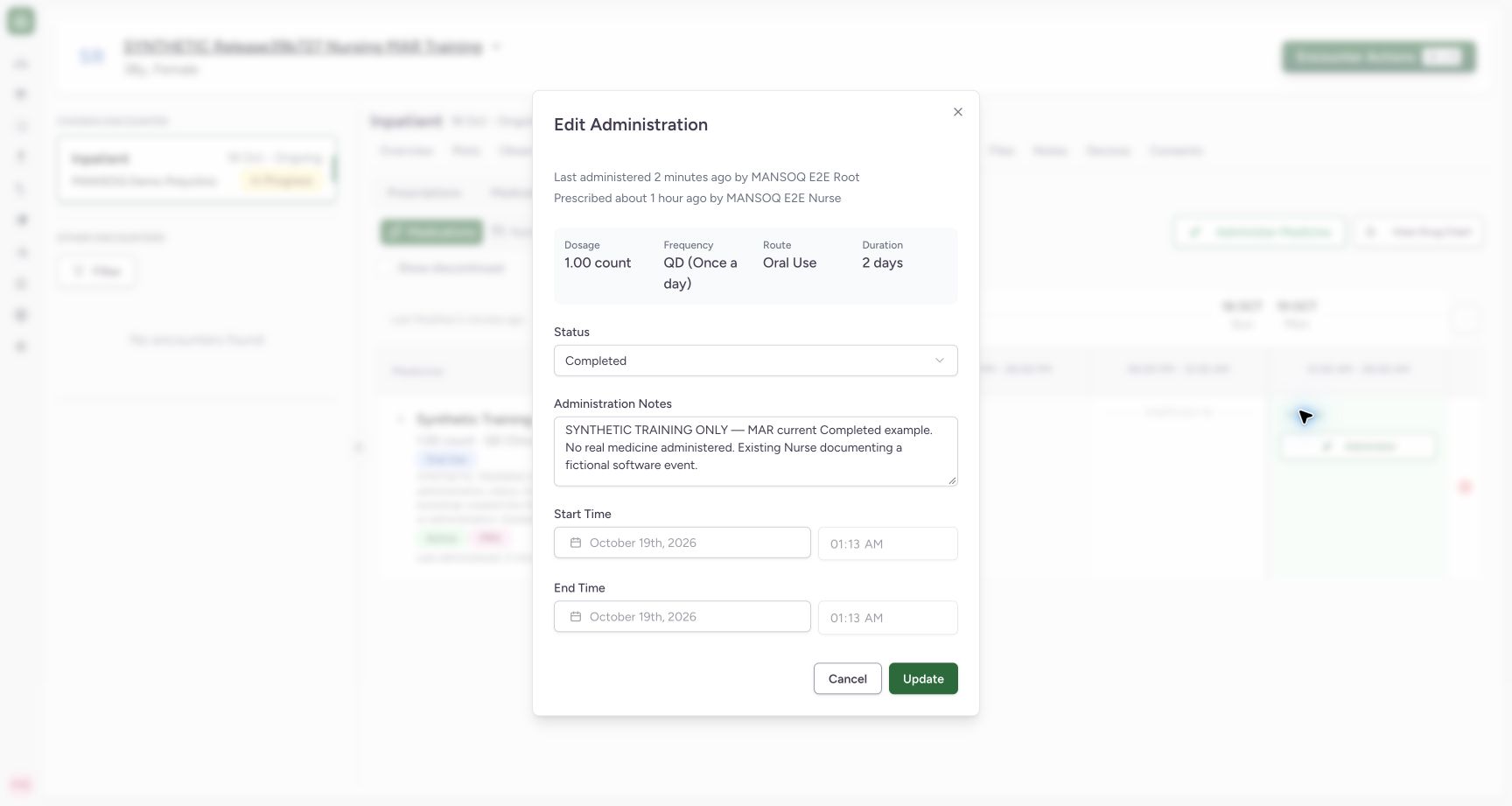
Exact committed release 39b72767 on an isolated nonproduction clone. Existing Nurse; fictional Polyclinic Inpatient software exercise only. The saved event reopens as Edit Administration with Completed, the saved note, and locked occurrence fields. Actual header captions reverse actor sources: Last administered shows prerequisite creator Root, Prescribed shows Nurse. Independent normal records prove Nurse created/updated the event and Doctor is the order requester; do not teach these captions as an audit trail.
Image SHA-256 4ddcb56774c5355f8c21e578bfee125a0b6282efc69a094e19b7948d6fb06540
- Saved status: Inspect the persisted event status.
- Saved note: Confirm the exact saved event note; do not rely on reversed actor captions.
123Review corrected past start and end times
Capture details
Exact committed release 39b72767 on an isolated nonproduction clone. Existing Nurse; fictional Polyclinic Inpatient software exercise only. Past-time Yes, Completed, start 00:55 and end 00:56 are now valid. The submit control is enabled. The example times are fictional software data and fall within the bootstrapped prescription window.
Image SHA-256 3da2a8fff2fc6831d4a703e5a030a48395967ea6e1327d713b932b945485c837
- Past-time entry: Yes enables the new-event occurrence controls.
- Past start: Confirm the intended date as well as 00:55.
- Save the corrected event: Submit only after both occurrence fields are valid.
12Verify both persisted events in the time slot
Capture details
Exact committed release 39b72767 on an isolated nonproduction clone. Existing Nurse; fictional Polyclinic Inpatient software exercise only. Normal Nurse UI saved the corrected past Completed event. Independent Nurse and Doctor GET200 both confirm exactly two events, the current draft-initialization event at 01:13 and past 00:55–00:56 event, correct MAR-A request and Nurse actors. Invalid future/end-before-start drafts were never submitted.
Image SHA-256 ad4ed1930a087501d408000bb6acf2489d701274618b3ba24e3f5cad12dec7d1
- Saved past event: This chip opens the separately persisted past event.
- Earlier current-time event: The earlier saved event remains separate; this workflow does not merge them.
Source evidence
Every citation uses this exact committed version. The private source repository requires access.
- repositories/platform/mansoq-web/src/components/Medicine/MedicationAdministration/MedicineAdminForm.tsx:231 ·
39b7276732f88bc07ad0abb61619f7aafe3c9e14Source file checksum
b6002675d4d8d1612494006f390203dd134699ab5b3d44876ed169db3e681e3a - repositories/platform/mansoq-web/src/components/Medicine/MedicationAdministration/MedicineAdminDialog.tsx:84 ·
39b7276732f88bc07ad0abb61619f7aafe3c9e14Source file checksum
c6ccd39c46d4093d346e97987eebd9dd1b51ffae1c8688f5305a7eed5336d6f2 - repositories/platform/mansoq-core/mansoq/emr/resources/medication/administration/spec.py:85 ·
39b7276732f88bc07ad0abb61619f7aafe3c9e14Source file checksum
b9549599f7137f28773491f3d79ced93730be81df46083248a9049e1ba3dd626