 MANSOQ
 Medication administration · VERSION 39b72767
Document a current-time medication administration
Select the patient, encounter and exact medication order, review the event defaults, save one fictional Completed event and inspect its persisted details. This lesson was observed with an existing Nurse on one Polyclinic inpatient encounter in release 39b72767.
Nurse
 12
12Read the medication group and administration controls
Capture details
Exact committed release 39b72767 on an isolated nonproduction clone. Existing Nurse; fictional Polyclinic Inpatient software exercise only. Three active orders for the same fictional product appear as one group. PRN is a group badge here because one grouped order is PRN; it does not make the currently shown scheduled MAR-A order a PRN prescription. Administration history is empty.
Image SHA-256 925f0aa2ef31b25dec1ec6adf960ad2c7772756ac2c4c3b50dda1a7f28811fdf
- Administer this order: Review the exact displayed order before opening its event form.
- Grouped PRN badge: This badge reflects a PRN order somewhere in the three-order product group; inspect individual orders.
 1
1Confirm the saved event in its time slot
Capture details
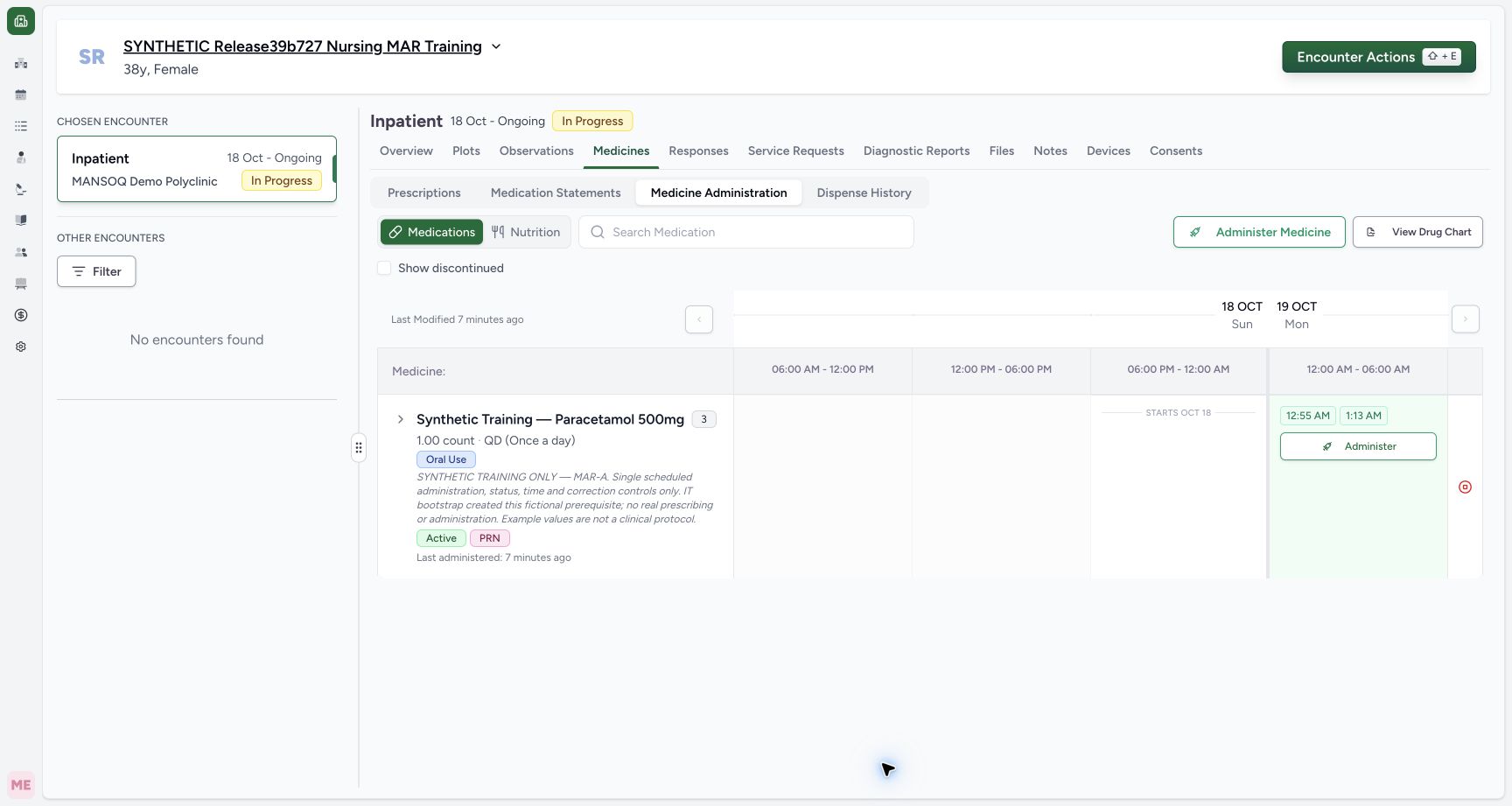
Exact committed release 39b72767 on an isolated nonproduction clone. Existing Nurse; fictional Polyclinic Inpatient software exercise only. Normal Nurse UI saved one Completed event for MAR-A. Independent Nurse and Doctor GET200 both return exactly one event with request a5063d3d… and Nurse creator/updater. The time is the draft initialization time (01:13), not a claim that submit time is refreshed automatically.
Image SHA-256 e6510e4667f4320e78d2a3d82548795c9fdb7d896e8954ff2a656fbe2c712376
- Saved event chip: Open the persisted event to inspect its saved status, time and note.
10 of 10 content blocks have reviewed image alignment. Missing overview or prerequisite images remain open.
Before you begin
- Use your existing authorized account and an encounter that permits clinical updates. The illustrated Nurse successfully saved this fictional event; visible controls alone do not establish another account’s write permission.
 12
12Recorded release 39b72767 · 2026-10-18T22:13:48.669Z · 1728 × 921 Identify the fictional patient and existing medication orders
Capture details
Exact committed release 39b72767 on an isolated nonproduction clone. Existing Nurse; fictional Polyclinic Inpatient software exercise only. The final-only synthetic training encounter contains three IT-bootstrapped orders. The page displays the requester Doctor; creation was prerequisite bootstrap, not observed Doctor prescribing. No administration exists yet.
Image SHA-256
6a360395468c593802972ab80b59d66a4a1c60b61981abab36c63e61d44b2000- Medicine Administration: Open the medication administration workspace for this selected encounter.
- Verify the patient: Confirm the fictional training patient before documenting an event.
1Recorded release 39b72767 · 2026-10-18T22:14:44.912Z · 1728 × 921 Confirm the saved event in its time slot
Capture details
Exact committed release 39b72767 on an isolated nonproduction clone. Existing Nurse; fictional Polyclinic Inpatient software exercise only. Normal Nurse UI saved one Completed event for MAR-A. Independent Nurse and Doctor GET200 both return exactly one event with request a5063d3d… and Nurse creator/updater. The time is the draft initialization time (01:13), not a claim that submit time is refreshed automatically.
Image SHA-256
e6510e4667f4320e78d2a3d82548795c9fdb7d896e8954ff2a656fbe2c712376- Saved event chip: Open the persisted event to inspect its saved status, time and note.
- An appropriate medication order must already exist. The three example orders were created as separate IT training prerequisites, with a Doctor requester. These screenshots do not demonstrate Doctor prescribing, an approved medication protocol, dispensing or real administration.12
Recorded release 39b72767 · 2026-10-18T22:13:48.669Z · 1728 × 921 Identify the fictional patient and existing medication orders
Capture details
Exact committed release 39b72767 on an isolated nonproduction clone. Existing Nurse; fictional Polyclinic Inpatient software exercise only. The final-only synthetic training encounter contains three IT-bootstrapped orders. The page displays the requester Doctor; creation was prerequisite bootstrap, not observed Doctor prescribing. No administration exists yet.
Image SHA-256
6a360395468c593802972ab80b59d66a4a1c60b61981abab36c63e61d44b2000- Medicine Administration: Open the medication administration workspace for this selected encounter.
- Verify the patient: Confirm the fictional training patient before documenting an event.
1. Confirm the patient, encounter and orders
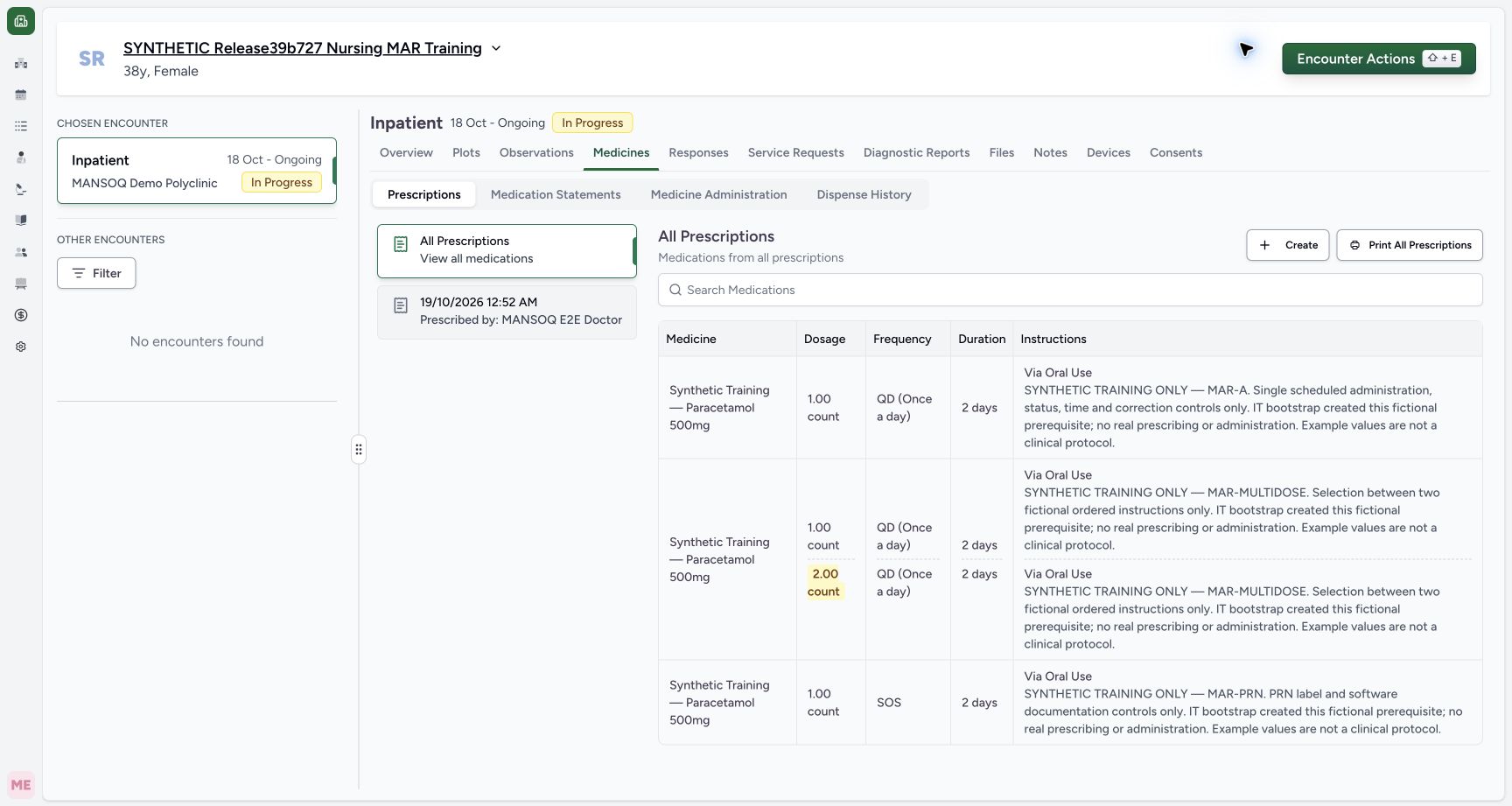
Open the intended patient and encounter, then Medicines. Check the patient banner, facility and In Progress inpatient context. The example prescription table contains three fictional orders for one product with distinct notes: MAR-A, MAR-MULTIDOSE and MAR-PRN. Read the order instructions before opening Medicine Administration.
12Identify the fictional patient and existing medication orders
Capture details
Exact committed release 39b72767 on an isolated nonproduction clone. Existing Nurse; fictional Polyclinic Inpatient software exercise only. The final-only synthetic training encounter contains three IT-bootstrapped orders. The page displays the requester Doctor; creation was prerequisite bootstrap, not observed Doctor prescribing. No administration exists yet.
Image SHA-256 6a360395468c593802972ab80b59d66a4a1c60b61981abab36c63e61d44b2000
- Medicine Administration: Open the medication administration workspace for this selected encounter.
- Verify the patient: Confirm the fictional training patient before documenting an event.
2. Inspect the exact order in the product group
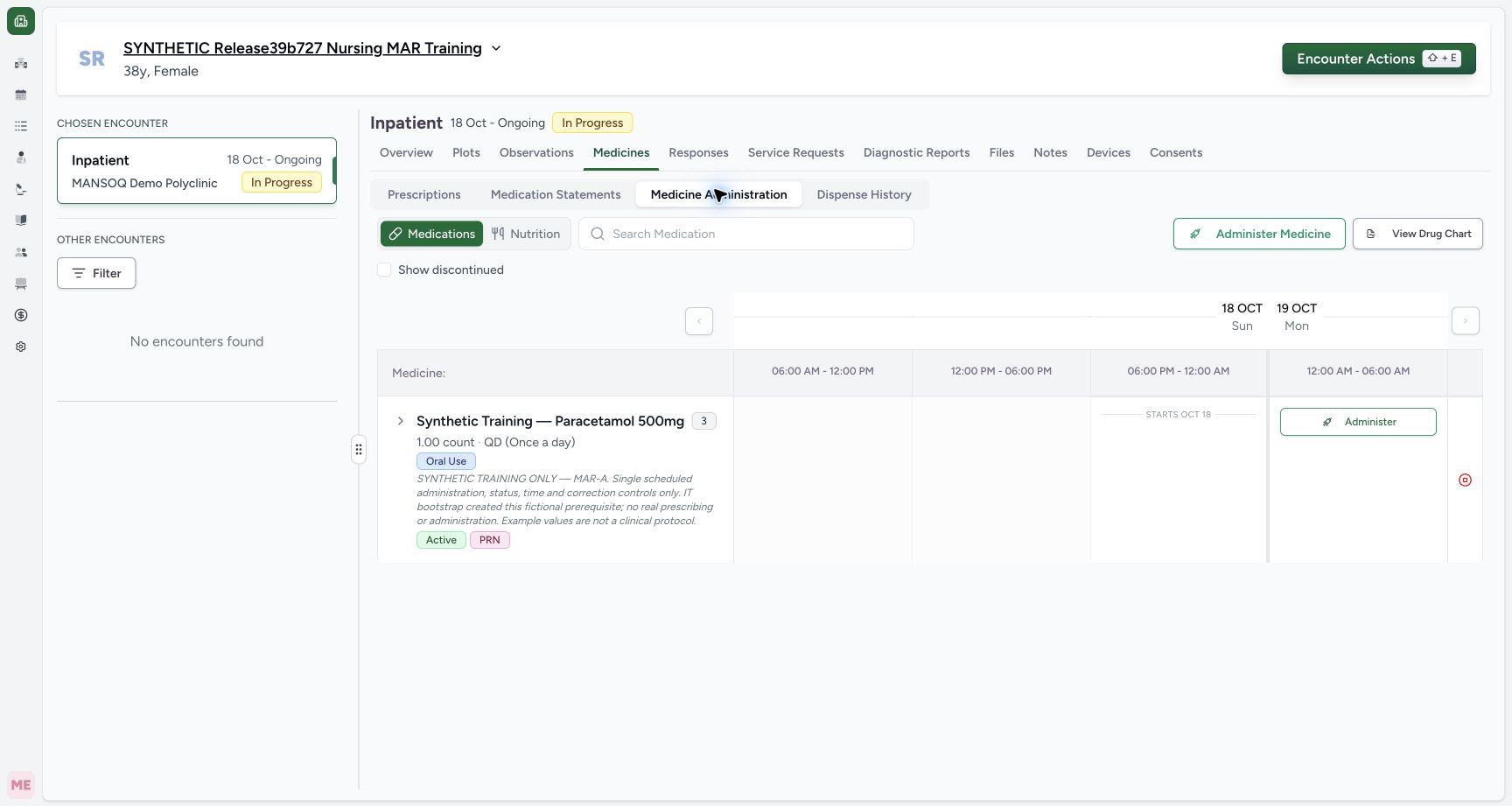
Open Medicine Administration, keep Medications selected and locate the required product. Three orders for the same product appear as a group. The collapsed row currently shows scheduled MAR-A. A PRN badge on this mixed group does not make every individual order PRN. Select Administer, then confirm that the highlighted selected card is the intended order; the order cards let you distinguish the grouped prescriptions.
12Read the medication group and administration controls
Capture details
Exact committed release 39b72767 on an isolated nonproduction clone. Existing Nurse; fictional Polyclinic Inpatient software exercise only. Three active orders for the same fictional product appear as one group. PRN is a group badge here because one grouped order is PRN; it does not make the currently shown scheduled MAR-A order a PRN prescription. Administration history is empty.
Image SHA-256 925f0aa2ef31b25dec1ec6adf960ad2c7772756ac2c4c3b50dda1a7f28811fdf
- Administer this order: Review the exact displayed order before opening its event form.
- Grouped PRN badge: This badge reflects a PRN order somewhere in the three-order product group; inspect individual orders.
 12
12Review the selected order and new-event status
Capture details
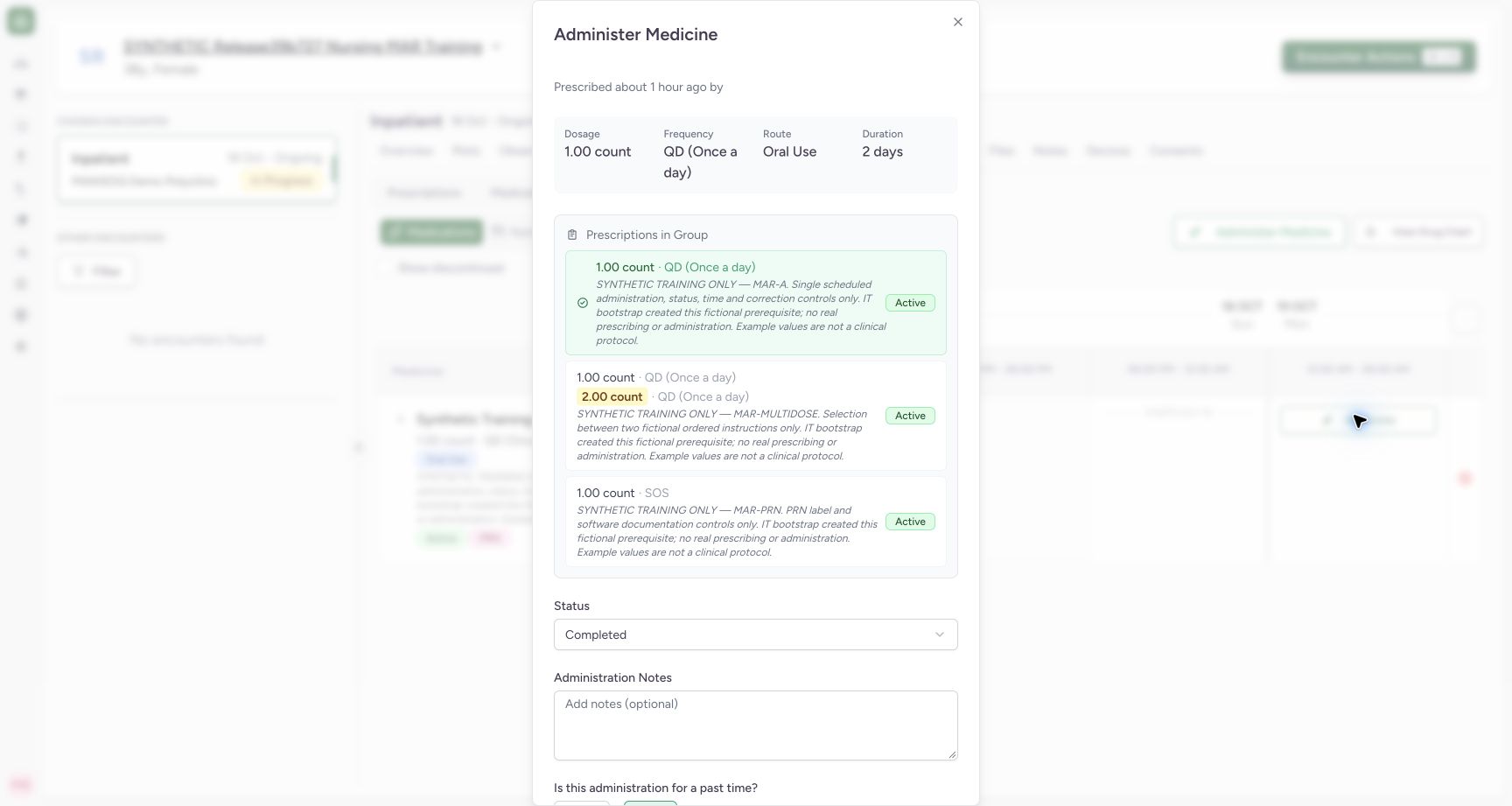
Exact committed release 39b72767 on an isolated nonproduction clone. Existing Nurse; fictional Polyclinic Inpatient software exercise only. Upper panel for scheduled MAR-A. Its disabled selected group button identifies the order. Completed is the new-event default. The empty product heading and incomplete prescriber subtitle are actual UI limitations; no actor claim is made from them.
Image SHA-256 b129d0f75ba506ba52012eb115ce9f65179db59deea1c35f10ab6f7526ad117e
- Event status: Review the default status before entering an event.
- Selected scheduled order: The selected disabled card is the exact order receiving this event.
3. Review status, dose and current-time behavior
For the new scheduled MAR-A event, confirm the displayed dose, unit, frequency, route and duration, then review the Status selection. The new-event default is Completed. With Is this administration for a past time? set to No, Start Time and End Time are disabled. The time is initialized when the draft opens; do not assume a long-open draft refreshes its occurrence to the later submission time.
12Review the selected order and new-event status
Capture details
Exact committed release 39b72767 on an isolated nonproduction clone. Existing Nurse; fictional Polyclinic Inpatient software exercise only. Upper panel for scheduled MAR-A. Its disabled selected group button identifies the order. Completed is the new-event default. The empty product heading and incomplete prescriber subtitle are actual UI limitations; no actor claim is made from them.
Image SHA-256 b129d0f75ba506ba52012eb115ce9f65179db59deea1c35f10ab6f7526ad117e
- Event status: Review the default status before entering an event.
- Selected scheduled order: The selected disabled card is the exact order receiving this event.
 12
12Review notes and current-time settings before saving
Capture details
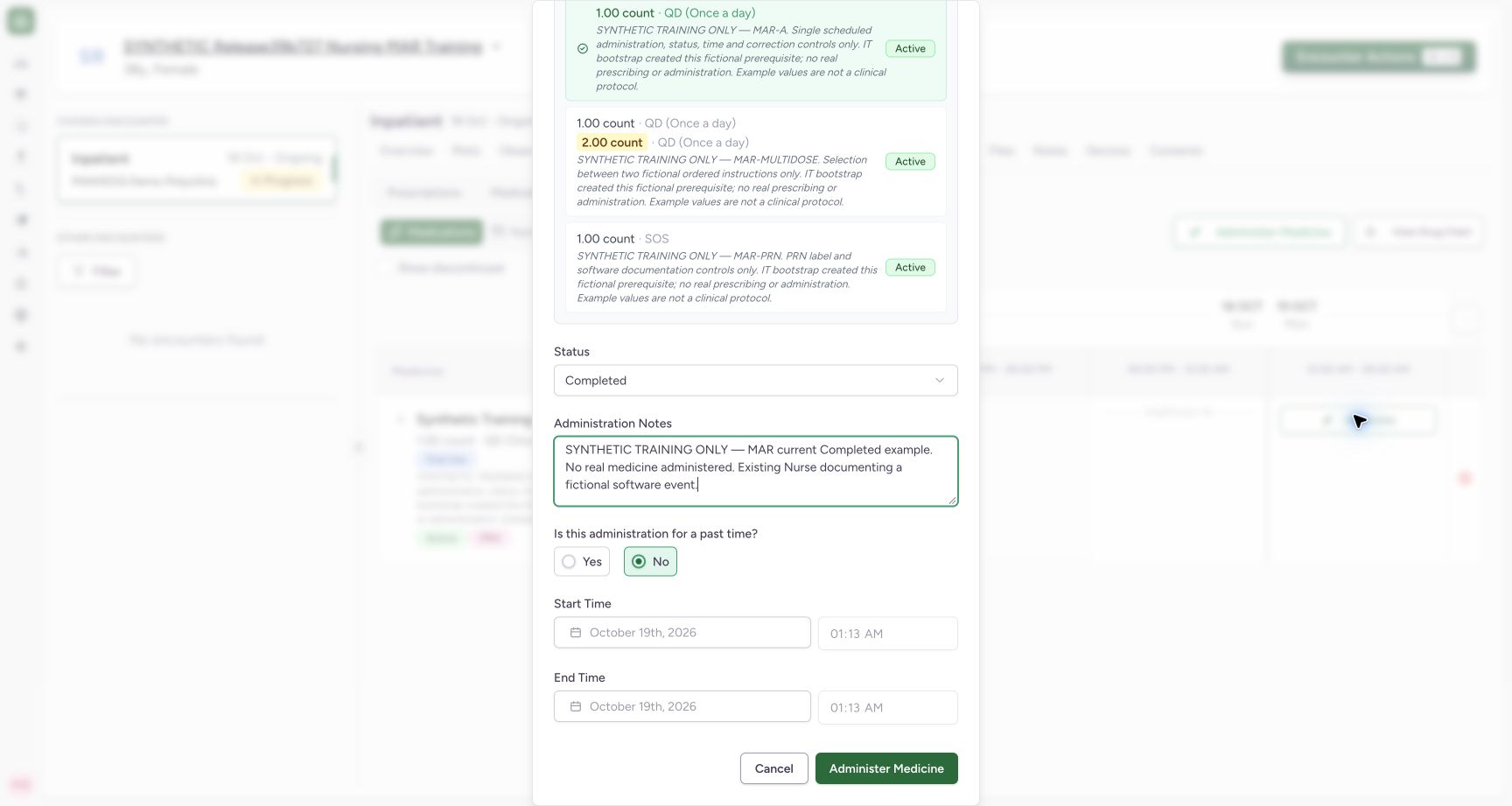
Exact committed release 39b72767 on an isolated nonproduction clone. Existing Nurse; fictional Polyclinic Inpatient software exercise only. Fictional MAR-A Completed draft with explicit synthetic note. Past-time No is selected; start/end are disabled. This is a draft only until the normal Administer Medicine save succeeds.
Image SHA-256 7efc473e1201eb44094f96f9a8027e68e551bcb889feb70a7626326033a77449
- Current-time entry: No keeps the occurrence inputs disabled for a new event.
- Save one fictional event: Submit only after reviewing order, status, note and occurrence.
4. Add the note and save once
Administration Notes is an optional software field. Record the appropriate event context under your facility’s policy, then review the selected order and status and select Administer Medicine once. In this fictional example the note explicitly identifies a training event. Wait for the save to finish and the entry dialog to close; a draft, disabled Saving control or button click by itself is not a saved result.
12Review notes and current-time settings before saving
Capture details
Exact committed release 39b72767 on an isolated nonproduction clone. Existing Nurse; fictional Polyclinic Inpatient software exercise only. Fictional MAR-A Completed draft with explicit synthetic note. Past-time No is selected; start/end are disabled. This is a draft only until the normal Administer Medicine save succeeds.
Image SHA-256 7efc473e1201eb44094f96f9a8027e68e551bcb889feb70a7626326033a77449
- Current-time entry: No keeps the occurrence inputs disabled for a new event.
- Save one fictional event: Submit only after reviewing order, status, note and occurrence.
1Confirm the saved event in its time slot
Capture details
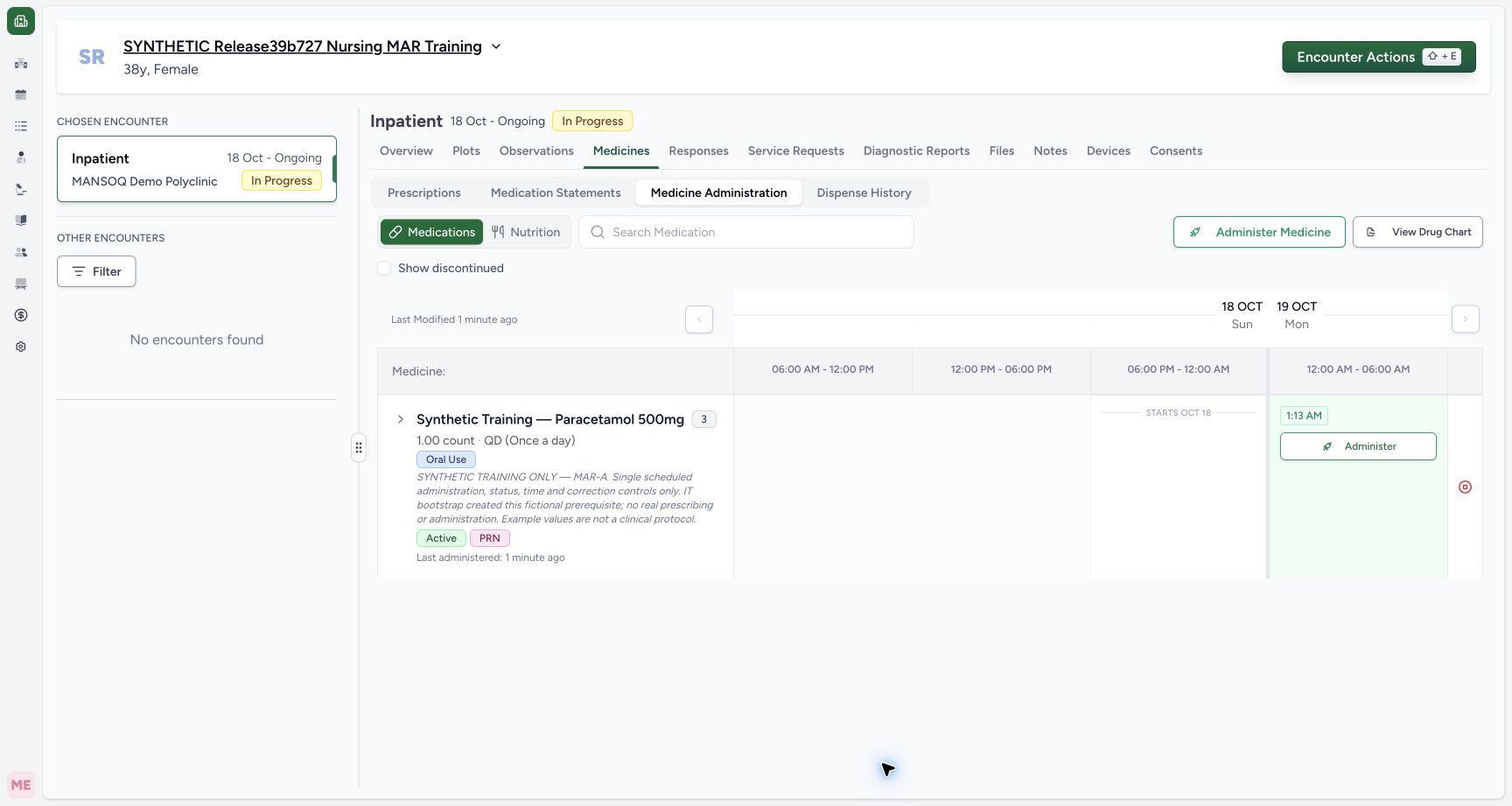
Exact committed release 39b72767 on an isolated nonproduction clone. Existing Nurse; fictional Polyclinic Inpatient software exercise only. Normal Nurse UI saved one Completed event for MAR-A. Independent Nurse and Doctor GET200 both return exactly one event with request a5063d3d… and Nurse creator/updater. The time is the draft initialization time (01:13), not a claim that submit time is refreshed automatically.
Image SHA-256 e6510e4667f4320e78d2a3d82548795c9fdb7d896e8954ff2a656fbe2c712376
- Saved event chip: Open the persisted event to inspect its saved status, time and note.
5. Inspect the persisted event
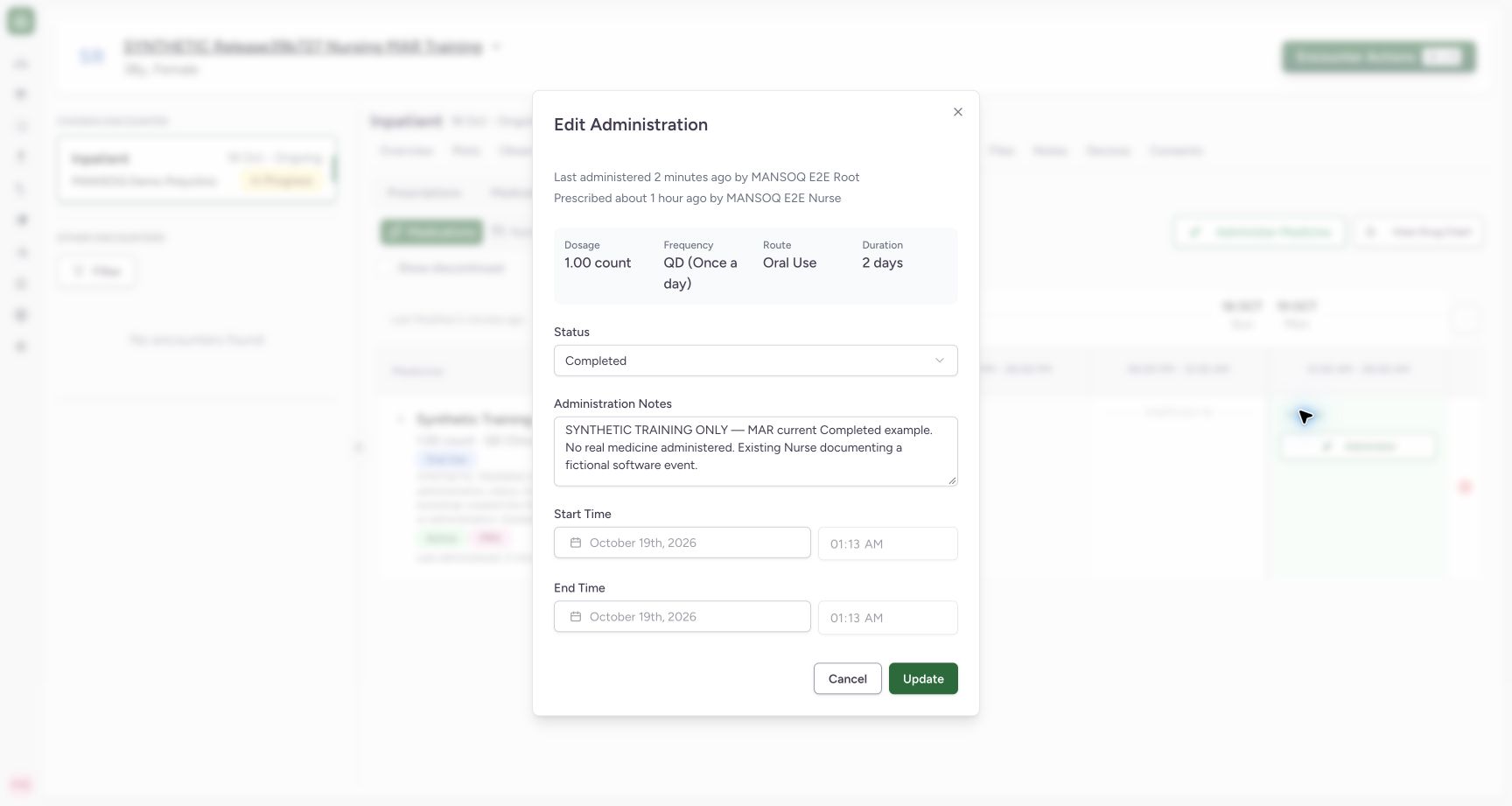
Confirm the event’s time chip appears in the intended slot. Select that chip to open Edit Administration, and check the saved status, note and occurrence. This example retained Completed, its exact note, and start/end at 01:13; independent normal Nurse and Doctor record reads confirmed the correct order and Nurse creator/updater. Both saved occurrence fields are locked in this edit form. Use Cancel when you only intend to inspect the saved event.
1Confirm the saved event in its time slot
Capture details
Exact committed release 39b72767 on an isolated nonproduction clone. Existing Nurse; fictional Polyclinic Inpatient software exercise only. Normal Nurse UI saved one Completed event for MAR-A. Independent Nurse and Doctor GET200 both return exactly one event with request a5063d3d… and Nurse creator/updater. The time is the draft initialization time (01:13), not a claim that submit time is refreshed automatically.
Image SHA-256 e6510e4667f4320e78d2a3d82548795c9fdb7d896e8954ff2a656fbe2c712376
- Saved event chip: Open the persisted event to inspect its saved status, time and note.
 12
12Inspect persisted status, note and locked times
Capture details
Exact committed release 39b72767 on an isolated nonproduction clone. Existing Nurse; fictional Polyclinic Inpatient software exercise only. The saved event reopens as Edit Administration with Completed, the saved note, and locked occurrence fields. Actual header captions reverse actor sources: Last administered shows prerequisite creator Root, Prescribed shows Nurse. Independent normal records prove Nurse created/updated the event and Doctor is the order requester; do not teach these captions as an audit trail.
Image SHA-256 4ddcb56774c5355f8c21e578bfee125a0b6282efc69a094e19b7948d6fb06540
- Saved status: Inspect the persisted event status.
- Saved note: Confirm the exact saved event note; do not rely on reversed actor captions.
Read event documentation separately from order status
Completed here is the status of one administration event. It does not by itself complete the medication order, dispense stock or complete the encounter. The chart can retain multiple separate events under one order; the visible time chip identifies an event that can be inspected individually.
1Confirm the saved event in its time slot
Capture details
Exact committed release 39b72767 on an isolated nonproduction clone. Existing Nurse; fictional Polyclinic Inpatient software exercise only. Normal Nurse UI saved one Completed event for MAR-A. Independent Nurse and Doctor GET200 both return exactly one event with request a5063d3d… and Nurse creator/updater. The time is the draft initialization time (01:13), not a claim that submit time is refreshed automatically.
Image SHA-256 e6510e4667f4320e78d2a3d82548795c9fdb7d896e8954ff2a656fbe2c712376
- Saved event chip: Open the persisted event to inspect its saved status, time and note.
12Inspect persisted status, note and locked times
Capture details
Exact committed release 39b72767 on an isolated nonproduction clone. Existing Nurse; fictional Polyclinic Inpatient software exercise only. The saved event reopens as Edit Administration with Completed, the saved note, and locked occurrence fields. Actual header captions reverse actor sources: Last administered shows prerequisite creator Root, Prescribed shows Nurse. Independent normal records prove Nurse created/updated the event and Doctor is the order requester; do not teach these captions as an audit trail.
Image SHA-256 4ddcb56774c5355f8c21e578bfee125a0b6282efc69a094e19b7948d6fb06540
- Saved status: Inspect the persisted event status.
- Saved note: Confirm the exact saved event note; do not rely on reversed actor captions.
 12
12Verify both persisted events in the time slot
Capture details
Exact committed release 39b72767 on an isolated nonproduction clone. Existing Nurse; fictional Polyclinic Inpatient software exercise only. Normal Nurse UI saved the corrected past Completed event. Independent Nurse and Doctor GET200 both confirm exactly two events, the current draft-initialization event at 01:13 and past 00:55–00:56 event, correct MAR-A request and Nurse actors. Invalid future/end-before-start drafts were never submitted.
Image SHA-256 ad4ed1930a087501d408000bb6acf2489d701274618b3ba24e3f5cad12dec7d1
- Saved past event: This chip opens the separately persisted past event.
- Earlier current-time event: The earlier saved event remains separate; this workflow does not merge them.
Known author-caption limitation in this release
The illustrated Edit Administration header incorrectly shows the order’s data-entry creator after Last administered and the event creator after Prescribed. In this training case the order requester is Doctor, its IT prerequisite creator is Root, and the actual saved event creator/updater is Nurse. The displayed Root/Nurse captions are reversed and do not establish who prescribed or performed care. Report this display defect through your facility support process; do not use these captions as the clinical audit trail.
12Inspect persisted status, note and locked times
Capture details
Exact committed release 39b72767 on an isolated nonproduction clone. Existing Nurse; fictional Polyclinic Inpatient software exercise only. The saved event reopens as Edit Administration with Completed, the saved note, and locked occurrence fields. Actual header captions reverse actor sources: Last administered shows prerequisite creator Root, Prescribed shows Nurse. Independent normal records prove Nurse created/updated the event and Doctor is the order requester; do not teach these captions as an audit trail.
Image SHA-256 4ddcb56774c5355f8c21e578bfee125a0b6282efc69a094e19b7948d6fb06540
- Saved status: Inspect the persisted event status.
- Saved note: Confirm the exact saved event note; do not rely on reversed actor captions.
Source evidence
Every citation uses this exact committed version. The private source repository requires access.
- repositories/platform/mansoq-web/src/components/Medicine/MedicationAdministration/MedicineAdminForm.tsx:231 ·
39b7276732f88bc07ad0abb61619f7aafe3c9e14Source file checksum
b6002675d4d8d1612494006f390203dd134699ab5b3d44876ed169db3e681e3a - repositories/platform/mansoq-web/src/components/Medicine/MedicationAdministration/MedicineAdminDialog.tsx:84 ·
39b7276732f88bc07ad0abb61619f7aafe3c9e14Source file checksum
c6ccd39c46d4093d346e97987eebd9dd1b51ffae1c8688f5305a7eed5336d6f2 - repositories/platform/mansoq-web/src/components/Medicine/MedicationAdministration/AdministrationTab.tsx:230 ·
39b7276732f88bc07ad0abb61619f7aafe3c9e14Source file checksum
170c246835ea1966b8512f5baf72ff0ea60635f28cbcec6a465bb8c17506555f - repositories/platform/mansoq-web/src/types/emr/medicationAdministration/medicationAdministration.ts:10 ·
39b7276732f88bc07ad0abb61619f7aafe3c9e14Source file checksum
aba9ae9ba873b5da05a41e9188fcacf1d1f5169794a85c72652b570cfa1079d1 - repositories/platform/mansoq-core/mansoq/emr/api/viewsets/medication_administration.py:28 ·
39b7276732f88bc07ad0abb61619f7aafe3c9e14Source file checksum
2a9126a3aae000cf2bce7710a1ad025aa451f9a4febb189a7dff0620842e7b76 - repositories/platform/mansoq-core/mansoq/emr/resources/medication/administration/spec.py:85 ·
39b7276732f88bc07ad0abb61619f7aafe3c9e14Source file checksum
b9549599f7137f28773491f3d79ced93730be81df46083248a9049e1ba3dd626 - repositories/platform/mansoq-core/mansoq/emr/models/medication_request.py:45 ·
39b7276732f88bc07ad0abb61619f7aafe3c9e14Source file checksum
6d0148f12528d99718544a54fd6ccaee3f931d58ff7b6796b8aac66533555f2f - repositories/platform/mansoq-core/mansoq/emr/api/viewsets/encounter_authz_base.py:15 ·
39b7276732f88bc07ad0abb61619f7aafe3c9e14Source file checksum
71d6adda5026319eeca7f47eb673e81db1217b347ee8c8fa13f7e9701c60d3c9