 MANSOQ
 Clinical documentation · VERSION 39b72767
Print one questionnaire response or matching encounter responses
Use the response action menu, verify the patient and saved answers, and save a PDF. This lesson was observed with an existing Nurse in one fictional Polyclinic inpatient encounter on release 39b72767; the actual two-page single PDF and three-page combined PDF were checked page by page.
Nurse
 12
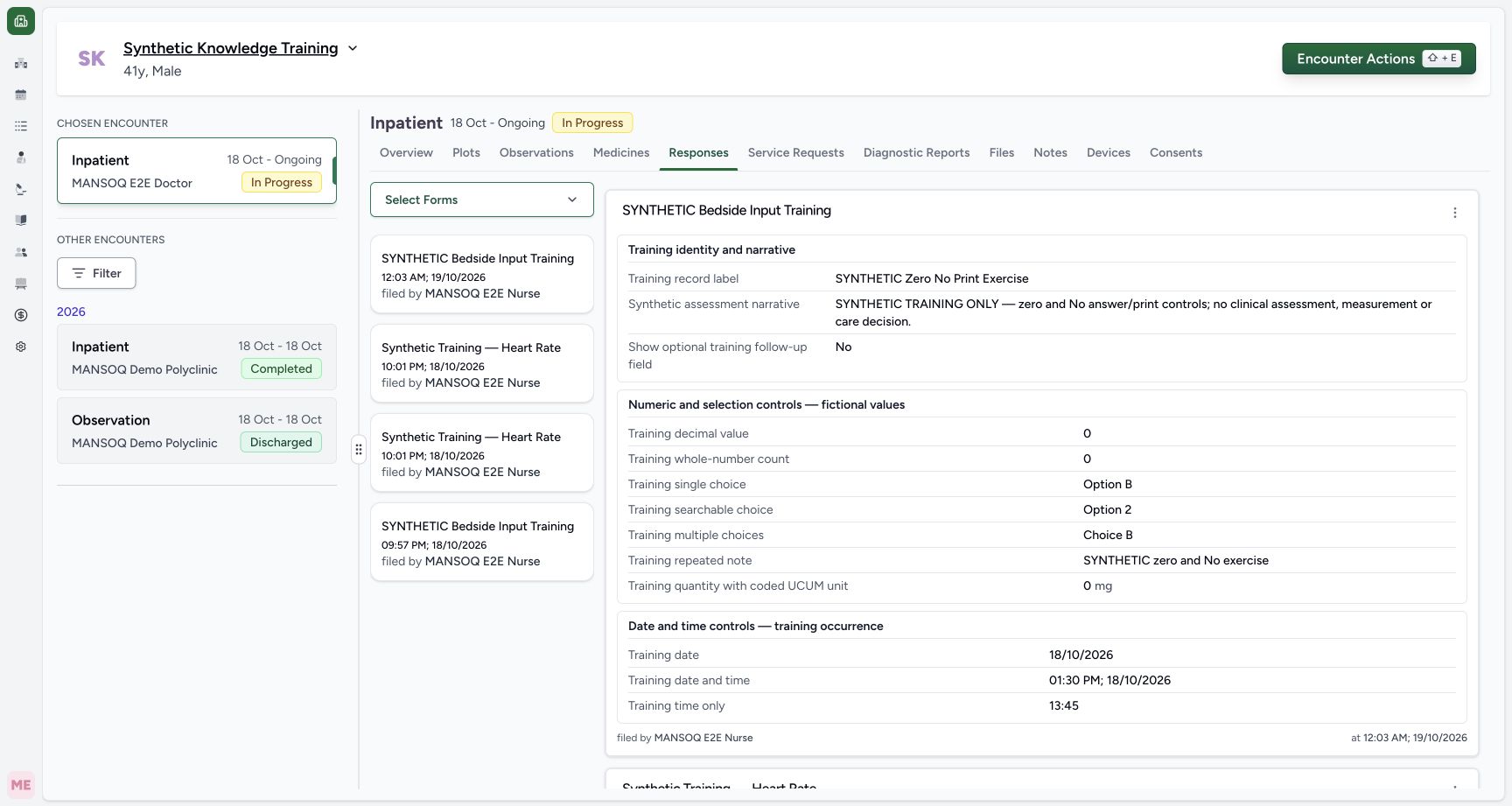
12Identify the saved response and its action menu
Capture details
Exact committed release 39b72767 on an isolated nonproduction clone. Existing Nurse; fictional Polyclinic Inpatient software exercise only. Responses tab on the exact final release. The selected fictional response label, author and occurrence answers were independently read back unchanged; no response is edited.
Image SHA-256 34a6a22248dcc3cd2609bed800a36ca254a321cdd2d0c88c24d8a9c4c23d8e49
- Responses tab: Open the response list for the intended encounter.
- Response actions: Use the action menu belonging to the intended saved response.
 12
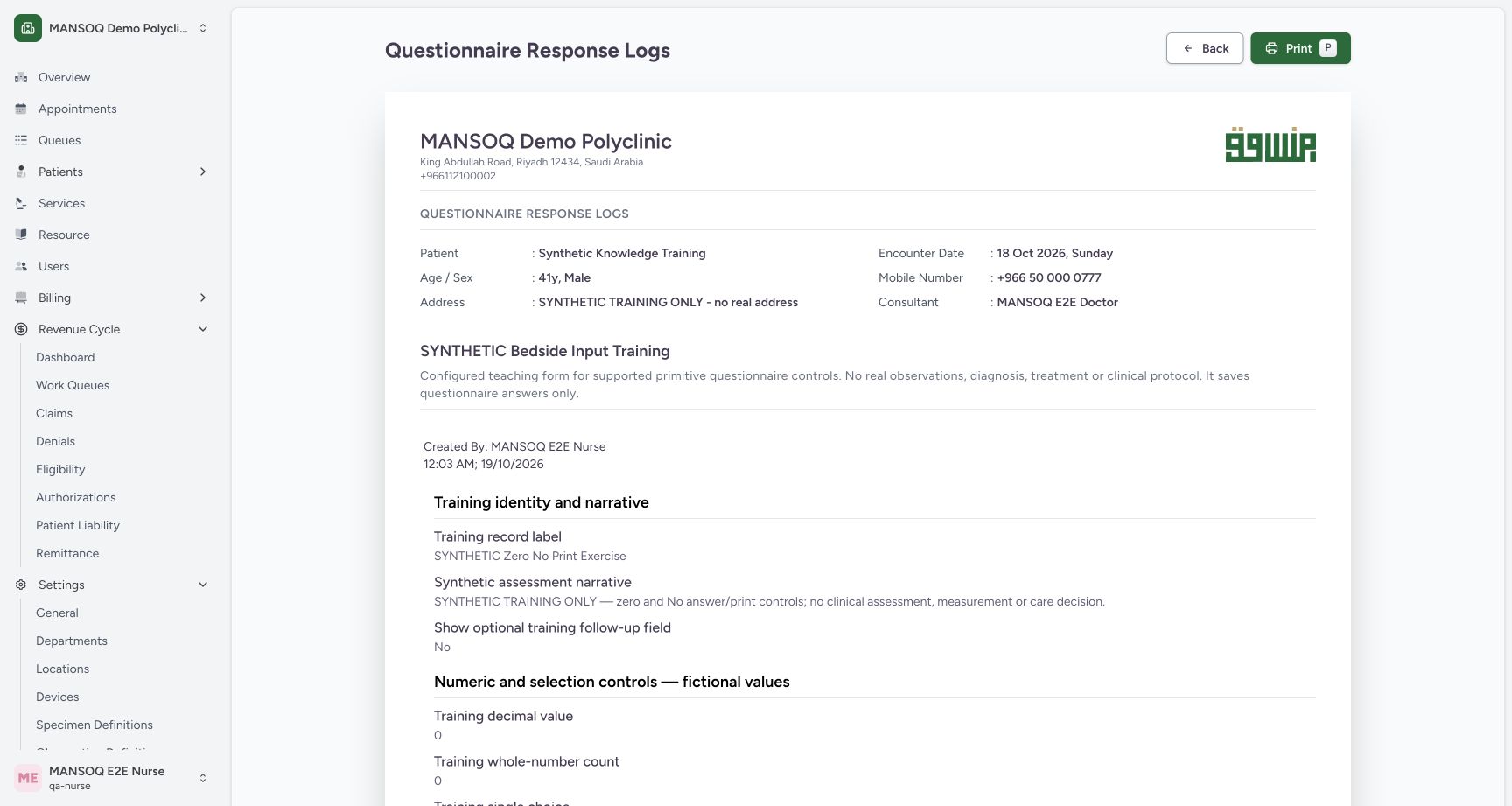
12Verify single-response patient, author and print control
Capture details
Exact committed release 39b72767 on an isolated nonproduction clone. Existing Nurse; fictional Polyclinic Inpatient software exercise only. Loaded single-response preview for saved response 50c30b9f-9c6d-4724-b0d9-ad162c086bb6. The visible facility, fictional patient, questionnaire and Nurse author belong to this selected response. Print opens the browser dialog; no file exists from this preview alone.
Image SHA-256 6e3a103b6e184ccc6e4b32ac6cc757c90f83a4f50c3584f6c969e0795ce0d8bd
- Print this preview: Open the ordinary browser print dialog only after checking the selected response.
- Verify questionnaire identity: Confirm this is the intended configured questionnaire and selected saved response.
15 of 15 content blocks have reviewed image alignment. Missing overview or prerequisite images remain open.
Before you begin
- Sign in with your existing authorized workforce account and open the intended patient and encounter. The screenshots show an existing Nurse with access to the displayed fictional response; another role or facility needs its own permission and workflow check.12
Recorded release 39b72767 · 2026-10-18T22:04:05.466Z · 1728 × 921 Identify the saved response and its action menu
Capture details
Exact committed release 39b72767 on an isolated nonproduction clone. Existing Nurse; fictional Polyclinic Inpatient software exercise only. Responses tab on the exact final release. The selected fictional response label, author and occurrence answers were independently read back unchanged; no response is edited.
Image SHA-256
34a6a22248dcc3cd2609bed800a36ca254a321cdd2d0c88c24d8a9c4c23d8e49- Responses tab: Open the response list for the intended encounter.
- Response actions: Use the action menu belonging to the intended saved response.
- Have saved questionnaire responses available. This example contains two unstructured responses to the same configured questionnaire. Printing reads the saved answers; it does not complete, sign or correct a response.12
Recorded release 39b72767 · 2026-10-18T22:04:05.466Z · 1728 × 921 Identify the saved response and its action menu
Capture details
Exact committed release 39b72767 on an isolated nonproduction clone. Existing Nurse; fictional Polyclinic Inpatient software exercise only. Responses tab on the exact final release. The selected fictional response label, author and occurrence answers were independently read back unchanged; no response is edited.
Image SHA-256
34a6a22248dcc3cd2609bed800a36ca254a321cdd2d0c88c24d8a9c4c23d8e49- Responses tab: Open the response list for the intended encounter.
- Response actions: Use the action menu belonging to the intended saved response.
 12
12Recorded release 39b72767 · 2026-10-18T22:08:40.335Z · 1728 × 921 Identify the earlier response in the combined preview
Capture details
Exact committed release 39b72767 on an isolated nonproduction clone. Existing Nurse; fictional Polyclinic Inpatient software exercise only. The combined preview includes a separate earlier Nurse response, with its own author/time and SYNTHETIC Nurse Input Exercise label. Two response records remain distinct; this does not amend the newer response.
Image SHA-256
75a9ab3c25d63e8dcfb754db7cb40b5cb8cbbe6534d8f7c665d930f47bfc65f1- Earlier response label: Confirm the earlier saved response is included as a separate record.
- Separate recorded time: Read the earlier response author/time independently from the newer exercise.
1. Identify the intended saved response
Open Responses in the patient encounter. Check the patient banner and encounter context, then locate the saved response label and author/time. Use the More Actions button belonging to that response. Here the selected record is SYNTHETIC Zero No Print Exercise; its record time is separate from the training date/time answers inside the form.
12Identify the saved response and its action menu
Capture details
Exact committed release 39b72767 on an isolated nonproduction clone. Existing Nurse; fictional Polyclinic Inpatient software exercise only. Responses tab on the exact final release. The selected fictional response label, author and occurrence answers were independently read back unchanged; no response is edited.
Image SHA-256 34a6a22248dcc3cd2609bed800a36ca254a321cdd2d0c88c24d8a9c4c23d8e49
- Responses tab: Open the response list for the intended encounter.
- Response actions: Use the action menu belonging to the intended saved response.
2. Choose the required print scope
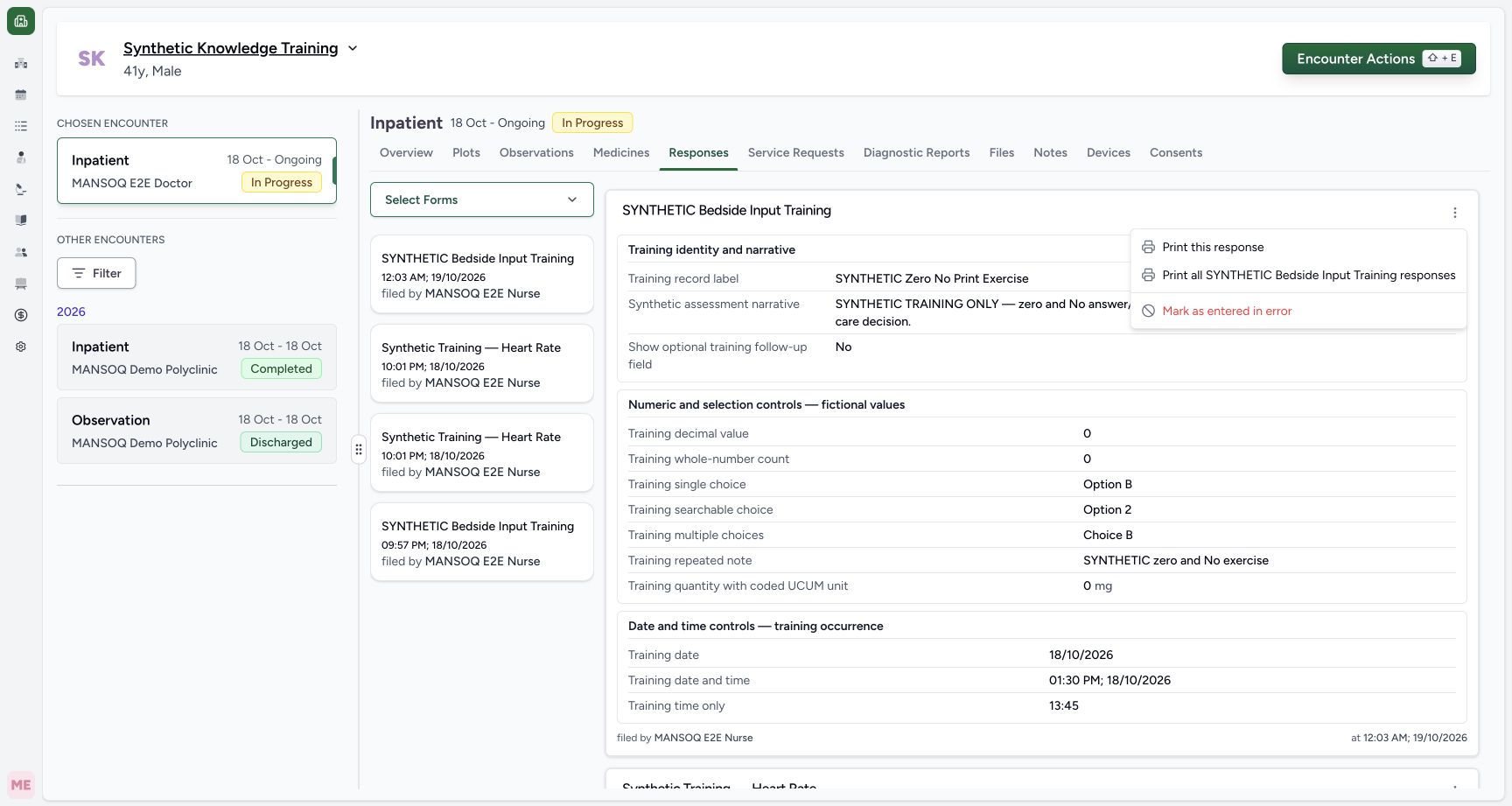
Choose Print this response for the selected saved record. The other Print all option opens matching unstructured responses for that questionnaire and encounter. Mark as entered in error is a separate correction action; it is not part of printing.
 12
12Choose one response or matching questionnaire responses
Capture details
Exact committed release 39b72767 on an isolated nonproduction clone. Existing Nurse; fictional Polyclinic Inpatient software exercise only. Actual normal menu on the exact final release. Print this response and Print all matching questionnaire responses are distinct from Mark as entered in error; no correction is performed.
Image SHA-256 c6e1c252ed5d4c1e2383517a7c4f15ddfbba2c433933da3ae10a8d9cf13717db
- Print one response: Open the selected response only.
- Print matching responses: Open matching unstructured responses for this questionnaire and encounter.
3. Verify the single-response preview
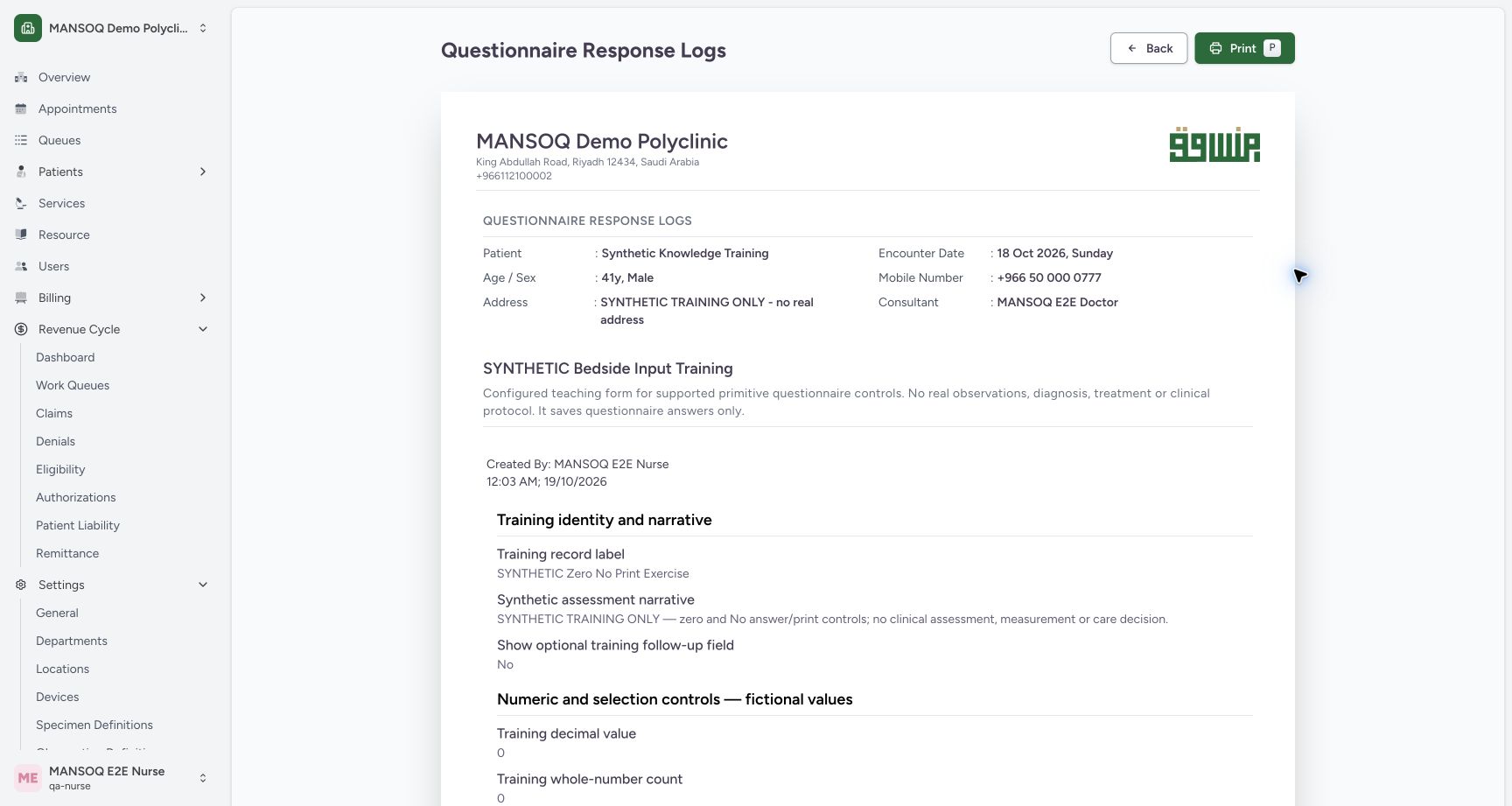
Before printing, check the facility, patient, questionnaire title, saved response label and Nurse author/time in the preview. Print at the upper right opens the browser print dialog. A loaded preview alone does not create a PDF file.
12Verify single-response patient, author and print control
Capture details
Exact committed release 39b72767 on an isolated nonproduction clone. Existing Nurse; fictional Polyclinic Inpatient software exercise only. Loaded single-response preview for saved response 50c30b9f-9c6d-4724-b0d9-ad162c086bb6. The visible facility, fictional patient, questionnaire and Nurse author belong to this selected response. Print opens the browser dialog; no file exists from this preview alone.
Image SHA-256 6e3a103b6e184ccc6e4b32ac6cc757c90f83a4f50c3584f6c969e0795ce0d8bd
- Print this preview: Open the ordinary browser print dialog only after checking the selected response.
- Verify questionnaire identity: Confirm this is the intended configured questionnaire and selected saved response.
4. Review the actual answers and units
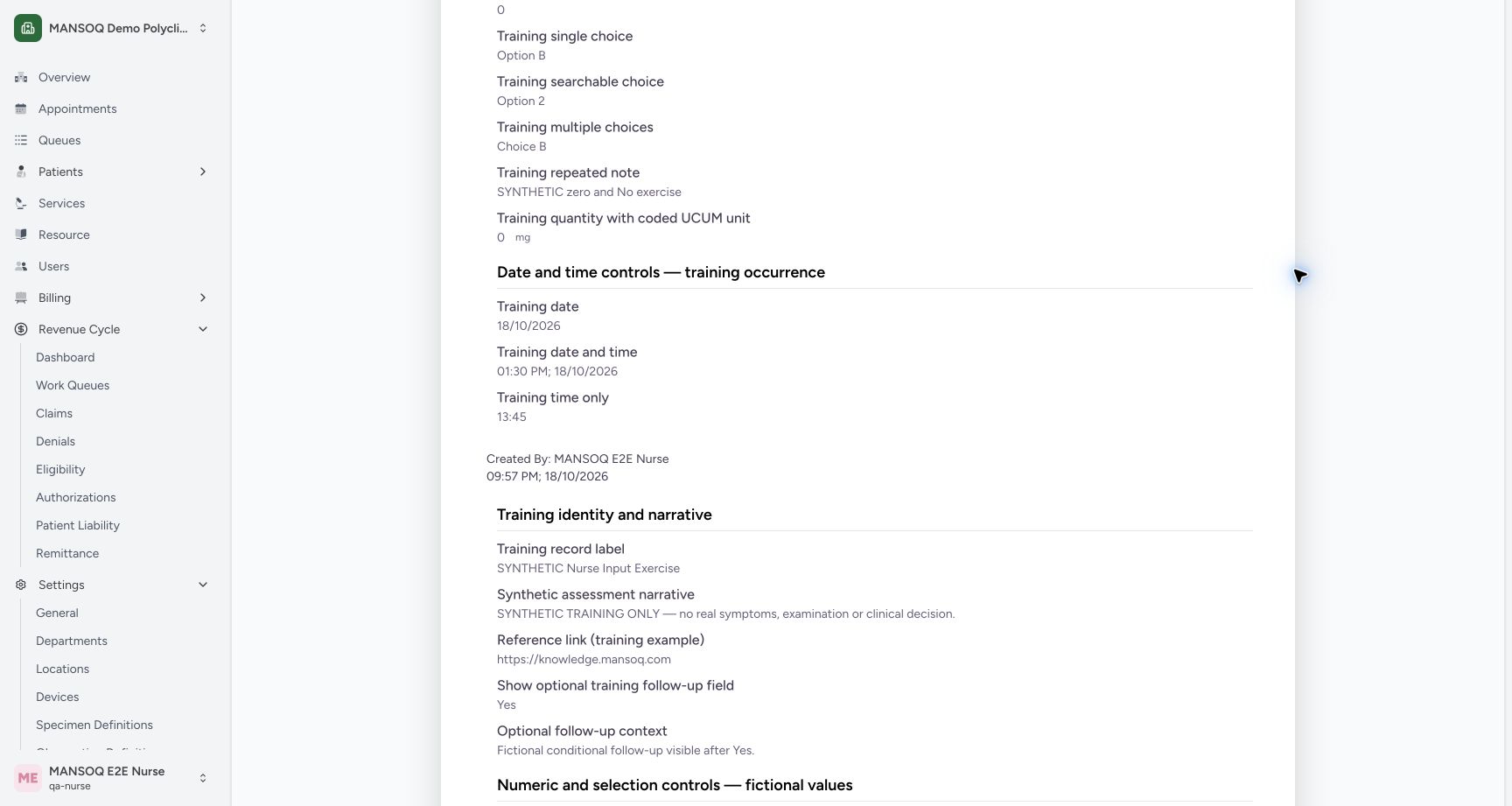
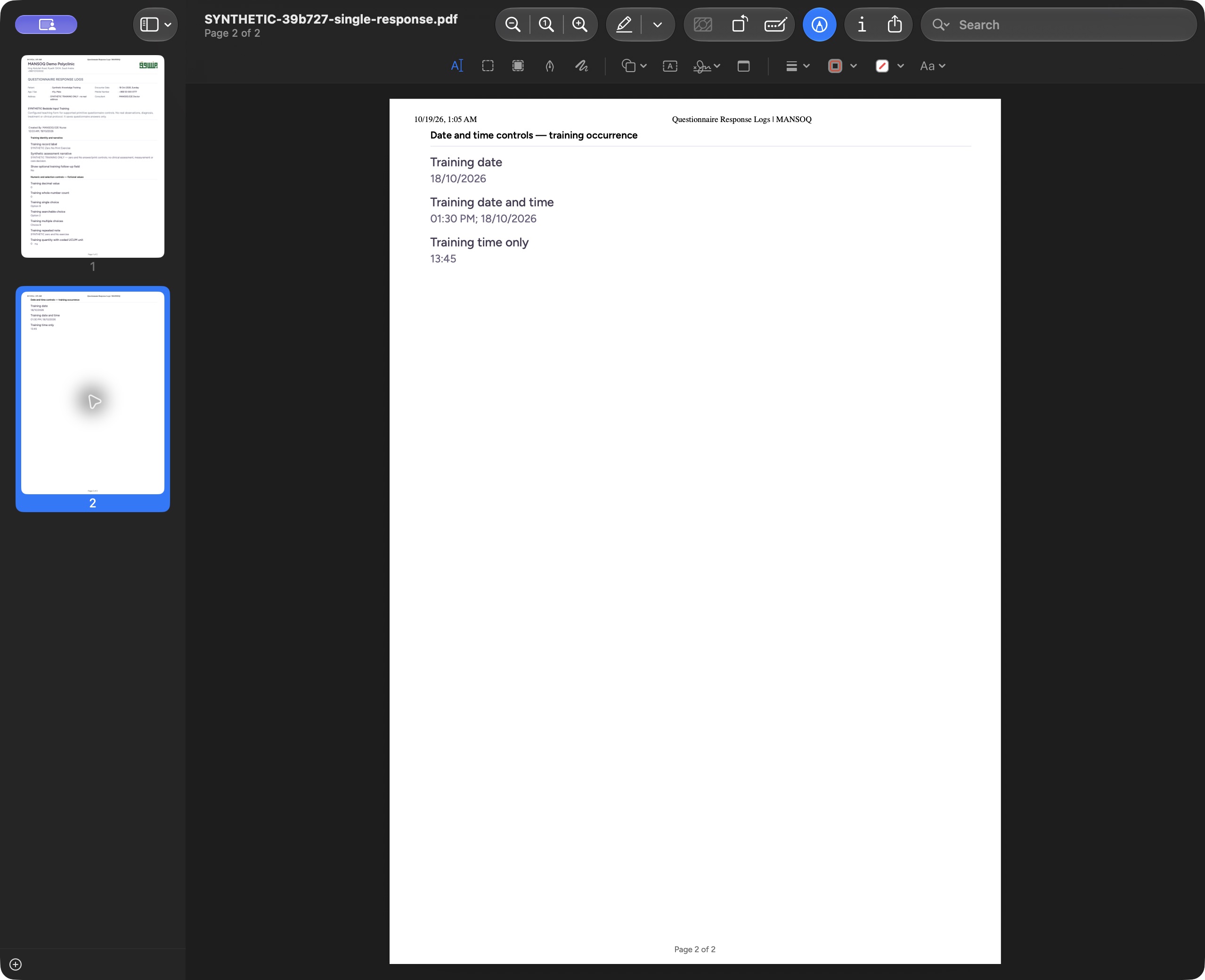
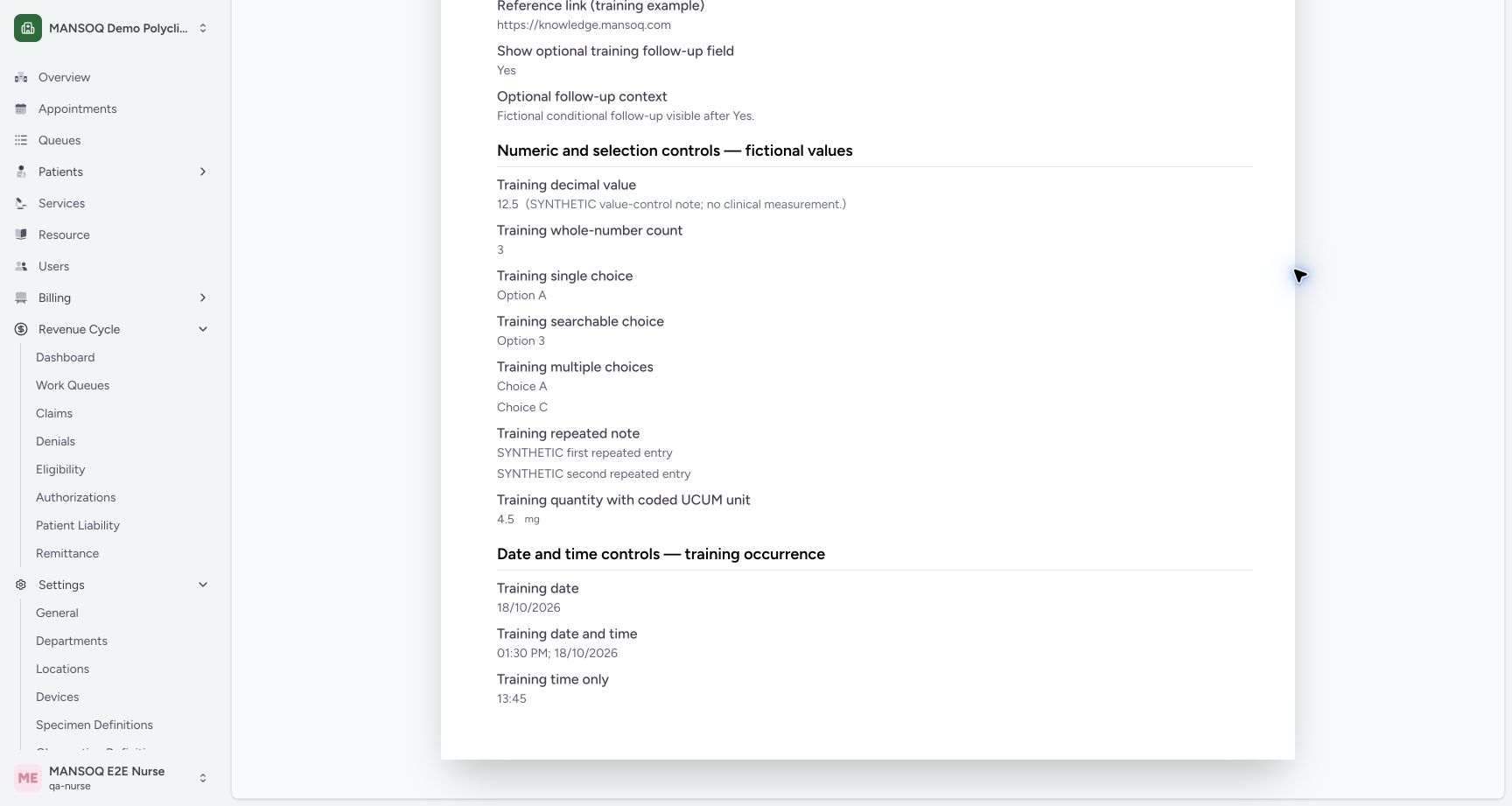
Scroll through the selected response. In this fictional example the No answer, zero values, 0 mg, date, local date/time and time-only answer remain visible. Read the question label with its value and unit; a zero value is not a missing answer. The date/time group heading stays with its content in the checked PDF output.
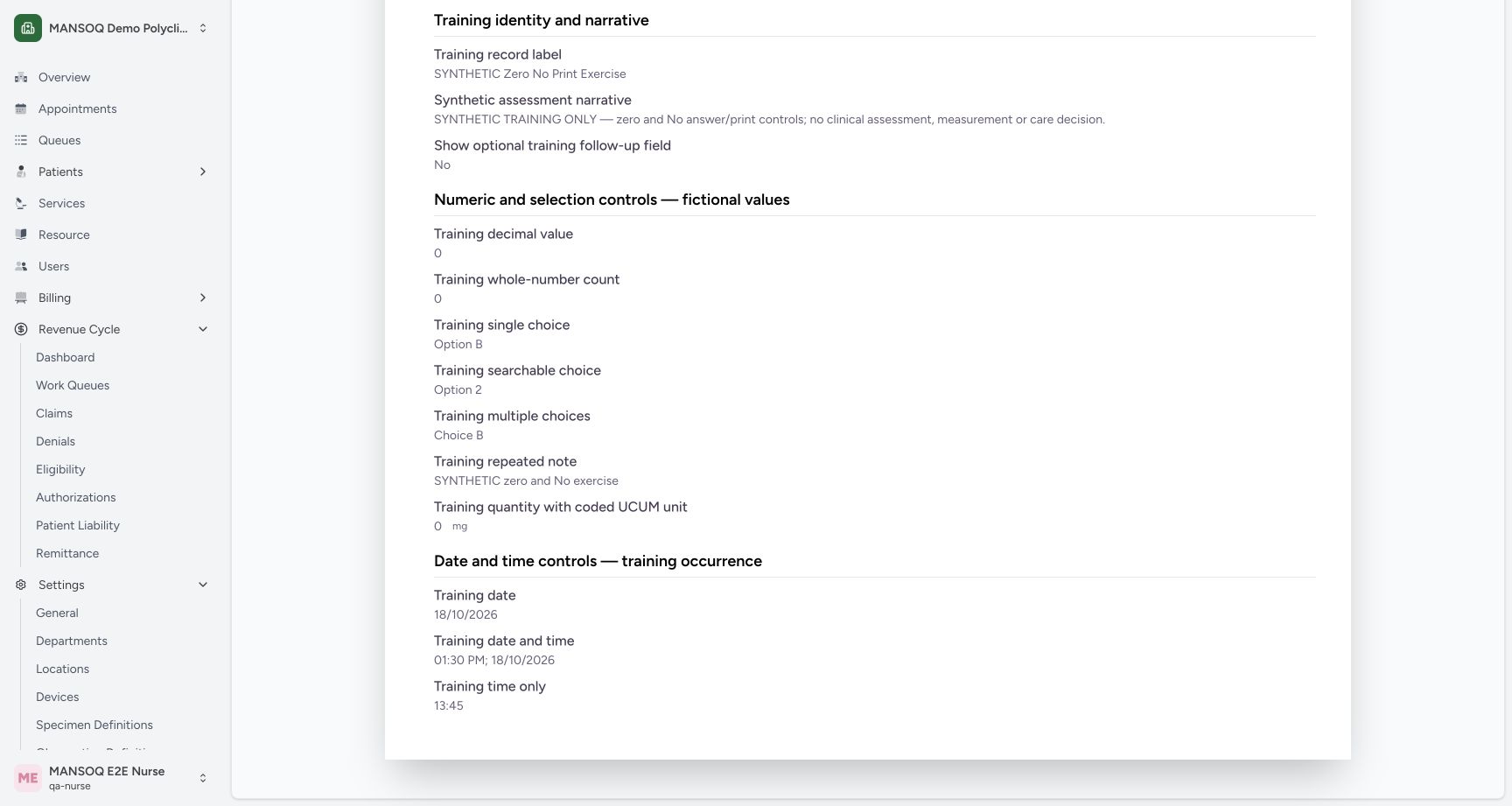 12
12Read No, zero, units and date/time answers
Capture details
Exact committed release 39b72767 on an isolated nonproduction clone. Existing Nurse; fictional Polyclinic Inpatient software exercise only. Lower single-response preview preserves normal canonical No and zero answers, the coded mg unit and committed date/time values. This view is limited to this unstructured saved response and creates no clinical records.
Image SHA-256 0768bf8e2bb53ce65c07ee32f3730c277abc68171606b754191d3982e25a0c28
- Quantity and unit: Read the saved zero together with mg.
- Date and time answers: Check the committed date, date-and-time and time-only values before printing.
5. Set the browser print destination and pages
Select Print in the preview. In the macOS Chrome Print dialog shown here, choose Save as PDF, confirm All pages and review the page count and orientation. This single-response example produces two portrait pages. Other browsers, content lengths, paper settings and operating systems may display different controls or page counts.
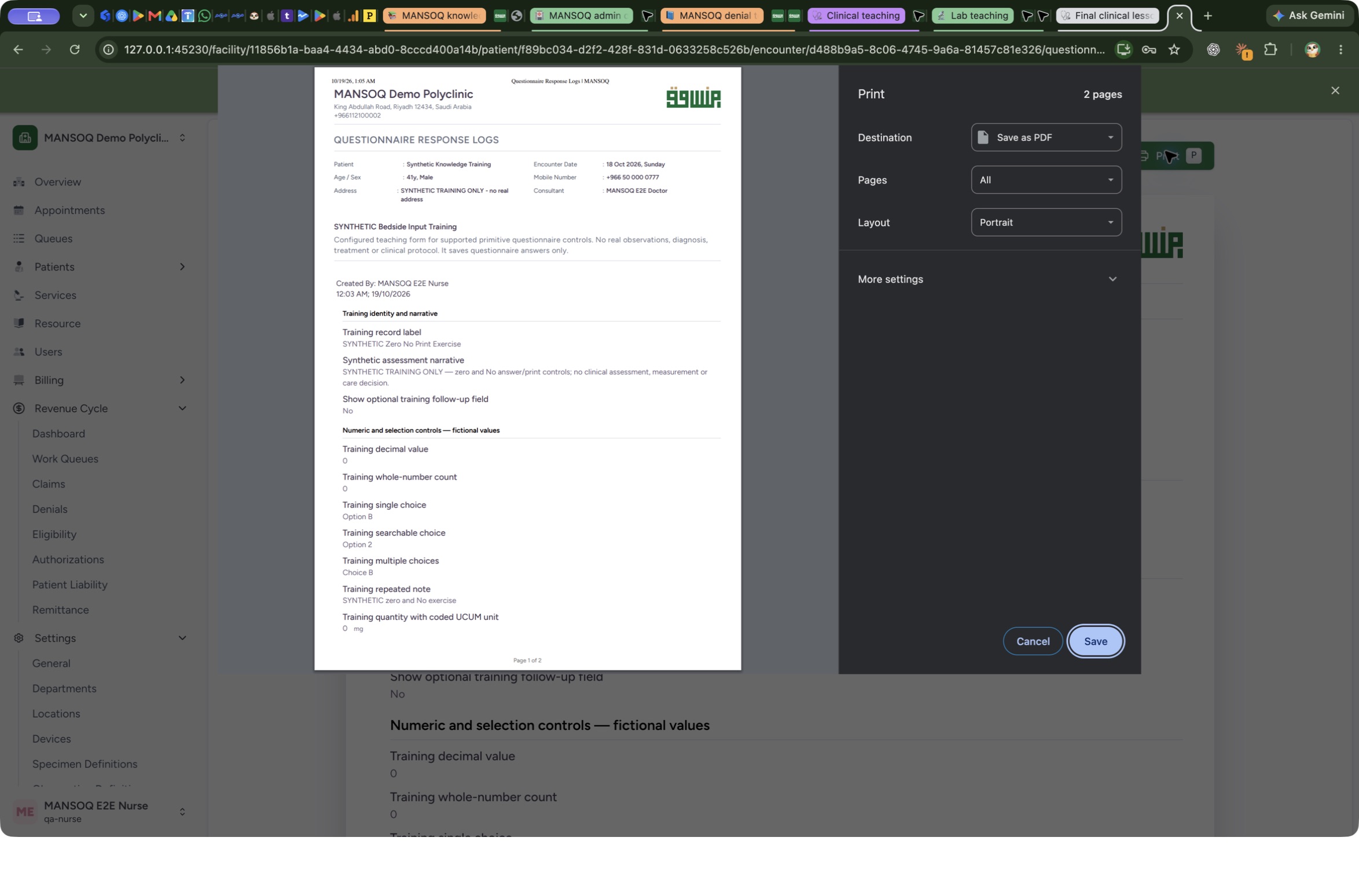 12
12macOS Print dialog: choose PDF destination and pages
Capture details
Exact committed release 39b72767, existing Nurse, isolated fictional Polyclinic Inpatient case. Genuine macOS Chrome native print dialog; browser-specific controls are not MANSOQ form fields. The unobstructed dialog shows two pages, Save as PDF, All pages, Portrait and the ordinary Save control. Earlier password-prompt-obscured pixels were rejected and not saved as teaching evidence.
Image SHA-256 46b3e6b39a44a4125edd3c5293eb5bea495ecb329937c780bd3b0f5c40ef9e6c
- Choose the destination: The observed local exercise uses Save as PDF; review the page count and selected pages.
- Save the actual file: Save opens the normal file-location dialog; preview alone has not written a PDF.
6. Save the single-response PDF
Choose Save in the Print dialog. In the macOS Save dialog, choose the intended folder and a recognizable file name, then select Save. The example uses a dedicated local training folder and SYNTHETIC-39b727-single-response.pdf. Open the saved file in your PDF viewer; the illustrated macOS Preview example shows the file name, Page 1 of 2 and page thumbnails. Verify the patient, selected response label, No, zero values and 0 mg. Select page two in the thumbnails and check its date/time group and answers. Both pages must be readable; this example contains only the selected response.
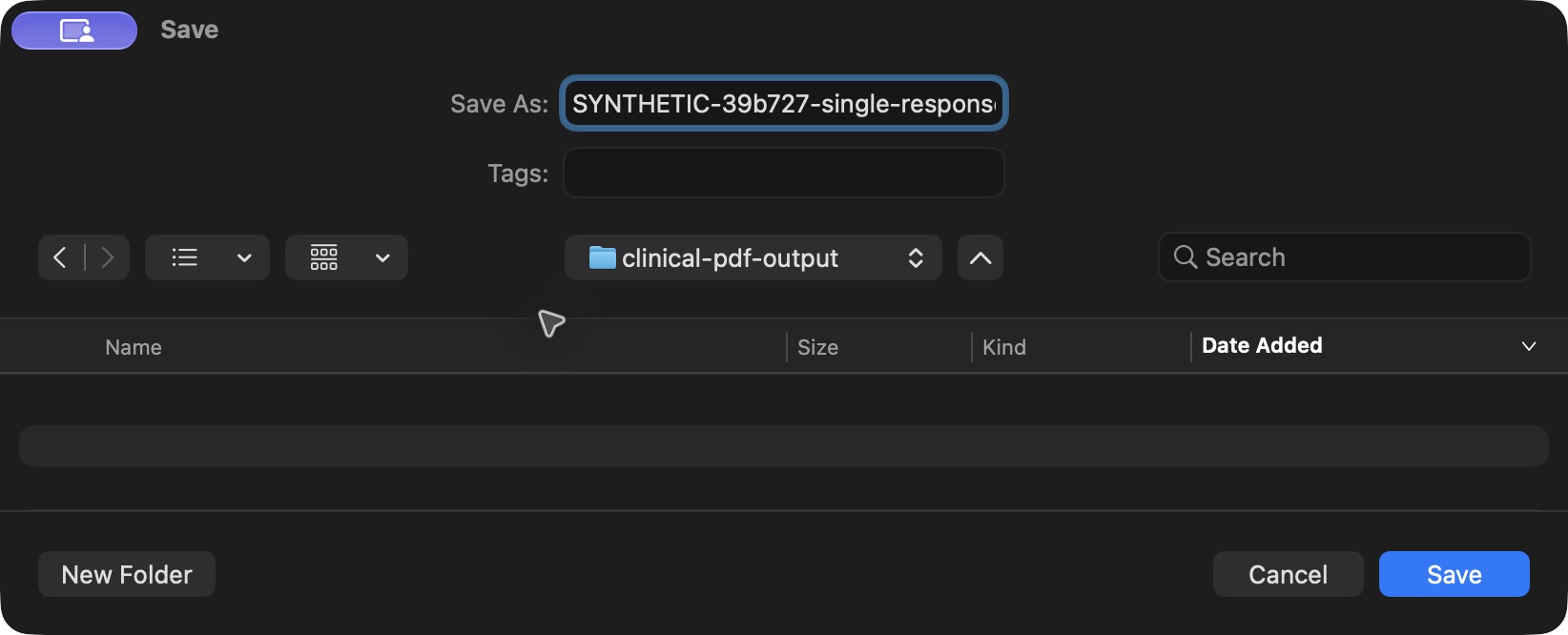 123
123macOS Save dialog: choose the PDF file name and destination
Capture details
Genuine macOS file save dialog after normal Chrome Save as PDF from exact release 39b72767. Existing Nurse; isolated fictional questionnaire response. Actual 1644 × 666 pixels, no resizing or cropping. The local example uses a dedicated synthetic output folder; choose your own approved location.
Image SHA-256 4199e1310ba9e67ef5996cfb3d286b029467096226d3f3f2ab545d3ee53aa23a
- Review the file name: Enter a recognizable PDF file name; the normal dialog retains the .pdf extension.
- Choose the destination: Check the folder where the file will be written.
- Save the PDF: This final Save writes the local PDF. Verify the saved document and all its pages afterward.
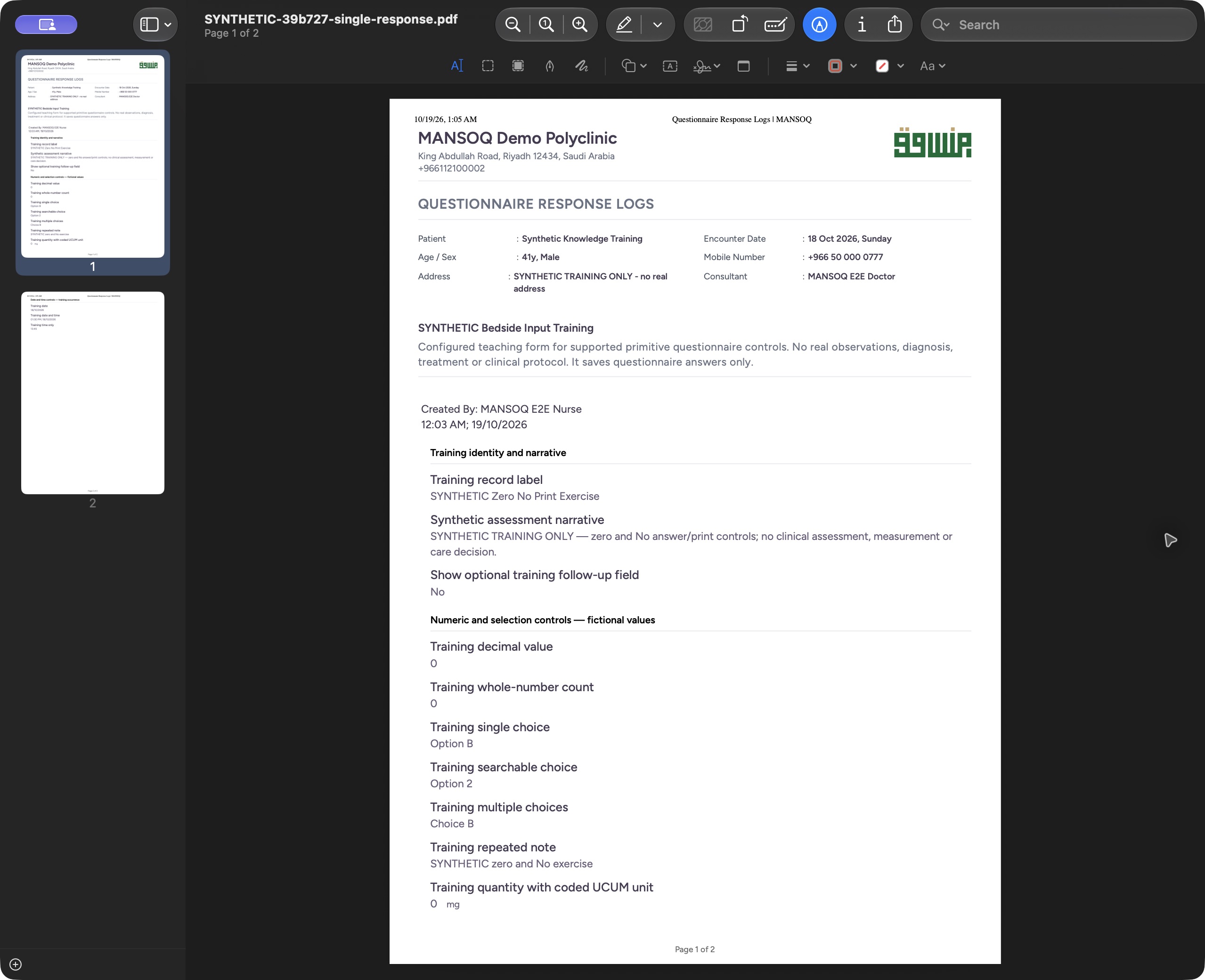 123
123Open the saved single-response PDF and verify page one
Capture details
Exact committed release 39b72767, existing Nurse, isolated fictional Polyclinic Inpatient case. Genuine local macOS Preview document viewer displaying the actual saved PDF; viewer controls are separate from MANSOQ form fields. Actual local macOS Preview opened the exact saved single PDF, SHA256 9bbb7318…. The title shows Page 1 of 2; the visible printed patient, response label, No, zero answers and 0 mg match the normal saved Nurse response. No file contents were edited.
Image SHA-256 28a0b80962f518ba2a41d6c7f895fc399f21cd8503239ddef26a86917c1c8164
- Saved file and page count: Confirm the actual single-response file is open and contains two pages.
- Selected response label: Confirm the printed saved record is SYNTHETIC Zero No Print Exercise.
- Zero with its unit: The real PDF retains the zero quantity and mg unit.
 123
123Check the single PDF last page and date/time answers
Capture details
Exact committed release 39b72767, existing Nurse, isolated fictional Polyclinic Inpatient case. Genuine local macOS Preview document viewer displaying the actual saved PDF; viewer controls are separate from MANSOQ form fields. Actual saved single PDF opened in local Preview. Page 2 of 2 contains the complete date/time group heading and all three answers. This is the generated file, not the application preview or a rendered mock-up.
Image SHA-256 e3ab3d04546e46e4ef55c1308ba8ad9fbbc441c4e418f59a0f54f294cd8a044d
- Last page of the saved PDF: The file viewer reports Page 2 of 2.
- Date/time group heading: The actual PDF keeps this heading on the same page as its answers.
- Time-only answer: The saved time-only answer remains 13:45.
7. Open the matching questionnaire preview
Return to the saved response action menu and choose its Print all option. Confirm the patient, encounter and questionnaire again. This preview is for the matching unstructured response set, rather than every clinical record for the patient. In the checked example the normal response query returned exactly two matching records.
12Choose one response or matching questionnaire responses
Capture details
Exact committed release 39b72767 on an isolated nonproduction clone. Existing Nurse; fictional Polyclinic Inpatient software exercise only. Actual normal menu on the exact final release. Print this response and Print all matching questionnaire responses are distinct from Mark as entered in error; no correction is performed.
Image SHA-256 c6e1c252ed5d4c1e2383517a7c4f15ddfbba2c433933da3ae10a8d9cf13717db
- Print one response: Open the selected response only.
- Print matching responses: Open matching unstructured responses for this questionnaire and encounter.
 12
12Verify the combined questionnaire and encounter context
Capture details
Exact committed release 39b72767 on an isolated nonproduction clone. Existing Nurse; fictional Polyclinic Inpatient software exercise only. Actual combined preview from Print all SYNTHETIC Bedside Input Training responses. Normal Nurse GET verified exactly two matching unstructured responses for this questionnaire and encounter; this is not patient-wide or structured clinical export.
Image SHA-256 41eb86aadeb0090e2eb738c2ea7453f325c41071708f24bcb4942e7a57340584
- Print matching responses: This control prints the loaded matching response set for this questionnaire and encounter.
- Verify matching questionnaire: Confirm the questionnaire title and patient context before reviewing every included response.
8. Review each returned response
Scroll through the combined preview and identify each record by its label and author/time. The newer SYNTHETIC Zero No Print Exercise and earlier SYNTHETIC Nurse Input Exercise remain distinct. The earlier response retains its Yes answer, numeric values, choice labels, repeated notes, 4.5 mg and date/time answers. Check each response before saving; similar questionnaire headings do not mean the records are identical.
12Identify the earlier response in the combined preview
Capture details
Exact committed release 39b72767 on an isolated nonproduction clone. Existing Nurse; fictional Polyclinic Inpatient software exercise only. The combined preview includes a separate earlier Nurse response, with its own author/time and SYNTHETIC Nurse Input Exercise label. Two response records remain distinct; this does not amend the newer response.
Image SHA-256 75a9ab3c25d63e8dcfb754db7cb40b5cb8cbbe6534d8f7c665d930f47bfc65f1
- Earlier response label: Confirm the earlier saved response is included as a separate record.
- Separate recorded time: Read the earlier response author/time independently from the newer exercise.
 12
12Check the earlier values, note and date group
Capture details
Exact committed release 39b72767 on an isolated nonproduction clone. Existing Nurse; fictional Polyclinic Inpatient software exercise only. Lower combined preview shows the earlier 12.5 value with its synthetic note, whole-number count, repeated choices/notes, 4.5 mg and committed dates. This earlier record remains distinct from the newer zero/No response. No structured clinical records are included.
Image SHA-256 415bde418170b59dbc2b0fc9dca3d85a3a30fde2877dc872e236f394dc8417cc
- Earlier quantity and unit: Read the earlier 4.5 together with mg; do not confuse it with the newer zero quantity.
- Earlier date and time group: Verify this response’s date/time heading and answers in the actual saved output too.
9. Check the combined print settings
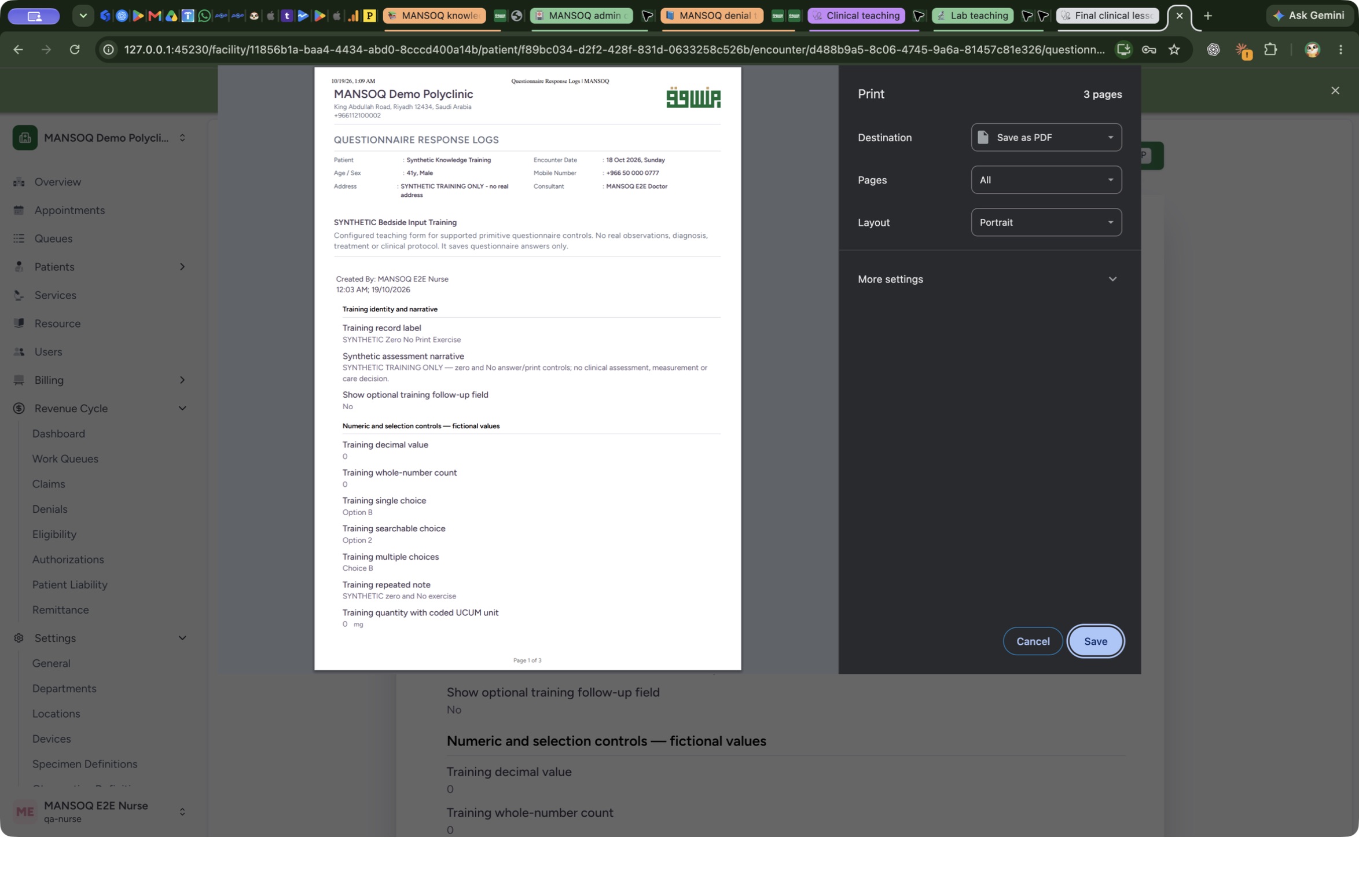
Select Print for the combined preview. In the macOS Chrome Print dialog, check Save as PDF, All pages and the actual page count. The two-response training example produces three portrait pages. Review the preview rather than assuming the single-response page count applies.
 123
123macOS Print dialog: confirm the combined page count
Capture details
Exact committed release 39b72767, existing Nurse, isolated fictional Polyclinic Inpatient case. Genuine macOS Chrome native print dialog; browser-specific controls are not MANSOQ form fields. Actual normal macOS Chrome combined print dialog shows three pages, Save as PDF and All pages. This finite example contains two matching responses; page count does not prove arbitrary larger query completeness.
Image SHA-256 a293ef7b0985ba755668f608cbbaa60de9594f07d2799ad1fd8e5aa90cc8a807
- Review the three-page output: The observed combined example is three pages; inspect each saved page after export.
- Confirm PDF and all pages: The local exercise uses Save as PDF with All pages selected.
- Save the combined file: Open the normal file destination dialog and give the combined output its own name.
10. Save and verify a separate combined PDF
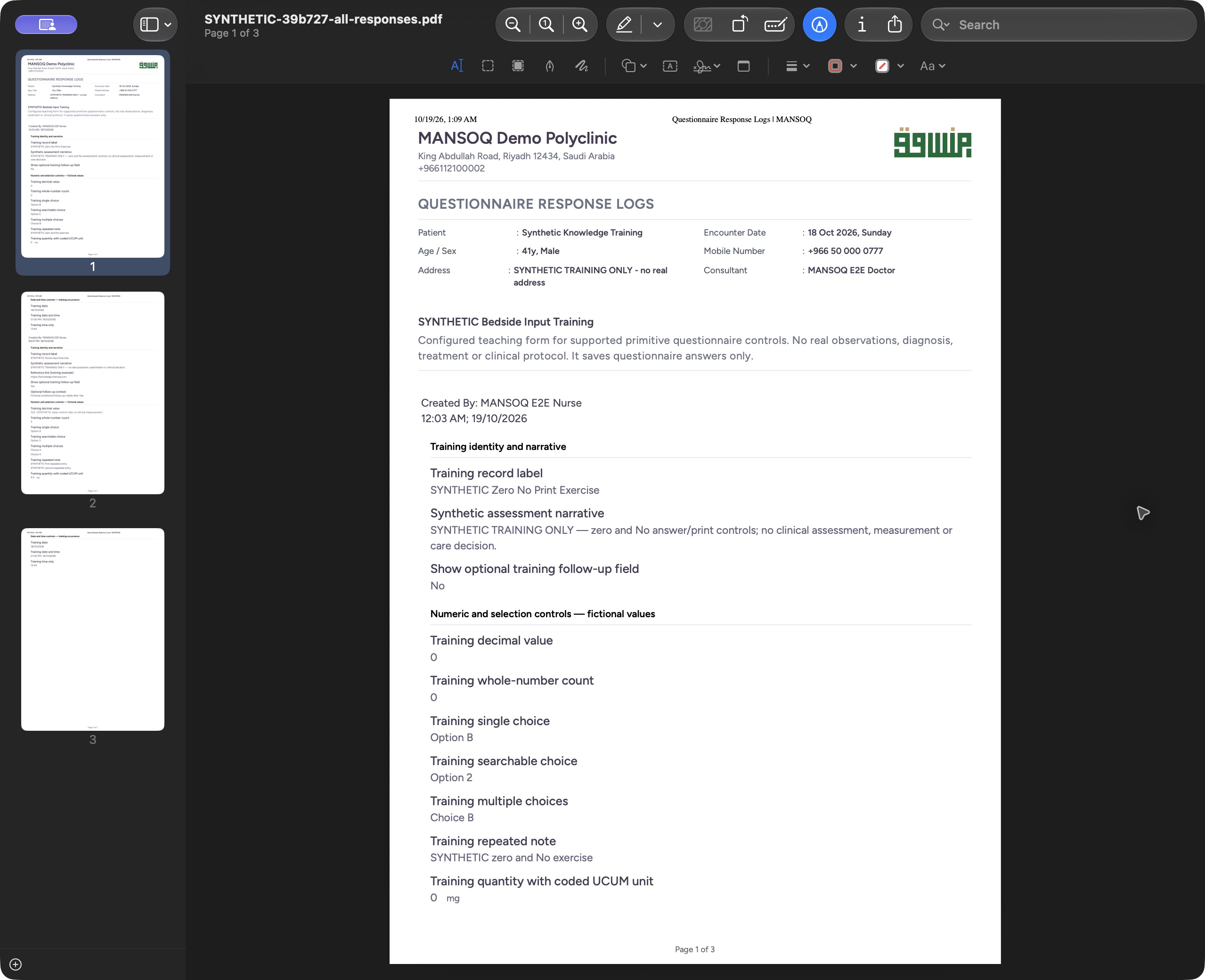
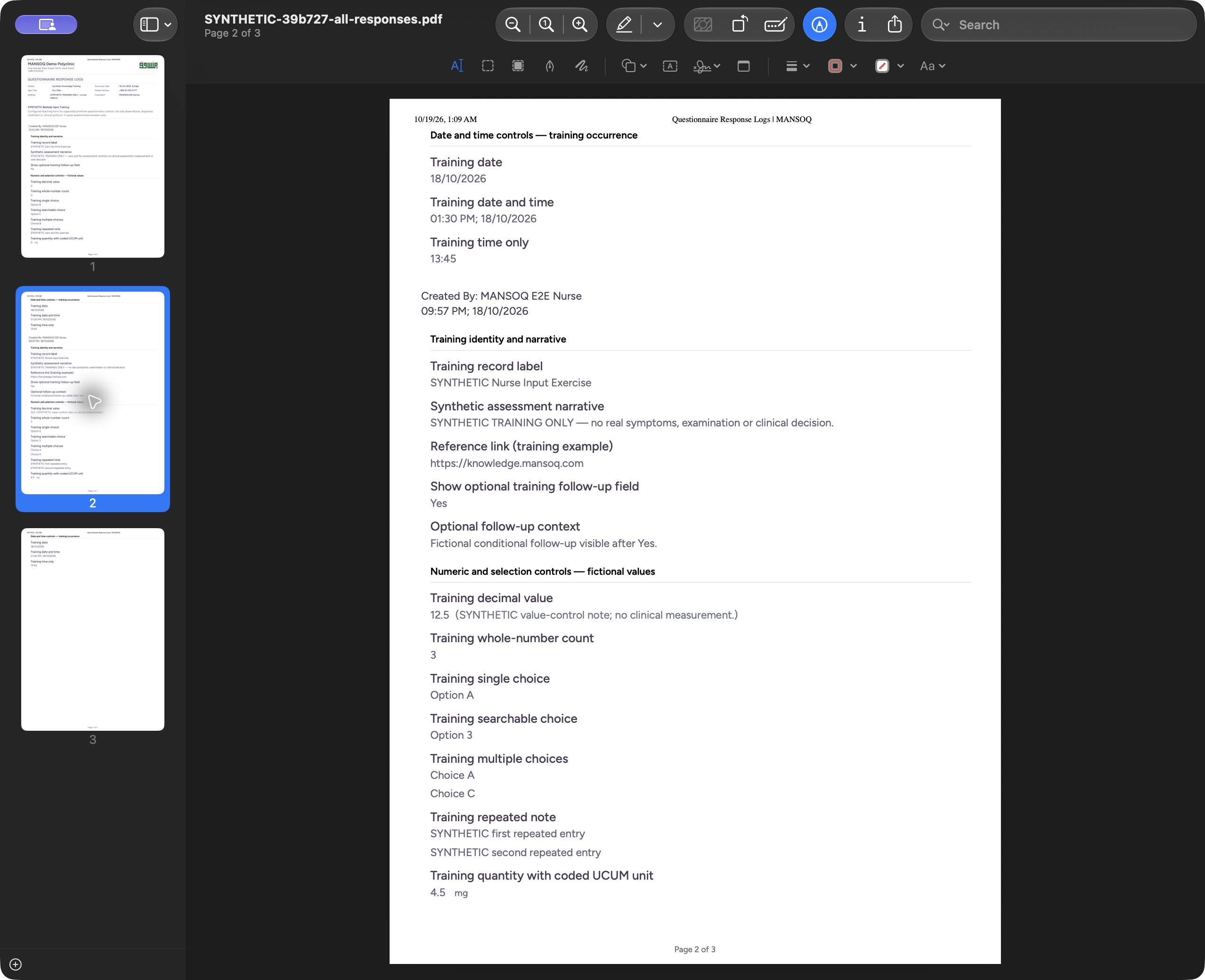
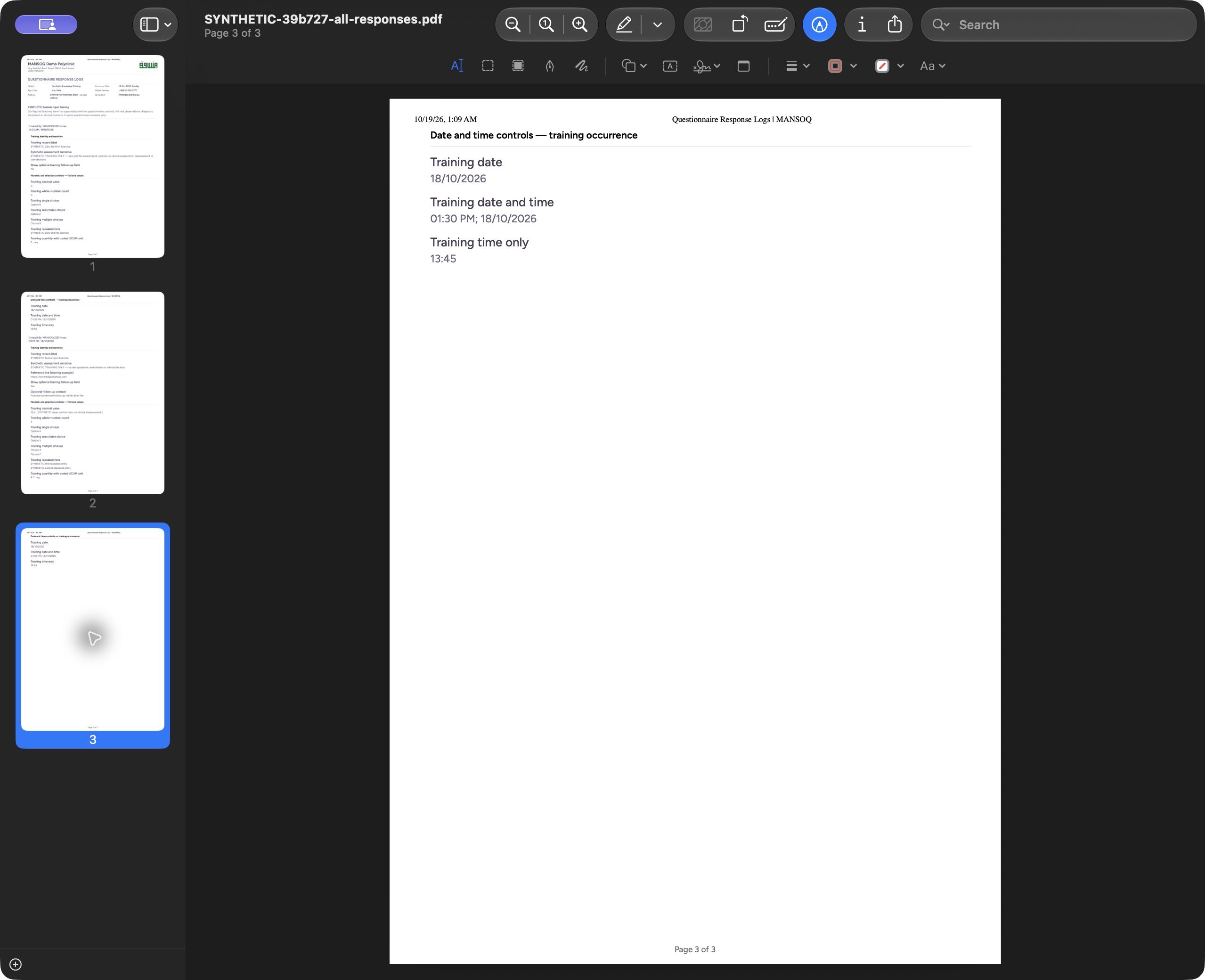
In the macOS Save dialog, use a distinct name such as SYNTHETIC-39b727-all-responses.pdf and select Save. Open that saved file in your PDF viewer. The illustrated macOS Preview title and thumbnails confirm three pages. Review each page: the newer response appears on page one, the earlier response label and its answers appear on page two, and the earlier date/time heading and all its answers remain together on page three. The PDF answer content was independently checked unchanged. Saving and printing did not alter the saved response answers.
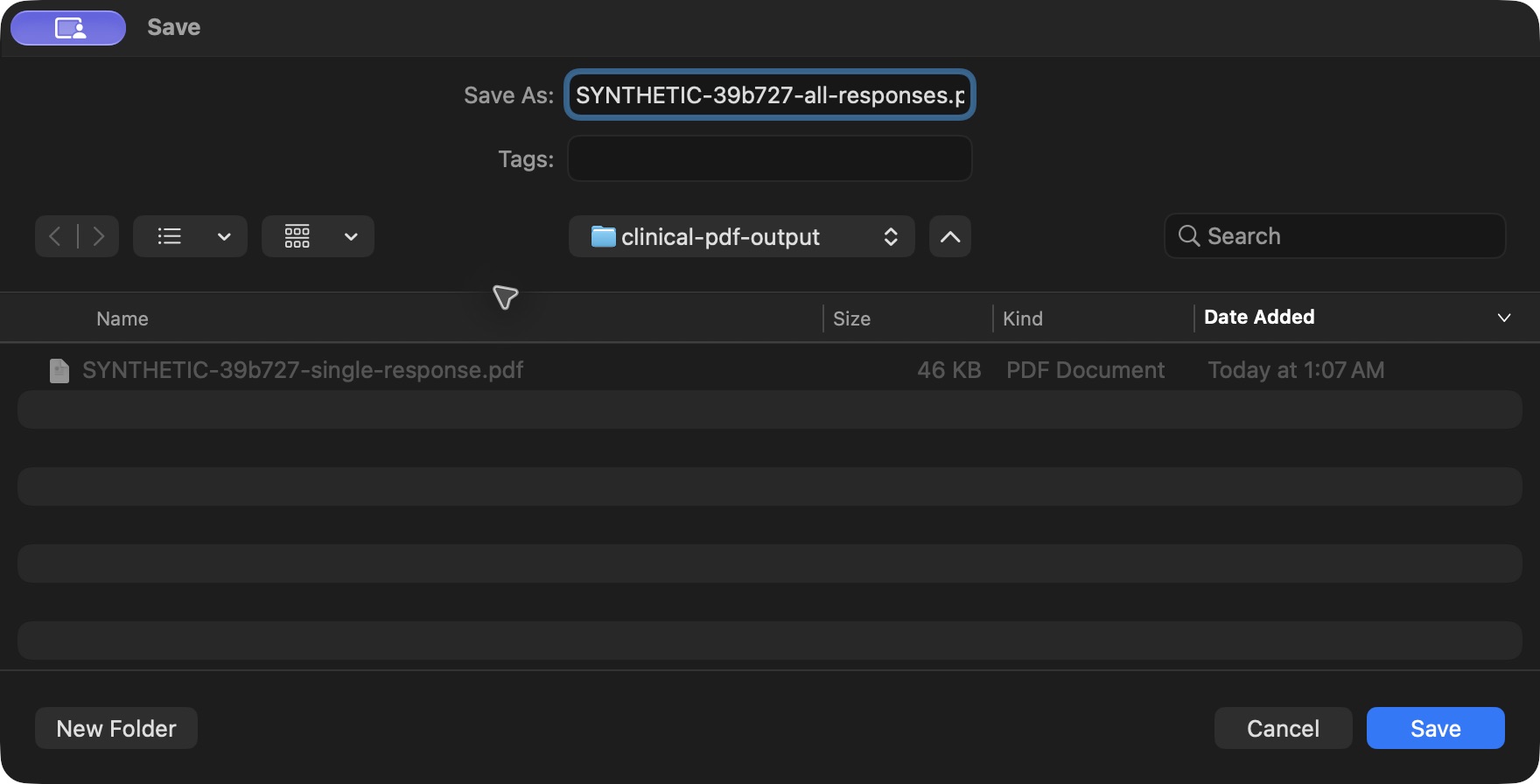 123
123macOS Save dialog: name the combined PDF separately
Capture details
Exact committed release 39b72767, existing Nurse, isolated fictional Polyclinic Inpatient case. Genuine macOS Chrome native print dialog; browser-specific controls are not MANSOQ form fields. Genuine macOS Save dialog, actual 1760 × 896 pixels. The earlier single-response PDF is visible in the chosen synthetic output folder; the combined output uses a distinct name. No resizing or cropping.
Image SHA-256 c7eeccc0ae98314130386839264f9b430aaa1224f5c75853c589ae3f5b07b8e0
- Use a separate combined file name: Keep the combined result distinct from the earlier single-response PDF.
- Check the output folder: Choose your approved storage location for the actual PDF.
- Write the combined PDF: Select Save, then open and review every saved page.
 12
12Open the saved combined PDF and confirm three pages
Capture details
Exact committed release 39b72767, existing Nurse, isolated fictional Polyclinic Inpatient case. Genuine local macOS Preview document viewer displaying the actual saved PDF; viewer controls are separate from MANSOQ form fields. Actual local Preview opened combined PDF SHA256 3e9d9eba…. The title and thumbnails show three pages. Page one contains the newer saved response, No, zero answers and 0 mg. The document is opened from the actual local Save output, without editing.
Image SHA-256 28426a98d92c8d0423ad1379149f8256e375b1116fc954223fa61345b0ff0980
- Actual combined file and page count: Confirm this is the separate all-responses file with three pages.
- Newer saved response: The combined output begins with the intended newer response label.
 123
123Inspect the earlier response on combined PDF page two
Capture details
Exact committed release 39b72767, existing Nurse, isolated fictional Polyclinic Inpatient case. Genuine local macOS Preview document viewer displaying the actual saved PDF; viewer controls are separate from MANSOQ form fields. Actual combined PDF Page 2 of 3 displays the newer response date group followed by the earlier Nurse record, its distinct label/time, Yes follow-up, 12.5, 3, choices, repeated notes and 4.5 mg. No additional date-group heading is orphaned at the bottom.
Image SHA-256 106e8f6c8c2ee69fa61e1ca04e72c9bbd1c451db62ff297e509f3ddb3c2511c8
- Combined page two: Use the actual file page count while reviewing each saved page.
- Earlier response identity: The earlier saved response keeps its own label and Nurse record time.
- Earlier quantity and unit: Verify the earlier response retained 4.5 mg.
 123
123Check the combined PDF last-page date/time group
Capture details
Exact committed release 39b72767, existing Nurse, isolated fictional Polyclinic Inpatient case. Genuine local macOS Preview document viewer displaying the actual saved PDF; viewer controls are separate from MANSOQ form fields. Actual combined PDF opened in macOS Preview, Page 3 of 3. The earlier response date/time group heading and all three answers remain together on the final page. The saved file is the independently hashed three-page output; no document annotation or content change was made.
Image SHA-256 41a1a99f343596ea83432e68cb4091a1da1054a4da1e90921f13ace909e95ce7
- Final combined page: The actual output viewer reports Page 3 of 3.
- Heading stays with its answers: Check the date/time group heading and its answers together on this saved page.
- Last saved answer: The time-only answer remains 13:45 on the same final page.
Understand the Print all boundary
For this release, the combined questionnaire preview requests only unstructured responses for the selected patient, questionnaire and encounter context. It is not a complete clinical chart, attachment export or structured clinical payload printout. The demonstrated set contains two returned records; larger histories, other questionnaires, other roles and other facility types remain separate qualification work.
12Choose one response or matching questionnaire responses
Capture details
Exact committed release 39b72767 on an isolated nonproduction clone. Existing Nurse; fictional Polyclinic Inpatient software exercise only. Actual normal menu on the exact final release. Print this response and Print all matching questionnaire responses are distinct from Mark as entered in error; no correction is performed.
Image SHA-256 c6e1c252ed5d4c1e2383517a7c4f15ddfbba2c433933da3ae10a8d9cf13717db
- Print one response: Open the selected response only.
- Print matching responses: Open matching unstructured responses for this questionnaire and encounter.
12Verify the combined questionnaire and encounter context
Capture details
Exact committed release 39b72767 on an isolated nonproduction clone. Existing Nurse; fictional Polyclinic Inpatient software exercise only. Actual combined preview from Print all SYNTHETIC Bedside Input Training responses. Normal Nurse GET verified exactly two matching unstructured responses for this questionnaire and encounter; this is not patient-wide or structured clinical export.
Image SHA-256 41eb86aadeb0090e2eb738c2ea7453f325c41071708f24bcb4942e7a57340584
- Print matching responses: This control prints the loaded matching response set for this questionnaire and encounter.
- Verify matching questionnaire: Confirm the questionnaire title and patient context before reviewing every included response.
12Identify the earlier response in the combined preview
Capture details
Exact committed release 39b72767 on an isolated nonproduction clone. Existing Nurse; fictional Polyclinic Inpatient software exercise only. The combined preview includes a separate earlier Nurse response, with its own author/time and SYNTHETIC Nurse Input Exercise label. Two response records remain distinct; this does not amend the newer response.
Image SHA-256 75a9ab3c25d63e8dcfb754db7cb40b5cb8cbbe6534d8f7c665d930f47bfc65f1
- Earlier response label: Confirm the earlier saved response is included as a separate record.
- Separate recorded time: Read the earlier response author/time independently from the newer exercise.
Use the checked output to recognize a complete print
Check the actual saved PDF, not just the browser preview: the patient and questionnaire must be correct, the intended response labels must be present, No and zero answers must remain readable, units and dates must stay with their questions, and no page may be blank, clipped or overlapping. On this exact release, the checked single PDF has two pages and the combined PDF has three; all five pages preserved the answer content and kept the date/time group headings with their answers. These are observed examples, not fixed page-count rules.
123Open the saved single-response PDF and verify page one
Capture details
Exact committed release 39b72767, existing Nurse, isolated fictional Polyclinic Inpatient case. Genuine local macOS Preview document viewer displaying the actual saved PDF; viewer controls are separate from MANSOQ form fields. Actual local macOS Preview opened the exact saved single PDF, SHA256 9bbb7318…. The title shows Page 1 of 2; the visible printed patient, response label, No, zero answers and 0 mg match the normal saved Nurse response. No file contents were edited.
Image SHA-256 28a0b80962f518ba2a41d6c7f895fc399f21cd8503239ddef26a86917c1c8164
- Saved file and page count: Confirm the actual single-response file is open and contains two pages.
- Selected response label: Confirm the printed saved record is SYNTHETIC Zero No Print Exercise.
- Zero with its unit: The real PDF retains the zero quantity and mg unit.
123Check the single PDF last page and date/time answers
Capture details
Exact committed release 39b72767, existing Nurse, isolated fictional Polyclinic Inpatient case. Genuine local macOS Preview document viewer displaying the actual saved PDF; viewer controls are separate from MANSOQ form fields. Actual saved single PDF opened in local Preview. Page 2 of 2 contains the complete date/time group heading and all three answers. This is the generated file, not the application preview or a rendered mock-up.
Image SHA-256 e3ab3d04546e46e4ef55c1308ba8ad9fbbc441c4e418f59a0f54f294cd8a044d
- Last page of the saved PDF: The file viewer reports Page 2 of 2.
- Date/time group heading: The actual PDF keeps this heading on the same page as its answers.
- Time-only answer: The saved time-only answer remains 13:45.
12Open the saved combined PDF and confirm three pages
Capture details
Exact committed release 39b72767, existing Nurse, isolated fictional Polyclinic Inpatient case. Genuine local macOS Preview document viewer displaying the actual saved PDF; viewer controls are separate from MANSOQ form fields. Actual local Preview opened combined PDF SHA256 3e9d9eba…. The title and thumbnails show three pages. Page one contains the newer saved response, No, zero answers and 0 mg. The document is opened from the actual local Save output, without editing.
Image SHA-256 28426a98d92c8d0423ad1379149f8256e375b1116fc954223fa61345b0ff0980
- Actual combined file and page count: Confirm this is the separate all-responses file with three pages.
- Newer saved response: The combined output begins with the intended newer response label.
123Inspect the earlier response on combined PDF page two
Capture details
Exact committed release 39b72767, existing Nurse, isolated fictional Polyclinic Inpatient case. Genuine local macOS Preview document viewer displaying the actual saved PDF; viewer controls are separate from MANSOQ form fields. Actual combined PDF Page 2 of 3 displays the newer response date group followed by the earlier Nurse record, its distinct label/time, Yes follow-up, 12.5, 3, choices, repeated notes and 4.5 mg. No additional date-group heading is orphaned at the bottom.
Image SHA-256 106e8f6c8c2ee69fa61e1ca04e72c9bbd1c451db62ff297e509f3ddb3c2511c8
- Combined page two: Use the actual file page count while reviewing each saved page.
- Earlier response identity: The earlier saved response keeps its own label and Nurse record time.
- Earlier quantity and unit: Verify the earlier response retained 4.5 mg.
123Check the combined PDF last-page date/time group
Capture details
Exact committed release 39b72767, existing Nurse, isolated fictional Polyclinic Inpatient case. Genuine local macOS Preview document viewer displaying the actual saved PDF; viewer controls are separate from MANSOQ form fields. Actual combined PDF opened in macOS Preview, Page 3 of 3. The earlier response date/time group heading and all three answers remain together on the final page. The saved file is the independently hashed three-page output; no document annotation or content change was made.
Image SHA-256 41a1a99f343596ea83432e68cb4091a1da1054a4da1e90921f13ace909e95ce7
- Final combined page: The actual output viewer reports Page 3 of 3.
- Heading stays with its answers: Check the date/time group heading and its answers together on this saved page.
- Last saved answer: The time-only answer remains 13:45 on the same final page.
Source evidence
Every citation uses this exact committed version. The private source repository requires access.
- repositories/platform/mansoq-core/mansoq/emr/api/viewsets/questionnaire_response.py:79 ·
39b7276732f88bc07ad0abb61619f7aafe3c9e14Source file checksum
e91f52d5191853851af09e05b8eb373b9645dce489043cf5821b7b5169a84e42 - repositories/platform/mansoq-core/mansoq/security/authorization/encounter.py:50 ·
39b7276732f88bc07ad0abb61619f7aafe3c9e14Source file checksum
0e7ff8afcfb57b2371201e16ee6fac26125d6e686af66ed7edd95e49bc07de78 - repositories/platform/mansoq-core/mansoq/security/permissions/encounter.py:68 ·
39b7276732f88bc07ad0abb61619f7aafe3c9e14Source file checksum
06b74efb763810e425de8529660f748ebd56509c729ebc532c8d115102b29218 - repositories/platform/mansoq-web/src/Routers/routes/ConsultationRoutes.tsx:34 ·
39b7276732f88bc07ad0abb61619f7aafe3c9e14Source file checksum
58d982de3558969447b6b74d9839168a8cbb82ba45b15995dff081d3a3dd0d57 - repositories/platform/mansoq-web/src/components/Facility/ConsultationDetails/PrintAllQuestionnaireResponses.tsx:66 ·
39b7276732f88bc07ad0abb61619f7aafe3c9e14Source file checksum
e7314df6d693bbd49e54e5f007521488cbc82b164dba4fc0ba2e317049b5cc1a - repositories/platform/mansoq-web/src/components/Facility/ConsultationDetails/PrintQuestionnaireResponse.tsx:53 ·
39b7276732f88bc07ad0abb61619f7aafe3c9e14Source file checksum
626d6b496a09058d94929bbec29bd34a3c91a95111466342a278e6bca0f2202e - repositories/platform/mansoq-web/src/components/Facility/ConsultationDetails/QuestionnaireResponsesList.tsx:298 ·
39b7276732f88bc07ad0abb61619f7aafe3c9e14Source file checksum
c4c607439b9c4bbeec4d54915d50a02aa12c67d43993011dc2365e19ff28c9c7