 MANSOQ
 Revenue Cycle · VERSION 39b72767
Attest a performed charge and prepare an insured visit
Find the correct episode, attest its performed charge, enter a future expiry and inspect the saved provisional amounts.
Facility administrator · RCM specialist · Finance manager
 1234
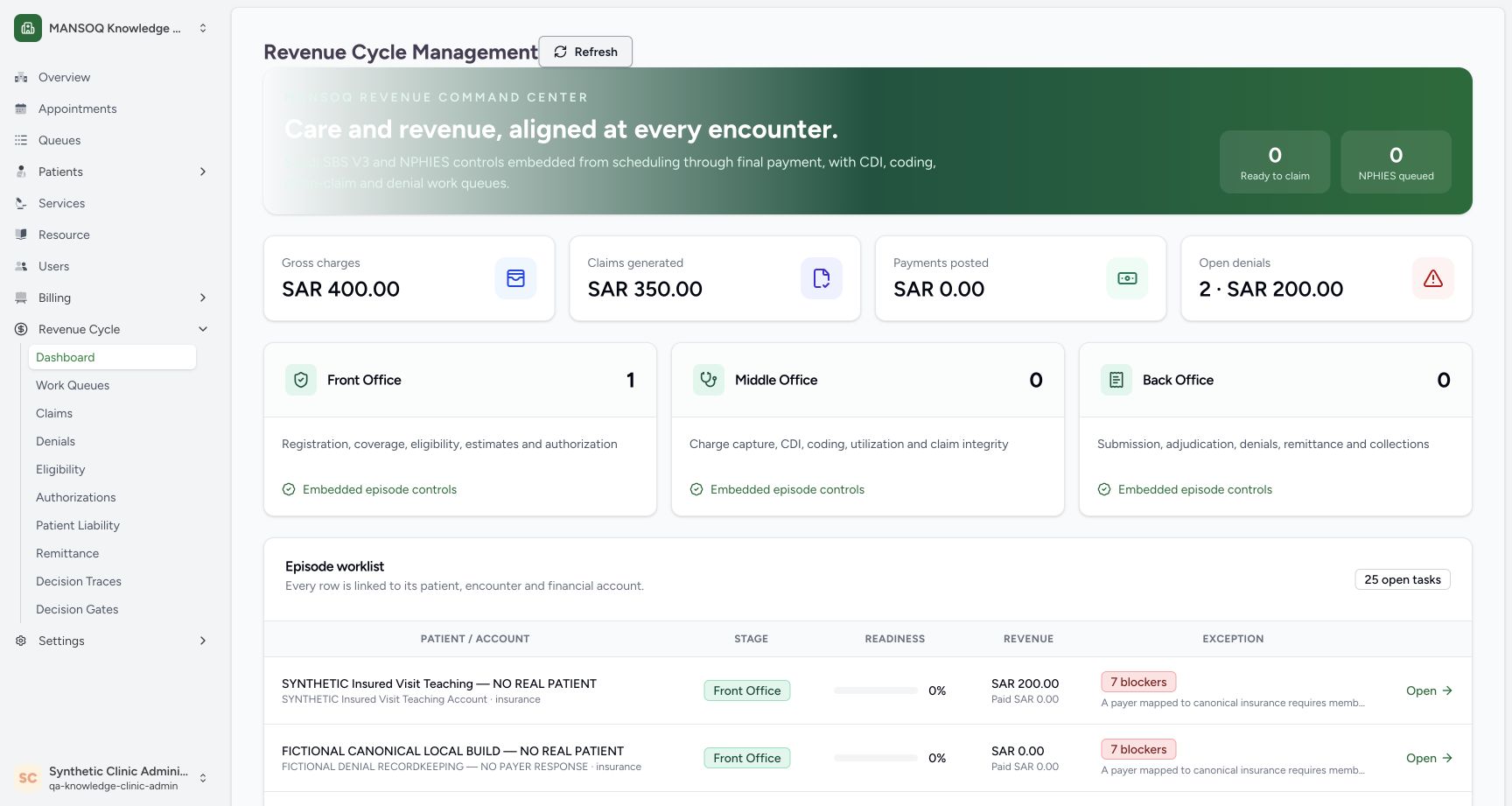
1234Find the exact patient and account in the episode worklist
Capture details
Fresh 1728×921 Chrome capture of exact committed MANSOQ release 39b72767 using the full local core/web profile. This synthetic Clinic demonstration does not establish production deployment or real payer authority. The dashboard contains the distinct SYNTHETIC Insured Visit Teaching patient/account row, SAR 200 revenue, seven initial blockers and its Open link. Other rows and totals are facility context.
Image SHA-256 14b19e01ec43a95d68f7b6a991fb1027e0a4f130e0772e4b91b2463295efba91
- Correct synthetic patient: Match the intended patient rather than another worklist row.
- Correct episode account: Confirm the corresponding teaching account.
- Read the blockers: Readiness and blockers are separate from the gross charge amount.
- Open this episode: Open the link on the matching patient/account row.
 12345
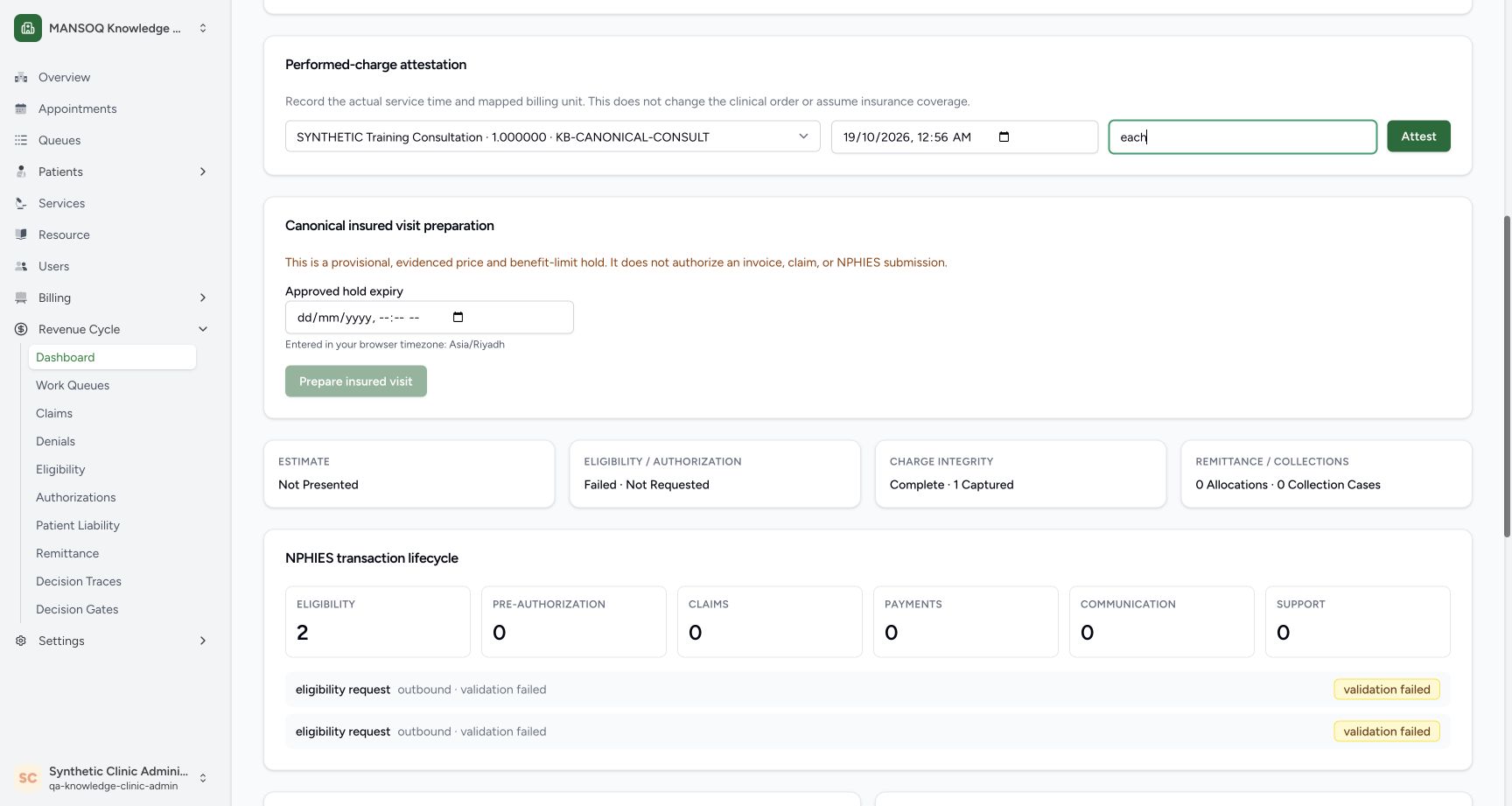
12345Review the complete performed-charge inputs
Capture details
Fresh 1728×921 Chrome capture of exact committed MANSOQ release 39b72767 using the full local core/web profile. This synthetic Clinic demonstration does not establish production deployment or real payer authority. The selected SYNTHETIC Training Consultation, 19 October 2026 12:56 AM browser-local time and exact unit each are visible before the enabled Attest action. The expiry below is still empty and Prepare is disabled.
Image SHA-256 fb280a53c48695be8ad0f1aa89895225878cc7202301234fa7e23545db40d3c6
- Correct mapped charge: The local mapped consultation is selected.
- Actual performed time: This teaching instant is 19 October 00:56 Asia/Riyadh; use the actual service time in your workflow.
- Exact unit each: Use the configured service/tariff unit; do not guess a substitute.
- Attest once: Submit the reviewed performed-service fact.
- Expiry is still empty: This frame has not reached the Prepare action.
 1234
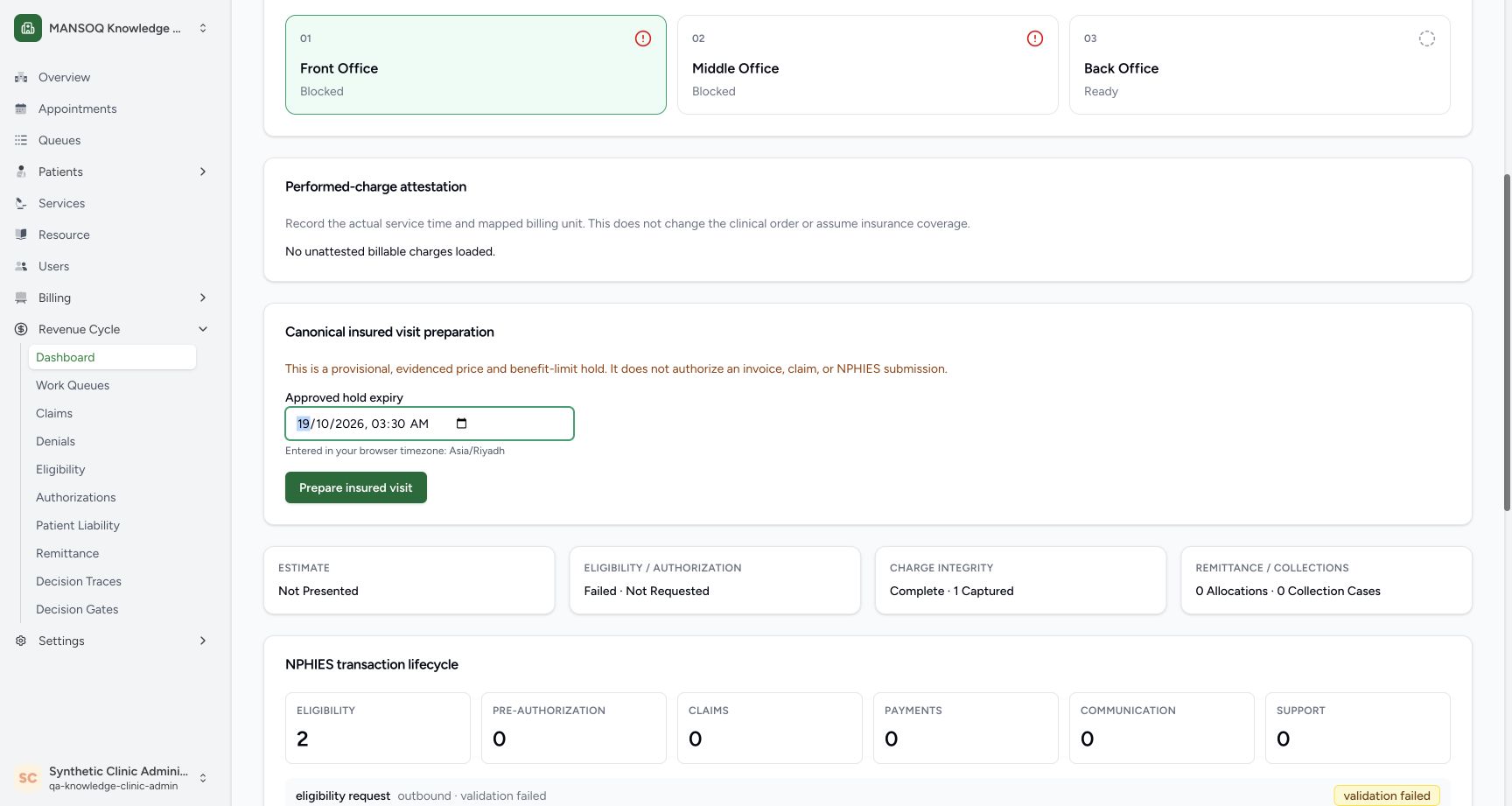
1234Enter the future expiry and prepare the insured visit
Capture details
Fresh 1728×921 Chrome capture of exact committed MANSOQ release 39b72767 using the full local core/web profile. This synthetic Clinic demonstration does not establish production deployment or real payer authority. The filled approved hold expiry 19 October 2026 03:30 AM, Asia/Riyadh browser hint and enabled Prepare insured visit button are visible before submission. The page explicitly says this provisional operation does not authorize an invoice, claim or NPHIES submission.
Image SHA-256 66b9046a925868815e05494455fe499b9e00a837e09c638bb8073e4816ad7c6d
- Approved future expiry: The recorded example uses 19 October 03:30 AM; use your own currently valid approved future instant.
- Browser timezone: The field is interpreted in the displayed browser timezone.
- Prepare insured visit: Choose this enabled action after checking the inputs.
- Provisional boundary: Preparation is not invoice, claim or external-submission authorization.
 123456
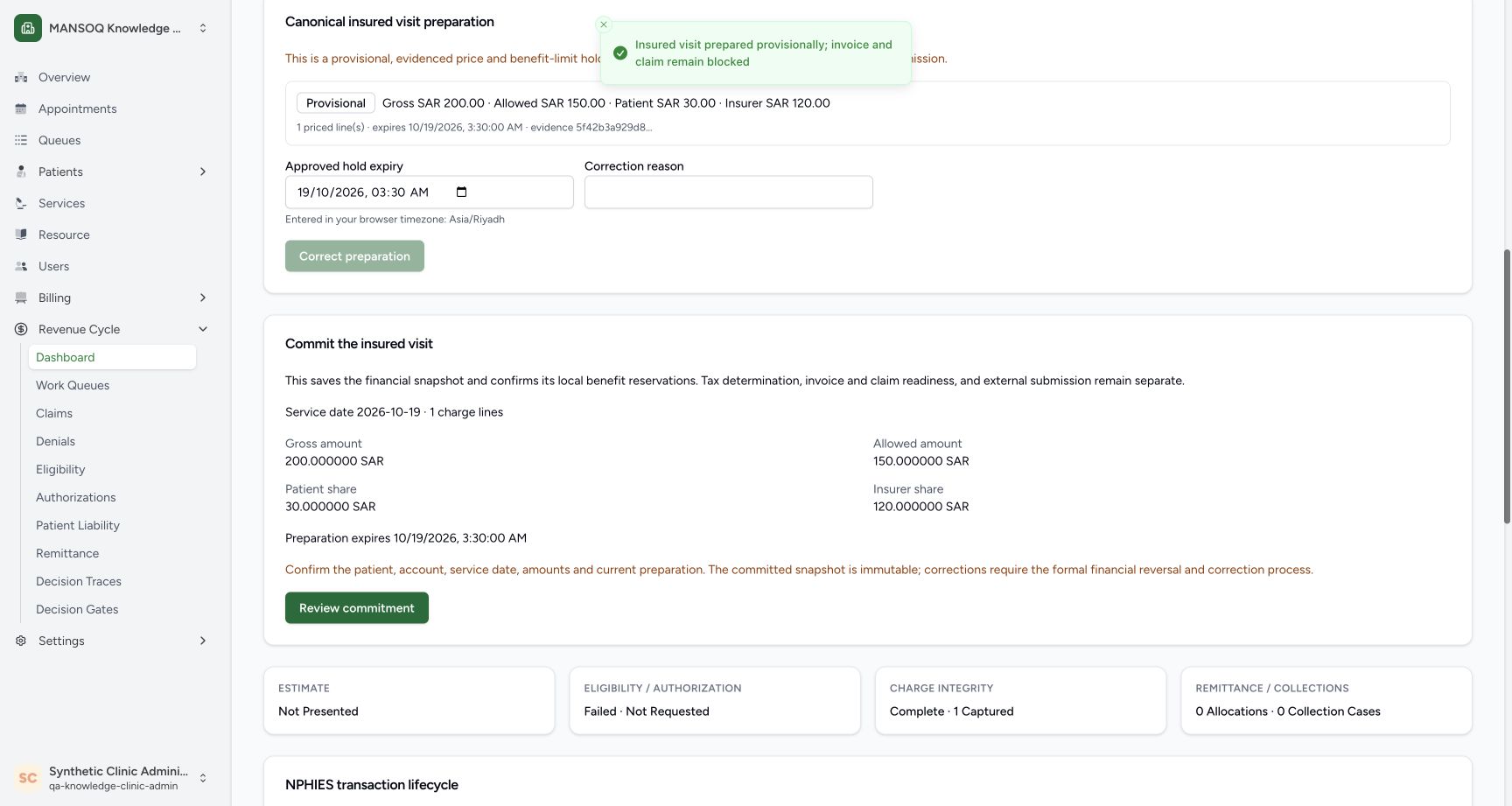
Inspect the saved provisional preparation and commitment review
Capture details
Fresh 1728×921 Chrome capture of exact committed MANSOQ release 39b72767 using the full local core/web profile. This synthetic Clinic demonstration does not establish production deployment or real payer authority. The provisional card shows gross SAR 200, allowed SAR 150, patient share SAR 30 and insurer share SAR 120, one priced line, expiry 03:30 AM and a saved evidence fingerprint. The complete commitment panel shows service date 19 October, the same four amounts, expiry and Review commitment. A toast says invoice and claim remain blocked.
Image SHA-256 a876db9507e95cc353768d8bf41e6494f19a0211a0b06083c69f55a424d51733
- Provisional state: The saved preparation is not invoice or claim clearance.
- Four resolved amounts: Read gross SAR 200, allowed SAR 150, patient share SAR 30 and insurer share SAR 120 separately.
- Expiry and evidence: Check the saved expiry and evidence fingerprint.
- Service date and line count: The panel shows 19 October and one charge line.
- Allowed amount: The exact stored snapshot amount is 150 SAR.
- Review commitment: This opens a review; it does not itself commit.
10 of 12 content blocks have reviewed image alignment. Missing overview or prerequisite images remain open.
Before you begin
- Use an authorized facility account. This walkthrough uses an existing Facility Admin with the required charge/account and insured-visit preparation permissions. A knowledge-base page does not grant access.
- Use a billable charge for the correct patient, encounter, account and facility, with the supported service/unit mapping and configured coverage. This example uses an explicitly fictional IT-seeded baseline; it is not a real payer contract or an activation workflow.
1. Select the facility and open Revenue Cycle
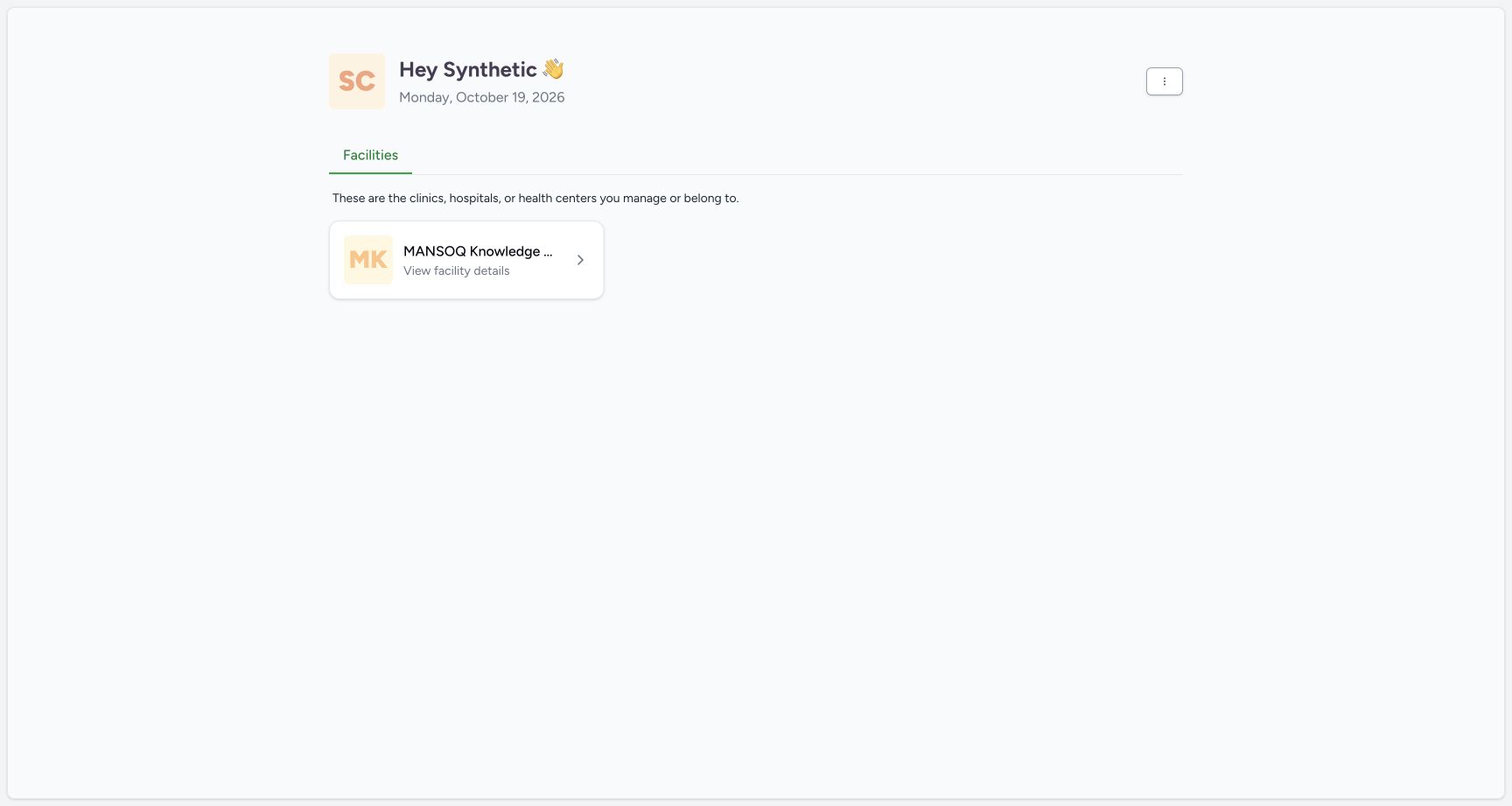
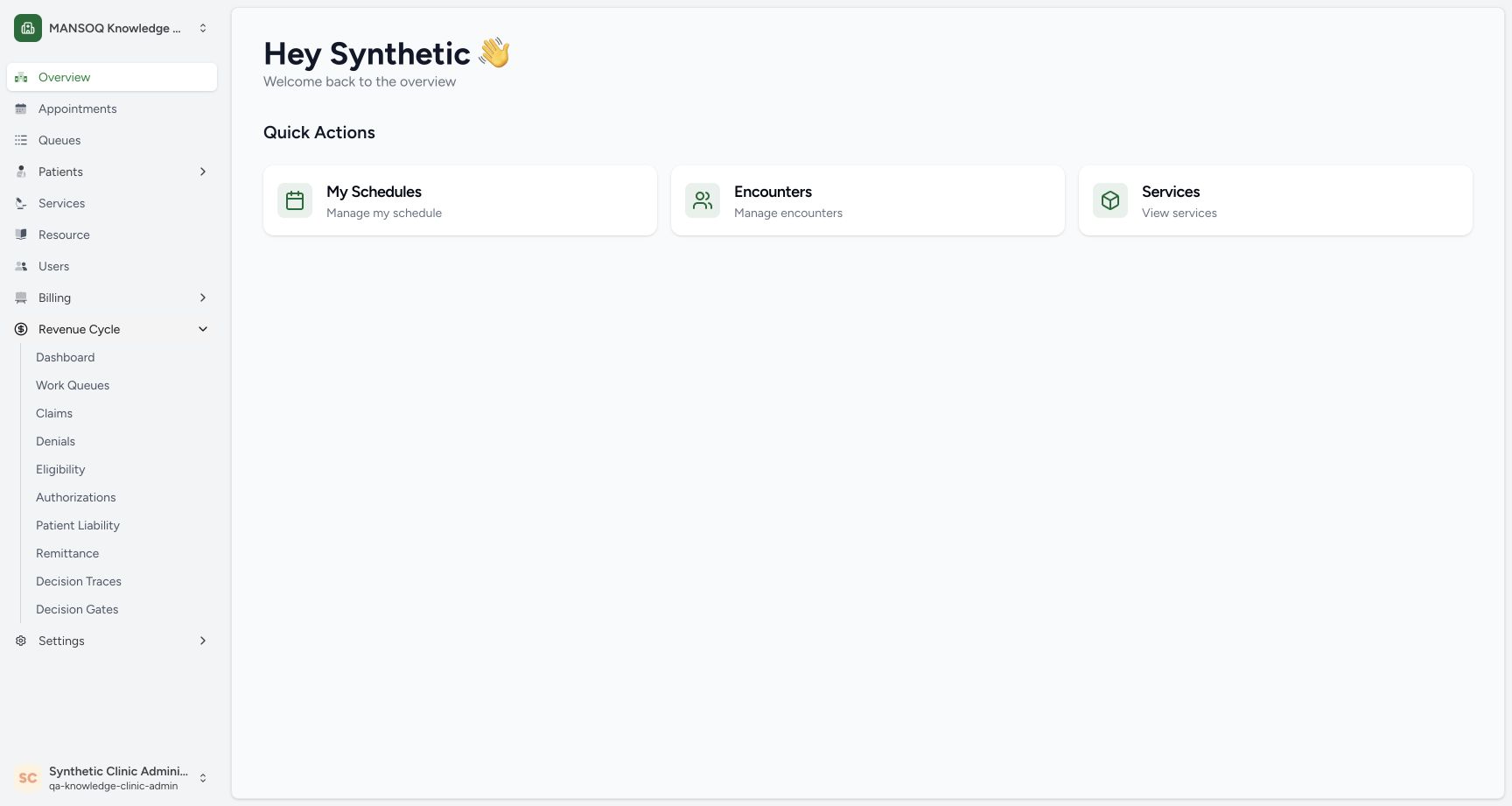
Choose the intended facility card. In its sidebar, expand Revenue Cycle and open Dashboard. Confirm the selected facility and signed-in account before opening a financial episode. The card label is truncated in the first image, so check the facility context after opening it.
 1
1Select the intended facility
Capture details
Fresh 1728×921 Chrome capture of exact committed MANSOQ release 39b72767 using the full local core/web profile. This synthetic Clinic demonstration does not establish production deployment or real payer authority. The synthetic Facility Admin home shows the MANSOQ Knowledge facility card. Its label is truncated in this view; verify the facility context after selecting it.
Image SHA-256 4241ee1eb04dcdd5a3e18420103437f2f3de663efc4c9531df22949ff42bf015
- Open the intended facility: Select the facility card, then verify its context before opening a patient episode.
 123
123Open Revenue Cycle from the facility sidebar
Capture details
Fresh 1728×921 Chrome capture of exact committed MANSOQ release 39b72767 using the full local core/web profile. This synthetic Clinic demonstration does not establish production deployment or real payer authority. The facility overview shows the expanded Revenue Cycle menu and Dashboard link. The lower-left account is the existing synthetic Clinic Admin.
Image SHA-256 0aae6e38f21090223f96455b5c3116ae40ea9f16a6184d9323d18b6653a11785
- Revenue Cycle: Expand the Revenue Cycle menu in the selected facility.
- Dashboard: Open the dashboard to find the episode worklist.
- Current account: Confirm the signed-in account. These images use an existing Facility Admin; they do not grant access.
2. Find the exact episode in the worklist
Match both patient and account in Episode worklist, then use Open on that row. This walkthrough uses SYNTHETIC Insured Visit Teaching — NO REAL PATIENT and its separate teaching account. Dashboard totals and nearby rows are facility-wide context; they are not the financial snapshot for this individual episode.
1234Find the exact patient and account in the episode worklist
Capture details
Fresh 1728×921 Chrome capture of exact committed MANSOQ release 39b72767 using the full local core/web profile. This synthetic Clinic demonstration does not establish production deployment or real payer authority. The dashboard contains the distinct SYNTHETIC Insured Visit Teaching patient/account row, SAR 200 revenue, seven initial blockers and its Open link. Other rows and totals are facility context.
Image SHA-256 14b19e01ec43a95d68f7b6a991fb1027e0a4f130e0772e4b91b2463295efba91
- Correct synthetic patient: Match the intended patient rather than another worklist row.
- Correct episode account: Confirm the corresponding teaching account.
- Read the blockers: Readiness and blockers are separate from the gross charge amount.
- Open this episode: Open the link on the matching patient/account row.
3. Confirm the patient, account and coverage context
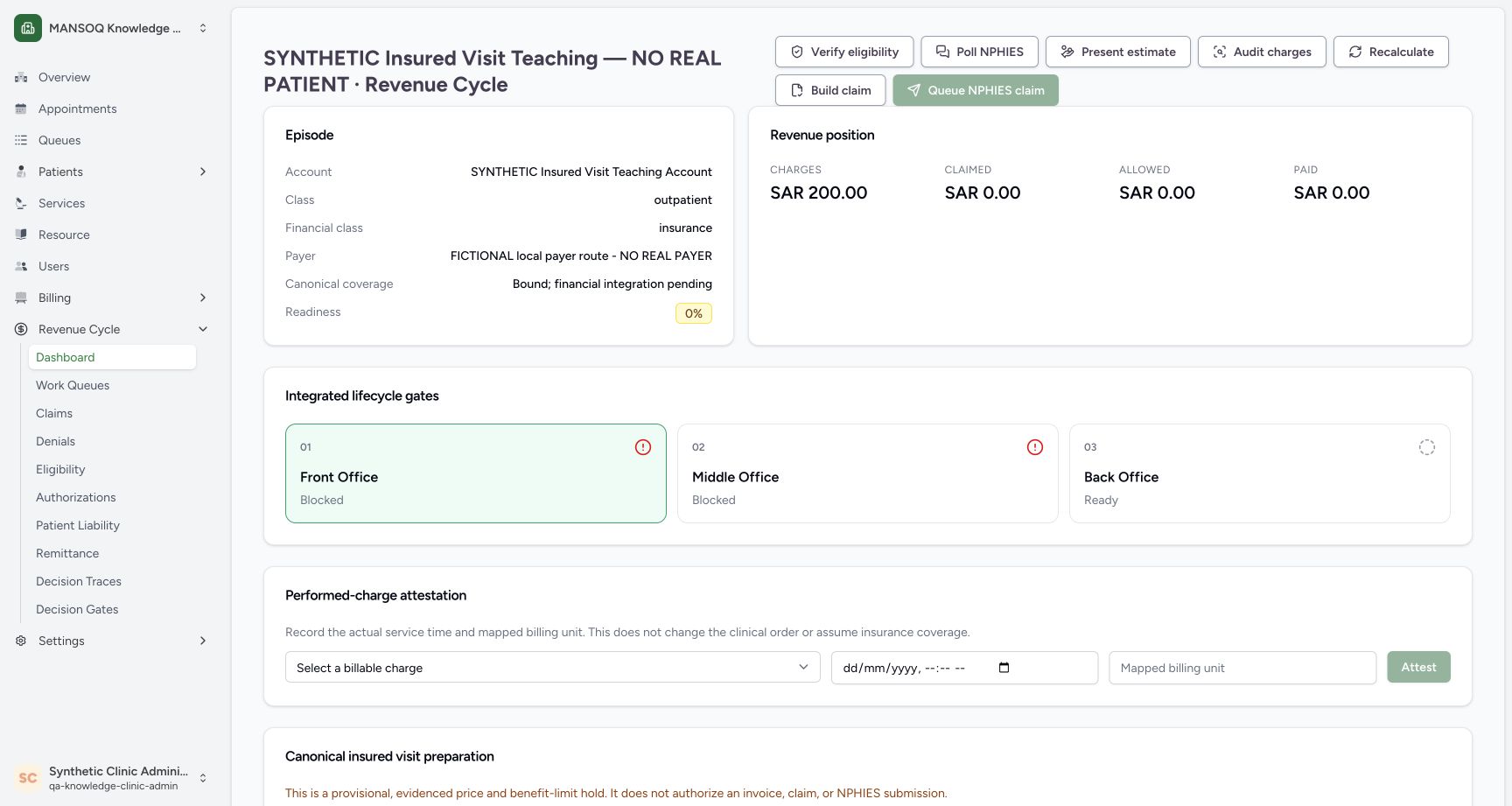
Check the case heading, account, insurance financial class and payer. The example explicitly names a fictional local payer and says canonical coverage is bound while financial integration is pending. A bound link alone is not verified eligibility or claim clearance. The case header has SAR 200 charges and zero claimed, allowed and paid projections because no claim exists.
 123456
Confirm episode context before recording performance
Capture details
Fresh 1728×921 Chrome capture of exact committed MANSOQ release 39b72767 using the full local core/web profile. This synthetic Clinic demonstration does not establish production deployment or real payer authority. The case shows the synthetic patient/account, insurance financial class, explicitly fictional payer, bound canonical coverage with financial integration pending, SAR 200 charges and empty attestation fields. Claimed, allowed and paid header projections remain zero.
Image SHA-256 19469cea1c8b8f97cf8f7c6a36934e4bffee4a3eb07a3c2a39311fc964c64b61
- Patient identity: Confirm the patient and revenue-cycle episode.
- Episode account: Confirm the account before changing a financial fact.
- Fictional payer context: This local route is explicitly not a real payer.
- Bound coverage is not clearance: The link is bound while financial integration is pending.
- Billable charge selector: Choose the intended unattested billable charge.
- Mapped billing unit: The exact service billing unit is required.
4. Enter the actual performance time and mapped unit
Select the intended billable charge. Enter its actual service time in the browser-local date/time field and the exact configured unit. The recorded example uses 19 October 2026 at 12:56 AM Asia/Riyadh, equivalent to 18 October 21:56 UTC, and unit each. Use the actual time for your own service, never copy the demo timestamp. The backend requires an aware, nonfuture instant and matching patient/account/encounter/facility, charge mapping and unit.
123456Confirm episode context before recording performance
Capture details
Fresh 1728×921 Chrome capture of exact committed MANSOQ release 39b72767 using the full local core/web profile. This synthetic Clinic demonstration does not establish production deployment or real payer authority. The case shows the synthetic patient/account, insurance financial class, explicitly fictional payer, bound canonical coverage with financial integration pending, SAR 200 charges and empty attestation fields. Claimed, allowed and paid header projections remain zero.
Image SHA-256 19469cea1c8b8f97cf8f7c6a36934e4bffee4a3eb07a3c2a39311fc964c64b61
- Patient identity: Confirm the patient and revenue-cycle episode.
- Episode account: Confirm the account before changing a financial fact.
- Fictional payer context: This local route is explicitly not a real payer.
- Bound coverage is not clearance: The link is bound while financial integration is pending.
- Billable charge selector: Choose the intended unattested billable charge.
- Mapped billing unit: The exact service billing unit is required.
12345Review the complete performed-charge inputs
Capture details
Fresh 1728×921 Chrome capture of exact committed MANSOQ release 39b72767 using the full local core/web profile. This synthetic Clinic demonstration does not establish production deployment or real payer authority. The selected SYNTHETIC Training Consultation, 19 October 2026 12:56 AM browser-local time and exact unit each are visible before the enabled Attest action. The expiry below is still empty and Prepare is disabled.
Image SHA-256 fb280a53c48695be8ad0f1aa89895225878cc7202301234fa7e23545db40d3c6
- Correct mapped charge: The local mapped consultation is selected.
- Actual performed time: This teaching instant is 19 October 00:56 Asia/Riyadh; use the actual service time in your workflow.
- Exact unit each: Use the configured service/tariff unit; do not guess a substitute.
- Attest once: Submit the reviewed performed-service fact.
- Expiry is still empty: This frame has not reached the Prepare action.
5. Attest the performed charge
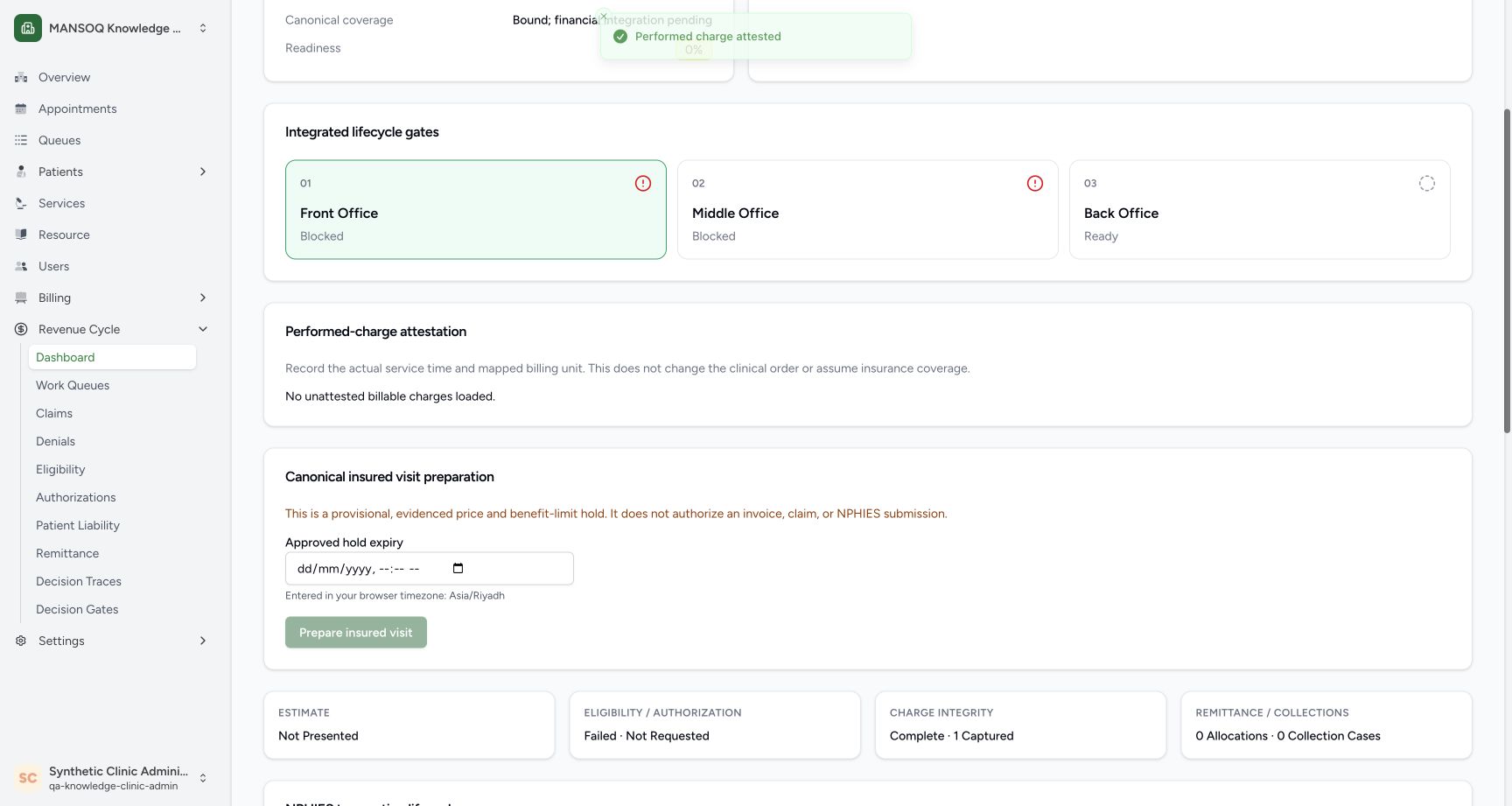
Choose Attest once and wait for Performed charge attested. The saved charge leaves the unattested selector. In this case the widget then says No unattested billable charges loaded. Independent readback confirms one saved charge capture with one unit each, gross SAR 200, the reviewed instant and the existing Facility Admin actor. Recording performance does not change the clinical order or assume insurance coverage.
12345Review the complete performed-charge inputs
Capture details
Fresh 1728×921 Chrome capture of exact committed MANSOQ release 39b72767 using the full local core/web profile. This synthetic Clinic demonstration does not establish production deployment or real payer authority. The selected SYNTHETIC Training Consultation, 19 October 2026 12:56 AM browser-local time and exact unit each are visible before the enabled Attest action. The expiry below is still empty and Prepare is disabled.
Image SHA-256 fb280a53c48695be8ad0f1aa89895225878cc7202301234fa7e23545db40d3c6
- Correct mapped charge: The local mapped consultation is selected.
- Actual performed time: This teaching instant is 19 October 00:56 Asia/Riyadh; use the actual service time in your workflow.
- Exact unit each: Use the configured service/tariff unit; do not guess a substitute.
- Attest once: Submit the reviewed performed-service fact.
- Expiry is still empty: This frame has not reached the Prepare action.
 12345
12345Verify the saved attestation and remaining preparation inputs
Capture details
Fresh 1728×921 Chrome capture of exact committed MANSOQ release 39b72767 using the full local core/web profile. This synthetic Clinic demonstration does not establish production deployment or real payer authority. The UI reports Performed charge attested and no unattested billable charges loaded. The approved hold expiry is still empty; Prepare remains disabled. Independent stored records confirm the captured service fact.
Image SHA-256 101e944c933379bdc12282c8c0d4c06379117dbcc13f229c9e44c98cbb20d226
- Attestation saved: The UI reports the completed attestation.
- No remaining unattested row: The captured charge is no longer offered in this widget.
- Hold expiry required: Enter an approved future expiry before preparation.
- Browser timezone: Read the actual Asia/Riyadh hint before entering the expiry.
- Prepare still disabled: An empty expiry is not a completed preparation.
6. Enter an approved future expiry
Read the browser timezone hint and enter the approved hold expiry. This demonstration was performed before 19 October 03:30 AM Asia/Riyadh, so that future instant was valid at the time. A live workflow needs its own currently valid approved future instant. Check date, AM/PM and timezone carefully. The field is interpreted in the displayed browser timezone; the server validates the resulting aware instant.
12345Verify the saved attestation and remaining preparation inputs
Capture details
Fresh 1728×921 Chrome capture of exact committed MANSOQ release 39b72767 using the full local core/web profile. This synthetic Clinic demonstration does not establish production deployment or real payer authority. The UI reports Performed charge attested and no unattested billable charges loaded. The approved hold expiry is still empty; Prepare remains disabled. Independent stored records confirm the captured service fact.
Image SHA-256 101e944c933379bdc12282c8c0d4c06379117dbcc13f229c9e44c98cbb20d226
- Attestation saved: The UI reports the completed attestation.
- No remaining unattested row: The captured charge is no longer offered in this widget.
- Hold expiry required: Enter an approved future expiry before preparation.
- Browser timezone: Read the actual Asia/Riyadh hint before entering the expiry.
- Prepare still disabled: An empty expiry is not a completed preparation.
1234Enter the future expiry and prepare the insured visit
Capture details
Fresh 1728×921 Chrome capture of exact committed MANSOQ release 39b72767 using the full local core/web profile. This synthetic Clinic demonstration does not establish production deployment or real payer authority. The filled approved hold expiry 19 October 2026 03:30 AM, Asia/Riyadh browser hint and enabled Prepare insured visit button are visible before submission. The page explicitly says this provisional operation does not authorize an invoice, claim or NPHIES submission.
Image SHA-256 66b9046a925868815e05494455fe499b9e00a837e09c638bb8073e4816ad7c6d
- Approved future expiry: The recorded example uses 19 October 03:30 AM; use your own currently valid approved future instant.
- Browser timezone: The field is interpreted in the displayed browser timezone.
- Prepare insured visit: Choose this enabled action after checking the inputs.
- Provisional boundary: Preparation is not invoice, claim or external-submission authorization.
7. Prepare and inspect the provisional result
When Prepare insured visit is enabled, choose it once. Inspect the saved Provisional card, one priced line, expiry and evidence fingerprint. The demonstration resolves gross SAR 200, allowed SAR 150, patient share SAR 30 and insurer share SAR 120. The visible notice and toast say preparation does not authorize an invoice, claim or NPHIES submission. Open Review commitment only after checking this current preparation.
1234Enter the future expiry and prepare the insured visit
Capture details
Fresh 1728×921 Chrome capture of exact committed MANSOQ release 39b72767 using the full local core/web profile. This synthetic Clinic demonstration does not establish production deployment or real payer authority. The filled approved hold expiry 19 October 2026 03:30 AM, Asia/Riyadh browser hint and enabled Prepare insured visit button are visible before submission. The page explicitly says this provisional operation does not authorize an invoice, claim or NPHIES submission.
Image SHA-256 66b9046a925868815e05494455fe499b9e00a837e09c638bb8073e4816ad7c6d
- Approved future expiry: The recorded example uses 19 October 03:30 AM; use your own currently valid approved future instant.
- Browser timezone: The field is interpreted in the displayed browser timezone.
- Prepare insured visit: Choose this enabled action after checking the inputs.
- Provisional boundary: Preparation is not invoice, claim or external-submission authorization.
123456Inspect the saved provisional preparation and commitment review
Capture details
Fresh 1728×921 Chrome capture of exact committed MANSOQ release 39b72767 using the full local core/web profile. This synthetic Clinic demonstration does not establish production deployment or real payer authority. The provisional card shows gross SAR 200, allowed SAR 150, patient share SAR 30 and insurer share SAR 120, one priced line, expiry 03:30 AM and a saved evidence fingerprint. The complete commitment panel shows service date 19 October, the same four amounts, expiry and Review commitment. A toast says invoice and claim remain blocked.
Image SHA-256 a876db9507e95cc353768d8bf41e6494f19a0211a0b06083c69f55a424d51733
- Provisional state: The saved preparation is not invoice or claim clearance.
- Four resolved amounts: Read gross SAR 200, allowed SAR 150, patient share SAR 30 and insurer share SAR 120 separately.
- Expiry and evidence: Check the saved expiry and evidence fingerprint.
- Service date and line count: The panel shows 19 October and one charge line.
- Allowed amount: The exact stored snapshot amount is 150 SAR.
- Review commitment: This opens a review; it does not itself commit.
Understand the two local eligibility failures
The transaction list shows two eligibility rows marked validation failed. Separate stored-record checks show both belong to this new case, patient and coverage; they were automatically created by account/coverage hooks during the fictional prerequisite setup. Both failed before transport, with no endpoint, sent time, HTTP status or transport attempt. They are not payer responses. Real provider/site licensing and endpoint requirements remain unresolved; no external authority was invented to clear them.
12345Review the complete performed-charge inputs
Capture details
Fresh 1728×921 Chrome capture of exact committed MANSOQ release 39b72767 using the full local core/web profile. This synthetic Clinic demonstration does not establish production deployment or real payer authority. The selected SYNTHETIC Training Consultation, 19 October 2026 12:56 AM browser-local time and exact unit each are visible before the enabled Attest action. The expiry below is still empty and Prepare is disabled.
Image SHA-256 fb280a53c48695be8ad0f1aa89895225878cc7202301234fa7e23545db40d3c6
- Correct mapped charge: The local mapped consultation is selected.
- Actual performed time: This teaching instant is 19 October 00:56 Asia/Riyadh; use the actual service time in your workflow.
- Exact unit each: Use the configured service/tariff unit; do not guess a substitute.
- Attest once: Submit the reviewed performed-service fact.
- Expiry is still empty: This frame has not reached the Prepare action.
 123456
Read all six remaining blockers including no claim built
Capture details
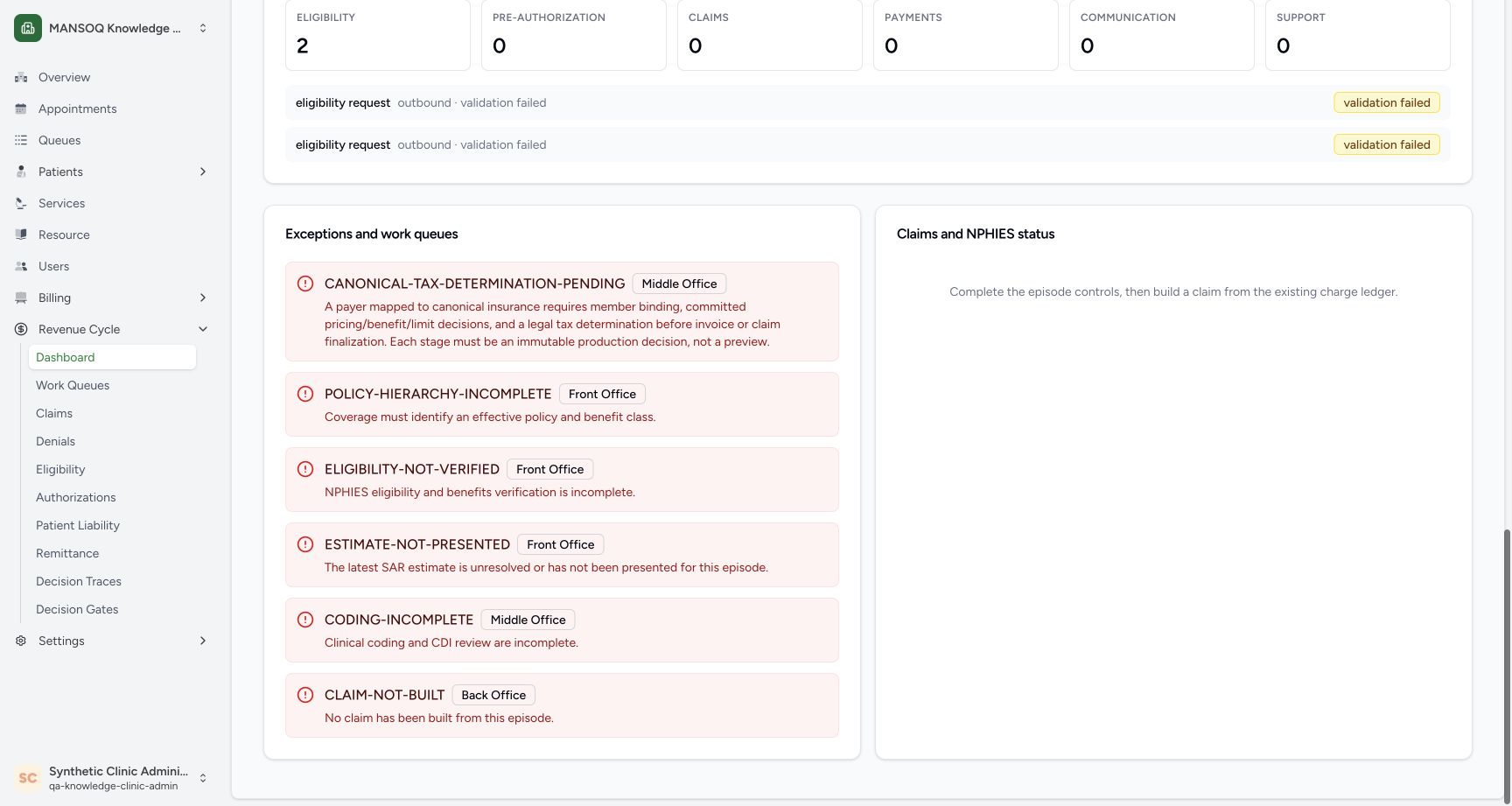
Fresh 1728×921 Chrome capture of exact committed MANSOQ release 39b72767 using the full local core/web profile. This synthetic Clinic demonstration does not establish production deployment or real payer authority. The lower panel shows all six remaining blockers, ending with CODING-INCOMPLETE and CLAIM-NOT-BUILT. The transaction lifecycle still shows only two validation-failed eligibility checks and zero claims/payments.
Image SHA-256 e1030365cd76e538231d773e14d4a5e5ba0aeffc41b1b9008d2f928f026b4684
- Tax still pending: A committed financial snapshot is not a tax decision.
- Policy requirement: The effective policy/benefit-class requirement remains visible.
- Eligibility requirement: Real verification is not established by this demo.
- Estimate requirement: The latest estimate has not been presented for this episode.
- Coding requirement: Complete authorized coding/CDI work separately.
- No claim built: No claim was created by this local commitment flow.
Troubleshooting
Prepare remains disabled while expiry is empty
The post-attestation image shows the empty expiry and disabled Prepare action. Enter the approved future instant, verify the visible timezone and wait for the enabled state shown in the next image. Do not treat the empty form as a completed preparation.
12345Verify the saved attestation and remaining preparation inputs
Capture details
Fresh 1728×921 Chrome capture of exact committed MANSOQ release 39b72767 using the full local core/web profile. This synthetic Clinic demonstration does not establish production deployment or real payer authority. The UI reports Performed charge attested and no unattested billable charges loaded. The approved hold expiry is still empty; Prepare remains disabled. Independent stored records confirm the captured service fact.
Image SHA-256 101e944c933379bdc12282c8c0d4c06379117dbcc13f229c9e44c98cbb20d226
- Attestation saved: The UI reports the completed attestation.
- No remaining unattested row: The captured charge is no longer offered in this widget.
- Hold expiry required: Enter an approved future expiry before preparation.
- Browser timezone: Read the actual Asia/Riyadh hint before entering the expiry.
- Prepare still disabled: An empty expiry is not a completed preparation.
1234Enter the future expiry and prepare the insured visit
Capture details
Fresh 1728×921 Chrome capture of exact committed MANSOQ release 39b72767 using the full local core/web profile. This synthetic Clinic demonstration does not establish production deployment or real payer authority. The filled approved hold expiry 19 October 2026 03:30 AM, Asia/Riyadh browser hint and enabled Prepare insured visit button are visible before submission. The page explicitly says this provisional operation does not authorize an invoice, claim or NPHIES submission.
Image SHA-256 66b9046a925868815e05494455fe499b9e00a837e09c638bb8073e4816ad7c6d
- Approved future expiry: The recorded example uses 19 October 03:30 AM; use your own currently valid approved future instant.
- Browser timezone: The field is interpreted in the displayed browser timezone.
- Prepare insured visit: Choose this enabled action after checking the inputs.
- Provisional boundary: Preparation is not invoice, claim or external-submission authorization.
Source evidence
Every citation uses this exact committed version. The private source repository requires access.
- repositories/platform/mansoq-web/src/pages/Facility/revenueCycle/ChargeAttestationPanel.tsx:28 ·
39b7276732f88bc07ad0abb61619f7aafe3c9e14Source file checksum
dab1bf106deace35360635729fe89a67ed9fdc28b46f124fb01badbecd00e560 - repositories/platform/mansoq-web/src/pages/Facility/revenueCycle/RevenueCycleCasePage.tsx:276 ·
39b7276732f88bc07ad0abb61619f7aafe3c9e14Source file checksum
60f6c583a70d46617878aa2f95ef9ac52dbf056b8a6c02158d8f0f945c84b8be - repositories/platform/mansoq-core/mansoq/emr/api/viewsets/charge_item.py:422 ·
39b7276732f88bc07ad0abb61619f7aafe3c9e14Source file checksum
7fe16dd73abeafbe0e8c0fc52a69e8675a7797326da5079345626ce6b1d06a63 - repositories/platform/mansoq-core/mansoq/emr/rcm/services/legacy_charge_capture.py:120 ·
39b7276732f88bc07ad0abb61619f7aafe3c9e14Source file checksum
ff9da1fe733133192417aac897a2f113452550269772212f6f24e494b794357b - repositories/platform/mansoq-core/mansoq/emr/rcm/services/operational_visit_preparation.py:255 ·
39b7276732f88bc07ad0abb61619f7aafe3c9e14Source file checksum
0418705f860c0cd4d679cb920a0dd9c3454d29213db413ce057285a35ebb3e7e - repositories/platform/mansoq-core/mansoq/emr/resources/revenue_cycle/lifecycle.py:287 ·
39b7276732f88bc07ad0abb61619f7aafe3c9e14Source file checksum
fc08da0077891eed96a57d5bc6b031c2d1ec7c51e9fb8bb241e258bc1a780b38