 MANSOQ
 Billing · VERSION 3dfb7c9f
Search an account’s invoices and review a saved Balanced invoice
Read an existing account’s separate summary fields, search and clear its invoice list, and inspect the saved invoice and filing context.
Billing Officer
 123
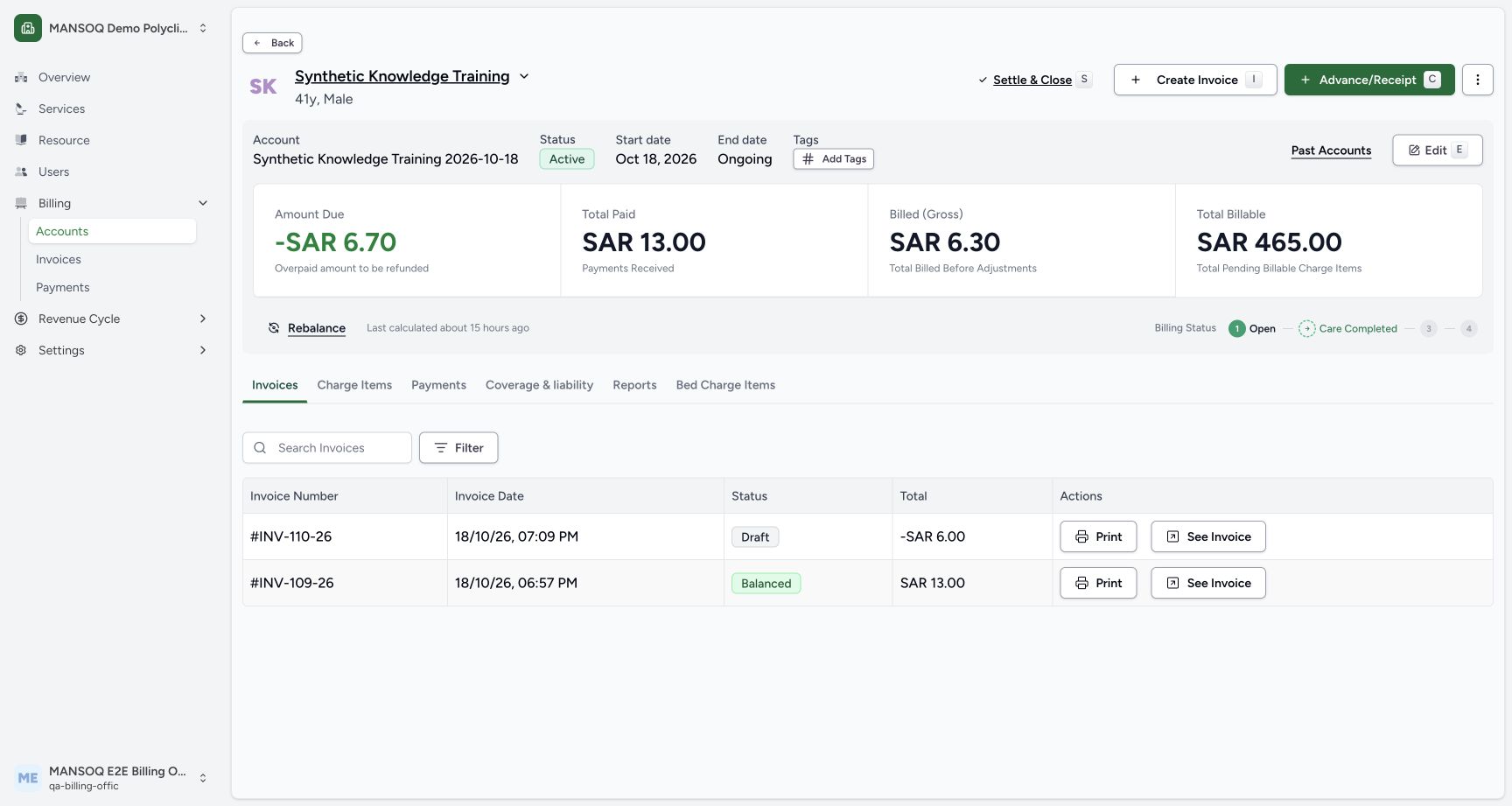
123Read the account identity and separate summary amounts
Capture details
Exact committed 3dfb source and existing ordinary Billing Officer. Genuine unchanged desktop/native pixels; existing synthetic records only. No billing lifecycle or payment action.
Image SHA-256 7b223e749c1f0c827a2db59459c167c94992ea05d19df527aaa421a1438b6649
- Account name: Check the selected account name.
- Amount Due: Read Amount Due with its explanatory label.
- Search Invoices: Enter an invoice number in this account’s invoice search.
 123
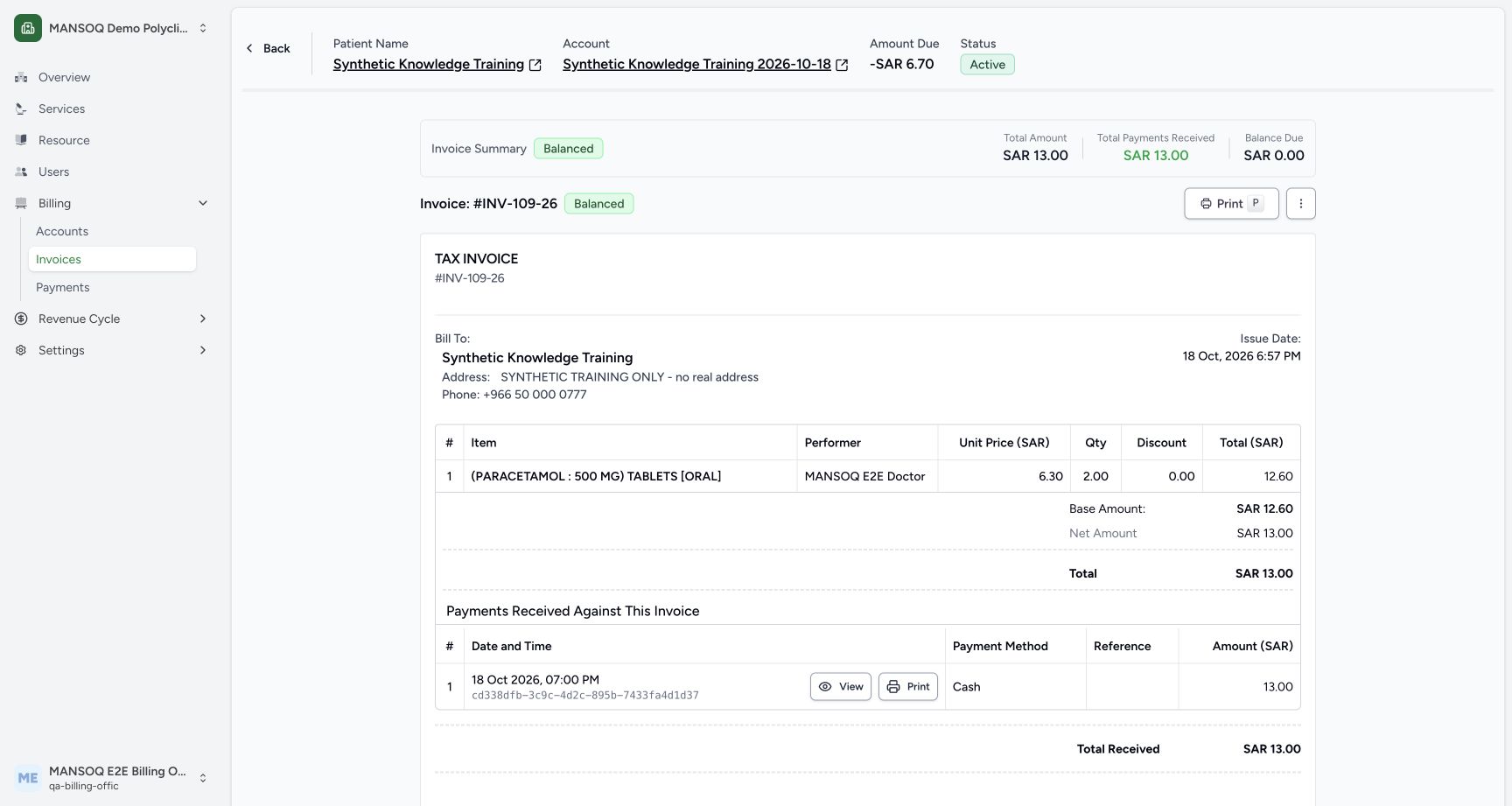
123Review the saved invoice, totals and print entry
Capture details
Exact committed 3dfb source and existing ordinary Billing Officer. Genuine unchanged desktop/native pixels; existing synthetic records only. No billing lifecycle or payment action.
Image SHA-256 8da8338459262a19c4bdc0f5ef2c892b72cf2583f8216f6fcacd63641d65c07b
- Print invoice: Open this invoice’s print page.
- Balanced invoice status: Read the recorded Balanced invoice status.
- Invoice number: Confirm the invoice number before printing.
8 of 8 content blocks have reviewed image alignment. Missing overview or prerequisite images remain open.
Before you begin
- Open the existing Synthetic Knowledge Training 2026-10-18 account as the authorized Billing Officer. This example has an existing Draft invoice and the existing Balanced INV-109-26.123
Recorded release 3dfb7c9f · 2026-10-19T07:05:08.292Z · 1728 × 921 Read the account identity and separate summary amounts
Capture details
Exact committed 3dfb source and existing ordinary Billing Officer. Genuine unchanged desktop/native pixels; existing synthetic records only. No billing lifecycle or payment action.
Image SHA-256
7b223e749c1f0c827a2db59459c167c94992ea05d19df527aaa421a1438b6649- Account name: Check the selected account name.
- Amount Due: Read Amount Due with its explanatory label.
- Search Invoices: Enter an invoice number in this account’s invoice search.
 12
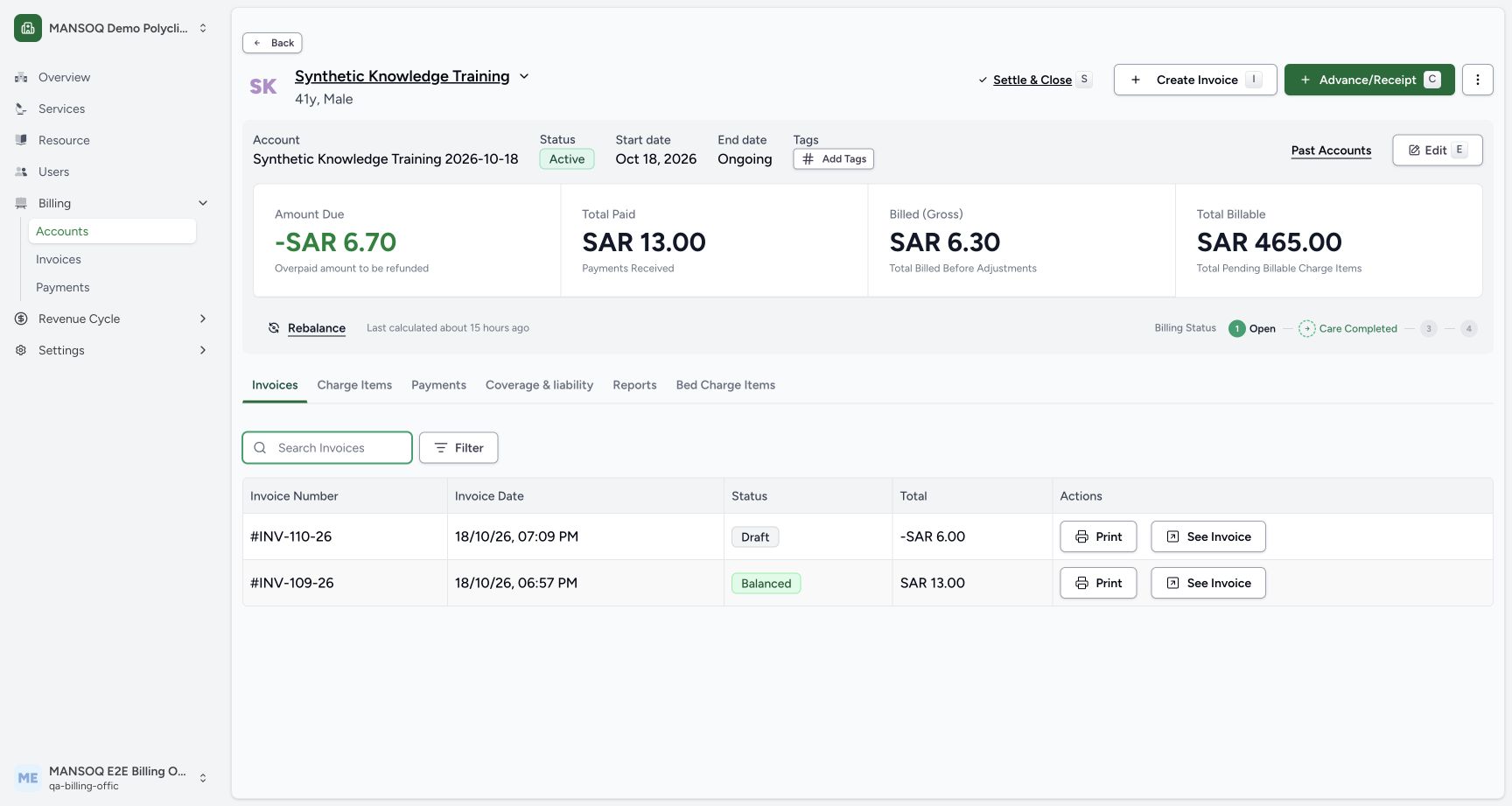
12Recorded release 3dfb7c9f · 2026-10-19T07:05:31.114Z · 1728 × 921 Return to all invoices in this account
Capture details
Exact committed 3dfb source and existing ordinary Billing Officer. Genuine unchanged desktop/native pixels; existing synthetic records only. No billing lifecycle or payment action.
Image SHA-256
f35215ca0a17cba73b030204f43985ee3a07c0f7f43b43c81c95682c235a6476- Cleared invoice search: Check that the invoice search is clear.
- See the Balanced invoice INV-109-26: Open the existing INV-109-26 row.
1. Read account context and its separate summaries
Verify the account name, Active status, start date and Ongoing end date. Read the account summaries as displayed: Amount Due -SAR 6.70, with Overpaid amount to be refunded; Total Paid SAR 13.00; Billed (Gross) SAR 6.30; and Total Billable SAR 465.00. These are account-level fields and are not interchangeable with one invoice total.
123Read the account identity and separate summary amounts
Capture details
Exact committed 3dfb source and existing ordinary Billing Officer. Genuine unchanged desktop/native pixels; existing synthetic records only. No billing lifecycle or payment action.
Image SHA-256 7b223e749c1f0c827a2db59459c167c94992ea05d19df527aaa421a1438b6649
- Account name: Check the selected account name.
- Amount Due: Read Amount Due with its explanatory label.
- Search Invoices: Enter an invoice number in this account’s invoice search.
2. Find a saved invoice by number
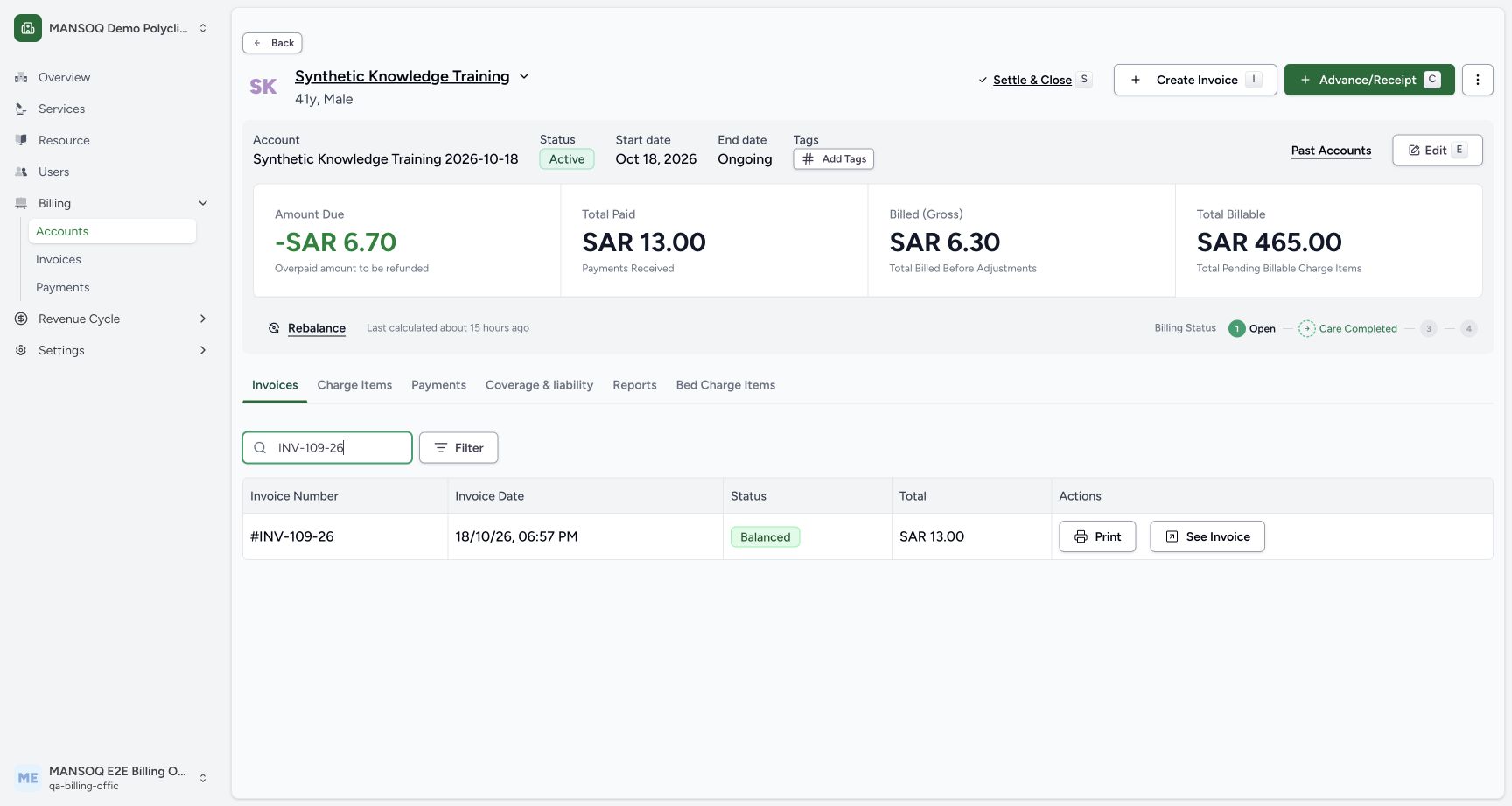
In the selected Invoices tab, enter INV-109-26 in Search Invoices. The matching row shows #INV-109-26, its invoice date, Balanced and SAR 13.00.
 123
123Find the saved Balanced invoice
Capture details
Exact committed 3dfb source and existing ordinary Billing Officer. Genuine unchanged desktop/native pixels; existing synthetic records only. No billing lifecycle or payment action.
Image SHA-256 0d1d1dc646122bcae90dfa0284135320f9dc9ec7294a924fdcc8d88e88bd8f9f
- Search by invoice number: Read the invoice-number search.
- See Invoice: Open the matching invoice after verifying its identity.
- Balanced status: Read this invoice’s Balanced status.
3. Recognize an empty filtered result and restore the list
The example query SYNTHETIC-NO-SUCH-INVOICE produces No invoices and Try adjusting your filters or search. Delete the search text. The existing Draft INV-110-26 and Balanced INV-109-26 rows return.
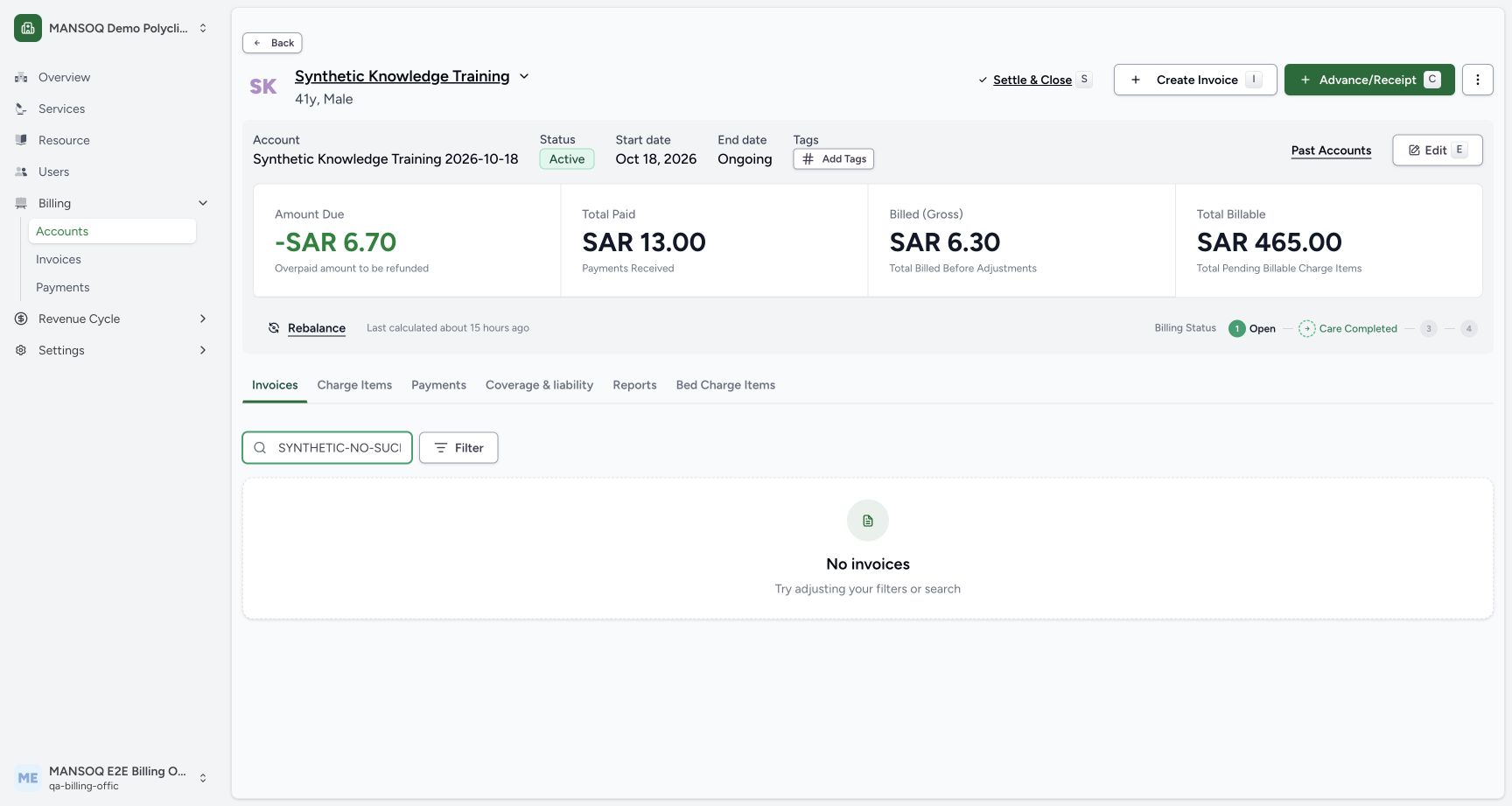 12
12Recognize a search with no matching invoice
Capture details
Exact committed 3dfb source and existing ordinary Billing Officer. Genuine unchanged desktop/native pixels; existing synthetic records only. No billing lifecycle or payment action.
Image SHA-256 4ca138f48e0c68943a975cd7ccb61d364c0b3f9eee42a7253e28e356b2b007ad
- Invoice search to clear: Delete the no-match invoice query to restore the list.
- No invoices for this query: No invoices applies to this search result.
12Return to all invoices in this account
Capture details
Exact committed 3dfb source and existing ordinary Billing Officer. Genuine unchanged desktop/native pixels; existing synthetic records only. No billing lifecycle or payment action.
Image SHA-256 f35215ca0a17cba73b030204f43985ee3a07c0f7f43b43c81c95682c235a6476
- Cleared invoice search: Check that the invoice search is clear.
- See the Balanced invoice INV-109-26: Open the existing INV-109-26 row.
4. Open and review the intended saved invoice
Select See Invoice on INV-109-26. Check the intended patient and account links. Its Invoice Summary is Balanced, with Total Amount SAR 13.00, Total Payments Received SAR 13.00 and Balance Due SAR 0.00. The document separately shows the saved medicine quantity 2.00, unit price 6.30, line/base amount 12.60, and net/total 13.00. Read the recorded fields without substituting account totals for invoice totals.
12Return to all invoices in this account
Capture details
Exact committed 3dfb source and existing ordinary Billing Officer. Genuine unchanged desktop/native pixels; existing synthetic records only. No billing lifecycle or payment action.
Image SHA-256 f35215ca0a17cba73b030204f43985ee3a07c0f7f43b43c81c95682c235a6476
- Cleared invoice search: Check that the invoice search is clear.
- See the Balanced invoice INV-109-26: Open the existing INV-109-26 row.
123Review the saved invoice, totals and print entry
Capture details
Exact committed 3dfb source and existing ordinary Billing Officer. Genuine unchanged desktop/native pixels; existing synthetic records only. No billing lifecycle or payment action.
Image SHA-256 8da8338459262a19c4bdc0f5ef2c892b72cf2583f8216f6fcacd63641d65c07b
- Print invoice: Open this invoice’s print page.
- Balanced invoice status: Read the recorded Balanced invoice status.
- Invoice number: Confirm the invoice number before printing.
5. Review tax and electronic-document context separately
Scroll below the invoice. This example shows 0 claim(s), Tax determination required, and a notice that no tax determination is recorded; its gross figure is not a finalized tax position. Electronic invoice and retained files says no electronic document has been prepared. A Balanced payment summary does not replace these recorded filing states.
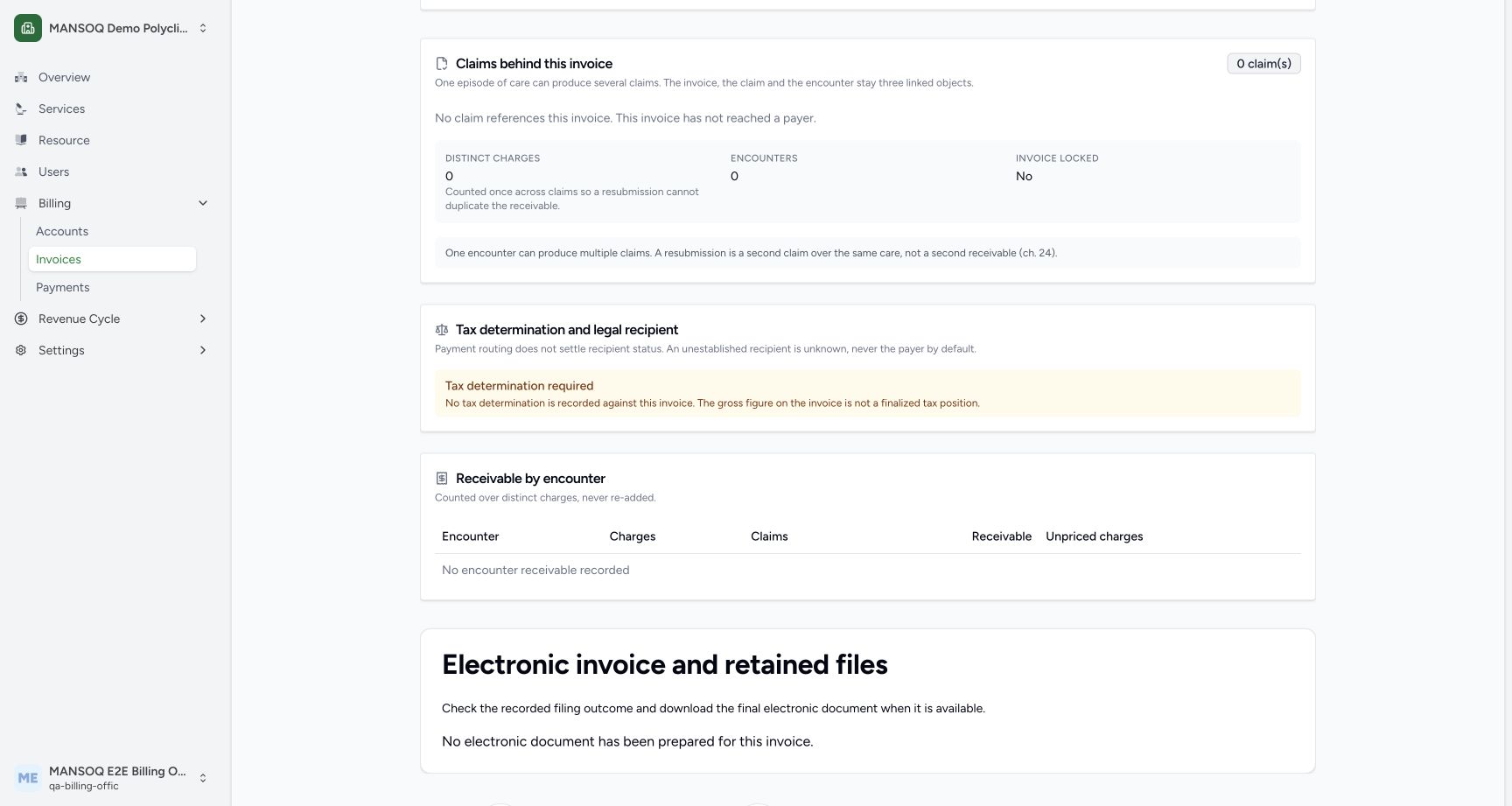 12
12Distinguish balance, tax determination and electronic filing
Capture details
Exact committed 3dfb source and existing ordinary Billing Officer. Genuine unchanged desktop/native pixels; existing synthetic records only. No billing lifecycle or payment action.
Image SHA-256 9cb842d361140185cd421d5e167fe49e50ffc844a0f08a0981b4139b24dbdbf4
- Recorded tax determination context: Read the actual missing tax-determination notice.
- Electronic invoice and retained files: Review the electronic-document section separately from the invoice balance.
Troubleshooting
No invoices appears while a search is entered
Check the account and search text together. Clear the query to restore this account’s full invoice list, then verify the intended invoice number and its saved status before opening See Invoice.
12Recognize a search with no matching invoice
Capture details
Exact committed 3dfb source and existing ordinary Billing Officer. Genuine unchanged desktop/native pixels; existing synthetic records only. No billing lifecycle or payment action.
Image SHA-256 4ca138f48e0c68943a975cd7ccb61d364c0b3f9eee42a7253e28e356b2b007ad
- Invoice search to clear: Delete the no-match invoice query to restore the list.
- No invoices for this query: No invoices applies to this search result.
12Return to all invoices in this account
Capture details
Exact committed 3dfb source and existing ordinary Billing Officer. Genuine unchanged desktop/native pixels; existing synthetic records only. No billing lifecycle or payment action.
Image SHA-256 f35215ca0a17cba73b030204f43985ee3a07c0f7f43b43c81c95682c235a6476
- Cleared invoice search: Check that the invoice search is clear.
- See the Balanced invoice INV-109-26: Open the existing INV-109-26 row.
Source evidence
Every citation uses this exact committed version. The private source repository requires access.
- repositories/platform/mansoq-web/src/pages/Facility/billing/account/AccountShow.tsx:300 ·
3dfb7c9f519fb5b4cd4452439f3c12346bf58319Source file checksum
9277e49a749307ff5f222c77dbb069a9f827ecc24763bf1a5e7fb4ce9998d8ad - repositories/platform/mansoq-web/src/pages/Facility/billing/invoice/InvoicesData.tsx:135 ·
3dfb7c9f519fb5b4cd4452439f3c12346bf58319Source file checksum
72c693044793da37720daa41d31d9f82dcfe7d5aa417fed2a973b78334bd0925 - repositories/platform/mansoq-web/src/pages/Facility/billing/invoice/InvoicesData.tsx:164 ·
3dfb7c9f519fb5b4cd4452439f3c12346bf58319Source file checksum
72c693044793da37720daa41d31d9f82dcfe7d5aa417fed2a973b78334bd0925 - repositories/platform/mansoq-web/src/pages/Facility/billing/invoice/InvoiceShow.tsx:514 ·
3dfb7c9f519fb5b4cd4452439f3c12346bf58319Source file checksum
1b350ccc4aef289b8e4ba2527180edaf4b3cffdf1bc4e92fda920779f2ef4989 - repositories/platform/mansoq-web/src/pages/Facility/billing/rcm/InvoiceClaimPanel.tsx:406 ·
3dfb7c9f519fb5b4cd4452439f3c12346bf58319Source file checksum
4227d0e31d531c15fa2f296ea468b39a124c88091ddd6d2348c2c53128ef2696 - repositories/platform/mansoq-core/mansoq/emr/api/viewsets/invoice.py:449 ·
3dfb7c9f519fb5b4cd4452439f3c12346bf58319Source file checksum
03e73113c89d4be24b4f7ae6f0bf3d4538d8129774ce6dedd0272219530bb88e