 MANSOQ
 Billing · VERSION 3dfb7c9f
Print an existing invoice to a local PDF and review the saved page
Open the existing invoice print page, save its actual one-page output using Chrome on macOS, and review the exact saved document.
Billing Officer
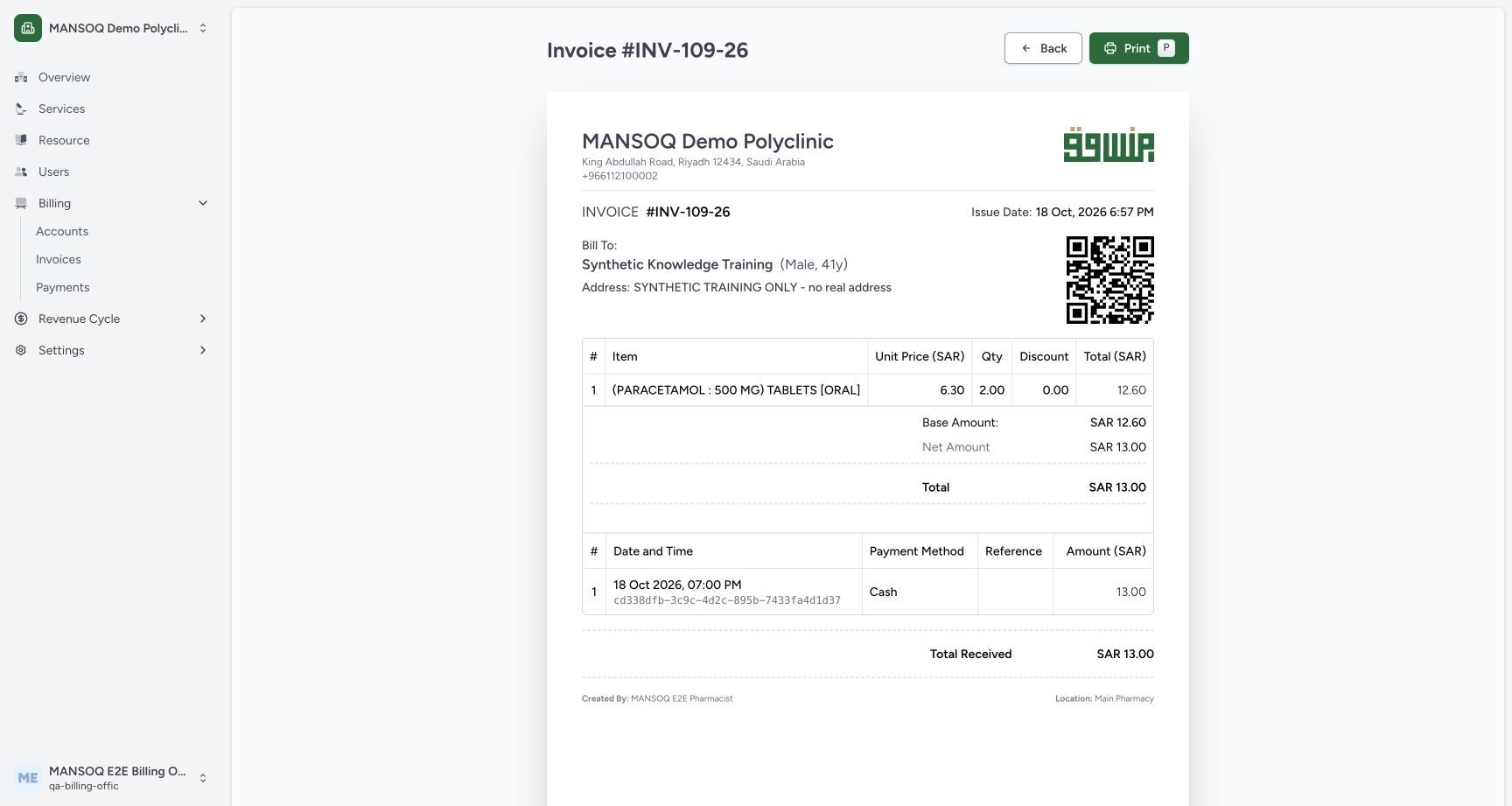 12
12Review the invoice print page before opening Print
Capture details
Exact committed 3dfb source and existing ordinary Billing Officer. Genuine unchanged desktop/native pixels; existing synthetic records only. No billing lifecycle or payment action.
Image SHA-256 7b47c3aed71da4fa4d16f7ed40f56d2ccb73272f7c1eda5eda6c028231ef04a9
- Print: Open Chrome Print for this preview.
- Invoice print heading: Check the invoice number in the print-page heading.
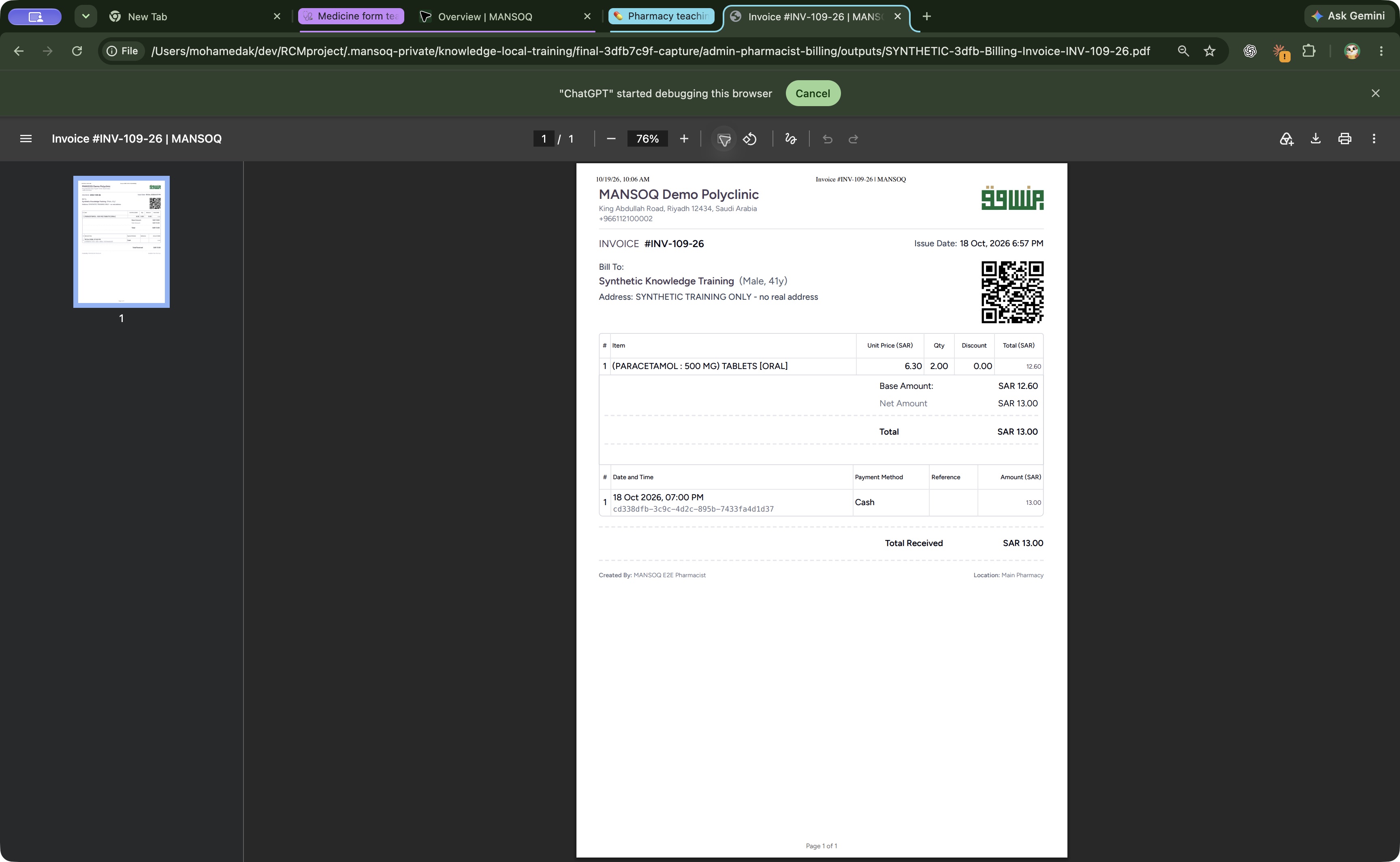 123
123Open the exact saved invoice PDF in Chrome
Saved PDF in Google Chrome (macOS) · page 1 of 1.
Capture details
Exact committed 3dfb source and existing ordinary Billing Officer. Genuine unchanged desktop/native pixels; existing synthetic records only. No billing lifecycle or payment action.
Image SHA-256 88bf1d243036484ce3b0281d0ea8ad35afc8b0b4953ac52cba8ec11923008482
- Page 1 of 1: Check the saved document has one page.
- Invoice INV-109-26: Confirm the saved invoice number and intended patient.
- Total Received SAR 13.00: Review the retained Total Received amount on the saved page.
7 of 7 content blocks have reviewed image alignment. Missing overview or prerequisite images remain open.
Before you begin
- Open the existing Balanced INV-109-26 for Synthetic Knowledge Training as the authorized Billing Officer. The pictured native dialogs and saved-file viewer are Chrome on macOS; this lesson uses a local Save as PDF destination.
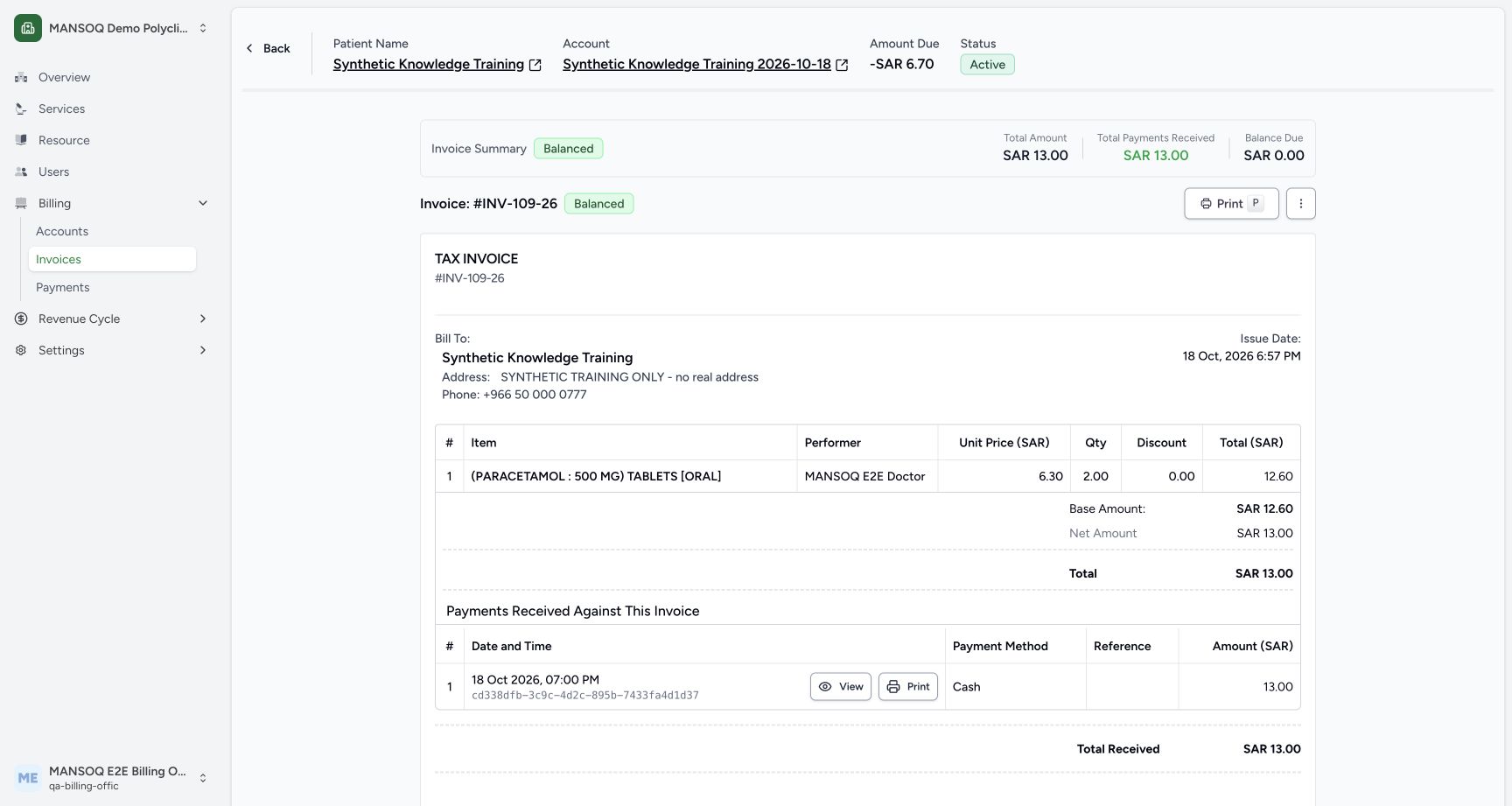 123
123Recorded release 3dfb7c9f · 2026-10-19T07:05:42.974Z · 1728 × 921 Review the saved invoice, totals and print entry
Capture details
Exact committed 3dfb source and existing ordinary Billing Officer. Genuine unchanged desktop/native pixels; existing synthetic records only. No billing lifecycle or payment action.
Image SHA-256
8da8338459262a19c4bdc0f5ef2c892b72cf2583f8216f6fcacd63641d65c07b- Print invoice: Open this invoice’s print page.
- Balanced invoice status: Read the recorded Balanced invoice status.
- Invoice number: Confirm the invoice number before printing.
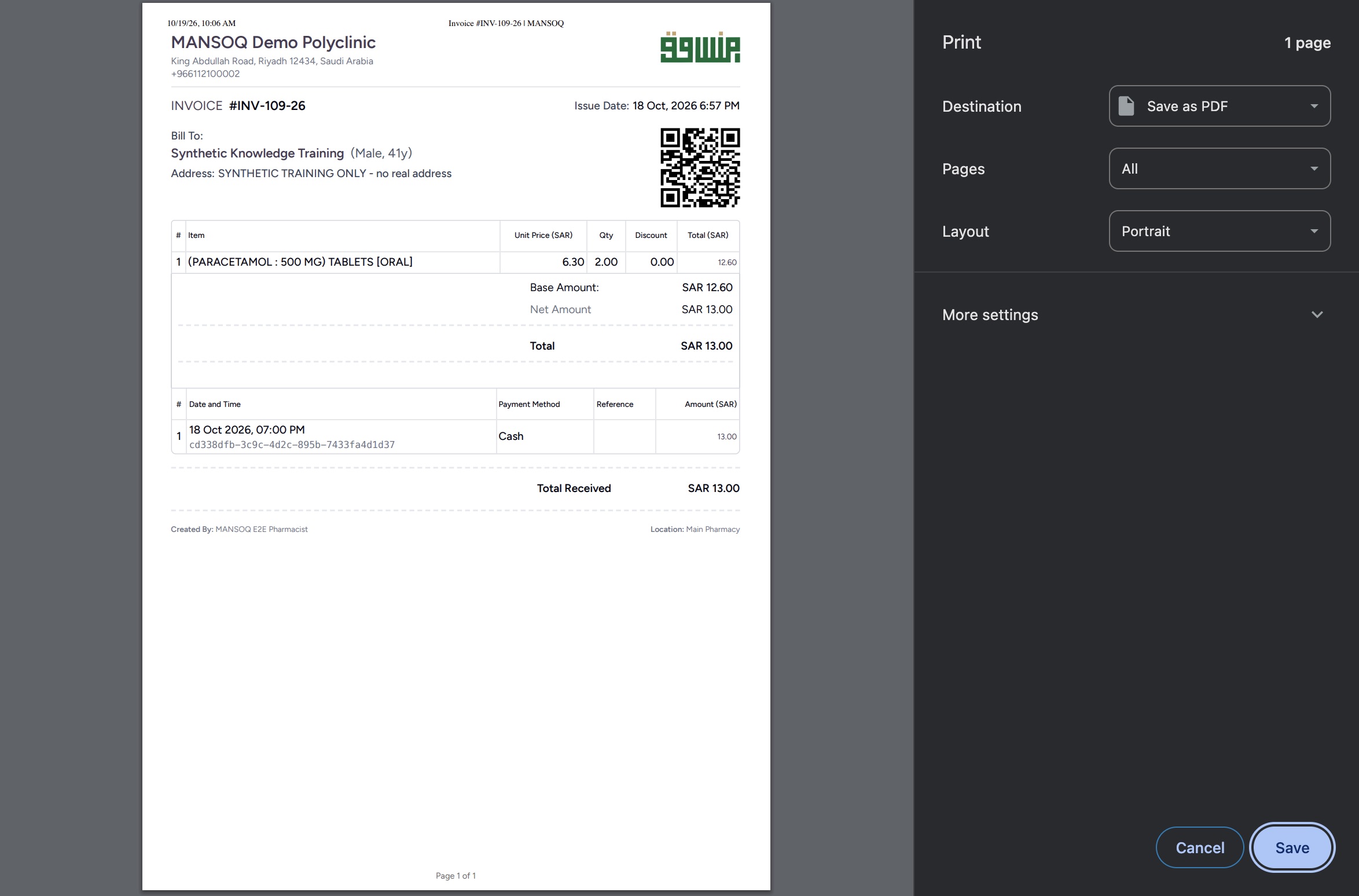 12
12Recorded release 3dfb7c9f · 2026-10-19T07:07:01.379Z · 2348 × 1548 macOS Chrome Print: Save the one-page invoice PDF
Native macOS print/save dialog.
Capture details
Exact committed 3dfb source and existing ordinary Billing Officer. Genuine unchanged desktop/native pixels; existing synthetic records only. No billing lifecycle or payment action.
Image SHA-256
7cf94e3172ec93977fda6560d9c3aac7cf037df367660b990a9166b420c5c590- Destination: Save as PDF: Keep the local Save as PDF destination.
- Save: Open the file Save panel for this one-page invoice.
1. Open the invoice’s print page
Verify INV-109-26 on the saved invoice and select its top Print button. The print page repeats the invoice number, fictional facility, patient, saved medicine line and recorded payment. Review this preview before opening the browser dialog.
123Review the saved invoice, totals and print entry
Capture details
Exact committed 3dfb source and existing ordinary Billing Officer. Genuine unchanged desktop/native pixels; existing synthetic records only. No billing lifecycle or payment action.
Image SHA-256 8da8338459262a19c4bdc0f5ef2c892b72cf2583f8216f6fcacd63641d65c07b
- Print invoice: Open this invoice’s print page.
- Balanced invoice status: Read the recorded Balanced invoice status.
- Invoice number: Confirm the invoice number before printing.
12Review the invoice print page before opening Print
Capture details
Exact committed 3dfb source and existing ordinary Billing Officer. Genuine unchanged desktop/native pixels; existing synthetic records only. No billing lifecycle or payment action.
Image SHA-256 7b47c3aed71da4fa4d16f7ed40f56d2ccb73272f7c1eda5eda6c028231ef04a9
- Print: Open Chrome Print for this preview.
- Invoice print heading: Check the invoice number in the print-page heading.
2. Open Print and select the local PDF destination
Select Print on the print page. In the pictured Chrome Print dialog, confirm Save as PDF, All pages and Portrait. The preview contains 1 page. Select Save to open the macOS file Save panel.
12Review the invoice print page before opening Print
Capture details
Exact committed 3dfb source and existing ordinary Billing Officer. Genuine unchanged desktop/native pixels; existing synthetic records only. No billing lifecycle or payment action.
Image SHA-256 7b47c3aed71da4fa4d16f7ed40f56d2ccb73272f7c1eda5eda6c028231ef04a9
- Print: Open Chrome Print for this preview.
- Invoice print heading: Check the invoice number in the print-page heading.
12macOS Chrome Print: Save the one-page invoice PDF
Native macOS print/save dialog.
Capture details
Exact committed 3dfb source and existing ordinary Billing Officer. Genuine unchanged desktop/native pixels; existing synthetic records only. No billing lifecycle or payment action.
Image SHA-256 7cf94e3172ec93977fda6560d9c3aac7cf037df367660b990a9166b420c5c590
- Destination: Save as PDF: Keep the local Save as PDF destination.
- Save: Open the file Save panel for this one-page invoice.
3. Choose a filename and save locally
In the macOS Save panel, choose your intended local folder and a clear invoice PDF name, then select Save. This example retains SYNTHETIC-3dfb-Billing-Invoice-INV-109-26.pdf in the dedicated synthetic output folder.
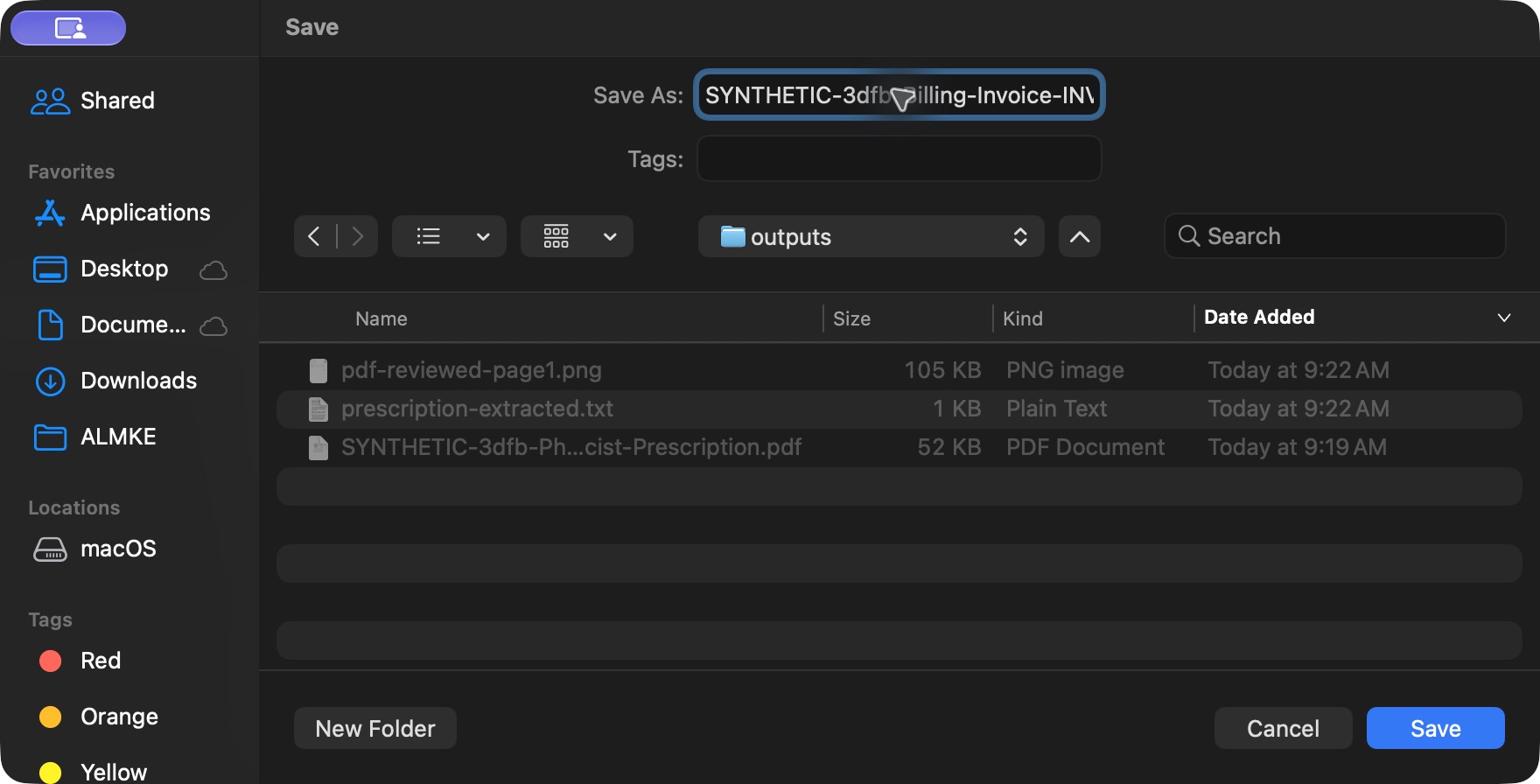 12
12macOS Save: retain the synthetic invoice PDF
Native macOS print/save dialog.
Capture details
Exact committed 3dfb source and existing ordinary Billing Officer. Genuine unchanged desktop/native pixels; existing synthetic records only. No billing lifecycle or payment action.
Image SHA-256 d769447272f79b653b0eac4c96a65da8adf3b989aae5ad92747be65f820051f1
- Save As filename: Choose a clearly identified local PDF filename.
- Save: Save the file in the selected local folder.
4. Open and review the actual saved PDF
Open the exact saved file in Chrome’s ordinary file viewer and fit the page. Verify 1 / 1, INV-109-26, the intended synthetic patient, the complete medicine/payment tables and footer. The saved page retains Total SAR 13.00, Total Received SAR 13.00, creator and Main Pharmacy. Its browser print header contains the dated capture time.
123Open the exact saved invoice PDF in Chrome
Saved PDF in Google Chrome (macOS) · page 1 of 1.
Capture details
Exact committed 3dfb source and existing ordinary Billing Officer. Genuine unchanged desktop/native pixels; existing synthetic records only. No billing lifecycle or payment action.
Image SHA-256 88bf1d243036484ce3b0281d0ea8ad35afc8b0b4953ac52cba8ec11923008482
- Page 1 of 1: Check the saved document has one page.
- Invoice INV-109-26: Confirm the saved invoice number and intended patient.
- Total Received SAR 13.00: Review the retained Total Received amount on the saved page.
Keep the printable document separate from electronic filing
The saved PDF is the local invoice print output. The invoice’s separate filing context still says Tax determination required and that no electronic document has been prepared. Saving this PDF does not provide a different filing outcome.
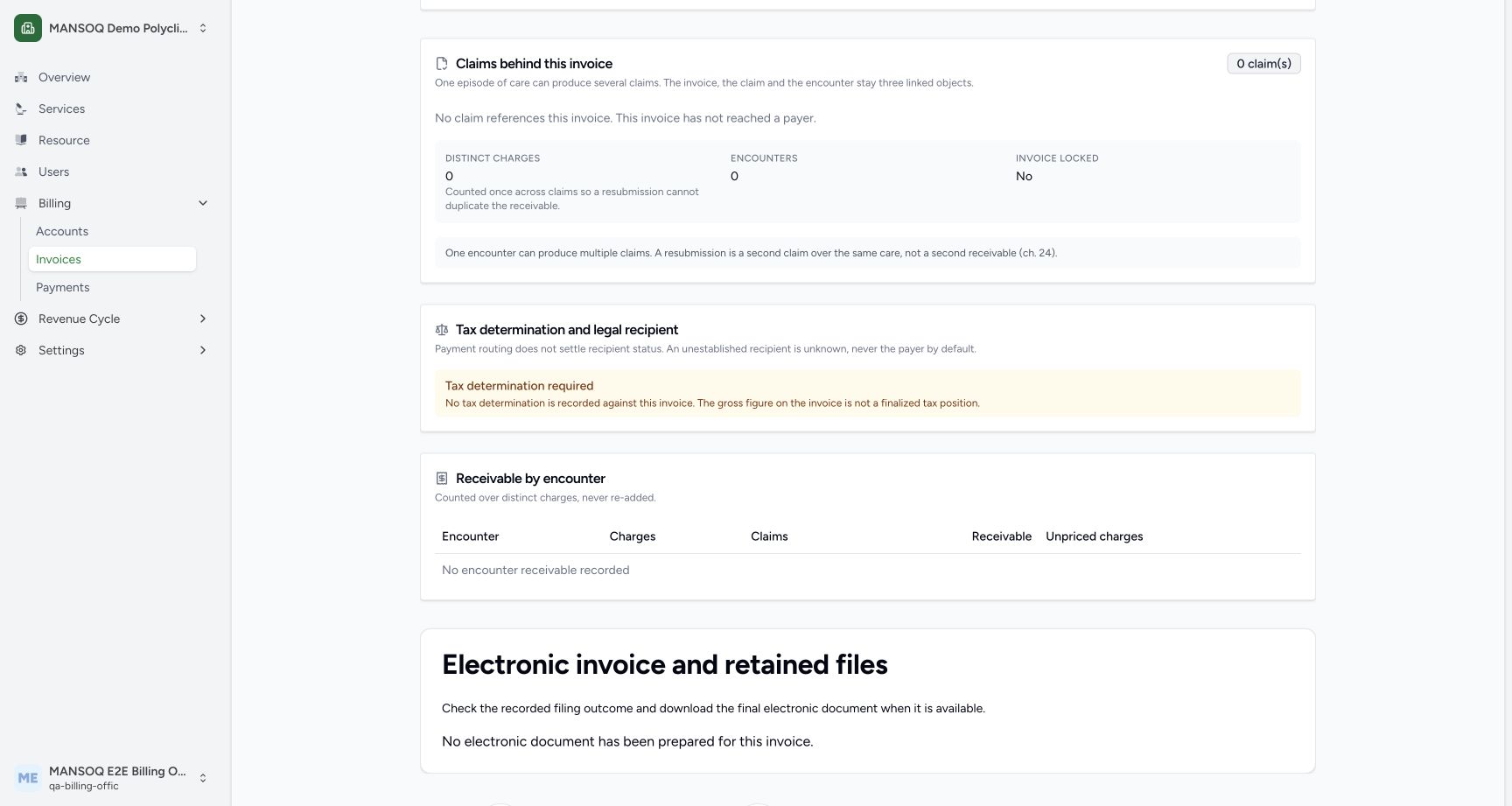 12
12Distinguish balance, tax determination and electronic filing
Capture details
Exact committed 3dfb source and existing ordinary Billing Officer. Genuine unchanged desktop/native pixels; existing synthetic records only. No billing lifecycle or payment action.
Image SHA-256 9cb842d361140185cd421d5e167fe49e50ffc844a0f08a0981b4139b24dbdbf4
- Recorded tax determination context: Read the actual missing tax-determination notice.
- Electronic invoice and retained files: Review the electronic-document section separately from the invoice balance.
123Open the exact saved invoice PDF in Chrome
Saved PDF in Google Chrome (macOS) · page 1 of 1.
Capture details
Exact committed 3dfb source and existing ordinary Billing Officer. Genuine unchanged desktop/native pixels; existing synthetic records only. No billing lifecycle or payment action.
Image SHA-256 88bf1d243036484ce3b0281d0ea8ad35afc8b0b4953ac52cba8ec11923008482
- Page 1 of 1: Check the saved document has one page.
- Invoice INV-109-26: Confirm the saved invoice number and intended patient.
- Total Received SAR 13.00: Review the retained Total Received amount on the saved page.
Source evidence
Every citation uses this exact committed version. The private source repository requires access.
- repositories/platform/mansoq-web/src/pages/Facility/billing/invoice/InvoiceShow.tsx:1479 ·
3dfb7c9f519fb5b4cd4452439f3c12346bf58319Source file checksum
1b350ccc4aef289b8e4ba2527180edaf4b3cffdf1bc4e92fda920779f2ef4989 - repositories/platform/mansoq-web/src/pages/Facility/billing/invoice/PrintInvoice.tsx:141 ·
3dfb7c9f519fb5b4cd4452439f3c12346bf58319Source file checksum
73b771334c0b3fe569e011819ccafa7780743f69abf3a08ec8e6d09d40c20328 - repositories/platform/mansoq-web/src/pages/Facility/billing/invoice/PrintInvoice.tsx:71 ·
3dfb7c9f519fb5b4cd4452439f3c12346bf58319Source file checksum
73b771334c0b3fe569e011819ccafa7780743f69abf3a08ec8e6d09d40c20328 - repositories/platform/mansoq-web/src/MansoqUI/misc/PrintPreview.tsx:44 ·
3dfb7c9f519fb5b4cd4452439f3c12346bf58319Source file checksum
66b44ba3d2996d2db6d1d37c275a084db50c2ac1d68468f5355cc2522c67679b - repositories/platform/mansoq-web/src/pages/Facility/billing/rcm/InvoiceClaimPanel.tsx:406 ·
3dfb7c9f519fb5b4cd4452439f3c12346bf58319Source file checksum
4227d0e31d531c15fa2f296ea468b39a124c88091ddd6d2348c2c53128ef2696