 MANSOQ
 Revenue cycle management · VERSION 3dfb7c9f
Validate an unresolved Tax draft and read all five refusals
Use Row lifecycle to inspect why the assigned Draft is not ready for active status.
Facility Admin
 123456789
Prepare the assigned Tax rule readiness controls
Capture details
Observed committed 3dfb source on 20 October 2026 (Asia/Riyadh; captured 19 October UTC). Fictional unresolved software example; no tax rate, legal authority or financial approval is established.
Image SHA-256 14d66089eb265d8a8444b813d6e82ce101abd386364db10b4b82d96c05c1a79d
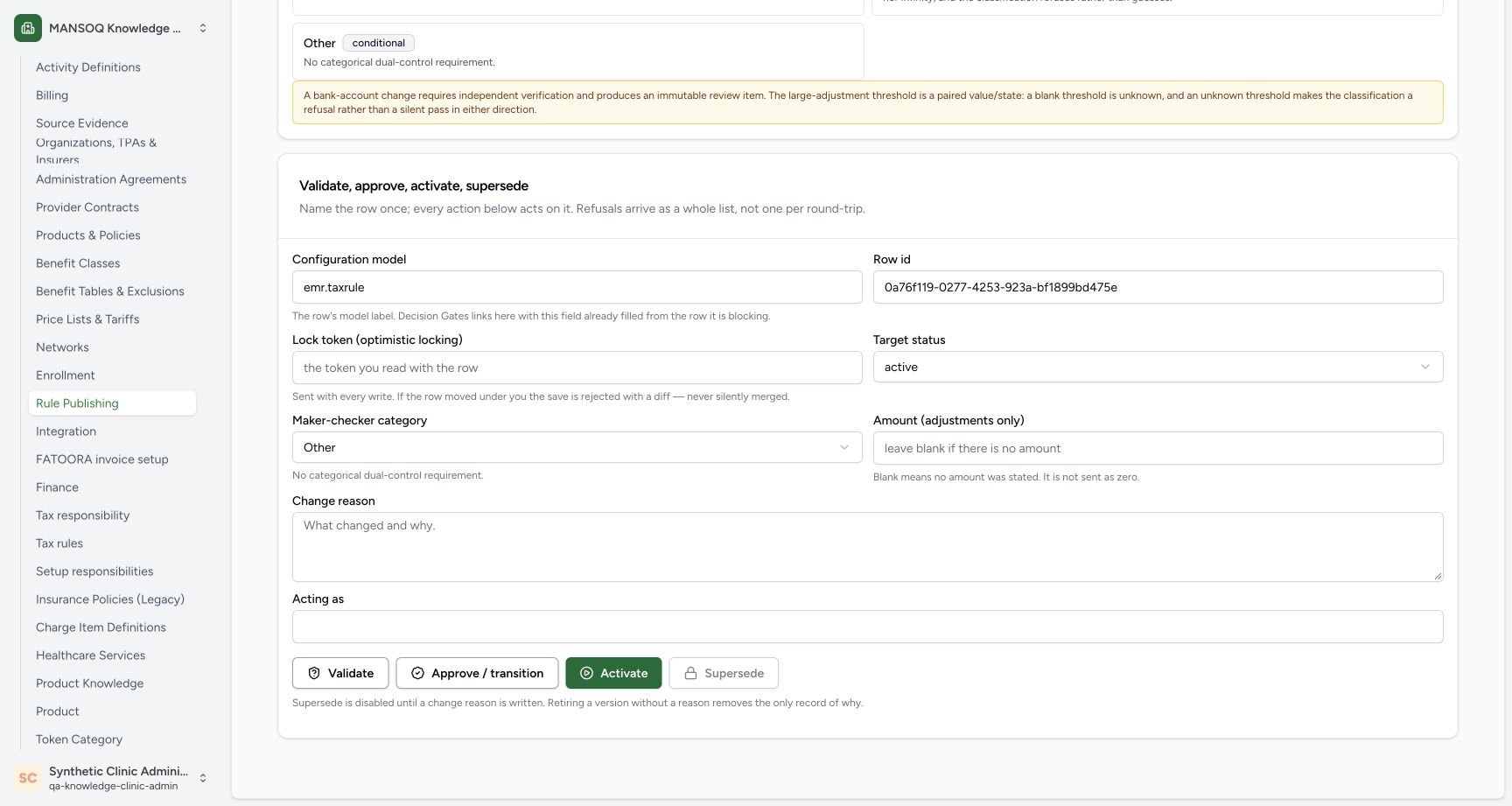
- Set the Configuration model: Use emr.taxrule for the assigned existing Tax rule.
- Identify the existing Row id: Use the full assigned rule identifier shown, not a new or different row.
- Choose the status to check: Select active as the target status for Validate; this does not activate the row.
- Keep category Other: Use Other for this readiness check.
- Leave Amount blank: Blank means no amount is stated; it is not sent as zero.
- Keep the lock-token field blank: This exercise uses Validate, not a write action.
- Keep Change reason blank here: The separate console is being used only for Validate.
- Keep Acting as blank: No acting-role override is entered.
- Select Validate: Request the readiness verdict once; Approve / transition and Activate are separate actions.
 1234567
Read all five negative readiness refusals
Capture details
Observed committed 3dfb source on 20 October 2026 (Asia/Riyadh; captured 19 October UTC). Fictional unresolved software example; no tax rate, legal authority or financial approval is established.
Image SHA-256 e3bba327f0c1daf734a4c23bf22199a6e8732021bd2ba781c18a48f72314a8f7
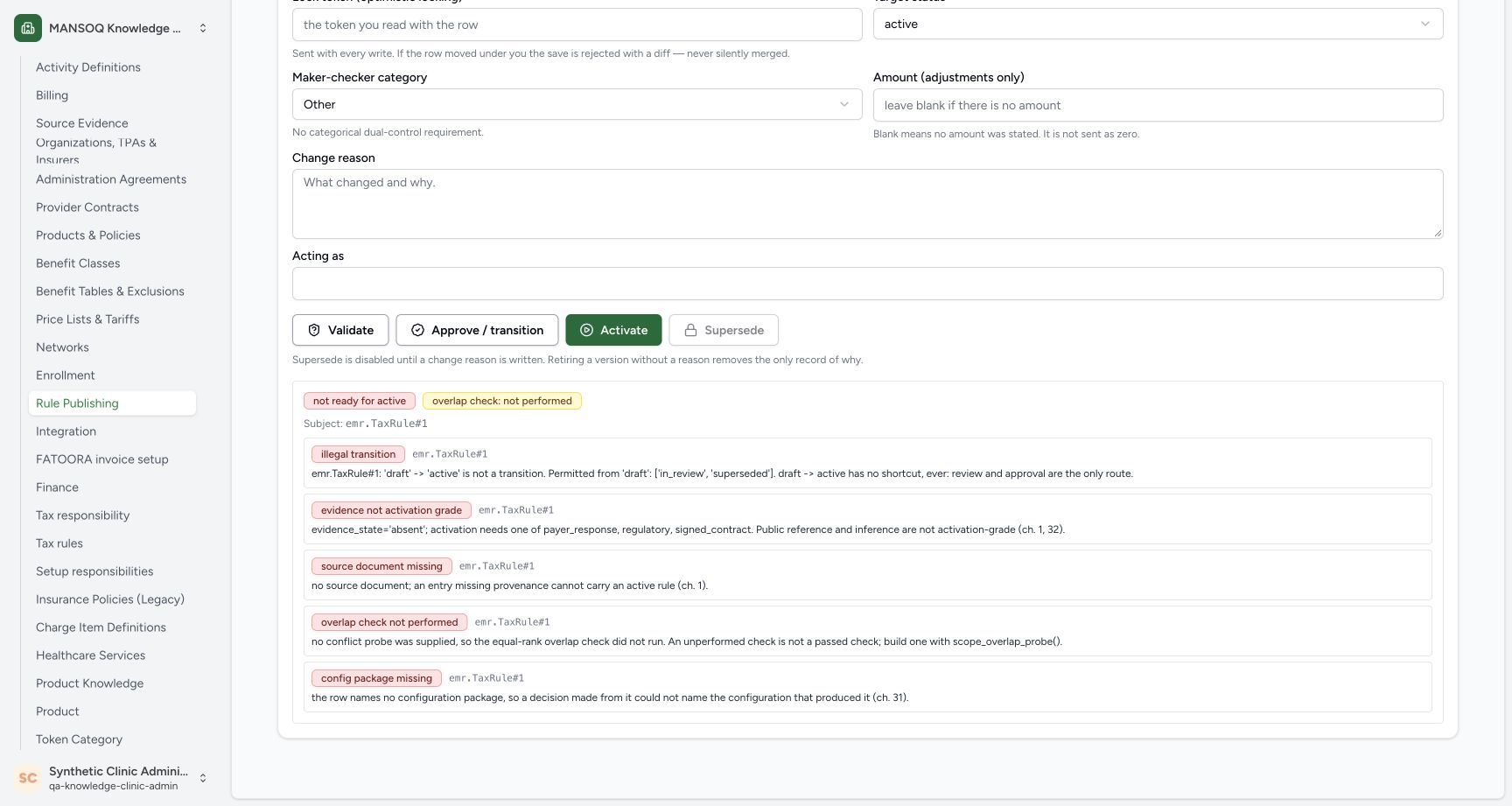
- Read not ready for active: The check returned a negative readiness verdict.
- Read overlap check not performed: An unperformed overlap check is not a successful overlap check.
- Read illegal transition: The displayed Draft row cannot jump directly to active.
- Read evidence not activation grade: Absent evidence does not meet the displayed activation evidence requirement.
- Read source document missing: The rule has no source document for activation.
- Read overlap check not performed: Read the full explanation rather than interpreting missing checking as a pass.
- Read config package missing: The rule has no configuration package.
15 of 15 content blocks have reviewed image alignment. Missing overview or prerequisite images remain open.
Before you begin
- Use an already authenticated, authorized Facility Admin session in the assigned synthetic Clinic. The existing account is pictured; sign-in steps are separate.
 12
12Recorded release 3dfb7c9f · 2026-10-19T21:21:23.173Z · 1728 × 921 Open Row lifecycle from the loaded Rule publishing page
Capture details
Observed committed 3dfb source on 20 October 2026 (Asia/Riyadh; captured 19 October UTC). Fictional unresolved software example; no tax rate, legal authority or financial approval is established.
Image SHA-256
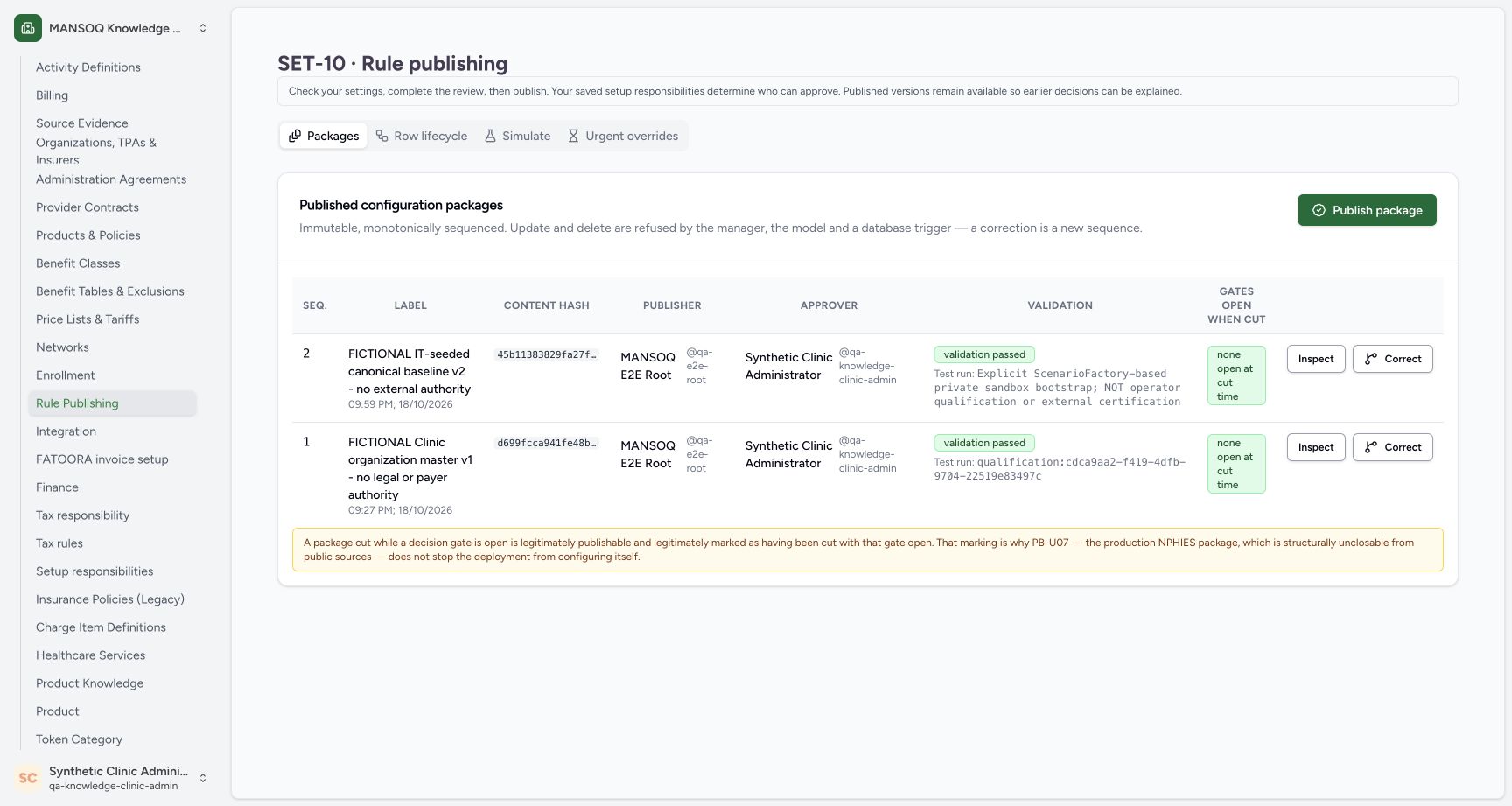
09a7d0fc49608bada023a1892b9e68ff2502817261fd4789354cb72e1d4450dd- Open Row lifecycle: Select the Row lifecycle tab from the fully loaded Rule publishing page.
- Keep package validation in its own scope: These pre-existing fictional package rows do not approve this unresolved Tax rule.
- Use the assigned existing Tax draft and its full Row id. This software-training check does not establish a tax rate, source authority or permission to activate a rule.
 1234
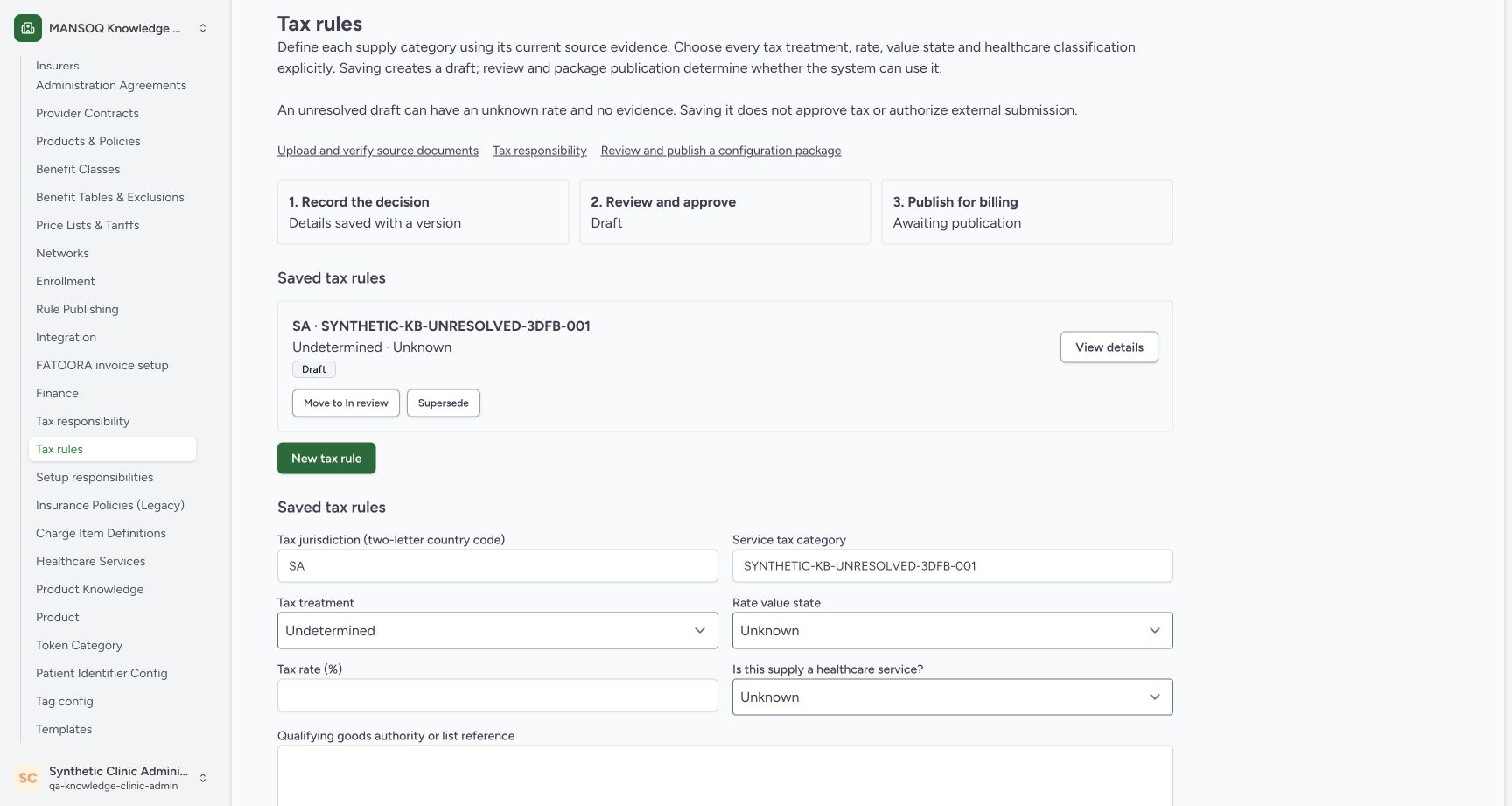
1234Recorded release 3dfb7c9f · 2026-10-19T21:18:52.692Z · 1728 × 921 Identify the saved unresolved Tax draft
Capture details
Observed committed 3dfb source on 20 October 2026 (Asia/Riyadh; captured 19 October UTC). Fictional unresolved software example; no tax rate, legal authority or financial approval is established.
Image SHA-256
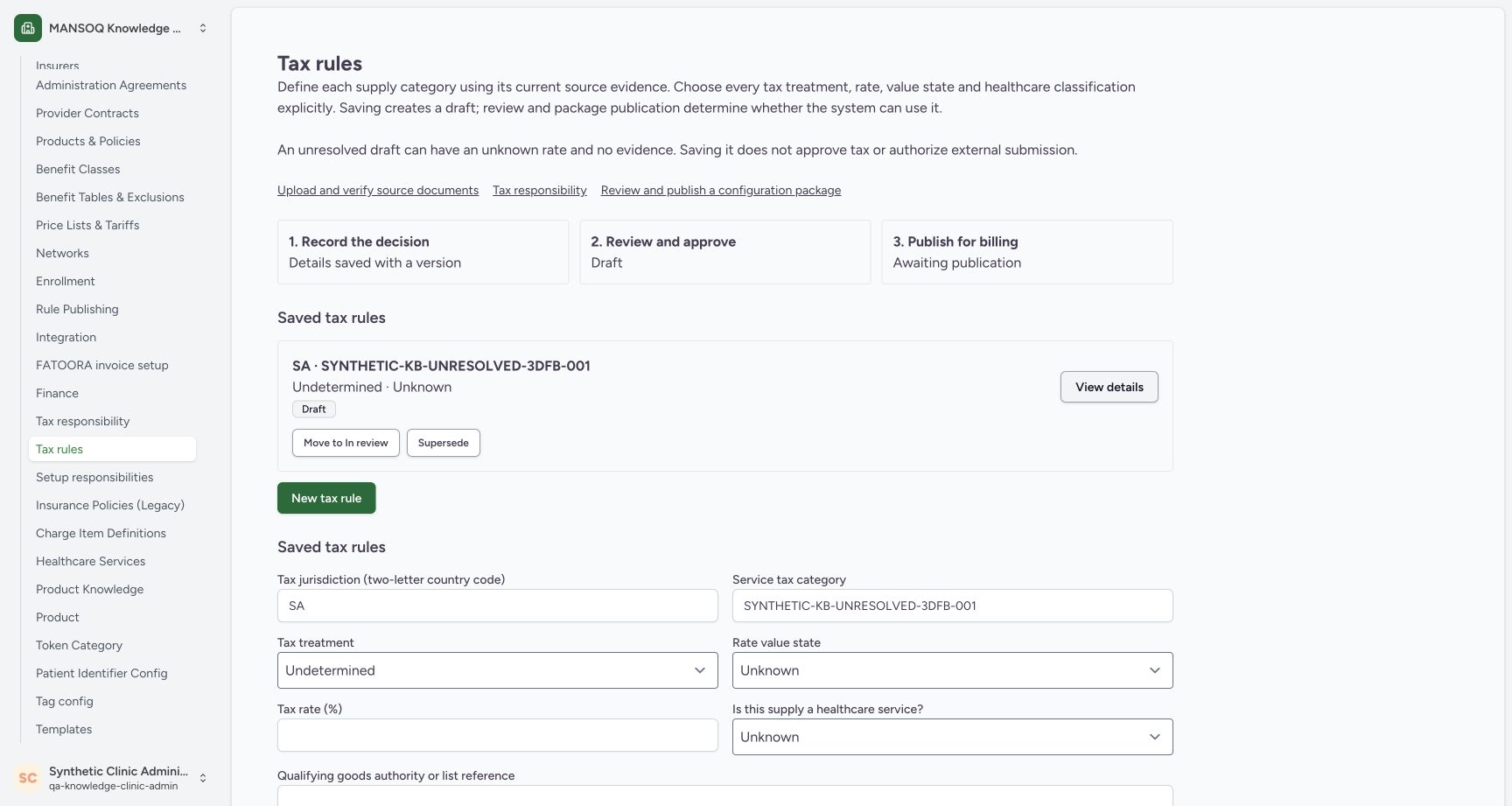
4840fba075ea29daa1640c2971449279e3e47f9b5e1588af5606799b78dcf06f- Check the existing Clinic session: Read qa-knowledge-clinic-admin under the synthetic Clinic administrator.
- Identify the assigned synthetic rule: Match SYNTHETIC-KB-UNRESOLVED-3DFB-001 in Saved tax rules.
- Read Draft: The saved rule is still Draft.
- Open Move to In review: Open the review dialog for this saved rule.
123456789Recorded release 3dfb7c9f · 2026-10-19T21:21:48.392Z · 1728 × 921 Prepare the assigned Tax rule readiness controls
Capture details
Observed committed 3dfb source on 20 October 2026 (Asia/Riyadh; captured 19 October UTC). Fictional unresolved software example; no tax rate, legal authority or financial approval is established.
Image SHA-256
14d66089eb265d8a8444b813d6e82ce101abd386364db10b4b82d96c05c1a79d- Set the Configuration model: Use emr.taxrule for the assigned existing Tax rule.
- Identify the existing Row id: Use the full assigned rule identifier shown, not a new or different row.
- Choose the status to check: Select active as the target status for Validate; this does not activate the row.
- Keep category Other: Use Other for this readiness check.
- Leave Amount blank: Blank means no amount is stated; it is not sent as zero.
- Keep the lock-token field blank: This exercise uses Validate, not a write action.
- Keep Change reason blank here: The separate console is being used only for Validate.
- Keep Acting as blank: No acting-role override is entered.
- Select Validate: Request the readiness verdict once; Approve / transition and Activate are separate actions.
1. Open the Row lifecycle view
Select Rule Publishing in Settings. From the loaded Rule publishing page, select Row lifecycle. The pre-existing fictional package rows on the Packages tab do not approve this unresolved Tax draft.
 12
12Check Draft after the second Cancel
Capture details
Observed committed 3dfb source on 20 October 2026 (Asia/Riyadh; captured 19 October UTC). Fictional unresolved software example; no tax rate, legal authority or financial approval is established.
Image SHA-256 f3f00aa1055cd625504f6292ccbb079a15ceaa926a7c70b13459798e5d65bb5c
- Verify Draft after the second Cancel: The saved rule is still Draft with Undetermined and Unknown displayed.
- Open Rule Publishing: Continue to the Rule Publishing page for a separate readiness check.
12Open Row lifecycle from the loaded Rule publishing page
Capture details
Observed committed 3dfb source on 20 October 2026 (Asia/Riyadh; captured 19 October UTC). Fictional unresolved software example; no tax rate, legal authority or financial approval is established.
Image SHA-256 09a7d0fc49608bada023a1892b9e68ff2502817261fd4789354cb72e1d4450dd
- Open Row lifecycle: Select the Row lifecycle tab from the fully loaded Rule publishing page.
- Keep package validation in its own scope: These pre-existing fictional package rows do not approve this unresolved Tax rule.
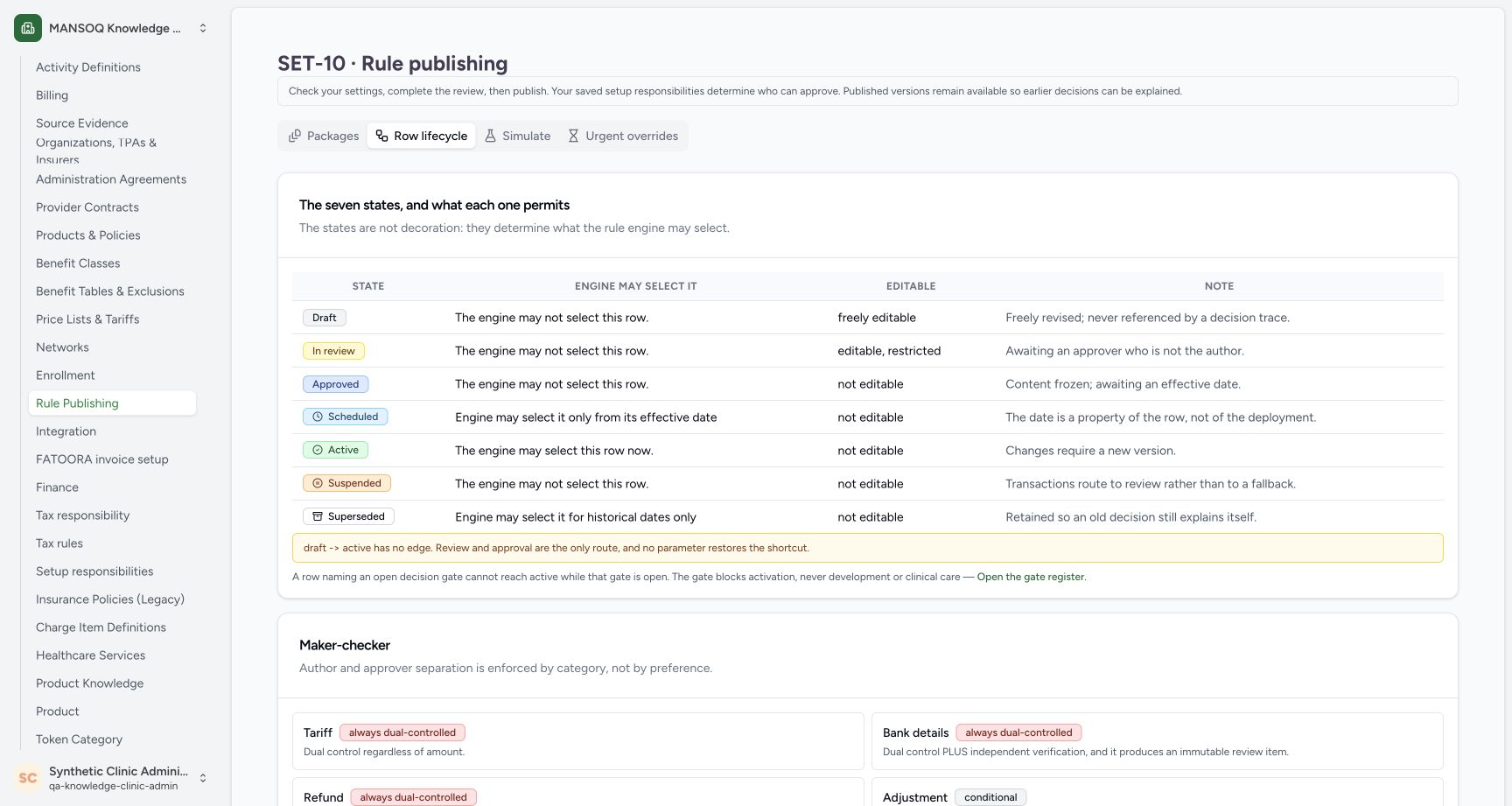
2. Read the seven-state reference
Review Draft, In review, Approved, Scheduled, Active, Suspended and Superseded. The table distinguishes whether a row may be selected now or only for dated or historical use. Read the warning that Draft has no direct route to active.
 12345678
Read the seven lifecycle states and no-shortcut warning
Capture details
Observed committed 3dfb source on 20 October 2026 (Asia/Riyadh; captured 19 October UTC). Fictional unresolved software example; no tax rate, legal authority or financial approval is established.
Image SHA-256 ada58e7c9618cd24da238dc0b5a31ac853b09c6887fc707e7a05bc24bfa9dc43
- Read Draft: The engine may not select a Draft row.
- Read In review: The engine may not select an In review row.
- Read Approved: An Approved row is still not selectable here.
- Read Scheduled: A Scheduled row is selectable only from its effective date.
- Read Active: The table describes selection of an Active row now.
- Read Suspended: The engine may not select a Suspended row.
- Read Superseded: The table describes historical-date selection only.
- Read the no-shortcut warning: Draft to active has no edge; review and approval remain required.
3. Identify the existing Tax row
Scroll to Validate, approve, activate, supersede. Set Configuration model to emr.taxrule and enter the full assigned existing Tax rule Row id shown in the example. Check the intended row before proceeding.
123456789Prepare the assigned Tax rule readiness controls
Capture details
Observed committed 3dfb source on 20 October 2026 (Asia/Riyadh; captured 19 October UTC). Fictional unresolved software example; no tax rate, legal authority or financial approval is established.
Image SHA-256 14d66089eb265d8a8444b813d6e82ce101abd386364db10b4b82d96c05c1a79d
- Set the Configuration model: Use emr.taxrule for the assigned existing Tax rule.
- Identify the existing Row id: Use the full assigned rule identifier shown, not a new or different row.
- Choose the status to check: Select active as the target status for Validate; this does not activate the row.
- Keep category Other: Use Other for this readiness check.
- Leave Amount blank: Blank means no amount is stated; it is not sent as zero.
- Keep the lock-token field blank: This exercise uses Validate, not a write action.
- Keep Change reason blank here: The separate console is being used only for Validate.
- Keep Acting as blank: No acting-role override is entered.
- Select Validate: Request the readiness verdict once; Approve / transition and Activate are separate actions.
4. Choose the status being checked
Set Target status to active and keep Maker-checker category as Other. The target status describes the Validate question; selecting it does not activate the rule.
123456789Prepare the assigned Tax rule readiness controls
Capture details
Observed committed 3dfb source on 20 October 2026 (Asia/Riyadh; captured 19 October UTC). Fictional unresolved software example; no tax rate, legal authority or financial approval is established.
Image SHA-256 14d66089eb265d8a8444b813d6e82ce101abd386364db10b4b82d96c05c1a79d
- Set the Configuration model: Use emr.taxrule for the assigned existing Tax rule.
- Identify the existing Row id: Use the full assigned rule identifier shown, not a new or different row.
- Choose the status to check: Select active as the target status for Validate; this does not activate the row.
- Keep category Other: Use Other for this readiness check.
- Leave Amount blank: Blank means no amount is stated; it is not sent as zero.
- Keep the lock-token field blank: This exercise uses Validate, not a write action.
- Keep Change reason blank here: The separate console is being used only for Validate.
- Keep Acting as blank: No acting-role override is entered.
- Select Validate: Request the readiness verdict once; Approve / transition and Activate are separate actions.
5. Keep the blank inputs as shown
Leave Amount, Acting as, Lock token and Change reason blank for this Validate check. The Amount hint explicitly says that blank is not sent as zero.
123456789Prepare the assigned Tax rule readiness controls
Capture details
Observed committed 3dfb source on 20 October 2026 (Asia/Riyadh; captured 19 October UTC). Fictional unresolved software example; no tax rate, legal authority or financial approval is established.
Image SHA-256 14d66089eb265d8a8444b813d6e82ce101abd386364db10b4b82d96c05c1a79d
- Set the Configuration model: Use emr.taxrule for the assigned existing Tax rule.
- Identify the existing Row id: Use the full assigned rule identifier shown, not a new or different row.
- Choose the status to check: Select active as the target status for Validate; this does not activate the row.
- Keep category Other: Use Other for this readiness check.
- Leave Amount blank: Blank means no amount is stated; it is not sent as zero.
- Keep the lock-token field blank: This exercise uses Validate, not a write action.
- Keep Change reason blank here: The separate console is being used only for Validate.
- Keep Acting as blank: No acting-role override is entered.
- Select Validate: Request the readiness verdict once; Approve / transition and Activate are separate actions.
6. Select only Validate
Select Validate once. Approve / transition, Activate and Supersede are different actions; they are not used in this lesson.
123456789Prepare the assigned Tax rule readiness controls
Capture details
Observed committed 3dfb source on 20 October 2026 (Asia/Riyadh; captured 19 October UTC). Fictional unresolved software example; no tax rate, legal authority or financial approval is established.
Image SHA-256 14d66089eb265d8a8444b813d6e82ce101abd386364db10b4b82d96c05c1a79d
- Set the Configuration model: Use emr.taxrule for the assigned existing Tax rule.
- Identify the existing Row id: Use the full assigned rule identifier shown, not a new or different row.
- Choose the status to check: Select active as the target status for Validate; this does not activate the row.
- Keep category Other: Use Other for this readiness check.
- Leave Amount blank: Blank means no amount is stated; it is not sent as zero.
- Keep the lock-token field blank: This exercise uses Validate, not a write action.
- Keep Change reason blank here: The separate console is being used only for Validate.
- Keep Acting as blank: No acting-role override is entered.
- Select Validate: Request the readiness verdict once; Approve / transition and Activate are separate actions.
7. Read the negative verdict and illegal transition
Read not ready for active. The illegal transition refusal explains that this Draft cannot jump directly to active: review and approval are required.
1234567Read all five negative readiness refusals
Capture details
Observed committed 3dfb source on 20 October 2026 (Asia/Riyadh; captured 19 October UTC). Fictional unresolved software example; no tax rate, legal authority or financial approval is established.
Image SHA-256 e3bba327f0c1daf734a4c23bf22199a6e8732021bd2ba781c18a48f72314a8f7
- Read not ready for active: The check returned a negative readiness verdict.
- Read overlap check not performed: An unperformed overlap check is not a successful overlap check.
- Read illegal transition: The displayed Draft row cannot jump directly to active.
- Read evidence not activation grade: Absent evidence does not meet the displayed activation evidence requirement.
- Read source document missing: The rule has no source document for activation.
- Read overlap check not performed: Read the full explanation rather than interpreting missing checking as a pass.
- Read config package missing: The rule has no configuration package.
8. Read the evidence and source refusals
Read evidence not activation grade and source document missing. The displayed absent evidence and missing source document do not meet the activation requirements.
1234567Read all five negative readiness refusals
Capture details
Observed committed 3dfb source on 20 October 2026 (Asia/Riyadh; captured 19 October UTC). Fictional unresolved software example; no tax rate, legal authority or financial approval is established.
Image SHA-256 e3bba327f0c1daf734a4c23bf22199a6e8732021bd2ba781c18a48f72314a8f7
- Read not ready for active: The check returned a negative readiness verdict.
- Read overlap check not performed: An unperformed overlap check is not a successful overlap check.
- Read illegal transition: The displayed Draft row cannot jump directly to active.
- Read evidence not activation grade: Absent evidence does not meet the displayed activation evidence requirement.
- Read source document missing: The rule has no source document for activation.
- Read overlap check not performed: Read the full explanation rather than interpreting missing checking as a pass.
- Read config package missing: The rule has no configuration package.
9. Read the overlap and package refusals
Read overlap check not performed and config package missing. An unperformed check is not a passed check, and this row names no configuration package. Read the complete list rather than stopping after the first refusal.
1234567Read all five negative readiness refusals
Capture details
Observed committed 3dfb source on 20 October 2026 (Asia/Riyadh; captured 19 October UTC). Fictional unresolved software example; no tax rate, legal authority or financial approval is established.
Image SHA-256 e3bba327f0c1daf734a4c23bf22199a6e8732021bd2ba781c18a48f72314a8f7
- Read not ready for active: The check returned a negative readiness verdict.
- Read overlap check not performed: An unperformed overlap check is not a successful overlap check.
- Read illegal transition: The displayed Draft row cannot jump directly to active.
- Read evidence not activation grade: Absent evidence does not meet the displayed activation evidence requirement.
- Read source document missing: The rule has no source document for activation.
- Read overlap check not performed: Read the full explanation rather than interpreting missing checking as a pass.
- Read config package missing: The rule has no configuration package.
Keep the outcome within this check
This observed Validate returned a negative readiness result and left the saved Tax draft unchanged. It did not move the rule to In review, approve or activate it, resolve the existing claim holds, or establish that billing or external submission is ready.
123456789Prepare the assigned Tax rule readiness controls
Capture details
Observed committed 3dfb source on 20 October 2026 (Asia/Riyadh; captured 19 October UTC). Fictional unresolved software example; no tax rate, legal authority or financial approval is established.
Image SHA-256 14d66089eb265d8a8444b813d6e82ce101abd386364db10b4b82d96c05c1a79d
- Set the Configuration model: Use emr.taxrule for the assigned existing Tax rule.
- Identify the existing Row id: Use the full assigned rule identifier shown, not a new or different row.
- Choose the status to check: Select active as the target status for Validate; this does not activate the row.
- Keep category Other: Use Other for this readiness check.
- Leave Amount blank: Blank means no amount is stated; it is not sent as zero.
- Keep the lock-token field blank: This exercise uses Validate, not a write action.
- Keep Change reason blank here: The separate console is being used only for Validate.
- Keep Acting as blank: No acting-role override is entered.
- Select Validate: Request the readiness verdict once; Approve / transition and Activate are separate actions.
1234567Read all five negative readiness refusals
Capture details
Observed committed 3dfb source on 20 October 2026 (Asia/Riyadh; captured 19 October UTC). Fictional unresolved software example; no tax rate, legal authority or financial approval is established.
Image SHA-256 e3bba327f0c1daf734a4c23bf22199a6e8732021bd2ba781c18a48f72314a8f7
- Read not ready for active: The check returned a negative readiness verdict.
- Read overlap check not performed: An unperformed overlap check is not a successful overlap check.
- Read illegal transition: The displayed Draft row cannot jump directly to active.
- Read evidence not activation grade: Absent evidence does not meet the displayed activation evidence requirement.
- Read source document missing: The rule has no source document for activation.
- Read overlap check not performed: Read the full explanation rather than interpreting missing checking as a pass.
- Read config package missing: The rule has no configuration package.
Troubleshooting
Does overlap check not performed mean there is no conflict?
No. The result explicitly says that the check did not run. Keep it unresolved and use the appropriate evidence and review workflow; do not treat an unperformed check as a pass.
1234567Read all five negative readiness refusals
Capture details
Observed committed 3dfb source on 20 October 2026 (Asia/Riyadh; captured 19 October UTC). Fictional unresolved software example; no tax rate, legal authority or financial approval is established.
Image SHA-256 e3bba327f0c1daf734a4c23bf22199a6e8732021bd2ba781c18a48f72314a8f7
- Read not ready for active: The check returned a negative readiness verdict.
- Read overlap check not performed: An unperformed overlap check is not a successful overlap check.
- Read illegal transition: The displayed Draft row cannot jump directly to active.
- Read evidence not activation grade: Absent evidence does not meet the displayed activation evidence requirement.
- Read source document missing: The rule has no source document for activation.
- Read overlap check not performed: Read the full explanation rather than interpreting missing checking as a pass.
- Read config package missing: The rule has no configuration package.
Do validation-passed package rows make this draft ready?
No. Those separate fictional package rows were already on the entry page. The readiness result for this Tax draft still lists all five refusals, including config package missing.
12Open Row lifecycle from the loaded Rule publishing page
Capture details
Observed committed 3dfb source on 20 October 2026 (Asia/Riyadh; captured 19 October UTC). Fictional unresolved software example; no tax rate, legal authority or financial approval is established.
Image SHA-256 09a7d0fc49608bada023a1892b9e68ff2502817261fd4789354cb72e1d4450dd
- Open Row lifecycle: Select the Row lifecycle tab from the fully loaded Rule publishing page.
- Keep package validation in its own scope: These pre-existing fictional package rows do not approve this unresolved Tax rule.
1234567Read all five negative readiness refusals
Capture details
Observed committed 3dfb source on 20 October 2026 (Asia/Riyadh; captured 19 October UTC). Fictional unresolved software example; no tax rate, legal authority or financial approval is established.
Image SHA-256 e3bba327f0c1daf734a4c23bf22199a6e8732021bd2ba781c18a48f72314a8f7
- Read not ready for active: The check returned a negative readiness verdict.
- Read overlap check not performed: An unperformed overlap check is not a successful overlap check.
- Read illegal transition: The displayed Draft row cannot jump directly to active.
- Read evidence not activation grade: Absent evidence does not meet the displayed activation evidence requirement.
- Read source document missing: The rule has no source document for activation.
- Read overlap check not performed: Read the full explanation rather than interpreting missing checking as a pass.
- Read config package missing: The rule has no configuration package.
Source evidence
Every citation uses this exact committed version. The private source repository requires access.
- repositories/platform/mansoq-web/src/pages/Facility/settings/rcm/TaxRuleSettings.tsx:149 ·
3dfb7c9f519fb5b4cd4452439f3c12346bf58319Source file checksum
f1e8279cd8a8c81e5db560c438020bd6c484f222825a7c3079f54d073a39feb1 - repositories/platform/mansoq-web/src/pages/Facility/settings/rcm/parties/components/LifecycleActions.tsx:179 ·
3dfb7c9f519fb5b4cd4452439f3c12346bf58319Source file checksum
1cc8cd82811317ef405936d56baf4ac5fcb908296f09408c79a77b0e2bf9d74f - repositories/platform/mansoq-web/src/types/rcm/configLifecycle.ts:6 ·
3dfb7c9f519fb5b4cd4452439f3c12346bf58319Source file checksum
82867ccfbe3e66fb101ad43a31ec650ea6ddbe72e6273286ae774511aec4e1ce - repositories/platform/mansoq-web/src/types/rcm/taxRules.ts:179 ·
3dfb7c9f519fb5b4cd4452439f3c12346bf58319Source file checksum
6ba829669a733108bce2a6233e8b9f5f2ae29b809773b2550f27c7f031d62a26 - repositories/platform/mansoq-web/src/pages/Facility/settings/rcm/RulePublishingSettings.tsx:915 ·
3dfb7c9f519fb5b4cd4452439f3c12346bf58319Source file checksum
2108e2a71130cccd94211435d22cb2ebf6e422c456c2f23896e2a916a5d3d939 - repositories/platform/mansoq-web/src/pages/Facility/settings/rcm/governanceApi.ts:38 ·
3dfb7c9f519fb5b4cd4452439f3c12346bf58319Source file checksum
ff97224d5fbbd20f144d5fbfef996f1a52674778e15d2ea24d03e3f273e32f45 - repositories/platform/mansoq-web/src/pages/Facility/settings/rcm/TaxAllocationSettings.tsx:36 ·
3dfb7c9f519fb5b4cd4452439f3c12346bf58319Source file checksum
4c117d68ddec8aad508ac69b15b4cf1fadd0bc68a42272041f972754b5f11a41 - repositories/platform/mansoq-web/src/components/rcm/ApprovalCode.tsx:33 ·
3dfb7c9f519fb5b4cd4452439f3c12346bf58319Source file checksum
add14ae1b03e157a076fae2933335a743b1ebc11cb4a64b407ca3cfdb39cc6ac - repositories/platform/mansoq-web/src/types/rcm/packageQualification.ts:23 ·
3dfb7c9f519fb5b4cd4452439f3c12346bf58319Source file checksum
816472a73405361af9923417d46076e2520034549d95183d0b62fd51d943f968 - repositories/platform/mansoq-web/src/lib/capabilities/routeCapabilities.ts:285 ·
3dfb7c9f519fb5b4cd4452439f3c12346bf58319Source file checksum
2188d1f7e98b0cc44f225f9f6c170b8c8769348245ab82f8b95bf7cbba1e7a50 - repositories/platform/mansoq-web/public/locale/en.json:6955 ·
3dfb7c9f519fb5b4cd4452439f3c12346bf58319Source file checksum
96498c8b964dce856d43c09e4241708efdd175d935e7ebbd14fa2f8d62efa507 - repositories/platform/mansoq-core/mansoq/emr/api/viewsets/rcm/tax_setup.py:74 ·
3dfb7c9f519fb5b4cd4452439f3c12346bf58319Source file checksum
64a19cf9f732a3d61796e8af876eb257bfbd92067a1fa9041df2a9248b8f8d43 - repositories/platform/mansoq-core/mansoq/emr/api/viewsets/rcm/organization.py:355 ·
3dfb7c9f519fb5b4cd4452439f3c12346bf58319Source file checksum
0e160f39d0eeac946b761309e46be759946ddbe66a471ee4c60e6f3c01b13310 - repositories/platform/mansoq-core/mansoq/emr/rcm/services/publication.py:223 ·
3dfb7c9f519fb5b4cd4452439f3c12346bf58319Source file checksum
23f9269f5efbd31932e972d731386ea77e8ac282a1c5f1af737b615427ee1b6c - repositories/platform/mansoq-core/mansoq/emr/api/viewsets/rcm/governance.py:250 ·
3dfb7c9f519fb5b4cd4452439f3c12346bf58319Source file checksum
49cc1798847d0bb9082ab4aa30bfb942f8717a41b34c1de767585aa8912586a5 - repositories/platform/mansoq-core/mansoq/emr/rcm/services/package_qualification.py:27 ·
3dfb7c9f519fb5b4cd4452439f3c12346bf58319Source file checksum
76fc12906e76025edba88a403023fc73887c73a85355316b6a76944e890de644 - repositories/platform/mansoq-core/mansoq/emr/rcm/services/setup_governance.py:6 ·
3dfb7c9f519fb5b4cd4452439f3c12346bf58319Source file checksum
310144bbe116308a08da7827a7e613573aaa04f74e96ee9fc46f54d61e1840e0 - repositories/platform/mansoq-core/mansoq/emr/rcm/services/source_integrity.py:10 ·
3dfb7c9f519fb5b4cd4452439f3c12346bf58319Source file checksum
e2de14680469de0e0227302fc52659f0e2af611d1242b5fad195cd8b012d47c4 - repositories/platform/mansoq-core/mansoq/emr/api/viewsets/rcm/operations_base.py:394 ·
3dfb7c9f519fb5b4cd4452439f3c12346bf58319Source file checksum
e2b741a157811f624bf70161931308f82789e49ca28a2c0d35f86f6fb46b6ba7 - repositories/platform/mansoq-core/mansoq/emr/api/viewsets/rcm/approval.py:22 ·
3dfb7c9f519fb5b4cd4452439f3c12346bf58319Source file checksum
3dc3db3ef606bece6cbfccd13ac043180dbcc11c656a407641411fd3d05813b1 - repositories/platform/mansoq-core/mansoq/security/permissions/rcm.py:15 ·
3dfb7c9f519fb5b4cd4452439f3c12346bf58319Source file checksum
fd433eada5141642192f6dcaeb5df7a85516f79191d7023b9acf3991ac249906 - repositories/platform/mansoq-core/mansoq/security/authorization/rcm.py:7 ·
3dfb7c9f519fb5b4cd4452439f3c12346bf58319Source file checksum
6695821987ae94bb3a9bf379c57c2ce06c400c2b49323022a97664cb942f0f90 - repositories/platform/mansoq-core/mansoq/emr/api/serializers/rcm/common.py:336 ·
3dfb7c9f519fb5b4cd4452439f3c12346bf58319Source file checksum
b6fdaf1858f3997abfcee9d69204c7f83216e55d4b2976199e98b11a8743eceb - repositories/platform/mansoq-core/mansoq/emr/models/rcm/base.py:69 ·
3dfb7c9f519fb5b4cd4452439f3c12346bf58319Source file checksum
4b601c09a81cbb21da2ae46d272ac4abd462ed38c35ddb61407074232d535129 - repositories/platform/mansoq-core/mansoq/emr/models/rcm/governance.py:83 ·
3dfb7c9f519fb5b4cd4452439f3c12346bf58319Source file checksum
8b0b3542a0caebd152aca9e23c73dba7d0321b86d6da31f3fb8fd37dfaf5b983 - repositories/platform/mansoq-core/mansoq/emr/models/rcm/setup_governance.py:11 ·
3dfb7c9f519fb5b4cd4452439f3c12346bf58319Source file checksum
0ea87c855f9237460dc1556821f5ce4219e4dd0a73b9c91adba29ad9b53befd9 - repositories/platform/mansoq-core/mansoq/utils/models/base.py:15 ·
3dfb7c9f519fb5b4cd4452439f3c12346bf58319Source file checksum
1a5270f50188d1e0b044210773ca86a483b904f3a9724bb7b321d4ea463acfaf - repositories/platform/mansoq-core/mansoq/emr/resources/revenue_cycle/lifecycle.py:433 ·
3dfb7c9f519fb5b4cd4452439f3c12346bf58319Source file checksum
4463a8c4affc001a10d6d58fdf3fa0468b0c1f111b5e32b01550cef6a2a6690a - repositories/platform/mansoq-core/mansoq/emr/rcm/services/claim_financial_finalization.py:26 ·
3dfb7c9f519fb5b4cd4452439f3c12346bf58319Source file checksum
3aa5c91ef62584f85ebe4f5fee0272784d5c59bb2970234ddd290969e55be358 - repositories/platform/mansoq-core/mansoq/emr/rcm/engines/tax.py:605 ·
3dfb7c9f519fb5b4cd4452439f3c12346bf58319Source file checksum
624d90842571ba031ba8fe40692b0c09d66a8e5a3fe5e317da0bfcf7a6029e1a - repositories/platform/mansoq-core/config/api_router.py:966 ·
3dfb7c9f519fb5b4cd4452439f3c12346bf58319Source file checksum
36bd0555423f9dd86b0586dac6de8782c32f10017c954587a0c7dd65d0e608db - repositories/platform/mansoq-core/mansoq/emr/signals/revenue_cycle.py:62 ·
3dfb7c9f519fb5b4cd4452439f3c12346bf58319Source file checksum
f71600b7112b7b3b1adfc46213bb2e02506033c0c744bb15dd45b1ed9ccc09b9 - repositories/platform/mansoq-core/mansoq/emr/api/viewsets/rcm/governance_serializers.py:99 ·
3dfb7c9f519fb5b4cd4452439f3c12346bf58319Source file checksum
e04fe39a904878cfb7e7e92dfe2bc3b88a9e5e556a4ca979712bf05735e81ff3 - repositories/platform/mansoq-core/mansoq/emr/rcm/services/gates.py:137 ·
3dfb7c9f519fb5b4cd4452439f3c12346bf58319Source file checksum
5622f3df315d6dc8b60696e9052d0953bcd2daee58a8f236a0310d35ccd3ad35 - repositories/platform/mansoq-core/mansoq/emr/models/revenue_cycle.py:68 ·
3dfb7c9f519fb5b4cd4452439f3c12346bf58319Source file checksum
e576c48f88ea02f524d651bdfa01339bcd9af2d396cfce68df65068e204af71a - repositories/platform/mansoq-core/mansoq/emr/models/invoice.py:7 ·
3dfb7c9f519fb5b4cd4452439f3c12346bf58319Source file checksum
c75e2df36ccbfb4883ca97f58b4e534ab27c557cddb5e7eab52c59b744a1b512 - repositories/platform/mansoq-core/mansoq/emr/models/rcm/financial_decision.py:17 ·
3dfb7c9f519fb5b4cd4452439f3c12346bf58319Source file checksum
7f121ce8fba3d53bb9fe0b6b98bedf1b33c3e08dd320a5a5fe96b9086af4eeb2 - repositories/platform/mansoq-core/mansoq/emr/models/rcm/liability_finance.py:157 ·
3dfb7c9f519fb5b4cd4452439f3c12346bf58319Source file checksum
d599bf6ce6ff4e7877a037ba8af2781541a8550d45d22e2ee621d41932131ab2 - repositories/platform/mansoq-core/mansoq/emr/models/rcm/tax_allocation.py:18 ·
3dfb7c9f519fb5b4cd4452439f3c12346bf58319Source file checksum
019bd76f12887b8c5282d09e86f4535de0817b6e4354d972b746e6bc5f45e013 - repositories/platform/mansoq-core/mansoq/emr/models/workflow_email.py:35 ·
3dfb7c9f519fb5b4cd4452439f3c12346bf58319Source file checksum
3de7559e72223bfb5f967a13db3669cefe0bfea9a5e18dc2f1ba49bd950a7018 - repositories/platform/mansoq-core/mansoq/emr/rcm/email_notifications.py:96 ·
3dfb7c9f519fb5b4cd4452439f3c12346bf58319Source file checksum
83b2646fa7a2af986ebda25cede1169a5913d9ae16665cceee818bccce8734da