 MANSOQ
 Revenue cycle management · VERSION 3dfb7c9f
Inspect a Tax draft and check the required change reason
Open Move to In review and read its missing-reason message without changing the saved draft.
Facility Admin
 1234
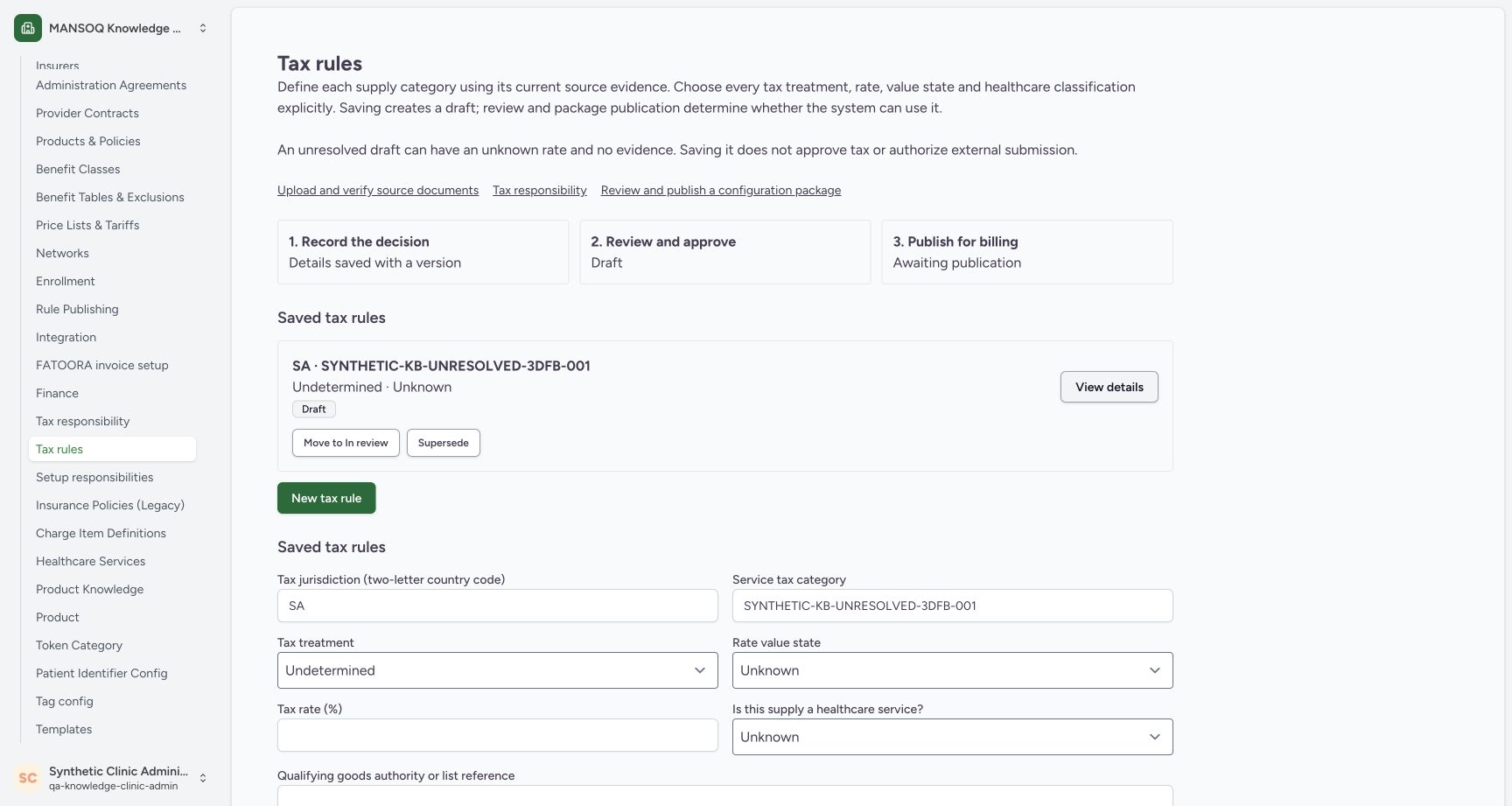
1234Identify the saved unresolved Tax draft
Capture details
Observed committed 3dfb source on 20 October 2026 (Asia/Riyadh; captured 19 October UTC). Fictional unresolved software example; no tax rate, legal authority or financial approval is established.
Image SHA-256 4840fba075ea29daa1640c2971449279e3e47f9b5e1588af5606799b78dcf06f
- Check the existing Clinic session: Read qa-knowledge-clinic-admin under the synthetic Clinic administrator.
- Identify the assigned synthetic rule: Match SYNTHETIC-KB-UNRESOLVED-3DFB-001 in Saved tax rules.
- Read Draft: The saved rule is still Draft.
- Open Move to In review: Open the review dialog for this saved rule.
 12
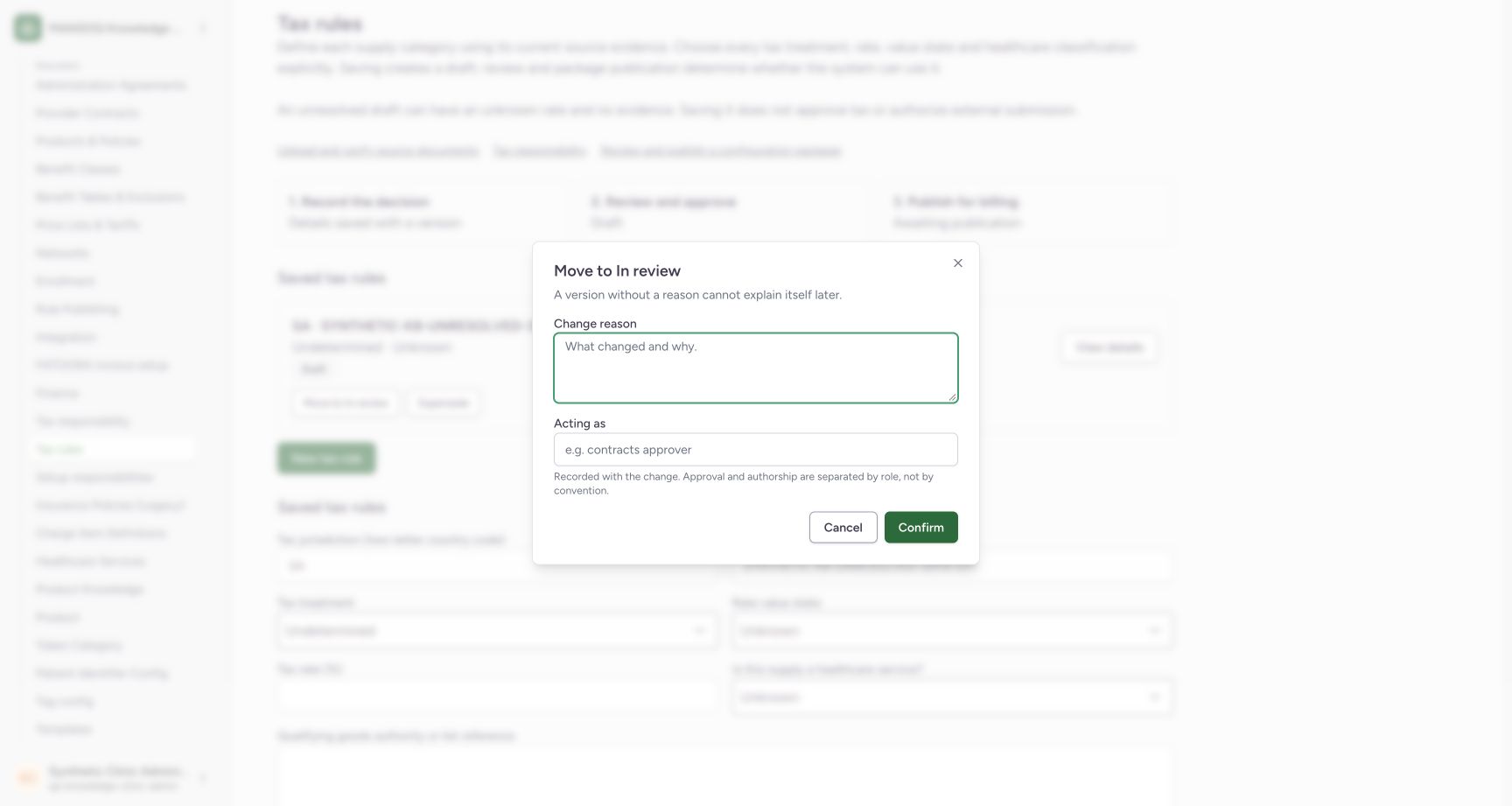
12Read the required-reason client validation
Capture details
Observed committed 3dfb source on 20 October 2026 (Asia/Riyadh; captured 19 October UTC). Fictional unresolved software example; no tax rate, legal authority or financial approval is established.
Image SHA-256 72a3d7994c2d108a60bfcd4b934de8cfcb6a189dbad96e02d511152eb7b1fa86
- Check the still-empty reason: The reason remains blank after the client validation attempt.
- Read the reason validation message: Enter a reason of 10 to 10,000 characters using valid text. The dialog remains open.
9 of 9 content blocks have reviewed image alignment. Missing overview or prerequisite images remain open.
Before you begin
- Start in an already authenticated, authorized Facility Admin session for the assigned synthetic Clinic. Signing in is a separate lesson and is not pictured here.1234
Recorded release 3dfb7c9f · 2026-10-19T21:18:52.692Z · 1728 × 921 Identify the saved unresolved Tax draft
Capture details
Observed committed 3dfb source on 20 October 2026 (Asia/Riyadh; captured 19 October UTC). Fictional unresolved software example; no tax rate, legal authority or financial approval is established.
Image SHA-256
4840fba075ea29daa1640c2971449279e3e47f9b5e1588af5606799b78dcf06f- Check the existing Clinic session: Read qa-knowledge-clinic-admin under the synthetic Clinic administrator.
- Identify the assigned synthetic rule: Match SYNTHETIC-KB-UNRESOLVED-3DFB-001 in Saved tax rules.
- Read Draft: The saved rule is still Draft.
- Open Move to In review: Open the review dialog for this saved rule.
- Use the existing fictional unresolved Tax draft assigned for this exercise. Its treatment and rate remain unresolved; this example establishes no tax or legal advice.1234
Recorded release 3dfb7c9f · 2026-10-19T21:18:52.692Z · 1728 × 921 Identify the saved unresolved Tax draft
Capture details
Observed committed 3dfb source on 20 October 2026 (Asia/Riyadh; captured 19 October UTC). Fictional unresolved software example; no tax rate, legal authority or financial approval is established.
Image SHA-256
4840fba075ea29daa1640c2971449279e3e47f9b5e1588af5606799b78dcf06f- Check the existing Clinic session: Read qa-knowledge-clinic-admin under the synthetic Clinic administrator.
- Identify the assigned synthetic rule: Match SYNTHETIC-KB-UNRESOLVED-3DFB-001 in Saved tax rules.
- Read Draft: The saved rule is still Draft.
- Open Move to In review: Open the review dialog for this saved rule.
1. Identify the saved draft
On Tax rules, match SYNTHETIC-KB-UNRESOLVED-3DFB-001 in Saved tax rules. Read Draft and Undetermined · Unknown before opening a lifecycle action.
1234Identify the saved unresolved Tax draft
Capture details
Observed committed 3dfb source on 20 October 2026 (Asia/Riyadh; captured 19 October UTC). Fictional unresolved software example; no tax rate, legal authority or financial approval is established.
Image SHA-256 4840fba075ea29daa1640c2971449279e3e47f9b5e1588af5606799b78dcf06f
- Check the existing Clinic session: Read qa-knowledge-clinic-admin under the synthetic Clinic administrator.
- Identify the assigned synthetic rule: Match SYNTHETIC-KB-UNRESOLVED-3DFB-001 in Saved tax rules.
- Read Draft: The saved rule is still Draft.
- Open Move to In review: Open the review dialog for this saved rule.
2. Inspect Move to In review
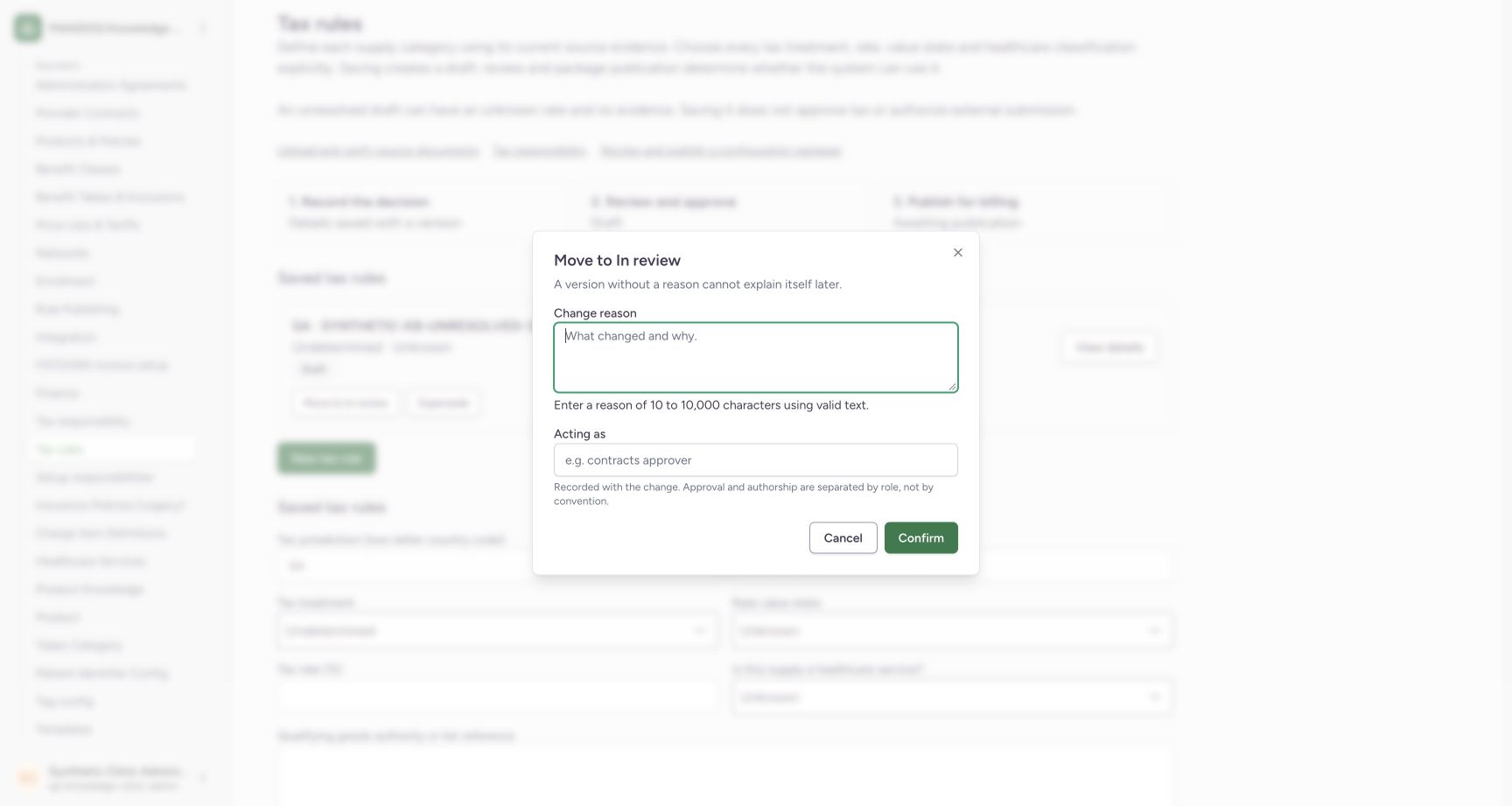
Select Move to In review on that saved rule. The dialog shows Change reason, Acting as, Cancel and Confirm. Opening this dialog does not move the rule.
1234Identify the saved unresolved Tax draft
Capture details
Observed committed 3dfb source on 20 October 2026 (Asia/Riyadh; captured 19 October UTC). Fictional unresolved software example; no tax rate, legal authority or financial approval is established.
Image SHA-256 4840fba075ea29daa1640c2971449279e3e47f9b5e1588af5606799b78dcf06f
- Check the existing Clinic session: Read qa-knowledge-clinic-admin under the synthetic Clinic administrator.
- Identify the assigned synthetic rule: Match SYNTHETIC-KB-UNRESOLVED-3DFB-001 in Saved tax rules.
- Read Draft: The saved rule is still Draft.
- Open Move to In review: Open the review dialog for this saved rule.
 123
123Inspect the empty Move to In review dialog
Capture details
Observed committed 3dfb source on 20 October 2026 (Asia/Riyadh; captured 19 October UTC). Fictional unresolved software example; no tax rate, legal authority or financial approval is established.
Image SHA-256 cef37732671ef2f57537d674be6e46e5a0bf6fef08cce699ce34198cb76e5008
- Leave Change reason empty: The placeholder is visible; no reason has been entered.
- Leave Acting as empty: No acting-role text is entered in this exercise.
- Try the empty-reason Confirm: In the training validation exercise, select Confirm once with the reason empty.
3. Try the empty required reason
For this fictional validation exercise, leave Change reason and Acting as empty and select Confirm once.
123Inspect the empty Move to In review dialog
Capture details
Observed committed 3dfb source on 20 October 2026 (Asia/Riyadh; captured 19 October UTC). Fictional unresolved software example; no tax rate, legal authority or financial approval is established.
Image SHA-256 cef37732671ef2f57537d674be6e46e5a0bf6fef08cce699ce34198cb76e5008
- Leave Change reason empty: The placeholder is visible; no reason has been entered.
- Leave Acting as empty: No acting-role text is entered in this exercise.
- Try the empty-reason Confirm: In the training validation exercise, select Confirm once with the reason empty.
4. Read the missing-reason message
Read Enter a reason of 10 to 10,000 characters using valid text. The dialog stays open with the reason field focused. This is the client validation result, not a completed move to In review.
12Read the required-reason client validation
Capture details
Observed committed 3dfb source on 20 October 2026 (Asia/Riyadh; captured 19 October UTC). Fictional unresolved software example; no tax rate, legal authority or financial approval is established.
Image SHA-256 72a3d7994c2d108a60bfcd4b934de8cfcb6a189dbad96e02d511152eb7b1fa86
- Check the still-empty reason: The reason remains blank after the client validation attempt.
- Read the reason validation message: Enter a reason of 10 to 10,000 characters using valid text. The dialog remains open.
Keep the unresolved values honest
Unknown and a blank rate do not mean a confirmed zero. The saved item is a Draft; opening its review dialog has not approved its tax treatment or published it for billing.
1234Identify the saved unresolved Tax draft
Capture details
Observed committed 3dfb source on 20 October 2026 (Asia/Riyadh; captured 19 October UTC). Fictional unresolved software example; no tax rate, legal authority or financial approval is established.
Image SHA-256 4840fba075ea29daa1640c2971449279e3e47f9b5e1588af5606799b78dcf06f
- Check the existing Clinic session: Read qa-knowledge-clinic-admin under the synthetic Clinic administrator.
- Identify the assigned synthetic rule: Match SYNTHETIC-KB-UNRESOLVED-3DFB-001 in Saved tax rules.
- Read Draft: The saved rule is still Draft.
- Open Move to In review: Open the review dialog for this saved rule.
Troubleshooting
Did the empty Confirm move the rule?
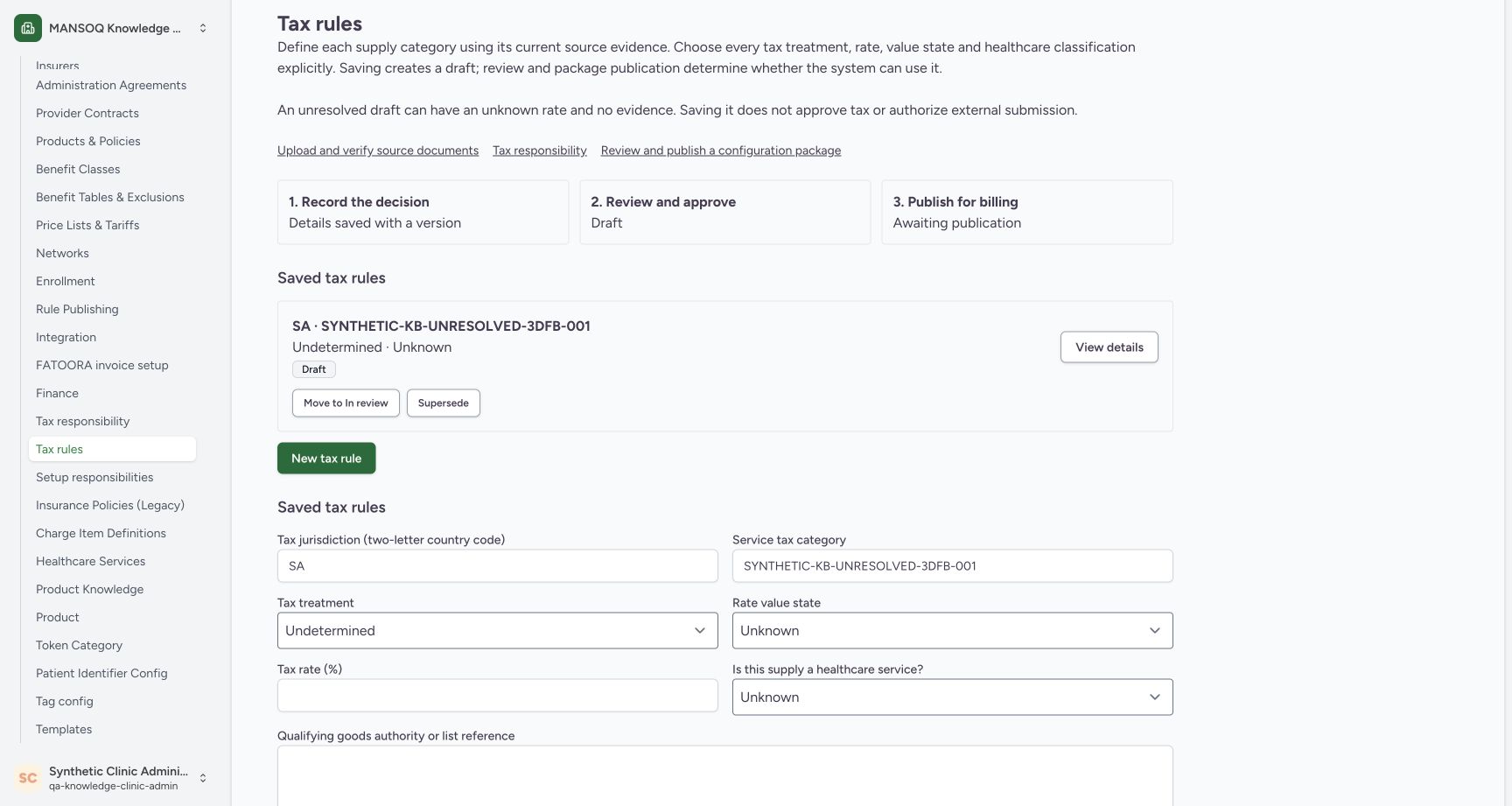
No. The required-reason message remains in the dialog, and the subsequent Cancel returns to the same Draft. Continue with the Cancel and reopen lesson for that observed result.
12Read the required-reason client validation
Capture details
Observed committed 3dfb source on 20 October 2026 (Asia/Riyadh; captured 19 October UTC). Fictional unresolved software example; no tax rate, legal authority or financial approval is established.
Image SHA-256 72a3d7994c2d108a60bfcd4b934de8cfcb6a189dbad96e02d511152eb7b1fa86
- Check the still-empty reason: The reason remains blank after the client validation attempt.
- Read the reason validation message: Enter a reason of 10 to 10,000 characters using valid text. The dialog remains open.
 12
12Check Draft after Cancel and reopen
Capture details
Observed committed 3dfb source on 20 October 2026 (Asia/Riyadh; captured 19 October UTC). Fictional unresolved software example; no tax rate, legal authority or financial approval is established.
Image SHA-256 f3f00aa1055cd625504f6292ccbb079a15ceaa926a7c70b13459798e5d65bb5c
- Check Draft after Cancel: The selected saved rule remains Draft.
- Reopen Move to In review: Open the same dialog again from the unchanged saved rule.
Source evidence
Every citation uses this exact committed version. The private source repository requires access.
- repositories/platform/mansoq-web/src/pages/Facility/settings/rcm/TaxRuleSettings.tsx:149 ·
3dfb7c9f519fb5b4cd4452439f3c12346bf58319Source file checksum
f1e8279cd8a8c81e5db560c438020bd6c484f222825a7c3079f54d073a39feb1 - repositories/platform/mansoq-web/src/pages/Facility/settings/rcm/parties/components/LifecycleActions.tsx:179 ·
3dfb7c9f519fb5b4cd4452439f3c12346bf58319Source file checksum
1cc8cd82811317ef405936d56baf4ac5fcb908296f09408c79a77b0e2bf9d74f - repositories/platform/mansoq-web/src/types/rcm/configLifecycle.ts:6 ·
3dfb7c9f519fb5b4cd4452439f3c12346bf58319Source file checksum
82867ccfbe3e66fb101ad43a31ec650ea6ddbe72e6273286ae774511aec4e1ce - repositories/platform/mansoq-web/src/types/rcm/taxRules.ts:179 ·
3dfb7c9f519fb5b4cd4452439f3c12346bf58319Source file checksum
6ba829669a733108bce2a6233e8b9f5f2ae29b809773b2550f27c7f031d62a26 - repositories/platform/mansoq-web/public/locale/en.json:6955 ·
3dfb7c9f519fb5b4cd4452439f3c12346bf58319Source file checksum
96498c8b964dce856d43c09e4241708efdd175d935e7ebbd14fa2f8d62efa507 - repositories/platform/mansoq-web/src/lib/capabilities/routeCapabilities.ts:285 ·
3dfb7c9f519fb5b4cd4452439f3c12346bf58319Source file checksum
2188d1f7e98b0cc44f225f9f6c170b8c8769348245ab82f8b95bf7cbba1e7a50 - repositories/platform/mansoq-core/mansoq/security/permissions/rcm.py:15 ·
3dfb7c9f519fb5b4cd4452439f3c12346bf58319Source file checksum
fd433eada5141642192f6dcaeb5df7a85516f79191d7023b9acf3991ac249906 - repositories/platform/mansoq-core/mansoq/security/authorization/rcm.py:7 ·
3dfb7c9f519fb5b4cd4452439f3c12346bf58319Source file checksum
6695821987ae94bb3a9bf379c57c2ce06c400c2b49323022a97664cb942f0f90