 MANSOQ
 Laboratory workflow · VERSION 3dfb7c9f
Create a fictional laboratory service request
Choose the existing laboratory activity, review the request and save one software-training order.
Doctor
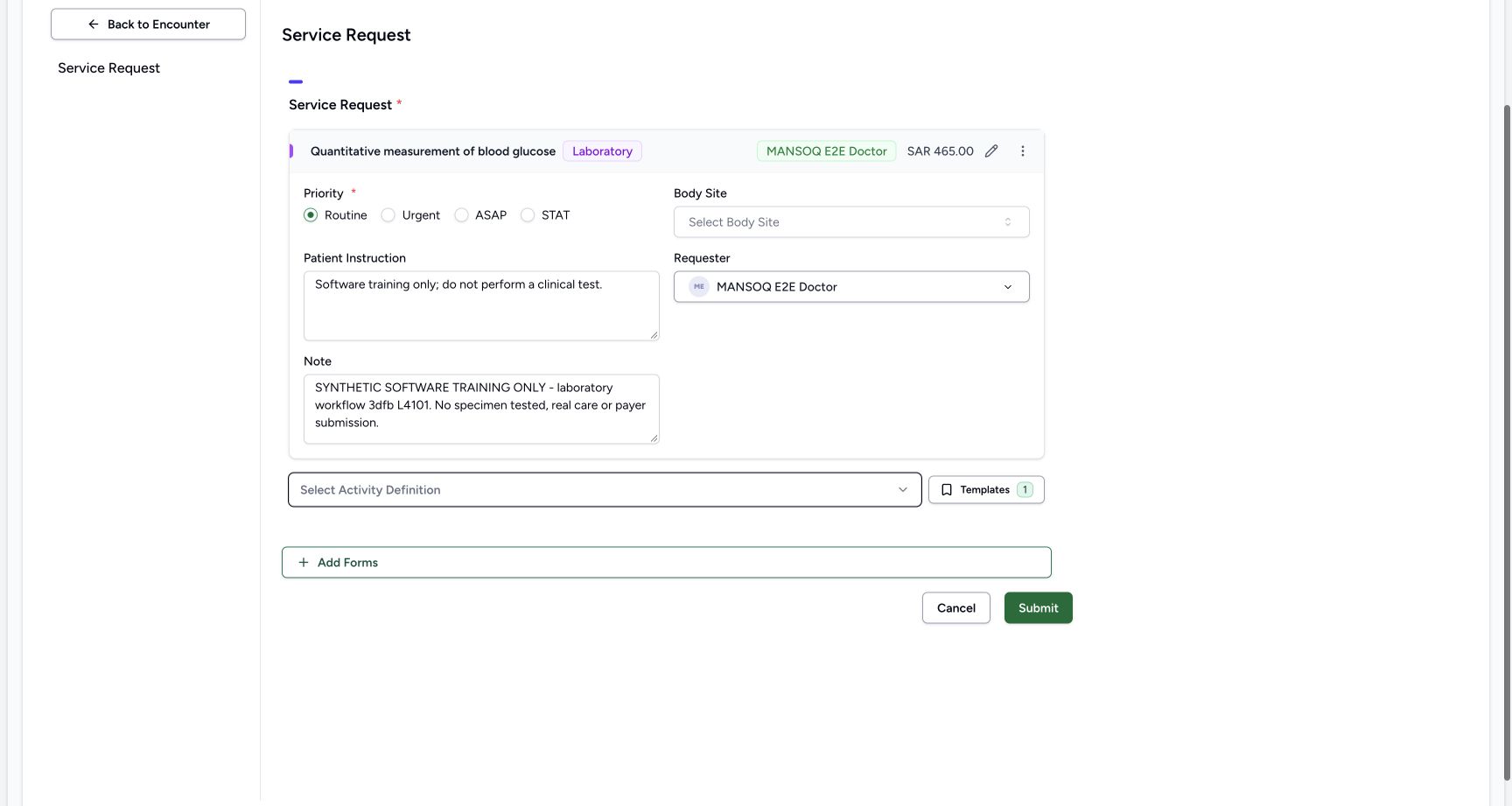 1234567
doctor order presave source fields
Capture details
Retained 3dfb software-training capture; fictional laboratory record and measurements, not clinical advice.
Image SHA-256 899f1c5936f197303d1fc9bae36cd6f9db42e8392d42f52423dbd2969095864f
- Activity: Review the selected title and Laboratory category.
- Displayed charge: Read SAR 465.00.
- Routine: Keep the intended priority.
- Requester: Read the existing Doctor.
- Patient Instruction: Read the training-only instruction.
- Note: Read the full fictional note.
- Submit: Submit the reviewed request once.
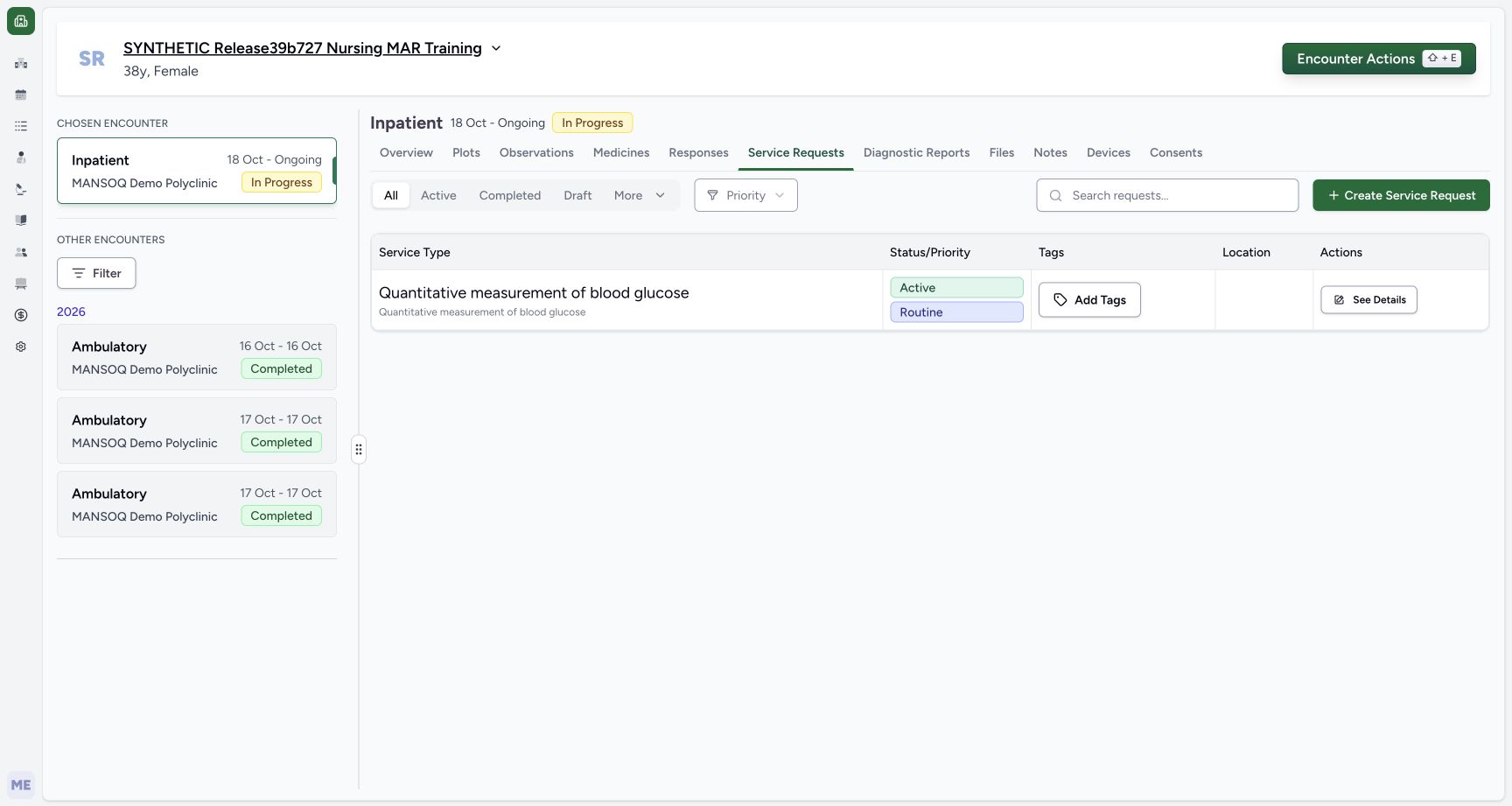 123
123doctor after single submit service list
Capture details
Retained 3dfb software-training capture; fictional laboratory record and measurements, not clinical advice.
Image SHA-256 3d32403dd6387e3c10155444f132dcc9a9385d9954506b006d7aa51376e19df0
- Saved request: Read the new service request title.
- Active and Routine: Verify the saved status and priority.
- See Details: Open this exact saved request.
14 of 14 content blocks have reviewed image alignment. Missing overview or prerequisite images remain open.
Before you begin
- Use an authorized Doctor session in MANSOQ Demo Polyclinic. The pictured account is MANSOQ E2E Doctor.
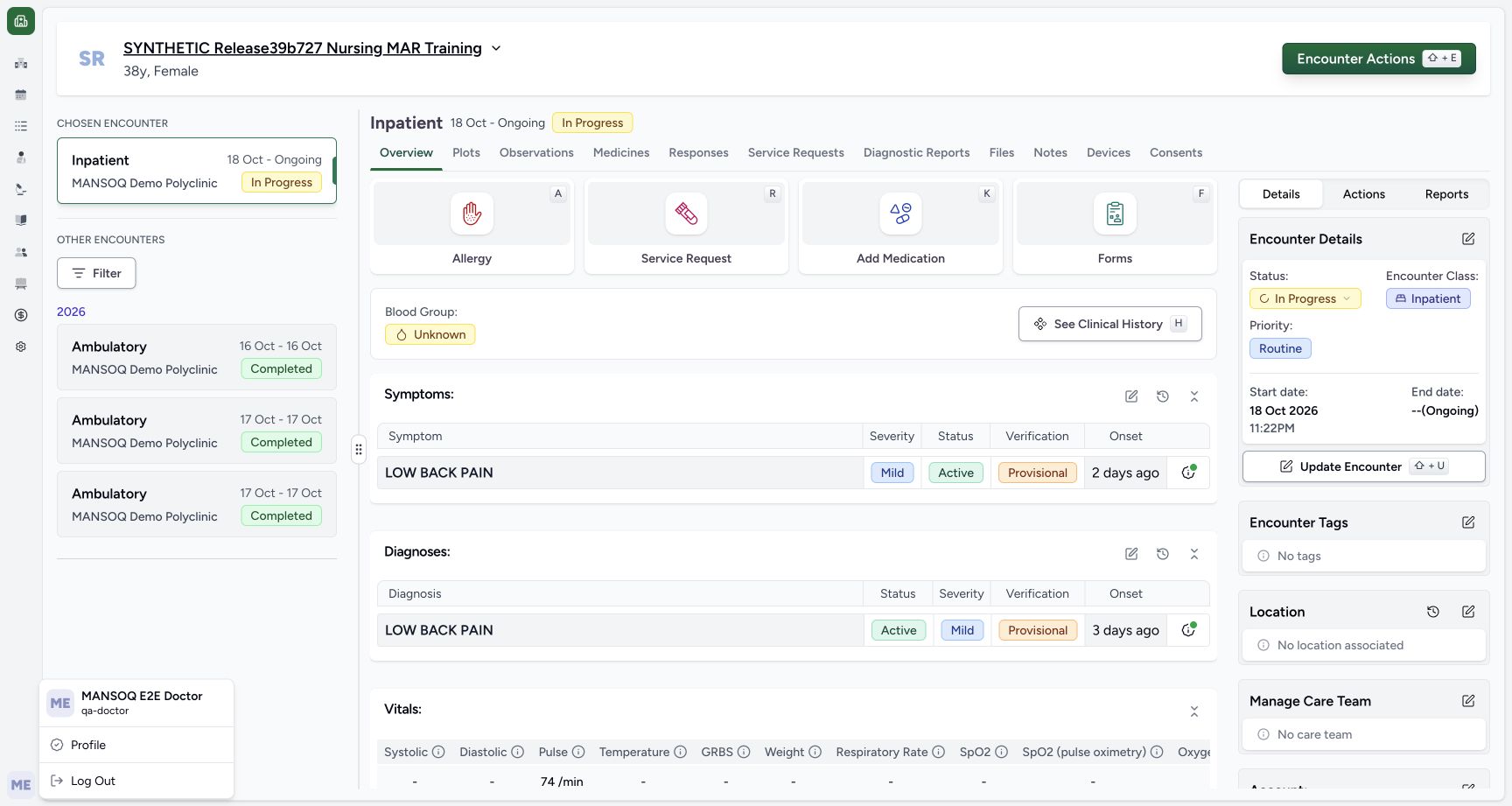 123
123Recorded release 3dfb7c9f · 2026-10-20T02:28:09.197Z · 1728 × 921 doctor identity context
Capture details
Retained 3dfb software-training capture; fictional laboratory record and measurements, not clinical advice.
Image SHA-256
4244b0eeb4392817c6296ceeb656959735dc13c9a10321c5a9cfcce39a610c9d- Doctor session: Read the pictured Doctor account.
- Chosen encounter: Confirm the ongoing Inpatient encounter.
- Fictional patient: Read the exact synthetic patient name.
- Select SYNTHETIC Release39b727 Nursing MAR Training and its ongoing Inpatient encounter. Confirm In Progress before continuing.123
Recorded release 3dfb7c9f · 2026-10-20T02:28:09.197Z · 1728 × 921 doctor identity context
Capture details
Retained 3dfb software-training capture; fictional laboratory record and measurements, not clinical advice.
Image SHA-256
4244b0eeb4392817c6296ceeb656959735dc13c9a10321c5a9cfcce39a610c9d- Doctor session: Read the pictured Doctor account.
- Chosen encounter: Confirm the ongoing Inpatient encounter.
- Fictional patient: Read the exact synthetic patient name.
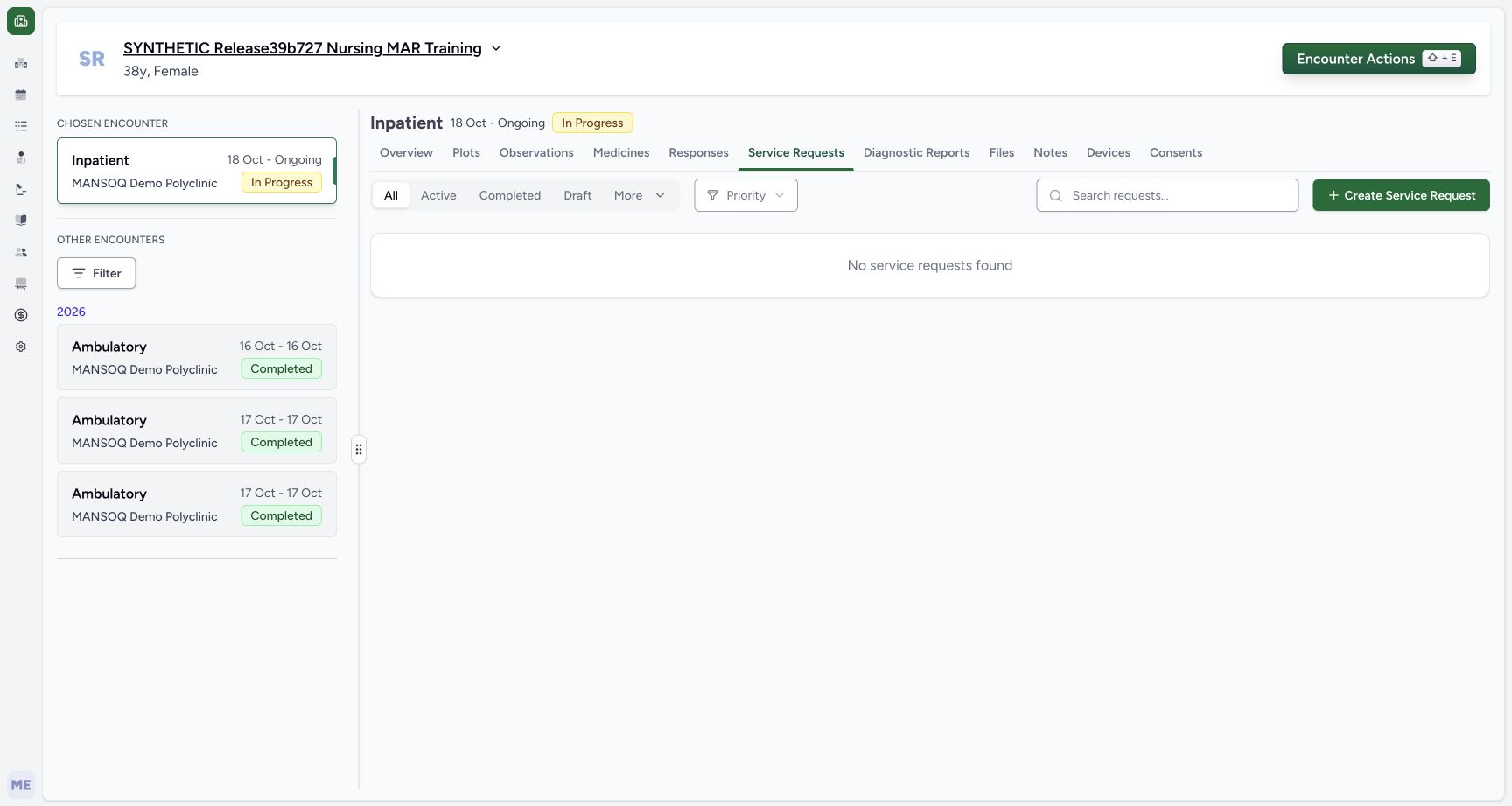 123
123Recorded release 3dfb7c9f · 2026-10-20T02:28:13.348Z · 1728 × 921 doctor empty service requests
Capture details
Retained 3dfb software-training capture; fictional laboratory record and measurements, not clinical advice.
Image SHA-256
9eb8aaf4bc1a4e0b936fc1b4a19e228d09d77a876cb0221e281f96e0a64574ac- Service Requests: Open this encounter tab.
- Create Service Request: Open the request form.
- Empty list: This captured list has no service requests.
- Use the existing software-training activity and specimen/result definitions. This exercise records no physical test or clinical interpretation.1234567
Recorded release 3dfb7c9f · 2026-10-20T02:30:23.814Z · 1728 × 921 doctor order presave source fields
Capture details
Retained 3dfb software-training capture; fictional laboratory record and measurements, not clinical advice.
Image SHA-256
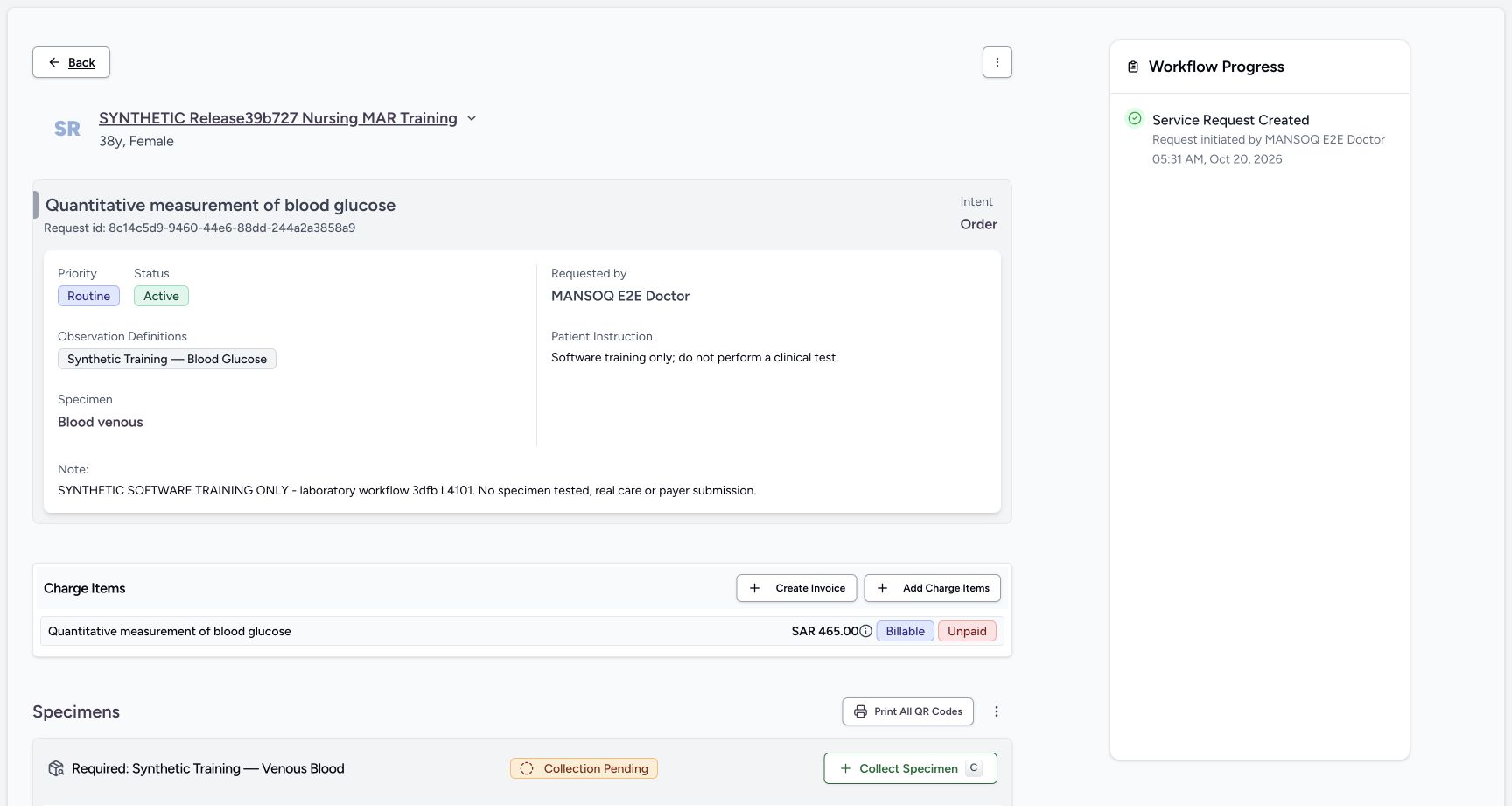
899f1c5936f197303d1fc9bae36cd6f9db42e8392d42f52423dbd2969095864f- Activity: Review the selected title and Laboratory category.
- Displayed charge: Read SAR 465.00.
- Routine: Keep the intended priority.
- Requester: Read the existing Doctor.
- Patient Instruction: Read the training-only instruction.
- Note: Read the full fictional note.
- Submit: Submit the reviewed request once.
 1234
1234Recorded release 3dfb7c9f · 2026-10-20T02:32:17.612Z · 1728 × 921 nurse request before first collect
Capture details
Retained 3dfb software-training capture; fictional laboratory record and measurements, not clinical advice.
Image SHA-256
a1f02bd060772c63ca7d77fc5745ccd39c82d43342829edc71a1678a2eb1781a- Request context: Read the intended laboratory title.
- Active: The request is active.
- Charge status: Read SAR 465.00, Billable and Unpaid.
- Collect Specimen: Open the required specimen collection form.
1. Open Service Requests
In the chosen encounter, select Service Requests. This captured list is empty. Select Create Service Request.
123doctor empty service requests
Capture details
Retained 3dfb software-training capture; fictional laboratory record and measurements, not clinical advice.
Image SHA-256 9eb8aaf4bc1a4e0b936fc1b4a19e228d09d77a876cb0221e281f96e0a64574ac
- Service Requests: Open this encounter tab.
- Create Service Request: Open the request form.
- Empty list: This captured list has no service requests.
2. Choose the activity
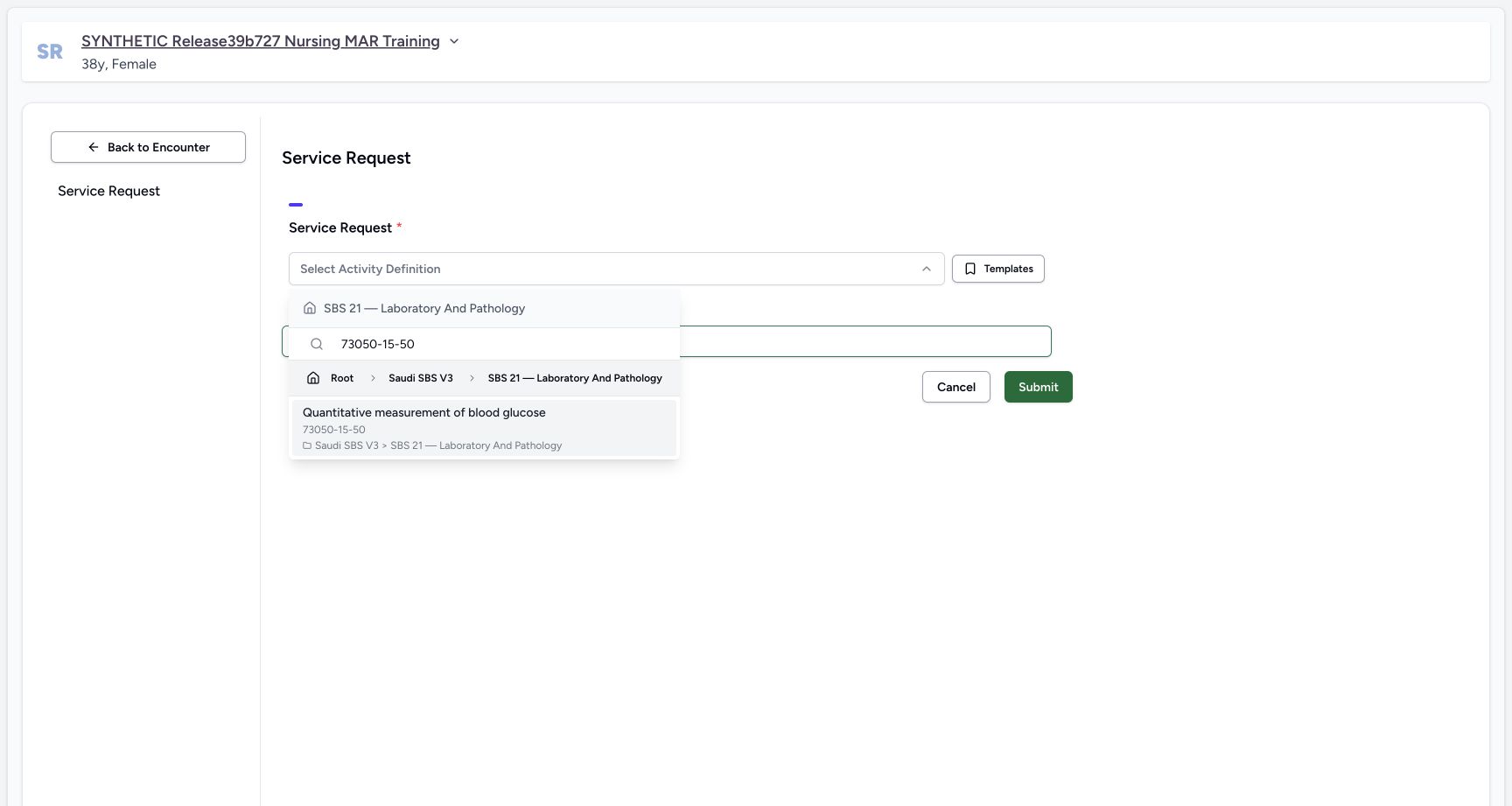
Open Select Activity Definition. Search for 73050-15-50 and select Quantitative measurement of blood glucose under Saudi SBS V3, SBS 21 — Laboratory And Pathology.
 12
12service request empty form
Capture details
Retained 3dfb software-training capture; fictional laboratory record and measurements, not clinical advice.
Image SHA-256 c6516d068d5cb7088ccfae8cefa08e83d075e467f210ba6ce7657a6a0f6a57f8
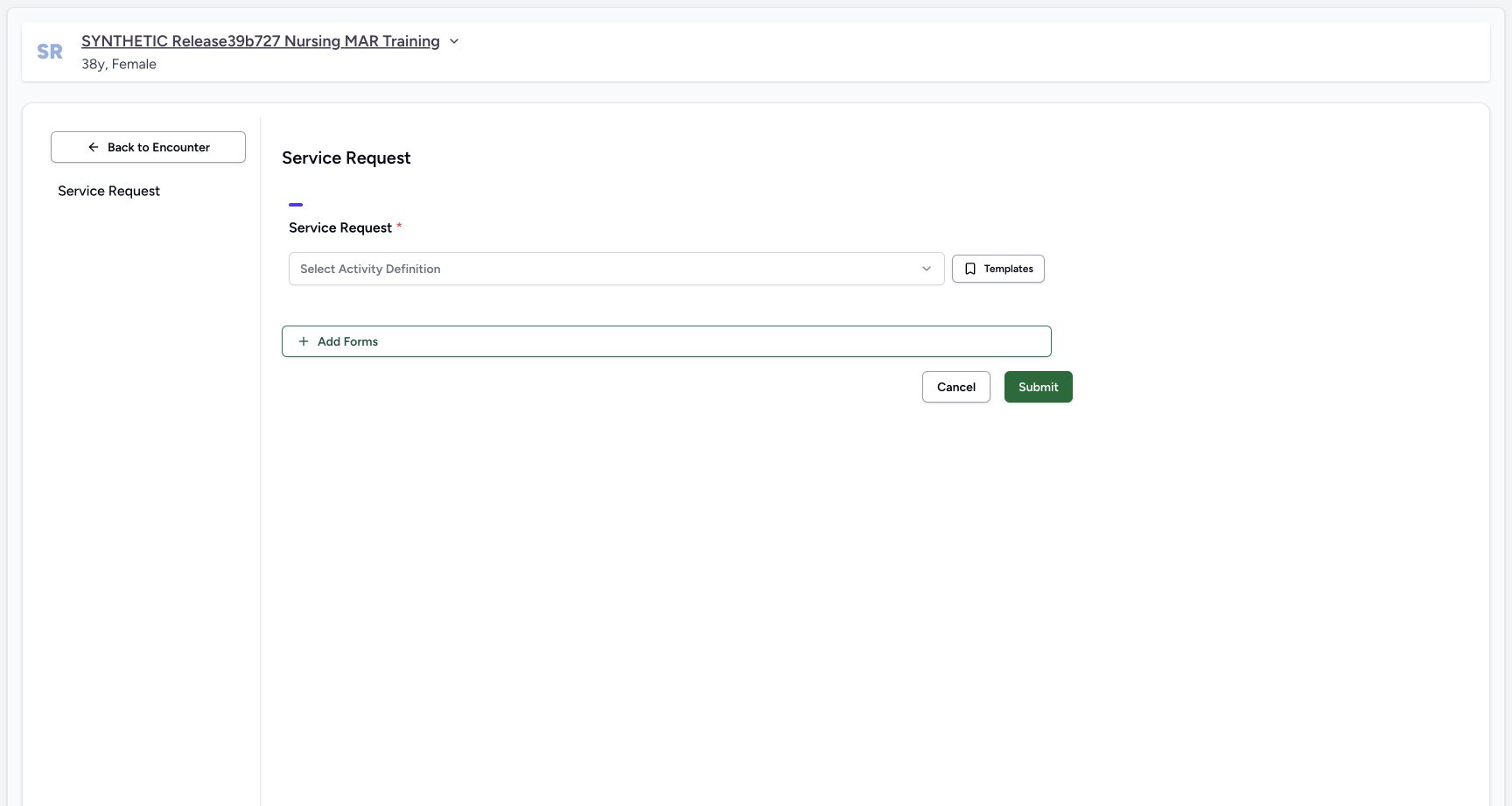
- Select Activity Definition: Open the existing activity picker.
- Cancel: Cancel is available on the blank request form.
 123
123exact activity code result
Capture details
Retained 3dfb software-training capture; fictional laboratory record and measurements, not clinical advice.
Image SHA-256 e6ce965ddc2f8c56fb13b28df7ba80791e27d2c8b9dd8f98ff432fca359b4d83
- Search the code: Search for 73050-15-50.
- Exact activity result: Choose Quantitative measurement of blood glucose.
- Catalogue context: Read Saudi SBS V3 and Laboratory And Pathology.
3. Review the selected request
Read the activity title, Laboratory category and SAR 465.00 price. Keep Routine selected and read MANSOQ E2E Doctor in Requester. Body Site remains unselected in this example.
1234567doctor order presave source fields
Capture details
Retained 3dfb software-training capture; fictional laboratory record and measurements, not clinical advice.
Image SHA-256 899f1c5936f197303d1fc9bae36cd6f9db42e8392d42f52423dbd2969095864f
- Activity: Review the selected title and Laboratory category.
- Displayed charge: Read SAR 465.00.
- Routine: Keep the intended priority.
- Requester: Read the existing Doctor.
- Patient Instruction: Read the training-only instruction.
- Note: Read the full fictional note.
- Submit: Submit the reviewed request once.
4. Enter the training-only instruction
In Patient Instruction, enter: Software training only; do not perform a clinical test.
1234567doctor order presave source fields
Capture details
Retained 3dfb software-training capture; fictional laboratory record and measurements, not clinical advice.
Image SHA-256 899f1c5936f197303d1fc9bae36cd6f9db42e8392d42f52423dbd2969095864f
- Activity: Review the selected title and Laboratory category.
- Displayed charge: Read SAR 465.00.
- Routine: Keep the intended priority.
- Requester: Read the existing Doctor.
- Patient Instruction: Read the training-only instruction.
- Note: Read the full fictional note.
- Submit: Submit the reviewed request once.
5. Enter the fictional note
In Note, enter: SYNTHETIC SOFTWARE TRAINING ONLY - laboratory workflow 3dfb L4101. No specimen tested, real care or payer submission.
1234567doctor order presave source fields
Capture details
Retained 3dfb software-training capture; fictional laboratory record and measurements, not clinical advice.
Image SHA-256 899f1c5936f197303d1fc9bae36cd6f9db42e8392d42f52423dbd2969095864f
- Activity: Review the selected title and Laboratory category.
- Displayed charge: Read SAR 465.00.
- Routine: Keep the intended priority.
- Requester: Read the existing Doctor.
- Patient Instruction: Read the training-only instruction.
- Note: Read the full fictional note.
- Submit: Submit the reviewed request once.
6. Submit the reviewed request
Review the fields, then select Submit once. Wait for the encounter Service Requests list to return.
1234567doctor order presave source fields
Capture details
Retained 3dfb software-training capture; fictional laboratory record and measurements, not clinical advice.
Image SHA-256 899f1c5936f197303d1fc9bae36cd6f9db42e8392d42f52423dbd2969095864f
- Activity: Review the selected title and Laboratory category.
- Displayed charge: Read SAR 465.00.
- Routine: Keep the intended priority.
- Requester: Read the existing Doctor.
- Patient Instruction: Read the training-only instruction.
- Note: Read the full fictional note.
- Submit: Submit the reviewed request once.
123doctor after single submit service list
Capture details
Retained 3dfb software-training capture; fictional laboratory record and measurements, not clinical advice.
Image SHA-256 3d32403dd6387e3c10155444f132dcc9a9385d9954506b006d7aa51376e19df0
- Saved request: Read the new service request title.
- Active and Routine: Verify the saved status and priority.
- See Details: Open this exact saved request.
7. Verify the saved order
Find the new Quantitative measurement of blood glucose row. Read Active and Routine, then use See Details to open this request.
123doctor after single submit service list
Capture details
Retained 3dfb software-training capture; fictional laboratory record and measurements, not clinical advice.
Image SHA-256 3d32403dd6387e3c10155444f132dcc9a9385d9954506b006d7aa51376e19df0
- Saved request: Read the new service request title.
- Active and Routine: Verify the saved status and priority.
- See Details: Open this exact saved request.
8. Read the request detail and charge
Check the patient, title, requested-by name, instruction and note. The captured request has one SAR 465.00 charge marked Billable and Unpaid. Leave Create Invoice and Add Charge Items unused.
1234nurse request before first collect
Capture details
Retained 3dfb software-training capture; fictional laboratory record and measurements, not clinical advice.
Image SHA-256 a1f02bd060772c63ca7d77fc5745ccd39c82d43342829edc71a1678a2eb1781a
- Request context: Read the intended laboratory title.
- Active: The request is active.
- Charge status: Read SAR 465.00, Billable and Unpaid.
- Collect Specimen: Open the required specimen collection form.
Request and report codes have different labels
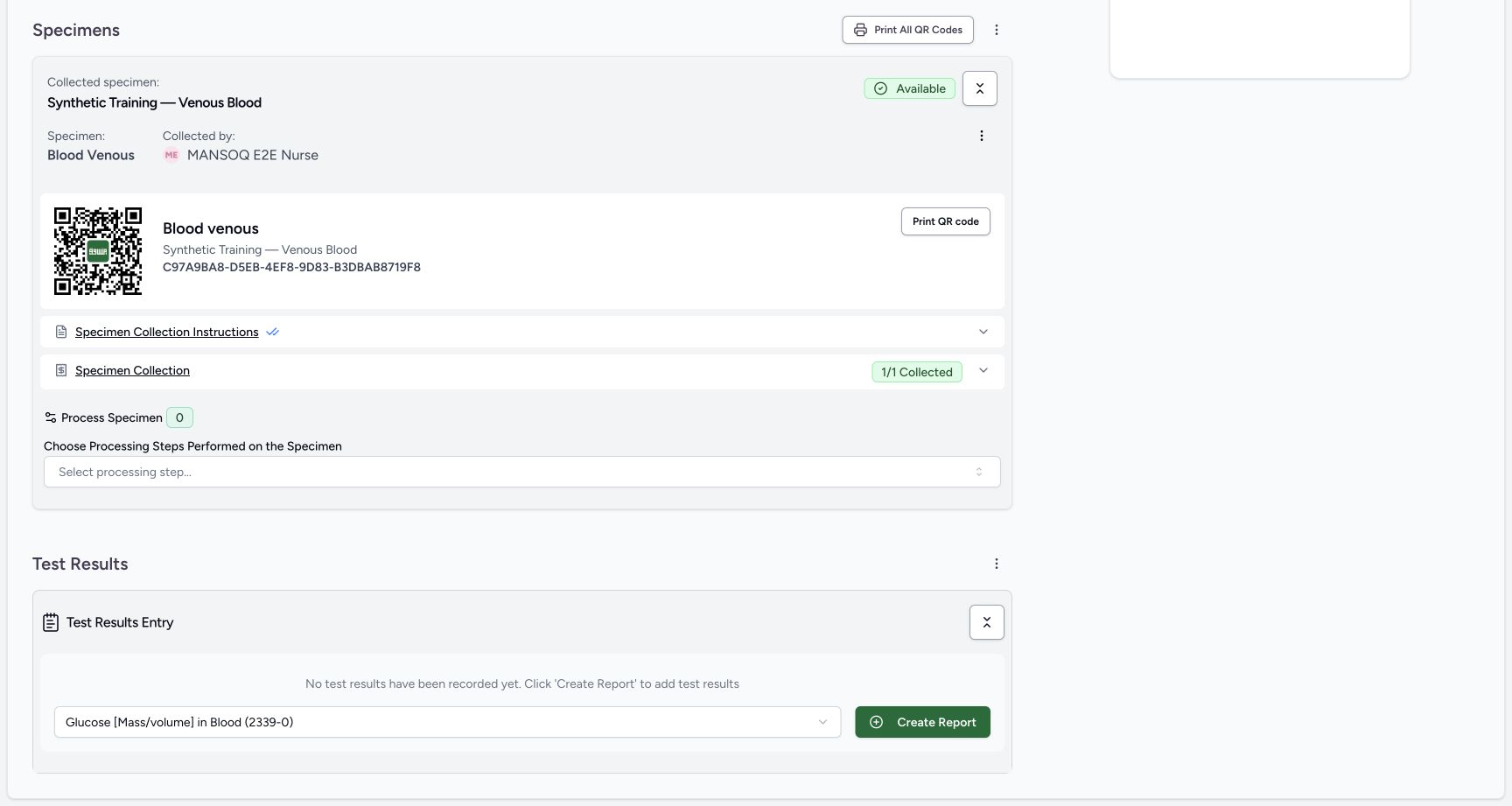
The activity picker identifies the requested service with 73050-15-50. Later, the report-type selector uses Glucose [Mass/volume] in Blood (2339-0). Read the name and code in the control you are using.
123exact activity code result
Capture details
Retained 3dfb software-training capture; fictional laboratory record and measurements, not clinical advice.
Image SHA-256 e6ce965ddc2f8c56fb13b28df7ba80791e27d2c8b9dd8f98ff432fca359b4d83
- Search the code: Search for 73050-15-50.
- Exact activity result: Choose Quantitative measurement of blood glucose.
- Catalogue context: Read Saudi SBS V3 and Laboratory And Pathology.
 12
12loinc report type presave
Capture details
Retained 3dfb software-training capture; fictional laboratory record and measurements, not clinical advice.
Image SHA-256 5bc12b8cba6d64866206dadb1a642a7695340b6c76920696be055383443ef257
- Report type: Review Glucose [Mass/volume] in Blood (2339-0).
- Create Report: Create the reviewed Preliminary report once.
Troubleshooting
The intended activity is not shown
Check the searched code and the visible catalogue path. Continue only when the existing activity title matches this lesson; do not substitute another test or create a definition.
123exact activity code result
Capture details
Retained 3dfb software-training capture; fictional laboratory record and measurements, not clinical advice.
Image SHA-256 e6ce965ddc2f8c56fb13b28df7ba80791e27d2c8b9dd8f98ff432fca359b4d83
- Search the code: Search for 73050-15-50.
- Exact activity result: Choose Quantitative measurement of blood glucose.
- Catalogue context: Read Saudi SBS V3 and Laboratory And Pathology.
Source evidence
Every citation uses this exact committed version. The private source repository requires access.
- repositories/platform/mansoq-core/mansoq/emr/api/viewsets/service_request.py:335 ·
3dfb7c9f519fb5b4cd4452439f3c12346bf58319Source file checksum
dc8d54fb85d383447098aa01c8f43f4711ae3457beeb203dd9e1f2cf47341f9c - repositories/platform/mansoq-core/mansoq/emr/resources/activity_definition/service_request.py:18 ·
3dfb7c9f519fb5b4cd4452439f3c12346bf58319Source file checksum
a1835f8a27ffd62f90e70ef2cc310213142205eb5af080ff5411e40fc1d91283 - repositories/platform/mansoq-core/mansoq/emr/resources/charge_item/apply_charge_item_definition.py:56 ·
3dfb7c9f519fb5b4cd4452439f3c12346bf58319Source file checksum
f0e436da014c81006a40a5449126439c94a70b0da84953fec62018de5d8203db - repositories/platform/mansoq-core/mansoq/emr/resources/account/default_account.py:18 ·
3dfb7c9f519fb5b4cd4452439f3c12346bf58319Source file checksum
ea9781250b2f341d189c9e1cd23679d23b144dc1c4d1d7dc93e5fbdb4c984b49 - repositories/platform/mansoq-core/mansoq/security/permissions/service_request.py:17 ·
3dfb7c9f519fb5b4cd4452439f3c12346bf58319Source file checksum
6f1bee356210ea5a4be4b382dece997e6b4960badc2374a4cd5c073f2f556226 - repositories/platform/mansoq-core/mansoq/security/authorization/service_request.py:32 ·
3dfb7c9f519fb5b4cd4452439f3c12346bf58319Source file checksum
96e09bef17e0c5a8f3f2fdaa8e1969e7257889e33b9729d64d4a25e0490708cb - repositories/platform/mansoq-web/src/components/Questionnaire/QuestionTypes/ServiceRequestQuestion.tsx:749 ·
3dfb7c9f519fb5b4cd4452439f3c12346bf58319Source file checksum
fe3d6d7b52050d2ae63c16e4b18d549b289140d5702d706a38d17dd395bc8670 - repositories/platform/mansoq-web/src/pages/Facility/services/serviceRequests/ServiceRequestShow.tsx:180 ·
3dfb7c9f519fb5b4cd4452439f3c12346bf58319Source file checksum
f279adcb6610e9c5d762bfd93b5299cac08893d438ff21161f35c57f3b5c29ae - repositories/platform/mansoq-web/src/pages/Facility/services/serviceRequests/components/DiagnosticReportForm.tsx:143 ·
3dfb7c9f519fb5b4cd4452439f3c12346bf58319Source file checksum
bab46e364618765f6928981ade71dfd6cfb3e611ffa26860c576cf85c03f41f9 - repositories/platform/mansoq-web/src/pages/Facility/services/serviceRequests/components/DiagnosticReportReview.tsx:132 ·
3dfb7c9f519fb5b4cd4452439f3c12346bf58319Source file checksum
0ecc142ec0638d6a9289fa280917b1bd14de8ea050dc6f0d46dc971505f2e43f - repositories/platform/mansoq-web/src/pages/Facility/services/diagnosticReports/DiagnosticReportPrint.tsx:117 ·
3dfb7c9f519fb5b4cd4452439f3c12346bf58319Source file checksum
4c94eda230ba9fef634bfe2f9cae33460c43472ca48a5ff33a3dd0c6fb5ee8c7 - repositories/platform/mansoq-web/src/pages/Facility/services/diagnosticReports/DiagnosticReportView.tsx:234 ·
3dfb7c9f519fb5b4cd4452439f3c12346bf58319Source file checksum
ad6d57240d62f09a324b9bc48e4d6eabed53dfc345b78cd0d5e6f037898b5f7a - repositories/platform/mansoq-web/src/pages/Facility/services/diagnosticReports/components/DiagnosticReportResultsTable.tsx:210 ·
3dfb7c9f519fb5b4cd4452439f3c12346bf58319Source file checksum
46f3cdfd7850d19a460cea130532ac49e205dff84c43236483de6d9c5ef6174d - repositories/platform/mansoq-web/src/pages/Facility/services/serviceRequests/components/ObservationHistorySheet.tsx:50 ·
3dfb7c9f519fb5b4cd4452439f3c12346bf58319Source file checksum
d302ebd75c861441af455cd6ffc70253036a6acc80c00e184a9275d99c92ff73 - repositories/platform/mansoq-web/src/pages/Facility/services/serviceRequests/components/SpecimenHistorySheet.tsx:38 ·
3dfb7c9f519fb5b4cd4452439f3c12346bf58319Source file checksum
0cab00b4f57f6576c0fd5515eeb39ba820d04a8d3231d7c1ed76a22ce0649cd7