 MANSOQ
 Laboratory workflow · VERSION 3dfb7c9f
Review, finalize and save the fictional laboratory report
Cancel an approval warning, approve the reviewed training report, inspect its retained history and save the genuine one-page PDF.
Doctor
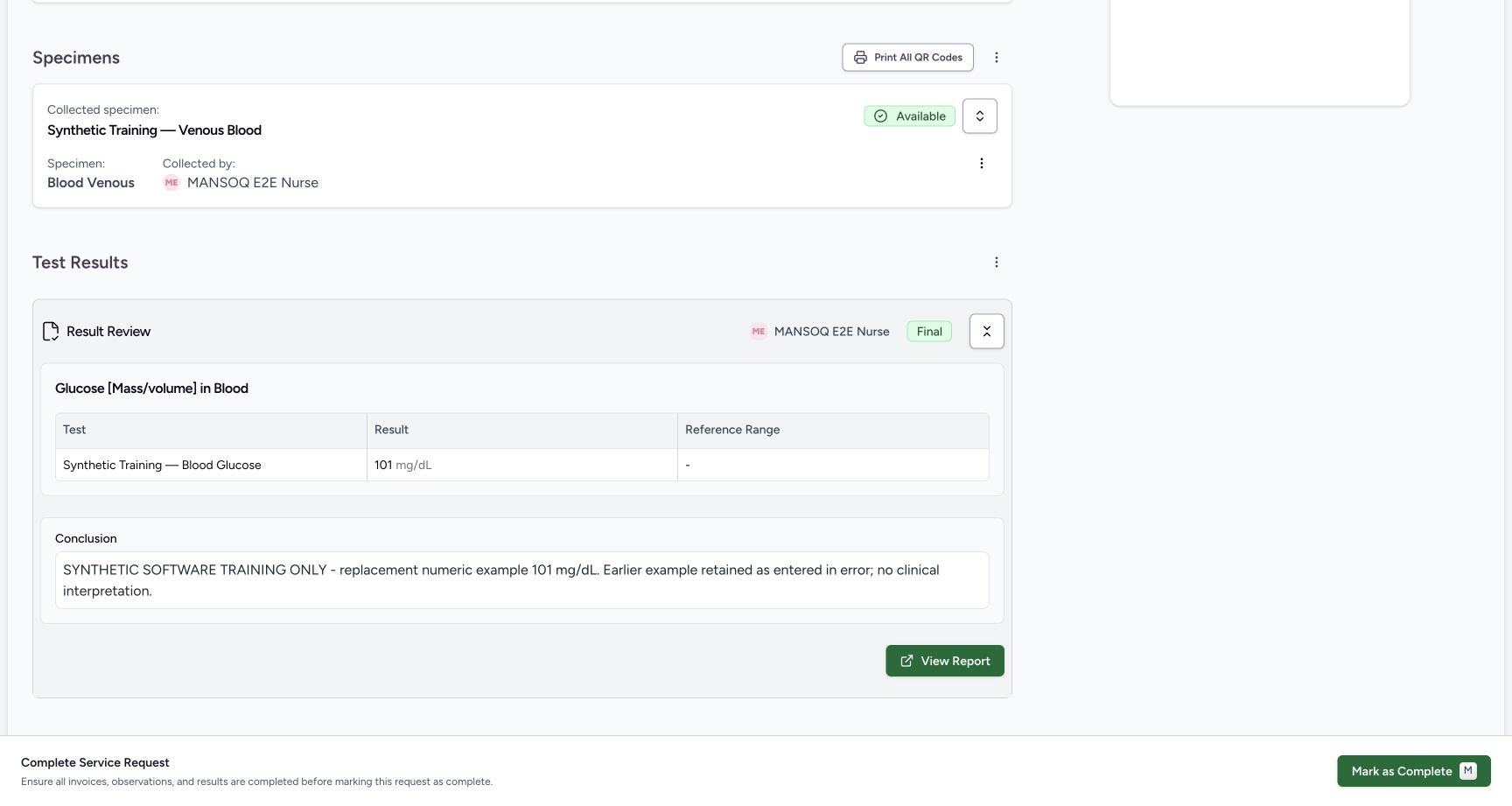 123
123doctor report final after one approval
Capture details
Retained 3dfb software-training capture; fictional laboratory record and measurements, not clinical advice.
Image SHA-256 056a33bf3002914be9b9383fd26cc7bc058951d2bff57c3b001fb40b56e5cc2a
- Final: The report is finalized.
- Current 101: The replacement remains current.
- View Report: Open the normal final report.
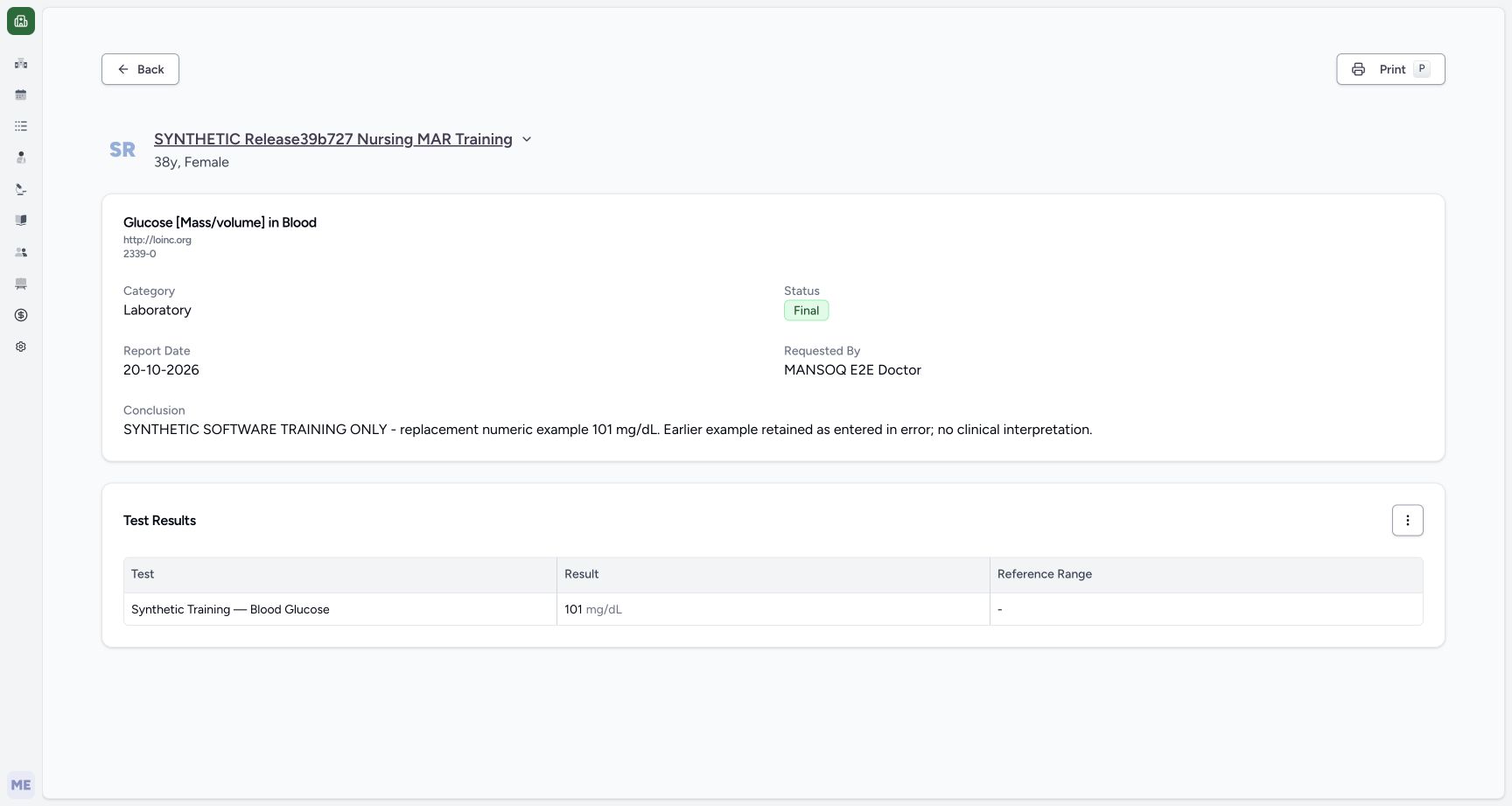 123456
final report current result normal view
Capture details
Retained 3dfb software-training capture; fictional laboratory record and measurements, not clinical advice.
Image SHA-256 a3b237d059955f02421b337277c2033cbe397d8e35d59d38b21e3fde2315e8a3
- Fictional patient: Check the report patient.
- Report code: Read Glucose [Mass/volume] in Blood and 2339-0.
- Final: Confirm the report status.
- Current result: Read 101 mg/dL.
- Test Results menu: Open the observation-history action.
- Print: Open the printable report.
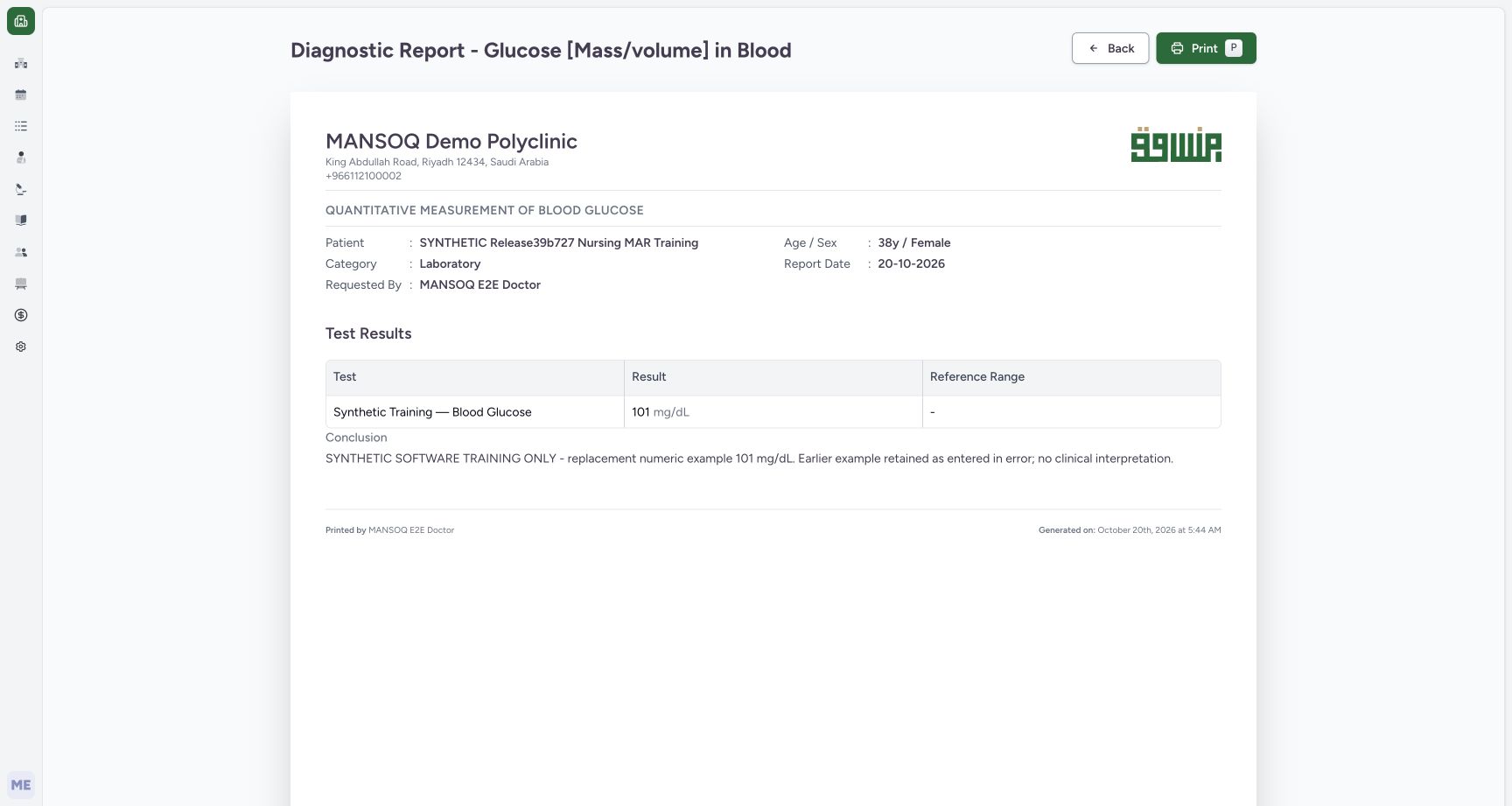 123
123actual printable final report
Capture details
Retained 3dfb software-training capture; fictional laboratory record and measurements, not clinical advice.
Image SHA-256 a6dd5d3b5149f4572d6833bbcd47cc1baf5e934ad2985c81e3199d2f20c34b7c
- Print: Open the browser print dialog once.
- Current 101: Read the printable current result.
- Training-only Conclusion: Verify the full explanation.
19 of 19 content blocks have reviewed image alignment. Missing overview or prerequisite images remain open.
Before you begin
- Use an authorized Doctor session for the same patient and service request. The pictured session is MANSOQ E2E Doctor.
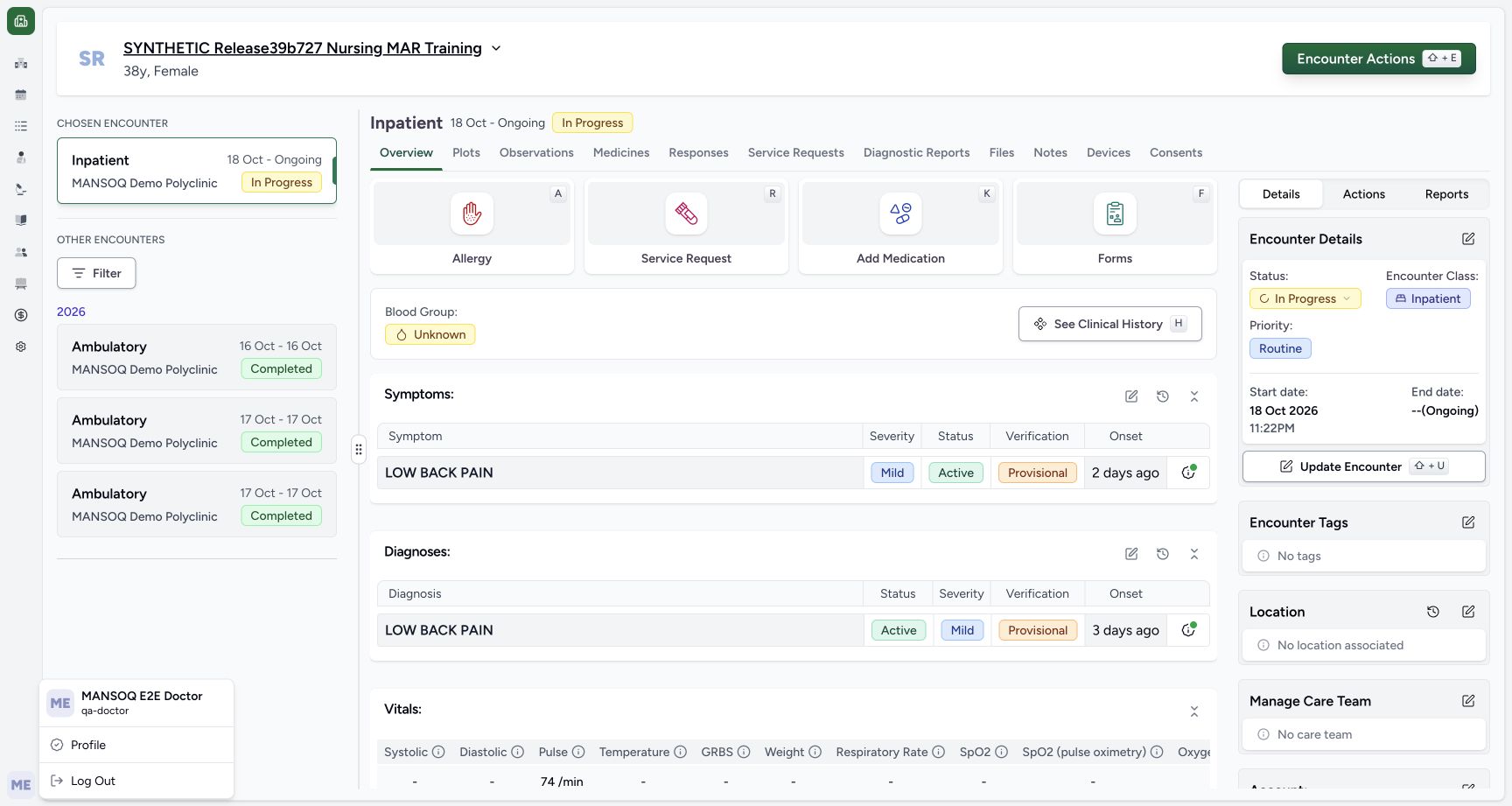 123
123Recorded release 3dfb7c9f · 2026-10-20T02:28:09.197Z · 1728 × 921 doctor identity context
Capture details
Retained 3dfb software-training capture; fictional laboratory record and measurements, not clinical advice.
Image SHA-256
4244b0eeb4392817c6296ceeb656959735dc13c9a10321c5a9cfcce39a610c9d- Doctor session: Read the pictured Doctor account.
- Chosen encounter: Confirm the ongoing Inpatient encounter.
- Fictional patient: Read the exact synthetic patient name.
 123
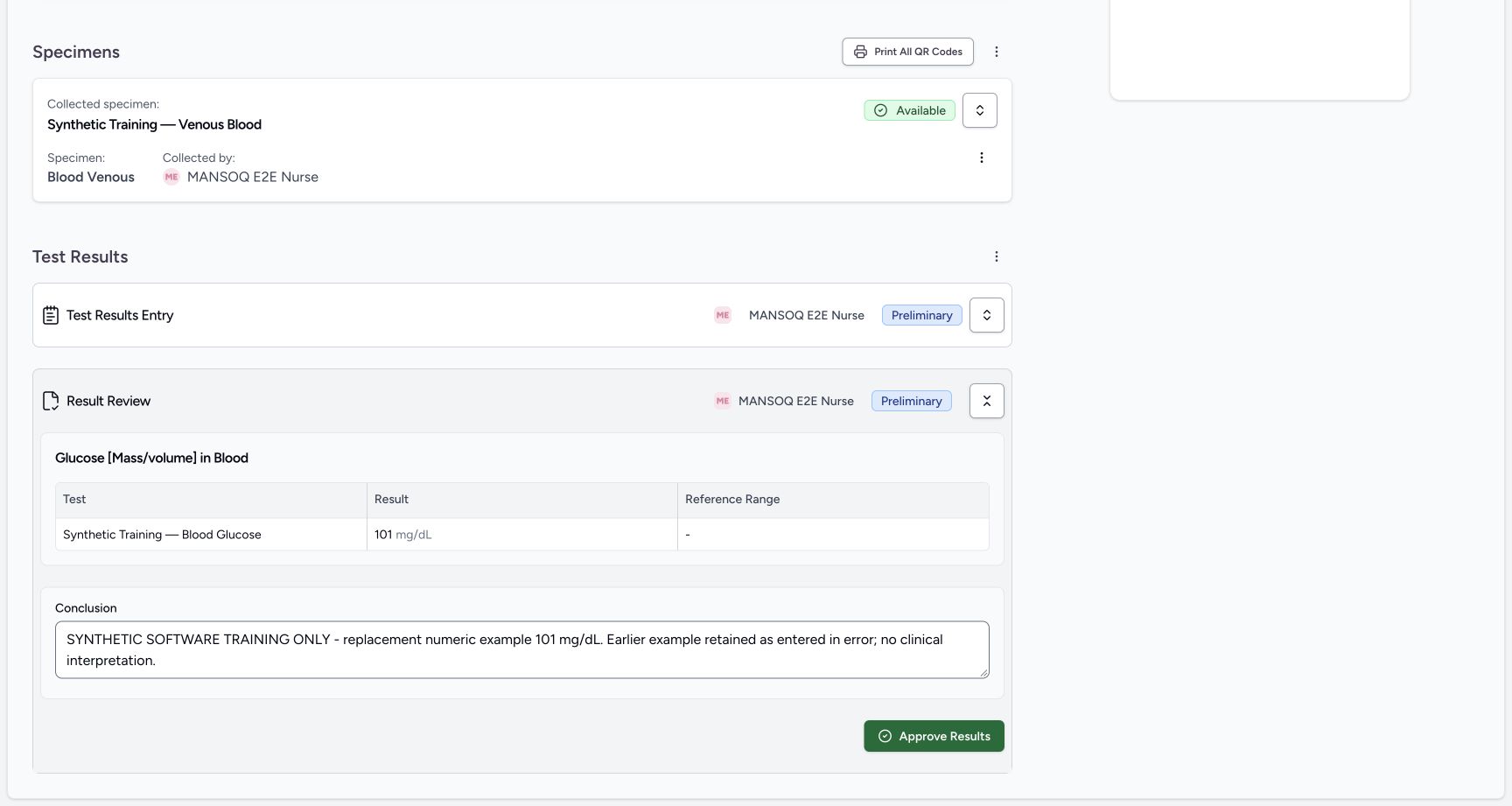
123Recorded release 3dfb7c9f · 2026-10-20T02:42:42.323Z · 1728 × 921 approval cancel settled preliminary
Capture details
Retained 3dfb software-training capture; fictional laboratory record and measurements, not clinical advice.
Image SHA-256
ee70031acc7b517d618cc3afbd0b468cb24a630c643ad1c32c331d72be8ac12a- Preliminary retained: Cancel did not finalize the report.
- Current 101: The corrected value remains.
- Approve Results: Reopen the warning for the intended final approval.
- Review the Preliminary replacement example of 101 mg/dL and its training-only Conclusion before approval.123
Recorded release 3dfb7c9f · 2026-10-20T02:42:42.323Z · 1728 × 921 approval cancel settled preliminary
Capture details
Retained 3dfb software-training capture; fictional laboratory record and measurements, not clinical advice.
Image SHA-256
ee70031acc7b517d618cc3afbd0b468cb24a630c643ad1c32c331d72be8ac12a- Preliminary retained: Cancel did not finalize the report.
- Current 101: The corrected value remains.
- Approve Results: Reopen the warning for the intended final approval.
- Approval is a deliberate saved status change. This exercise demonstrates the software controls without clinical or legal validation of the example.
 123
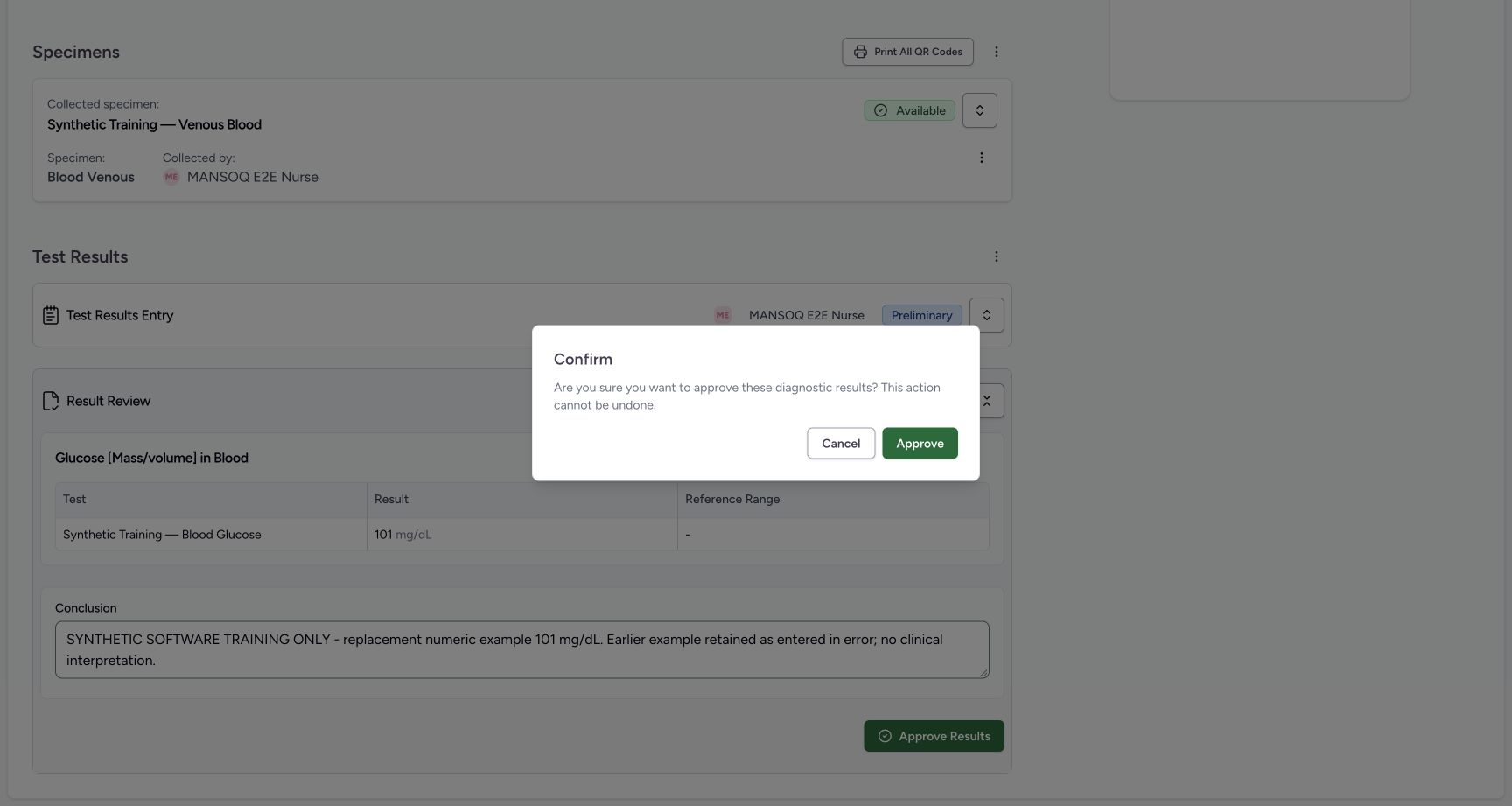
123Recorded release 3dfb7c9f · 2026-10-20T02:42:36.881Z · 1728 × 921 doctor approval warning before cancel
Capture details
Retained 3dfb software-training capture; fictional laboratory record and measurements, not clinical advice.
Image SHA-256
dd8cd8a2990016db13773f287743ffa290200f111bbfb4fb8ac18c474ff8d382- Approval warning: Read the warning before acting.
- Cancel: Keep Preliminary.
- Approve: Confirm only after the review.
123Recorded release 3dfb7c9f · 2026-10-20T02:43:20.586Z · 1728 × 921 doctor report final after one approval
Capture details
Retained 3dfb software-training capture; fictional laboratory record and measurements, not clinical advice.
Image SHA-256
056a33bf3002914be9b9383fd26cc7bc058951d2bff57c3b001fb40b56e5cc2a- Final: The report is finalized.
- Current 101: The replacement remains current.
- View Report: Open the normal final report.
1. Review the preliminary report
In Result Review, read 101 mg/dL, the complete replacement Conclusion and Preliminary.
123approval cancel settled preliminary
Capture details
Retained 3dfb software-training capture; fictional laboratory record and measurements, not clinical advice.
Image SHA-256 ee70031acc7b517d618cc3afbd0b468cb24a630c643ad1c32c331d72be8ac12a
- Preliminary retained: Cancel did not finalize the report.
- Current 101: The corrected value remains.
- Approve Results: Reopen the warning for the intended final approval.
2. Inspect the approval warning
Select Approve Results. Read the warning that the action cannot be undone.
123approval cancel settled preliminary
Capture details
Retained 3dfb software-training capture; fictional laboratory record and measurements, not clinical advice.
Image SHA-256 ee70031acc7b517d618cc3afbd0b468cb24a630c643ad1c32c331d72be8ac12a
- Preliminary retained: Cancel did not finalize the report.
- Current 101: The corrected value remains.
- Approve Results: Reopen the warning for the intended final approval.
123doctor approval warning before cancel
Capture details
Retained 3dfb software-training capture; fictional laboratory record and measurements, not clinical advice.
Image SHA-256 dd8cd8a2990016db13773f287743ffa290200f111bbfb4fb8ac18c474ff8d382
- Approval warning: Read the warning before acting.
- Cancel: Keep Preliminary.
- Approve: Confirm only after the review.
3. Cancel without finalizing
Select Cancel. Verify the report remains Preliminary and still shows the same result and Conclusion.
123doctor approval warning before cancel
Capture details
Retained 3dfb software-training capture; fictional laboratory record and measurements, not clinical advice.
Image SHA-256 dd8cd8a2990016db13773f287743ffa290200f111bbfb4fb8ac18c474ff8d382
- Approval warning: Read the warning before acting.
- Cancel: Keep Preliminary.
- Approve: Confirm only after the review.
123approval cancel settled preliminary
Capture details
Retained 3dfb software-training capture; fictional laboratory record and measurements, not clinical advice.
Image SHA-256 ee70031acc7b517d618cc3afbd0b468cb24a630c643ad1c32c331d72be8ac12a
- Preliminary retained: Cancel did not finalize the report.
- Current 101: The corrected value remains.
- Approve Results: Reopen the warning for the intended final approval.
4. Approve the reviewed example
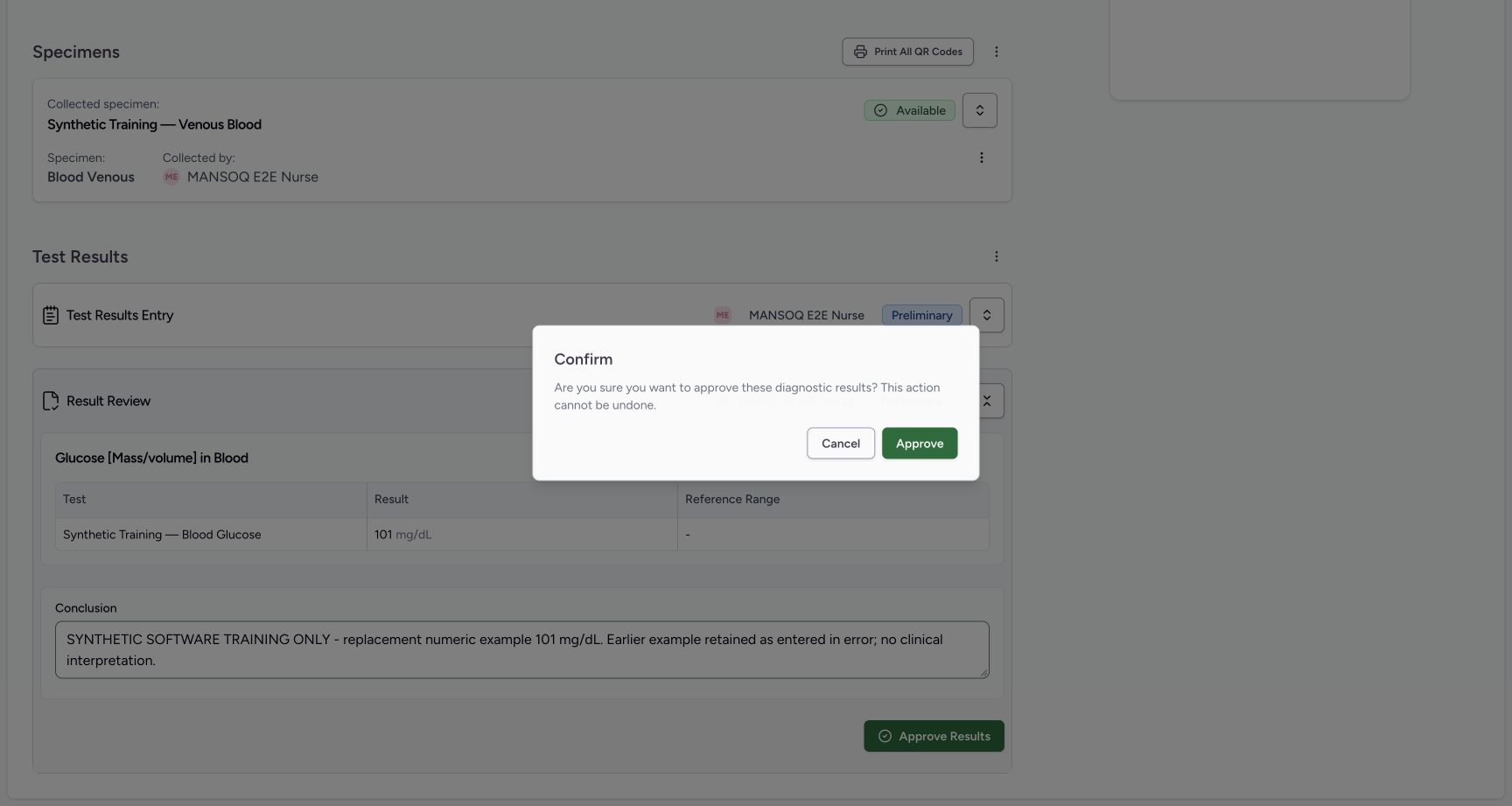
Reopen Approve Results, review the same warning and select Approve once. The saved report now reads Final.
 12
12doctor final approval presave warning
Capture details
Retained 3dfb software-training capture; fictional laboratory record and measurements, not clinical advice.
Image SHA-256 9b577d0beae4dbfc9dadfa99882587d804fa2192250e4b5b21312435d964c864
- Approval warning: Read the same warning again.
- Approve once: Approve the reviewed fictional report once.
123doctor report final after one approval
Capture details
Retained 3dfb software-training capture; fictional laboratory record and measurements, not clinical advice.
Image SHA-256 056a33bf3002914be9b9383fd26cc7bc058951d2bff57c3b001fb40b56e5cc2a
- Final: The report is finalized.
- Current 101: The replacement remains current.
- View Report: Open the normal final report.
5. Open the final report
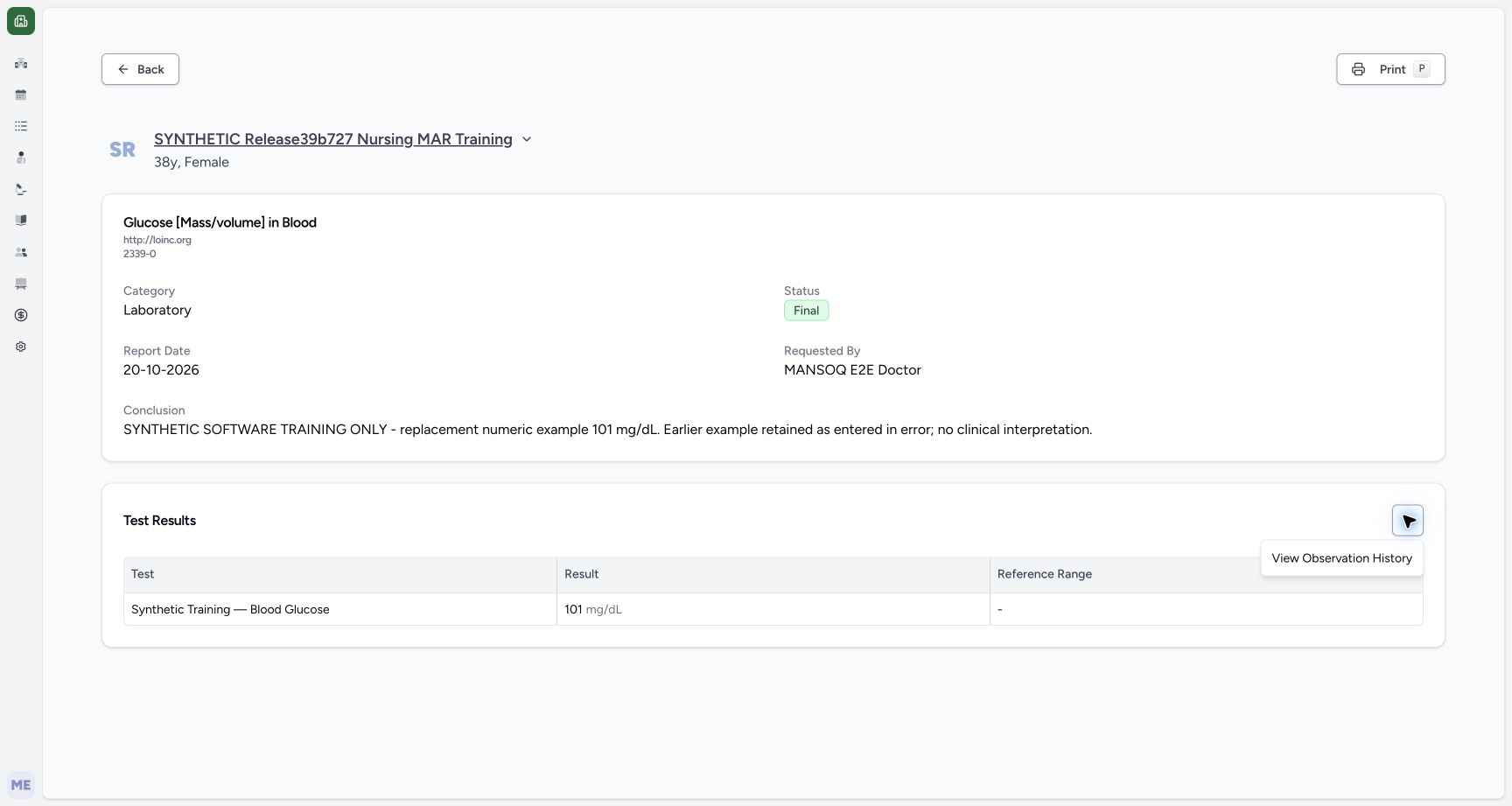
Select View Report. Confirm the fictional patient, Glucose [Mass/volume] in Blood (2339-0), Final, report date, requested-by Doctor, current 101 mg/dL and the complete Conclusion.
123doctor report final after one approval
Capture details
Retained 3dfb software-training capture; fictional laboratory record and measurements, not clinical advice.
Image SHA-256 056a33bf3002914be9b9383fd26cc7bc058951d2bff57c3b001fb40b56e5cc2a
- Final: The report is finalized.
- Current 101: The replacement remains current.
- View Report: Open the normal final report.
123456final report current result normal view
Capture details
Retained 3dfb software-training capture; fictional laboratory record and measurements, not clinical advice.
Image SHA-256 a3b237d059955f02421b337277c2033cbe397d8e35d59d38b21e3fde2315e8a3
- Fictional patient: Check the report patient.
- Report code: Read Glucose [Mass/volume] in Blood and 2339-0.
- Final: Confirm the report status.
- Current result: Read 101 mg/dL.
- Test Results menu: Open the observation-history action.
- Print: Open the printable report.
6. Inspect the earlier observation
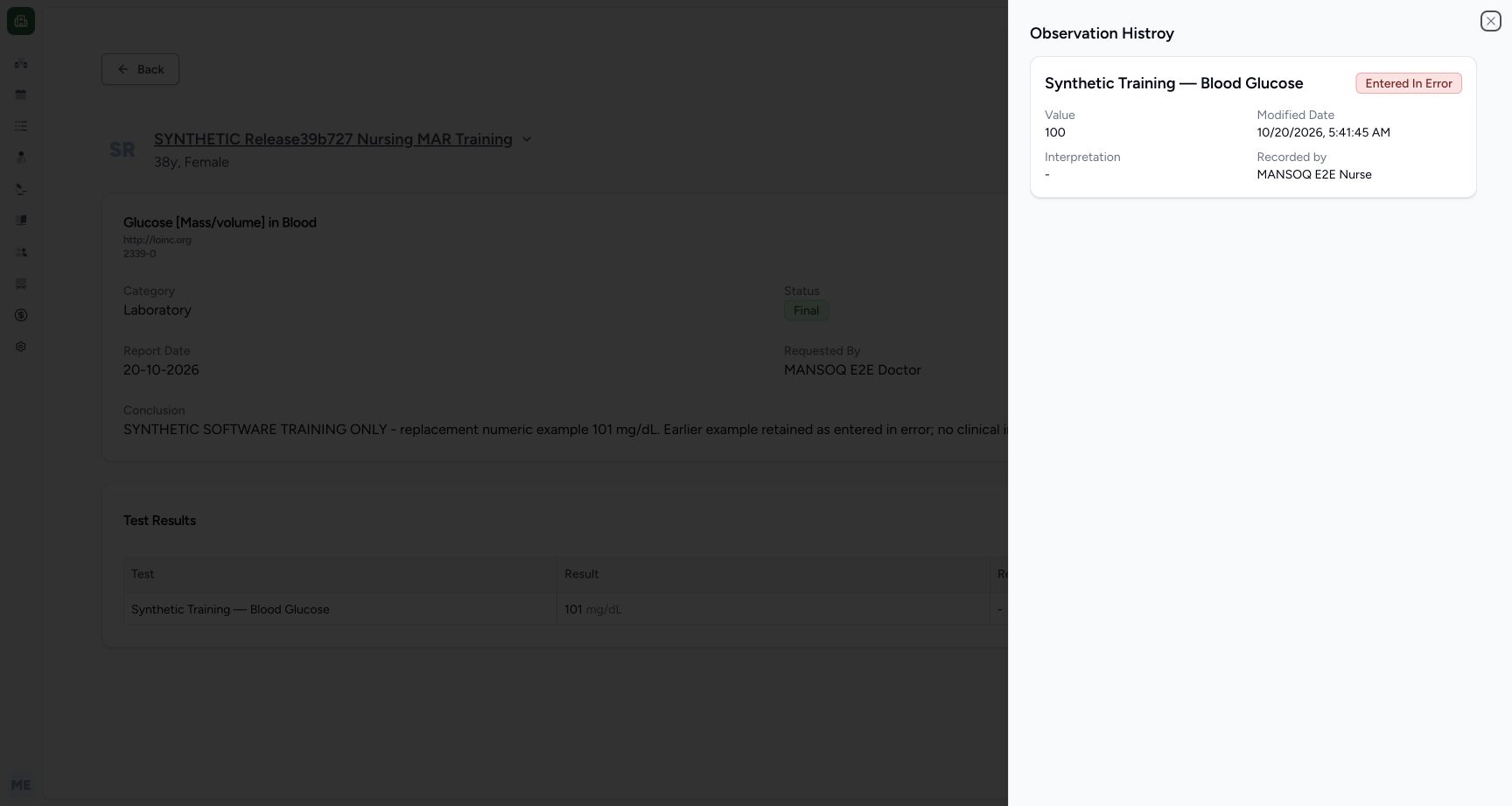
In the Test Results action menu, select View Observation History. Read the retained 100 example and Entered In Error badge. Close the history sheet to return to the current report. The open-menu picture is from a separate later read-only inspection of the same Final 101 report; the history sheet is from the original walkthrough.
123456final report current result normal view
Capture details
Retained 3dfb software-training capture; fictional laboratory record and measurements, not clinical advice.
Image SHA-256 a3b237d059955f02421b337277c2033cbe397d8e35d59d38b21e3fde2315e8a3
- Fictional patient: Check the report patient.
- Report code: Read Glucose [Mass/volume] in Blood and 2339-0.
- Final: Confirm the report status.
- Current result: Read 101 mg/dL.
- Test Results menu: Open the observation-history action.
- Print: Open the printable report.
 1234
1234Later read-only final report observation history menu open
Capture details
Separate later read-only open-menu illustration of the same visible saved Final101/Completed record. The menu items were not selected in this supplemental capture sequence; original history-result sheets retain their own earlier capture times.
Image SHA-256 74519db5206dbfbea45da827f143c0e3e5fcf08ff0e225e58aec14f24f08e41a
- Test Results actions: Open the Test Results menu; this is a separate later read-only inspection.
- View Observation History: Select this menu item to open history; it was illustrated but not selected in this later menu-only inspection.
- Final: The same saved report is Final.
- Current 101 mg/dL: The saved current result remains 101 mg/dL.
 1234
1234final report retained entered in error history
Capture details
Retained 3dfb software-training capture; fictional laboratory record and measurements, not clinical advice.
Image SHA-256 85a573d13b90444c9740876f5e47ef600def64b4536916814ecba0bccbb46125
- Entered In Error: Read the earlier observation status.
- Retained 100: The earlier example is still recorded.
- Recorded by: Read MANSOQ E2E Nurse.
- Close history: Return to the current report.
7. Open the printable report
Select Print from the report. Review the printable patient, title, current 101 mg/dL, Conclusion and report date before using its Print control.
123456final report current result normal view
Capture details
Retained 3dfb software-training capture; fictional laboratory record and measurements, not clinical advice.
Image SHA-256 a3b237d059955f02421b337277c2033cbe397d8e35d59d38b21e3fde2315e8a3
- Fictional patient: Check the report patient.
- Report code: Read Glucose [Mass/volume] in Blood and 2339-0.
- Final: Confirm the report status.
- Current result: Read 101 mg/dL.
- Test Results menu: Open the observation-history action.
- Print: Open the printable report.
123actual printable final report
Capture details
Retained 3dfb software-training capture; fictional laboratory record and measurements, not clinical advice.
Image SHA-256 a6dd5d3b5149f4572d6833bbcd47cc1baf5e934ad2985c81e3199d2f20c34b7c
- Print: Open the browser print dialog once.
- Current 101: Read the printable current result.
- Training-only Conclusion: Verify the full explanation.
8. Save and inspect the original PDF
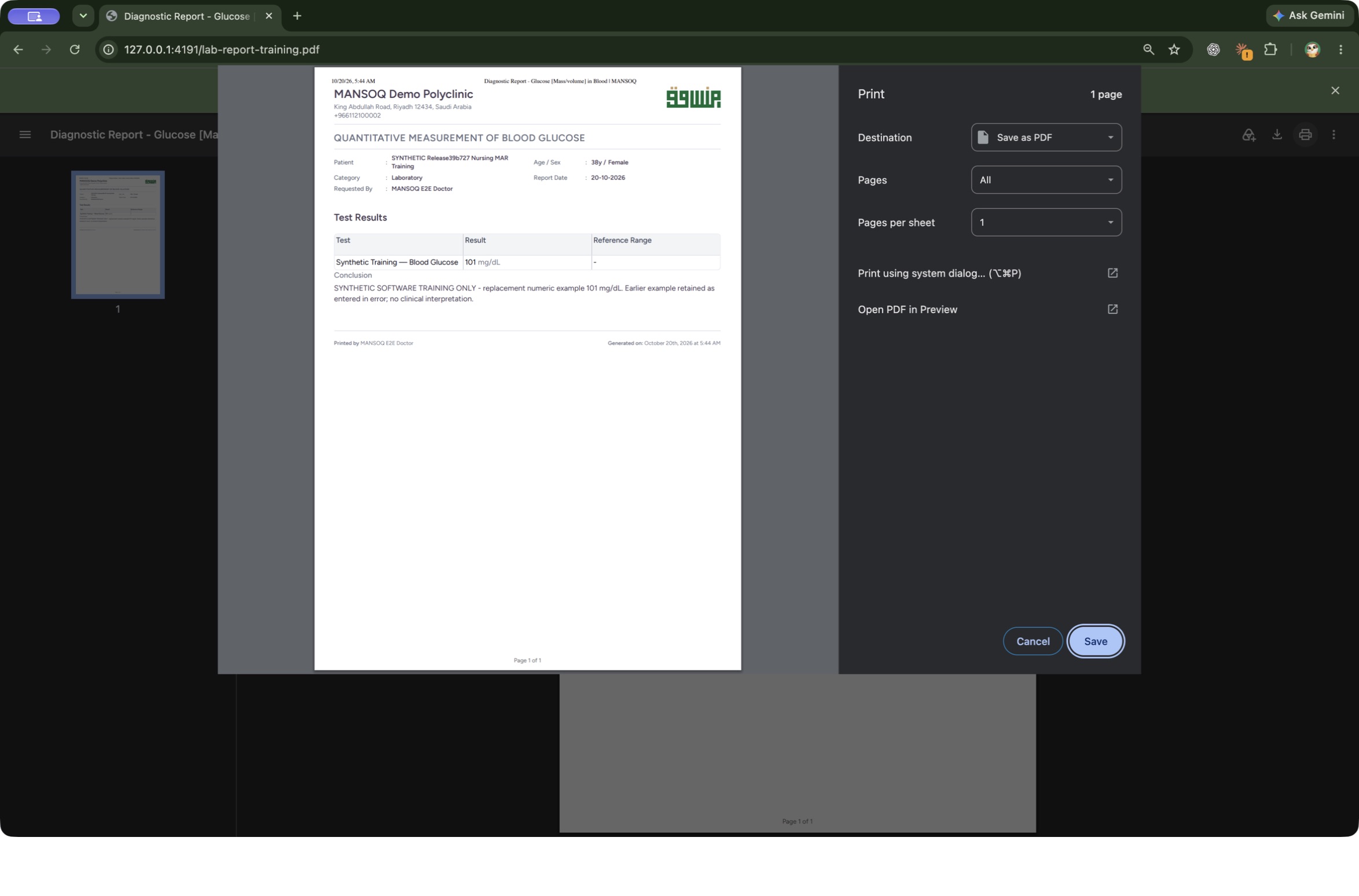
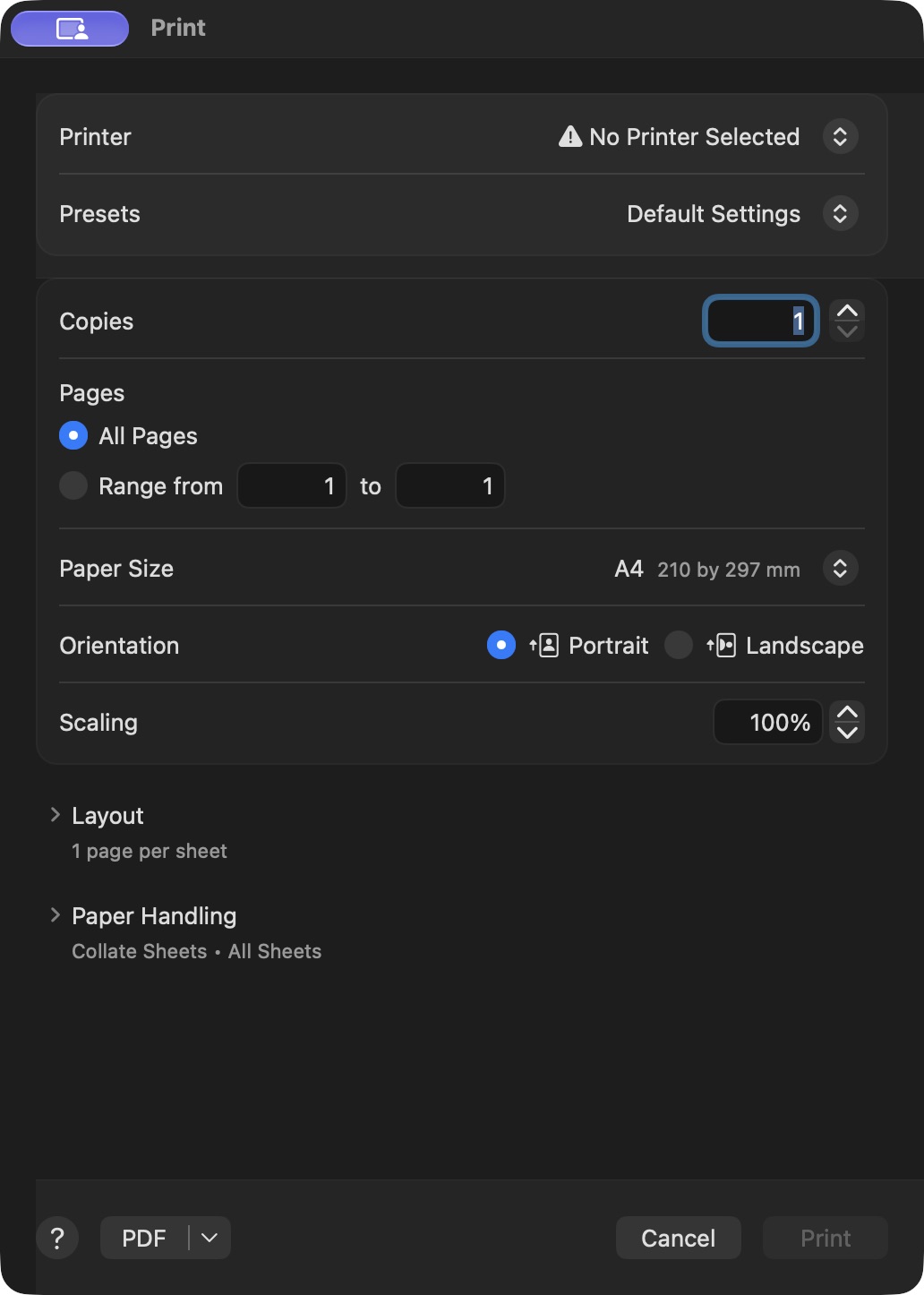
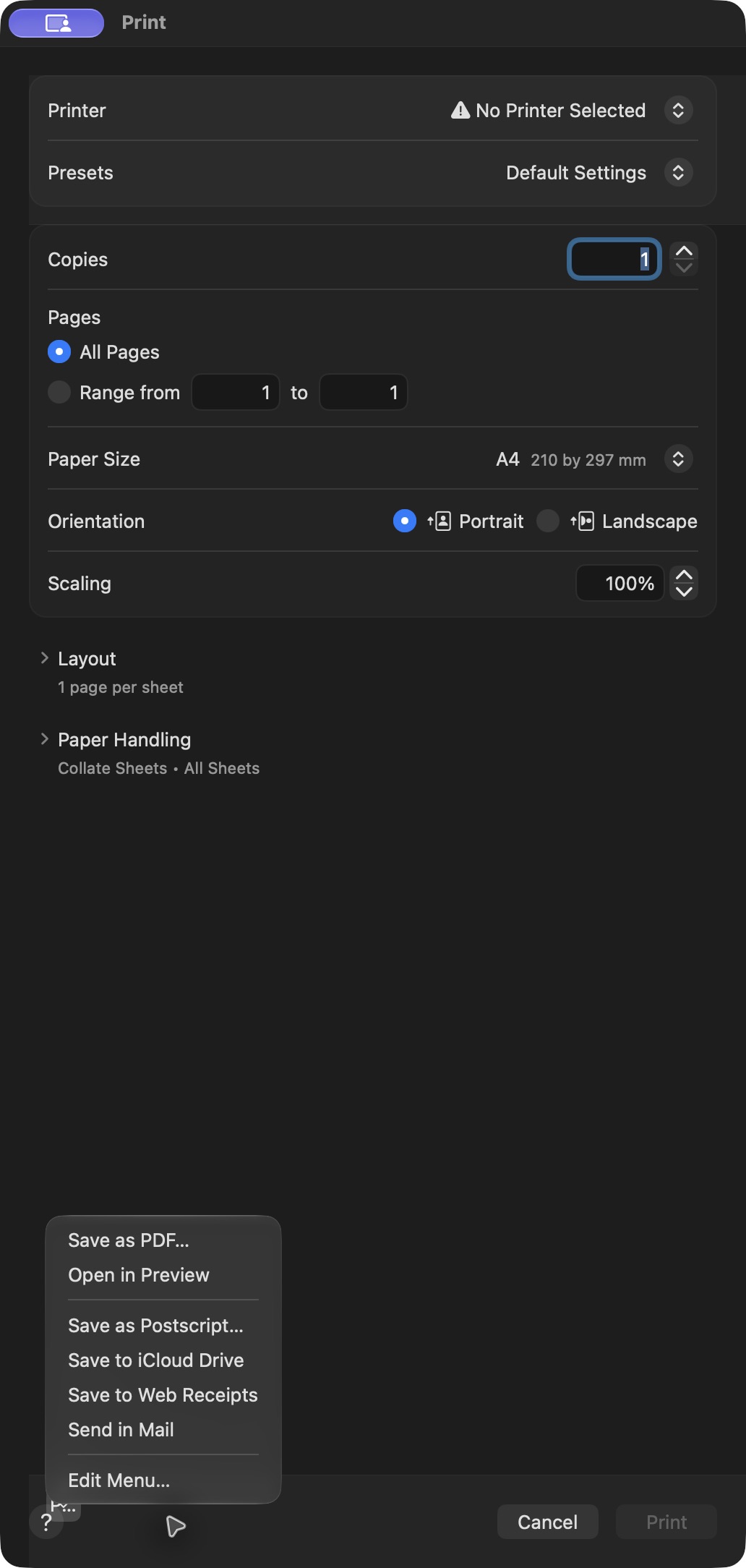
After selecting Print on the printable report, save a local PDF: in Chrome print preview select Print using system dialog…, open the macOS PDF menu, choose Save as PDF…, review a new filename and destination folder, and select Save once. Then open the saved PDF and inspect its complete page, including the fictional patient, current 101 mg/dL and full training-only Conclusion. These linked control pictures are separate later illustrations: the clean Chrome preview ended with Cancel, while the macOS panels show an earlier reprint of the original report. The pictured later filename is an example for a new copy, not the filename of the original saved report.
123actual printable final report
Capture details
Retained 3dfb software-training capture; fictional laboratory record and measurements, not clinical advice.
Image SHA-256 a6dd5d3b5149f4572d6833bbcd47cc1baf5e934ad2985c81e3199d2f20c34b7c
- Print: Open the browser print dialog once.
- Current 101: Read the printable current result.
- Training-only Conclusion: Verify the full explanation.
 1234
1234Google Chrome Print preview
Native macOS print/save dialog.
Capture details
Separate later clean Chrome Print preview of the saved original 3dfb report; this check ended with Cancel. No system-print transition or clinical update occurred in this capture sequence.
Image SHA-256 c4068e76c4a151dfa78162c36ddf8eb0218ae3bf444400230e0cc7e89702de27
- Print using system dialog…: Choose this option to open the macOS Print panel.
- Destination: Read Save as PDF in the clean preview.
- All Pages: All pages are selected.
- Cancel: The separate clean-preview check ended here without Save or a system transition.
 12345
12345Native macOS Print dialog
Native macOS print/save dialog.
Capture details
Separate later viewing/reprint of the already saved original 3dfb report; unmodified native pixels. No repeat clinical Print action or laboratory update.
Image SHA-256 50bc0a864d49a690ffbfcbc2ba8dd7b2044041c81a8c5ec01458d30204b0273d
- No printer selected: No physical printer is selected in this local-save example.
- All Pages: The one-page original is selected.
- A4: Review the paper size.
- Portrait: Review the orientation.
- PDF menu: Open the local PDF save choices.
 12
12Native macOS Print dialog
Native macOS print/save dialog.
Capture details
Separate later viewing/reprint of the already saved original 3dfb report; unmodified native pixels. No repeat clinical Print action or laboratory update.
Image SHA-256 1d585175bf165611d38dbbfc0c5f4a01f191d968bb5b5ff637178934706e7060
- Save as PDF…: Choose the local PDF save option.
- Cancel: Cancel is available if you do not intend to save a copy.
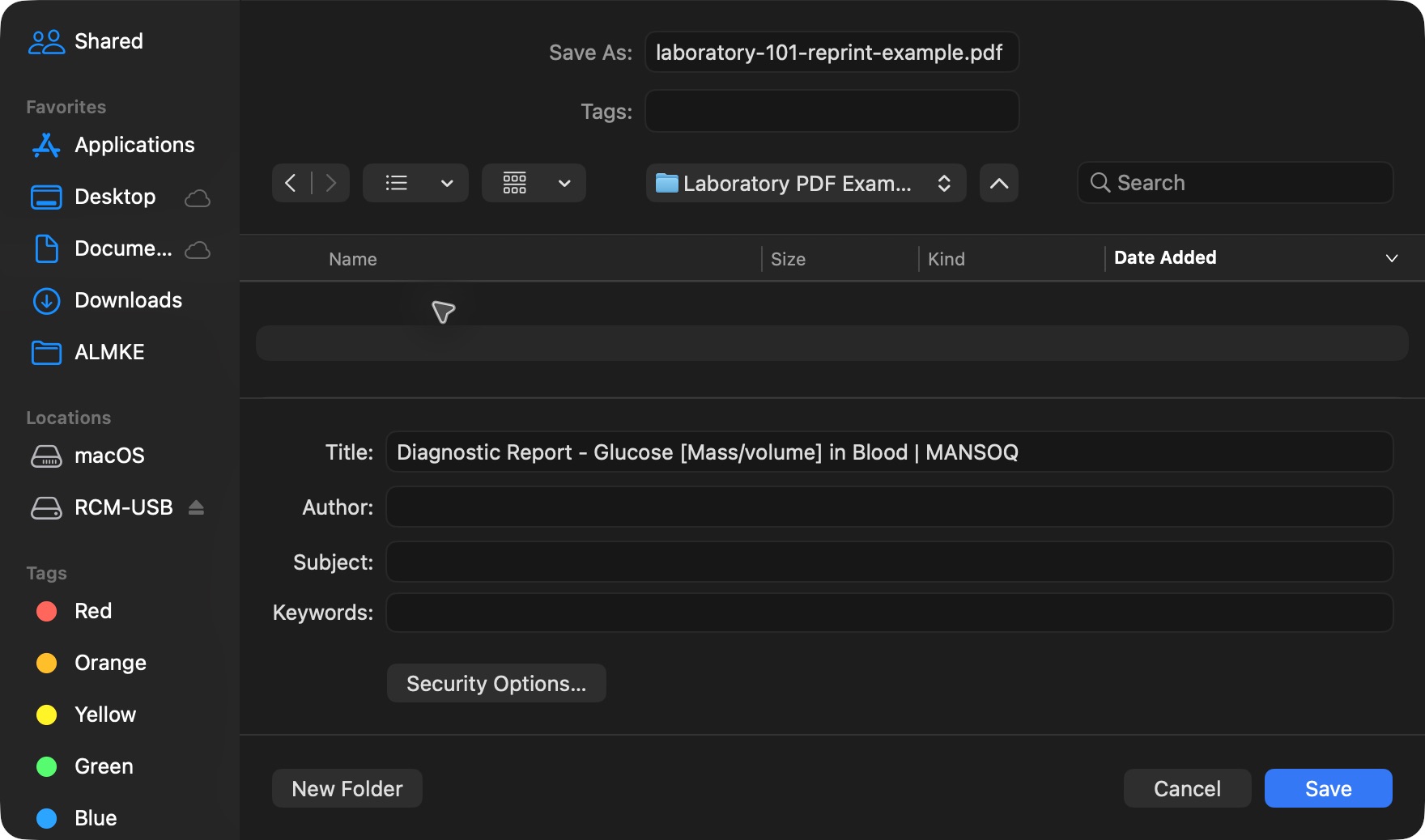 1234
1234Native macOS Save dialog
Native macOS print/save dialog.
Capture details
Separate later viewing/reprint of the already saved original 3dfb report; unmodified native pixels. No repeat clinical Print action or laboratory update.
Image SHA-256 82412bc12b7a3d122bd04a4f2f3c292717c9d76259fe0abe578cf0a03c773c44
- Save As: Review the new reprint filename.
- Destination folder: Review Laboratory PDF Example.
- Save: Save this separate local copy once.
- Cancel: Cancel remains available.
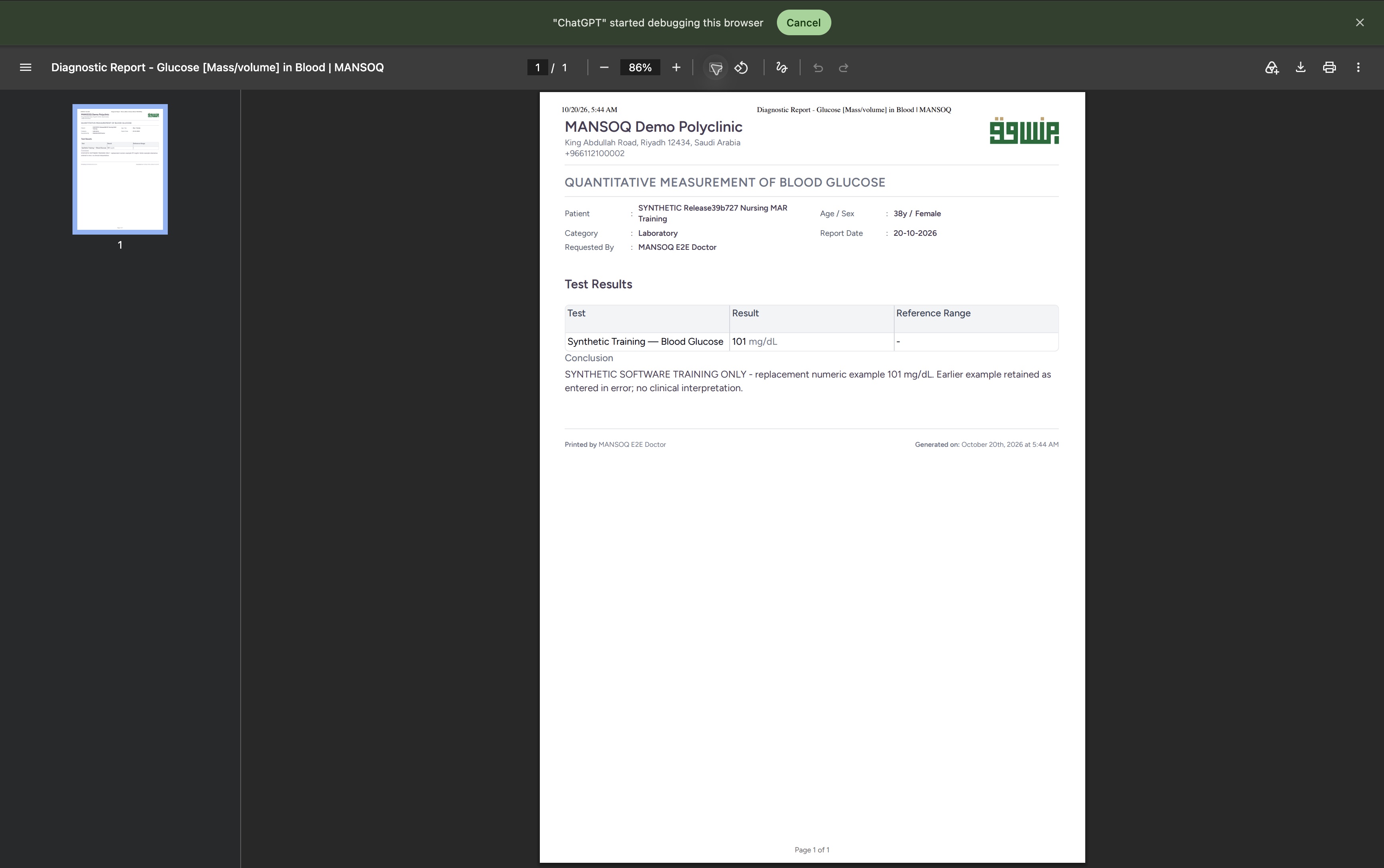 1234
1234Saved original laboratory PDF in Google Chrome
Saved PDF in Google Chrome (macOS) · page 1 of 1.
Capture details
Separate later viewing/reprint of the already saved original 3dfb report; unmodified native pixels. No repeat clinical Print action or laboratory update.
Image SHA-256 8332ce2a90a447189fa7c8944860c4094f607af3bb9da87ca00d97bd88a63a22
- Page 1 of 1: The original saved PDF contains one page.
- Current 101 mg/dL: Read the current fictional result.
- Training-only Conclusion: Read the full explanation.
- PDF viewer Print: This opens printing for the already saved PDF.
9. Choose the system print dialog in Chrome
From the saved PDF, open Print. In Chrome’s print preview, select Print using system dialog… to open the macOS panel. These pictures show the same saved report across separate demonstrations: the clean Chrome preview check ended with Cancel, while the macOS panels below show an earlier reprint.
1234Saved original laboratory PDF in Google Chrome
Saved PDF in Google Chrome (macOS) · page 1 of 1.
Capture details
Separate later viewing/reprint of the already saved original 3dfb report; unmodified native pixels. No repeat clinical Print action or laboratory update.
Image SHA-256 8332ce2a90a447189fa7c8944860c4094f607af3bb9da87ca00d97bd88a63a22
- Page 1 of 1: The original saved PDF contains one page.
- Current 101 mg/dL: Read the current fictional result.
- Training-only Conclusion: Read the full explanation.
- PDF viewer Print: This opens printing for the already saved PDF.
1234Google Chrome Print preview
Native macOS print/save dialog.
Capture details
Separate later clean Chrome Print preview of the saved original 3dfb report; this check ended with Cancel. No system-print transition or clinical update occurred in this capture sequence.
Image SHA-256 c4068e76c4a151dfa78162c36ddf8eb0218ae3bf444400230e0cc7e89702de27
- Print using system dialog…: Choose this option to open the macOS Print panel.
- Destination: Read Save as PDF in the clean preview.
- All Pages: All pages are selected.
- Cancel: The separate clean-preview check ended here without Save or a system transition.
10. Review the macOS Print panel
In the macOS system Print panel, review All Pages, A4 and Portrait. No printer is selected in this example. Open the PDF menu to save a local copy.
12345Native macOS Print dialog
Native macOS print/save dialog.
Capture details
Separate later viewing/reprint of the already saved original 3dfb report; unmodified native pixels. No repeat clinical Print action or laboratory update.
Image SHA-256 50bc0a864d49a690ffbfcbc2ba8dd7b2044041c81a8c5ec01458d30204b0273d
- No printer selected: No physical printer is selected in this local-save example.
- All Pages: The one-page original is selected.
- A4: Review the paper size.
- Portrait: Review the orientation.
- PDF menu: Open the local PDF save choices.
11. Choose Save as PDF
In the PDF menu, select Save as PDF…. This keeps the example local; no physical printer is selected.
12Native macOS Print dialog
Native macOS print/save dialog.
Capture details
Separate later viewing/reprint of the already saved original 3dfb report; unmodified native pixels. No repeat clinical Print action or laboratory update.
Image SHA-256 1d585175bf165611d38dbbfc0c5f4a01f191d968bb5b5ff637178934706e7060
- Save as PDF…: Choose the local PDF save option.
- Cancel: Cancel is available if you do not intend to save a copy.
12. Choose the new file and folder
In the Save panel, review Save As and the destination folder. This example uses laboratory-101-reprint-example.pdf in Laboratory PDF Example. Use a new name to preserve the original, then select Save once.
1234Native macOS Save dialog
Native macOS print/save dialog.
Capture details
Separate later viewing/reprint of the already saved original 3dfb report; unmodified native pixels. No repeat clinical Print action or laboratory update.
Image SHA-256 82412bc12b7a3d122bd04a4f2f3c292717c9d76259fe0abe578cf0a03c773c44
- Save As: Review the new reprint filename.
- Destination folder: Review Laboratory PDF Example.
- Save: Save this separate local copy once.
- Cancel: Cancel remains available.
13. Wait for the Save panel to close
The Save panel closes and the original one-page PDF remains open. This later demonstration saved a separate reprinted copy; it did not replace the original report or change the laboratory record.
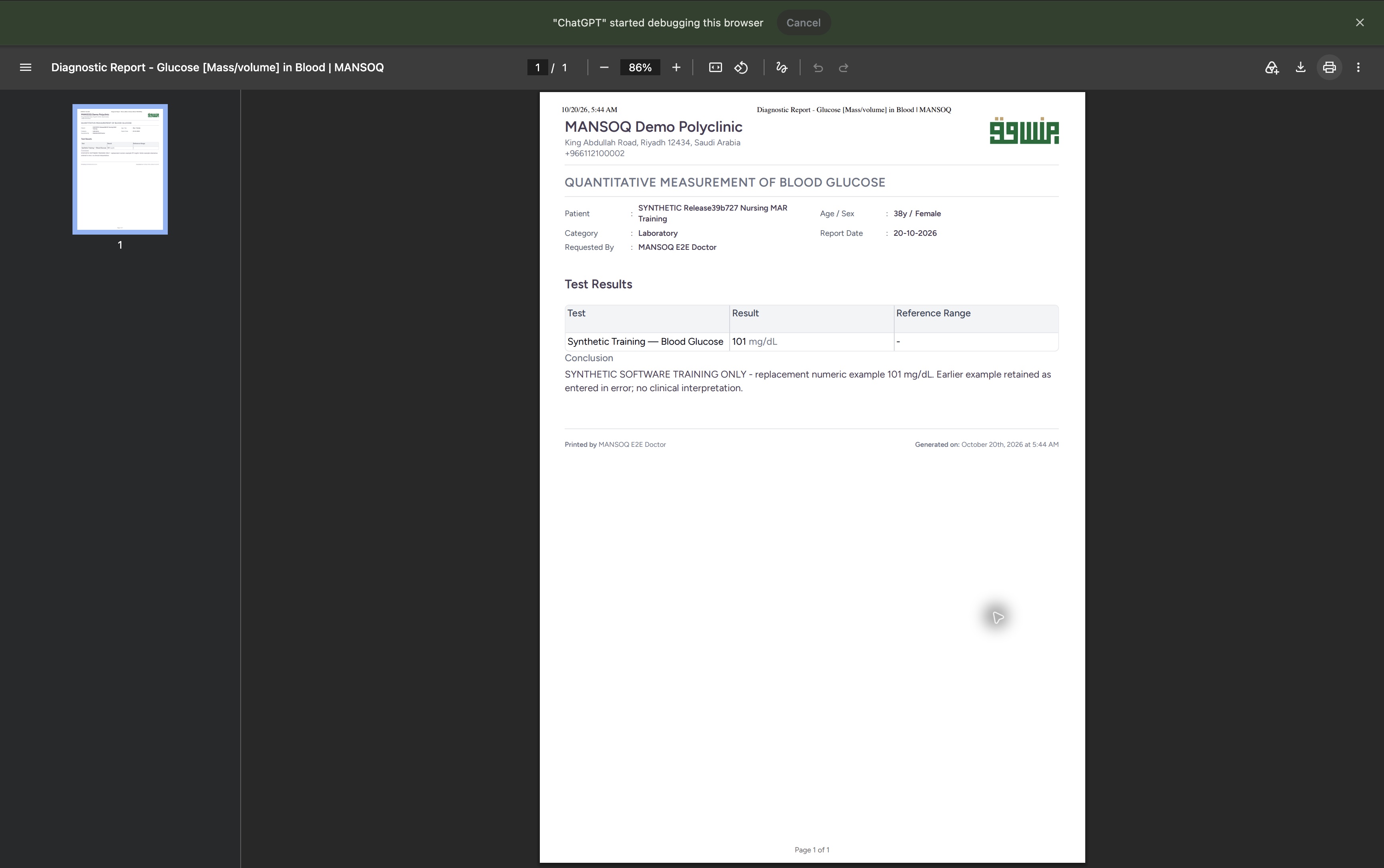 12
12Saved original laboratory PDF in Google Chrome
Saved PDF in Google Chrome (macOS) · page 1 of 1.
Capture details
Separate later viewing/reprint of the already saved original 3dfb report; unmodified native pixels. No repeat clinical Print action or laboratory update.
Image SHA-256 993ac8d43585bb22efa9d7b5a568849f1d16a62dfb06bcfe23cf15acc9ce61c9
- Original one-page PDF remains open: The Save panel is closed.
- Current 101 mg/dL: The original report remains visible after the separate save.
Current results and history remain distinct
The normal Final report and saved original PDF show the current 101 example. Observation History retains the earlier 100 example as Entered In Error; it has not become the current report value.
123456final report current result normal view
Capture details
Retained 3dfb software-training capture; fictional laboratory record and measurements, not clinical advice.
Image SHA-256 a3b237d059955f02421b337277c2033cbe397d8e35d59d38b21e3fde2315e8a3
- Fictional patient: Check the report patient.
- Report code: Read Glucose [Mass/volume] in Blood and 2339-0.
- Final: Confirm the report status.
- Current result: Read 101 mg/dL.
- Test Results menu: Open the observation-history action.
- Print: Open the printable report.
1234final report retained entered in error history
Capture details
Retained 3dfb software-training capture; fictional laboratory record and measurements, not clinical advice.
Image SHA-256 85a573d13b90444c9740876f5e47ef600def64b4536916814ecba0bccbb46125
- Entered In Error: Read the earlier observation status.
- Retained 100: The earlier example is still recorded.
- Recorded by: Read MANSOQ E2E Nurse.
- Close history: Return to the current report.
1234Saved original laboratory PDF in Google Chrome
Saved PDF in Google Chrome (macOS) · page 1 of 1.
Capture details
Separate later viewing/reprint of the already saved original 3dfb report; unmodified native pixels. No repeat clinical Print action or laboratory update.
Image SHA-256 8332ce2a90a447189fa7c8944860c4094f607af3bb9da87ca00d97bd88a63a22
- Page 1 of 1: The original saved PDF contains one page.
- Current 101 mg/dL: Read the current fictional result.
- Training-only Conclusion: Read the full explanation.
- PDF viewer Print: This opens printing for the already saved PDF.
Troubleshooting
Approval has not yet been confirmed
Use Cancel at the warning to keep Preliminary. Only the later explicit Approve action in this example changed the report to Final.
123doctor approval warning before cancel
Capture details
Retained 3dfb software-training capture; fictional laboratory record and measurements, not clinical advice.
Image SHA-256 dd8cd8a2990016db13773f287743ffa290200f111bbfb4fb8ac18c474ff8d382
- Approval warning: Read the warning before acting.
- Cancel: Keep Preliminary.
- Approve: Confirm only after the review.
123approval cancel settled preliminary
Capture details
Retained 3dfb software-training capture; fictional laboratory record and measurements, not clinical advice.
Image SHA-256 ee70031acc7b517d618cc3afbd0b468cb24a630c643ad1c32c331d72be8ac12a
- Preliminary retained: Cancel did not finalize the report.
- Current 101: The corrected value remains.
- Approve Results: Reopen the warning for the intended final approval.
123doctor report final after one approval
Capture details
Retained 3dfb software-training capture; fictional laboratory record and measurements, not clinical advice.
Image SHA-256 056a33bf3002914be9b9383fd26cc7bc058951d2bff57c3b001fb40b56e5cc2a
- Final: The report is finalized.
- Current 101: The replacement remains current.
- View Report: Open the normal final report.
Source evidence
Every citation uses this exact committed version. The private source repository requires access.
- repositories/platform/mansoq-core/mansoq/emr/api/viewsets/service_request.py:335 ·
3dfb7c9f519fb5b4cd4452439f3c12346bf58319Source file checksum
dc8d54fb85d383447098aa01c8f43f4711ae3457beeb203dd9e1f2cf47341f9c - repositories/platform/mansoq-core/mansoq/emr/resources/activity_definition/service_request.py:18 ·
3dfb7c9f519fb5b4cd4452439f3c12346bf58319Source file checksum
a1835f8a27ffd62f90e70ef2cc310213142205eb5af080ff5411e40fc1d91283 - repositories/platform/mansoq-core/mansoq/emr/resources/charge_item/apply_charge_item_definition.py:56 ·
3dfb7c9f519fb5b4cd4452439f3c12346bf58319Source file checksum
f0e436da014c81006a40a5449126439c94a70b0da84953fec62018de5d8203db - repositories/platform/mansoq-core/mansoq/emr/resources/account/default_account.py:18 ·
3dfb7c9f519fb5b4cd4452439f3c12346bf58319Source file checksum
ea9781250b2f341d189c9e1cd23679d23b144dc1c4d1d7dc93e5fbdb4c984b49 - repositories/platform/mansoq-core/mansoq/security/permissions/service_request.py:17 ·
3dfb7c9f519fb5b4cd4452439f3c12346bf58319Source file checksum
6f1bee356210ea5a4be4b382dece997e6b4960badc2374a4cd5c073f2f556226 - repositories/platform/mansoq-core/mansoq/security/authorization/service_request.py:32 ·
3dfb7c9f519fb5b4cd4452439f3c12346bf58319Source file checksum
96e09bef17e0c5a8f3f2fdaa8e1969e7257889e33b9729d64d4a25e0490708cb - repositories/platform/mansoq-web/src/components/Questionnaire/QuestionTypes/ServiceRequestQuestion.tsx:749 ·
3dfb7c9f519fb5b4cd4452439f3c12346bf58319Source file checksum
fe3d6d7b52050d2ae63c16e4b18d549b289140d5702d706a38d17dd395bc8670 - repositories/platform/mansoq-web/src/pages/Facility/services/serviceRequests/ServiceRequestShow.tsx:180 ·
3dfb7c9f519fb5b4cd4452439f3c12346bf58319Source file checksum
f279adcb6610e9c5d762bfd93b5299cac08893d438ff21161f35c57f3b5c29ae - repositories/platform/mansoq-web/src/pages/Facility/services/serviceRequests/components/DiagnosticReportForm.tsx:143 ·
3dfb7c9f519fb5b4cd4452439f3c12346bf58319Source file checksum
bab46e364618765f6928981ade71dfd6cfb3e611ffa26860c576cf85c03f41f9 - repositories/platform/mansoq-web/src/pages/Facility/services/serviceRequests/components/DiagnosticReportReview.tsx:132 ·
3dfb7c9f519fb5b4cd4452439f3c12346bf58319Source file checksum
0ecc142ec0638d6a9289fa280917b1bd14de8ea050dc6f0d46dc971505f2e43f - repositories/platform/mansoq-web/src/pages/Facility/services/diagnosticReports/DiagnosticReportPrint.tsx:117 ·
3dfb7c9f519fb5b4cd4452439f3c12346bf58319Source file checksum
4c94eda230ba9fef634bfe2f9cae33460c43472ca48a5ff33a3dd0c6fb5ee8c7 - repositories/platform/mansoq-web/src/pages/Facility/services/diagnosticReports/DiagnosticReportView.tsx:234 ·
3dfb7c9f519fb5b4cd4452439f3c12346bf58319Source file checksum
ad6d57240d62f09a324b9bc48e4d6eabed53dfc345b78cd0d5e6f037898b5f7a - repositories/platform/mansoq-web/src/pages/Facility/services/diagnosticReports/components/DiagnosticReportResultsTable.tsx:210 ·
3dfb7c9f519fb5b4cd4452439f3c12346bf58319Source file checksum
46f3cdfd7850d19a460cea130532ac49e205dff84c43236483de6d9c5ef6174d - repositories/platform/mansoq-web/src/pages/Facility/services/serviceRequests/components/ObservationHistorySheet.tsx:50 ·
3dfb7c9f519fb5b4cd4452439f3c12346bf58319Source file checksum
d302ebd75c861441af455cd6ffc70253036a6acc80c00e184a9275d99c92ff73 - repositories/platform/mansoq-web/src/pages/Facility/services/serviceRequests/components/SpecimenHistorySheet.tsx:38 ·
3dfb7c9f519fb5b4cd4452439f3c12346bf58319Source file checksum
0cab00b4f57f6576c0fd5515eeb39ba820d04a8d3231d7c1ed76a22ce0649cd7