 MANSOQ
 Laboratory workflow · VERSION 3dfb7c9f
Record an unsatisfactory specimen and inspect its replacement
Cancel a discard warning, save the fictional Unsatisfactory status, collect a replacement and inspect its label selection.
Nurse
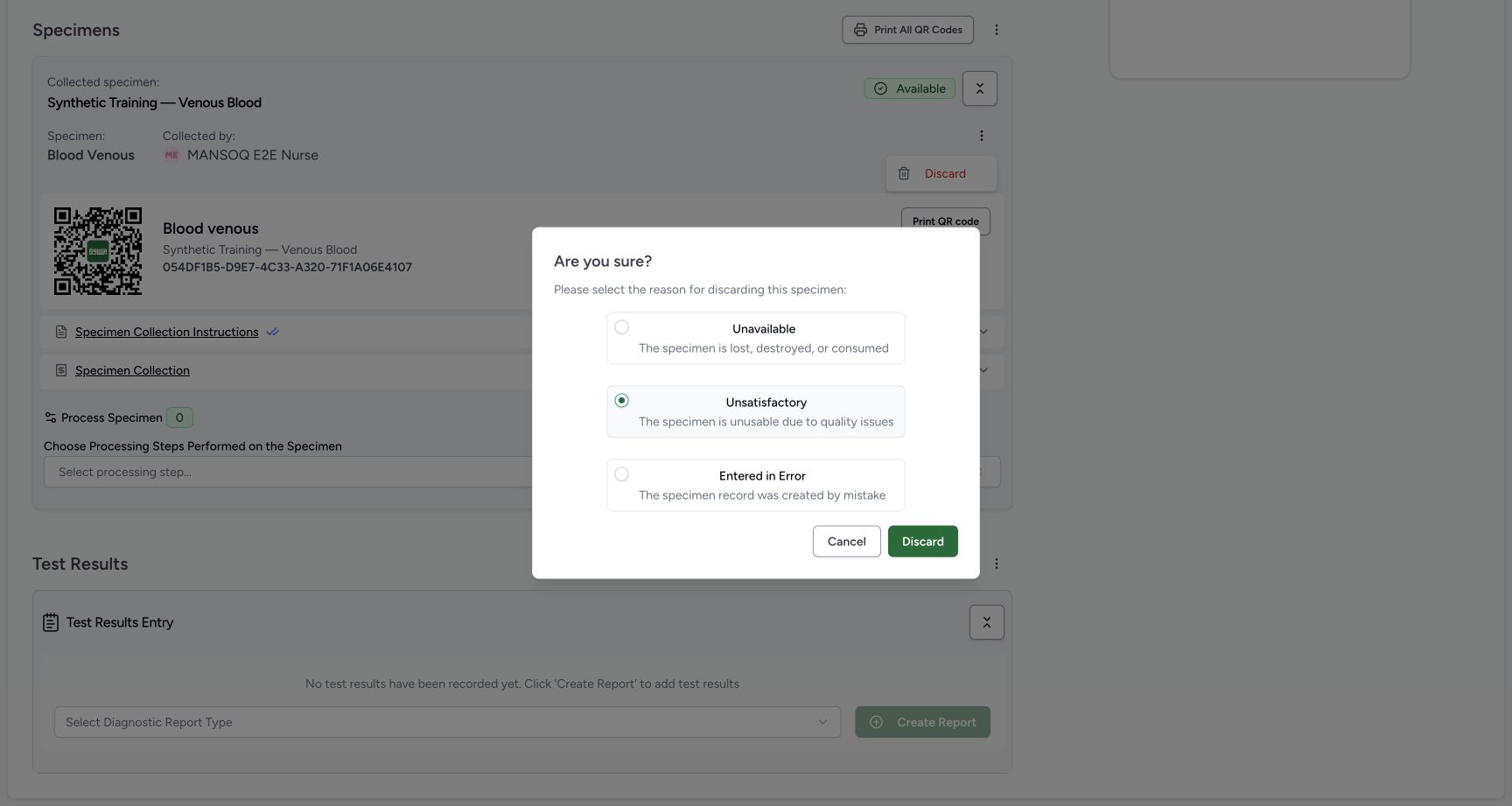 123
123unsatisfactory warning before neutral cancel
Capture details
Retained 3dfb software-training capture; fictional laboratory record and measurements, not clinical advice.
Image SHA-256 09ca6e366b6724d179b58242d8e281cc9d36f54d303cf0ba7c9419e0afe79d82
- Unsatisfactory: Read the selected fictional discard reason.
- Cancel: Leave the specimen unchanged.
- Discard: This confirms the selected status change.
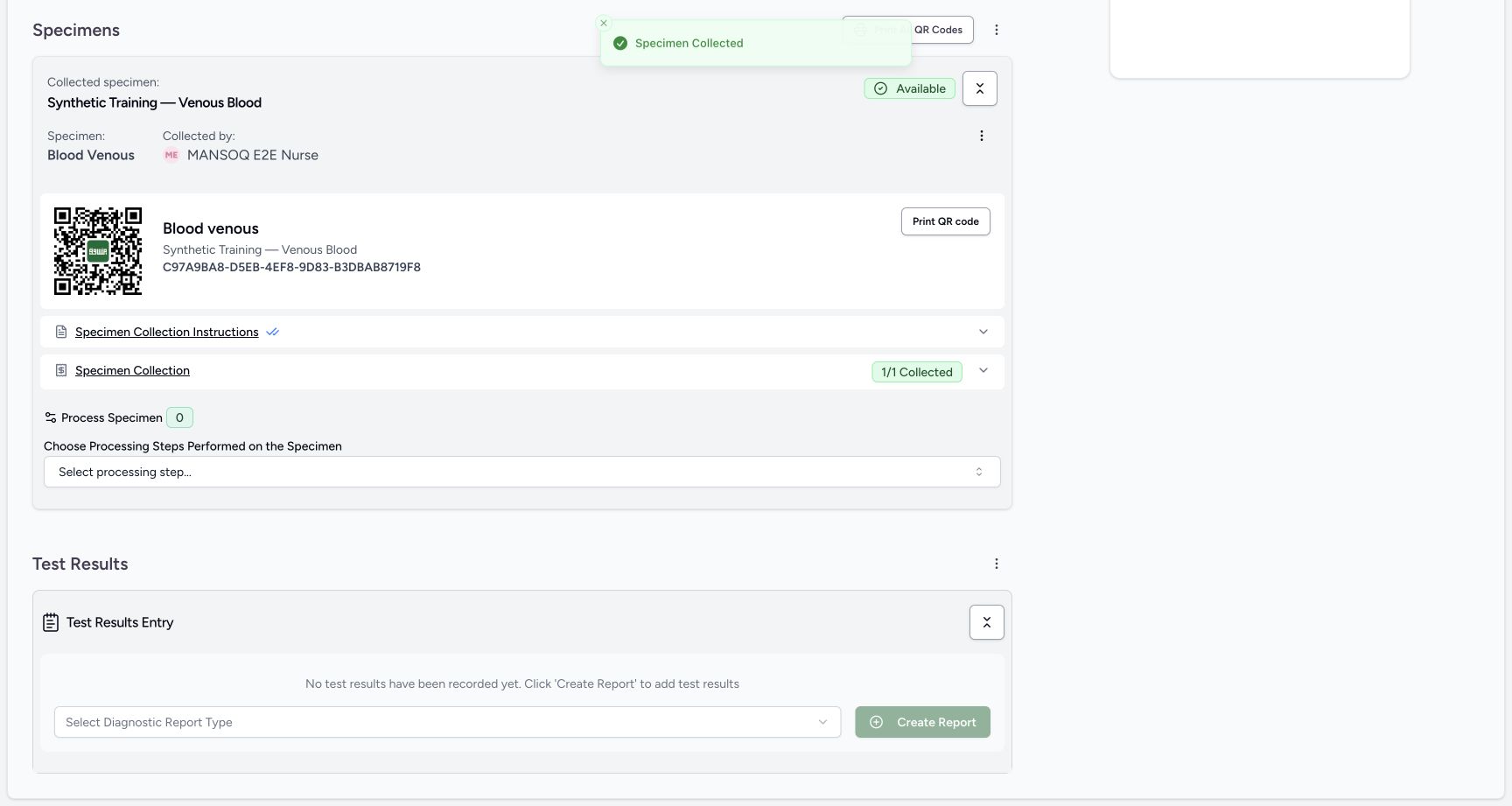 123
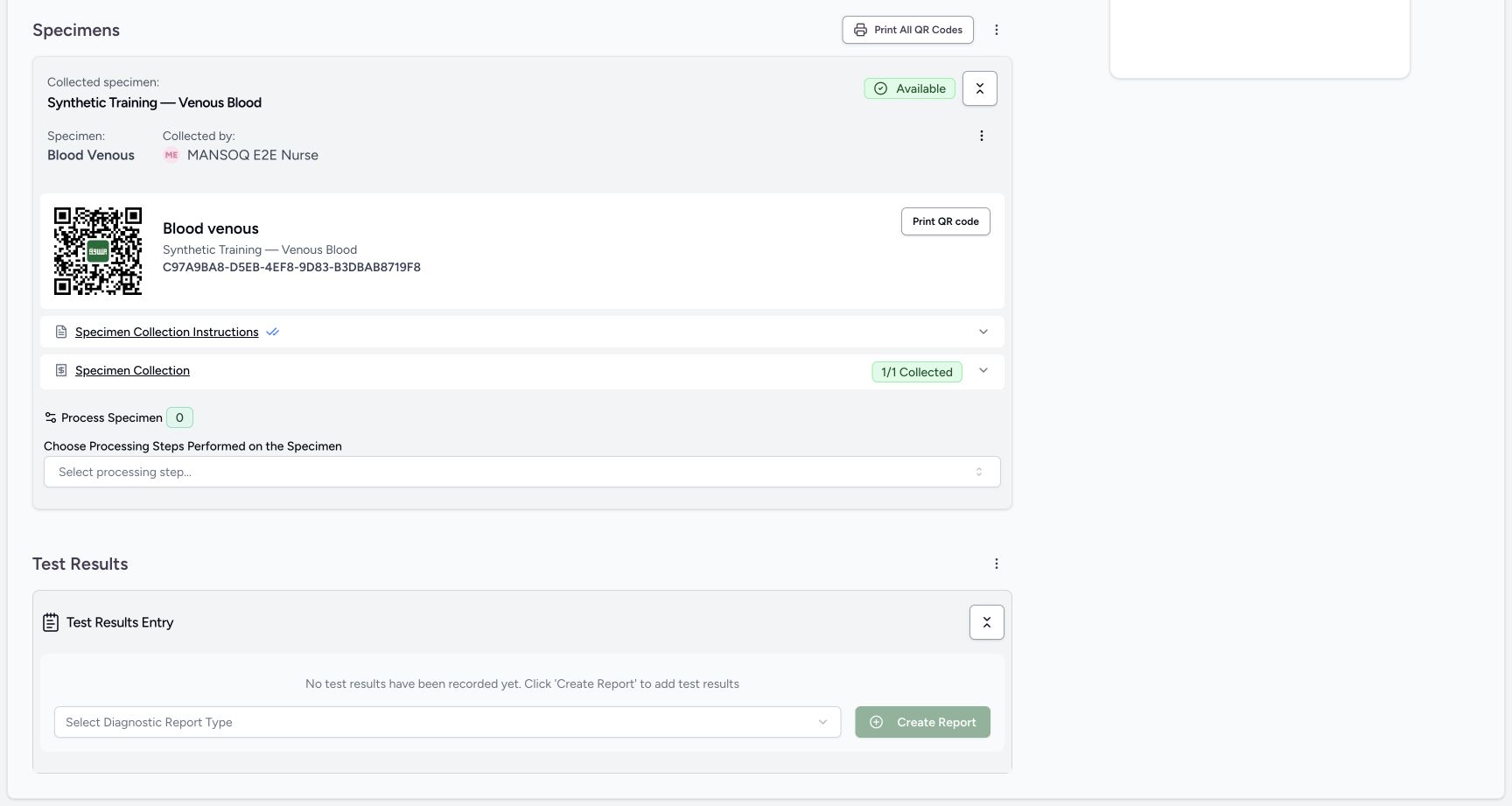
123second specimen available after one save
Capture details
Retained 3dfb software-training capture; fictional laboratory record and measurements, not clinical advice.
Image SHA-256 e84793c930ee59542fcfca3dbe78043d0f1784e03da375ad24e06a066f2e7029
- Available replacement: The second collection is saved.
- Replacement accession: Read the new saved accession.
- Print All QR Codes: Open the label-selection sheet.
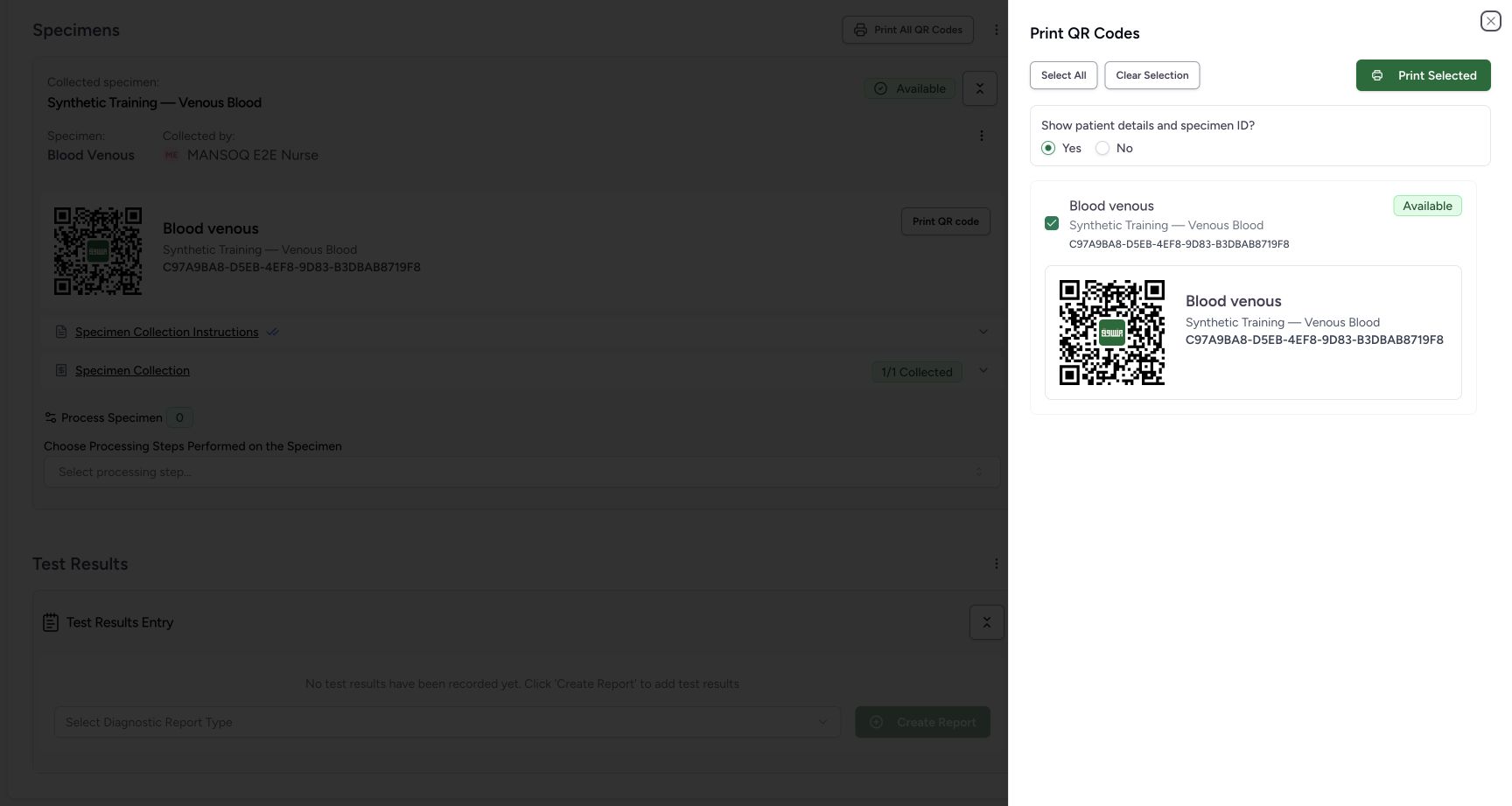 12345
12345existing second specimen label selection
Capture details
Retained 3dfb software-training capture; fictional laboratory record and measurements, not clinical advice.
Image SHA-256 766f3017a8f7e349ed4f1fb1921d81fa6dd50abc082d79f7c0ffd4620309519f
- Selected replacement: Only the existing Available replacement is selected.
- Replacement accession: Verify the exact specimen ID.
- Show patient details: Read the pictured Yes selection.
- Print Selected: This walkthrough leaves printing unused.
- Close label sheet: Close without printing.
15 of 15 content blocks have reviewed image alignment. Missing overview or prerequisite images remain open.
Before you begin
- Use the same authorized Nurse session and the same Active fictional service request.
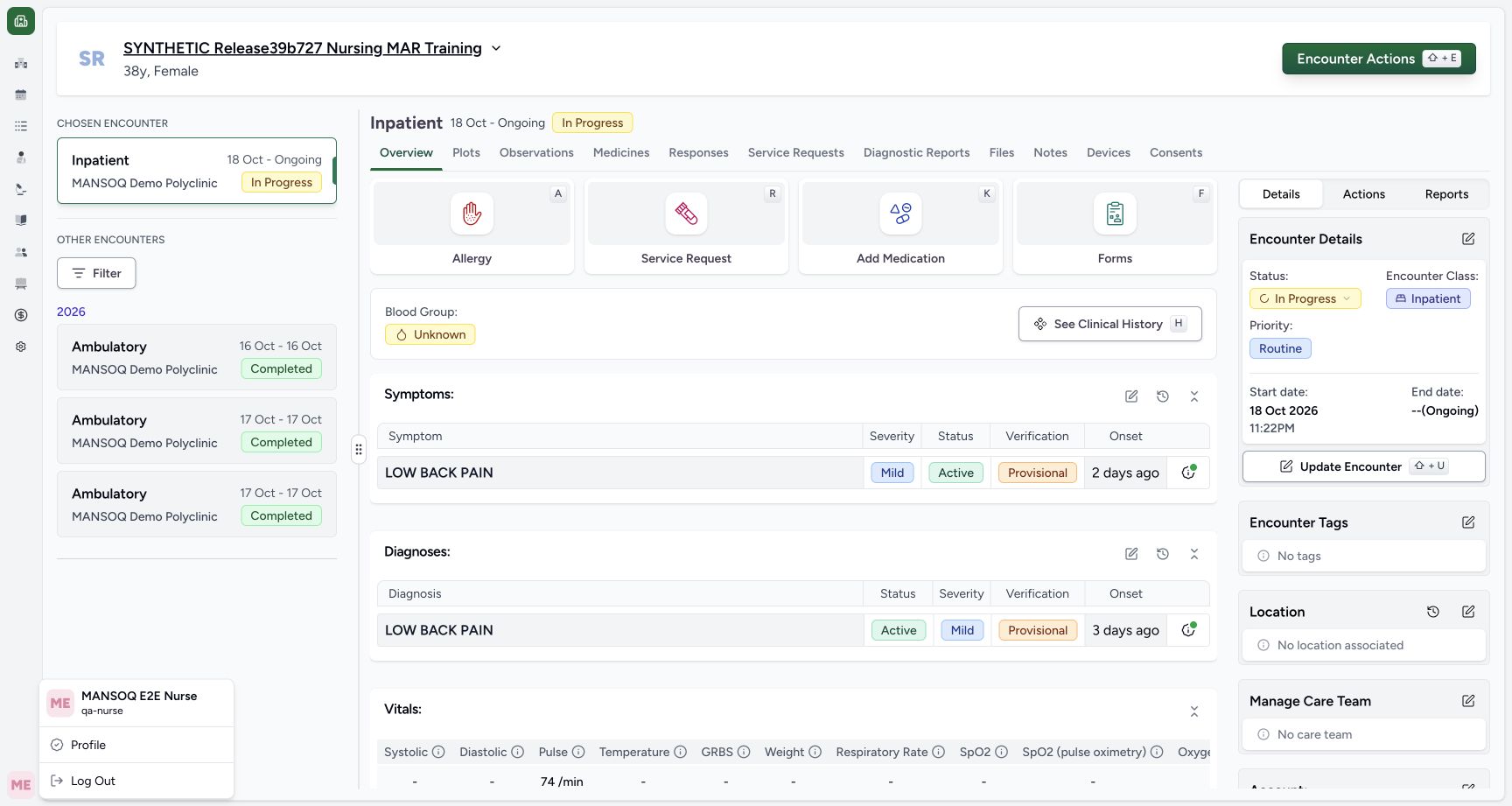 12
12Recorded release 3dfb7c9f · 2026-10-20T02:31:52.505Z · 1728 × 921 nurse identity context
Capture details
Retained 3dfb software-training capture; fictional laboratory record and measurements, not clinical advice.
Image SHA-256
7d6bbd1dead13b42b063c2a5b81bc4d38eab7697648e19e086fbf81619a83b38- Nurse session: Read the pictured Nurse account.
- Chosen encounter: Confirm the same Inpatient encounter.
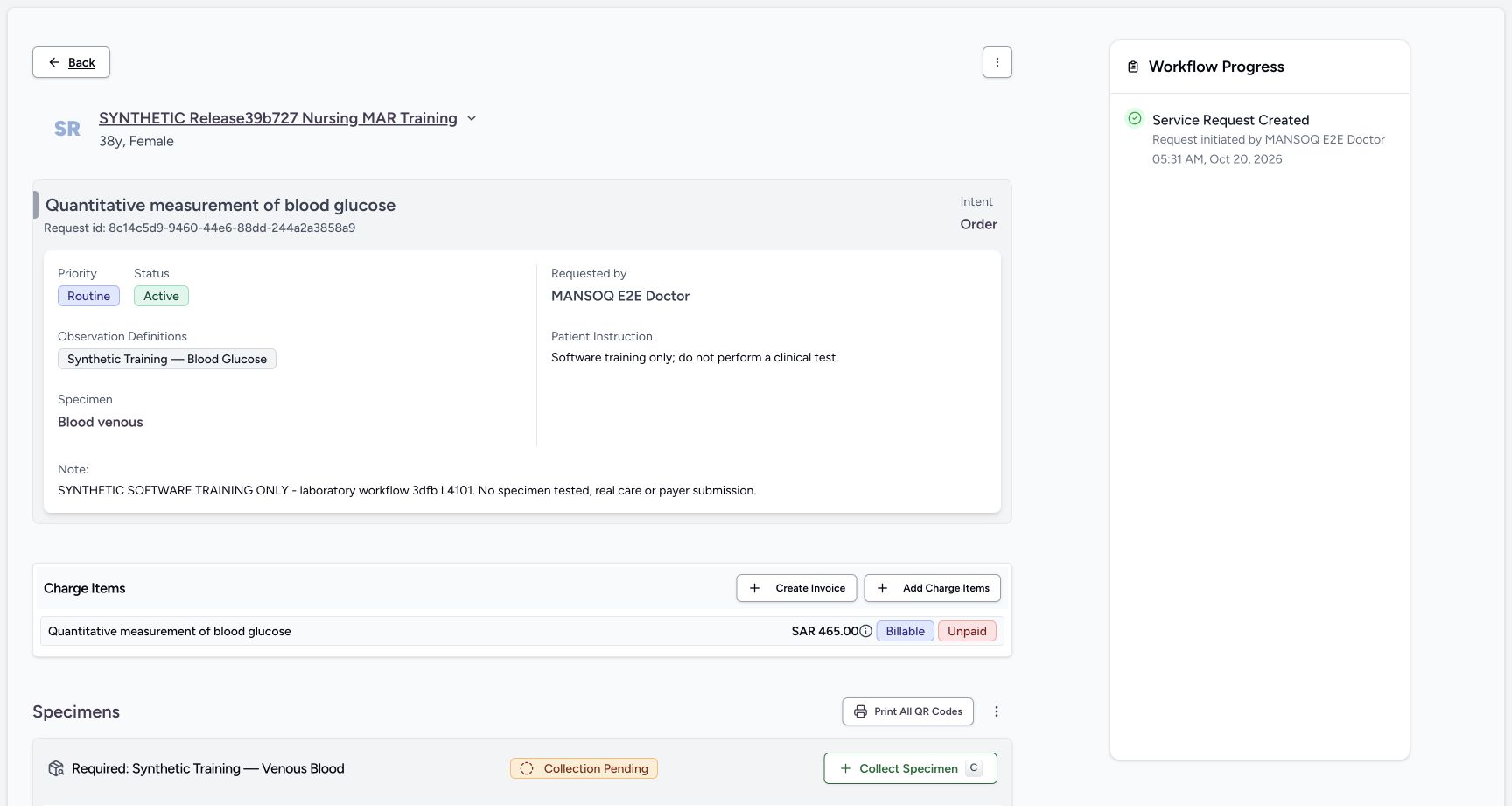 1234
1234Recorded release 3dfb7c9f · 2026-10-20T02:32:17.612Z · 1728 × 921 nurse request before first collect
Capture details
Retained 3dfb software-training capture; fictional laboratory record and measurements, not clinical advice.
Image SHA-256
a1f02bd060772c63ca7d77fc5745ccd39c82d43342829edc71a1678a2eb1781a- Request context: Read the intended laboratory title.
- Active: The request is active.
- Charge status: Read SAR 465.00, Billable and Unpaid.
- Collect Specimen: Open the required specimen collection form.
- Start with the first saved Available specimen. The pictured accession begins 054DF1B5.
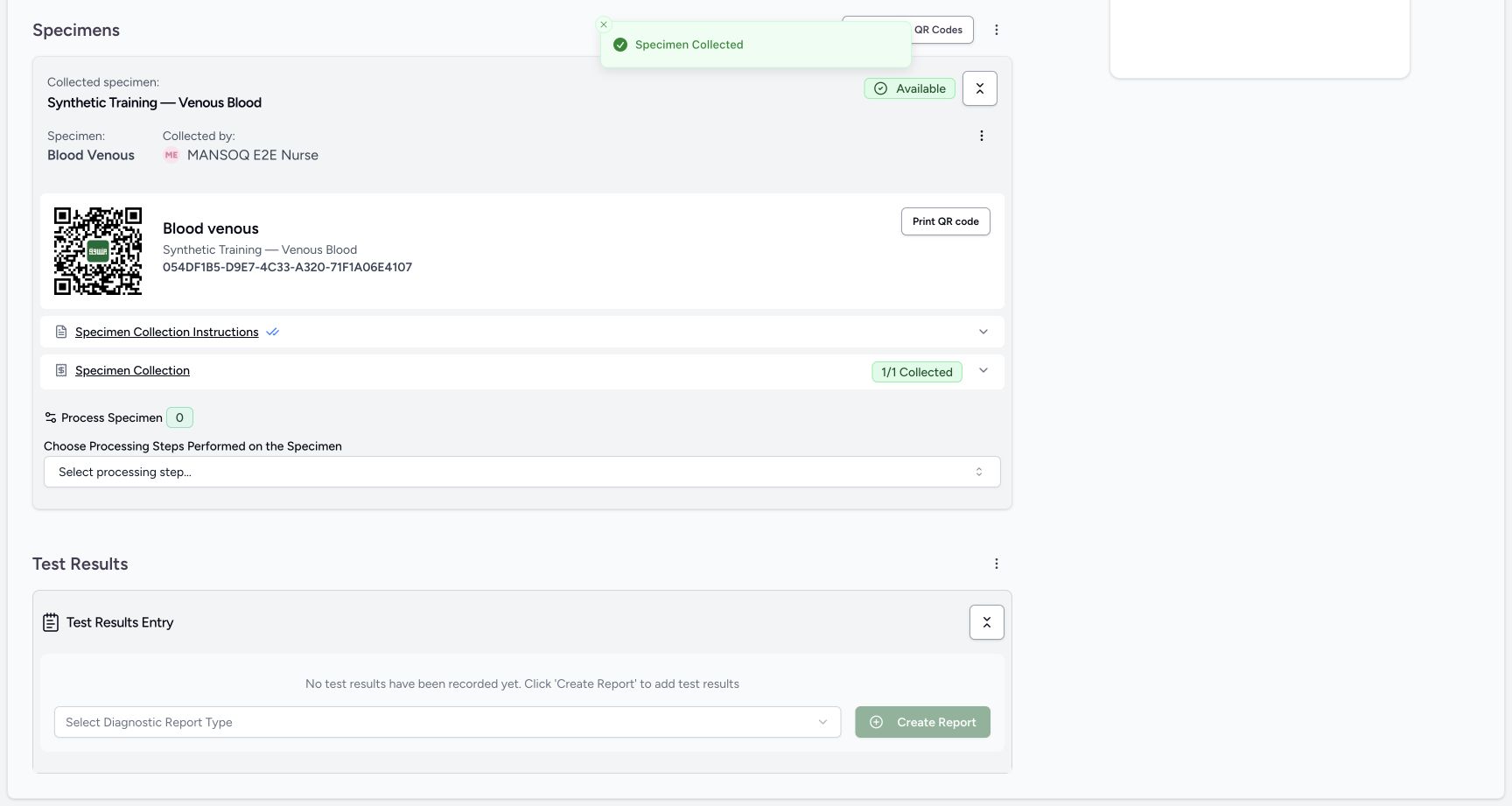 1234
1234Recorded release 3dfb7c9f · 2026-10-20T02:35:13.960Z · 1728 × 921 first specimen available after one collect
Capture details
Retained 3dfb software-training capture; fictional laboratory record and measurements, not clinical advice.
Image SHA-256
804eed79018050e30da3c423d7d8c74f8a32d396423cdf39617fb320b44c00ed- Available: The first collection is saved.
- First accession: Read the saved first specimen accession.
- 1/1 Collected: Collection is recorded.
- Processing count: No processing is recorded.
- This exercise changes software records only. It does not establish a physical sample quality decision or perform specimen processing.123
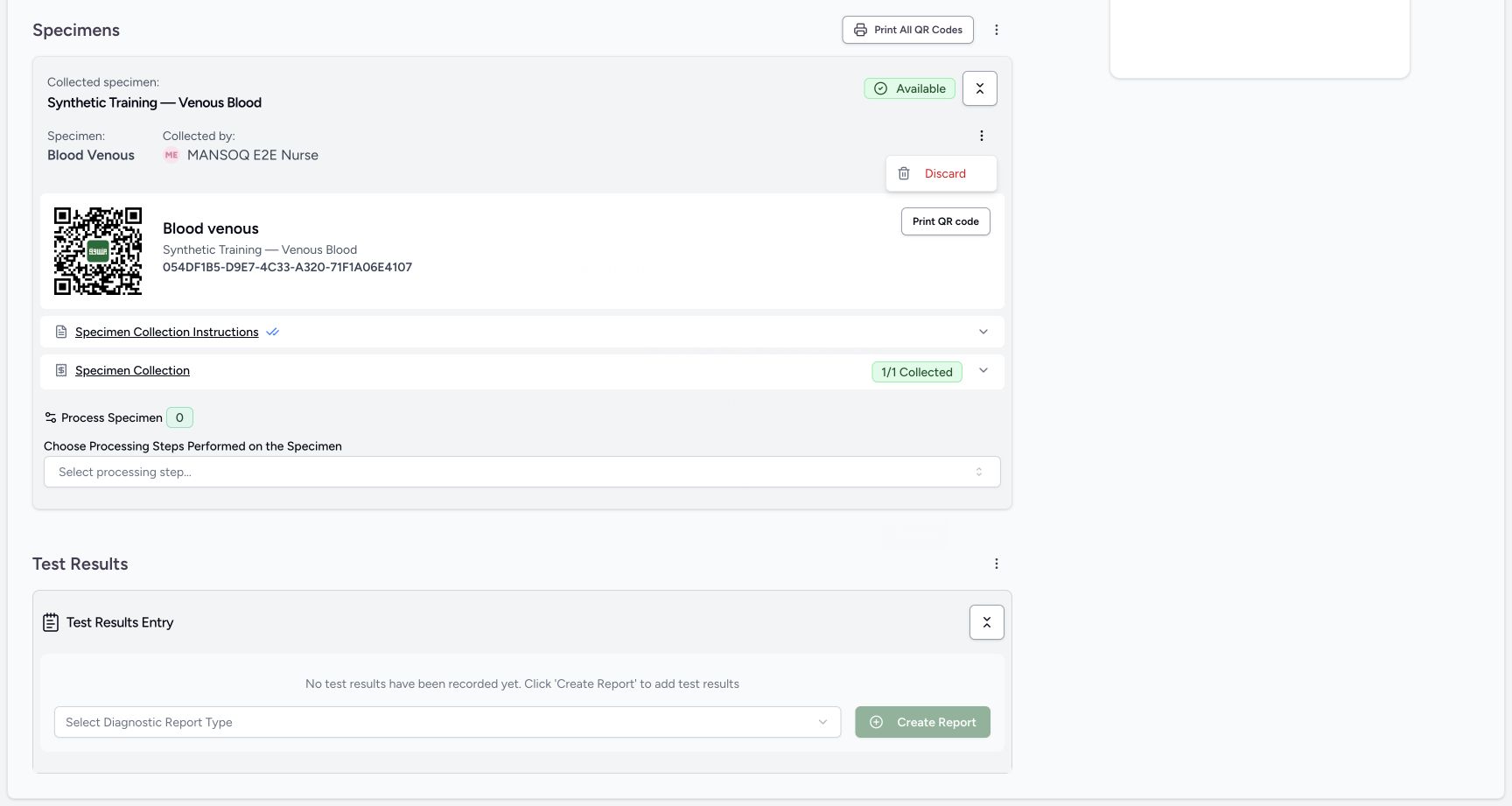
Recorded release 3dfb7c9f · 2026-10-20T02:35:46.187Z · 1728 × 921 unsatisfactory warning before neutral cancel
Capture details
Retained 3dfb software-training capture; fictional laboratory record and measurements, not clinical advice.
Image SHA-256
09ca6e366b6724d179b58242d8e281cc9d36f54d303cf0ba7c9419e0afe79d82- Unsatisfactory: Read the selected fictional discard reason.
- Cancel: Leave the specimen unchanged.
- Discard: This confirms the selected status change.
 123
123Recorded release 3dfb7c9f · 2026-10-20T02:38:40.550Z · 1728 × 921 processing zero picker kept closed
Capture details
Retained 3dfb software-training capture; fictional laboratory record and measurements, not clinical advice.
Image SHA-256
7576686b9eb85b50711d4086ee826cfa0c89b03dbf940fe65eed5f88b1e9fd94- Available: The replacement remains available after closing labels.
- Process Specimen 0: No processing step was recorded.
- Processing picker left closed: Do not select or save a processing method in this example.
1. Inspect Discard
Open the collected specimen action menu and select Discard. The warning offers Unavailable, Unsatisfactory and Entered in Error. Choose Unsatisfactory for this fictional example.
 123
123discard cancel first specimen still available
Capture details
Retained 3dfb software-training capture; fictional laboratory record and measurements, not clinical advice.
Image SHA-256 2f729d110605f712eb170da241468940fb8e927cd60e6ff221184394981e5225
- Available retained: Cancel left the first specimen Available.
- Same accession: The first accession is unchanged.
- Discard menu action: The specimen action remains available.
123unsatisfactory warning before neutral cancel
Capture details
Retained 3dfb software-training capture; fictional laboratory record and measurements, not clinical advice.
Image SHA-256 09ca6e366b6724d179b58242d8e281cc9d36f54d303cf0ba7c9419e0afe79d82
- Unsatisfactory: Read the selected fictional discard reason.
- Cancel: Leave the specimen unchanged.
- Discard: This confirms the selected status change.
2. Cancel the warning first
Select Cancel. Read Available and the same accession on the retained first specimen.
123unsatisfactory warning before neutral cancel
Capture details
Retained 3dfb software-training capture; fictional laboratory record and measurements, not clinical advice.
Image SHA-256 09ca6e366b6724d179b58242d8e281cc9d36f54d303cf0ba7c9419e0afe79d82
- Unsatisfactory: Read the selected fictional discard reason.
- Cancel: Leave the specimen unchanged.
- Discard: This confirms the selected status change.
123discard cancel first specimen still available
Capture details
Retained 3dfb software-training capture; fictional laboratory record and measurements, not clinical advice.
Image SHA-256 2f729d110605f712eb170da241468940fb8e927cd60e6ff221184394981e5225
- Available retained: Cancel left the first specimen Available.
- Same accession: The first accession is unchanged.
- Discard menu action: The specimen action remains available.
3. Record the fictional Unsatisfactory status
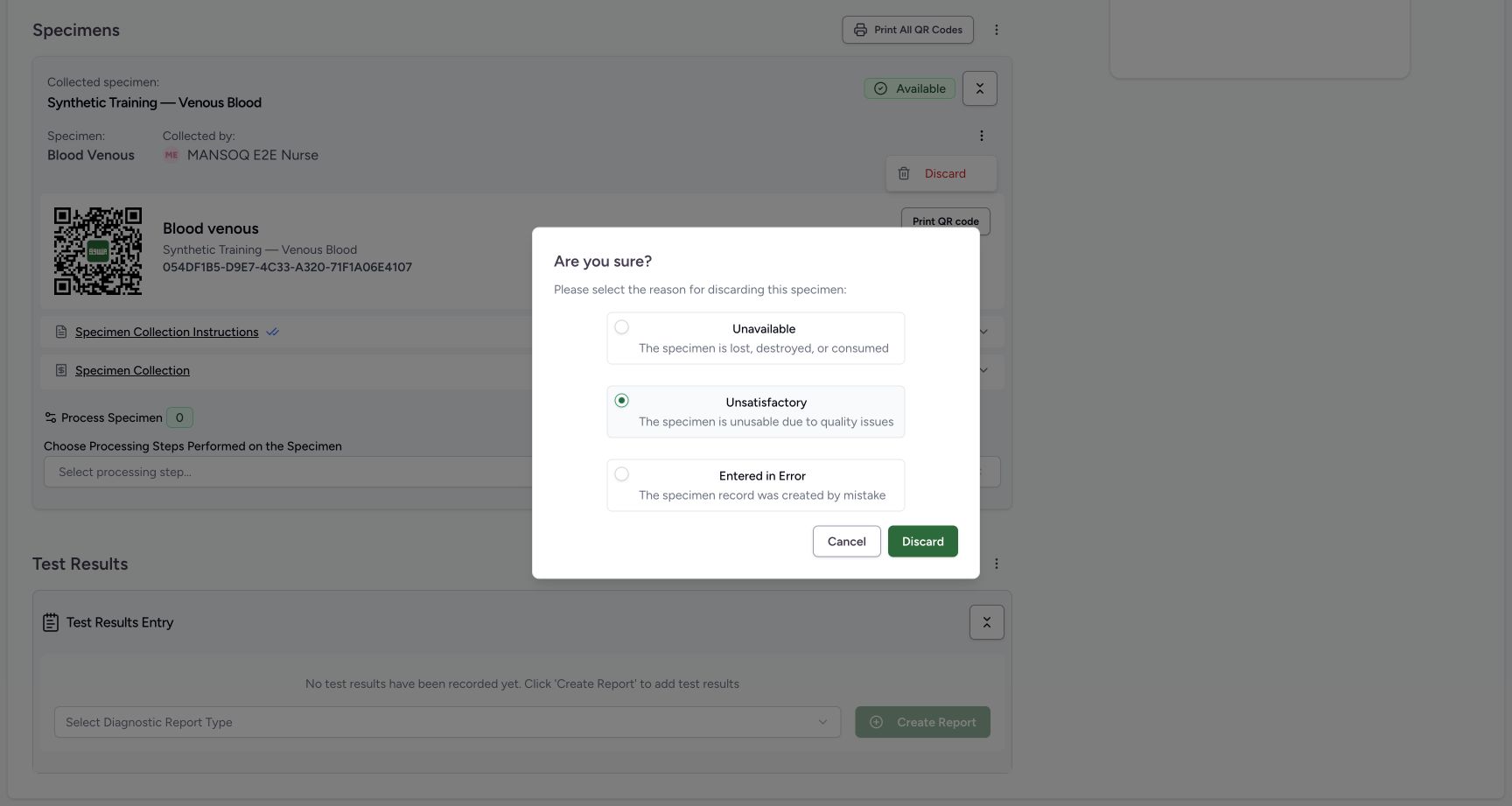
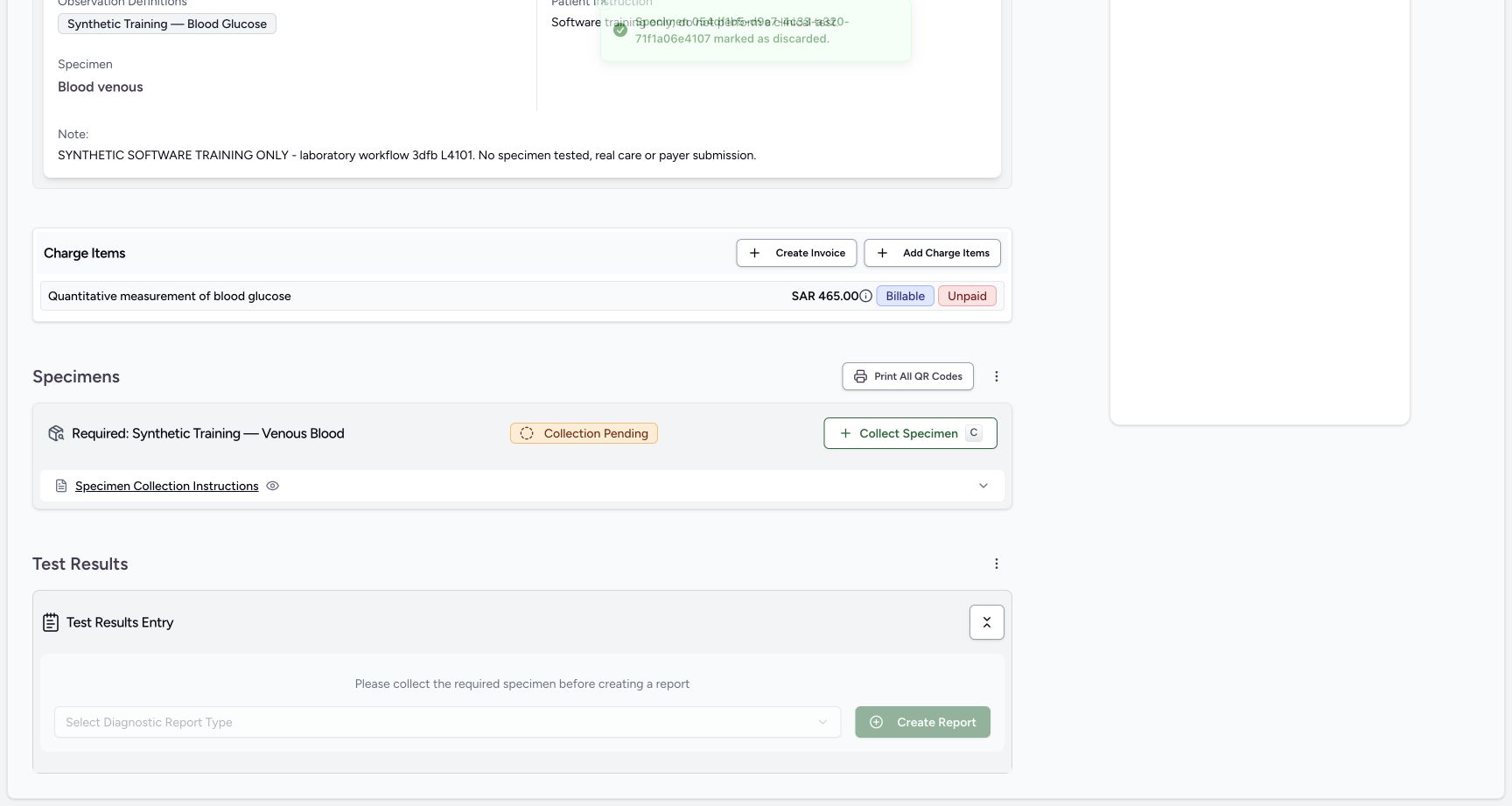
Reopen Discard, review Unsatisfactory and select Discard once. The service request now shows Collection Pending and Collect Specimen for the required specimen again.
 12
12own unsatisfactory discard presave
Capture details
Retained 3dfb software-training capture; fictional laboratory record and measurements, not clinical advice.
Image SHA-256 09ca6e366b6724d179b58242d8e281cc9d36f54d303cf0ba7c9419e0afe79d82
- Unsatisfactory selected: Review this exact fictional reason.
- Discard: Confirm only the intended own specimen change.
 12
12own unsatisfactory saved recollection available
Capture details
Retained 3dfb software-training capture; fictional laboratory record and measurements, not clinical advice.
Image SHA-256 ebbce585addcc716bdb39a0c1f019722e9d8e9e1b3151967b1cf5670674cba56
- Collection Pending: The required specimen can be recollected.
- Collect Specimen: Open a new replacement draft.
4. Create the replacement draft
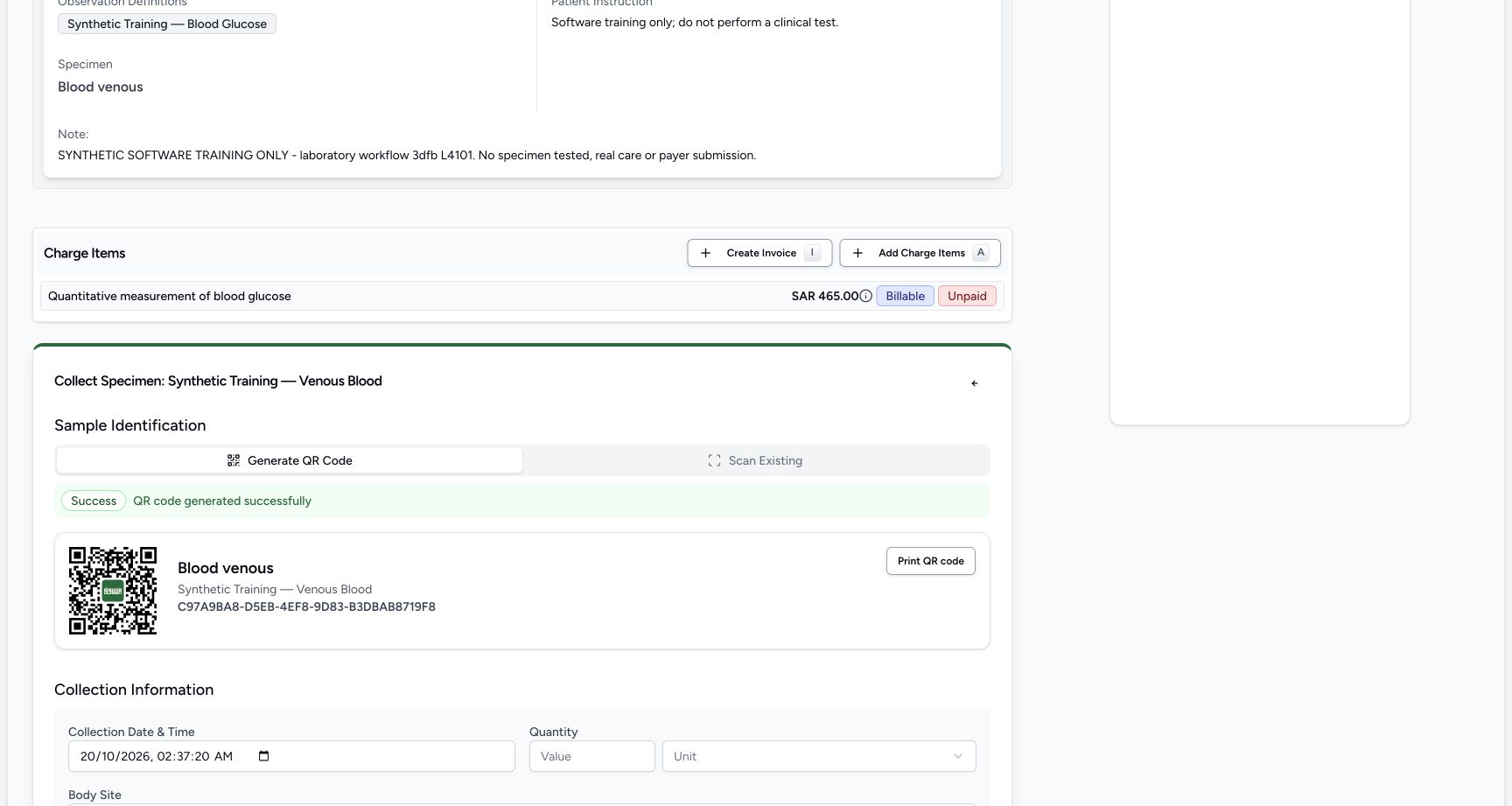
Select Collect Specimen for the pending required specimen. Read the newly generated accession beginning C97A9BA8. This is a replacement record with a different accession.
12own unsatisfactory saved recollection available
Capture details
Retained 3dfb software-training capture; fictional laboratory record and measurements, not clinical advice.
Image SHA-256 ebbce585addcc716bdb39a0c1f019722e9d8e9e1b3151967b1cf5670674cba56
- Collection Pending: The required specimen can be recollected.
- Collect Specimen: Open a new replacement draft.
 123
123second draft new accession
Capture details
Retained 3dfb software-training capture; fictional laboratory record and measurements, not clinical advice.
Image SHA-256 1a0ea55c39b0752b20ba9b16ca8e37876991cc7ab6f56b1400fee6390ed04566
- Replacement accession: Read the new accession beginning C97A9BA8.
- Generate QR Code tab: The new draft has already generated its accession.
- Collection time: Review the replacement collection time.
5. Save the replacement collection
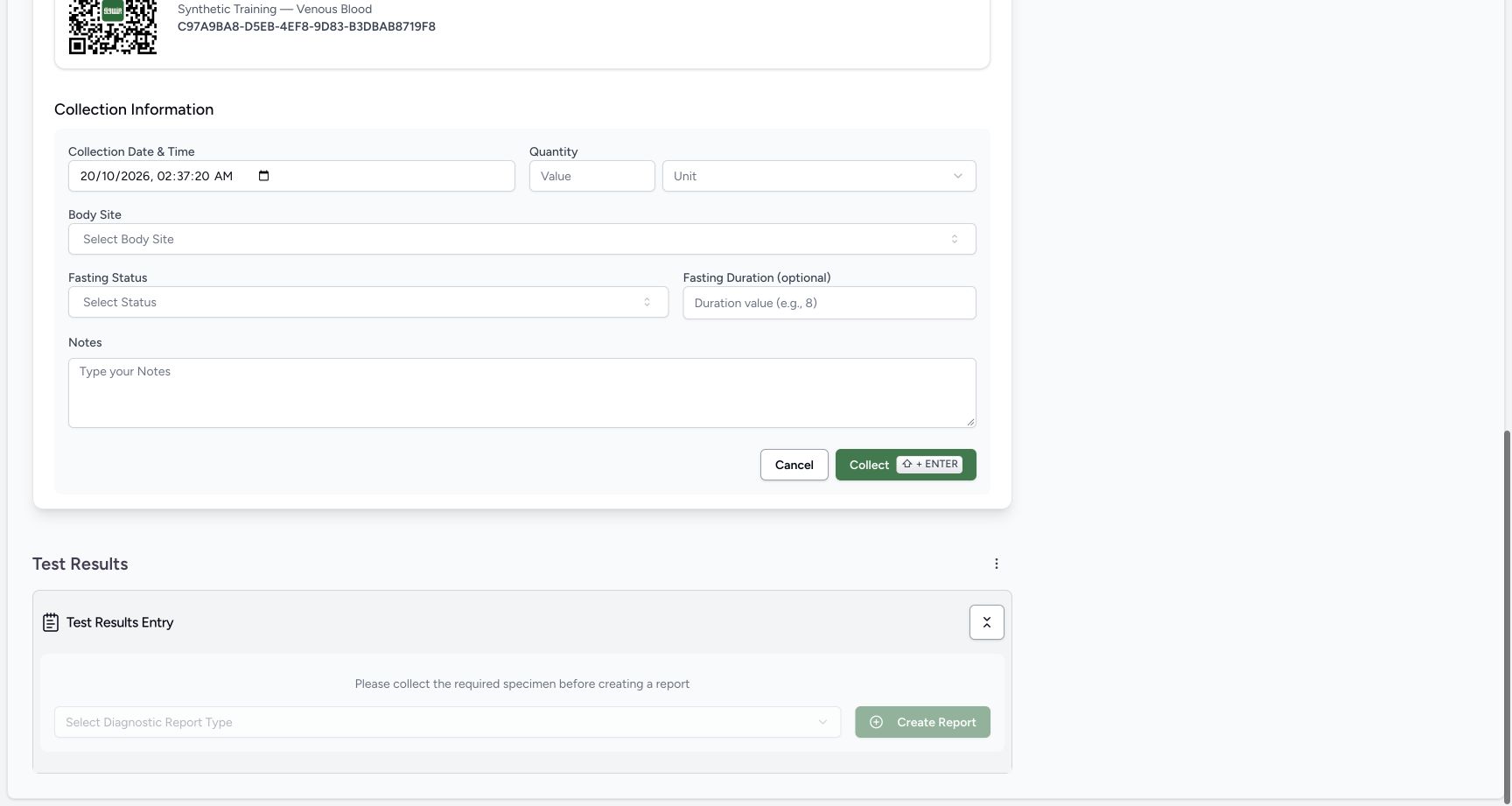
Review Collection Date & Time and the untouched optional fields, then select Collect once. Verify the second specimen is Available and its accession begins C97A9BA8.
 1234
1234second collection presave null quantity
Capture details
Retained 3dfb software-training capture; fictional laboratory record and measurements, not clinical advice.
Image SHA-256 45a5b4011c9ff71c1fb50b9e1ccb67bbeb8559463f32c0c27bfd6d51487b3c41
- Replacement accession: Confirm this is the second draft.
- Collection time: Review date and time.
- Quantity and Unit: Both remain blank in this fixture.
- Collect: Save the replacement collection once.
123second specimen available after one save
Capture details
Retained 3dfb software-training capture; fictional laboratory record and measurements, not clinical advice.
Image SHA-256 e84793c930ee59542fcfca3dbe78043d0f1784e03da375ad24e06a066f2e7029
- Available replacement: The second collection is saved.
- Replacement accession: Read the new saved accession.
- Print All QR Codes: Open the label-selection sheet.
6. Inspect the existing label selection
Open Print All QR Codes. In the sheet, inspect the checked Available replacement, its accession and the Yes option for showing patient details and specimen ID. Do not use Select All or Print Selected in this walkthrough.
123second specimen available after one save
Capture details
Retained 3dfb software-training capture; fictional laboratory record and measurements, not clinical advice.
Image SHA-256 e84793c930ee59542fcfca3dbe78043d0f1784e03da375ad24e06a066f2e7029
- Available replacement: The second collection is saved.
- Replacement accession: Read the new saved accession.
- Print All QR Codes: Open the label-selection sheet.
12345existing second specimen label selection
Capture details
Retained 3dfb software-training capture; fictional laboratory record and measurements, not clinical advice.
Image SHA-256 766f3017a8f7e349ed4f1fb1921d81fa6dd50abc082d79f7c0ffd4620309519f
- Selected replacement: Only the existing Available replacement is selected.
- Replacement accession: Verify the exact specimen ID.
- Show patient details: Read the pictured Yes selection.
- Print Selected: This walkthrough leaves printing unused.
- Close label sheet: Close without printing.
7. Close the label sheet
Use the sheet Close control. The saved replacement remains Available. This inspection did not print labels or create another specimen draft.
12345existing second specimen label selection
Capture details
Retained 3dfb software-training capture; fictional laboratory record and measurements, not clinical advice.
Image SHA-256 766f3017a8f7e349ed4f1fb1921d81fa6dd50abc082d79f7c0ffd4620309519f
- Selected replacement: Only the existing Available replacement is selected.
- Replacement accession: Verify the exact specimen ID.
- Show patient details: Read the pictured Yes selection.
- Print Selected: This walkthrough leaves printing unused.
- Close label sheet: Close without printing.
123processing zero picker kept closed
Capture details
Retained 3dfb software-training capture; fictional laboratory record and measurements, not clinical advice.
Image SHA-256 7576686b9eb85b50711d4086ee826cfa0c89b03dbf940fe65eed5f88b1e9fd94
- Available: The replacement remains available after closing labels.
- Process Specimen 0: No processing step was recorded.
- Processing picker left closed: Do not select or save a processing method in this example.
8. Recognize the processing boundary
Read Process Specimen 0 and the unselected processing-step control. Leave the picker closed. No processing method is selected or saved in this demonstration.
123processing zero picker kept closed
Capture details
Retained 3dfb software-training capture; fictional laboratory record and measurements, not clinical advice.
Image SHA-256 7576686b9eb85b50711d4086ee826cfa0c89b03dbf940fe65eed5f88b1e9fd94
- Available: The replacement remains available after closing labels.
- Process Specimen 0: No processing step was recorded.
- Processing picker left closed: Do not select or save a processing method in this example.
9. Verify the earlier record in history
After the later saved reload, use the Specimens action menu to open View Specimen History. The first specimen is retained as Unsatisfactory. Close the history sheet after reading it. The open-menu picture is a separate later read-only illustration on the same Completed request; the history sheet retains its original walkthrough timestamp.
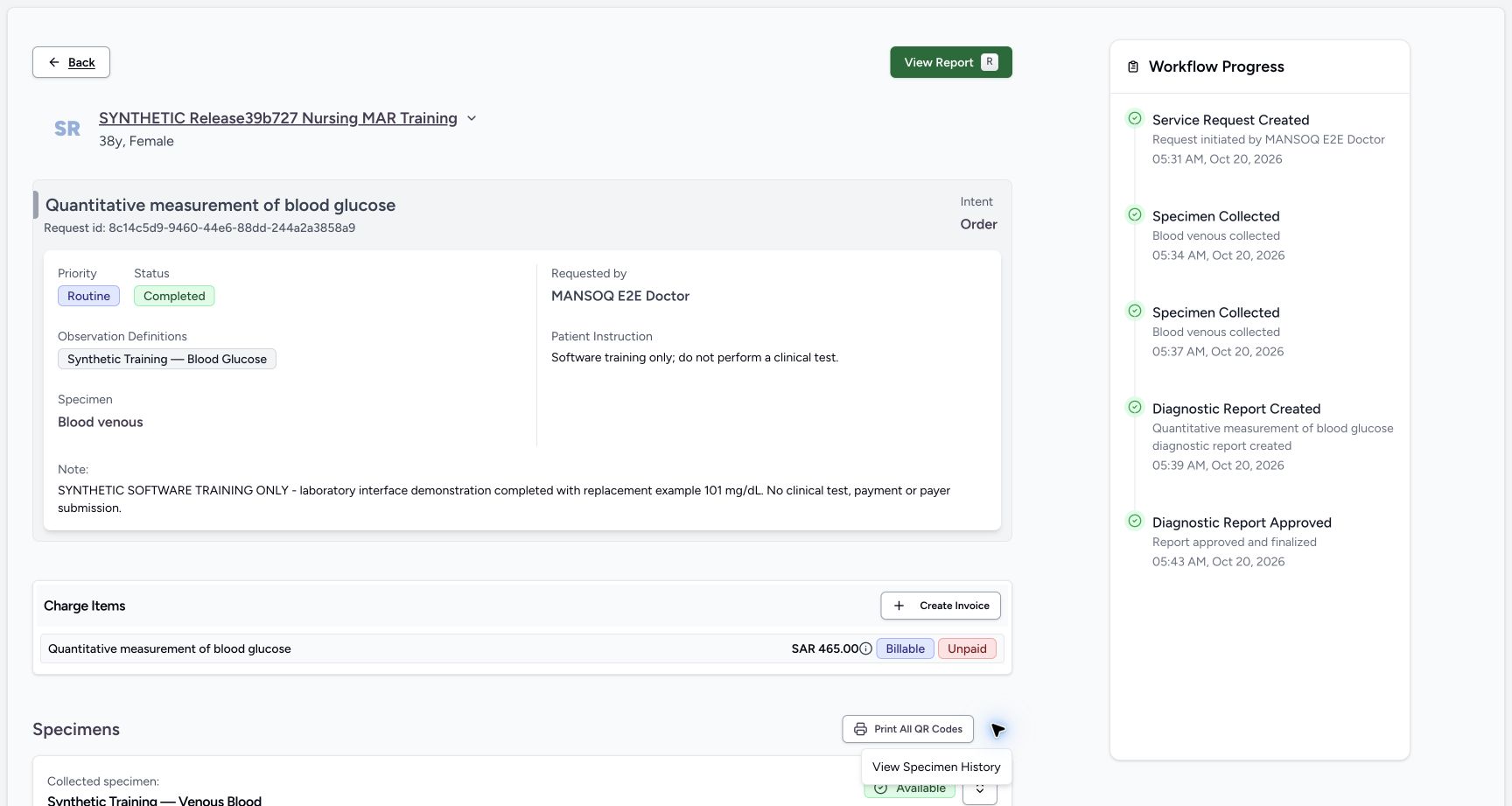 1234
1234Later read-only completed request specimen history menu open
Capture details
Separate later read-only open-menu illustration of the same visible saved Final101/Completed record. The menu items were not selected in this supplemental capture sequence; original history-result sheets retain their own earlier capture times.
Image SHA-256 95590935b9364e7cb39f57a7082f48cff97ecf182d7e3f646108978bc6690256
- Specimens actions: Open the Specimens action menu; this is a separate later read-only inspection.
- View Specimen History: Select this menu item to open history; it was illustrated but not selected in this later menu-only inspection.
- Completed: The same service request remains Completed.
- View Report: Return to the saved Final report when needed.
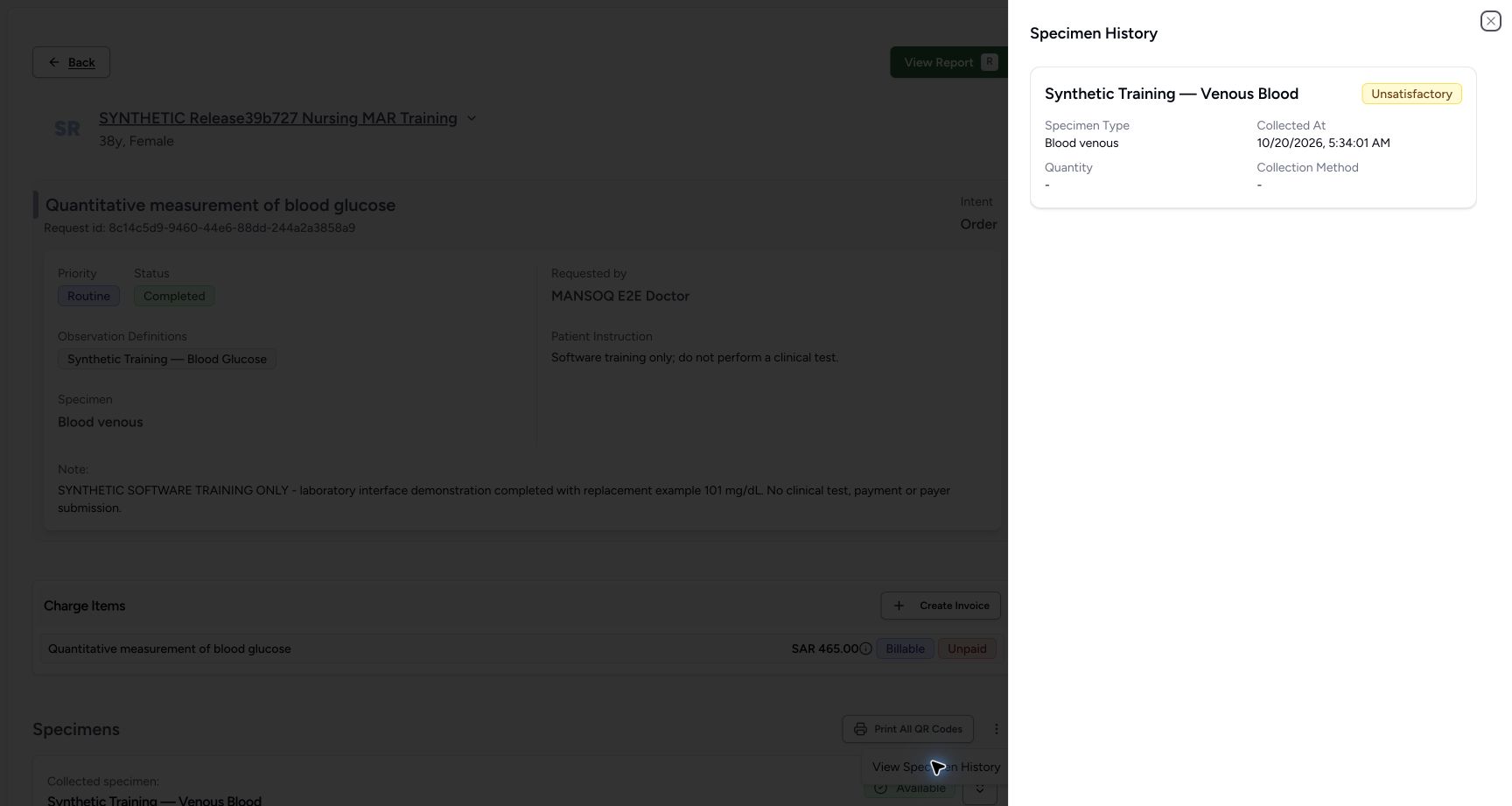 123
123reloaded retained first unsatisfactory specimen
Capture details
Retained 3dfb software-training capture; fictional laboratory record and measurements, not clinical advice.
Image SHA-256 76938345724d1901da0ec3f095ae2cf1ca2a37a0cc4fce6324164e145f4ffd14
- Unsatisfactory retained: The first specimen remains in history.
- Saved collection time: This is the displayed local collection time.
- Close history: Return to the normal request view.
Replacement preserves the earlier record
The normal request view shows the Available replacement. The earlier Unsatisfactory specimen remains in Specimen History; recollection does not erase it.
123second specimen available after one save
Capture details
Retained 3dfb software-training capture; fictional laboratory record and measurements, not clinical advice.
Image SHA-256 e84793c930ee59542fcfca3dbe78043d0f1784e03da375ad24e06a066f2e7029
- Available replacement: The second collection is saved.
- Replacement accession: Read the new saved accession.
- Print All QR Codes: Open the label-selection sheet.
123reloaded retained first unsatisfactory specimen
Capture details
Retained 3dfb software-training capture; fictional laboratory record and measurements, not clinical advice.
Image SHA-256 76938345724d1901da0ec3f095ae2cf1ca2a37a0cc4fce6324164e145f4ffd14
- Unsatisfactory retained: The first specimen remains in history.
- Saved collection time: This is the displayed local collection time.
- Close history: Return to the normal request view.
Troubleshooting
Which discard option was demonstrated?
Only Unsatisfactory was saved here. The warning displays other options, but this guide does not demonstrate those changes or a restoration workflow.
123unsatisfactory warning before neutral cancel
Capture details
Retained 3dfb software-training capture; fictional laboratory record and measurements, not clinical advice.
Image SHA-256 09ca6e366b6724d179b58242d8e281cc9d36f54d303cf0ba7c9419e0afe79d82
- Unsatisfactory: Read the selected fictional discard reason.
- Cancel: Leave the specimen unchanged.
- Discard: This confirms the selected status change.
123reloaded retained first unsatisfactory specimen
Capture details
Retained 3dfb software-training capture; fictional laboratory record and measurements, not clinical advice.
Image SHA-256 76938345724d1901da0ec3f095ae2cf1ca2a37a0cc4fce6324164e145f4ffd14
- Unsatisfactory retained: The first specimen remains in history.
- Saved collection time: This is the displayed local collection time.
- Close history: Return to the normal request view.
Source evidence
Every citation uses this exact committed version. The private source repository requires access.
- repositories/platform/mansoq-core/mansoq/emr/api/viewsets/specimen.py:46 ·
3dfb7c9f519fb5b4cd4452439f3c12346bf58319Source file checksum
9f0407af6773a8f026fe4fdda70c35cc948e56293f2e43429b342d44466c165a - repositories/platform/mansoq-core/mansoq/emr/api/viewsets/diagnostic_report.py:164 ·
3dfb7c9f519fb5b4cd4452439f3c12346bf58319Source file checksum
161a3f2f7a13464addeec9fa37579520751b9c7b162a44efbaa73d218e3d1010 - repositories/platform/mansoq-core/mansoq/emr/resources/specimen_definition/specimen.py:5 ·
3dfb7c9f519fb5b4cd4452439f3c12346bf58319Source file checksum
4364920fe0321247dae2acc6668d6c3c456e23fa6608b6b46cea7c1aec13b5b5 - repositories/platform/mansoq-core/mansoq/security/permissions/specimen.py:16 ·
3dfb7c9f519fb5b4cd4452439f3c12346bf58319Source file checksum
85a45a1769b38c6425cbe5ce4d0f25efe48c84a69d2ce701b3966d9754fa0b90 - repositories/platform/mansoq-core/mansoq/security/permissions/diagnostic_report.py:16 ·
3dfb7c9f519fb5b4cd4452439f3c12346bf58319Source file checksum
444e768b2f99737c61ce071860edaac5101325bfa6128aa66838fc70563f9ba8 - repositories/platform/mansoq-core/mansoq/emr/models/specimen.py:6 ·
3dfb7c9f519fb5b4cd4452439f3c12346bf58319Source file checksum
e11e3053eb9f03d247f226b1923578c62d1acdffddae73ea6fdf22a3a98bbda7 - repositories/platform/mansoq-web/src/pages/Facility/services/serviceRequests/ServiceRequestShow.tsx:180 ·
3dfb7c9f519fb5b4cd4452439f3c12346bf58319Source file checksum
f279adcb6610e9c5d762bfd93b5299cac08893d438ff21161f35c57f3b5c29ae - repositories/platform/mansoq-web/src/pages/Facility/services/serviceRequests/components/SpecimenWorkflowCard.tsx:186 ·
3dfb7c9f519fb5b4cd4452439f3c12346bf58319Source file checksum
7d3324e775f22010f26d50cdad000f755c87292018b373706edeaba53c6b2943 - repositories/platform/mansoq-web/src/pages/Facility/services/serviceRequests/components/SpecimenForm.tsx:78 ·
3dfb7c9f519fb5b4cd4452439f3c12346bf58319Source file checksum
bc517eb7335bffb2b18cddea8283c0d1476e8c309b7882f8b4f7edfb1c88902a - repositories/platform/mansoq-web/src/pages/Facility/services/serviceRequests/components/ProcessSpecimen.tsx:184 ·
3dfb7c9f519fb5b4cd4452439f3c12346bf58319Source file checksum
d9c7164b41123a84d4eaec938da1c3ebf513df46f20052b335e7aa09523d94b4 - repositories/platform/mansoq-web/src/pages/Facility/services/serviceRequests/components/DiagnosticReportForm.tsx:143 ·
3dfb7c9f519fb5b4cd4452439f3c12346bf58319Source file checksum
bab46e364618765f6928981ade71dfd6cfb3e611ffa26860c576cf85c03f41f9 - repositories/platform/mansoq-web/src/pages/Facility/services/serviceRequests/components/DiagnosticReportReview.tsx:132 ·
3dfb7c9f519fb5b4cd4452439f3c12346bf58319Source file checksum
0ecc142ec0638d6a9289fa280917b1bd14de8ea050dc6f0d46dc971505f2e43f - repositories/platform/mansoq-web/src/pages/Facility/services/diagnosticReports/DiagnosticReportPrint.tsx:117 ·
3dfb7c9f519fb5b4cd4452439f3c12346bf58319Source file checksum
4c94eda230ba9fef634bfe2f9cae33460c43472ca48a5ff33a3dd0c6fb5ee8c7 - repositories/platform/mansoq-web/src/pages/Facility/services/serviceRequests/components/MultiQRCodePrintSheet.tsx:100 ·
3dfb7c9f519fb5b4cd4452439f3c12346bf58319Source file checksum
a02530659565206487d5623e036c1938961c8127bbd9a981f47bb200245a9c47 - repositories/platform/mansoq-core/mansoq/emr/models/diagnostic_report.py:6 ·
3dfb7c9f519fb5b4cd4452439f3c12346bf58319Source file checksum
9db851008767ae59f743a46a9c50233f35acc20ad7be55c263e4c536a059180b - repositories/platform/mansoq-web/src/pages/Facility/services/diagnosticReports/DiagnosticReportView.tsx:234 ·
3dfb7c9f519fb5b4cd4452439f3c12346bf58319Source file checksum
ad6d57240d62f09a324b9bc48e4d6eabed53dfc345b78cd0d5e6f037898b5f7a - repositories/platform/mansoq-web/src/pages/Facility/services/diagnosticReports/components/DiagnosticReportResultsTable.tsx:210 ·
3dfb7c9f519fb5b4cd4452439f3c12346bf58319Source file checksum
46f3cdfd7850d19a460cea130532ac49e205dff84c43236483de6d9c5ef6174d - repositories/platform/mansoq-web/src/pages/Facility/services/serviceRequests/components/ObservationHistorySheet.tsx:50 ·
3dfb7c9f519fb5b4cd4452439f3c12346bf58319Source file checksum
d302ebd75c861441af455cd6ffc70253036a6acc80c00e184a9275d99c92ff73 - repositories/platform/mansoq-web/src/pages/Facility/services/serviceRequests/components/SpecimenHistorySheet.tsx:38 ·
3dfb7c9f519fb5b4cd4452439f3c12346bf58319Source file checksum
0cab00b4f57f6576c0fd5515eeb39ba820d04a8d3231d7c1ed76a22ce0649cd7