 MANSOQ
 Clinical care · VERSION 3dfb7c9f
Compare a completed encounter’s Allergy view with patient history
Inspect an older completed visit without editing it, compare the patient’s current Allergy history, and verify the encounter shown after returning.
Doctor
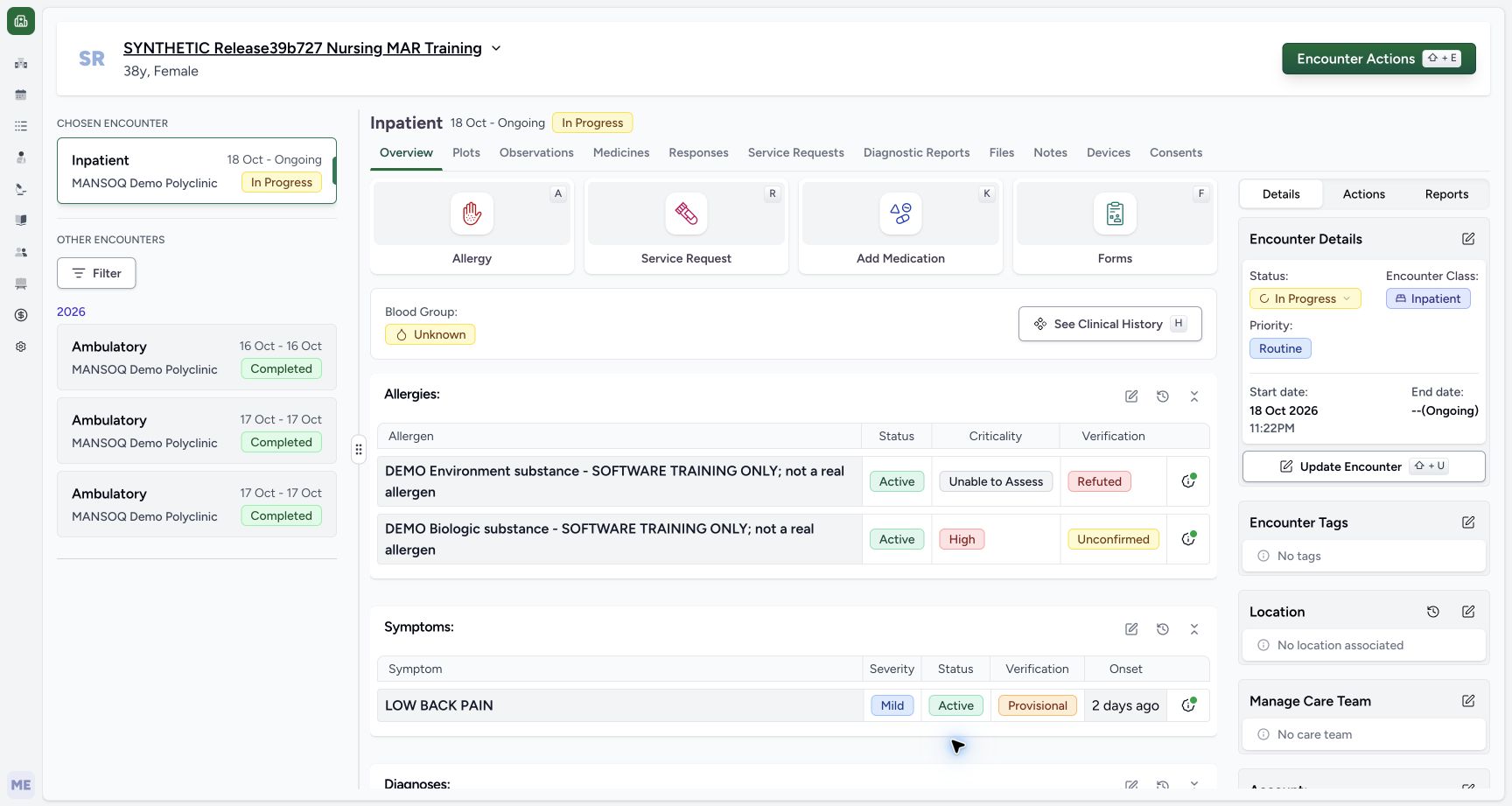 12345
12345Active Inpatient context with two current fictional Allergy entries
Capture details
Observed committed 3dfb software on 20 October 2026. Separate read-only navigation after the accepted three-submit Allergy lifecycle; no new save or fresh SQL observation. Original pixels unchanged.
Image SHA-256 a41fe06f03e5fc0ac6f86822920771396c2b4e26c046727ea7b05c8f6c875603
- Verify the assigned synthetic patient: Read the fictional training patient before changing the viewed encounter.
- Read active In Progress context: The active primary case is Inpatient, 18 October to Ongoing.
- Read Environment verification: The current Environment entry is Refuted, separately from clinical Active.
- Read Biologic verification: Biologic remains Unconfirmed with High criticality; these are different columns.
- Select the older 16 October encounter: Choose the distinct Ambulatory 16 Oct–16 Oct Completed card under Other Encounters.
12 of 12 content blocks have reviewed image alignment.
Before you begin
- Use an authorised Doctor account and the assigned fictional training patient with an active encounter and an older Completed encounter.12345
Recorded release 3dfb7c9f · 2026-10-20T05:21:03.145Z · 1728 × 921 Active Inpatient context with two current fictional Allergy entries
Capture details
Observed committed 3dfb software on 20 October 2026. Separate read-only navigation after the accepted three-submit Allergy lifecycle; no new save or fresh SQL observation. Original pixels unchanged.
Image SHA-256
a41fe06f03e5fc0ac6f86822920771396c2b4e26c046727ea7b05c8f6c875603- Verify the assigned synthetic patient: Read the fictional training patient before changing the viewed encounter.
- Read active In Progress context: The active primary case is Inpatient, 18 October to Ongoing.
- Read Environment verification: The current Environment entry is Refuted, separately from clinical Active.
- Read Biologic verification: Biologic remains Unconfirmed with High criticality; these are different columns.
- Select the older 16 October encounter: Choose the distinct Ambulatory 16 Oct–16 Oct Completed card under Other Encounters.
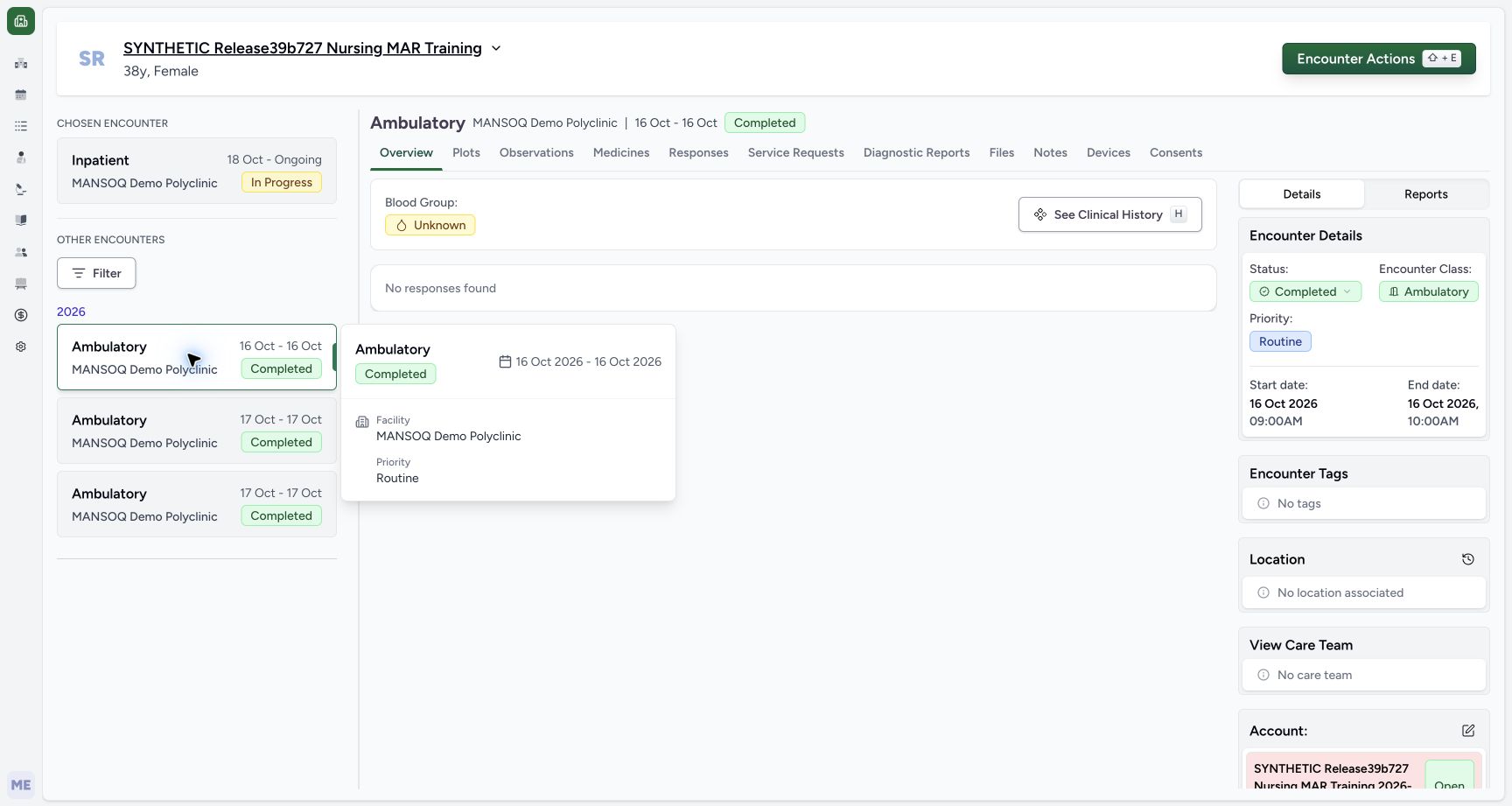 123
123Recorded release 3dfb7c9f · 2026-10-20T05:21:19.585Z · 1728 × 921 Selected 16 October Completed Ambulatory encounter and date tooltip
Capture details
Observed committed 3dfb software on 20 October 2026. Separate read-only navigation after the accepted three-submit Allergy lifecycle; no new save or fresh SQL observation. Original pixels unchanged.
Image SHA-256
aaa1081d59fc91a15dff542cb751dbfbd9c15d40c510f9c76272ae8d600cd7c5- Review the selected historical card: The outlined 16 October Completed card is the viewed historical encounter; the Chosen Encounter above is still the primary active case.
- Read the selected Completed header: Confirm Ambulatory and Completed in the content header.
- Read the completed visit date: The details show a 16 October 2026 start at 09:00AM; the paired end is 10:00AM that day.
- Keep this inspection read-only. Leave Allergy fields, Submit, encounter status and restart controls unchanged.
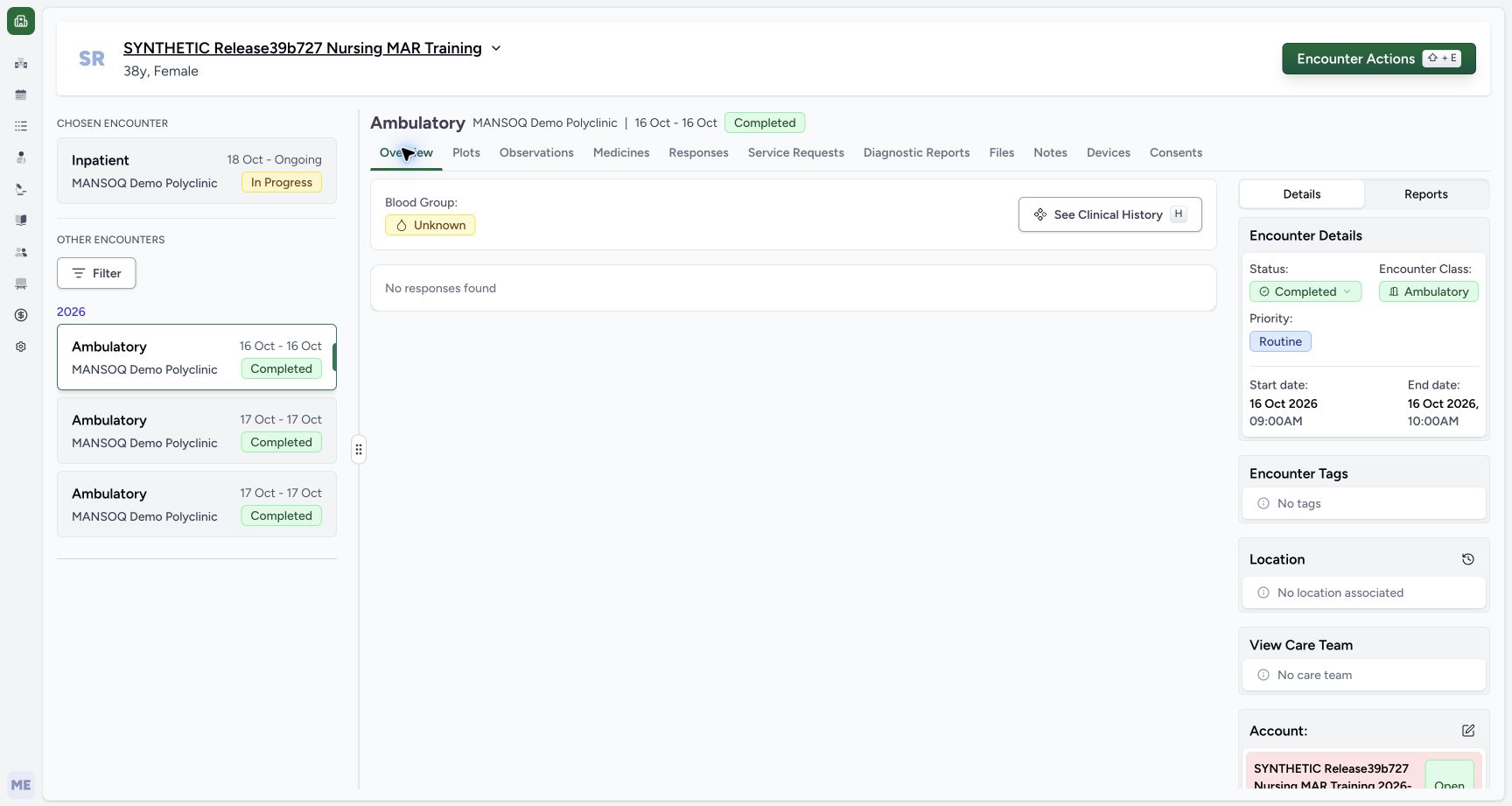 123
123Recorded release 3dfb7c9f · 2026-10-20T05:21:40.335Z · 1728 × 921 Completed Overview without an Allergy panel
Capture details
Observed committed 3dfb software on 20 October 2026. Separate read-only navigation after the accepted three-submit Allergy lifecycle; no new save or fresh SQL observation. Original pixels unchanged.
Image SHA-256
78e616c077e5afb6e687fd0f9d3451a2bde76c8971ed9a67f4c75525281b226f- Confirm Overview is selected: Use the actual Overview tab, not the privately retained Diagnostic Reports detour.
- Read No responses found precisely: This label describes questionnaire responses; it is not an Allergy finding.
- Open See Clinical History: Use the visible patient Clinical History button from the historical Overview.
- The pictured DEMO substances are fictional software examples, not real allergy, reaction or clinical assessment information.
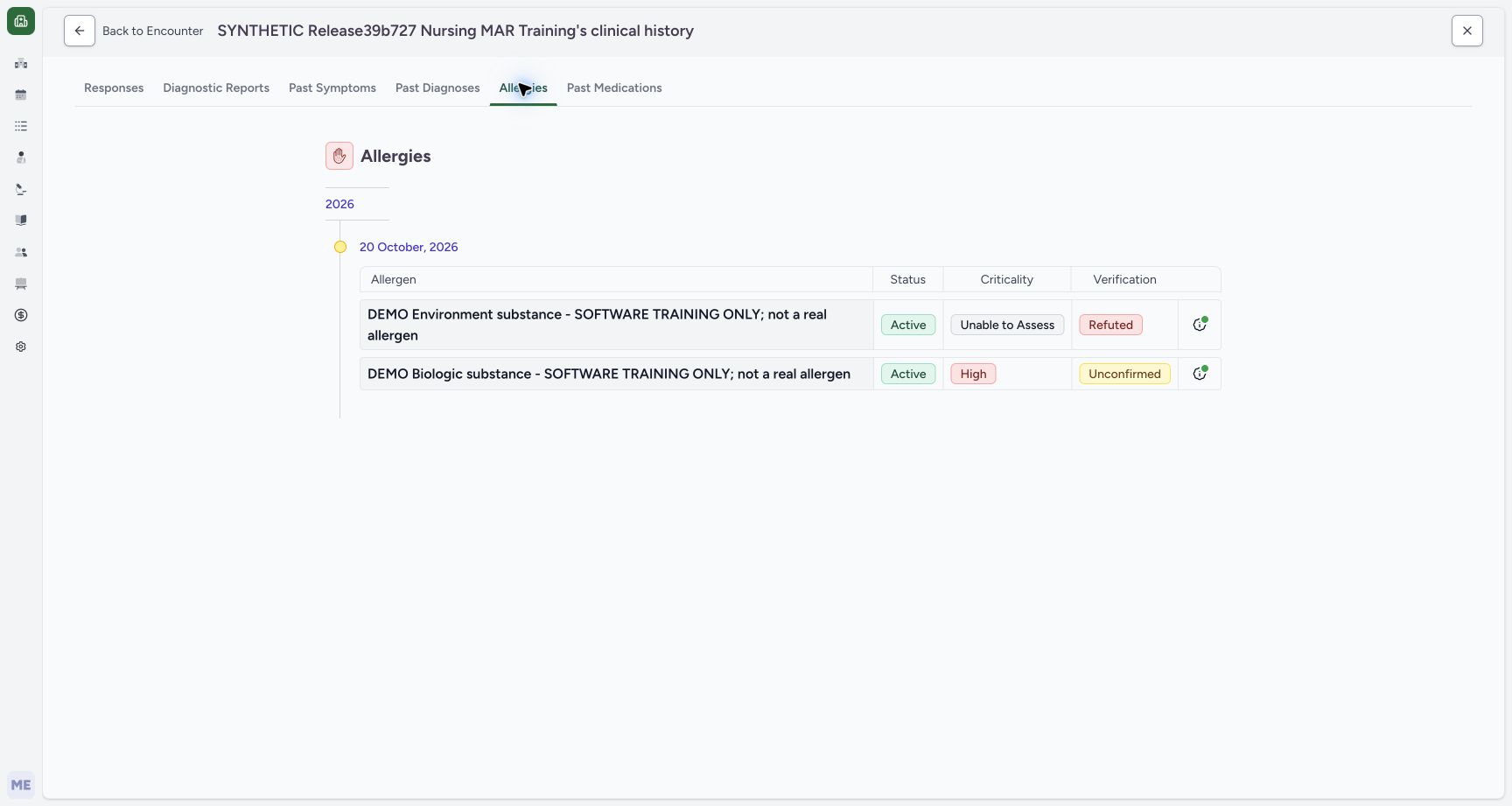 12345
12345Recorded release 3dfb7c9f · 2026-10-20T05:24:29.659Z · 1728 × 921 Patient Allergy history with two current fictional entries
Capture details
Observed committed 3dfb software on 20 October 2026. Separate read-only navigation after the accepted three-submit Allergy lifecycle; no new save or fresh SQL observation. Original pixels unchanged.
Image SHA-256
1f807c4d1835f2a03af6723d94e0a07889e76b200c64f774c1409f9946b21c36- Confirm the Allergies history tab: The underline identifies the selected patient Allergy history.
- Read Environment Refuted: Environment is still present with Active, Unable to Assess and Refuted.
- Read Biologic Unconfirmed: Biologic is still present with Active, High and Unconfirmed.
- Read the creation-date group: 20 October 2026 groups record creation, not the selected 16 October visit or occurrence dates.
- Choose Back to Encounter: The arrow follows the supplied return path; recheck which encounter appears next.
1. Identify the active case and current entries
On Overview, verify the assigned synthetic patient and the active Inpatient case, shown here as 18 October to Ongoing and In Progress. Environment shows Refuted and Unable to Assess; Biologic shows Unconfirmed and High. Both clinical statuses are Active. Keep this context distinct from the older Completed cards.
12345Active Inpatient context with two current fictional Allergy entries
Capture details
Observed committed 3dfb software on 20 October 2026. Separate read-only navigation after the accepted three-submit Allergy lifecycle; no new save or fresh SQL observation. Original pixels unchanged.
Image SHA-256 a41fe06f03e5fc0ac6f86822920771396c2b4e26c046727ea7b05c8f6c875603
- Verify the assigned synthetic patient: Read the fictional training patient before changing the viewed encounter.
- Read active In Progress context: The active primary case is Inpatient, 18 October to Ongoing.
- Read Environment verification: The current Environment entry is Refuted, separately from clinical Active.
- Read Biologic verification: Biologic remains Unconfirmed with High criticality; these are different columns.
- Select the older 16 October encounter: Choose the distinct Ambulatory 16 Oct–16 Oct Completed card under Other Encounters.
2. Select the completed 16 October visit
Under Other Encounters, select the Ambulatory 16 Oct–16 Oct Completed card. Confirm the selected content header says Completed and the details show 16 October 2026, 09:00AM to 10:00AM. The outlined older card is the viewed encounter; Chosen Encounter above still identifies the active primary case. The first selected image includes its actual date tooltip.
12345Active Inpatient context with two current fictional Allergy entries
Capture details
Observed committed 3dfb software on 20 October 2026. Separate read-only navigation after the accepted three-submit Allergy lifecycle; no new save or fresh SQL observation. Original pixels unchanged.
Image SHA-256 a41fe06f03e5fc0ac6f86822920771396c2b4e26c046727ea7b05c8f6c875603
- Verify the assigned synthetic patient: Read the fictional training patient before changing the viewed encounter.
- Read active In Progress context: The active primary case is Inpatient, 18 October to Ongoing.
- Read Environment verification: The current Environment entry is Refuted, separately from clinical Active.
- Read Biologic verification: Biologic remains Unconfirmed with High criticality; these are different columns.
- Select the older 16 October encounter: Choose the distinct Ambulatory 16 Oct–16 Oct Completed card under Other Encounters.
123Selected 16 October Completed Ambulatory encounter and date tooltip
Capture details
Observed committed 3dfb software on 20 October 2026. Separate read-only navigation after the accepted three-submit Allergy lifecycle; no new save or fresh SQL observation. Original pixels unchanged.
Image SHA-256 aaa1081d59fc91a15dff542cb751dbfbd9c15d40c510f9c76272ae8d600cd7c5
- Review the selected historical card: The outlined 16 October Completed card is the viewed historical encounter; the Chosen Encounter above is still the primary active case.
- Read the selected Completed header: Confirm Ambulatory and Completed in the content header.
- Read the completed visit date: The details show a 16 October 2026 start at 09:00AM; the paired end is 10:00AM that day.
123Completed Overview without an Allergy panel
Capture details
Observed committed 3dfb software on 20 October 2026. Separate read-only navigation after the accepted three-submit Allergy lifecycle; no new save or fresh SQL observation. Original pixels unchanged.
Image SHA-256 78e616c077e5afb6e687fd0f9d3451a2bde76c8971ed9a67f4c75525281b226f
- Confirm Overview is selected: Use the actual Overview tab, not the privately retained Diagnostic Reports detour.
- Read No responses found precisely: This label describes questionnaire responses; it is not an Allergy finding.
- Open See Clinical History: Use the visible patient Clinical History button from the historical Overview.
3. Read the completed Overview carefully
Stay on Overview. The active case’s quick-action tiles are absent. This selected visit has no Allergy panel in the example. No responses found describes questionnaire responses; it is not an Allergy status. Do not interpret this screen as evidence that all patient allergies were removed or that the patient has none.
123Completed Overview without an Allergy panel
Capture details
Observed committed 3dfb software on 20 October 2026. Separate read-only navigation after the accepted three-submit Allergy lifecycle; no new save or fresh SQL observation. Original pixels unchanged.
Image SHA-256 78e616c077e5afb6e687fd0f9d3451a2bde76c8971ed9a67f4c75525281b226f
- Confirm Overview is selected: Use the actual Overview tab, not the privately retained Diagnostic Reports detour.
- Read No responses found precisely: This label describes questionnaire responses; it is not an Allergy finding.
- Open See Clinical History: Use the visible patient Clinical History button from the historical Overview.
4. Open patient Clinical History and Allergies
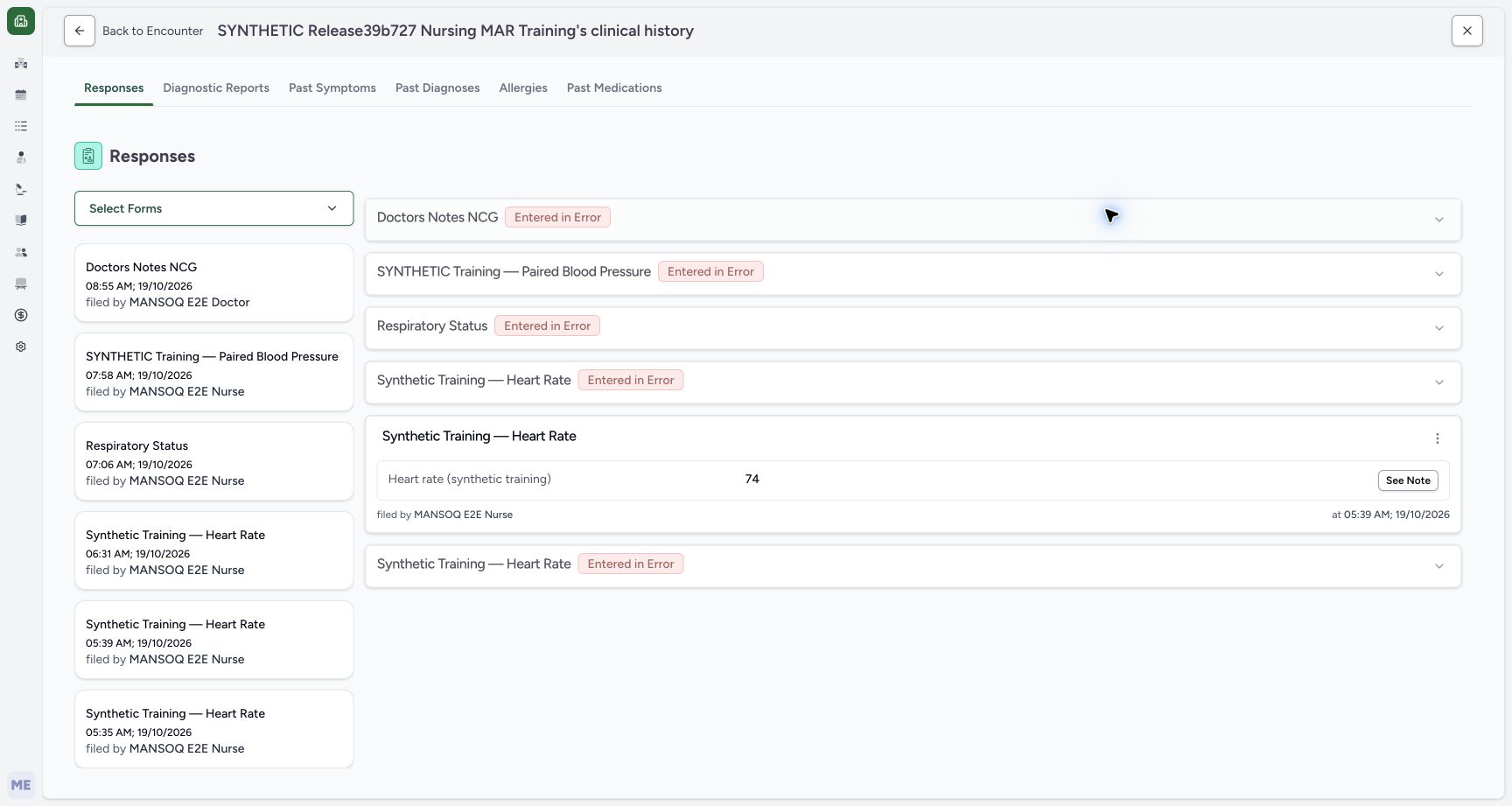
Select See Clinical History, then select the Allergies tab. Clinical History initially opens Responses in this example; changing tabs only changes the view.
123Completed Overview without an Allergy panel
Capture details
Observed committed 3dfb software on 20 October 2026. Separate read-only navigation after the accepted three-submit Allergy lifecycle; no new save or fresh SQL observation. Original pixels unchanged.
Image SHA-256 78e616c077e5afb6e687fd0f9d3451a2bde76c8971ed9a67f4c75525281b226f
- Confirm Overview is selected: Use the actual Overview tab, not the privately retained Diagnostic Reports detour.
- Read No responses found precisely: This label describes questionnaire responses; it is not an Allergy finding.
- Open See Clinical History: Use the visible patient Clinical History button from the historical Overview.
 12
12Patient Clinical History initially on Responses
Capture details
Observed committed 3dfb software on 20 October 2026. Separate read-only navigation after the accepted three-submit Allergy lifecycle; no new save or fresh SQL observation. Original pixels unchanged.
Image SHA-256 50600f74f2209d3a83a4c912598bac3ab2ab49a133f57f3626043da312c662ef
- Verify the patient history heading: This is the same synthetic patient’s clinical history, initially on Responses.
- Open the Allergies tab: Select Allergies in the patient history navigation.
12345Patient Allergy history with two current fictional entries
Capture details
Observed committed 3dfb software on 20 October 2026. Separate read-only navigation after the accepted three-submit Allergy lifecycle; no new save or fresh SQL observation. Original pixels unchanged.
Image SHA-256 1f807c4d1835f2a03af6723d94e0a07889e76b200c64f774c1409f9946b21c36
- Confirm the Allergies history tab: The underline identifies the selected patient Allergy history.
- Read Environment Refuted: Environment is still present with Active, Unable to Assess and Refuted.
- Read Biologic Unconfirmed: Biologic is still present with Active, High and Unconfirmed.
- Read the creation-date group: 20 October 2026 groups record creation, not the selected 16 October visit or occurrence dates.
- Choose Back to Encounter: The arrow follows the supplied return path; recheck which encounter appears next.
5. Compare the two current patient entries
Patient Allergy history still shows Environment as Active, Unable to Assess and Refuted, and Biologic as Active, High and Unconfirmed. The 20 October 2026 group is their creation date, not the selected 16 October visit or their occurrence dates. This current list excludes Entered in Error; the earlier Food correction remains outside this view rather than being deleted.
12345Patient Allergy history with two current fictional entries
Capture details
Observed committed 3dfb software on 20 October 2026. Separate read-only navigation after the accepted three-submit Allergy lifecycle; no new save or fresh SQL observation. Original pixels unchanged.
Image SHA-256 1f807c4d1835f2a03af6723d94e0a07889e76b200c64f774c1409f9946b21c36
- Confirm the Allergies history tab: The underline identifies the selected patient Allergy history.
- Read Environment Refuted: Environment is still present with Active, Unable to Assess and Refuted.
- Read Biologic Unconfirmed: Biologic is still present with Active, High and Unconfirmed.
- Read the creation-date group: 20 October 2026 groups record creation, not the selected 16 October visit or occurrence dates.
- Choose Back to Encounter: The arrow follows the supplied return path; recheck which encounter appears next.
6. Return and verify the actual encounter
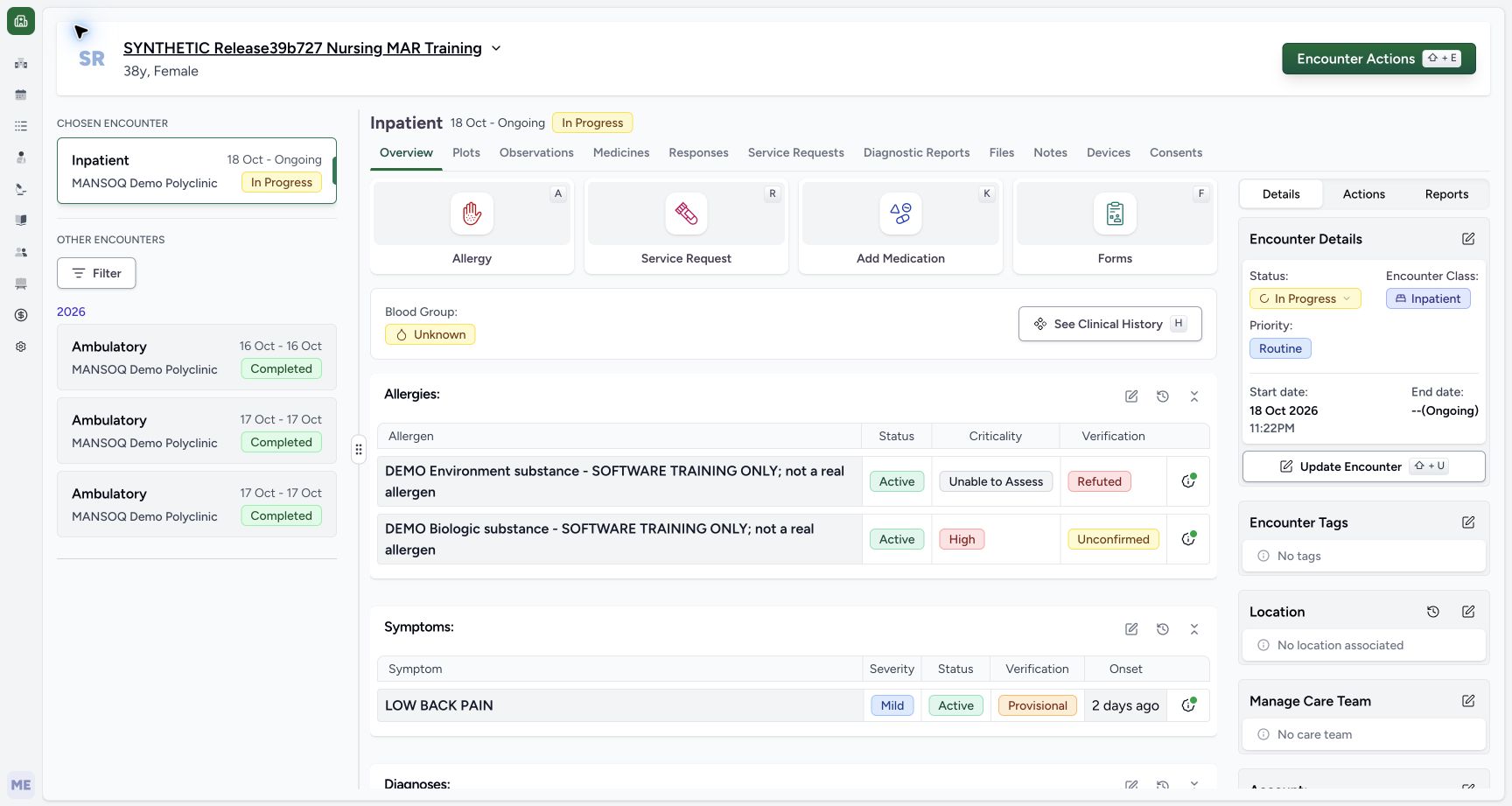
Choose the Back to Encounter arrow. The observed return is the active 18 October to Ongoing Inpatient case, with In Progress and the same two current entries. It does not retain the earlier 16 October historical selection. Recheck the header and Chosen Encounter before any later work; this walkthrough makes no field edit, Submit or restart.
12345Patient Allergy history with two current fictional entries
Capture details
Observed committed 3dfb software on 20 October 2026. Separate read-only navigation after the accepted three-submit Allergy lifecycle; no new save or fresh SQL observation. Original pixels unchanged.
Image SHA-256 1f807c4d1835f2a03af6723d94e0a07889e76b200c64f774c1409f9946b21c36
- Confirm the Allergies history tab: The underline identifies the selected patient Allergy history.
- Read Environment Refuted: Environment is still present with Active, Unable to Assess and Refuted.
- Read Biologic Unconfirmed: Biologic is still present with Active, High and Unconfirmed.
- Read the creation-date group: 20 October 2026 groups record creation, not the selected 16 October visit or occurrence dates.
- Choose Back to Encounter: The arrow follows the supplied return path; recheck which encounter appears next.
 1234
1234Back to Encounter returns to active Inpatient context
Capture details
Observed committed 3dfb software on 20 October 2026. Separate read-only navigation after the accepted three-submit Allergy lifecycle; no new save or fresh SQL observation. Original pixels unchanged.
Image SHA-256 c74eb796b04014e5fcc64519e515b9404e534820a4aa8612770878c01780e484
- Verify the returned Chosen Encounter: The returned selection is the active primary Inpatient case.
- Recheck In Progress: Back returned to 18 Oct–Ongoing Inpatient, not the earlier Completed selection.
- Recheck Environment retained: The current Environment entry still shows Refuted after the read-only navigation.
- Recheck Biologic retained: The current Biologic entry still shows High and Unconfirmed.
Understand the different filters
For a Completed encounter, its Overview Allergy list is narrowed to that selected visit. Patient Clinical History shows the current non-error patient list across encounters. The top clinical-history summary also uses a Confirmed-only Allergy query; an absent badge there is not a patient-wide no-allergy finding. Use the actual current list and the verified clinical record rather than treating a blank area as a clinical conclusion.
12345Active Inpatient context with two current fictional Allergy entries
Capture details
Observed committed 3dfb software on 20 October 2026. Separate read-only navigation after the accepted three-submit Allergy lifecycle; no new save or fresh SQL observation. Original pixels unchanged.
Image SHA-256 a41fe06f03e5fc0ac6f86822920771396c2b4e26c046727ea7b05c8f6c875603
- Verify the assigned synthetic patient: Read the fictional training patient before changing the viewed encounter.
- Read active In Progress context: The active primary case is Inpatient, 18 October to Ongoing.
- Read Environment verification: The current Environment entry is Refuted, separately from clinical Active.
- Read Biologic verification: Biologic remains Unconfirmed with High criticality; these are different columns.
- Select the older 16 October encounter: Choose the distinct Ambulatory 16 Oct–16 Oct Completed card under Other Encounters.
123Completed Overview without an Allergy panel
Capture details
Observed committed 3dfb software on 20 October 2026. Separate read-only navigation after the accepted three-submit Allergy lifecycle; no new save or fresh SQL observation. Original pixels unchanged.
Image SHA-256 78e616c077e5afb6e687fd0f9d3451a2bde76c8971ed9a67f4c75525281b226f
- Confirm Overview is selected: Use the actual Overview tab, not the privately retained Diagnostic Reports detour.
- Read No responses found precisely: This label describes questionnaire responses; it is not an Allergy finding.
- Open See Clinical History: Use the visible patient Clinical History button from the historical Overview.
12345Patient Allergy history with two current fictional entries
Capture details
Observed committed 3dfb software on 20 October 2026. Separate read-only navigation after the accepted three-submit Allergy lifecycle; no new save or fresh SQL observation. Original pixels unchanged.
Image SHA-256 1f807c4d1835f2a03af6723d94e0a07889e76b200c64f774c1409f9946b21c36
- Confirm the Allergies history tab: The underline identifies the selected patient Allergy history.
- Read Environment Refuted: Environment is still present with Active, Unable to Assess and Refuted.
- Read Biologic Unconfirmed: Biologic is still present with Active, High and Unconfirmed.
- Read the creation-date group: 20 October 2026 groups record creation, not the selected 16 October visit or occurrence dates.
- Choose Back to Encounter: The arrow follows the supplied return path; recheck which encounter appears next.
Keep the evidence within this read-only scope
These screens demonstrate historical viewing and normal history navigation. They do not test direct API write permissions, changing a closed encounter, or copying an Allergy into another encounter. The earlier guides separately demonstrate the fictional saved records and their retained correction; this inspection adds no clinical record.
123Selected 16 October Completed Ambulatory encounter and date tooltip
Capture details
Observed committed 3dfb software on 20 October 2026. Separate read-only navigation after the accepted three-submit Allergy lifecycle; no new save or fresh SQL observation. Original pixels unchanged.
Image SHA-256 aaa1081d59fc91a15dff542cb751dbfbd9c15d40c510f9c76272ae8d600cd7c5
- Review the selected historical card: The outlined 16 October Completed card is the viewed historical encounter; the Chosen Encounter above is still the primary active case.
- Read the selected Completed header: Confirm Ambulatory and Completed in the content header.
- Read the completed visit date: The details show a 16 October 2026 start at 09:00AM; the paired end is 10:00AM that day.
123Completed Overview without an Allergy panel
Capture details
Observed committed 3dfb software on 20 October 2026. Separate read-only navigation after the accepted three-submit Allergy lifecycle; no new save or fresh SQL observation. Original pixels unchanged.
Image SHA-256 78e616c077e5afb6e687fd0f9d3451a2bde76c8971ed9a67f4c75525281b226f
- Confirm Overview is selected: Use the actual Overview tab, not the privately retained Diagnostic Reports detour.
- Read No responses found precisely: This label describes questionnaire responses; it is not an Allergy finding.
- Open See Clinical History: Use the visible patient Clinical History button from the historical Overview.
1234Back to Encounter returns to active Inpatient context
Capture details
Observed committed 3dfb software on 20 October 2026. Separate read-only navigation after the accepted three-submit Allergy lifecycle; no new save or fresh SQL observation. Original pixels unchanged.
Image SHA-256 c74eb796b04014e5fcc64519e515b9404e534820a4aa8612770878c01780e484
- Verify the returned Chosen Encounter: The returned selection is the active primary Inpatient case.
- Recheck In Progress: Back returned to 18 Oct–Ongoing Inpatient, not the earlier Completed selection.
- Recheck Environment retained: The current Environment entry still shows Refuted after the read-only navigation.
- Recheck Biologic retained: The current Biologic entry still shows High and Unconfirmed.
Source evidence
Every citation uses this exact committed version. The private source repository requires access.
- repositories/platform/mansoq-web/src/pages/Encounters/utils/EncounterProvider.tsx:164 ·
3dfb7c9f519fb5b4cd4452439f3c12346bf58319Source file checksum
d2609fc0452c91c20104237bf02be40ecb3bf48225011aba1f4bca2d50620d75 - repositories/platform/mansoq-web/src/pages/Encounters/EncounterHistorySelector.tsx:90 ·
3dfb7c9f519fb5b4cd4452439f3c12346bf58319Source file checksum
b02c8e66ae497608e32ffbe8ba7ea19234928b7ef7cf6c2440af327a1d34facf - repositories/platform/mansoq-web/src/pages/Encounters/tabs/overview.tsx:52 ·
3dfb7c9f519fb5b4cd4452439f3c12346bf58319Source file checksum
c085d98e3b4b6e6cb2e217faa57398e57fcd00ae5e4839fc7151567991b78e4a - repositories/platform/mansoq-web/src/pages/Encounters/tabs/overview/clinical-history-overview.tsx:30 ·
3dfb7c9f519fb5b4cd4452439f3c12346bf58319Source file checksum
e2cc1309001e96b38b1cd34c878188f3a56d29323ac3c3afeeb422274c19675b - repositories/platform/mansoq-web/src/components/Patient/allergy/list.tsx:83 ·
3dfb7c9f519fb5b4cd4452439f3c12346bf58319Source file checksum
bc8ef47eb25cf88a026260eb0bcd989b0f93cfae23acf9ecb7d35e5ffbb82fd7 - repositories/platform/mansoq-web/src/components/Patient/allergy/AllergyTable.tsx:144 ·
3dfb7c9f519fb5b4cd4452439f3c12346bf58319Source file checksum
90ad547be1793fbd6b7341e9ffa497337ecb227a623c95444d85c9e980dd2a84 - repositories/platform/mansoq-web/src/components/Patient/EncounterAccordionLayout.tsx:48 ·
3dfb7c9f519fb5b4cd4452439f3c12346bf58319Source file checksum
8bb99bd478feab4e8084ebadb54df2ea0ff73036f6de03ef67dca982fe068580 - repositories/platform/mansoq-web/src/pages/Patient/History/AllergyHistory.tsx:15 ·
3dfb7c9f519fb5b4cd4452439f3c12346bf58319Source file checksum
b19e3433b2b4594118a01306bbe27631ffe22aefdd2d80209804b99cc9e749c2 - repositories/platform/mansoq-web/src/pages/Patient/History/index.tsx:47 ·
3dfb7c9f519fb5b4cd4452439f3c12346bf58319Source file checksum
b434486d27a139467b3618a9bc8396c1eb7de96e5461ed7787e4c8c5de1aceb4 - repositories/platform/mansoq-web/src/types/emr/encounter/encounter.ts:257 ·
3dfb7c9f519fb5b4cd4452439f3c12346bf58319Source file checksum
178ad4319d92bef379a78ed07c74d87d4c185774b3cdf989affc0f7e06ac08db - repositories/platform/mansoq-core/mansoq/emr/api/viewsets/allergy_intolerance.py:81 ·
3dfb7c9f519fb5b4cd4452439f3c12346bf58319Source file checksum
d9ae1ae9e05ebe02fa61b89e71d10b371c7ca07d020d74875f449d80ce85ed54 - repositories/platform/mansoq-web/src/pages/Encounters/EncounterShow.tsx:281 ·
3dfb7c9f519fb5b4cd4452439f3c12346bf58319Source file checksum
dba481a8490fa06802648aae1791dc0d91668e6e231e223d6dc4a69369b344d8