 MANSOQ
 Clinical care · VERSION 3dfb7c9f
Review and cancel an individual medication stop
Find one fictional copied request within a same-medicine group, distinguish its Stop control from the group control and cancel the single-request warning.
Doctor
 123
123Doctor new prescription context
Capture details
Observed committed3dfb software. One individual copied request ended, distinct from active older requests, the prescription and administration events. No clinical recommendation.
Image SHA-256 bef96e60c5708f0ca24b2641030c416f01f5722beb3216a7a9e6873ae9ed06a1
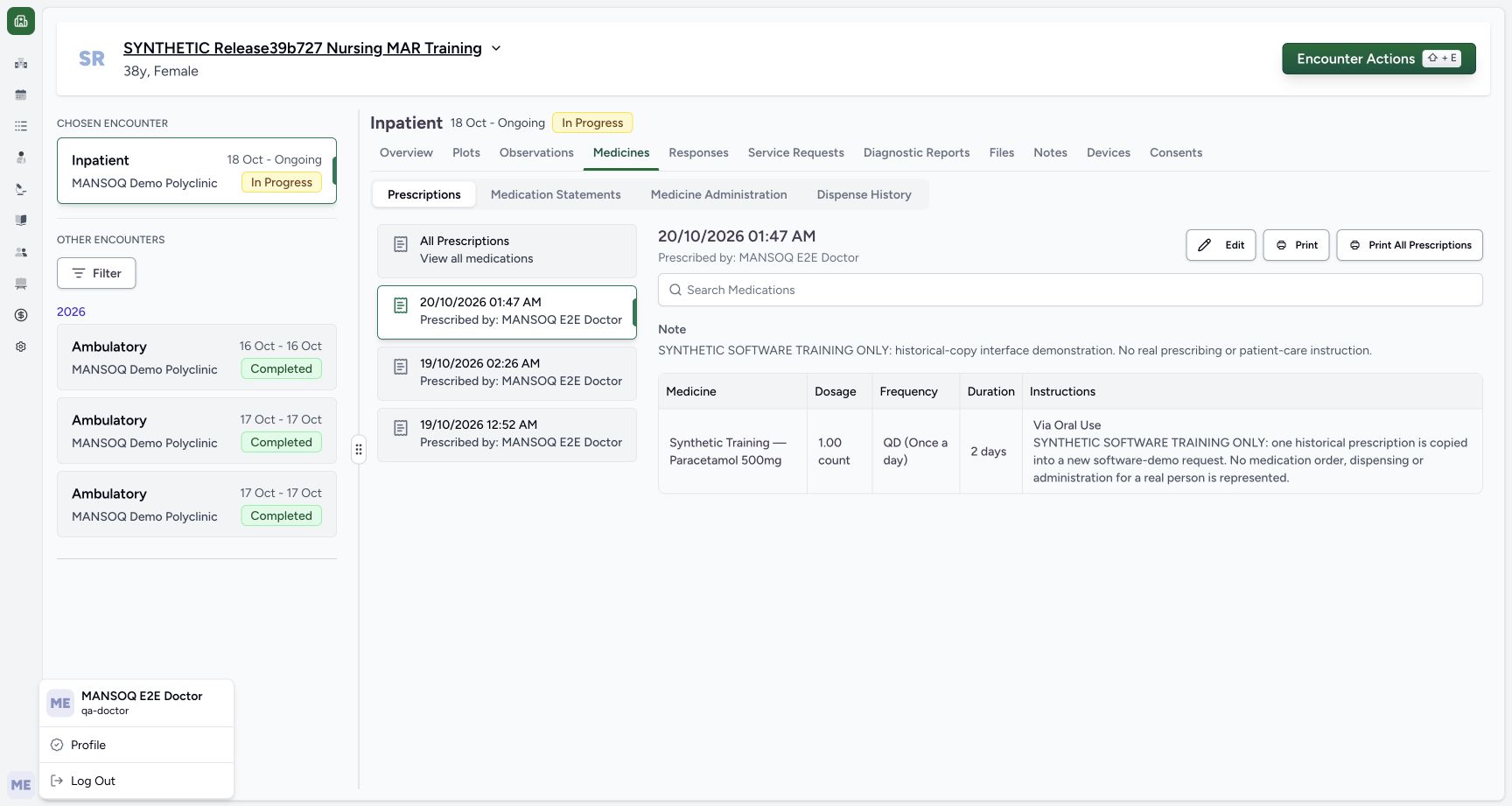
- Read the Doctor account: The account menu identifies MANSOQ E2E Doctor and qa-doctor.
- Confirm the synthetic patient: Use the named fictional software-training patient.
- Check In Progress: The selected Inpatient encounter is active.
11 of 11 content blocks have reviewed image alignment. Missing overview or prerequisite images remain open.
Before you begin
- Use an authorised ordinary Doctor account with medication-write access to the assigned active synthetic encounter.123
Recorded release 3dfb7c9f · 2026-10-19T23:05:52.354Z · 1728 × 921 Doctor new prescription context
Capture details
Observed committed3dfb software. One individual copied request ended, distinct from active older requests, the prescription and administration events. No clinical recommendation.
Image SHA-256
bef96e60c5708f0ca24b2641030c416f01f5722beb3216a7a9e6873ae9ed06a1- Read the Doctor account: The account menu identifies MANSOQ E2E Doctor and qa-doctor.
- Confirm the synthetic patient: Use the named fictional software-training patient.
- Check In Progress: The selected Inpatient encounter is active.
- Use only an approved fictional training copy that has been positively identified by its prescription and unique request note. All medicine values are software examples, not clinical instructions.
 123
123Recorded release 3dfb7c9f · 2026-10-19T23:05:58.012Z · 1728 × 921 Saved copy prescription and unique note
Capture details
Observed committed3dfb software. One individual copied request ended, distinct from active older requests, the prescription and administration events. No clinical recommendation.
Image SHA-256
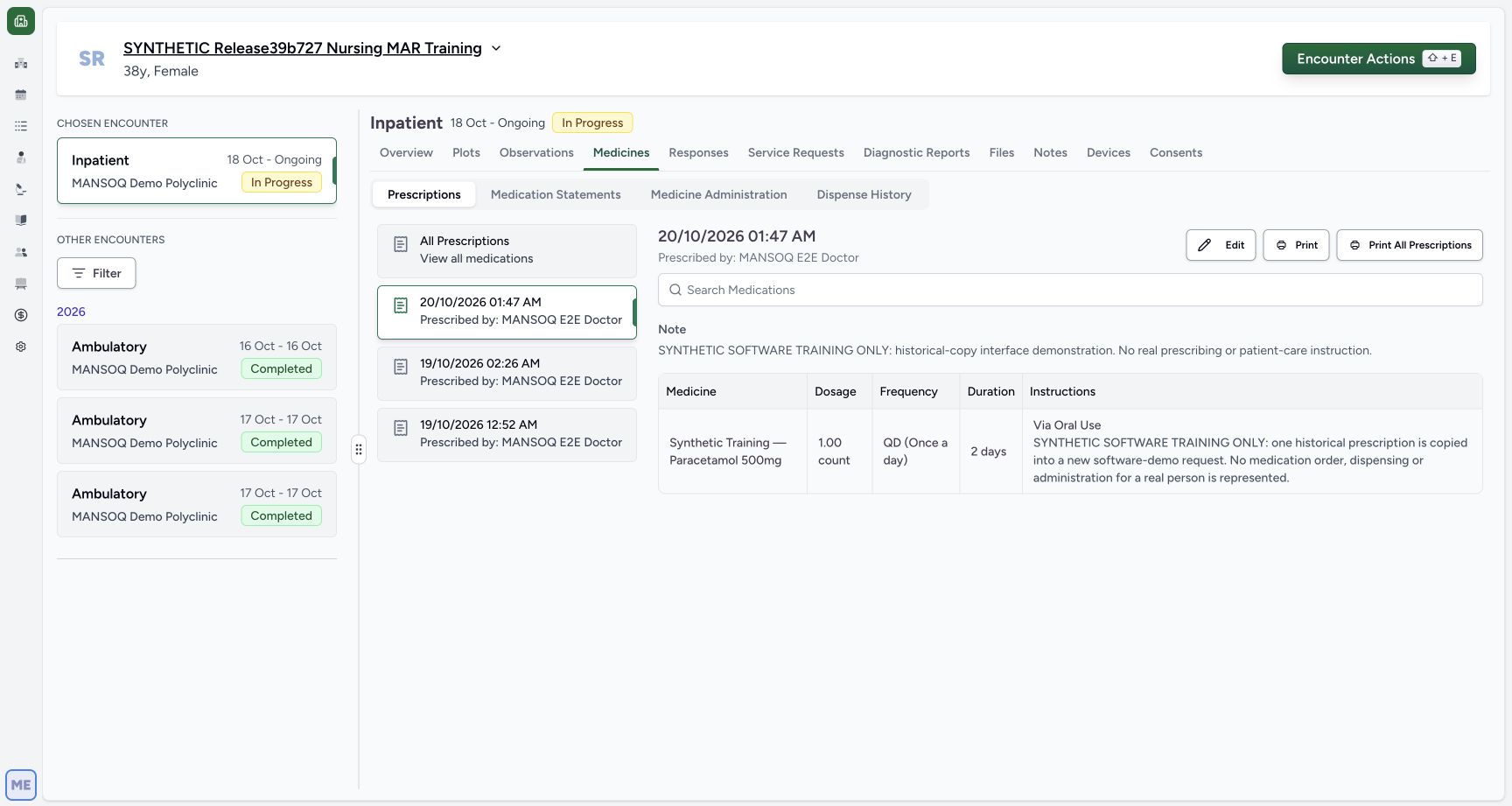
e15e431275b0708b584436e09bc9a8f9fb2409f03d562cedfec84e46e711ae4b- Read the new prescription entry: Match the 20 October 01:47 AM Doctor prescription.
- Read the copied request note: The complete unique software-training note identifies the copy.
- Choose Medicine Administration: Open the encounter medication administration view.
1. Confirm the Doctor and the synthetic encounter
Check the account menu shows MANSOQ E2E Doctor and qa-doctor. Confirm SYNTHETIC Release39b727 Nursing MAR Training and its Inpatient encounter marked In Progress. The medicine, dose and schedule in these screenshots are fictional software examples, not prescribing or treatment advice.
123Doctor new prescription context
Capture details
Observed committed3dfb software. One individual copied request ended, distinct from active older requests, the prescription and administration events. No clinical recommendation.
Image SHA-256 bef96e60c5708f0ca24b2641030c416f01f5722beb3216a7a9e6873ae9ed06a1
- Read the Doctor account: The account menu identifies MANSOQ E2E Doctor and qa-doctor.
- Confirm the synthetic patient: Use the named fictional software-training patient.
- Check In Progress: The selected Inpatient encounter is active.
2. Match the saved copy by its prescription and note
In Medicines → Prescriptions, read the selected 20/10/2026 01:47 AM entry prescribed by MANSOQ E2E Doctor. It contains one copied medicine and the explicit software-training request note. Read the whole note in Instructions: SYNTHETIC SOFTWARE TRAINING ONLY: one historical prescription is copied into a new software-demo request. No medication order, dispensing or administration for a real person is represented. Use the note and prescription context to identify this copy; matching medicine names alone is insufficient.
123Saved copy prescription and unique note
Capture details
Observed committed3dfb software. One individual copied request ended, distinct from active older requests, the prescription and administration events. No clinical recommendation.
Image SHA-256 e15e431275b0708b584436e09bc9a8f9fb2409f03d562cedfec84e46e711ae4b
- Read the new prescription entry: Match the 20 October 01:47 AM Doctor prescription.
- Read the copied request note: The complete unique software-training note identifies the copy.
- Choose Medicine Administration: Open the encounter medication administration view.
3. Open Medicine Administration
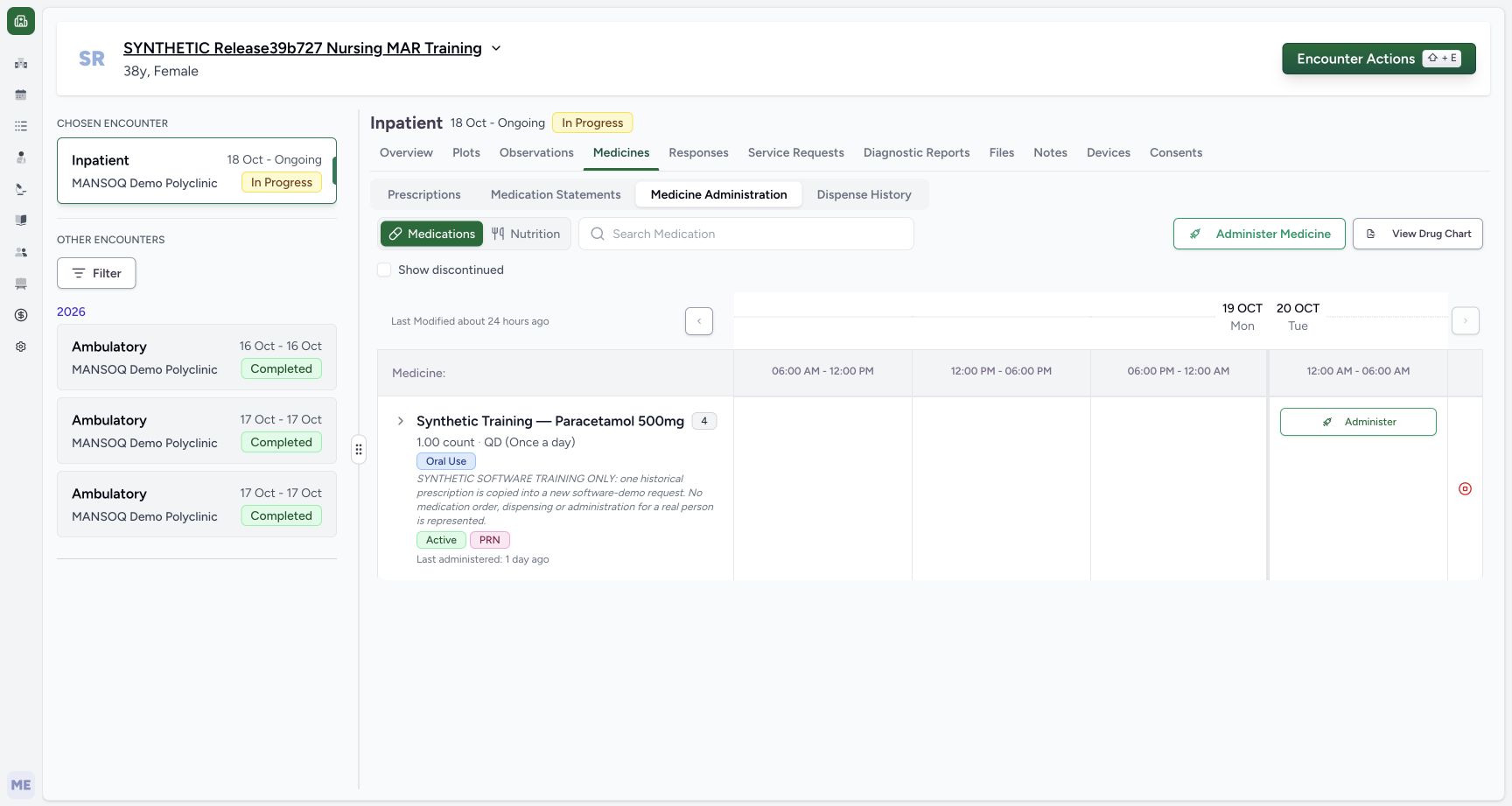
Choose Medicine Administration and read the selected Medications tab. This training medicine is grouped with four requests, including older requests. The group’s Active and PRN labels summarise the group; they do not identify the copied request by themselves.
123Saved copy prescription and unique note
Capture details
Observed committed3dfb software. One individual copied request ended, distinct from active older requests, the prescription and administration events. No clinical recommendation.
Image SHA-256 e15e431275b0708b584436e09bc9a8f9fb2409f03d562cedfec84e46e711ae4b
- Read the new prescription entry: Match the 20 October 01:47 AM Doctor prescription.
- Read the copied request note: The complete unique software-training note identifies the copy.
- Choose Medicine Administration: Open the encounter medication administration view.
 1234
1234Four request medication group header
Capture details
Observed committed3dfb software. One individual copied request ended, distinct from active older requests, the prescription and administration events. No clinical recommendation.
Image SHA-256 7bf984d50fadafc73c3d77360e0a88a7f6c585a02668b84b299a0b5f0b0f8246
- Read the selected Medications tab: This exercise uses medications rather than nutrition.
- Read four grouped requests: The medicine header represents four individual requests.
- Expand the medicine group: Show the individual request rows before choosing Stop.
- Leave the group Stop control alone: This header icon targets the active requests in the group; it was not clicked.
4. Expand the group before choosing a request
Use the chevron beside Synthetic Training — Paracetamol 500mg to expand the four requests. The red icon in the group header acts on the group’s active requests. Leave that icon alone for this individual-request exercise.
1234Four request medication group header
Capture details
Observed committed3dfb software. One individual copied request ended, distinct from active older requests, the prescription and administration events. No clinical recommendation.
Image SHA-256 7bf984d50fadafc73c3d77360e0a88a7f6c585a02668b84b299a0b5f0b0f8246
- Read the selected Medications tab: This exercise uses medications rather than nutrition.
- Read four grouped requests: The medicine header represents four individual requests.
- Expand the medicine group: Show the individual request rows before choosing Stop.
- Leave the group Stop control alone: This header icon targets the active requests in the group; it was not clicked.
 12
12Expanded own copy and original mar a
Capture details
Observed committed3dfb software. One individual copied request ended, distinct from active older requests, the prescription and administration events. No clinical recommendation.
Image SHA-256 f7e6d3a373ff8251218029562a66508575489bfa6d22489c81fb566f4688d264
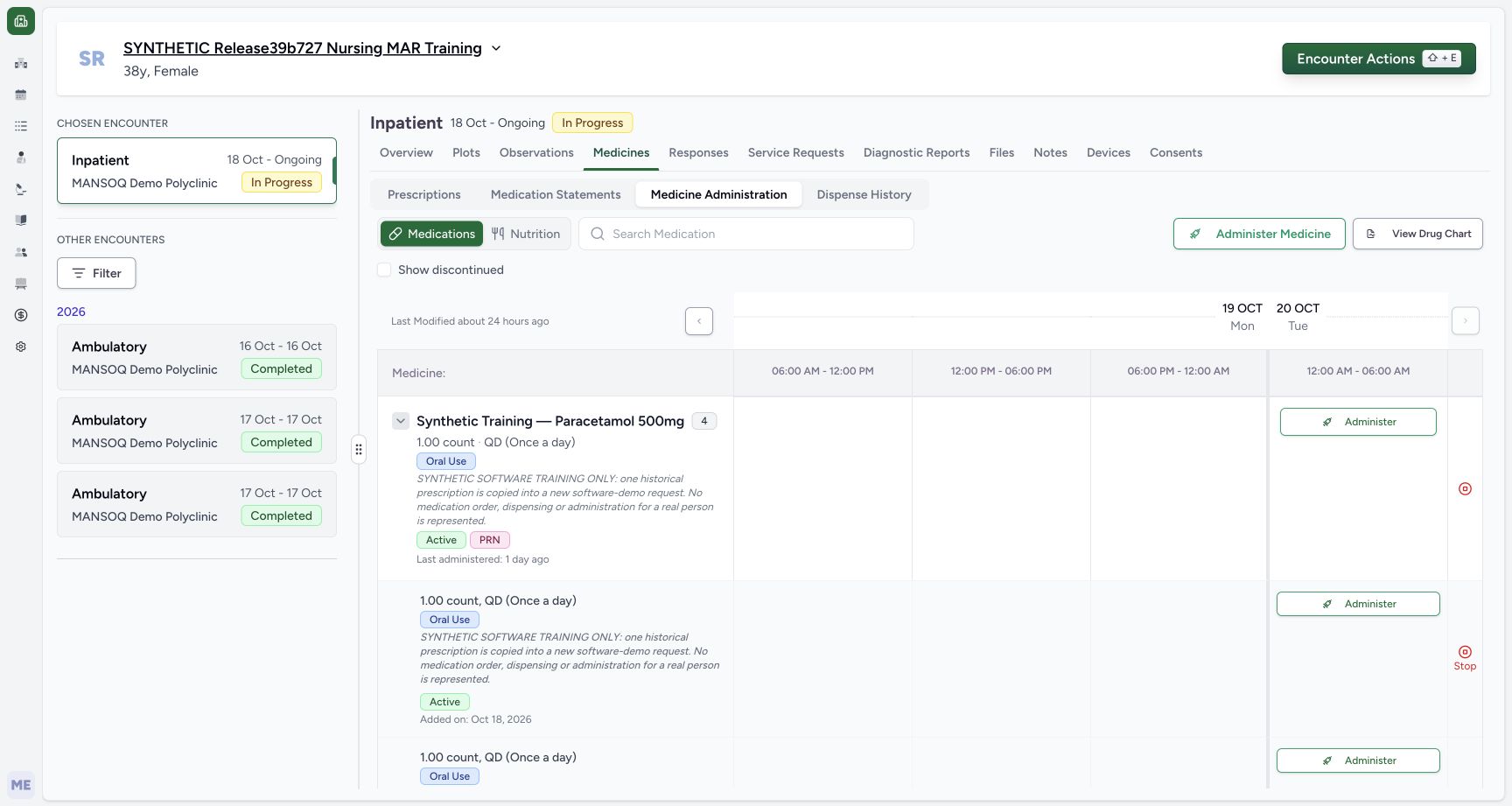
- Read the copied row note: The expanded first row contains the explicit copied-request note.
- Locate the individual row Stop: This row control is distinct from the group-header icon above.
5. Find the copied row and open its Stop warning
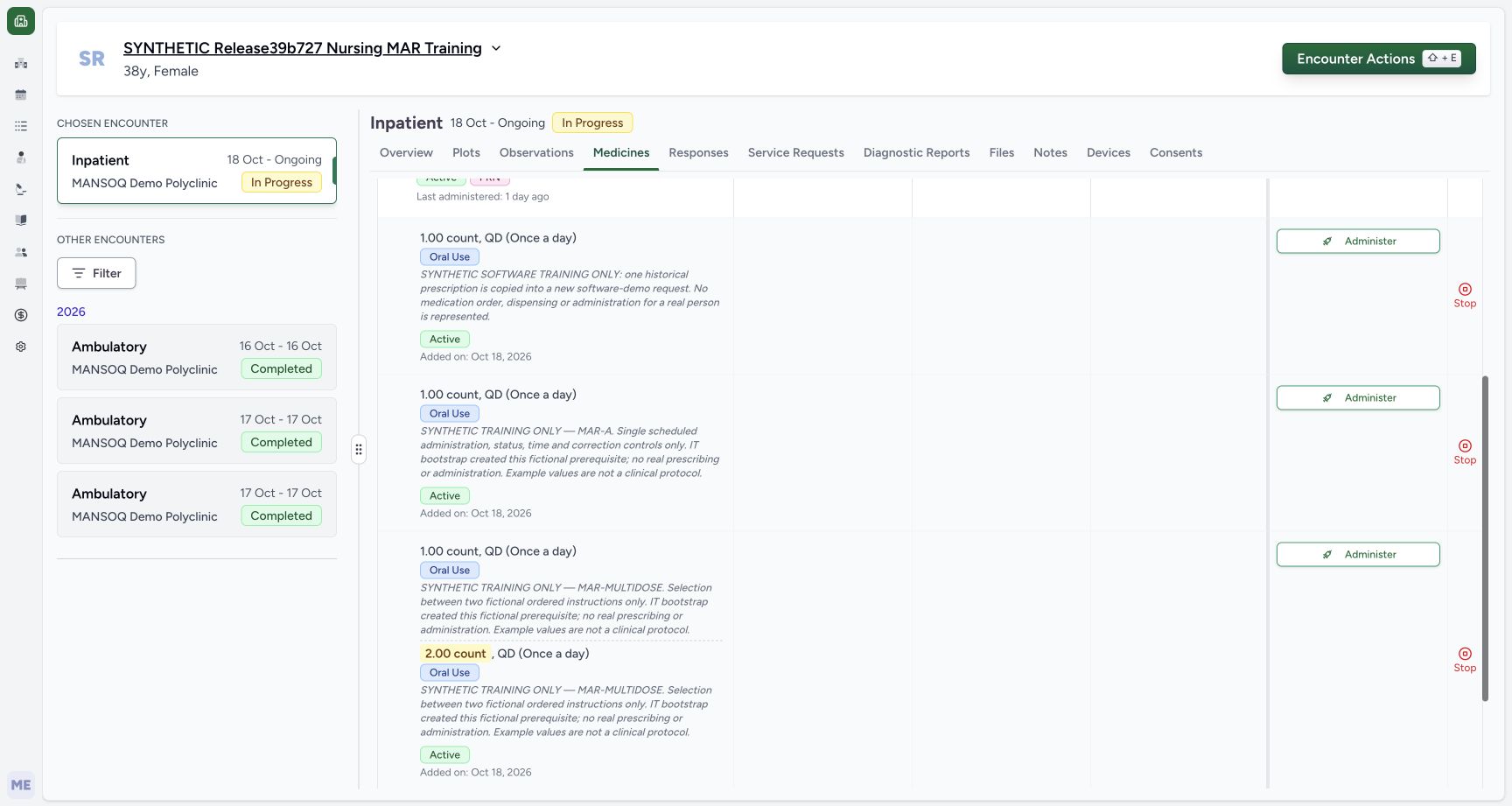
Scroll inside the medication table until the full copied row and its Stop control are visible. Re-read its unique software-training note and Active badge. The separate MAR-A row below has a different note. Choose Stop only on the copied row; row order can change, so do not identify a request solely as the first row.
12Expanded own copy and original mar a
Capture details
Observed committed3dfb software. One individual copied request ended, distinct from active older requests, the prescription and administration events. No clinical recommendation.
Image SHA-256 f7e6d3a373ff8251218029562a66508575489bfa6d22489c81fb566f4688d264
- Read the copied row note: The expanded first row contains the explicit copied-request note.
- Locate the individual row Stop: This row control is distinct from the group-header icon above.
 1234
1234Own copy stop distinct from old mar a
Capture details
Observed committed3dfb software. One individual copied request ended, distinct from active older requests, the prescription and administration events. No clinical recommendation.
Image SHA-256 f3621aba496b0cc8dc13ec3a7e6d1d9cda0c9ea923a8e09b2f09fb0ed3f965e9
- Identify the copied request: Read the complete unique software-training note before acting.
- Check the copy is Active: The identified request is still Active before the warning.
- Choose only the copied row Stop: Open the single-request warning for the row with the copied note.
- Read the separate MAR-A note: The older original is a different request; leave its Stop alone.
6. Read the single-request warning and choose Cancel
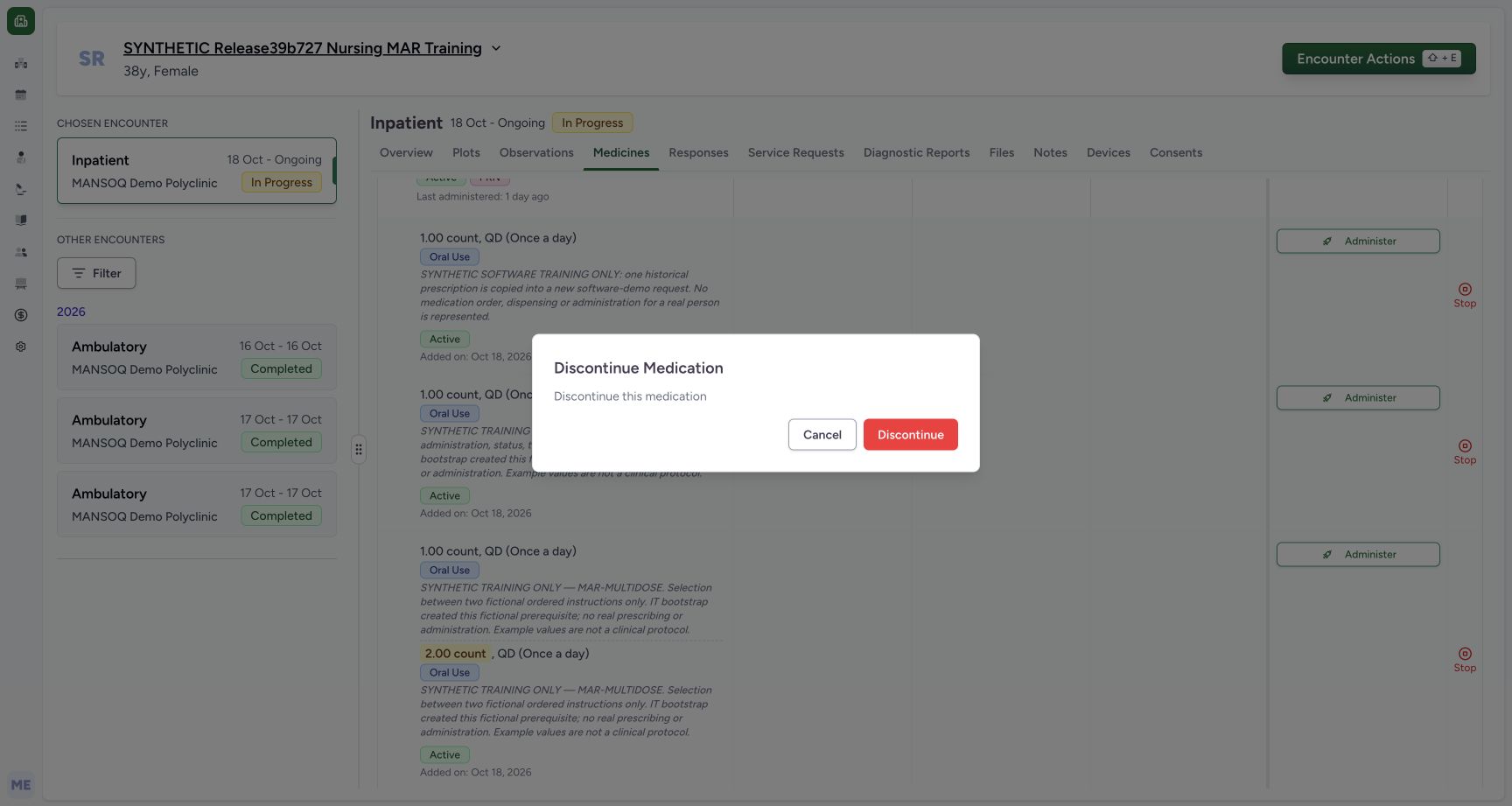
Check the dialog says Discontinue Medication and Discontinue this medication. It offers Cancel and Discontinue, with no reason input in this observed single-request dialog. Choose Cancel to return without discontinuing the request.
 123
123Single discontinue warning cancel first
Capture details
Observed committed3dfb software. One individual copied request ended, distinct from active older requests, the prescription and administration events. No clinical recommendation.
Image SHA-256 94158d8eeef7203d878ef6c3ac562bbab284950601c6a9963cb9d7ec4065885f
- Read Discontinue Medication: The title identifies the single-medication warning.
- Read the single-request description: The warning says Discontinue this medication and has no reason input.
- Choose Cancel: Close this first warning without saving a stop.
 1234
1234Neutral cancel retains own active row
Capture details
Observed committed3dfb software. One individual copied request ended, distinct from active older requests, the prescription and administration events. No clinical recommendation.
Image SHA-256 350fe0d39c69c9e9de080edeb090aa303fa2ec4295b91f6575d724fadf4fde83
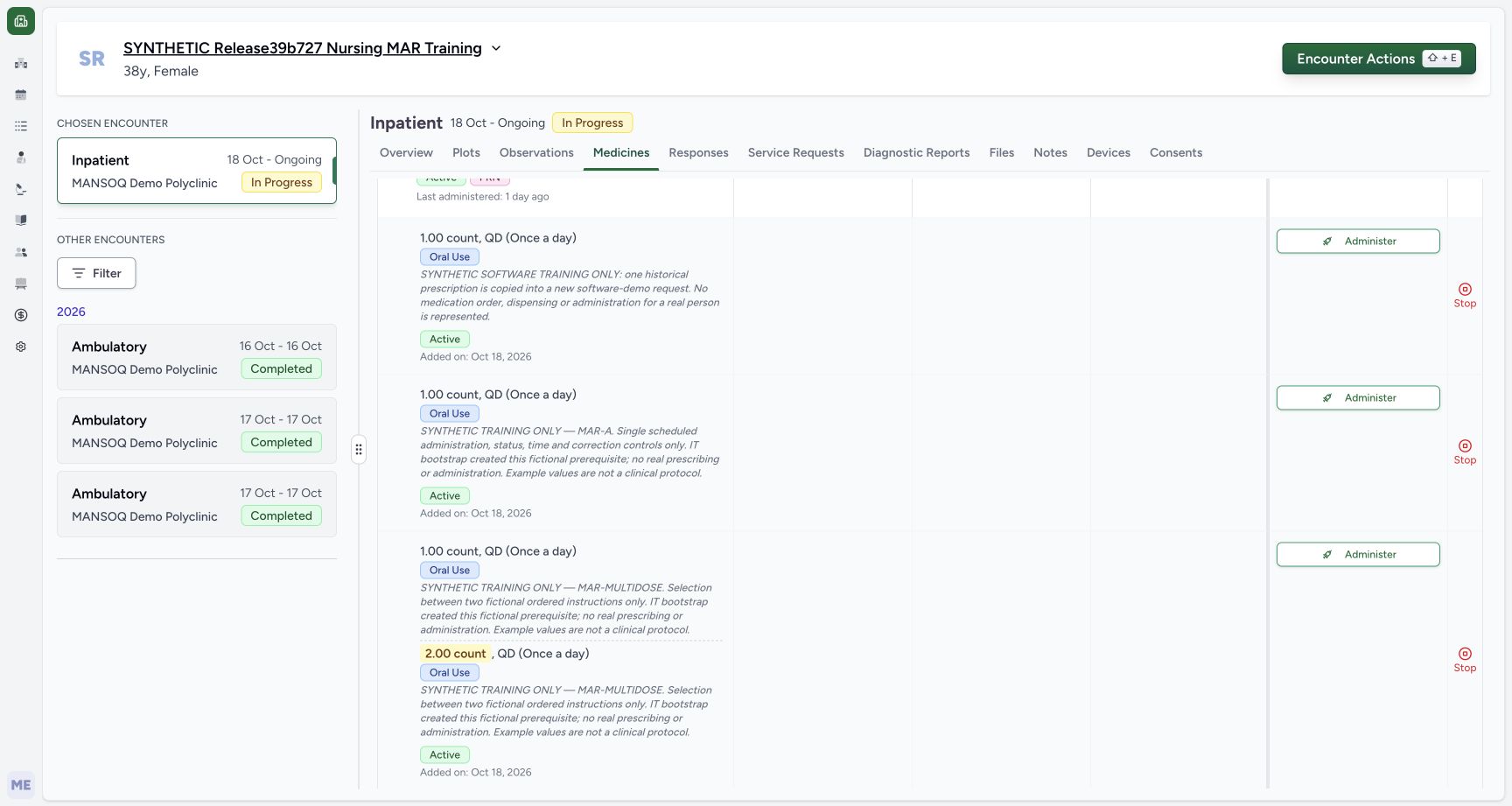
- Re-read the same copied note: Cancel returns to the identified copied request.
- Verify Active after Cancel: The copied request remains Active.
- Reopen this row Stop for the next guide: Only the same copied row is used for the later one-time confirmation.
- Read the older MAR-A Active badge: The original request is still Active.
7. Verify that cancellation leaves the request Active
The dialog closes. Re-read the same copied note and its Active badge. The older MAR-A row also remains Active. Cancel has closed the warning without saving a stop.
1234Neutral cancel retains own active row
Capture details
Observed committed3dfb software. One individual copied request ended, distinct from active older requests, the prescription and administration events. No clinical recommendation.
Image SHA-256 350fe0d39c69c9e9de080edeb090aa303fa2ec4295b91f6575d724fadf4fde83
- Re-read the same copied note: Cancel returns to the identified copied request.
- Verify Active after Cancel: The copied request remains Active.
- Reopen this row Stop for the next guide: Only the same copied row is used for the later one-time confirmation.
- Read the older MAR-A Active badge: The original request is still Active.
Keep the scope of the control clear
These screenshots show the committed 3dfb single-request interface. Group Stop, Administer, nutrition, prescribing changes and administration-event correction are separate workflows. This guide demonstrates only the individual warning and a neutral Cancel.
1234Four request medication group header
Capture details
Observed committed3dfb software. One individual copied request ended, distinct from active older requests, the prescription and administration events. No clinical recommendation.
Image SHA-256 7bf984d50fadafc73c3d77360e0a88a7f6c585a02668b84b299a0b5f0b0f8246
- Read the selected Medications tab: This exercise uses medications rather than nutrition.
- Read four grouped requests: The medicine header represents four individual requests.
- Expand the medicine group: Show the individual request rows before choosing Stop.
- Leave the group Stop control alone: This header icon targets the active requests in the group; it was not clicked.
1234Own copy stop distinct from old mar a
Capture details
Observed committed3dfb software. One individual copied request ended, distinct from active older requests, the prescription and administration events. No clinical recommendation.
Image SHA-256 f3621aba496b0cc8dc13ec3a7e6d1d9cda0c9ea923a8e09b2f09fb0ed3f965e9
- Identify the copied request: Read the complete unique software-training note before acting.
- Check the copy is Active: The identified request is still Active before the warning.
- Choose only the copied row Stop: Open the single-request warning for the row with the copied note.
- Read the separate MAR-A note: The older original is a different request; leave its Stop alone.
123Single discontinue warning cancel first
Capture details
Observed committed3dfb software. One individual copied request ended, distinct from active older requests, the prescription and administration events. No clinical recommendation.
Image SHA-256 94158d8eeef7203d878ef6c3ac562bbab284950601c6a9963cb9d7ec4065885f
- Read Discontinue Medication: The title identifies the single-medication warning.
- Read the single-request description: The warning says Discontinue this medication and has no reason input.
- Choose Cancel: Close this first warning without saving a stop.
Source evidence
Every citation uses this exact committed version. The private source repository requires access.
- repositories/platform/mansoq-web/src/components/Medicine/MedicationRequestTable/index.tsx:56 ·
3dfb7c9f519fb5b4cd4452439f3c12346bf58319Source file checksum
031e169fb1f09e4559edb7b2ab0eba7c3c2a6fa9bd6ace44d1b05e1563106457 - repositories/platform/mansoq-web/src/components/Medicine/MedicationAdministration/AdministrationTab.tsx:168 ·
3dfb7c9f519fb5b4cd4452439f3c12346bf58319Source file checksum
170c246835ea1966b8512f5baf72ff0ea60635f28cbcec6a465bb8c17506555f - repositories/platform/mansoq-web/src/components/Medicine/MedicationAdministration/GroupedMedicationRow.tsx:191 ·
3dfb7c9f519fb5b4cd4452439f3c12346bf58319Source file checksum
e497c113ba63d31c09068cdab1ebe7c495794548f218112599914ef06cc191d2 - repositories/platform/mansoq-web/src/components/Medicine/MedicationAdministration/DiscontinueConfirmDialog.tsx:53 ·
3dfb7c9f519fb5b4cd4452439f3c12346bf58319Source file checksum
6f030003b1d09fceed7dedeff5a4ea7c40da275af3051f8c4679c6e027a32ea6 - repositories/platform/mansoq-web/src/components/Medicine/MedicationAdministration/utils.ts:106 ·
3dfb7c9f519fb5b4cd4452439f3c12346bf58319Source file checksum
3df1d0c6fd4265ef3b0ea3d5704b463290b1f72b6ee0a77141f13d8debaccfbb - repositories/platform/mansoq-web/src/types/emr/medicationRequest/medicationRequestApi.ts:4 ·
3dfb7c9f519fb5b4cd4452439f3c12346bf58319Source file checksum
2e18bb5bef449fb67b01d4b763e8ca1e57bad00a6381c5c0e3a2eac1d6a272c3 - repositories/platform/mansoq-web/src/types/emr/medicationRequest/medicationRequest.ts:78 ·
3dfb7c9f519fb5b4cd4452439f3c12346bf58319Source file checksum
a39df63f9b7f2d976d4379511d7a2d4c8e3e284fd1e9b67c28e59392e8545b2b - repositories/platform/mansoq-web/src/pages/Encounters/tabs/medicines.tsx:1 ·
3dfb7c9f519fb5b4cd4452439f3c12346bf58319Source file checksum
21673bfc16196ff5c13fc361650480477e6545a875aac2c3b59d29a27546aa5e - repositories/platform/mansoq-core/mansoq/emr/api/viewsets/medication_request.py:62 ·
3dfb7c9f519fb5b4cd4452439f3c12346bf58319Source file checksum
a3f3ae8042fb8134112c5d04fe8b060e68bce11dae682d138aafaae64119c215 - repositories/platform/mansoq-core/mansoq/emr/api/viewsets/encounter_authz_base.py:15 ·
3dfb7c9f519fb5b4cd4452439f3c12346bf58319Source file checksum
852c308f990e192a1003e286be7dd57ddcc78840d218da1b90c1fab2eebec4f7 - repositories/platform/mansoq-core/mansoq/emr/api/viewsets/base.py:179 ·
3dfb7c9f519fb5b4cd4452439f3c12346bf58319Source file checksum
6a287dd315b8a4957b29c58e4bbc1bef7b8d9d257f9149f93045ff0adbdcae6c - repositories/platform/mansoq-core/mansoq/emr/resources/medication/request/spec.py:195 ·
3dfb7c9f519fb5b4cd4452439f3c12346bf58319Source file checksum
9f9e929369e186f88af131f2a1ccc3a773d9bfe9648f92a98f6a4935c09a7ade - repositories/platform/mansoq-core/mansoq/emr/models/medication_request.py:10 ·
3dfb7c9f519fb5b4cd4452439f3c12346bf58319Source file checksum
6d0148f12528d99718544a54fd6ccaee3f931d58ff7b6796b8aac66533555f2f - repositories/platform/mansoq-core/mansoq/emr/resources/base.py:82 ·
3dfb7c9f519fb5b4cd4452439f3c12346bf58319Source file checksum
bc406c723888997dd99fc408cb3c5dec51fb0b54d10272ca31bfd8c98c893229 - repositories/platform/mansoq-core/mansoq/emr/models/questionnaire.py:57 ·
3dfb7c9f519fb5b4cd4452439f3c12346bf58319Source file checksum
2e422990f996654b71999dd1303f0bf9b5706ffc38c4271cdcdc741faf1a08d0 - repositories/platform/mansoq-core/mansoq/emr/models/base.py:1 ·
3dfb7c9f519fb5b4cd4452439f3c12346bf58319Source file checksum
61f50a19078c8a6435398e6b3e9174326038e9047129382c0d882f1e8f367b4c - repositories/platform/mansoq-web/src/components/Medicine/PrescriptionView.tsx:78 ·
3dfb7c9f519fb5b4cd4452439f3c12346bf58319Source file checksum
af1781d51d3dd511231a79e034a7f98412434dfa4603b91dce6676c4474fad96 - repositories/platform/mansoq-web/src/components/Medicine/MedicationsTable.tsx:37 ·
3dfb7c9f519fb5b4cd4452439f3c12346bf58319Source file checksum
8bdf0ac1770dc1423e4534f9ed0f75f51bda5be717ef7bd0aa345edc79244830