 MANSOQ
 Clinical care · VERSION 3dfb7c9f
Change a saved symptom from Provisional to Refuted
Update only the verification of one existing fictional symptom, reload to verify it, and distinguish the retained Active record from separate history and entered-in-error records.
Doctor
 1234
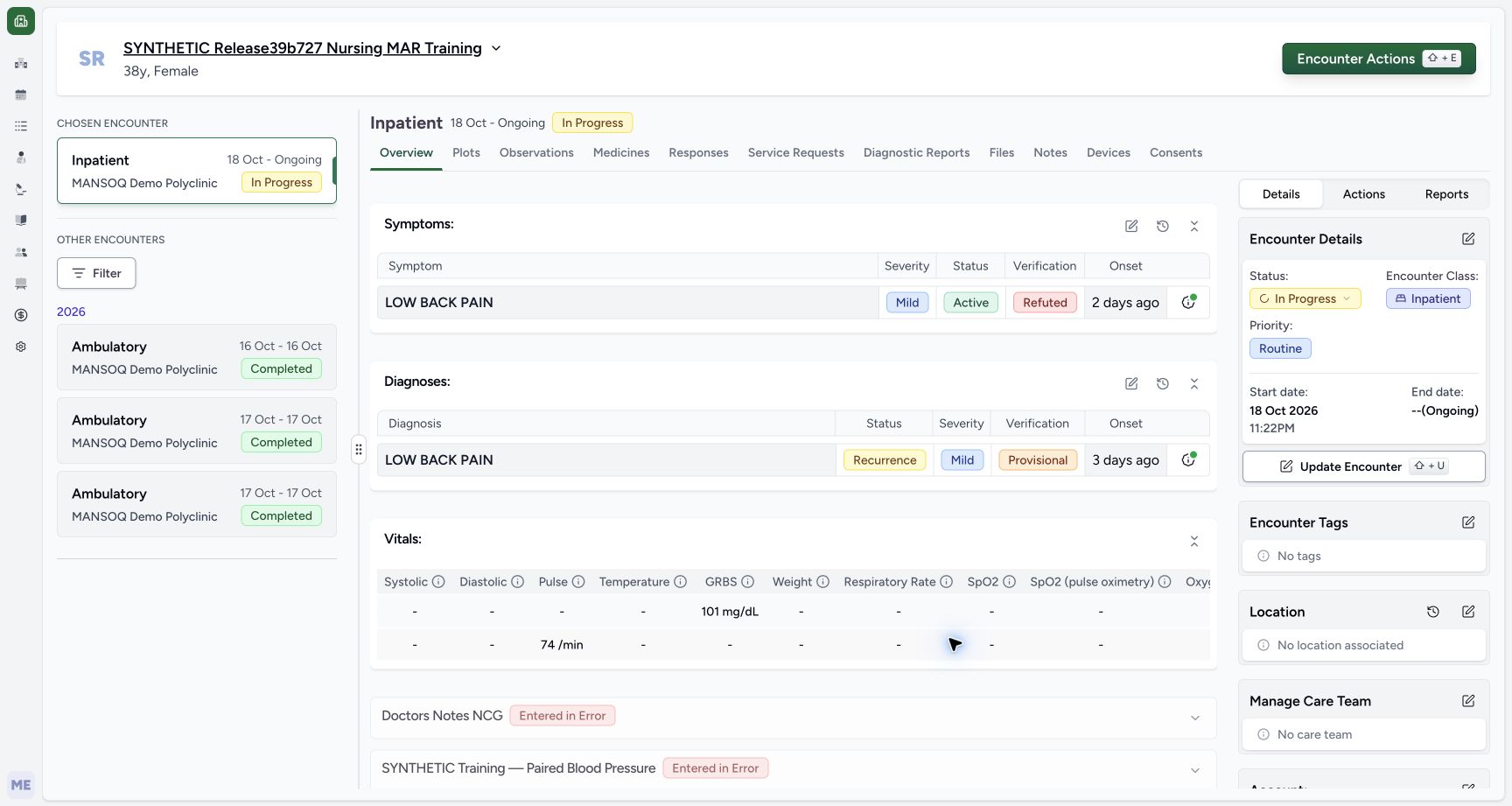
1234Active Refuted symptom after normal browser reload
Capture details
Observed committed 3dfb software on 20 October 2026. Actual original pixels and capture times preserved. Clinical status, verification and retained historical note remain distinct.
Image SHA-256 5ea77d6c5cc1b782f000ec7112055f2cc4968388999dc01f6a2525e5c7811ca5
- Verify Refuted after browser reload: The saved symptom still reads Refuted after the normal reload.
- Verify clinical Active remains: Refuted does not hide this Active symptom in the demonstrated release.
- Open Past Symptoms: Use the history icon belonging to the Symptoms panel.
- Reopen the same Symptoms editor: This earlier Overview view illustrates the pencil used again after returning from history.
13 of 13 content blocks have reviewed image alignment.
Before you begin
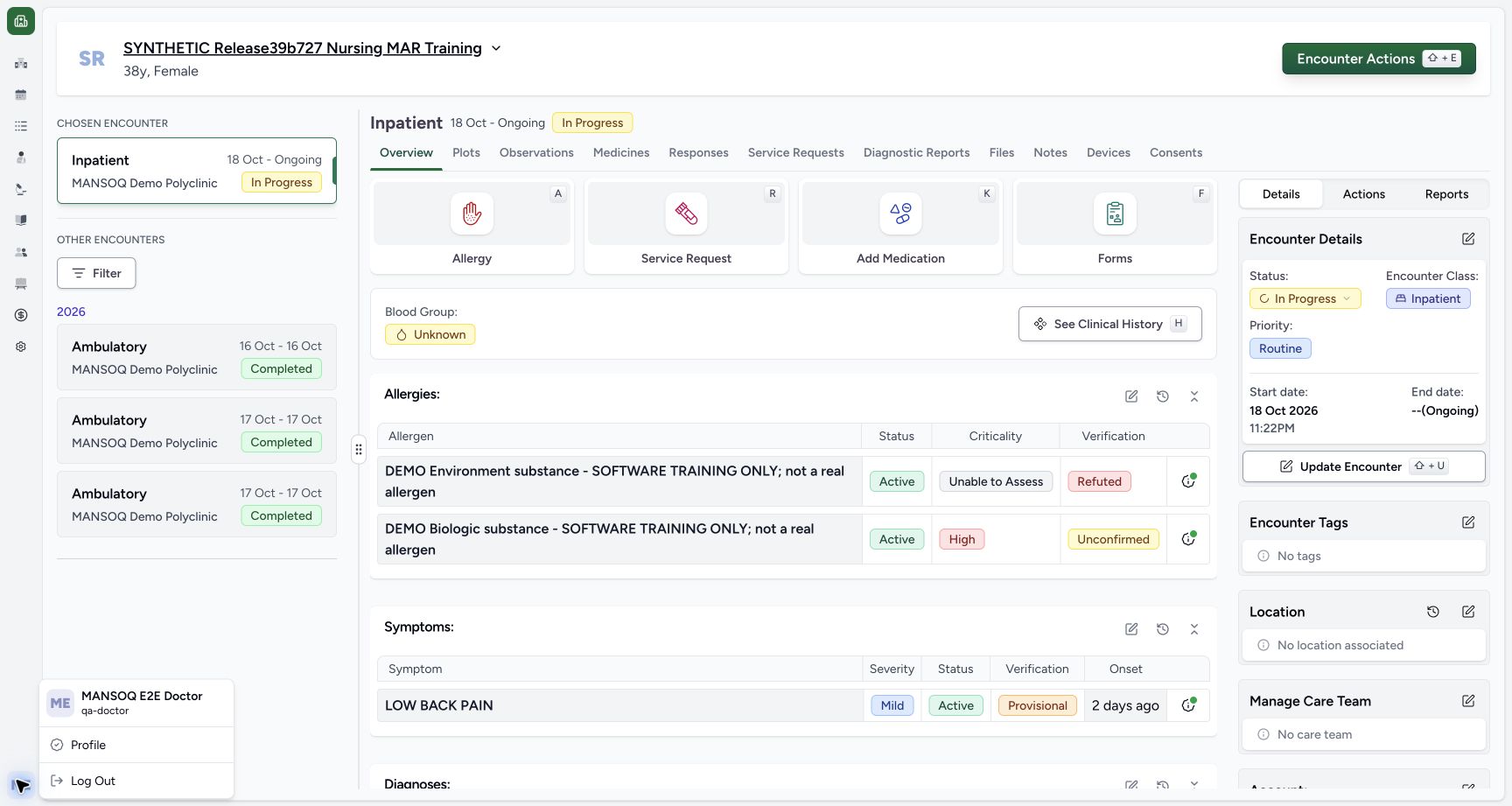
- Use an authorised Doctor account and verify the assigned fictional patient and selected ongoing encounter. The illustrated account is MANSOQ E2E Doctor, qa-doctor.
 123
123Recorded release 3dfb7c9f · 2026-10-20T07:04:34.921Z · 1728 × 921 Doctor identity on the selected synthetic active encounter
Capture details
Observed committed 3dfb software on 20 October 2026. Actual original pixels and capture times preserved. Clinical status, verification and retained historical note remain distinct.
Image SHA-256
40f7f356fdf0c2381eeb874dd30509d057273bcd5b3ba9469d89d0be63a9ba70- Verify the Doctor account: The account menu identifies MANSOQ E2E Doctor and qa-doctor.
- Verify the assigned patient: Read the synthetic patient banner.
- Verify the selected active encounter: The selected Inpatient case is In Progress, 18 October to Ongoing.
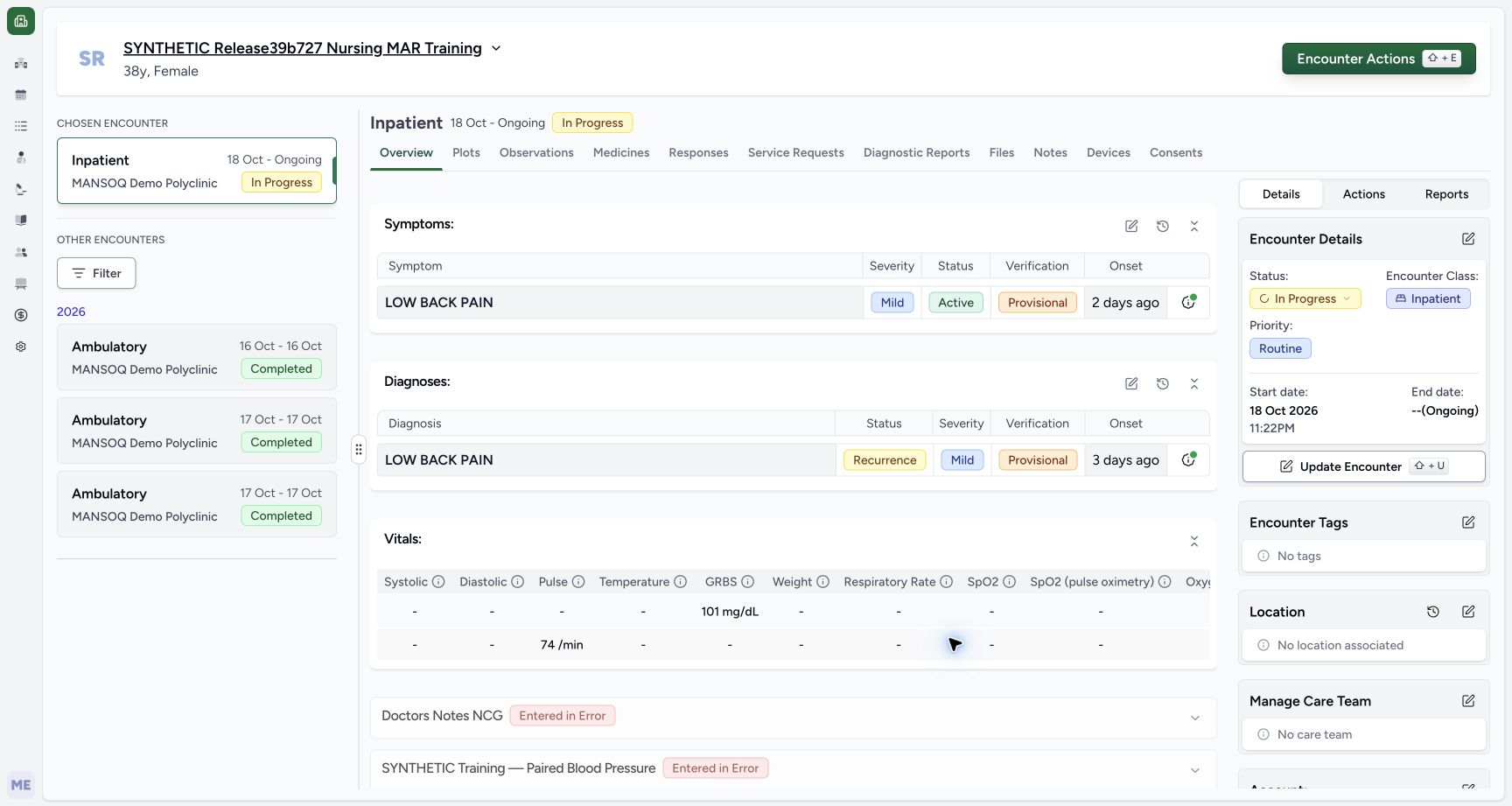
- Identify the intended existing symptom before changing it. This example uses LOW BACK PAIN with Active clinical status, Mild severity, Provisional verification and an existing 18 October 2026 onset.
 123
123Recorded release 3dfb7c9f · 2026-10-20T07:14:33.267Z · 1728 × 921 Symptoms before the verification change
Capture details
Observed committed 3dfb software on 20 October 2026. Actual original pixels and capture times preserved. Clinical status, verification and retained historical note remain distinct.
Image SHA-256
08a191ac6842a0c401b8af6d49684a522dd70cc8e6ae4bd3f47cfa4c2f380818- Locate Symptoms: Use the Symptoms panel, separate from Diagnoses below.
- Read current Provisional verification: The symptom is currently Active, Mild and Provisional.
- Open the Symptoms editor: Select the pencil belonging to Symptoms; do not choose the diagnosis pencil below.
 1234567
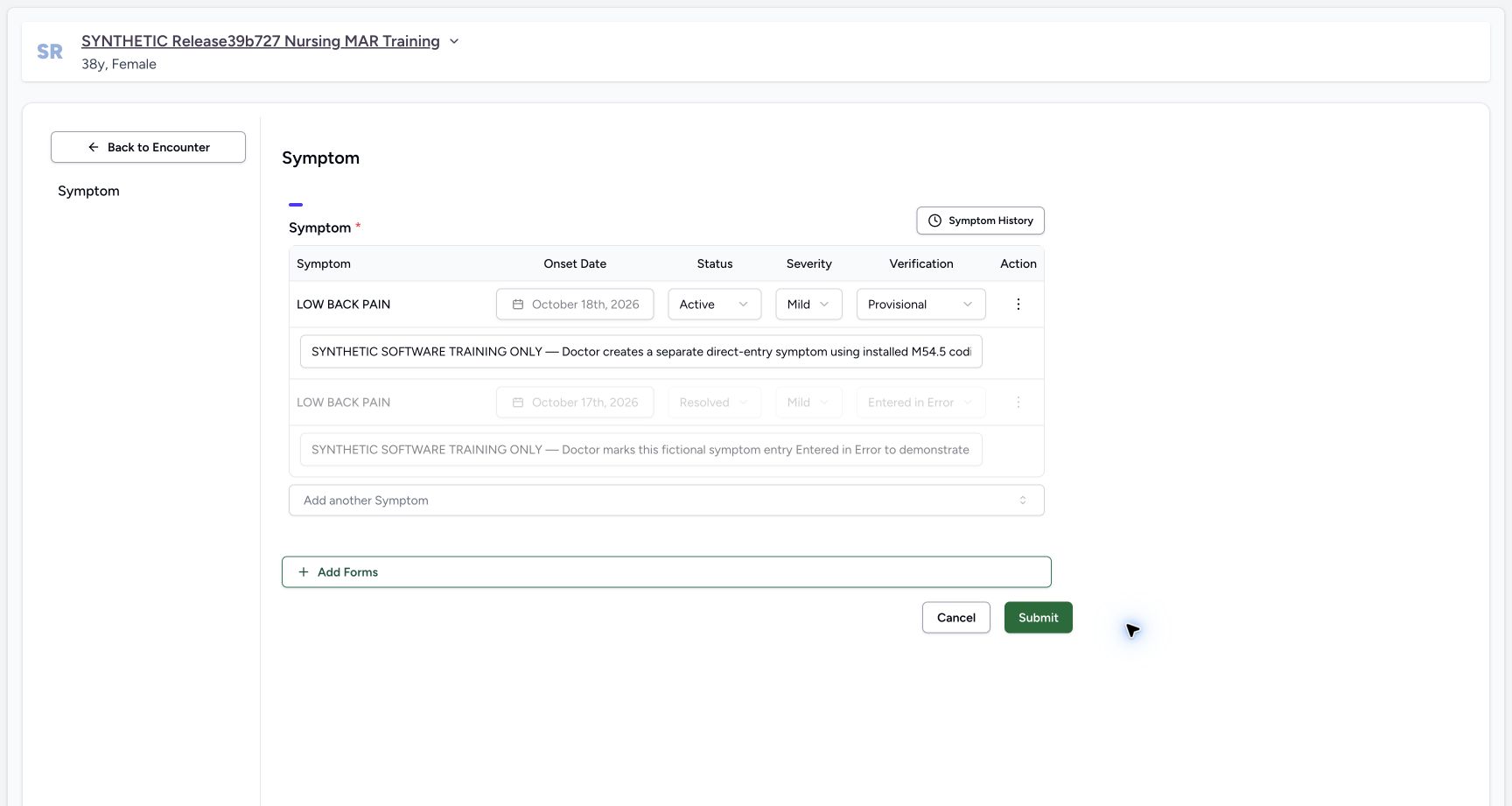
Recorded release 3dfb7c9f · 2026-10-20T07:15:09.311Z · 1728 × 921 Existing saved Symptom row before Refuted
Capture details
Observed committed 3dfb software on 20 October 2026. Actual original pixels and capture times preserved. Clinical status, verification and retained historical note remain distinct.
Image SHA-256
1b08289a3102bff1ece79479065348467d1e1f888ed6d53fc032b6cd8117a865- Identify the existing symptom: This is the intended saved LOW BACK PAIN row.
- Read the locked onset: The existing onset remains October 18th, 2026.
- Read clinical Active: Clinical status is a separate control from Verification.
- Read retained Mild severity: Severity is not changed in this exercise.
- Open Verification: Open the Provisional dropdown for the intended row.
- Recognize the retained training note: Only the beginning of the single-line note is pictured; it describes the earlier creation exercise.
- Leave the disabled corrected row alone: The separate greyed row is Resolved and Entered in Error.
- All symptoms and notes in this example are fictional software exercises, not a clinical assessment or advice. Do not change the separate disabled entered-in-error row.1234567
Recorded release 3dfb7c9f · 2026-10-20T07:15:09.311Z · 1728 × 921 Existing saved Symptom row before Refuted
Capture details
Observed committed 3dfb software on 20 October 2026. Actual original pixels and capture times preserved. Clinical status, verification and retained historical note remain distinct.
Image SHA-256
1b08289a3102bff1ece79479065348467d1e1f888ed6d53fc032b6cd8117a865- Identify the existing symptom: This is the intended saved LOW BACK PAIN row.
- Read the locked onset: The existing onset remains October 18th, 2026.
- Read clinical Active: Clinical status is a separate control from Verification.
- Read retained Mild severity: Severity is not changed in this exercise.
- Open Verification: Open the Provisional dropdown for the intended row.
- Recognize the retained training note: Only the beginning of the single-line note is pictured; it describes the earlier creation exercise.
- Leave the disabled corrected row alone: The separate greyed row is Resolved and Entered in Error.
 1234
1234Recorded release 3dfb7c9f · 2026-10-20T07:15:58.034Z · 1728 × 921 Reopened saved Refuted symptom before unchanged Cancel
Capture details
Observed committed 3dfb software on 20 October 2026. Actual original pixels and capture times preserved. Clinical status, verification and retained historical note remain distinct.
Image SHA-256
7132be52da330dcda5a7ce7428d1c0d56b91084cf78b13bf371d6e1bc0fe6c2a- Verify the reopened saved status: The same existing symptom still has Refuted verification.
- Recheck Active independently: Clinical status remains Active.
- Read the note as retained context: The existing note is not rewritten by this verification-only update and is clipped in this input.
- Leave with Cancel: Choose Cancel after unchanged inspection; do not submit the saved change a second time.
1. Identify the symptom and open its editor
Check the Doctor account, patient banner and selected Inpatient encounter. On Overview locate Symptoms. The intended LOW BACK PAIN row reads Mild, Active and Provisional, with onset 2 days ago. Select the Symptoms pencil; the separate Diagnoses panel below has its own pencil.
123Doctor identity on the selected synthetic active encounter
Capture details
Observed committed 3dfb software on 20 October 2026. Actual original pixels and capture times preserved. Clinical status, verification and retained historical note remain distinct.
Image SHA-256 40f7f356fdf0c2381eeb874dd30509d057273bcd5b3ba9469d89d0be63a9ba70
- Verify the Doctor account: The account menu identifies MANSOQ E2E Doctor and qa-doctor.
- Verify the assigned patient: Read the synthetic patient banner.
- Verify the selected active encounter: The selected Inpatient case is In Progress, 18 October to Ongoing.
123Symptoms before the verification change
Capture details
Observed committed 3dfb software on 20 October 2026. Actual original pixels and capture times preserved. Clinical status, verification and retained historical note remain distinct.
Image SHA-256 08a191ac6842a0c401b8af6d49684a522dd70cc8e6ae4bd3f47cfa4c2f380818
- Locate Symptoms: Use the Symptoms panel, separate from Diagnoses below.
- Read current Provisional verification: The symptom is currently Active, Mild and Provisional.
- Open the Symptoms editor: Select the pencil belonging to Symptoms; do not choose the diagnosis pencil below.
2. Read the saved fields before changing verification
In Symptom, identify the existing Active, Mild, Provisional row and its locked October 18th, 2026 onset. Leave the retained note unchanged. Its single-line input shows only the beginning of the older training text. The second, greyed Resolved / Entered in Error row is a separate record and stays untouched.
1234567Existing saved Symptom row before Refuted
Capture details
Observed committed 3dfb software on 20 October 2026. Actual original pixels and capture times preserved. Clinical status, verification and retained historical note remain distinct.
Image SHA-256 1b08289a3102bff1ece79479065348467d1e1f888ed6d53fc032b6cd8117a865
- Identify the existing symptom: This is the intended saved LOW BACK PAIN row.
- Read the locked onset: The existing onset remains October 18th, 2026.
- Read clinical Active: Clinical status is a separate control from Verification.
- Read retained Mild severity: Severity is not changed in this exercise.
- Open Verification: Open the Provisional dropdown for the intended row.
- Recognize the retained training note: Only the beginning of the single-line note is pictured; it describes the earlier creation exercise.
- Leave the disabled corrected row alone: The separate greyed row is Resolved and Entered in Error.
3. Select Refuted in Verification
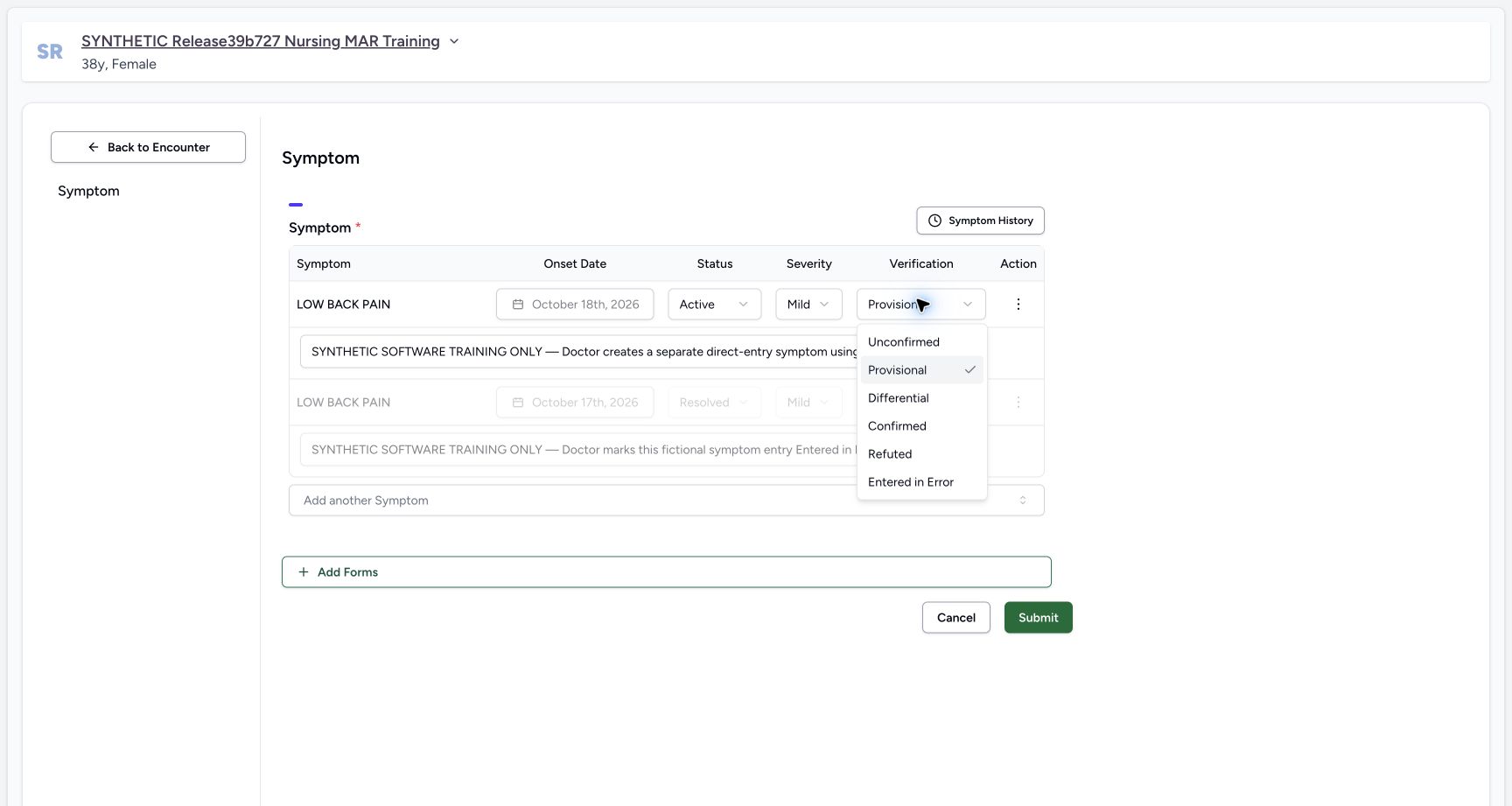
Open Verification on the intended first row. The actual menu includes Unconfirmed, Provisional, Differential, Confirmed, Refuted and Entered in Error. For this fictional example choose Refuted. Do not change the separate clinical Status control or select Entered in Error.
1234567Existing saved Symptom row before Refuted
Capture details
Observed committed 3dfb software on 20 October 2026. Actual original pixels and capture times preserved. Clinical status, verification and retained historical note remain distinct.
Image SHA-256 1b08289a3102bff1ece79479065348467d1e1f888ed6d53fc032b6cd8117a865
- Identify the existing symptom: This is the intended saved LOW BACK PAIN row.
- Read the locked onset: The existing onset remains October 18th, 2026.
- Read clinical Active: Clinical status is a separate control from Verification.
- Read retained Mild severity: Severity is not changed in this exercise.
- Open Verification: Open the Provisional dropdown for the intended row.
- Recognize the retained training note: Only the beginning of the single-line note is pictured; it describes the earlier creation exercise.
- Leave the disabled corrected row alone: The separate greyed row is Resolved and Entered in Error.
 123
123Symptom Verification menu with Refuted as a distinct choice
Capture details
Observed committed 3dfb software on 20 October 2026. Actual original pixels and capture times preserved. Clinical status, verification and retained historical note remain distinct.
Image SHA-256 e491febe288f903adeed2ddb142ee08c1f9a94ed2998db010a427ba2b8108431
- Locate the Verification menu: This menu changes verification, not clinical status.
- Choose Refuted: Select Refuted for this explicitly fictional software example.
- Distinguish Entered in Error: Entered in Error is a different option; it is not selected here.
 1234
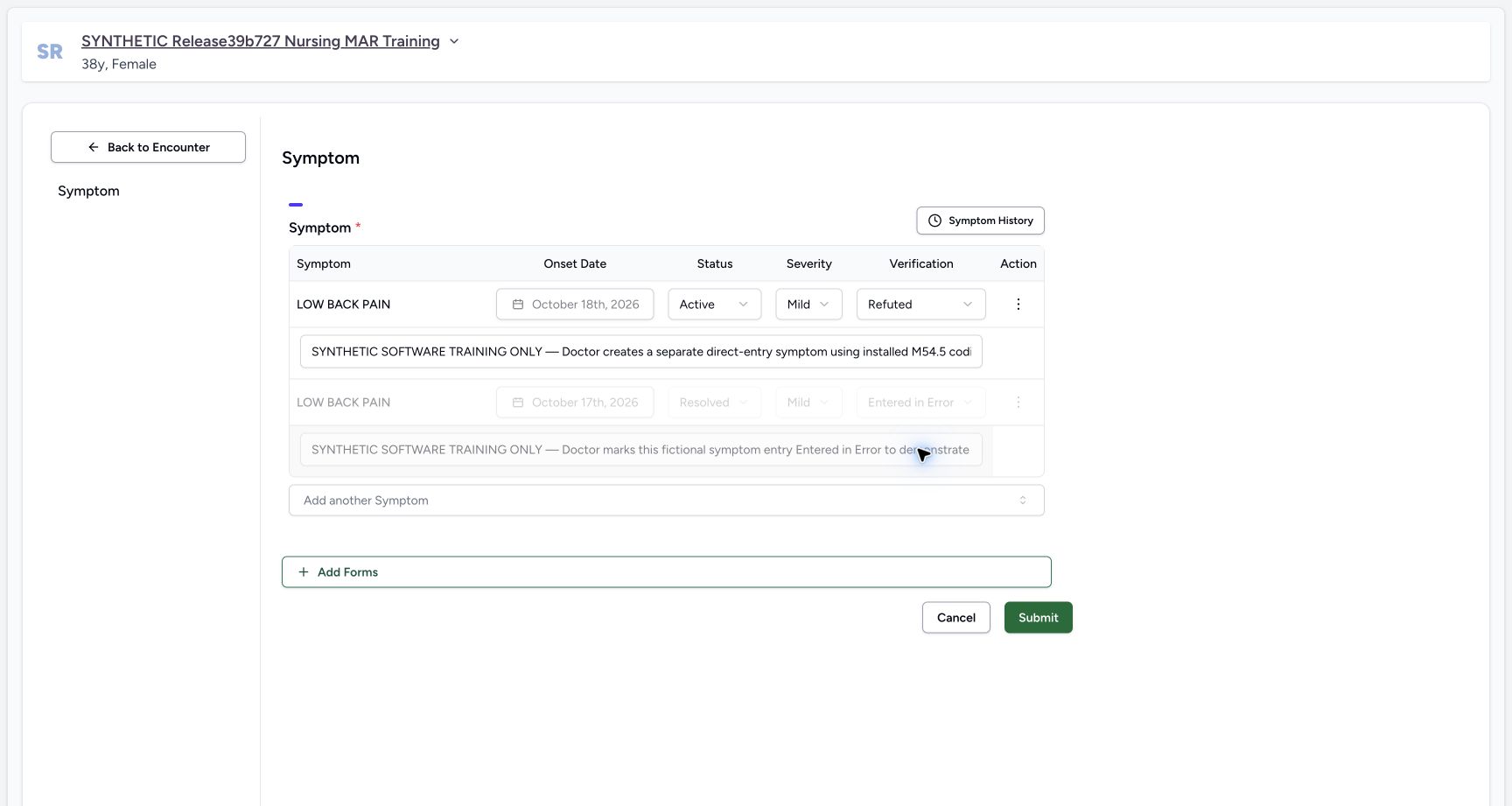
1234One reviewed Refuted draft with enabled Submit
Capture details
Observed committed 3dfb software on 20 October 2026. Actual original pixels and capture times preserved. Clinical status, verification and retained historical note remain distinct.
Image SHA-256 58551805492c589596670f0555f672d335424f9f291ca434c06241b07ef28a86
- Review pending Refuted: Refuted is selected in the unsaved draft.
- Recheck Active: The clinical status remains Active.
- Recheck the unchanged onset: The saved October 18 onset is retained.
- Submit this reviewed change once: Use Submit only after confirming the same row and retained fields.
4. Review and submit the one change
Check that Verification is Refuted while clinical Status remains Active, Severity remains Mild, and the existing onset and note are retained. Review the target again, then choose Submit once. Selecting Refuted only changes the draft until the save completes.
1234One reviewed Refuted draft with enabled Submit
Capture details
Observed committed 3dfb software on 20 October 2026. Actual original pixels and capture times preserved. Clinical status, verification and retained historical note remain distinct.
Image SHA-256 58551805492c589596670f0555f672d335424f9f291ca434c06241b07ef28a86
- Review pending Refuted: Refuted is selected in the unsaved draft.
- Recheck Active: The clinical status remains Active.
- Recheck the unchanged onset: The saved October 18 onset is retained.
- Submit this reviewed change once: Use Submit only after confirming the same row and retained fields.
5. Wait for the return, then reload and verify
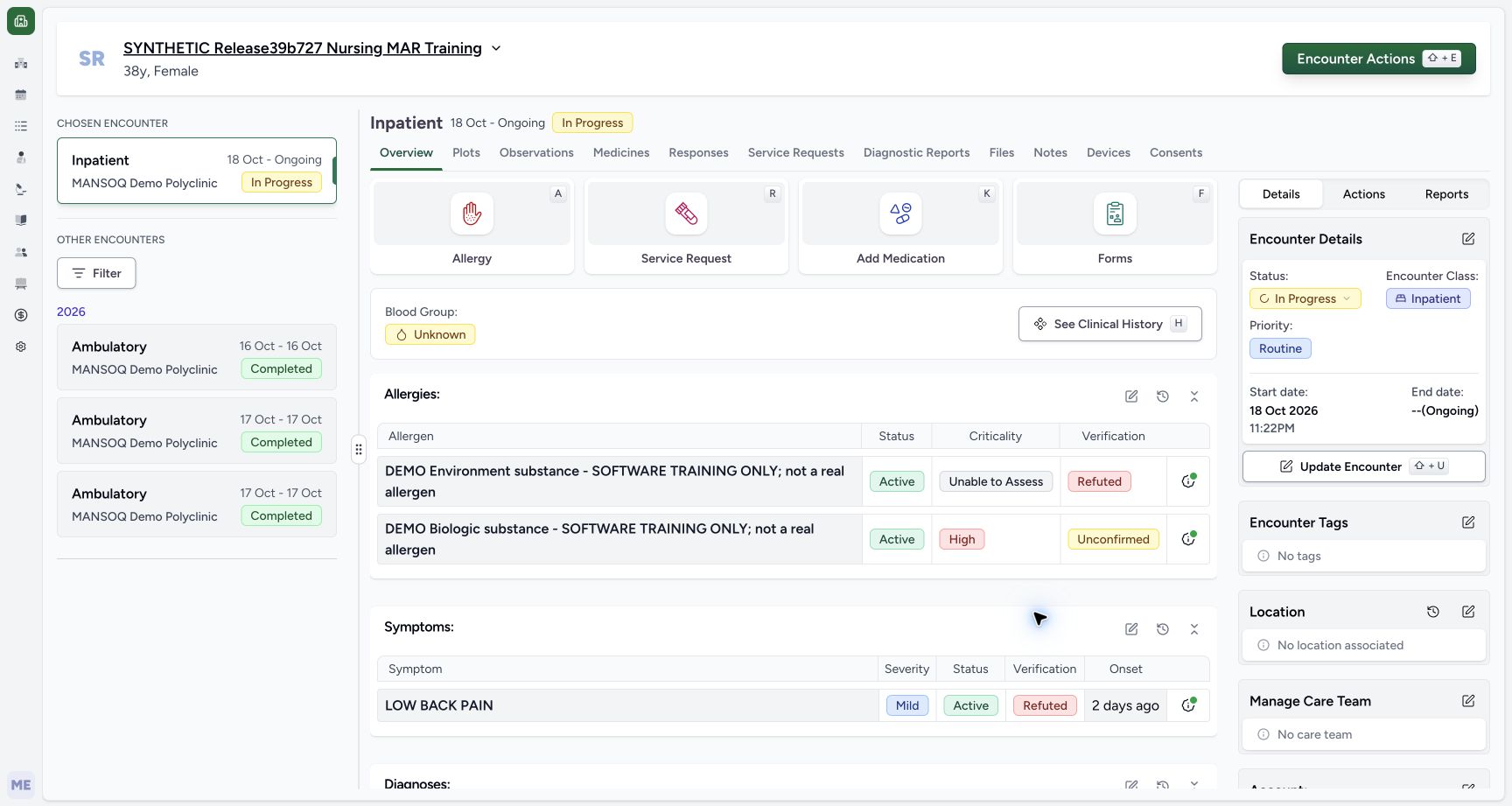
Wait for the app to return to Overview. Do not repeat Submit to force a badge refresh. Use the browser’s Reload command once, wait for the saved encounter to load, then scroll to Symptoms. The saved row reads Mild, Active and Refuted with the same onset. It remains visible in this release. The earlier returned-Overview frame also shows Refuted; no success toast is pictured there.
 12
12Returned Overview after the single save
Capture details
Observed committed 3dfb software on 20 October 2026. Actual original pixels and capture times preserved. Clinical status, verification and retained historical note remain distinct.
Image SHA-256 1e212132016b23094b2606a3988b0a02e104a14230ea7a707db462b6eb3fafd2
- Read the returned Overview: This retained frame already shows Refuted; no success toast is visible in the original.
- Read retained Active: Clinical Active remains separate from the Refuted badge.
1234Active Refuted symptom after normal browser reload
Capture details
Observed committed 3dfb software on 20 October 2026. Actual original pixels and capture times preserved. Clinical status, verification and retained historical note remain distinct.
Image SHA-256 5ea77d6c5cc1b782f000ec7112055f2cc4968388999dc01f6a2525e5c7811ca5
- Verify Refuted after browser reload: The saved symptom still reads Refuted after the normal reload.
- Verify clinical Active remains: Refuted does not hide this Active symptom in the demonstrated release.
- Open Past Symptoms: Use the history icon belonging to the Symptoms panel.
- Reopen the same Symptoms editor: This earlier Overview view illustrates the pencil used again after returning from history.
6. Compare the two records in Past Symptoms
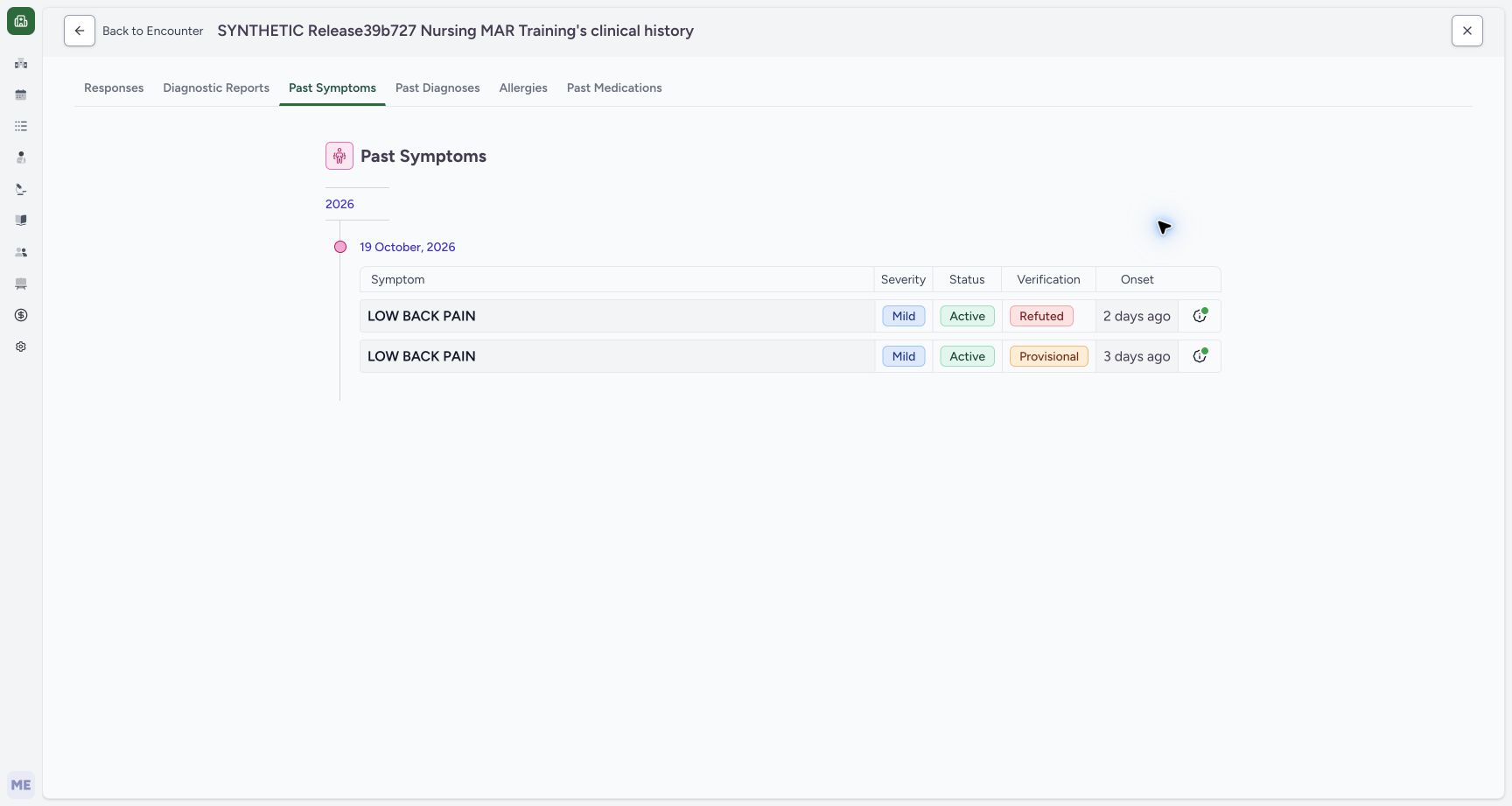
Select the Symptoms history icon. Past Symptoms shows the saved Active, Mild, Refuted row with onset 2 days ago, plus a separate older Active, Mild, Provisional row with onset 3 days ago. These are two records, not before-and-after revisions of this one symptom. The list excludes the entered-in-error row.
1234Active Refuted symptom after normal browser reload
Capture details
Observed committed 3dfb software on 20 October 2026. Actual original pixels and capture times preserved. Clinical status, verification and retained historical note remain distinct.
Image SHA-256 5ea77d6c5cc1b782f000ec7112055f2cc4968388999dc01f6a2525e5c7811ca5
- Verify Refuted after browser reload: The saved symptom still reads Refuted after the normal reload.
- Verify clinical Active remains: Refuted does not hide this Active symptom in the demonstrated release.
- Open Past Symptoms: Use the history icon belonging to the Symptoms panel.
- Reopen the same Symptoms editor: This earlier Overview view illustrates the pencil used again after returning from history.
 1234
1234Past Symptoms with separate Refuted and older Provisional records
Capture details
Observed committed 3dfb software on 20 October 2026. Actual original pixels and capture times preserved. Clinical status, verification and retained historical note remain distinct.
Image SHA-256 b6b6960568926773e7c934b6c1a2f5aa6ba427adabb3a4bf33750507a46bd3ce
- Confirm Past Symptoms: This patient history tab is selected.
- Read the saved Refuted record: The first row has Mild, Active, Refuted and onset 2 days ago.
- Distinguish the separate Provisional record: The second row is a different older symptom, with onset 3 days ago.
- Return to the encounter: Use Back to Encounter, then verify the same case before reopening the editor.
7. Reopen the saved row and leave unchanged
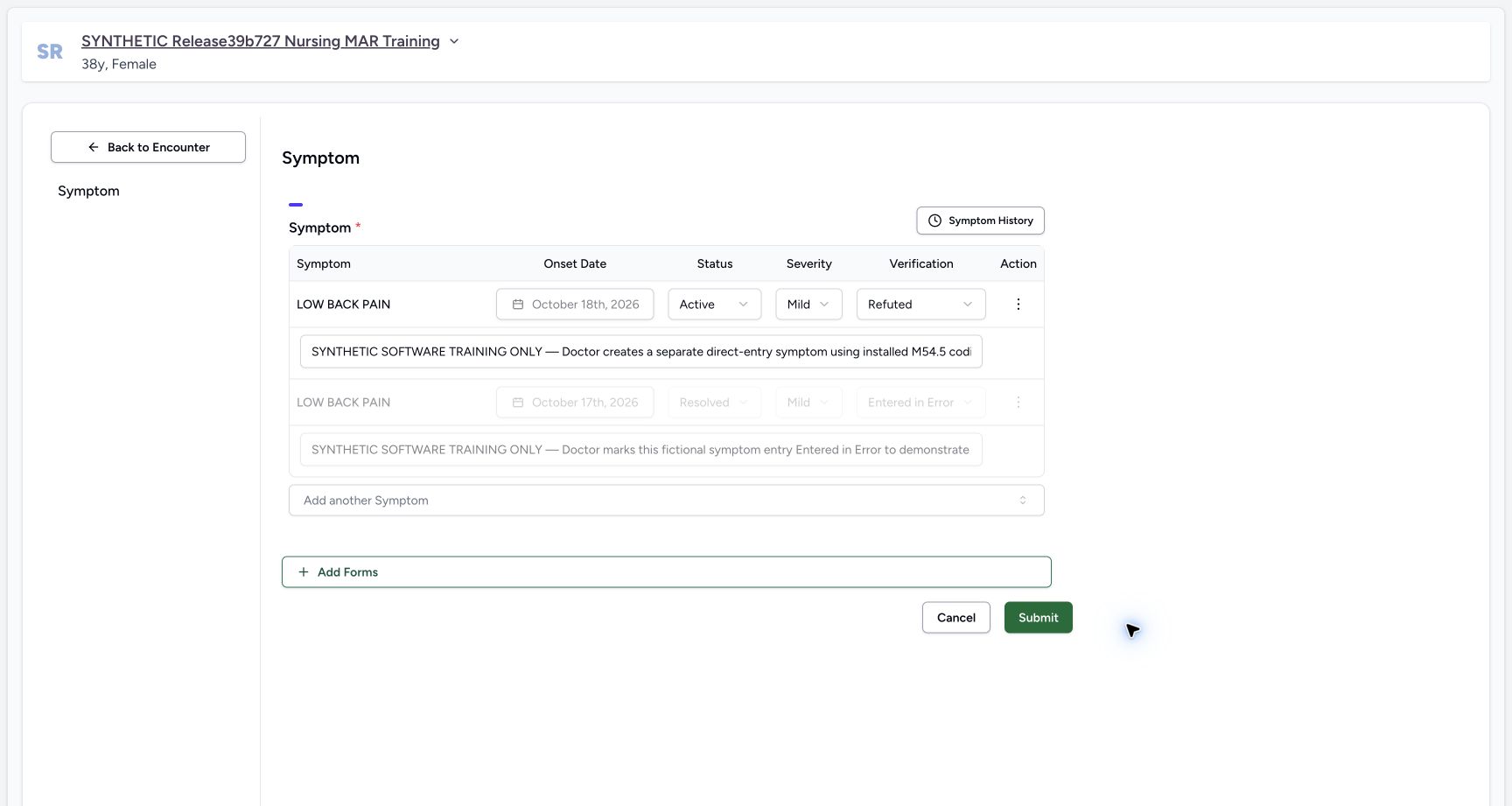
Choose Back to Encounter. Reopen the Symptoms editor with its pencil; the earlier Overview picture illustrates that same control. Check the saved Active, Mild and Refuted values and unchanged onset. Use Cancel after this inspection, without a second Submit.
1234Past Symptoms with separate Refuted and older Provisional records
Capture details
Observed committed 3dfb software on 20 October 2026. Actual original pixels and capture times preserved. Clinical status, verification and retained historical note remain distinct.
Image SHA-256 b6b6960568926773e7c934b6c1a2f5aa6ba427adabb3a4bf33750507a46bd3ce
- Confirm Past Symptoms: This patient history tab is selected.
- Read the saved Refuted record: The first row has Mild, Active, Refuted and onset 2 days ago.
- Distinguish the separate Provisional record: The second row is a different older symptom, with onset 3 days ago.
- Return to the encounter: Use Back to Encounter, then verify the same case before reopening the editor.
1234Active Refuted symptom after normal browser reload
Capture details
Observed committed 3dfb software on 20 October 2026. Actual original pixels and capture times preserved. Clinical status, verification and retained historical note remain distinct.
Image SHA-256 5ea77d6c5cc1b782f000ec7112055f2cc4968388999dc01f6a2525e5c7811ca5
- Verify Refuted after browser reload: The saved symptom still reads Refuted after the normal reload.
- Verify clinical Active remains: Refuted does not hide this Active symptom in the demonstrated release.
- Open Past Symptoms: Use the history icon belonging to the Symptoms panel.
- Reopen the same Symptoms editor: This earlier Overview view illustrates the pencil used again after returning from history.
1234Reopened saved Refuted symptom before unchanged Cancel
Capture details
Observed committed 3dfb software on 20 October 2026. Actual original pixels and capture times preserved. Clinical status, verification and retained historical note remain distinct.
Image SHA-256 7132be52da330dcda5a7ce7428d1c0d56b91084cf78b13bf371d6e1bc0fe6c2a
- Verify the reopened saved status: The same existing symptom still has Refuted verification.
- Recheck Active independently: Clinical status remains Active.
- Read the note as retained context: The existing note is not rewritten by this verification-only update and is clipped in this input.
- Leave with Cancel: Choose Cancel after unchanged inspection; do not submit the saved change a second time.
Clinical status and verification answer different questions
Active is the clinical-status field; Refuted is the separate verification field. The demonstrated version keeps this Active / Refuted symptom visible in Overview and Past Symptoms. Refuted is not Entered in Error and does not delete the record. Keep the two columns distinct when reading the result.
123Symptom Verification menu with Refuted as a distinct choice
Capture details
Observed committed 3dfb software on 20 October 2026. Actual original pixels and capture times preserved. Clinical status, verification and retained historical note remain distinct.
Image SHA-256 e491febe288f903adeed2ddb142ee08c1f9a94ed2998db010a427ba2b8108431
- Locate the Verification menu: This menu changes verification, not clinical status.
- Choose Refuted: Select Refuted for this explicitly fictional software example.
- Distinguish Entered in Error: Entered in Error is a different option; it is not selected here.
1234Active Refuted symptom after normal browser reload
Capture details
Observed committed 3dfb software on 20 October 2026. Actual original pixels and capture times preserved. Clinical status, verification and retained historical note remain distinct.
Image SHA-256 5ea77d6c5cc1b782f000ec7112055f2cc4968388999dc01f6a2525e5c7811ca5
- Verify Refuted after browser reload: The saved symptom still reads Refuted after the normal reload.
- Verify clinical Active remains: Refuted does not hide this Active symptom in the demonstrated release.
- Open Past Symptoms: Use the history icon belonging to the Symptoms panel.
- Reopen the same Symptoms editor: This earlier Overview view illustrates the pencil used again after returning from history.
1234Past Symptoms with separate Refuted and older Provisional records
Capture details
Observed committed 3dfb software on 20 October 2026. Actual original pixels and capture times preserved. Clinical status, verification and retained historical note remain distinct.
Image SHA-256 b6b6960568926773e7c934b6c1a2f5aa6ba427adabb3a4bf33750507a46bd3ce
- Confirm Past Symptoms: This patient history tab is selected.
- Read the saved Refuted record: The first row has Mild, Active, Refuted and onset 2 days ago.
- Distinguish the separate Provisional record: The second row is a different older symptom, with onset 3 days ago.
- Return to the encounter: Use Back to Encounter, then verify the same case before reopening the editor.
Retained notes are historical context
The unchanged note belongs to the earlier Provisional creation exercise. Its historical wording is not the current verification value. Read the saved Verification control and the reloaded summary for the current Refuted state. This lesson changes one existing symptom’s verification; it does not create another symptom, revise the separate diagnosis, or demonstrate every status transition.
1234567Existing saved Symptom row before Refuted
Capture details
Observed committed 3dfb software on 20 October 2026. Actual original pixels and capture times preserved. Clinical status, verification and retained historical note remain distinct.
Image SHA-256 1b08289a3102bff1ece79479065348467d1e1f888ed6d53fc032b6cd8117a865
- Identify the existing symptom: This is the intended saved LOW BACK PAIN row.
- Read the locked onset: The existing onset remains October 18th, 2026.
- Read clinical Active: Clinical status is a separate control from Verification.
- Read retained Mild severity: Severity is not changed in this exercise.
- Open Verification: Open the Provisional dropdown for the intended row.
- Recognize the retained training note: Only the beginning of the single-line note is pictured; it describes the earlier creation exercise.
- Leave the disabled corrected row alone: The separate greyed row is Resolved and Entered in Error.
1234Active Refuted symptom after normal browser reload
Capture details
Observed committed 3dfb software on 20 October 2026. Actual original pixels and capture times preserved. Clinical status, verification and retained historical note remain distinct.
Image SHA-256 5ea77d6c5cc1b782f000ec7112055f2cc4968388999dc01f6a2525e5c7811ca5
- Verify Refuted after browser reload: The saved symptom still reads Refuted after the normal reload.
- Verify clinical Active remains: Refuted does not hide this Active symptom in the demonstrated release.
- Open Past Symptoms: Use the history icon belonging to the Symptoms panel.
- Reopen the same Symptoms editor: This earlier Overview view illustrates the pencil used again after returning from history.
1234Reopened saved Refuted symptom before unchanged Cancel
Capture details
Observed committed 3dfb software on 20 October 2026. Actual original pixels and capture times preserved. Clinical status, verification and retained historical note remain distinct.
Image SHA-256 7132be52da330dcda5a7ce7428d1c0d56b91084cf78b13bf371d6e1bc0fe6c2a
- Verify the reopened saved status: The same existing symptom still has Refuted verification.
- Recheck Active independently: Clinical status remains Active.
- Read the note as retained context: The existing note is not rewritten by this verification-only update and is clipped in this input.
- Leave with Cancel: Choose Cancel after unchanged inspection; do not submit the saved change a second time.
Source evidence
Every citation uses this exact committed version. The private source repository requires access.
- repositories/platform/mansoq-web/src/components/Questionnaire/QuestionTypes/SymptomQuestion.tsx:203 ·
3dfb7c9f519fb5b4cd4452439f3c12346bf58319Source file checksum
6ba0e94786f3e5e2b7123f9c13a3e35648bd1944af6729bbc4afbf24ae2f9803 - repositories/platform/mansoq-web/src/components/Patient/symptoms/list.tsx:36 ·
3dfb7c9f519fb5b4cd4452439f3c12346bf58319Source file checksum
913b893cb4cdddc5069e6251ee1894b3b39dd2efe7269add6e342b4f435bd584 - repositories/platform/mansoq-web/src/components/Patient/symptoms/SymptomTable.tsx:100 ·
3dfb7c9f519fb5b4cd4452439f3c12346bf58319Source file checksum
3573def0ea61d7fbab2f631afea87f0e16d88308a0747e2057f7676436b49d63 - repositories/platform/mansoq-web/src/pages/Patient/History/SymptomsHistory.tsx:7 ·
3dfb7c9f519fb5b4cd4452439f3c12346bf58319Source file checksum
06542cf9fc93a40a5dac21b39379d4c84bf4fac0ca3f4cca0b0112c61d824dbc - repositories/platform/mansoq-web/src/types/emr/symptom/symptom.ts:15 ·
3dfb7c9f519fb5b4cd4452439f3c12346bf58319Source file checksum
6356cb1f3fb33385c432f81724b8ee593b7ccd84a13dc4ff540a66938f79a819 - repositories/platform/mansoq-web/src/components/Questionnaire/structured/handlers.ts:128 ·
3dfb7c9f519fb5b4cd4452439f3c12346bf58319Source file checksum
459ade48f77316279ab2978dc7b4466cb96acb8223c61b9a1f87ca9973be7c7f - repositories/platform/mansoq-core/mansoq/emr/api/viewsets/condition.py:59 ·
3dfb7c9f519fb5b4cd4452439f3c12346bf58319Source file checksum
f5d22181887766355e1aa847ff777b6f72a492eccce7820f716e4dcb28ad6172 - repositories/platform/mansoq-core/mansoq/emr/resources/condition/spec.py:79 ·
3dfb7c9f519fb5b4cd4452439f3c12346bf58319Source file checksum
53f9aa7a7b65f530950d3804ddfcad69fe786ca58c5e62ecb7531a1c7fa45a04 - repositories/platform/mansoq-web/src/components/Questionnaire/QuestionnaireForm.tsx:879 ·
3dfb7c9f519fb5b4cd4452439f3c12346bf58319Source file checksum
ee6c2195f13e48f0896a2d3da566c2f2a67910adad08894df6b77862f9cfdeec