 MANSOQ
 Clinical care · VERSION 3dfb7c9f
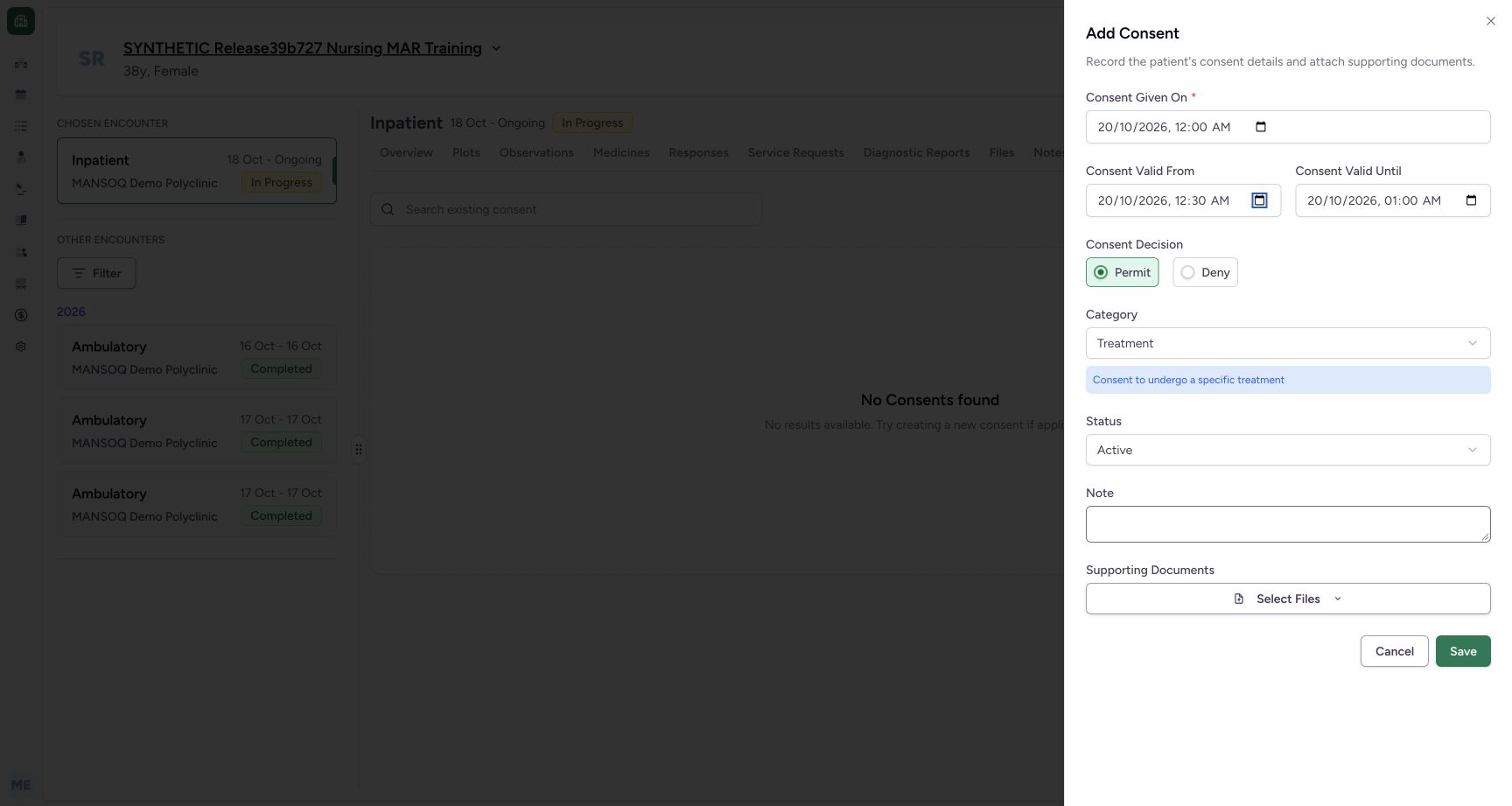
Practise Consent decision and category choices without saving
Use the two decision buttons and all six installed category choices on the fictional form, then restore Deny and Privacy Consent before the later draft save.
Doctor
 123
123Restored valid fictional period after refusals
Capture details
Actual committed3dfb software. Temporary choices are unsaved; one fictional metadata Draft was created and the same record corrected to Entered in Error. Native required-date and optional-clear validation limitations retained. No actual legal consent, refusal, signature or patient-care decision.
Image SHA-256 6ad0b1cc93f02e18f8346423c968c9da744e9b52fe54e53ba3cca542fda81589
- Verify restored Given On: The final fictional date is 20 October 12:00 AM.
- Verify restored start: Valid From is back to 12:30 AM.
- Verify restored end: Valid Until is back to 01:00 AM.
13 of 13 content blocks have reviewed image alignment. Missing overview or prerequisite images remain open.
Before you begin
- Use an authorised ordinary Doctor account with write access to the assigned active synthetic encounter. Actual screenshots show the Doctor role only.
 1234
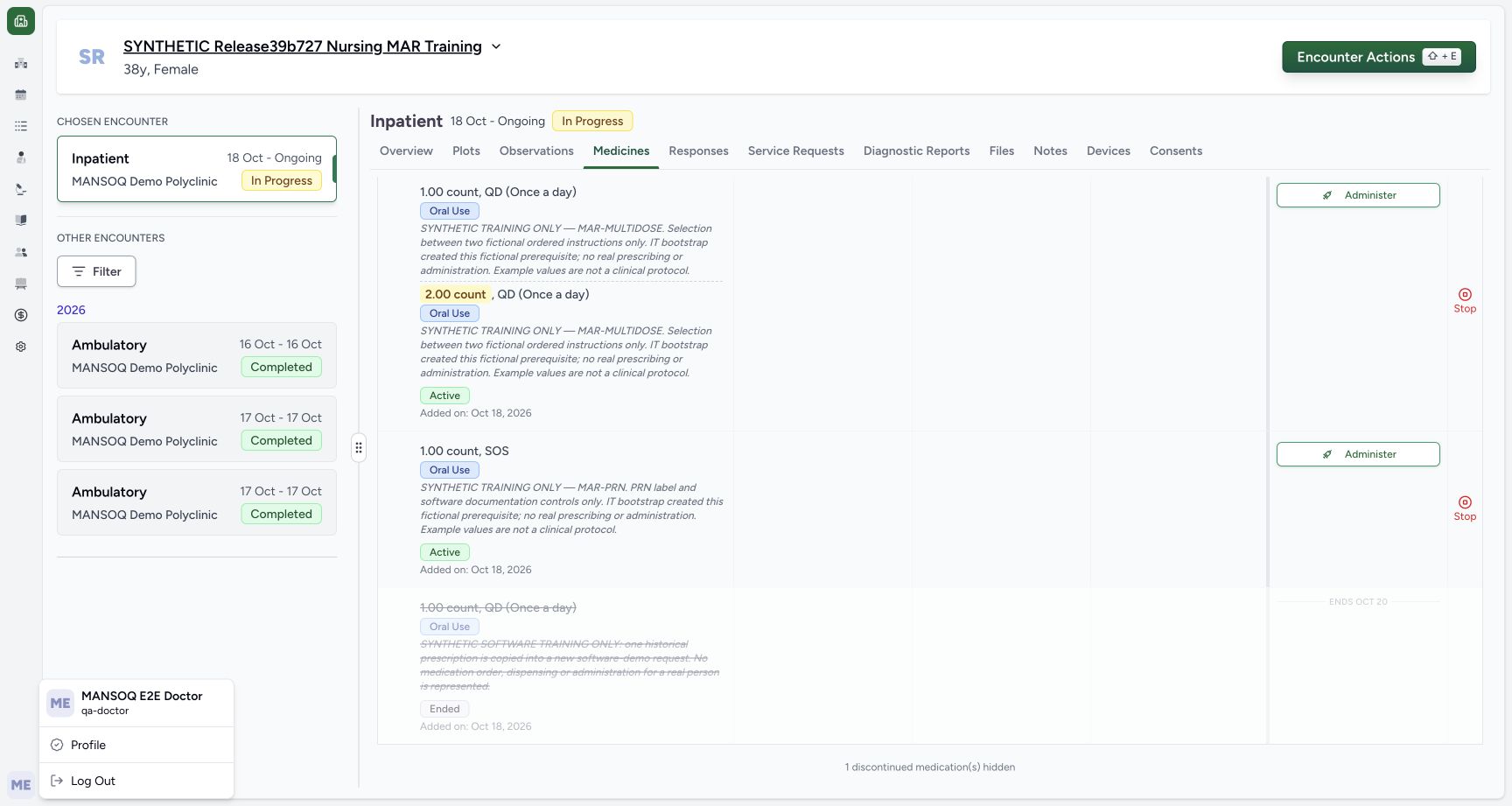
1234Recorded release 3dfb7c9f · 2026-10-19T23:23:58.372Z · 1728 × 921 Doctor synthetic encounter context
Capture details
Actual committed3dfb software. Temporary choices are unsaved; one fictional metadata Draft was created and the same record corrected to Entered in Error. Native required-date and optional-clear validation limitations retained. No actual legal consent, refusal, signature or patient-care decision.
Image SHA-256
deecf6cdd228d8bdb8b6b06d1fa10f19dfba388456dfd0982db2268935d14558- Confirm the Doctor account: Read MANSOQ E2E Doctor and qa-doctor.
- Confirm the fictional patient: Use the named SYNTHETIC training patient.
- Read In Progress: The chosen Inpatient encounter is active.
- Choose Consents: Open the encounter Consents tab.
- Use only an approved fictional software-training case. No person gives or refuses consent, no signature is collected, and no legal, treatment, research or disclosure authority is represented.
 1
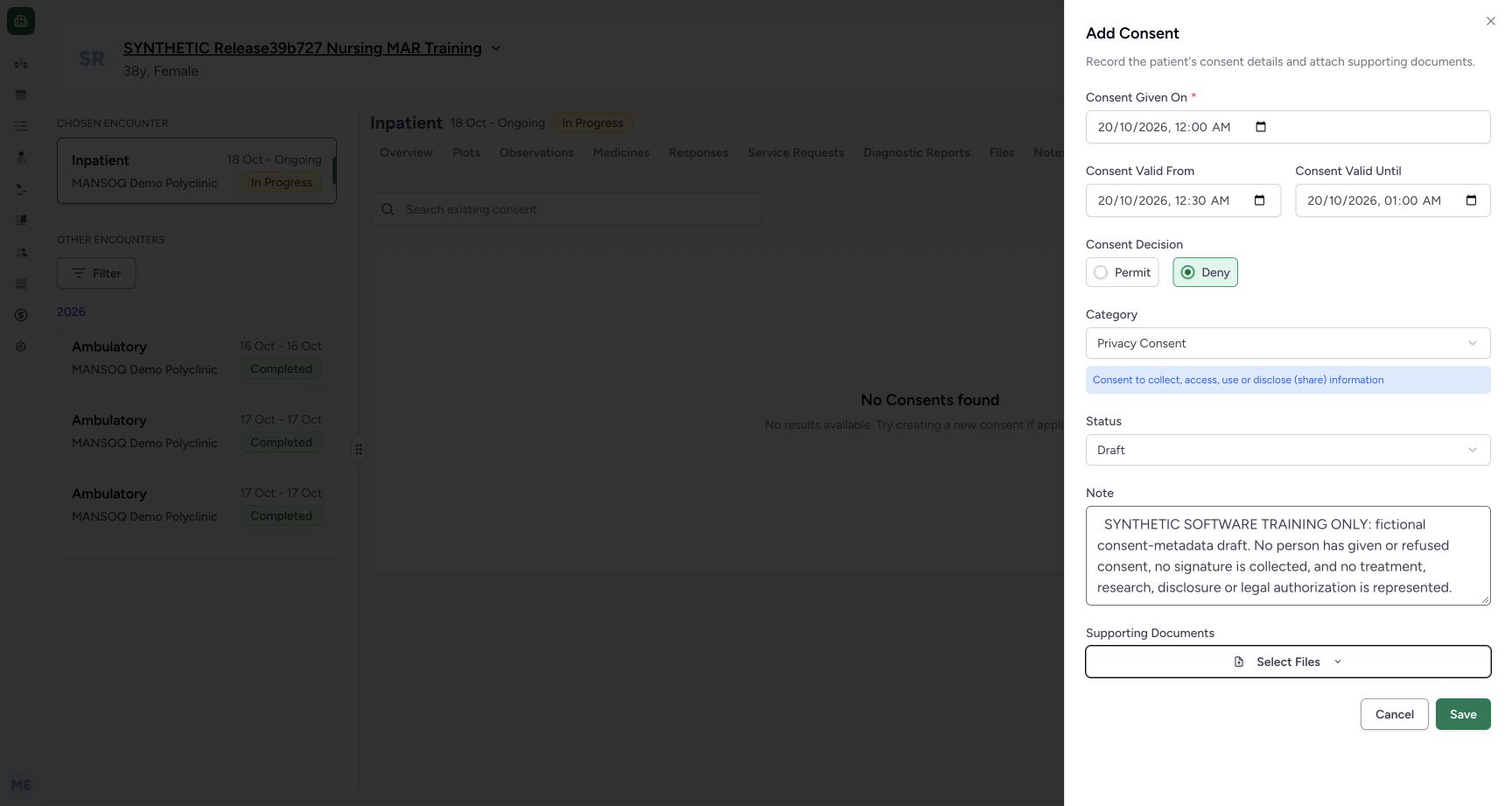
1Recorded release 3dfb7c9f · 2026-10-19T23:28:59.875Z · 1728 × 921 Final fictional draft full note before save
Capture details
Actual committed3dfb software. Temporary choices are unsaved; one fictional metadata Draft was created and the same record corrected to Entered in Error. Native required-date and optional-clear validation limitations retained. No actual legal consent, refusal, signature or patient-care decision.
Image SHA-256
e189d4247390b7fecda8bda2de7f8919f85bec69b4c8844dd83ae505b1730570- Enter and read the full training note: The entire final fictional create note is visible after blur.
1. Continue on the same unsaved fictional form
Continue after restoring the date controls in the preceding guide. Do not create another record for each choice. Every category and decision change in this guide is an unsaved interface exercise on the explicitly fictional case.
123Restored valid fictional period after refusals
Capture details
Actual committed3dfb software. Temporary choices are unsaved; one fictional metadata Draft was created and the same record corrected to Entered in Error. Native required-date and optional-clear validation limitations retained. No actual legal consent, refusal, signature or patient-care decision.
Image SHA-256 6ad0b1cc93f02e18f8346423c968c9da744e9b52fe54e53ba3cca542fda81589
- Verify restored Given On: The final fictional date is 20 October 12:00 AM.
- Verify restored start: Valid From is back to 12:30 AM.
- Verify restored end: Valid Until is back to 01:00 AM.
2. Select Deny, then Permit, then restore Deny
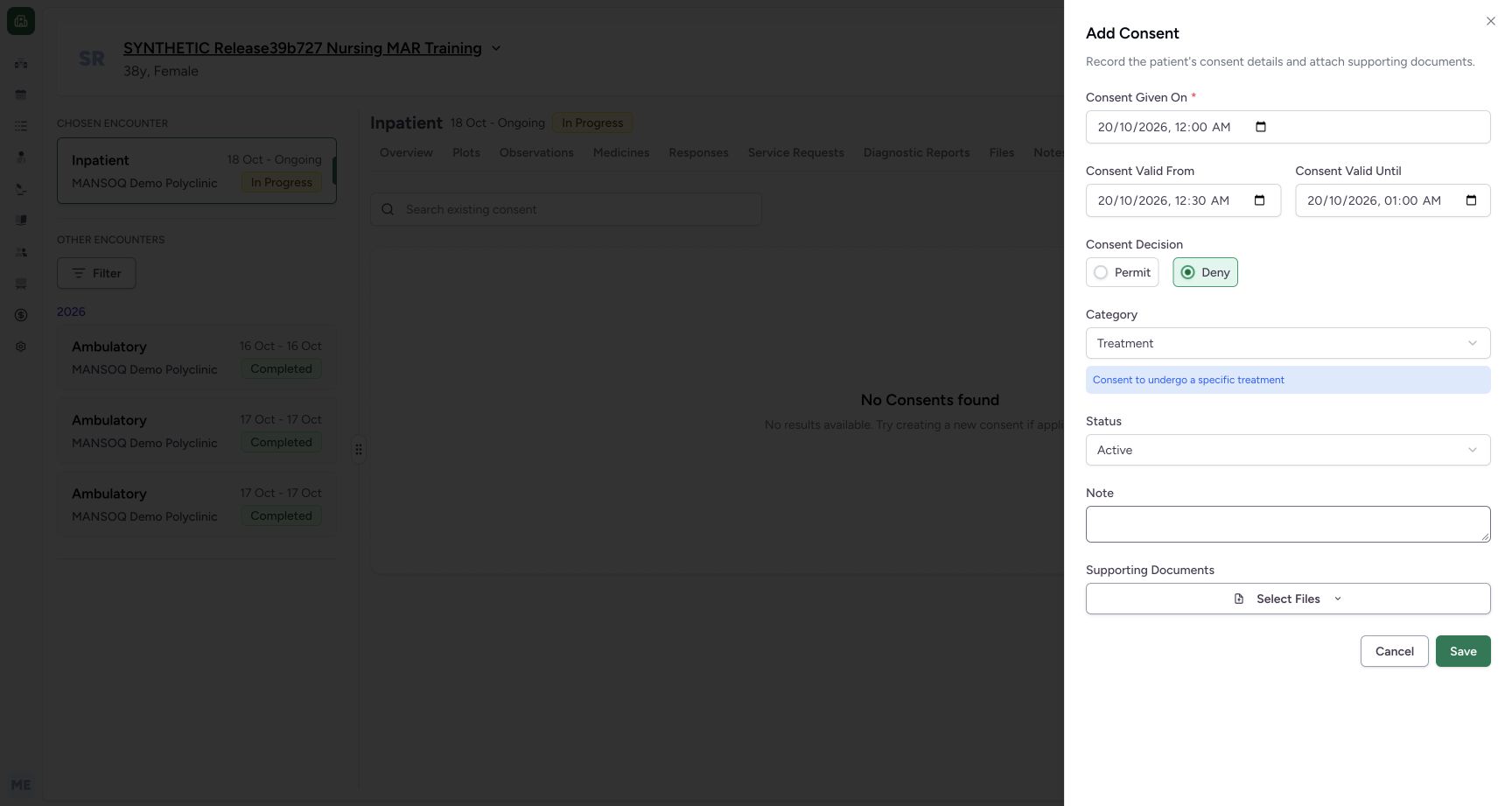
Choose Deny and read its selected radio state. Choose Permit and read that state. Restore Deny before continuing. These labels exercise stored software choices; neither selection records an actual person’s decision in this training example.
 12
12Unsaved decision deny selection
Capture details
Actual committed3dfb software. Temporary choices are unsaved; one fictional metadata Draft was created and the same record corrected to Entered in Error. Native required-date and optional-clear validation limitations retained. No actual legal consent, refusal, signature or patient-care decision.
Image SHA-256 0e107e55b481e24df20c3303fb916e69e77f69ea2ae0df8e5ed6dd02ce28504b
- Select and read Deny: Deny is selected on the unsaved form.
- Locate Permit for the next exercise: The alternative decision remains available.
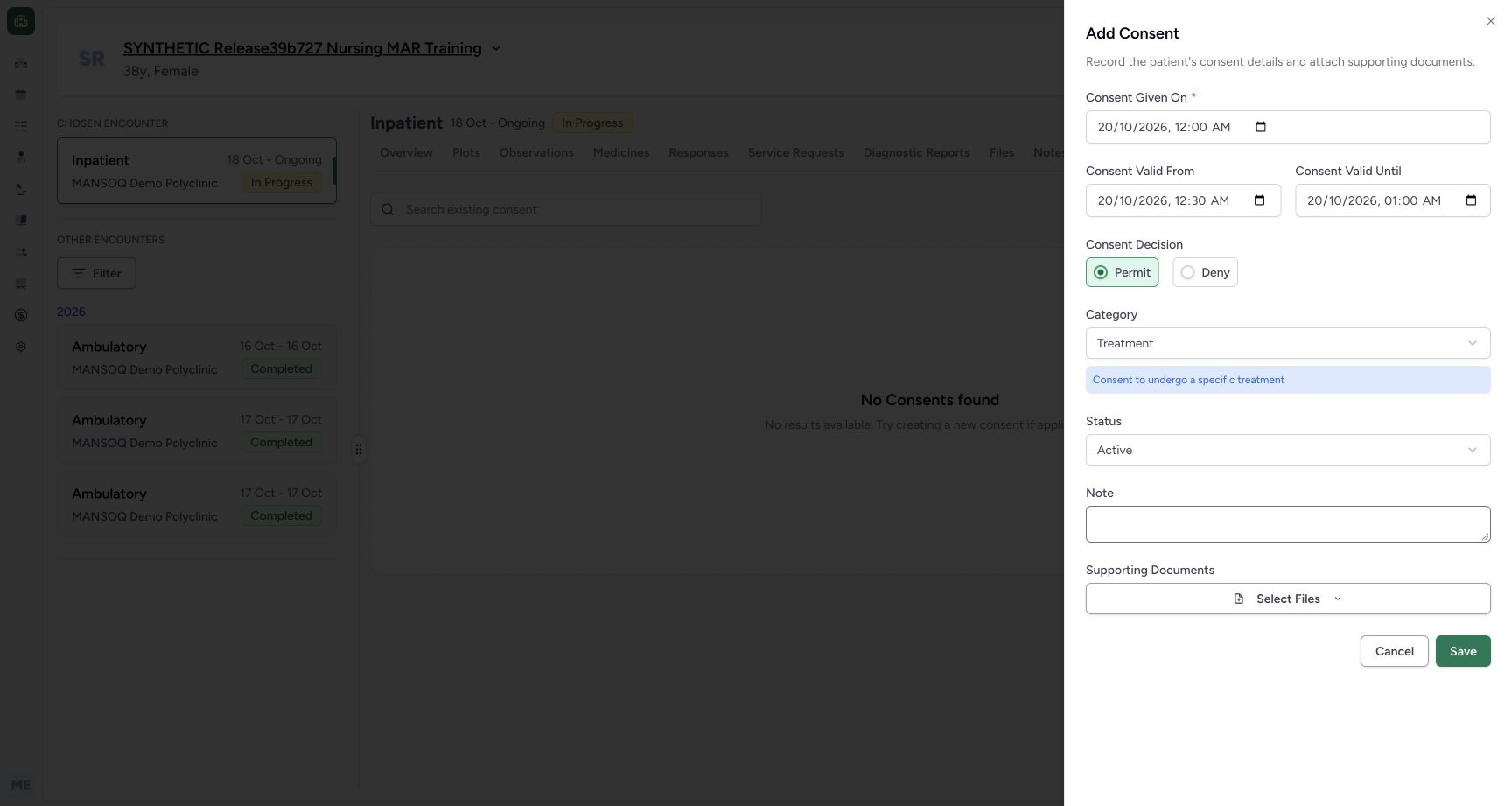 12
12Unsaved decision permit selection
Capture details
Actual committed3dfb software. Temporary choices are unsaved; one fictional metadata Draft was created and the same record corrected to Entered in Error. Native required-date and optional-clear validation limitations retained. No actual legal consent, refusal, signature or patient-care decision.
Image SHA-256 f0875f71b66f808d15ac292f7aa2633f20dc87f13de6d9b6714b378e1eb2f429
- Read selected Permit: This is a temporary unsaved selection.
- Restore Deny next: Return to the final fictional decision before saving.
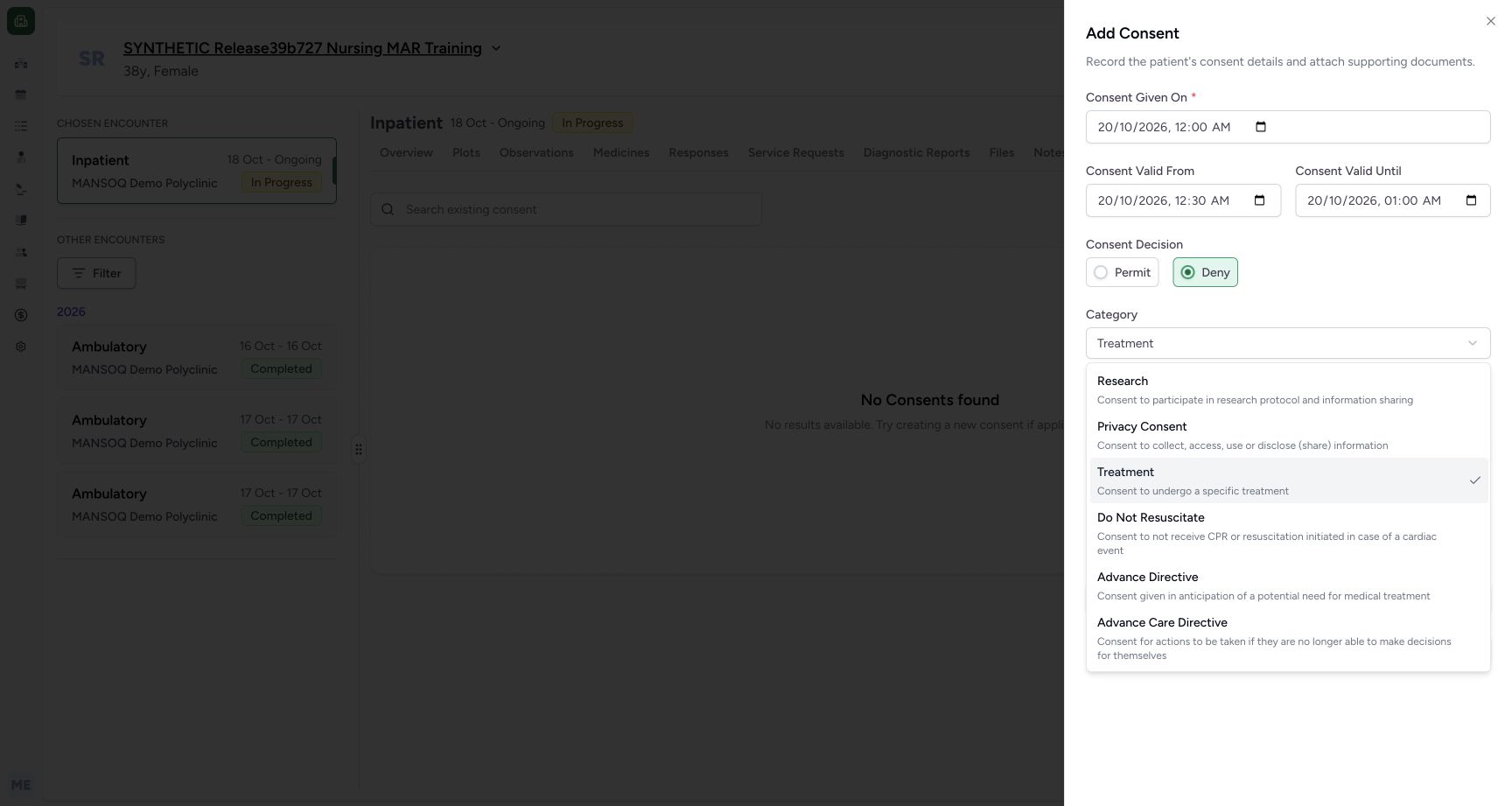 12345678
Six installed category options unsaved menu
Capture details
Actual committed3dfb software. Temporary choices are unsaved; one fictional metadata Draft was created and the same record corrected to Entered in Error. Native required-date and optional-clear validation limitations retained. No actual legal consent, refusal, signature or patient-care decision.
Image SHA-256 6d8495f5622ac1b44d8260dd1a28b131ed54111ab6be7f52dcfe6fb878d9e868
- Recheck Deny: The final decision has been restored before category exercises.
- Open Category: The installed six-option menu is open.
- Choose Research: Inspect this category without saving.
- Choose Privacy Consent: This is the final category to restore later.
- Choose Treatment: The menu shows the Treatment option.
- Choose Do Not Resuscitate only as an unsaved example: This software demonstration is not a resuscitation instruction.
- Choose Advance Directive only as an unsaved example: No legal directive is created here.
- Choose Advance Care Directive only as an unsaved example: Read the label and description without saving it.
3. Open the six-category menu
Open Category. The installed menu offers Research, Privacy Consent, Treatment, Do Not Resuscitate, Advance Directive and Advance Care Directive, each with explanatory text. Read the actual menu rather than assuming that every backend category appears here.
12345678Six installed category options unsaved menu
Capture details
Actual committed3dfb software. Temporary choices are unsaved; one fictional metadata Draft was created and the same record corrected to Entered in Error. Native required-date and optional-clear validation limitations retained. No actual legal consent, refusal, signature or patient-care decision.
Image SHA-256 6d8495f5622ac1b44d8260dd1a28b131ed54111ab6be7f52dcfe6fb878d9e868
- Recheck Deny: The final decision has been restored before category exercises.
- Open Category: The installed six-option menu is open.
- Choose Research: Inspect this category without saving.
- Choose Privacy Consent: This is the final category to restore later.
- Choose Treatment: The menu shows the Treatment option.
- Choose Do Not Resuscitate only as an unsaved example: This software demonstration is not a resuscitation instruction.
- Choose Advance Directive only as an unsaved example: No legal directive is created here.
- Choose Advance Care Directive only as an unsaved example: Read the label and description without saving it.
4. Select Research and inspect its helper text
Choose Research. The selected label and the blue explanatory line change while the form remains unsaved. This is only a software-control demonstration, with no research enrolment, permission or information-sharing action.
12345678Six installed category options unsaved menu
Capture details
Actual committed3dfb software. Temporary choices are unsaved; one fictional metadata Draft was created and the same record corrected to Entered in Error. Native required-date and optional-clear validation limitations retained. No actual legal consent, refusal, signature or patient-care decision.
Image SHA-256 6d8495f5622ac1b44d8260dd1a28b131ed54111ab6be7f52dcfe6fb878d9e868
- Recheck Deny: The final decision has been restored before category exercises.
- Open Category: The installed six-option menu is open.
- Choose Research: Inspect this category without saving.
- Choose Privacy Consent: This is the final category to restore later.
- Choose Treatment: The menu shows the Treatment option.
- Choose Do Not Resuscitate only as an unsaved example: This software demonstration is not a resuscitation instruction.
- Choose Advance Directive only as an unsaved example: No legal directive is created here.
- Choose Advance Care Directive only as an unsaved example: Read the label and description without saving it.
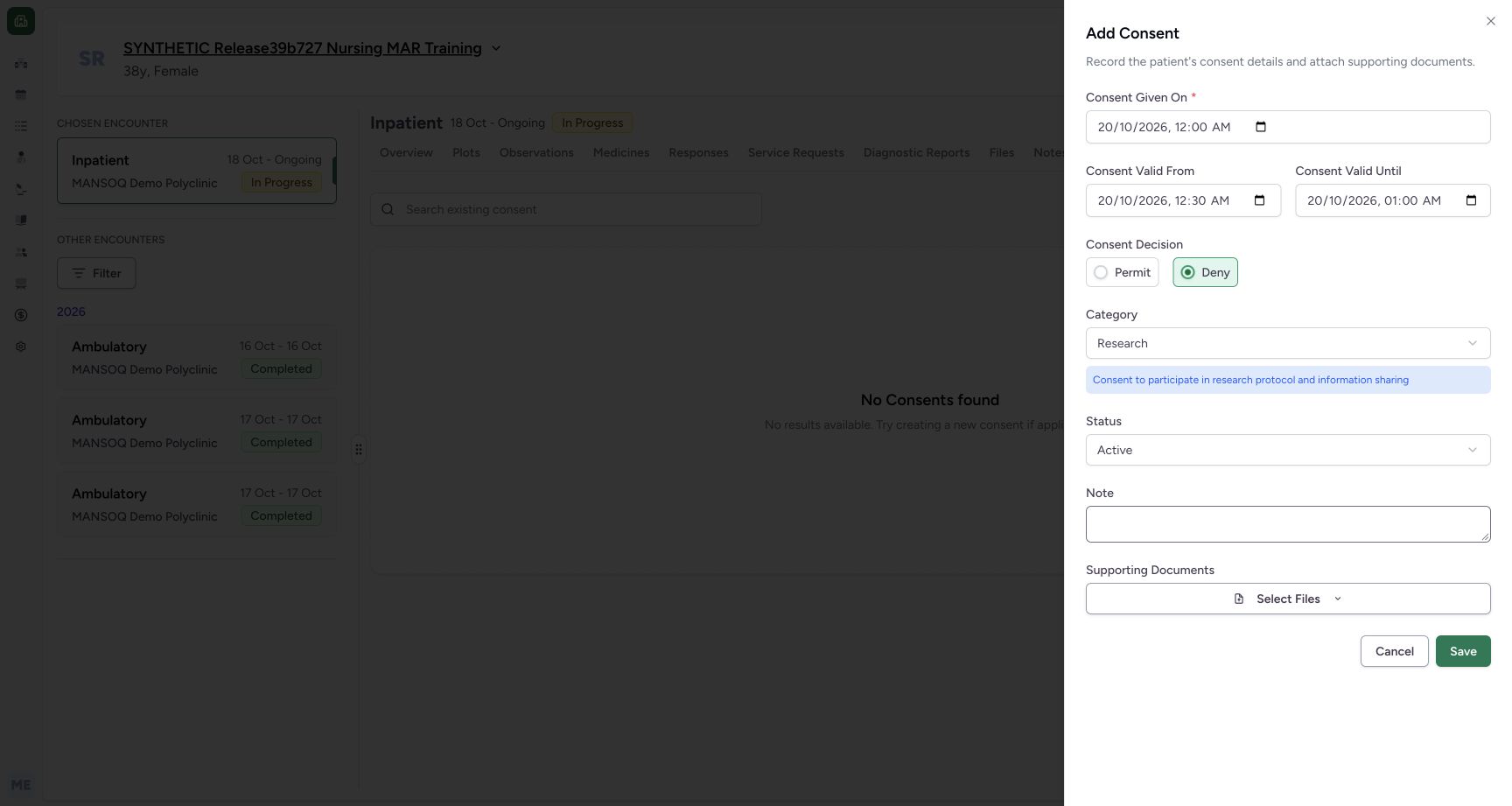 12
12Unsaved category research description
Capture details
Actual committed3dfb software. Temporary choices are unsaved; one fictional metadata Draft was created and the same record corrected to Entered in Error. Native required-date and optional-clear validation limitations retained. No actual legal consent, refusal, signature or patient-care decision.
Image SHA-256 77a3cded7bcc4589263b14757c18cb87d9890934017314abc798a25a37180e26
- Read selected Research: This actual category selection is still unsaved.
- Read the category helper text: The explanatory line belongs to the currently selected category.
5. Inspect the Do Not Resuscitate category label
Reopen Category and choose Do Not Resuscitate. Read the selected label and its helper text without saving. This example does not establish a resuscitation instruction or authorise any action for a real person.
12345678Six installed category options unsaved menu
Capture details
Actual committed3dfb software. Temporary choices are unsaved; one fictional metadata Draft was created and the same record corrected to Entered in Error. Native required-date and optional-clear validation limitations retained. No actual legal consent, refusal, signature or patient-care decision.
Image SHA-256 6d8495f5622ac1b44d8260dd1a28b131ed54111ab6be7f52dcfe6fb878d9e868
- Recheck Deny: The final decision has been restored before category exercises.
- Open Category: The installed six-option menu is open.
- Choose Research: Inspect this category without saving.
- Choose Privacy Consent: This is the final category to restore later.
- Choose Treatment: The menu shows the Treatment option.
- Choose Do Not Resuscitate only as an unsaved example: This software demonstration is not a resuscitation instruction.
- Choose Advance Directive only as an unsaved example: No legal directive is created here.
- Choose Advance Care Directive only as an unsaved example: Read the label and description without saving it.
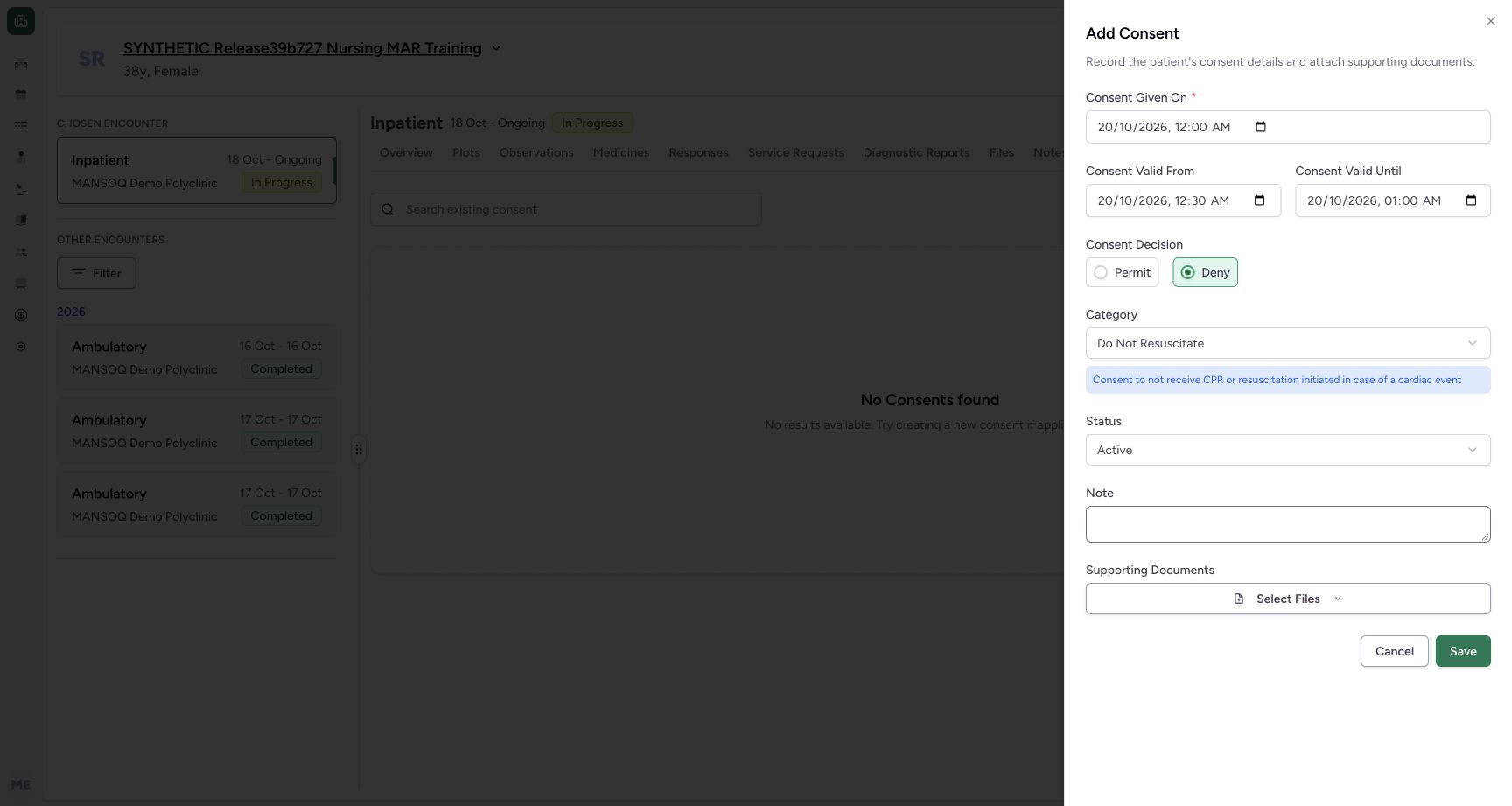 12
12Unsaved category dnr description only
Capture details
Actual committed3dfb software. Temporary choices are unsaved; one fictional metadata Draft was created and the same record corrected to Entered in Error. Native required-date and optional-clear validation limitations retained. No actual legal consent, refusal, signature or patient-care decision.
Image SHA-256 6cfa45cb844f4b88489f6029694f07e116119c8844c37899d1fff01f6592f8d6
- Read selected Do Not Resuscitate: This actual category selection is still unsaved.
- Read the category helper text: The explanatory line belongs to the currently selected category.
6. Inspect Advance Directive
Reopen Category and choose Advance Directive. Read the changed selected value and helper line. Leave the form unsaved; no directive or legal instruction is created by this demonstration.
12345678Six installed category options unsaved menu
Capture details
Actual committed3dfb software. Temporary choices are unsaved; one fictional metadata Draft was created and the same record corrected to Entered in Error. Native required-date and optional-clear validation limitations retained. No actual legal consent, refusal, signature or patient-care decision.
Image SHA-256 6d8495f5622ac1b44d8260dd1a28b131ed54111ab6be7f52dcfe6fb878d9e868
- Recheck Deny: The final decision has been restored before category exercises.
- Open Category: The installed six-option menu is open.
- Choose Research: Inspect this category without saving.
- Choose Privacy Consent: This is the final category to restore later.
- Choose Treatment: The menu shows the Treatment option.
- Choose Do Not Resuscitate only as an unsaved example: This software demonstration is not a resuscitation instruction.
- Choose Advance Directive only as an unsaved example: No legal directive is created here.
- Choose Advance Care Directive only as an unsaved example: Read the label and description without saving it.
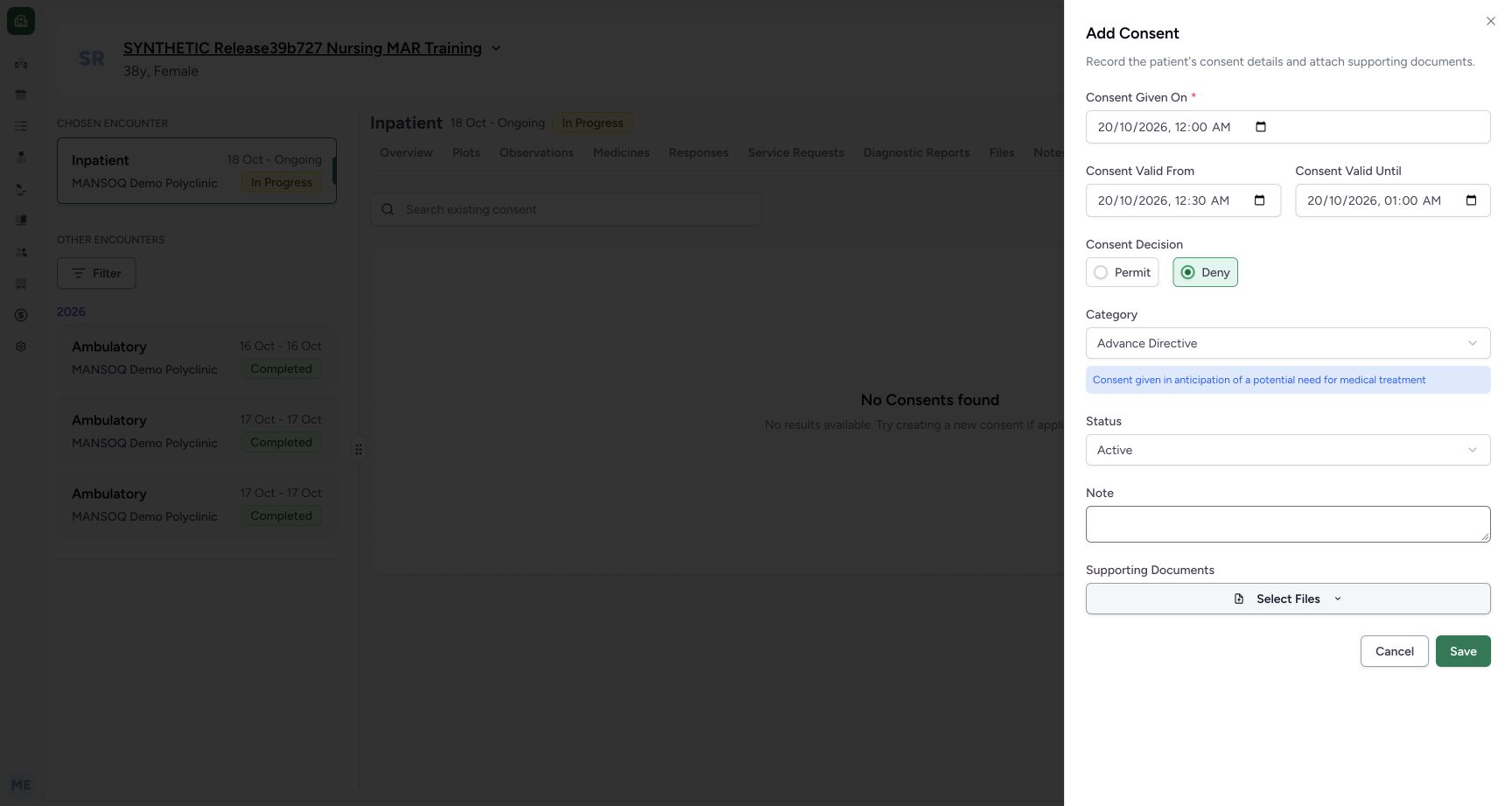 12
12Unsaved category advance directive description only
Capture details
Actual committed3dfb software. Temporary choices are unsaved; one fictional metadata Draft was created and the same record corrected to Entered in Error. Native required-date and optional-clear validation limitations retained. No actual legal consent, refusal, signature or patient-care decision.
Image SHA-256 3dbb66732318014fcfec812f26035157d515501b7c77413def45f29bb288b054
- Read selected Advance Directive: This actual category selection is still unsaved.
- Read the category helper text: The explanatory line belongs to the currently selected category.
7. Inspect Advance Care Directive
Reopen Category and choose Advance Care Directive. Its helper text wraps onto a second line and moves the lower controls slightly. Read the actual value instead of relying on a fixed vertical position. Leave it unsaved.
12345678Six installed category options unsaved menu
Capture details
Actual committed3dfb software. Temporary choices are unsaved; one fictional metadata Draft was created and the same record corrected to Entered in Error. Native required-date and optional-clear validation limitations retained. No actual legal consent, refusal, signature or patient-care decision.
Image SHA-256 6d8495f5622ac1b44d8260dd1a28b131ed54111ab6be7f52dcfe6fb878d9e868
- Recheck Deny: The final decision has been restored before category exercises.
- Open Category: The installed six-option menu is open.
- Choose Research: Inspect this category without saving.
- Choose Privacy Consent: This is the final category to restore later.
- Choose Treatment: The menu shows the Treatment option.
- Choose Do Not Resuscitate only as an unsaved example: This software demonstration is not a resuscitation instruction.
- Choose Advance Directive only as an unsaved example: No legal directive is created here.
- Choose Advance Care Directive only as an unsaved example: Read the label and description without saving it.
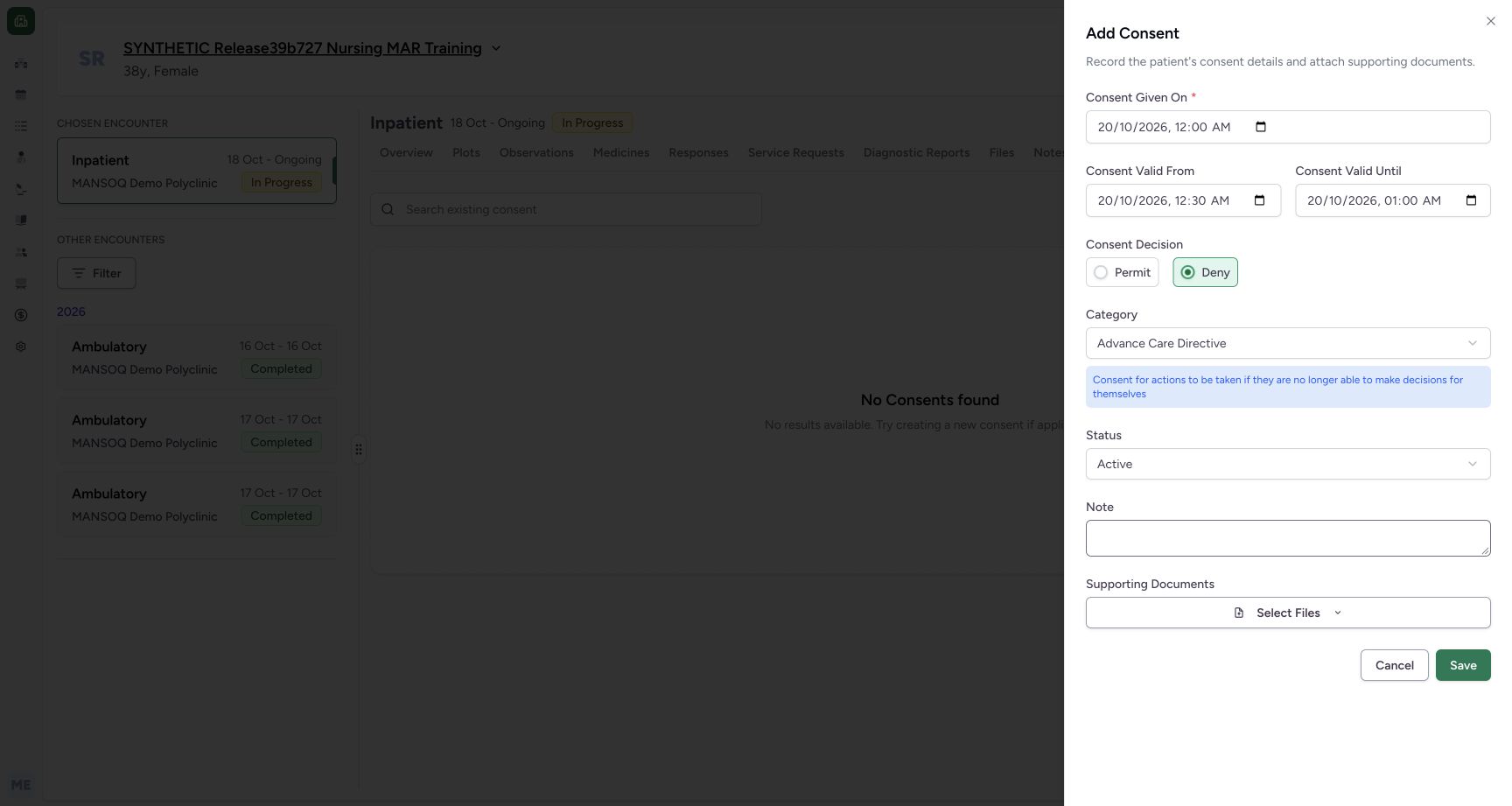 12
12Unsaved category advance care directive description only
Capture details
Actual committed3dfb software. Temporary choices are unsaved; one fictional metadata Draft was created and the same record corrected to Entered in Error. Native required-date and optional-clear validation limitations retained. No actual legal consent, refusal, signature or patient-care decision.
Image SHA-256 a2247bdc3c0072c65318bb9dddd834f925fe29aa33e57485001371ff9a3bf693
- Read selected Advance Care Directive: This actual category selection is still unsaved.
- Read the category helper text: The explanatory line belongs to the currently selected category.
8. Inspect Treatment
Reopen Category and choose Treatment. The blue helper line changes again. This unsaved metadata selection does not authorise treatment.
12345678Six installed category options unsaved menu
Capture details
Actual committed3dfb software. Temporary choices are unsaved; one fictional metadata Draft was created and the same record corrected to Entered in Error. Native required-date and optional-clear validation limitations retained. No actual legal consent, refusal, signature or patient-care decision.
Image SHA-256 6d8495f5622ac1b44d8260dd1a28b131ed54111ab6be7f52dcfe6fb878d9e868
- Recheck Deny: The final decision has been restored before category exercises.
- Open Category: The installed six-option menu is open.
- Choose Research: Inspect this category without saving.
- Choose Privacy Consent: This is the final category to restore later.
- Choose Treatment: The menu shows the Treatment option.
- Choose Do Not Resuscitate only as an unsaved example: This software demonstration is not a resuscitation instruction.
- Choose Advance Directive only as an unsaved example: No legal directive is created here.
- Choose Advance Care Directive only as an unsaved example: Read the label and description without saving it.
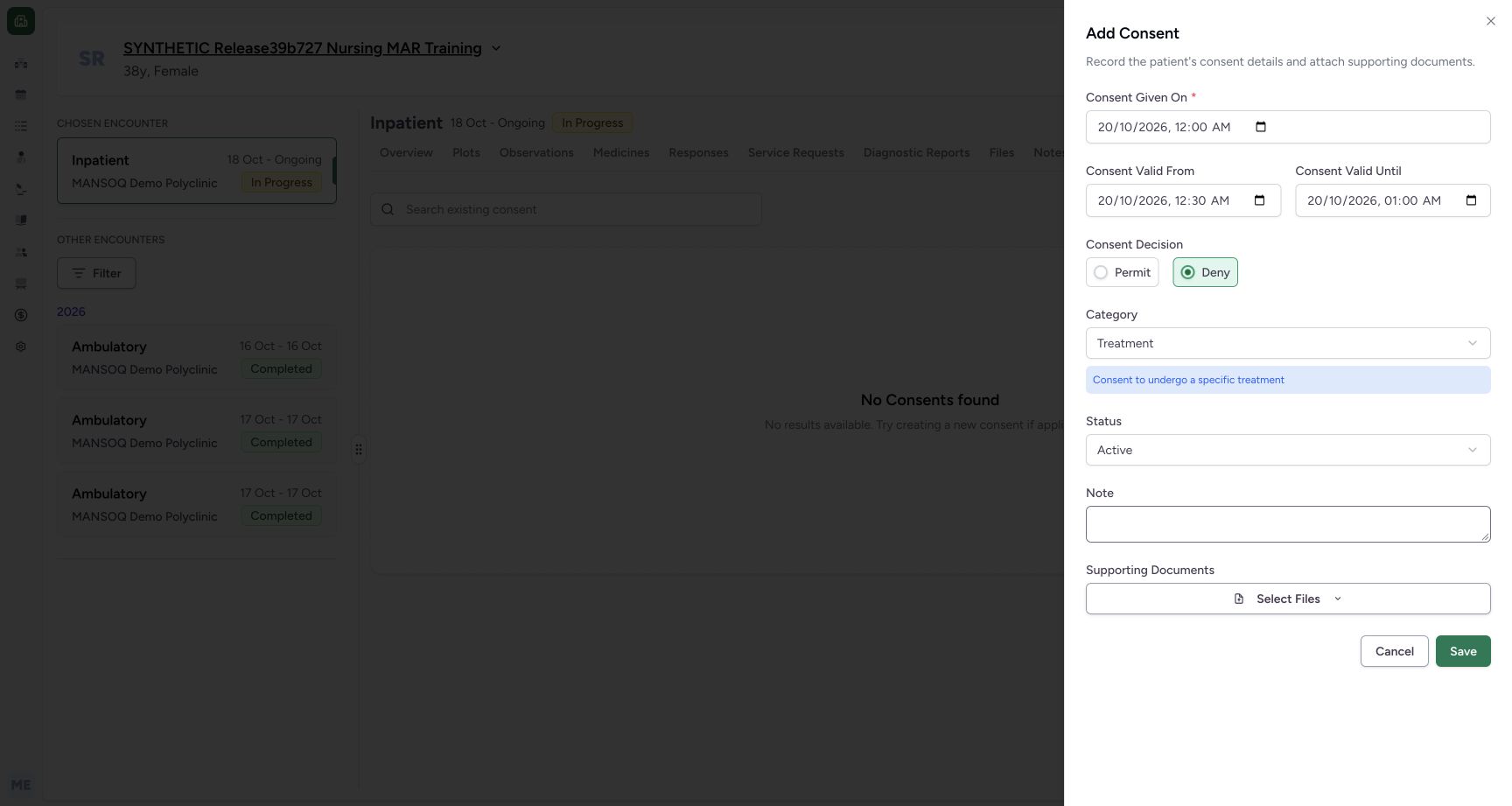 12
12Unsaved category treatment description only
Capture details
Actual committed3dfb software. Temporary choices are unsaved; one fictional metadata Draft was created and the same record corrected to Entered in Error. Native required-date and optional-clear validation limitations retained. No actual legal consent, refusal, signature or patient-care decision.
Image SHA-256 0e107e55b481e24df20c3303fb916e69e77f69ea2ae0df8e5ed6dd02ce28504b
- Read selected Treatment: This actual category selection is still unsaved.
- Read the category helper text: The explanatory line belongs to the currently selected category.
9. Restore Privacy Consent and Deny
Reopen Category and select Privacy Consent. Confirm its explanatory line and recheck Deny. Keep the restored dates unchanged. The next guide changes Status to Draft and adds the explicit training note before the single save.
12345678Six installed category options unsaved menu
Capture details
Actual committed3dfb software. Temporary choices are unsaved; one fictional metadata Draft was created and the same record corrected to Entered in Error. Native required-date and optional-clear validation limitations retained. No actual legal consent, refusal, signature or patient-care decision.
Image SHA-256 6d8495f5622ac1b44d8260dd1a28b131ed54111ab6be7f52dcfe6fb878d9e868
- Recheck Deny: The final decision has been restored before category exercises.
- Open Category: The installed six-option menu is open.
- Choose Research: Inspect this category without saving.
- Choose Privacy Consent: This is the final category to restore later.
- Choose Treatment: The menu shows the Treatment option.
- Choose Do Not Resuscitate only as an unsaved example: This software demonstration is not a resuscitation instruction.
- Choose Advance Directive only as an unsaved example: No legal directive is created here.
- Choose Advance Care Directive only as an unsaved example: Read the label and description without saving it.
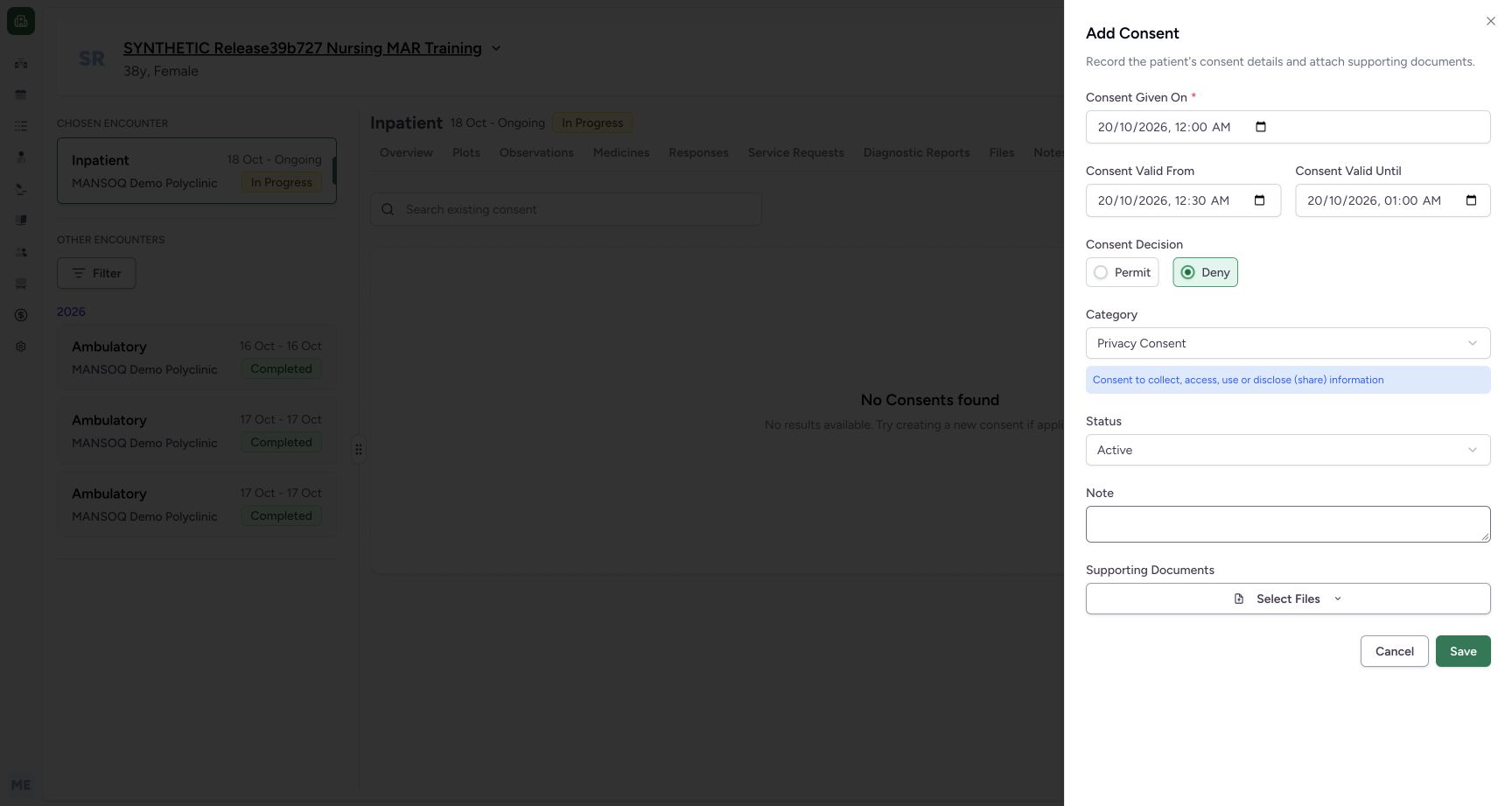 123
123Restored privacy category deny unsaved
Capture details
Actual committed3dfb software. Temporary choices are unsaved; one fictional metadata Draft was created and the same record corrected to Entered in Error. Native required-date and optional-clear validation limitations retained. No actual legal consent, refusal, signature or patient-care decision.
Image SHA-256 929f697f8e663a9357bab44ac8c9cb0fe02b42ffb5c592f4e6994d5a121fc646
- Read selected Privacy Consent: This actual category selection is still unsaved.
- Read the category helper text: The explanatory line belongs to the currently selected category.
- Verify Deny is restored: Keep the final Deny/Privacy combination for the later Draft save.
Distinguish selection from a completed process
The six category labels are selectable metadata in this observed form. Reading their descriptions or trying them unsaved is not evidence of a signature, competency assessment, legal consent, refusal, disclosure or treatment decision.
12345678Six installed category options unsaved menu
Capture details
Actual committed3dfb software. Temporary choices are unsaved; one fictional metadata Draft was created and the same record corrected to Entered in Error. Native required-date and optional-clear validation limitations retained. No actual legal consent, refusal, signature or patient-care decision.
Image SHA-256 6d8495f5622ac1b44d8260dd1a28b131ed54111ab6be7f52dcfe6fb878d9e868
- Recheck Deny: The final decision has been restored before category exercises.
- Open Category: The installed six-option menu is open.
- Choose Research: Inspect this category without saving.
- Choose Privacy Consent: This is the final category to restore later.
- Choose Treatment: The menu shows the Treatment option.
- Choose Do Not Resuscitate only as an unsaved example: This software demonstration is not a resuscitation instruction.
- Choose Advance Directive only as an unsaved example: No legal directive is created here.
- Choose Advance Care Directive only as an unsaved example: Read the label and description without saving it.
123Restored privacy category deny unsaved
Capture details
Actual committed3dfb software. Temporary choices are unsaved; one fictional metadata Draft was created and the same record corrected to Entered in Error. Native required-date and optional-clear validation limitations retained. No actual legal consent, refusal, signature or patient-care decision.
Image SHA-256 929f697f8e663a9357bab44ac8c9cb0fe02b42ffb5c592f4e6994d5a121fc646
- Read selected Privacy Consent: This actual category selection is still unsaved.
- Read the category helper text: The explanatory line belongs to the currently selected category.
- Verify Deny is restored: Keep the final Deny/Privacy combination for the later Draft save.
Source evidence
Every citation uses this exact committed version. The private source repository requires access.
- repositories/platform/mansoq-web/src/components/Consent/ConsentFormSheet.tsx:68 ·
3dfb7c9f519fb5b4cd4452439f3c12346bf58319Source file checksum
b89ccb97b14997364d4c4281498f9e8cbebbcd2d4a8d5b8f6f11544465dbac09 - repositories/platform/mansoq-web/src/pages/Encounters/tabs/consents.tsx:26 ·
3dfb7c9f519fb5b4cd4452439f3c12346bf58319Source file checksum
2f3ee4fe34e9761b7c272dd9e51afbc5bfda09b16edbaf8e2fe6132e47486ddd - repositories/platform/mansoq-web/src/pages/Encounters/ConsentDetail.tsx:56 ·
3dfb7c9f519fb5b4cd4452439f3c12346bf58319Source file checksum
1c91231813f0908fdba7b12023998bad88b4148d378281ca727adf42211d422a - repositories/platform/mansoq-web/src/types/consent/consent.ts:4 ·
3dfb7c9f519fb5b4cd4452439f3c12346bf58319Source file checksum
90674a2497e6024bd015c711593046ac06e348e329d1be3b2c48dfcb448a5581 - repositories/platform/mansoq-web/src/types/consent/consentApi.ts:11 ·
3dfb7c9f519fb5b4cd4452439f3c12346bf58319Source file checksum
43986d090fb6eed6c4ead66df25668dcec638ccf6f8b59479a48d2b003427fbc - repositories/platform/mansoq-web/src/components/Common/DateTimeInput.tsx:6 ·
3dfb7c9f519fb5b4cd4452439f3c12346bf58319Source file checksum
72a885cd20cc0f506da42218669bb8997eefb653d17ef4bb30895ba57cfd4d7f - repositories/platform/mansoq-web/src/lib/validators.ts:3 ·
3dfb7c9f519fb5b4cd4452439f3c12346bf58319Source file checksum
de6a8b925bc793e8145419ed501d3aee37b6d4caf4078e5b78e14661ddbdcc46 - repositories/platform/mansoq-web/src/pages/Encounters/utils/EncounterProvider.tsx:162 ·
3dfb7c9f519fb5b4cd4452439f3c12346bf58319Source file checksum
d2609fc0452c91c20104237bf02be40ecb3bf48225011aba1f4bca2d50620d75 - repositories/platform/mansoq-web/src/pages/Encounters/EncounterShow.tsx:186 ·
3dfb7c9f519fb5b4cd4452439f3c12346bf58319Source file checksum
dba481a8490fa06802648aae1791dc0d91668e6e231e223d6dc4a69369b344d8 - repositories/platform/mansoq-web/src/Routers/routes/PatientRoutes.tsx:9 ·
3dfb7c9f519fb5b4cd4452439f3c12346bf58319Source file checksum
8e3b39ed6e265dc91a238af6ac080ffc7006a7b60e2337908641f1bdf6ec4f31 - repositories/platform/mansoq-web/src/components/ui/RadioInput.tsx:6 ·
3dfb7c9f519fb5b4cd4452439f3c12346bf58319Source file checksum
17b849d60a4f860fdb9f2384625fe43b2bc99fc1179019728c57511fce74813d - repositories/platform/mansoq-web/public/locale/en.json:1480 ·
3dfb7c9f519fb5b4cd4452439f3c12346bf58319Source file checksum
96498c8b964dce856d43c09e4241708efdd175d935e7ebbd14fa2f8d62efa507 - repositories/platform/mansoq-core/mansoq/emr/api/viewsets/consent.py:26 ·
3dfb7c9f519fb5b4cd4452439f3c12346bf58319Source file checksum
39b1ef318198a4cbce7b5ee6bf7111b7e050914cf68e4603c4ea978daa69f7d4 - repositories/platform/mansoq-core/mansoq/emr/resources/consent/spec.py:21 ·
3dfb7c9f519fb5b4cd4452439f3c12346bf58319Source file checksum
a8f9c1b4b3d2b219bc887859a259d54a5a12304782515d78be08280436a54ff5 - repositories/platform/mansoq-core/mansoq/emr/models/consent.py:6 ·
3dfb7c9f519fb5b4cd4452439f3c12346bf58319Source file checksum
e6d3853b435445982b8f9cc4d937342be7a82d13b2ac02ac15487aa0c3b1c0e8 - repositories/platform/mansoq-core/mansoq/emr/api/viewsets/base.py:94 ·
3dfb7c9f519fb5b4cd4452439f3c12346bf58319Source file checksum
6a287dd315b8a4957b29c58e4bbc1bef7b8d9d257f9149f93045ff0adbdcae6c - repositories/platform/mansoq-core/mansoq/emr/api/viewsets/encounter_authz_base.py:15 ·
3dfb7c9f519fb5b4cd4452439f3c12346bf58319Source file checksum
852c308f990e192a1003e286be7dd57ddcc78840d218da1b90c1fab2eebec4f7 - repositories/platform/mansoq-core/mansoq/emr/api/viewsets/condition.py:25 ·
3dfb7c9f519fb5b4cd4452439f3c12346bf58319Source file checksum
f5d22181887766355e1aa847ff777b6f72a492eccce7820f716e4dcb28ad6172 - repositories/platform/mansoq-core/mansoq/security/authorization/encounter.py:97 ·
3dfb7c9f519fb5b4cd4452439f3c12346bf58319Source file checksum
0e7ff8afcfb57b2371201e16ee6fac26125d6e686af66ed7edd95e49bc07de78 - repositories/platform/mansoq-core/mansoq/security/permissions/encounter.py:51 ·
3dfb7c9f519fb5b4cd4452439f3c12346bf58319Source file checksum
06b74efb763810e425de8529660f748ebd56509c729ebc532c8d115102b29218 - repositories/platform/mansoq-core/mansoq/emr/resources/base.py:82 ·
3dfb7c9f519fb5b4cd4452439f3c12346bf58319Source file checksum
bc406c723888997dd99fc408cb3c5dec51fb0b54d10272ca31bfd8c98c893229 - repositories/platform/mansoq-core/mansoq/emr/models/base.py:8 ·
3dfb7c9f519fb5b4cd4452439f3c12346bf58319Source file checksum
61f50a19078c8a6435398e6b3e9174326038e9047129382c0d882f1e8f367b4c - repositories/platform/mansoq-core/mansoq/utils/models/base.py:15 ·
3dfb7c9f519fb5b4cd4452439f3c12346bf58319Source file checksum
1a5270f50188d1e0b044210773ca86a483b904f3a9724bb7b321d4ea463acfaf - repositories/platform/mansoq-core/mansoq/emr/models/file_upload.py:13 ·
3dfb7c9f519fb5b4cd4452439f3c12346bf58319Source file checksum
ebf811b496a25595a7d6ccb9db5181dff79aa6e6a3195819b4fff7292ba79692