 MANSOQ
 Clinical care · VERSION 3dfb7c9f
Copy one past prescription into a new request
Add only the identified training order to the unsaved form, review the carried date and copied fields, add clear software-demo notes and save once.
Doctor
 12
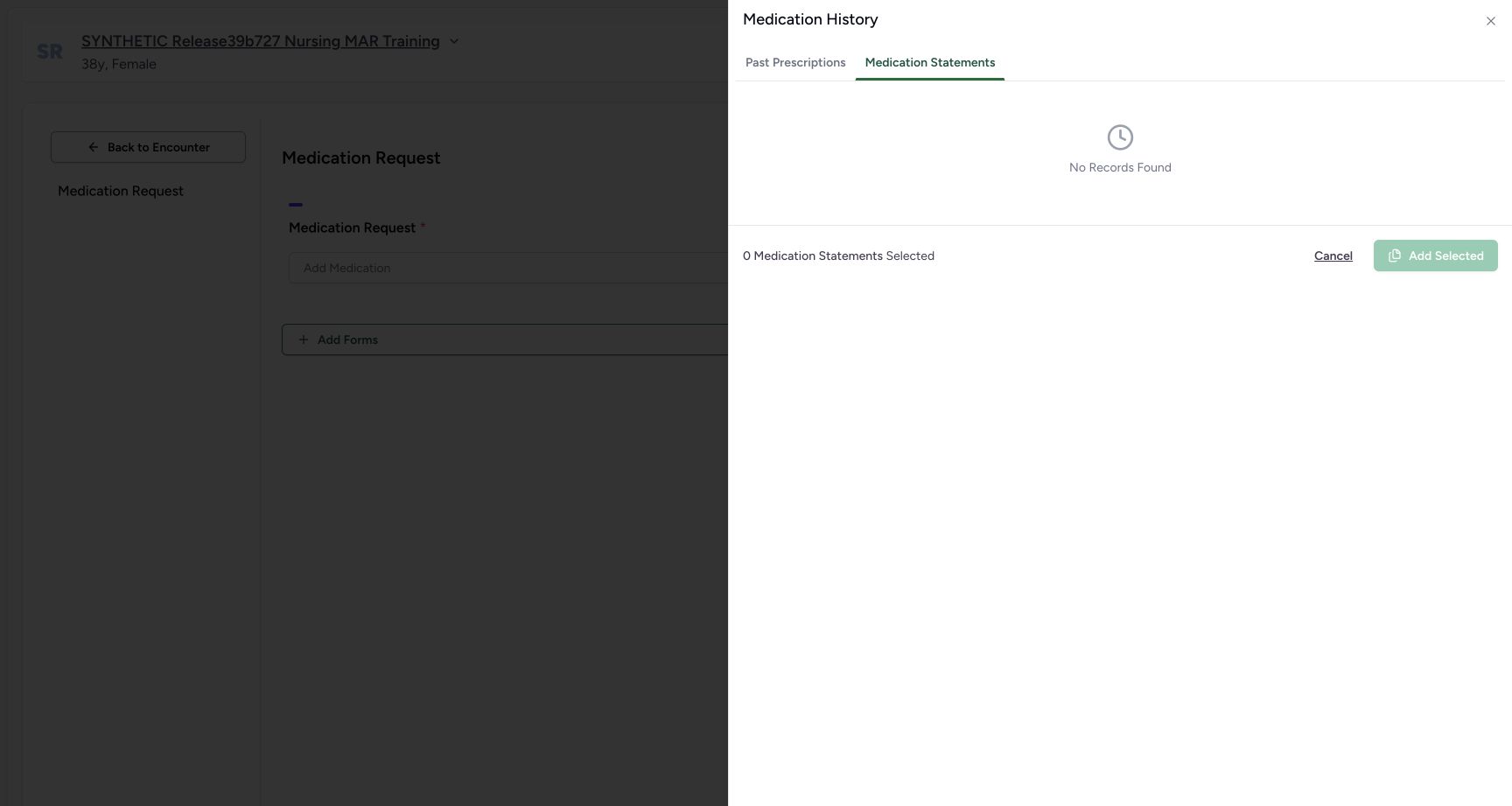
12Medication statements empty distinct tab
Capture details
Observed committed3dfb software in the existing day20-qualified Clinical profile. One new copy and its carried authored date are distinct from the retained original records. No clinical recommendation.
Image SHA-256 d84f4e7871303494f715f58a87bb04db660bc6eec6a6dc94f75a0da8999719d5
- Read No Records Found: This patient’s statement tab is empty here.
- Return to Past Prescriptions: Return to the existing prescription rows.
12 of 12 content blocks have reviewed image alignment. Missing overview or prerequisite images remain open.
Before you begin
- Use an authorised Doctor session with medication-write access to the assigned active synthetic encounter and patient-wide clinical history.
 12
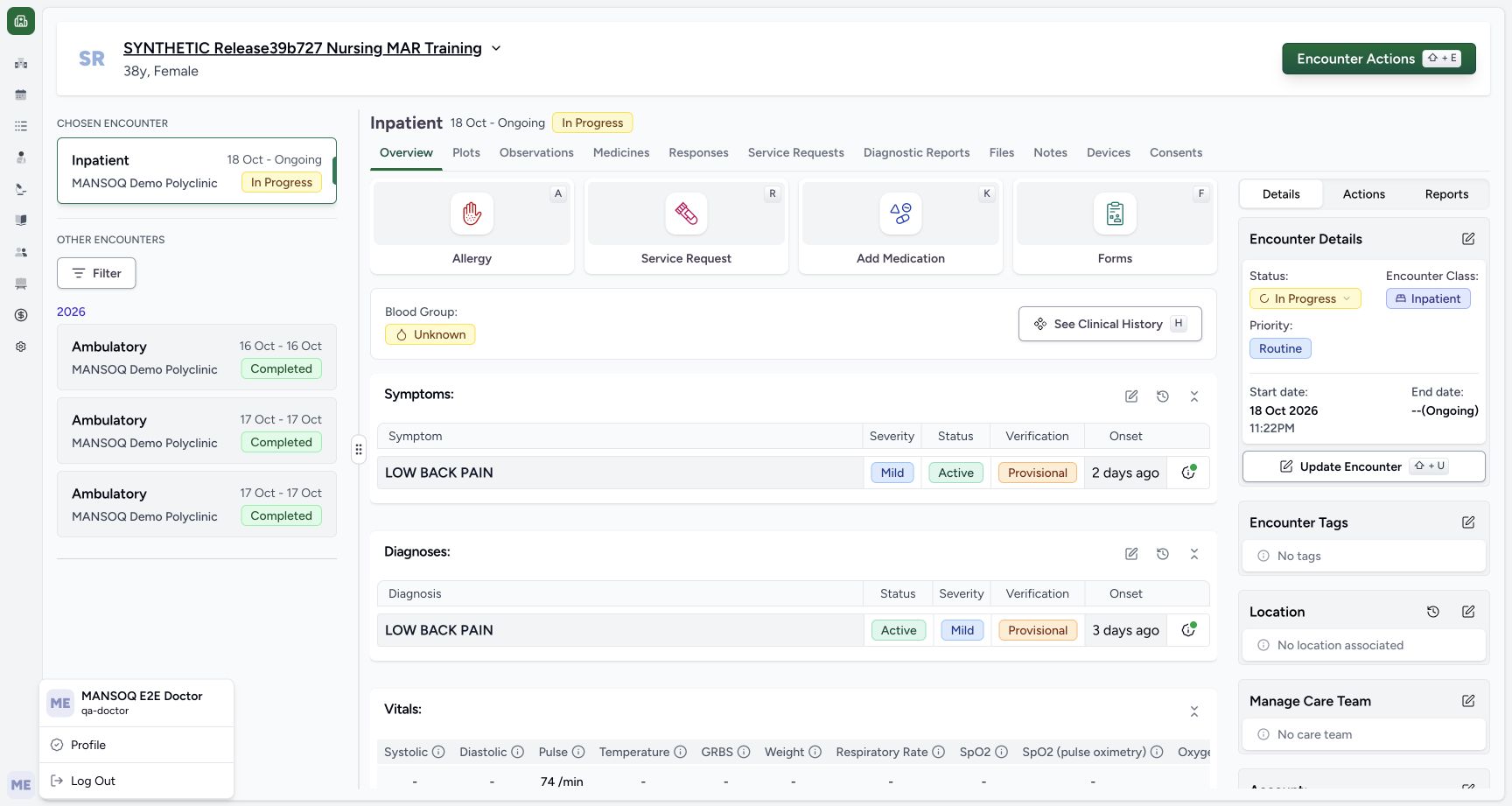
12Recorded release 3dfb7c9f · 2026-10-19T22:44:33.519Z · 1728 × 921 Existing doctor normal ui context
Capture details
Observed committed3dfb software in the existing day20-qualified Clinical profile. One new copy and its carried authored date are distinct from the retained original records. No clinical recommendation.
Image SHA-256
c4c86be73b5b112247d62300becd0ad1dc901cdbeefb607cc4e239abfbc154ef- Read the Doctor account: The account menu shows MANSOQ E2E Doctor and qa-doctor.
- Confirm the synthetic patient: Use the named software-training fixture.
- Use only approved fictional software-training records. All medicine, dose, schedule and date examples here are interface samples, not clinical guidance.
 12
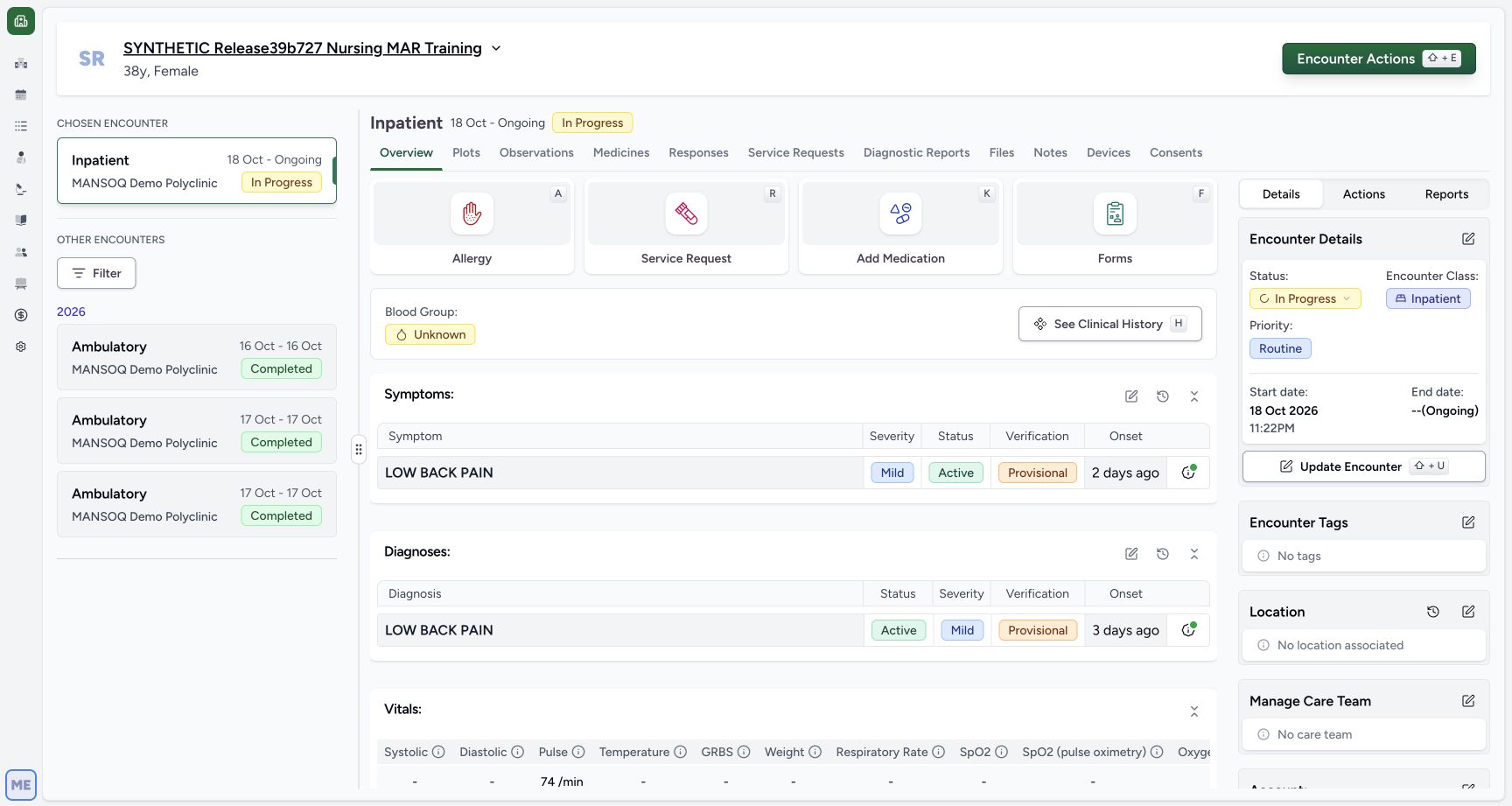
12Recorded release 3dfb7c9f · 2026-10-19T22:44:36.176Z · 1728 × 921 Active inpatient add medication
Capture details
Observed committed3dfb software in the existing day20-qualified Clinical profile. One new copy and its carried authored date are distinct from the retained original records. No clinical recommendation.
Image SHA-256
dd1e33720ffdb69ce66a87c14ebe12af1bf91f3c391ac597852ee66bb23b2ae6- Choose Add Medication: Open the medication request form from Overview.
- Check In Progress encounter: The chosen encounter is the active Inpatient software-training encounter.
1. Return to Past Prescriptions and select one row
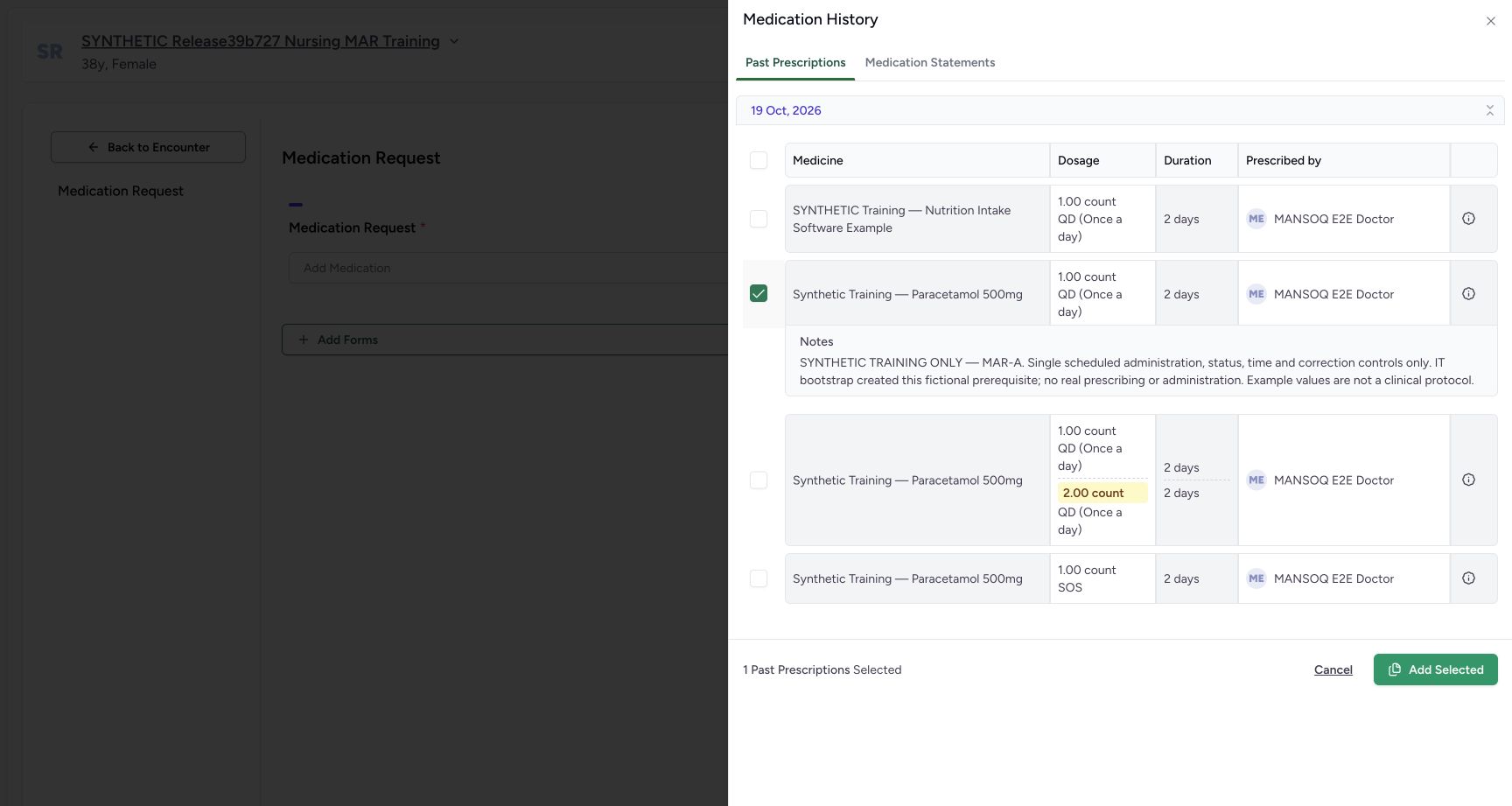
Choose Past Prescriptions and select only the MAR-A row identified by its expanded note. Confirm the count is 1 and the selected dose is 1.00 count, QD (Once a day), for 2 days. These are retained fictional example values.
12Medication statements empty distinct tab
Capture details
Observed committed3dfb software in the existing day20-qualified Clinical profile. One new copy and its carried authored date are distinct from the retained original records. No clinical recommendation.
Image SHA-256 d84f4e7871303494f715f58a87bb04db660bc6eec6a6dc94f75a0da8999719d5
- Read No Records Found: This patient’s statement tab is empty here.
- Return to Past Prescriptions: Return to the existing prescription rows.
 12
12Exact one history selection before add
Capture details
Observed committed3dfb software in the existing day20-qualified Clinical profile. One new copy and its carried authored date are distinct from the retained original records. No clinical recommendation.
Image SHA-256 498b2d367537511284209b09a0928eaad215378c5d7ff385af51e26bba03cd86
- Select only the identified row: Review the expanded MAR-A note and one selected count.
- Choose Add Selected: Add one historical request to the unsaved editor.
2. Add the selection to the editor
Choose Add Selected once. The drawer closes and one row appears in Medication Request. This is an unsaved new request, not an edit to the original historical order and not the final save.
12Exact one history selection before add
Capture details
Observed committed3dfb software in the existing day20-qualified Clinical profile. One new copy and its carried authored date are distinct from the retained original records. No clinical recommendation.
Image SHA-256 498b2d367537511284209b09a0928eaad215378c5d7ff385af51e26bba03cd86
- Select only the identified row: Review the expanded MAR-A note and one selected count.
- Choose Add Selected: Add one historical request to the unsaved editor.
 1234
1234Unsaved copied medication row
Capture details
Observed committed3dfb software in the existing day20-qualified Clinical profile. One new copy and its carried authored date are distinct from the retained original records. No clinical recommendation.
Image SHA-256 5eb0e133234668b8c1aa45a190ad31e3219167733f2fc4374ab38f18eb9325d3
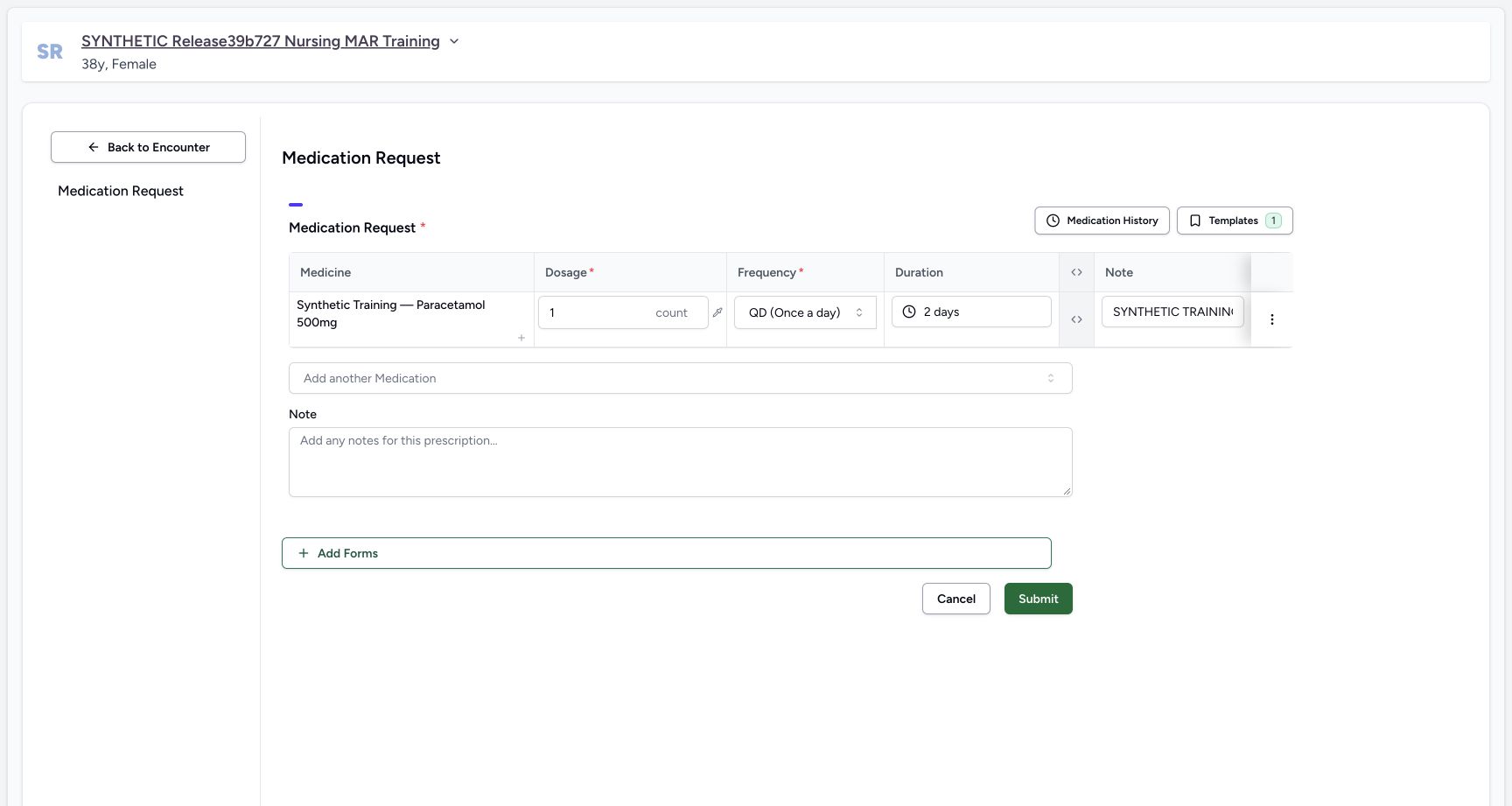
- Check the copied product: One fictional Paracetamol training row was copied.
- Review dose and unit: The carried quantity is 1 count.
- Review frequency: The carried frequency is QD (Once a day).
- Review duration: The carried duration is 2 days.
3. Review the copied fields
Check the product, dosage 1 count, frequency QD (Once a day) and duration 2 days. Required asterisks identify dosage and frequency. This guide reuses the reviewed fictional values; it does not recommend them for a patient.
1234Unsaved copied medication row
Capture details
Observed committed3dfb software in the existing day20-qualified Clinical profile. One new copy and its carried authored date are distinct from the retained original records. No clinical recommendation.
Image SHA-256 5eb0e133234668b8c1aa45a190ad31e3219167733f2fc4374ab38f18eb9325d3
- Check the copied product: One fictional Paracetamol training row was copied.
- Review dose and unit: The carried quantity is 1 count.
- Review frequency: The carried frequency is QD (Once a day).
- Review duration: The carried duration is 2 days.
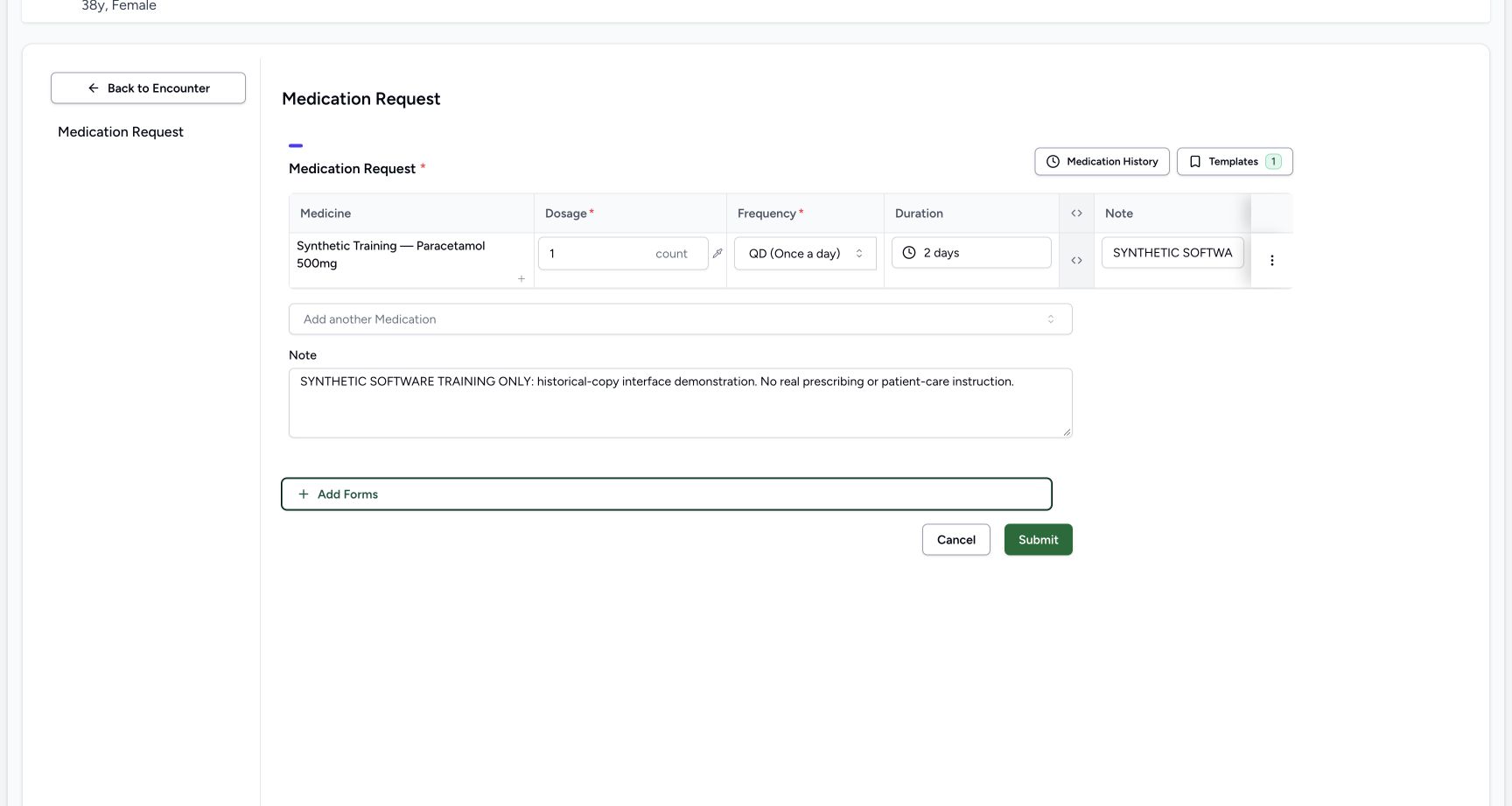
4. Replace the two notes with clear training text
In the row Note enter: SYNTHETIC SOFTWARE TRAINING ONLY: one historical prescription is copied into a new software-demo request. No medication order, dispensing or administration for a real person is represented. In the larger prescription Note enter: SYNTHETIC SOFTWARE TRAINING ONLY: historical-copy interface demonstration. No real prescribing or patient-care instruction. Move focus out of the field and review the retained text. The row input displays only part of a long note; the complete notes are checked in the saved prescription later.
 123
123New request and prescription notes
Capture details
Observed committed3dfb software in the existing day20-qualified Clinical profile. One new copy and its carried authored date are distinct from the retained original records. No clinical recommendation.
Image SHA-256 09113f465ad8ff60a290443a798aad6caf8f5c6eda31fc550492df00d928be0d
- Enter the row Note: Replace the old note with the explicit new software-training note.
- Enter the prescription Note: This separate Note applies to the new prescription.
- Show advanced fields: Expand the columns to review carried date, route and requester.
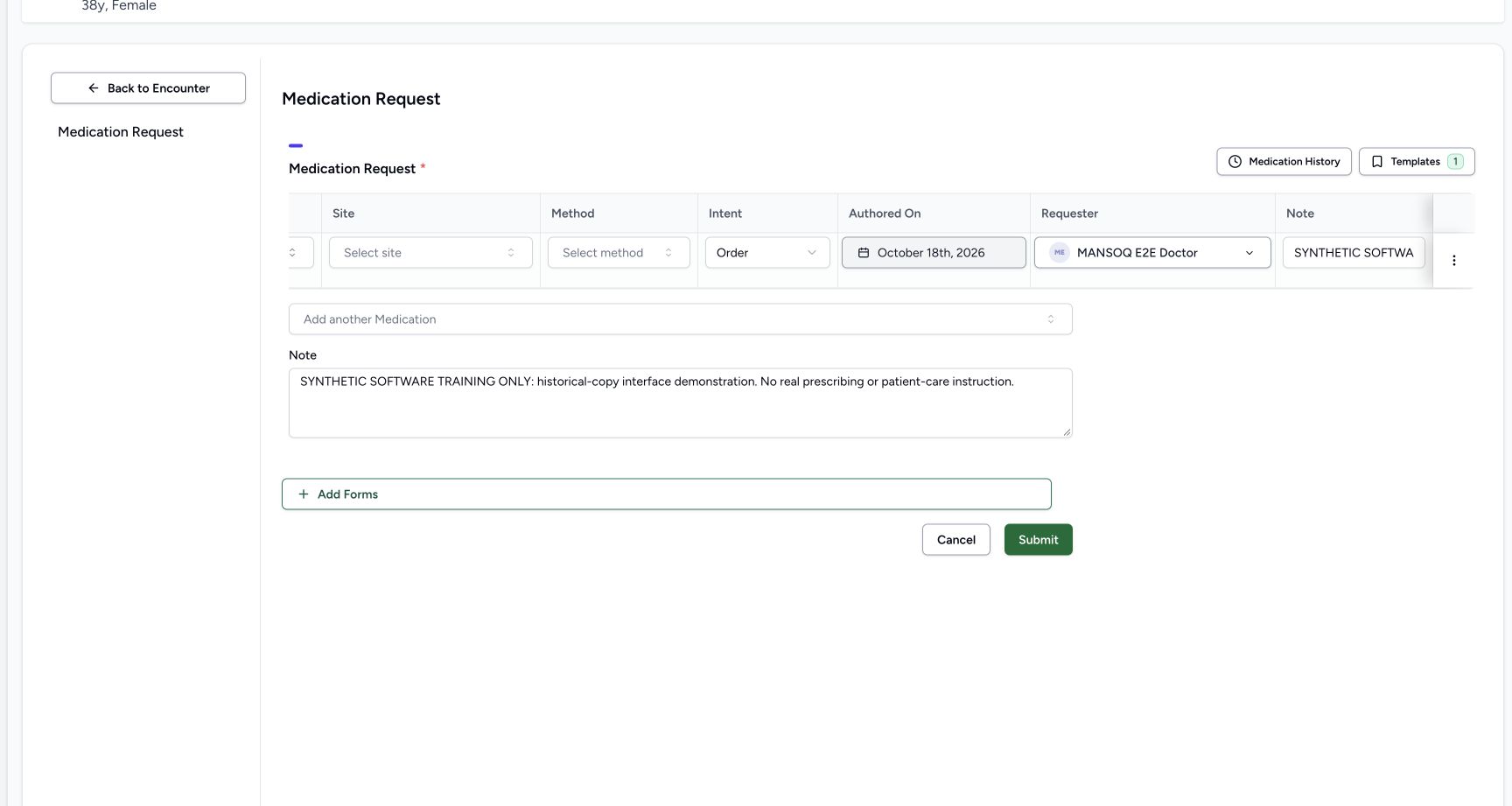
5. Review advanced fields and the current requester
Use the small expand control beside Duration, then scroll horizontally across the table. Check Intent is Order, Requester is MANSOQ E2E Doctor and Authored On is October 18th, 2026. Copying a past prescription retains its original authored date; it does not automatically replace it with today.
123New request and prescription notes
Capture details
Observed committed3dfb software in the existing day20-qualified Clinical profile. One new copy and its carried authored date are distinct from the retained original records. No clinical recommendation.
Image SHA-256 09113f465ad8ff60a290443a798aad6caf8f5c6eda31fc550492df00d928be0d
- Enter the row Note: Replace the old note with the explicit new software-training note.
- Enter the prescription Note: This separate Note applies to the new prescription.
- Show advanced fields: Expand the columns to review carried date, route and requester.
 123
123Carried authored date current doctor
Capture details
Observed committed3dfb software in the existing day20-qualified Clinical profile. One new copy and its carried authored date are distinct from the retained original records. No clinical recommendation.
Image SHA-256 399d51cc34e99a2b9e27d62bfcab151ac4dd5e93f3e70bdfee36813562b9a90a
- Open Authored On: Read the retained October18 date before opening the calendar.
- Review current requester: The new request uses MANSOQ E2E Doctor.
- Read Intent Order: The existing Order intent is retained.
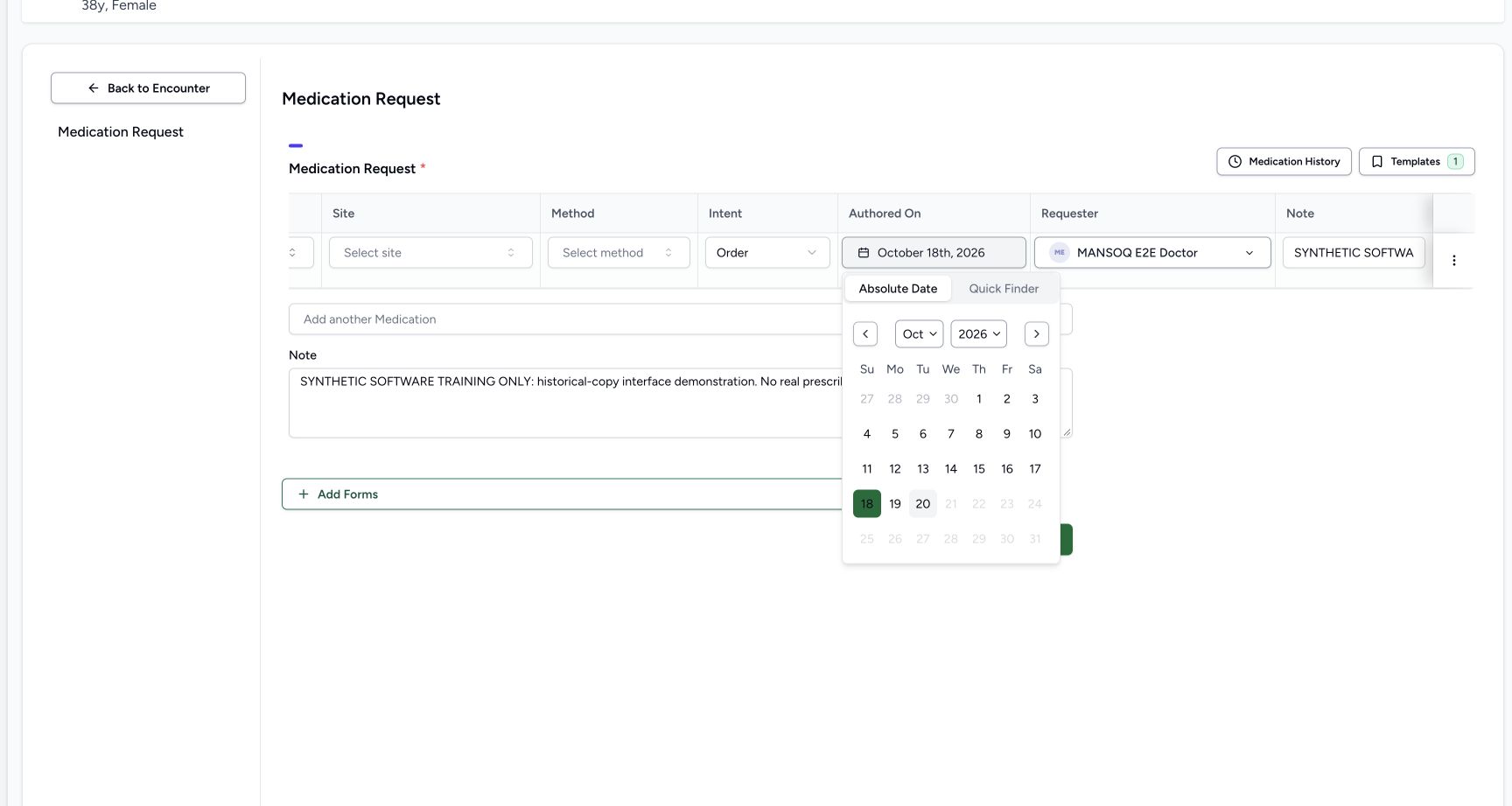
6. Read the carried date without changing it
Open Authored On. The calendar shows October 18 selected and future dates disabled. Close the calendar with Escape without choosing another day. Quick Finder was not used in this copy: changing date mode can change an unsaved date.
123Carried authored date current doctor
Capture details
Observed committed3dfb software in the existing day20-qualified Clinical profile. One new copy and its carried authored date are distinct from the retained original records. No clinical recommendation.
Image SHA-256 399d51cc34e99a2b9e27d62bfcab151ac4dd5e93f3e70bdfee36813562b9a90a
- Open Authored On: Read the retained October18 date before opening the calendar.
- Review current requester: The new request uses MANSOQ E2E Doctor.
- Read Intent Order: The existing Order intent is retained.
 12
12Original october18 calendar future disabled
Capture details
Observed committed3dfb software in the existing day20-qualified Clinical profile. One new copy and its carried authored date are distinct from the retained original records. No clinical recommendation.
Image SHA-256 ab045c330596123d5406aa019946990a46d69503610dcd63320d2df37b327aa8
- Read selected October 18: The original authored day is selected; no replacement day was chosen.
- Read future disabled dates: Dates after the current capture day are disabled.
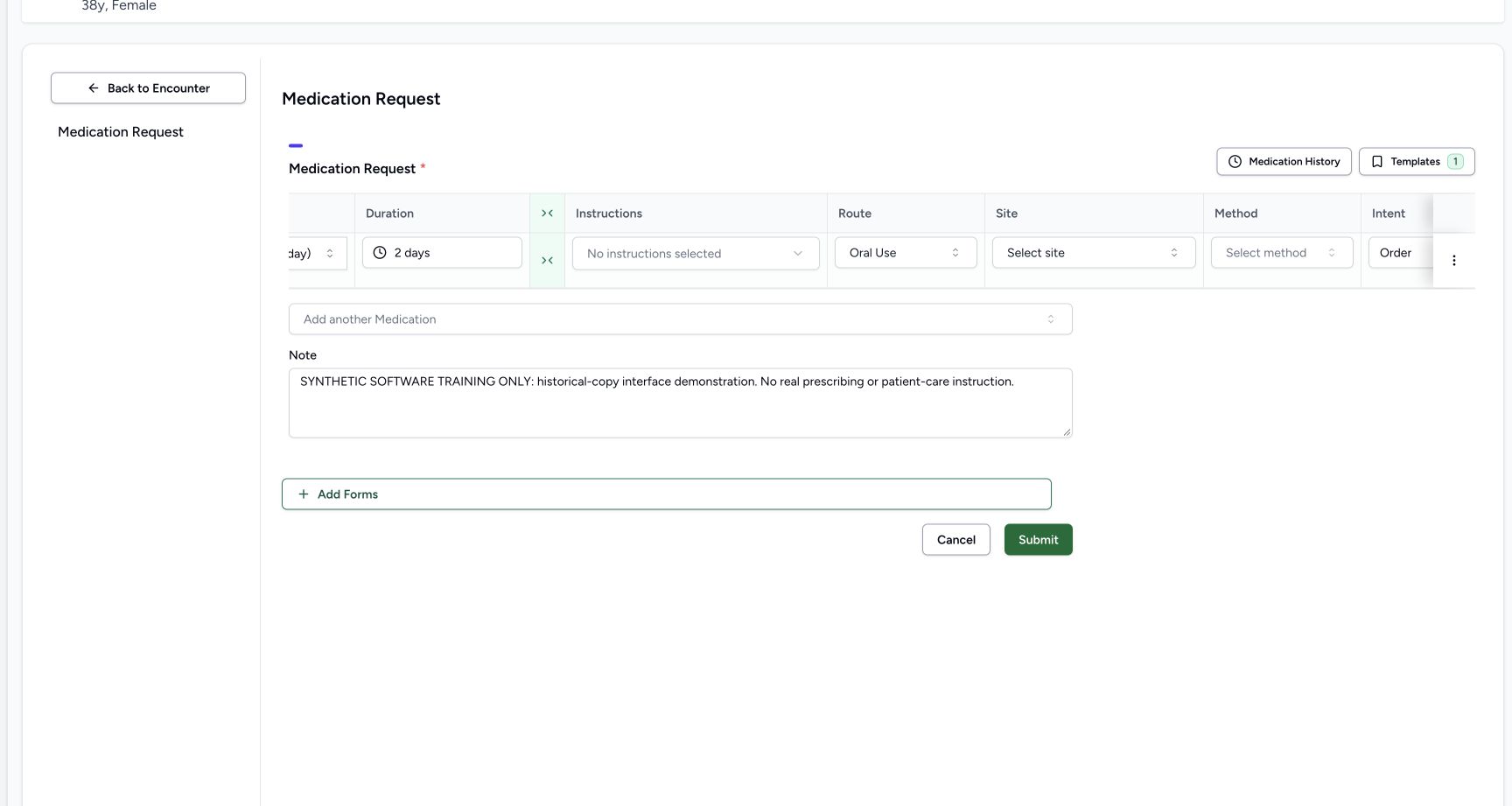
7. Check the retained route and return to the simple row
Scroll across the advanced columns to read Oral Use. No extra instructions, site or method were selected. Use the collapse control to return to the simple row, then review the dose, frequency, duration and both notes again.
 123
123Retained route oral use no extra instructions
Capture details
Observed committed3dfb software in the existing day20-qualified Clinical profile. One new copy and its carried authored date are distinct from the retained original records. No clinical recommendation.
Image SHA-256 970c6ce91cf4c231566193328de37094d6da2ac6ec205f17f132d329502bdc4e
- Read Oral Use: Review the retained route.
- Read no extra instructions: No additional instructions were selected.
- Hide advanced fields: Collapse the advanced columns after review.
 1234
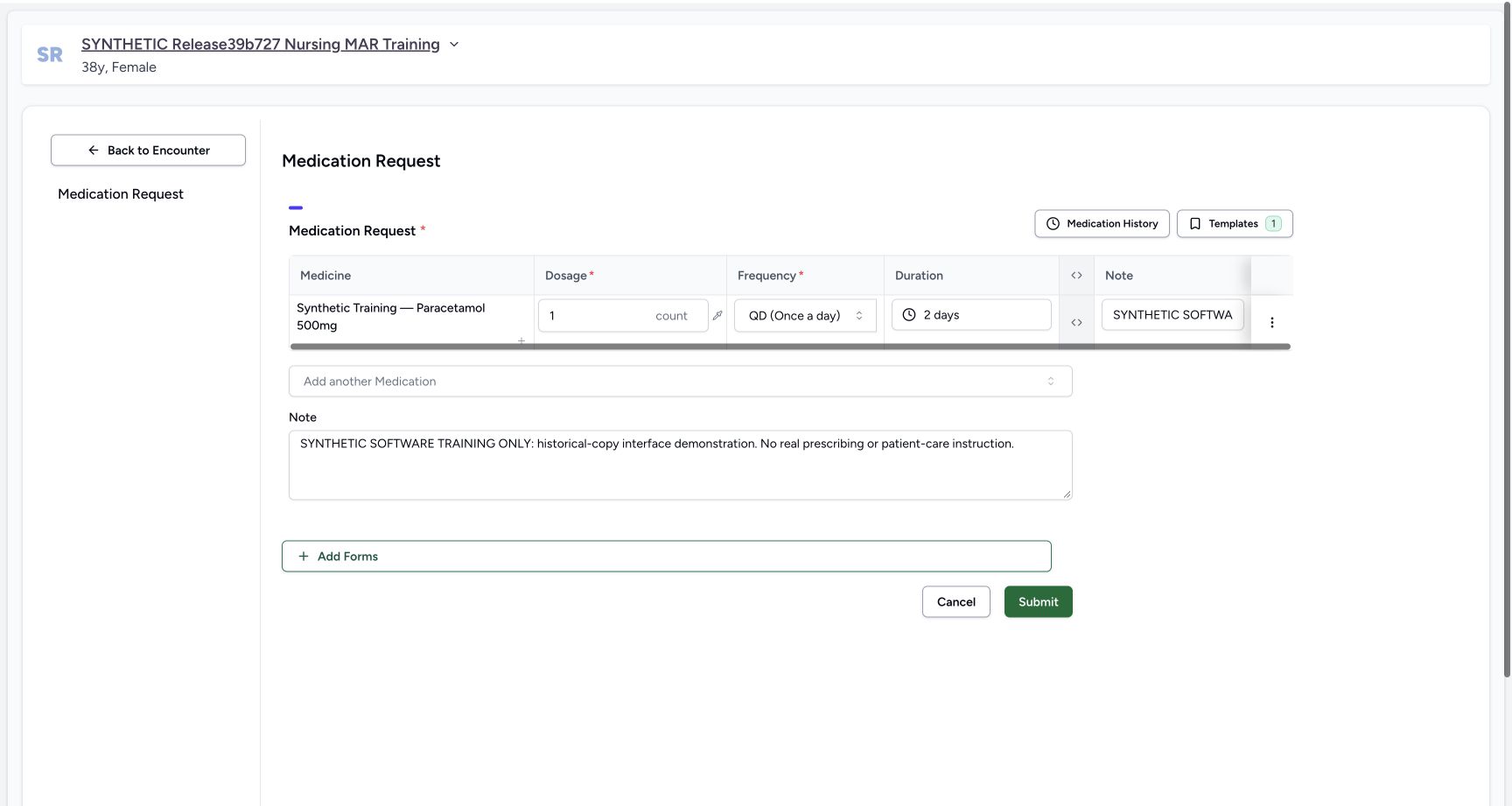
1234Final ready reviewed simple row
Capture details
Observed committed3dfb software in the existing day20-qualified Clinical profile. One new copy and its carried authored date are distinct from the retained original records. No clinical recommendation.
Image SHA-256 8889cf4c0c6352b0f4d44a9be94c7e23a5ad30a8016eb8627f6357bd49a56114
- Recheck 1 count: The final simple quantity is restored and reviewed.
- Recheck QD: The final frequency remains Once a day.
- Recheck 2 days: The final duration remains two days.
- Choose Submit once: Save this one reviewed fictional copy once.
8. Save the reviewed copy once
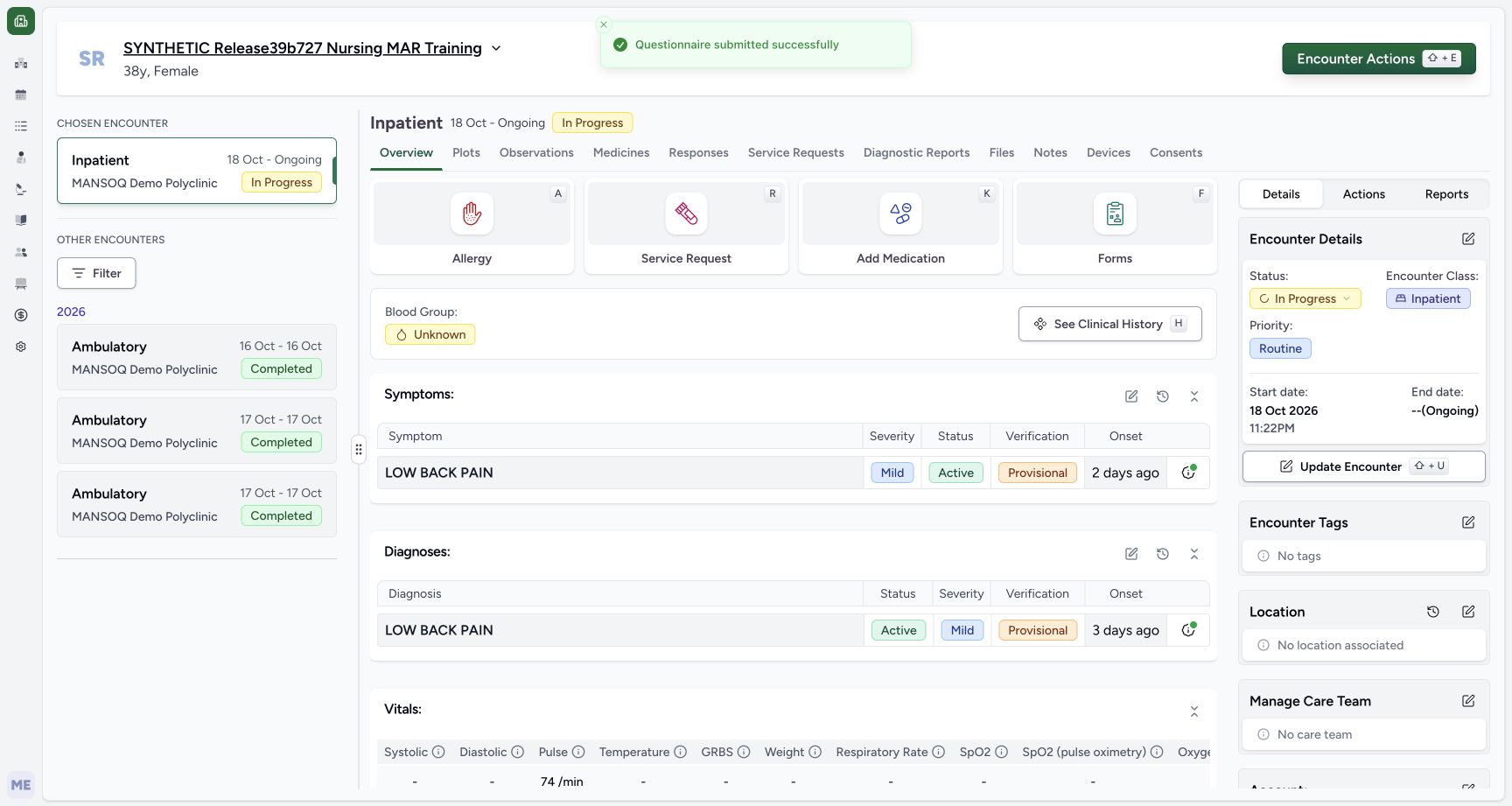
When the one new row and notes are correct, choose Submit once. The app returns to Overview with Questionnaire submitted successfully. Continue to Medicines to inspect the saved copy. If a save outcome is uncertain, check existing records before any further Submit.
1234Final ready reviewed simple row
Capture details
Observed committed3dfb software in the existing day20-qualified Clinical profile. One new copy and its carried authored date are distinct from the retained original records. No clinical recommendation.
Image SHA-256 8889cf4c0c6352b0f4d44a9be94c7e23a5ad30a8016eb8627f6357bd49a56114
- Recheck 1 count: The final simple quantity is restored and reviewed.
- Recheck QD: The final frequency remains Once a day.
- Recheck 2 days: The final duration remains two days.
- Choose Submit once: Save this one reviewed fictional copy once.
 12
12One submit success returned overview
Capture details
Observed committed3dfb software in the existing day20-qualified Clinical profile. One new copy and its carried authored date are distinct from the retained original records. No clinical recommendation.
Image SHA-256 c057bb631f63889044e0f7c1984a22bf10d70632cb661d575af332e8a9048a34
- Read the success notice: The app reports Questionnaire submitted successfully.
- Choose Medicines: Inspect the saved prescription in the encounter.
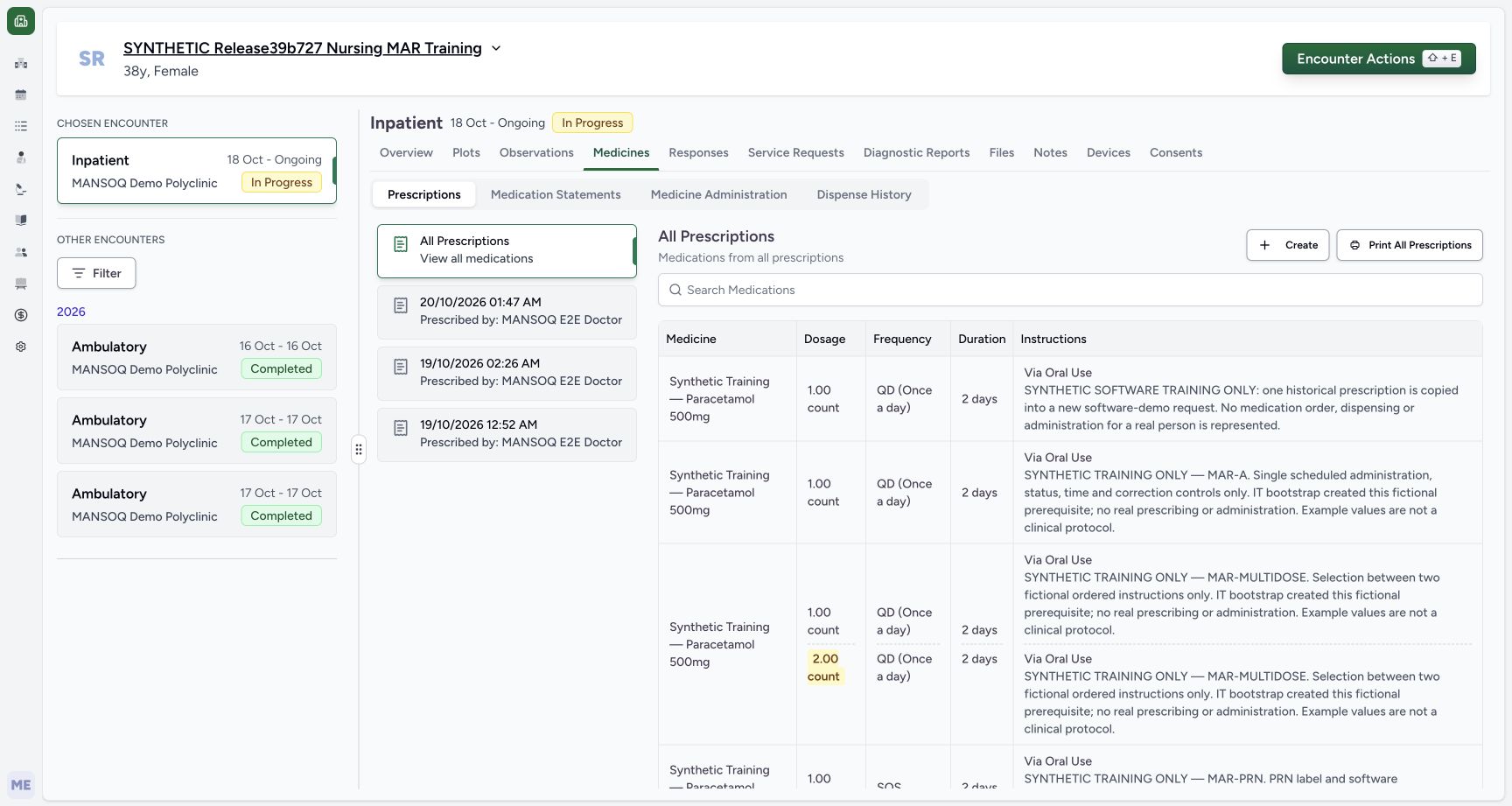
A copy does not retire the original
The saved copy has its own new request and prescription. The original remains separate. This source does not automatically reconcile duplicate copies, so repeating Submit or copying again is not a recovery method. No old-order stop, administration, dispensing or stock action is part of this exercise.
12Exact one history selection before add
Capture details
Observed committed3dfb software in the existing day20-qualified Clinical profile. One new copy and its carried authored date are distinct from the retained original records. No clinical recommendation.
Image SHA-256 498b2d367537511284209b09a0928eaad215378c5d7ff385af51e26bba03cd86
- Select only the identified row: Review the expanded MAR-A note and one selected count.
- Choose Add Selected: Add one historical request to the unsaved editor.
 123
123Saved new copy and originals distinct list
Capture details
Observed committed3dfb software in the existing day20-qualified Clinical profile. One new copy and its carried authored date are distinct from the retained original records. No clinical recommendation.
Image SHA-256 cf05dcfd56c119cc6f0a7b202cce93e74d1faa9a6c8dd4bc83f4f6e4ab183c72
- Select the new dated prescription: Choose 20 October 01:47 AM prescribed by the Doctor.
- Read the new request note: The new row carries the explicit software-demo note.
- Read the retained original MAR-A row: The old MAR-A instruction remains a separate row.
Source evidence
Every citation uses this exact committed version. The private source repository requires access.
- repositories/platform/mansoq-web/src/components/Questionnaire/QuestionTypes/MedicationRequestQuestion.tsx:269 ·
3dfb7c9f519fb5b4cd4452439f3c12346bf58319Source file checksum
561259e73b1752c9844e31b798ad676878af5f4caf6be5fbd130cd31fcfc89cc - repositories/platform/mansoq-web/src/components/HistoricalRecordSelector/index.tsx:89 ·
3dfb7c9f519fb5b4cd4452439f3c12346bf58319Source file checksum
0ab03afa6a5954112061e0bf07b15cd3f4c901444f3c3de8a8e194524ef1f0c2 - repositories/platform/mansoq-web/src/components/HistoricalRecordSelector/RecordItem.tsx:36 ·
3dfb7c9f519fb5b4cd4452439f3c12346bf58319Source file checksum
91960b93e01760bc021d0a08d2684905e269a1091bff162bf0e4c3b5e63ef468 - repositories/platform/mansoq-web/src/components/Questionnaire/structured/handlers.ts:65 ·
3dfb7c9f519fb5b4cd4452439f3c12346bf58319Source file checksum
459ade48f77316279ab2978dc7b4466cb96acb8223c61b9a1f87ca9973be7c7f - repositories/platform/mansoq-web/src/components/Questionnaire/data/StructuredFormData.tsx:23 ·
3dfb7c9f519fb5b4cd4452439f3c12346bf58319Source file checksum
434386c27b8e583e1dbd0a6f506250e7a0fb3640963c572445123bae62880f0f - repositories/platform/mansoq-web/src/components/Questionnaire/QuestionnaireForm.tsx:321 ·
3dfb7c9f519fb5b4cd4452439f3c12346bf58319Source file checksum
ee6c2195f13e48f0896a2d3da566c2f2a67910adad08894df6b77862f9cfdeec - repositories/platform/mansoq-web/src/components/Medicine/MedicationRequestTable/index.tsx:46 ·
3dfb7c9f519fb5b4cd4452439f3c12346bf58319Source file checksum
031e169fb1f09e4559edb7b2ab0eba7c3c2a6fa9bd6ace44d1b05e1563106457 - repositories/platform/mansoq-web/src/components/Medicine/PrescriptionView.tsx:88 ·
3dfb7c9f519fb5b4cd4452439f3c12346bf58319Source file checksum
af1781d51d3dd511231a79e034a7f98412434dfa4603b91dce6676c4474fad96 - repositories/platform/mansoq-web/src/types/emr/medicationRequest/medicationRequestApi.ts:6 ·
3dfb7c9f519fb5b4cd4452439f3c12346bf58319Source file checksum
2e18bb5bef449fb67b01d4b763e8ca1e57bad00a6381c5c0e3a2eac1d6a272c3 - repositories/platform/mansoq-web/src/types/emr/prescription/prescriptionApi.ts:5 ·
3dfb7c9f519fb5b4cd4452439f3c12346bf58319Source file checksum
9d66f5800fa3e9f6c8abf1f9fc3c02b6601f4a2663c1554b2b1bd86e28100889 - repositories/platform/mansoq-core/mansoq/emr/api/viewsets/medication_request.py:39 ·
3dfb7c9f519fb5b4cd4452439f3c12346bf58319Source file checksum
a3f3ae8042fb8134112c5d04fe8b060e68bce11dae682d138aafaae64119c215 - repositories/platform/mansoq-core/mansoq/emr/api/viewsets/encounter_authz_base.py:20 ·
3dfb7c9f519fb5b4cd4452439f3c12346bf58319Source file checksum
852c308f990e192a1003e286be7dd57ddcc78840d218da1b90c1fab2eebec4f7 - repositories/platform/mansoq-core/mansoq/emr/resources/medication/request/spec.py:132 ·
3dfb7c9f519fb5b4cd4452439f3c12346bf58319Source file checksum
9f9e929369e186f88af131f2a1ccc3a773d9bfe9648f92a98f6a4935c09a7ade - repositories/platform/mansoq-core/mansoq/emr/resources/medication/valueset/route.py:5 ·
3dfb7c9f519fb5b4cd4452439f3c12346bf58319Source file checksum
3388cb1f634a60ed2716b3418a6aefc2117b4ac86cf481313960dbf8c9fd9b52 - repositories/platform/mansoq-core/mansoq/emr/models/medication_request.py:9 ·
3dfb7c9f519fb5b4cd4452439f3c12346bf58319Source file checksum
6d0148f12528d99718544a54fd6ccaee3f931d58ff7b6796b8aac66533555f2f - repositories/platform/mansoq-core/mansoq/emr/api/viewsets/base.py:98 ·
3dfb7c9f519fb5b4cd4452439f3c12346bf58319Source file checksum
6a287dd315b8a4957b29c58e4bbc1bef7b8d9d257f9149f93045ff0adbdcae6c - repositories/platform/mansoq-core/mansoq/emr/utils/valueset_coding_type.py:1 ·
3dfb7c9f519fb5b4cd4452439f3c12346bf58319Source file checksum
8371acc7857e74d3b53e14878506b3f9eae444af1774fe214eada35c0354dc39 - repositories/platform/mansoq-web/src/pages/Encounters/tabs/overview/quick-actions.tsx:1 ·
3dfb7c9f519fb5b4cd4452439f3c12346bf58319Source file checksum
555331d2be0793af35974e2ac2b3642f222ebbb49ddbec83bdb74331a7d963d4 - repositories/platform/mansoq-core/mansoq/emr/resources/base.py:94 ·
3dfb7c9f519fb5b4cd4452439f3c12346bf58319Source file checksum
bc406c723888997dd99fc408cb3c5dec51fb0b54d10272ca31bfd8c98c893229