 MANSOQ
 Appointments and registration handoff · VERSION 3dfb7c9f
Create an Ambulatory encounter from a checked-in appointment
Review the existing appointment, set the intended encounter fields, create the fictional encounter once and verify its saved department and Doctor attribution.
Doctor
 12
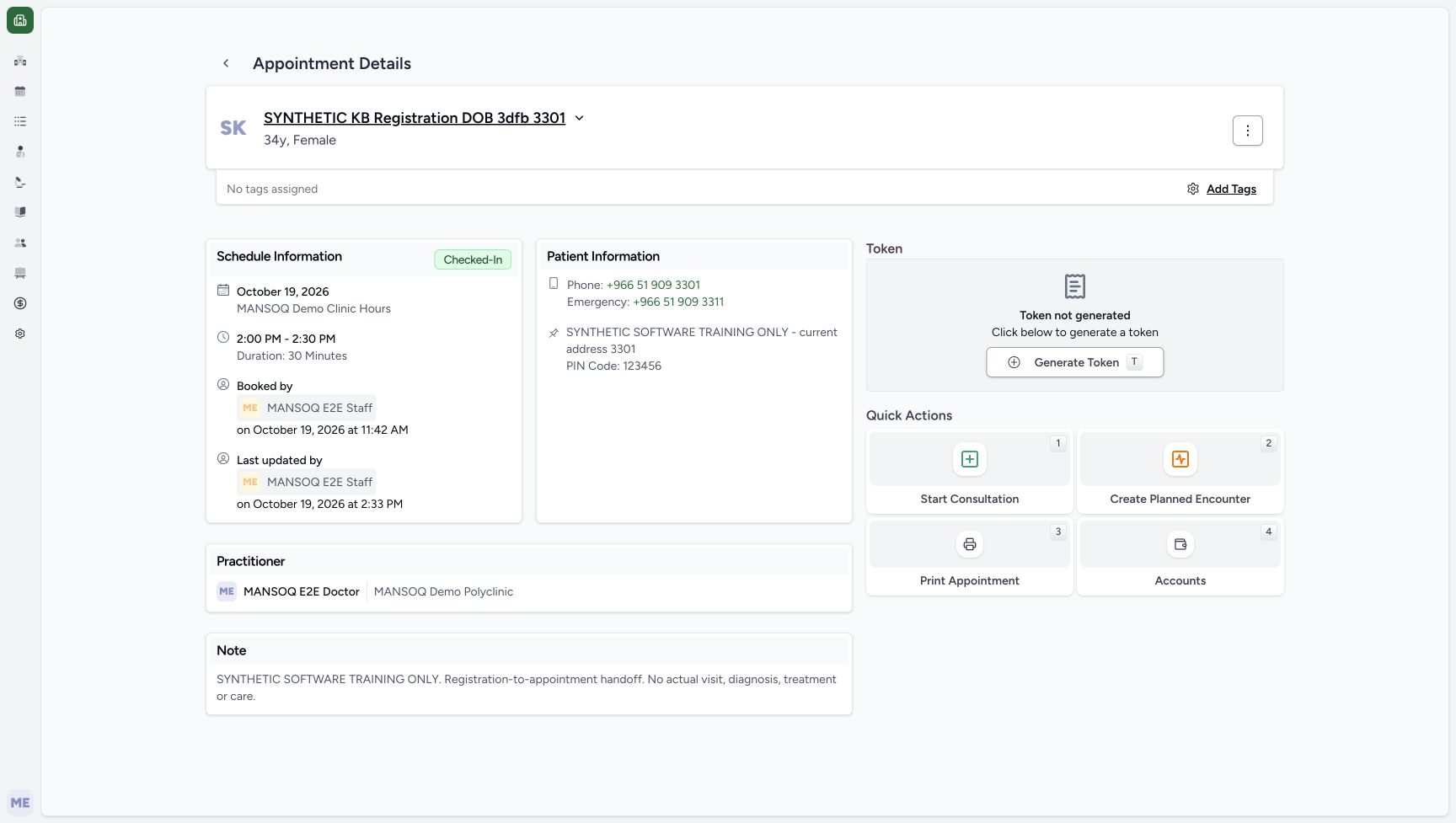
12Review the saved checked-in appointment before opening its encounter form
Capture details
Exact committed 3dfb source after USB migration. Existing non-superuser Doctor. One explicitly synthetic encounter was created and its appointment linked; later reload and View actions are read-only. No real attendance, diagnosis, treatment or clinical-service claim.
Image SHA-256 123c035755901dab3d9f0b864dece24e9361a0e34a462df5aa5882fe51706ce6
- Start Consultation: Open the normal Doctor encounter form for this saved fictional appointment.
- Checked-In: The saved appointment is checked in before the encounter is created.
 123
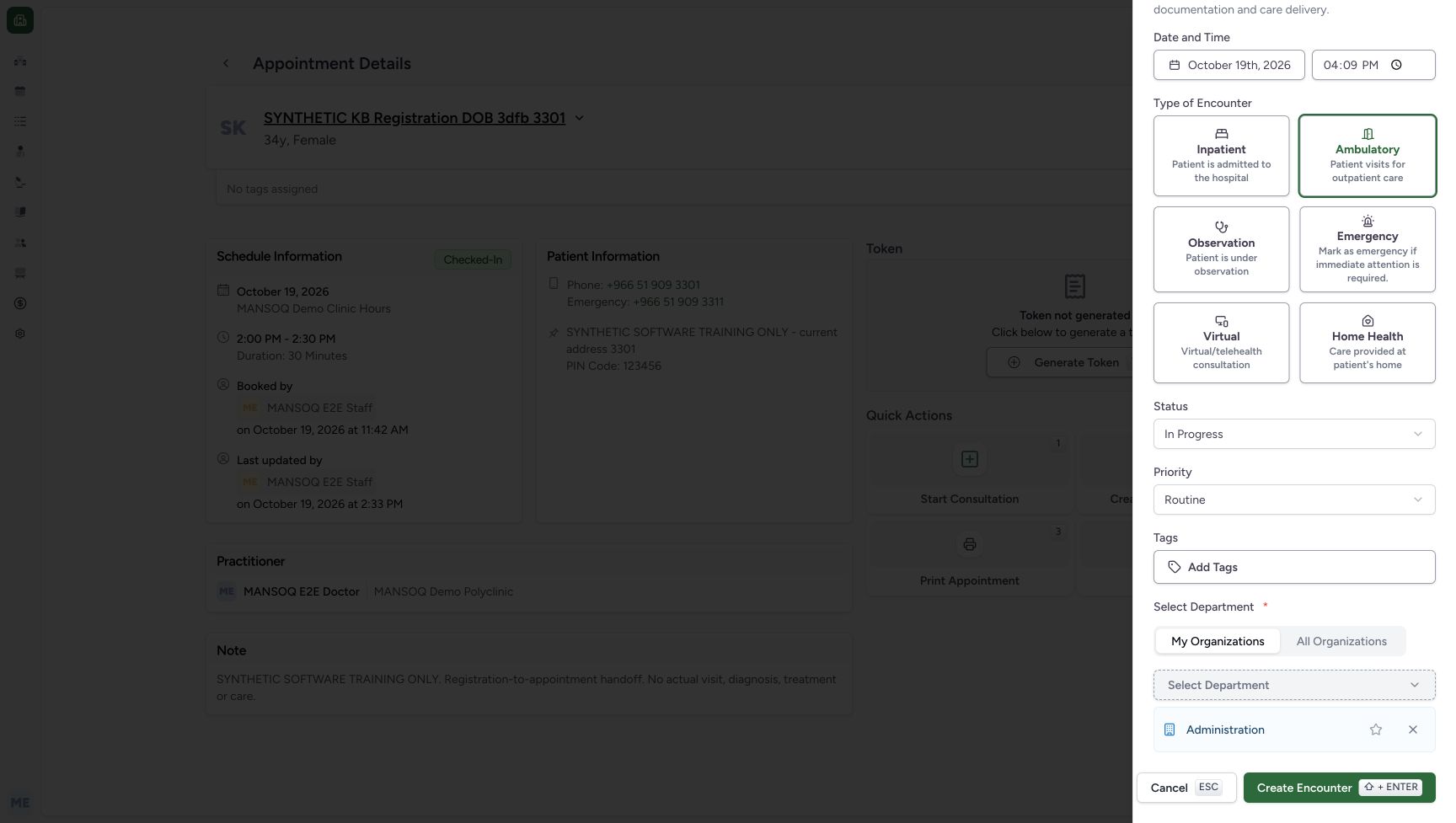
123Review the department and the once-only Create control
Capture details
Exact committed 3dfb source after USB migration. Existing non-superuser Doctor. One explicitly synthetic encounter was created and its appointment linked; later reload and View actions are read-only. No real attendance, diagnosis, treatment or clinical-service claim.
Image SHA-256 77f5ad6bd4690f051fb6fde56039155c653de0e72fa26030e601cd8444b54d49
- Administration: Confirm the existing Administration department; no favorite or membership changes are made.
- Create Encounter: After reviewing the fields, create the fictional encounter once.
- Cancel: Cancel remains available before submission.
 123
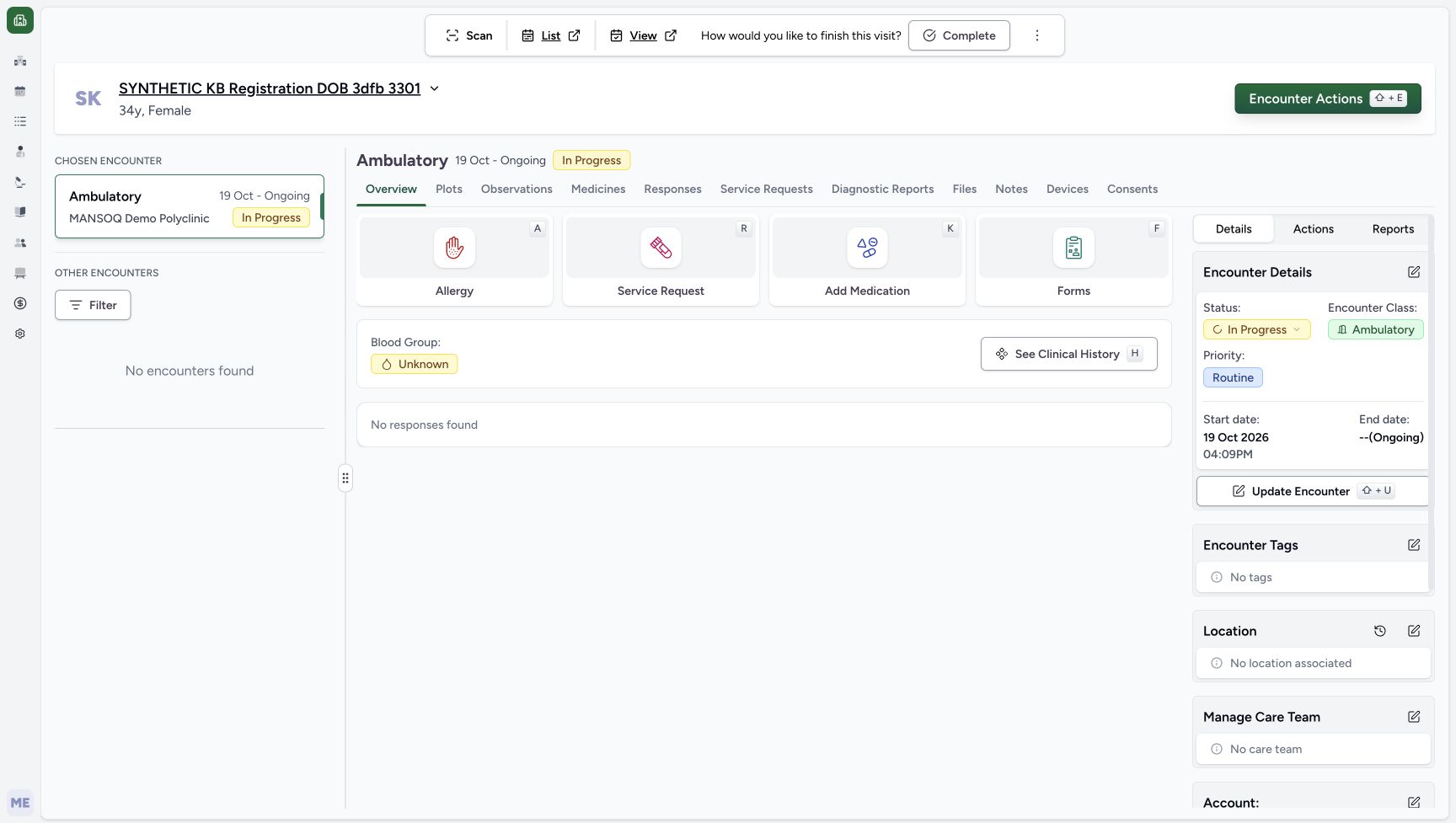
123Review the saved Ambulatory encounter
Capture details
Exact committed 3dfb source after USB migration. Existing non-superuser Doctor. One explicitly synthetic encounter was created and its appointment linked; later reload and View actions are read-only. No real attendance, diagnosis, treatment or clinical-service claim.
Image SHA-256 86ba5e78a59fe38cbe003c316889f34479d0d5326c237a40a02dfd17d8c2bcb3
- Ambulatory encounter: The saved encounter is Ambulatory and In Progress.
- Saved start time: The saved encounter displays the reviewed 4:09 PM start time.
- View appointment: Open the associated appointment to verify its saved state separately.
10 of 10 content blocks have reviewed image alignment. Missing overview or prerequisite images remain open.
Before you begin
- Use an already authenticated authorized Doctor session in the assigned fictional Polyclinic and the intended existing Checked-In appointment. This example uses synthetic DOB patient ending 3301 on 19 October 2026. Its original appointment is 2:00 PM–2:30 PM; the independently reviewed encounter start is 4:09 PM in Asia/Riyadh UTC+03. Confirm the configured browser/scheduling date context; the screens do not print a timezone. Sign-in is separate and is not illustrated here.12
Recorded release 3dfb7c9f · 2026-10-19T13:09:59.155Z · 1728 × 977 Review the saved checked-in appointment before opening its encounter form
Capture details
Exact committed 3dfb source after USB migration. Existing non-superuser Doctor. One explicitly synthetic encounter was created and its appointment linked; later reload and View actions are read-only. No real attendance, diagnosis, treatment or clinical-service claim.
Image SHA-256
123c035755901dab3d9f0b864dece24e9361a0e34a462df5aa5882fe51706ce6- Start Consultation: Open the normal Doctor encounter form for this saved fictional appointment.
- Checked-In: The saved appointment is checked in before the encounter is created.
 1234
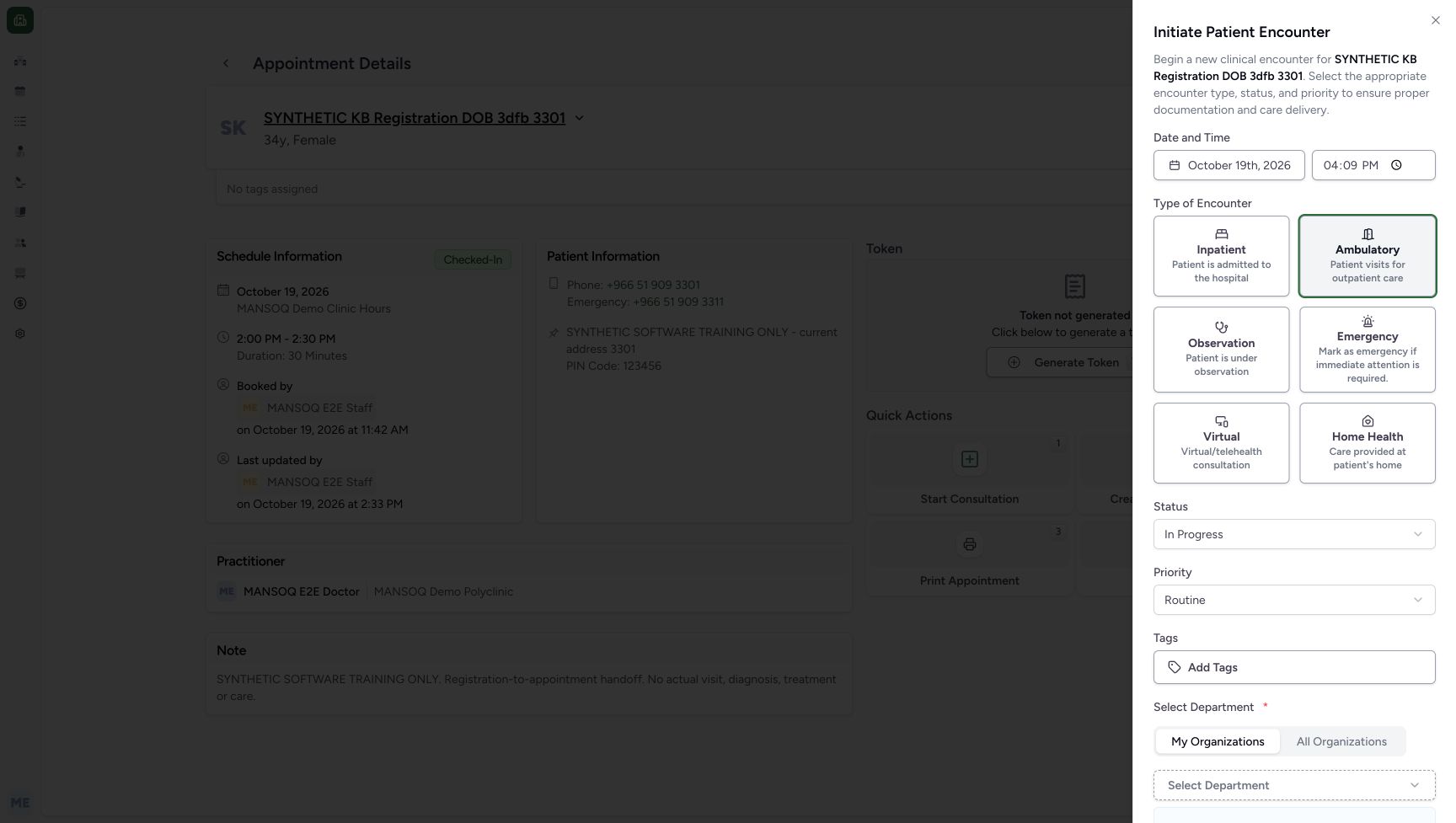
1234Recorded release 3dfb7c9f · 2026-10-19T13:12:42.491Z · 1728 × 977 Review the intended encounter start separately from the appointment time
Capture details
Exact committed 3dfb source after USB migration. Existing non-superuser Doctor. One explicitly synthetic encounter was created and its appointment linked; later reload and View actions are read-only. No real attendance, diagnosis, treatment or clinical-service claim.
Image SHA-256
2302d4c320b466993b9a479127988f87417b9d55f37296fd5f63066594fb2dd2- Encounter time: The normal keyboard edit remains at 4:09 PM after leaving the field; this is the intended encounter start.
- Encounter date: Review 19 October 2026 before the once-only create.
- In Progress: Keep the existing In Progress status for this software demonstration.
- Routine: Keep the existing Routine priority.
1. Review the checked-in appointment
Confirm the intended synthetic patient, practitioner, original date and time, Checked-In badge and retained note. Choose the visible Start Consultation control to open its new encounter form.
12Review the saved checked-in appointment before opening its encounter form
Capture details
Exact committed 3dfb source after USB migration. Existing non-superuser Doctor. One explicitly synthetic encounter was created and its appointment linked; later reload and View actions are read-only. No real attendance, diagnosis, treatment or clinical-service claim.
Image SHA-256 123c035755901dab3d9f0b864dece24e9361a0e34a462df5aa5882fe51706ce6
- Start Consultation: Open the normal Doctor encounter form for this saved fictional appointment.
- Checked-In: The saved appointment is checked in before the encounter is created.
2. Select Ambulatory
Choose Ambulatory and verify its selected border. The other encounter types are visible choices; this lesson saves only Ambulatory.
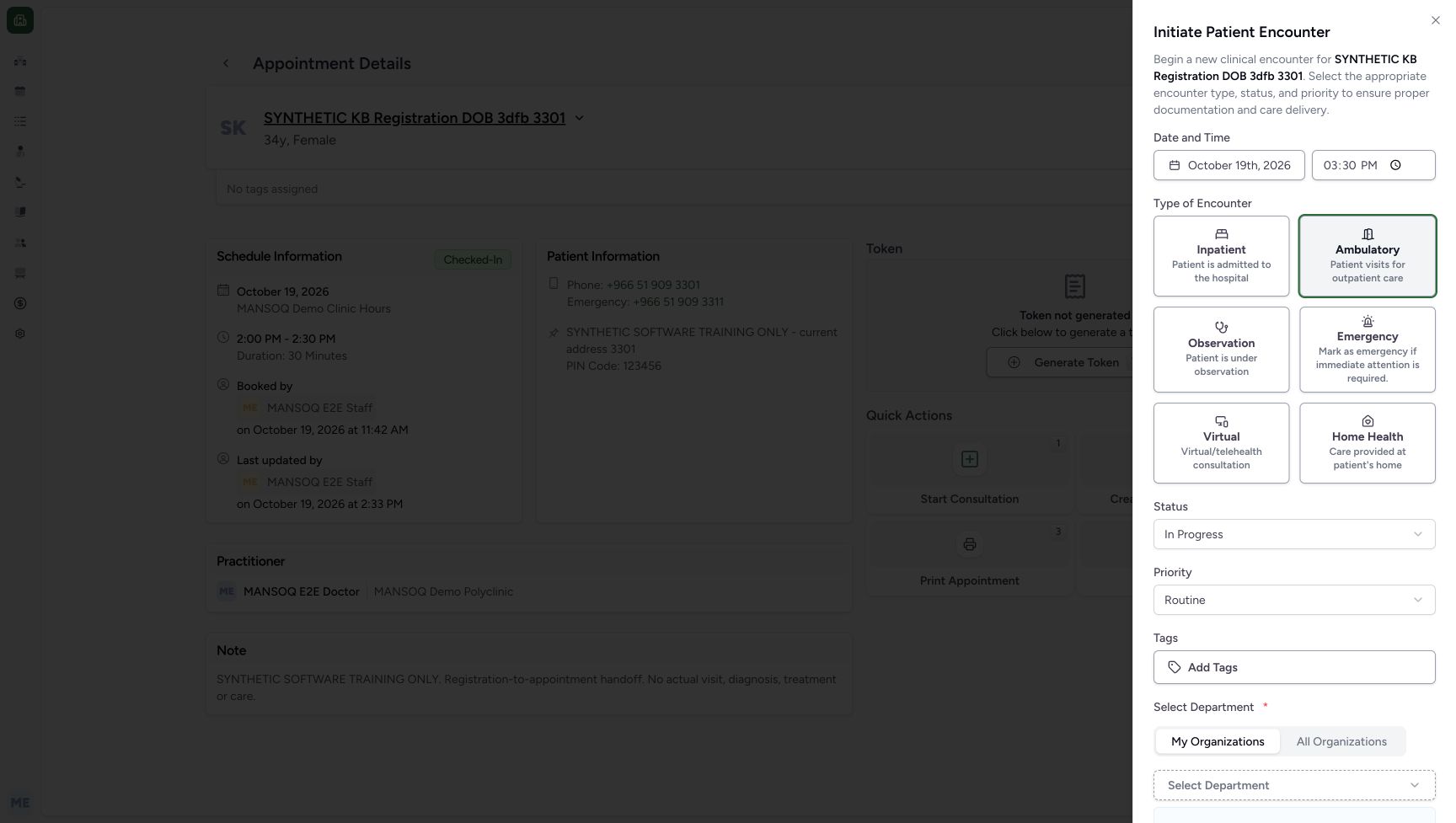 1
1Choose Ambulatory for the fictional encounter
Capture details
Exact committed 3dfb source after USB migration. Existing non-superuser Doctor. One explicitly synthetic encounter was created and its appointment linked; later reload and View actions are read-only. No real attendance, diagnosis, treatment or clinical-service claim.
Image SHA-256 1793afbc52fe3cc74b6324fc6f1d9b49dfd0f6ede494ca294ca9cc3be29519f6
- Ambulatory: Choose the Ambulatory software encounter class before creating the fictional encounter.
3. Set and retain the intended encounter date and time
Review 19 October 2026 and enter the intended encounter start using the time field. Move focus away, then verify the value remains 04:09 PM after another field is selected. The encounter start is reviewed separately from the original 2:00 PM–2:30 PM appointment.
1234Review the intended encounter start separately from the appointment time
Capture details
Exact committed 3dfb source after USB migration. Existing non-superuser Doctor. One explicitly synthetic encounter was created and its appointment linked; later reload and View actions are read-only. No real attendance, diagnosis, treatment or clinical-service claim.
Image SHA-256 2302d4c320b466993b9a479127988f87417b9d55f37296fd5f63066594fb2dd2
- Encounter time: The normal keyboard edit remains at 4:09 PM after leaving the field; this is the intended encounter start.
- Encounter date: Review 19 October 2026 before the once-only create.
- In Progress: Keep the existing In Progress status for this software demonstration.
- Routine: Keep the existing Routine priority.
4. Review status, priority and department
Keep In Progress and Routine for this fictional example. Scroll the form to confirm the existing Administration department has loaded and is retained before submission.
1234Review the intended encounter start separately from the appointment time
Capture details
Exact committed 3dfb source after USB migration. Existing non-superuser Doctor. One explicitly synthetic encounter was created and its appointment linked; later reload and View actions are read-only. No real attendance, diagnosis, treatment or clinical-service claim.
Image SHA-256 2302d4c320b466993b9a479127988f87417b9d55f37296fd5f63066594fb2dd2
- Encounter time: The normal keyboard edit remains at 4:09 PM after leaving the field; this is the intended encounter start.
- Encounter date: Review 19 October 2026 before the once-only create.
- In Progress: Keep the existing In Progress status for this software demonstration.
- Routine: Keep the existing Routine priority.
123Review the department and the once-only Create control
Capture details
Exact committed 3dfb source after USB migration. Existing non-superuser Doctor. One explicitly synthetic encounter was created and its appointment linked; later reload and View actions are read-only. No real attendance, diagnosis, treatment or clinical-service claim.
Image SHA-256 77f5ad6bd4690f051fb6fde56039155c653de0e72fa26030e601cd8444b54d49
- Administration: Confirm the existing Administration department; no favorite or membership changes are made.
- Create Encounter: After reviewing the fields, create the fictional encounter once.
- Cancel: Cancel remains available before submission.
5. Create once and inspect the saved result
After the field review, choose Create Encounter once. Wait for the saved encounter Overview. If the outcome is uncertain, read the appointment and encounter before attempting any further action; do not repeat Create to guess the result.
123Review the department and the once-only Create control
Capture details
Exact committed 3dfb source after USB migration. Existing non-superuser Doctor. One explicitly synthetic encounter was created and its appointment linked; later reload and View actions are read-only. No real attendance, diagnosis, treatment or clinical-service claim.
Image SHA-256 77f5ad6bd4690f051fb6fde56039155c653de0e72fa26030e601cd8444b54d49
- Administration: Confirm the existing Administration department; no favorite or membership changes are made.
- Create Encounter: After reviewing the fields, create the fictional encounter once.
- Cancel: Cancel remains available before submission.
123Review the saved Ambulatory encounter
Capture details
Exact committed 3dfb source after USB migration. Existing non-superuser Doctor. One explicitly synthetic encounter was created and its appointment linked; later reload and View actions are read-only. No real attendance, diagnosis, treatment or clinical-service claim.
Image SHA-256 86ba5e78a59fe38cbe003c316889f34479d0d5326c237a40a02dfd17d8c2bcb3
- Ambulatory encounter: The saved encounter is Ambulatory and In Progress.
- Saved start time: The saved encounter displays the reviewed 4:09 PM start time.
- View appointment: Open the associated appointment to verify its saved state separately.
6. Verify the saved department and Doctor attribution
In the saved Details panel, review Administration and the Created By and Last Modified By entries for MANSOQ E2E Doctor at 4:14 PM on 19 October 2026. No account found is the observed account state.
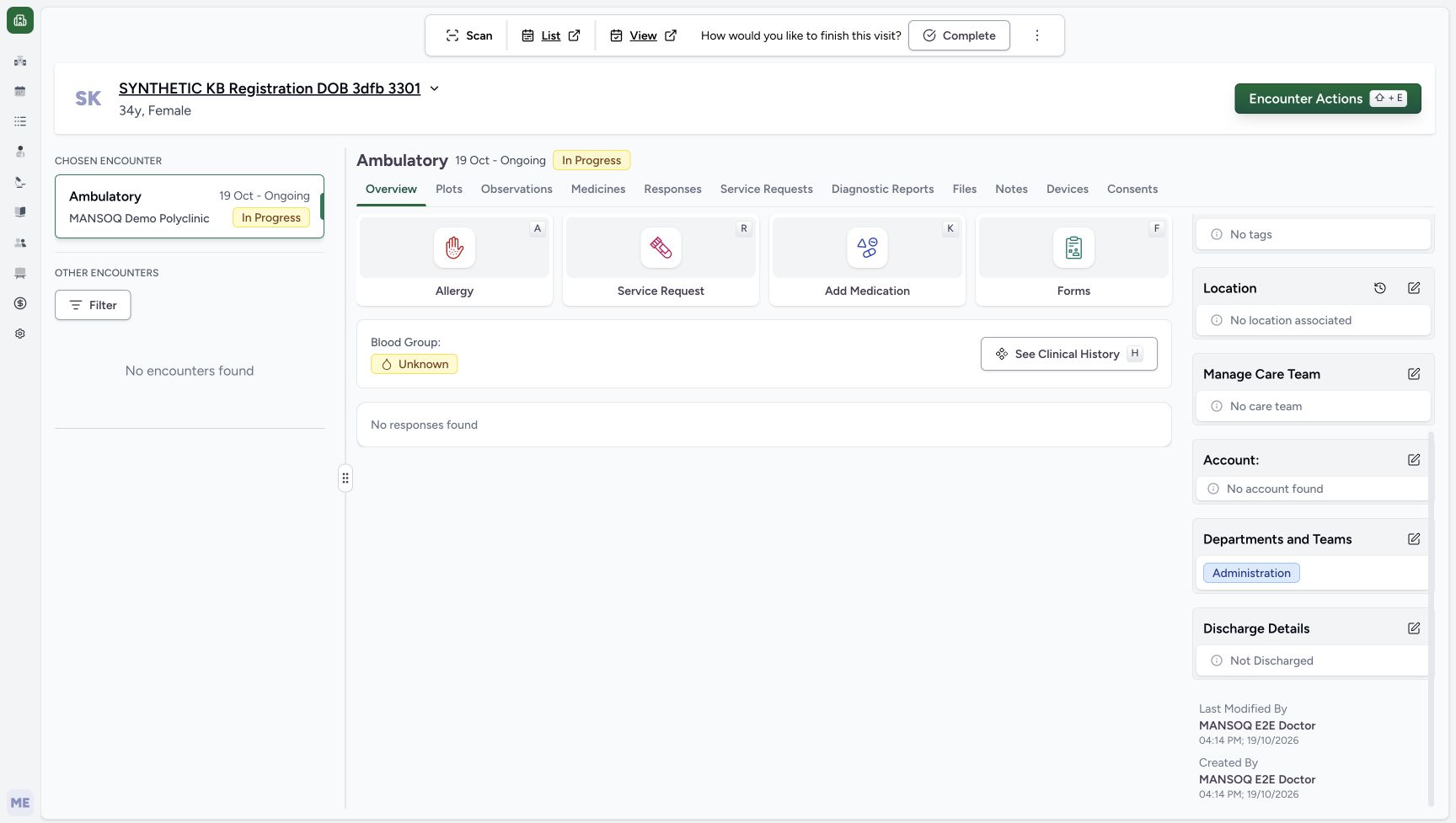 123
123Saved department and Doctor attribution
Capture details
Exact committed 3dfb source after USB migration. Existing non-superuser Doctor. One explicitly synthetic encounter was created and its appointment linked; later reload and View actions are read-only. No real attendance, diagnosis, treatment or clinical-service claim.
Image SHA-256 88d4da5d3e40b0d9b620f8bbf71202197b82a74bcfe3d933b71ca6634b941cff
- Saved department: Administration is retained in Departments and Teams.
- Created by Doctor: The saved encounter identifies MANSOQ E2E Doctor as creator.
- No account: The saved encounter currently shows No account found.
Check the saved encounter fields
The saved Overview shows Ambulatory, In Progress, Routine and a 19 October 2026 start of 04:09 PM. No responses found is the observed initial state; this software demonstration does not record a real assessment or treatment.
123Review the saved Ambulatory encounter
Capture details
Exact committed 3dfb source after USB migration. Existing non-superuser Doctor. One explicitly synthetic encounter was created and its appointment linked; later reload and View actions are read-only. No real attendance, diagnosis, treatment or clinical-service claim.
Image SHA-256 86ba5e78a59fe38cbe003c316889f34479d0d5326c237a40a02dfd17d8c2bcb3
- Ambulatory encounter: The saved encounter is Ambulatory and In Progress.
- Saved start time: The saved encounter displays the reviewed 4:09 PM start time.
- View appointment: Open the associated appointment to verify its saved state separately.
Keep the appointment time distinct from the encounter start
The appointment remains 2:00 PM–2:30 PM, while the encounter starts at 4:09 PM. Verify both saved values for their separate purposes rather than treating the form time as a reschedule.
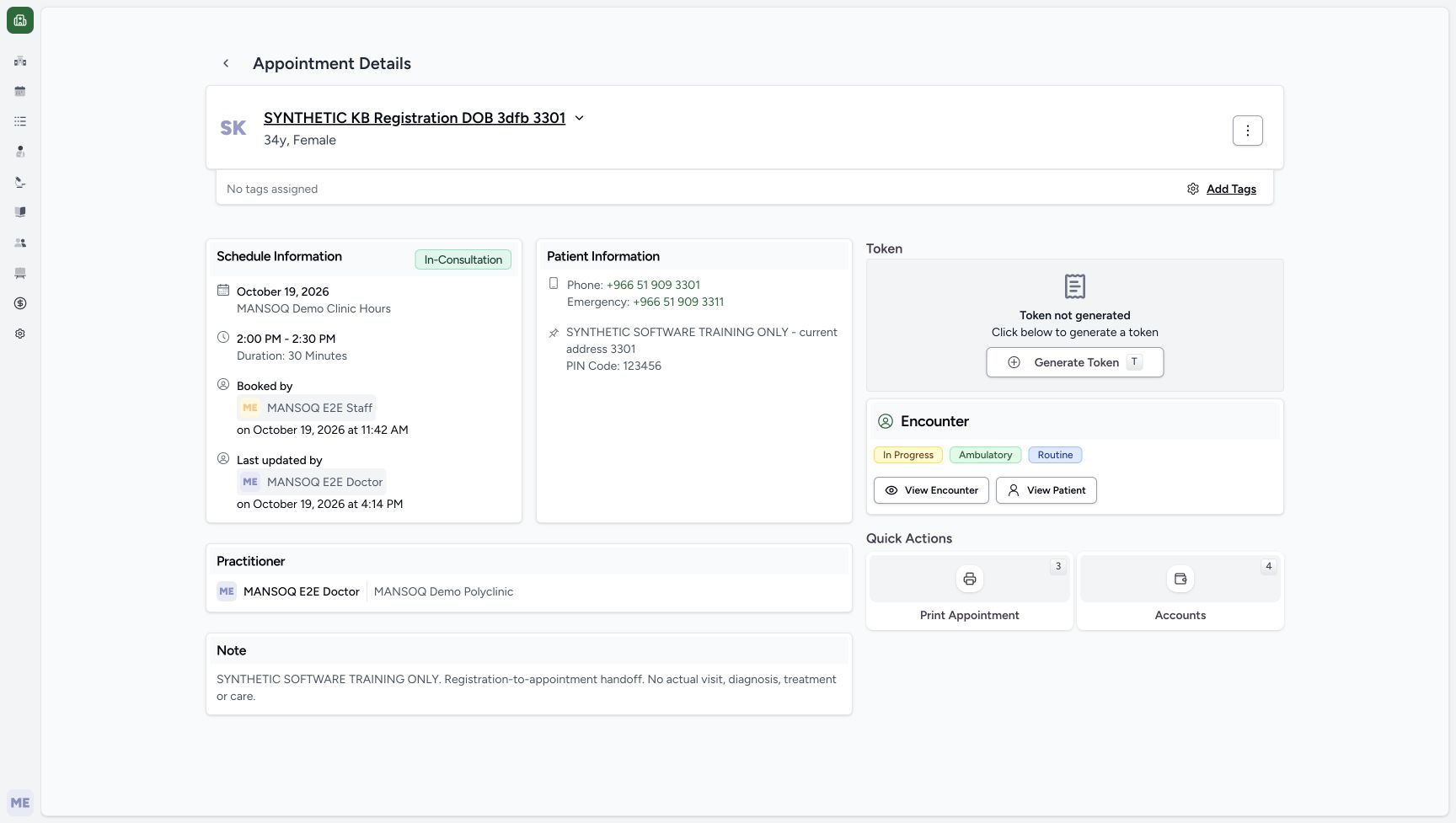 123
123Reloaded appointment retains its booked time and note
Capture details
Exact committed 3dfb source after USB migration. Existing non-superuser Doctor. One explicitly synthetic encounter was created and its appointment linked; later reload and View actions are read-only. No real attendance, diagnosis, treatment or clinical-service claim.
Image SHA-256 5497e2acf6d9d47a782bb19d8a6ae4976616c1c8db72d2f341e57a1afa7a1f4f
- Original booked slot: The original appointment remains scheduled for 2:00 PM–2:30 PM.
- Original synthetic note: The original synthetic handoff note is retained.
- View Encounter: Use View Encounter to return to the saved linked encounter.
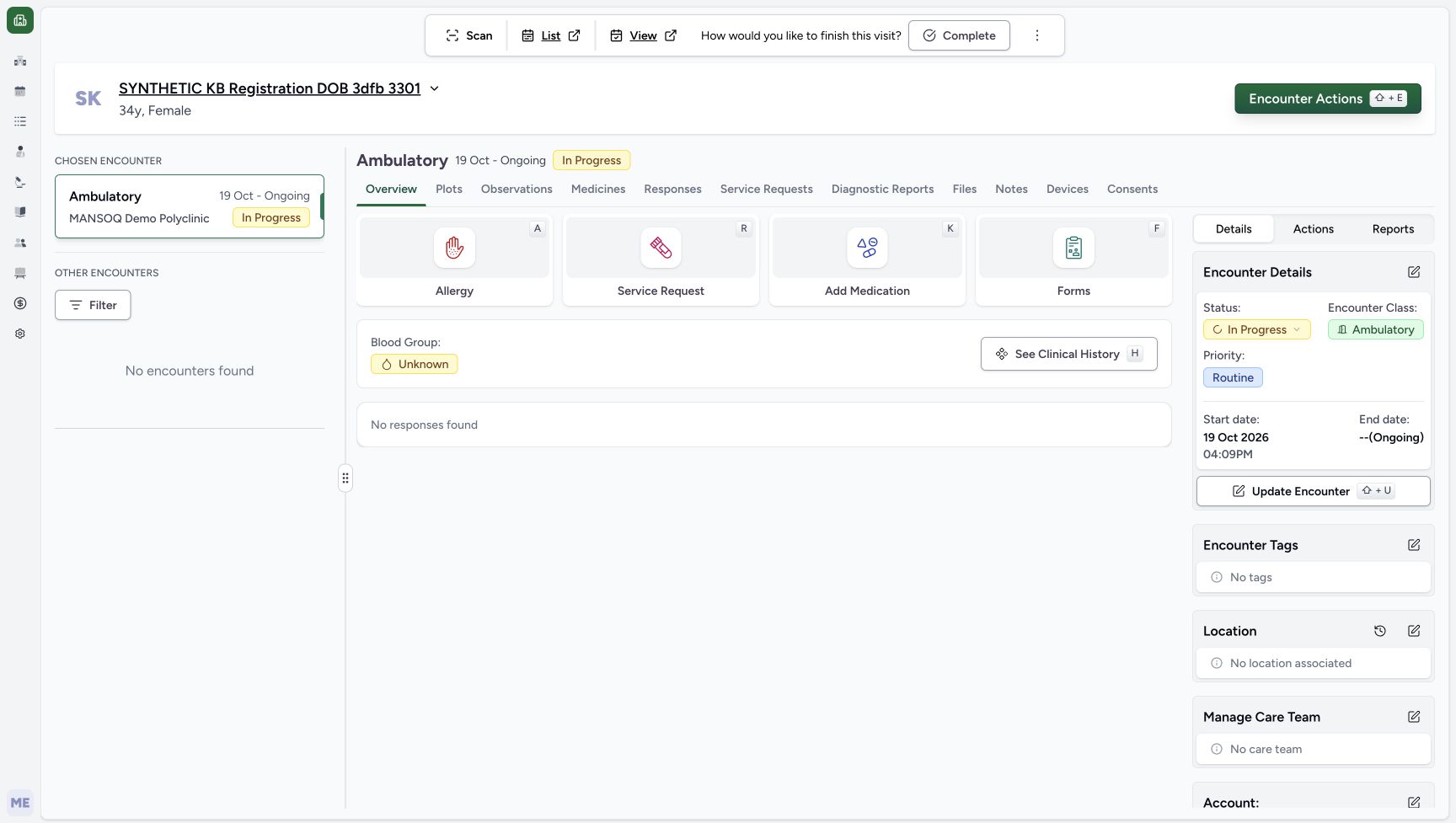 123
123Reloaded encounter and its appointment link
Capture details
Exact committed 3dfb source after USB migration. Existing non-superuser Doctor. One explicitly synthetic encounter was created and its appointment linked; later reload and View actions are read-only. No real attendance, diagnosis, treatment or clinical-service claim.
Image SHA-256 67e769e861223a17a14df05251cb1b3536764e08168531dbc605f2e284f004fd
- Saved start time: After reload, the encounter retains 19 October 2026 at 04:09 PM.
- View appointment: Use View to open the appointment linked to this saved encounter.
- Ambulatory encounter: The reloaded chosen encounter remains Ambulatory and In Progress.
Source evidence
Every citation uses this exact committed version. The private source repository requires access.
- repositories/platform/mansoq-web/src/pages/Appointments/AppointmentDetail.tsx:197 ·
3dfb7c9f519fb5b4cd4452439f3c12346bf58319Source file checksum
8fc77ee6f1f7b145e2987ba272e80f35631e17907ea91cd305738250b137b839 - repositories/platform/mansoq-web/src/pages/Appointments/AppointmentDetail.tsx:506 ·
3dfb7c9f519fb5b4cd4452439f3c12346bf58319Source file checksum
8fc77ee6f1f7b145e2987ba272e80f35631e17907ea91cd305738250b137b839 - repositories/platform/mansoq-web/src/pages/Appointments/AppointmentDetail.tsx:361 ·
3dfb7c9f519fb5b4cd4452439f3c12346bf58319Source file checksum
8fc77ee6f1f7b145e2987ba272e80f35631e17907ea91cd305738250b137b839 - repositories/platform/mansoq-web/src/components/Encounter/CreateEncounterForm.tsx:156 ·
3dfb7c9f519fb5b4cd4452439f3c12346bf58319Source file checksum
849ee40ade505c03c37ead86ac160b0c611bedf5f35da2e7dec1700288d4daca - repositories/platform/mansoq-web/src/components/Encounter/CreateEncounterForm.tsx:247 ·
3dfb7c9f519fb5b4cd4452439f3c12346bf58319Source file checksum
849ee40ade505c03c37ead86ac160b0c611bedf5f35da2e7dec1700288d4daca - repositories/platform/mansoq-web/src/components/Encounter/CreateEncounterForm.tsx:411 ·
3dfb7c9f519fb5b4cd4452439f3c12346bf58319Source file checksum
849ee40ade505c03c37ead86ac160b0c611bedf5f35da2e7dec1700288d4daca - repositories/platform/mansoq-core/mansoq/emr/api/viewsets/encounter.py:172 ·
3dfb7c9f519fb5b4cd4452439f3c12346bf58319Source file checksum
95deb76fba78fa3426ea5eae2fa175db4a31bd3ea8a6bc70da5f80632a05d2f8 - repositories/platform/mansoq-core/mansoq/emr/api/viewsets/encounter.py:177 ·
3dfb7c9f519fb5b4cd4452439f3c12346bf58319Source file checksum
95deb76fba78fa3426ea5eae2fa175db4a31bd3ea8a6bc70da5f80632a05d2f8 - repositories/platform/mansoq-core/mansoq/emr/api/viewsets/encounter.py:190 ·
3dfb7c9f519fb5b4cd4452439f3c12346bf58319Source file checksum
95deb76fba78fa3426ea5eae2fa175db4a31bd3ea8a6bc70da5f80632a05d2f8 - repositories/platform/mansoq-web/src/pages/Encounters/tabs/overview/summary-panel-details-tab/auditlogs.tsx:29 ·
3dfb7c9f519fb5b4cd4452439f3c12346bf58319Source file checksum
076b0eded1c49f718e3fcb515e0ae904df71c73e1865073b1ae8165848d176fa - repositories/platform/mansoq-web/src/pages/Encounters/tabs/overview/summary-panel-details-tab/department-and-team.tsx:36 ·
3dfb7c9f519fb5b4cd4452439f3c12346bf58319Source file checksum
dec3f0d9d10a8b4b7d5c5007f4b3f0cc93bbc8e22508cd34d317372717a2fd7c