 MANSOQ
 Clinical assessment · VERSION 3dfb7c9f
Select a diagnosis history group and cancel without copying
Practise group selection, deselecting one record, cancelling and reopening Diagnosis History. Collapse and reopen the date group, then leave the form without copying or changing a diagnosis. This illustrated Doctor example uses a fictional Polyclinic encounter.
Doctor
 1234
1234Date group with all three diagnoses selected
Capture details
Genuine unchanged 1728×921 original captured20October2026 on exact3dfb. Ordinary Doctor in the fictional Polyclinic encounter; manual original-pixel pointers.
Image SHA-256 4d50d51a7f2425372c4b99e550e9e728bbed01d963a7a8106eba152287f7a6fa
- Date-group checkbox: Select all three visible rows in this group.
- All three checked: Each of the three individual checkboxes is checked.
- Three selected: Read the footer count after selecting the group.
- Leave Add Selected unused: Enabled does not mean a record has been copied; this lesson uses Cancel.
 123
123History reopened with zero selections
Capture details
Genuine unchanged 1728×921 original captured20October2026 on exact3dfb. Ordinary Doctor in the fictional Polyclinic encounter; manual original-pixel pointers. Frames04and08 are separate chronological captures with identical original JPEG bytes; the reopened-zero observation is independently recorded.
Image SHA-256 a444fc257d689f1b51d0527cb7ac40a4e9dccc7b1a037d47aaa211f44ce90a23
- Group checkbox clear: The reopened selector has no group or row checks.
- Reset to zero: The selection count returns to zero.
- Add Selected disabled again: No pending selection remains from the cancelled visit.
 123
123Overview after both cancellations
Capture details
Genuine unchanged 1728×921 original captured20October2026 on exact3dfb. Ordinary Doctor in the fictional Polyclinic encounter; manual original-pixel pointers.
Image SHA-256 de53f4153e07fcff5ed18a5bf261d5186970da5aaa26ad1047d87450e1879d2c
- Diagnosis still Active: The returned Overview retains the original Active diagnosis.
- Severity and verification retained: Mild and Provisional remain beside the diagnosis.
- Same chosen encounter: Confirm the same In Progress Inpatient encounter.
14 of 14 content blocks have reviewed image alignment.
Before you begin
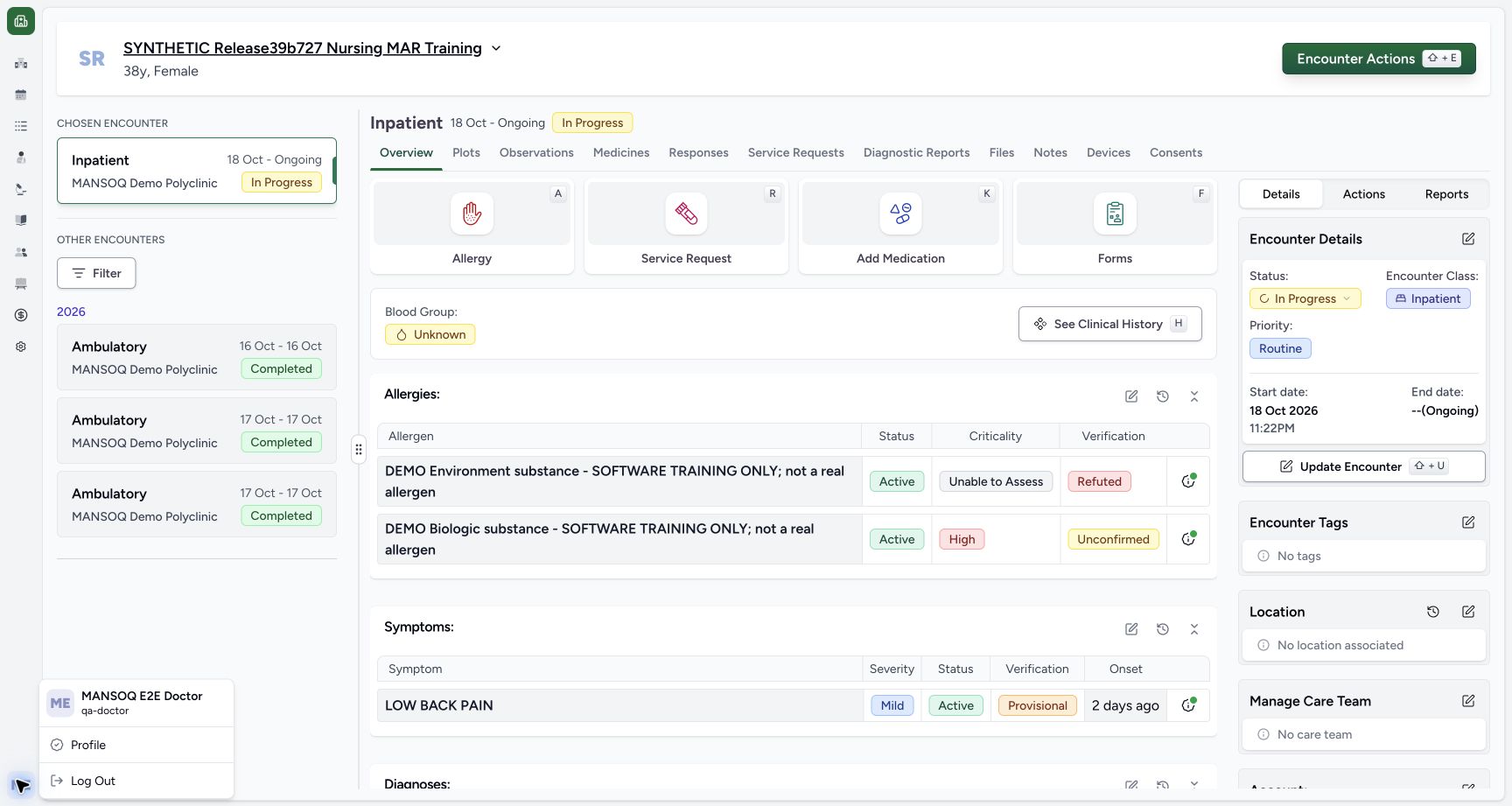
- Use your authorized Doctor account and confirm the intended fictional patient and chosen In Progress encounter. The pictured account is MANSOQ E2E Doctor at MANSOQ Demo Polyclinic.
 1234
1234Recorded release 3dfb7c9f · 2026-10-20T07:04:34.921Z · 1728 × 921 Confirm the Doctor and chosen fictional encounter
Capture details
Genuine unchanged 1728×921 original captured20October2026 on exact3dfb. Ordinary Doctor in the fictional Polyclinic encounter; manual original-pixel pointers.
Image SHA-256
40f7f356fdf0c2381eeb874dd30509d057273bcd5b3ba9469d89d0be63a9ba70- Fictional patient: Check the intended fictional patient label.
- Chosen encounter: Confirm the selected Inpatient encounter at MANSOQ Demo Polyclinic.
- In Progress: Use the intended active encounter.
- Doctor account: The opened account menu identifies MANSOQ E2E Doctor / qa-doctor.
 123
123Recorded release 3dfb7c9f · 2026-10-20T07:05:13.857Z · 1728 × 921 Existing diagnosis and symptom on Overview
Capture details
Genuine unchanged 1728×921 original captured20October2026 on exact3dfb. Ordinary Doctor in the fictional Polyclinic encounter; manual original-pixel pointers.
Image SHA-256
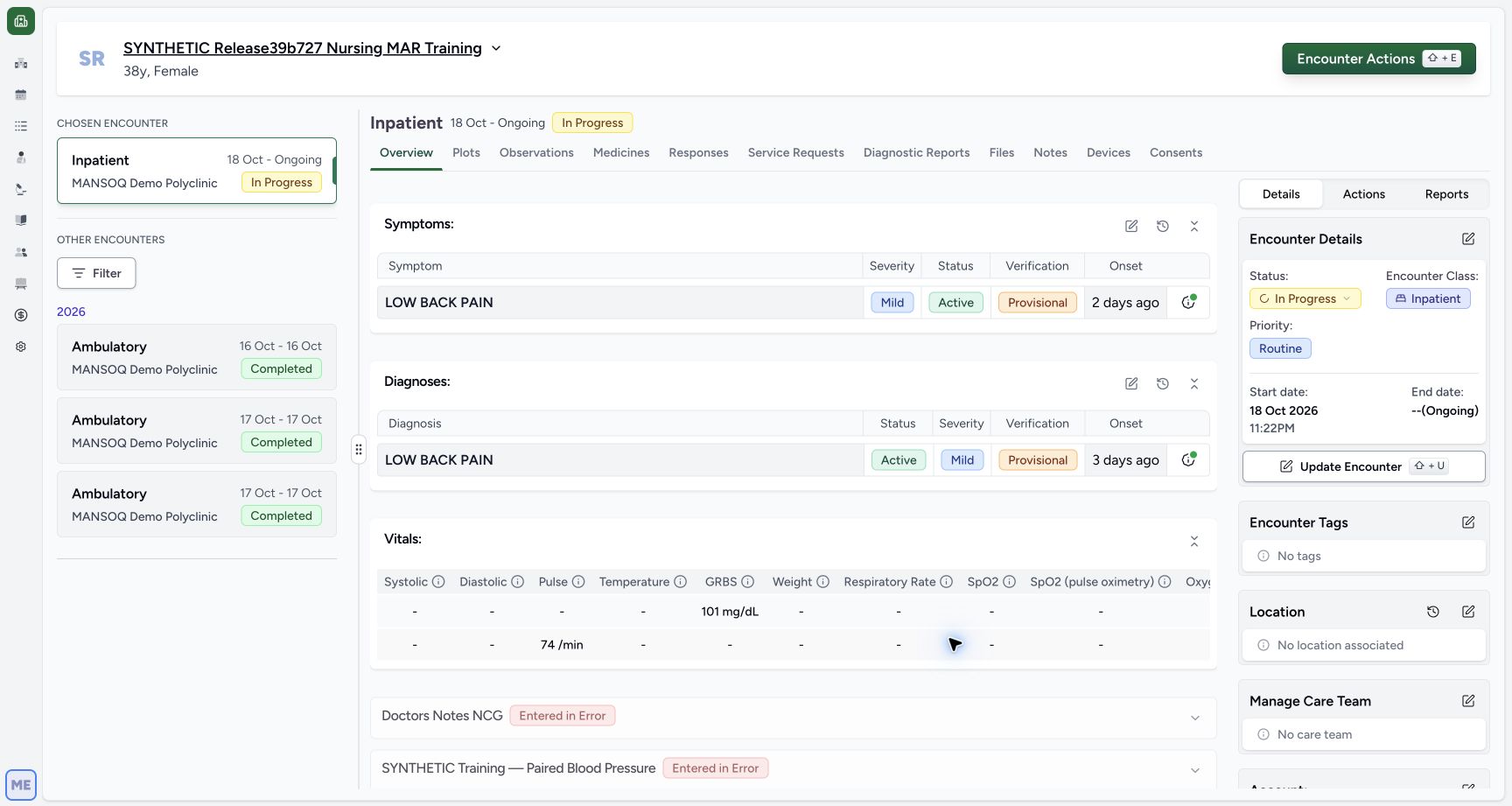
663ea0ae20ddcc0edbd9294dc658f0b54cd62e0f85c2238561560d146581e6d5- Open Diagnosis: Use the pencil beside Diagnoses.
- Existing diagnosis: Read this diagnosis separately from the Symptoms row above.
- Saved values: The existing diagnosis is Active, Mild and Provisional.
- Start with the existing saved diagnosis and retained corrected row. This example has three eligible history records. Their shared LOW BACK PAIN label does not replace the author, onset, status and encounter as record context. The older release label in the fictional patient name is not the software version.
 1234
1234Recorded release 3dfb7c9f · 2026-10-20T07:05:27.846Z · 1728 × 921 Existing Diagnosis form before history selection
Capture details
Genuine unchanged 1728×921 original captured20October2026 on exact3dfb. Ordinary Doctor in the fictional Polyclinic encounter; manual original-pixel pointers.
Image SHA-256
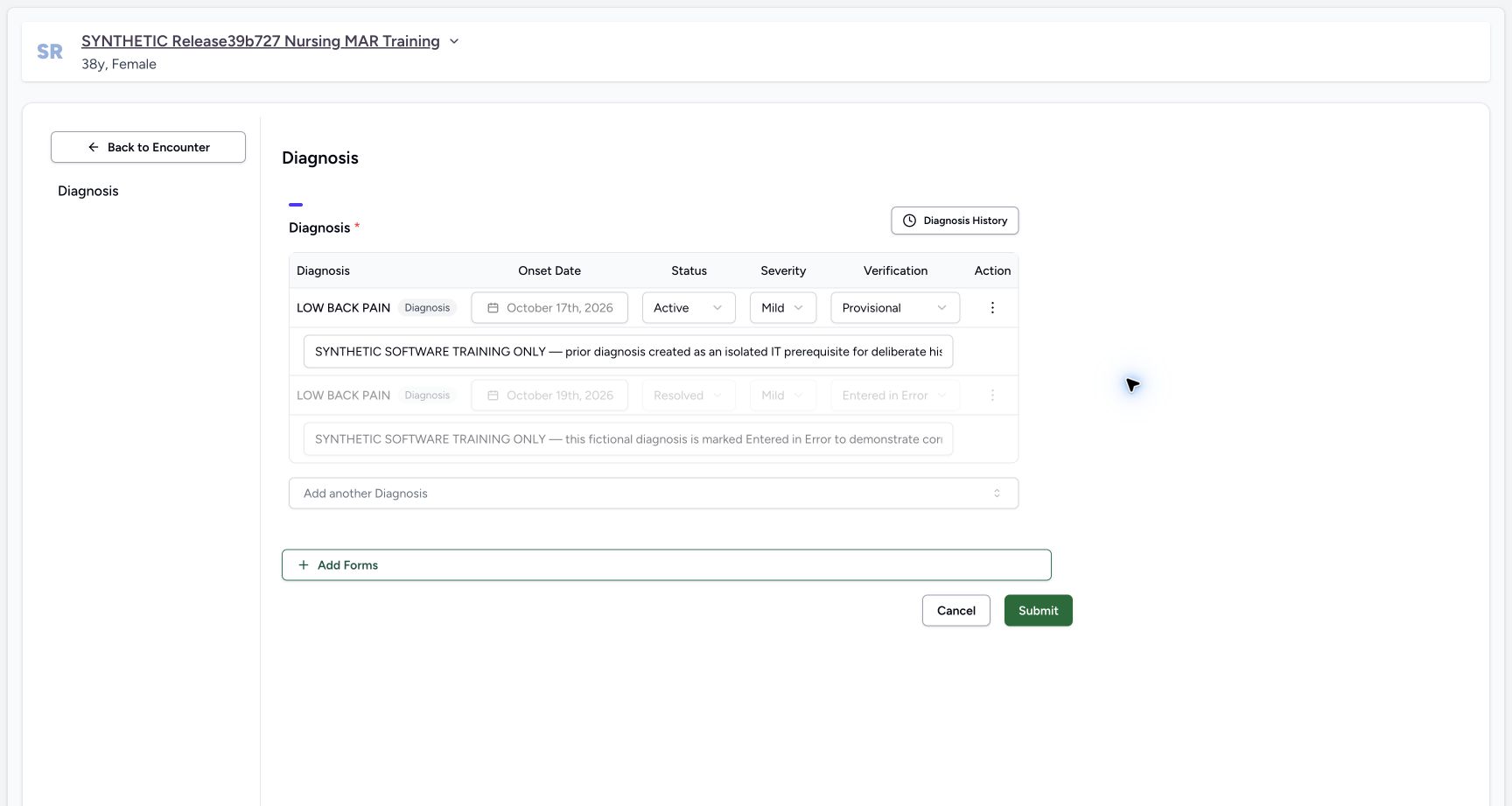
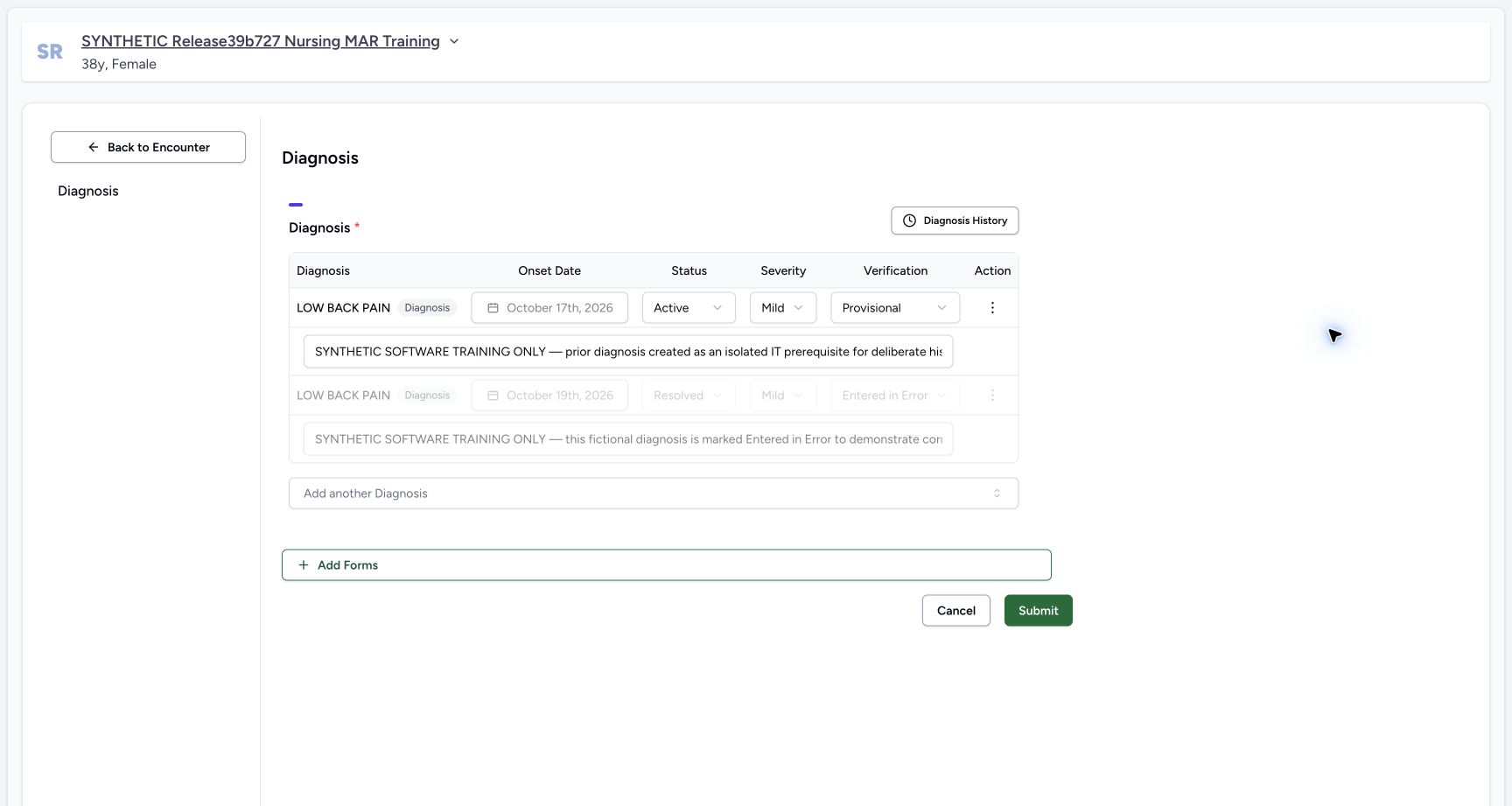
66ab4210cf936d2a893f0f4be37d00da7dbb12d4e6c12f18811af02e2c0d58e0- Diagnosis History: Open the patient diagnosis history selector.
- Saved onset: The existing 17 October onset is locked.
- Retained error row: This separate faded row is Entered in Error; leave it untouched.
- Form Cancel: This Cancel leaves the form without Submit.
 12345
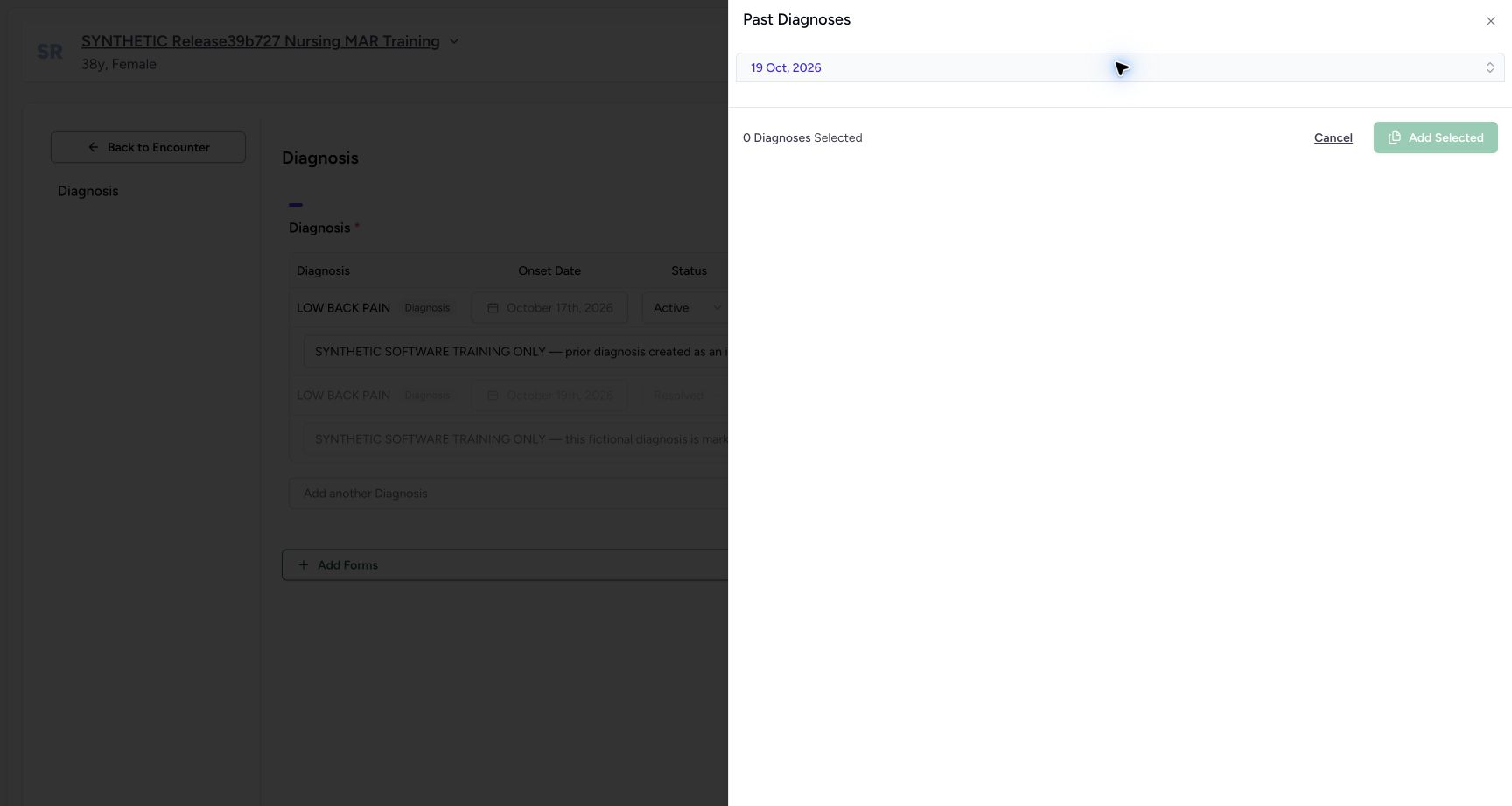
12345Recorded release 3dfb7c9f · 2026-10-20T07:05:41.677Z · 1728 × 921 History initially has zero selections
Capture details
Genuine unchanged 1728×921 original captured20October2026 on exact3dfb. Ordinary Doctor in the fictional Polyclinic encounter; manual original-pixel pointers. Frames04and08 are separate chronological captures with identical original JPEG bytes; the reopened-zero observation is independently recorded.
Image SHA-256
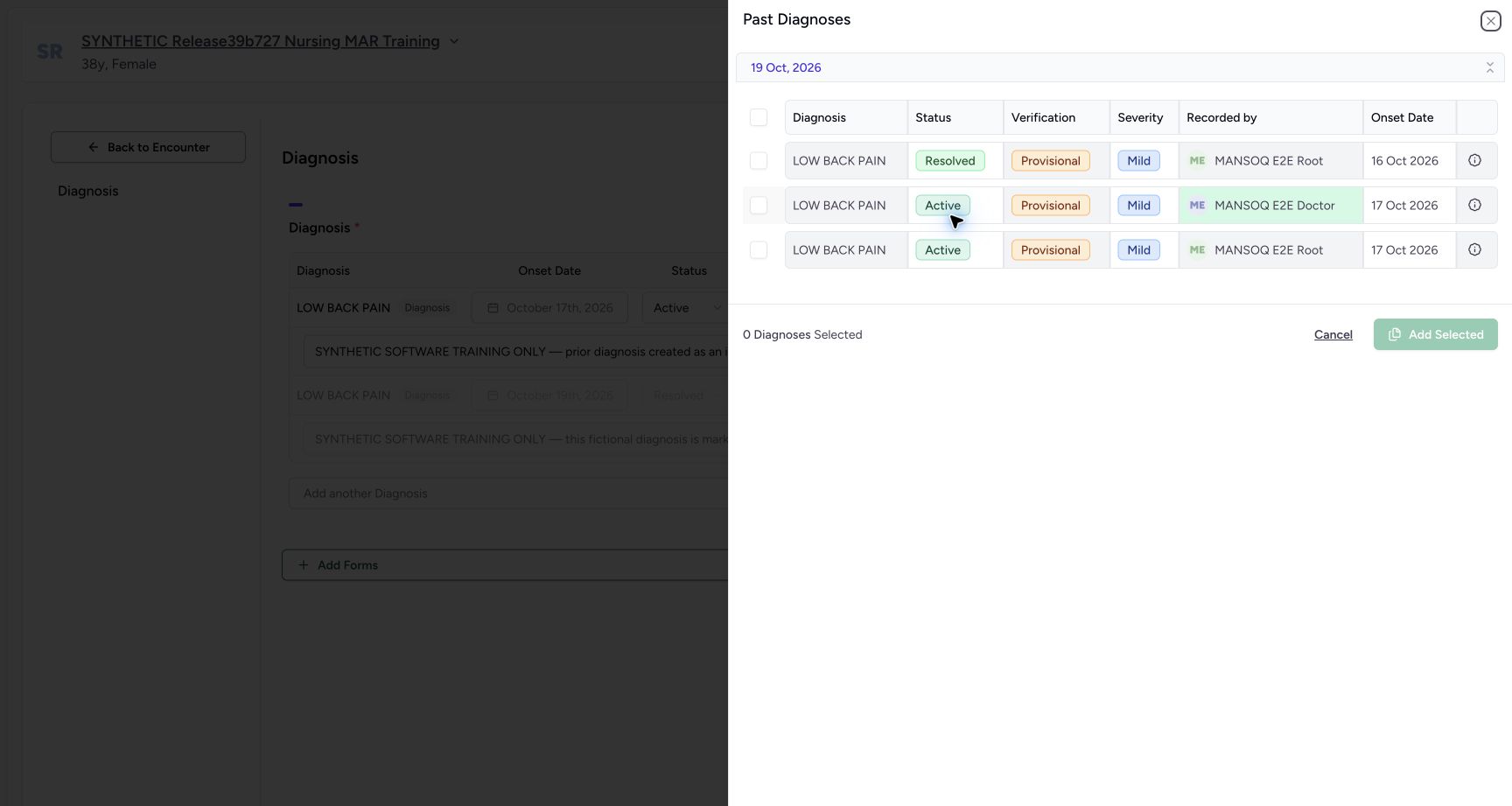
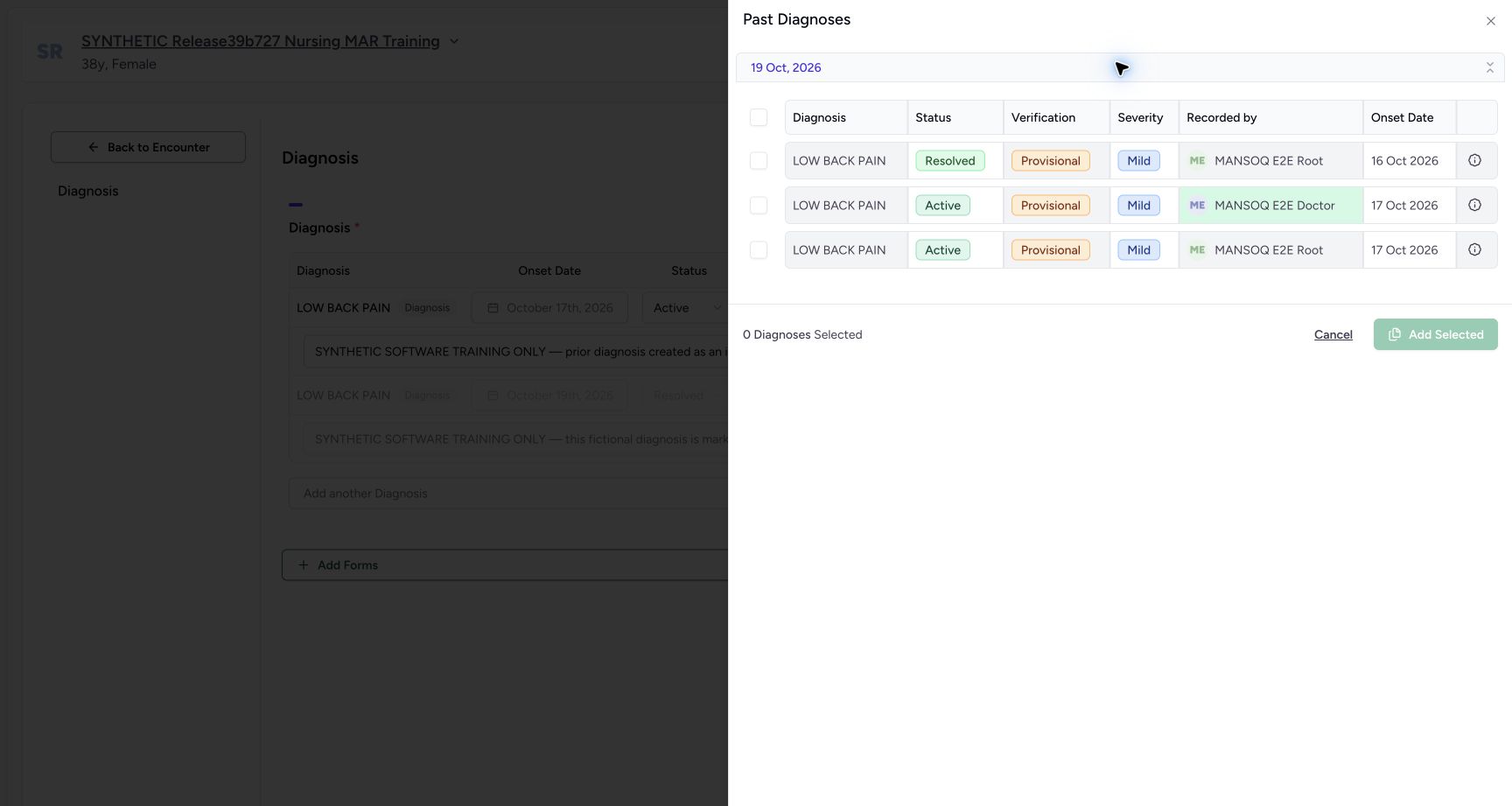
a444fc257d689f1b51d0527cb7ac40a4e9dccc7b1a037d47aaa211f44ce90a23- Recorded-date group: The 19 October heading groups record creation dates.
- Individual onset: The first row onset is 16 October; the lower two are 17 October.
- Recorded by: Distinguish the Doctor-authored middle record from the Root-authored records.
- Zero selected: The selector opens with zero diagnoses selected.
- Add Selected disabled: No selection is ready to add at this point.
- Keep the clinical fields unchanged. Use Cancel in the history selector, then the separate form Cancel when finished. Add Selected and Submit are outside this selection exercise.
 1234
1234Recorded release 3dfb7c9f · 2026-10-20T07:06:15.721Z · 1728 × 921 Partial selection with the middle row unchecked
Capture details
Genuine unchanged 1728×921 original captured20October2026 on exact3dfb. Ordinary Doctor in the fictional Polyclinic encounter; manual original-pixel pointers.
Image SHA-256
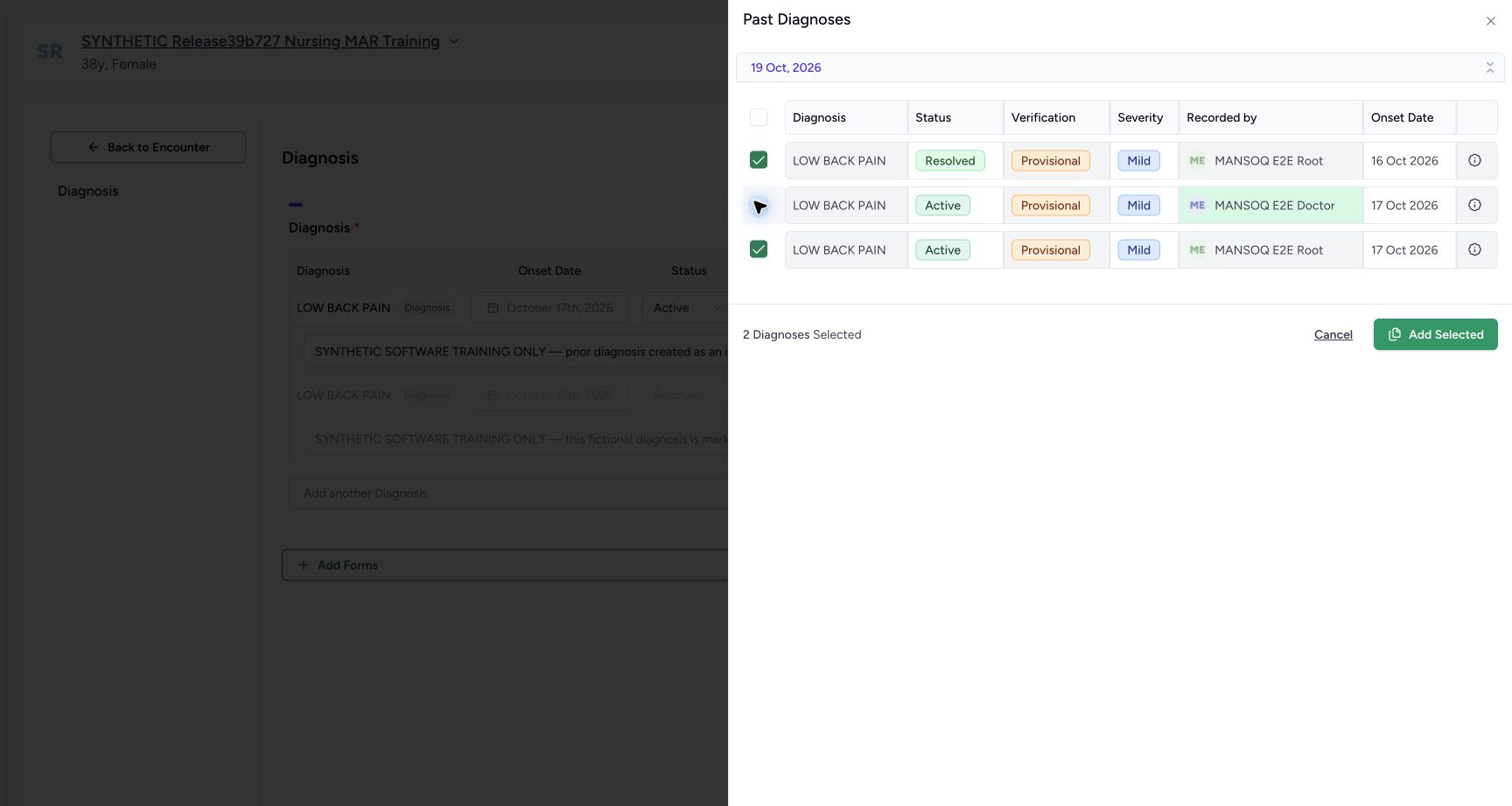
82c2d8169ad1e170c1817dad3e6ccdbe867a48edae2a98e83fb475a82d199567- Uncheck the middle row: Deselect the Doctor-authored middle record only.
- Group no longer fully checked: The header checkbox is clear after a partial selection.
- Two selected: The footer count now reads two.
- History Cancel: Close this selection without adding the records.
 123
123Recorded release 3dfb7c9f · 2026-10-20T07:06:39.504Z · 1728 × 921 Original form after history Cancel
Capture details
Genuine unchanged 1728×921 original captured20October2026 on exact3dfb. Ordinary Doctor in the fictional Polyclinic encounter; manual original-pixel pointers. Captured after the first history Cancel; reused only as an explicitly earlier unchanged-form reference for the later form Cancel control.
Image SHA-256
32162c65fb94be1866c58216c6b24f8627474d19c977b7d19e1c98b93a5204db- Reopen Diagnosis History: Open the same selector again to check its reset state.
- Original current row: The original Active diagnosis remains in the form.
- Form Cancel reference: This earlier unchanged form image also locates the separate form Cancel control.
1. Open the existing Diagnosis form
On the chosen encounter’s Overview, scroll to Diagnoses and select its pencil. Read the diagnosis separately from the Symptoms section above it. Confirm the intended patient before continuing.
1234Confirm the Doctor and chosen fictional encounter
Capture details
Genuine unchanged 1728×921 original captured20October2026 on exact3dfb. Ordinary Doctor in the fictional Polyclinic encounter; manual original-pixel pointers.
Image SHA-256 40f7f356fdf0c2381eeb874dd30509d057273bcd5b3ba9469d89d0be63a9ba70
- Fictional patient: Check the intended fictional patient label.
- Chosen encounter: Confirm the selected Inpatient encounter at MANSOQ Demo Polyclinic.
- In Progress: Use the intended active encounter.
- Doctor account: The opened account menu identifies MANSOQ E2E Doctor / qa-doctor.
123Existing diagnosis and symptom on Overview
Capture details
Genuine unchanged 1728×921 original captured20October2026 on exact3dfb. Ordinary Doctor in the fictional Polyclinic encounter; manual original-pixel pointers.
Image SHA-256 663ea0ae20ddcc0edbd9294dc658f0b54cd62e0f85c2238561560d146581e6d5
- Open Diagnosis: Use the pencil beside Diagnoses.
- Existing diagnosis: Read this diagnosis separately from the Symptoms row above.
- Saved values: The existing diagnosis is Active, Mild and Provisional.
2. Leave the saved rows unchanged and open history
The form shows the current Active diagnosis with its locked 17 October onset and a separate faded Entered in Error row. Leave both rows unchanged. Select Diagnosis History.
1234Existing Diagnosis form before history selection
Capture details
Genuine unchanged 1728×921 original captured20October2026 on exact3dfb. Ordinary Doctor in the fictional Polyclinic encounter; manual original-pixel pointers.
Image SHA-256 66ab4210cf936d2a893f0f4be37d00da7dbb12d4e6c12f18811af02e2c0d58e0
- Diagnosis History: Open the patient diagnosis history selector.
- Saved onset: The existing 17 October onset is locked.
- Retained error row: This separate faded row is Entered in Error; leave it untouched.
- Form Cancel: This Cancel leaves the form without Submit.
3. Read the date group and initial count
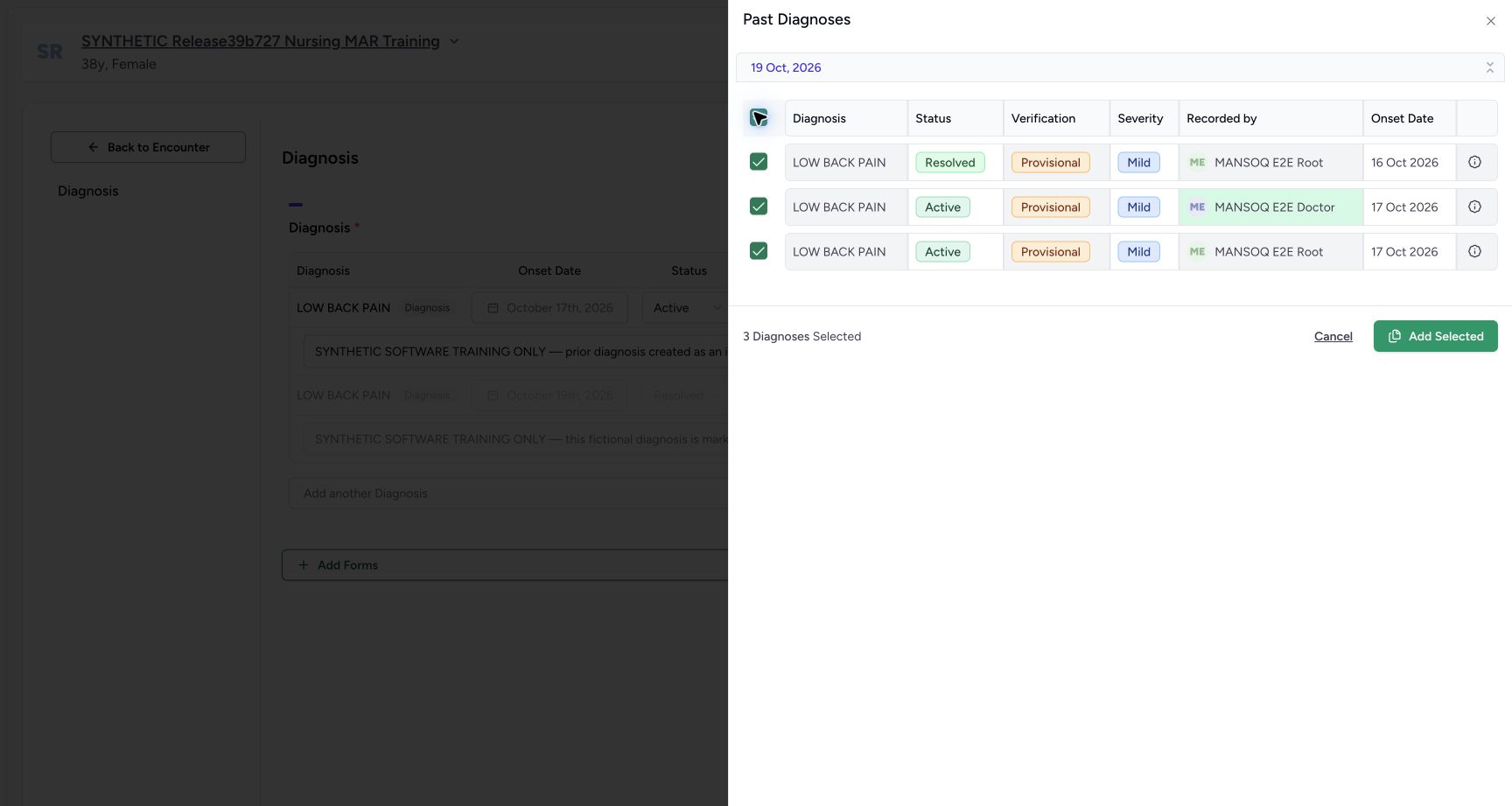
Past Diagnoses opens with three records under 19 Oct, 2026 and 0 Diagnoses Selected. The group date is separate from the individual Onset Date values: the first row shows 16 October and the other two show 17 October. Recorded by distinguishes the Doctor-authored middle row from the two Root-authored records. Add Selected is disabled while nothing is selected.
12345History initially has zero selections
Capture details
Genuine unchanged 1728×921 original captured20October2026 on exact3dfb. Ordinary Doctor in the fictional Polyclinic encounter; manual original-pixel pointers. Frames04and08 are separate chronological captures with identical original JPEG bytes; the reopened-zero observation is independently recorded.
Image SHA-256 a444fc257d689f1b51d0527cb7ac40a4e9dccc7b1a037d47aaa211f44ce90a23
- Recorded-date group: The 19 October heading groups record creation dates.
- Individual onset: The first row onset is 16 October; the lower two are 17 October.
- Recorded by: Distinguish the Doctor-authored middle record from the Root-authored records.
- Zero selected: The selector opens with zero diagnoses selected.
- Add Selected disabled: No selection is ready to add at this point.
4. Select the visible date group
Select the checkbox at the left of the group’s table header. All three visible row checkboxes become checked, and the footer reads 3 Diagnoses Selected. Add Selected becomes enabled, but leave it unused in this exercise. Selection alone has not copied a record.
1234Date group with all three diagnoses selected
Capture details
Genuine unchanged 1728×921 original captured20October2026 on exact3dfb. Ordinary Doctor in the fictional Polyclinic encounter; manual original-pixel pointers.
Image SHA-256 4d50d51a7f2425372c4b99e550e9e728bbed01d963a7a8106eba152287f7a6fa
- Date-group checkbox: Select all three visible rows in this group.
- All three checked: Each of the three individual checkboxes is checked.
- Three selected: Read the footer count after selecting the group.
- Leave Add Selected unused: Enabled does not mean a record has been copied; this lesson uses Cancel.
5. Deselect one record and check the partial count
Uncheck the Doctor-authored middle row. The first and last rows remain selected, the group header checkbox is clear and the footer reads 2 Diagnoses Selected. Check the individual rows and count together.
1234Partial selection with the middle row unchecked
Capture details
Genuine unchanged 1728×921 original captured20October2026 on exact3dfb. Ordinary Doctor in the fictional Polyclinic encounter; manual original-pixel pointers.
Image SHA-256 82c2d8169ad1e170c1817dad3e6ccdbe867a48edae2a98e83fb475a82d199567
- Uncheck the middle row: Deselect the Doctor-authored middle record only.
- Group no longer fully checked: The header checkbox is clear after a partial selection.
- Two selected: The footer count now reads two.
- History Cancel: Close this selection without adding the records.
6. Cancel the selection and return to the form
Select Cancel in the history selector. It closes and returns to the original form with its current diagnosis and separate retained error row. Do not choose Add Selected or Submit.
1234Partial selection with the middle row unchecked
Capture details
Genuine unchanged 1728×921 original captured20October2026 on exact3dfb. Ordinary Doctor in the fictional Polyclinic encounter; manual original-pixel pointers.
Image SHA-256 82c2d8169ad1e170c1817dad3e6ccdbe867a48edae2a98e83fb475a82d199567
- Uncheck the middle row: Deselect the Doctor-authored middle record only.
- Group no longer fully checked: The header checkbox is clear after a partial selection.
- Two selected: The footer count now reads two.
- History Cancel: Close this selection without adding the records.
123Original form after history Cancel
Capture details
Genuine unchanged 1728×921 original captured20October2026 on exact3dfb. Ordinary Doctor in the fictional Polyclinic encounter; manual original-pixel pointers. Captured after the first history Cancel; reused only as an explicitly earlier unchanged-form reference for the later form Cancel control.
Image SHA-256 32162c65fb94be1866c58216c6b24f8627474d19c977b7d19e1c98b93a5204db
- Reopen Diagnosis History: Open the same selector again to check its reset state.
- Original current row: The original Active diagnosis remains in the form.
- Form Cancel reference: This earlier unchanged form image also locates the separate form Cancel control.
7. Reopen history and verify that selection reset
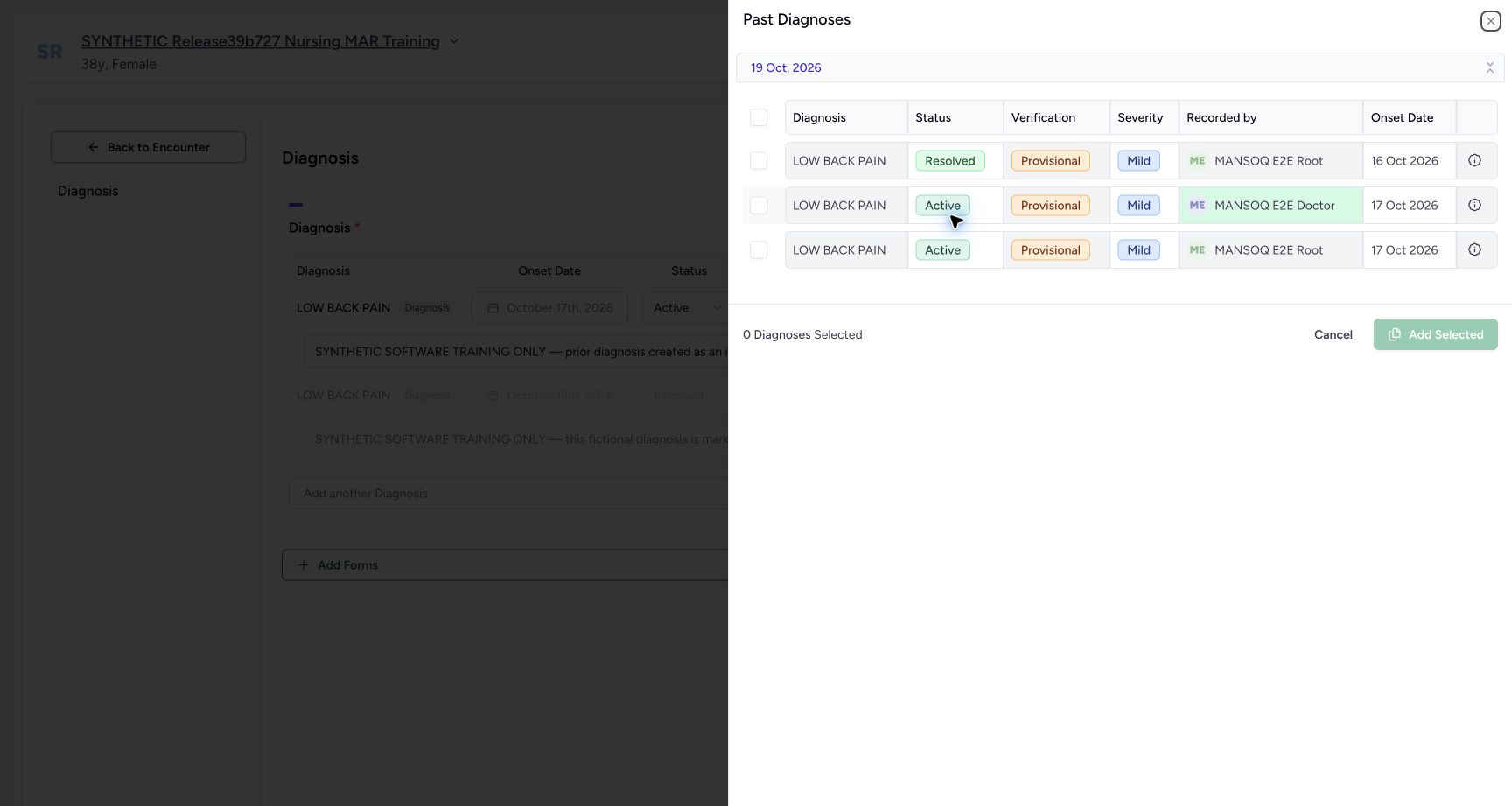
Select Diagnosis History again. The three records are visible but every checkbox is clear, the footer reads 0 Diagnoses Selected and Add Selected is disabled. The previous two-record selection has been cleared.
123Original form after history Cancel
Capture details
Genuine unchanged 1728×921 original captured20October2026 on exact3dfb. Ordinary Doctor in the fictional Polyclinic encounter; manual original-pixel pointers. Captured after the first history Cancel; reused only as an explicitly earlier unchanged-form reference for the later form Cancel control.
Image SHA-256 32162c65fb94be1866c58216c6b24f8627474d19c977b7d19e1c98b93a5204db
- Reopen Diagnosis History: Open the same selector again to check its reset state.
- Original current row: The original Active diagnosis remains in the form.
- Form Cancel reference: This earlier unchanged form image also locates the separate form Cancel control.
123History reopened with zero selections
Capture details
Genuine unchanged 1728×921 original captured20October2026 on exact3dfb. Ordinary Doctor in the fictional Polyclinic encounter; manual original-pixel pointers. Frames04and08 are separate chronological captures with identical original JPEG bytes; the reopened-zero observation is independently recorded.
Image SHA-256 a444fc257d689f1b51d0527cb7ac40a4e9dccc7b1a037d47aaa211f44ce90a23
- Group checkbox clear: The reopened selector has no group or row checks.
- Reset to zero: The selection count returns to zero.
- Add Selected disabled again: No pending selection remains from the cancelled visit.
8. Collapse and expand the date group
Select the date-group header or its chevron to collapse the group. The records are hidden while the footer remains at zero. Select it again to show the same three unchecked rows. Collapsing the group changes visibility, not the records or selection count.
 123
123Recorded-date group collapsed with zero selected
Capture details
Genuine unchanged 1728×921 original captured20October2026 on exact3dfb. Ordinary Doctor in the fictional Polyclinic encounter; manual original-pixel pointers.
Image SHA-256 aa42f02ad24a402961c20a868305fb6b4ad419a0ff3c06c0af174a4df0de7960
- Collapse or expand date group: The date-group chevron toggles row visibility.
- Still zero selected: Collapsing rows leaves the selection count at zero.
- Add Selected remains disabled: Hidden rows have not been selected or removed.
 1234
1234Recorded-date group expanded with zero selected
Capture details
Genuine unchanged 1728×921 original captured20October2026 on exact3dfb. Ordinary Doctor in the fictional Polyclinic encounter; manual original-pixel pointers.
Image SHA-256 c3aa9d670df7fee27c1ae78ca202ac208b724c4fb7bb3454b5cc3d4002c575f6
- Date group expanded: Re-expand the same recorded-date group.
- Rows remain unchecked: The three records return without selections.
- Zero after expansion: Check the unchanged selection count.
- Cancel the history selector: Close history before using the form Cancel.
9. Cancel both views and verify the return
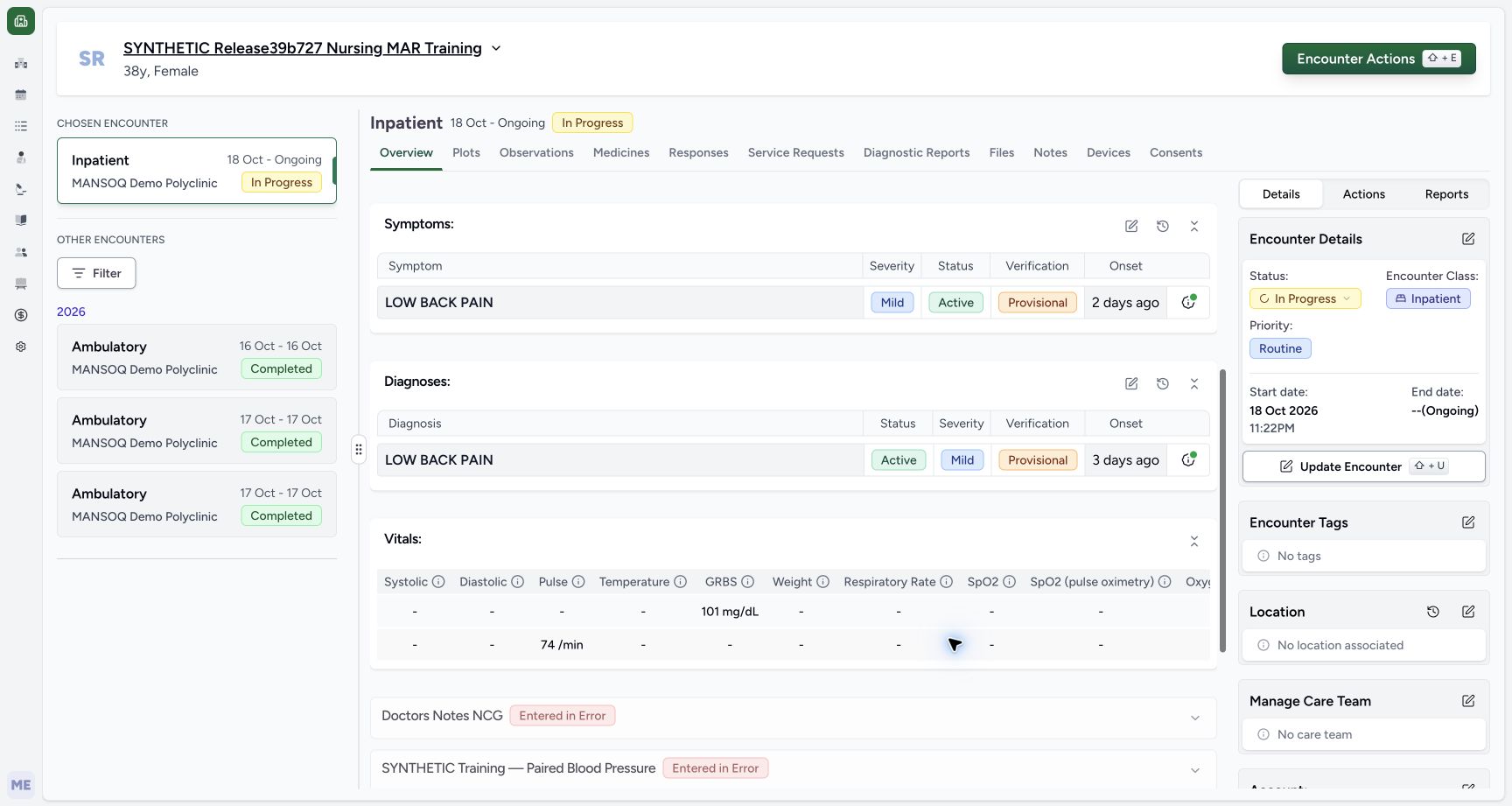
Select the history selector’s Cancel again, then the form’s own Cancel. The earlier unchanged-form picture locates that separate form control; it was captured after the first history cancellation. On the returned Overview, confirm the same chosen encounter and the original diagnosis’s Active, Mild and Provisional values. No Add Selected or Submit was used.
1234Recorded-date group expanded with zero selected
Capture details
Genuine unchanged 1728×921 original captured20October2026 on exact3dfb. Ordinary Doctor in the fictional Polyclinic encounter; manual original-pixel pointers.
Image SHA-256 c3aa9d670df7fee27c1ae78ca202ac208b724c4fb7bb3454b5cc3d4002c575f6
- Date group expanded: Re-expand the same recorded-date group.
- Rows remain unchecked: The three records return without selections.
- Zero after expansion: Check the unchanged selection count.
- Cancel the history selector: Close history before using the form Cancel.
123Original form after history Cancel
Capture details
Genuine unchanged 1728×921 original captured20October2026 on exact3dfb. Ordinary Doctor in the fictional Polyclinic encounter; manual original-pixel pointers. Captured after the first history Cancel; reused only as an explicitly earlier unchanged-form reference for the later form Cancel control.
Image SHA-256 32162c65fb94be1866c58216c6b24f8627474d19c977b7d19e1c98b93a5204db
- Reopen Diagnosis History: Open the same selector again to check its reset state.
- Original current row: The original Active diagnosis remains in the form.
- Form Cancel reference: This earlier unchanged form image also locates the separate form Cancel control.
123Overview after both cancellations
Capture details
Genuine unchanged 1728×921 original captured20October2026 on exact3dfb. Ordinary Doctor in the fictional Polyclinic encounter; manual original-pixel pointers.
Image SHA-256 de53f4153e07fcff5ed18a5bf261d5186970da5aaa26ad1047d87450e1879d2c
- Diagnosis still Active: The returned Overview retains the original Active diagnosis.
- Severity and verification retained: Mild and Provisional remain beside the diagnosis.
- Same chosen encounter: Confirm the same In Progress Inpatient encounter.
Selection is separate from a saved clinical change
This exercise demonstrates selecting, deselecting, clearing a cancelled selection and changing group visibility. The saved records remained unchanged at the end of this captured exercise. It does not demonstrate copying the selected records, creating a diagnosis or saving a lifecycle change. Later status demonstrations are separate from these pictures.
123History reopened with zero selections
Capture details
Genuine unchanged 1728×921 original captured20October2026 on exact3dfb. Ordinary Doctor in the fictional Polyclinic encounter; manual original-pixel pointers. Frames04and08 are separate chronological captures with identical original JPEG bytes; the reopened-zero observation is independently recorded.
Image SHA-256 a444fc257d689f1b51d0527cb7ac40a4e9dccc7b1a037d47aaa211f44ce90a23
- Group checkbox clear: The reopened selector has no group or row checks.
- Reset to zero: The selection count returns to zero.
- Add Selected disabled again: No pending selection remains from the cancelled visit.
123Overview after both cancellations
Capture details
Genuine unchanged 1728×921 original captured20October2026 on exact3dfb. Ordinary Doctor in the fictional Polyclinic encounter; manual original-pixel pointers.
Image SHA-256 de53f4153e07fcff5ed18a5bf261d5186970da5aaa26ad1047d87450e1879d2c
- Diagnosis still Active: The returned Overview retains the original Active diagnosis.
- Severity and verification retained: Mild and Provisional remain beside the diagnosis.
- Same chosen encounter: Confirm the same In Progress Inpatient encounter.
Source evidence
Every citation uses this exact committed version. The private source repository requires access.
- repositories/platform/mansoq-web/src/components/HistoricalRecordSelector/index.tsx:117 ·
3dfb7c9f519fb5b4cd4452439f3c12346bf58319Source file checksum
0ab03afa6a5954112061e0bf07b15cd3f4c901444f3c3de8a8e194524ef1f0c2 - repositories/platform/mansoq-web/src/components/HistoricalRecordSelector/index.tsx:136 ·
3dfb7c9f519fb5b4cd4452439f3c12346bf58319Source file checksum
0ab03afa6a5954112061e0bf07b15cd3f4c901444f3c3de8a8e194524ef1f0c2 - repositories/platform/mansoq-web/src/components/HistoricalRecordSelector/index.tsx:294 ·
3dfb7c9f519fb5b4cd4452439f3c12346bf58319Source file checksum
0ab03afa6a5954112061e0bf07b15cd3f4c901444f3c3de8a8e194524ef1f0c2 - repositories/platform/mansoq-web/src/components/HistoricalRecordSelector/index.tsx:334 ·
3dfb7c9f519fb5b4cd4452439f3c12346bf58319Source file checksum
0ab03afa6a5954112061e0bf07b15cd3f4c901444f3c3de8a8e194524ef1f0c2 - repositories/platform/mansoq-web/src/components/HistoricalRecordSelector/index.tsx:410 ·
3dfb7c9f519fb5b4cd4452439f3c12346bf58319Source file checksum
0ab03afa6a5954112061e0bf07b15cd3f4c901444f3c3de8a8e194524ef1f0c2 - repositories/platform/mansoq-web/src/components/HistoricalRecordSelector/index.tsx:514 ·
3dfb7c9f519fb5b4cd4452439f3c12346bf58319Source file checksum
0ab03afa6a5954112061e0bf07b15cd3f4c901444f3c3de8a8e194524ef1f0c2 - repositories/platform/mansoq-web/src/components/HistoricalRecordSelector/RecordItem.tsx:1 ·
3dfb7c9f519fb5b4cd4452439f3c12346bf58319Source file checksum
91960b93e01760bc021d0a08d2684905e269a1091bff162bf0e4c3b5e63ef468 - repositories/platform/mansoq-web/src/components/Questionnaire/QuestionTypes/DiagnosisQuestion.tsx:299 ·
3dfb7c9f519fb5b4cd4452439f3c12346bf58319Source file checksum
56a14d11bcc3aef66d9dc2d220b29d4c22ff671eed6ed4c4676ddf59b7920159 - repositories/platform/mansoq-web/src/components/Questionnaire/QuestionTypes/DiagnosisQuestion.tsx:381 ·
3dfb7c9f519fb5b4cd4452439f3c12346bf58319Source file checksum
56a14d11bcc3aef66d9dc2d220b29d4c22ff671eed6ed4c4676ddf59b7920159 - repositories/platform/mansoq-web/src/components/Questionnaire/QuestionTypes/DiagnosisQuestion.tsx:393 ·
3dfb7c9f519fb5b4cd4452439f3c12346bf58319Source file checksum
56a14d11bcc3aef66d9dc2d220b29d4c22ff671eed6ed4c4676ddf59b7920159 - repositories/platform/mansoq-web/src/components/Questionnaire/QuestionTypes/DiagnosisQuestion.tsx:562 ·
3dfb7c9f519fb5b4cd4452439f3c12346bf58319Source file checksum
56a14d11bcc3aef66d9dc2d220b29d4c22ff671eed6ed4c4676ddf59b7920159 - repositories/platform/mansoq-web/src/components/Questionnaire/QuestionTypes/DiagnosisQuestion.tsx:651 ·
3dfb7c9f519fb5b4cd4452439f3c12346bf58319Source file checksum
56a14d11bcc3aef66d9dc2d220b29d4c22ff671eed6ed4c4676ddf59b7920159 - repositories/platform/mansoq-web/src/components/Patient/diagnosis/list.tsx:60 ·
3dfb7c9f519fb5b4cd4452439f3c12346bf58319Source file checksum
5662a180f3653fa2e8fbabf2f931d3e9a65792f22e9e7d534b108772601863ed - repositories/platform/mansoq-web/src/components/Patient/diagnosis/list.tsx:161 ·
3dfb7c9f519fb5b4cd4452439f3c12346bf58319Source file checksum
5662a180f3653fa2e8fbabf2f931d3e9a65792f22e9e7d534b108772601863ed - repositories/platform/mansoq-web/src/components/Questionnaire/QuestionnaireForm.tsx:1215 ·
3dfb7c9f519fb5b4cd4452439f3c12346bf58319Source file checksum
ee6c2195f13e48f0896a2d3da566c2f2a67910adad08894df6b77862f9cfdeec - repositories/platform/mansoq-web/src/types/emr/diagnosis/diagnosis.ts:4 ·
3dfb7c9f519fb5b4cd4452439f3c12346bf58319Source file checksum
4153cbcd88d02cf5a115cf585ee7cce198b9948d2722ccf2db11203c1eef1974 - repositories/platform/mansoq-web/src/types/emr/diagnosis/diagnosis.ts:27 ·
3dfb7c9f519fb5b4cd4452439f3c12346bf58319Source file checksum
4153cbcd88d02cf5a115cf585ee7cce198b9948d2722ccf2db11203c1eef1974 - repositories/platform/mansoq-core/mansoq/emr/api/viewsets/condition.py:43 ·
3dfb7c9f519fb5b4cd4452439f3c12346bf58319Source file checksum
f5d22181887766355e1aa847ff777b6f72a492eccce7820f716e4dcb28ad6172 - repositories/platform/mansoq-core/mansoq/emr/api/viewsets/condition.py:125 ·
3dfb7c9f519fb5b4cd4452439f3c12346bf58319Source file checksum
f5d22181887766355e1aa847ff777b6f72a492eccce7820f716e4dcb28ad6172 - repositories/platform/mansoq-documentation/versioned_docs/version-3.1/flows/clinical/condition/record-diagnosis.mdx:13 ·
3dfb7c9f519fb5b4cd4452439f3c12346bf58319Source file checksum
737a7c261144cbdaed517568649ea24f9c859297ae9c8e09f8838b9b62038cf2 - repositories/platform/mansoq-documentation/versioned_docs/version-3.1/flows/clinical/condition/record-diagnosis.mdx:31 ·
3dfb7c9f519fb5b4cd4452439f3c12346bf58319Source file checksum
737a7c261144cbdaed517568649ea24f9c859297ae9c8e09f8838b9b62038cf2