 MANSOQ
 Diagnosis lifecycle · VERSION 3dfb7c9f
Set an existing fictional diagnosis Inactive, then record Recurrence
Update one saved diagnosis, find its retained Inactive history, and verify the same row after Recurrence and reload.
Doctor
 123456
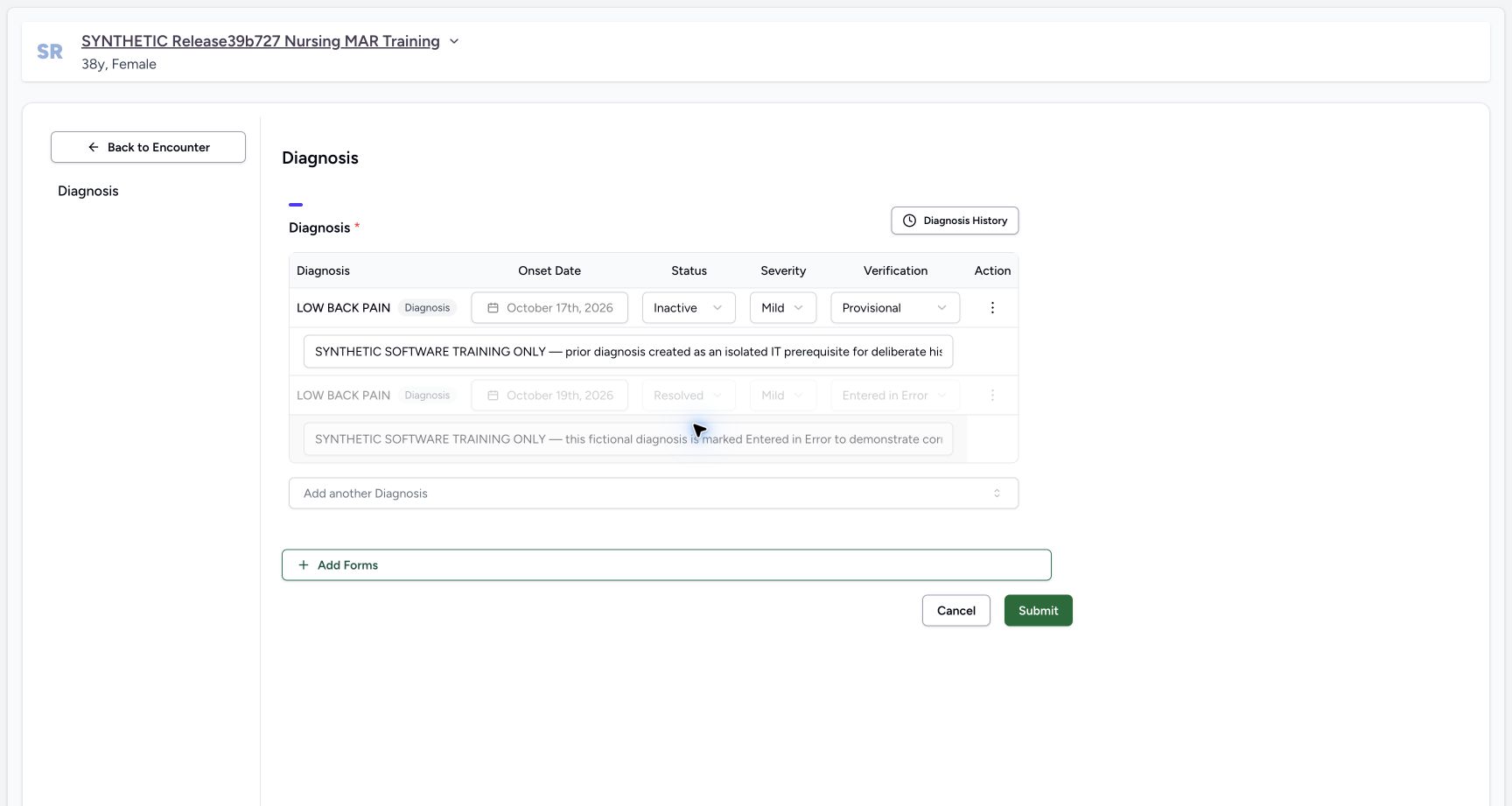
Inactive pending on the same diagnosis
Capture details
Observed exact 3dfb software on 20 October 2026. Original pixels and chronology retained. The Forms route in 19–21 is the installed Diagnosis form with blank Text/Integer.16/17 are separate naturally identical captures.22 does not visibly retain the success toast; 23 is the reloaded current summary. No clinical recommendation or global database guarantee.
Image SHA-256 ad9e3eaeb21e992776859757c2bc71a62bb368978264d2bc65146594363c3bef
- Review Inactive before saving: Only the target status has changed to Inactive.
- Recheck Mild: Severity remains Mild.
- Recheck Provisional: Verification remains Provisional.
- Keep the existing note: The saved note remains in the same first row.
- Protect the disabled error row: Do not change the separate Resolved/Entered in Error record.
- Submit the Inactive update once: After checking the target and retained fields, select Submit once.
 12345
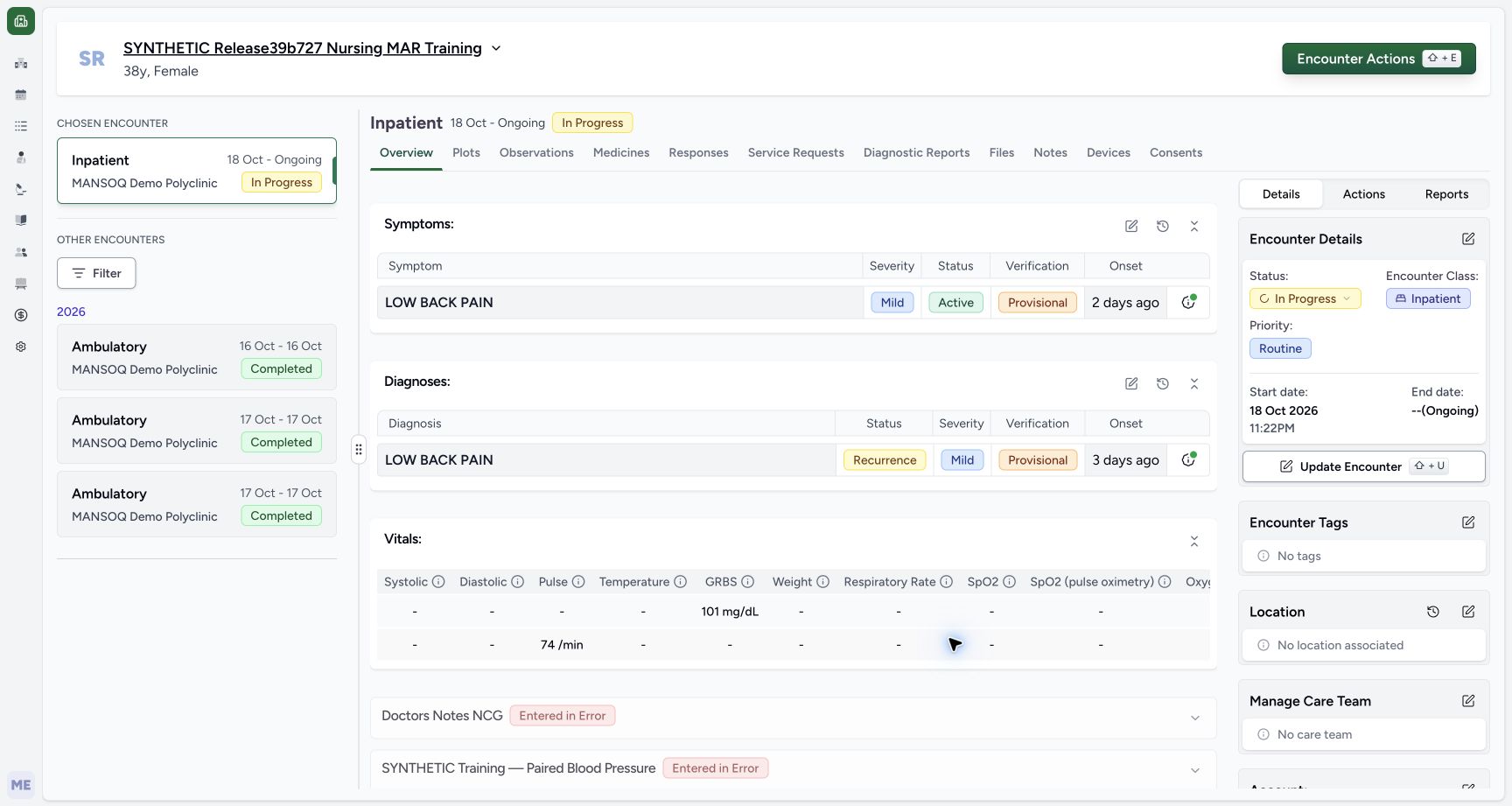
12345Current summary Recurrence after normal reload
Capture details
Observed exact 3dfb software on 20 October 2026. Original pixels and chronology retained. The Forms route in 19–21 is the installed Diagnosis form with blank Text/Integer.16/17 are separate naturally identical captures.22 does not visibly retain the success toast; 23 is the reloaded current summary. No clinical recommendation or global database guarantee.
Image SHA-256 08a191ac6842a0c401b8af6d49684a522dd70cc8e6ae4bd3f47cfa4c2f380818
- Read Recurrence after Reload: The current Diagnoses row now shows Recurrence.
- Recheck Mild: Severity remains Mild.
- Recheck Provisional: Verification remains Provisional.
- Recheck the retained onset: The same row still says 3 days ago.
- Reopen the built-in edit form: Select the Diagnoses edit icon to inspect the saved row.
18 of 18 content blocks have reviewed image alignment.
Before you begin
- Use an authorised Doctor account and the assigned fictional patient and ongoing encounter. The pictured account is MANSOQ E2E Doctor, qa-doctor; the selected Inpatient encounter is 18 October to Ongoing, In Progress.
 123
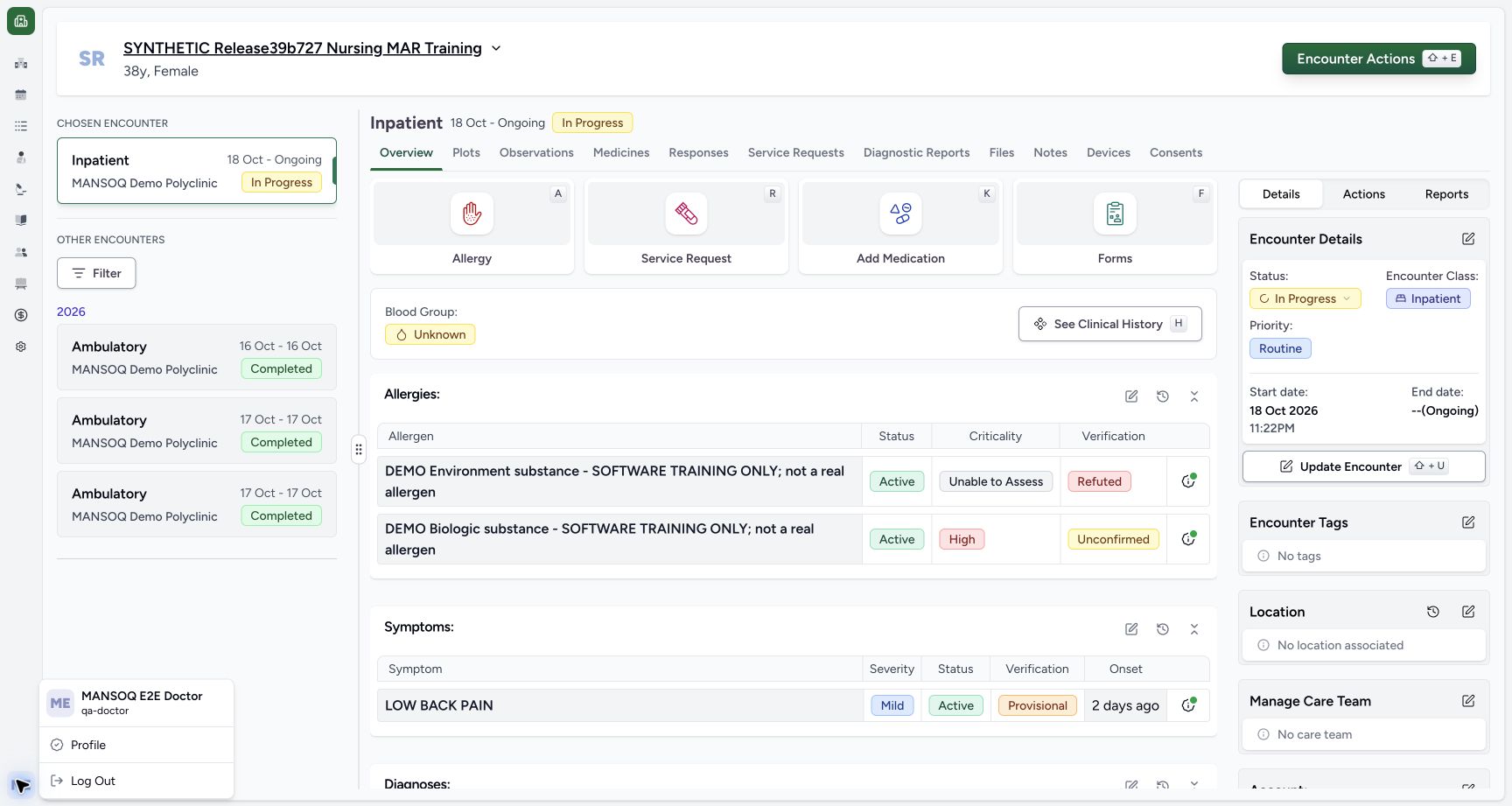
123Recorded release 3dfb7c9f · 2026-10-20T07:04:34.921Z · 1728 × 921 Doctor identity and selected synthetic encounter
Capture details
Observed exact 3dfb software on 20 October 2026. Original pixels and chronology retained. The Forms route in 19–21 is the installed Diagnosis form with blank Text/Integer.16/17 are separate naturally identical captures.22 does not visibly retain the success toast; 23 is the reloaded current summary. No clinical recommendation or global database guarantee.
Image SHA-256
40f7f356fdf0c2381eeb874dd30509d057273bcd5b3ba9469d89d0be63a9ba70- Verify the synthetic patient: Read the assigned fictional patient banner.
- Verify the selected encounter: The selected Inpatient encounter is In Progress, 18 October to Ongoing.
- Verify the Doctor: The account menu identifies MANSOQ E2E Doctor and qa-doctor.
 123456
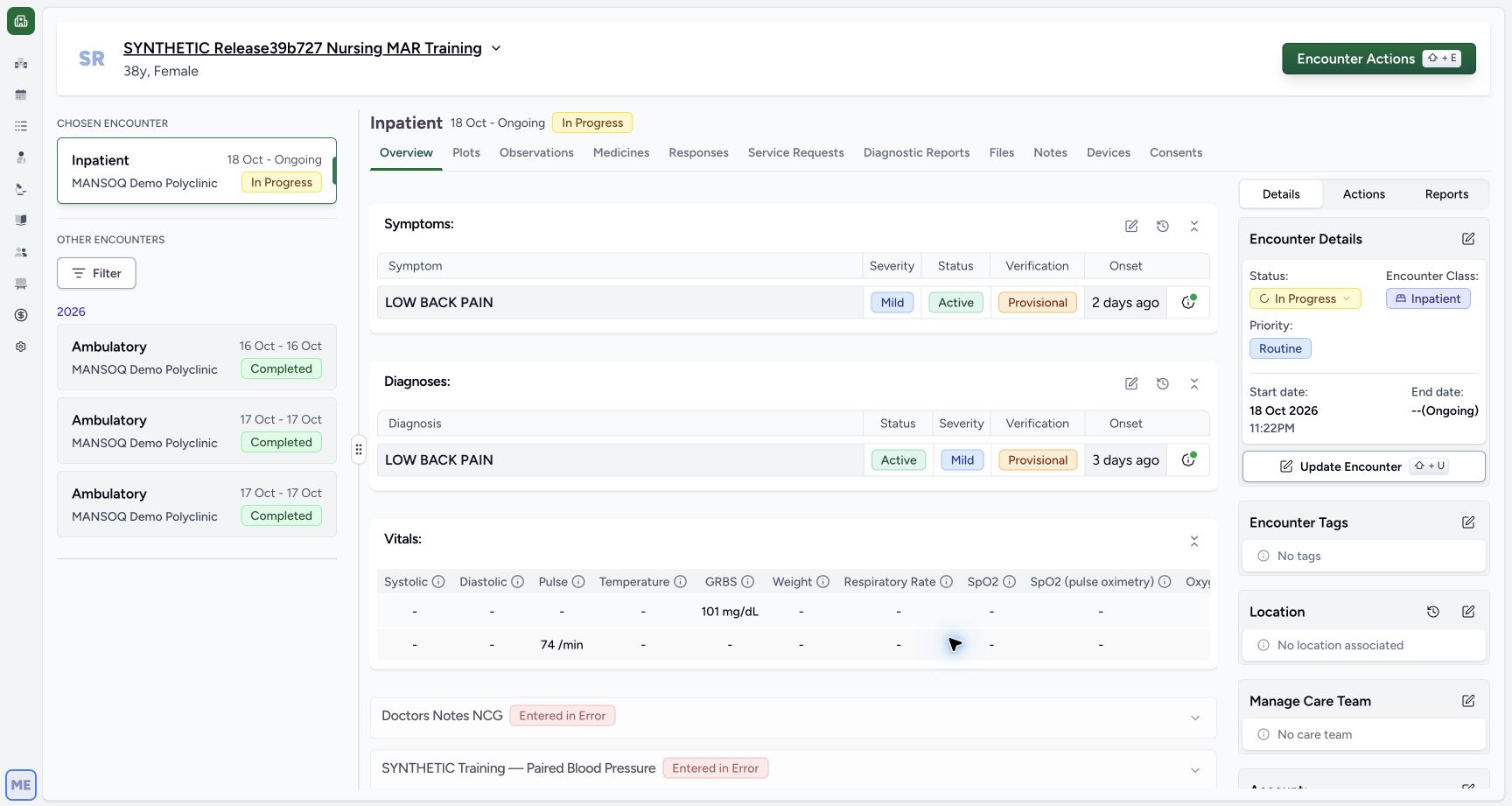
Recorded release 3dfb7c9f · 2026-10-20T07:05:13.857Z · 1728 × 921 Existing Active diagnosis in the current summary
Capture details
Observed exact 3dfb software on 20 October 2026. Original pixels and chronology retained. The Forms route in 19–21 is the installed Diagnosis form with blank Text/Integer.16/17 are separate naturally identical captures.22 does not visibly retain the success toast; 23 is the reloaded current summary. No clinical recommendation or global database guarantee.
Image SHA-256
663ea0ae20ddcc0edbd9294dc658f0b54cd62e0f85c2238561560d146581e6d5- Locate Diagnoses: Use the Diagnoses section, separate from Symptoms above.
- Open the existing diagnosis form: Select the edit icon on the Diagnoses section.
- Read the current status: The saved diagnosis is Active before this exercise.
- Retain Mild: Keep the existing severity.
- Retain Provisional: Keep the existing verification status.
- Read the relative onset: The current row says 3 days ago; this is distinct from the symptom above.
- Use the prepared existing LOW BACK PAIN diagnosis with Active, Mild, Provisional and locked 17 October 2026 onset. A separate same-label Resolved/Entered in Error row is disabled. Do not add or copy a diagnosis to reproduce these pictures.
 12345
12345Recorded release 3dfb7c9f · 2026-10-20T07:05:27.846Z · 1728 × 921 Built-in Diagnosis form with existing editable and error rows
Capture details
Observed exact 3dfb software on 20 October 2026. Original pixels and chronology retained. The Forms route in 19–21 is the installed Diagnosis form with blank Text/Integer.16/17 are separate naturally identical captures.22 does not visibly retain the success toast; 23 is the reloaded current summary. No clinical recommendation or global database guarantee.
Image SHA-256
66ab4210cf936d2a893f0f4be37d00da7dbb12d4e6c12f18811af02e2c0d58e0- Locate the existing status control: Only the first editable diagnosis is the target.
- Retain the locked onset: The saved onset is October 17th, 2026; leave it untouched.
- Retain the saved note: The existing fictional note is clipped in this input; do not replace it.
- Leave the error row unchanged: The separate Entered in Error row is disabled.
- Locate Submit: This control submits the form; do not use it until the reviewed status change is ready.
123456Recorded release 3dfb7c9f · 2026-10-20T07:12:41.479Z · 1728 × 921 Inactive pending on the same diagnosis
Capture details
Observed exact 3dfb software on 20 October 2026. Original pixels and chronology retained. The Forms route in 19–21 is the installed Diagnosis form with blank Text/Integer.16/17 are separate naturally identical captures.22 does not visibly retain the success toast; 23 is the reloaded current summary. No clinical recommendation or global database guarantee.
Image SHA-256
ad9e3eaeb21e992776859757c2bc71a62bb368978264d2bc65146594363c3bef- Review Inactive before saving: Only the target status has changed to Inactive.
- Recheck Mild: Severity remains Mild.
- Recheck Provisional: Verification remains Provisional.
- Keep the existing note: The saved note remains in the same first row.
- Protect the disabled error row: Do not change the separate Resolved/Entered in Error record.
- Submit the Inactive update once: After checking the target and retained fields, select Submit once.
- These status choices demonstrate software on a synthetic record. They do not establish a real diagnosis, clinical recurrence, resolution, treatment decision or complete Doctor curriculum. Leave the existing severity, verification, onset and note unchanged.12345
Recorded release 3dfb7c9f · 2026-10-20T07:05:27.846Z · 1728 × 921 Built-in Diagnosis form with existing editable and error rows
Capture details
Observed exact 3dfb software on 20 October 2026. Original pixels and chronology retained. The Forms route in 19–21 is the installed Diagnosis form with blank Text/Integer.16/17 are separate naturally identical captures.22 does not visibly retain the success toast; 23 is the reloaded current summary. No clinical recommendation or global database guarantee.
Image SHA-256
66ab4210cf936d2a893f0f4be37d00da7dbb12d4e6c12f18811af02e2c0d58e0- Locate the existing status control: Only the first editable diagnosis is the target.
- Retain the locked onset: The saved onset is October 17th, 2026; leave it untouched.
- Retain the saved note: The existing fictional note is clipped in this input; do not replace it.
- Leave the error row unchanged: The separate Entered in Error row is disabled.
- Locate Submit: This control submits the form; do not use it until the reviewed status change is ready.
 12345678
Recorded release 3dfb7c9f · 2026-10-20T07:13:49.595Z · 1728 × 921 Installed Diagnosis form with saved Inactive row and blank Text/Integer
Capture details
Observed exact 3dfb software on 20 October 2026. Original pixels and chronology retained. The Forms route in 19–21 is the installed Diagnosis form with blank Text/Integer.16/17 are separate naturally identical captures.22 does not visibly retain the success toast; 23 is the reloaded current summary. No clinical recommendation or global database guarantee.
Image SHA-256
0ad8de3e33932a87bb0f415678969ded7c7bd5282d5e25bb50f78d1b8db53ac3- Verify the saved Inactive row: The first row is still Inactive in the installed Diagnosis form.
- Recheck the locked 17 October onset: Retain the existing onset.
- Retain Mild: Do not change severity.
- Retain Provisional: Do not change verification.
- Retain the existing note: Leave the saved fictional note unchanged.
- Leave Text blank: This installed form includes an additional blank Text field.
- Leave Integer blank: This installed form also includes an additional blank Integer field.
- Retain the disabled error row: The separate entered-error record stays disabled.
1. Verify the Doctor and identify the existing diagnosis
Read the account menu and selected encounter. On Overview, scroll to Diagnoses. Confirm the existing LOW BACK PAIN row is Active, Mild and Provisional, with onset 3 days ago. Symptoms above is a separate record even though it has the same label.
123Doctor identity and selected synthetic encounter
Capture details
Observed exact 3dfb software on 20 October 2026. Original pixels and chronology retained. The Forms route in 19–21 is the installed Diagnosis form with blank Text/Integer.16/17 are separate naturally identical captures.22 does not visibly retain the success toast; 23 is the reloaded current summary. No clinical recommendation or global database guarantee.
Image SHA-256 40f7f356fdf0c2381eeb874dd30509d057273bcd5b3ba9469d89d0be63a9ba70
- Verify the synthetic patient: Read the assigned fictional patient banner.
- Verify the selected encounter: The selected Inpatient encounter is In Progress, 18 October to Ongoing.
- Verify the Doctor: The account menu identifies MANSOQ E2E Doctor and qa-doctor.
123456Existing Active diagnosis in the current summary
Capture details
Observed exact 3dfb software on 20 October 2026. Original pixels and chronology retained. The Forms route in 19–21 is the installed Diagnosis form with blank Text/Integer.16/17 are separate naturally identical captures.22 does not visibly retain the success toast; 23 is the reloaded current summary. No clinical recommendation or global database guarantee.
Image SHA-256 663ea0ae20ddcc0edbd9294dc658f0b54cd62e0f85c2238561560d146581e6d5
- Locate Diagnoses: Use the Diagnoses section, separate from Symptoms above.
- Open the existing diagnosis form: Select the edit icon on the Diagnoses section.
- Read the current status: The saved diagnosis is Active before this exercise.
- Retain Mild: Keep the existing severity.
- Retain Provisional: Keep the existing verification status.
- Read the relative onset: The current row says 3 days ago; this is distinct from the symptom above.
2. Open the built-in diagnosis editor
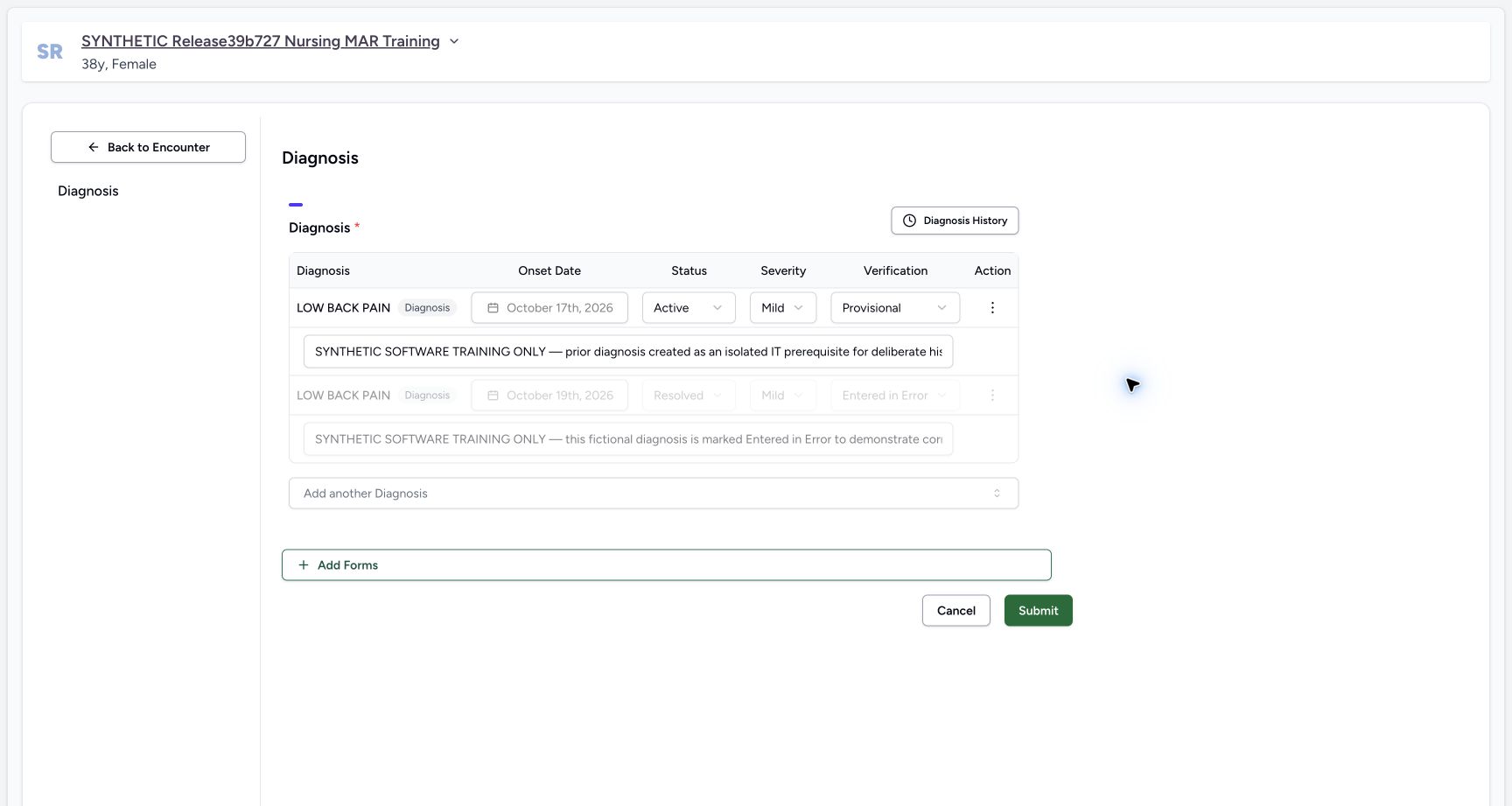
Select the edit icon on the Diagnoses section. In the built-in Diagnosis form, identify the first editable row: Active, Mild, Provisional and October 17th, 2026. Its onset is locked. Retain the existing note. Leave the second Resolved/Entered in Error row unchanged; it is disabled.
123456Existing Active diagnosis in the current summary
Capture details
Observed exact 3dfb software on 20 October 2026. Original pixels and chronology retained. The Forms route in 19–21 is the installed Diagnosis form with blank Text/Integer.16/17 are separate naturally identical captures.22 does not visibly retain the success toast; 23 is the reloaded current summary. No clinical recommendation or global database guarantee.
Image SHA-256 663ea0ae20ddcc0edbd9294dc658f0b54cd62e0f85c2238561560d146581e6d5
- Locate Diagnoses: Use the Diagnoses section, separate from Symptoms above.
- Open the existing diagnosis form: Select the edit icon on the Diagnoses section.
- Read the current status: The saved diagnosis is Active before this exercise.
- Retain Mild: Keep the existing severity.
- Retain Provisional: Keep the existing verification status.
- Read the relative onset: The current row says 3 days ago; this is distinct from the symptom above.
12345Built-in Diagnosis form with existing editable and error rows
Capture details
Observed exact 3dfb software on 20 October 2026. Original pixels and chronology retained. The Forms route in 19–21 is the installed Diagnosis form with blank Text/Integer.16/17 are separate naturally identical captures.22 does not visibly retain the success toast; 23 is the reloaded current summary. No clinical recommendation or global database guarantee.
Image SHA-256 66ab4210cf936d2a893f0f4be37d00da7dbb12d4e6c12f18811af02e2c0d58e0
- Locate the existing status control: Only the first editable diagnosis is the target.
- Retain the locked onset: The saved onset is October 17th, 2026; leave it untouched.
- Retain the saved note: The existing fictional note is clipped in this input; do not replace it.
- Leave the error row unchanged: The separate Entered in Error row is disabled.
- Locate Submit: This control submits the form; do not use it until the reviewed status change is ready.
3. Choose Inactive for the same row
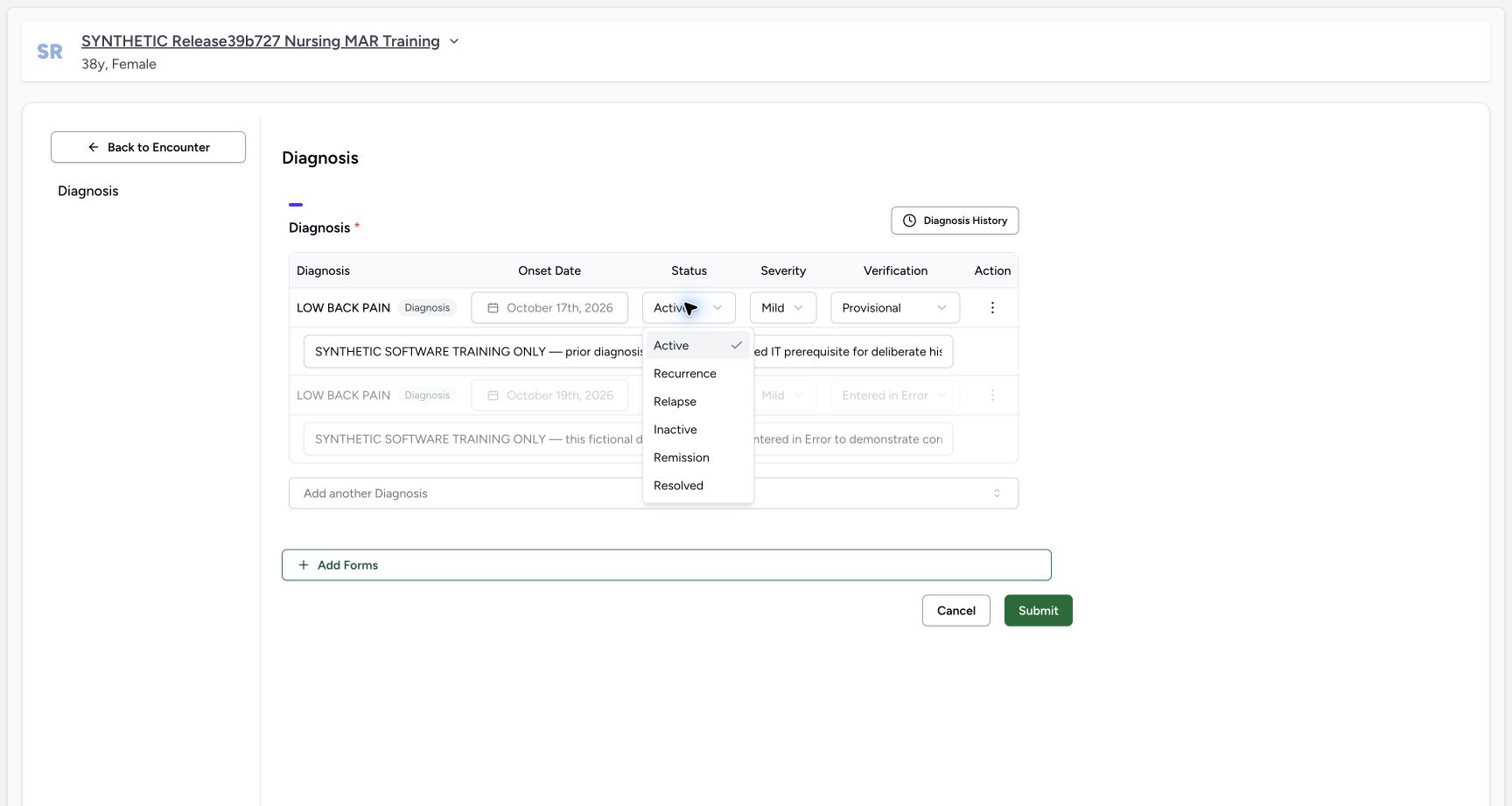
Open the first row’s Status dropdown and select Inactive. The actual list also contains Active, Recurrence, Relapse, Remission and Resolved; this exercise does not demonstrate every status. Recheck Inactive while keeping Mild, Provisional, the locked onset and note unchanged.
 12
12Actual diagnosis status options
Capture details
Observed exact 3dfb software on 20 October 2026. Original pixels and chronology retained. The Forms route in 19–21 is the installed Diagnosis form with blank Text/Integer.16/17 are separate naturally identical captures.22 does not visibly retain the success toast; 23 is the reloaded current summary. No clinical recommendation or global database guarantee.
Image SHA-256 c6af1396b60c383d9545736c389c5343a5b29b63d6294e8b6289ee45679cce8d
- Open the status list: This dropdown belongs to the first editable saved diagnosis.
- Choose Inactive: Use Inactive for this fictional exercise; the other listed statuses are not demonstrated here.
123456Inactive pending on the same diagnosis
Capture details
Observed exact 3dfb software on 20 October 2026. Original pixels and chronology retained. The Forms route in 19–21 is the installed Diagnosis form with blank Text/Integer.16/17 are separate naturally identical captures.22 does not visibly retain the success toast; 23 is the reloaded current summary. No clinical recommendation or global database guarantee.
Image SHA-256 ad9e3eaeb21e992776859757c2bc71a62bb368978264d2bc65146594363c3bef
- Review Inactive before saving: Only the target status has changed to Inactive.
- Recheck Mild: Severity remains Mild.
- Recheck Provisional: Verification remains Provisional.
- Keep the existing note: The saved note remains in the same first row.
- Protect the disabled error row: Do not change the separate Resolved/Entered in Error record.
- Submit the Inactive update once: After checking the target and retained fields, select Submit once.
4. Submit the Inactive update once
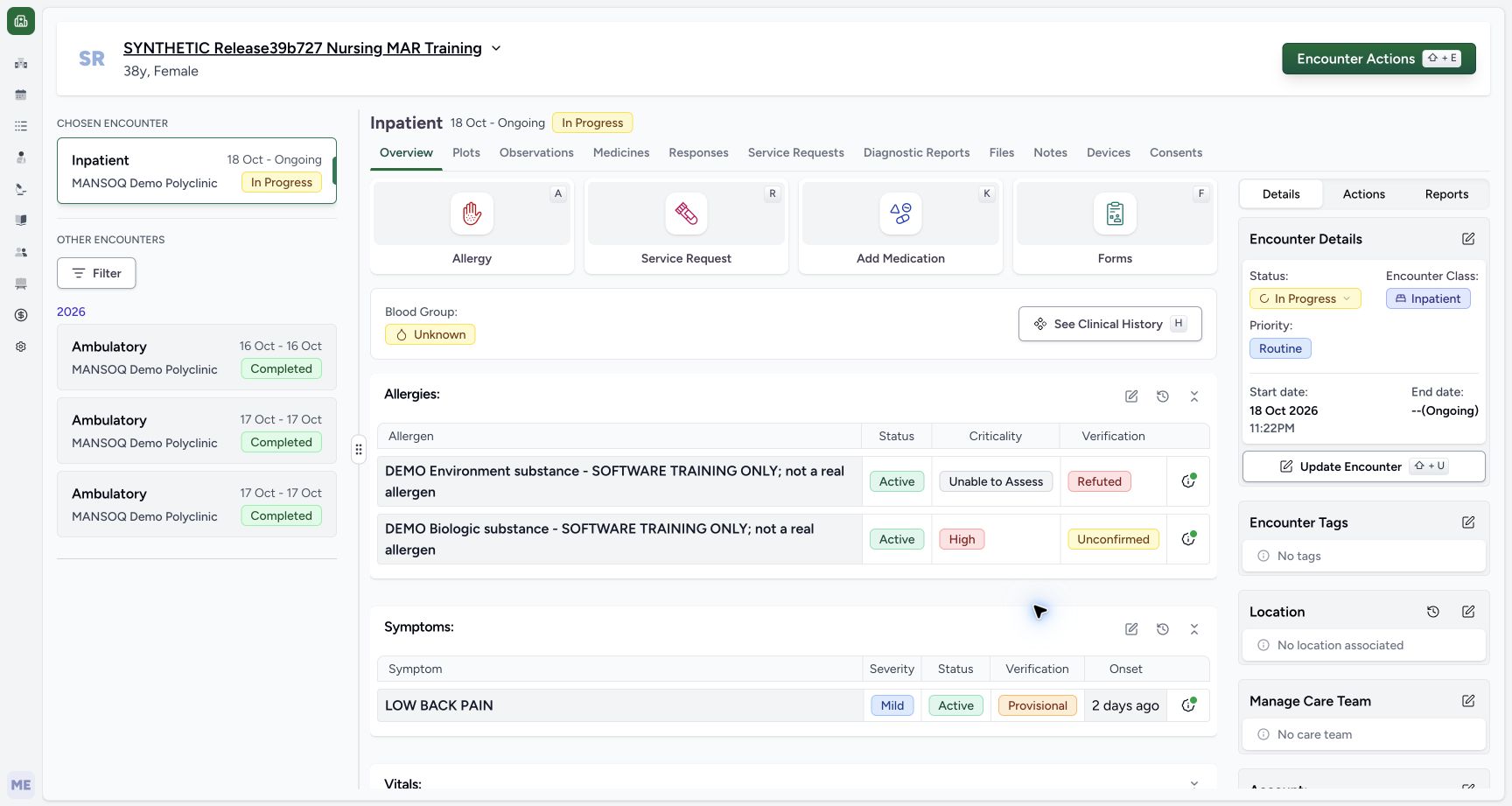
After verifying the intended existing row and retained fields, select Submit once. The form returns to Overview. The current Diagnoses section is no longer shown between Symptoms and Vitals. This filtered absence does not mean that the saved diagnosis was deleted.
123456Inactive pending on the same diagnosis
Capture details
Observed exact 3dfb software on 20 October 2026. Original pixels and chronology retained. The Forms route in 19–21 is the installed Diagnosis form with blank Text/Integer.16/17 are separate naturally identical captures.22 does not visibly retain the success toast; 23 is the reloaded current summary. No clinical recommendation or global database guarantee.
Image SHA-256 ad9e3eaeb21e992776859757c2bc71a62bb368978264d2bc65146594363c3bef
- Review Inactive before saving: Only the target status has changed to Inactive.
- Recheck Mild: Severity remains Mild.
- Recheck Provisional: Verification remains Provisional.
- Keep the existing note: The saved note remains in the same first row.
- Protect the disabled error row: Do not change the separate Resolved/Entered in Error record.
- Submit the Inactive update once: After checking the target and retained fields, select Submit once.
 12345
12345Overview after Inactive with no current Diagnoses section
Capture details
Observed exact 3dfb software on 20 October 2026. Original pixels and chronology retained. The Forms route in 19–21 is the installed Diagnosis form with blank Text/Integer.16/17 are separate naturally identical captures.22 does not visibly retain the success toast; 23 is the reloaded current summary. No clinical recommendation or global database guarantee.
Image SHA-256 28b26d3b67f912e551f5b79c7aaa7ee7cf76fcf97a37cd2c746786bd04662c46
- Confirm return to Overview: The selected encounter remains In Progress.
- Read the Symptoms section: Symptoms remain a separate section.
- Locate Vitals below Symptoms: The current Diagnoses section is absent from this filtered summary.
- Open See Clinical History: Inspect the retained diagnosis through patient history.
- Open Forms: Use this Forms tile after returning to the encounter; the picker then offers Diagnosis.
5. Find the retained Inactive diagnosis
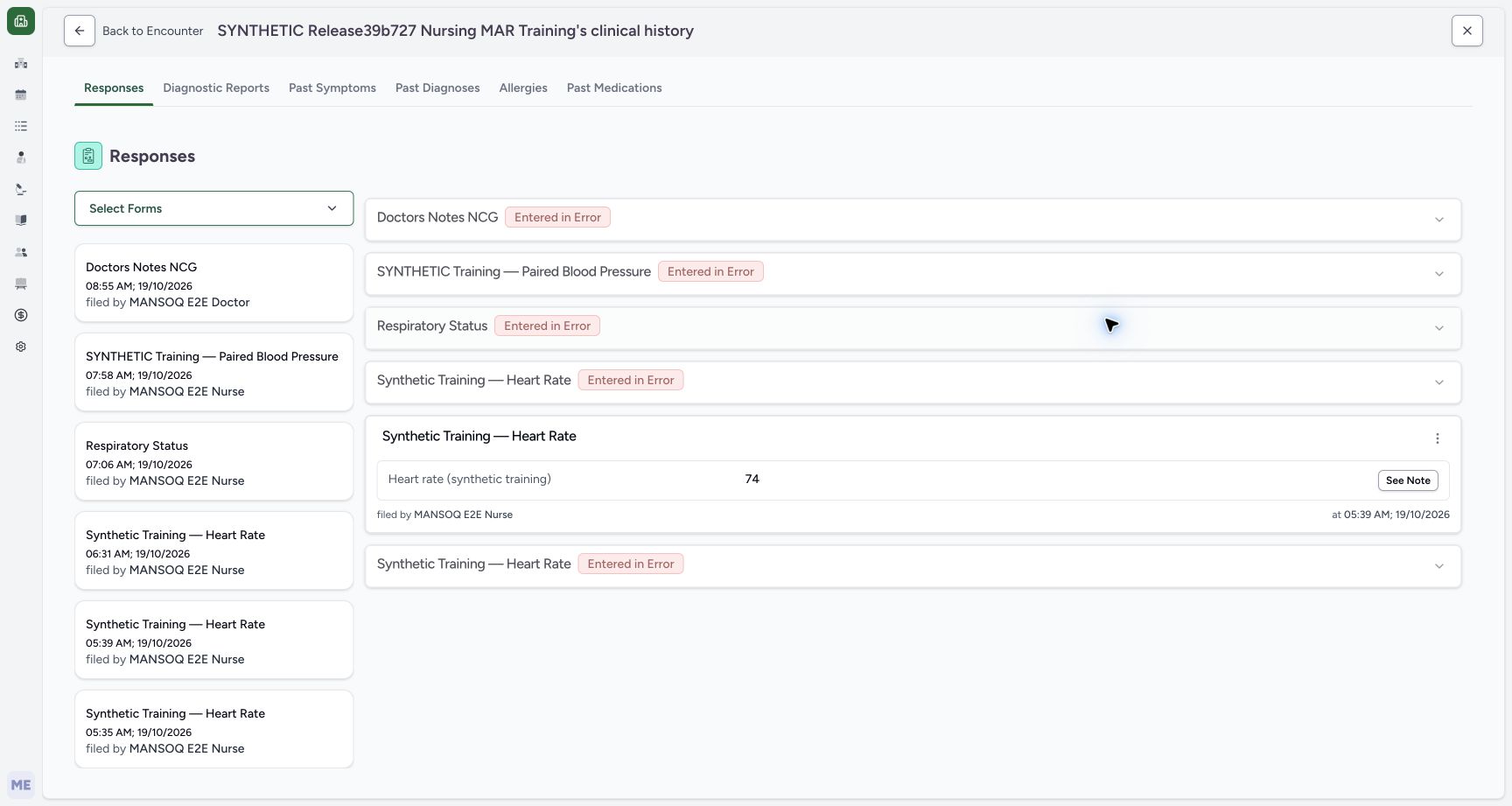
Select See Clinical History. The page initially opens Responses; choose Past Diagnoses. Find the middle LOW BACK PAIN row showing Inactive, Mild, Provisional and 3 days ago. The other Resolved and Active rows with the same label are separate saved records.
12345Overview after Inactive with no current Diagnoses section
Capture details
Observed exact 3dfb software on 20 October 2026. Original pixels and chronology retained. The Forms route in 19–21 is the installed Diagnosis form with blank Text/Integer.16/17 are separate naturally identical captures.22 does not visibly retain the success toast; 23 is the reloaded current summary. No clinical recommendation or global database guarantee.
Image SHA-256 28b26d3b67f912e551f5b79c7aaa7ee7cf76fcf97a37cd2c746786bd04662c46
- Confirm return to Overview: The selected encounter remains In Progress.
- Read the Symptoms section: Symptoms remain a separate section.
- Locate Vitals below Symptoms: The current Diagnoses section is absent from this filtered summary.
- Open See Clinical History: Inspect the retained diagnosis through patient history.
- Open Forms: Use this Forms tile after returning to the encounter; the picker then offers Diagnosis.
 12
12Clinical History navigation with Past Diagnoses
Capture details
Observed exact 3dfb software on 20 October 2026. Original pixels and chronology retained. The Forms route in 19–21 is the installed Diagnosis form with blank Text/Integer.16/17 are separate naturally identical captures.22 does not visibly retain the success toast; 23 is the reloaded current summary. No clinical recommendation or global database guarantee.
Image SHA-256 704ea51f16f60ddcb197a25dd94de7aeac8e2709ad4cce48aa74e62d6ee579db
- Choose Past Diagnoses: Clinical History initially opens Responses; select Past Diagnoses.
- Locate Back to Encounter: This returns to the originating encounter.
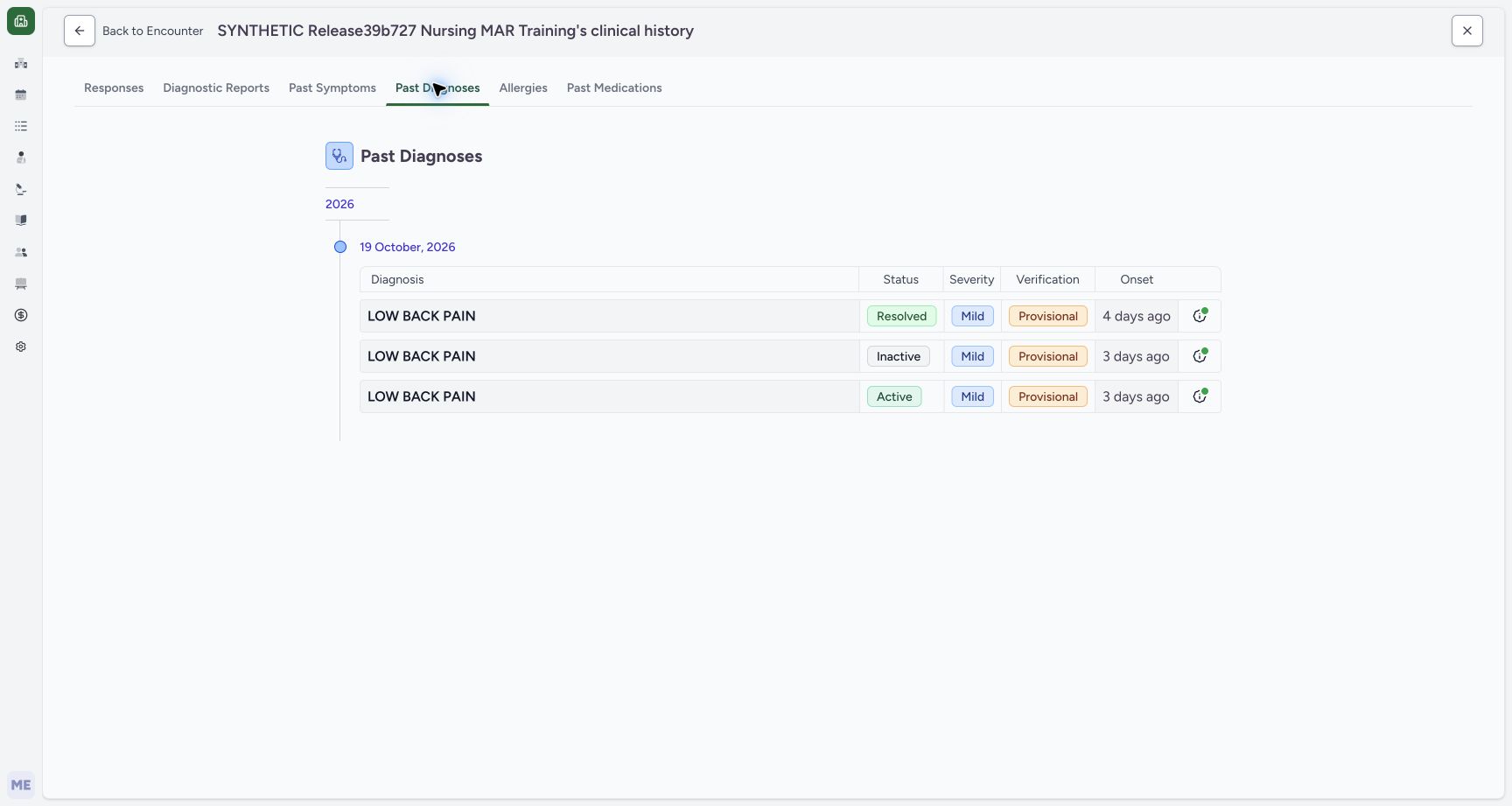 123456
Retained Inactive diagnosis in patient history
Capture details
Observed exact 3dfb software on 20 October 2026. Original pixels and chronology retained. The Forms route in 19–21 is the installed Diagnosis form with blank Text/Integer.16/17 are separate naturally identical captures.22 does not visibly retain the success toast; 23 is the reloaded current summary. No clinical recommendation or global database guarantee.
Image SHA-256 0a580c902bc65f1ab568131c862a539efa4667566bc100e77490ddc9b7d2d33a
- Read the retained Inactive row: The middle eligible row is Inactive, not deleted.
- Read retained Mild: The same row keeps Mild severity.
- Read retained Provisional: Verification remains Provisional.
- Read onset separately: The middle row says 3 days ago.
- Distinguish the creation-date group: The 19 October group is not the onset date.
- Distinguish the other Active row: The lower same-label row is a separate saved diagnosis.
6. Reload history and return to the encounter
Use your browser’s Reload command once and wait for Past Diagnoses to load. The middle row remains Inactive. The 19 October 2026 heading groups record creation dates; it is not the row’s 17 October onset. Select Back to Encounter to return to the originating ongoing encounter.
123456Retained Inactive diagnosis in patient history
Capture details
Observed exact 3dfb software on 20 October 2026. Original pixels and chronology retained. The Forms route in 19–21 is the installed Diagnosis form with blank Text/Integer.16/17 are separate naturally identical captures.22 does not visibly retain the success toast; 23 is the reloaded current summary. No clinical recommendation or global database guarantee.
Image SHA-256 0a580c902bc65f1ab568131c862a539efa4667566bc100e77490ddc9b7d2d33a
- Read the retained Inactive row: The middle eligible row is Inactive, not deleted.
- Read retained Mild: The same row keeps Mild severity.
- Read retained Provisional: Verification remains Provisional.
- Read onset separately: The middle row says 3 days ago.
- Distinguish the creation-date group: The 19 October group is not the onset date.
- Distinguish the other Active row: The lower same-label row is a separate saved diagnosis.
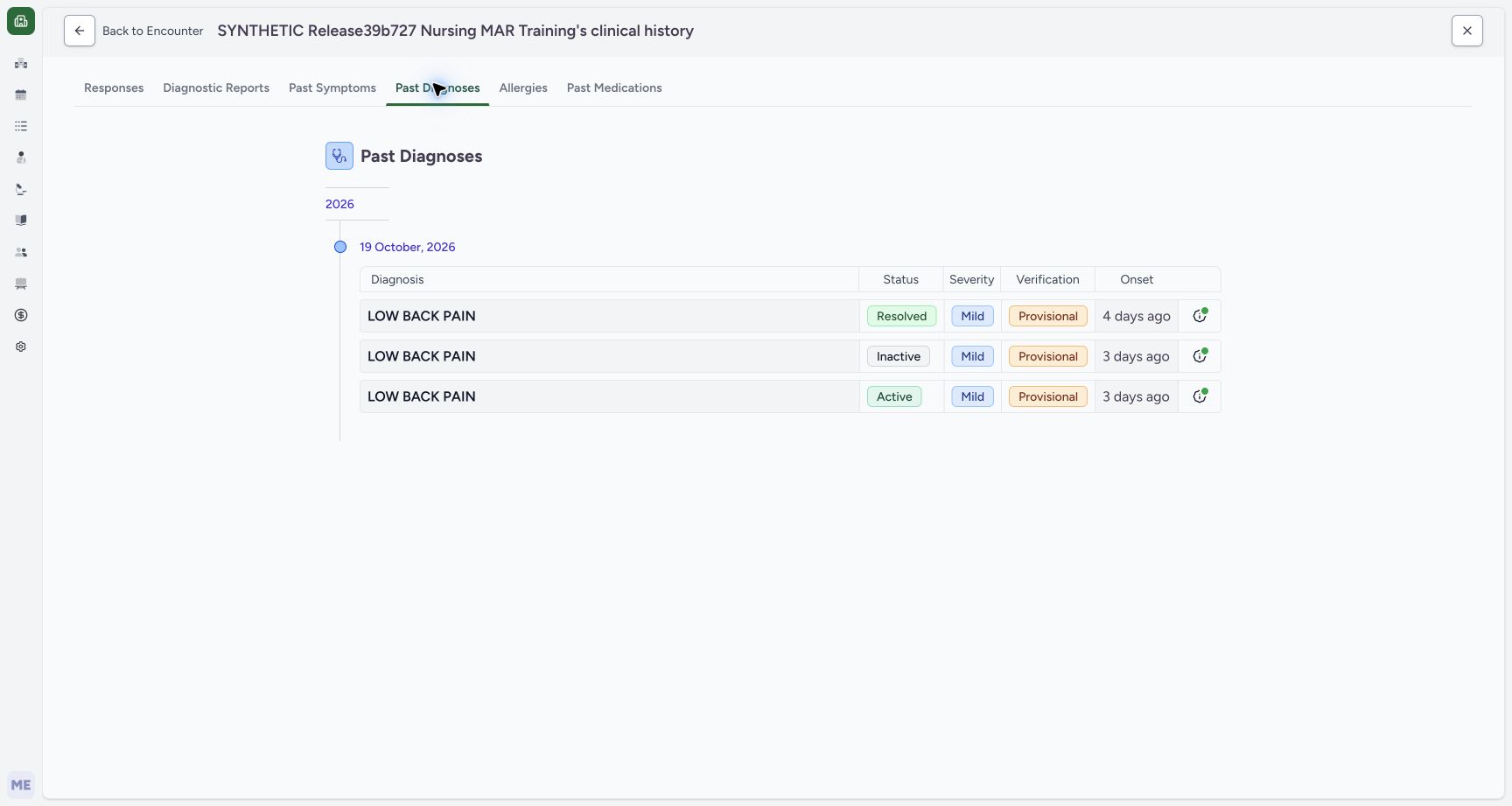 12
12Inactive patient history after normal reload
Capture details
Observed exact 3dfb software on 20 October 2026. Original pixels and chronology retained. The Forms route in 19–21 is the installed Diagnosis form with blank Text/Integer.16/17 are separate naturally identical captures.22 does not visibly retain the success toast; 23 is the reloaded current summary. No clinical recommendation or global database guarantee.
Image SHA-256 0a580c902bc65f1ab568131c862a539efa4667566bc100e77490ddc9b7d2d33a
- Recheck Inactive after Reload: The middle row remains Inactive after the actual browser reload.
- Return with Back to Encounter: Return to the selected encounter before using Forms.
7. Reopen Diagnosis through Forms
On the returned Overview, select Forms, then select Diagnosis in the native form picker. In this installed setup, the picker opens a Diagnosis form with the same saved row and additional Text and Integer fields. Opening it does not add a diagnosis.
12345Overview after Inactive with no current Diagnoses section
Capture details
Observed exact 3dfb software on 20 October 2026. Original pixels and chronology retained. The Forms route in 19–21 is the installed Diagnosis form with blank Text/Integer.16/17 are separate naturally identical captures.22 does not visibly retain the success toast; 23 is the reloaded current summary. No clinical recommendation or global database guarantee.
Image SHA-256 28b26d3b67f912e551f5b79c7aaa7ee7cf76fcf97a37cd2c746786bd04662c46
- Confirm return to Overview: The selected encounter remains In Progress.
- Read the Symptoms section: Symptoms remain a separate section.
- Locate Vitals below Symptoms: The current Diagnoses section is absent from this filtered summary.
- Open See Clinical History: Inspect the retained diagnosis through patient history.
- Open Forms: Use this Forms tile after returning to the encounter; the picker then offers Diagnosis.
12Inactive patient history after normal reload
Capture details
Observed exact 3dfb software on 20 October 2026. Original pixels and chronology retained. The Forms route in 19–21 is the installed Diagnosis form with blank Text/Integer.16/17 are separate naturally identical captures.22 does not visibly retain the success toast; 23 is the reloaded current summary. No clinical recommendation or global database guarantee.
Image SHA-256 0a580c902bc65f1ab568131c862a539efa4667566bc100e77490ddc9b7d2d33a
- Recheck Inactive after Reload: The middle row remains Inactive after the actual browser reload.
- Return with Back to Encounter: Return to the selected encounter before using Forms.
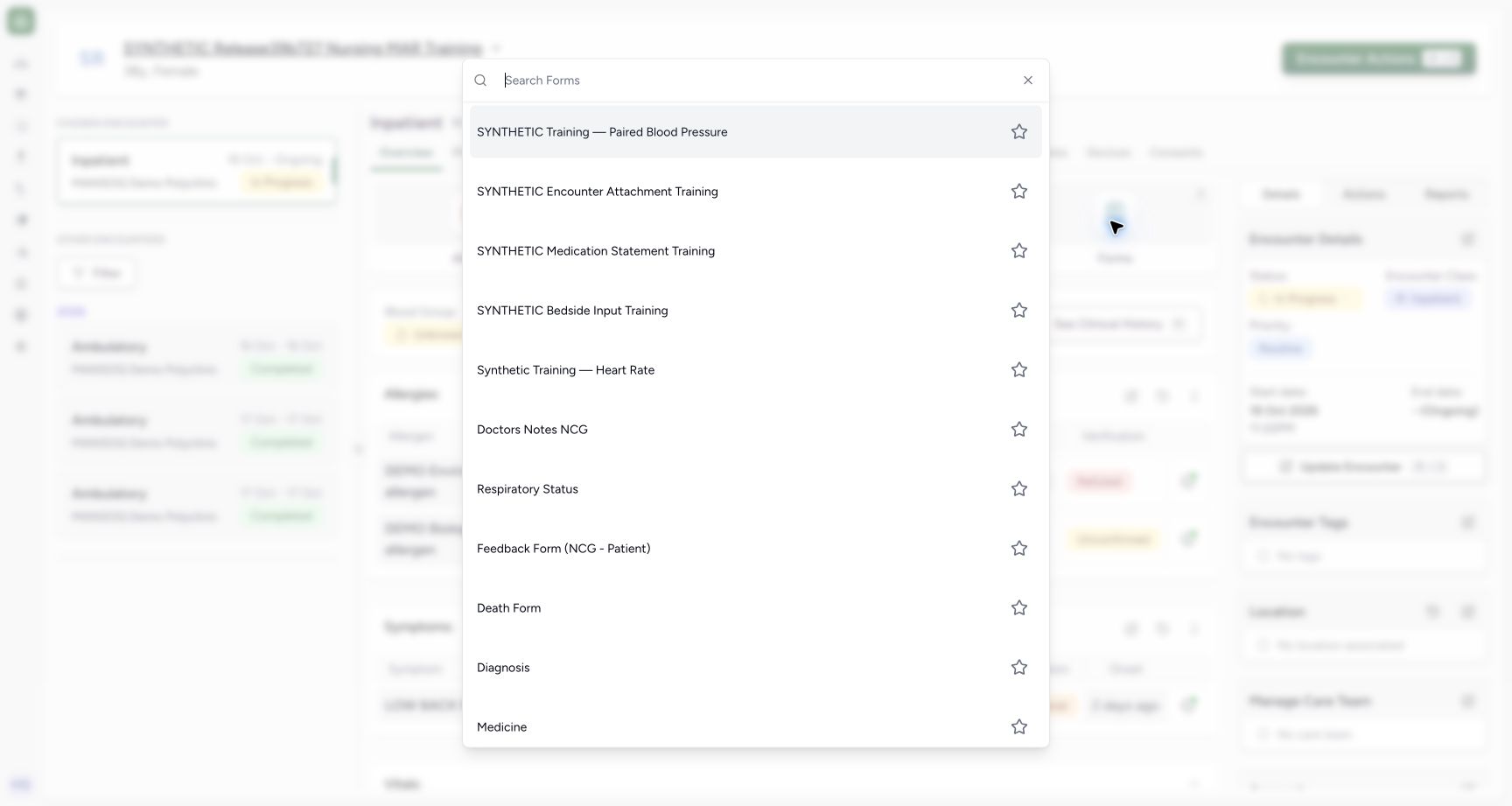 1
1Actual Forms picker with Diagnosis entry
Capture details
Observed exact 3dfb software on 20 October 2026. Original pixels and chronology retained. The Forms route in 19–21 is the installed Diagnosis form with blank Text/Integer.16/17 are separate naturally identical captures.22 does not visibly retain the success toast; 23 is the reloaded current summary. No clinical recommendation or global database guarantee.
Image SHA-256 1d9ac224841c0ad926435413eab4d7620ef6b64f8dd76921450832508fd39db7
- Select Diagnosis in Forms: This existing installed Diagnosis form reopens the saved diagnosis; it does not add a condition by itself.
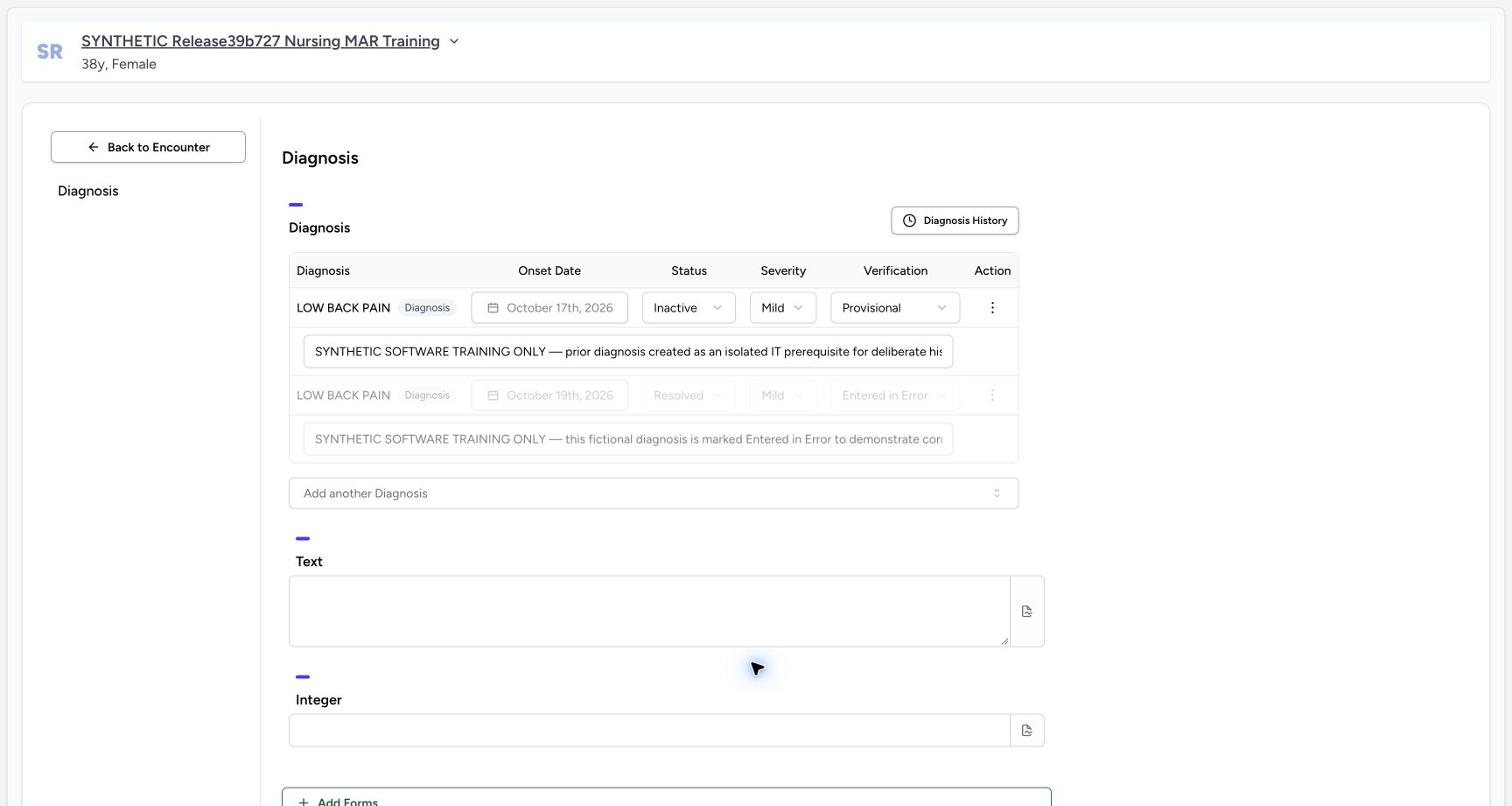
12345678Installed Diagnosis form with saved Inactive row and blank Text/Integer
Capture details
Observed exact 3dfb software on 20 October 2026. Original pixels and chronology retained. The Forms route in 19–21 is the installed Diagnosis form with blank Text/Integer.16/17 are separate naturally identical captures.22 does not visibly retain the success toast; 23 is the reloaded current summary. No clinical recommendation or global database guarantee.
Image SHA-256 0ad8de3e33932a87bb0f415678969ded7c7bd5282d5e25bb50f78d1b8db53ac3
- Verify the saved Inactive row: The first row is still Inactive in the installed Diagnosis form.
- Recheck the locked 17 October onset: Retain the existing onset.
- Retain Mild: Do not change severity.
- Retain Provisional: Do not change verification.
- Retain the existing note: Leave the saved fictional note unchanged.
- Leave Text blank: This installed form includes an additional blank Text field.
- Leave Integer blank: This installed form also includes an additional blank Integer field.
- Retain the disabled error row: The separate entered-error record stays disabled.
8. Keep the installed form’s extra fields blank
Verify that the first saved diagnosis is still Inactive with the locked 17 October onset, Mild, Provisional and its existing note. This installed form also contains blank Text and Integer fields below Diagnosis. Leave both blank for this status-only exercise. Keep the separate entered-error row untouched and do not use Add another Diagnosis.
12345678Installed Diagnosis form with saved Inactive row and blank Text/Integer
Capture details
Observed exact 3dfb software on 20 October 2026. Original pixels and chronology retained. The Forms route in 19–21 is the installed Diagnosis form with blank Text/Integer.16/17 are separate naturally identical captures.22 does not visibly retain the success toast; 23 is the reloaded current summary. No clinical recommendation or global database guarantee.
Image SHA-256 0ad8de3e33932a87bb0f415678969ded7c7bd5282d5e25bb50f78d1b8db53ac3
- Verify the saved Inactive row: The first row is still Inactive in the installed Diagnosis form.
- Recheck the locked 17 October onset: Retain the existing onset.
- Retain Mild: Do not change severity.
- Retain Provisional: Do not change verification.
- Retain the existing note: Leave the saved fictional note unchanged.
- Leave Text blank: This installed form includes an additional blank Text field.
- Leave Integer blank: This installed form also includes an additional blank Integer field.
- Retain the disabled error row: The separate entered-error record stays disabled.
9. Set Recurrence and review the whole form
Open the same first row’s Status dropdown and choose Recurrence. Scroll down to review the actual Submit control. Confirm Recurrence, Mild, Provisional, the original onset and note, and blank Text and Integer fields. This is a change to the existing diagnosis, not a new diagnosis or an ordinary Text/Integer response.
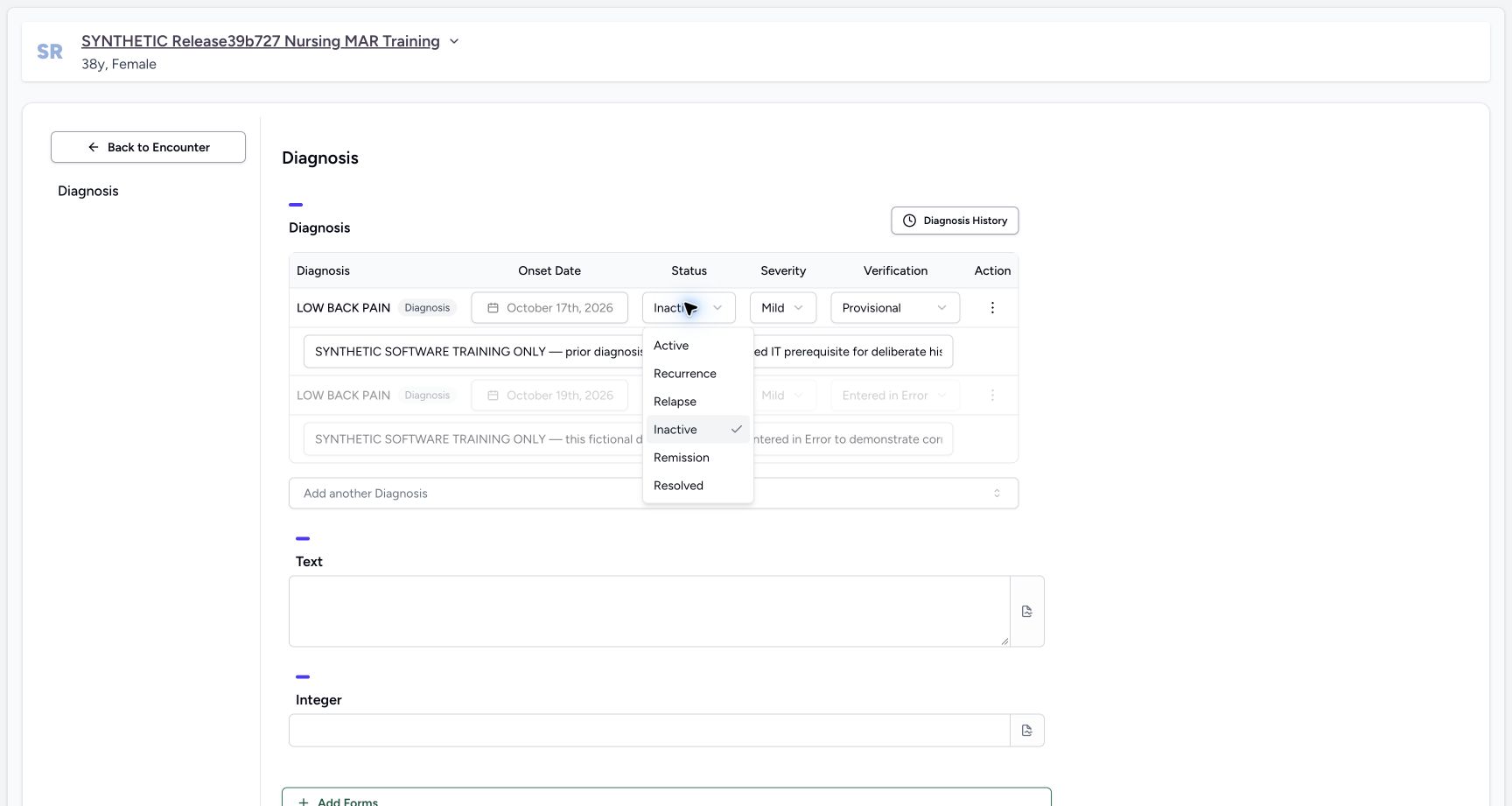 12
12Recurrence option on the saved Inactive diagnosis
Capture details
Observed exact 3dfb software on 20 October 2026. Original pixels and chronology retained. The Forms route in 19–21 is the installed Diagnosis form with blank Text/Integer.16/17 are separate naturally identical captures.22 does not visibly retain the success toast; 23 is the reloaded current summary. No clinical recommendation or global database guarantee.
Image SHA-256 ed13c3ebed320ef637b06c75f37098a28a7c300a83d41988e9eda484b2ad2889
- Choose Recurrence: Select Recurrence for the same first saved diagnosis.
- Distinguish the current selection: Inactive is checked before the Recurrence selection.
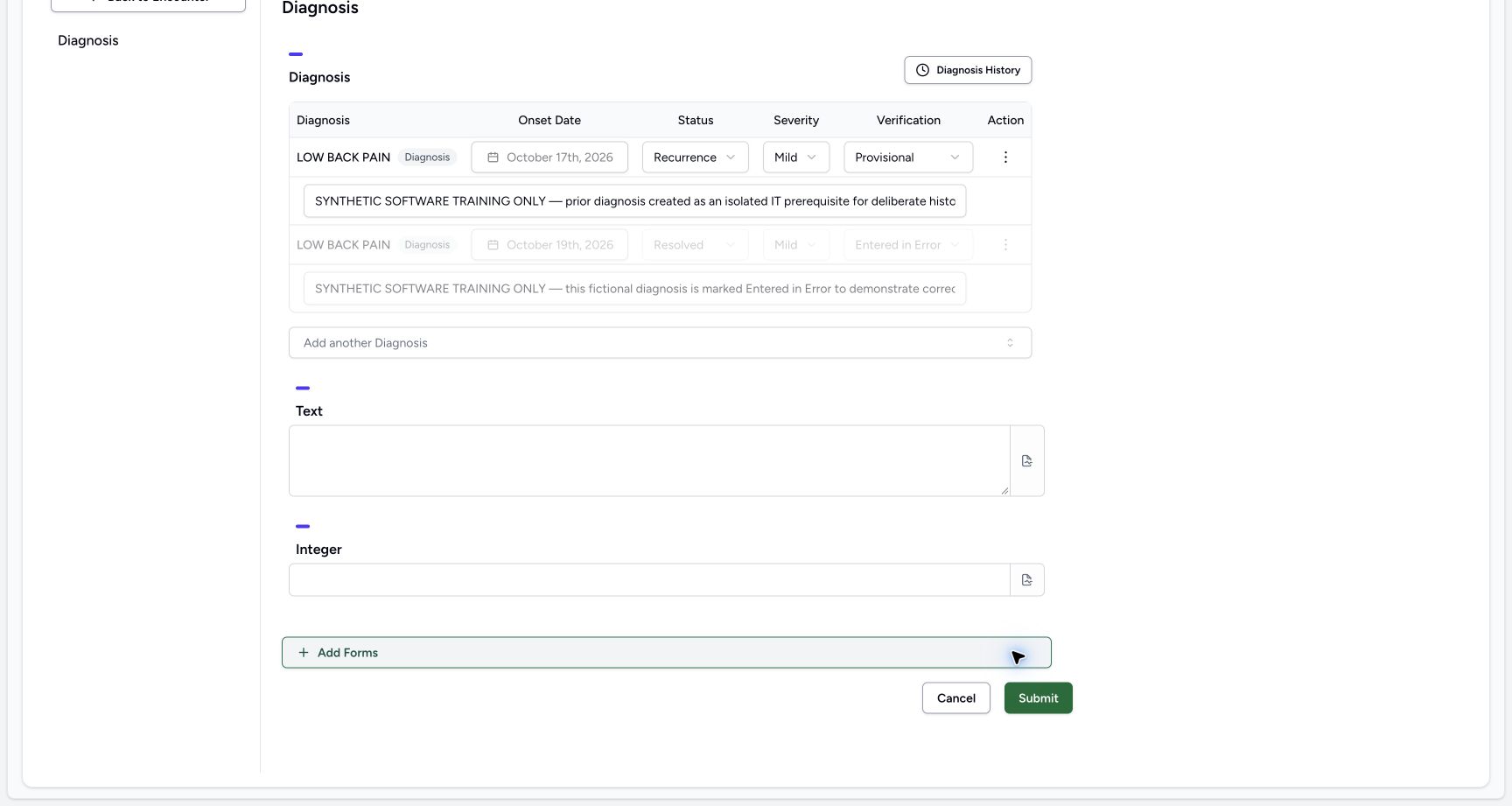 123456
Recurrence reviewed with blank fields and enabled Submit
Capture details
Observed exact 3dfb software on 20 October 2026. Original pixels and chronology retained. The Forms route in 19–21 is the installed Diagnosis form with blank Text/Integer.16/17 are separate naturally identical captures.22 does not visibly retain the success toast; 23 is the reloaded current summary. No clinical recommendation or global database guarantee.
Image SHA-256 f5c825380f33c58751c1b376aff9c729dfd073845ac946bd1477e323e8cc635c
- Review Recurrence: The same diagnosis now has pending Recurrence status.
- Retain the saved note: The original note is not replaced.
- Keep Text blank: Do not add an ordinary Text answer for this status-only exercise.
- Keep Integer blank: Do not add an Integer answer.
- Submit Recurrence once: After reviewing the retained fields, select the enabled Submit once.
- Locate Cancel: Cancel is available if the pending change is not intended.
10. Submit Recurrence once and wait for Overview
Select the enabled Submit once and wait for the app to return to Overview. Use the next step to reload and verify the saved result before making another change.
123456Recurrence reviewed with blank fields and enabled Submit
Capture details
Observed exact 3dfb software on 20 October 2026. Original pixels and chronology retained. The Forms route in 19–21 is the installed Diagnosis form with blank Text/Integer.16/17 are separate naturally identical captures.22 does not visibly retain the success toast; 23 is the reloaded current summary. No clinical recommendation or global database guarantee.
Image SHA-256 f5c825380f33c58751c1b376aff9c729dfd073845ac946bd1477e323e8cc635c
- Review Recurrence: The same diagnosis now has pending Recurrence status.
- Retain the saved note: The original note is not replaced.
- Keep Text blank: Do not add an ordinary Text answer for this status-only exercise.
- Keep Integer blank: Do not add an Integer answer.
- Submit Recurrence once: After reviewing the retained fields, select the enabled Submit once.
- Locate Cancel: Cancel is available if the pending change is not intended.
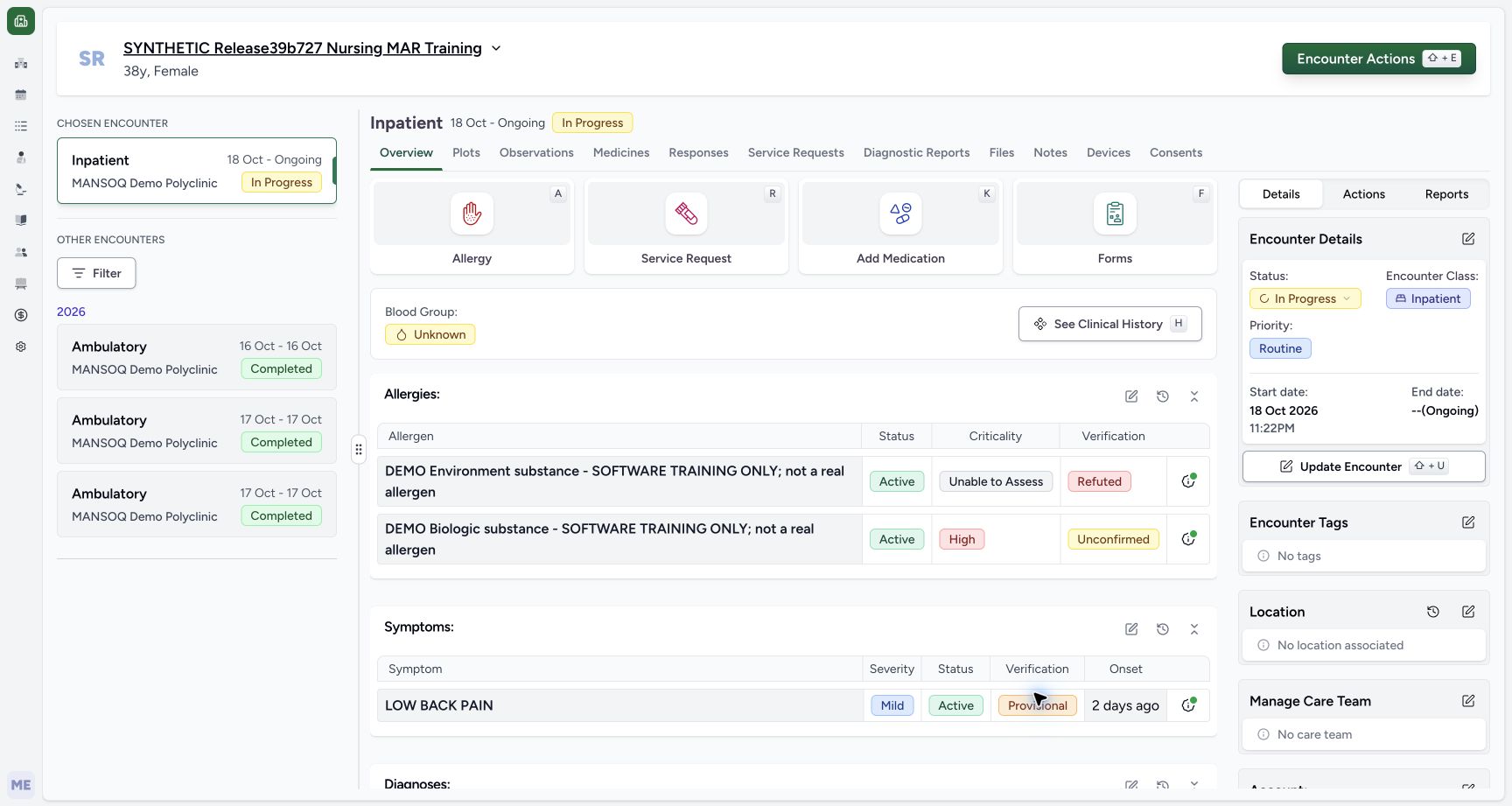 12
12Returned Overview after the successful Recurrence submission
Capture details
Observed exact 3dfb software on 20 October 2026. Original pixels and chronology retained. The Forms route in 19–21 is the installed Diagnosis form with blank Text/Integer.16/17 are separate naturally identical captures.22 does not visibly retain the success toast; 23 is the reloaded current summary. No clinical recommendation or global database guarantee.
Image SHA-256 91883886614a654d5e4103a4aadf8b125ce0010d13fb0a4d7e171d0f068e08b0
- Recognize the returned Overview: This is the returned Overview. Reload next to verify the saved diagnosis.
- Keep the selected encounter context: Do not change the encounter while waiting and reloading.
11. Reload and verify the current Recurrence row
Use your browser’s Reload command once, wait for Overview to load, and scroll to Diagnoses. The same LOW BACK PAIN row now shows Recurrence, Mild, Provisional and onset 3 days ago. The selected encounter remains In Progress. The separate Symptoms row remains distinct.
12Returned Overview after the successful Recurrence submission
Capture details
Observed exact 3dfb software on 20 October 2026. Original pixels and chronology retained. The Forms route in 19–21 is the installed Diagnosis form with blank Text/Integer.16/17 are separate naturally identical captures.22 does not visibly retain the success toast; 23 is the reloaded current summary. No clinical recommendation or global database guarantee.
Image SHA-256 91883886614a654d5e4103a4aadf8b125ce0010d13fb0a4d7e171d0f068e08b0
- Recognize the returned Overview: This is the returned Overview. Reload next to verify the saved diagnosis.
- Keep the selected encounter context: Do not change the encounter while waiting and reloading.
12345Current summary Recurrence after normal reload
Capture details
Observed exact 3dfb software on 20 October 2026. Original pixels and chronology retained. The Forms route in 19–21 is the installed Diagnosis form with blank Text/Integer.16/17 are separate naturally identical captures.22 does not visibly retain the success toast; 23 is the reloaded current summary. No clinical recommendation or global database guarantee.
Image SHA-256 08a191ac6842a0c401b8af6d49684a522dd70cc8e6ae4bd3f47cfa4c2f380818
- Read Recurrence after Reload: The current Diagnoses row now shows Recurrence.
- Recheck Mild: Severity remains Mild.
- Recheck Provisional: Verification remains Provisional.
- Recheck the retained onset: The same row still says 3 days ago.
- Reopen the built-in edit form: Select the Diagnoses edit icon to inspect the saved row.
12. Reopen the saved row and Cancel without another save
Select the Diagnoses edit icon again. The built-in form now shows the same saved Recurrence row, with Mild, Provisional, the locked October 17th onset and existing note. Leave every field unchanged and select Cancel. This inspection does not require another Submit.
12345Current summary Recurrence after normal reload
Capture details
Observed exact 3dfb software on 20 October 2026. Original pixels and chronology retained. The Forms route in 19–21 is the installed Diagnosis form with blank Text/Integer.16/17 are separate naturally identical captures.22 does not visibly retain the success toast; 23 is the reloaded current summary. No clinical recommendation or global database guarantee.
Image SHA-256 08a191ac6842a0c401b8af6d49684a522dd70cc8e6ae4bd3f47cfa4c2f380818
- Read Recurrence after Reload: The current Diagnoses row now shows Recurrence.
- Recheck Mild: Severity remains Mild.
- Recheck Provisional: Verification remains Provisional.
- Recheck the retained onset: The same row still says 3 days ago.
- Reopen the built-in edit form: Select the Diagnoses edit icon to inspect the saved row.
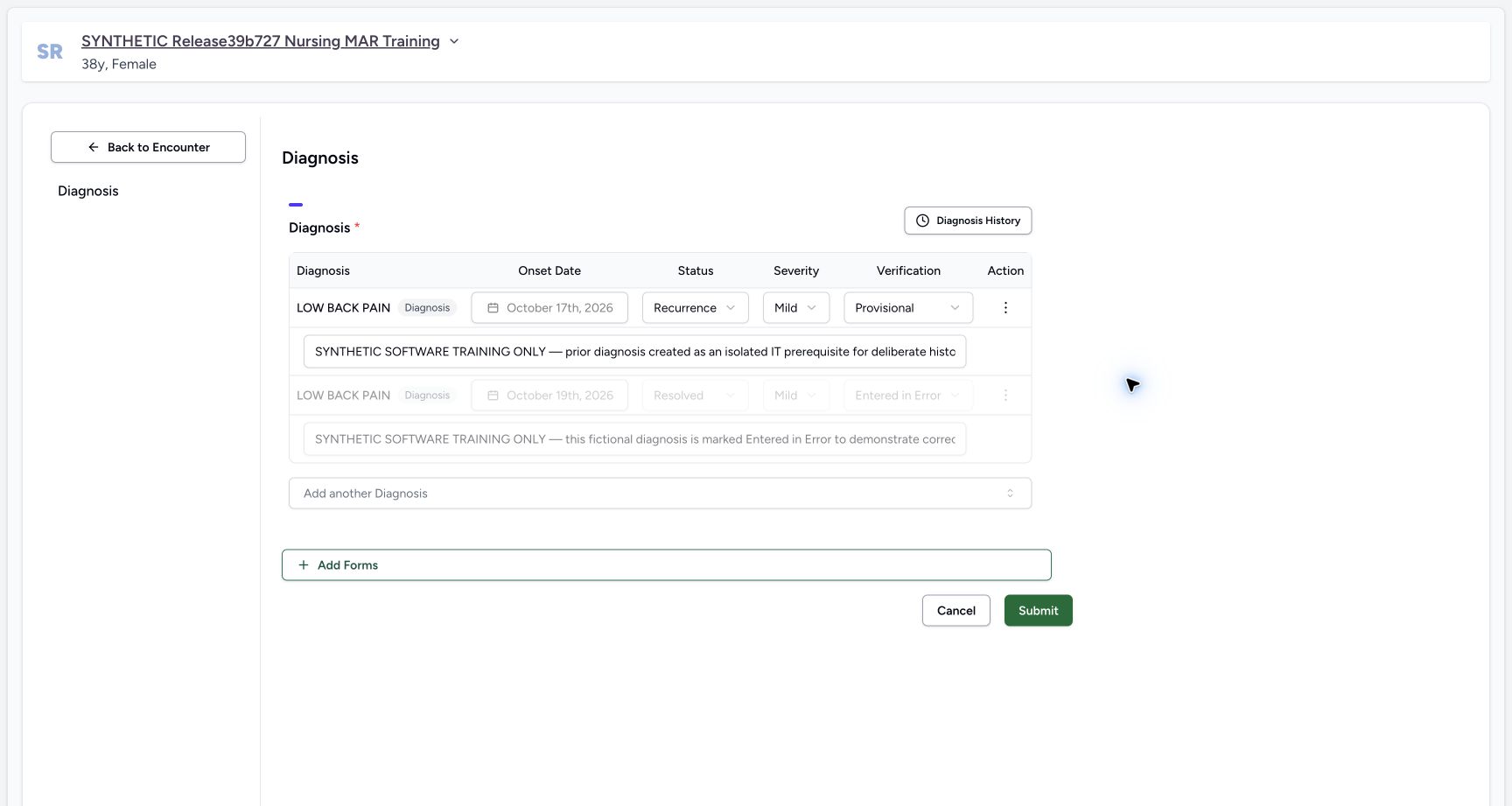 12345
12345Saved Recurrence re-opened in the built-in form
Capture details
Observed exact 3dfb software on 20 October 2026. Original pixels and chronology retained. The Forms route in 19–21 is the installed Diagnosis form with blank Text/Integer.16/17 are separate naturally identical captures.22 does not visibly retain the success toast; 23 is the reloaded current summary. No clinical recommendation or global database guarantee.
Image SHA-256 388021b12dfae53edf940de307333b0c5bc185beab2dcf420c19ce30af34048f
- Read saved Recurrence: The built-in form rehydrates the same saved Recurrence row.
- Recheck the locked onset: The saved onset remains October 17th, 2026.
- Recheck retained verification: Mild and Provisional remain unchanged.
- Leave the disabled error row untouched: The separate Resolved/Entered in Error row remains disabled.
- Cancel this unchanged inspection: Select Cancel without editing or submitting again.
Understand current summary versus patient history
In this release the current diagnosis summary requests Active, Recurrence or Relapse and excludes entered-error verification. Inactive can therefore disappear from that summary while remaining in Past Diagnoses. Patient history can include diagnoses from other encounters; the same display label does not identify a unique row. Use the saved context and retained fields before editing.
123456Existing Active diagnosis in the current summary
Capture details
Observed exact 3dfb software on 20 October 2026. Original pixels and chronology retained. The Forms route in 19–21 is the installed Diagnosis form with blank Text/Integer.16/17 are separate naturally identical captures.22 does not visibly retain the success toast; 23 is the reloaded current summary. No clinical recommendation or global database guarantee.
Image SHA-256 663ea0ae20ddcc0edbd9294dc658f0b54cd62e0f85c2238561560d146581e6d5
- Locate Diagnoses: Use the Diagnoses section, separate from Symptoms above.
- Open the existing diagnosis form: Select the edit icon on the Diagnoses section.
- Read the current status: The saved diagnosis is Active before this exercise.
- Retain Mild: Keep the existing severity.
- Retain Provisional: Keep the existing verification status.
- Read the relative onset: The current row says 3 days ago; this is distinct from the symptom above.
12345Overview after Inactive with no current Diagnoses section
Capture details
Observed exact 3dfb software on 20 October 2026. Original pixels and chronology retained. The Forms route in 19–21 is the installed Diagnosis form with blank Text/Integer.16/17 are separate naturally identical captures.22 does not visibly retain the success toast; 23 is the reloaded current summary. No clinical recommendation or global database guarantee.
Image SHA-256 28b26d3b67f912e551f5b79c7aaa7ee7cf76fcf97a37cd2c746786bd04662c46
- Confirm return to Overview: The selected encounter remains In Progress.
- Read the Symptoms section: Symptoms remain a separate section.
- Locate Vitals below Symptoms: The current Diagnoses section is absent from this filtered summary.
- Open See Clinical History: Inspect the retained diagnosis through patient history.
- Open Forms: Use this Forms tile after returning to the encounter; the picker then offers Diagnosis.
123456Retained Inactive diagnosis in patient history
Capture details
Observed exact 3dfb software on 20 October 2026. Original pixels and chronology retained. The Forms route in 19–21 is the installed Diagnosis form with blank Text/Integer.16/17 are separate naturally identical captures.22 does not visibly retain the success toast; 23 is the reloaded current summary. No clinical recommendation or global database guarantee.
Image SHA-256 0a580c902bc65f1ab568131c862a539efa4667566bc100e77490ddc9b7d2d33a
- Read the retained Inactive row: The middle eligible row is Inactive, not deleted.
- Read retained Mild: The same row keeps Mild severity.
- Read retained Provisional: Verification remains Provisional.
- Read onset separately: The middle row says 3 days ago.
- Distinguish the creation-date group: The 19 October group is not the onset date.
- Distinguish the other Active row: The lower same-label row is a separate saved diagnosis.
12345Current summary Recurrence after normal reload
Capture details
Observed exact 3dfb software on 20 October 2026. Original pixels and chronology retained. The Forms route in 19–21 is the installed Diagnosis form with blank Text/Integer.16/17 are separate naturally identical captures.22 does not visibly retain the success toast; 23 is the reloaded current summary. No clinical recommendation or global database guarantee.
Image SHA-256 08a191ac6842a0c401b8af6d49684a522dd70cc8e6ae4bd3f47cfa4c2f380818
- Read Recurrence after Reload: The current Diagnoses row now shows Recurrence.
- Recheck Mild: Severity remains Mild.
- Recheck Provisional: Verification remains Provisional.
- Recheck the retained onset: The same row still says 3 days ago.
- Reopen the built-in edit form: Select the Diagnoses edit icon to inspect the saved row.
Keep the status-only demonstration bounded
The two demonstrated saves changed the same existing diagnosis to Inactive and then Recurrence. No additional diagnosis was added, and the disabled error row was retained. The installed Forms version’s blank Text and Integer fields were left blank. This teaches the observed save/history/reload controls, not new-diagnosis entry, all status transitions or clinical decision-making.
123456Inactive pending on the same diagnosis
Capture details
Observed exact 3dfb software on 20 October 2026. Original pixels and chronology retained. The Forms route in 19–21 is the installed Diagnosis form with blank Text/Integer.16/17 are separate naturally identical captures.22 does not visibly retain the success toast; 23 is the reloaded current summary. No clinical recommendation or global database guarantee.
Image SHA-256 ad9e3eaeb21e992776859757c2bc71a62bb368978264d2bc65146594363c3bef
- Review Inactive before saving: Only the target status has changed to Inactive.
- Recheck Mild: Severity remains Mild.
- Recheck Provisional: Verification remains Provisional.
- Keep the existing note: The saved note remains in the same first row.
- Protect the disabled error row: Do not change the separate Resolved/Entered in Error record.
- Submit the Inactive update once: After checking the target and retained fields, select Submit once.
12345678Installed Diagnosis form with saved Inactive row and blank Text/Integer
Capture details
Observed exact 3dfb software on 20 October 2026. Original pixels and chronology retained. The Forms route in 19–21 is the installed Diagnosis form with blank Text/Integer.16/17 are separate naturally identical captures.22 does not visibly retain the success toast; 23 is the reloaded current summary. No clinical recommendation or global database guarantee.
Image SHA-256 0ad8de3e33932a87bb0f415678969ded7c7bd5282d5e25bb50f78d1b8db53ac3
- Verify the saved Inactive row: The first row is still Inactive in the installed Diagnosis form.
- Recheck the locked 17 October onset: Retain the existing onset.
- Retain Mild: Do not change severity.
- Retain Provisional: Do not change verification.
- Retain the existing note: Leave the saved fictional note unchanged.
- Leave Text blank: This installed form includes an additional blank Text field.
- Leave Integer blank: This installed form also includes an additional blank Integer field.
- Retain the disabled error row: The separate entered-error record stays disabled.
123456Recurrence reviewed with blank fields and enabled Submit
Capture details
Observed exact 3dfb software on 20 October 2026. Original pixels and chronology retained. The Forms route in 19–21 is the installed Diagnosis form with blank Text/Integer.16/17 are separate naturally identical captures.22 does not visibly retain the success toast; 23 is the reloaded current summary. No clinical recommendation or global database guarantee.
Image SHA-256 f5c825380f33c58751c1b376aff9c729dfd073845ac946bd1477e323e8cc635c
- Review Recurrence: The same diagnosis now has pending Recurrence status.
- Retain the saved note: The original note is not replaced.
- Keep Text blank: Do not add an ordinary Text answer for this status-only exercise.
- Keep Integer blank: Do not add an Integer answer.
- Submit Recurrence once: After reviewing the retained fields, select the enabled Submit once.
- Locate Cancel: Cancel is available if the pending change is not intended.
12345Saved Recurrence re-opened in the built-in form
Capture details
Observed exact 3dfb software on 20 October 2026. Original pixels and chronology retained. The Forms route in 19–21 is the installed Diagnosis form with blank Text/Integer.16/17 are separate naturally identical captures.22 does not visibly retain the success toast; 23 is the reloaded current summary. No clinical recommendation or global database guarantee.
Image SHA-256 388021b12dfae53edf940de307333b0c5bc185beab2dcf420c19ce30af34048f
- Read saved Recurrence: The built-in form rehydrates the same saved Recurrence row.
- Recheck the locked onset: The saved onset remains October 17th, 2026.
- Recheck retained verification: Mild and Provisional remain unchanged.
- Leave the disabled error row untouched: The separate Resolved/Entered in Error row remains disabled.
- Cancel this unchanged inspection: Select Cancel without editing or submitting again.
Source evidence
Every citation uses this exact committed version. The private source repository requires access.
- repositories/platform/mansoq-web/src/components/Questionnaire/QuestionTypes/DiagnosisQuestion.tsx:299 ·
3dfb7c9f519fb5b4cd4452439f3c12346bf58319Source file checksum
56a14d11bcc3aef66d9dc2d220b29d4c22ff671eed6ed4c4676ddf59b7920159 - repositories/platform/mansoq-web/src/components/Questionnaire/structured/handlers.ts:155 ·
3dfb7c9f519fb5b4cd4452439f3c12346bf58319Source file checksum
459ade48f77316279ab2978dc7b4466cb96acb8223c61b9a1f87ca9973be7c7f - repositories/platform/mansoq-web/src/components/Questionnaire/QuestionnaireForm.tsx:879 ·
3dfb7c9f519fb5b4cd4452439f3c12346bf58319Source file checksum
ee6c2195f13e48f0896a2d3da566c2f2a67910adad08894df6b77862f9cfdeec - repositories/platform/mansoq-web/src/components/Patient/diagnosis/list.tsx:60 ·
3dfb7c9f519fb5b4cd4452439f3c12346bf58319Source file checksum
5662a180f3653fa2e8fbabf2f931d3e9a65792f22e9e7d534b108772601863ed - repositories/platform/mansoq-web/src/components/Patient/diagnosis/DiagnosisTable.tsx:29 ·
3dfb7c9f519fb5b4cd4452439f3c12346bf58319Source file checksum
45e40342661a50ac9ad52a4e34cfc2dc4d153ce389dc8829ffdb52c0f44f4c19 - repositories/platform/mansoq-web/src/types/emr/diagnosis/diagnosis.ts:4 ·
3dfb7c9f519fb5b4cd4452439f3c12346bf58319Source file checksum
4153cbcd88d02cf5a115cf585ee7cce198b9948d2722ccf2db11203c1eef1974 - repositories/platform/mansoq-web/src/types/emr/diagnosis/diagnosisApi.ts:1 ·
3dfb7c9f519fb5b4cd4452439f3c12346bf58319Source file checksum
22d477cb1cd2c66c58acf7ffc05c2b9940633449cc8901d6bdd79e9ae503f562 - repositories/platform/mansoq-web/src/pages/Encounters/tabs/overview/clinical-history-overview.tsx:105 ·
3dfb7c9f519fb5b4cd4452439f3c12346bf58319Source file checksum
e2cc1309001e96b38b1cd34c878188f3a56d29323ac3c3afeeb422274c19675b - repositories/platform/mansoq-web/src/pages/Patient/History/index.tsx:46 ·
3dfb7c9f519fb5b4cd4452439f3c12346bf58319Source file checksum
b434486d27a139467b3618a9bc8396c1eb7de96e5461ed7787e4c8c5de1aceb4 - repositories/platform/mansoq-web/src/pages/Patient/History/DiagnosesHistory.tsx:7 ·
3dfb7c9f519fb5b4cd4452439f3c12346bf58319Source file checksum
aa74018dae4db47ed2db803ef7242c7ca975d767d4520d7581e575caffc6f9fc - repositories/platform/mansoq-web/src/pages/Encounters/tabs/overview/FormsDialog.tsx:125 ·
3dfb7c9f519fb5b4cd4452439f3c12346bf58319Source file checksum
94e423519145edb5e7895c4b2fa8eba6625db5a1d320fb35c37777f0876321a6 - repositories/platform/mansoq-core/mansoq/emr/api/viewsets/condition.py:115 ·
3dfb7c9f519fb5b4cd4452439f3c12346bf58319Source file checksum
f5d22181887766355e1aa847ff777b6f72a492eccce7820f716e4dcb28ad6172 - repositories/platform/mansoq-core/mansoq/emr/api/viewsets/base.py:179 ·
3dfb7c9f519fb5b4cd4452439f3c12346bf58319Source file checksum
6a287dd315b8a4957b29c58e4bbc1bef7b8d9d257f9149f93045ff0adbdcae6c - repositories/platform/mansoq-core/mansoq/emr/resources/condition/spec.py:1 ·
3dfb7c9f519fb5b4cd4452439f3c12346bf58319Source file checksum
53f9aa7a7b65f530950d3804ddfcad69fe786ca58c5e62ecb7531a1c7fa45a04 - repositories/platform/mansoq-core/mansoq/emr/resources/condition/valueset.py:1 ·
3dfb7c9f519fb5b4cd4452439f3c12346bf58319Source file checksum
836687dd3f5fffec0e1b06c53cf0209229ff8dded04d7ddd1a1e395642b56525 - repositories/platform/mansoq-core/mansoq/emr/models/condition.py:1 ·
3dfb7c9f519fb5b4cd4452439f3c12346bf58319Source file checksum
35dd570fe209ab12cb4c05dcb15d7a84bf4c144967322c52c454222619c180e7