 MANSOQ
 Clinical care · VERSION 3dfb7c9f
Open an Emergency discharge draft and leave without saving
Use the genuine Encounter form and recognise its unsaved-change warning before a discharge is saved.
Doctor
 123
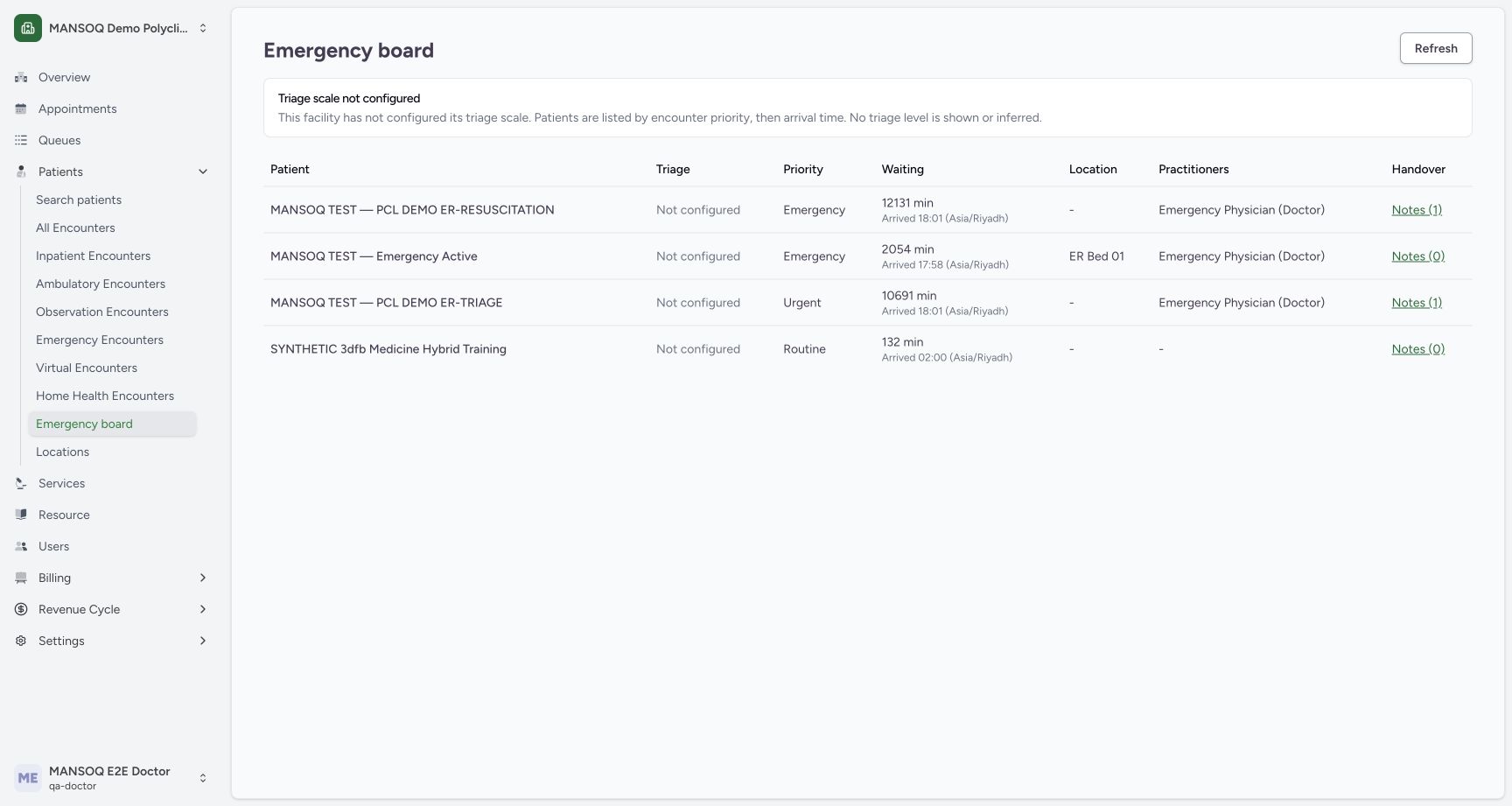
123Doctor emergency board before
Capture details
Captured committed 3dfb interface. One discharge Submit, one completion confirmation and one refused Restart attempt; older Ambulatory encounter separate. Original web blur/dimming and native dimensions preserved.
Image SHA-256 7469adcfb1c56e2f60ce9f279d30b15297a30b7ba2058dffcda77dcb4c3ddf88
- Check the Doctor account: The account label shows MANSOQ E2E Doctor / qa-doctor.
- Find the fictional Emergency example: This synthetic case is listed on the Emergency board.
- Read the unconfigured triage notice: No triage score is shown or inferred in this example.
9 of 9 content blocks have reviewed image alignment. Missing overview or prerequisite images remain open.
Before you begin
- Use an authorised ordinary Doctor account, the assigned synthetic facility and a dedicated fictional Emergency encounter. Verify the chosen encounter; the older Ambulatory encounter is separate.123
Recorded release 3dfb7c9f · 2026-10-20T01:13:18.188Z · 1728 × 921 Doctor emergency board before
Capture details
Captured committed 3dfb interface. One discharge Submit, one completion confirmation and one refused Restart attempt; older Ambulatory encounter separate. Original web blur/dimming and native dimensions preserved.
Image SHA-256
7469adcfb1c56e2f60ce9f279d30b15297a30b7ba2058dffcda77dcb4c3ddf88- Check the Doctor account: The account label shows MANSOQ E2E Doctor / qa-doctor.
- Find the fictional Emergency example: This synthetic case is listed on the Emergency board.
- Read the unconfigured triage notice: No triage score is shown or inferred in this example.
 123
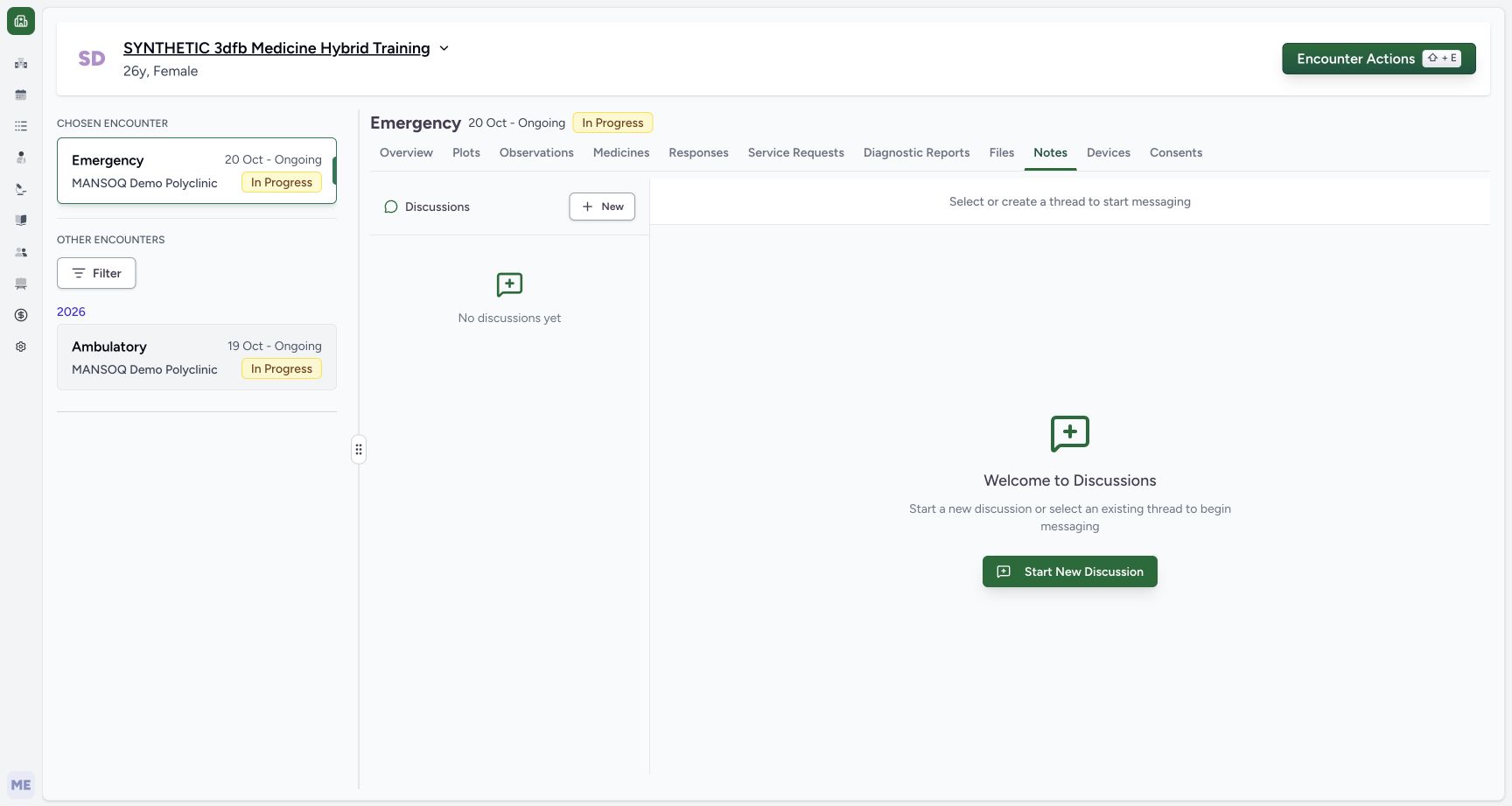
123Recorded release 3dfb7c9f · 2026-10-20T01:13:44.933Z · 1728 × 921 Own emergency in progress before
Capture details
Captured committed 3dfb interface. One discharge Submit, one completion confirmation and one refused Restart attempt; older Ambulatory encounter separate. Original web blur/dimming and native dimensions preserved.
Image SHA-256
199a871c35a1a7372857f02353b30943731585dfbfbbbac4d33271bc1e771b72- Match the chosen Emergency encounter: The chosen encounter is Emergency and In Progress.
- Keep the separate Ambulatory encounter distinct: The other encounter is visible below and is not the target of this lesson.
- Open Encounter Actions: Use actions for the chosen Emergency encounter.
- These sample dates, disposition and advice teach software controls only. They represent no clinical discharge decision, treatment instruction, legal consent or real patient-care action.
 12
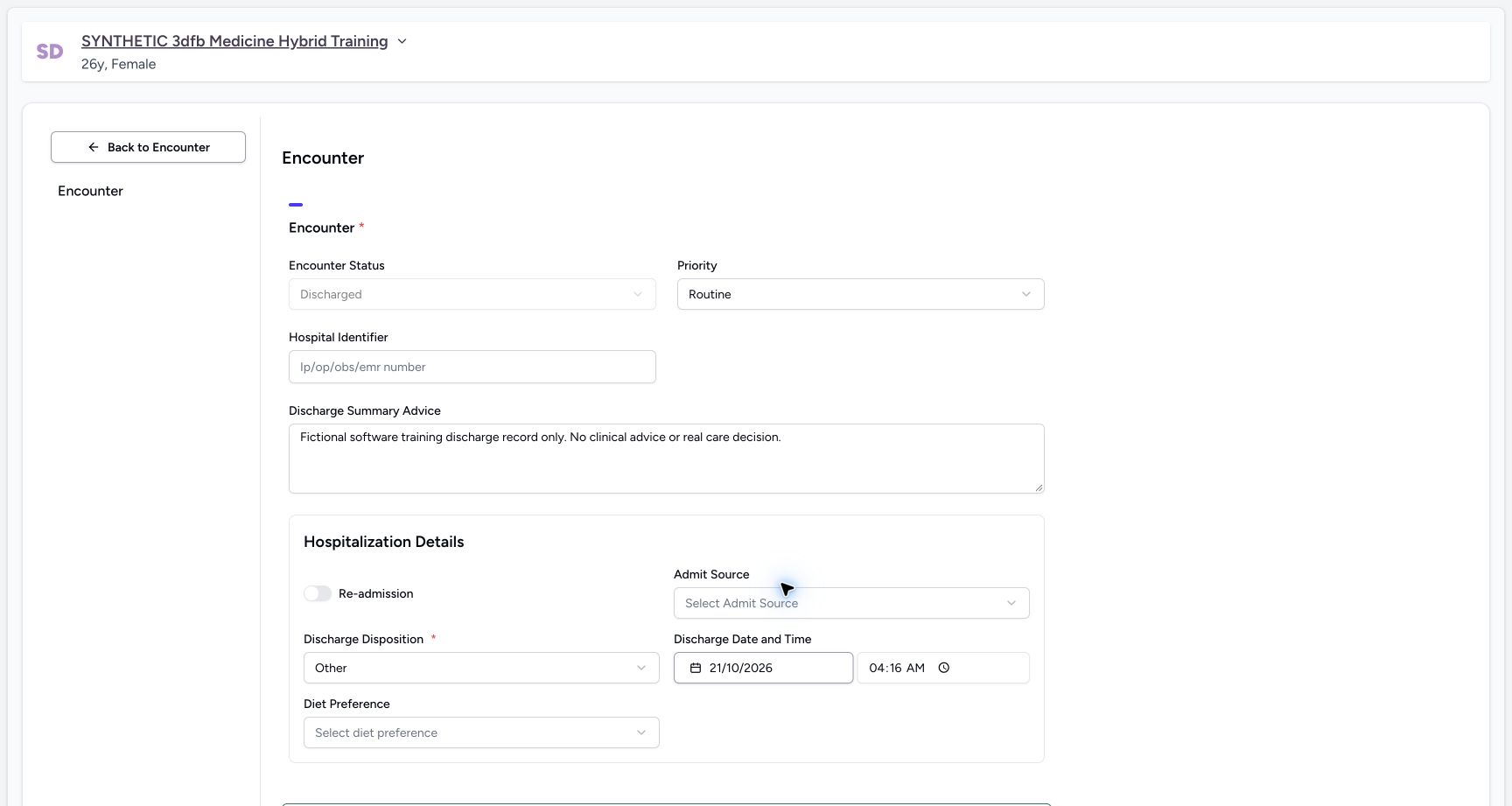
12Recorded release 3dfb7c9f · 2026-10-20T01:16:30.791Z · 1728 × 921 Temporary next day discharge date
Capture details
Captured committed 3dfb interface. One discharge Submit, one completion confirmation and one refused Restart attempt; older Ambulatory encounter separate. Original web blur/dimming and native dimensions preserved.
Image SHA-256
ed2d2ce41608e6eb21142ee14047c386507ce72f3ecdc669810174a11270f91e- Read the temporary 21 October date: Do not save this intermediate date; the example returns to 20 October.
- Read the fictional advice: The text contains no clinical instruction or real care decision.
1. Match the Doctor and chosen Emergency encounter
Check the ordinary Doctor account and open the intended fictional Emergency encounter. Keep its In Progress state distinct from the separate Ambulatory encounter.
123Doctor emergency board before
Capture details
Captured committed 3dfb interface. One discharge Submit, one completion confirmation and one refused Restart attempt; older Ambulatory encounter separate. Original web blur/dimming and native dimensions preserved.
Image SHA-256 7469adcfb1c56e2f60ce9f279d30b15297a30b7ba2058dffcda77dcb4c3ddf88
- Check the Doctor account: The account label shows MANSOQ E2E Doctor / qa-doctor.
- Find the fictional Emergency example: This synthetic case is listed on the Emergency board.
- Read the unconfigured triage notice: No triage score is shown or inferred in this example.
123Own emergency in progress before
Capture details
Captured committed 3dfb interface. One discharge Submit, one completion confirmation and one refused Restart attempt; older Ambulatory encounter separate. Original web blur/dimming and native dimensions preserved.
Image SHA-256 199a871c35a1a7372857f02353b30943731585dfbfbbbac4d33271bc1e771b72
- Match the chosen Emergency encounter: The chosen encounter is Emergency and In Progress.
- Keep the separate Ambulatory encounter distinct: The other encounter is visible below and is not the target of this lesson.
- Open Encounter Actions: Use actions for the chosen Emergency encounter.
2. Open Update Encounter Details
Choose Encounter Actions, then Update Encounter Details. In the form, read the existing status and priority before choosing Mark for discharge.
123Own emergency in progress before
Capture details
Captured committed 3dfb interface. One discharge Submit, one completion confirmation and one refused Restart attempt; older Ambulatory encounter separate. Original web blur/dimming and native dimensions preserved.
Image SHA-256 199a871c35a1a7372857f02353b30943731585dfbfbbbac4d33271bc1e771b72
- Match the chosen Emergency encounter: The chosen encounter is Emergency and In Progress.
- Keep the separate Ambulatory encounter distinct: The other encounter is visible below and is not the target of this lesson.
- Open Encounter Actions: Use actions for the chosen Emergency encounter.
 1
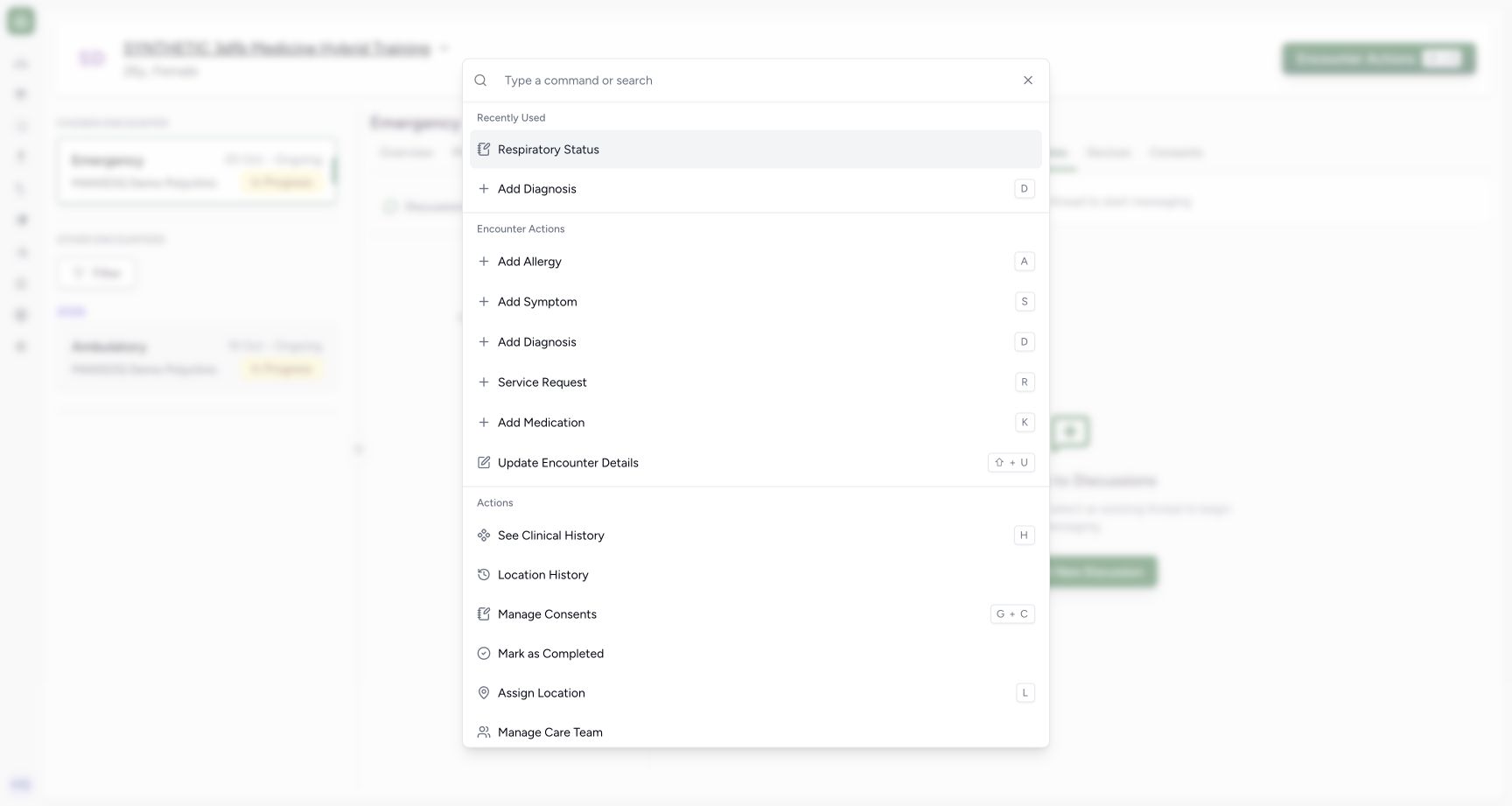
1Actions update details entry
Capture details
Captured committed 3dfb interface. One discharge Submit, one completion confirmation and one refused Restart attempt; older Ambulatory encounter separate. Original web blur/dimming and native dimensions preserved.
Image SHA-256 3229f96027c798282965fc3f73ee99be87d514bd4961e7fcee5f53e6ac1f90a3
- Choose Update Encounter Details: This opens the genuine Encounter form; it is separate from Mark as Completed.
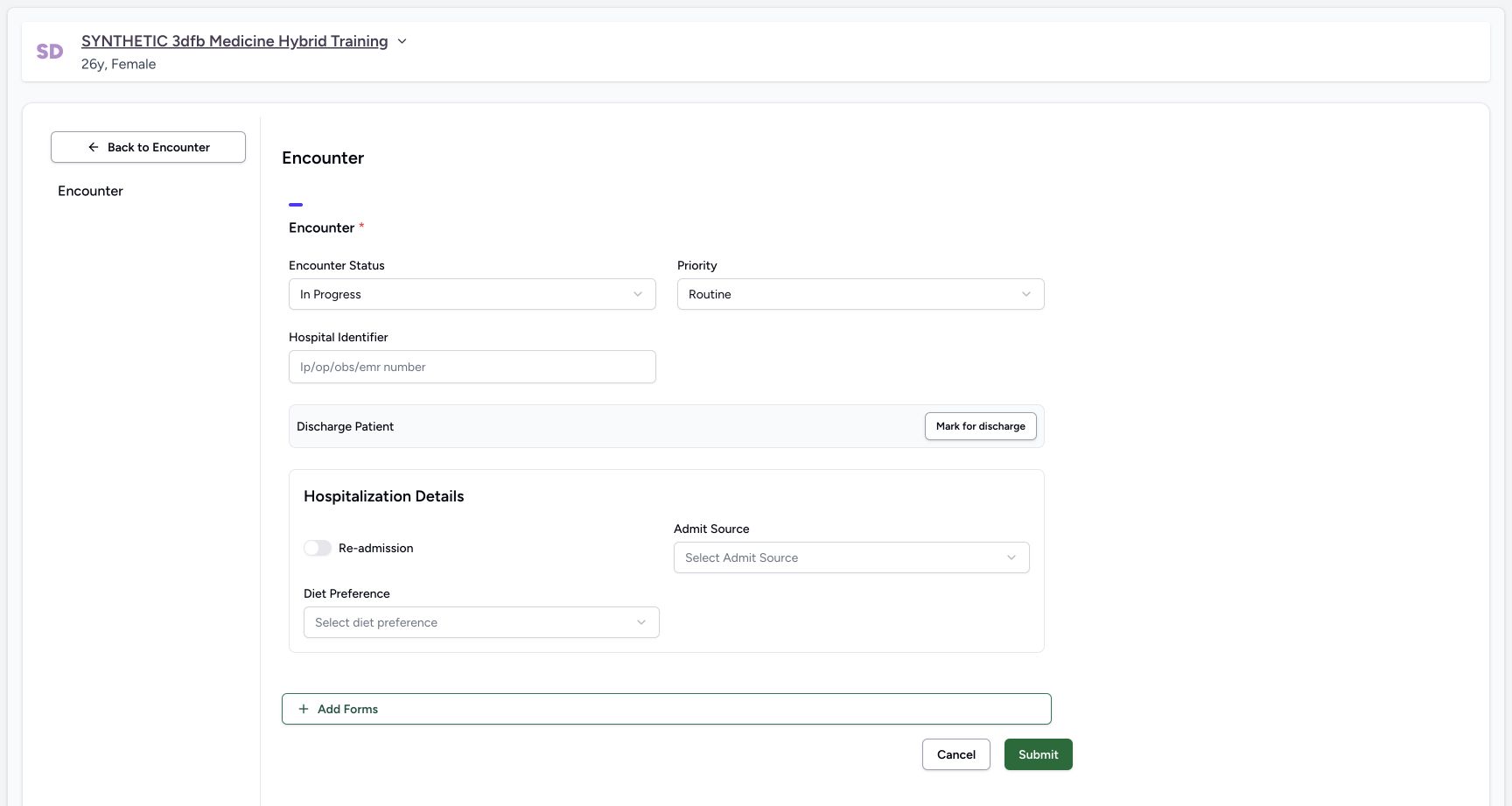 1234
1234Update details mark for discharge
Capture details
Captured committed 3dfb interface. One discharge Submit, one completion confirmation and one refused Restart attempt; older Ambulatory encounter separate. Original web blur/dimming and native dimensions preserved.
Image SHA-256 0fe9676c8c6eb3e1a511411ca779012e42a7fbc7354a897f1cb3fdd1f977f8e5
- Read In Progress: This is the status before Mark for discharge.
- Keep Routine unchanged: This lesson changes no priority.
- Choose Mark for discharge: This exposes the discharge fields in the form.
- Locate the form Cancel control: Initial form-footer reference: the same Cancel control is used after the unsaved discharge change; it is not pictured in frame 05.
3. Read the unsaved discharge fields
The status now shows Discharged in a disabled selector. The required disposition, date/time and advice belong to this unsaved draft. Do not treat the label alone as a saved discharge.
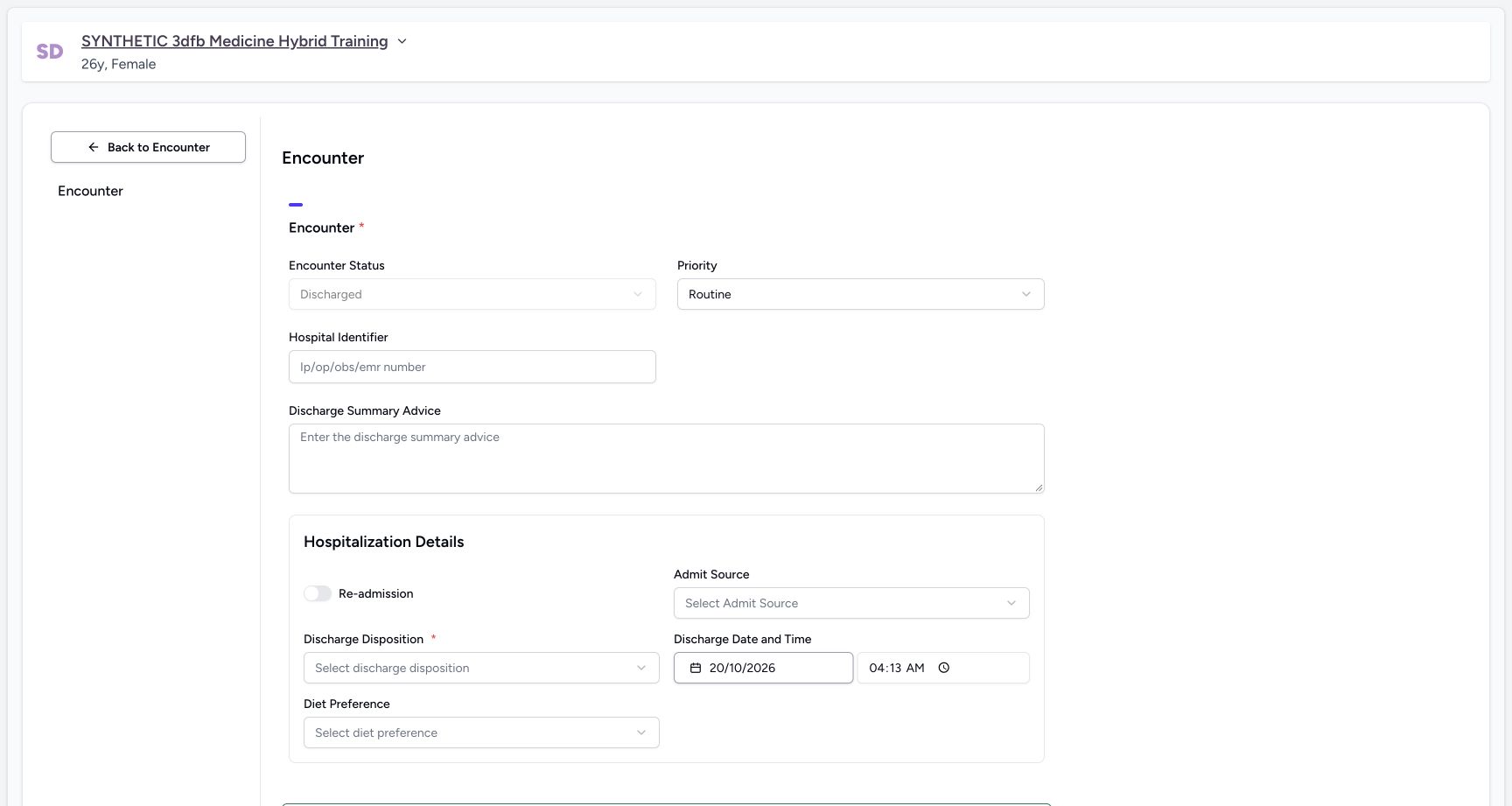 1234
1234Unsaved discharge fields before cancel
Capture details
Captured committed 3dfb interface. One discharge Submit, one completion confirmation and one refused Restart attempt; older Ambulatory encounter separate. Original web blur/dimming and native dimensions preserved.
Image SHA-256 38aa2dbeba184de57be9289edea3239d121eb56280cc0c8dc55f0361f37a943e
- Read the unsaved Discharged choice: The disabled status reflects the unsaved Mark for discharge action.
- Locate Discharge Summary Advice: The first cancel exercise has not authored advice.
- Locate required Discharge Disposition: The disposition is still unselected in this unsaved exercise.
- Read the automatically displayed date: This initial display is not the final reviewed discharge time.
4. Leave the draft through form Cancel
Choose the form’s Cancel button. The first form-footer screenshot shows this control before Mark for discharge; the same footer is below the viewport in the following unsaved-fields screenshot. This recorded leave used form Cancel, not Back to Encounter.
1234Update details mark for discharge
Capture details
Captured committed 3dfb interface. One discharge Submit, one completion confirmation and one refused Restart attempt; older Ambulatory encounter separate. Original web blur/dimming and native dimensions preserved.
Image SHA-256 0fe9676c8c6eb3e1a511411ca779012e42a7fbc7354a897f1cb3fdd1f977f8e5
- Read In Progress: This is the status before Mark for discharge.
- Keep Routine unchanged: This lesson changes no priority.
- Choose Mark for discharge: This exposes the discharge fields in the form.
- Locate the form Cancel control: Initial form-footer reference: the same Cancel control is used after the unsaved discharge change; it is not pictured in frame 05.
1234Unsaved discharge fields before cancel
Capture details
Captured committed 3dfb interface. One discharge Submit, one completion confirmation and one refused Restart attempt; older Ambulatory encounter separate. Original web blur/dimming and native dimensions preserved.
Image SHA-256 38aa2dbeba184de57be9289edea3239d121eb56280cc0c8dc55f0361f37a943e
- Read the unsaved Discharged choice: The disabled status reflects the unsaved Mark for discharge action.
- Locate Discharge Summary Advice: The first cancel exercise has not authored advice.
- Locate required Discharge Disposition: The disposition is still unselected in this unsaved exercise.
- Read the automatically displayed date: This initial display is not the final reviewed discharge time.
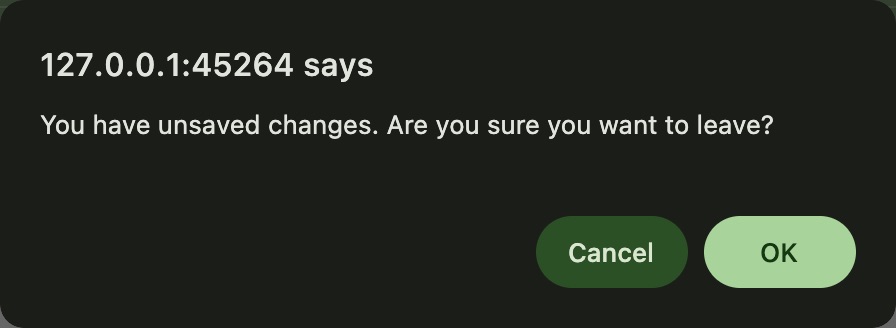 123
123Native unsaved-changes confirmation after discharge draft Cancel
Native macOS confirmation dialog, shown in its original proportions.
Capture details
Captured committed 3dfb interface. One discharge Submit, one completion confirmation and one refused Restart attempt; older Ambulatory encounter separate. Original web blur/dimming and native dimensions preserved.
Image SHA-256 e0fdd09a1f9d26beb5d6815d0daf5cd7134815b53d1707ee6a110b6a8ebb7746
- Read the unsaved-change warning: The actual macOS confirmation asks whether to leave unsaved changes.
- Read Cancel: This would keep the unsaved form; that choice is not the action shown in this branch.
- Choose OK to discard this draft: The recorded branch used OK and returned without saving.
5. Discard the unsaved change and verify the result
In the actual macOS warning, OK discards this unsaved draft; Cancel would keep it. The recorded branch chose OK. Verify that the chosen Emergency encounter is still In Progress.
123Native unsaved-changes confirmation after discharge draft Cancel
Native macOS confirmation dialog, shown in its original proportions.
Capture details
Captured committed 3dfb interface. One discharge Submit, one completion confirmation and one refused Restart attempt; older Ambulatory encounter separate. Original web blur/dimming and native dimensions preserved.
Image SHA-256 e0fdd09a1f9d26beb5d6815d0daf5cd7134815b53d1707ee6a110b6a8ebb7746
- Read the unsaved-change warning: The actual macOS confirmation asks whether to leave unsaved changes.
- Read Cancel: This would keep the unsaved form; that choice is not the action shown in this branch.
- Choose OK to discard this draft: The recorded branch used OK and returned without saving.
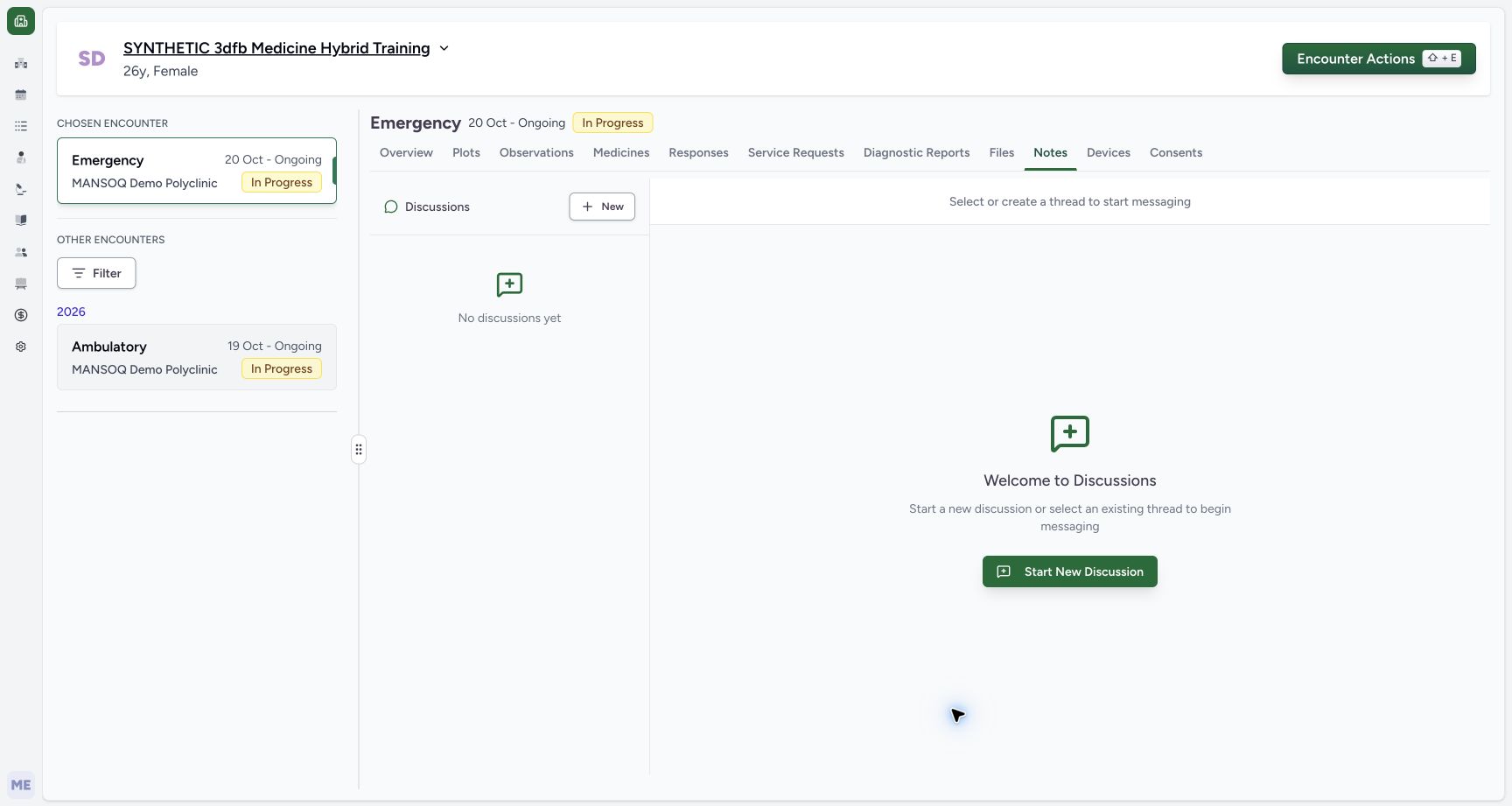 12
12Returned in progress after discharge cancel
Capture details
Captured committed 3dfb interface. One discharge Submit, one completion confirmation and one refused Restart attempt; older Ambulatory encounter separate. Original web blur/dimming and native dimensions preserved.
Image SHA-256 cefbf5114c91402d794c6ac786559ad545b84ae7111fb145ae34f9ce860eb031
- Check In Progress after leaving: The same chosen Emergency encounter remains In Progress.
- Keep the other Ambulatory encounter separate: Its visible In Progress label belongs to the other encounter.
Use this as a software exercise
The example concerns a dedicated fictional Emergency record. No real discharge decision, clinical advice, treatment instruction, legal consent or patient permission is represented. The actual warning’s OK discards this draft; its Cancel would keep the form open.
123Native unsaved-changes confirmation after discharge draft Cancel
Native macOS confirmation dialog, shown in its original proportions.
Capture details
Captured committed 3dfb interface. One discharge Submit, one completion confirmation and one refused Restart attempt; older Ambulatory encounter separate. Original web blur/dimming and native dimensions preserved.
Image SHA-256 e0fdd09a1f9d26beb5d6815d0daf5cd7134815b53d1707ee6a110b6a8ebb7746
- Read the unsaved-change warning: The actual macOS confirmation asks whether to leave unsaved changes.
- Read Cancel: This would keep the unsaved form; that choice is not the action shown in this branch.
- Choose OK to discard this draft: The recorded branch used OK and returned without saving.
12Returned in progress after discharge cancel
Capture details
Captured committed 3dfb interface. One discharge Submit, one completion confirmation and one refused Restart attempt; older Ambulatory encounter separate. Original web blur/dimming and native dimensions preserved.
Image SHA-256 cefbf5114c91402d794c6ac786559ad545b84ae7111fb145ae34f9ce860eb031
- Check In Progress after leaving: The same chosen Emergency encounter remains In Progress.
- Keep the other Ambulatory encounter separate: Its visible In Progress label belongs to the other encounter.
Source evidence
Every citation uses this exact committed version. The private source repository requires access.
- repositories/platform/mansoq-web/src/components/Questionnaire/QuestionTypes/EncounterQuestion.tsx:72 ·
3dfb7c9f519fb5b4cd4452439f3c12346bf58319Source file checksum
3a18093287f1975b8f3387b83216b981d9ec6e75975ccecde4544e4d4c91cb2c - repositories/platform/mansoq-web/src/components/Questionnaire/structured/handlers.ts:188 ·
3dfb7c9f519fb5b4cd4452439f3c12346bf58319Source file checksum
459ade48f77316279ab2978dc7b4466cb96acb8223c61b9a1f87ca9973be7c7f - repositories/platform/mansoq-web/src/components/Questionnaire/QuestionnaireForm.tsx:296 ·
3dfb7c9f519fb5b4cd4452439f3c12346bf58319Source file checksum
ee6c2195f13e48f0896a2d3da566c2f2a67910adad08894df6b77862f9cfdeec - repositories/platform/mansoq-web/src/components/Questionnaire/data/StructuredFormData.tsx:1 ·
3dfb7c9f519fb5b4cd4452439f3c12346bf58319Source file checksum
434386c27b8e583e1dbd0a6f506250e7a0fb3640963c572445123bae62880f0f - repositories/platform/mansoq-web/src/components/Patient/EncounterQuestionnaire.tsx:28 ·
3dfb7c9f519fb5b4cd4452439f3c12346bf58319Source file checksum
869639606049677ede766507b10295f9a5b0a4f9b68f2fcae1513702a86d36e9 - repositories/platform/mansoq-web/src/pages/Encounters/utils/useEncounterProgressController.ts:19 ·
3dfb7c9f519fb5b4cd4452439f3c12346bf58319Source file checksum
d627cc15e3bad6b3bfd3fd61271787f274bfc325dc0d815e846e5d580554a265 - repositories/platform/mansoq-web/src/pages/Encounters/MarkEncounterAsCompletedDialog.tsx:23 ·
3dfb7c9f519fb5b4cd4452439f3c12346bf58319Source file checksum
77bb1d697abaa70d5721484619f68c2f0af1d36adc2f7dd8477a100f6bb5ed49 - repositories/platform/mansoq-web/src/pages/Encounters/utils/EncounterProvider.tsx:160 ·
3dfb7c9f519fb5b4cd4452439f3c12346bf58319Source file checksum
d2609fc0452c91c20104237bf02be40ecb3bf48225011aba1f4bca2d50620d75 - repositories/platform/mansoq-web/src/components/Encounter/EncounterCommandDialog.tsx:138 ·
3dfb7c9f519fb5b4cd4452439f3c12346bf58319Source file checksum
361a31246fc38a50a86c8960dadb3254afcfcb7fb8eb53d7bf59c1699512683c - repositories/platform/mansoq-web/src/components/Encounter/EncounterActions.tsx:29 ·
3dfb7c9f519fb5b4cd4452439f3c12346bf58319Source file checksum
6ca7bde6f8771df1d7f271cbd744a8072d8e4be132c1c3f6265b25f32f15f8ad - repositories/platform/mansoq-web/src/pages/Encounters/tabs/overview/summary-panel-details-tab/encounter-details.tsx:22 ·
3dfb7c9f519fb5b4cd4452439f3c12346bf58319Source file checksum
bdbb37747983f56e72a3552f1e023bf09c561d341696252be51030638821ba49 - repositories/platform/mansoq-web/src/pages/Encounters/tabs/overview/summary-panel-details-tab/discharge-summary.tsx:23 ·
3dfb7c9f519fb5b4cd4452439f3c12346bf58319Source file checksum
92b23199b8b658a68bc23362a40d16bf86ae32b1e66b04c5e2824335fa01b110 - repositories/platform/mansoq-web/src/pages/Encounters/tabs/overview/summary-panel-actions.tab.tsx:112 ·
3dfb7c9f519fb5b4cd4452439f3c12346bf58319Source file checksum
50bf854691937a90b656a4582ff9daf3b4633349665a6b35d502000bc85d5d89 - repositories/platform/mansoq-web/src/types/emr/encounter/encounter.ts:15 ·
3dfb7c9f519fb5b4cd4452439f3c12346bf58319Source file checksum
178ad4319d92bef379a78ed07c74d87d4c185774b3cdf989affc0f7e06ac08db - repositories/platform/mansoq-web/src/types/emr/encounter/encounterApi.ts:26 ·
3dfb7c9f519fb5b4cd4452439f3c12346bf58319Source file checksum
dc3397b24f1343b3d39f1b8ee3b01da8b3b9c16011d53427d118e6f48a674eaf - repositories/platform/mansoq-web/src/components/ui/date-picker.tsx:1 ·
3dfb7c9f519fb5b4cd4452439f3c12346bf58319Source file checksum
1eb53d9cc0a57d26397480d750e0e88fea580ad3f0c17a46aa3bd9dec2ef7cc3 - repositories/platform/mansoq-web/src/components/Common/BackButton.tsx:1 ·
3dfb7c9f519fb5b4cd4452439f3c12346bf58319Source file checksum
56a741eff730a7b18a5fae594374068bab2d5413993c32dbbaf3625e14743ca3 - repositories/platform/mansoq-core/mansoq/emr/api/viewsets/encounter.py:217 ·
3dfb7c9f519fb5b4cd4452439f3c12346bf58319Source file checksum
95deb76fba78fa3426ea5eae2fa175db4a31bd3ea8a6bc70da5f80632a05d2f8 - repositories/platform/mansoq-core/mansoq/emr/resources/encounter/spec.py:43 ·
3dfb7c9f519fb5b4cd4452439f3c12346bf58319Source file checksum
c500756ac656d65d419fd08381905d7201414d63cb7910205a6eb7fd52099545 - repositories/platform/mansoq-core/mansoq/emr/resources/encounter/constants.py:4 ·
3dfb7c9f519fb5b4cd4452439f3c12346bf58319Source file checksum
4cb075b4aee3c09c6275cab553865929e2ea1bced4c5e66eb571855bcbb9f52a - repositories/platform/mansoq-core/mansoq/emr/resources/base.py:91 ·
3dfb7c9f519fb5b4cd4452439f3c12346bf58319Source file checksum
bc406c723888997dd99fc408cb3c5dec51fb0b54d10272ca31bfd8c98c893229 - repositories/platform/mansoq-core/mansoq/emr/api/viewsets/base.py:179 ·
3dfb7c9f519fb5b4cd4452439f3c12346bf58319Source file checksum
6a287dd315b8a4957b29c58e4bbc1bef7b8d9d257f9149f93045ff0adbdcae6c - repositories/platform/mansoq-core/mansoq/emr/models/encounter.py:12 ·
3dfb7c9f519fb5b4cd4452439f3c12346bf58319Source file checksum
9a506456aba3ae2e3be5cfd25f32e552d3406ddd7290c0d0edef5e136782b46e - repositories/platform/mansoq-core/mansoq/security/authorization/encounter.py:69 ·
3dfb7c9f519fb5b4cd4452439f3c12346bf58319Source file checksum
0e7ff8afcfb57b2371201e16ee6fac26125d6e686af66ed7edd95e49bc07de78 - repositories/platform/mansoq-core/mansoq/emr/resources/encounter/emergency_board.py:54 ·
3dfb7c9f519fb5b4cd4452439f3c12346bf58319Source file checksum
de05aec7b2b1c2a956bde172243c221aadc9dcc4c671e0775d929664d5273cff - repositories/platform/mansoq-core/config/settings/config.py:254 ·
3dfb7c9f519fb5b4cd4452439f3c12346bf58319Source file checksum
80e2bd16a124b5b9e80eefab7a9d5b2f20a874a8fe645b223f26cad04e6cd60a - repositories/platform/mansoq-web/src/pages/Encounters/EncounterProperties.tsx:21 ·
3dfb7c9f519fb5b4cd4452439f3c12346bf58319Source file checksum
f8077c29c8df9f307e2687894d4997526efb015feb628832378c3aefd1521091 - repositories/platform/mansoq-web/src/Utils/utils.ts:20 ·
3dfb7c9f519fb5b4cd4452439f3c12346bf58319Source file checksum
42db3c7a21342795ae94608ded05958c34844fb0004399c4360b94b45bde2357