 MANSOQ
 Appointments and registration handoff · VERSION 3dfb7c9f
Inspect and cancel an appointment consultation form as Doctor
Open the ordinary Doctor form for the saved Checked-In appointment, review its actual defaults and cancel without creating an encounter.
Doctor
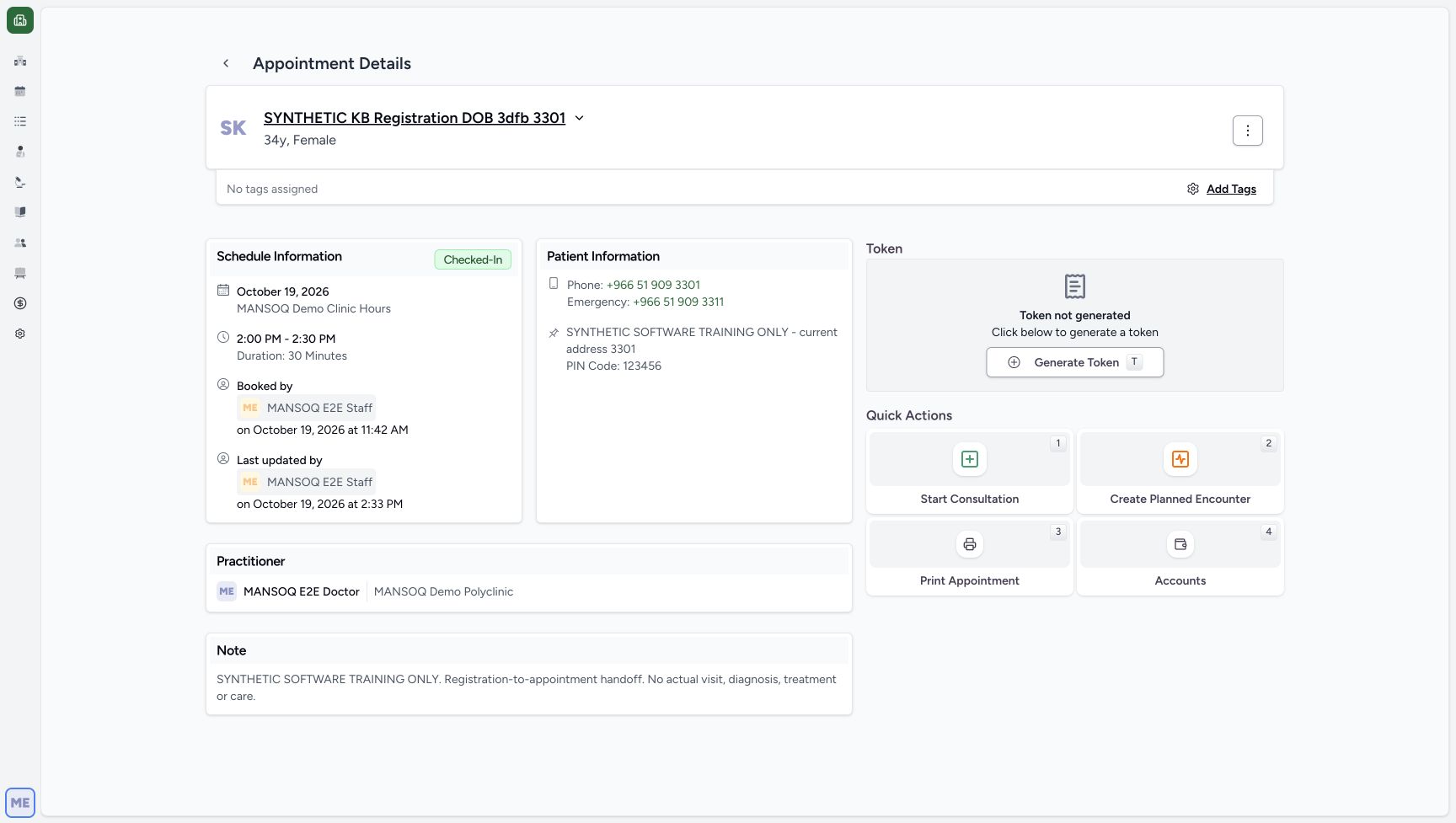 12
12Doctor can open the consultation form
Capture details
Exact same 3dfb committed source/build after USB migration. Normal existing Doctor actor; saved Check-In was not replayed. Doctor captures inspect and cancel an unsaved form only. No new encounter, token, charge or appointment is submitted.
Image SHA-256 7e1106d10b47e9484fb83ffcf332ca15b54dfbe582d9a1ac29c0c9240da83787
- Start Consultation: The existing Doctor can open this form for the checked-in appointment. Opening it is separate from saving a consultation.
- Saved Checked-In status: The saved appointment remains Checked-In before the Doctor opens the form.
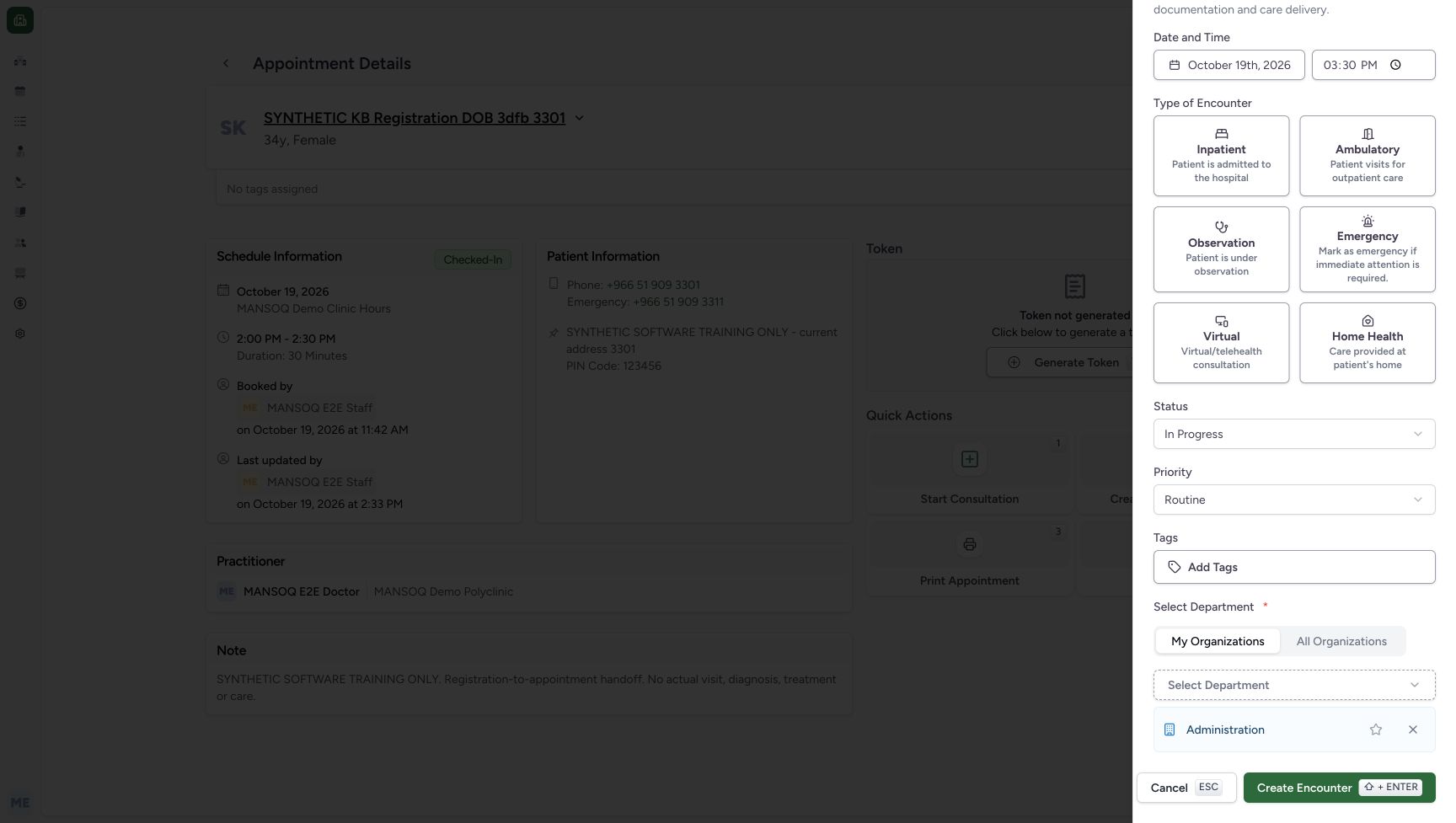 123
123Review the automatic department and cancel the unsaved form
Capture details
Exact same 3dfb committed source/build after USB migration. Normal existing Doctor actor; saved Check-In was not replayed. Doctor captures inspect and cancel an unsaved form only. No new encounter, token, charge or appointment is submitted.
Image SHA-256 9f29183d837c5db9f593d7ed20bebc31bcd5021510603e6f38f42fd14226e06f
- Administration selected automatically: The existing Administration department appeared automatically after the selector loaded. No department or preference was changed.
- Cancel: Cancel the form to leave the saved appointment unchanged. No encounter is created.
- Create Encounter — not submitted: This control is visible and enabled after the department loads. No encounter type was selected, and it is not clicked in this read-only lesson.
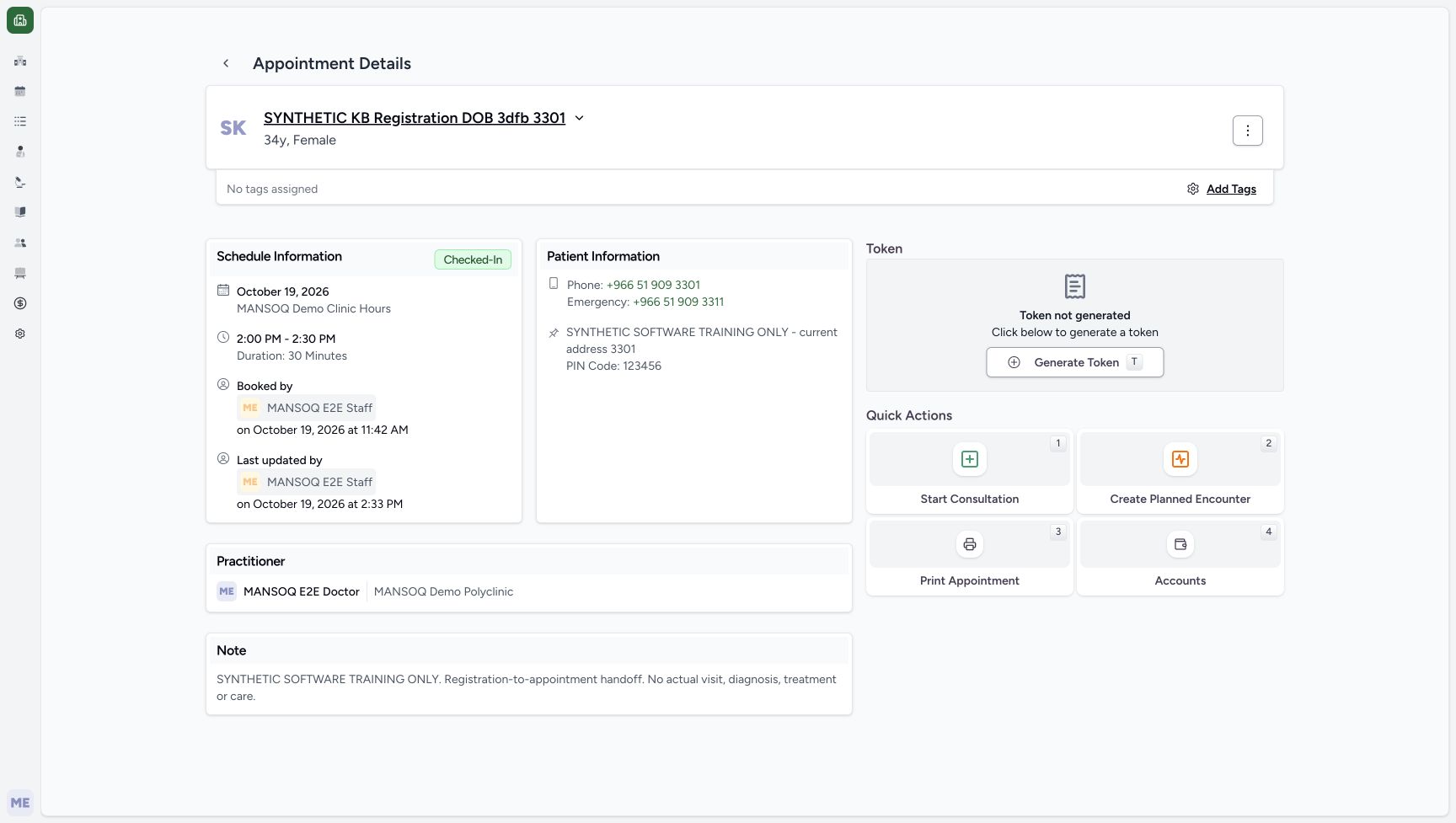 12
12Cancel returns to the saved Checked-In appointment
Capture details
Exact same 3dfb committed source/build after USB migration. Normal existing Doctor actor; saved Check-In was not replayed. Doctor captures inspect and cancel an unsaved form only. No new encounter, token, charge or appointment is submitted.
Image SHA-256 123c035755901dab3d9f0b864dece24e9361a0e34a462df5aa5882fe51706ce6
- Checked-In retained: Cancel returns to the same saved Checked-In appointment.
- No token generated: The read-only form inspection did not generate a token.
7 of 7 content blocks have reviewed image alignment. Missing overview or prerequisite images remain open.
Before you begin
- Use an already authenticated authorized Doctor session in the assigned fictional Polyclinic and the intended existing Checked-In appointment. This example uses the same synthetic DOB patient ending 3301. The Doctor sign-in procedure is separate and is not illustrated here.12
Recorded release 3dfb7c9f · 2026-10-19T12:30:52.839Z · 1728 × 977 Doctor can open the consultation form
Capture details
Exact same 3dfb committed source/build after USB migration. Normal existing Doctor actor; saved Check-In was not replayed. Doctor captures inspect and cancel an unsaved form only. No new encounter, token, charge or appointment is submitted.
Image SHA-256
7e1106d10b47e9484fb83ffcf332ca15b54dfbe582d9a1ac29c0c9240da83787- Start Consultation: The existing Doctor can open this form for the checked-in appointment. Opening it is separate from saving a consultation.
- Saved Checked-In status: The saved appointment remains Checked-In before the Doctor opens the form.
1. Open the available Start Consultation form
Review the saved Checked-In appointment and choose its actual Start Consultation control. This opens a new encounter form; it does not itself complete a consultation.
12Doctor can open the consultation form
Capture details
Exact same 3dfb committed source/build after USB migration. Normal existing Doctor actor; saved Check-In was not replayed. Doctor captures inspect and cancel an unsaved form only. No new encounter, token, charge or appointment is submitted.
Image SHA-256 7e1106d10b47e9484fb83ffcf332ca15b54dfbe582d9a1ac29c0c9240da83787
- Start Consultation: The existing Doctor can open this form for the checked-in appointment. Opening it is separate from saving a consultation.
- Saved Checked-In status: The saved appointment remains Checked-In before the Doctor opens the form.
2. Read the actual settled defaults
The pictured form shows 19 October 2026, 03:30 PM, In Progress and Routine. No encounter type is selected. After the department selector loads, the existing Administration department appears automatically. These form defaults are separate from the appointment time; no field or preference is changed here.
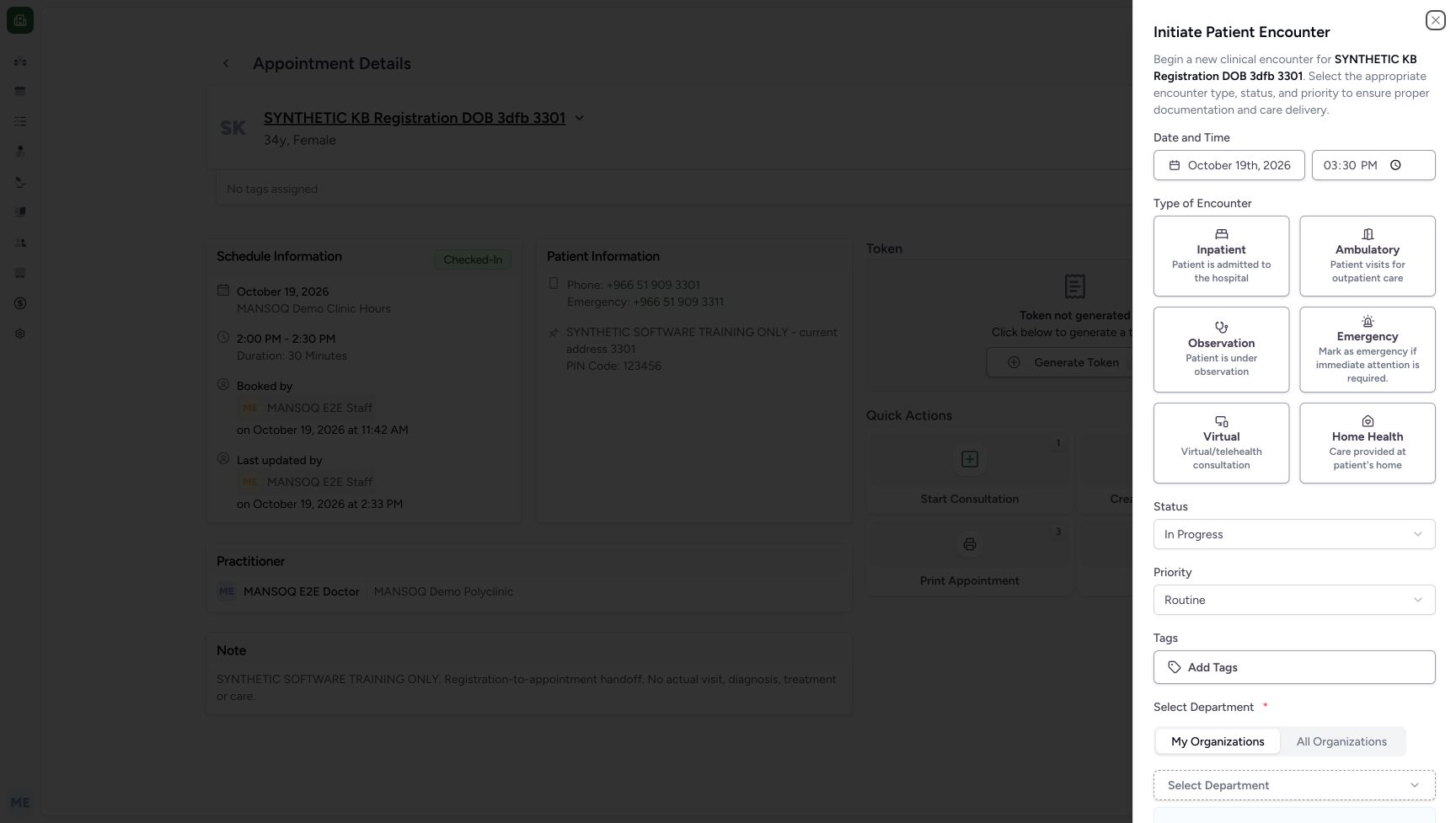 1234
1234Review the unsaved Doctor date, time, status and priority
Capture details
Exact same 3dfb committed source/build after USB migration. Normal existing Doctor actor; saved Check-In was not replayed. Doctor captures inspect and cancel an unsaved form only. No new encounter, token, charge or appointment is submitted.
Image SHA-256 bade2fcd347cec72459da02eba2d21c883c9fbe186ca7a10a3460fb688481885
- Visible encounter date: The form displays October 19, 2026. This is the current form default, separate from the appointment slot.
- Visible encounter time: The pictured default is 03:30 PM (rendered time-input value 15:30). Seconds and milliseconds are not exposed by this control.
- In Progress: Start Consultation defaults the encounter status to In Progress; this is still unsaved.
- Routine: The priority displays Routine. No clinical decision or submission has been made.
123Review the automatic department and cancel the unsaved form
Capture details
Exact same 3dfb committed source/build after USB migration. Normal existing Doctor actor; saved Check-In was not replayed. Doctor captures inspect and cancel an unsaved form only. No new encounter, token, charge or appointment is submitted.
Image SHA-256 9f29183d837c5db9f593d7ed20bebc31bcd5021510603e6f38f42fd14226e06f
- Administration selected automatically: The existing Administration department appeared automatically after the selector loaded. No department or preference was changed.
- Cancel: Cancel the form to leave the saved appointment unchanged. No encounter is created.
- Create Encounter — not submitted: This control is visible and enabled after the department loads. No encounter type was selected, and it is not clicked in this read-only lesson.
3. Cancel and verify the saved appointment
Choose Cancel. The form closes and the same appointment remains Checked-In with Token not generated. Do not choose Create Encounter during this inspection.
123Review the automatic department and cancel the unsaved form
Capture details
Exact same 3dfb committed source/build after USB migration. Normal existing Doctor actor; saved Check-In was not replayed. Doctor captures inspect and cancel an unsaved form only. No new encounter, token, charge or appointment is submitted.
Image SHA-256 9f29183d837c5db9f593d7ed20bebc31bcd5021510603e6f38f42fd14226e06f
- Administration selected automatically: The existing Administration department appeared automatically after the selector loaded. No department or preference was changed.
- Cancel: Cancel the form to leave the saved appointment unchanged. No encounter is created.
- Create Encounter — not submitted: This control is visible and enabled after the department loads. No encounter type was selected, and it is not clicked in this read-only lesson.
12Cancel returns to the saved Checked-In appointment
Capture details
Exact same 3dfb committed source/build after USB migration. Normal existing Doctor actor; saved Check-In was not replayed. Doctor captures inspect and cancel an unsaved form only. No new encounter, token, charge or appointment is submitted.
Image SHA-256 123c035755901dab3d9f0b864dece24e9361a0e34a462df5aa5882fe51706ce6
- Checked-In retained: Cancel returns to the same saved Checked-In appointment.
- No token generated: The read-only form inspection did not generate a token.
An enabled Create button is not a saved encounter
Create Encounter is visible and enabled after Administration loads, even while no encounter type is selected. This lesson reviews the form and uses Cancel; it does not submit the form or claim an encounter was created.
1234Review the unsaved Doctor date, time, status and priority
Capture details
Exact same 3dfb committed source/build after USB migration. Normal existing Doctor actor; saved Check-In was not replayed. Doctor captures inspect and cancel an unsaved form only. No new encounter, token, charge or appointment is submitted.
Image SHA-256 bade2fcd347cec72459da02eba2d21c883c9fbe186ca7a10a3460fb688481885
- Visible encounter date: The form displays October 19, 2026. This is the current form default, separate from the appointment slot.
- Visible encounter time: The pictured default is 03:30 PM (rendered time-input value 15:30). Seconds and milliseconds are not exposed by this control.
- In Progress: Start Consultation defaults the encounter status to In Progress; this is still unsaved.
- Routine: The priority displays Routine. No clinical decision or submission has been made.
123Review the automatic department and cancel the unsaved form
Capture details
Exact same 3dfb committed source/build after USB migration. Normal existing Doctor actor; saved Check-In was not replayed. Doctor captures inspect and cancel an unsaved form only. No new encounter, token, charge or appointment is submitted.
Image SHA-256 9f29183d837c5db9f593d7ed20bebc31bcd5021510603e6f38f42fd14226e06f
- Administration selected automatically: The existing Administration department appeared automatically after the selector loaded. No department or preference was changed.
- Cancel: Cancel the form to leave the saved appointment unchanged. No encounter is created.
- Create Encounter — not submitted: This control is visible and enabled after the department loads. No encounter type was selected, and it is not clicked in this read-only lesson.
12Cancel returns to the saved Checked-In appointment
Capture details
Exact same 3dfb committed source/build after USB migration. Normal existing Doctor actor; saved Check-In was not replayed. Doctor captures inspect and cancel an unsaved form only. No new encounter, token, charge or appointment is submitted.
Image SHA-256 123c035755901dab3d9f0b864dece24e9361a0e34a462df5aa5882fe51706ce6
- Checked-In retained: Cancel returns to the same saved Checked-In appointment.
- No token generated: The read-only form inspection did not generate a token.
Verify the encounter date and time
The pictured form shows 03:30 PM on 19 October 2026, while the booked appointment is 2:00 PM–2:30 PM. Review the intended encounter start separately before creating an encounter. This inspection uses Cancel.
12Doctor can open the consultation form
Capture details
Exact same 3dfb committed source/build after USB migration. Normal existing Doctor actor; saved Check-In was not replayed. Doctor captures inspect and cancel an unsaved form only. No new encounter, token, charge or appointment is submitted.
Image SHA-256 7e1106d10b47e9484fb83ffcf332ca15b54dfbe582d9a1ac29c0c9240da83787
- Start Consultation: The existing Doctor can open this form for the checked-in appointment. Opening it is separate from saving a consultation.
- Saved Checked-In status: The saved appointment remains Checked-In before the Doctor opens the form.
1234Review the unsaved Doctor date, time, status and priority
Capture details
Exact same 3dfb committed source/build after USB migration. Normal existing Doctor actor; saved Check-In was not replayed. Doctor captures inspect and cancel an unsaved form only. No new encounter, token, charge or appointment is submitted.
Image SHA-256 bade2fcd347cec72459da02eba2d21c883c9fbe186ca7a10a3460fb688481885
- Visible encounter date: The form displays October 19, 2026. This is the current form default, separate from the appointment slot.
- Visible encounter time: The pictured default is 03:30 PM (rendered time-input value 15:30). Seconds and milliseconds are not exposed by this control.
- In Progress: Start Consultation defaults the encounter status to In Progress; this is still unsaved.
- Routine: The priority displays Routine. No clinical decision or submission has been made.
Source evidence
Every citation uses this exact committed version. The private source repository requires access.
- repositories/platform/mansoq-web/src/pages/Appointments/AppointmentDetail.tsx:197 ·
3dfb7c9f519fb5b4cd4452439f3c12346bf58319Source file checksum
8fc77ee6f1f7b145e2987ba272e80f35631e17907ea91cd305738250b137b839 - repositories/platform/mansoq-web/src/pages/Appointments/AppointmentDetail.tsx:477 ·
3dfb7c9f519fb5b4cd4452439f3c12346bf58319Source file checksum
8fc77ee6f1f7b145e2987ba272e80f35631e17907ea91cd305738250b137b839 - repositories/platform/mansoq-web/src/pages/Appointments/AppointmentDetail.tsx:499 ·
3dfb7c9f519fb5b4cd4452439f3c12346bf58319Source file checksum
8fc77ee6f1f7b145e2987ba272e80f35631e17907ea91cd305738250b137b839 - repositories/platform/mansoq-web/src/components/Encounter/CreateEncounterForm.tsx:123 ·
3dfb7c9f519fb5b4cd4452439f3c12346bf58319Source file checksum
849ee40ade505c03c37ead86ac160b0c611bedf5f35da2e7dec1700288d4daca - repositories/platform/mansoq-web/src/components/Encounter/CreateEncounterForm.tsx:162 ·
3dfb7c9f519fb5b4cd4452439f3c12346bf58319Source file checksum
849ee40ade505c03c37ead86ac160b0c611bedf5f35da2e7dec1700288d4daca - repositories/platform/mansoq-web/src/components/Encounter/CreateEncounterForm.tsx:234 ·
3dfb7c9f519fb5b4cd4452439f3c12346bf58319Source file checksum
849ee40ade505c03c37ead86ac160b0c611bedf5f35da2e7dec1700288d4daca - repositories/platform/mansoq-web/src/components/Encounter/CreateEncounterForm.tsx:394 ·
3dfb7c9f519fb5b4cd4452439f3c12346bf58319Source file checksum
849ee40ade505c03c37ead86ac160b0c611bedf5f35da2e7dec1700288d4daca - repositories/platform/mansoq-web/src/pages/Facility/settings/organizations/components/FacilityOrganizationSelector.tsx:249 ·
3dfb7c9f519fb5b4cd4452439f3c12346bf58319Source file checksum
d8c2e8f45aa41fb084eaa52ffe031822fdb64b9d2500aa7f02f6b7cf64fef2b4 - repositories/platform/mansoq-web/src/pages/Facility/settings/organizations/components/FacilityOrganizationSelector.tsx:307 ·
3dfb7c9f519fb5b4cd4452439f3c12346bf58319Source file checksum
d8c2e8f45aa41fb084eaa52ffe031822fdb64b9d2500aa7f02f6b7cf64fef2b4