 MANSOQ
 Clinical forms and response documents · VERSION 3dfb7c9f
Complete the installed Doctors Notes NCG form
Use the original hybrid form without changing its shared diagnosis rows: cancel an untouched form, enter four fictional ordinary answers and an optional note, then verify one saved Doctor response.
Doctor
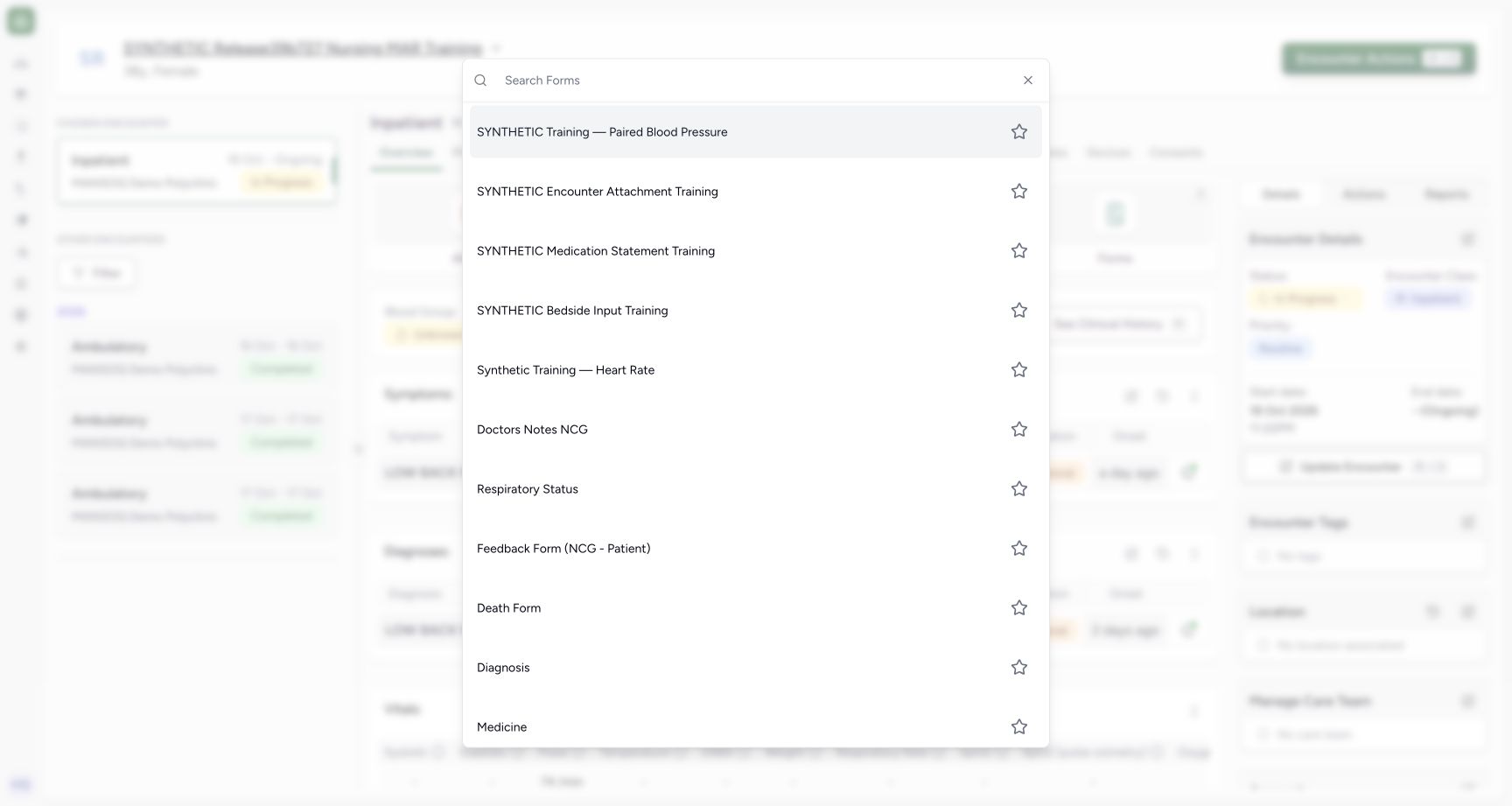 1
1Select the installed Doctors Notes NCG form
Capture details
Exact committed 3dfb7c9f, 3401 verified core/web blobs and 139 built assets. Existing ordinary Doctor; the old release label in the fictional patient name is retained. No role, form or terminology change. Before the single new response save.
Image SHA-256 8951207873068a0648d48e18bde5aff7c7e081d3a70b0bb17dbfad994278d3f4
- Select Doctors Notes NCG: Choose Doctors Notes NCG from the Forms picker.
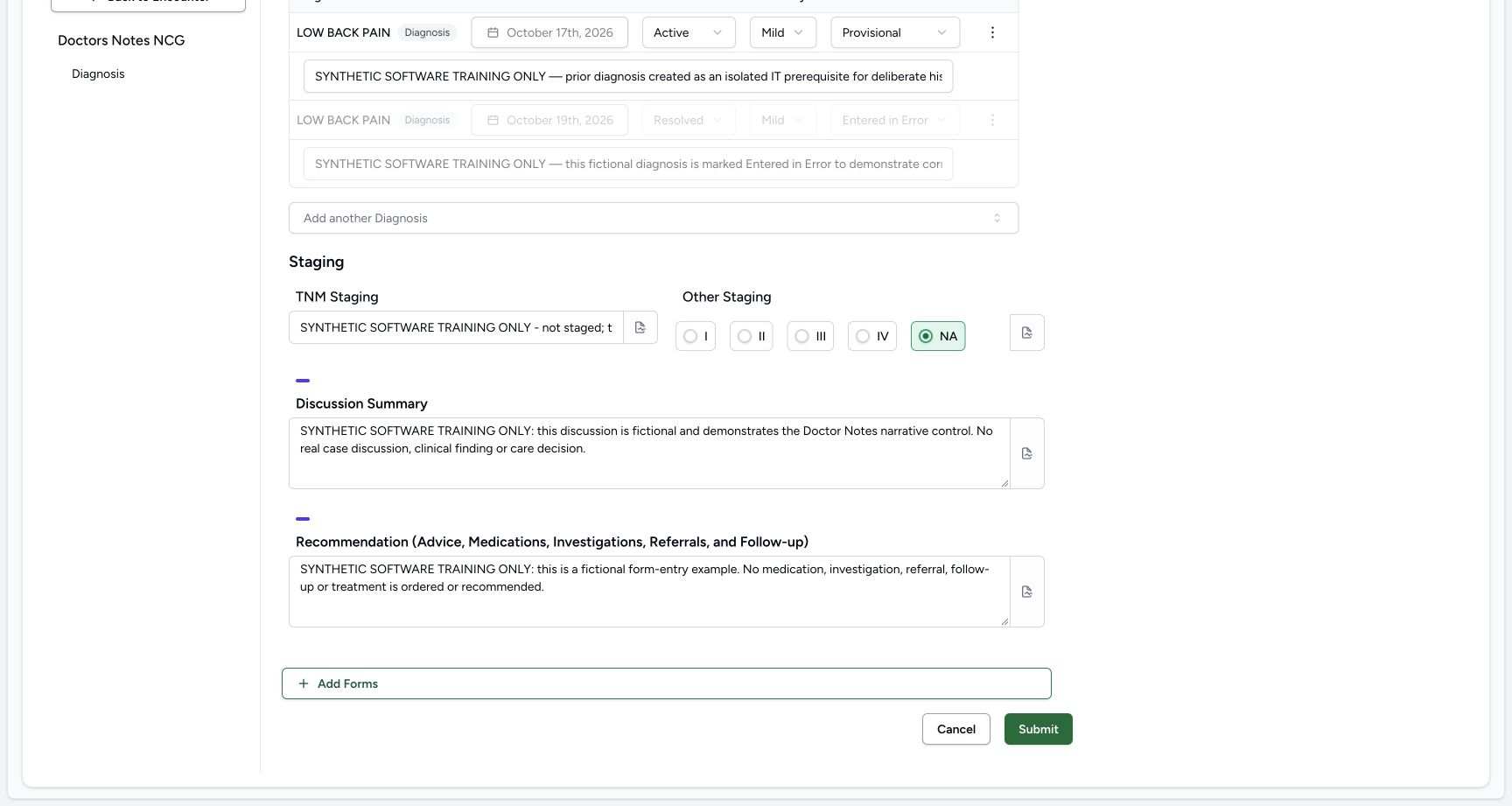 123
123Enter Discussion and Recommendation and locate the optional note
Capture details
Exact committed 3dfb7c9f, 3401 verified core/web blobs and 139 built assets. Existing ordinary Doctor; the old release label in the fictional patient name is retained. No role, form or terminology change. Before the single new response save.
Image SHA-256 65c673d8ca88c7a355f23323f65803d651fdf3c2b0ae3210af337b117909c5a7
- Enter Discussion Summary: Type the explicit fictional discussion narrative in this textarea.
- Enter the fictional Recommendation: Enter the software-training narrative, with no real medication, investigation, referral or treatment recommendation.
- Open the optional Discussion note: Choose the note icon at the right edge of Discussion Summary.
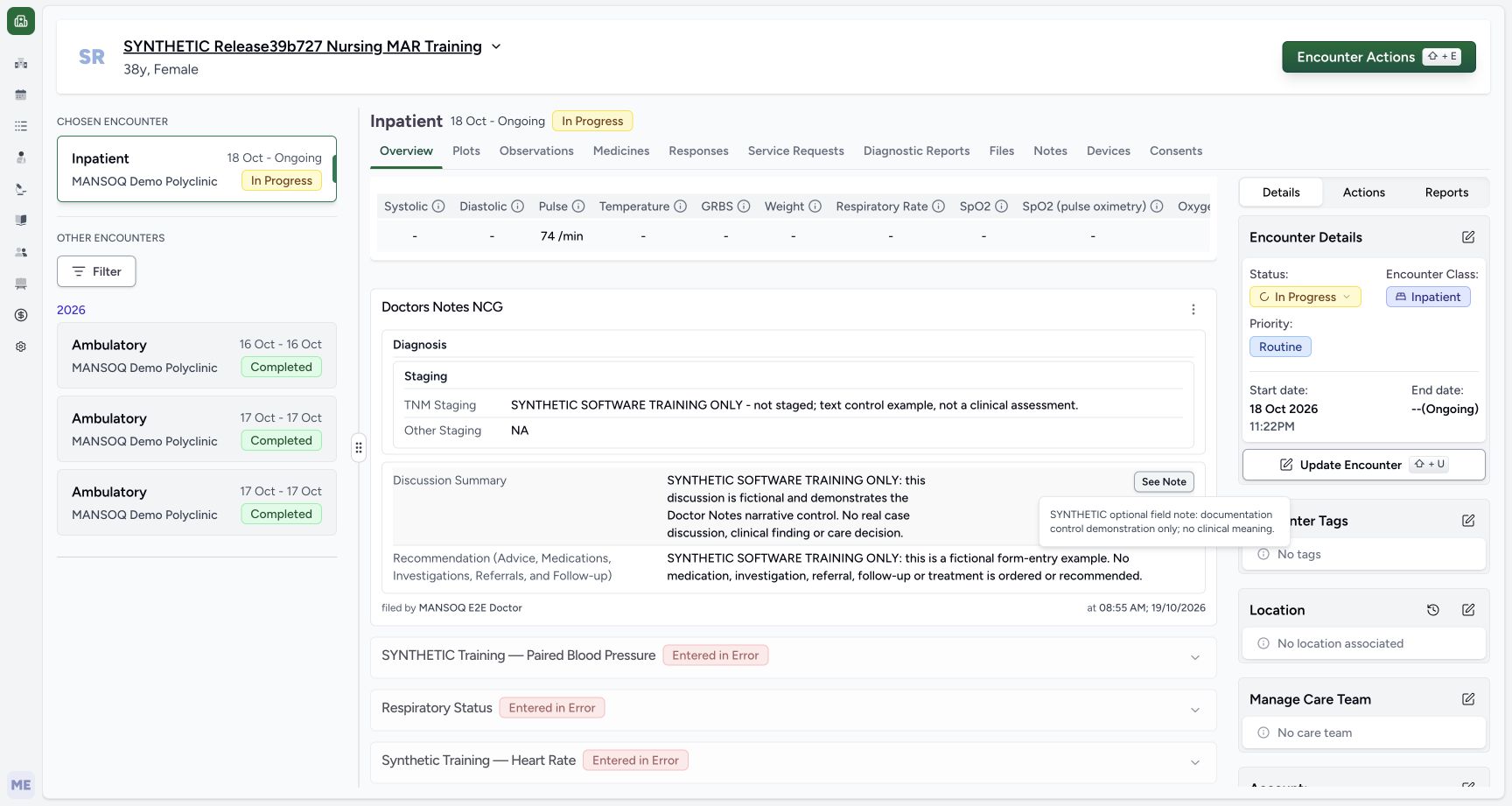 12
12Read the saved response and optional note
Capture details
Exact committed 3dfb7c9f, 3401 verified core/web blobs and 139 built assets. Existing ordinary Doctor; the old release label in the fictional patient name is retained. No role, form or terminology change. The new ordinary source was saved Completed; only the four ordinary answers and optional note were authored.
Image SHA-256 879ce55c38ef38257070704fc60702e82647969591531e662dda4055da31b9ce
- Open the saved Discussion note: Choose See Note beside Discussion Summary to read the retained optional field note.
- Read the retained optional note: Read the fictional field note in this saved popover; it is separate from the Discussion narrative.
13 of 13 content blocks have reviewed image alignment. Missing overview or prerequisite images remain open.
Before you begin
- Use an existing authorized Doctor session and the intended ongoing fictional Inpatient encounter in MANSOQ Demo Polyclinic. Confirm the patient and chosen encounter before opening Forms. The older release label in the training patient name is retained; these screens run exact committed 3dfb7c9f.
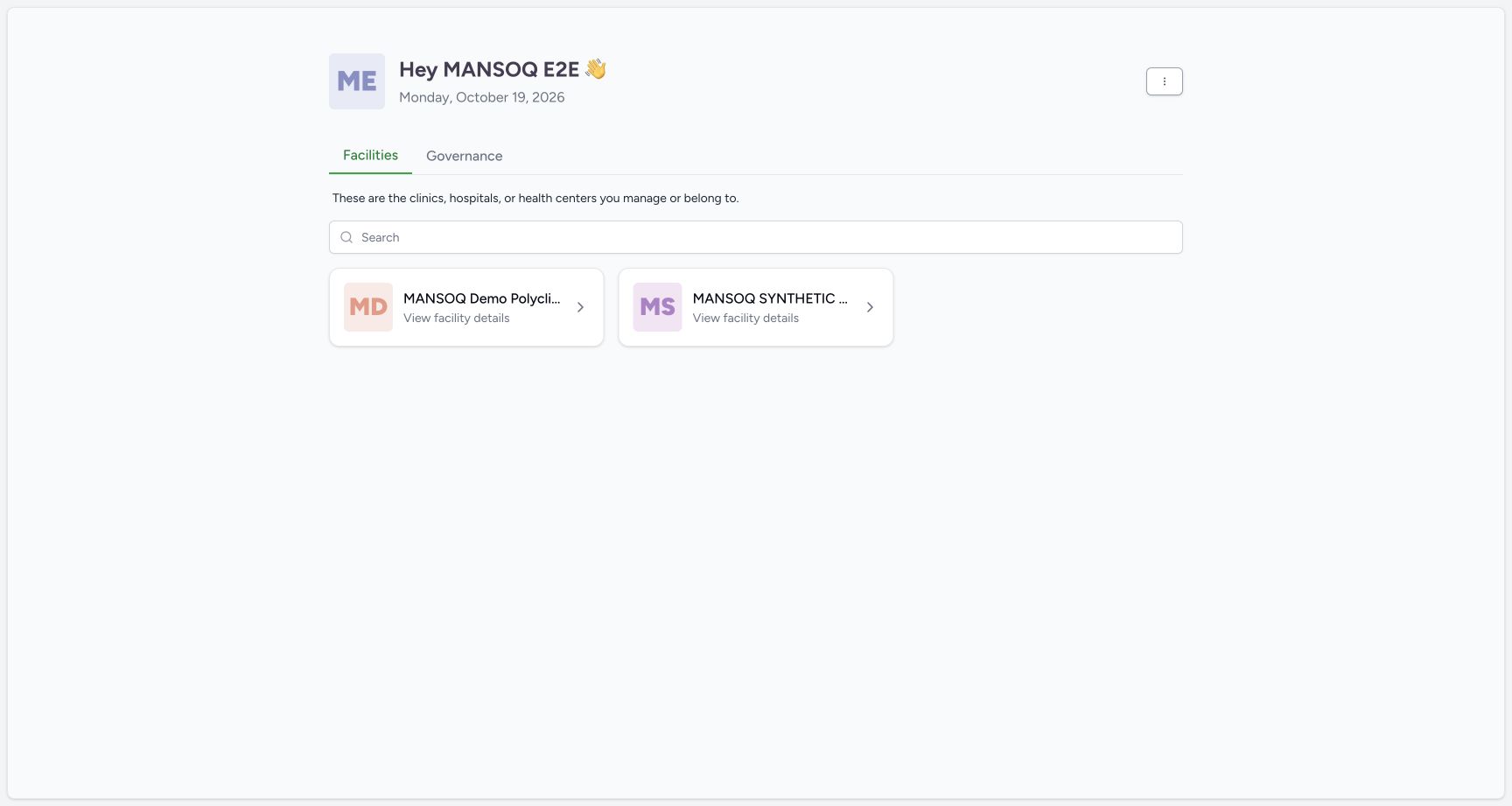 1
1Recorded release 3dfb7c9f · 2026-10-19T05:54:18.901Z · 1728 × 921 Choose the intended Doctor facility
Capture details
Exact committed 3dfb7c9f, 3401 verified core/web blobs and 139 built assets. Existing ordinary Doctor; the old release label in the fictional patient name is retained. No role, form or terminology change. Before the single new response save.
Image SHA-256
a0dc589415ec1003688576fff9712ee34ba18411eacdc661954af066af721798- Choose MANSOQ Demo Polyclinic: Select the intended fictional facility before opening its patient encounter.
 12
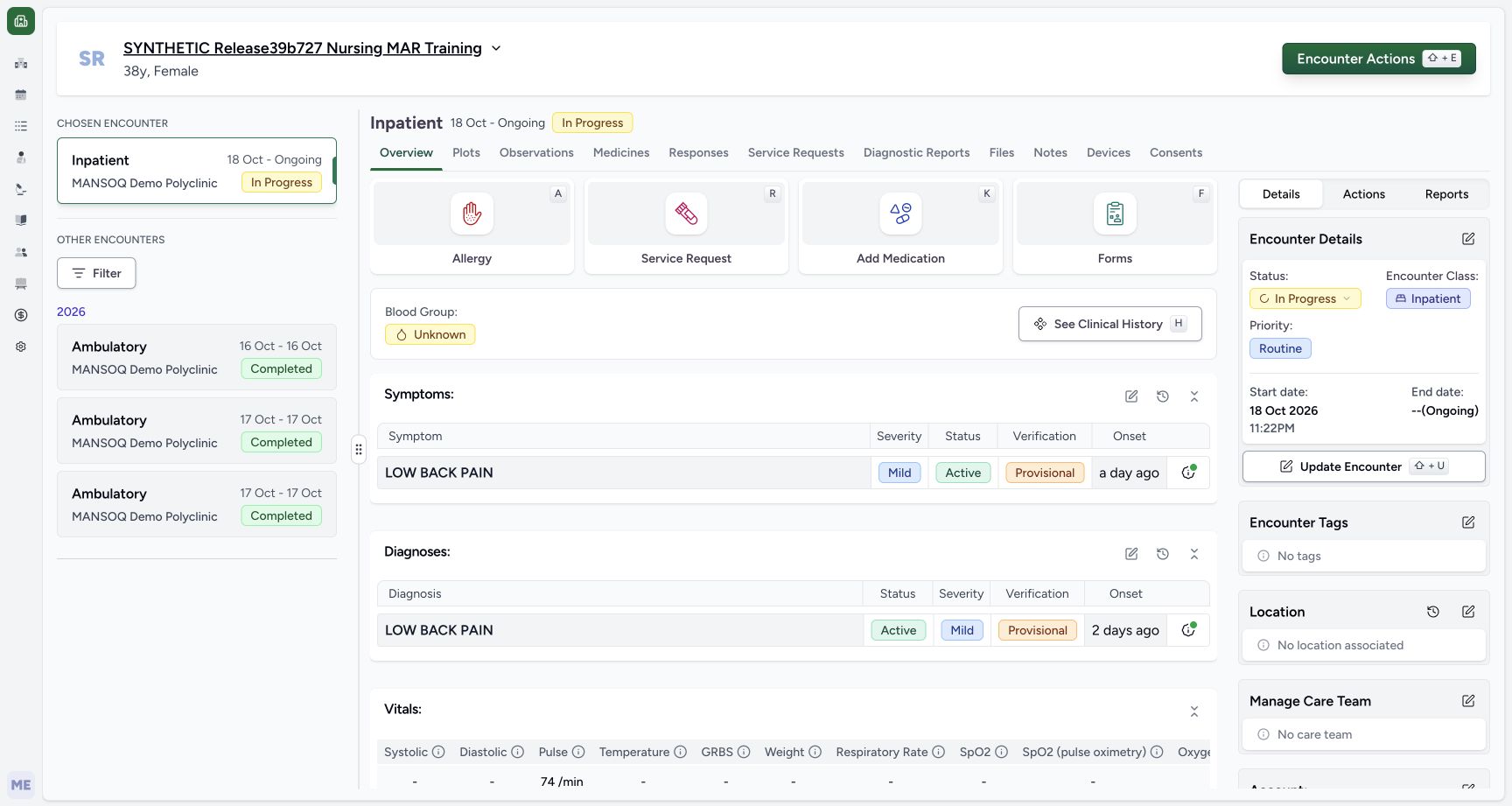
12Recorded release 3dfb7c9f · 2026-10-19T05:54:32.441Z · 1728 × 921 Open Forms on the fictional ongoing encounter
Capture details
Exact committed 3dfb7c9f, 3401 verified core/web blobs and 139 built assets. Existing ordinary Doctor; the old release label in the fictional patient name is retained. No role, form or terminology change. Before the single new response save.
Image SHA-256
adbe9fdce5935717767a69088c9f849b0338a15a9cc0be5124b6e9fd70c3983a- Open Forms: Choose Forms in this fictional ongoing Inpatient encounter.
- Verify the chosen encounter: Read the chosen encounter panel and confirm the intended Inpatient visit before entering notes.
- Doctors Notes NCG is an existing installed encounter form. Its five input leaves are a shared structured Diagnosis editor and four ordinary inputs: TNM Staging, Other Staging, Discussion Summary and Recommendation. None is configured required. This lesson uses explicit fictional software text and literal NA; it does not assign a clinical stage, diagnosis, advice or treatment.
 12
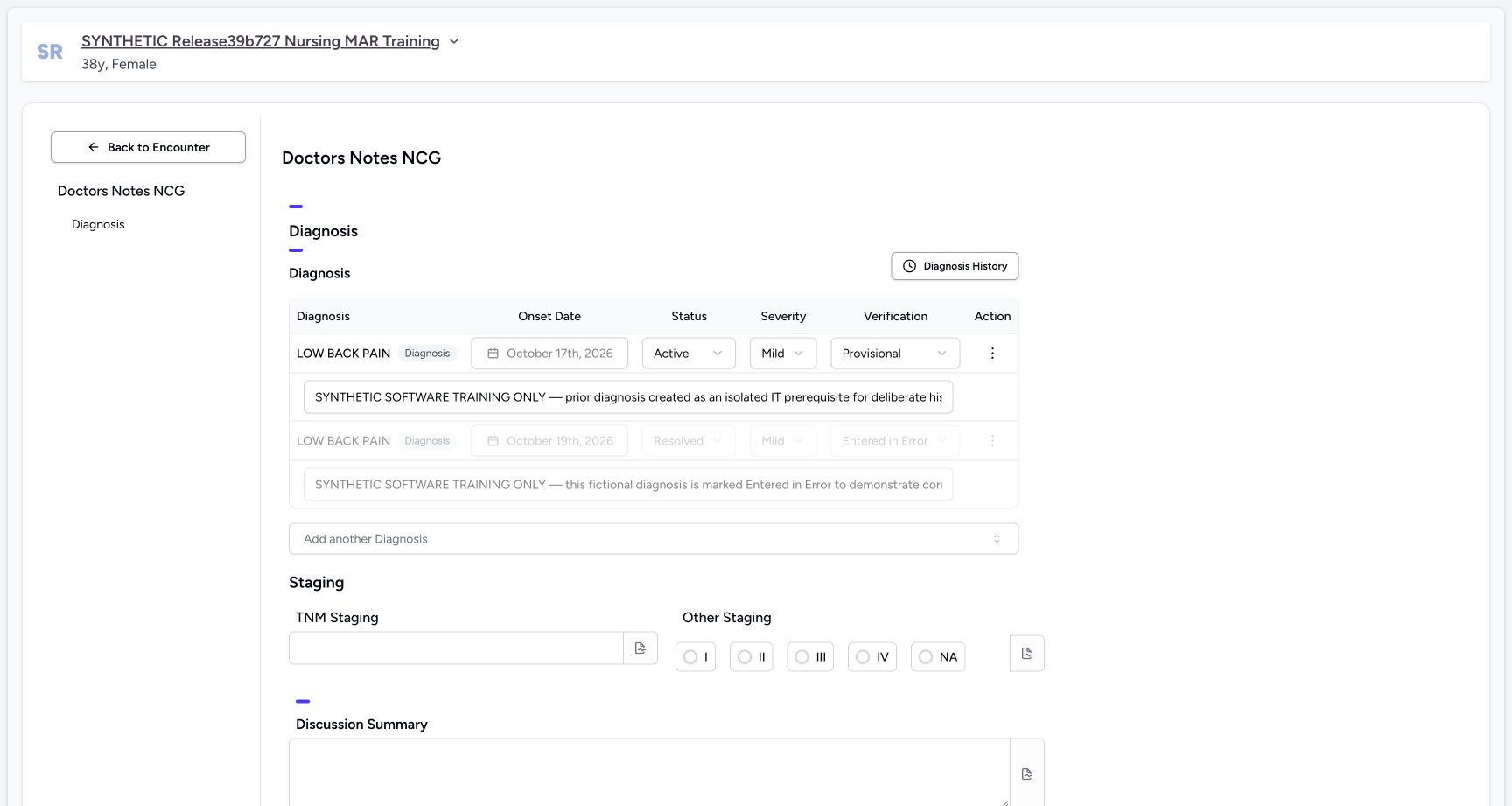
12Recorded release 3dfb7c9f · 2026-10-19T05:54:44.795Z · 1728 × 921 Review the shared diagnosis context without editing it
Capture details
Exact committed 3dfb7c9f, 3401 verified core/web blobs and 139 built assets. Existing ordinary Doctor; the old release label in the fictional patient name is retained. No role, form or terminology change. Before the single new response save.
Image SHA-256
dd925304c49b68efefd9efc1013162104b53cd45e77cbe7b39163a73a3446d99- Read the form title: Confirm Doctors Notes NCG before using its shared diagnosis and narrative controls.
- Keep the Error diagnosis locked: Read the grey Entered in Error diagnosis row; leave its disabled controls unchanged.
 12
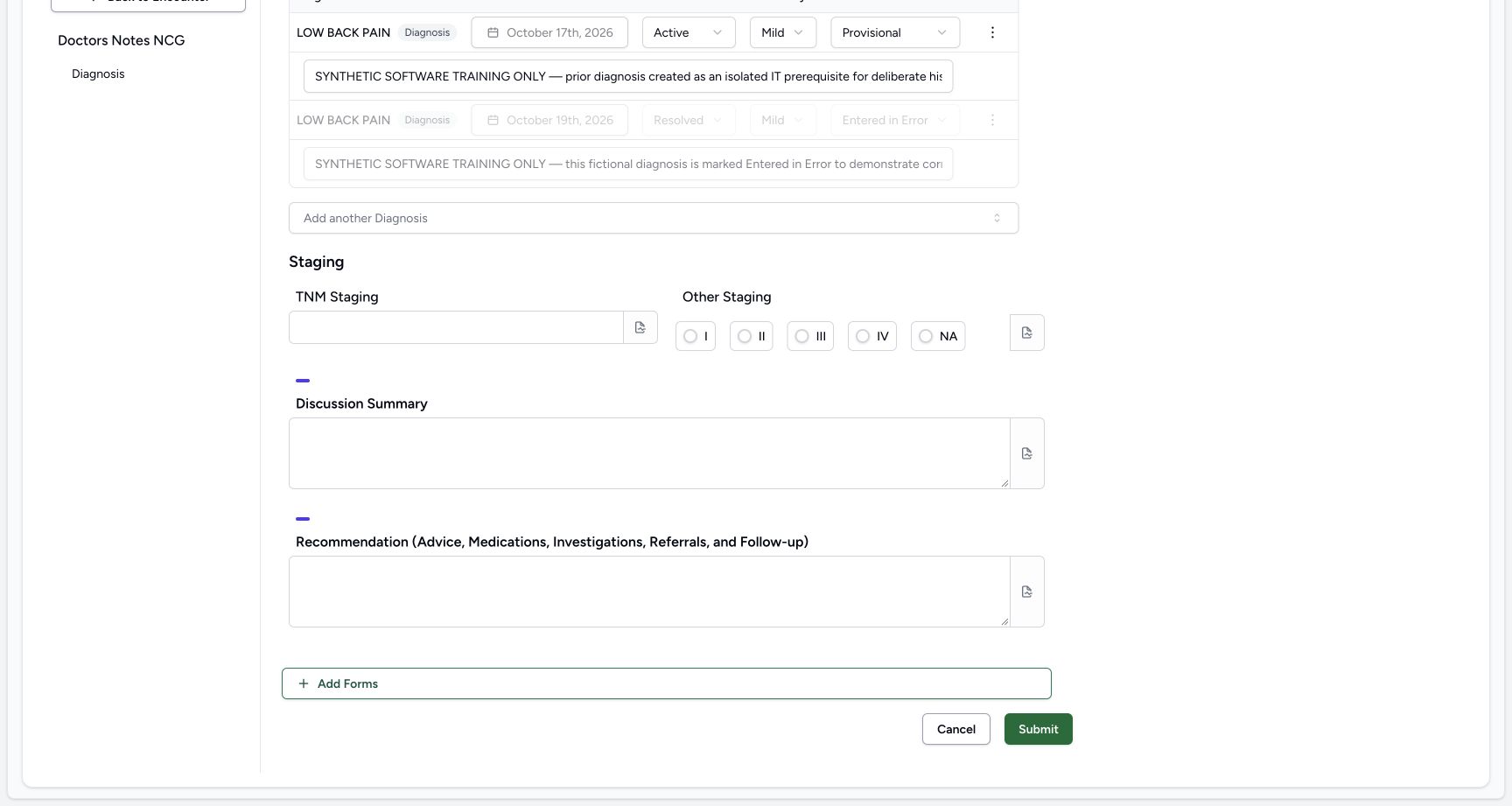
12Recorded release 3dfb7c9f · 2026-10-19T05:54:52.494Z · 1728 × 921 Cancel an untouched original form
Capture details
Exact committed 3dfb7c9f, 3401 verified core/web blobs and 139 built assets. Existing ordinary Doctor; the old release label in the fictional patient name is retained. No role, form or terminology change. Before the single new response save.
Image SHA-256
44a8ae4448ec14ba160bc9896ea051d138a49f0998a38610dc5ab598ef4fc4b4- Cancel without edits: Choose Cancel when leaving this untouched form.
- Read the available NA option: Other Staging offers the literal NA option among five choices; this blank form has no selection yet.
123Recorded release 3dfb7c9f · 2026-10-19T05:55:24.228Z · 1728 × 921 Enter Discussion and Recommendation and locate the optional note
Capture details
Exact committed 3dfb7c9f, 3401 verified core/web blobs and 139 built assets. Existing ordinary Doctor; the old release label in the fictional patient name is retained. No role, form or terminology change. Before the single new response save.
Image SHA-256
65c673d8ca88c7a355f23323f65803d651fdf3c2b0ae3210af337b117909c5a7- Enter Discussion Summary: Type the explicit fictional discussion narrative in this textarea.
- Enter the fictional Recommendation: Enter the software-training narrative, with no real medication, investigation, referral or treatment recommendation.
- Open the optional Discussion note: Choose the note icon at the right edge of Discussion Summary.
1. Open the original form
Select the intended facility, open the approved ongoing fictional encounter and choose Forms in Overview. In the picker select Doctors Notes NCG. Confirm the title before entering anything; this lesson does not create or reconfigure a form.
1Choose the intended Doctor facility
Capture details
Exact committed 3dfb7c9f, 3401 verified core/web blobs and 139 built assets. Existing ordinary Doctor; the old release label in the fictional patient name is retained. No role, form or terminology change. Before the single new response save.
Image SHA-256 a0dc589415ec1003688576fff9712ee34ba18411eacdc661954af066af721798
- Choose MANSOQ Demo Polyclinic: Select the intended fictional facility before opening its patient encounter.
12Open Forms on the fictional ongoing encounter
Capture details
Exact committed 3dfb7c9f, 3401 verified core/web blobs and 139 built assets. Existing ordinary Doctor; the old release label in the fictional patient name is retained. No role, form or terminology change. Before the single new response save.
Image SHA-256 adbe9fdce5935717767a69088c9f849b0338a15a9cc0be5124b6e9fd70c3983a
- Open Forms: Choose Forms in this fictional ongoing Inpatient encounter.
- Verify the chosen encounter: Read the chosen encounter panel and confirm the intended Inpatient visit before entering notes.
1Select the installed Doctors Notes NCG form
Capture details
Exact committed 3dfb7c9f, 3401 verified core/web blobs and 139 built assets. Existing ordinary Doctor; the old release label in the fictional patient name is retained. No role, form or terminology change. Before the single new response save.
Image SHA-256 8951207873068a0648d48e18bde5aff7c7e081d3a70b0bb17dbfad994278d3f4
- Select Doctors Notes NCG: Choose Doctors Notes NCG from the Forms picker.
12Review the shared diagnosis context without editing it
Capture details
Exact committed 3dfb7c9f, 3401 verified core/web blobs and 139 built assets. Existing ordinary Doctor; the old release label in the fictional patient name is retained. No role, form or terminology change. Before the single new response save.
Image SHA-256 dd925304c49b68efefd9efc1013162104b53cd45e77cbe7b39163a73a3446d99
- Read the form title: Confirm Doctors Notes NCG before using its shared diagnosis and narrative controls.
- Keep the Error diagnosis locked: Read the grey Entered in Error diagnosis row; leave its disabled controls unchanged.
2. Read the shared diagnosis context without editing it
The Diagnosis group hydrates existing encounter diagnoses. In this example one row is Active and another persisted row is Entered in Error with grey disabled controls. Leave both rows, their onset dates, status, severity, verification and notes unchanged. The form shows this encounter subset; independent reads preserve all seven existing condition records across the patient history.
12Review the shared diagnosis context without editing it
Capture details
Exact committed 3dfb7c9f, 3401 verified core/web blobs and 139 built assets. Existing ordinary Doctor; the old release label in the fictional patient name is retained. No role, form or terminology change. Before the single new response save.
Image SHA-256 dd925304c49b68efefd9efc1013162104b53cd45e77cbe7b39163a73a3446d99
- Read the form title: Confirm Doctors Notes NCG before using its shared diagnosis and narrative controls.
- Keep the Error diagnosis locked: Read the grey Entered in Error diagnosis row; leave its disabled controls unchanged.
3. Cancel the untouched form
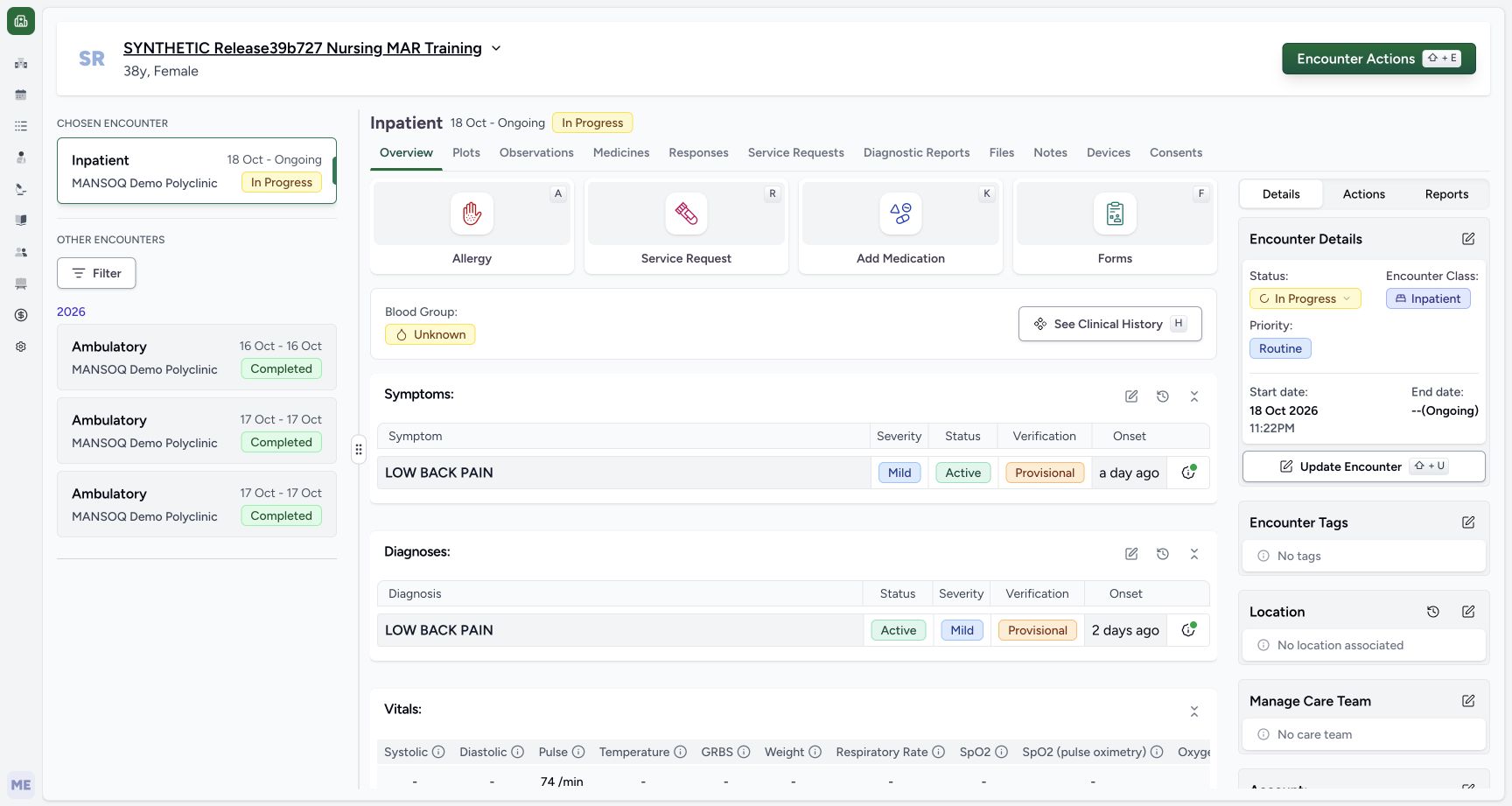
Scroll to the footer and choose Cancel without editing an answer or diagnosis. The form returns to Overview with no unsaved-change warning in this demonstrated state. Independent Doctor and Nurse reads confirm no new response and no old-record changes. Reopen Forms and Doctors Notes NCG for the fictional entry.
12Cancel an untouched original form
Capture details
Exact committed 3dfb7c9f, 3401 verified core/web blobs and 139 built assets. Existing ordinary Doctor; the old release label in the fictional patient name is retained. No role, form or terminology change. Before the single new response save.
Image SHA-256 44a8ae4448ec14ba160bc9896ea051d138a49f0998a38610dc5ab598ef4fc4b4
- Cancel without edits: Choose Cancel when leaving this untouched form.
- Read the available NA option: Other Staging offers the literal NA option among five choices; this blank form has no selection yet.
 1
1Return to the encounter without creating a response
Capture details
Exact committed 3dfb7c9f, 3401 verified core/web blobs and 139 built assets. Existing ordinary Doctor; the old release label in the fictional patient name is retained. No role, form or terminology change. Before the single new response save.
Image SHA-256 adbe9fdce5935717767a69088c9f849b0338a15a9cc0be5124b6e9fd70c3983a
- Return to Forms if needed: The unchanged form returned to Overview; choose Forms to start the fictional note example.
1Select the installed Doctors Notes NCG form
Capture details
Exact committed 3dfb7c9f, 3401 verified core/web blobs and 139 built assets. Existing ordinary Doctor; the old release label in the fictional patient name is retained. No role, form or terminology change. Before the single new response save.
Image SHA-256 8951207873068a0648d48e18bde5aff7c7e081d3a70b0bb17dbfad994278d3f4
- Select Doctors Notes NCG: Choose Doctors Notes NCG from the Forms picker.
4. Use the two staging controls as fictional examples
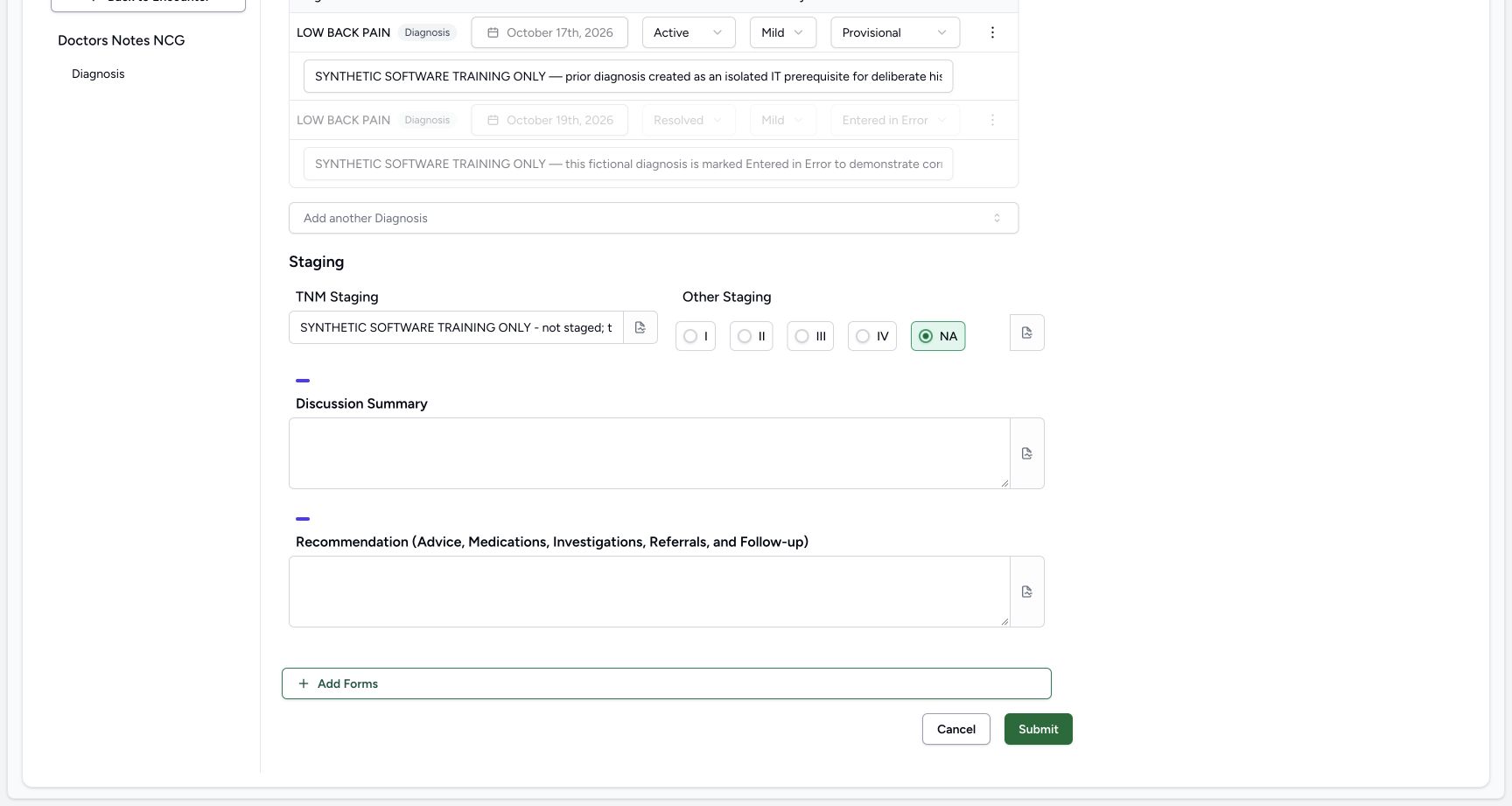
In TNM Staging enter the explicit software-training statement shown: the example is not staged and is not a clinical assessment. The full text is retained even when this single-line input displays only its beginning. Other Staging offers I, II, III, IV and NA; choose the literal NA radio option for this control exercise. No staging code or clinical interpretation is assigned.
 12
12Enter the fictional staging-control example
Capture details
Exact committed 3dfb7c9f, 3401 verified core/web blobs and 139 built assets. Existing ordinary Doctor; the old release label in the fictional patient name is retained. No role, form or terminology change. Before the single new response save.
Image SHA-256 d977770ca2aa2667d2150b6f51bcba4f21f79ffebd4b27fc2eaa624c67abe21b
- Enter the fictional TNM text: Use an explicit software-training statement in TNM Staging; do not record an actual clinical stage in this exercise.
- Select Other Staging NA: Select the NA radio option for this fictional control example.
12Read the saved response and optional note
Capture details
Exact committed 3dfb7c9f, 3401 verified core/web blobs and 139 built assets. Existing ordinary Doctor; the old release label in the fictional patient name is retained. No role, form or terminology change. The new ordinary source was saved Completed; only the four ordinary answers and optional note were authored.
Image SHA-256 879ce55c38ef38257070704fc60702e82647969591531e662dda4055da31b9ce
- Open the saved Discussion note: Choose See Note beside Discussion Summary to read the retained optional field note.
- Read the retained optional note: Read the fictional field note in this saved popover; it is separate from the Discussion narrative.
5. Complete Discussion and Recommendation
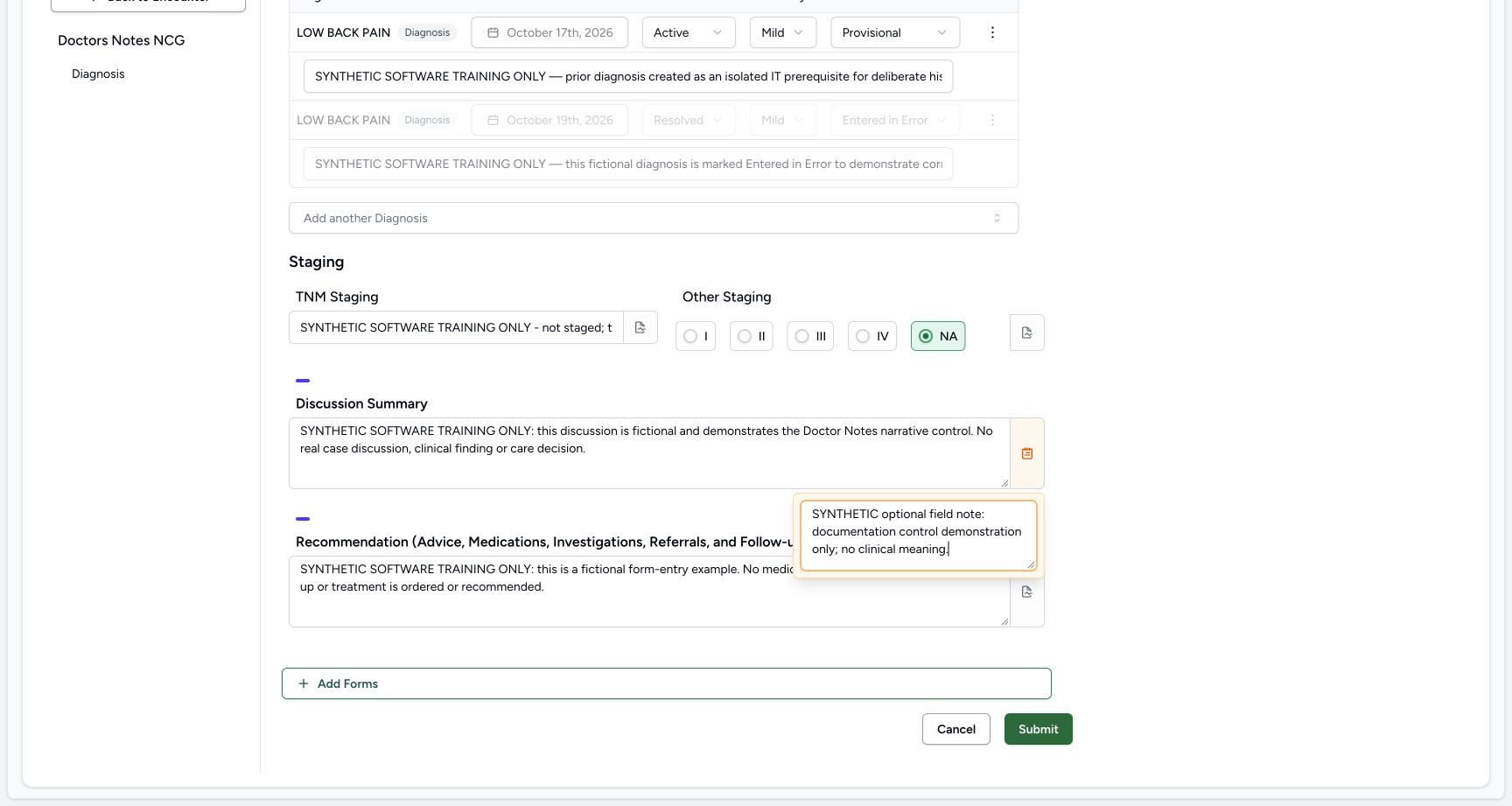
In Discussion Summary enter the fictional documentation narrative. In Recommendation enter the explicit software-training narrative saying that no real medication, investigation, referral, follow-up or treatment is ordered or recommended. Both are ordinary text areas; writing these words does not create the separate clinical orders mentioned in the label.
123Enter Discussion and Recommendation and locate the optional note
Capture details
Exact committed 3dfb7c9f, 3401 verified core/web blobs and 139 built assets. Existing ordinary Doctor; the old release label in the fictional patient name is retained. No role, form or terminology change. Before the single new response save.
Image SHA-256 65c673d8ca88c7a355f23323f65803d651fdf3c2b0ae3210af337b117909c5a7
- Enter Discussion Summary: Type the explicit fictional discussion narrative in this textarea.
- Enter the fictional Recommendation: Enter the software-training narrative, with no real medication, investigation, referral or treatment recommendation.
- Open the optional Discussion note: Choose the note icon at the right edge of Discussion Summary.
6. Add the optional Discussion field note
Choose the small note icon at the right of Discussion Summary. Enter the fictional context in Add notes. Read the retained note in the open popover and review the visible orange note indicator before submitting. The note is optional software input and separate from the Discussion narrative; local documentation policy may impose its own requirements.
123Enter Discussion and Recommendation and locate the optional note
Capture details
Exact committed 3dfb7c9f, 3401 verified core/web blobs and 139 built assets. Existing ordinary Doctor; the old release label in the fictional patient name is retained. No role, form or terminology change. Before the single new response save.
Image SHA-256 65c673d8ca88c7a355f23323f65803d651fdf3c2b0ae3210af337b117909c5a7
- Enter Discussion Summary: Type the explicit fictional discussion narrative in this textarea.
- Enter the fictional Recommendation: Enter the software-training narrative, with no real medication, investigation, referral or treatment recommendation.
- Open the optional Discussion note: Choose the note icon at the right edge of Discussion Summary.
 1
1Enter the optional Discussion field note
Capture details
Exact committed 3dfb7c9f, 3401 verified core/web blobs and 139 built assets. Existing ordinary Doctor; the old release label in the fictional patient name is retained. No role, form or terminology change. Before the single new response save.
Image SHA-256 bca14b113fd8b8cbdc1d471ba85677330af6628853d89beba74aa1a813200fa1
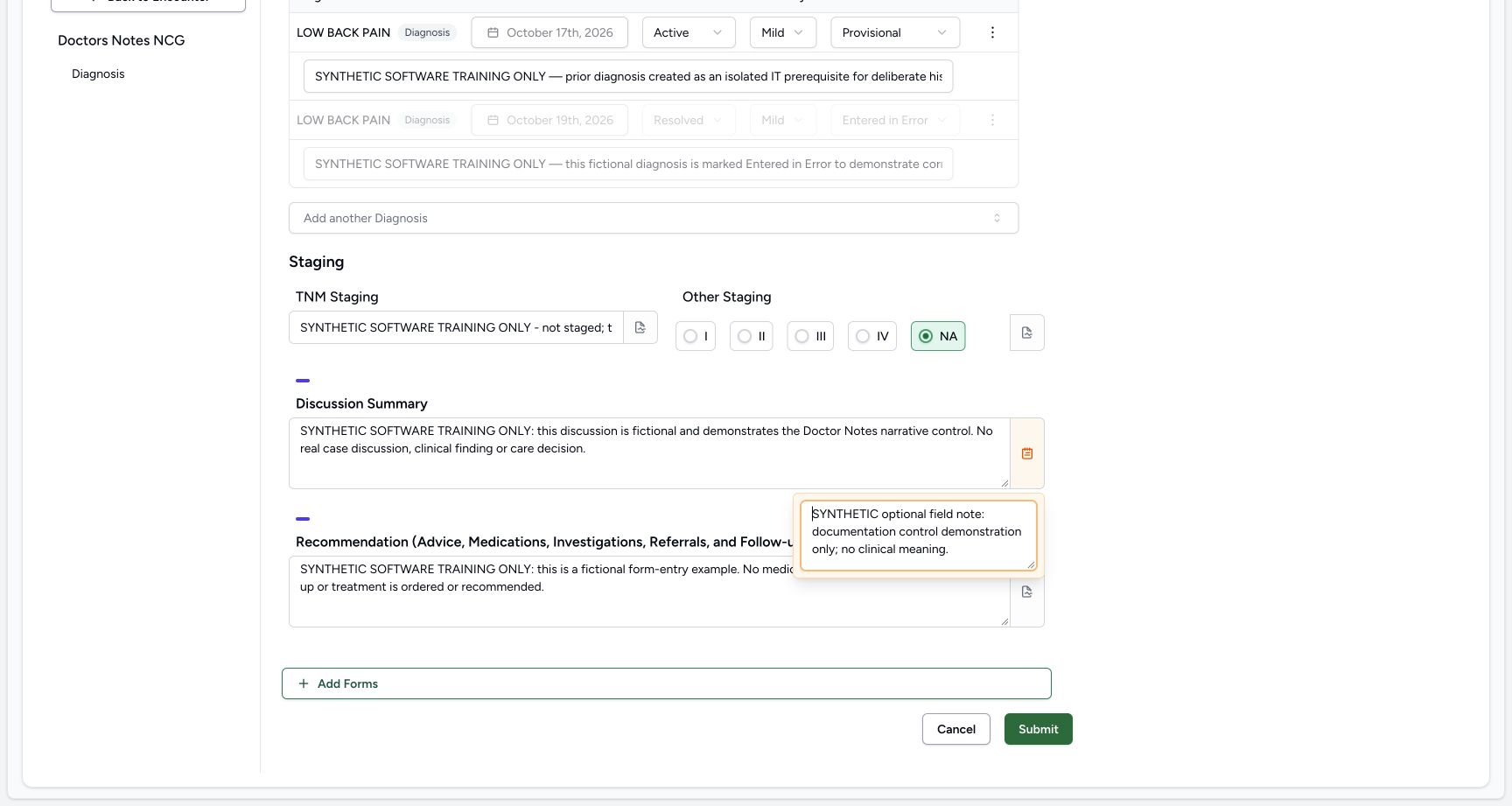
- Enter the optional field note: Type the fictional documentation context in Add notes. This note is optional software input.
 12
12Review the four answers before a single Submit
Capture details
Exact committed 3dfb7c9f, 3401 verified core/web blobs and 139 built assets. Existing ordinary Doctor; the old release label in the fictional patient name is retained. No role, form or terminology change. The new ordinary source was saved Completed; only the four ordinary answers and optional note were authored.
Image SHA-256 259aac2204632daa4930b6ce27219cfdd9b2767755b0e7768c76e8bd5601299d
- Submit the reviewed form once: After reviewing the four ordinary answers and retained optional note, choose Submit once.
- Read the retained note indicator: The orange note icon indicates the Discussion field has a note; the note is separate from the narrative answer.
7. Review and submit once
Review the four ordinary answers, literal NA, retained optional note and unchanged diagnosis context. Choose Submit once. The form returns to the encounter. Identify the new Doctors Notes NCG card filed by MANSOQ E2E Doctor at 08:55 AM on 19 October 2026. Do not repeat submission to obtain another screenshot or duplicate note.
12Review the four answers before a single Submit
Capture details
Exact committed 3dfb7c9f, 3401 verified core/web blobs and 139 built assets. Existing ordinary Doctor; the old release label in the fictional patient name is retained. No role, form or terminology change. The new ordinary source was saved Completed; only the four ordinary answers and optional note were authored.
Image SHA-256 259aac2204632daa4930b6ce27219cfdd9b2767755b0e7768c76e8bd5601299d
- Submit the reviewed form once: After reviewing the four ordinary answers and retained optional note, choose Submit once.
- Read the retained note indicator: The orange note icon indicates the Discussion field has a note; the note is separate from the narrative answer.
12Read the saved response and optional note
Capture details
Exact committed 3dfb7c9f, 3401 verified core/web blobs and 139 built assets. Existing ordinary Doctor; the old release label in the fictional patient name is retained. No role, form or terminology change. The new ordinary source was saved Completed; only the four ordinary answers and optional note were authored.
Image SHA-256 879ce55c38ef38257070704fc60702e82647969591531e662dda4055da31b9ce
- Open the saved Discussion note: Choose See Note beside Discussion Summary to read the retained optional field note.
- Read the retained optional note: Read the fictional field note in this saved popover; it is separate from the Discussion narrative.
8. Verify the saved answers and optional note
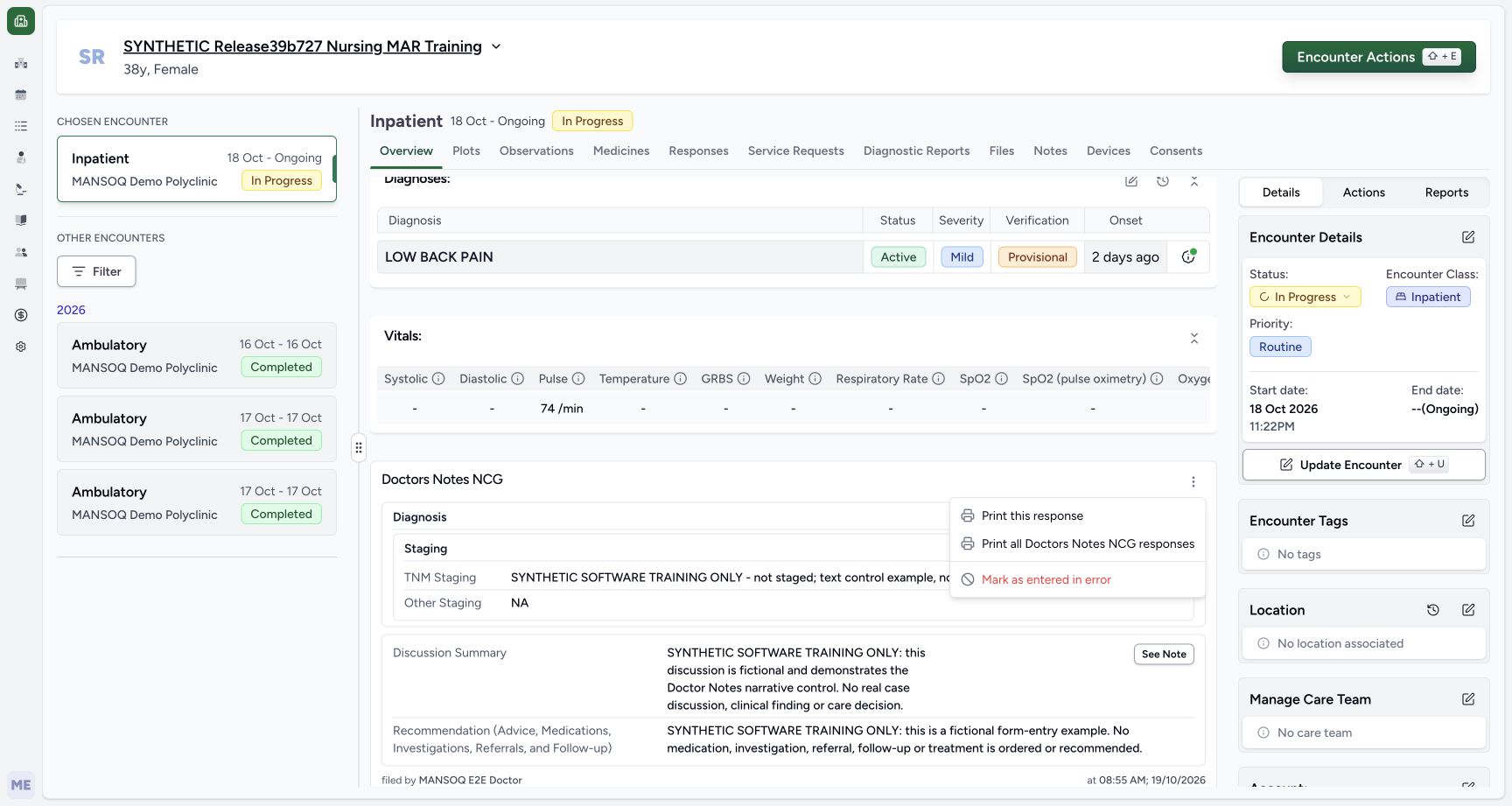
Expand the saved card if needed and read TNM Staging, NA, Discussion Summary and Recommendation. Choose See Note beside Discussion Summary to read its saved optional note. Ordinary independent Doctor and Nurse reads verify exactly one new Completed source response with those four answers and note; no diagnosis, symptom, observation, medication order or administration was created or changed by this entry.
12Read the saved response and optional note
Capture details
Exact committed 3dfb7c9f, 3401 verified core/web blobs and 139 built assets. Existing ordinary Doctor; the old release label in the fictional patient name is retained. No role, form or terminology change. The new ordinary source was saved Completed; only the four ordinary answers and optional note were authored.
Image SHA-256 879ce55c38ef38257070704fc60702e82647969591531e662dda4055da31b9ce
- Open the saved Discussion note: Choose See Note beside Discussion Summary to read the retained optional field note.
- Read the retained optional note: Read the fictional field note in this saved popover; it is separate from the Discussion narrative.
 1
1Choose Print this response for the saved note
Capture details
Exact committed 3dfb7c9f, 3401 verified core/web blobs and 139 built assets. Existing ordinary Doctor; the old release label in the fictional patient name is retained. No role, form or terminology change. The new ordinary source was saved Completed; only the four ordinary answers and optional note were authored.
Image SHA-256 2df89506078e1a3b6e6b36c04ff58157a3269302f65feb6c9f7e7a37fe1072fb
- Print this response: Choose Print this response to print only this saved Doctor Notes entry.
Hybrid form and draft boundaries
Diagnosis is a shared structured editor with its own destination and history, while these four answers belong to the ordinary form response. This exercise intentionally leaves Diagnosis unchanged. No Save as Draft action is shown: drafts are disabled in this training build and this form also contains a structured question. This lesson does not demonstrate a new diagnosis, historical copy, existing-answer amendment or a draft lifecycle.
12Review the shared diagnosis context without editing it
Capture details
Exact committed 3dfb7c9f, 3401 verified core/web blobs and 139 built assets. Existing ordinary Doctor; the old release label in the fictional patient name is retained. No role, form or terminology change. Before the single new response save.
Image SHA-256 dd925304c49b68efefd9efc1013162104b53cd45e77cbe7b39163a73a3446d99
- Read the form title: Confirm Doctors Notes NCG before using its shared diagnosis and narrative controls.
- Keep the Error diagnosis locked: Read the grey Entered in Error diagnosis row; leave its disabled controls unchanged.
12Cancel an untouched original form
Capture details
Exact committed 3dfb7c9f, 3401 verified core/web blobs and 139 built assets. Existing ordinary Doctor; the old release label in the fictional patient name is retained. No role, form or terminology change. Before the single new response save.
Image SHA-256 44a8ae4448ec14ba160bc9896ea051d138a49f0998a38610dc5ab598ef4fc4b4
- Cancel without edits: Choose Cancel when leaving this untouched form.
- Read the available NA option: Other Staging offers the literal NA option among five choices; this blank form has no selection yet.
12Review the four answers before a single Submit
Capture details
Exact committed 3dfb7c9f, 3401 verified core/web blobs and 139 built assets. Existing ordinary Doctor; the old release label in the fictional patient name is retained. No role, form or terminology change. The new ordinary source was saved Completed; only the four ordinary answers and optional note were authored.
Image SHA-256 259aac2204632daa4930b6ce27219cfdd9b2767755b0e7768c76e8bd5601299d
- Submit the reviewed form once: After reviewing the four ordinary answers and retained optional note, choose Submit once.
- Read the retained note indicator: The orange note icon indicates the Discussion field has a note; the note is separate from the narrative answer.
12Read the saved response and optional note
Capture details
Exact committed 3dfb7c9f, 3401 verified core/web blobs and 139 built assets. Existing ordinary Doctor; the old release label in the fictional patient name is retained. No role, form or terminology change. The new ordinary source was saved Completed; only the four ordinary answers and optional note were authored.
Image SHA-256 879ce55c38ef38257070704fc60702e82647969591531e662dda4055da31b9ce
- Open the saved Discussion note: Choose See Note beside Discussion Summary to read the retained optional field note.
- Read the retained optional note: Read the fictional field note in this saved popover; it is separate from the Discussion narrative.
Preserved clinical context
The original seven condition records comprise four diagnoses and three symptoms; the symptoms are a subset of that total. All forty older responses, five retained observations, fourteen administrations and four medication requests remained unchanged in both ordinary-role readbacks. This is one Doctor form workflow in a fictional Polyclinic encounter, not evidence that every role or facility has the same access.
12Open Forms on the fictional ongoing encounter
Capture details
Exact committed 3dfb7c9f, 3401 verified core/web blobs and 139 built assets. Existing ordinary Doctor; the old release label in the fictional patient name is retained. No role, form or terminology change. Before the single new response save.
Image SHA-256 adbe9fdce5935717767a69088c9f849b0338a15a9cc0be5124b6e9fd70c3983a
- Open Forms: Choose Forms in this fictional ongoing Inpatient encounter.
- Verify the chosen encounter: Read the chosen encounter panel and confirm the intended Inpatient visit before entering notes.
12Review the shared diagnosis context without editing it
Capture details
Exact committed 3dfb7c9f, 3401 verified core/web blobs and 139 built assets. Existing ordinary Doctor; the old release label in the fictional patient name is retained. No role, form or terminology change. Before the single new response save.
Image SHA-256 dd925304c49b68efefd9efc1013162104b53cd45e77cbe7b39163a73a3446d99
- Read the form title: Confirm Doctors Notes NCG before using its shared diagnosis and narrative controls.
- Keep the Error diagnosis locked: Read the grey Entered in Error diagnosis row; leave its disabled controls unchanged.
12Read the saved response and optional note
Capture details
Exact committed 3dfb7c9f, 3401 verified core/web blobs and 139 built assets. Existing ordinary Doctor; the old release label in the fictional patient name is retained. No role, form or terminology change. The new ordinary source was saved Completed; only the four ordinary answers and optional note were authored.
Image SHA-256 879ce55c38ef38257070704fc60702e82647969591531e662dda4055da31b9ce
- Open the saved Discussion note: Choose See Note beside Discussion Summary to read the retained optional field note.
- Read the retained optional note: Read the fictional field note in this saved popover; it is separate from the Discussion narrative.
Source evidence
Every citation uses this exact committed version. The private source repository requires access.
- repositories/platform/mansoq-web/src/pages/Encounters/tabs/overview/FormsDialog.tsx:163 ·
3dfb7c9f519fb5b4cd4452439f3c12346bf58319Source file checksum
94e423519145edb5e7895c4b2fa8eba6625db5a1d320fb35c37777f0876321a6 - repositories/platform/mansoq-web/src/components/Questionnaire/QuestionnaireForm.tsx:557 ·
3dfb7c9f519fb5b4cd4452439f3c12346bf58319Source file checksum
ee6c2195f13e48f0896a2d3da566c2f2a67910adad08894df6b77862f9cfdeec - repositories/platform/mansoq-web/src/components/Questionnaire/QuestionnaireForm.tsx:587 ·
3dfb7c9f519fb5b4cd4452439f3c12346bf58319Source file checksum
ee6c2195f13e48f0896a2d3da566c2f2a67910adad08894df6b77862f9cfdeec - repositories/platform/mansoq-web/src/components/Questionnaire/QuestionnaireForm.tsx:831 ·
3dfb7c9f519fb5b4cd4452439f3c12346bf58319Source file checksum
ee6c2195f13e48f0896a2d3da566c2f2a67910adad08894df6b77862f9cfdeec - repositories/platform/mansoq-web/src/components/Questionnaire/QuestionTypes/DiagnosisQuestion.tsx:320 ·
3dfb7c9f519fb5b4cd4452439f3c12346bf58319Source file checksum
56a14d11bcc3aef66d9dc2d220b29d4c22ff671eed6ed4c4676ddf59b7920159 - repositories/platform/mansoq-web/src/components/Questionnaire/QuestionTypes/DiagnosisQuestion.tsx:393 ·
3dfb7c9f519fb5b4cd4452439f3c12346bf58319Source file checksum
56a14d11bcc3aef66d9dc2d220b29d4c22ff671eed6ed4c4676ddf59b7920159 - repositories/platform/mansoq-web/src/components/Questionnaire/QuestionTypes/TextQuestion.tsx:207 ·
3dfb7c9f519fb5b4cd4452439f3c12346bf58319Source file checksum
1ce4eb85780e351a42f155fc8a092fa921e6f4853f1efc91902365498b834aab - repositories/platform/mansoq-web/src/components/Questionnaire/QuestionTypes/ChoiceQuestion.tsx:46 ·
3dfb7c9f519fb5b4cd4452439f3c12346bf58319Source file checksum
0f6a5813b88385121e4d44682fb82fa0c3d65a57faf21b59ddda8e19995e446e - repositories/platform/mansoq-web/src/components/Questionnaire/structured/handlers.ts:157 ·
3dfb7c9f519fb5b4cd4452439f3c12346bf58319Source file checksum
459ade48f77316279ab2978dc7b4466cb96acb8223c61b9a1f87ca9973be7c7f - repositories/platform/mansoq-core/mansoq/emr/resources/questionnaire/spec.py:143 ·
3dfb7c9f519fb5b4cd4452439f3c12346bf58319Source file checksum
360690dc0be252ca3508ca507a6b2fb3acc1f9a67377b24bac36c023dfb43458 - repositories/platform/mansoq-core/mansoq/emr/api/viewsets/questionnaire.py:116 ·
3dfb7c9f519fb5b4cd4452439f3c12346bf58319Source file checksum
ccc0fe021d193e5d6de9540c256413da356895ceed0c71c5fdcba75ca6915d4e - repositories/platform/mansoq-core/mansoq/security/authorization/encounter.py:69 ·
3dfb7c9f519fb5b4cd4452439f3c12346bf58319Source file checksum
0e7ff8afcfb57b2371201e16ee6fac26125d6e686af66ed7edd95e49bc07de78 - repositories/platform/mansoq-core/mansoq/emr/resources/questionnaire/utils.py:447 ·
3dfb7c9f519fb5b4cd4452439f3c12346bf58319Source file checksum
8425858d2179a66f482f38a3fd7f0fc0dcb70a4bcd85450fe7ce748b3081826c