 MANSOQ
 Clinical care · VERSION 3dfb7c9f
Return the Emergency encounter to In Progress and verify its history
Save the return on the same dedicated encounter, verify it after reload, read its three status-history entries and confirm its return to the Emergency board.
Doctor
 1234
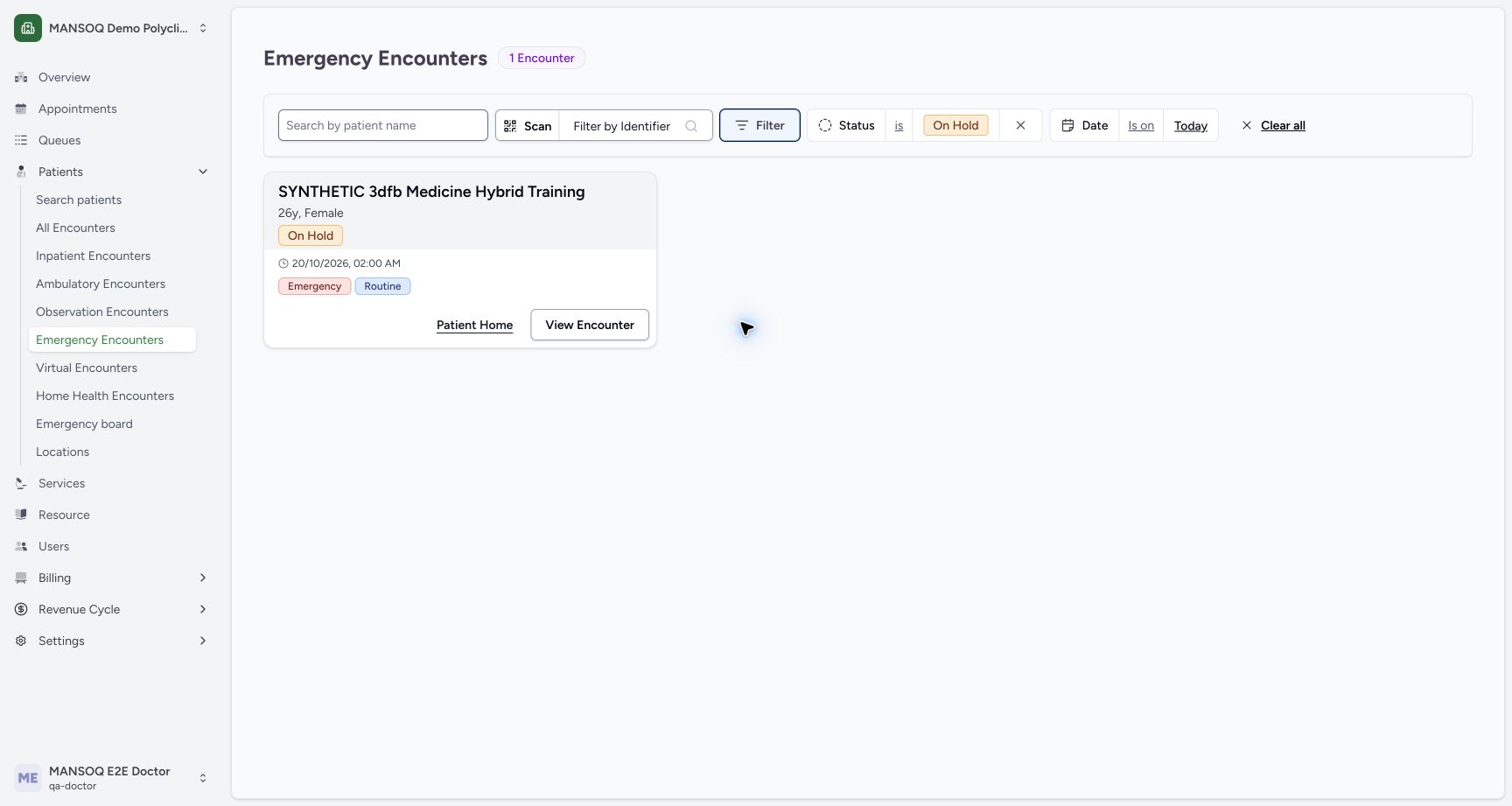
1234On hold filtered retained own encounter
Capture details
Captured committed 3dfb interface. One separate Emergency create, one On Hold update and one return to In Progress; no triage, discharge or change to the older Ambulatory encounter. Browser and native originals retain their actual dimensions.
Image SHA-256 e49eadd5b895df41380662a7ceb41fc20062a8001a540155ab9a0872b5af949c
- Verify Status is On Hold chip: The selected read filter is now applied.
- Verify Today date filter: Both filters define the visible list.
- Verify retained On Hold card: Filtering did not mutate the encounter.
- Choose View Encounter: Open only the matched dedicated encounter.
10 of 10 content blocks have reviewed image alignment. Missing overview or prerequisite images remain open.
Before you begin
- Use an authorised ordinary Doctor account in the assigned synthetic facility and patient scope. Actual native screenshots demonstrate Doctor only; Nurse and Staff checks are read-only authority observations.
 12345678910
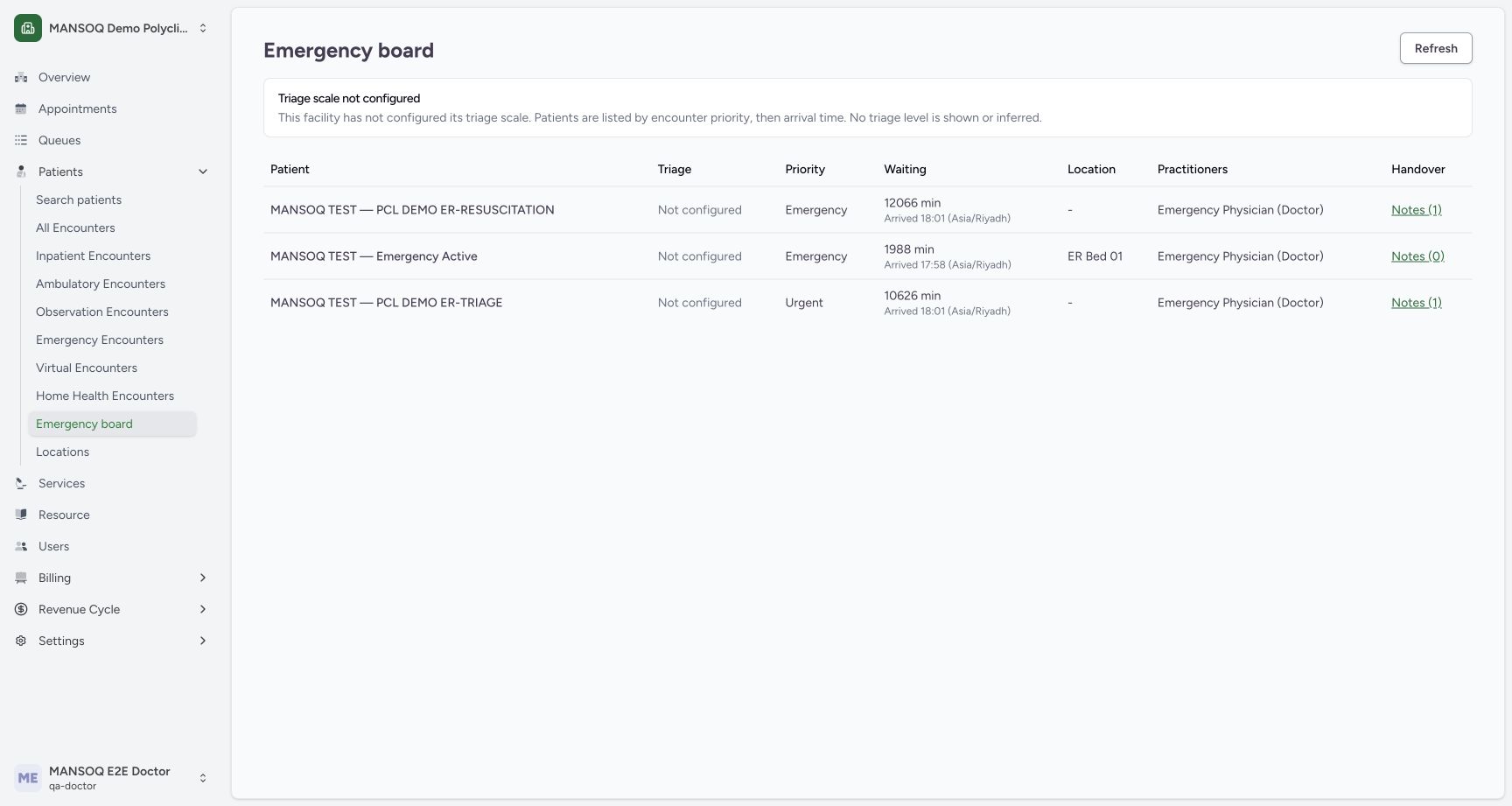
Recorded release 3dfb7c9f · 2026-10-20T00:07:53.010Z · 1728 × 921 Emergency board unconfigured existing rows
Capture details
Captured committed 3dfb interface. One separate Emergency create, one On Hold update and one return to In Progress; no triage, discharge or change to the older Ambulatory encounter. Browser and native originals retain their actual dimensions.
Image SHA-256
772ce2e5bcd1b03a608e96e88bc15717c2ceb0e826833e46149477b4b8b0c367- Open Emergency board: Use the facility sidebar Patients section.
- Check the ordinary Doctor account: The actual account is MANSOQ E2E Doctor / qa-doctor.
- Read the unconfigured triage warning: Priority and arrival ordering does not infer a triage level.
- Read Not configured: This cell contains no triage level.
- Read encounter priority: This Emergency label is a priority, not a calculated triage result.
- Read waiting and arrival: The cell includes elapsed minutes and the displayed time zone.
- Read location: An existing demonstration row displays ER Bed 01; no location was assigned in this exercise.
- Read practitioners: The row shows its recorded practitioner role.
- Read Handover Notes: The link count is associated with that particular row.
- Locate Refresh: Manual Refresh requests the current board data.
- Use only an approved fictional software-training case with validated creation/update prerequisites. No triage, treatment, clinical urgency, handover, admission or discharge decision is represented.
 12
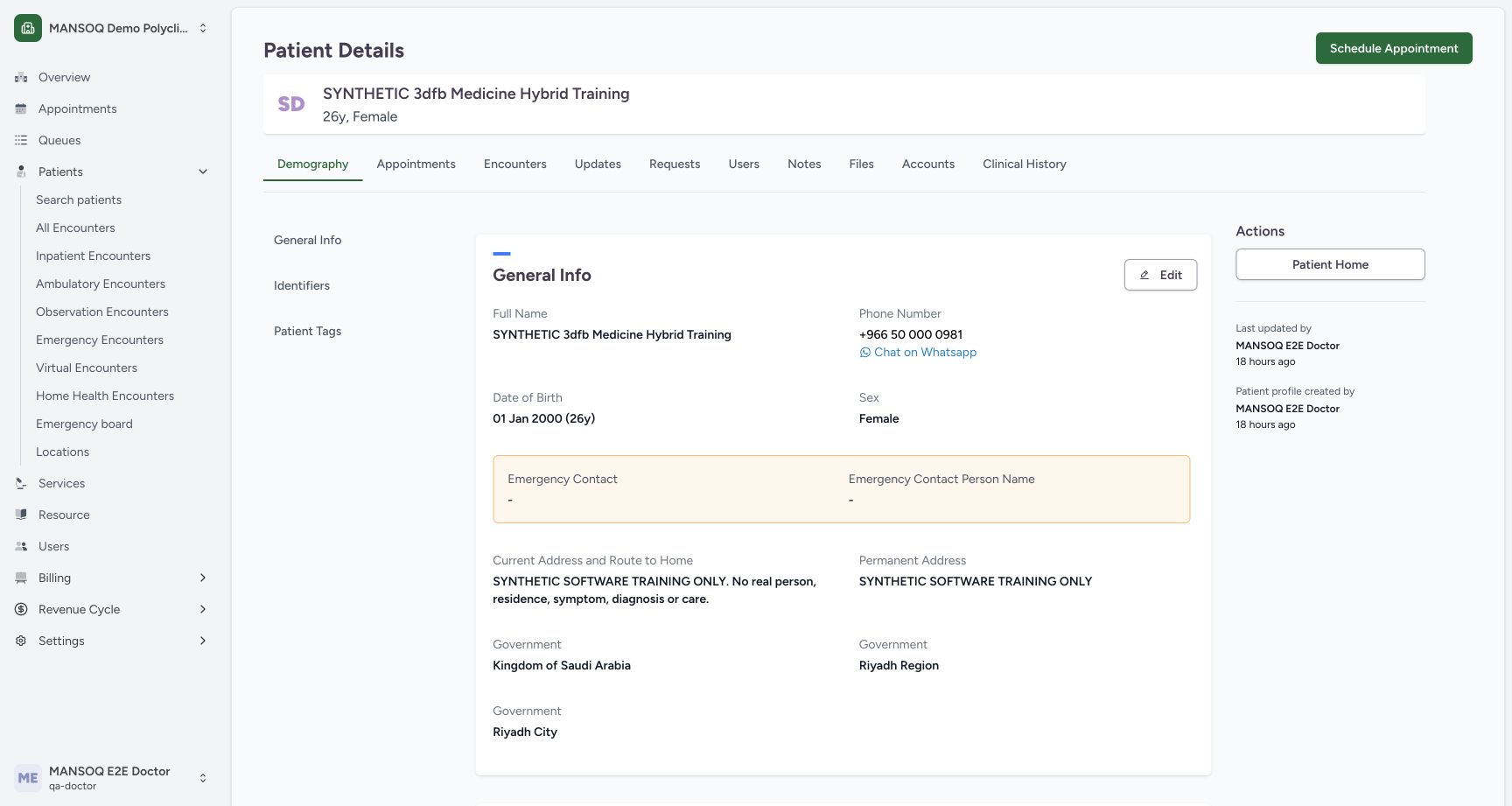
12Recorded release 3dfb7c9f · 2026-10-20T00:08:26.168Z · 1728 × 921 Existing synthetic patient profile and home link
Capture details
Captured committed 3dfb interface. One separate Emergency create, one On Hold update and one return to In Progress; no triage, discharge or change to the older Ambulatory encounter. Browser and native originals retain their actual dimensions.
Image SHA-256
71f570730dbc162c980a84f3073daaac96cbcb24d66a846bb56db4693a767252- Confirm the fictional patient: Use the assigned SYNTHETIC training identity.
- Choose Patient Home: Open the existing patient home without editing the profile.
1. Open the matched encounter and review only In Progress
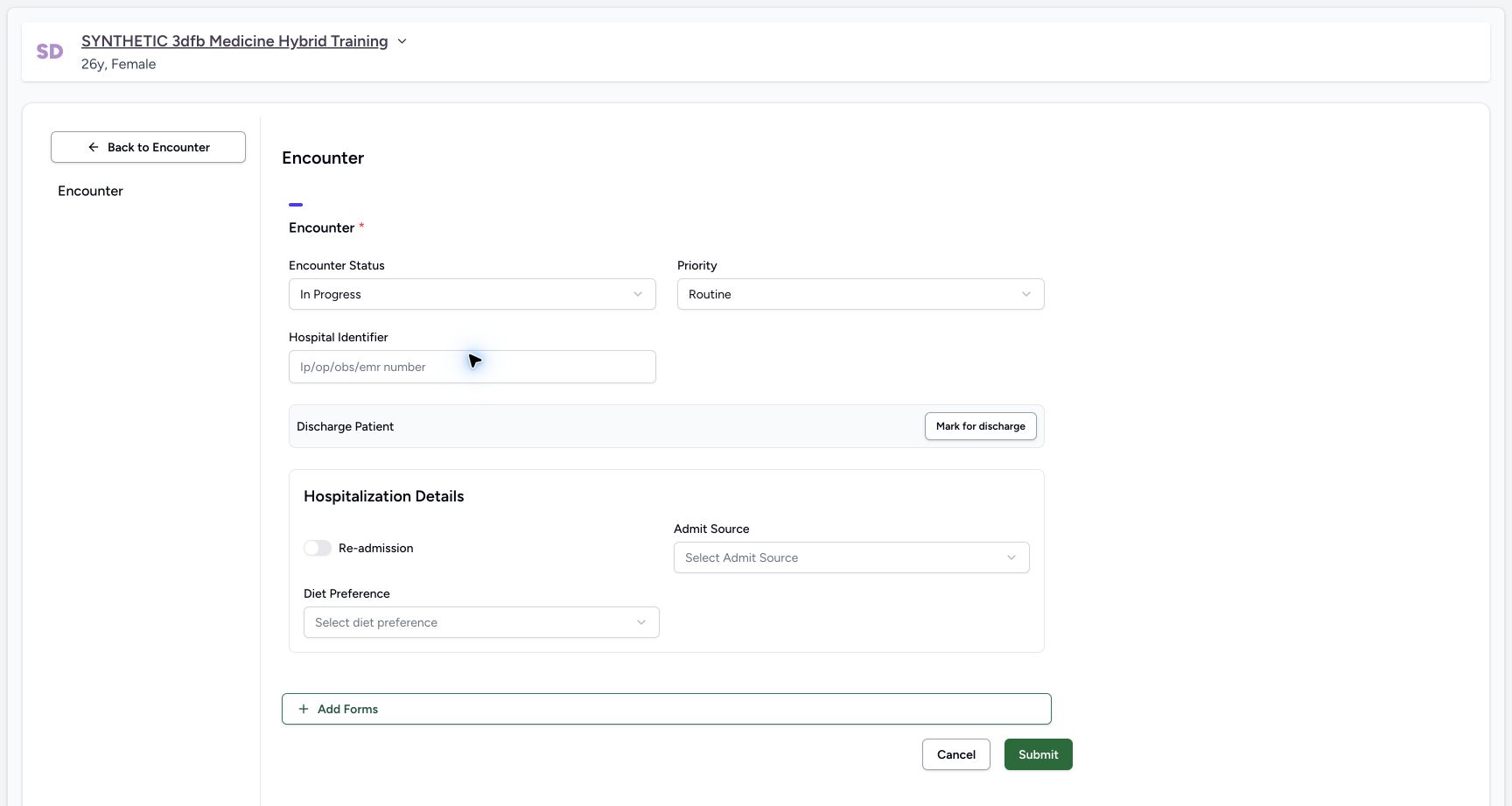
From the retained On Hold card, choose View Encounter, then Update Encounter. Open Encounter Status and choose In Progress. The screenshot shows that final selection with Routine and the other form values unchanged. Use the same dedicated encounter; do not create another record.
1234On hold filtered retained own encounter
Capture details
Captured committed 3dfb interface. One separate Emergency create, one On Hold update and one return to In Progress; no triage, discharge or change to the older Ambulatory encounter. Browser and native originals retain their actual dimensions.
Image SHA-256 e49eadd5b895df41380662a7ceb41fc20062a8001a540155ab9a0872b5af949c
- Verify Status is On Hold chip: The selected read filter is now applied.
- Verify Today date filter: Both filters define the visible list.
- Verify retained On Hold card: Filtering did not mutate the encounter.
- Choose View Encounter: Open only the matched dedicated encounter.
 1234
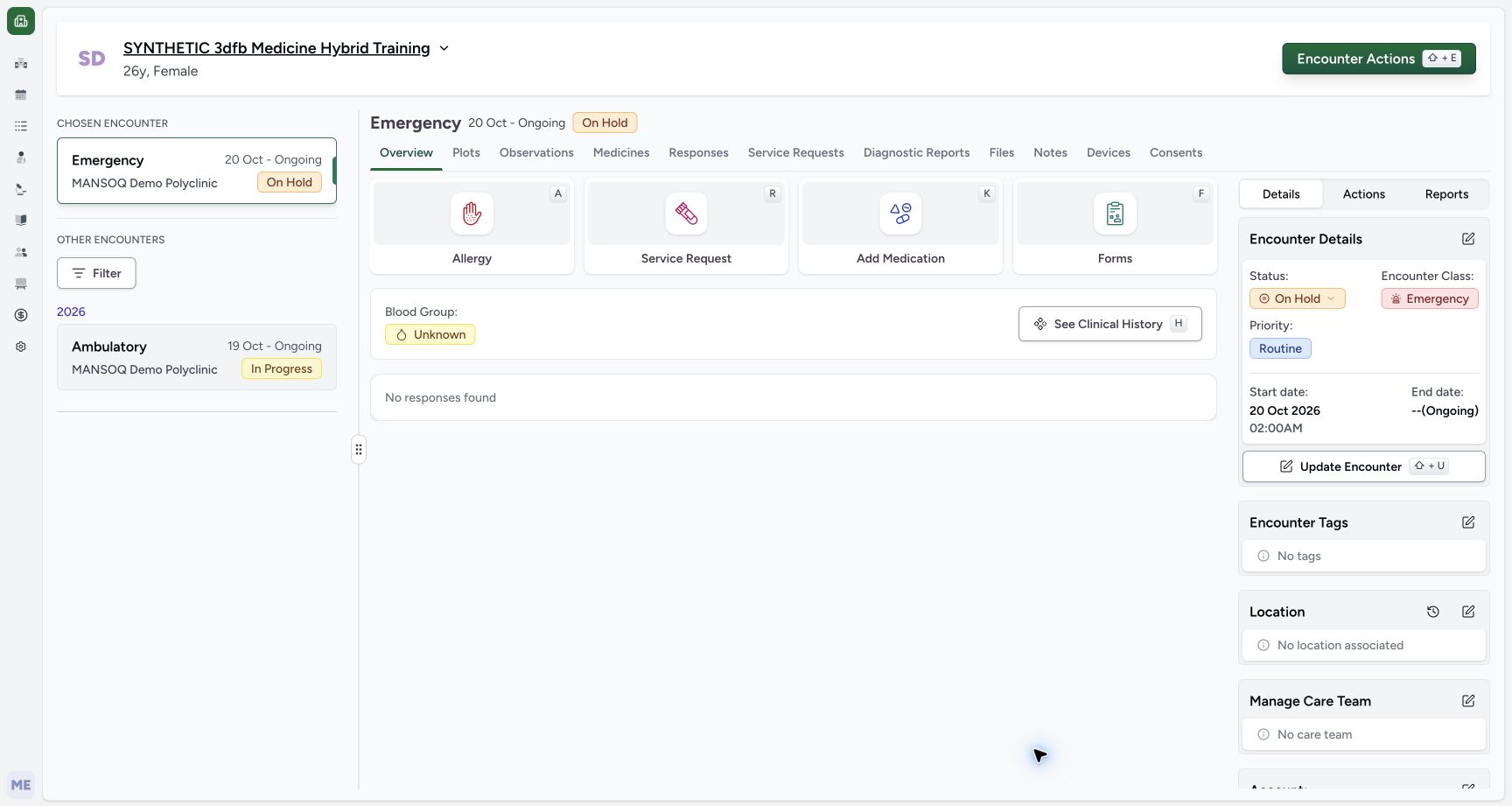
1234Own on hold saved overview
Capture details
Captured committed 3dfb interface. One separate Emergency create, one On Hold update and one return to In Progress; no triage, discharge or change to the older Ambulatory encounter. Browser and native originals retain their actual dimensions.
Image SHA-256 21ba87fefd5a7aabaab975bc46e8ae538e208fbbbddf91a6d79ff26bcad3fc0c
- Verify saved On Hold: The selected encounter displays the saved pause state.
- Verify Emergency remains: Status did not change the encounter class.
- Verify the same start: The original local minute display remains.
- Locate Update Encounter: Reopen this editor only for the later return to In Progress.
 123
123Own in progress reviewed before submit
Capture details
Captured committed 3dfb interface. One separate Emergency create, one On Hold update and one return to In Progress; no triage, discharge or change to the older Ambulatory encounter. Browser and native originals retain their actual dimensions.
Image SHA-256 01febe8a3215251672b15578c6db05294d5a97f653d997b93802c0b5a1e23af3
- Review In Progress: Only the own encounter status is restored.
- Recheck unchanged Routine: No priority or hospitalization field is changed.
- Choose Submit once: Save the approved return on the same encounter.
2. Submit the return once and inspect the settled Overview
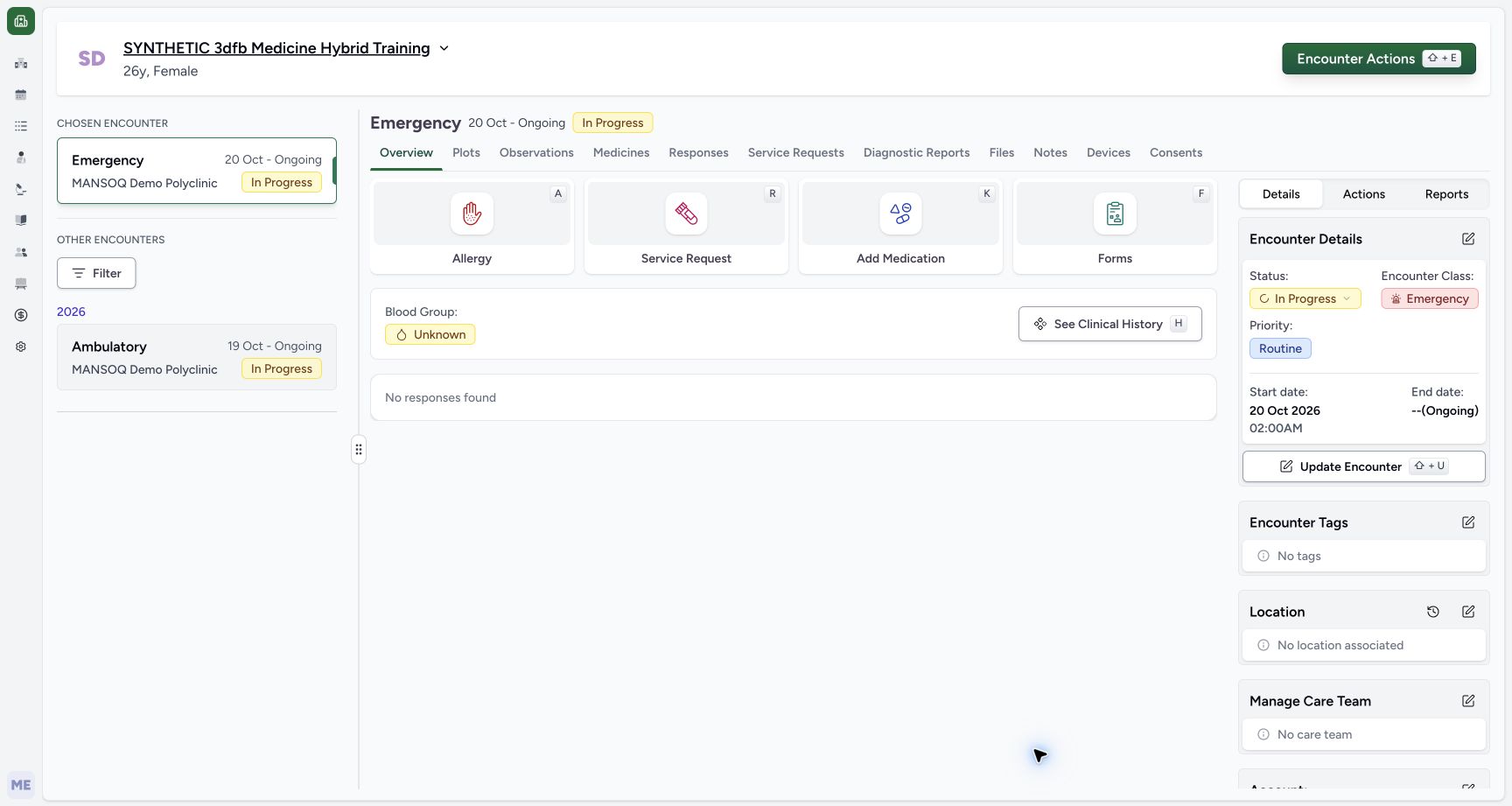
Choose Submit once. Wait for the Overview to settle, then check In Progress in the selected encounter and Encounter Details. Emergency, Routine, the displayed start and ongoing end remain unchanged. If a brief previous status appears while data refreshes, wait for the result instead of submitting again.
123Own in progress reviewed before submit
Capture details
Captured committed 3dfb interface. One separate Emergency create, one On Hold update and one return to In Progress; no triage, discharge or change to the older Ambulatory encounter. Browser and native originals retain their actual dimensions.
Image SHA-256 01febe8a3215251672b15578c6db05294d5a97f653d997b93802c0b5a1e23af3
- Review In Progress: Only the own encounter status is restored.
- Recheck unchanged Routine: No priority or hospitalization field is changed.
- Choose Submit once: Save the approved return on the same encounter.
 123
123Own in progress saved overview
Capture details
Captured committed 3dfb interface. One separate Emergency create, one On Hold update and one return to In Progress; no triage, discharge or change to the older Ambulatory encounter. Browser and native originals retain their actual dimensions.
Image SHA-256 9f30ed0b8c8c6231ce33f28e59ecf85c05d666f5ccf4ad3253cb9a709a9b0bc6
- Read saved In Progress: The settled Overview confirms the return.
- Verify Emergency class: The class remains separate from care state.
- Verify original start: The displayed local start is retained.
3. Reload normally and confirm the same saved state
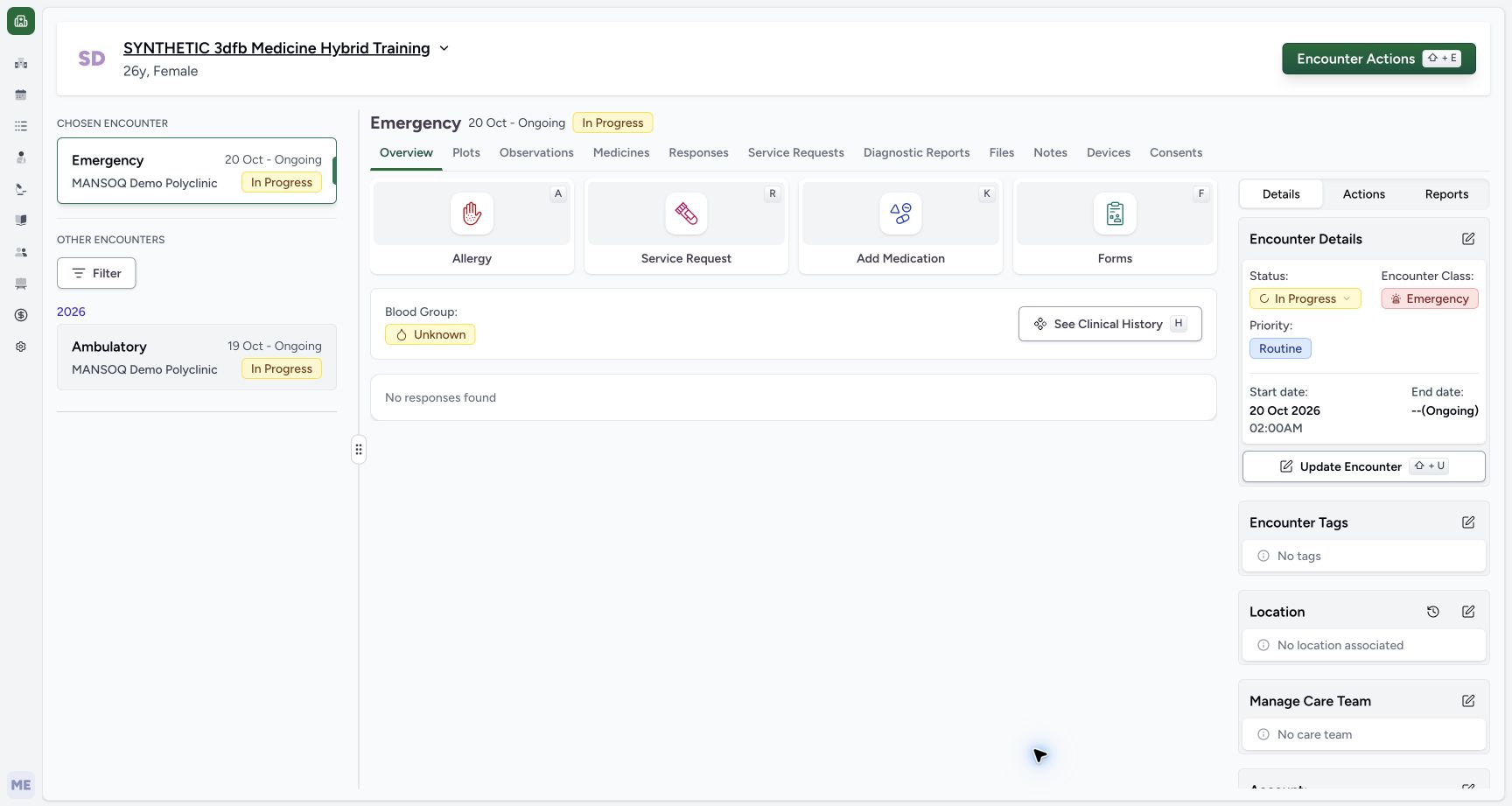
Use the browser’s normal Reload once. After loading, verify the same Emergency encounter In Progress, Routine and start time. The separate older Ambulatory encounter remains visible. This screenshot was captured after that actual reload.
 123
123Own in progress after normal reload
Capture details
Captured committed 3dfb interface. One separate Emergency create, one On Hold update and one return to In Progress; no triage, discharge or change to the older Ambulatory encounter. Browser and native originals retain their actual dimensions.
Image SHA-256 7832dc12bf52cf766c948fb348d8e65f50dc1c2ac1f996c6c12effd157c3b2d4
- Verify In Progress after normal reload: This original was captured after the one actual browser reload.
- Open Status History: Choose the status badge and its down arrow.
- Verify retained Emergency class: No class conversion occurred.
4. Open and read Status History
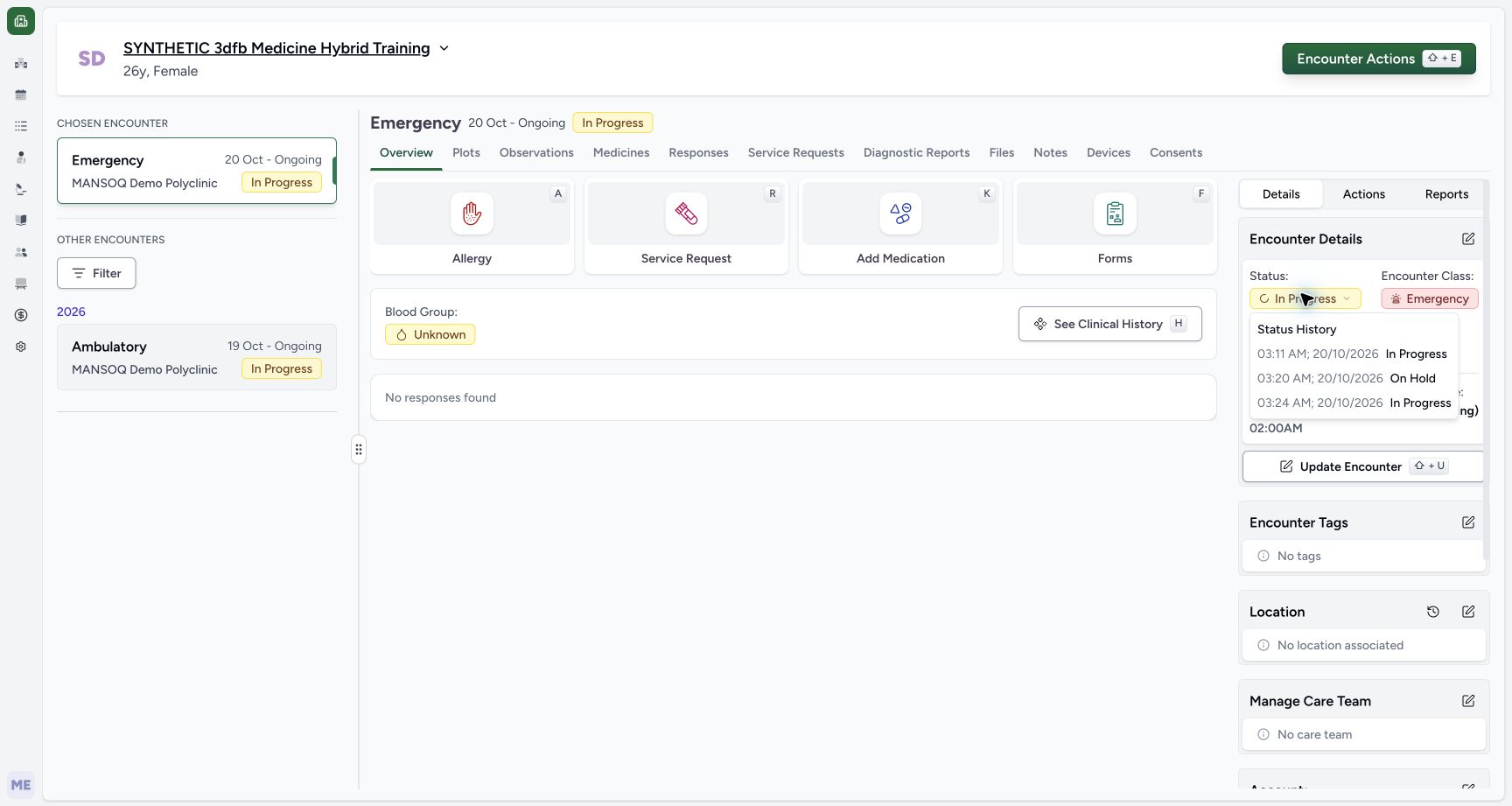
In Encounter Details, select the In Progress status badge with its down arrow. The popover lists the three saved states in order: In Progress, On Hold and In Progress, each with its recorded local date and time. The history concerns this encounter’s status, not a class conversion. Press Escape to close it.
123Own in progress after normal reload
Capture details
Captured committed 3dfb interface. One separate Emergency create, one On Hold update and one return to In Progress; no triage, discharge or change to the older Ambulatory encounter. Browser and native originals retain their actual dimensions.
Image SHA-256 7832dc12bf52cf766c948fb348d8e65f50dc1c2ac1f996c6c12effd157c3b2d4
- Verify In Progress after normal reload: This original was captured after the one actual browser reload.
- Open Status History: Choose the status badge and its down arrow.
- Verify retained Emergency class: No class conversion occurred.
 1234
1234Own status history created paused resumed
Capture details
Captured committed 3dfb interface. One separate Emergency create, one On Hold update and one return to In Progress; no triage, discharge or change to the older Ambulatory encounter. Browser and native originals retain their actual dimensions.
Image SHA-256 75e52f2c651b24366c7563f42caabc95d01e0e0d5bce96950c1028846fb33dc9
- Read the status-history trigger: The popover is open for this same status badge.
- Read initial In Progress entry: The popover records the create status and local timestamp.
- Read On Hold entry: The first saved update is retained in the history.
- Read returned In Progress entry: The second saved update appears after On Hold.
5. Return to the Emergency board
Expand the sidebar if needed and choose Emergency board. The same synthetic encounter is visible again because its class is Emergency and its status is In Progress. Its Routine priority, Not configured triage, arrival time and Notes (0) belong to the same row.
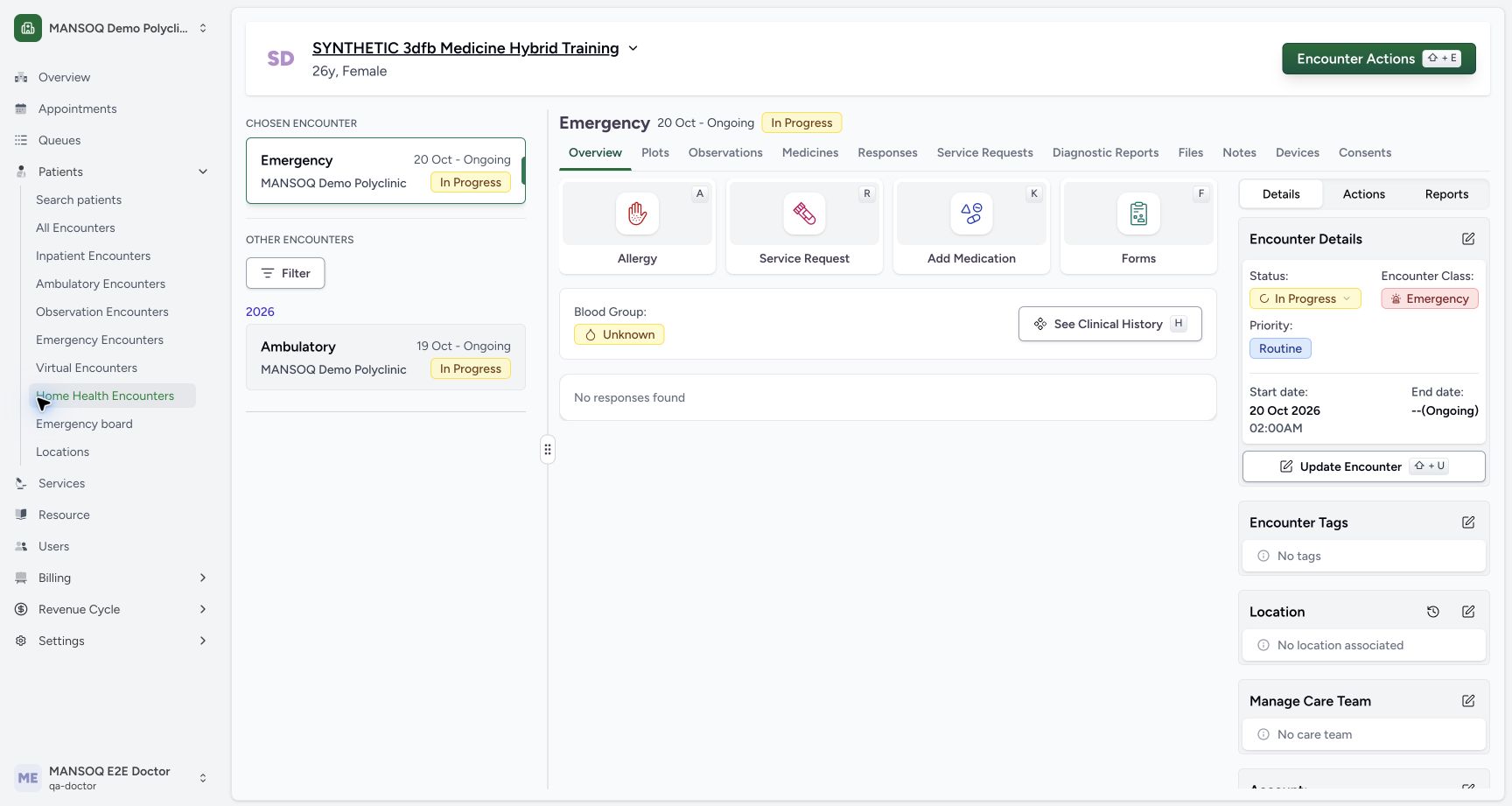 12
12Resumed overview board navigation
Capture details
Captured committed 3dfb interface. One separate Emergency create, one On Hold update and one return to In Progress; no triage, discharge or change to the older Ambulatory encounter. Browser and native originals retain their actual dimensions.
Image SHA-256 42369d3fd0fbd006b65814d49be3ebf3149581ac931846966ebd373923f2331e
- Choose Emergency board: This sidebar navigation is visible in the expanded view.
- Verify resumed header before leaving: The chosen encounter is In Progress.
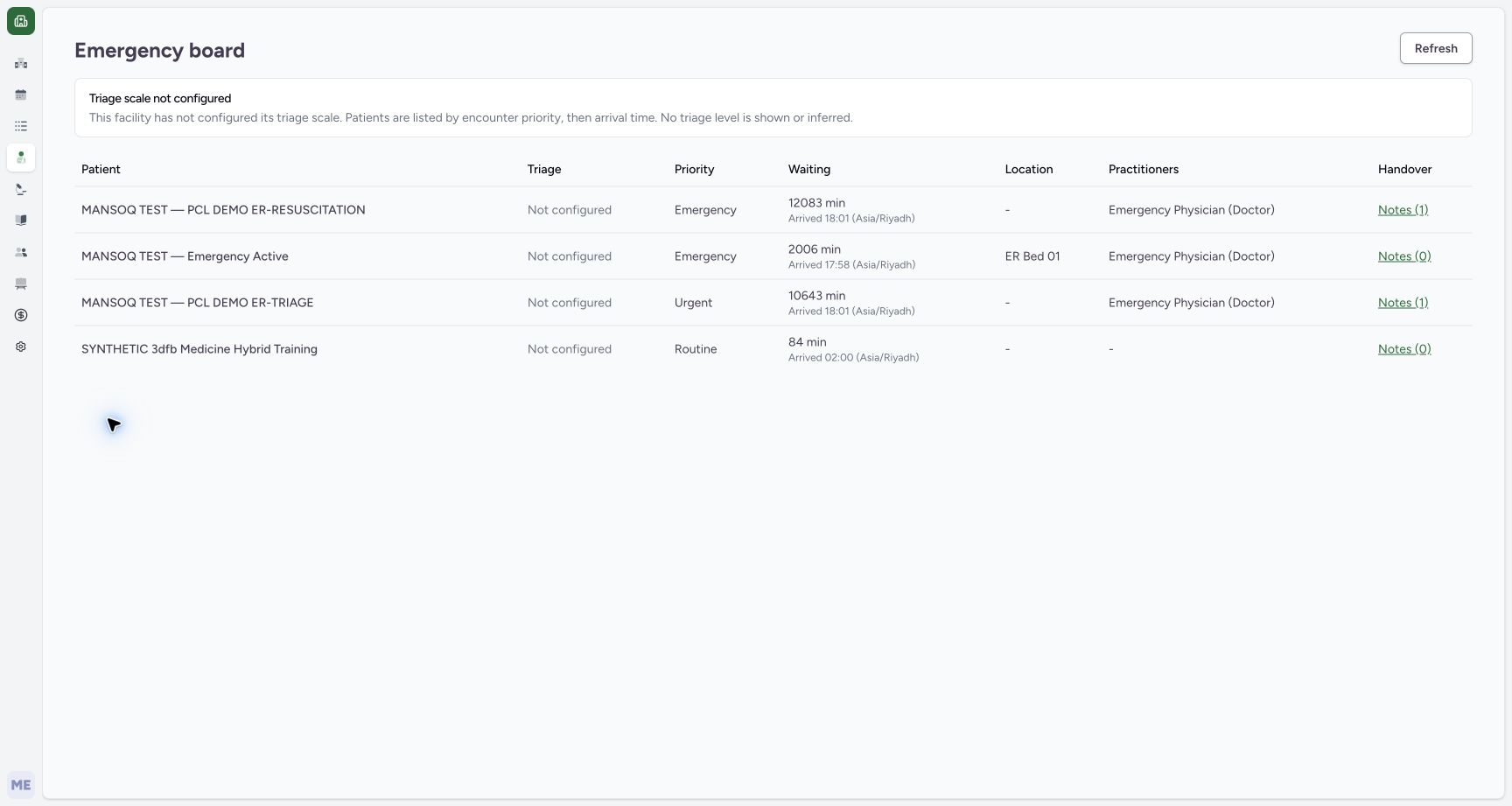 123456
In progress returned to emergency board
Capture details
Captured committed 3dfb interface. One separate Emergency create, one On Hold update and one return to In Progress; no triage, discharge or change to the older Ambulatory encounter. Browser and native originals retain their actual dimensions.
Image SHA-256 e109e5689f9e83bae90430383169973b4e43d552d0f826a7bc432af9f45015fc
- Locate the returned synthetic row: The same encounter is again included while In Progress.
- Read Not configured triage: No triage level was authored.
- Read Routine priority: The original priority is retained.
- Read arrival and elapsed time: Waiting is a displayed duration, not an assessment.
- Locate this row’s Notes (0): Use only the intended synthetic row’s link.
- Choose Refresh: Request current board data once.
6. Verify the board row after Refresh
Choose Refresh. The row remains present in the captured result. Notes (0) opens the same encounter’s empty Discussions view if you need to inspect it; choose Overview to return without creating a thread. The separate board-reading guide shows that exact read-only navigation.
123456In progress returned to emergency board
Capture details
Captured committed 3dfb interface. One separate Emergency create, one On Hold update and one return to In Progress; no triage, discharge or change to the older Ambulatory encounter. Browser and native originals retain their actual dimensions.
Image SHA-256 e109e5689f9e83bae90430383169973b4e43d552d0f826a7bc432af9f45015fc
- Locate the returned synthetic row: The same encounter is again included while In Progress.
- Read Not configured triage: No triage level was authored.
- Read Routine priority: The original priority is retained.
- Read arrival and elapsed time: Waiting is a displayed duration, not an assessment.
- Locate this row’s Notes (0): Use only the intended synthetic row’s link.
- Choose Refresh: Request current board data once.
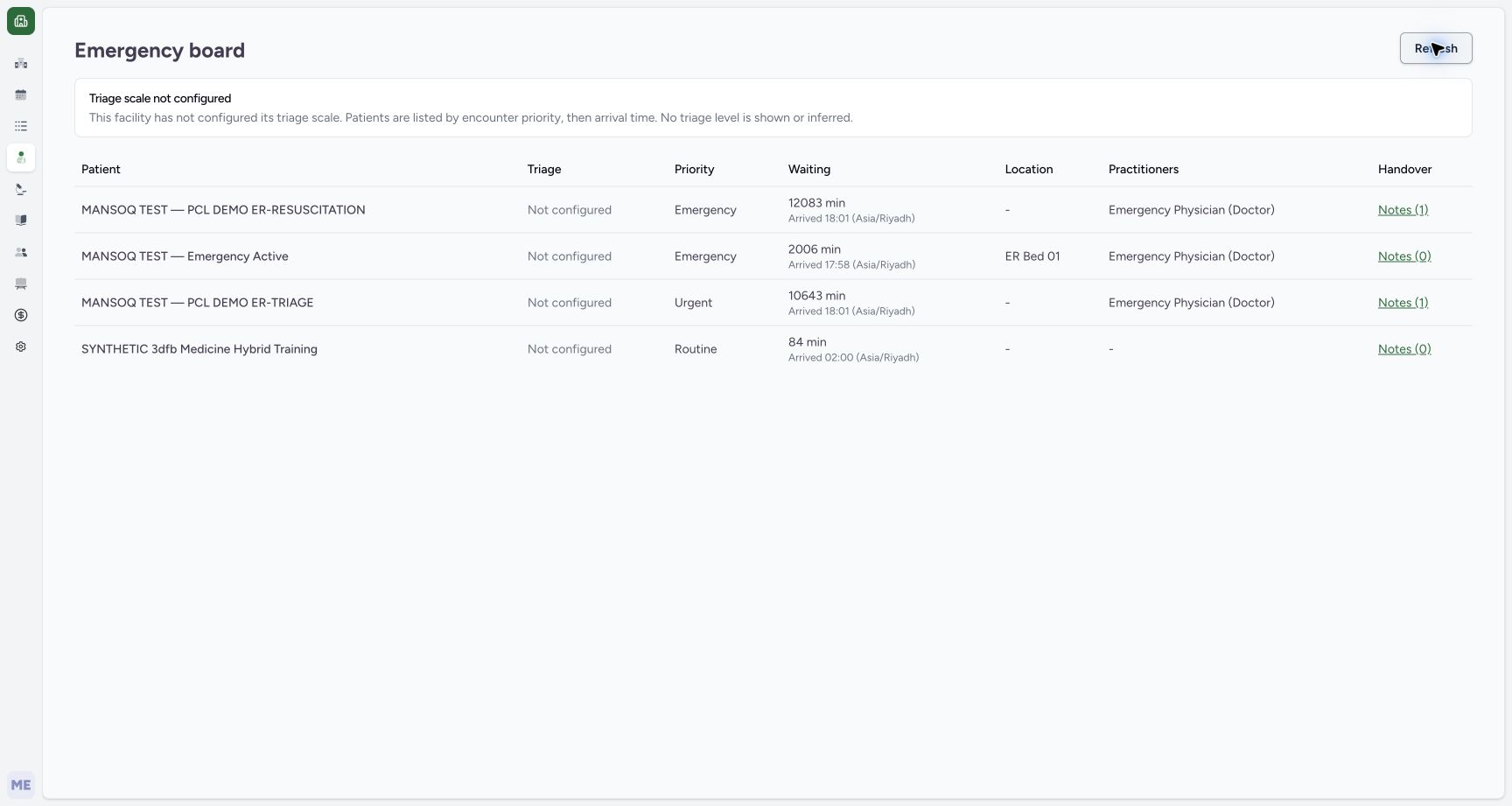 123
123Board after manual refresh own row retained
Capture details
Captured committed 3dfb interface. One separate Emergency create, one On Hold update and one return to In Progress; no triage, discharge or change to the older Ambulatory encounter. Browser and native originals retain their actual dimensions.
Image SHA-256 8e50eb9f2bcaec14fcb5a9a01660be43088f23d36383f84feac2fe8c662e5fc8
- Read Refresh after the actual click: The manual refresh completed without changing the row.
- Verify the same retained synthetic row: The read-only result retains the encounter.
- Choose own Notes (0): Open the linked Emergency encounter discussion view.
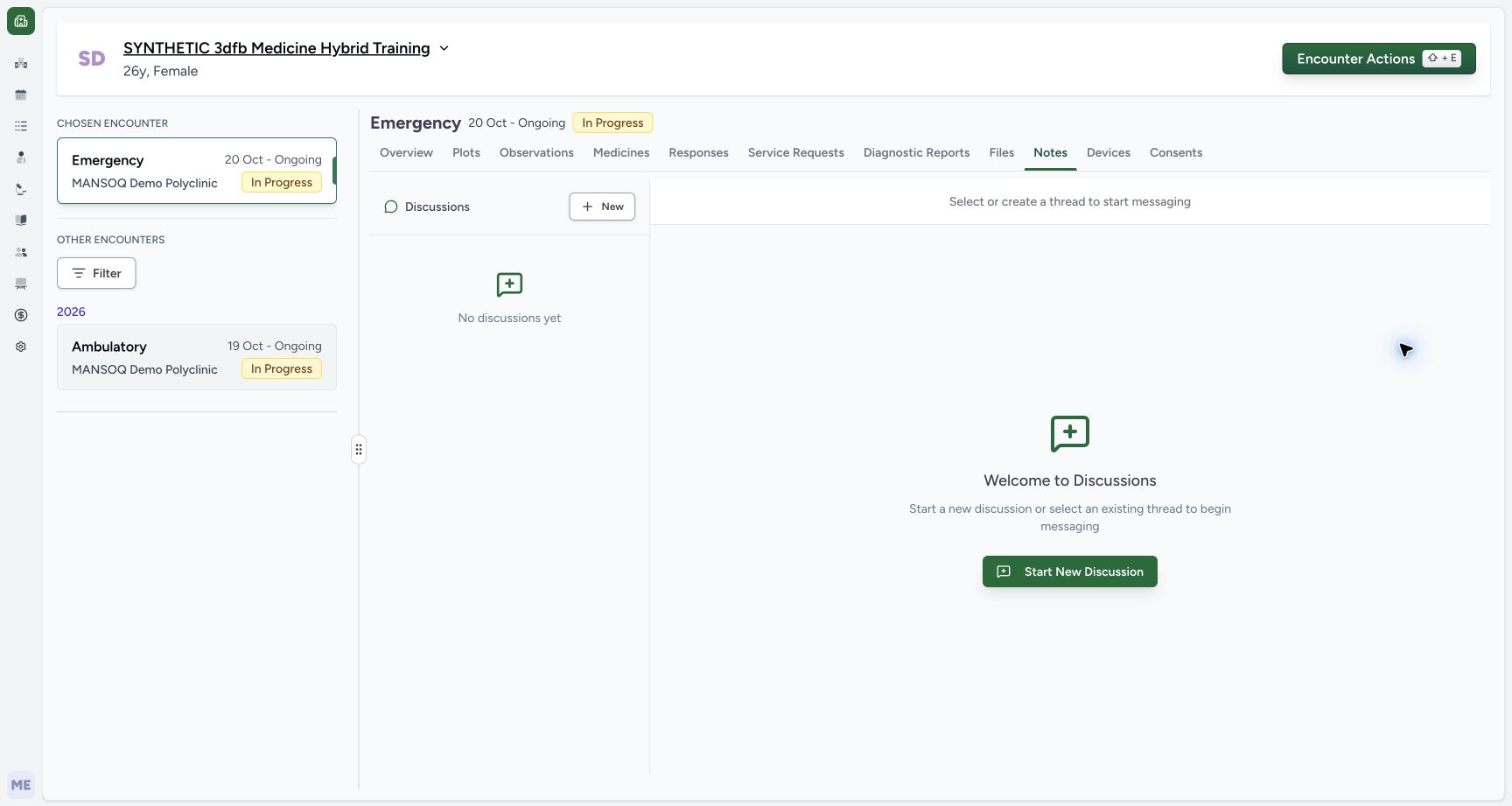 1234
1234Board own notes link empty encounter discussions
Capture details
Captured committed 3dfb interface. One separate Emergency create, one On Hold update and one return to In Progress; no triage, discharge or change to the older Ambulatory encounter. Browser and native originals retain their actual dimensions.
Image SHA-256 380f431f8073fe6953b48b908c20bc4454974bcbcfc5a68f21e2742334f28080
- Confirm chosen Emergency encounter: The Notes link opened this encounter, not the older Ambulatory one.
- Read No discussions yet: No discussion thread is created here.
- Read selected Notes tab: This is the encounter-scoped Discussions view.
- Choose Overview: Return without using New or Send.
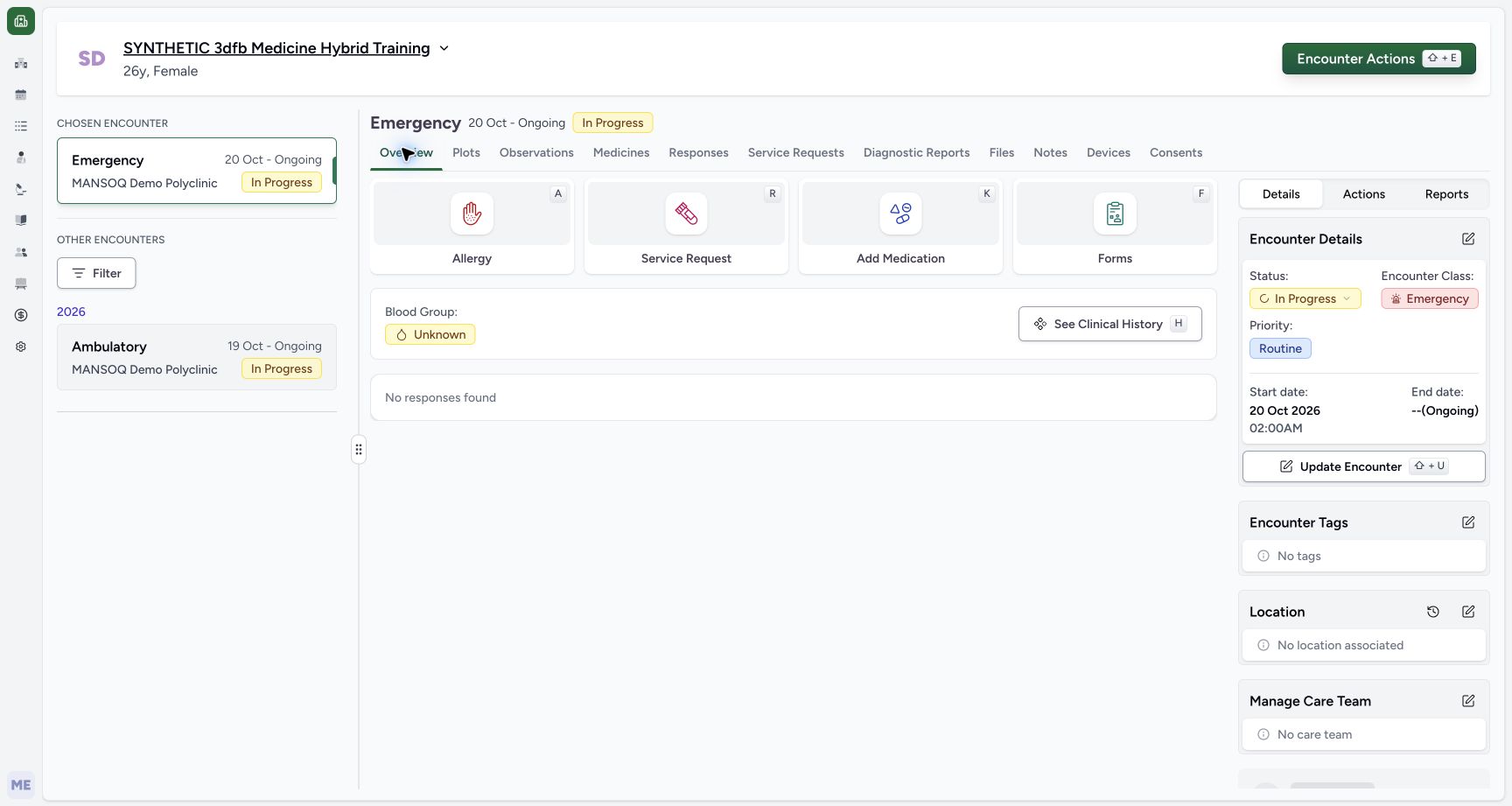 123
123Final clean own emergency overview
Capture details
Captured committed 3dfb interface. One separate Emergency create, one On Hold update and one return to In Progress; no triage, discharge or change to the older Ambulatory encounter. Browser and native originals retain their actual dimensions.
Image SHA-256 a26ec1d08a5f31941629fc0aac196b531d9e1d07a9855bcc9ac53ae344b1bcbd
- Verify final In Progress: The workflow ends on a clean saved Overview.
- Verify dedicated Emergency encounter: The chosen encounter remains distinct.
- Verify older Ambulatory entry remains separate: The exercise never changed its care state.
Use the finite demonstrated outcome
The completed example is one new synthetic Emergency encounter, one On Hold save and one return to In Progress. It contains no triage entry, handover message, discharge, terminal-state save or change to the older Ambulatory encounter. The screenshots document the captured 3dfb interface; later releases may expose different controls.
1234Own status history created paused resumed
Capture details
Captured committed 3dfb interface. One separate Emergency create, one On Hold update and one return to In Progress; no triage, discharge or change to the older Ambulatory encounter. Browser and native originals retain their actual dimensions.
Image SHA-256 75e52f2c651b24366c7563f42caabc95d01e0e0d5bce96950c1028846fb33dc9
- Read the status-history trigger: The popover is open for this same status badge.
- Read initial In Progress entry: The popover records the create status and local timestamp.
- Read On Hold entry: The first saved update is retained in the history.
- Read returned In Progress entry: The second saved update appears after On Hold.
123Final clean own emergency overview
Capture details
Captured committed 3dfb interface. One separate Emergency create, one On Hold update and one return to In Progress; no triage, discharge or change to the older Ambulatory encounter. Browser and native originals retain their actual dimensions.
Image SHA-256 a26ec1d08a5f31941629fc0aac196b531d9e1d07a9855bcc9ac53ae344b1bcbd
- Verify final In Progress: The workflow ends on a clean saved Overview.
- Verify dedicated Emergency encounter: The chosen encounter remains distinct.
- Verify older Ambulatory entry remains separate: The exercise never changed its care state.
Source evidence
Every citation uses this exact committed version. The private source repository requires access.
- repositories/platform/mansoq-web/src/pages/Facility/emergency/EmergencyBoard.tsx:44 ·
3dfb7c9f519fb5b4cd4452439f3c12346bf58319Source file checksum
f71db4dd0fdea13df8ed5f587dfabd03648516256e75badde7077dd604cb5b6c - repositories/platform/mansoq-web/src/pages/Facility/emergency/emergencyBoardApi.ts:27 ·
3dfb7c9f519fb5b4cd4452439f3c12346bf58319Source file checksum
33e8286f0f259e49267bd02152c02769cdaad32c5764bac9c4fe4d3e031fd513 - repositories/platform/mansoq-web/src/components/ui/sidebar/facility/facility-nav.tsx:89 ·
3dfb7c9f519fb5b4cd4452439f3c12346bf58319Source file checksum
26a257157ad5c4272295c13ac63f349cc4f2ba61ede92af64e671a0eb9be5d95 - repositories/platform/mansoq-web/src/Routers/routes/FacilityRoutes.tsx:54 ·
3dfb7c9f519fb5b4cd4452439f3c12346bf58319Source file checksum
e42381cbb2ce6c5ba8cdf2203ad05e90582e6bf59c27be491a071ea5417cc534 - repositories/platform/mansoq-web/src/pages/Encounters/EncounterList.tsx:187 ·
3dfb7c9f519fb5b4cd4452439f3c12346bf58319Source file checksum
2dbe49fe5456b9161dbd171510f1614cd81a9c915ae766dd48346643d2ba61b1 - repositories/platform/mansoq-web/src/components/ui/multi-filter/filterConfigs.tsx:80 ·
3dfb7c9f519fb5b4cd4452439f3c12346bf58319Source file checksum
ff846a8365ca3b3351883b7b41bd5ecd3577d8d3c2bd422029c3d2bf0d9046a5 - repositories/platform/mansoq-web/src/components/Encounter/CreateEncounterForm.tsx:89 ·
3dfb7c9f519fb5b4cd4452439f3c12346bf58319Source file checksum
849ee40ade505c03c37ead86ac160b0c611bedf5f35da2e7dec1700288d4daca - repositories/platform/mansoq-web/src/components/Questionnaire/QuestionTypes/EncounterQuestion.tsx:69 ·
3dfb7c9f519fb5b4cd4452439f3c12346bf58319Source file checksum
3a18093287f1975b8f3387b83216b981d9ec6e75975ccecde4544e4d4c91cb2c - repositories/platform/mansoq-web/src/components/Questionnaire/QuestionnaireForm.tsx:834 ·
3dfb7c9f519fb5b4cd4452439f3c12346bf58319Source file checksum
ee6c2195f13e48f0896a2d3da566c2f2a67910adad08894df6b77862f9cfdeec - repositories/platform/mansoq-web/src/components/Questionnaire/structured/handlers.ts:179 ·
3dfb7c9f519fb5b4cd4452439f3c12346bf58319Source file checksum
459ade48f77316279ab2978dc7b4466cb96acb8223c61b9a1f87ca9973be7c7f - repositories/platform/mansoq-web/src/pages/Encounters/EncounterProperties.tsx:23 ·
3dfb7c9f519fb5b4cd4452439f3c12346bf58319Source file checksum
f8077c29c8df9f307e2687894d4997526efb015feb628832378c3aefd1521091 - repositories/platform/mansoq-web/src/components/Encounter/EncounterCommandDialog.tsx:248 ·
3dfb7c9f519fb5b4cd4452439f3c12346bf58319Source file checksum
361a31246fc38a50a86c8960dadb3254afcfcb7fb8eb53d7bf59c1699512683c - repositories/platform/mansoq-web/src/pages/Encounters/utils/EncounterProvider.tsx:162 ·
3dfb7c9f519fb5b4cd4452439f3c12346bf58319Source file checksum
d2609fc0452c91c20104237bf02be40ecb3bf48225011aba1f4bca2d50620d75 - repositories/platform/mansoq-web/src/pages/Encounters/utils/useEncounterProgressController.ts:19 ·
3dfb7c9f519fb5b4cd4452439f3c12346bf58319Source file checksum
d627cc15e3bad6b3bfd3fd61271787f274bfc325dc0d815e846e5d580554a265 - repositories/platform/mansoq-web/src/types/emr/encounter/encounter.ts:117 ·
3dfb7c9f519fb5b4cd4452439f3c12346bf58319Source file checksum
178ad4319d92bef379a78ed07c74d87d4c185774b3cdf989affc0f7e06ac08db - repositories/platform/mansoq-web/src/types/emr/encounter/encounterApi.ts:17 ·
3dfb7c9f519fb5b4cd4452439f3c12346bf58319Source file checksum
dc3397b24f1343b3d39f1b8ee3b01da8b3b9c16011d53427d118e6f48a674eaf - repositories/platform/mansoq-core/mansoq/emr/resources/encounter/emergency_board.py:35 ·
3dfb7c9f519fb5b4cd4452439f3c12346bf58319Source file checksum
de05aec7b2b1c2a956bde172243c221aadc9dcc4c671e0775d929664d5273cff - repositories/platform/mansoq-core/mansoq/emr/resources/facility/triage.py:15 ·
3dfb7c9f519fb5b4cd4452439f3c12346bf58319Source file checksum
a77ef80e937c9592c90051ad870c6efbf087e68dbbafc3f648b77509650f0ab4 - repositories/platform/mansoq-core/mansoq/emr/api/viewsets/encounter.py:172 ·
3dfb7c9f519fb5b4cd4452439f3c12346bf58319Source file checksum
95deb76fba78fa3426ea5eae2fa175db4a31bd3ea8a6bc70da5f80632a05d2f8 - repositories/platform/mansoq-core/mansoq/emr/resources/encounter/spec.py:44 ·
3dfb7c9f519fb5b4cd4452439f3c12346bf58319Source file checksum
c500756ac656d65d419fd08381905d7201414d63cb7910205a6eb7fd52099545 - repositories/platform/mansoq-core/mansoq/emr/resources/encounter/constants.py:4 ·
3dfb7c9f519fb5b4cd4452439f3c12346bf58319Source file checksum
4cb075b4aee3c09c6275cab553865929e2ea1bced4c5e66eb571855bcbb9f52a - repositories/platform/mansoq-core/mansoq/security/authorization/encounter.py:28 ·
3dfb7c9f519fb5b4cd4452439f3c12346bf58319Source file checksum
0e7ff8afcfb57b2371201e16ee6fac26125d6e686af66ed7edd95e49bc07de78 - repositories/platform/mansoq-core/mansoq/security/permissions/encounter.py:24 ·
3dfb7c9f519fb5b4cd4452439f3c12346bf58319Source file checksum
06b74efb763810e425de8529660f748ebd56509c729ebc532c8d115102b29218 - repositories/platform/mansoq-core/mansoq/emr/models/encounter.py:43 ·
3dfb7c9f519fb5b4cd4452439f3c12346bf58319Source file checksum
9a506456aba3ae2e3be5cfd25f32e552d3406ddd7290c0d0edef5e136782b46e - repositories/platform/mansoq-core/mansoq/emr/models/patient.py:116 ·
3dfb7c9f519fb5b4cd4452439f3c12346bf58319Source file checksum
35fa574cbdb97bd985a5561827116945e5acb81a38a93c678774ec422721e8aa - repositories/platform/mansoq-core/mansoq/emr/signals/patient/base.py:68 ·
3dfb7c9f519fb5b4cd4452439f3c12346bf58319Source file checksum
c6b7fc7fdd8af00756411343db2a4e2503c2f0166a4df0cb0e8e6bb7536b2d32 - repositories/platform/mansoq-core/mansoq/emr/signals/patient/facility_name_identifier.py:27 ·
3dfb7c9f519fb5b4cd4452439f3c12346bf58319Source file checksum
dd72b45263ce4c61a552f3d461eba4b4cd49ac295e2b31c9e2e5a84c11e26c34 - repositories/platform/mansoq-core/mansoq/emr/signals/patient/name_identifier.py:26 ·
3dfb7c9f519fb5b4cd4452439f3c12346bf58319Source file checksum
bd6bf5abfe31beeafd5bc07b9ad78b00c36506fe57dd68e929bd0e4060129821 - repositories/platform/mansoq-core/mansoq/emr/signals/patient/phone_number_identifier.py:26 ·
3dfb7c9f519fb5b4cd4452439f3c12346bf58319Source file checksum
843f7eeef76c4ee36117303644590f357f0b7d6ad2415e869dd26abe49c81f15 - repositories/platform/mansoq-core/mansoq/emr/resources/patient_identifier/default_expression_evaluator.py:48 ·
3dfb7c9f519fb5b4cd4452439f3c12346bf58319Source file checksum
0c5d676a96d65c6ca897ac6c9ae968e4497810260d1e7b4d7ce84f48621e8a31 - repositories/platform/mansoq-core/mansoq/emr/api/viewsets/location.py:558 ·
3dfb7c9f519fb5b4cd4452439f3c12346bf58319Source file checksum
646ce12d299831d9c6dba43121d80fba8a10afb85a69a26c73cae8d4a7e10a31 - repositories/platform/mansoq-core/mansoq/emr/api/viewsets/device.py:517 ·
3dfb7c9f519fb5b4cd4452439f3c12346bf58319Source file checksum
2940ecc132dd70b97cbbdadffcca205260dd65df63f16572c22b981b7bf207d7 - repositories/platform/mansoq-core/mansoq/emr/rcm/services/service_date.py:15 ·
3dfb7c9f519fb5b4cd4452439f3c12346bf58319Source file checksum
f98d08481591f0c3526a9c81dc0744267f3ba93f5abcc885379a7911d5e2aa77 - repositories/platform/mansoq-web/src/components/Questionnaire/data/StructuredFormData.tsx:3 ·
3dfb7c9f519fb5b4cd4452439f3c12346bf58319Source file checksum
434386c27b8e583e1dbd0a6f506250e7a0fb3640963c572445123bae62880f0f - repositories/platform/mansoq-core/config/settings/config.py:13 ·
3dfb7c9f519fb5b4cd4452439f3c12346bf58319Source file checksum
80e2bd16a124b5b9e80eefab7a9d5b2f20a874a8fe645b223f26cad04e6cd60a - repositories/platform/mansoq-core/config/settings/base.py:23 ·
3dfb7c9f519fb5b4cd4452439f3c12346bf58319Source file checksum
34f8931a2bae5a35f45bf6247695ee6bac09ccada3be766773861b4245817d6f - repositories/platform/mansoq-core/mansoq/emr/models/organization.py:102 ·
3dfb7c9f519fb5b4cd4452439f3c12346bf58319Source file checksum
1658c05cd0022370c55fe9d9a39d87278228141543fa3542b395119c32ee85f0 - repositories/platform/mansoq-core/mansoq/emr/models/location.py:12 ·
3dfb7c9f519fb5b4cd4452439f3c12346bf58319Source file checksum
3cafb18e62f616c20adc01ba2d5f9f11c4dd2f79451fa02e9b0ee1f2b9587a83 - repositories/platform/mansoq-core/mansoq/emr/models/device.py:7 ·
3dfb7c9f519fb5b4cd4452439f3c12346bf58319Source file checksum
9f9e3b431230d969391ac50d204d36b45eeca895fcd9423cb256974f5f7540f0 - repositories/platform/mansoq-core/mansoq/emr/resources/permissions.py:30 ·
3dfb7c9f519fb5b4cd4452439f3c12346bf58319Source file checksum
6822429d64e1f5a5c4cf7bdf37cb401e2f270d89d3b105d075ac42c6bce70f3e - repositories/platform/mansoq-core/mansoq/emr/resources/facility/spec.py:28 ·
3dfb7c9f519fb5b4cd4452439f3c12346bf58319Source file checksum
33c04d305762ea2f0f89dd6499544701aef27241e46874085f6b9c0973acbc9d - repositories/platform/mansoq-core/mansoq/emr/resources/base.py:82 ·
3dfb7c9f519fb5b4cd4452439f3c12346bf58319Source file checksum
bc406c723888997dd99fc408cb3c5dec51fb0b54d10272ca31bfd8c98c893229 - repositories/platform/mansoq-core/mansoq/facility/models/facility.py:155 ·
3dfb7c9f519fb5b4cd4452439f3c12346bf58319Source file checksum
64d598b63209caefad63c76e14d5010ba6838b9fd2cb5deca345d065a7e25ca3