 MANSOQ
 Clinical care · VERSION 3dfb7c9f
Review past prescriptions without adding them
Identify one fictional historical order, read its note and practise selection, deselection and Cancel before copying anything.
Doctor
 12
12Existing doctor normal ui context
Capture details
Observed committed3dfb software in the existing day20-qualified Clinical profile. One new copy and its carried authored date are distinct from the retained original records. No clinical recommendation.
Image SHA-256 c4c86be73b5b112247d62300becd0ad1dc901cdbeefb607cc4e239abfbc154ef
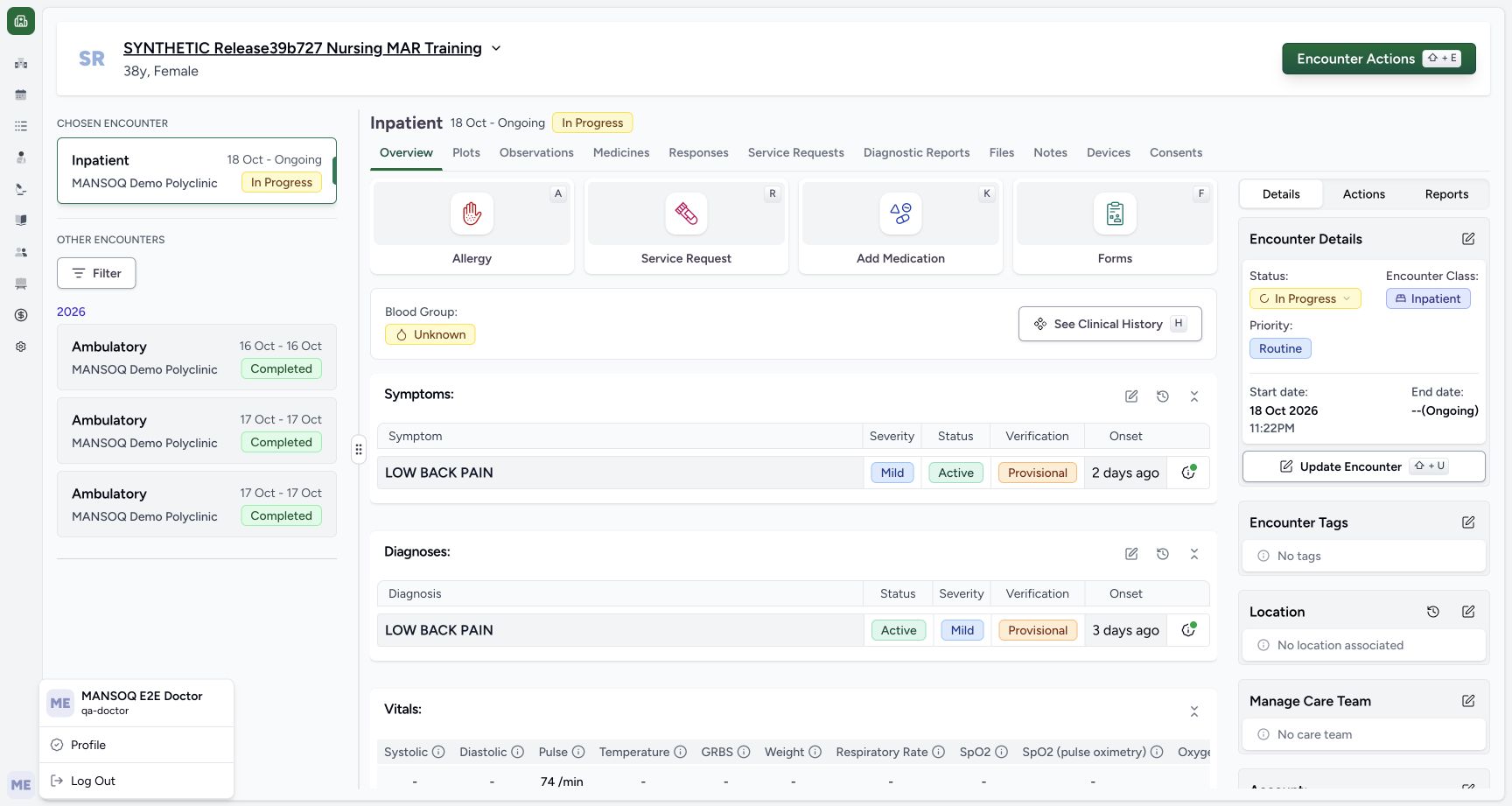
- Read the Doctor account: The account menu shows MANSOQ E2E Doctor and qa-doctor.
- Confirm the synthetic patient: Use the named software-training fixture.
11 of 11 content blocks have reviewed image alignment. Missing overview or prerequisite images remain open.
Before you begin
- Use an authorised Doctor session with medication-write access to the assigned active synthetic encounter and patient-wide clinical history.12
Recorded release 3dfb7c9f · 2026-10-19T22:44:33.519Z · 1728 × 921 Existing doctor normal ui context
Capture details
Observed committed3dfb software in the existing day20-qualified Clinical profile. One new copy and its carried authored date are distinct from the retained original records. No clinical recommendation.
Image SHA-256
c4c86be73b5b112247d62300becd0ad1dc901cdbeefb607cc4e239abfbc154ef- Read the Doctor account: The account menu shows MANSOQ E2E Doctor and qa-doctor.
- Confirm the synthetic patient: Use the named software-training fixture.
- Use only approved fictional software-training records. All medicine, dose, schedule and date examples here are interface samples, not clinical guidance.
 12
12Recorded release 3dfb7c9f · 2026-10-19T22:44:36.176Z · 1728 × 921 Active inpatient add medication
Capture details
Observed committed3dfb software in the existing day20-qualified Clinical profile. One new copy and its carried authored date are distinct from the retained original records. No clinical recommendation.
Image SHA-256
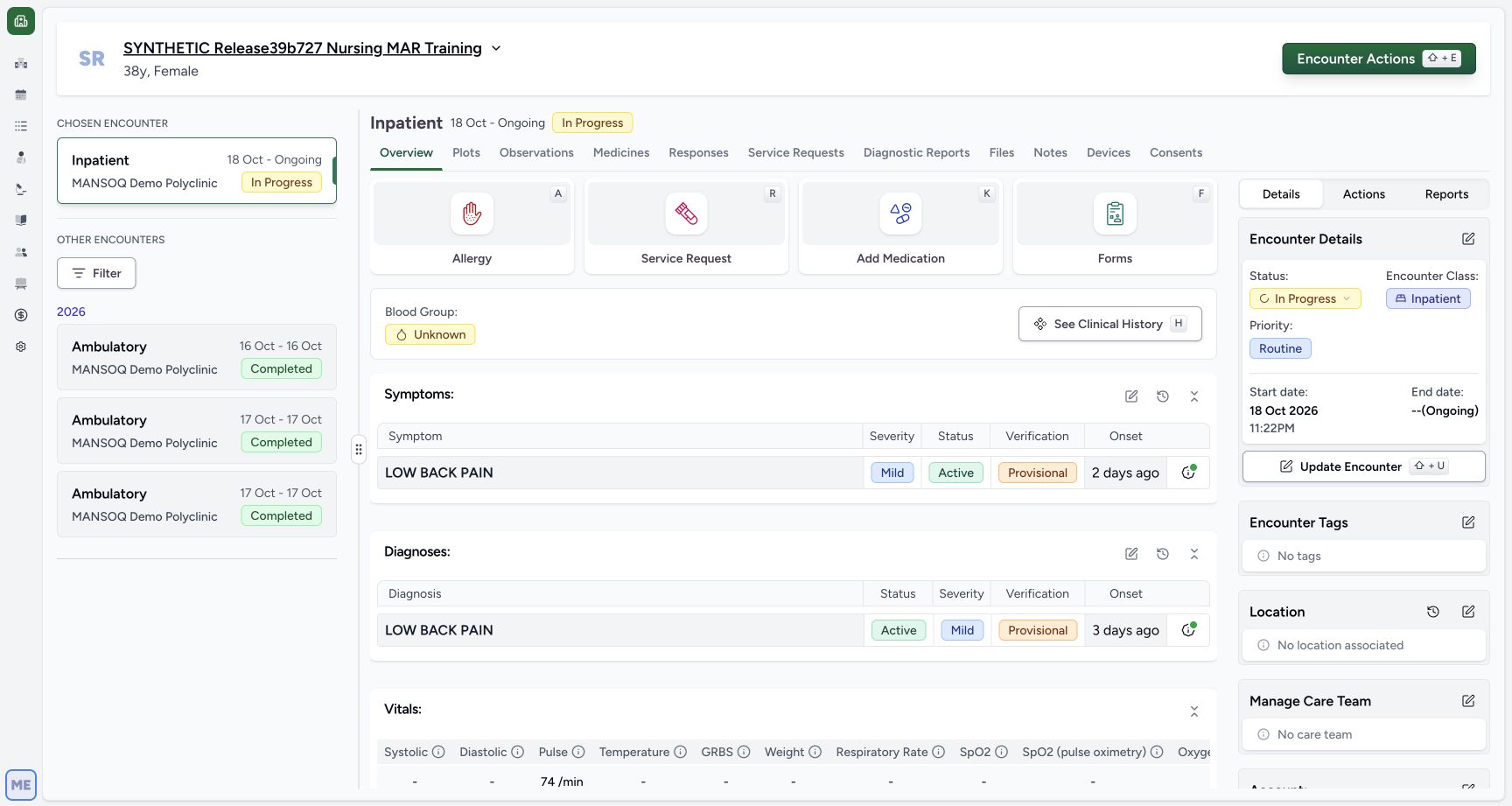
dd1e33720ffdb69ce66a87c14ebe12af1bf91f3c391ac597852ee66bb23b2ae6- Choose Add Medication: Open the medication request form from Overview.
- Check In Progress encounter: The chosen encounter is the active Inpatient software-training encounter.
1. Confirm the Doctor and the synthetic encounter
Check the account menu shows MANSOQ E2E Doctor and qa-doctor. Confirm SYNTHETIC Release39b727 Nursing MAR Training and the Inpatient encounter marked In Progress. These screenshots use fictional software records; the medicine, dose and schedule are not prescribing instructions.
12Existing doctor normal ui context
Capture details
Observed committed3dfb software in the existing day20-qualified Clinical profile. One new copy and its carried authored date are distinct from the retained original records. No clinical recommendation.
Image SHA-256 c4c86be73b5b112247d62300becd0ad1dc901cdbeefb607cc4e239abfbc154ef
- Read the Doctor account: The account menu shows MANSOQ E2E Doctor and qa-doctor.
- Confirm the synthetic patient: Use the named software-training fixture.
12Active inpatient add medication
Capture details
Observed committed3dfb software in the existing day20-qualified Clinical profile. One new copy and its carried authored date are distinct from the retained original records. No clinical recommendation.
Image SHA-256 dd1e33720ffdb69ce66a87c14ebe12af1bf91f3c391ac597852ee66bb23b2ae6
- Choose Add Medication: Open the medication request form from Overview.
- Check In Progress encounter: The chosen encounter is the active Inpatient software-training encounter.
2. Open Add Medication
From Overview choose Add Medication. The Medication Request form starts with an empty medicine selector; opening it has not created a new order.
12Active inpatient add medication
Capture details
Observed committed3dfb software in the existing day20-qualified Clinical profile. One new copy and its carried authored date are distinct from the retained original records. No clinical recommendation.
Image SHA-256 dd1e33720ffdb69ce66a87c14ebe12af1bf91f3c391ac597852ee66bb23b2ae6
- Choose Add Medication: Open the medication request form from Overview.
- Check In Progress encounter: The chosen encounter is the active Inpatient software-training encounter.
 12
12Medication request empty history control
Capture details
Observed committed3dfb software in the existing day20-qualified Clinical profile. One new copy and its carried authored date are distinct from the retained original records. No clinical recommendation.
Image SHA-256 dbec120f1f3e0c1a7f7d0daee43c3c1d17f8de469be7f746f79dfe682ebd8ea8
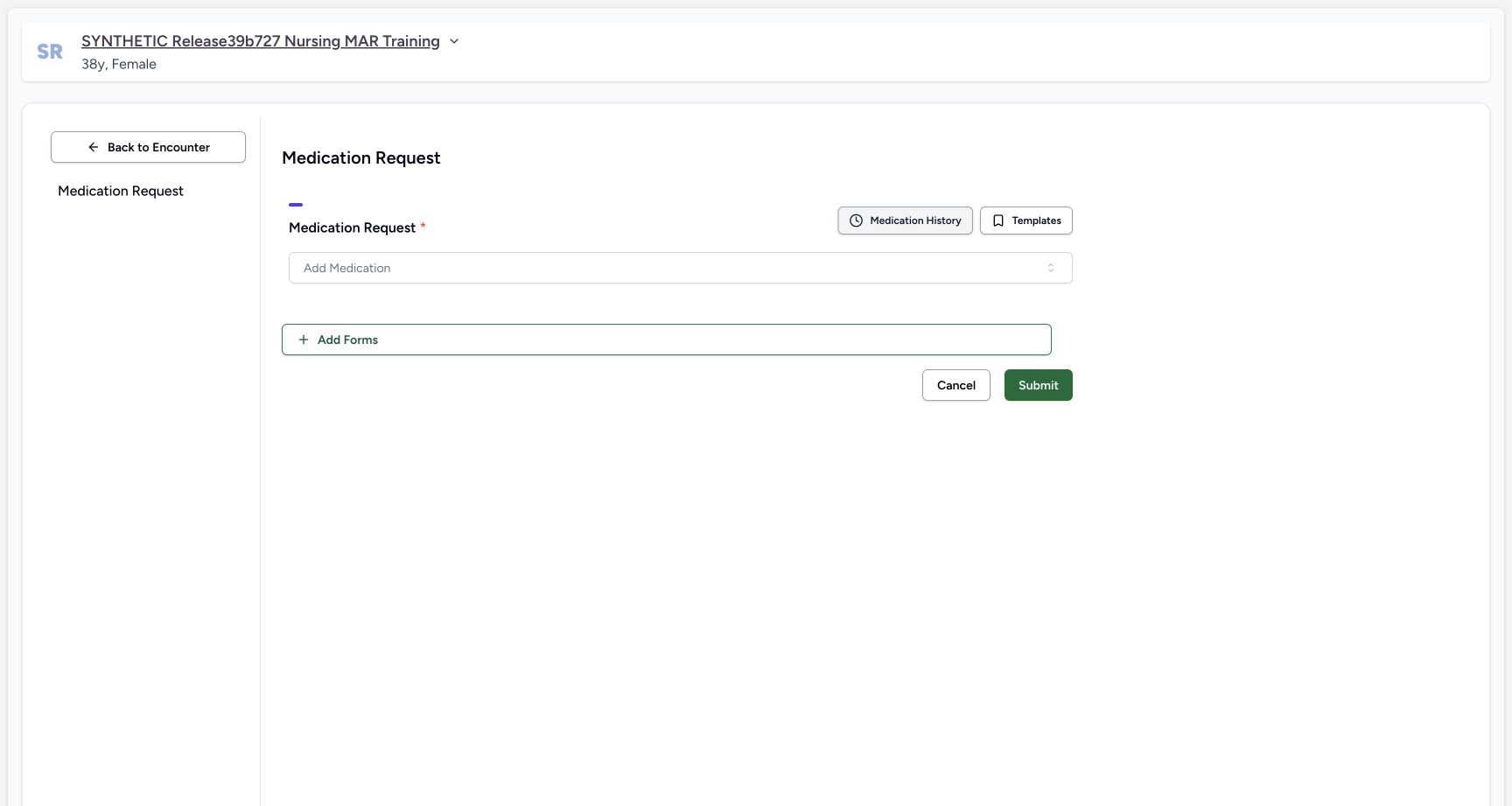
- Open Medication History: Open the history chooser rather than searching for a new product.
- Read the empty medicine selector: No copied request has been added yet.
3. Open Medication History
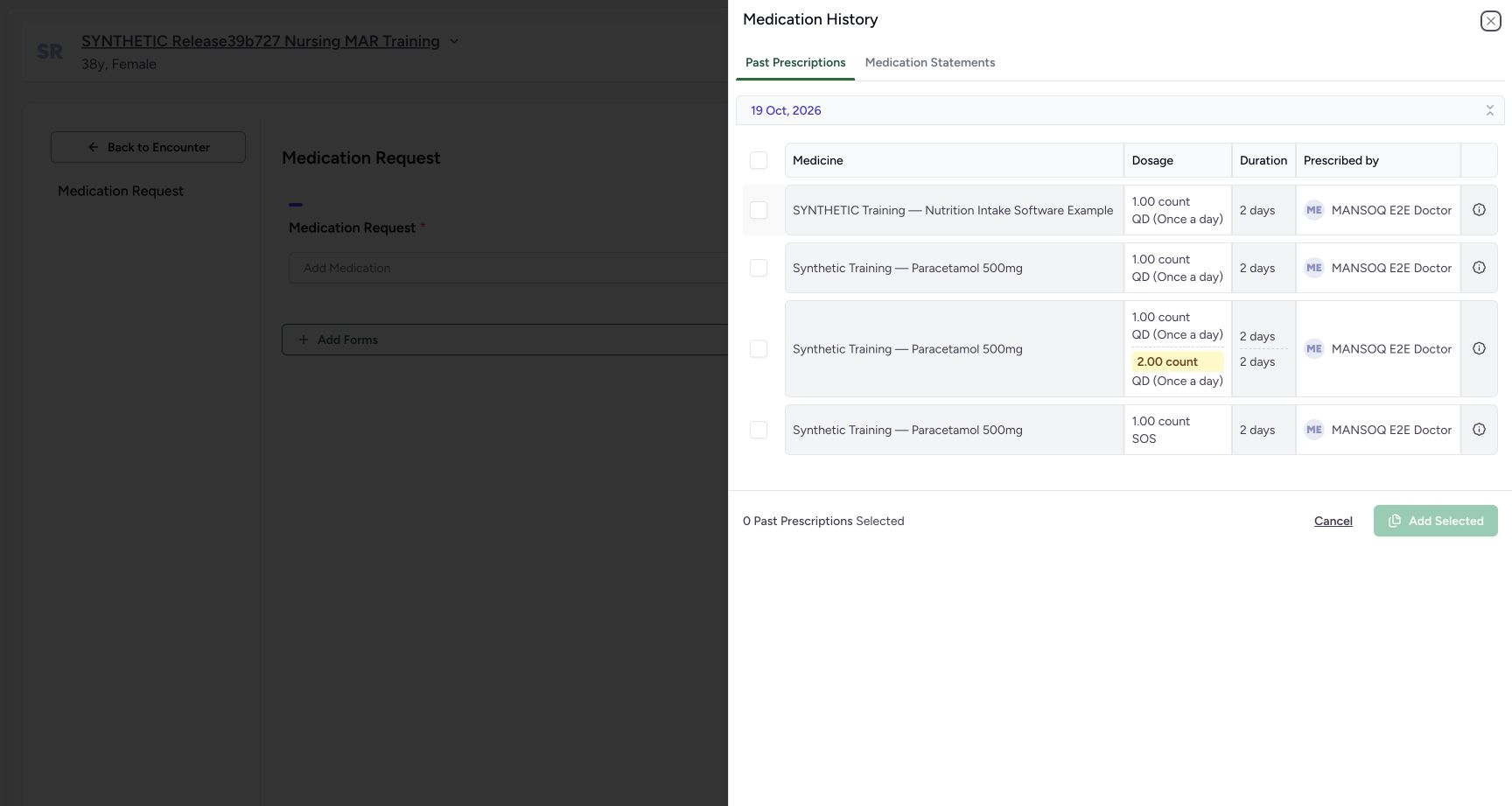
Choose Medication History. Past Prescriptions lists the existing patient records with dosage, duration and prescriber. This example has four rows. The date group is based on record creation, not the Authored On date reviewed later.
12Medication request empty history control
Capture details
Observed committed3dfb software in the existing day20-qualified Clinical profile. One new copy and its carried authored date are distinct from the retained original records. No clinical recommendation.
Image SHA-256 dbec120f1f3e0c1a7f7d0daee43c3c1d17f8de469be7f746f79dfe682ebd8ea8
- Open Medication History: Open the history chooser rather than searching for a new product.
- Read the empty medicine selector: No copied request has been added yet.
 123
123History four past prescriptions none selected
Capture details
Observed committed3dfb software in the existing day20-qualified Clinical profile. One new copy and its carried authored date are distinct from the retained original records. No clinical recommendation.
Image SHA-256 5509158a27d11873c4b8efd586d0e8616f261f6775389f9cd1497c8edac35db2
- Read Past Prescriptions: This is the populated historical request tab.
- Expand the single scheduled row note: Read the identifying note on the single QD training row.
- Read the creation-date group: The group is based on the source record creation date.
4. Identify the intended order by its note
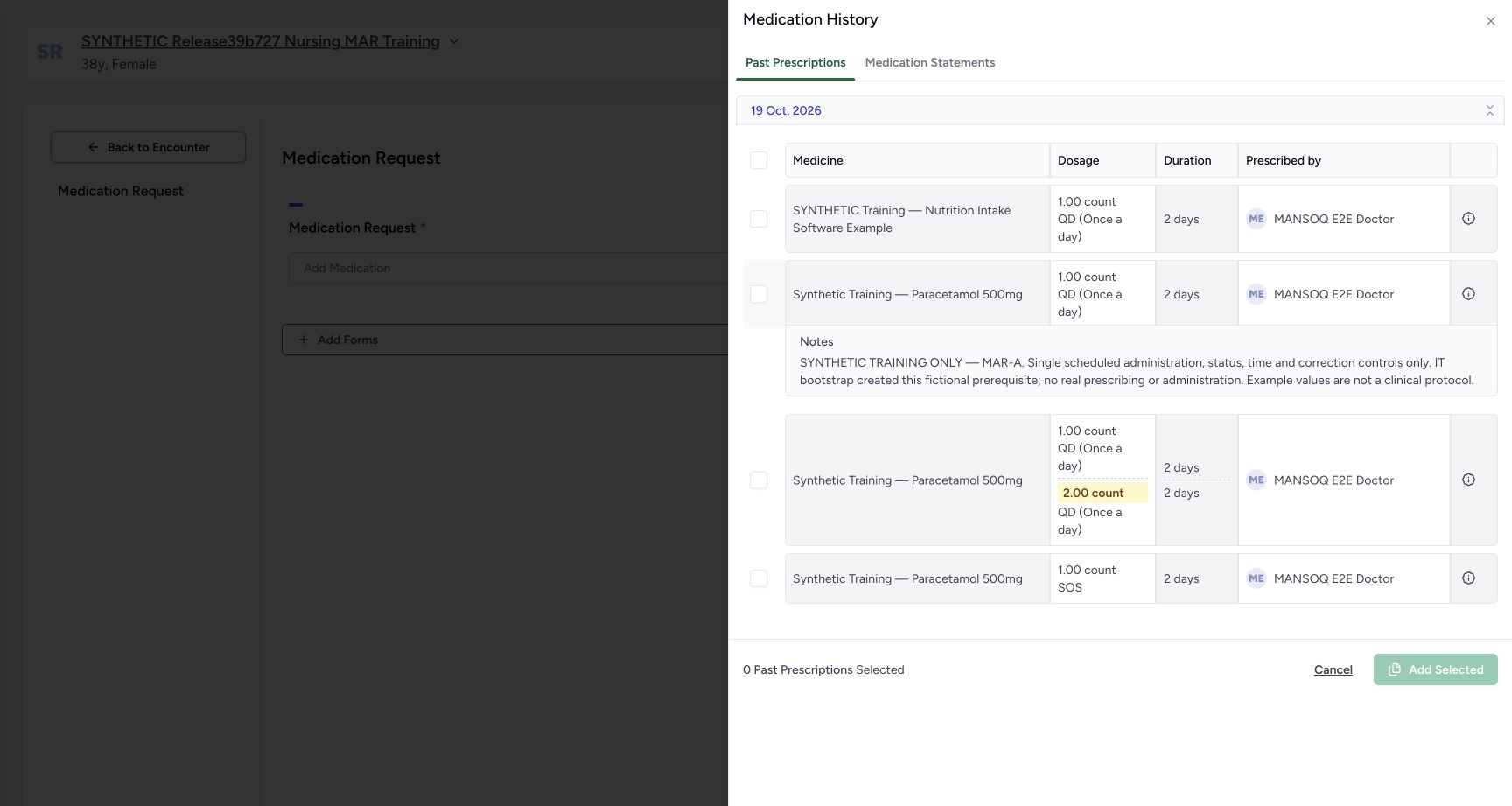
Use the information control on the single scheduled Paracetamol training row. Read the expanded MAR-A note before selecting; the other same-name rows have different instructions. Do not select the nutrition example or the multidose and SOS alternatives.
123History four past prescriptions none selected
Capture details
Observed committed3dfb software in the existing day20-qualified Clinical profile. One new copy and its carried authored date are distinct from the retained original records. No clinical recommendation.
Image SHA-256 5509158a27d11873c4b8efd586d0e8616f261f6775389f9cd1497c8edac35db2
- Read Past Prescriptions: This is the populated historical request tab.
- Expand the single scheduled row note: Read the identifying note on the single QD training row.
- Read the creation-date group: The group is based on the source record creation date.
 12
12Expand and read mar a historical note
Capture details
Observed committed3dfb software in the existing day20-qualified Clinical profile. One new copy and its carried authored date are distinct from the retained original records. No clinical recommendation.
Image SHA-256 077559dd18d6481a98356f0d18dd09ff118afab592e2af57a7585f14ea241cca
- Read MAR-A: The expanded note identifies the intended fictional prior order.
- Choose Cancel: Close the history chooser without adding a row.
5. Cancel without adding a row
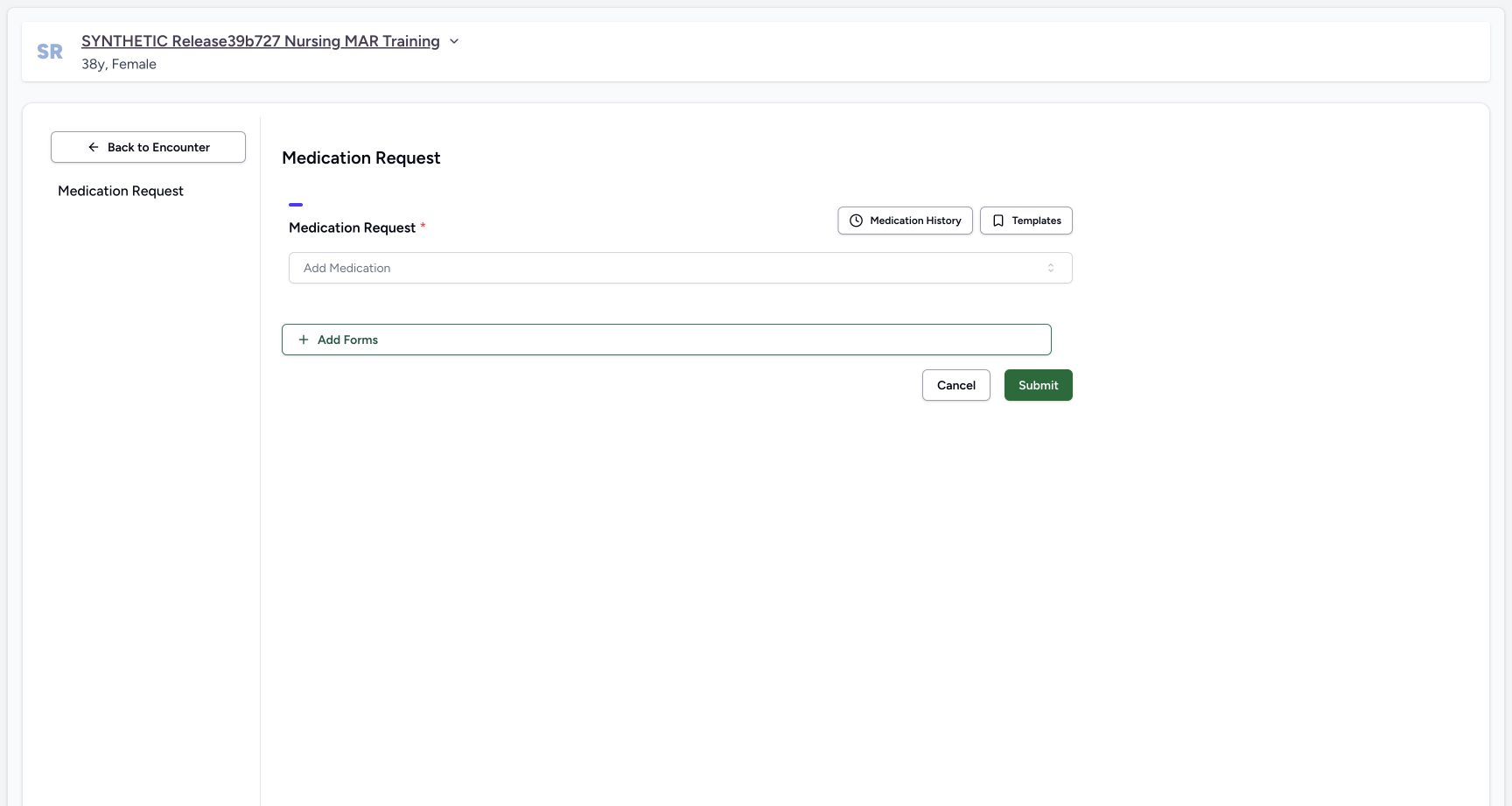
Choose Cancel inside Medication History. The drawer closes and the Medication Request form remains empty. This closes the chooser without creating a request.
12Expand and read mar a historical note
Capture details
Observed committed3dfb software in the existing day20-qualified Clinical profile. One new copy and its carried authored date are distinct from the retained original records. No clinical recommendation.
Image SHA-256 077559dd18d6481a98356f0d18dd09ff118afab592e2af57a7585f14ea241cca
- Read MAR-A: The expanded note identifies the intended fictional prior order.
- Choose Cancel: Close the history chooser without adding a row.
 1
1History cancel empty editor
Capture details
Observed committed3dfb software in the existing day20-qualified Clinical profile. One new copy and its carried authored date are distinct from the retained original records. No clinical recommendation.
Image SHA-256 23c2b1feea5944c2a6b87cc37691cb09e3ebe4044657137e648116cf7ac8d8ac
- Reopen Medication History: The cancelled editor remains empty.
6. Practise selecting and clearing one checkbox
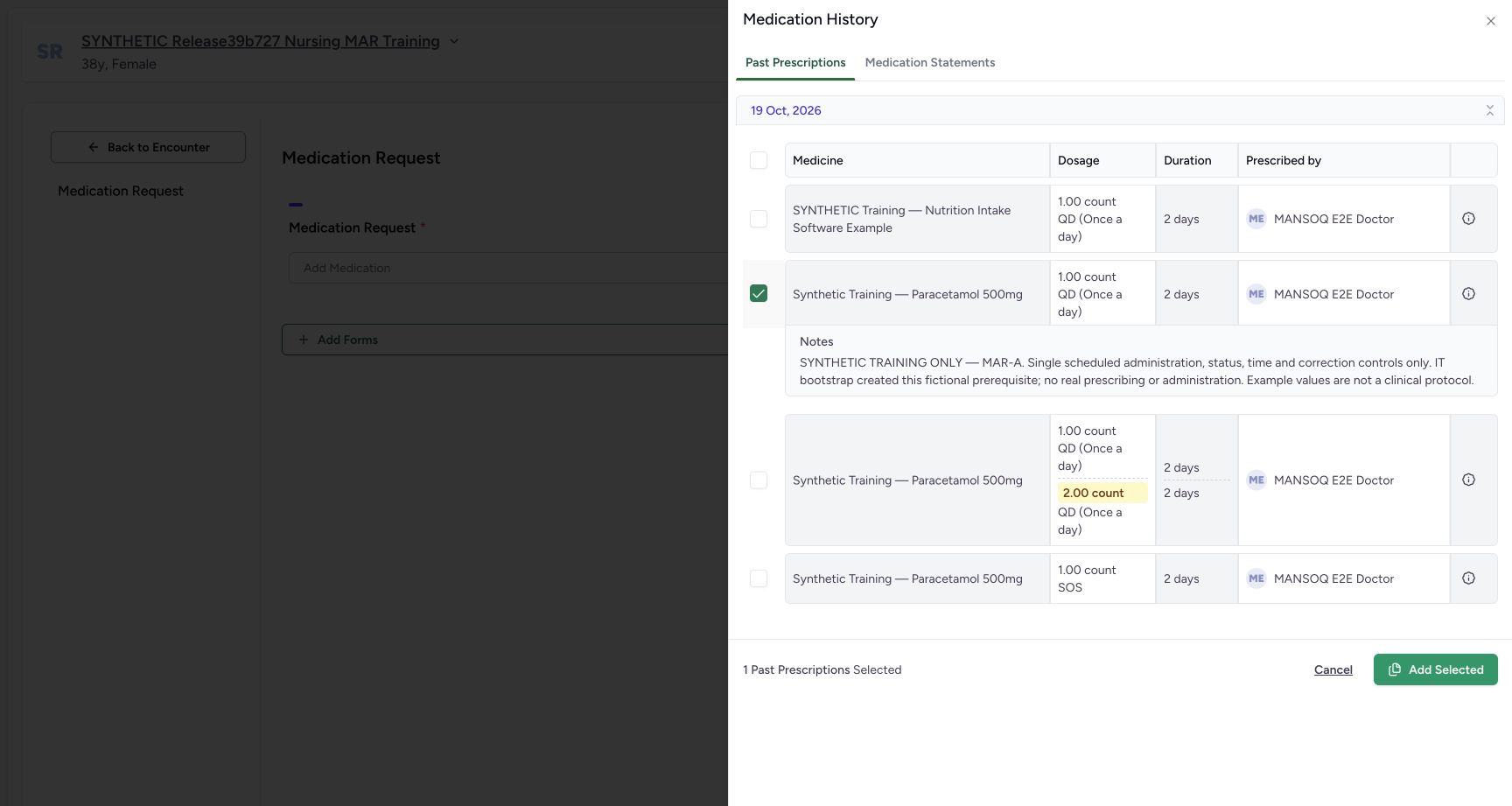
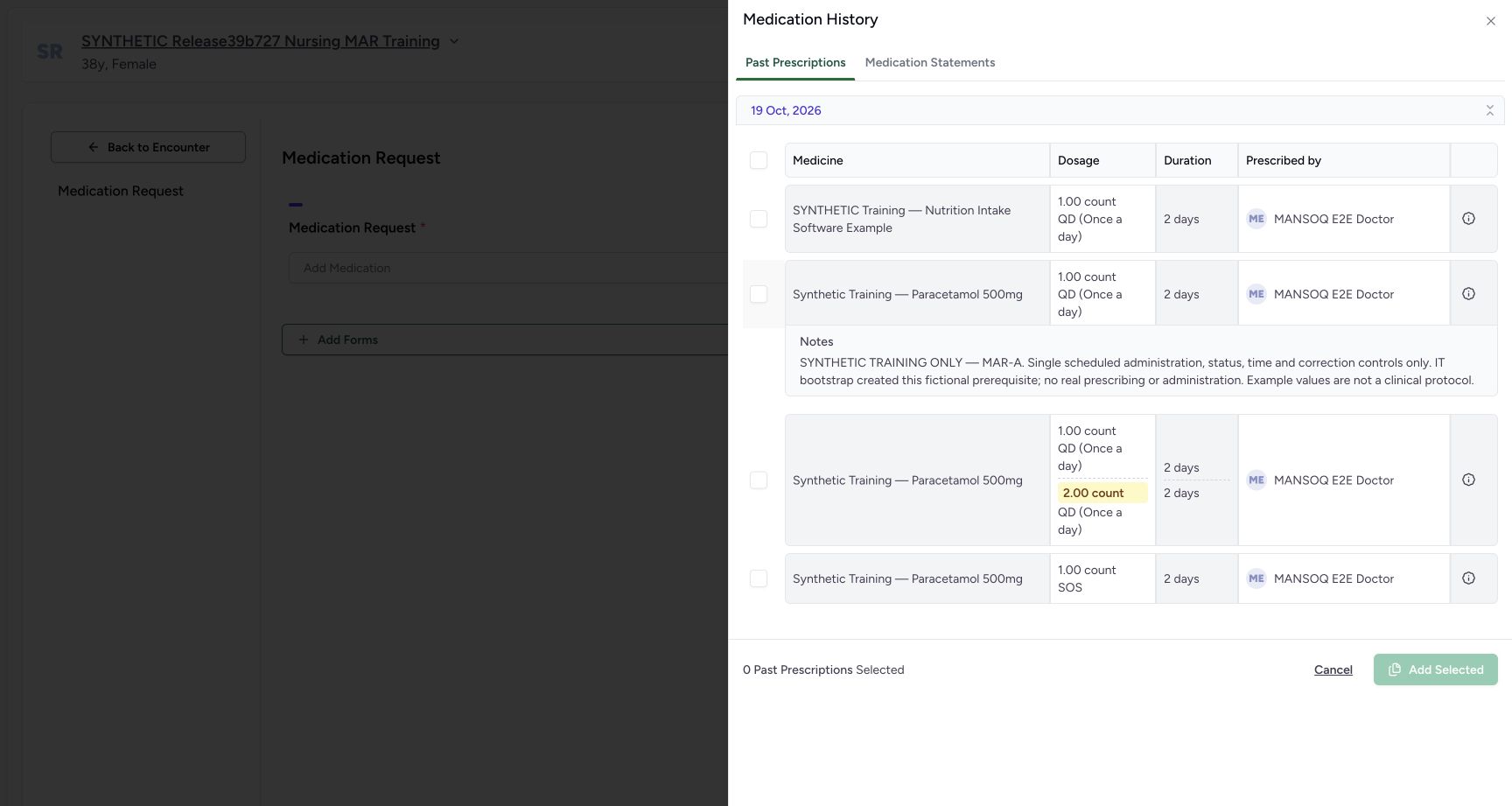
Reopen Medication History. Select only the identified MAR-A row and read 1 Past Prescriptions Selected. Clear that same checkbox: the count returns to zero and Add Selected is disabled. This is an unsaved chooser exercise.
1History cancel empty editor
Capture details
Observed committed3dfb software in the existing day20-qualified Clinical profile. One new copy and its carried authored date are distinct from the retained original records. No clinical recommendation.
Image SHA-256 23c2b1feea5944c2a6b87cc37691cb09e3ebe4044657137e648116cf7ac8d8ac
- Reopen Medication History: The cancelled editor remains empty.
 12
12One mar a checkbox selected
Capture details
Observed committed3dfb software in the existing day20-qualified Clinical profile. One new copy and its carried authored date are distinct from the retained original records. No clinical recommendation.
Image SHA-256 498b2d367537511284209b09a0928eaad215378c5d7ff385af51e26bba03cd86
- Select only MAR-A: This exact checkbox selects the identified single scheduled row.
- Check one selected: The chooser reports 1 Past Prescriptions Selected.
 123
123Deselect restores zero disabled add
Capture details
Observed committed3dfb software in the existing day20-qualified Clinical profile. One new copy and its carried authored date are distinct from the retained original records. No clinical recommendation.
Image SHA-256 077559dd18d6481a98356f0d18dd09ff118afab592e2af57a7585f14ea241cca
- Clear the same checkbox: The row is now unselected.
- Read disabled Add Selected: Zero selection disables Add Selected.
- Choose Medication Statements: Inspect the separate statement history tab.
7. Read the separate Medication Statements tab
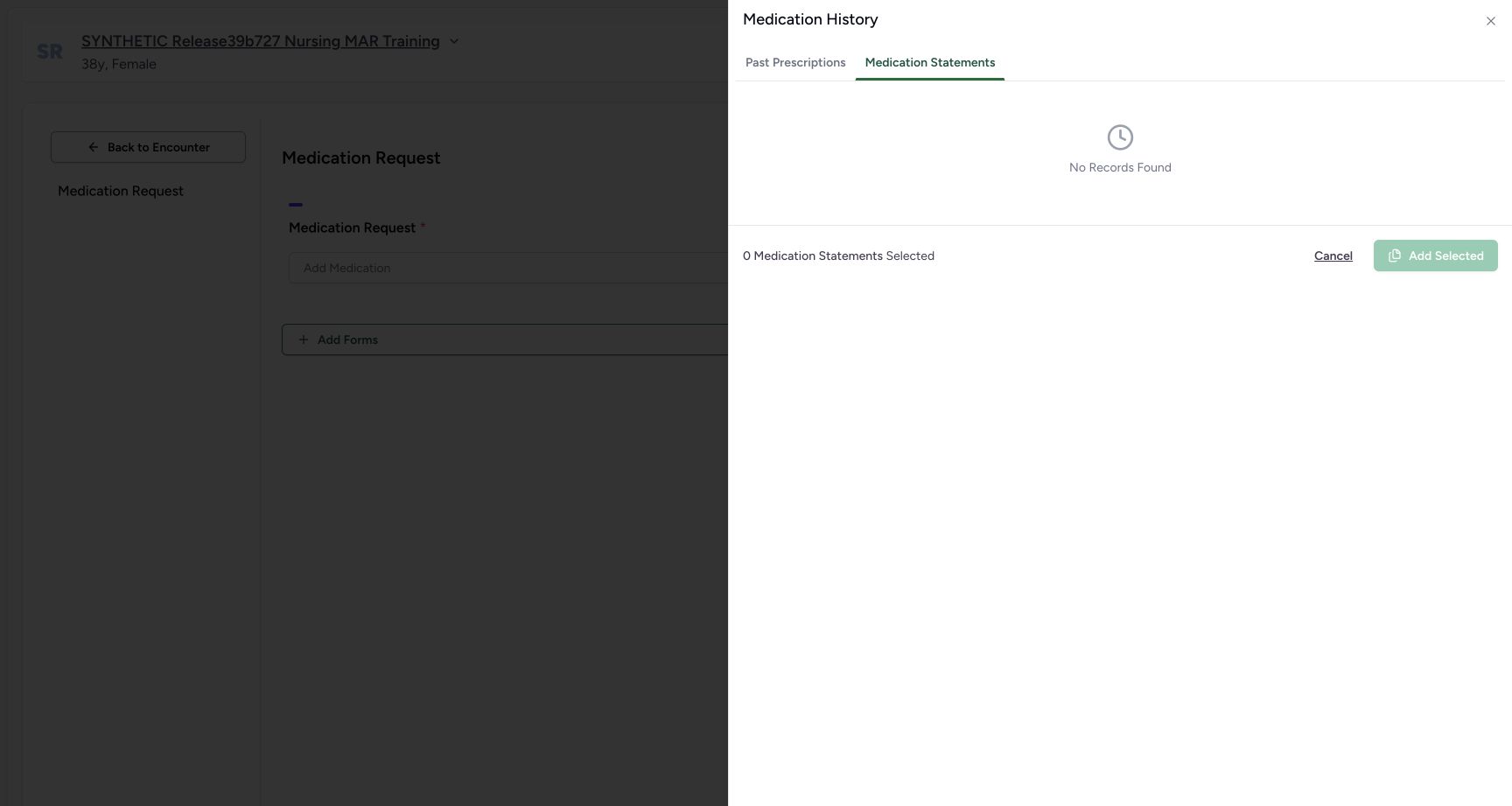
Choose Medication Statements. Here it shows No Records Found and zero selected; that is the result for this patient and this tab. It is separate from the populated Past Prescriptions list. Return to Past Prescriptions for the next guide.
123Deselect restores zero disabled add
Capture details
Observed committed3dfb software in the existing day20-qualified Clinical profile. One new copy and its carried authored date are distinct from the retained original records. No clinical recommendation.
Image SHA-256 077559dd18d6481a98356f0d18dd09ff118afab592e2af57a7585f14ea241cca
- Clear the same checkbox: The row is now unselected.
- Read disabled Add Selected: Zero selection disables Add Selected.
- Choose Medication Statements: Inspect the separate statement history tab.
 12
12Medication statements empty distinct tab
Capture details
Observed committed3dfb software in the existing day20-qualified Clinical profile. One new copy and its carried authored date are distinct from the retained original records. No clinical recommendation.
Image SHA-256 d84f4e7871303494f715f58a87bb04db660bc6eec6a6dc94f75a0da8999719d5
- Read No Records Found: This patient’s statement tab is empty here.
- Return to Past Prescriptions: Return to the existing prescription rows.
Limits of this history view
No history search or date-filter input was used or provided in this observed chooser. Load More was absent with these four rows. An empty Medication Statements tab does not mean the patient has no past prescriptions or no medication history.
123History four past prescriptions none selected
Capture details
Observed committed3dfb software in the existing day20-qualified Clinical profile. One new copy and its carried authored date are distinct from the retained original records. No clinical recommendation.
Image SHA-256 5509158a27d11873c4b8efd586d0e8616f261f6775389f9cd1497c8edac35db2
- Read Past Prescriptions: This is the populated historical request tab.
- Expand the single scheduled row note: Read the identifying note on the single QD training row.
- Read the creation-date group: The group is based on the source record creation date.
12Medication statements empty distinct tab
Capture details
Observed committed3dfb software in the existing day20-qualified Clinical profile. One new copy and its carried authored date are distinct from the retained original records. No clinical recommendation.
Image SHA-256 d84f4e7871303494f715f58a87bb04db660bc6eec6a6dc94f75a0da8999719d5
- Read No Records Found: This patient’s statement tab is empty here.
- Return to Past Prescriptions: Return to the existing prescription rows.
Source evidence
Every citation uses this exact committed version. The private source repository requires access.
- repositories/platform/mansoq-web/src/components/Questionnaire/QuestionTypes/MedicationRequestQuestion.tsx:269 ·
3dfb7c9f519fb5b4cd4452439f3c12346bf58319Source file checksum
561259e73b1752c9844e31b798ad676878af5f4caf6be5fbd130cd31fcfc89cc - repositories/platform/mansoq-web/src/components/HistoricalRecordSelector/index.tsx:89 ·
3dfb7c9f519fb5b4cd4452439f3c12346bf58319Source file checksum
0ab03afa6a5954112061e0bf07b15cd3f4c901444f3c3de8a8e194524ef1f0c2 - repositories/platform/mansoq-web/src/components/HistoricalRecordSelector/RecordItem.tsx:36 ·
3dfb7c9f519fb5b4cd4452439f3c12346bf58319Source file checksum
91960b93e01760bc021d0a08d2684905e269a1091bff162bf0e4c3b5e63ef468 - repositories/platform/mansoq-web/src/components/Questionnaire/structured/handlers.ts:65 ·
3dfb7c9f519fb5b4cd4452439f3c12346bf58319Source file checksum
459ade48f77316279ab2978dc7b4466cb96acb8223c61b9a1f87ca9973be7c7f - repositories/platform/mansoq-web/src/components/Questionnaire/data/StructuredFormData.tsx:23 ·
3dfb7c9f519fb5b4cd4452439f3c12346bf58319Source file checksum
434386c27b8e583e1dbd0a6f506250e7a0fb3640963c572445123bae62880f0f - repositories/platform/mansoq-web/src/components/Questionnaire/QuestionnaireForm.tsx:321 ·
3dfb7c9f519fb5b4cd4452439f3c12346bf58319Source file checksum
ee6c2195f13e48f0896a2d3da566c2f2a67910adad08894df6b77862f9cfdeec - repositories/platform/mansoq-web/src/components/Medicine/MedicationRequestTable/index.tsx:46 ·
3dfb7c9f519fb5b4cd4452439f3c12346bf58319Source file checksum
031e169fb1f09e4559edb7b2ab0eba7c3c2a6fa9bd6ace44d1b05e1563106457 - repositories/platform/mansoq-web/src/components/Medicine/PrescriptionView.tsx:88 ·
3dfb7c9f519fb5b4cd4452439f3c12346bf58319Source file checksum
af1781d51d3dd511231a79e034a7f98412434dfa4603b91dce6676c4474fad96 - repositories/platform/mansoq-web/src/types/emr/medicationRequest/medicationRequestApi.ts:6 ·
3dfb7c9f519fb5b4cd4452439f3c12346bf58319Source file checksum
2e18bb5bef449fb67b01d4b763e8ca1e57bad00a6381c5c0e3a2eac1d6a272c3 - repositories/platform/mansoq-web/src/types/emr/prescription/prescriptionApi.ts:5 ·
3dfb7c9f519fb5b4cd4452439f3c12346bf58319Source file checksum
9d66f5800fa3e9f6c8abf1f9fc3c02b6601f4a2663c1554b2b1bd86e28100889 - repositories/platform/mansoq-core/mansoq/emr/api/viewsets/medication_request.py:39 ·
3dfb7c9f519fb5b4cd4452439f3c12346bf58319Source file checksum
a3f3ae8042fb8134112c5d04fe8b060e68bce11dae682d138aafaae64119c215 - repositories/platform/mansoq-core/mansoq/emr/api/viewsets/encounter_authz_base.py:20 ·
3dfb7c9f519fb5b4cd4452439f3c12346bf58319Source file checksum
852c308f990e192a1003e286be7dd57ddcc78840d218da1b90c1fab2eebec4f7 - repositories/platform/mansoq-core/mansoq/emr/resources/medication/request/spec.py:132 ·
3dfb7c9f519fb5b4cd4452439f3c12346bf58319Source file checksum
9f9e929369e186f88af131f2a1ccc3a773d9bfe9648f92a98f6a4935c09a7ade - repositories/platform/mansoq-core/mansoq/emr/resources/medication/valueset/route.py:5 ·
3dfb7c9f519fb5b4cd4452439f3c12346bf58319Source file checksum
3388cb1f634a60ed2716b3418a6aefc2117b4ac86cf481313960dbf8c9fd9b52 - repositories/platform/mansoq-core/mansoq/emr/models/medication_request.py:9 ·
3dfb7c9f519fb5b4cd4452439f3c12346bf58319Source file checksum
6d0148f12528d99718544a54fd6ccaee3f931d58ff7b6796b8aac66533555f2f - repositories/platform/mansoq-core/mansoq/emr/api/viewsets/base.py:98 ·
3dfb7c9f519fb5b4cd4452439f3c12346bf58319Source file checksum
6a287dd315b8a4957b29c58e4bbc1bef7b8d9d257f9149f93045ff0adbdcae6c - repositories/platform/mansoq-core/mansoq/emr/utils/valueset_coding_type.py:1 ·
3dfb7c9f519fb5b4cd4452439f3c12346bf58319Source file checksum
8371acc7857e74d3b53e14878506b3f9eae444af1774fe214eada35c0354dc39 - repositories/platform/mansoq-web/src/pages/Encounters/tabs/overview/quick-actions.tsx:1 ·
3dfb7c9f519fb5b4cd4452439f3c12346bf58319Source file checksum
555331d2be0793af35974e2ac2b3642f222ebbb49ddbec83bdb74331a7d963d4 - repositories/platform/mansoq-core/mansoq/emr/resources/base.py:94 ·
3dfb7c9f519fb5b4cd4452439f3c12346bf58319Source file checksum
bc406c723888997dd99fc408cb3c5dec51fb0b54d10272ca31bfd8c98c893229