 MANSOQ
 Facility setup and administration · VERSION 3dfb7c9f
Add a child to a Patient tag config
Create a distinct child under the intended parent, verify inherited values and use the saved Parent Tag link.
Facility Admin
 123
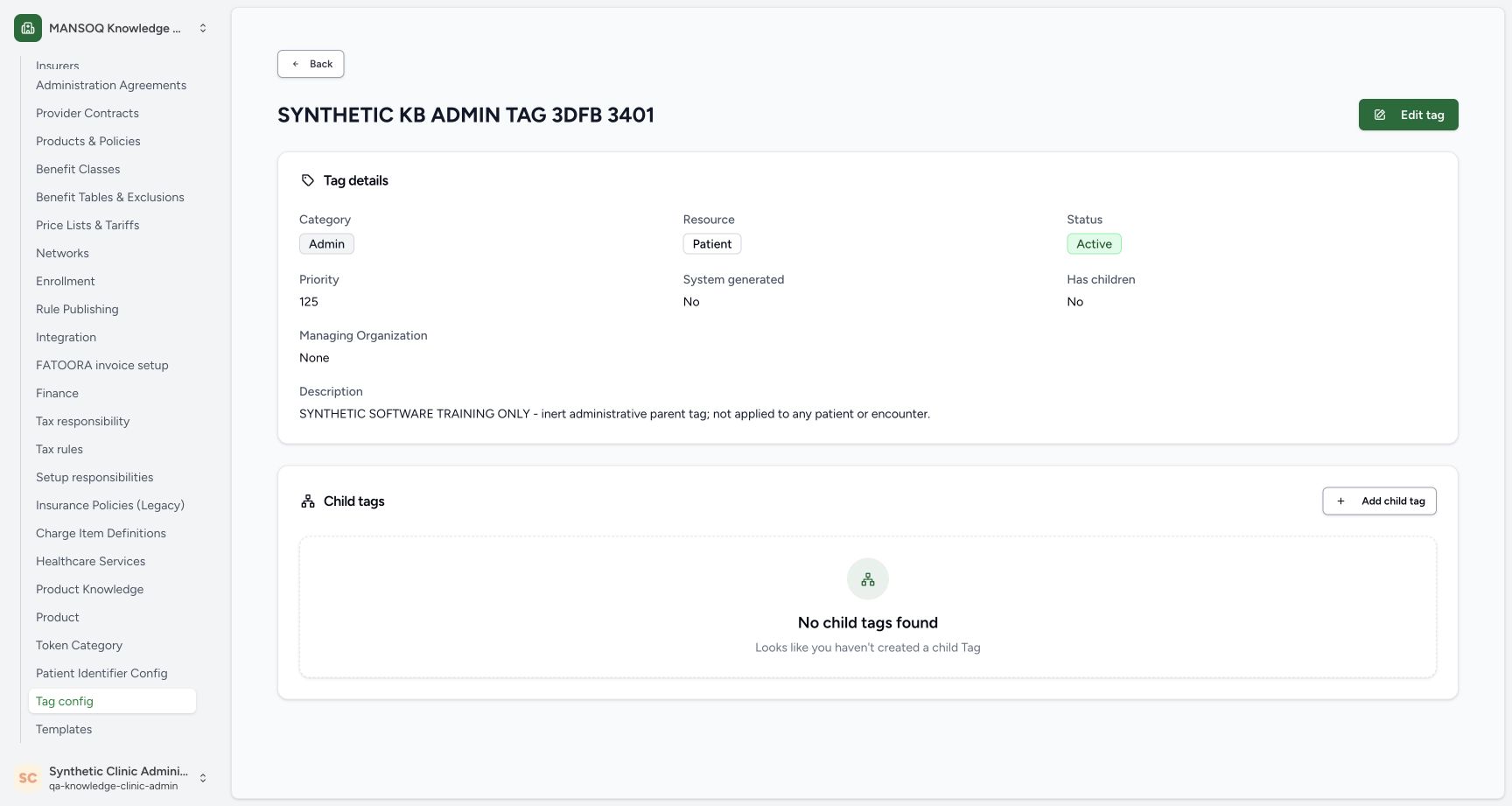
123Open the saved parent and its empty children section
Capture details
Exact committed3dfb training profile on20 October2026 (Asia/Riyadh). Two inert administrative Patient-resource tag configs; no tag application.
Image SHA-256 bdfaeda486c5e993977e765e8570e16f4af852f5c8cfff2a68adf11e123c0bd1
- Has children: No: This parent has no child before the next lesson.
- No child tags found: The current parent has an empty Child tags section.
- Add child tag: Start a child from this exact parent.
 12345
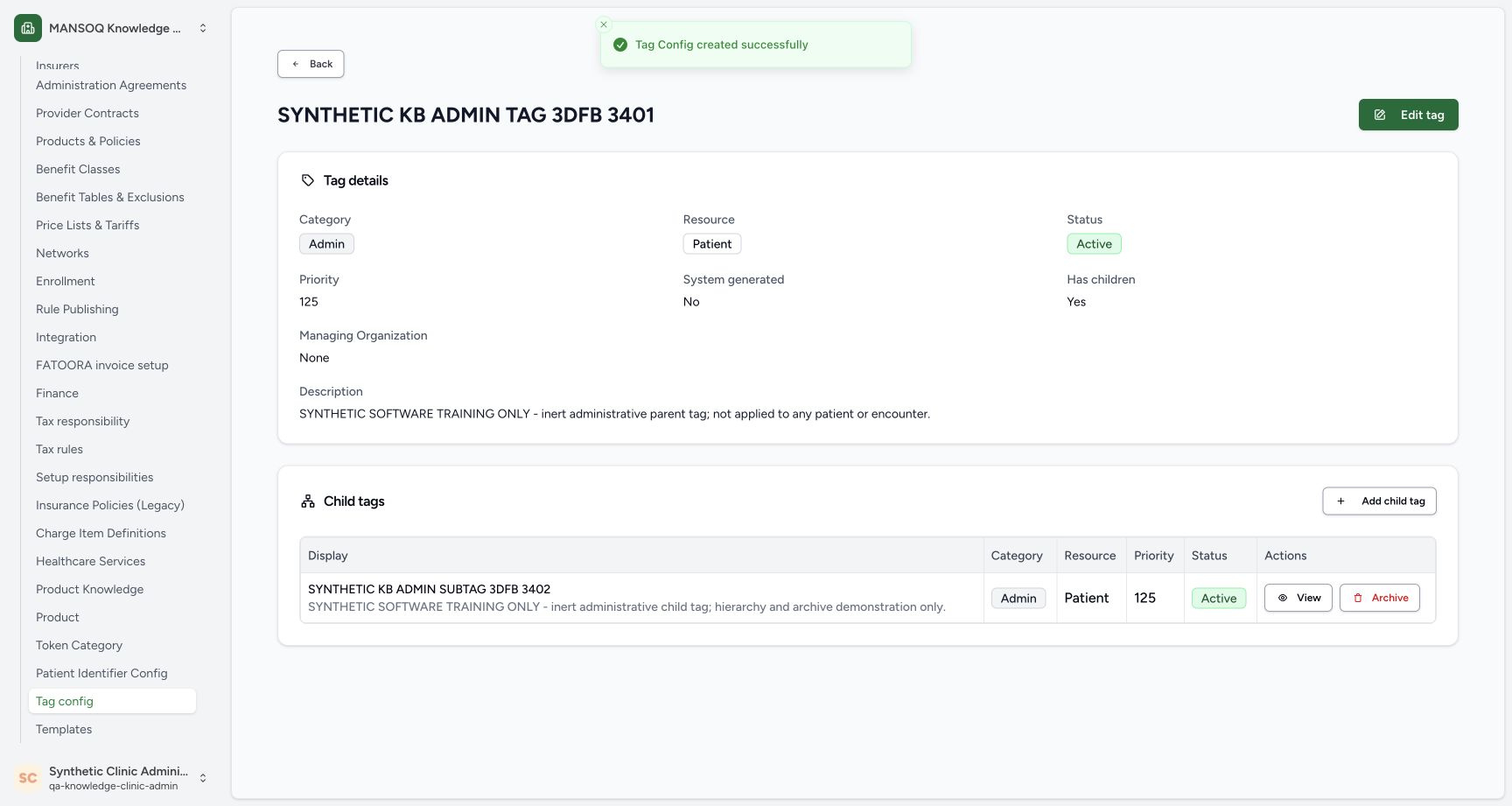
12345Verify the child in the parent list
Capture details
Exact committed3dfb training profile on20 October2026 (Asia/Riyadh). Two inert administrative Patient-resource tag configs; no tag application.
Image SHA-256 46a94fb06e40ae83bcdb7b5fc17ee2735d29f6a0ee4d398d3486f8918f821f86
- Child creation succeeded: The actual success message confirms the create result.
- Has children: Yes: The parent now reports a child.
- Verify the child name: The new child appears under this parent.
- Child is Active: Read the child status in its row.
- View the child: Open this child to inspect its saved details.
10 of 10 content blocks have reviewed image alignment. Missing overview or prerequisite images remain open.
Before you begin
- Use the same already authenticated, authorized Facility Admin session in the assigned synthetic Clinic.123
Recorded release 3dfb7c9f · 2026-10-19T23:14:23.264Z · 1728 × 921 Open the saved parent and its empty children section
Capture details
Exact committed3dfb training profile on20 October2026 (Asia/Riyadh). Two inert administrative Patient-resource tag configs; no tag application.
Image SHA-256
bdfaeda486c5e993977e765e8570e16f4af852f5c8cfff2a68adf11e123c0bd1- Has children: No: This parent has no child before the next lesson.
- No child tags found: The current parent has an empty Child tags section.
- Add child tag: Start a child from this exact parent.
- Open the saved SYNTHETIC KB ADMIN TAG 3DFB 3401 parent. Before this example, it is Active, priority 125 and has no children.123
Recorded release 3dfb7c9f · 2026-10-19T23:14:23.264Z · 1728 × 921 Open the saved parent and its empty children section
Capture details
Exact committed3dfb training profile on20 October2026 (Asia/Riyadh). Two inert administrative Patient-resource tag configs; no tag application.
Image SHA-256
bdfaeda486c5e993977e765e8570e16f4af852f5c8cfff2a68adf11e123c0bd1- Has children: No: This parent has no child before the next lesson.
- No child tags found: The current parent has an empty Child tags section.
- Add child tag: Start a child from this exact parent.
1. Start from the intended parent
Check the parent heading and select Add child tag in its Child tags section.
123Open the saved parent and its empty children section
Capture details
Exact committed3dfb training profile on20 October2026 (Asia/Riyadh). Two inert administrative Patient-resource tag configs; no tag application.
Image SHA-256 bdfaeda486c5e993977e765e8570e16f4af852f5c8cfff2a68adf11e123c0bd1
- Has children: No: This parent has no child before the next lesson.
- No child tags found: The current parent has an empty Child tags section.
- Add child tag: Start a child from this exact parent.
2. Review the child defaults
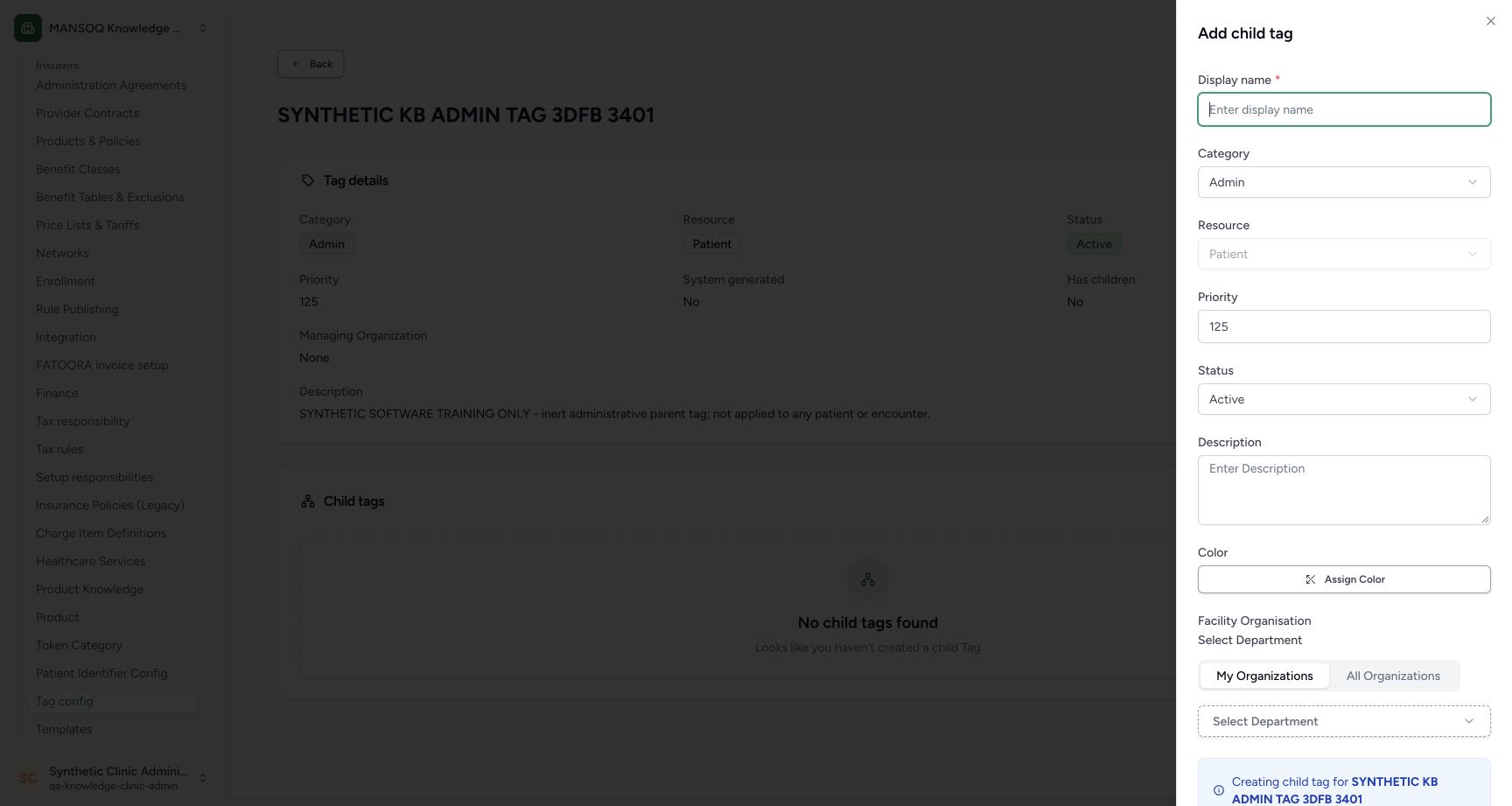
The child form starts with the parent’s Admin category, Patient resource and priority 125, plus Active status. The inherited Resource is disabled. Enter a distinct child Display name.
 12345
12345Inspect inherited child defaults
Capture details
Exact committed3dfb training profile on20 October2026 (Asia/Riyadh). Two inert administrative Patient-resource tag configs; no tag application.
Image SHA-256 807a9f655af7a4a4f20f48fcf2d77236e4eaf123d25f7e246979567cba8aee1f
- Child Display name: Enter a distinct child name here.
- Inherited Admin category: The new child initially uses its parent category.
- Inherited Patient resource: The inherited resource is disabled in this child form.
- Inherited priority 125: The initial child priority matches the parent.
- Child starts Active: Review the new child status.
3. Complete the child details
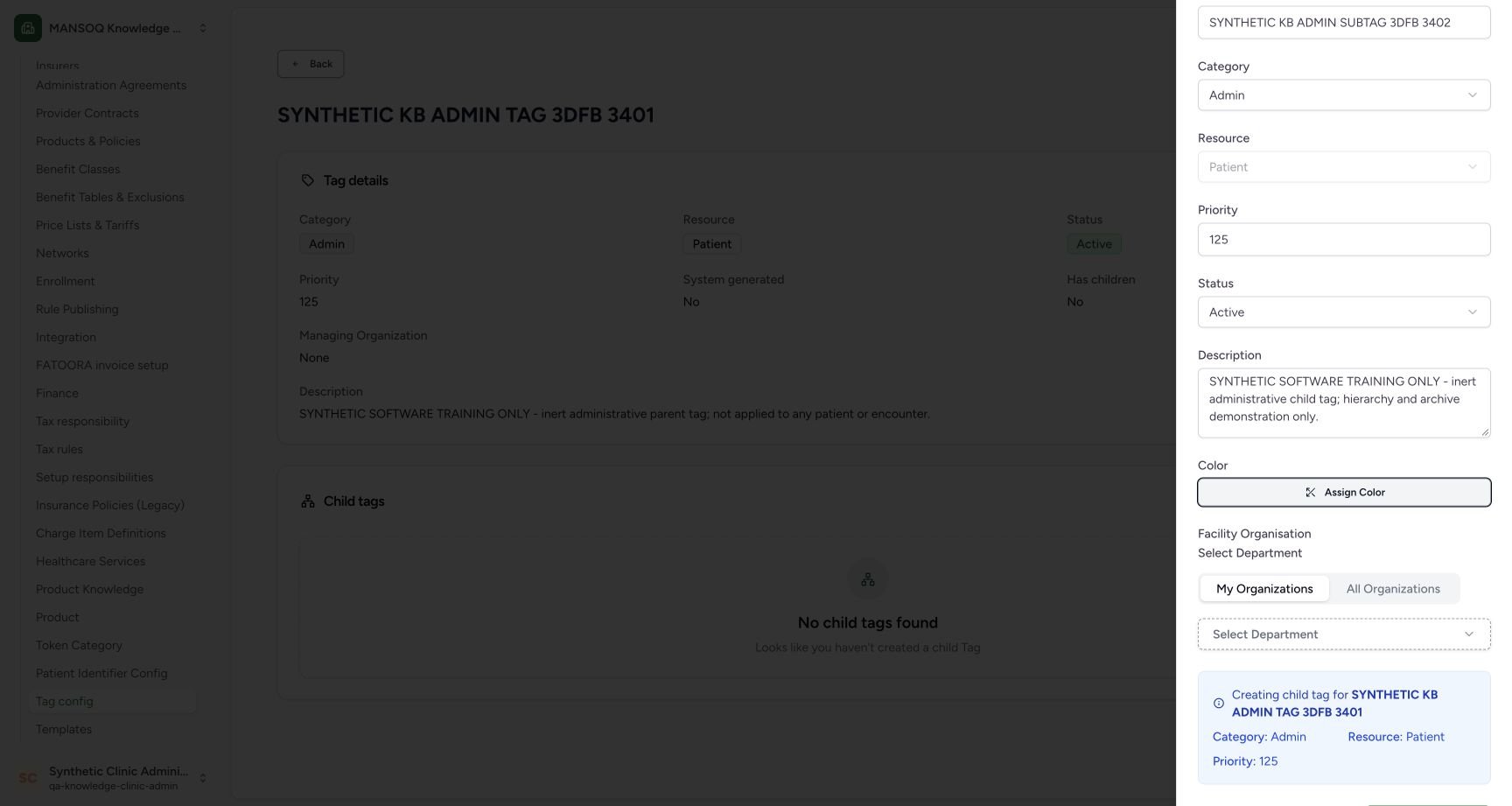
Enter SYNTHETIC KB ADMIN SUBTAG 3DFB 3402 and the pictured description: SYNTHETIC SOFTWARE TRAINING ONLY - inert administrative child tag; hierarchy and archive demonstration only. Keep Admin, Patient, 125 and Active. Leave Color and the optional department unselected.
12345Inspect inherited child defaults
Capture details
Exact committed3dfb training profile on20 October2026 (Asia/Riyadh). Two inert administrative Patient-resource tag configs; no tag application.
Image SHA-256 807a9f655af7a4a4f20f48fcf2d77236e4eaf123d25f7e246979567cba8aee1f
- Child Display name: Enter a distinct child name here.
- Inherited Admin category: The new child initially uses its parent category.
- Inherited Patient resource: The inherited resource is disabled in this child form.
- Inherited priority 125: The initial child priority matches the parent.
- Child starts Active: Review the new child status.
 1234
1234Review the entered child name and description
Capture details
Exact committed3dfb training profile on20 October2026 (Asia/Riyadh). Two inert administrative Patient-resource tag configs; no tag application.
Image SHA-256 f2abd40002279844b2107de1f310e886c57fdddbe7156623c2510e523ab9d4a4
- Child display value: The entered child is SYNTHETIC KB ADMIN SUBTAG 3DFB 3402.
- Child training description: The description identifies a hierarchy and archive demonstration.
- No color assigned: This example leaves Assign Color unchanged.
- No department selected: The optional selector remains empty.
4. Confirm the parent before Create
Scroll to the parent notice. It must name SYNTHETIC KB ADMIN TAG 3DFB 3401 and show Admin, Patient and priority 125. Once the child fields are correct, select Create tag config.
1234Review the entered child name and description
Capture details
Exact committed3dfb training profile on20 October2026 (Asia/Riyadh). Two inert administrative Patient-resource tag configs; no tag application.
Image SHA-256 f2abd40002279844b2107de1f310e886c57fdddbe7156623c2510e523ab9d4a4
- Child display value: The entered child is SYNTHETIC KB ADMIN SUBTAG 3DFB 3402.
- Child training description: The description identifies a hierarchy and archive demonstration.
- No color assigned: This example leaves Assign Color unchanged.
- No department selected: The optional selector remains empty.
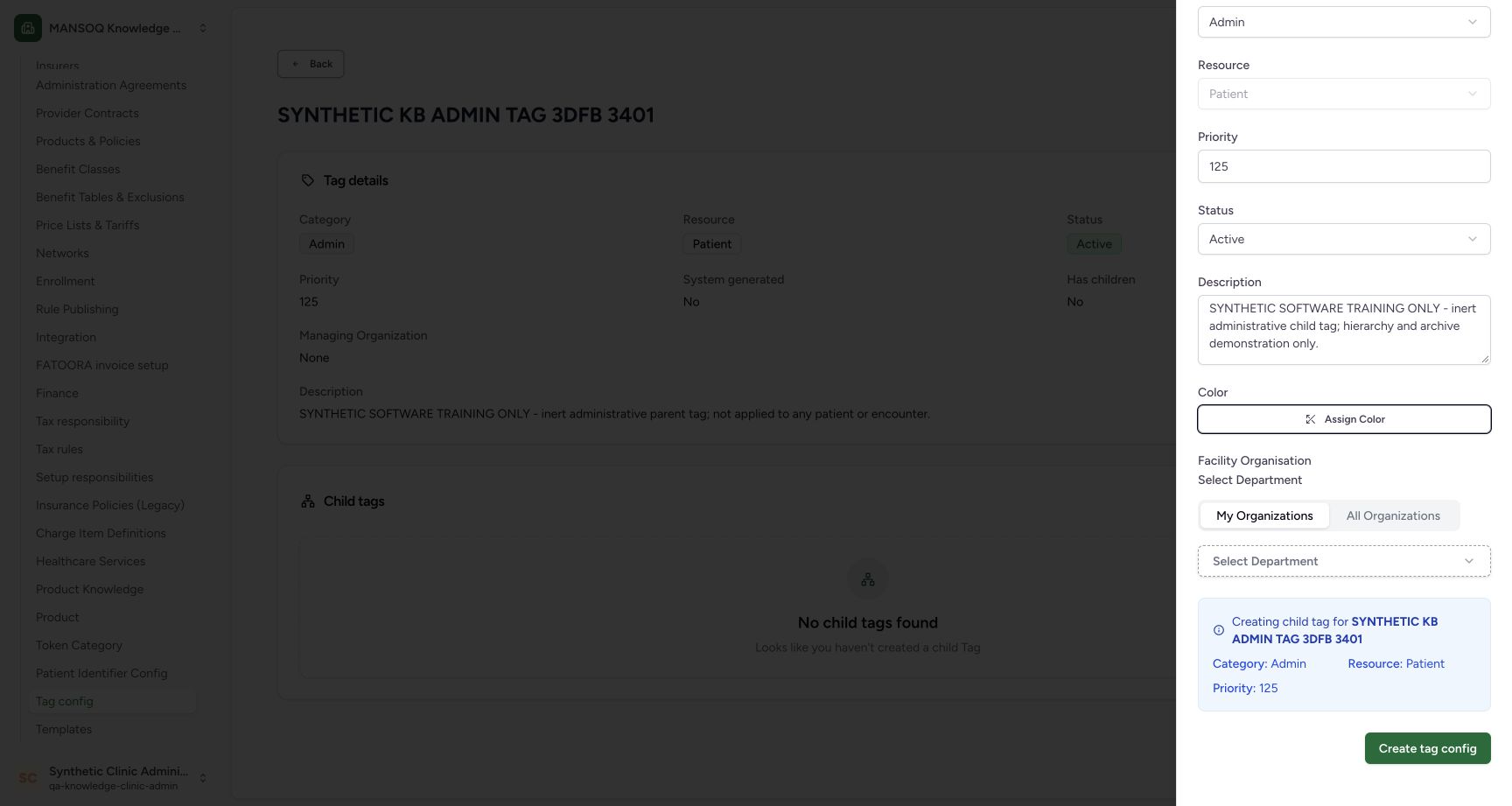 123
123Confirm the parent and create the child
Capture details
Exact committed3dfb training profile on20 October2026 (Asia/Riyadh). Two inert administrative Patient-resource tag configs; no tag application.
Image SHA-256 552c8b88a6c1ae4f521a8031f32f097e0c070a4030340aa6d4bfdc297fdf2390
- Confirm the intended parent: The notice names SYNTHETIC KB ADMIN TAG 3DFB 3401.
- Review inherited values: The parent notice shows Admin, Patient and priority 125.
- Create the child: Submit the reviewed child form once.
5. Verify the saved child row
Read the creation success message. The parent now says Has children Yes, and its Child tags section contains the exact child with Active status.
12345Verify the child in the parent list
Capture details
Exact committed3dfb training profile on20 October2026 (Asia/Riyadh). Two inert administrative Patient-resource tag configs; no tag application.
Image SHA-256 46a94fb06e40ae83bcdb7b5fc17ee2735d29f6a0ee4d398d3486f8918f821f86
- Child creation succeeded: The actual success message confirms the create result.
- Has children: Yes: The parent now reports a child.
- Verify the child name: The new child appears under this parent.
- Child is Active: Read the child status in its row.
- View the child: Open this child to inspect its saved details.
6. Inspect the child and follow its parent
Select View on the child row. Verify its saved name, category, resource, priority and Active status. Select the Parent Tag link to return to the parent; confirm the parent heading and the same child row.
12345Verify the child in the parent list
Capture details
Exact committed3dfb training profile on20 October2026 (Asia/Riyadh). Two inert administrative Patient-resource tag configs; no tag application.
Image SHA-256 46a94fb06e40ae83bcdb7b5fc17ee2735d29f6a0ee4d398d3486f8918f821f86
- Child creation succeeded: The actual success message confirms the create result.
- Has children: Yes: The parent now reports a child.
- Verify the child name: The new child appears under this parent.
- Child is Active: Read the child status in its row.
- View the child: Open this child to inspect its saved details.
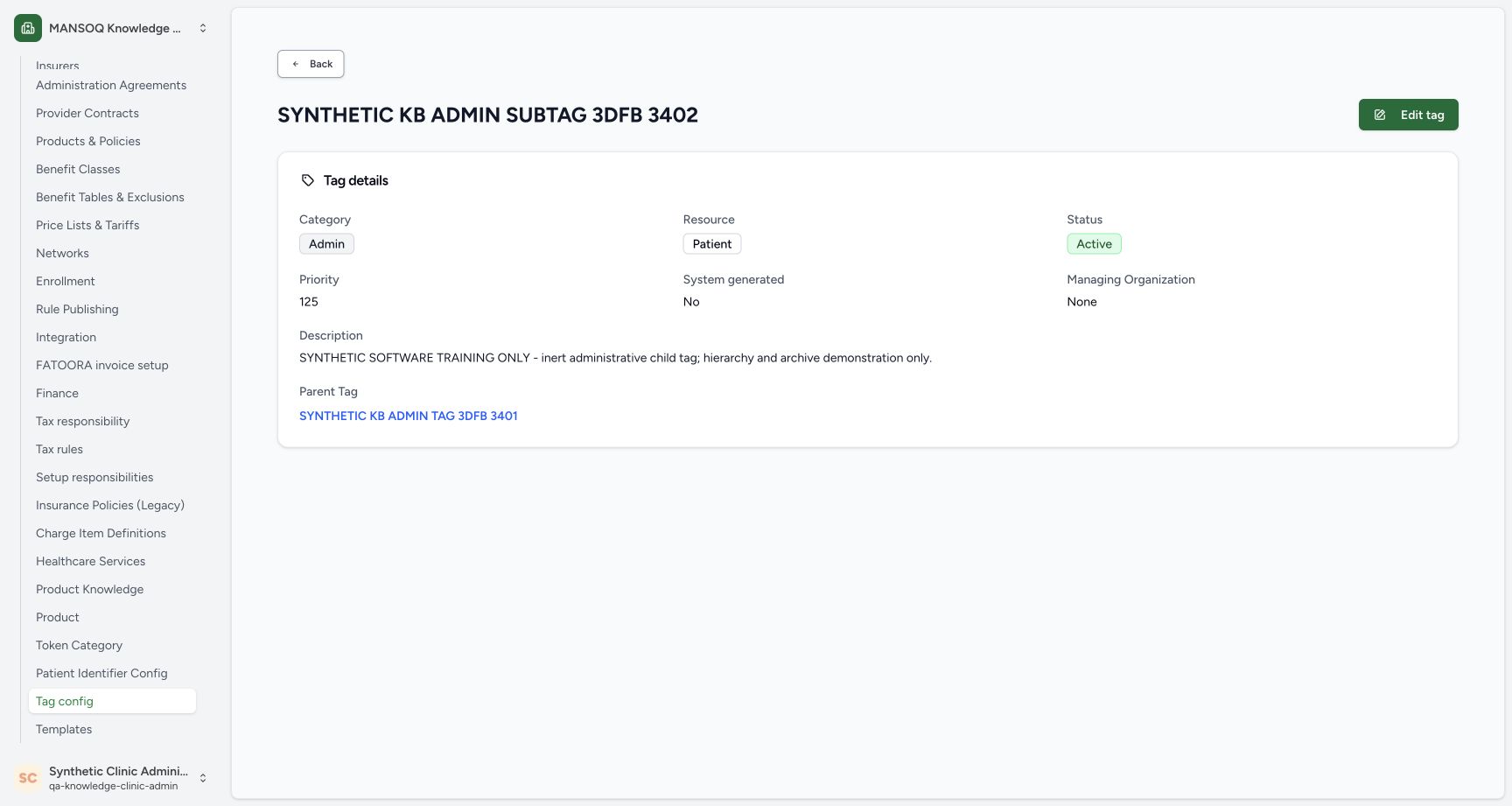 123
123Open the child details and parent link
Capture details
Exact committed3dfb training profile on20 October2026 (Asia/Riyadh). Two inert administrative Patient-resource tag configs; no tag application.
Image SHA-256 d2b905080e25a6d9beee764050f9f8df83e8c41e8555b7d6f903172291358c6a
- Verify the child heading: The detail page names the child rather than its parent.
- Saved child is Active: Read the child status.
- Follow Parent Tag: This link returns to the saved parent tag.
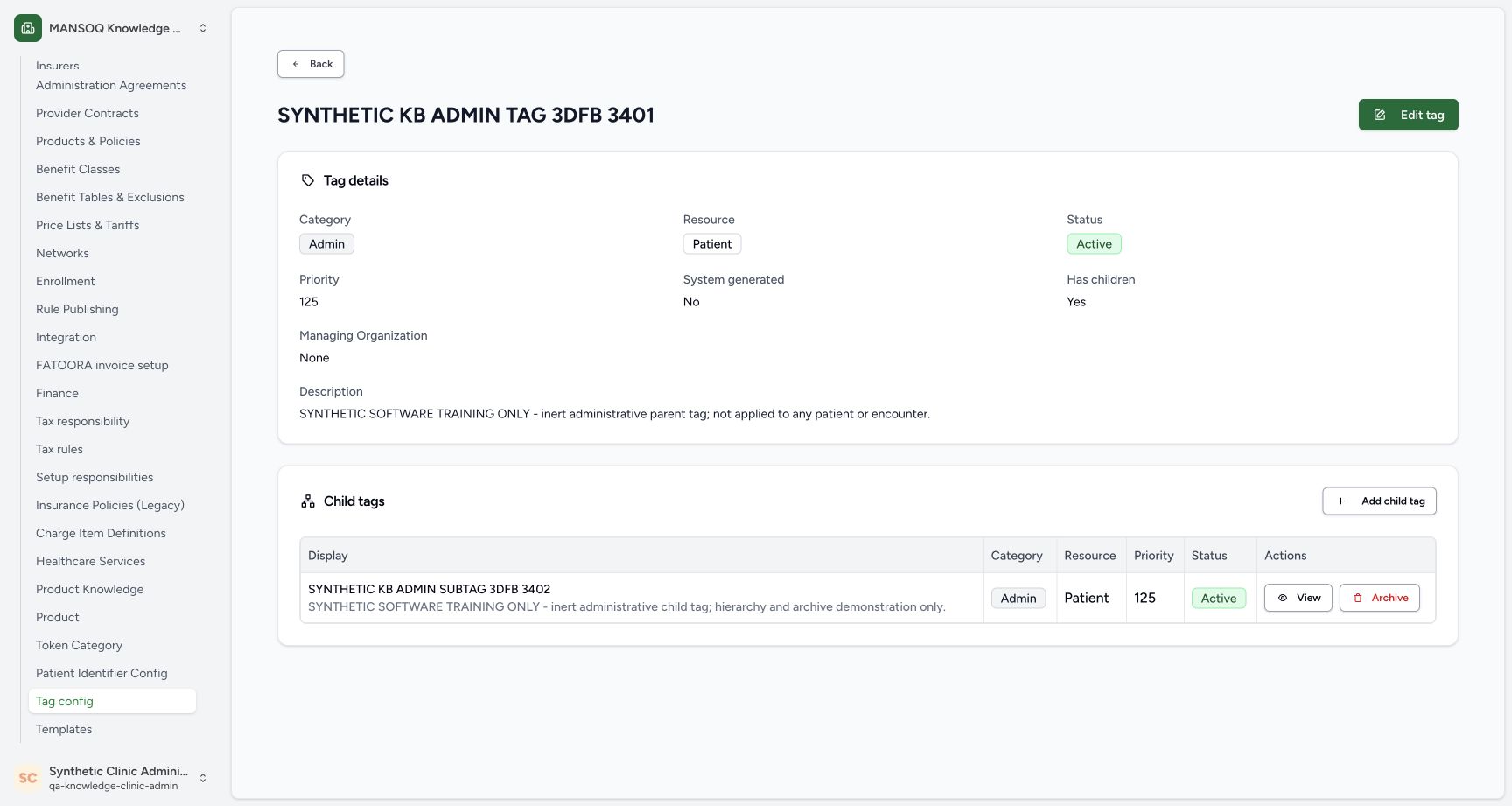 1234
1234Identify the active child before Archive
Capture details
Exact committed3dfb training profile on20 October2026 (Asia/Riyadh). Two inert administrative Patient-resource tag configs; no tag application.
Image SHA-256 d2a56a8bae8203e31899f7edb666d62af5ab99f57b1b23ed94514300051cd81a
- Verify the parent heading: Confirm the parent before using a child-row action.
- Identify the intended child: Match the synthetic child name.
- Active before archiving: The child is still Active at this point.
- Open Archive Child Tag: Archive opens a confirmation warning for this child.
Read parent and child pages separately
The child page names the child and provides a Parent Tag link. The parent page names the parent and lists its children. Check the heading before choosing a row action.
123Open the child details and parent link
Capture details
Exact committed3dfb training profile on20 October2026 (Asia/Riyadh). Two inert administrative Patient-resource tag configs; no tag application.
Image SHA-256 d2b905080e25a6d9beee764050f9f8df83e8c41e8555b7d6f903172291358c6a
- Verify the child heading: The detail page names the child rather than its parent.
- Saved child is Active: Read the child status.
- Follow Parent Tag: This link returns to the saved parent tag.
1234Identify the active child before Archive
Capture details
Exact committed3dfb training profile on20 October2026 (Asia/Riyadh). Two inert administrative Patient-resource tag configs; no tag application.
Image SHA-256 d2a56a8bae8203e31899f7edb666d62af5ab99f57b1b23ed94514300051cd81a
- Verify the parent heading: Confirm the parent before using a child-row action.
- Identify the intended child: Match the synthetic child name.
- Active before archiving: The child is still Active at this point.
- Open Archive Child Tag: Archive opens a confirmation warning for this child.
Source evidence
Every citation uses this exact committed version. The private source repository requires access.
- repositories/platform/mansoq-web/src/pages/Facility/settings/layout.tsx:380 ·
3dfb7c9f519fb5b4cd4452439f3c12346bf58319Source file checksum
6fbc4ae56f122fb81af6c8664c8dd6a147d2afda10e937a69aa5ff01faf8bd79 - repositories/platform/mansoq-web/src/pages/Admin/TagConfig/TagConfigList.tsx:36 ·
3dfb7c9f519fb5b4cd4452439f3c12346bf58319Source file checksum
1728044c2f69437e062d6b2e7ae7a3c046f90bad03c4d1b7c985b63004f522f1 - repositories/platform/mansoq-web/src/pages/Admin/TagConfig/TagConfigForm.tsx:79 ·
3dfb7c9f519fb5b4cd4452439f3c12346bf58319Source file checksum
84f9136c12df0f9e9c9663d63755919f215e6993ce5f1bf8c557d17890fc28d4 - repositories/platform/mansoq-web/src/pages/Admin/TagConfig/components/TagConfigFormDrawer.tsx:60 ·
3dfb7c9f519fb5b4cd4452439f3c12346bf58319Source file checksum
9467ab8f0e4ed645ef1af837bf85f185f3ec6f23e59e2869539df4406efec27d - repositories/platform/mansoq-web/src/pages/Admin/TagConfig/TagConfigView.tsx:66 ·
3dfb7c9f519fb5b4cd4452439f3c12346bf58319Source file checksum
e4d7d1af6db724c5e45b8ce12be6abb35a53a83c8ea0760b50acda2548974051 - repositories/platform/mansoq-web/src/pages/Admin/TagConfig/components/TagConfigTable.tsx:97 ·
3dfb7c9f519fb5b4cd4452439f3c12346bf58319Source file checksum
f4e2fe97475bf9b7a5b0fa9589533f5e6d1907222a39de6cc5a048e468a36eea - repositories/platform/mansoq-web/src/components/Common/ConfirmActionDialog.tsx:53 ·
3dfb7c9f519fb5b4cd4452439f3c12346bf58319Source file checksum
035fade7079e1d5b58f7cfea2802c345c55571f43fc48e77cbdc36487ed74154 - repositories/platform/mansoq-web/src/types/emr/tagConfig/tagConfig.ts:12 ·
3dfb7c9f519fb5b4cd4452439f3c12346bf58319Source file checksum
a03f0eb2c434a93641173019dbb1f0d912b9207d57494bb3e10a87d2fac6a947 - repositories/platform/mansoq-web/src/types/emr/tagConfig/tagConfigApi.ts:20 ·
3dfb7c9f519fb5b4cd4452439f3c12346bf58319Source file checksum
5db1f98a70d86338d2e46d2b6124f5c413a1144a2aa19d9f1b48e2c9d82bef05 - repositories/platform/mansoq-core/mansoq/security/permissions/tag_config.py:17 ·
3dfb7c9f519fb5b4cd4452439f3c12346bf58319Source file checksum
0faa94f695ad9f8eeda9645b713ac279e01409698d3f76e3d85856e2d5a3082e - repositories/platform/mansoq-core/mansoq/security/authorization/tag_config.py:17 ·
3dfb7c9f519fb5b4cd4452439f3c12346bf58319Source file checksum
8aa3af453879597db5ce27ab9f6a9204adaea660a39e11731158ccf79ac3a0bd - repositories/platform/mansoq-core/mansoq/emr/api/viewsets/tag_config.py:46 ·
3dfb7c9f519fb5b4cd4452439f3c12346bf58319Source file checksum
4fb0f5b78f5d3edbfdd4b2995eb61fbd92b7b5b5ab071de21e1c462964d83f2c - repositories/platform/mansoq-core/mansoq/emr/resources/tag/config_spec.py:92 ·
3dfb7c9f519fb5b4cd4452439f3c12346bf58319Source file checksum
9e42cf433a203c64106d598be030fa4f186a1cfa8dbb5932b6362c4abe125665 - repositories/platform/mansoq-core/mansoq/emr/models/tag_config.py:58 ·
3dfb7c9f519fb5b4cd4452439f3c12346bf58319Source file checksum
3896df87914b65fbc191bd0055a5db66a7ca46ea31037ba04547635b78727f8c - repositories/platform/mansoq-web/public/locale/en.json:791 ·
3dfb7c9f519fb5b4cd4452439f3c12346bf58319Source file checksum
96498c8b964dce856d43c09e4241708efdd175d935e7ebbd14fa2f8d62efa507