 MANSOQ
 Facility administration · VERSION 3dfb7c9f
Cancel removal or remove an unused Team
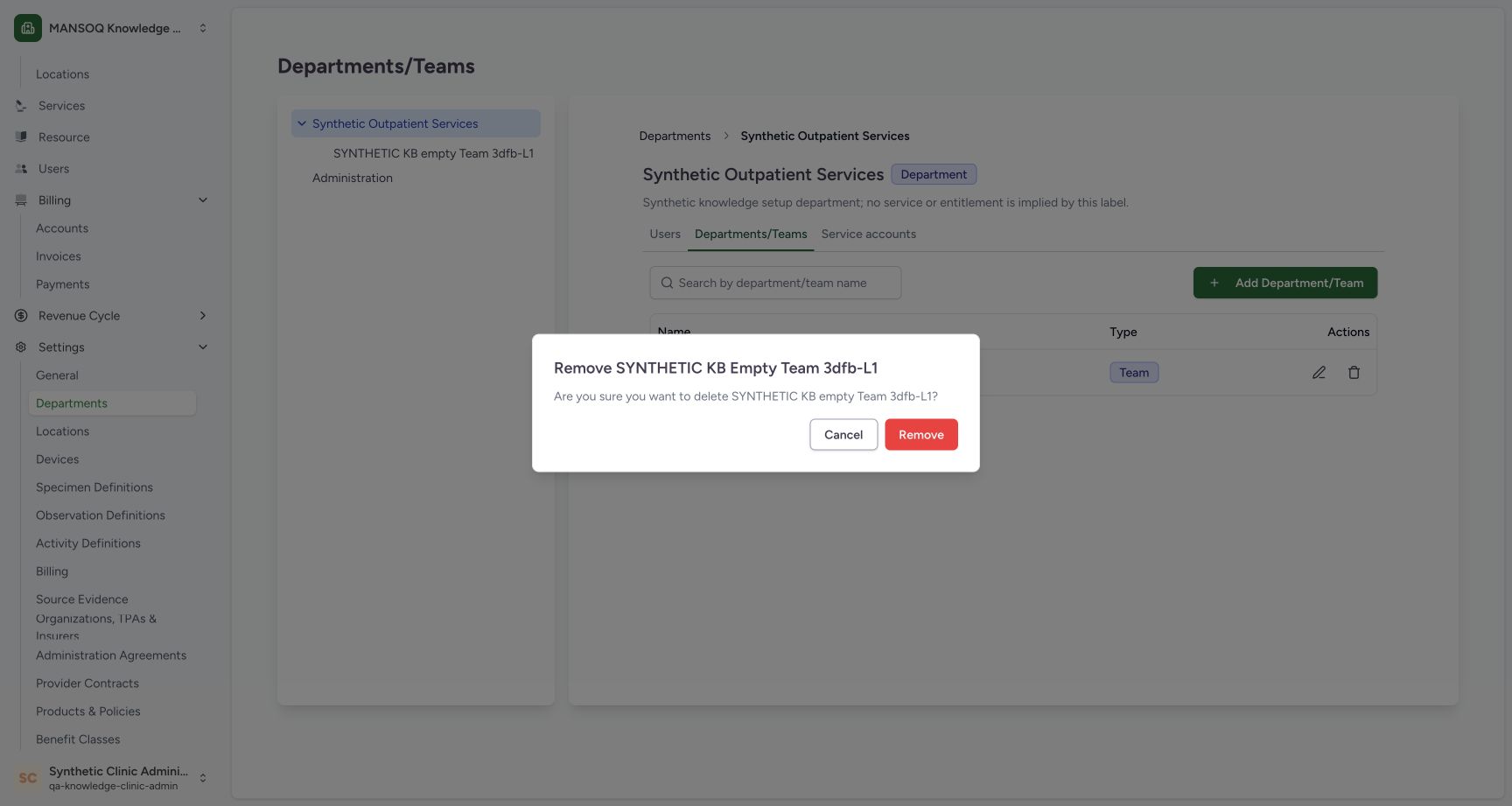
Inspect the named Remove warning, use Cancel to retain the Team, then remove the same unused fictional Team and verify its absence after reload.
Facility Admin
 1234
1234Named Remove warning before neutral Cancel
Capture details
Observed20October2026 Asia/Riyadh on the exact3dfb profile. One empty fictional Team create, neutral Remove Cancel, one own-Team soft deletion and reload. Manual original-pixel targets.
Image SHA-256 3901aae4a3966fd7dbdd96fd51cc1f18a8d0fed074d15ac0efc6799ac4753406
- Read the named warning: Confirm that the warning identifies the intended fictional Team.
- Check the Team name again: The warning asks whether to delete SYNTHETIC KB empty Team 3dfb-L1.
- Cancel: Close the warning and keep the Team.
- Remove is the separate action: The red control removes the named Team when intentionally confirmed.
 12345
12345Reloaded parent and empty active hierarchy
Capture details
Observed20October2026 Asia/Riyadh on the exact3dfb profile. One empty fictional Team create, neutral Remove Cancel, one own-Team soft deletion and reload. Manual original-pixel targets.
Image SHA-256 bc1c088416c37097c93669a58a244a5bf230e8e32c51e1d0fd76fc0479c7d6bc
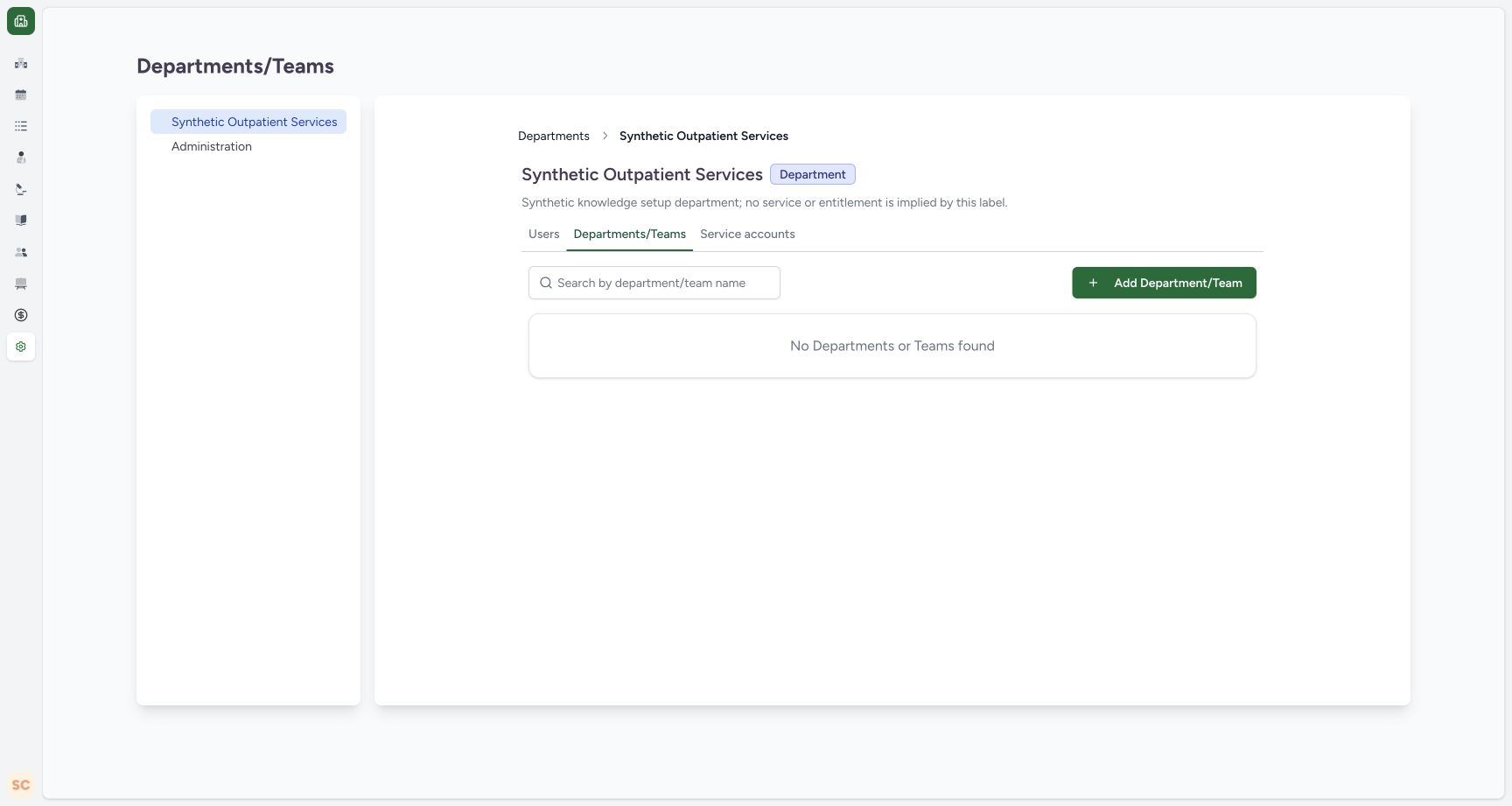
- Reloaded parent heading: Synthetic Outpatient Services is still selected.
- Department retained: The parent still has Department type.
- Reloaded empty hierarchy: No Departments or Teams found remains after the normal reload.
- Same child-hierarchy tab: Departments/Teams remains selected.
- Parent in the collapsed-sidebar layout: The selected parent remains visible; the collapsed application sidebar is only a layout change.
12 of 12 content blocks have reviewed image alignment. Missing overview or prerequisite images remain open.
Before you begin
- Continue with the empty fictional Team created in the preceding lesson under Synthetic Outpatient Services, in the same assigned Clinic and authorized Facility Admin session.
 1234
1234Recorded release 3dfb7c9f · 2026-10-20T00:56:43.326Z · 1728 × 921 Created Team in the parent’s settled child list
Capture details
Observed20October2026 Asia/Riyadh on the exact3dfb profile. One empty fictional Team create, neutral Remove Cancel, one own-Team soft deletion and reload. Manual original-pixel targets.
Image SHA-256
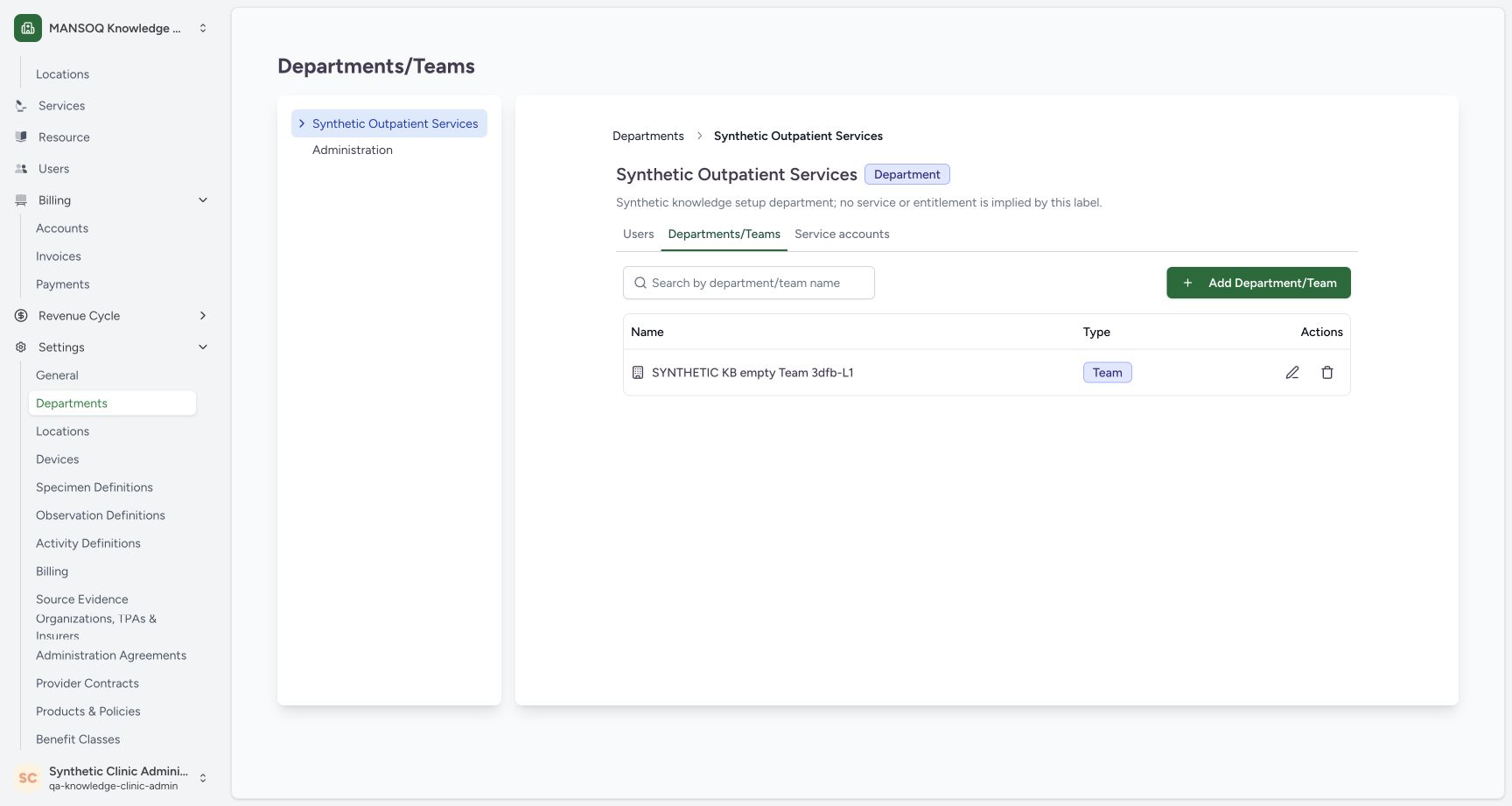
7bbc5d6ec3af13f4b62a0fe636d36e36a74f5b45f9e31e6403134d7ad2649e5b- Saved Team row: The newly created name appears in this parent’s list.
- Team type badge: The saved row is Team.
- Existing parent retained: Synthetic Outpatient Services is still the parent.
- Remove icon on the saved row: The row’s trash icon opens its named confirmation.
 12345
12345Recorded release 3dfb7c9f · 2026-10-20T00:57:00.061Z · 1728 × 921 Saved Team detail and parent breadcrumb
Capture details
Observed20October2026 Asia/Riyadh on the exact3dfb profile. One empty fictional Team create, neutral Remove Cancel, one own-Team soft deletion and reload. Manual original-pixel targets.
Image SHA-256
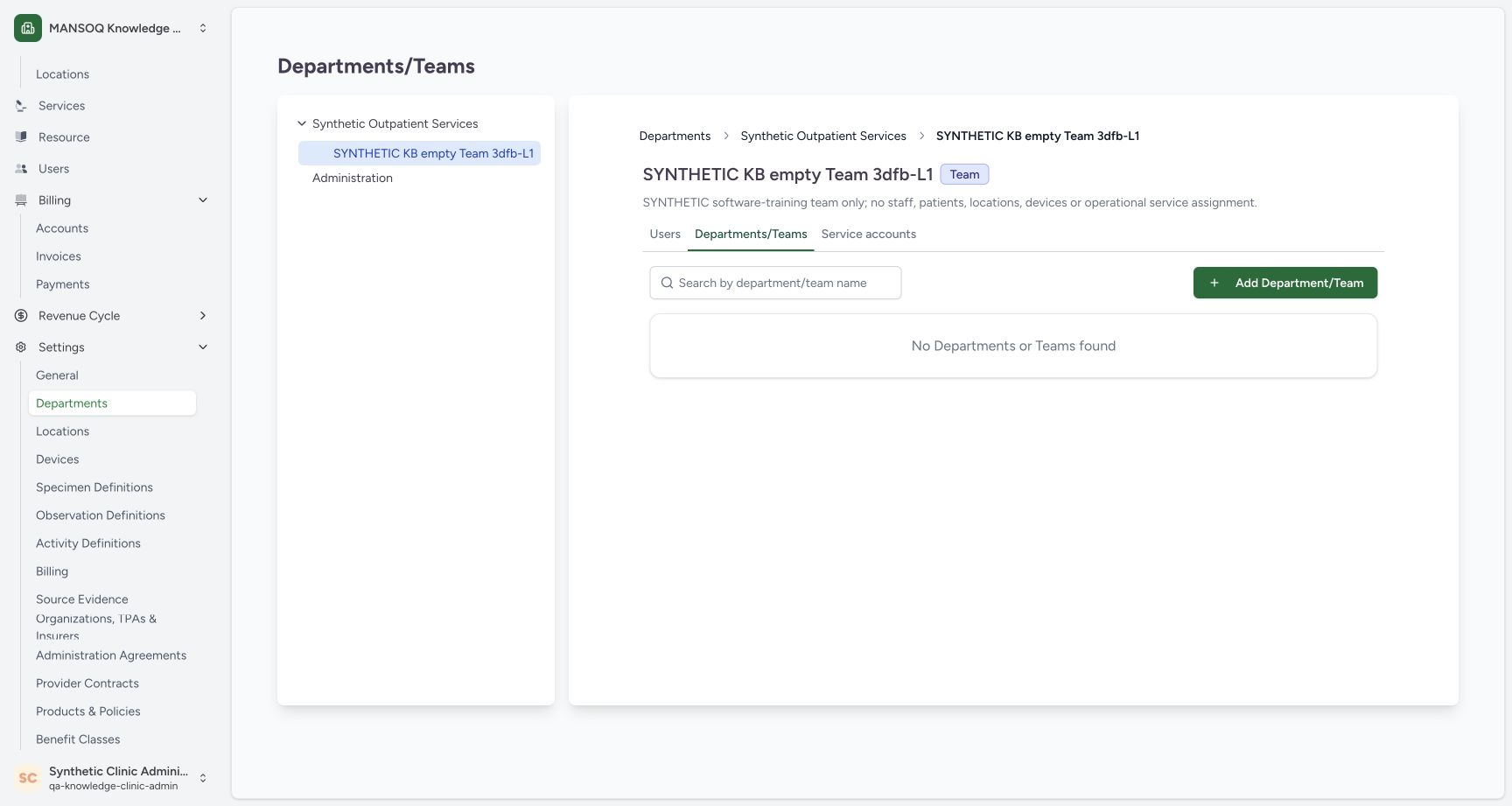
999b7bfb6d815346c39dfa483126212308fc6842373aa30c4fb3ee5da7de7901- Parent breadcrumb: Use Synthetic Outpatient Services to return to its child list.
- Saved Team heading: The Team detail names the created record.
- Saved type: The detail shows Team.
- Saved full description: The saved description explains that this is an empty software-training Team.
- No child departments or Teams: This Team’s child hierarchy is empty.
- Use only this unused software-training Team in the assigned Clinic. The example has no staff or operational assignments.12345
Recorded release 3dfb7c9f · 2026-10-20T00:57:00.061Z · 1728 × 921 Saved Team detail and parent breadcrumb
Capture details
Observed20October2026 Asia/Riyadh on the exact3dfb profile. One empty fictional Team create, neutral Remove Cancel, one own-Team soft deletion and reload. Manual original-pixel targets.
Image SHA-256
999b7bfb6d815346c39dfa483126212308fc6842373aa30c4fb3ee5da7de7901- Parent breadcrumb: Use Synthetic Outpatient Services to return to its child list.
- Saved Team heading: The Team detail names the created record.
- Saved type: The detail shows Team.
- Saved full description: The saved description explains that this is an empty software-training Team.
- No child departments or Teams: This Team’s child hierarchy is empty.
1234Recorded release 3dfb7c9f · 2026-10-20T00:58:05.678Z · 1728 × 921 Named Remove warning before neutral Cancel
Capture details
Observed20October2026 Asia/Riyadh on the exact3dfb profile. One empty fictional Team create, neutral Remove Cancel, one own-Team soft deletion and reload. Manual original-pixel targets.
Image SHA-256
3901aae4a3966fd7dbdd96fd51cc1f18a8d0fed074d15ac0efc6799ac4753406- Read the named warning: Confirm that the warning identifies the intended fictional Team.
- Check the Team name again: The warning asks whether to delete SYNTHETIC KB empty Team 3dfb-L1.
- Cancel: Close the warning and keep the Team.
- Remove is the separate action: The red control removes the named Team when intentionally confirmed.
1. Return to the parent list
From the saved Team detail, use the Synthetic Outpatient Services breadcrumb to return to that department’s child list. Match the exact fictional Team and its Team badge.
12345Saved Team detail and parent breadcrumb
Capture details
Observed20October2026 Asia/Riyadh on the exact3dfb profile. One empty fictional Team create, neutral Remove Cancel, one own-Team soft deletion and reload. Manual original-pixel targets.
Image SHA-256 999b7bfb6d815346c39dfa483126212308fc6842373aa30c4fb3ee5da7de7901
- Parent breadcrumb: Use Synthetic Outpatient Services to return to its child list.
- Saved Team heading: The Team detail names the created record.
- Saved type: The detail shows Team.
- Saved full description: The saved description explains that this is an empty software-training Team.
- No child departments or Teams: This Team’s child hierarchy is empty.
1234Created Team in the parent’s settled child list
Capture details
Observed20October2026 Asia/Riyadh on the exact3dfb profile. One empty fictional Team create, neutral Remove Cancel, one own-Team soft deletion and reload. Manual original-pixel targets.
Image SHA-256 7bbc5d6ec3af13f4b62a0fe636d36e36a74f5b45f9e31e6403134d7ad2649e5b
- Saved Team row: The newly created name appears in this parent’s list.
- Team type badge: The saved row is Team.
- Existing parent retained: Synthetic Outpatient Services is still the parent.
- Remove icon on the saved row: The row’s trash icon opens its named confirmation.
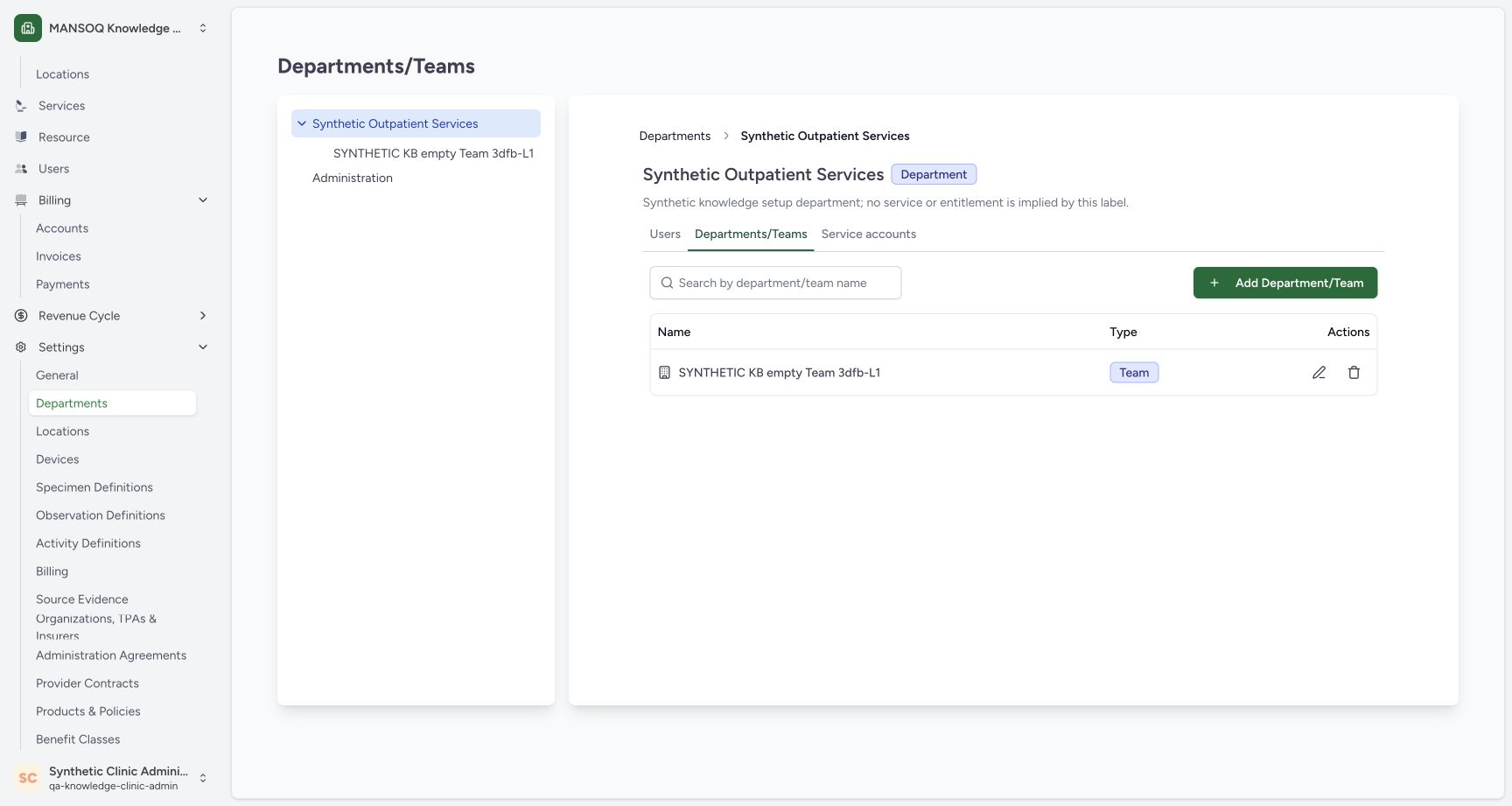 123
123Parent row context before the Remove warning
Capture details
Observed20October2026 Asia/Riyadh on the exact3dfb profile. One empty fictional Team create, neutral Remove Cancel, one own-Team soft deletion and reload. Manual original-pixel targets.
Image SHA-256 9d479d65c2cc8b539d82b049c25c59c8f47b6d1dc5cf7eef2f1a0d9173ae3572
- Existing parent context: The visible heading remains Synthetic Outpatient Services.
- Own Team row before removal: This original supplies row context; settled frame06 separately supports the saved list.
- Visible Team badge: The row is a Team. No AX-stability claim is made for this transition frame.
2. Open the named Remove warning
On the matching Team row, select its trash icon. Read the name in the warning and the question before choosing an action.
1234Created Team in the parent’s settled child list
Capture details
Observed20October2026 Asia/Riyadh on the exact3dfb profile. One empty fictional Team create, neutral Remove Cancel, one own-Team soft deletion and reload. Manual original-pixel targets.
Image SHA-256 7bbc5d6ec3af13f4b62a0fe636d36e36a74f5b45f9e31e6403134d7ad2649e5b
- Saved Team row: The newly created name appears in this parent’s list.
- Team type badge: The saved row is Team.
- Existing parent retained: Synthetic Outpatient Services is still the parent.
- Remove icon on the saved row: The row’s trash icon opens its named confirmation.
1234Named Remove warning before neutral Cancel
Capture details
Observed20October2026 Asia/Riyadh on the exact3dfb profile. One empty fictional Team create, neutral Remove Cancel, one own-Team soft deletion and reload. Manual original-pixel targets.
Image SHA-256 3901aae4a3966fd7dbdd96fd51cc1f18a8d0fed074d15ac0efc6799ac4753406
- Read the named warning: Confirm that the warning identifies the intended fictional Team.
- Check the Team name again: The warning asks whether to delete SYNTHETIC KB empty Team 3dfb-L1.
- Cancel: Close the warning and keep the Team.
- Remove is the separate action: The red control removes the named Team when intentionally confirmed.
3. Use Cancel to keep the Team
Select Cancel. The warning closes and the same Team row remains under Synthetic Outpatient Services.
1234Named Remove warning before neutral Cancel
Capture details
Observed20October2026 Asia/Riyadh on the exact3dfb profile. One empty fictional Team create, neutral Remove Cancel, one own-Team soft deletion and reload. Manual original-pixel targets.
Image SHA-256 3901aae4a3966fd7dbdd96fd51cc1f18a8d0fed074d15ac0efc6799ac4753406
- Read the named warning: Confirm that the warning identifies the intended fictional Team.
- Check the Team name again: The warning asks whether to delete SYNTHETIC KB empty Team 3dfb-L1.
- Cancel: Close the warning and keep the Team.
- Remove is the separate action: The red control removes the named Team when intentionally confirmed.
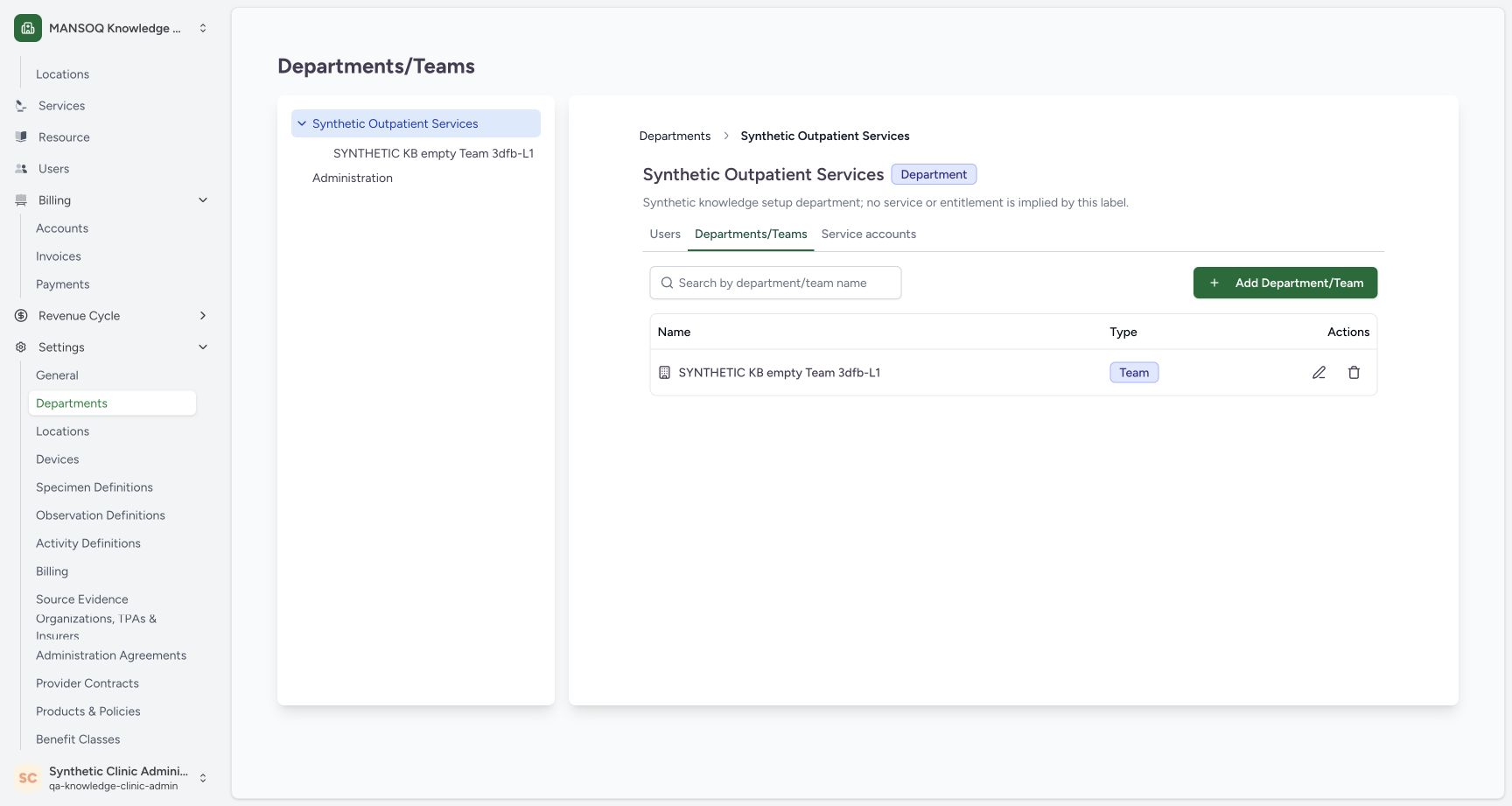 1234
1234Same Team retained after Cancel
Capture details
Observed20October2026 Asia/Riyadh on the exact3dfb profile. One empty fictional Team create, neutral Remove Cancel, one own-Team soft deletion and reload. Manual original-pixel targets.
Image SHA-256 9d479d65c2cc8b539d82b049c25c59c8f47b6d1dc5cf7eef2f1a0d9173ae3572
- Same Team remains after Cancel: The original row is still present.
- Type remains Team: Cancel leaves the saved type unchanged.
- Reopen the named warning: Use this row’s trash icon when continuing the removal lesson.
- Same parent after Cancel: The parent heading remains unchanged.
4. Reopen the same Team’s warning
To continue with the intended removal, select the trash icon on that same row again. Verify that the reopened warning names the same fictional Team.
1234Same Team retained after Cancel
Capture details
Observed20October2026 Asia/Riyadh on the exact3dfb profile. One empty fictional Team create, neutral Remove Cancel, one own-Team soft deletion and reload. Manual original-pixel targets.
Image SHA-256 9d479d65c2cc8b539d82b049c25c59c8f47b6d1dc5cf7eef2f1a0d9173ae3572
- Same Team remains after Cancel: The original row is still present.
- Type remains Team: Cancel leaves the saved type unchanged.
- Reopen the named warning: Use this row’s trash icon when continuing the removal lesson.
- Same parent after Cancel: The parent heading remains unchanged.
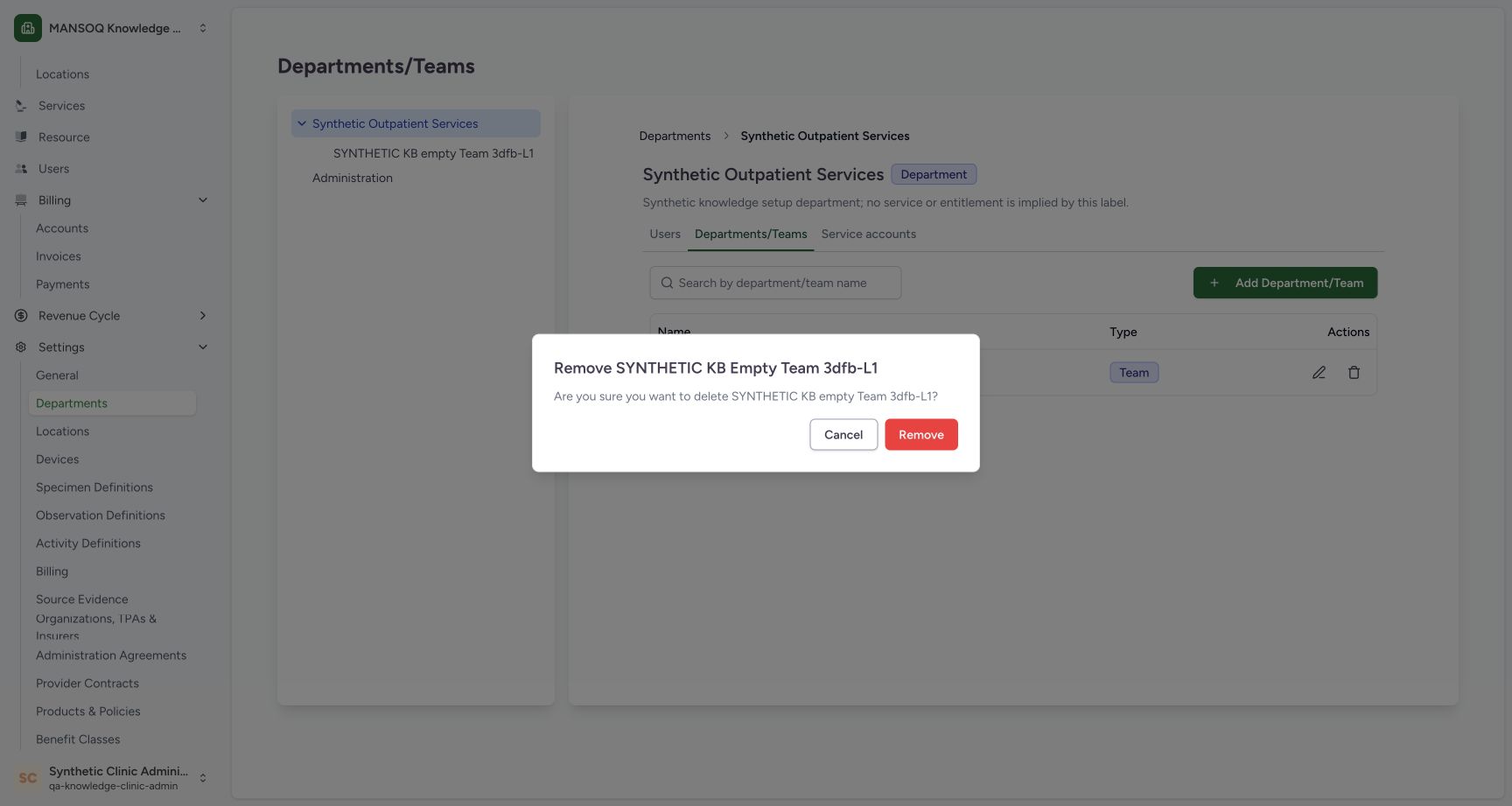 123
123Reopened named warning before one Remove
Capture details
Observed20October2026 Asia/Riyadh on the exact3dfb profile. One empty fictional Team create, neutral Remove Cancel, one own-Team soft deletion and reload. Manual original-pixel targets.
Image SHA-256 3901aae4a3966fd7dbdd96fd51cc1f18a8d0fed074d15ac0efc6799ac4753406
- Reopened warning names the same Team: Review the exact name before confirming.
- Cancel remains available: Use Cancel when removal is not intended.
- Confirm Remove once: Confirm only the unused fictional Team in this lesson.
5. Confirm removal once
After confirming this is the unused training Team, select the red Remove button once. Wait for the parent’s child list to return. The Team is no longer listed and No Departments or Teams found appears.
123Reopened named warning before one Remove
Capture details
Observed20October2026 Asia/Riyadh on the exact3dfb profile. One empty fictional Team create, neutral Remove Cancel, one own-Team soft deletion and reload. Manual original-pixel targets.
Image SHA-256 3901aae4a3966fd7dbdd96fd51cc1f18a8d0fed074d15ac0efc6799ac4753406
- Reopened warning names the same Team: Review the exact name before confirming.
- Cancel remains available: Use Cancel when removal is not intended.
- Confirm Remove once: Confirm only the unused fictional Team in this lesson.
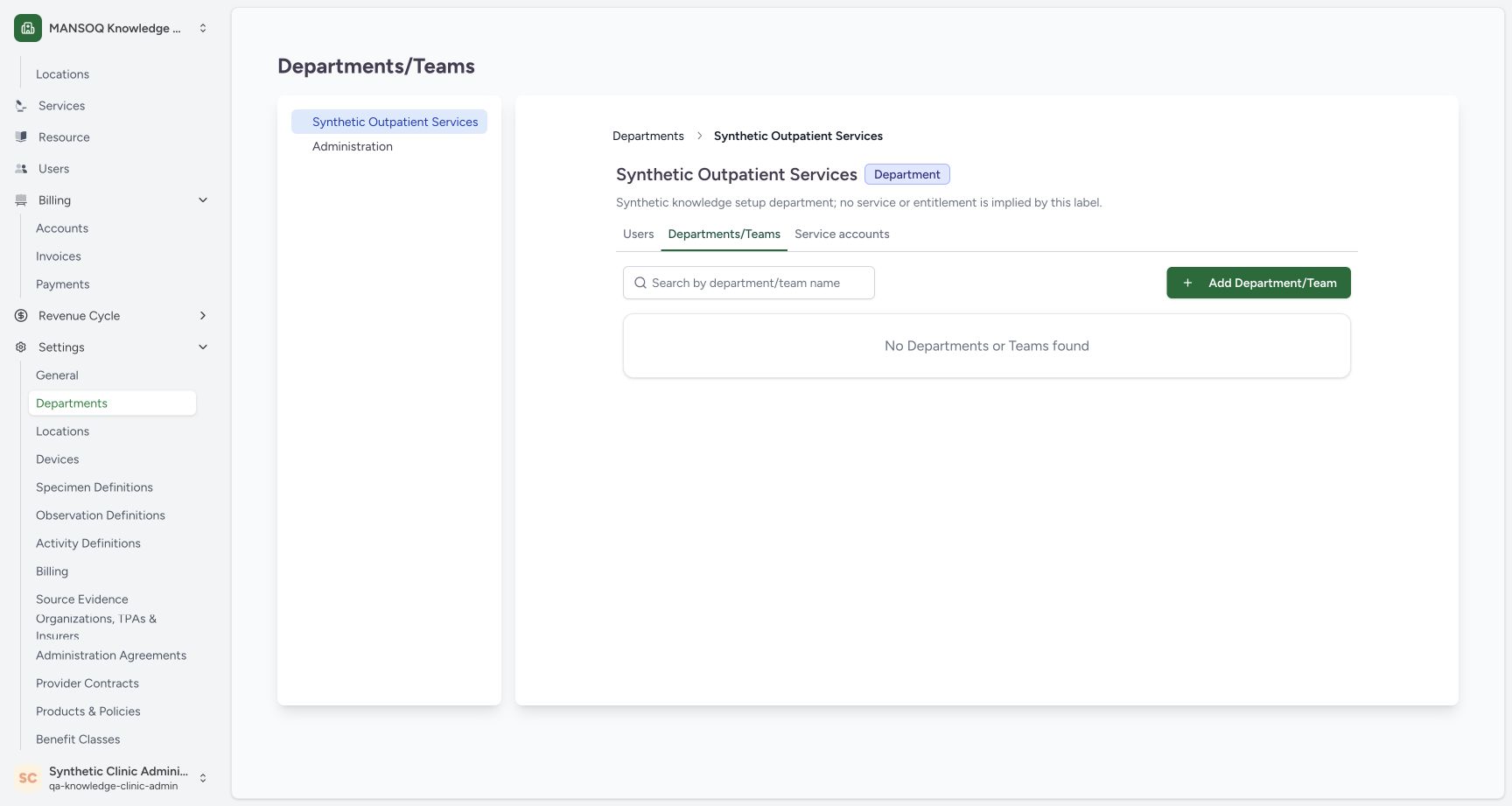 123
123Parent child list after removing the unused Team
Capture details
Observed20October2026 Asia/Riyadh on the exact3dfb profile. One empty fictional Team create, neutral Remove Cancel, one own-Team soft deletion and reload. Manual original-pixel targets.
Image SHA-256 0428fff60d8b4aba15d9919384c776b996675f06cc647deaae39dc7ee3ad022f
- Parent remains after removal: Synthetic Outpatient Services is retained.
- Child list is now empty: The removed Team is absent from this parent’s active hierarchy.
- Selected parent retained: The parent remains in the navigation tree.
6. Reload and verify the parent
Use your browser’s Reload once (⌘R on macOS or Ctrl+R on Windows/Linux). After the page loads, read Synthetic Outpatient Services, its Department badge, and the empty Departments/Teams list. The application sidebar is collapsed in this recorded view; that layout change is separate from the hierarchy.
12345Reloaded parent and empty active hierarchy
Capture details
Observed20October2026 Asia/Riyadh on the exact3dfb profile. One empty fictional Team create, neutral Remove Cancel, one own-Team soft deletion and reload. Manual original-pixel targets.
Image SHA-256 bc1c088416c37097c93669a58a244a5bf230e8e32c51e1d0fd76fc0479c7d6bc
- Reloaded parent heading: Synthetic Outpatient Services is still selected.
- Department retained: The parent still has Department type.
- Reloaded empty hierarchy: No Departments or Teams found remains after the normal reload.
- Same child-hierarchy tab: Departments/Teams remains selected.
- Parent in the collapsed-sidebar layout: The selected parent remains visible; the collapsed application sidebar is only a layout change.
Cancel and Remove have different outcomes
Cancel keeps the saved Team, as shown by the retained row. Confirmed Remove makes that unused Team absent from the parent’s active hierarchy.
1234Same Team retained after Cancel
Capture details
Observed20October2026 Asia/Riyadh on the exact3dfb profile. One empty fictional Team create, neutral Remove Cancel, one own-Team soft deletion and reload. Manual original-pixel targets.
Image SHA-256 9d479d65c2cc8b539d82b049c25c59c8f47b6d1dc5cf7eef2f1a0d9173ae3572
- Same Team remains after Cancel: The original row is still present.
- Type remains Team: Cancel leaves the saved type unchanged.
- Reopen the named warning: Use this row’s trash icon when continuing the removal lesson.
- Same parent after Cancel: The parent heading remains unchanged.
123Parent child list after removing the unused Team
Capture details
Observed20October2026 Asia/Riyadh on the exact3dfb profile. One empty fictional Team create, neutral Remove Cancel, one own-Team soft deletion and reload. Manual original-pixel targets.
Image SHA-256 0428fff60d8b4aba15d9919384c776b996675f06cc647deaae39dc7ee3ad022f
- Parent remains after removal: Synthetic Outpatient Services is retained.
- Child list is now empty: The removed Team is absent from this parent’s active hierarchy.
- Selected parent retained: The parent remains in the navigation tree.
Read the empty state in its parent context
No Departments or Teams found describes the child list under Synthetic Outpatient Services. The existing parent and separate Administration entry remain visible.
123Parent child list after removing the unused Team
Capture details
Observed20October2026 Asia/Riyadh on the exact3dfb profile. One empty fictional Team create, neutral Remove Cancel, one own-Team soft deletion and reload. Manual original-pixel targets.
Image SHA-256 0428fff60d8b4aba15d9919384c776b996675f06cc647deaae39dc7ee3ad022f
- Parent remains after removal: Synthetic Outpatient Services is retained.
- Child list is now empty: The removed Team is absent from this parent’s active hierarchy.
- Selected parent retained: The parent remains in the navigation tree.
12345Reloaded parent and empty active hierarchy
Capture details
Observed20October2026 Asia/Riyadh on the exact3dfb profile. One empty fictional Team create, neutral Remove Cancel, one own-Team soft deletion and reload. Manual original-pixel targets.
Image SHA-256 bc1c088416c37097c93669a58a244a5bf230e8e32c51e1d0fd76fc0479c7d6bc
- Reloaded parent heading: Synthetic Outpatient Services is still selected.
- Department retained: The parent still has Department type.
- Reloaded empty hierarchy: No Departments or Teams found remains after the normal reload.
- Same child-hierarchy tab: Departments/Teams remains selected.
- Parent in the collapsed-sidebar layout: The selected parent remains visible; the collapsed application sidebar is only a layout change.
Troubleshooting
The warning identifies a different Team
Use Cancel and return to the list. Match the intended fictional Team under the correct parent before opening its warning again.
1234Named Remove warning before neutral Cancel
Capture details
Observed20October2026 Asia/Riyadh on the exact3dfb profile. One empty fictional Team create, neutral Remove Cancel, one own-Team soft deletion and reload. Manual original-pixel targets.
Image SHA-256 3901aae4a3966fd7dbdd96fd51cc1f18a8d0fed074d15ac0efc6799ac4753406
- Read the named warning: Confirm that the warning identifies the intended fictional Team.
- Check the Team name again: The warning asks whether to delete SYNTHETIC KB empty Team 3dfb-L1.
- Cancel: Close the warning and keep the Team.
- Remove is the separate action: The red control removes the named Team when intentionally confirmed.
1234Same Team retained after Cancel
Capture details
Observed20October2026 Asia/Riyadh on the exact3dfb profile. One empty fictional Team create, neutral Remove Cancel, one own-Team soft deletion and reload. Manual original-pixel targets.
Image SHA-256 9d479d65c2cc8b539d82b049c25c59c8f47b6d1dc5cf7eef2f1a0d9173ae3572
- Same Team remains after Cancel: The original row is still present.
- Type remains Team: Cancel leaves the saved type unchanged.
- Reopen the named warning: Use this row’s trash icon when continuing the removal lesson.
- Same parent after Cancel: The parent heading remains unchanged.
123Reopened named warning before one Remove
Capture details
Observed20October2026 Asia/Riyadh on the exact3dfb profile. One empty fictional Team create, neutral Remove Cancel, one own-Team soft deletion and reload. Manual original-pixel targets.
Image SHA-256 3901aae4a3966fd7dbdd96fd51cc1f18a8d0fed074d15ac0efc6799ac4753406
- Reopened warning names the same Team: Review the exact name before confirming.
- Cancel remains available: Use Cancel when removal is not intended.
- Confirm Remove once: Confirm only the unused fictional Team in this lesson.
Source evidence
Every citation uses this exact committed version. The private source repository requires access.
- repositories/platform/mansoq-web/src/pages/Facility/settings/organizations/FacilityOrganizationList.tsx:49 ·
3dfb7c9f519fb5b4cd4452439f3c12346bf58319Source file checksum
b5fc4b8d3c91553c27ac791e5de5a03cceae07ac53f7d53b07fca148a819f5ef - repositories/platform/mansoq-web/src/pages/Facility/settings/organizations/FacilityOrganizationView.tsx:50 ·
3dfb7c9f519fb5b4cd4452439f3c12346bf58319Source file checksum
3b33ea98acbb933d1fb64d9fb12234faf00da9fdfdd320415523b7a031290dab - repositories/platform/mansoq-web/src/pages/Facility/settings/organizations/FacilityOrganizationUsers.tsx:1 ·
3dfb7c9f519fb5b4cd4452439f3c12346bf58319Source file checksum
e3c888cfaec482632888ccc9acc14f3eb4d262ed65c536c32b91f6413127b16e - repositories/platform/mansoq-web/src/pages/Facility/settings/organizations/components/FacilityOrganizationFormSheet.tsx:72 ·
3dfb7c9f519fb5b4cd4452439f3c12346bf58319Source file checksum
4e2b94cc2e1dbe82ce10f58d23ce8f528fa471143455c61b81f465979f28958c - repositories/platform/mansoq-web/src/pages/Facility/settings/organizations/components/FacilityOrganizationNavbar.tsx:36 ·
3dfb7c9f519fb5b4cd4452439f3c12346bf58319Source file checksum
4ecf7b9e41d7c5c11c0f9add13e87190fec8be9f4b667e1a9896c4b6f587183a - repositories/platform/mansoq-web/src/types/facilityOrganization/facilityOrganizationApi.ts:8 ·
3dfb7c9f519fb5b4cd4452439f3c12346bf58319Source file checksum
742cb8f85a748119cb7c6f1c167e2fe78b07f22fa16567ebba637ffcf06d2a64 - repositories/platform/mansoq-web/src/types/facilityOrganization/facilityOrganization.ts:1 ·
3dfb7c9f519fb5b4cd4452439f3c12346bf58319Source file checksum
906b1a6ba5ba883f88cffdd9433a4575946c7c1e888d499b290057f73a44f8fe - repositories/platform/mansoq-web/src/pages/Facility/settings/layout.tsx:1 ·
3dfb7c9f519fb5b4cd4452439f3c12346bf58319Source file checksum
6fbc4ae56f122fb81af6c8664c8dd6a147d2afda10e937a69aa5ff01faf8bd79 - repositories/platform/mansoq-web/src/common/Permissions.tsx:1 ·
3dfb7c9f519fb5b4cd4452439f3c12346bf58319Source file checksum
4b85506ece137dd8d361795440c8c69403b8805bf69aabaaa0f876017fc30e07 - repositories/platform/mansoq-web/src/components/Common/ConfirmActionDialog.tsx:43 ·
3dfb7c9f519fb5b4cd4452439f3c12346bf58319Source file checksum
035fade7079e1d5b58f7cfea2802c345c55571f43fc48e77cbdc36487ed74154 - repositories/platform/mansoq-core/mansoq/emr/api/viewsets/facility_organization.py:65 ·
3dfb7c9f519fb5b4cd4452439f3c12346bf58319Source file checksum
f7e8256c610207c2e5cc7b78e77136dc6520b495948e09a8b81208c0207fd7e2 - repositories/platform/mansoq-core/mansoq/emr/api/viewsets/base.py:98 ·
3dfb7c9f519fb5b4cd4452439f3c12346bf58319Source file checksum
6a287dd315b8a4957b29c58e4bbc1bef7b8d9d257f9149f93045ff0adbdcae6c - repositories/platform/mansoq-core/mansoq/emr/models/organization.py:30 ·
3dfb7c9f519fb5b4cd4452439f3c12346bf58319Source file checksum
1658c05cd0022370c55fe9d9a39d87278228141543fa3542b395119c32ee85f0 - repositories/platform/mansoq-core/mansoq/emr/models/base.py:1 ·
3dfb7c9f519fb5b4cd4452439f3c12346bf58319Source file checksum
61f50a19078c8a6435398e6b3e9174326038e9047129382c0d882f1e8f367b4c - repositories/platform/mansoq-core/mansoq/emr/resources/facility_organization/spec.py:20 ·
3dfb7c9f519fb5b4cd4452439f3c12346bf58319Source file checksum
4554de636432d28d8c870b3b6994e613423a21293d1b035ed85620b50a1acb99 - repositories/platform/mansoq-core/mansoq/security/authorization/facilityorganization.py:36 ·
3dfb7c9f519fb5b4cd4452439f3c12346bf58319Source file checksum
2872752e546945ab467f020260f5d09bbaacc221c1c801b5f550f7149aed5719 - repositories/platform/mansoq-core/mansoq/security/permissions/facility_organization.py:15 ·
3dfb7c9f519fb5b4cd4452439f3c12346bf58319Source file checksum
a068f25839d9344b8885bcf4003bdc418d00465412506cab2e50cc0aaa05b045 - repositories/platform/mansoq-core/mansoq/security/roles/role.py:1 ·
3dfb7c9f519fb5b4cd4452439f3c12346bf58319Source file checksum
f82fdfd926441545c8e500a66c216dbe3d73c5a7ac3ae6c8d590c12939affcda - repositories/platform/mansoq-core/mansoq/utils/models/base.py:9 ·
3dfb7c9f519fb5b4cd4452439f3c12346bf58319Source file checksum
1a5270f50188d1e0b044210773ca86a483b904f3a9724bb7b321d4ea463acfaf - repositories/platform/mansoq-core/config/settings/base.py:1 ·
3dfb7c9f519fb5b4cd4452439f3c12346bf58319Source file checksum
34f8931a2bae5a35f45bf6247695ee6bac09ccada3be766773861b4245817d6f - repositories/platform/mansoq-core/config/settings/config.py:24 ·
3dfb7c9f519fb5b4cd4452439f3c12346bf58319Source file checksum
80e2bd16a124b5b9e80eefab7a9d5b2f20a874a8fe645b223f26cad04e6cd60a - repositories/platform/mansoq-core/config/api_router.py:300 ·
3dfb7c9f519fb5b4cd4452439f3c12346bf58319Source file checksum
36bd0555423f9dd86b0586dac6de8782c32f10017c954587a0c7dd65d0e608db - repositories/platform/mansoq-core/mansoq/entitlements/registry.py:71 ·
3dfb7c9f519fb5b4cd4452439f3c12346bf58319Source file checksum
76308e27fef3e41e19fba1f87249c8a86218cf1a0f336d239aa68e17e52c16ed