 MANSOQ
 Revenue cycle management · VERSION 3dfb7c9f
Find every claim for one encounter
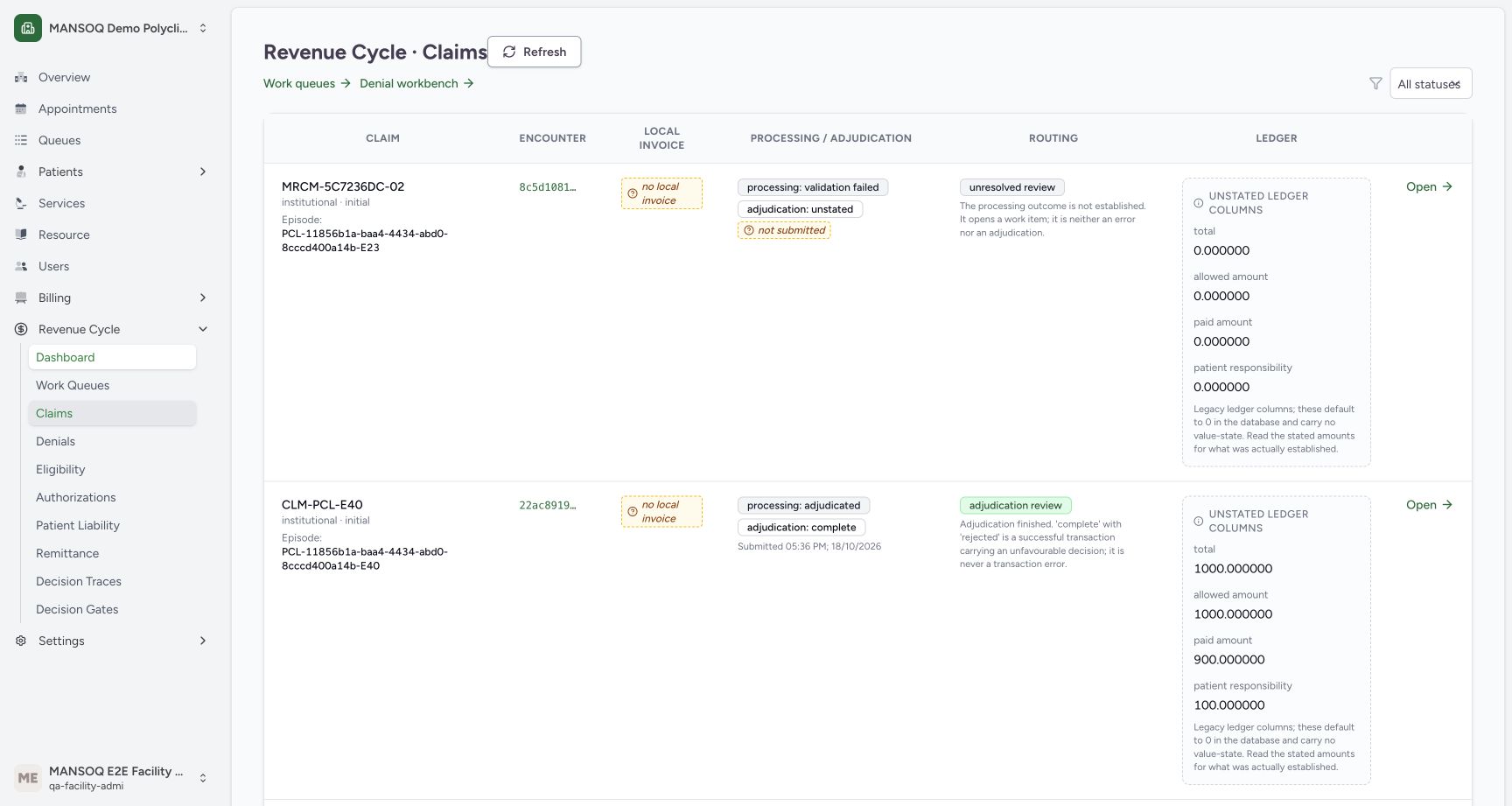
Follow the Encounter link from the claims worklist and read the two existing claims without merging them into one record.
Facility Admin
 12
12Follow the existing claim’s Encounter link
Capture details
Observed committed 3dfb source on 20 October 2026 (Asia/Riyadh; captured 19 October UTC). Existing synthetic claims; stored outcomes are not an external payer or settlement qualification.
Image SHA-256 332f56270004957c3141b849cf8138f9ad385558865349a432e3a03d309a5ca3
- Encounter link for MRCM-5C7236DC-02: Use or read this exact pictured Encounter link for MRCM-5C7236DC-02 control or label.
- Refresh: Use or read this exact pictured Refresh control or label.
 1234
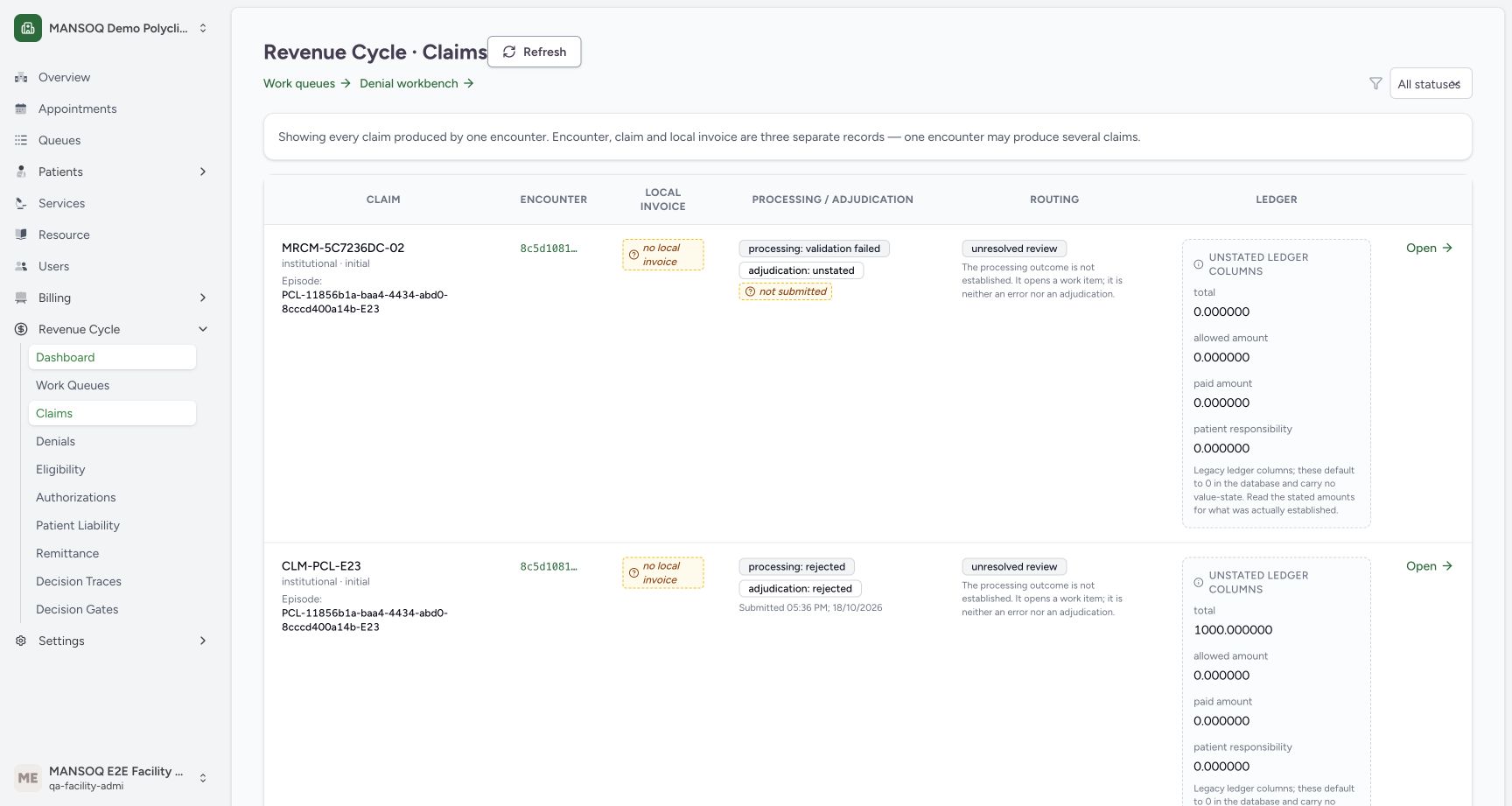
1234Read the two claims produced by the same encounter
Capture details
Observed committed 3dfb source on 20 October 2026 (Asia/Riyadh; captured 19 October UTC). Existing synthetic claims; stored outcomes are not an external payer or settlement qualification.
Image SHA-256 de41c74474e33102dc9ca24320bb1d0e2c5c3e81b1869e2527624faa663f56fb
- Open MRCM-5C7236DC-02: Use or read this exact pictured Open MRCM-5C7236DC-02 control or label.
- Open CLM-PCL-E23: Use or read this exact pictured Open CLM-PCL-E23 control or label.
- Refresh exact encounter worklist: Use or read this exact pictured Refresh exact encounter worklist control or label.
- Read the encounter-scoped banner: This list is showing every claim for one encounter, not one row per encounter.
9 of 9 content blocks have reviewed image alignment. Missing overview or prerequisite images remain open.
Before you begin
- Start in an already authenticated Facility Admin session with permission to read accounts for MANSOQ Demo Polyclinic. The pictured account is MANSOQ E2E Facility Admin; it is not a separate Executive role.
 12
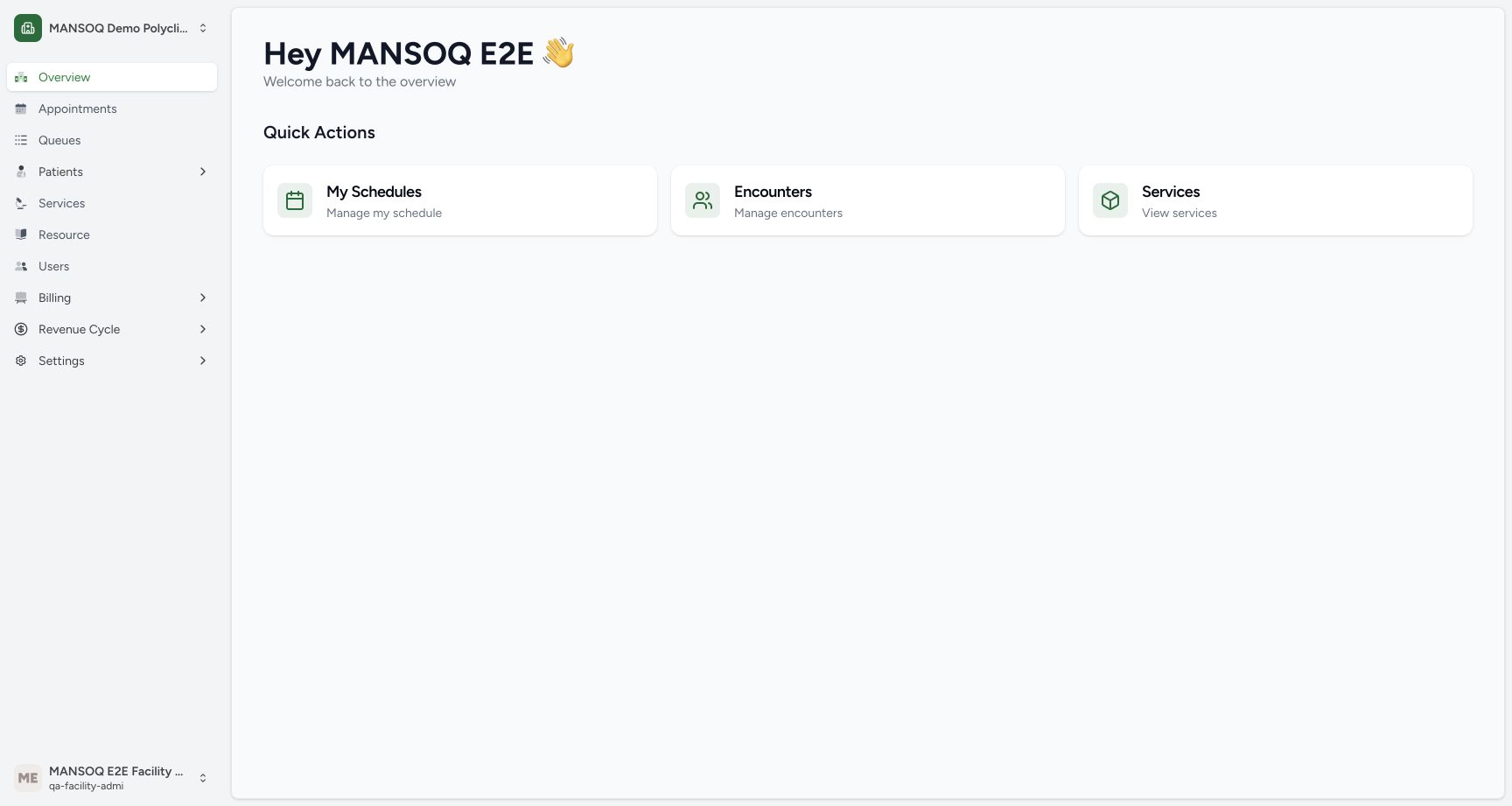
12Recorded release 3dfb7c9f · 2026-10-19T22:28:34.403Z · 1728 × 921 Use the actual Facility Admin account and Revenue Cycle navigation
Capture details
Observed committed 3dfb source on 20 October 2026 (Asia/Riyadh; captured 19 October UTC). Existing synthetic claims; stored outcomes are not an external payer or settlement qualification.
Image SHA-256
82a98c51409e00d16baa1e05359aeaf0a38ae0bc540df560235eb384ff846921- Revenue Cycle: Use or read this exact pictured Revenue Cycle control or label.
- Actual Facility Admin account: Use or read this exact pictured Actual Facility Admin account control or label.
- Use the existing synthetic MRCM-5C7236DC-02 claim in the pictured worklist. This exercise reads existing records; it does not create, submit or classify a claim.12
Recorded release 3dfb7c9f · 2026-10-19T22:28:47.862Z · 1728 × 921 Follow the existing claim’s Encounter link
Capture details
Observed committed 3dfb source on 20 October 2026 (Asia/Riyadh; captured 19 October UTC). Existing synthetic claims; stored outcomes are not an external payer or settlement qualification.
Image SHA-256
332f56270004957c3141b849cf8138f9ad385558865349a432e3a03d309a5ca3- Encounter link for MRCM-5C7236DC-02: Use or read this exact pictured Encounter link for MRCM-5C7236DC-02 control or label.
- Refresh: Use or read this exact pictured Refresh control or label.
1. Open Revenue Cycle and Claims
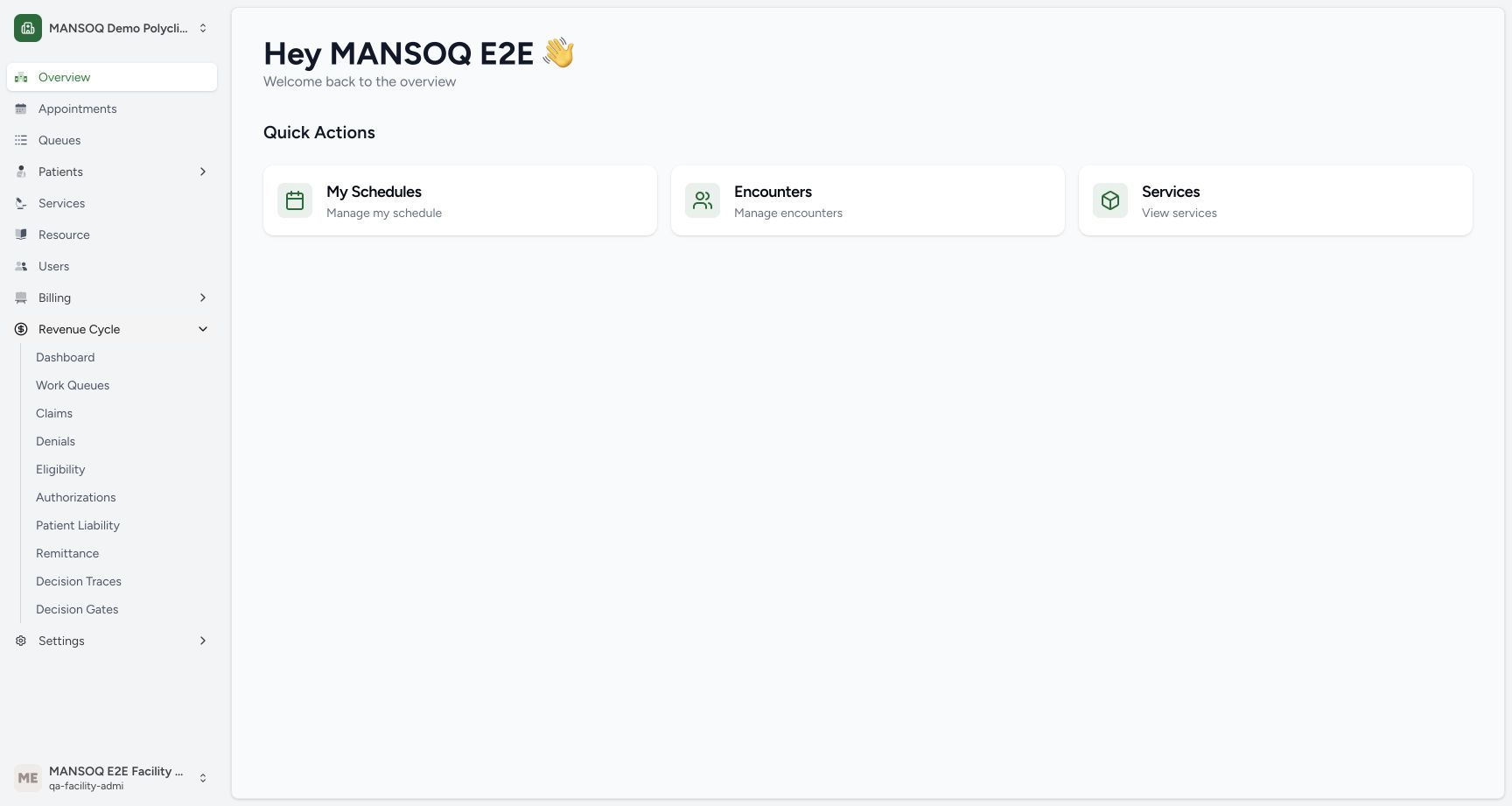
In the assigned facility, expand Revenue Cycle and select Claims. Confirm that the account shown is the authorized Facility Admin.
12Use the actual Facility Admin account and Revenue Cycle navigation
Capture details
Observed committed 3dfb source on 20 October 2026 (Asia/Riyadh; captured 19 October UTC). Existing synthetic claims; stored outcomes are not an external payer or settlement qualification.
Image SHA-256 82a98c51409e00d16baa1e05359aeaf0a38ae0bc540df560235eb384ff846921
- Revenue Cycle: Use or read this exact pictured Revenue Cycle control or label.
- Actual Facility Admin account: Use or read this exact pictured Actual Facility Admin account control or label.
 1
1Open Claims in Revenue Cycle
Capture details
Observed committed 3dfb source on 20 October 2026 (Asia/Riyadh; captured 19 October UTC). Existing synthetic claims; stored outcomes are not an external payer or settlement qualification.
Image SHA-256 2d1d5cd0c0c4267cd28b6ec03b04d7c911a9d1f0614ef17ba15122e3ce1df315
- Claims: Use or read this exact pictured Claims control or label.
2. Find the existing claim and Encounter link
With All statuses selected, locate MRCM-5C7236DC-02. In that same row, select its Encounter link, shown as 8c5d1081… in this example.
12Follow the existing claim’s Encounter link
Capture details
Observed committed 3dfb source on 20 October 2026 (Asia/Riyadh; captured 19 October UTC). Existing synthetic claims; stored outcomes are not an external payer or settlement qualification.
Image SHA-256 332f56270004957c3141b849cf8138f9ad385558865349a432e3a03d309a5ca3
- Encounter link for MRCM-5C7236DC-02: Use or read this exact pictured Encounter link for MRCM-5C7236DC-02 control or label.
- Refresh: Use or read this exact pictured Refresh control or label.
3. Read the encounter-scoped worklist
Read the banner explaining that one encounter may produce several claims. The loaded list contains MRCM-5C7236DC-02 and CLM-PCL-E23 for the same encounter. Read each row’s processing and adjudication labels separately.
1234Read the two claims produced by the same encounter
Capture details
Observed committed 3dfb source on 20 October 2026 (Asia/Riyadh; captured 19 October UTC). Existing synthetic claims; stored outcomes are not an external payer or settlement qualification.
Image SHA-256 de41c74474e33102dc9ca24320bb1d0e2c5c3e81b1869e2527624faa663f56fb
- Open MRCM-5C7236DC-02: Use or read this exact pictured Open MRCM-5C7236DC-02 control or label.
- Open CLM-PCL-E23: Use or read this exact pictured Open CLM-PCL-E23 control or label.
- Refresh exact encounter worklist: Use or read this exact pictured Refresh exact encounter worklist control or label.
- Read the encounter-scoped banner: This list is showing every claim for one encounter, not one row per encounter.
4. Keep the three records distinct
Both pictured claims show no local invoice. An encounter, a claim and a local invoice are separate records; two claims do not imply two invoices or a completed payment.
1234Read the two claims produced by the same encounter
Capture details
Observed committed 3dfb source on 20 October 2026 (Asia/Riyadh; captured 19 October UTC). Existing synthetic claims; stored outcomes are not an external payer or settlement qualification.
Image SHA-256 de41c74474e33102dc9ca24320bb1d0e2c5c3e81b1869e2527624faa663f56fb
- Open MRCM-5C7236DC-02: Use or read this exact pictured Open MRCM-5C7236DC-02 control or label.
- Open CLM-PCL-E23: Use or read this exact pictured Open CLM-PCL-E23 control or label.
- Refresh exact encounter worklist: Use or read this exact pictured Refresh exact encounter worklist control or label.
- Read the encounter-scoped banner: This list is showing every claim for one encounter, not one row per encounter.
Continue to an individual claim
Use Open on the intended claim row to read its detail. The companion lesson follows the first claim and then its same-encounter sibling.
1234Read the two claims produced by the same encounter
Capture details
Observed committed 3dfb source on 20 October 2026 (Asia/Riyadh; captured 19 October UTC). Existing synthetic claims; stored outcomes are not an external payer or settlement qualification.
Image SHA-256 de41c74474e33102dc9ca24320bb1d0e2c5c3e81b1869e2527624faa663f56fb
- Open MRCM-5C7236DC-02: Use or read this exact pictured Open MRCM-5C7236DC-02 control or label.
- Open CLM-PCL-E23: Use or read this exact pictured Open CLM-PCL-E23 control or label.
- Refresh exact encounter worklist: Use or read this exact pictured Refresh exact encounter worklist control or label.
- Read the encounter-scoped banner: This list is showing every claim for one encounter, not one row per encounter.
Troubleshooting
Do several rows mean the encounter was duplicated?
Not in this example. The worklist explicitly groups claims from one encounter. Identify the claim number and its own outcomes before opening a row.
1234Read the two claims produced by the same encounter
Capture details
Observed committed 3dfb source on 20 October 2026 (Asia/Riyadh; captured 19 October UTC). Existing synthetic claims; stored outcomes are not an external payer or settlement qualification.
Image SHA-256 de41c74474e33102dc9ca24320bb1d0e2c5c3e81b1869e2527624faa663f56fb
- Open MRCM-5C7236DC-02: Use or read this exact pictured Open MRCM-5C7236DC-02 control or label.
- Open CLM-PCL-E23: Use or read this exact pictured Open CLM-PCL-E23 control or label.
- Refresh exact encounter worklist: Use or read this exact pictured Refresh exact encounter worklist control or label.
- Read the encounter-scoped banner: This list is showing every claim for one encounter, not one row per encounter.
Source evidence
Every citation uses this exact committed version. The private source repository requires access.
- repositories/platform/mansoq-web/src/components/ui/sidebar/facility/facility-nav.tsx:144 ·
3dfb7c9f519fb5b4cd4452439f3c12346bf58319Source file checksum
26a257157ad5c4272295c13ac63f349cc4f2ba61ede92af64e671a0eb9be5d95 - repositories/platform/mansoq-web/src/Routers/routes/FacilityRoutes.tsx:205 ·
3dfb7c9f519fb5b4cd4452439f3c12346bf58319Source file checksum
e42381cbb2ce6c5ba8cdf2203ad05e90582e6bf59c27be491a071ea5417cc534 - repositories/platform/mansoq-web/src/pages/Facility/revenueCycle/ClaimWorkbenchPage.tsx:111 ·
3dfb7c9f519fb5b4cd4452439f3c12346bf58319Source file checksum
78dc1987950cd261dc2fc9b003e80f2b9c9168ae7711cb5c264b19952cbc4a37 - repositories/platform/mansoq-web/src/pages/Facility/revenueCycle/operations/rcmOperationsApi.ts:89 ·
3dfb7c9f519fb5b4cd4452439f3c12346bf58319Source file checksum
5db0f80e171dc7b30a6c62b9f67e0466e45d47a9fb8b4db6bef9f38780e97a1b - repositories/platform/mansoq-core/mansoq/emr/api/viewsets/rcm/claims.py:94 ·
3dfb7c9f519fb5b4cd4452439f3c12346bf58319Source file checksum
aa6e238eaf25189fb9e86902712923b25997bbce371a6caee3c6f8d3e8ebfeaa - repositories/platform/mansoq-core/mansoq/security/authorization/account.py:23 ·
3dfb7c9f519fb5b4cd4452439f3c12346bf58319Source file checksum
a9de19ac82208175cf033f9758dac878f128cbbbe8d246c77ec13215879fc0e6 - repositories/platform/mansoq-web/src/Utils/request/query.ts:23 ·
3dfb7c9f519fb5b4cd4452439f3c12346bf58319Source file checksum
5f702111f6316a80ac484092d57cadf3d72271bfa73a700b95a9939804a26b03 - repositories/platform/mansoq-web/src/Utils/request/utils.ts:19 ·
3dfb7c9f519fb5b4cd4452439f3c12346bf58319Source file checksum
b8c1b8a3805c54e408ae20ae524a7d798d42130403a8efde388f9bdbbeb0d9ca - repositories/platform/mansoq-core/mansoq/emr/api/viewsets/rcm/operations_base.py:596 ·
3dfb7c9f519fb5b4cd4452439f3c12346bf58319Source file checksum
e2b741a157811f624bf70161931308f82789e49ca28a2c0d35f86f6fb46b6ba7 - repositories/platform/mansoq-core/mansoq/security/permissions/account.py:30 ·
3dfb7c9f519fb5b4cd4452439f3c12346bf58319Source file checksum
f8510744c07106490919defb6a17307bfaa19cf032ae95f9f0327c98775c5ace