 MANSOQ
 Clinical care · VERSION 3dfb7c9f
Attach an approved training PDF to the current encounter
Select an organization-approved harmless PDF through the structured Files question, name the pending file, upload once and verify the saved encounter attachment.
Nurse
 123
123Review one named file before the upload
Capture details
Exact committed 3dfb7c9f, 3401 verified Git blobs/139 assets. Existing ordinary Nurse on a fictional active Ambulatory encounter, 19 October 2026. One harmless provided PDF; no real clinical document, consent, new clinical response or later-release interface claim. Original full native Chrome window, unedited and not a fabricated web-viewport crop.
Image SHA-256 9efa703a5925fe034a1e872968828f5c562f1c47e83c429f22ea985d48a44192
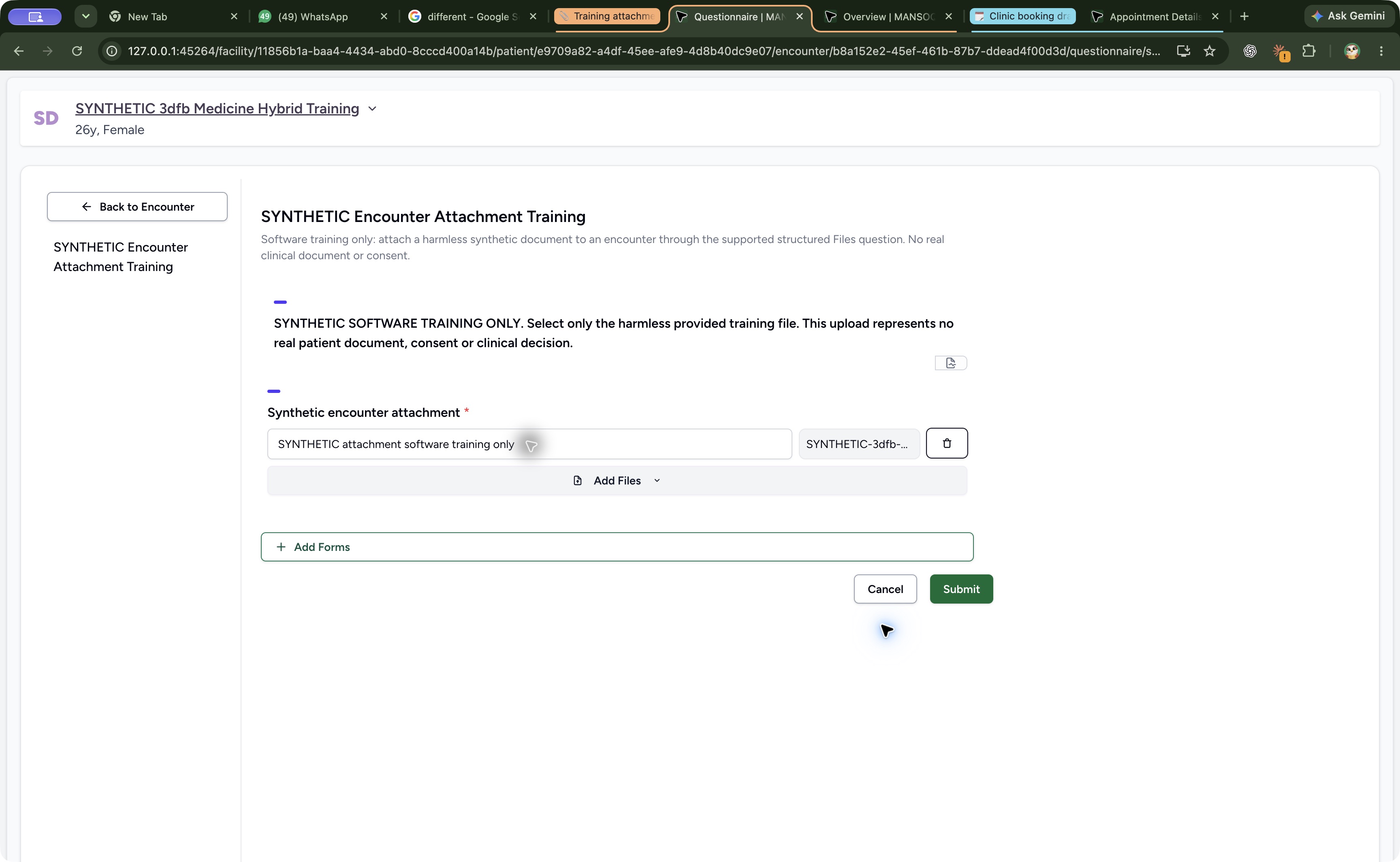
- Review the display name: The name is SYNTHETIC attachment software training only.
- Check the selected PDF: Keep exactly the intended approved training PDF in this single-file exercise.
- Submit the reviewed attachment once: Upload only after checking the patient, encounter, selected file and name.
 123
123Find the saved file and its recorder
Capture details
Exact committed 3dfb7c9f, 3401 verified Git blobs/139 assets. Existing ordinary Nurse on a fictional active Ambulatory encounter, 19 October 2026. One harmless provided PDF; no real clinical document, consent, new clinical response or later-release interface claim. Original full native Chrome window, unedited and not a fabricated web-viewport crop.
Image SHA-256 c67085588813a4c0a687c47d89a30c5b425ae378580e6aa7c4cf5ea63b22d371
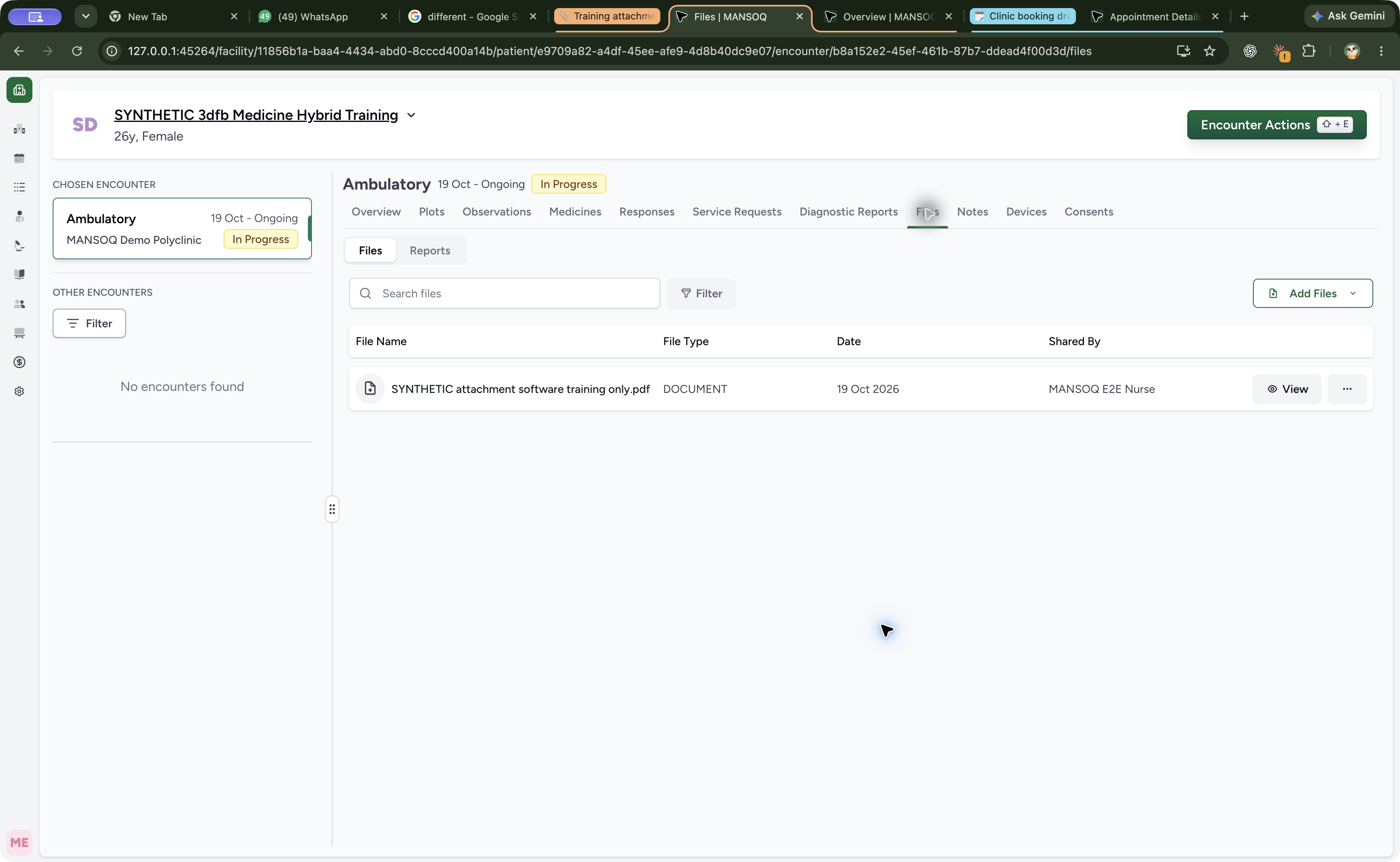
- Open Files: Review the attachment under the encounter Files tab.
- Read the saved filename: The display name is shown with its PDF extension.
- Read Shared By: The saved row identifies MANSOQ E2E Nurse.
16 of 16 content blocks have reviewed image alignment. Missing overview or prerequisite images remain open.
Before you begin
- Use the existing authorized Nurse session on the intended active encounter. Confirm the patient banner and encounter before selecting a document.
 12
12Recorded release 3dfb7c9f · 2026-10-19 · 1728 × 977 Check the authorized Nurse and intended case
Capture details
Exact committed 3dfb7c9f, 3401 verified Git blobs/139 assets. Existing ordinary Nurse on a fictional active Ambulatory encounter, 19 October 2026. One harmless provided PDF; no real clinical document, consent, new clinical response or later-release interface claim. Earlier same-day account frame preserved after connection failure; exact acquisition time is not claimed.
Image SHA-256
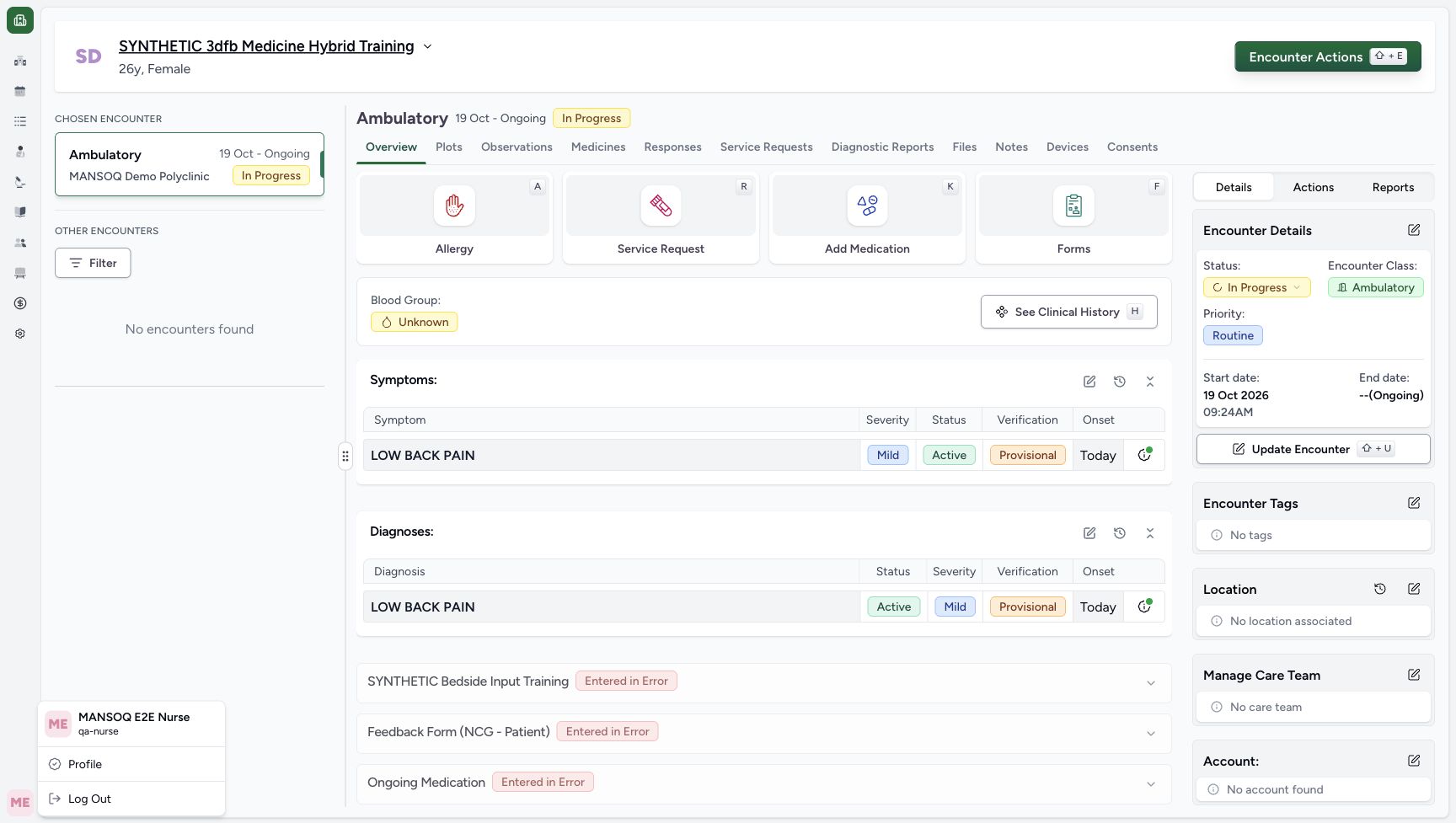
a8b71e2f2143ee284ba17d9f63518590adf7090dcde8f7a500b66f4cc67e84a9- Read the Nurse account: Check MANSOQ E2E Nurse and qa-nurse in the account menu.
- Check the patient banner: Use the intended fictional Medicine Hybrid Training case.
 12
12Recorded release 3dfb7c9f · 2026-10-19T16:28:29.800Z · 3456 × 2128 Open Forms on the current encounter
Capture details
Exact committed 3dfb7c9f, 3401 verified Git blobs/139 assets. Existing ordinary Nurse on a fictional active Ambulatory encounter, 19 October 2026. One harmless provided PDF; no real clinical document, consent, new clinical response or later-release interface claim. Original full native Chrome window, unedited and not a fabricated web-viewport crop.
Image SHA-256
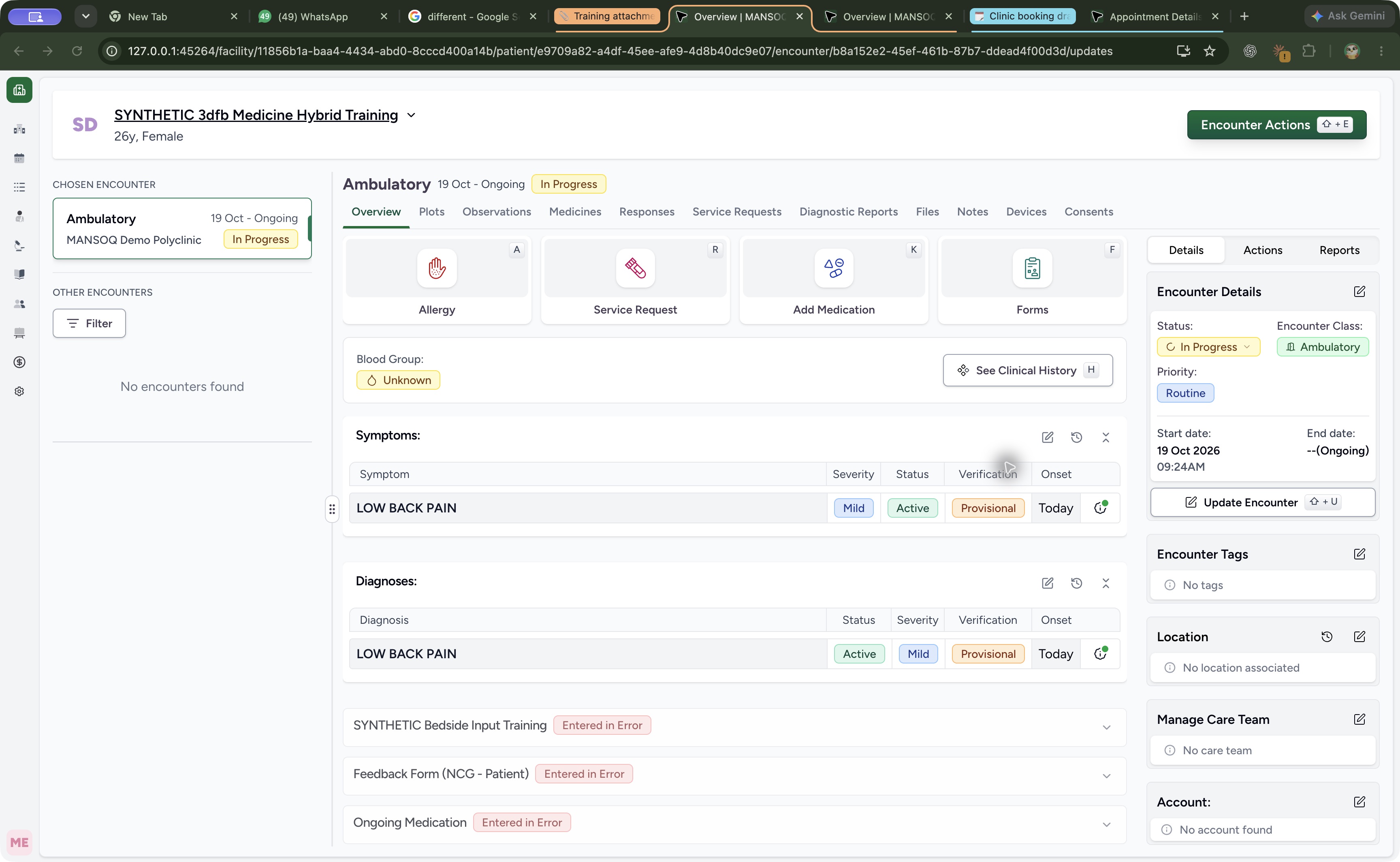
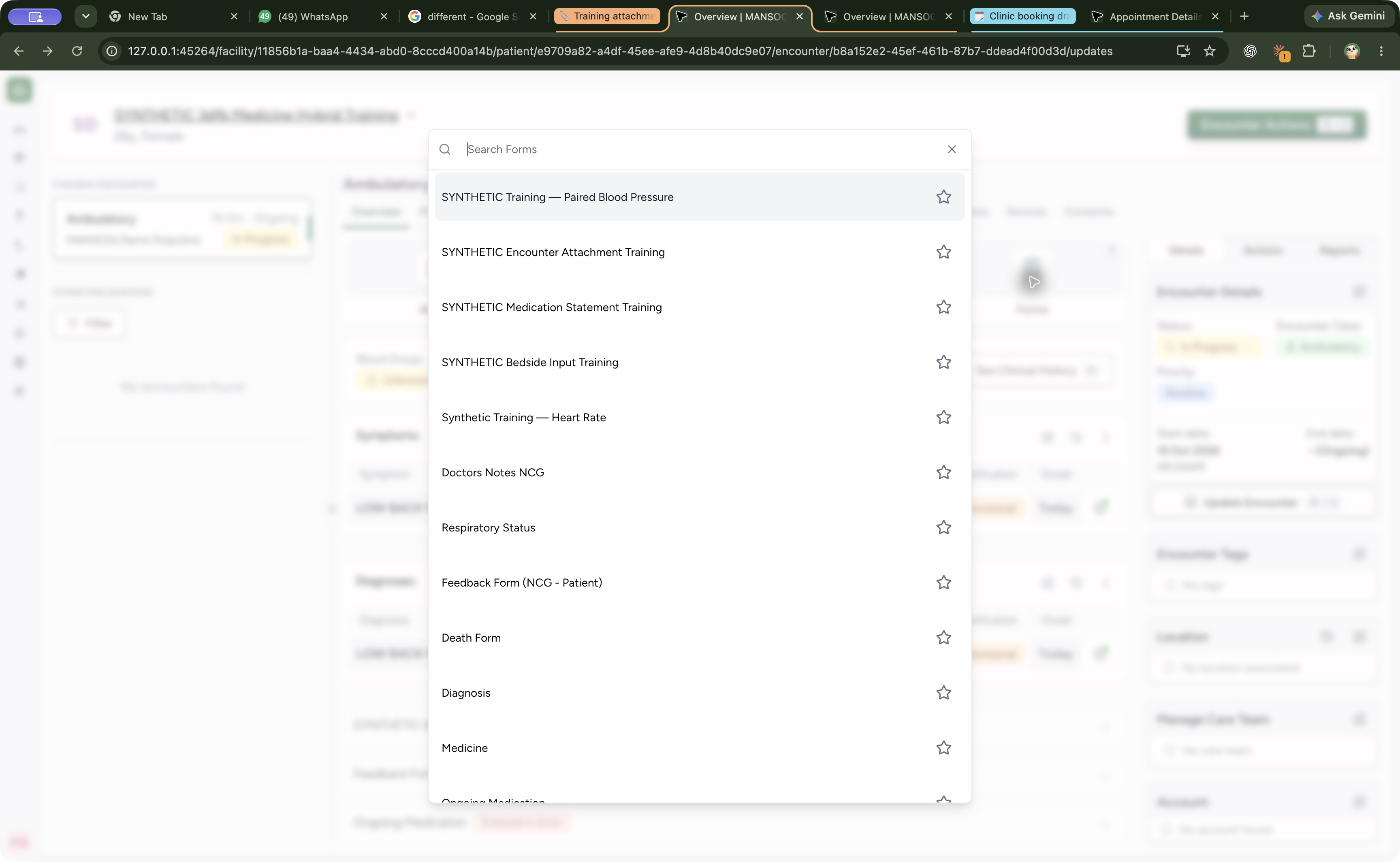
994fc9762612e78999ec162dae428bb1b939f61262b2cbd32d0b1e144d76341f- Open Forms: Choose Forms on the current Ambulatory encounter.
- Read In Progress: Verify the intended active encounter before choosing a form.
- Your organization must already provide the structured attachment form. The pictured installed form is SYNTHETIC Encounter Attachment Training; this walkthrough does not teach form setup or permission grants.
 1
1Recorded release 3dfb7c9f · 2026-10-19T16:30:03.099Z · 3456 × 2128 Choose the installed attachment training form
Capture details
Exact committed 3dfb7c9f, 3401 verified Git blobs/139 assets. Existing ordinary Nurse on a fictional active Ambulatory encounter, 19 October 2026. One harmless provided PDF; no real clinical document, consent, new clinical response or later-release interface claim. Original full native Chrome window, unedited and not a fabricated web-viewport crop.
Image SHA-256
0ccb044599ff5214febf48747a8880e327768c8a4f379ad30bd840dfbf891e04- Select SYNTHETIC Encounter Attachment Training: Choose the named form row; leave the separate favourite star unchanged.
 123
123Recorded release 3dfb7c9f · 2026-10-19T16:30:29.193Z · 3456 × 2128 Read the empty required attachment form
Capture details
Exact committed 3dfb7c9f, 3401 verified Git blobs/139 assets. Existing ordinary Nurse on a fictional active Ambulatory encounter, 19 October 2026. One harmless provided PDF; no real clinical document, consent, new clinical response or later-release interface claim. Original full native Chrome window, unedited and not a fabricated web-viewport crop.
Image SHA-256
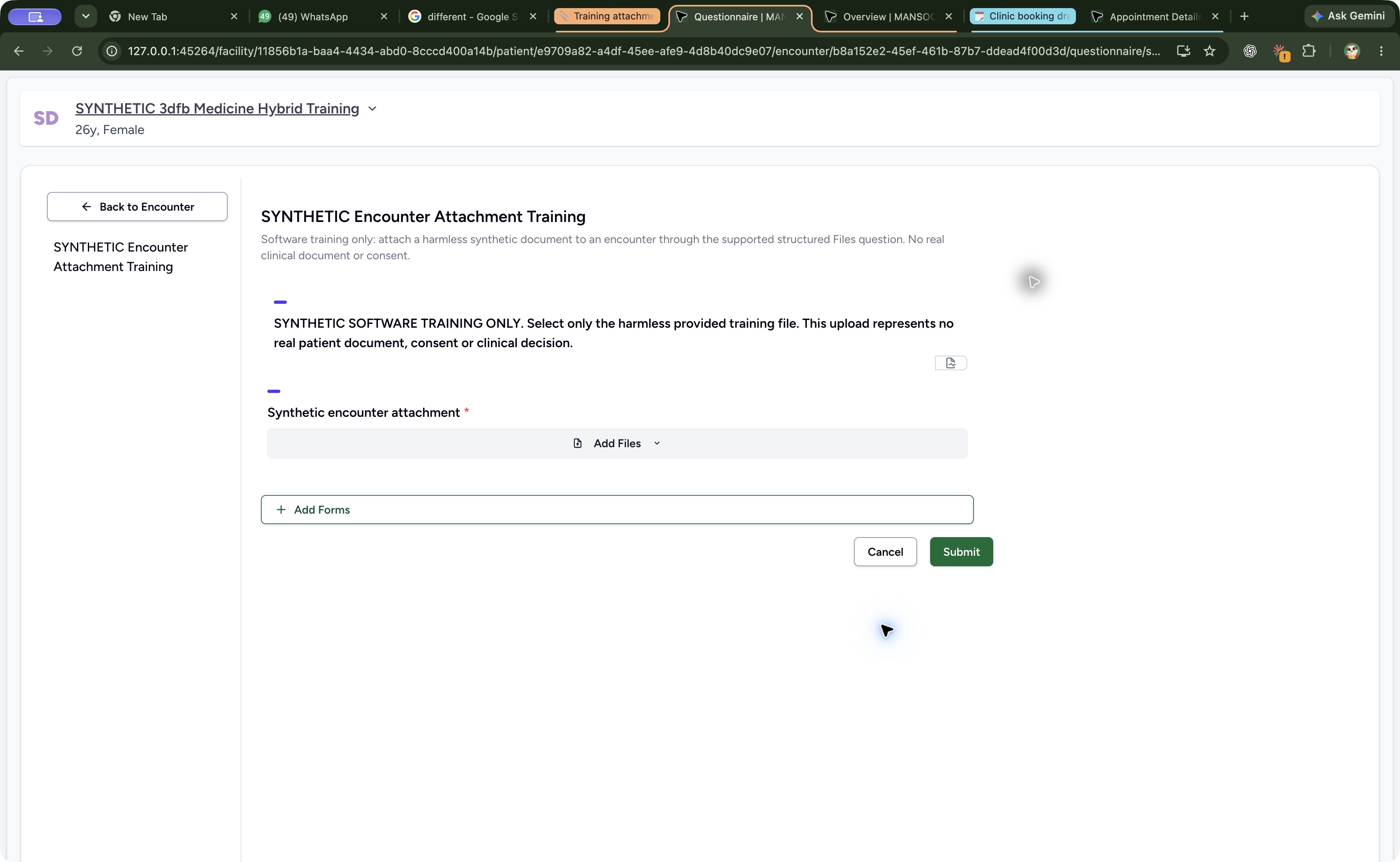
1debd5ea4ece05bac71ab426965a9d4b6902814bcfec971cc6dbed861e6bdbe1- Read the training notice: Read the software-training notice before selecting a harmless approved document.
- Open Add Files: The required attachment question is empty.
- Cancel without submitting: Leave this untouched form with Cancel.
- Obtain an approved harmless training PDF from your organization. The screenshots use the supplied SYNTHETIC-3dfb-encounter-attachment.pdf example; your approved filename can differ. No public example-file download is provided by this lesson, and the exercise represents no real clinical document, consent or care decision.123
Recorded release 3dfb7c9f · 2026-10-19T16:30:29.193Z · 3456 × 2128 Read the empty required attachment form
Capture details
Exact committed 3dfb7c9f, 3401 verified Git blobs/139 assets. Existing ordinary Nurse on a fictional active Ambulatory encounter, 19 October 2026. One harmless provided PDF; no real clinical document, consent, new clinical response or later-release interface claim. Original full native Chrome window, unedited and not a fabricated web-viewport crop.
Image SHA-256
1debd5ea4ece05bac71ab426965a9d4b6902814bcfec971cc6dbed861e6bdbe1- Read the training notice: Read the software-training notice before selecting a harmless approved document.
- Open Add Files: The required attachment question is empty.
- Cancel without submitting: Leave this untouched form with Cancel.
 12
12Recorded release 3dfb7c9f · 2026-10-19T16:45:08.151Z · 3456 × 2128 Inspect the selected local PDF before naming it
Capture details
Exact committed 3dfb7c9f, 3401 verified Git blobs/139 assets. Existing ordinary Nurse on a fictional active Ambulatory encounter, 19 October 2026. One harmless provided PDF; no real clinical document, consent, new clinical response or later-release interface claim. Original full native Chrome window, unedited and not a fabricated web-viewport crop.
Image SHA-256
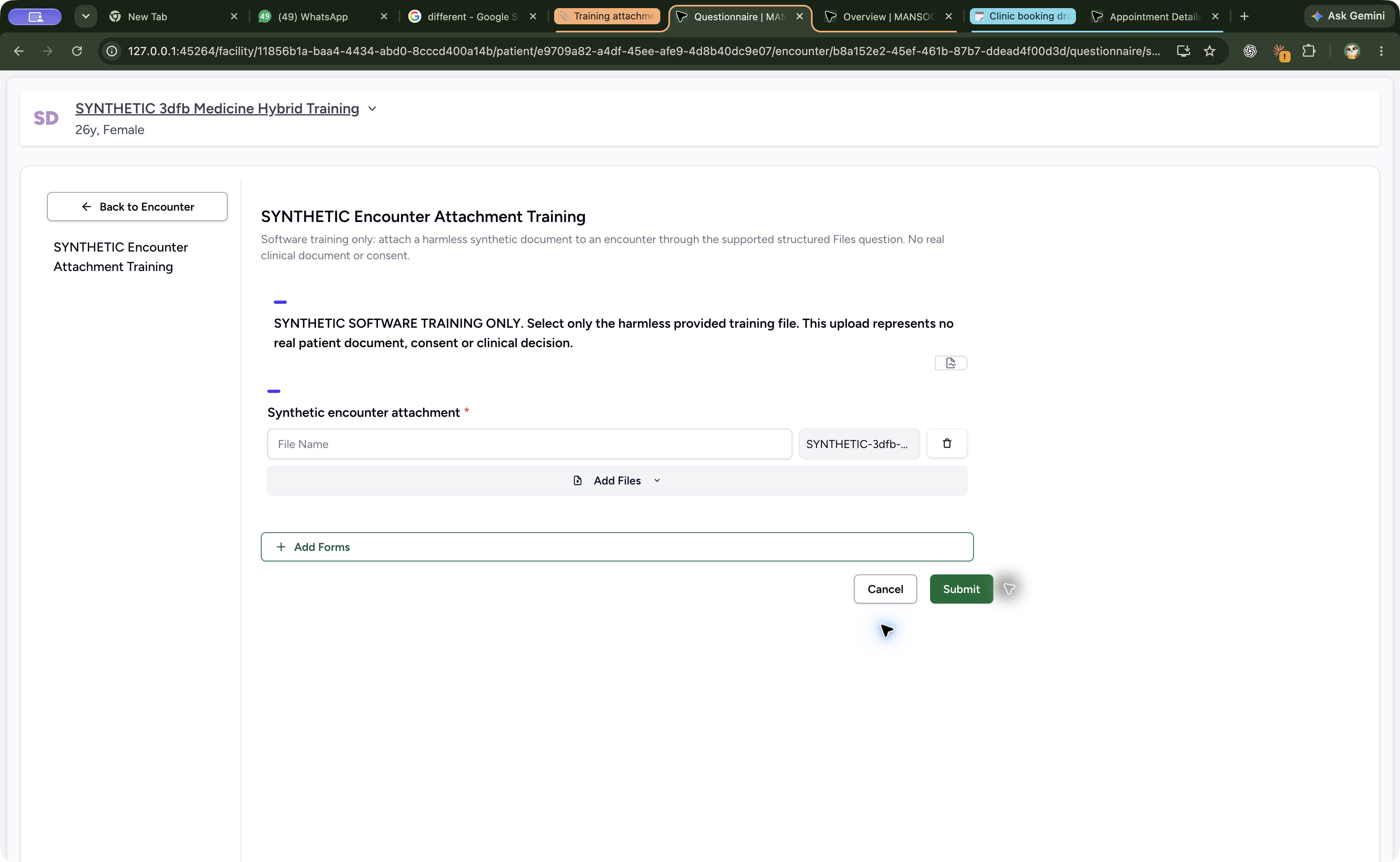
abe1cec38f5295ca7a9a49d1ac9223e736078ebd4c3987b4641adf122ccf73eb- Enter File Name: The pending file still needs its separate display name.
- Read the selected filename: The selected PDF filename appears beside the blank name field.
1. Check the account and intended encounter
Check the signed-in Nurse account and the patient banner. In the example, the intended fictional case is SYNTHETIC 3dfb Medicine Hybrid Training, with an In Progress Ambulatory encounter. Use Overview → Forms.
12Check the authorized Nurse and intended case
Capture details
Exact committed 3dfb7c9f, 3401 verified Git blobs/139 assets. Existing ordinary Nurse on a fictional active Ambulatory encounter, 19 October 2026. One harmless provided PDF; no real clinical document, consent, new clinical response or later-release interface claim. Earlier same-day account frame preserved after connection failure; exact acquisition time is not claimed.
Image SHA-256 a8b71e2f2143ee284ba17d9f63518590adf7090dcde8f7a500b66f4cc67e84a9
- Read the Nurse account: Check MANSOQ E2E Nurse and qa-nurse in the account menu.
- Check the patient banner: Use the intended fictional Medicine Hybrid Training case.
12Open Forms on the current encounter
Capture details
Exact committed 3dfb7c9f, 3401 verified Git blobs/139 assets. Existing ordinary Nurse on a fictional active Ambulatory encounter, 19 October 2026. One harmless provided PDF; no real clinical document, consent, new clinical response or later-release interface claim. Original full native Chrome window, unedited and not a fabricated web-viewport crop.
Image SHA-256 994fc9762612e78999ec162dae428bb1b939f61262b2cbd32d0b1e144d76341f
- Open Forms: Choose Forms on the current Ambulatory encounter.
- Read In Progress: Verify the intended active encounter before choosing a form.
2. Open the installed attachment form
Choose SYNTHETIC Encounter Attachment Training from the form list. Read its software-training notice and the required Synthetic encounter attachment question. An empty Add Files area is not a saved attachment.
1Choose the installed attachment training form
Capture details
Exact committed 3dfb7c9f, 3401 verified Git blobs/139 assets. Existing ordinary Nurse on a fictional active Ambulatory encounter, 19 October 2026. One harmless provided PDF; no real clinical document, consent, new clinical response or later-release interface claim. Original full native Chrome window, unedited and not a fabricated web-viewport crop.
Image SHA-256 0ccb044599ff5214febf48747a8880e327768c8a4f379ad30bd840dfbf891e04
- Select SYNTHETIC Encounter Attachment Training: Choose the named form row; leave the separate favourite star unchanged.
123Read the empty required attachment form
Capture details
Exact committed 3dfb7c9f, 3401 verified Git blobs/139 assets. Existing ordinary Nurse on a fictional active Ambulatory encounter, 19 October 2026. One harmless provided PDF; no real clinical document, consent, new clinical response or later-release interface claim. Original full native Chrome window, unedited and not a fabricated web-viewport crop.
Image SHA-256 1debd5ea4ece05bac71ab426965a9d4b6902814bcfec971cc6dbed861e6bdbe1
- Read the training notice: Read the software-training notice before selecting a harmless approved document.
- Open Add Files: The required attachment question is empty.
- Cancel without submitting: Leave this untouched form with Cancel.
3. Choose your approved PDF from the device
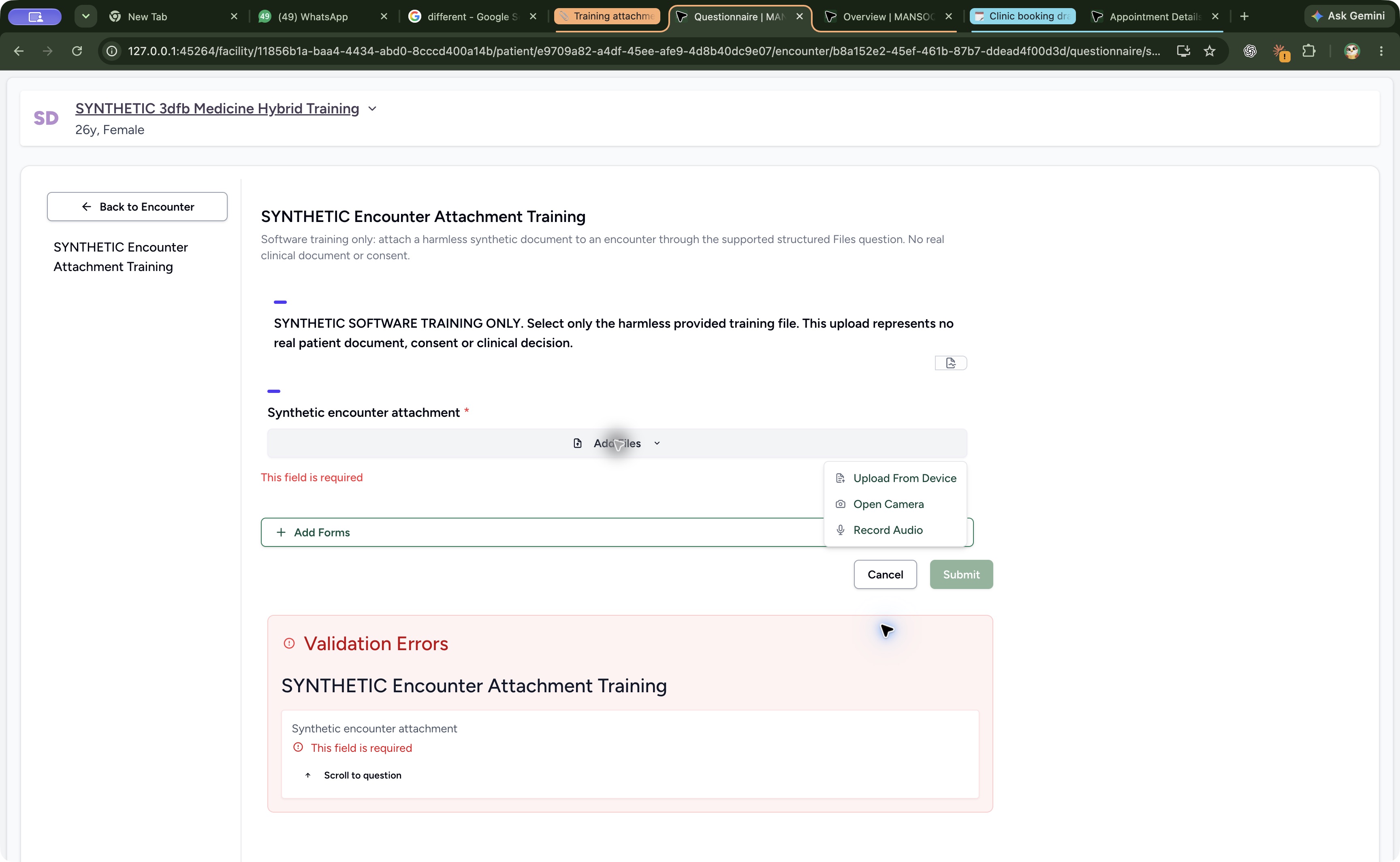
Open Add Files and choose Upload From Device. In the normal device chooser, select your organization-approved harmless training PDF, check its filename and choose Open. The chooser illustration shows the supplied SYNTHETIC example; your filename can differ. On returning to the form, verify that one pending file row appears. Camera and audio are separate choices and are not used here.
 12
12Choose Upload From Device
Capture details
Exact committed 3dfb7c9f, 3401 verified Git blobs/139 assets. Existing ordinary Nurse on a fictional active Ambulatory encounter, 19 October 2026. One harmless provided PDF; no real clinical document, consent, new clinical response or later-release interface claim. Original full native Chrome window, unedited and not a fabricated web-viewport crop.
Image SHA-256 d59dc03181954be666b051de2f2e298a012b1052df3675121d0613bd99749aea
- Select Upload From Device: Use a provided local file for this exercise.
- Read Open Camera: Open Camera is a separate capture choice. Record Audio is another visible choice; neither is used here.
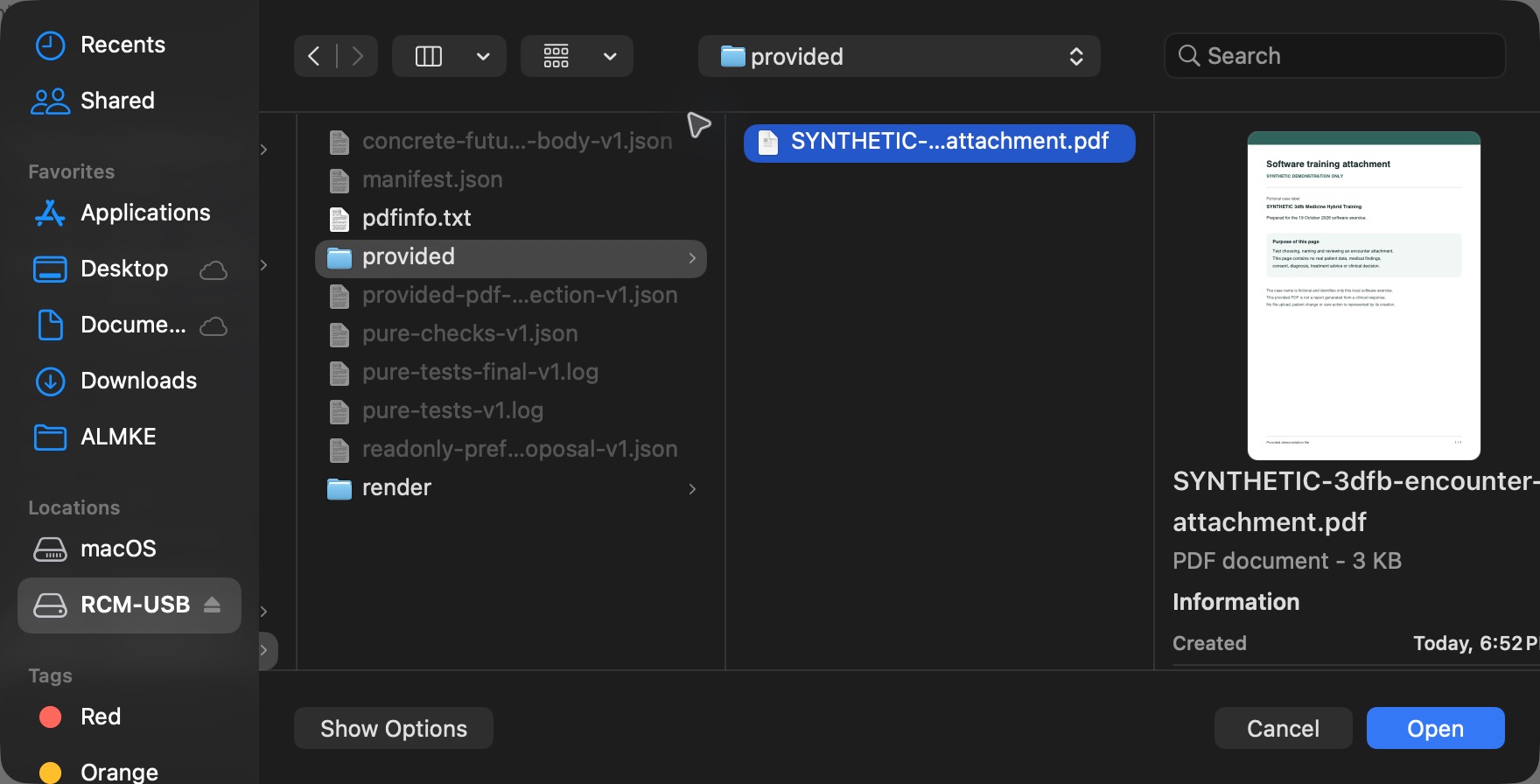 123
123Native macOS file chooser with the selected training PDF
Native macOS file chooser, shown in its original proportions.
Capture details
Exact 3dfb synthetic attachment exercise on macOS. Genuine original1760x896 device file chooser, not web, print or saved-PDF viewer; no stretching/cropping. The pictured supplied software-training PDF is selected. Open was used in this selection; Cancel illustrates the visible alternative and its earlier actual no-file result is separately retained.
Image SHA-256 36c266f6934e0a3f8865b30fb99a79d9a33063c6ad67a4d6717460ec5d84eaaa
- Check the selected training PDF: Read the selected filename and its harmless software-training preview before opening it.
- Open the selected file: Open returns the selected file to the pending form row; it does not itself upload to the encounter.
- Read Cancel as the alternative: Choose Cancel instead when you do not intend to open the selection. The earlier demonstrated chooser Cancel left the form without a pending file.
12Inspect the selected local PDF before naming it
Capture details
Exact committed 3dfb7c9f, 3401 verified Git blobs/139 assets. Existing ordinary Nurse on a fictional active Ambulatory encounter, 19 October 2026. One harmless provided PDF; no real clinical document, consent, new clinical response or later-release interface claim. Original full native Chrome window, unedited and not a fabricated web-viewport crop.
Image SHA-256 abe1cec38f5295ca7a9a49d1ac9223e736078ebd4c3987b4641adf122ccf73eb
- Enter File Name: The pending file still needs its separate display name.
- Read the selected filename: The selected PDF filename appears beside the blank name field.
4. Give the pending file its display name
Enter a clear display name in File Name. The pictured example uses SYNTHETIC attachment software training only. This name is separate from the original filename shown beside it. Leave the field and verify that the complete name remains. Keep exactly one intended PDF for this exercise.
12Inspect the selected local PDF before naming it
Capture details
Exact committed 3dfb7c9f, 3401 verified Git blobs/139 assets. Existing ordinary Nurse on a fictional active Ambulatory encounter, 19 October 2026. One harmless provided PDF; no real clinical document, consent, new clinical response or later-release interface claim. Original full native Chrome window, unedited and not a fabricated web-viewport crop.
Image SHA-256 abe1cec38f5295ca7a9a49d1ac9223e736078ebd4c3987b4641adf122ccf73eb
- Enter File Name: The pending file still needs its separate display name.
- Read the selected filename: The selected PDF filename appears beside the blank name field.
123Review one named file before the upload
Capture details
Exact committed 3dfb7c9f, 3401 verified Git blobs/139 assets. Existing ordinary Nurse on a fictional active Ambulatory encounter, 19 October 2026. One harmless provided PDF; no real clinical document, consent, new clinical response or later-release interface claim. Original full native Chrome window, unedited and not a fabricated web-viewport crop.
Image SHA-256 9efa703a5925fe034a1e872968828f5c562f1c47e83c429f22ea985d48a44192
- Review the display name: The name is SYNTHETIC attachment software training only.
- Check the selected PDF: Keep exactly the intended approved training PDF in this single-file exercise.
- Submit the reviewed attachment once: Upload only after checking the patient, encounter, selected file and name.
5. Review the pending row before saving
Check the same patient and encounter, your approved training PDF and its display name. File selection and naming remain local draft actions until submission. The pictured ready row has an enabled Submit button and no required-field error.
123Review one named file before the upload
Capture details
Exact committed 3dfb7c9f, 3401 verified Git blobs/139 assets. Existing ordinary Nurse on a fictional active Ambulatory encounter, 19 October 2026. One harmless provided PDF; no real clinical document, consent, new clinical response or later-release interface claim. Original full native Chrome window, unedited and not a fabricated web-viewport crop.
Image SHA-256 9efa703a5925fe034a1e872968828f5c562f1c47e83c429f22ea985d48a44192
- Review the display name: The name is SYNTHETIC attachment software training only.
- Check the selected PDF: Keep exactly the intended approved training PDF in this single-file exercise.
- Submit the reviewed attachment once: Upload only after checking the patient, encounter, selected file and name.
6. Submit the reviewed attachment once
Choose Submit once and wait for the form to finish. The observed successful submission returned to the encounter. Do not choose Submit again while the request is pending or if the outcome is uncertain; check the saved Files list first.
123Review one named file before the upload
Capture details
Exact committed 3dfb7c9f, 3401 verified Git blobs/139 assets. Existing ordinary Nurse on a fictional active Ambulatory encounter, 19 October 2026. One harmless provided PDF; no real clinical document, consent, new clinical response or later-release interface claim. Original full native Chrome window, unedited and not a fabricated web-viewport crop.
Image SHA-256 9efa703a5925fe034a1e872968828f5c562f1c47e83c429f22ea985d48a44192
- Review the display name: The name is SYNTHETIC attachment software training only.
- Check the selected PDF: Keep exactly the intended approved training PDF in this single-file exercise.
- Submit the reviewed attachment once: Upload only after checking the patient, encounter, selected file and name.
123Find the saved file and its recorder
Capture details
Exact committed 3dfb7c9f, 3401 verified Git blobs/139 assets. Existing ordinary Nurse on a fictional active Ambulatory encounter, 19 October 2026. One harmless provided PDF; no real clinical document, consent, new clinical response or later-release interface claim. Original full native Chrome window, unedited and not a fabricated web-viewport crop.
Image SHA-256 c67085588813a4c0a687c47d89a30c5b425ae378580e6aa7c4cf5ea63b22d371
- Open Files: Review the attachment under the encounter Files tab.
- Read the saved filename: The display name is shown with its PDF extension.
- Read Shared By: The saved row identifies MANSOQ E2E Nurse.
7. Verify the saved attachment in Files
Open the encounter Files tab and keep its Files subtab selected. Check SYNTHETIC attachment software training only.pdf, DOCUMENT, the date and Shared By MANSOQ E2E Nurse. These identify the saved attachment rather than an unsaved pending row.
123Find the saved file and its recorder
Capture details
Exact committed 3dfb7c9f, 3401 verified Git blobs/139 assets. Existing ordinary Nurse on a fictional active Ambulatory encounter, 19 October 2026. One harmless provided PDF; no real clinical document, consent, new clinical response or later-release interface claim. Original full native Chrome window, unedited and not a fabricated web-viewport crop.
Image SHA-256 c67085588813a4c0a687c47d89a30c5b425ae378580e6aa7c4cf5ea63b22d371
- Open Files: Review the attachment under the encounter Files tab.
- Read the saved filename: The display name is shown with its PDF extension.
- Read Shared By: The saved row identifies MANSOQ E2E Nurse.
8. Verify that the row remains after reload
After a normal page reload, verify the same filename, date and recorder in Files. The example retained its one saved attachment. Preview, download, rename and archive are separate actions and are not performed by this upload walkthrough.
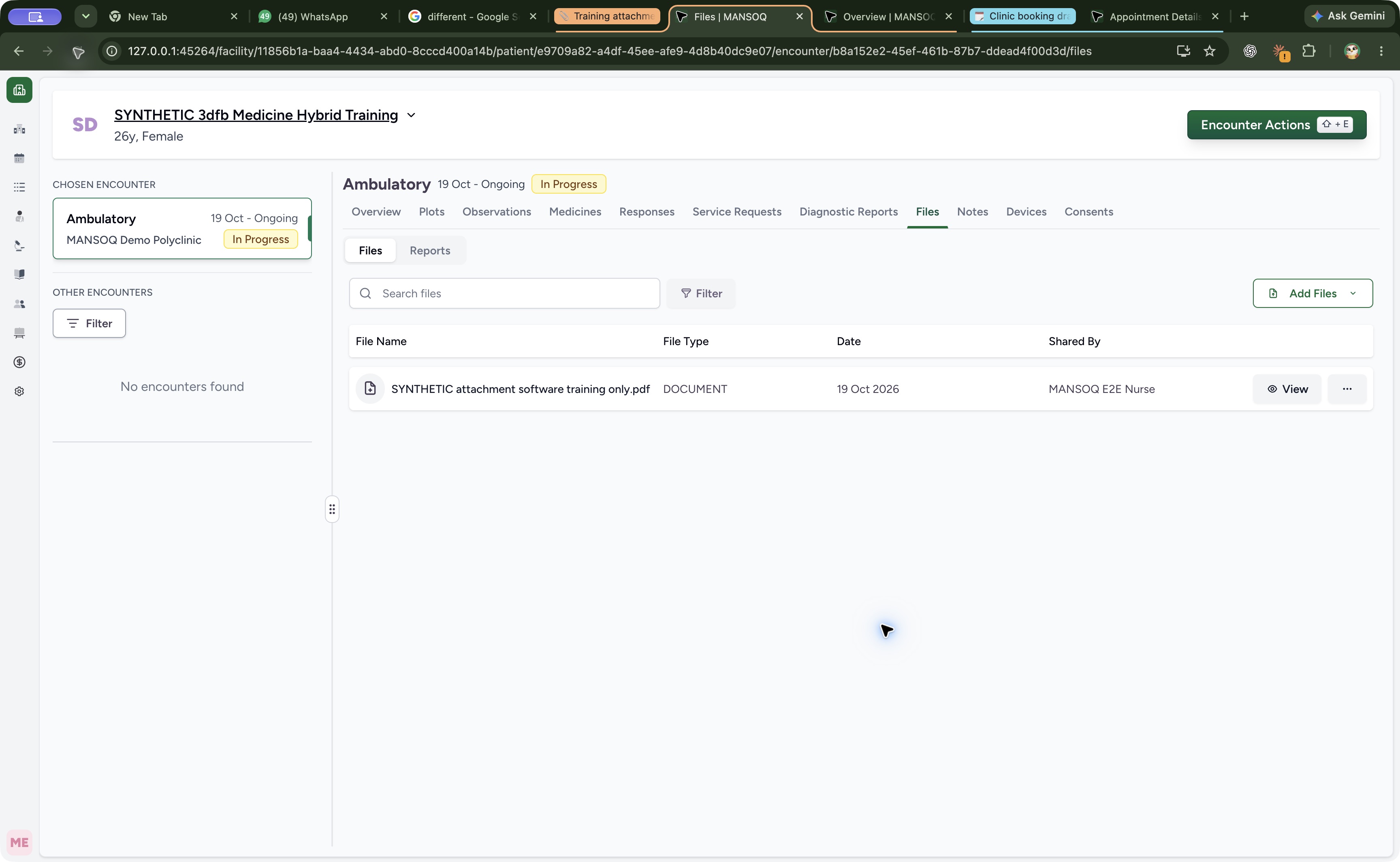 123
123Verify the saved row after a normal reload
Capture details
Exact committed 3dfb7c9f, 3401 verified Git blobs/139 assets. Existing ordinary Nurse on a fictional active Ambulatory encounter, 19 October 2026. One harmless provided PDF; no real clinical document, consent, new clinical response or later-release interface claim. Original full native Chrome window, unedited and not a fabricated web-viewport crop.
Image SHA-256 76e9ea9221ee7b2147bb7e5f5a184a5627dd5ce2dc8f5d8a314f33c0b7545b1a
- Read the retained filename: The same attachment remains after reload.
- Read the saved date: The row shows 19 Oct 2026.
- Check the same recorder: The retained row still identifies MANSOQ E2E Nurse.
This structured Files form has a file result
The saved result is an encounter attachment in Files. This form does not demonstrate an ordinary-answer response card, a generated response PDF or an Entered in Error action for an ordinary form response. Independent diagnoses, symptoms, observations and medication records remain separate.
123Read the empty required attachment form
Capture details
Exact committed 3dfb7c9f, 3401 verified Git blobs/139 assets. Existing ordinary Nurse on a fictional active Ambulatory encounter, 19 October 2026. One harmless provided PDF; no real clinical document, consent, new clinical response or later-release interface claim. Original full native Chrome window, unedited and not a fabricated web-viewport crop.
Image SHA-256 1debd5ea4ece05bac71ab426965a9d4b6902814bcfec971cc6dbed861e6bdbe1
- Read the training notice: Read the software-training notice before selecting a harmless approved document.
- Open Add Files: The required attachment question is empty.
- Cancel without submitting: Leave this untouched form with Cancel.
123Find the saved file and its recorder
Capture details
Exact committed 3dfb7c9f, 3401 verified Git blobs/139 assets. Existing ordinary Nurse on a fictional active Ambulatory encounter, 19 October 2026. One harmless provided PDF; no real clinical document, consent, new clinical response or later-release interface claim. Original full native Chrome window, unedited and not a fabricated web-viewport crop.
Image SHA-256 c67085588813a4c0a687c47d89a30c5b425ae378580e6aa7c4cf5ea63b22d371
- Open Files: Review the attachment under the encounter Files tab.
- Read the saved filename: The display name is shown with its PDF extension.
- Read Shared By: The saved row identifies MANSOQ E2E Nurse.
Keep the training scope clear
The pictures show one approved example PDF and one authorized Nurse on this configured active encounter. Direct Files-tab upload, multiple files, image compression, camera, audio, another patient, inactive encounters and other roles remain distinct workflows; they are not qualified by this example.
12Choose Upload From Device
Capture details
Exact committed 3dfb7c9f, 3401 verified Git blobs/139 assets. Existing ordinary Nurse on a fictional active Ambulatory encounter, 19 October 2026. One harmless provided PDF; no real clinical document, consent, new clinical response or later-release interface claim. Original full native Chrome window, unedited and not a fabricated web-viewport crop.
Image SHA-256 d59dc03181954be666b051de2f2e298a012b1052df3675121d0613bd99749aea
- Select Upload From Device: Use a provided local file for this exercise.
- Read Open Camera: Open Camera is a separate capture choice. Record Audio is another visible choice; neither is used here.
123Review one named file before the upload
Capture details
Exact committed 3dfb7c9f, 3401 verified Git blobs/139 assets. Existing ordinary Nurse on a fictional active Ambulatory encounter, 19 October 2026. One harmless provided PDF; no real clinical document, consent, new clinical response or later-release interface claim. Original full native Chrome window, unedited and not a fabricated web-viewport crop.
Image SHA-256 9efa703a5925fe034a1e872968828f5c562f1c47e83c429f22ea985d48a44192
- Review the display name: The name is SYNTHETIC attachment software training only.
- Check the selected PDF: Keep exactly the intended approved training PDF in this single-file exercise.
- Submit the reviewed attachment once: Upload only after checking the patient, encounter, selected file and name.
Troubleshooting
The selected file has a blank display name
Complete File Name and review the intended original filename. In this configured form, selecting a file without its name produces This field is required. The separate recovery walkthrough shows the actual client refusal.
12Inspect the selected local PDF before naming it
Capture details
Exact committed 3dfb7c9f, 3401 verified Git blobs/139 assets. Existing ordinary Nurse on a fictional active Ambulatory encounter, 19 October 2026. One harmless provided PDF; no real clinical document, consent, new clinical response or later-release interface claim. Original full native Chrome window, unedited and not a fabricated web-viewport crop.
Image SHA-256 abe1cec38f5295ca7a9a49d1ac9223e736078ebd4c3987b4641adf122ccf73eb
- Enter File Name: The pending file still needs its separate display name.
- Read the selected filename: The selected PDF filename appears beside the blank name field.
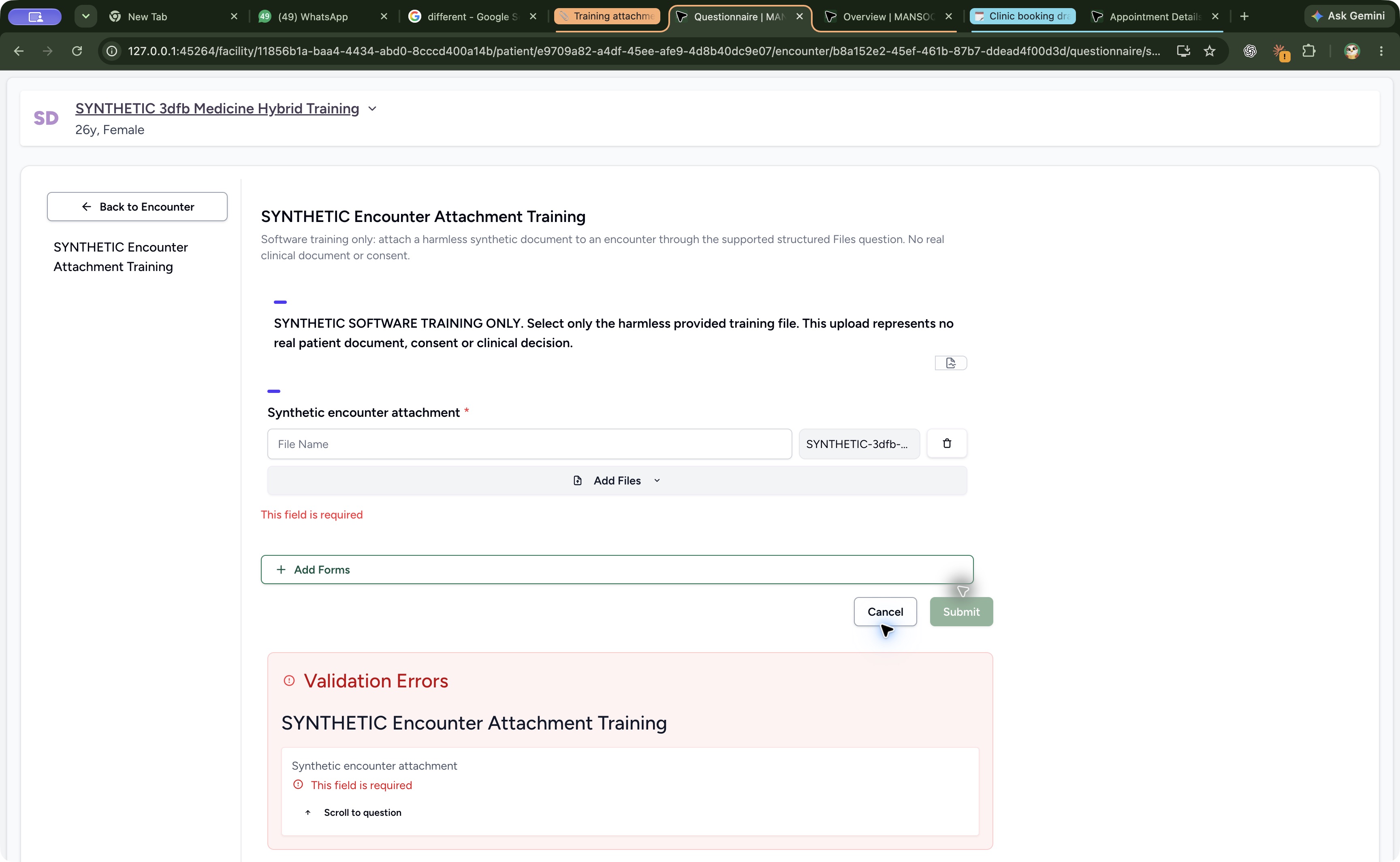 123
123Read the missing-name refusal
Capture details
Exact committed 3dfb7c9f, 3401 verified Git blobs/139 assets. Existing ordinary Nurse on a fictional active Ambulatory encounter, 19 October 2026. One harmless provided PDF; no real clinical document, consent, new clinical response or later-release interface claim. Original full native Chrome window, unedited and not a fabricated web-viewport crop.
Image SHA-256 3d7c160468a7920624265cc27e4bb48e741cdc2bdb60a9107ced00014fe3d3b3
- Complete File Name: A selected file alone does not satisfy this configured question.
- Read the required error: The missing name produces This field is required.
- Read disabled Submit: Correct the draft name before trying to save.
123Review one named file before the upload
Capture details
Exact committed 3dfb7c9f, 3401 verified Git blobs/139 assets. Existing ordinary Nurse on a fictional active Ambulatory encounter, 19 October 2026. One harmless provided PDF; no real clinical document, consent, new clinical response or later-release interface claim. Original full native Chrome window, unedited and not a fabricated web-viewport crop.
Image SHA-256 9efa703a5925fe034a1e872968828f5c562f1c47e83c429f22ea985d48a44192
- Review the display name: The name is SYNTHETIC attachment software training only.
- Check the selected PDF: Keep exactly the intended approved training PDF in this single-file exercise.
- Submit the reviewed attachment once: Upload only after checking the patient, encounter, selected file and name.
You cannot tell whether Submit finished
Wait for the current request. Check the intended encounter Files list for the named attachment. Do not repeat an uncertain upload merely to obtain a success message.
123Review one named file before the upload
Capture details
Exact committed 3dfb7c9f, 3401 verified Git blobs/139 assets. Existing ordinary Nurse on a fictional active Ambulatory encounter, 19 October 2026. One harmless provided PDF; no real clinical document, consent, new clinical response or later-release interface claim. Original full native Chrome window, unedited and not a fabricated web-viewport crop.
Image SHA-256 9efa703a5925fe034a1e872968828f5c562f1c47e83c429f22ea985d48a44192
- Review the display name: The name is SYNTHETIC attachment software training only.
- Check the selected PDF: Keep exactly the intended approved training PDF in this single-file exercise.
- Submit the reviewed attachment once: Upload only after checking the patient, encounter, selected file and name.
123Find the saved file and its recorder
Capture details
Exact committed 3dfb7c9f, 3401 verified Git blobs/139 assets. Existing ordinary Nurse on a fictional active Ambulatory encounter, 19 October 2026. One harmless provided PDF; no real clinical document, consent, new clinical response or later-release interface claim. Original full native Chrome window, unedited and not a fabricated web-viewport crop.
Image SHA-256 c67085588813a4c0a687c47d89a30c5b425ae378580e6aa7c4cf5ea63b22d371
- Open Files: Review the attachment under the encounter Files tab.
- Read the saved filename: The display name is shown with its PDF extension.
- Read Shared By: The saved row identifies MANSOQ E2E Nurse.
Source evidence
Every citation uses this exact committed version. The private source repository requires access.
- repositories/platform/mansoq-web/src/components/Questionnaire/QuestionTypes/FileQuestion.tsx:69 ·
3dfb7c9f519fb5b4cd4452439f3c12346bf58319Source file checksum
7c9715ee2816ca093b6aeee40ef19bb4ea2e1872d658a8c720affd888f97e5d6 - repositories/platform/mansoq-web/src/components/Questionnaire/QuestionTypes/FileQuestion.tsx:128 ·
3dfb7c9f519fb5b4cd4452439f3c12346bf58319Source file checksum
7c9715ee2816ca093b6aeee40ef19bb4ea2e1872d658a8c720affd888f97e5d6 - repositories/platform/mansoq-web/src/components/Questionnaire/QuestionTypes/FileQuestion.tsx:129 ·
3dfb7c9f519fb5b4cd4452439f3c12346bf58319Source file checksum
7c9715ee2816ca093b6aeee40ef19bb4ea2e1872d658a8c720affd888f97e5d6 - repositories/platform/mansoq-web/src/components/Questionnaire/structured/handlers.ts:221 ·
3dfb7c9f519fb5b4cd4452439f3c12346bf58319Source file checksum
459ade48f77316279ab2978dc7b4466cb96acb8223c61b9a1f87ca9973be7c7f - repositories/platform/mansoq-web/src/components/Files/FileUploadDropdown.tsx:58 ·
3dfb7c9f519fb5b4cd4452439f3c12346bf58319Source file checksum
17091ac5bbaa3a54ce92db9b40bdaa798eb89b36af9592c7fdaf95a72c03582a - repositories/platform/mansoq-web/src/components/Files/FilesTab.tsx:55 ·
3dfb7c9f519fb5b4cd4452439f3c12346bf58319Source file checksum
3974572fa14aff40efbde79775d1e0243ed06ceb93ccf6dcb06cdfb5e01ab282 - repositories/platform/mansoq-web/src/components/Files/FileListTable.tsx:105 ·
3dfb7c9f519fb5b4cd4452439f3c12346bf58319Source file checksum
dfe30f5a9a6f22ecf86b73bcda3a52eb49ca53454d5069a8060de171f647df4d - repositories/platform/mansoq-core/mansoq/emr/api/viewsets/file_upload.py:240 ·
3dfb7c9f519fb5b4cd4452439f3c12346bf58319Source file checksum
330ee5dc9faed4ad1ba7153f9ddb3347d8595d146e4e687e022a641b5f3e8478 - repositories/platform/mansoq-core/mansoq/emr/api/viewsets/file_upload.py:288 ·
3dfb7c9f519fb5b4cd4452439f3c12346bf58319Source file checksum
330ee5dc9faed4ad1ba7153f9ddb3347d8595d146e4e687e022a641b5f3e8478