 MANSOQ
 Clinical care · VERSION 3dfb7c9f
Print the ordinary Diagnosis response and review its PDF
Save and inspect the Text, zero and notes from one response. The existing structured diagnosis remains separate.
Nurse
 12345
12345Review the single-response print preview
Capture details
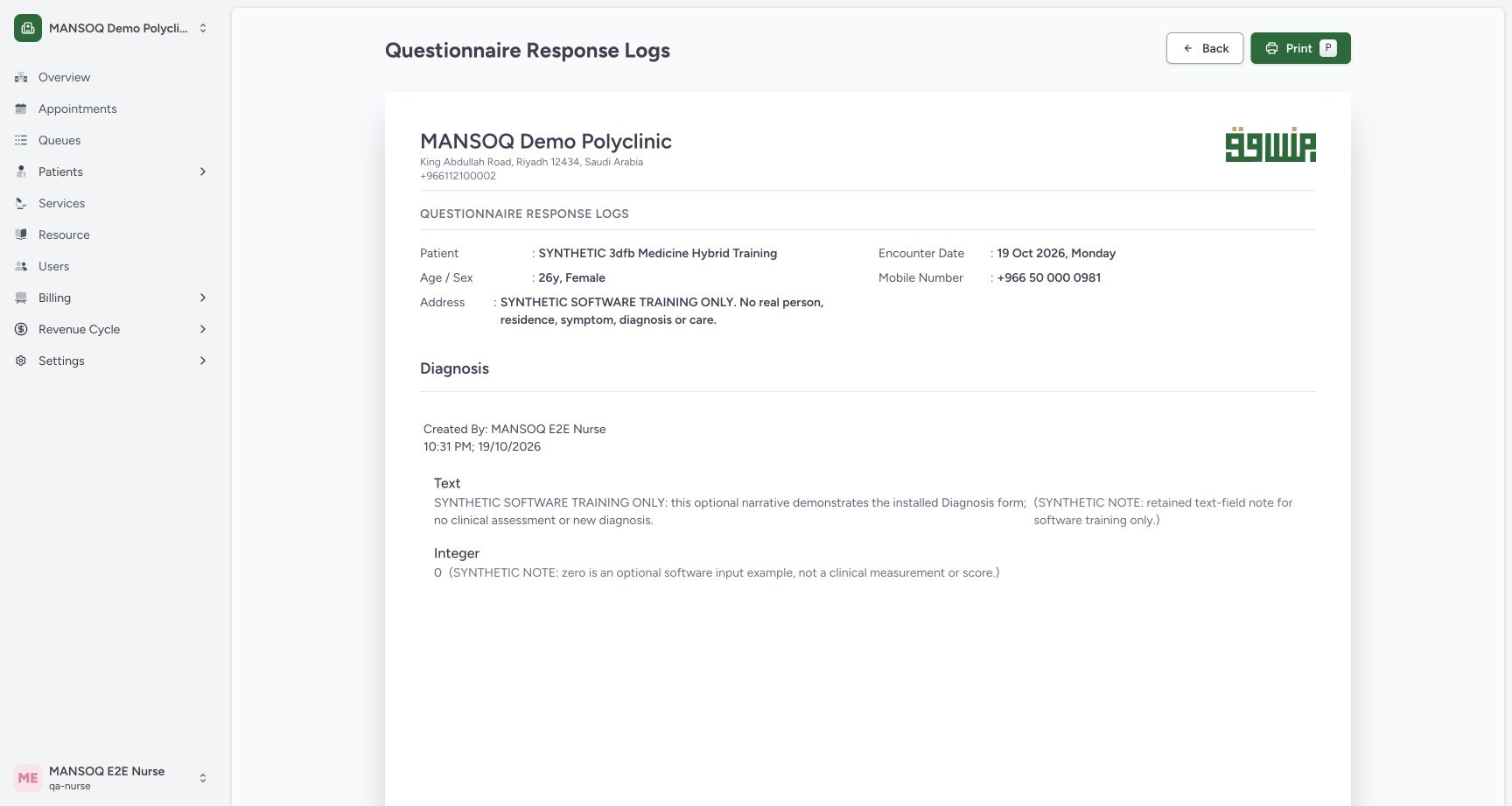
Observed exact committed 3dfb training source on 19 October 2026; this ordinary response is separate from the existing structured diagnosis.
Image SHA-256 4e02f0f2b3df166287901457e3cd44c2eef02a27915637bebc4a81158b034b99
- Check the patient: Confirm the intended synthetic patient in this print preview.
- Check the Nurse and time: Read Created By and the original response timestamp.
- Read the printed Text and its note: Review the ordinary Text answer and the full associated note.
- Read Integer zero and its note: Review 0 and the full Integer note.
- Open Print: Select Print after reviewing this single response.
 12345
12345Read the saved one-page PDF in macOS Preview
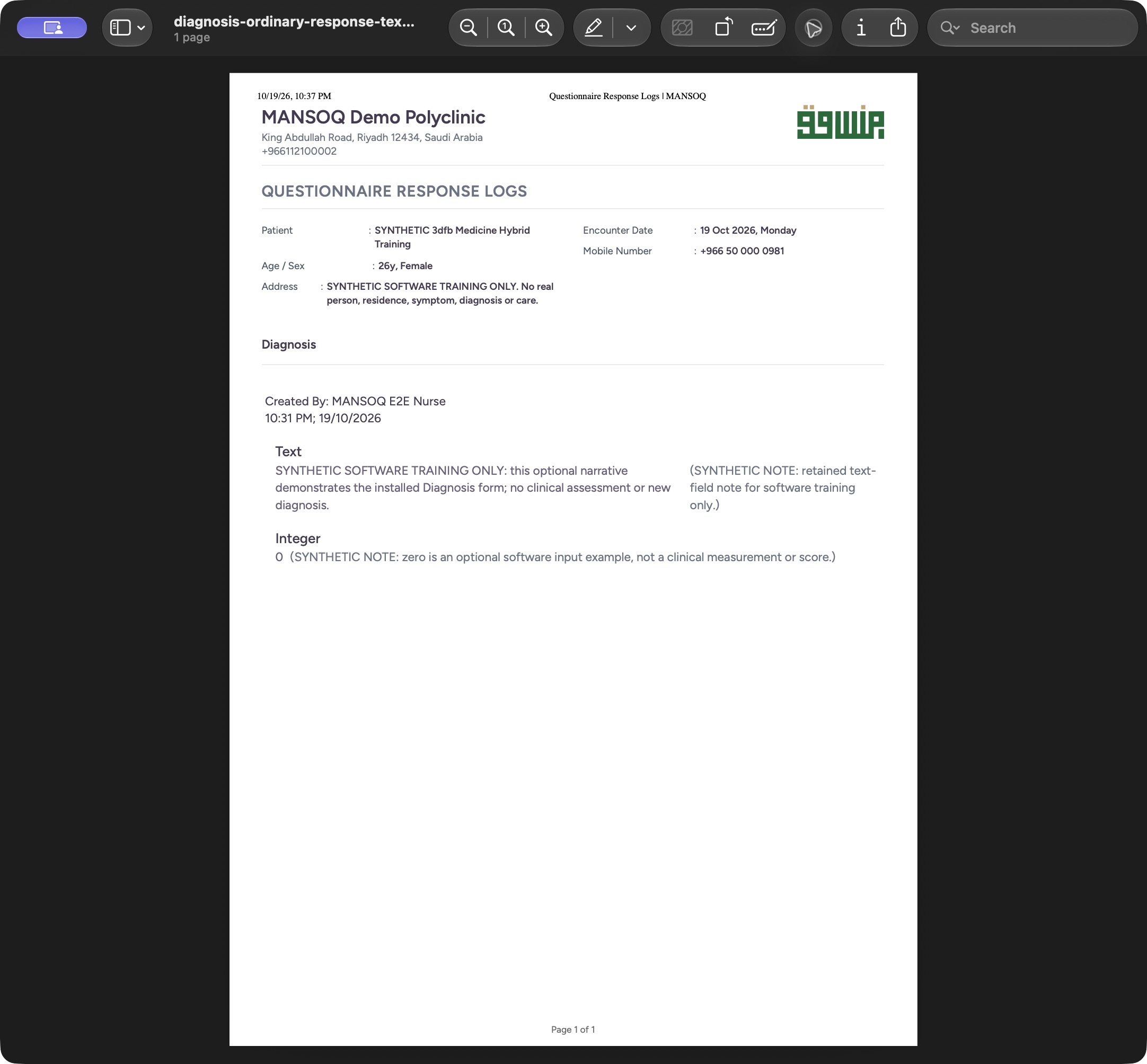
Saved PDF in Preview (macOS) · page 1 of 1.
Capture details
Observed exact committed 3dfb training source on 19 October 2026; this ordinary response is separate from the existing structured diagnosis.
Image SHA-256 e9cd65b775ca5070304a58015b68e7cb77ed12a647692202fd85274a64ca2c94
- Check the one-page document: The native Preview window identifies this saved document as one page.
- Read the original Nurse and time: Read the creator and original filing timestamp on the saved page.
- Read Text and its note: Review the complete ordinary narrative and its note.
- Read zero and its note: Review the Integer answer 0 and its full note.
- Read the page footer: The complete saved page is visible through Page 1 of 1.
9 of 9 content blocks have reviewed image alignment. Missing overview or prerequisite images remain open.
Before you begin
- Use the saved ordinary response for the intended synthetic patient, encounter, Nurse and filing time.
 123456
Recorded release 3dfb7c9f · 2026-10-19T19:31:25.343Z · 1728 × 921 Read the saved Text, zero, Nurse and time
Capture details
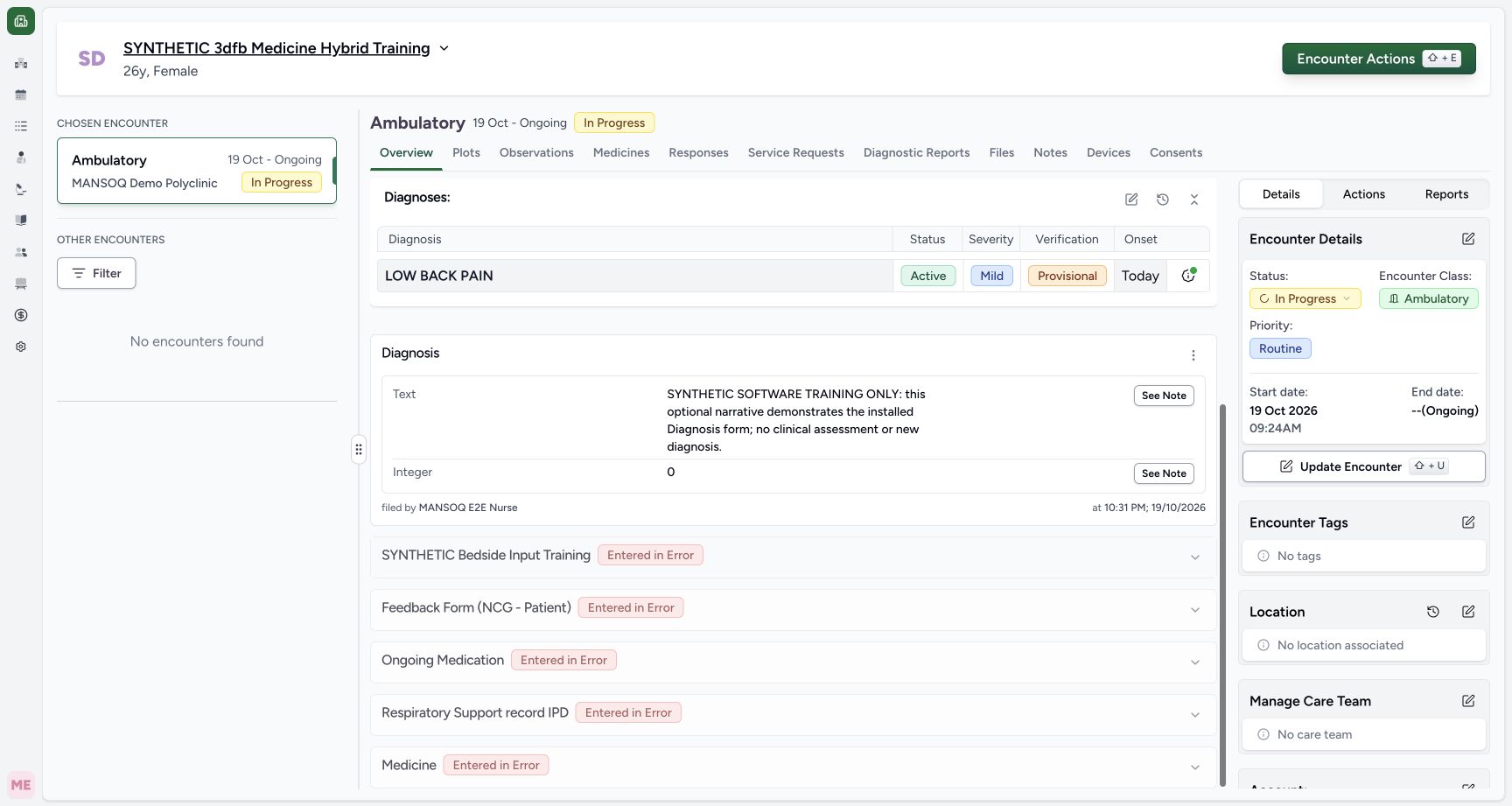
Observed exact committed 3dfb training source on 19 October 2026. Structured diagnosis is existing data; generic Text/Integer controls are software examples.
Image SHA-256
67d7b06ce28f312a16418d1da6295677383d3a90a439b6a0b20f32c4e45c26f0- Read the existing diagnosis: The separate existing LOW BACK PAIN diagnosis remains unchanged.
- Read the saved Text answer: Read the complete fictional narrative in the new Diagnosis response card.
- Read the saved zero: The ordinary Integer answer is 0.
- Check the recorded Nurse: Read the filed-by Nurse beneath this response.
- Check the saved response time: Read the time and date filed for this response.
- Open Responses: Select Responses to find this form response in encounter history.
- Use your organisation-approved local PDF destination. The illustrated document contains fictional software-training examples.
 123
123Recorded release 3dfb7c9f · 2026-10-19T19:40:00.574Z · 1760 × 896 Choose the PDF filename and folder in the native Save dialog
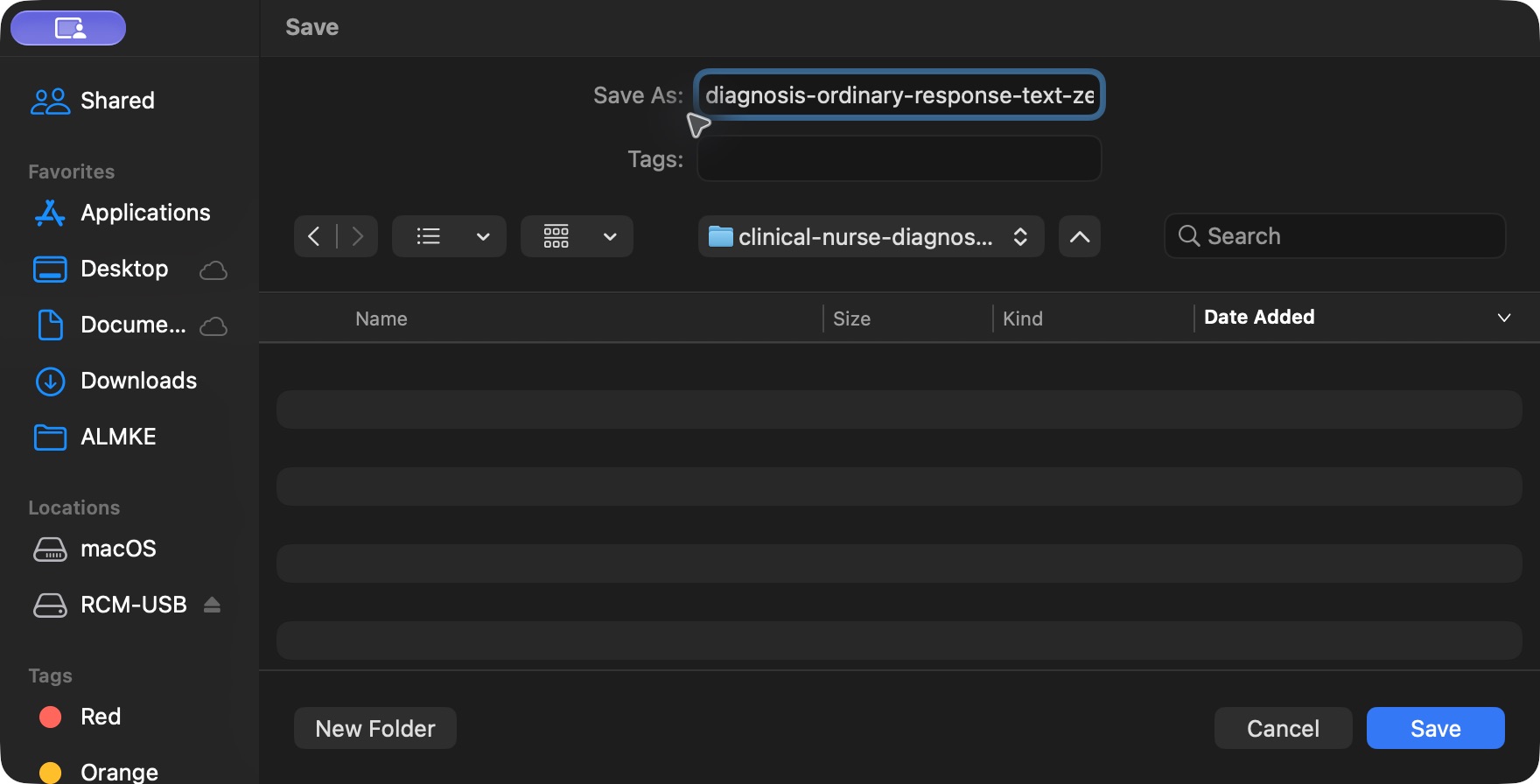
Native macOS print/save dialog.
Capture details
Observed exact committed 3dfb training source on 19 October 2026; this ordinary response is separate from the existing structured diagnosis.
Image SHA-256
b2025d24e2c4bf9d0f49529fd30dfc643d861de6e10cf5fcbc9fd47f4dff3971- Choose the PDF filename: Use an appropriate filename for the approved synthetic training output.
- Choose the destination folder: Check the intended local folder before saving.
- Save the named file: Select Save once to create this PDF.
1. Print this response
Open the menu on the intended saved Diagnosis response. Select Print this response. Print all Diagnosis responses is a separate action and is not used here.
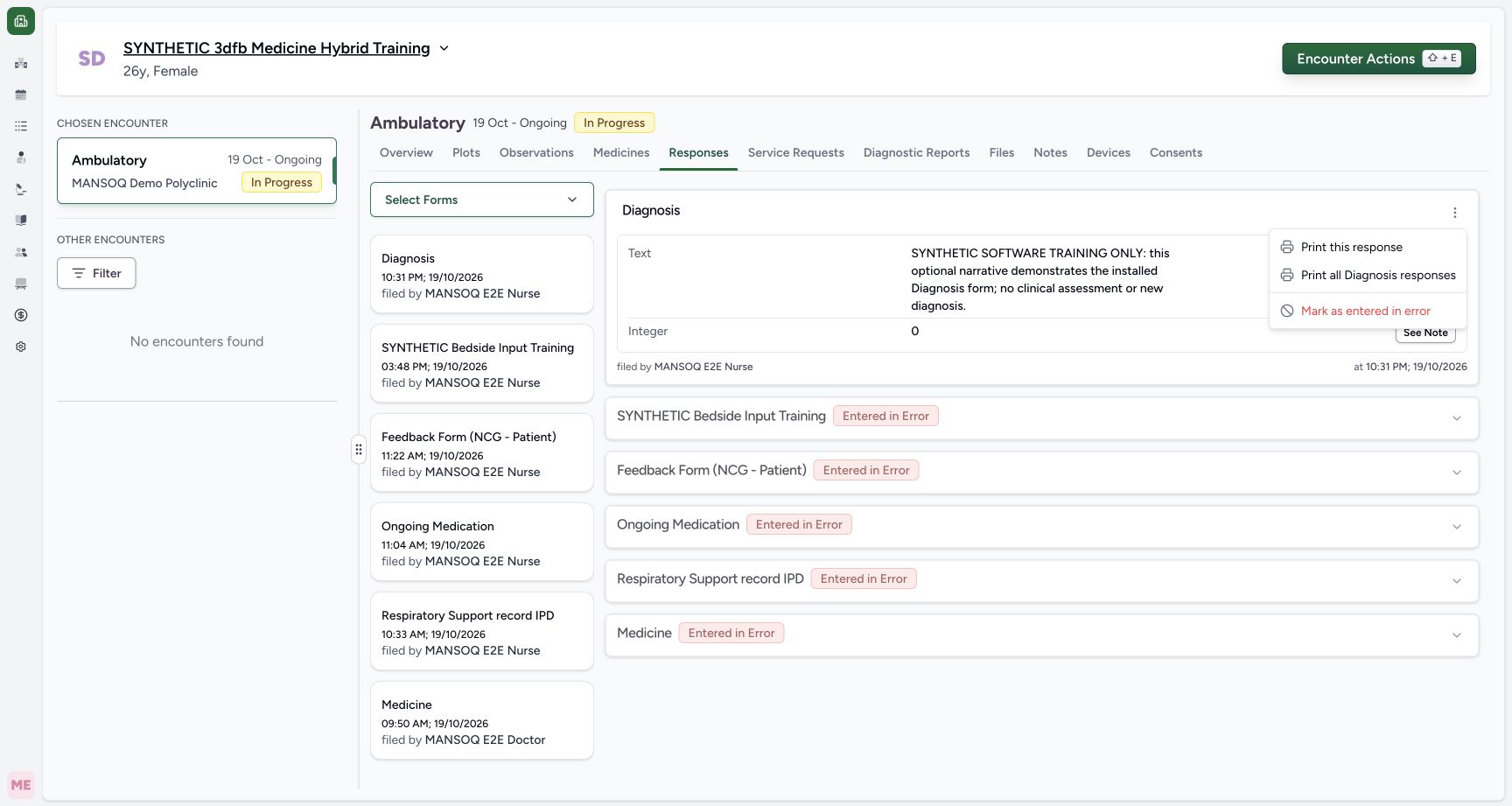 123
123Choose Print this response for the saved ordinary answers
Capture details
Observed exact committed 3dfb training source on 19 October 2026; this ordinary response is separate from the existing structured diagnosis.
Image SHA-256 df08d72674339f87de25f9c8aa674e62799ac20e188069ce48aa5c4d2677b9fb
- Open the response menu: Use the menu for this saved ordinary Diagnosis response.
- Select Print this response: Choose the single-response print action.
- Choose Mark as entered in error: For the later correction branch, select this action only on the intended ordinary response.
2. Review the single-response preview
Check the patient and facility, Created By MANSOQ E2E Nurse and the original filing time. Read Text, Integer 0 and both full notes. The existing structured diagnosis is omitted from this ordinary response print.
12345Review the single-response print preview
Capture details
Observed exact committed 3dfb training source on 19 October 2026; this ordinary response is separate from the existing structured diagnosis.
Image SHA-256 4e02f0f2b3df166287901457e3cd44c2eef02a27915637bebc4a81158b034b99
- Check the patient: Confirm the intended synthetic patient in this print preview.
- Check the Nurse and time: Read Created By and the original response timestamp.
- Read the printed Text and its note: Review the ordinary Text answer and the full associated note.
- Read Integer zero and its note: Review 0 and the full Integer note.
- Open Print: Select Print after reviewing this single response.
3. Open the native Print dialog
Select Print. In the native dialog, choose Save as PDF, check All pages and Portrait, and review the one-page preview. Select Save.
12345Review the single-response print preview
Capture details
Observed exact committed 3dfb training source on 19 October 2026; this ordinary response is separate from the existing structured diagnosis.
Image SHA-256 4e02f0f2b3df166287901457e3cd44c2eef02a27915637bebc4a81158b034b99
- Check the patient: Confirm the intended synthetic patient in this print preview.
- Check the Nurse and time: Read Created By and the original response timestamp.
- Read the printed Text and its note: Review the ordinary Text answer and the full associated note.
- Read Integer zero and its note: Review 0 and the full Integer note.
- Open Print: Select Print after reviewing this single response.
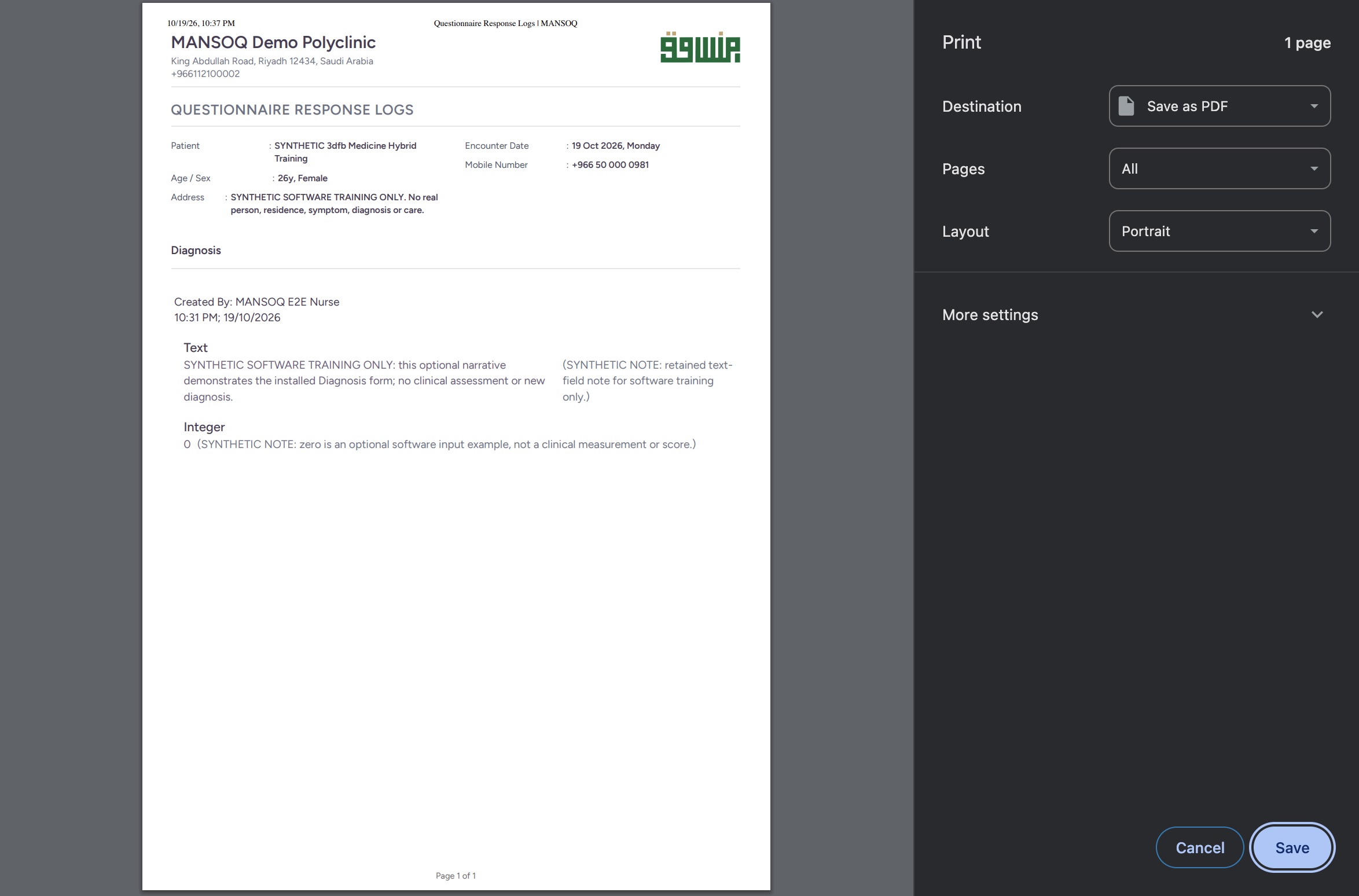 1234
1234Use the native macOS Print Save as PDF settings
Native macOS print/save dialog.
Capture details
Observed exact committed 3dfb training source on 19 October 2026; this ordinary response is separate from the existing structured diagnosis.
Image SHA-256 06054a5d6918b5fc8ee40b61a4dbf6ef386a32f688498eb0240883822e55b287
- Choose Save as PDF: Select Save as PDF as the print destination.
- Keep all pages: The native preview shows one page in this example.
- Check Portrait layout: The shown output uses Portrait.
- Save the PDF: Select Save to open the native filename and folder dialog.
4. Choose a filename and folder
In the native Save dialog, check the filename and intended folder. Select Save once. Your approved destination and filename can differ from this training example.
123Choose the PDF filename and folder in the native Save dialog
Native macOS print/save dialog.
Capture details
Observed exact committed 3dfb training source on 19 October 2026; this ordinary response is separate from the existing structured diagnosis.
Image SHA-256 b2025d24e2c4bf9d0f49529fd30dfc643d861de6e10cf5fcbc9fd47f4dff3971
- Choose the PDF filename: Use an appropriate filename for the approved synthetic training output.
- Choose the destination folder: Check the intended local folder before saving.
- Save the named file: Select Save once to create this PDF.
5. Read the saved PDF
Open the saved output in your authorised document viewer. The pictured macOS Preview document contains one complete A4 page. Read Text, Integer 0, both notes, the original Nurse and filing time, and the Page 1 of 1 footer.
12345Read the saved one-page PDF in macOS Preview
Saved PDF in Preview (macOS) · page 1 of 1.
Capture details
Observed exact committed 3dfb training source on 19 October 2026; this ordinary response is separate from the existing structured diagnosis.
Image SHA-256 e9cd65b775ca5070304a58015b68e7cb77ed12a647692202fd85274a64ca2c94
- Check the one-page document: The native Preview window identifies this saved document as one page.
- Read the original Nurse and time: Read the creator and original filing timestamp on the saved page.
- Read Text and its note: Review the complete ordinary narrative and its note.
- Read zero and its note: Review the Integer answer 0 and its full note.
- Read the page footer: The complete saved page is visible through Page 1 of 1.
The PDF is a saved snapshot
This example PDF was saved before the later entered-in-error correction. Check the current response status in MANSOQ when reviewing a saved output. The structured diagnosis is separate and is not included in this response PDF.
12345Read the saved one-page PDF in macOS Preview
Saved PDF in Preview (macOS) · page 1 of 1.
Capture details
Observed exact committed 3dfb training source on 19 October 2026; this ordinary response is separate from the existing structured diagnosis.
Image SHA-256 e9cd65b775ca5070304a58015b68e7cb77ed12a647692202fd85274a64ca2c94
- Check the one-page document: The native Preview window identifies this saved document as one page.
- Read the original Nurse and time: Read the creator and original filing timestamp on the saved page.
- Read Text and its note: Review the complete ordinary narrative and its note.
- Read zero and its note: Review the Integer answer 0 and its full note.
- Read the page footer: The complete saved page is visible through Page 1 of 1.
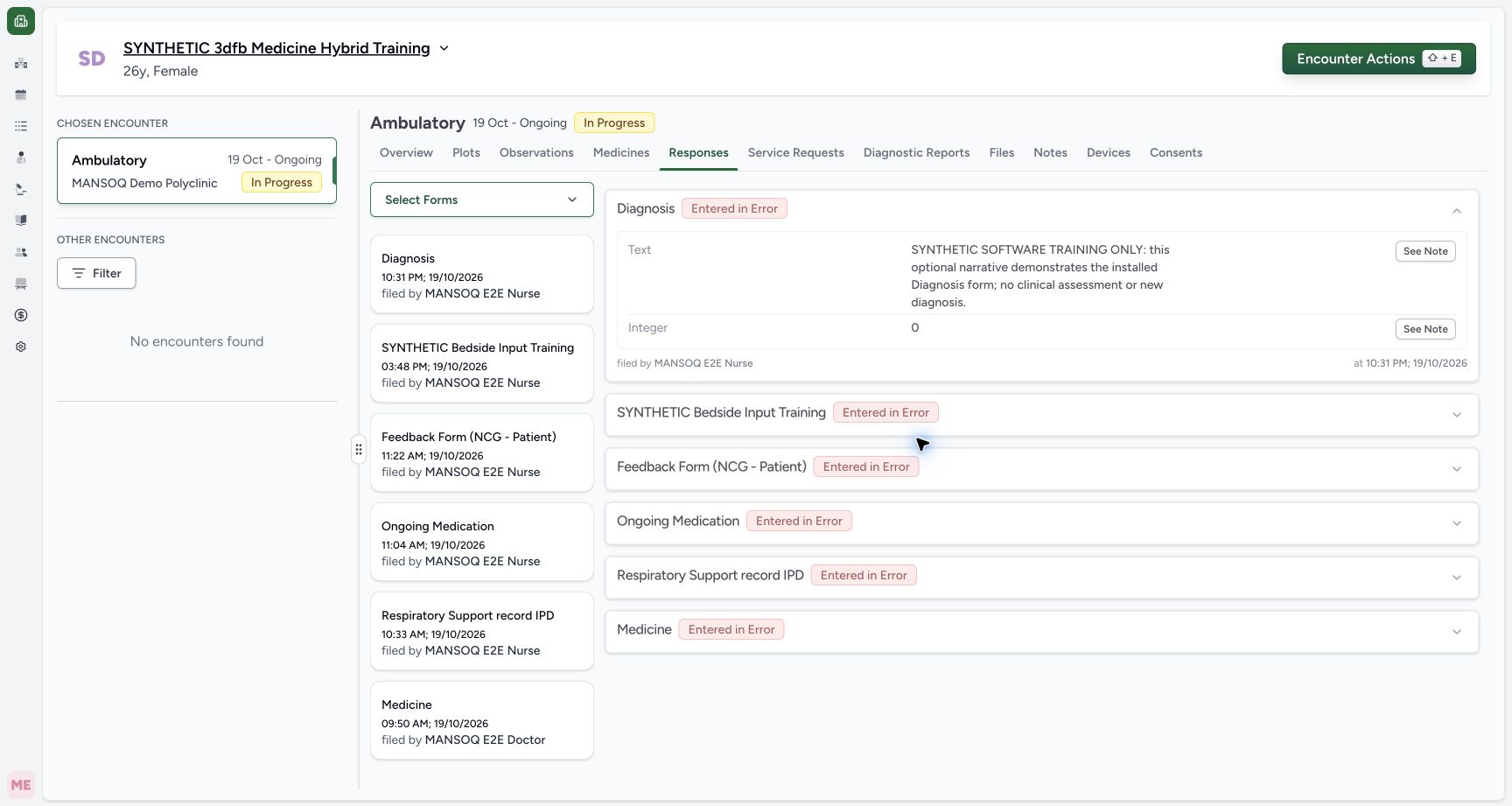 12345
12345Read the Entered in Error response with retained answers
Capture details
Observed exact committed 3dfb training source on 19 October 2026; this ordinary response is separate from the existing structured diagnosis.
Image SHA-256 7d1d0f03368c079e8ce0476c48ad87939f577cdcd4dc1176118c46df622fb852
- Read Entered in Error: The ordinary response is now marked Entered in Error.
- Read the retained Text: The original narrative remains visible.
- Read retained zero: The original Integer answer remains 0.
- Read the original Nurse: The original filed-by Nurse remains visible.
- Read the original filing time: The original response time and date remain visible.
Source evidence
Every citation uses this exact committed version. The private source repository requires access.
- repositories/platform/mansoq-web/src/components/Questionnaire/QuestionTypes/DiagnosisQuestion.tsx:299 ·
3dfb7c9f519fb5b4cd4452439f3c12346bf58319Source file checksum
56a14d11bcc3aef66d9dc2d220b29d4c22ff671eed6ed4c4676ddf59b7920159 - repositories/platform/mansoq-web/src/components/Questionnaire/QuestionTypes/NumberQuestion.tsx:29 ·
3dfb7c9f519fb5b4cd4452439f3c12346bf58319Source file checksum
fd8183d93ed6c65e651dfc6b790c5ebc740fceef5cf6d0d5dc3d107f465b8dab - repositories/platform/mansoq-web/src/components/Questionnaire/QuestionTypes/TextQuestion.tsx:111 ·
3dfb7c9f519fb5b4cd4452439f3c12346bf58319Source file checksum
1ce4eb85780e351a42f155fc8a092fa921e6f4853f1efc91902365498b834aab - repositories/platform/mansoq-web/src/components/Questionnaire/QuestionTypes/QuestionInput.tsx:243 ·
3dfb7c9f519fb5b4cd4452439f3c12346bf58319Source file checksum
16bebfb11603d50cb219f5db55d93cd0bc2935630af0fc60a6d5732f04a33163 - repositories/platform/mansoq-web/src/components/Questionnaire/QuestionnaireForm.tsx:879 ·
3dfb7c9f519fb5b4cd4452439f3c12346bf58319Source file checksum
ee6c2195f13e48f0896a2d3da566c2f2a67910adad08894df6b77862f9cfdeec - repositories/platform/mansoq-web/src/components/Questionnaire/structured/handlers.ts:157 ·
3dfb7c9f519fb5b4cd4452439f3c12346bf58319Source file checksum
459ade48f77316279ab2978dc7b4466cb96acb8223c61b9a1f87ca9973be7c7f - repositories/platform/mansoq-web/src/components/Facility/ConsultationDetails/PrintAllQuestionnaireResponses.tsx:338 ·
3dfb7c9f519fb5b4cd4452439f3c12346bf58319Source file checksum
e7314df6d693bbd49e54e5f007521488cbc82b164dba4fc0ba2e317049b5cc1a - repositories/platform/mansoq-web/src/components/Facility/ConsultationDetails/PrintQuestionnaireResponse.tsx:8 ·
3dfb7c9f519fb5b4cd4452439f3c12346bf58319Source file checksum
626d6b496a09058d94929bbec29bd34a3c91a95111466342a278e6bca0f2202e - repositories/platform/mansoq-web/src/types/base/batch/batchApi.ts:13 ·
3dfb7c9f519fb5b4cd4452439f3c12346bf58319Source file checksum
85f1bb278918300e3093154715268129106e98835f7e63872ee375f14cd0e346 - repositories/platform/mansoq-core/mansoq/emr/api/viewsets/questionnaire.py:116 ·
3dfb7c9f519fb5b4cd4452439f3c12346bf58319Source file checksum
ccc0fe021d193e5d6de9540c256413da356895ceed0c71c5fdcba75ca6915d4e - repositories/platform/mansoq-core/mansoq/emr/api/viewsets/batch_request.py:45 ·
3dfb7c9f519fb5b4cd4452439f3c12346bf58319Source file checksum
7228f8ab3d254e96f6218e2eb65882b481e87a6bc9f4bc2a31e4f2c401b7f8a2 - repositories/platform/mansoq-core/mansoq/emr/resources/questionnaire/utils.py:605 ·
3dfb7c9f519fb5b4cd4452439f3c12346bf58319Source file checksum
8425858d2179a66f482f38a3fd7f0fc0dcb70a4bcd85450fe7ce748b3081826c - repositories/platform/mansoq-core/mansoq/emr/resources/questionnaire_response/spec.py:18 ·
3dfb7c9f519fb5b4cd4452439f3c12346bf58319Source file checksum
e1aff7243f7557d61fa33271652df53ce0fe0220505abdf3f5d20cdb5fa1a555 - repositories/platform/mansoq-core/mansoq/emr/models/questionnaire.py:57 ·
3dfb7c9f519fb5b4cd4452439f3c12346bf58319Source file checksum
2e422990f996654b71999dd1303f0bf9b5706ffc38c4271cdcdc741faf1a08d0 - repositories/platform/mansoq-core/mansoq/emr/api/viewsets/condition.py:43 ·
3dfb7c9f519fb5b4cd4452439f3c12346bf58319Source file checksum
f5d22181887766355e1aa847ff777b6f72a492eccce7820f716e4dcb28ad6172 - repositories/platform/mansoq-core/mansoq/emr/api/viewsets/questionnaire_response.py:34 ·
3dfb7c9f519fb5b4cd4452439f3c12346bf58319Source file checksum
3a1e4e355e2f2ec25e82f5adc12ca9250c201b521098af8d1211bee95489fa2b - repositories/platform/mansoq-web/src/components/Facility/ConsultationDetails/QuestionnaireResponsesList.tsx:306 ·
3dfb7c9f519fb5b4cd4452439f3c12346bf58319Source file checksum
abcf7ab477238782e128a28bbd0b83562f900a41dcd1665a3df68e33fad1deac - repositories/platform/mansoq-core/config/settings/config.py:323 ·
3dfb7c9f519fb5b4cd4452439f3c12346bf58319Source file checksum
80e2bd16a124b5b9e80eefab7a9d5b2f20a874a8fe645b223f26cad04e6cd60a