 MANSOQ
 Clinical care · VERSION 3dfb7c9f
Select Allergy occurrence and maintain the row note
Use calendar and Quick Finder controls, then enter, clear, restore and hide the fictional note.
Nurse
 12
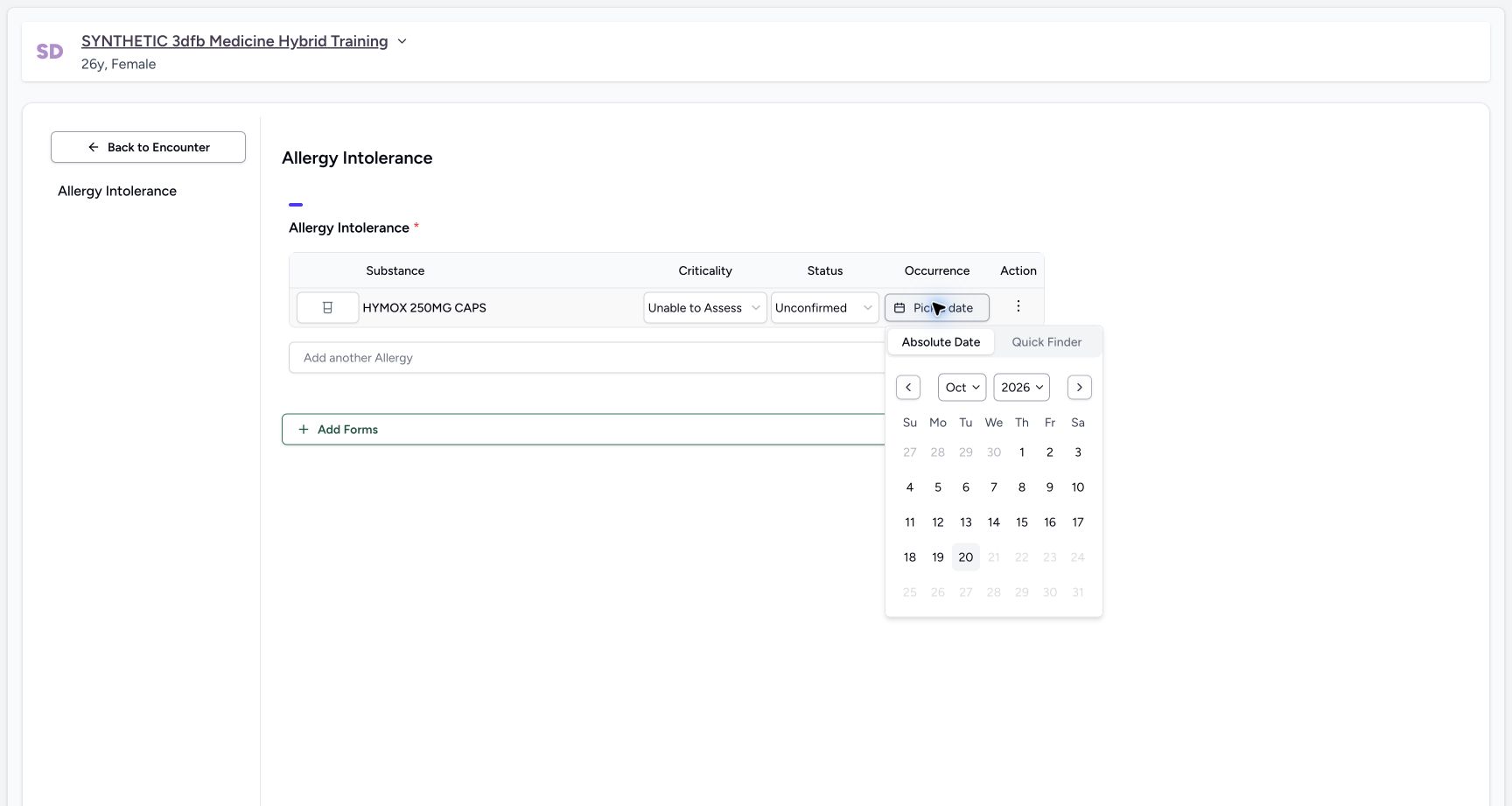
12Occurrence calendar future days disabled
Capture details
Observed committed 3dfb software and the existing Clinical proxy qualified for 20 October 2026. Temporary controls and the three saved states are distinguished in the instructions.
Image SHA-256 b3b52ef8c7fdaf8910d9c79bf6bf4ac2ac56cd3de0a5fe7f578b1d57d76a28a0
- Read a disabled future day: Dates after the current day are disabled in this example.
- Open Quick Finder: Read its computed result after opening.
11 of 11 content blocks have reviewed image alignment. Missing overview or prerequisite images remain open.
Before you begin
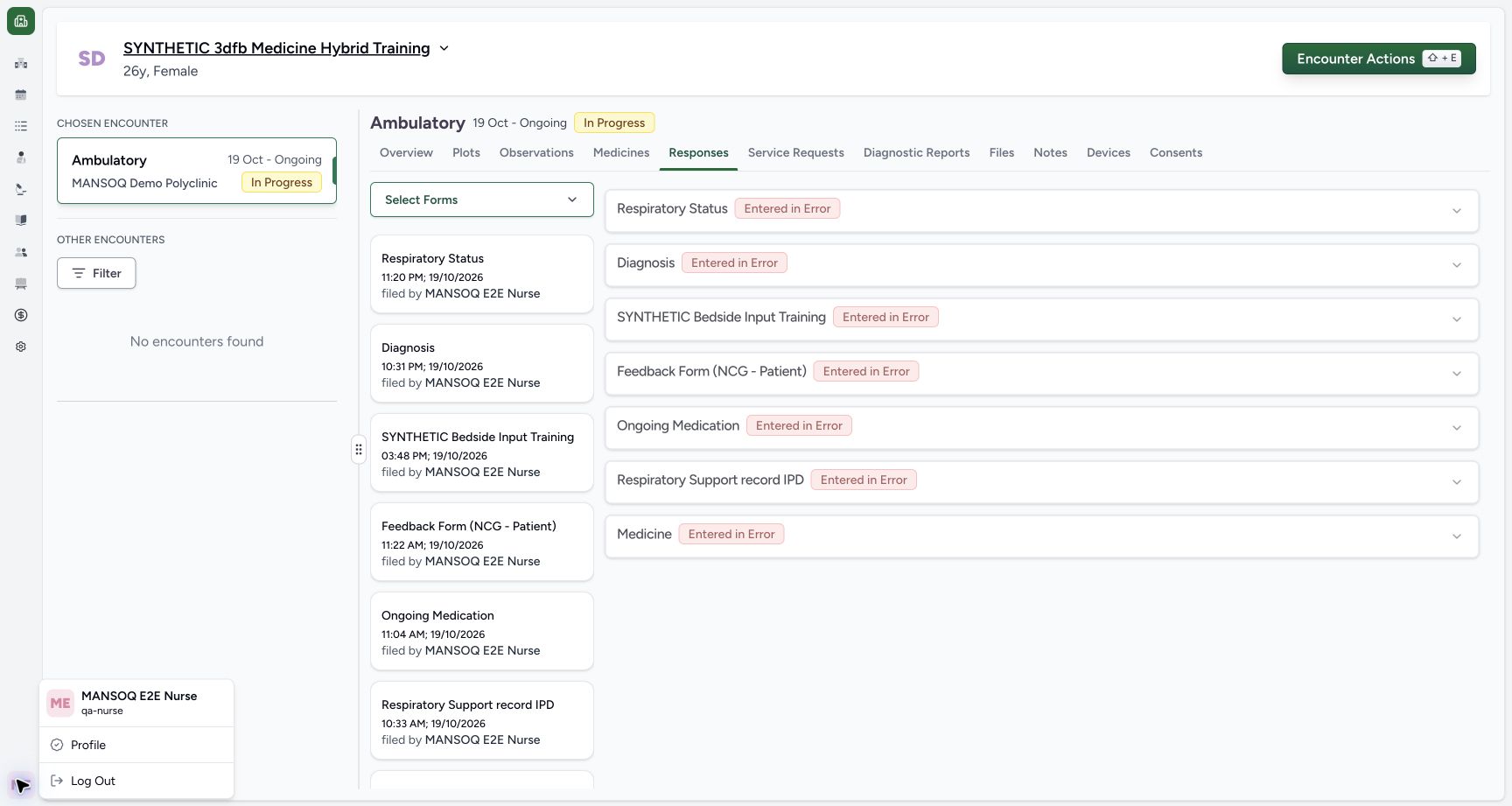
- Use an authorised Nurse session on the assigned active synthetic training encounter.
 123
123Recorded release 3dfb7c9f · 2026-10-19T21:25:50.566Z · 1728 × 921 Existing nurse and fictional encounter
Capture details
Observed committed 3dfb software and the existing Clinical proxy qualified for 20 October 2026. Temporary controls and the three saved states are distinguished in the instructions.
Image SHA-256
a0d4b32af0b456eccab1b5c7380d7dc6db1ce8a02f941b43924b0756f4414239- Check the Nurse session: Read MANSOQ E2E Nurse and qa-nurse.
- Check the intended patient: Confirm the synthetic Medicine training patient.
- Check the encounter: Confirm the selected Ambulatory encounter is In Progress.
- Use only the fictional software example. These sample selections are not reaction assessment, clinical determinations or treatment advice.12
Recorded release 3dfb7c9f · 2026-10-19T21:37:35.944Z · 1728 × 921 Occurrence calendar future days disabled
Capture details
Observed committed 3dfb software and the existing Clinical proxy qualified for 20 October 2026. Temporary controls and the three saved states are distinguished in the instructions.
Image SHA-256
b3b52ef8c7fdaf8910d9c79bf6bf4ac2ac56cd3de0a5fe7f578b1d57d76a28a0- Read a disabled future day: Dates after the current day are disabled in this example.
- Open Quick Finder: Read its computed result after opening.
1. Open the occurrence calendar
Select Pick a date. Absolute Date provides month, year and day controls; dates after the current day are disabled in this example. This picker has no direct clear or text-entry control.
12Occurrence calendar future days disabled
Capture details
Observed committed 3dfb software and the existing Clinical proxy qualified for 20 October 2026. Temporary controls and the three saved states are distinguished in the instructions.
Image SHA-256 b3b52ef8c7fdaf8910d9c79bf6bf4ac2ac56cd3de0a5fe7f578b1d57d76a28a0
- Read a disabled future day: Dates after the current day are disabled in this example.
- Open Quick Finder: Read its computed result after opening.
2. Read Quick Finder before relying on the result
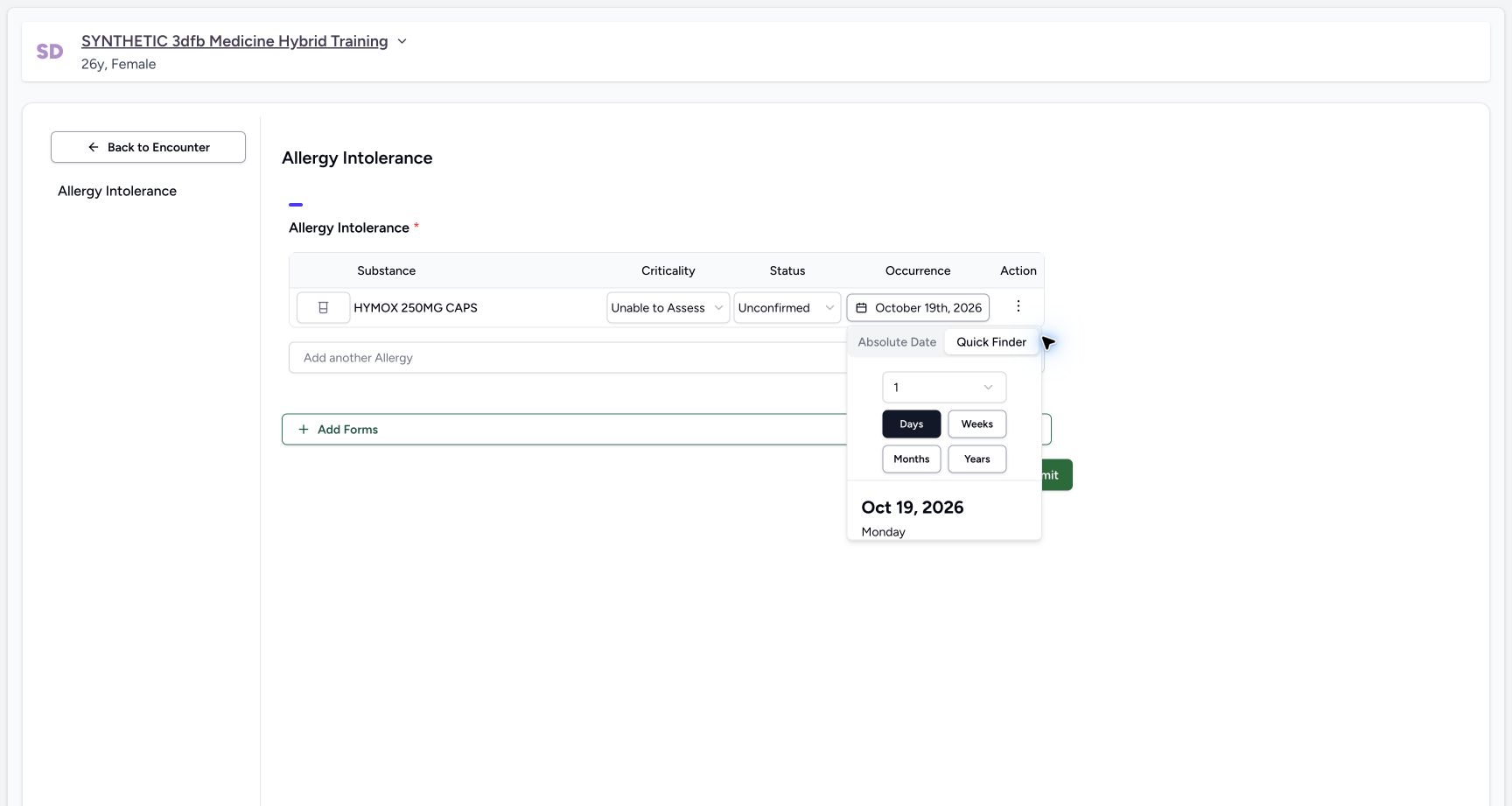
Opening Quick Finder can change the draft date. On the captured 20 October example, its one-day selection produces 19 October 2026. Read the computed date rather than assuming the draft is unchanged.
 123
123Quick finder default one day
Capture details
Observed committed 3dfb software and the existing Clinical proxy qualified for 20 October 2026. Temporary controls and the three saved states are distinguished in the instructions.
Image SHA-256 4e1a9927c79459c463c72538b43fa0bd307c1ebbfa148b266486a81e083b14c1
- Read the quantity: The captured default is one day.
- Read Days: The selected unit is Days.
- Read the computed date: The captured 20 October example produces 19 October 2026.
3. Select two days and inspect the date
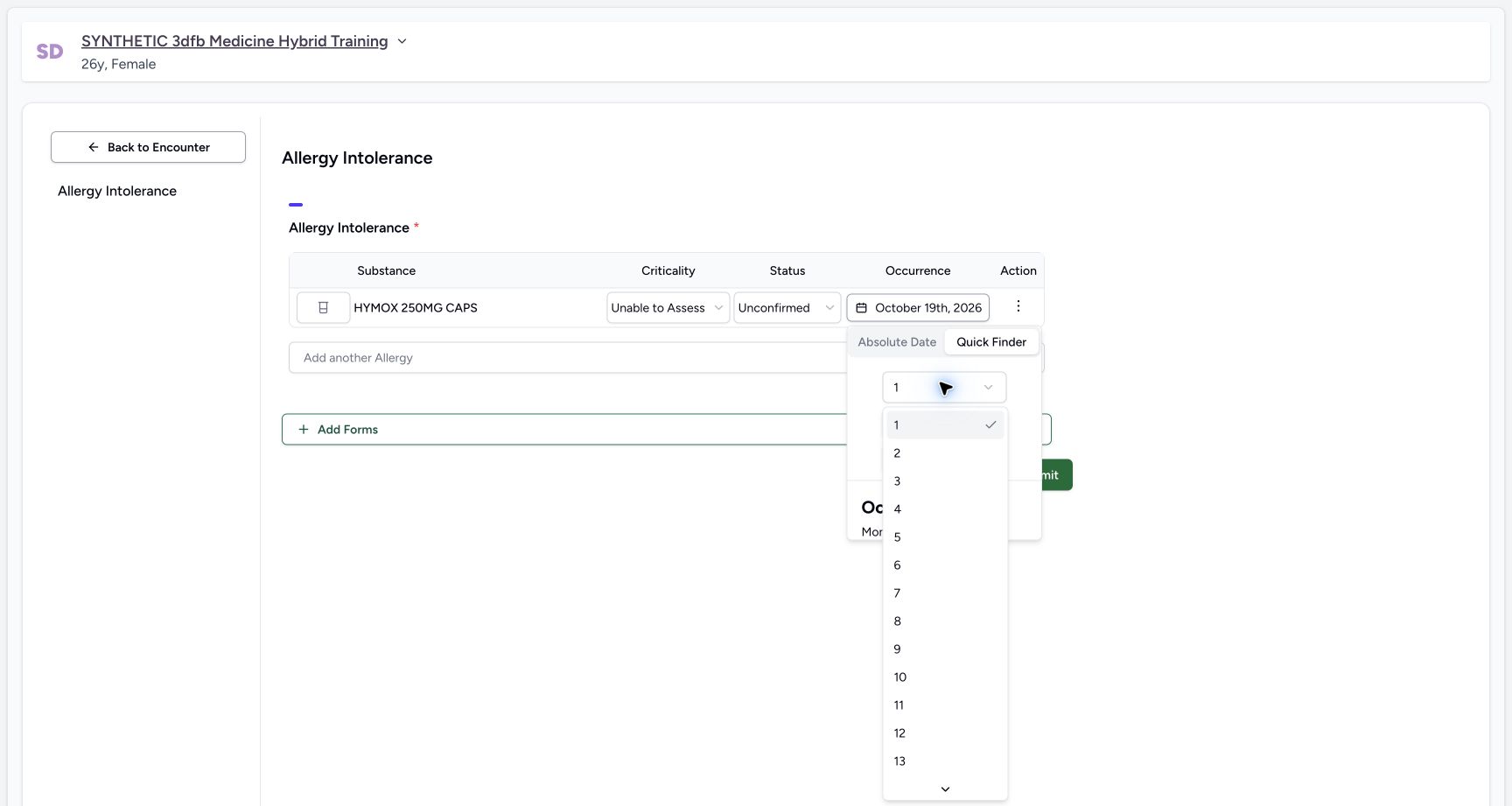
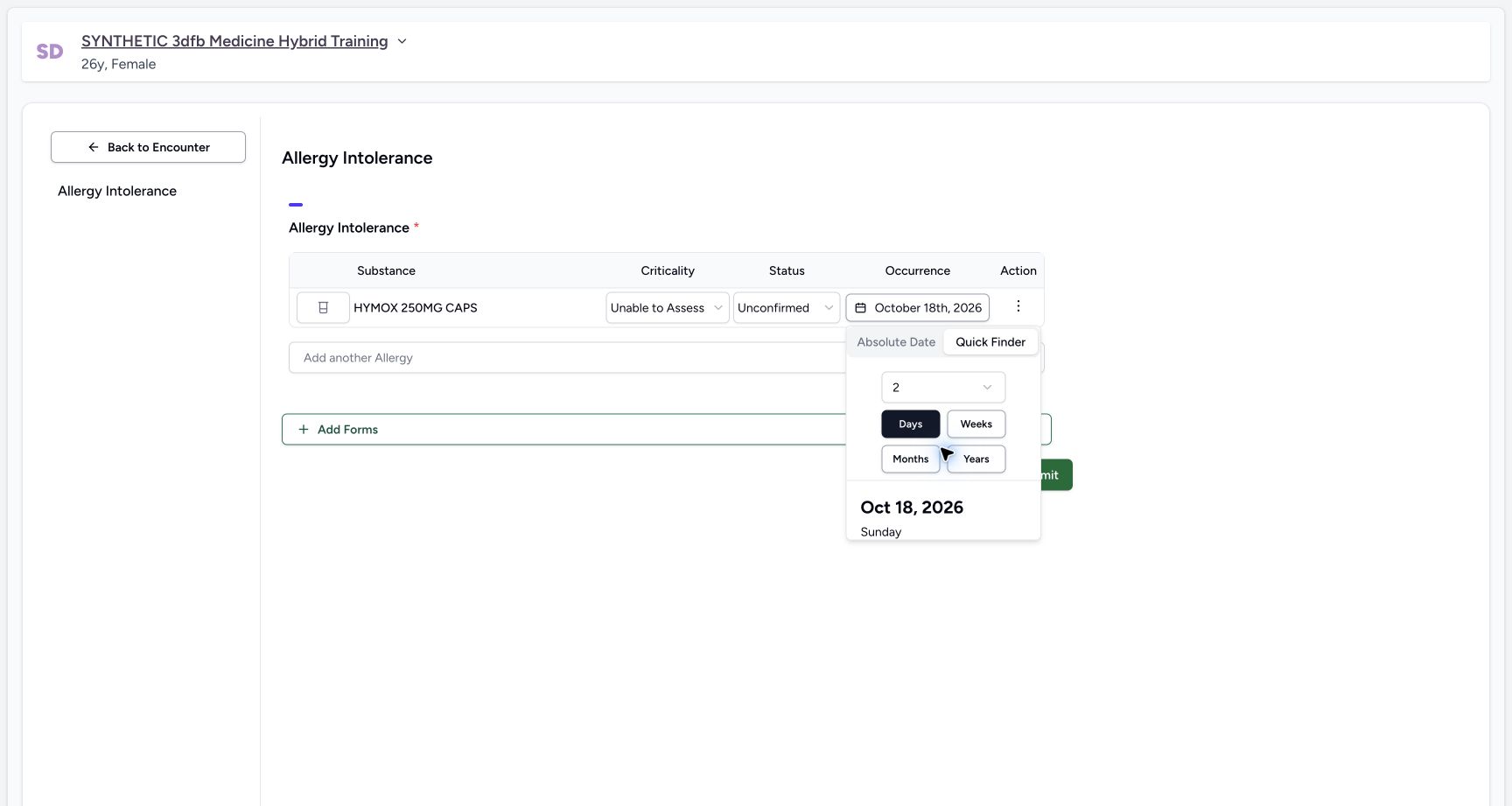
Open the quantity menu and choose 2 with Days selected. The example now shows 18 October 2026. The Days, Weeks, Months and Years controls select a date relative to today; they are not a treatment duration.
 1
1Quick finder quantity options
Capture details
Observed committed 3dfb software and the existing Clinical proxy qualified for 20 October 2026. Temporary controls and the three saved states are distinguished in the instructions.
Image SHA-256 50ed9150ca14c10c93b8c36365e6a611f9d59be6694b9f4ca3099daf6e349524
- Select 2: Choose two days for this training example.
 12
12Quick finder two days selected
Capture details
Observed committed 3dfb software and the existing Clinical proxy qualified for 20 October 2026. Temporary controls and the three saved states are distinguished in the instructions.
Image SHA-256 16b0faed8f561dd1f9cadc53dc92e498a593b718d2a7c193f19c578881eb9d13
- Read 18 October: Two days produces 18 October 2026 in this capture.
- Return to Absolute Date: Inspect the selected calendar day.
4. Replace an absolute date and restore the final day
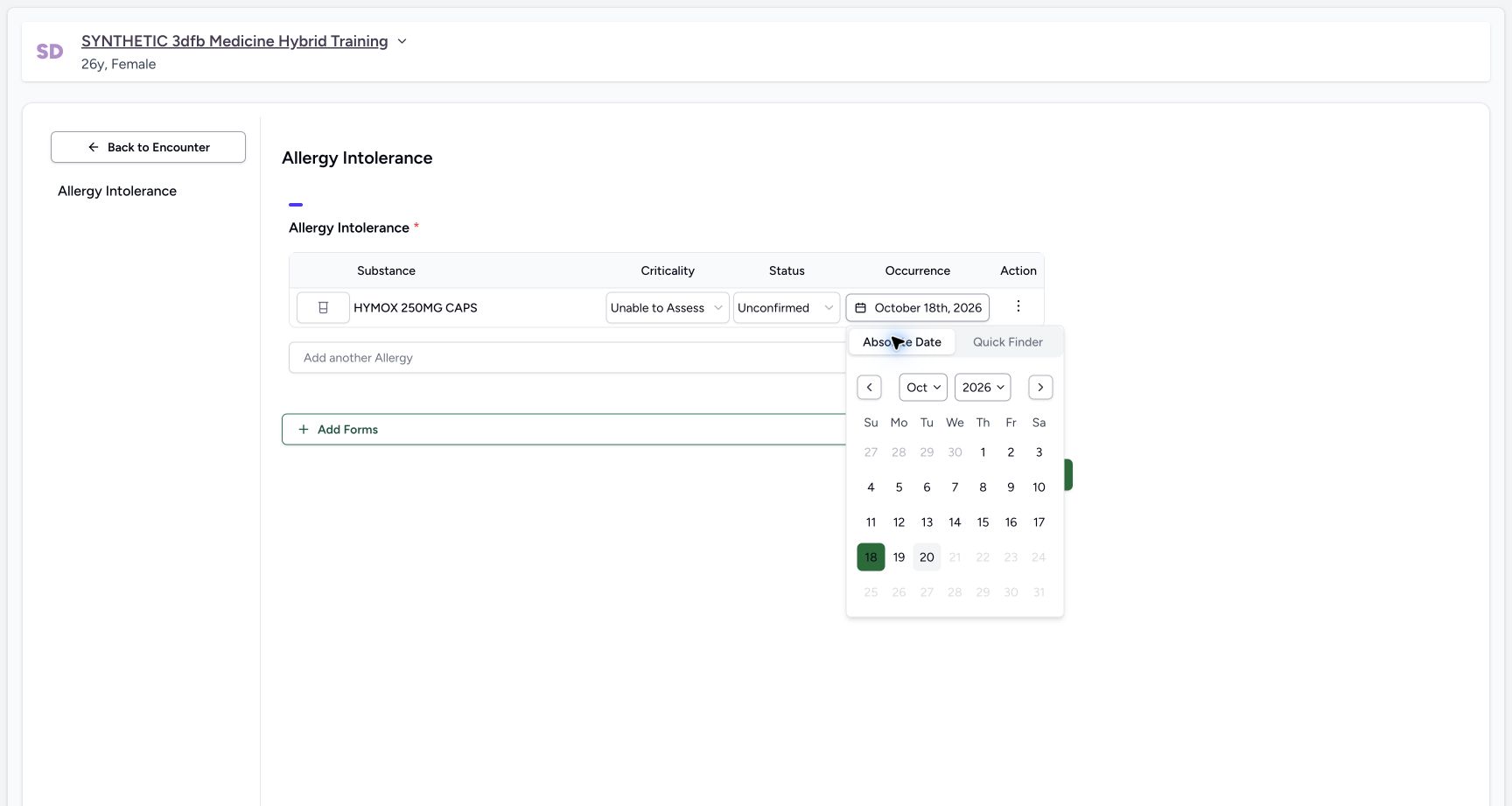
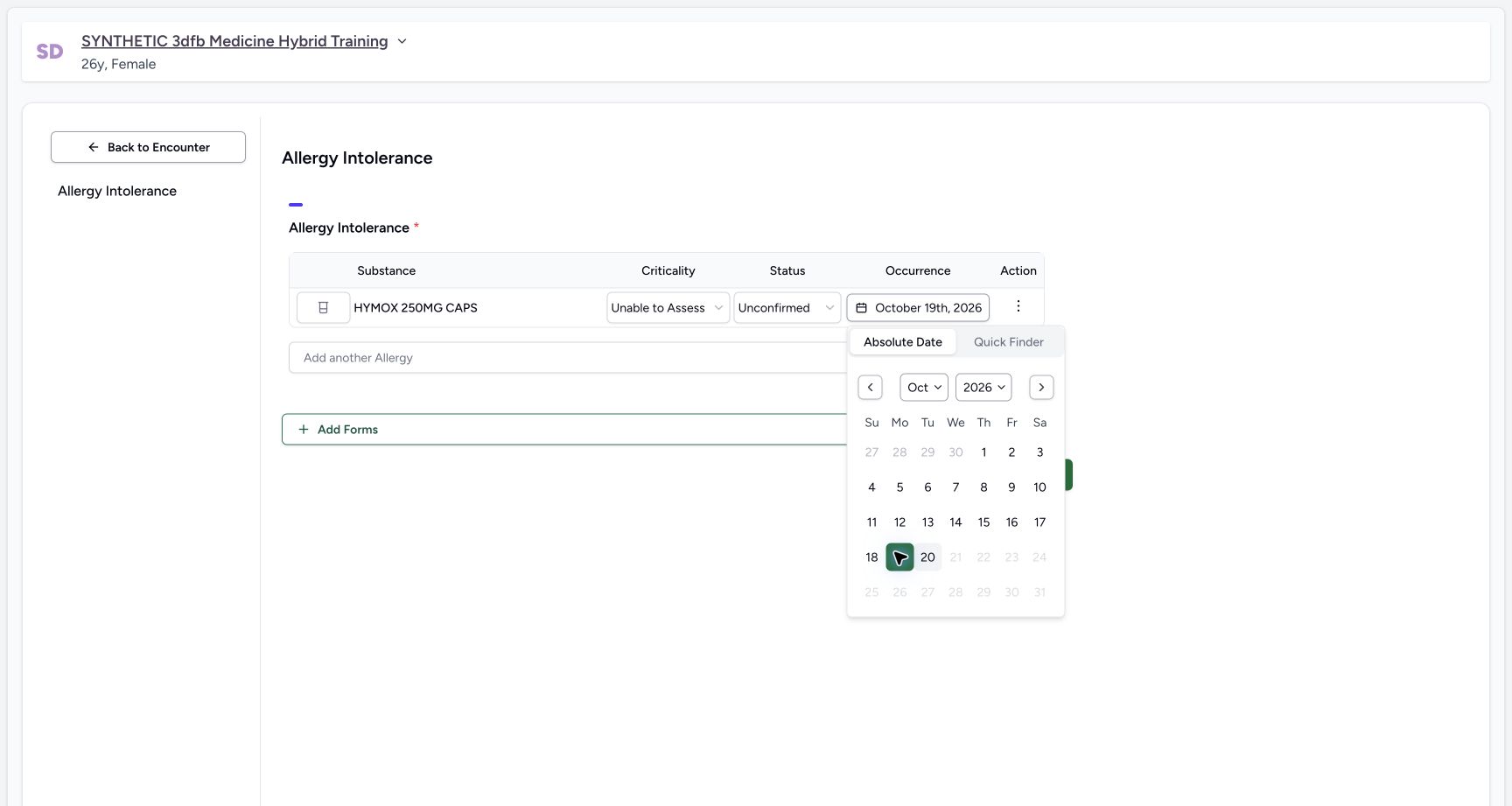
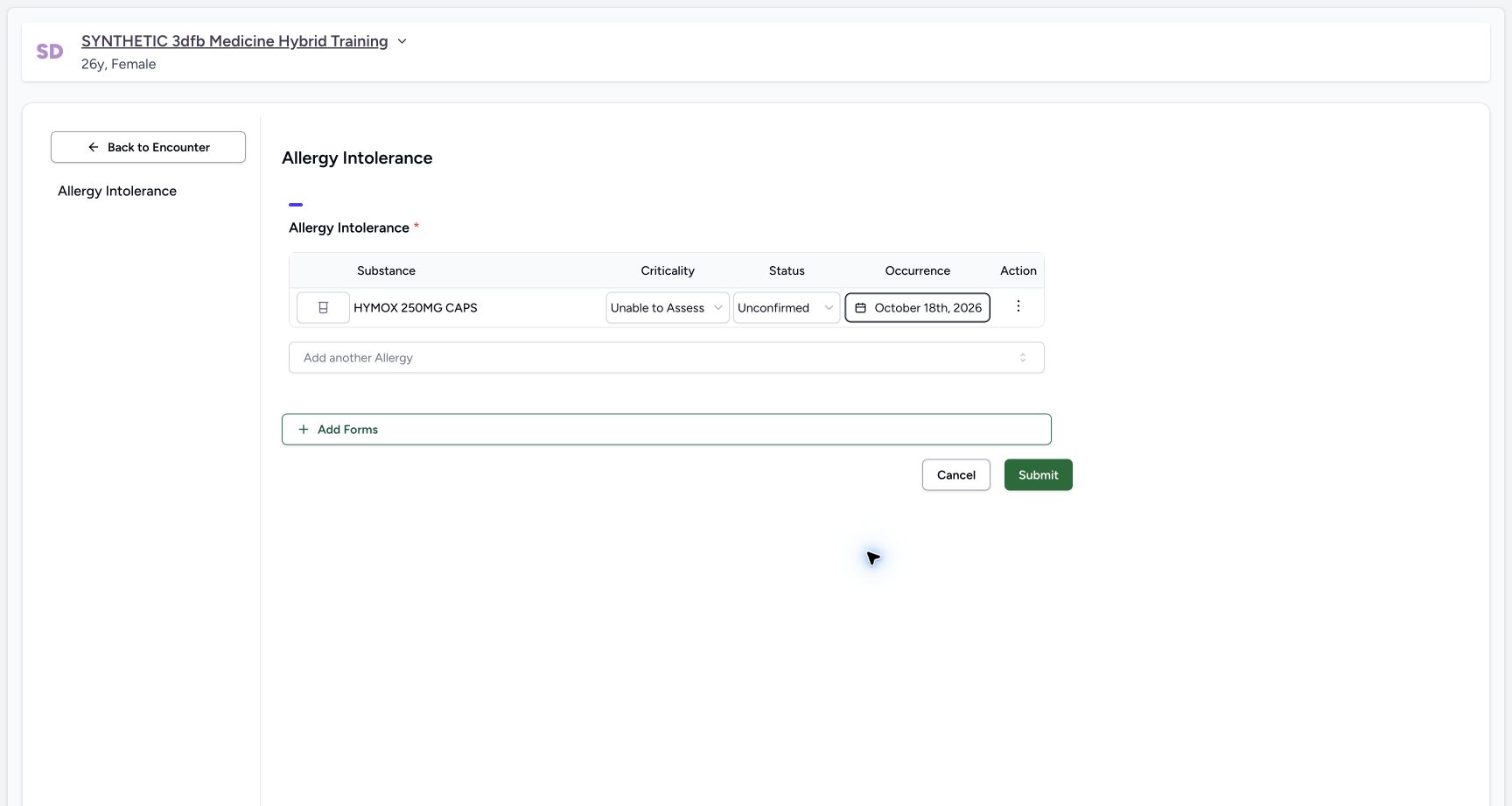
Return to Absolute Date. The example replaces the selected 18th with the 19th, then restores 18 October 2026 and closes the calendar. Read the date button to confirm the final day.
 12
12Absolute calendar two days before
Capture details
Observed committed 3dfb software and the existing Clinical proxy qualified for 20 October 2026. Temporary controls and the three saved states are distinguished in the instructions.
Image SHA-256 d216417c39ca25216ac81ff2bc3cbc0f07efd5d656099e48a182d98ca278f582
- Read the selected 18th: The calendar highlights 18 October.
- Select the 19th: Replace the date in the temporary exercise.
 1
1Date replaced with nineteenth
Capture details
Observed committed 3dfb software and the existing Clinical proxy qualified for 20 October 2026. Temporary controls and the three saved states are distinguished in the instructions.
Image SHA-256 3db8b8b496a71a573eb329c4f2ad08d50b3548e940fac4272ef39c53cb0eb0e4
- Read the selected 19th: This is a replacement date, not a cleared field.
 1
1Occurrence restored eighteenth
Capture details
Observed committed 3dfb software and the existing Clinical proxy qualified for 20 October 2026. Temporary controls and the three saved states are distinguished in the instructions.
Image SHA-256 50b93da51696f3722026e83f932dd80d1ff6d76563dd1769d330d636d672e8e0
- Read the final occurrence: The restored date is 18 October 2026.
5. Open the row note
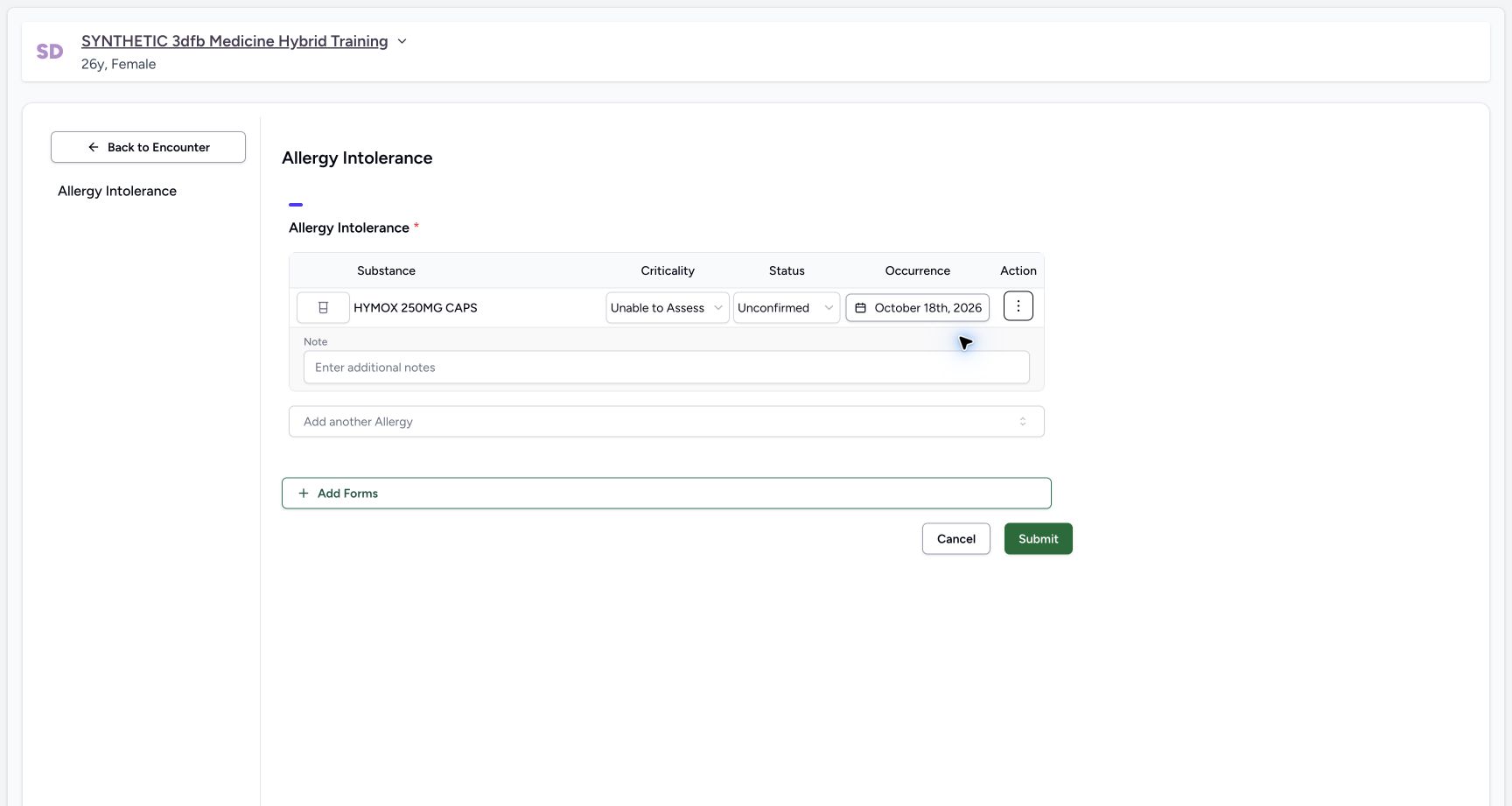
Use Actions, then Add notes, as shown in the earlier row-menu example. The opened field is labelled Note and initially shows Enter additional notes.
 1
1Empty allergy note editor
Capture details
Observed committed 3dfb software and the existing Clinical proxy qualified for 20 October 2026. Temporary controls and the three saved states are distinguished in the instructions.
Image SHA-256 9504b1c352edfe8cc084948def53698049cc5769e9b39b508f1cbb05f76f7316
- Enter the row note: The Note field is open and empty.
6. Enter and then clear the fictional note
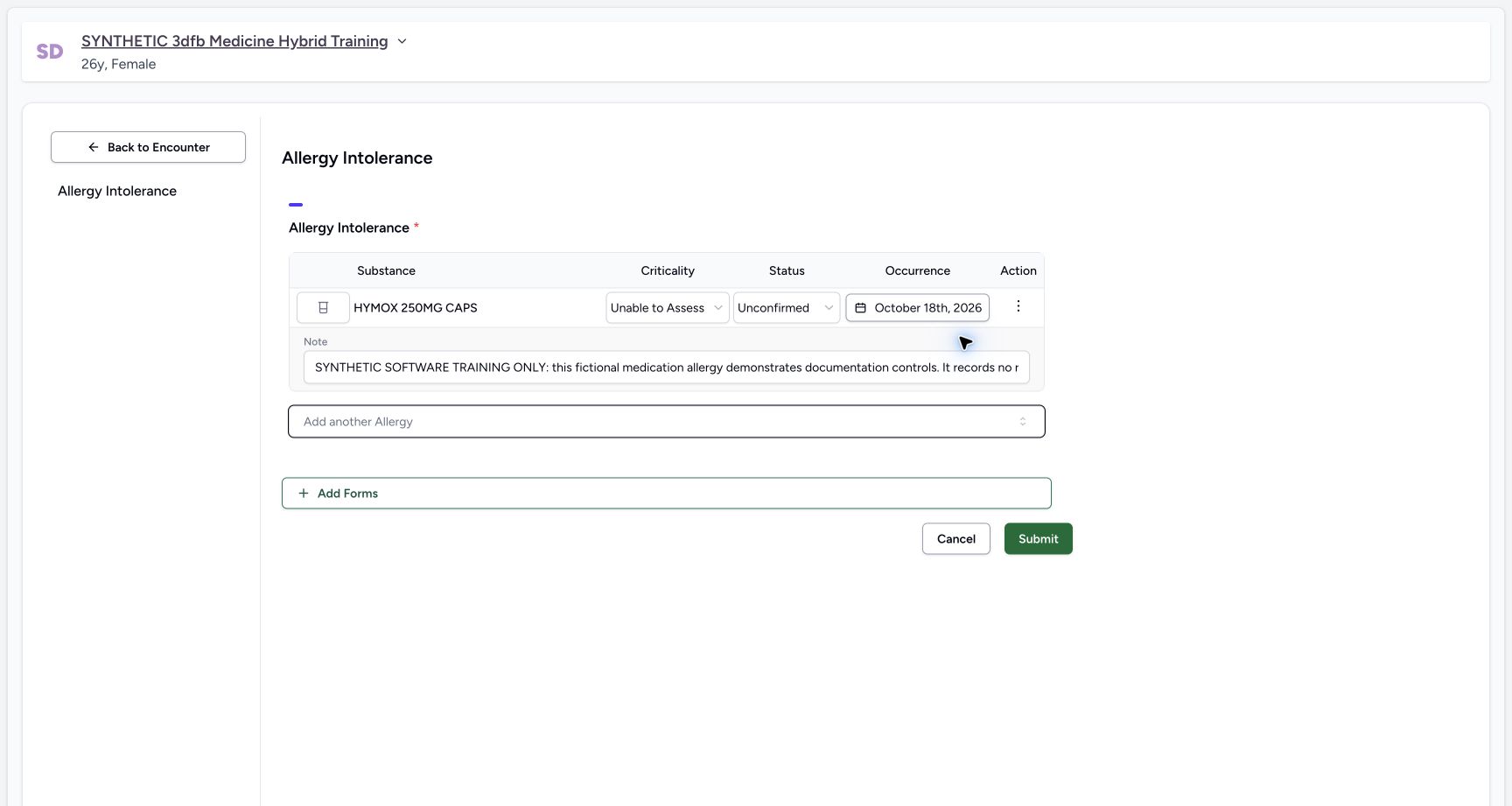
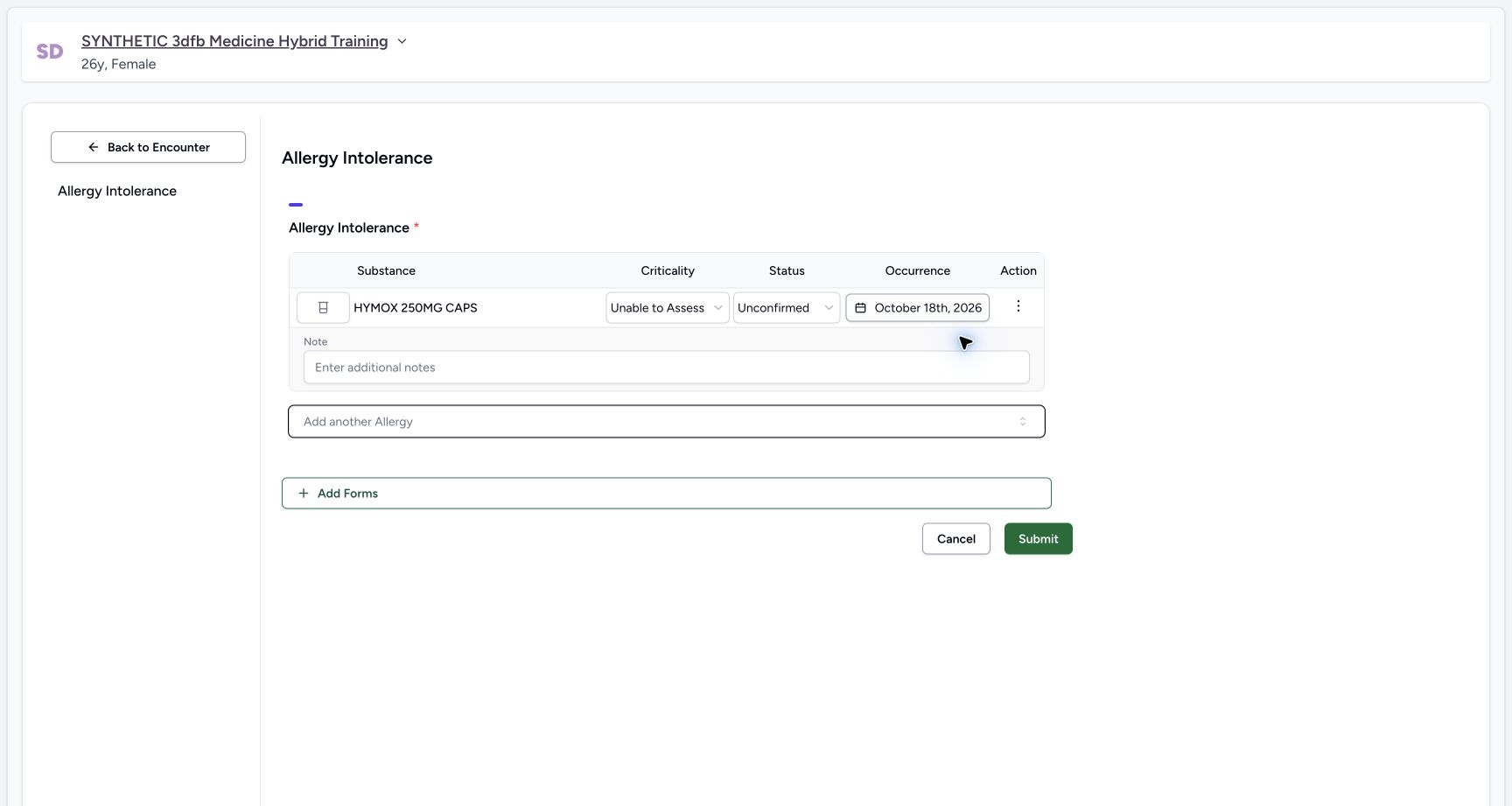
Enter this training text: “SYNTHETIC SOFTWARE TRAINING ONLY: this fictional medication allergy demonstrates documentation controls. It records no real reaction, assessment or treatment advice.” Move focus away and inspect it. The single-line field can show only part of a long note. In the clear exercise, remove the text and move focus away; Enter additional notes reappears.
 1
1Fictional note entered and blurred
Capture details
Observed committed 3dfb software and the existing Clinical proxy qualified for 20 October 2026. Temporary controls and the three saved states are distinguished in the instructions.
Image SHA-256 6d4174ef58c0fe54a65cc1124b9b5e5180140e575b902b9627041fbe800d6d7f
- Read the note field: The single-line input shows the beginning of the authored note.
 1
1Note cleared and blurred
Capture details
Observed committed 3dfb software and the existing Clinical proxy qualified for 20 October 2026. Temporary controls and the three saved states are distinguished in the instructions.
Image SHA-256 5ceeb88ceba472ab305afa592f489f8f473dd46cb199a2c07773ed90ee0f6e39
- Read the empty placeholder: Enter additional notes reappears after clearing.
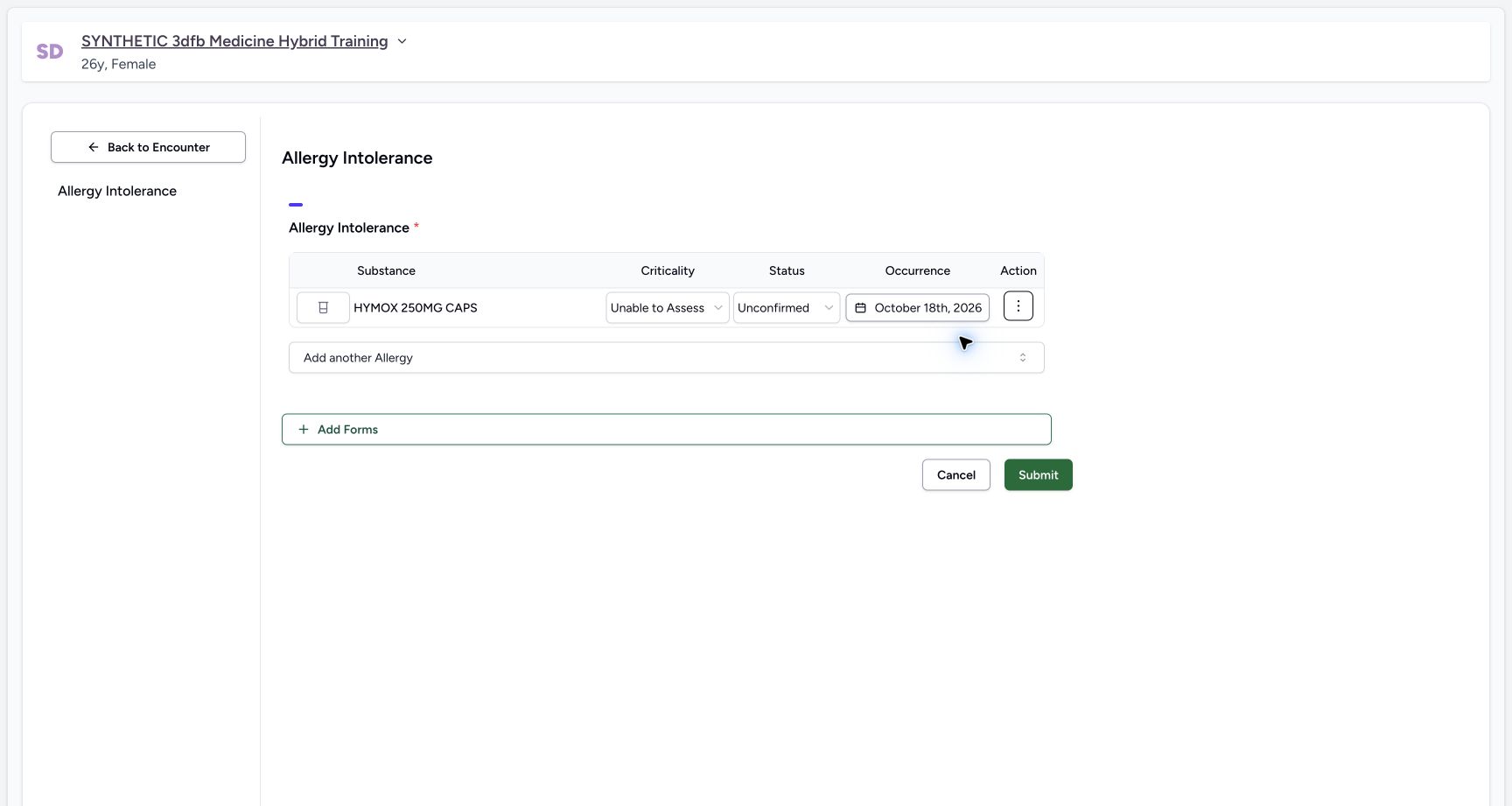
7. Restore the note and use Hide notes
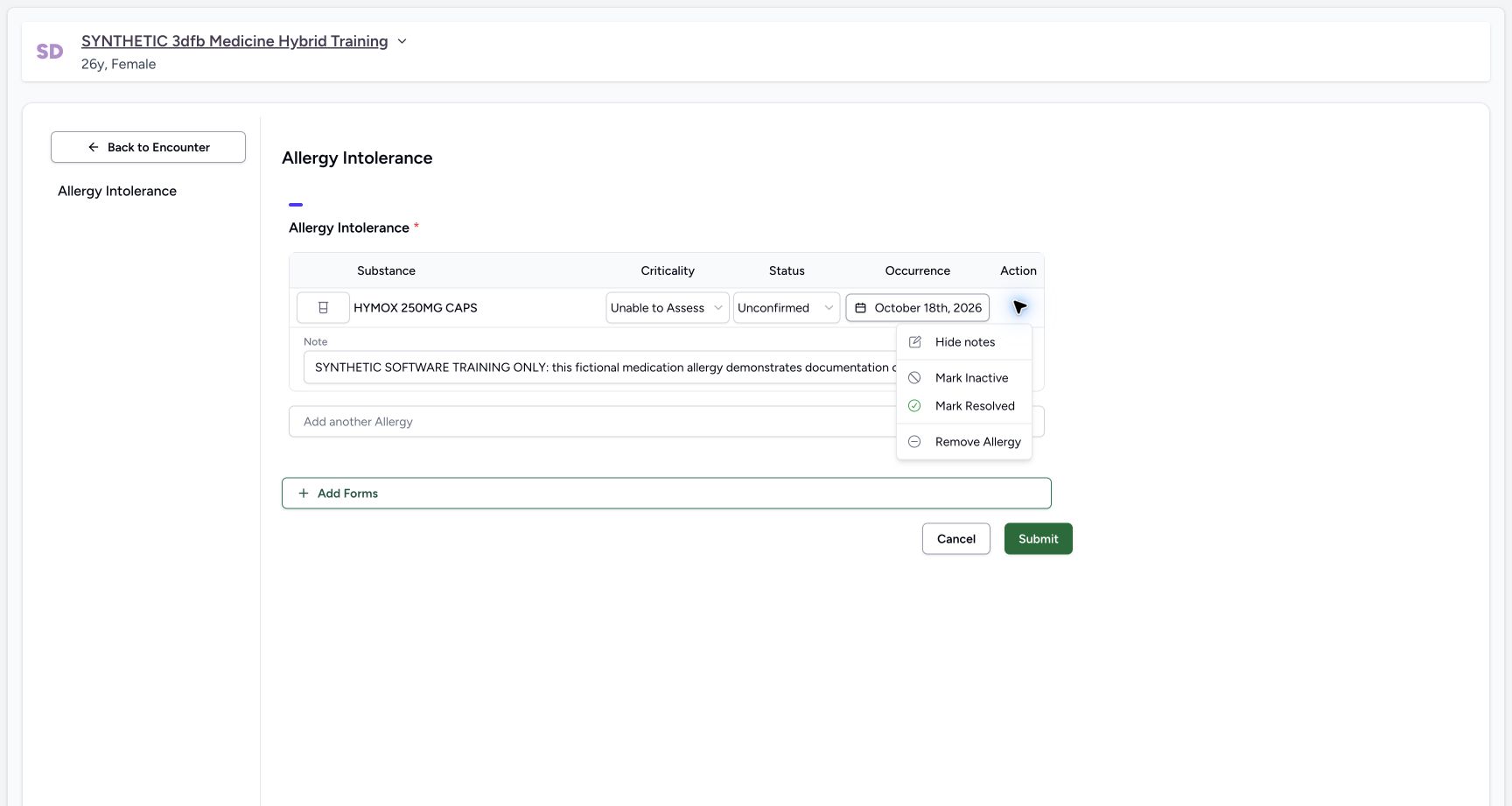
Restore the complete text: “SYNTHETIC SOFTWARE TRAINING ONLY: this fictional medication allergy demonstrates documentation controls. It records no real reaction, assessment or treatment advice.” Open Actions and select Hide notes. Hiding the field is a display action; it does not clear the authored note.
 1
1Hide notes action
Capture details
Observed committed 3dfb software and the existing Clinical proxy qualified for 20 October 2026. Temporary controls and the three saved states are distinguished in the instructions.
Image SHA-256 b746223df71658d4a569378ab6e9c6ca7203b2bb6f042a4f04f914ade7ab7646
- Select Hide notes: Hide the note field without clearing the authored text.
 1
1Note hidden stable
Capture details
Observed committed 3dfb software and the existing Clinical proxy qualified for 20 October 2026. Temporary controls and the three saved states are distinguished in the instructions.
Image SHA-256 cb4246f9888db4e3466da1ad38744d63c264a9bf9c8bee343e644c5fdccfd418
- Open Actions again: The note field is hidden; reopen the row menu.
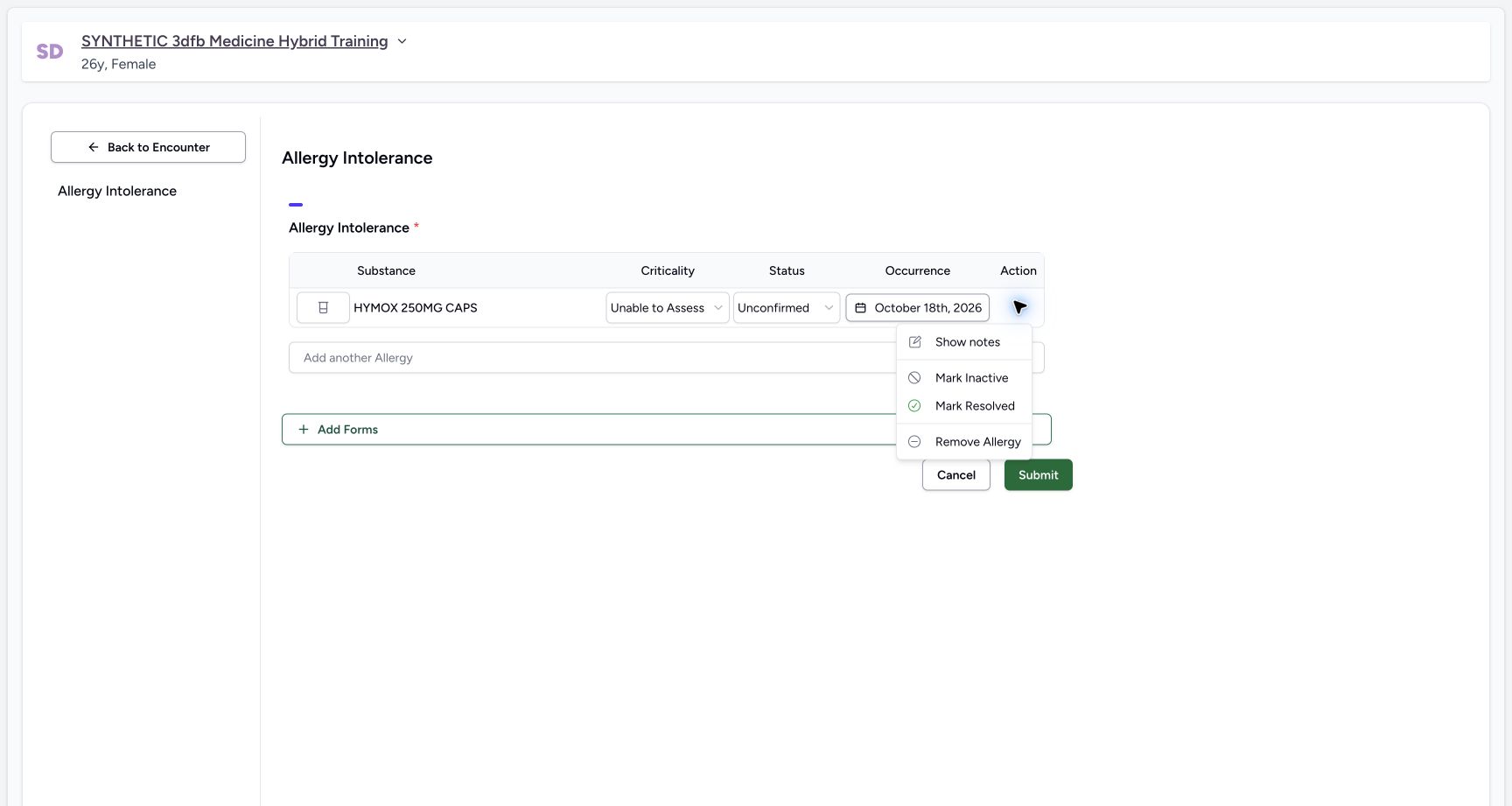
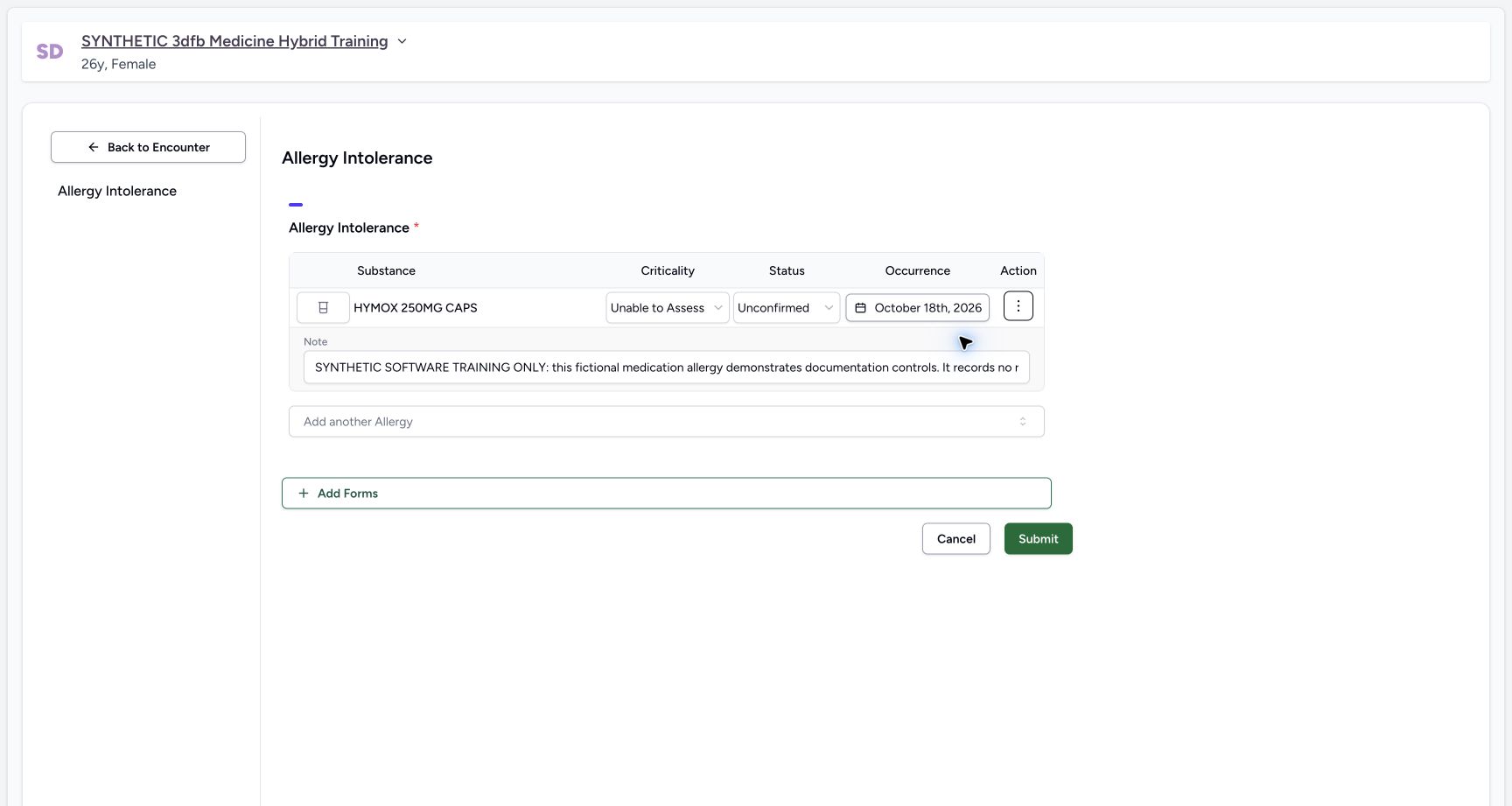
8. Show notes and review the final draft
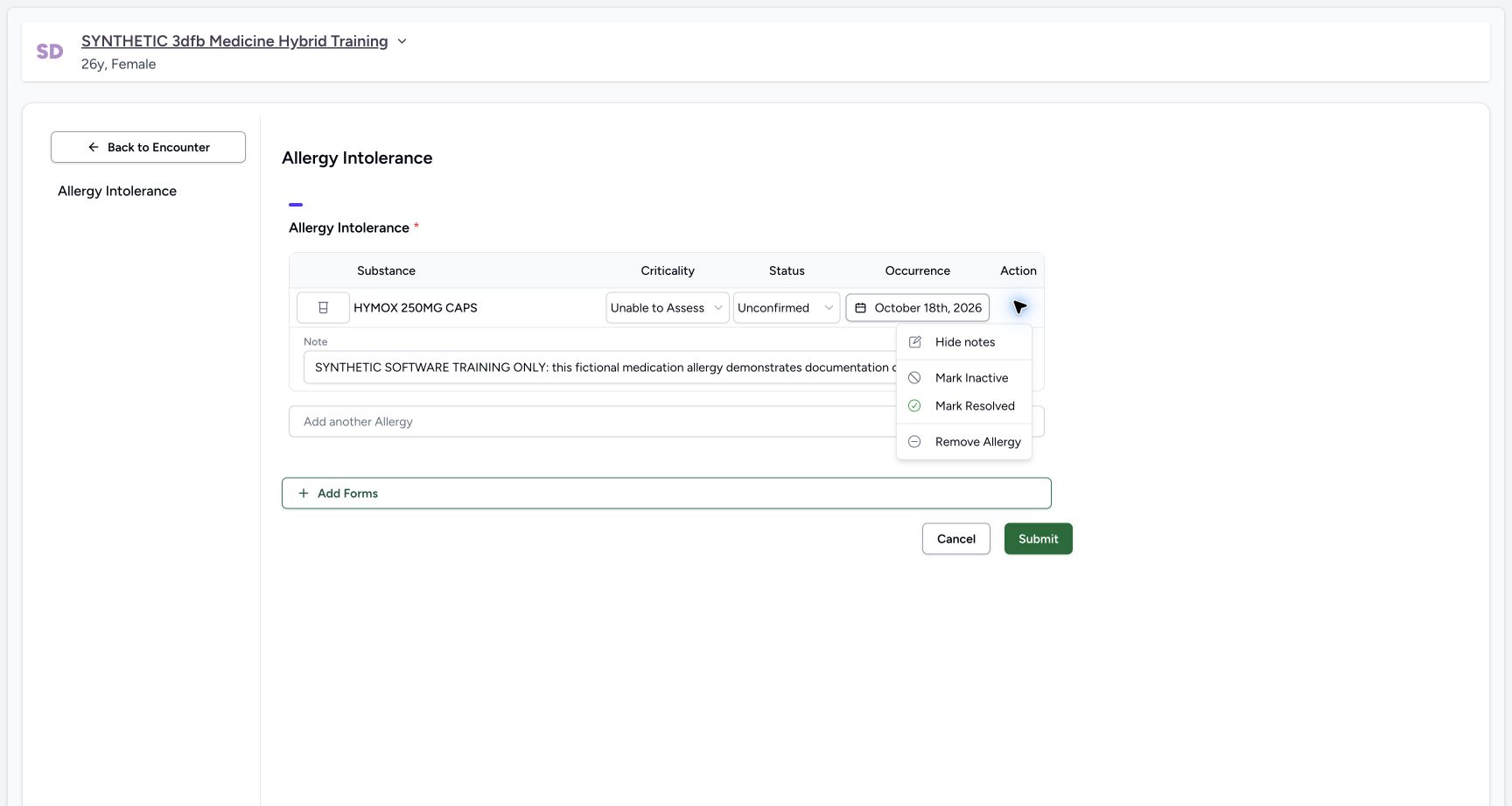
Open Actions and select Show notes. Read the restored note field and occurrence. The final training draft uses Medication, Unable to Assess, Unconfirmed, Active and 18 October 2026.
 1
1Show notes action
Capture details
Observed committed 3dfb software and the existing Clinical proxy qualified for 20 October 2026. Temporary controls and the three saved states are distinguished in the instructions.
Image SHA-256 2bb3e36903f71e0eb2d2e7d59f8cb9b4c21f288c8b79bf21ecc2488ba2efcac4
- Select Show notes: Reveal the existing note without changing its text.
 12
12Note restored with date and status
Capture details
Observed committed 3dfb software and the existing Clinical proxy qualified for 20 October 2026. Temporary controls and the three saved states are distinguished in the instructions.
Image SHA-256 d89d4c687a782d937eb8f91d5484e4808e35b62a02bb83efd914ed2a990fe2ea
- Read the restored note field: The single-line editor displays the start of the restored training note.
- Check occurrence: The final occurrence is 18 October 2026.
 1
1Restored active actions before submit
Capture details
Observed committed 3dfb software and the existing Clinical proxy qualified for 20 October 2026. Temporary controls and the three saved states are distinguished in the instructions.
Image SHA-256 b746223df71658d4a569378ab6e9c6ca7203b2bb6f042a4f04f914ade7ab7646
- Read the available state command: Mark Inactive is available after restoring the draft to Active.
Source evidence
Every citation uses this exact committed version. The private source repository requires access.
- repositories/platform/mansoq-web/src/pages/Encounters/tabs/overview/quick-actions.tsx:55 ·
3dfb7c9f519fb5b4cd4452439f3c12346bf58319Source file checksum
555331d2be0793af35974e2ac2b3642f222ebbb49ddbec83bdb74331a7d963d4 - repositories/platform/mansoq-web/src/components/Questionnaire/data/StructuredFormData.tsx:41 ·
3dfb7c9f519fb5b4cd4452439f3c12346bf58319Source file checksum
434386c27b8e583e1dbd0a6f506250e7a0fb3640963c572445123bae62880f0f - repositories/platform/mansoq-web/src/components/Questionnaire/QuestionTypes/AllergyQuestion.tsx:84 ·
3dfb7c9f519fb5b4cd4452439f3c12346bf58319Source file checksum
254d481b67a09bf7bb33fc18e6e7d92b1f4fb54d4b67e5d4aa6bda8fde7cea96 - repositories/platform/mansoq-web/src/components/Questionnaire/structured/handlers.ts:37 ·
3dfb7c9f519fb5b4cd4452439f3c12346bf58319Source file checksum
459ade48f77316279ab2978dc7b4466cb96acb8223c61b9a1f87ca9973be7c7f - repositories/platform/mansoq-web/src/components/Questionnaire/QuestionnaireForm.tsx:403 ·
3dfb7c9f519fb5b4cd4452439f3c12346bf58319Source file checksum
ee6c2195f13e48f0896a2d3da566c2f2a67910adad08894df6b77862f9cfdeec - repositories/platform/mansoq-web/src/components/Questionnaire/ValueSetSearchContent.tsx:226 ·
3dfb7c9f519fb5b4cd4452439f3c12346bf58319Source file checksum
d6adc1b84f5956cd554042aa8579a0a83b9a13c5337c64bd0ee6b7f9af5b8019 - repositories/platform/mansoq-web/src/components/Patient/allergy/list.tsx:78 ·
3dfb7c9f519fb5b4cd4452439f3c12346bf58319Source file checksum
bc8ef47eb25cf88a026260eb0bcd989b0f93cfae23acf9ecb7d35e5ffbb82fd7 - repositories/platform/mansoq-web/src/components/Patient/allergy/AllergyTable.tsx:97 ·
3dfb7c9f519fb5b4cd4452439f3c12346bf58319Source file checksum
90ad547be1793fbd6b7341e9ffa497337ecb227a623c95444d85c9e980dd2a84 - repositories/platform/mansoq-web/src/types/emr/allergyIntolerance/allergyIntolerance.ts:4 ·
3dfb7c9f519fb5b4cd4452439f3c12346bf58319Source file checksum
af5b8029b7b8cfc769fe108a02fa9566bf8df23723fc05b11bc9ec03461862f2 - repositories/platform/mansoq-web/src/types/emr/allergyIntolerance/allergyIntoleranceApi.ts:5 ·
3dfb7c9f519fb5b4cd4452439f3c12346bf58319Source file checksum
508e7c035908d31af3e1dde061e9cb25f6335492960a9a22bad52454a5c62c63 - repositories/platform/mansoq-web/src/Utils/utils.ts:81 ·
3dfb7c9f519fb5b4cd4452439f3c12346bf58319Source file checksum
42db3c7a21342795ae94608ded05958c34844fb0004399c4360b94b45bde2357 - repositories/platform/mansoq-web/src/components/Facility/ConsultationDetails/PrintAllQuestionnaireResponses.tsx:77 ·
3dfb7c9f519fb5b4cd4452439f3c12346bf58319Source file checksum
e7314df6d693bbd49e54e5f007521488cbc82b164dba4fc0ba2e317049b5cc1a - repositories/platform/mansoq-core/mansoq/emr/api/viewsets/allergy_intolerance.py:52 ·
3dfb7c9f519fb5b4cd4452439f3c12346bf58319Source file checksum
d9ae1ae9e05ebe02fa61b89e71d10b371c7ca07d020d74875f449d80ce85ed54 - repositories/platform/mansoq-core/mansoq/emr/api/viewsets/base.py:107 ·
3dfb7c9f519fb5b4cd4452439f3c12346bf58319Source file checksum
6a287dd315b8a4957b29c58e4bbc1bef7b8d9d257f9149f93045ff0adbdcae6c - repositories/platform/mansoq-core/mansoq/emr/resources/allergy_intolerance/spec.py:14 ·
3dfb7c9f519fb5b4cd4452439f3c12346bf58319Source file checksum
54dfb856b2c10739e7a5a0d3761d501d25dcb0dca8d063412fd9d52eaff1fc06 - repositories/platform/mansoq-core/mansoq/emr/resources/allergy_intolerance/valueset.py:1 ·
3dfb7c9f519fb5b4cd4452439f3c12346bf58319Source file checksum
2d3464dc112b00a00b3d8ce2aced6900813af49fdb17cc2d5ef2ae49b7bc7fdb - repositories/platform/mansoq-core/mansoq/emr/models/allergy_intolerance.py:6 ·
3dfb7c9f519fb5b4cd4452439f3c12346bf58319Source file checksum
dd9c7b0b3eaa442d09ebaa3cb3a665f1fab0a74792def3d7c76a3139dec0ba9f - repositories/platform/mansoq-core/mansoq/emr/models/terminology.py:7 ·
3dfb7c9f519fb5b4cd4452439f3c12346bf58319Source file checksum
2467ffbdaa7b14e785d8700688d1ed4999118591dd3a61f3b40dcf2a91b682d9 - repositories/platform/mansoq-core/mansoq/emr/models/valueset.py:44 ·
3dfb7c9f519fb5b4cd4452439f3c12346bf58319Source file checksum
36e46250876bf40cc74268c495bfd96b75784b7dc067a514ca0e572e8107a68d - repositories/platform/mansoq-core/mansoq/security/authorization/patient.py:64 ·
3dfb7c9f519fb5b4cd4452439f3c12346bf58319Source file checksum
45de75f24e42fa30316a96efb92b23c577e2c3831e17ec96e7ff2c73d0d1973d - repositories/platform/mansoq-core/mansoq/security/authorization/encounter.py:97 ·
3dfb7c9f519fb5b4cd4452439f3c12346bf58319Source file checksum
0e7ff8afcfb57b2371201e16ee6fac26125d6e686af66ed7edd95e49bc07de78 - repositories/platform/mansoq-core/mansoq/emr/utils/valueset_coding_type.py:7 ·
3dfb7c9f519fb5b4cd4452439f3c12346bf58319Source file checksum
8371acc7857e74d3b53e14878506b3f9eae444af1774fe214eada35c0354dc39 - repositories/platform/mansoq-core/mansoq/emr/api/viewsets/valueset.py:1 ·
3dfb7c9f519fb5b4cd4452439f3c12346bf58319Source file checksum
772841c50105d523530a79f758964537988b9366e3a8fb7ec90cef1fa3b13fe2 - repositories/platform/mansoq-core/mansoq/emr/fhir/resources/code_concept.py:1 ·
3dfb7c9f519fb5b4cd4452439f3c12346bf58319Source file checksum
0ca1b831d57391f8a47ab7dd44acddcfdba9f11ea2429f689f95467755105a6d - repositories/platform/mansoq-core/mansoq/emr/utils/local_terminology.py:1 ·
3dfb7c9f519fb5b4cd4452439f3c12346bf58319Source file checksum
d1a9126bcc12e59f1efa2a4fa48585c2c98921f9e0f098b815b7ac8d3525837e - repositories/platform/mansoq-core/mansoq/emr/models/questionnaire.py:1 ·
3dfb7c9f519fb5b4cd4452439f3c12346bf58319Source file checksum
2e422990f996654b71999dd1303f0bf9b5706ffc38c4271cdcdc741faf1a08d0 - repositories/platform/mansoq-core/mansoq/emr/models/base.py:1 ·
3dfb7c9f519fb5b4cd4452439f3c12346bf58319Source file checksum
61f50a19078c8a6435398e6b3e9174326038e9047129382c0d882f1e8f367b4c - repositories/platform/mansoq-core/mansoq/utils/models/base.py:1 ·
3dfb7c9f519fb5b4cd4452439f3c12346bf58319Source file checksum
1a5270f50188d1e0b044210773ca86a483b904f3a9724bb7b321d4ea463acfaf - repositories/platform/mansoq-web/src/types/valueSet/valueSetApi.ts:1 ·
3dfb7c9f519fb5b4cd4452439f3c12346bf58319Source file checksum
22ae83ebecd45489ccf00c51498c6624b87a9214521ca0d647071d82a721b919 - repositories/platform/mansoq-web/src/components/ui/combined-date-picker.tsx:53 ·
3dfb7c9f519fb5b4cd4452439f3c12346bf58319Source file checksum
272caeefe90613a5018d1ff31b46cf3d37e557cbe988450a99a2c22da2522d04 - repositories/platform/mansoq-web/src/components/ui/relative-date-picker.tsx:52 ·
3dfb7c9f519fb5b4cd4452439f3c12346bf58319Source file checksum
4987f114f93eb713b63e20d4644823738ca4748183fcb2af77076f5f2f63ad19