 MANSOQ
 Clinical care · VERSION 3dfb7c9f
Review the Archive warning, cancel, then archive the training attachment
Inspect the no-unarchive warning, see the Cancel result, and save one software-only reason for the same renamed file.
Nurse
 123
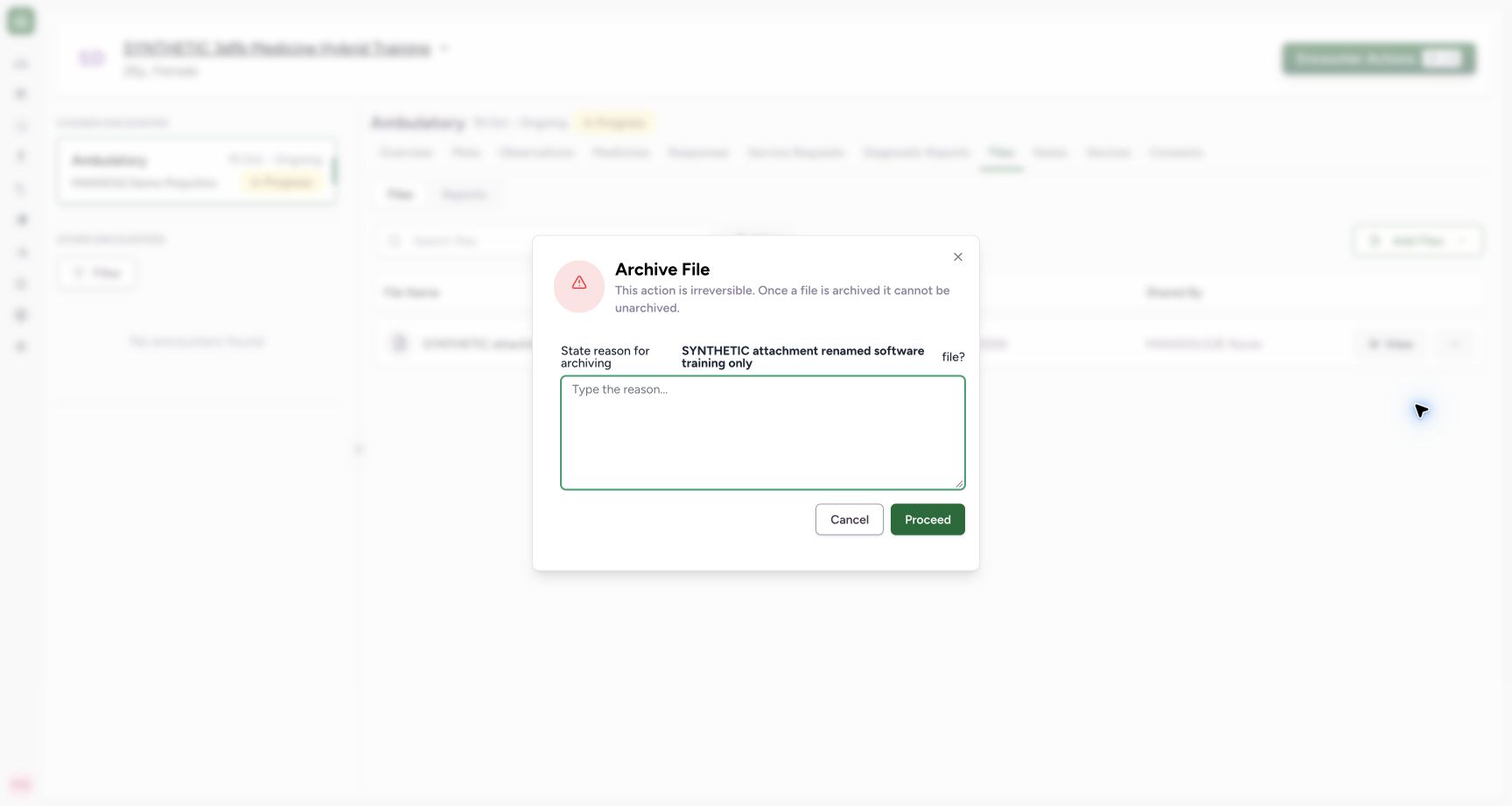
123Read the archive warning and choose Cancel
Capture details
Observed committed 3dfb source on 20 October 2026 (Asia/Riyadh; captured 19 October UTC). Existing fictional encounter attachment; no real clinical document or consent.
Image SHA-256 ba91ef5a652427f130f863f3e18edf2a253cfe412be8815a04f166ddfd2297fb
- Read the irreversible warning: The dialog says the file cannot be unarchived.
- Check the selected file: The warning names the renamed software-only attachment.
- Cancel this first dialog: Close the archive dialog without saving an archive.
 123
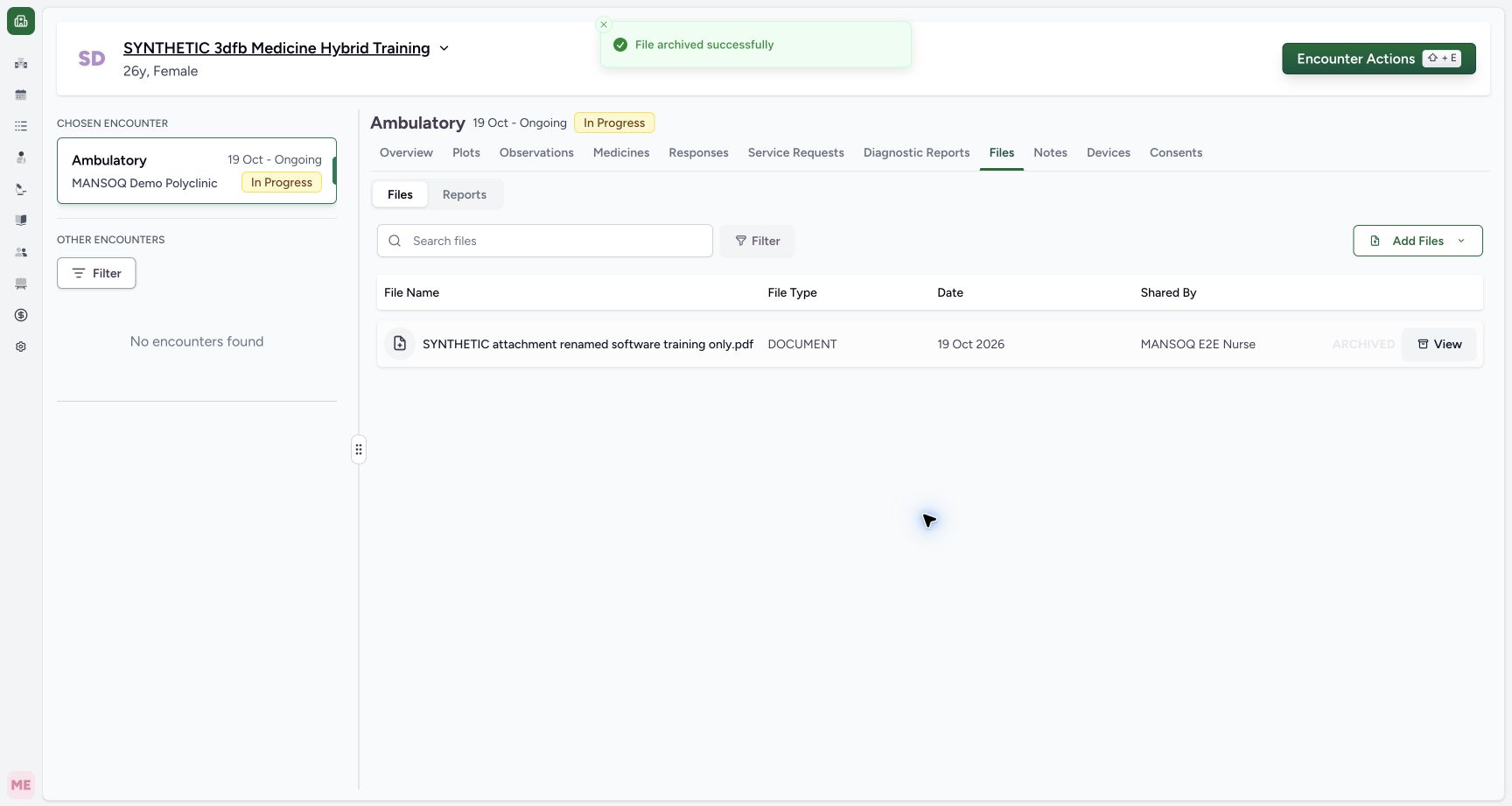
123Read Archive success with the retained ARCHIVED row
Capture details
Observed committed 3dfb source on 20 October 2026 (Asia/Riyadh; captured 19 October UTC). Existing fictional encounter attachment; no real clinical document or consent.
Image SHA-256 e562c038be554278323afbfa4b88640079d9dff5474118ba468375efd07897f8
- Read the Archive success message: File archived successfully is visible.
- Check ARCHIVED: The same retained row now has an ARCHIVED marker.
- Identify the same retained attachment: The renamed software PDF remains listed in the all-files view.
12 of 12 content blocks have reviewed image alignment. Missing overview or prerequisite images remain open.
Before you begin
- Continue in the same authorized Nurse session and chosen synthetic encounter after the Rename lesson. Use the same renamed active attachment.
 123
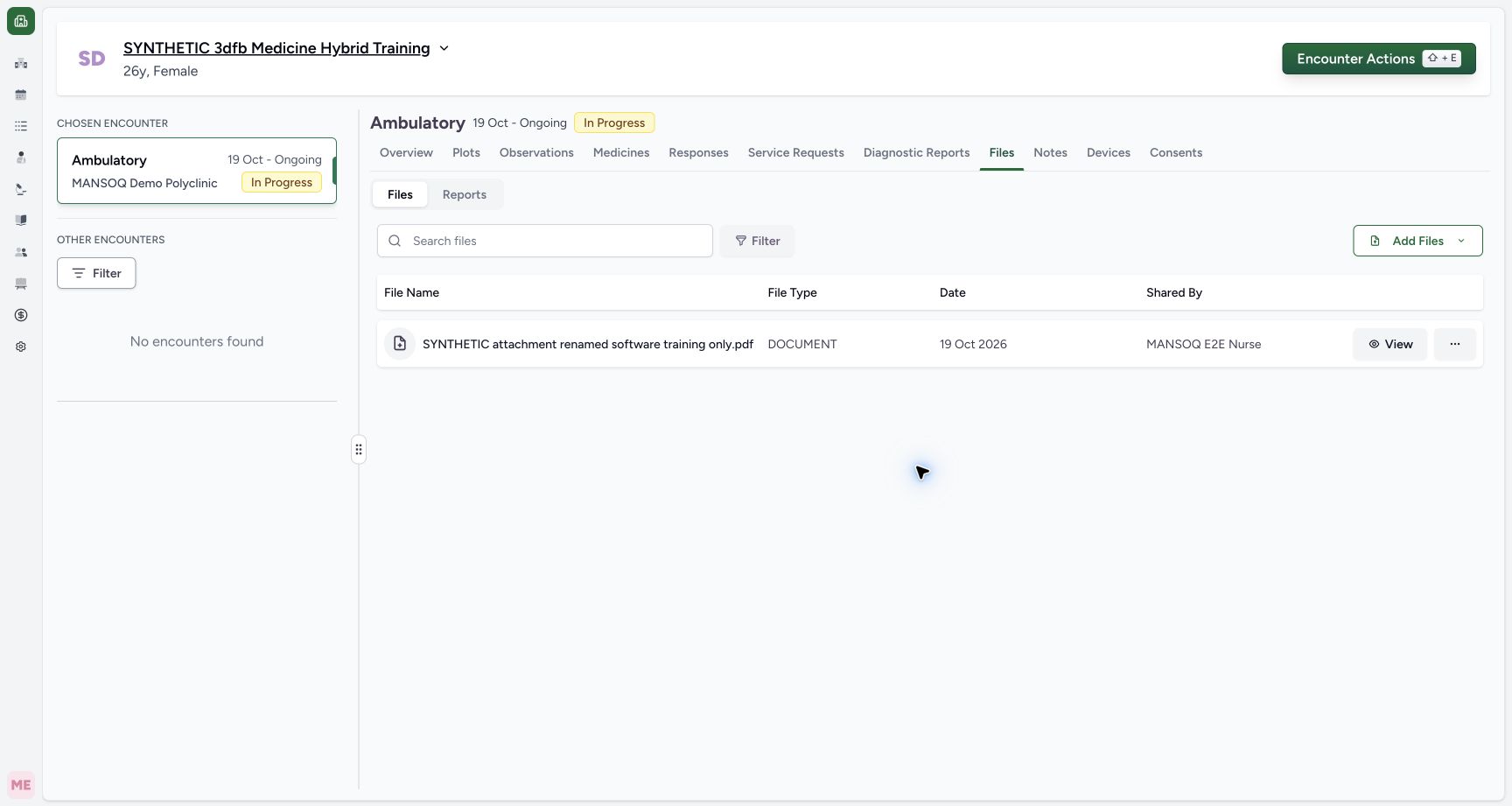
123Recorded release 3dfb7c9f · 2026-10-19T21:58:22.308Z · 1728 × 921 Check the saved name after reload
Capture details
Observed committed 3dfb source on 20 October 2026 (Asia/Riyadh; captured 19 October UTC). Existing fictional encounter attachment; no real clinical document or consent.
Image SHA-256
6fc71210f5f803063519a7210c427c65c4f2f8a3910b376cef0593f6077e141a- Check the persisted name after reload: The loaded row keeps the saved display name and .pdf extension.
- Read the unchanged upload Date: The original file Date remains 19 Oct 2026.
- Read Shared By after reload: The original uploader remains MANSOQ E2E Nurse.
 12
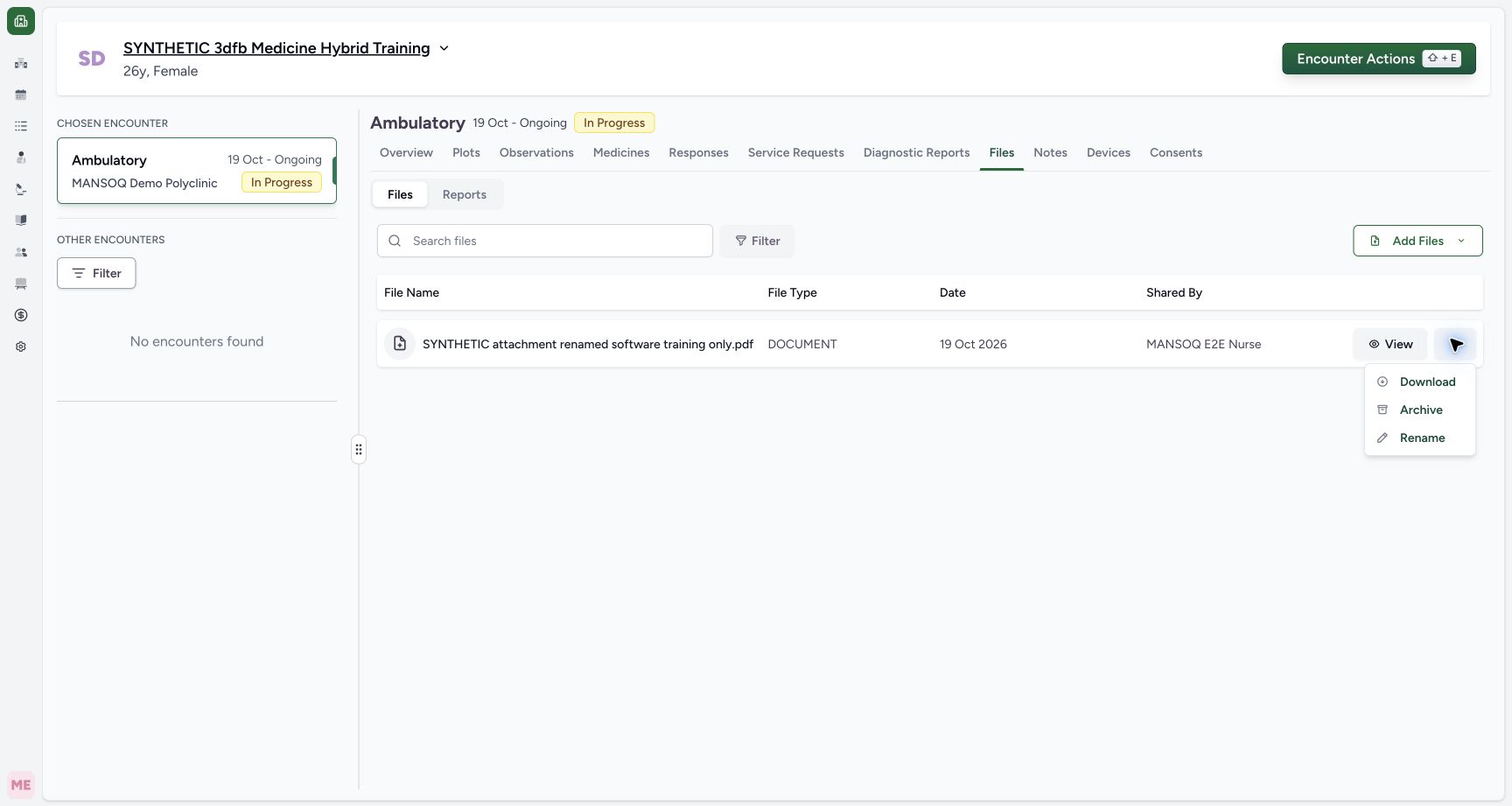
12Recorded release 3dfb7c9f · 2026-10-19T22:02:21.511Z · 1728 × 921 Open Archive on the renamed attachment
Capture details
Observed committed 3dfb source on 20 October 2026 (Asia/Riyadh; captured 19 October UTC). Existing fictional encounter attachment; no real clinical document or consent.
Image SHA-256
20363f0a15b05bf9746a0068e4b2441fa07e77c9231944ead6c740b6c68718a1- Open the same renamed row’s actions: Use the ellipsis on the renamed active file.
- Choose Archive: Open Archive for this same file.
- This fictional exercise archives a harmless software-training attachment. The dialog warns that an archived file cannot be unarchived; do not use a real clinical document or consent for practice.123
Recorded release 3dfb7c9f · 2026-10-19T22:02:25.379Z · 1728 × 921 Read the archive warning and choose Cancel
Capture details
Observed committed 3dfb source on 20 October 2026 (Asia/Riyadh; captured 19 October UTC). Existing fictional encounter attachment; no real clinical document or consent.
Image SHA-256
ba91ef5a652427f130f863f3e18edf2a253cfe412be8815a04f166ddfd2297fb- Read the irreversible warning: The dialog says the file cannot be unarchived.
- Check the selected file: The warning names the renamed software-only attachment.
- Cancel this first dialog: Close the archive dialog without saving an archive.
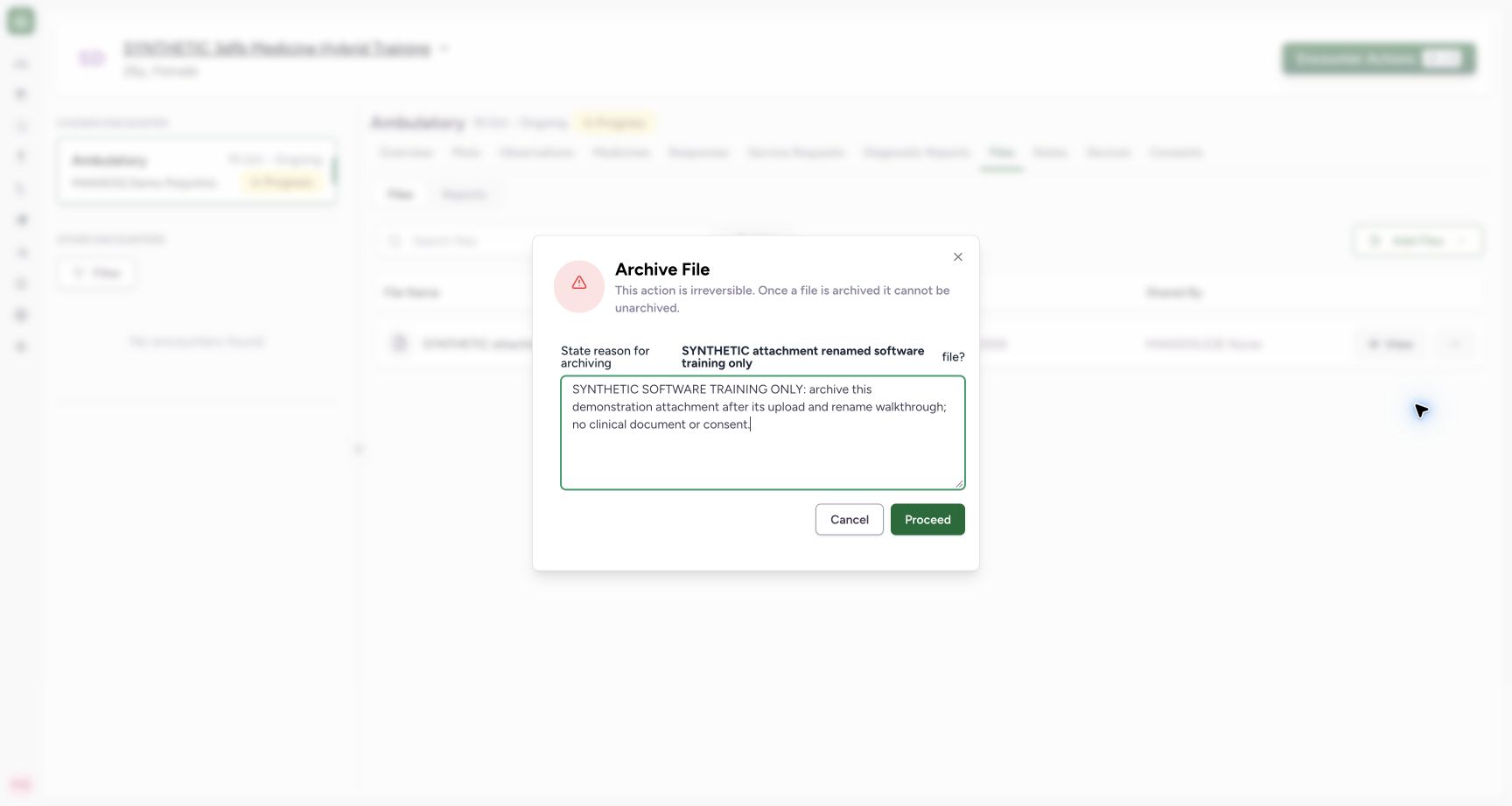 123
123Recorded release 3dfb7c9f · 2026-10-19T22:02:34.959Z · 1728 × 921 Review the software-only archive reason before Proceed
Capture details
Observed committed 3dfb source on 20 October 2026 (Asia/Riyadh; captured 19 October UTC). Existing fictional encounter attachment; no real clinical document or consent.
Image SHA-256
9337a76ada8d66ecf74d376fb6b3d2c78ee5308338b16ed326ff41a5087d7edf- Enter the software-only reason: Read the complete fictional reason before saving.
- Archive this demonstration once: Select Proceed once after checking the same file and reason.
- Keep the no-unarchive warning in view: Proceed archives the file; this source provides no Restore action.
1. Open Archive on the renamed file
Open the ellipsis for SYNTHETIC attachment renamed software training only.pdf and select Archive.
12Open Archive on the renamed attachment
Capture details
Observed committed 3dfb source on 20 October 2026 (Asia/Riyadh; captured 19 October UTC). Existing fictional encounter attachment; no real clinical document or consent.
Image SHA-256 20363f0a15b05bf9746a0068e4b2441fa07e77c9231944ead6c740b6c68718a1
- Open the same renamed row’s actions: Use the ellipsis on the renamed active file.
- Choose Archive: Open Archive for this same file.
123Read the archive warning and choose Cancel
Capture details
Observed committed 3dfb source on 20 October 2026 (Asia/Riyadh; captured 19 October UTC). Existing fictional encounter attachment; no real clinical document or consent.
Image SHA-256 ba91ef5a652427f130f863f3e18edf2a253cfe412be8815a04f166ddfd2297fb
- Read the irreversible warning: The dialog says the file cannot be unarchived.
- Check the selected file: The warning names the renamed software-only attachment.
- Cancel this first dialog: Close the archive dialog without saving an archive.
2. Read the file name and warning
Match the renamed attachment in Archive File. Read: This action is irreversible. Once a file is archived it cannot be unarchived. Leave the reason empty for this first inspection.
123Read the archive warning and choose Cancel
Capture details
Observed committed 3dfb source on 20 October 2026 (Asia/Riyadh; captured 19 October UTC). Existing fictional encounter attachment; no real clinical document or consent.
Image SHA-256 ba91ef5a652427f130f863f3e18edf2a253cfe412be8815a04f166ddfd2297fb
- Read the irreversible warning: The dialog says the file cannot be unarchived.
- Check the selected file: The warning names the renamed software-only attachment.
- Cancel this first dialog: Close the archive dialog without saving an archive.
3. Cancel this first dialog
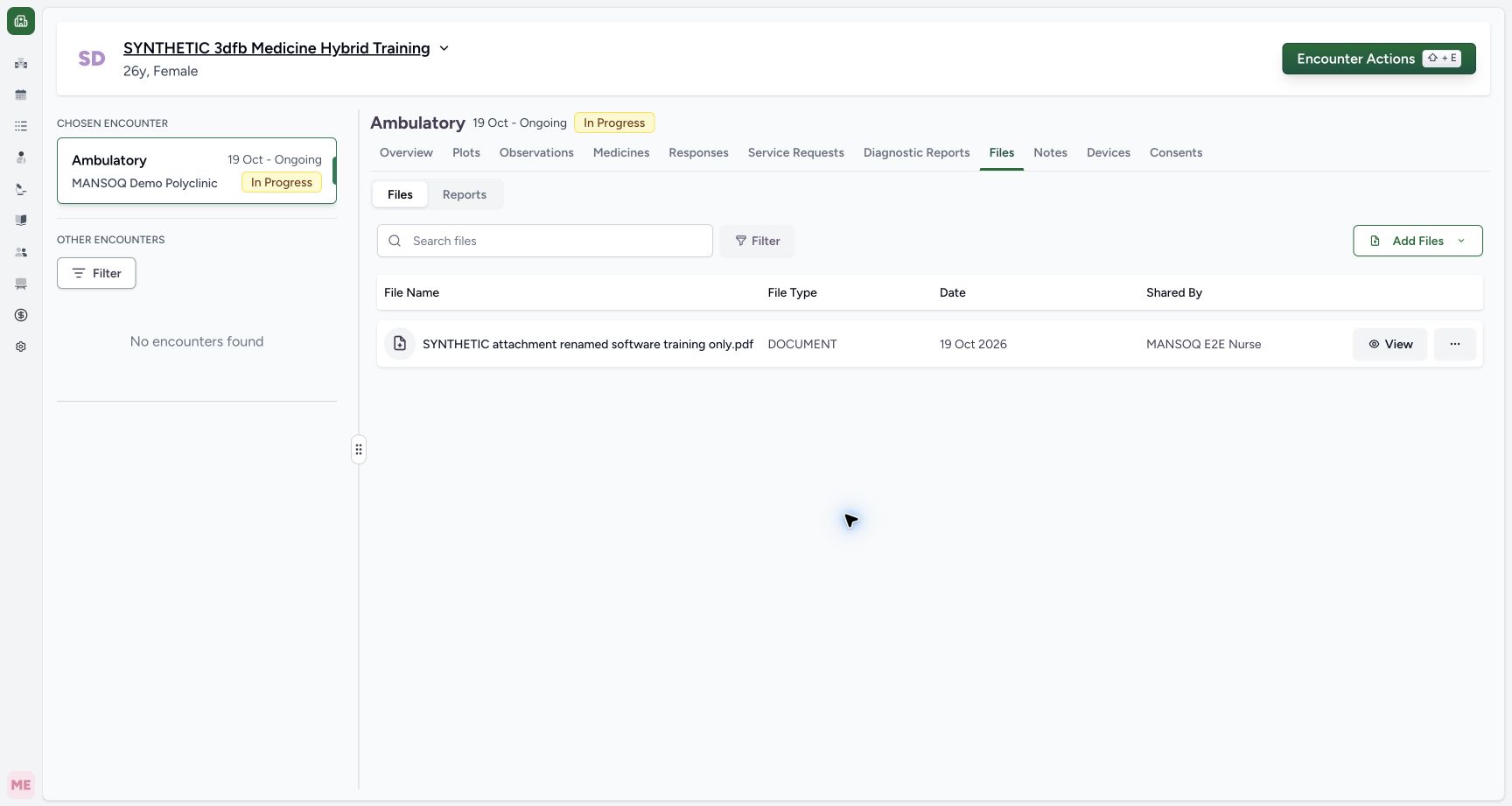
Select Cancel. In the stable returned list, the renamed attachment is still present without an ARCHIVED marker.
123Read the archive warning and choose Cancel
Capture details
Observed committed 3dfb source on 20 October 2026 (Asia/Riyadh; captured 19 October UTC). Existing fictional encounter attachment; no real clinical document or consent.
Image SHA-256 ba91ef5a652427f130f863f3e18edf2a253cfe412be8815a04f166ddfd2297fb
- Read the irreversible warning: The dialog says the file cannot be unarchived.
- Check the selected file: The warning names the renamed software-only attachment.
- Cancel this first dialog: Close the archive dialog without saving an archive.
 1
1Check the stable active file after Cancel
Capture details
Observed committed 3dfb source on 20 October 2026 (Asia/Riyadh; captured 19 October UTC). Existing fictional encounter attachment; no real clinical document or consent.
Image SHA-256 bfc1e1c9efba93f107058fe310a8fd9acb745628bf721417d4dc74e2e484ded2
- Check the stable Cancel result: The same renamed active row remains after Cancel; no ARCHIVED marker is shown.
4. Return to the same archive dialog
Open the same row’s Archive action again. Check that the dialog still names the intended renamed software-training attachment.
12Open Archive on the renamed attachment
Capture details
Observed committed 3dfb source on 20 October 2026 (Asia/Riyadh; captured 19 October UTC). Existing fictional encounter attachment; no real clinical document or consent.
Image SHA-256 20363f0a15b05bf9746a0068e4b2441fa07e77c9231944ead6c740b6c68718a1
- Open the same renamed row’s actions: Use the ellipsis on the renamed active file.
- Choose Archive: Open Archive for this same file.
123Review the software-only archive reason before Proceed
Capture details
Observed committed 3dfb source on 20 October 2026 (Asia/Riyadh; captured 19 October UTC). Existing fictional encounter attachment; no real clinical document or consent.
Image SHA-256 9337a76ada8d66ecf74d376fb6b3d2c78ee5308338b16ed326ff41a5087d7edf
- Enter the software-only reason: Read the complete fictional reason before saving.
- Archive this demonstration once: Select Proceed once after checking the same file and reason.
- Keep the no-unarchive warning in view: Proceed archives the file; this source provides no Restore action.
5. Enter the fictional archive reason
In the reason field, enter: SYNTHETIC SOFTWARE TRAINING ONLY: archive this demonstration attachment after its upload and rename walkthrough; no clinical document or consent. Read the full text before proceeding.
123Review the software-only archive reason before Proceed
Capture details
Observed committed 3dfb source on 20 October 2026 (Asia/Riyadh; captured 19 October UTC). Existing fictional encounter attachment; no real clinical document or consent.
Image SHA-256 9337a76ada8d66ecf74d376fb6b3d2c78ee5308338b16ed326ff41a5087d7edf
- Enter the software-only reason: Read the complete fictional reason before saving.
- Archive this demonstration once: Select Proceed once after checking the same file and reason.
- Keep the no-unarchive warning in view: Proceed archives the file; this source provides no Restore action.
6. Save this Archive once
With the same file and software-only reason checked, select Proceed once. Archive is a saved change; Cancel is the alternative before Proceed.
123Review the software-only archive reason before Proceed
Capture details
Observed committed 3dfb source on 20 October 2026 (Asia/Riyadh; captured 19 October UTC). Existing fictional encounter attachment; no real clinical document or consent.
Image SHA-256 9337a76ada8d66ecf74d376fb6b3d2c78ee5308338b16ed326ff41a5087d7edf
- Enter the software-only reason: Read the complete fictional reason before saving.
- Archive this demonstration once: Select Proceed once after checking the same file and reason.
- Keep the no-unarchive warning in view: Proceed archives the file; this source provides no Restore action.
7. Read the saved archive result
Read File archived successfully and the ARCHIVED marker on the same retained renamed row. The all-files list still contains the attachment.
123Read Archive success with the retained ARCHIVED row
Capture details
Observed committed 3dfb source on 20 October 2026 (Asia/Riyadh; captured 19 October UTC). Existing fictional encounter attachment; no real clinical document or consent.
Image SHA-256 e562c038be554278323afbfa4b88640079d9dff5474118ba468375efd07897f8
- Read the Archive success message: File archived successfully is visible.
- Check ARCHIVED: The same retained row now has an ARCHIVED marker.
- Identify the same retained attachment: The renamed software PDF remains listed in the all-files view.
Understand the archive boundary
Archive retains the document and its archive metadata. It is not a physical deletion. This source offers no Restore or unarchive action; use the next lesson to find the row and read its details.
123Read the archive warning and choose Cancel
Capture details
Observed committed 3dfb source on 20 October 2026 (Asia/Riyadh; captured 19 October UTC). Existing fictional encounter attachment; no real clinical document or consent.
Image SHA-256 ba91ef5a652427f130f863f3e18edf2a253cfe412be8815a04f166ddfd2297fb
- Read the irreversible warning: The dialog says the file cannot be unarchived.
- Check the selected file: The warning names the renamed software-only attachment.
- Cancel this first dialog: Close the archive dialog without saving an archive.
123Read Archive success with the retained ARCHIVED row
Capture details
Observed committed 3dfb source on 20 October 2026 (Asia/Riyadh; captured 19 October UTC). Existing fictional encounter attachment; no real clinical document or consent.
Image SHA-256 e562c038be554278323afbfa4b88640079d9dff5474118ba468375efd07897f8
- Read the Archive success message: File archived successfully is visible.
- Check ARCHIVED: The same retained row now has an ARCHIVED marker.
- Identify the same retained attachment: The renamed software PDF remains listed in the all-files view.
Troubleshooting
Did Cancel archive the file?
No. The stable post-Cancel view shows the active row without ARCHIVED. The later single Proceed produces the success message and ARCHIVED marker.
1Check the stable active file after Cancel
Capture details
Observed committed 3dfb source on 20 October 2026 (Asia/Riyadh; captured 19 October UTC). Existing fictional encounter attachment; no real clinical document or consent.
Image SHA-256 bfc1e1c9efba93f107058fe310a8fd9acb745628bf721417d4dc74e2e484ded2
- Check the stable Cancel result: The same renamed active row remains after Cancel; no ARCHIVED marker is shown.
123Read Archive success with the retained ARCHIVED row
Capture details
Observed committed 3dfb source on 20 October 2026 (Asia/Riyadh; captured 19 October UTC). Existing fictional encounter attachment; no real clinical document or consent.
Image SHA-256 e562c038be554278323afbfa4b88640079d9dff5474118ba468375efd07897f8
- Read the Archive success message: File archived successfully is visible.
- Check ARCHIVED: The same retained row now has an ARCHIVED marker.
- Identify the same retained attachment: The renamed software PDF remains listed in the all-files view.
Source evidence
Every citation uses this exact committed version. The private source repository requires access.
- repositories/platform/mansoq-web/src/hooks/useFileManager.tsx:233 ·
3dfb7c9f519fb5b4cd4452439f3c12346bf58319Source file checksum
85f27360ad717aa5e985901d3a3cbf9bcef2bddcc5a45ab0a92827adee518dbd - repositories/platform/mansoq-web/src/components/Files/FileSubTab.tsx:107 ·
3dfb7c9f519fb5b4cd4452439f3c12346bf58319Source file checksum
e7cd676bfc2ceae76a896c79def0cd5fbb280f7311809c1d6bd326c0c8ae1dd6 - repositories/platform/mansoq-web/public/locale/en.json:373 ·
3dfb7c9f519fb5b4cd4452439f3c12346bf58319Source file checksum
96498c8b964dce856d43c09e4241708efdd175d935e7ebbd14fa2f8d62efa507 - repositories/platform/mansoq-web/src/types/files/fileApi.ts:29 ·
3dfb7c9f519fb5b4cd4452439f3c12346bf58319Source file checksum
ad162efb04f604f840c58795f50aca61e038ef800c3fed19104933e284b37363 - repositories/platform/mansoq-core/mansoq/emr/api/viewsets/file_upload.py:164 ·
3dfb7c9f519fb5b4cd4452439f3c12346bf58319Source file checksum
330ee5dc9faed4ad1ba7153f9ddb3347d8595d146e4e687e022a641b5f3e8478 - repositories/platform/mansoq-core/mansoq/emr/models/file_upload.py:39 ·
3dfb7c9f519fb5b4cd4452439f3c12346bf58319Source file checksum
ebf811b496a25595a7d6ccb9db5181dff79aa6e6a3195819b4fff7292ba79692