 MANSOQ
 Clinical care · VERSION 3dfb7c9f
Distinguish patient-only Notes from encounter discussions
Open the patient profile, compare its separate Notes view and return to the saved encounter discussion.
Nurse
 12
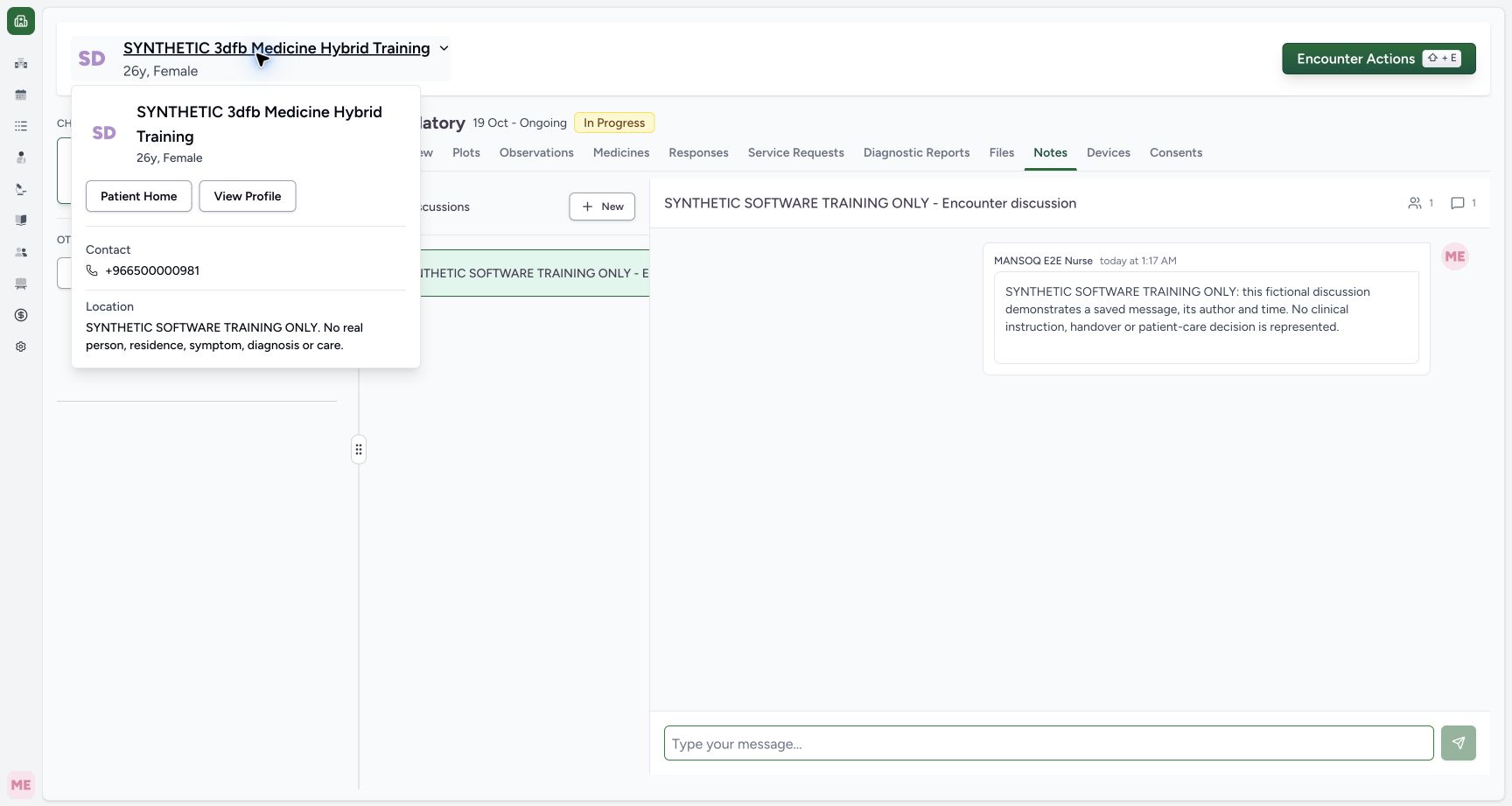
12Patient header view profile entry
Capture details
Observed committed 3dfb software and the Clinical profile qualified for 20 October 2026. Later read-only UI illustration after the four-stage SQL cutoff; no fresh SQL or HTTP measurement is claimed.
Image SHA-256 cdbc37af5d1d5d91bebedb9db5bb68fbfa8664cf85fb70a383142be5ffd5df8d
- Open the patient menu: Use the patient name to open the displayed menu.
- Select View Profile: Open Patient Details for this same synthetic patient.
9 of 9 content blocks have reviewed image alignment. Missing overview or prerequisite images remain open.
Before you begin
- Use an authorised Nurse session with access to the assigned active synthetic encounter and its patient profile.
 123
123Recorded release 3dfb7c9f · 2026-10-19T22:06:51.297Z · 1728 × 921 Notes empty encounter
Capture details
Observed committed 3dfb software and the Clinical profile qualified for 20 October 2026. One valid thread create and one message send are distinguished from unsaved exercises and refusals.
Image SHA-256
d7ff4b3f4a3b8c5655bed1e3056ab4a0a60b58c76ea41fcd551d5772a4314f2f- Open Notes: Select the encounter Notes tab.
- Select New: Open the new discussion dialog.
- Read Start New Discussion: This is another visible entry to the same new discussion dialog.
- Use only the fictional software examples. A discussion title or message here is not a clinical plan, handover or patient-care decision.12
Recorded release 3dfb7c9f · 2026-10-19T22:23:18.210Z · 1728 × 921 Patient header view profile entry
Capture details
Observed committed 3dfb software and the Clinical profile qualified for 20 October 2026. Later read-only UI illustration after the four-stage SQL cutoff; no fresh SQL or HTTP measurement is claimed.
Image SHA-256
cdbc37af5d1d5d91bebedb9db5bb68fbfa8664cf85fb70a383142be5ffd5df8d- Open the patient menu: Use the patient name to open the displayed menu.
- Select View Profile: Open Patient Details for this same synthetic patient.
1. Open the same patient profile
From the saved encounter, open the patient-name menu and select View Profile. Confirm the same synthetic patient at the top of Patient Details.
12Patient header view profile entry
Capture details
Observed committed 3dfb software and the Clinical profile qualified for 20 October 2026. Later read-only UI illustration after the four-stage SQL cutoff; no fresh SQL or HTTP measurement is claimed.
Image SHA-256 cdbc37af5d1d5d91bebedb9db5bb68fbfa8664cf85fb70a383142be5ffd5df8d
- Open the patient menu: Use the patient name to open the displayed menu.
- Select View Profile: Open Patient Details for this same synthetic patient.
 12
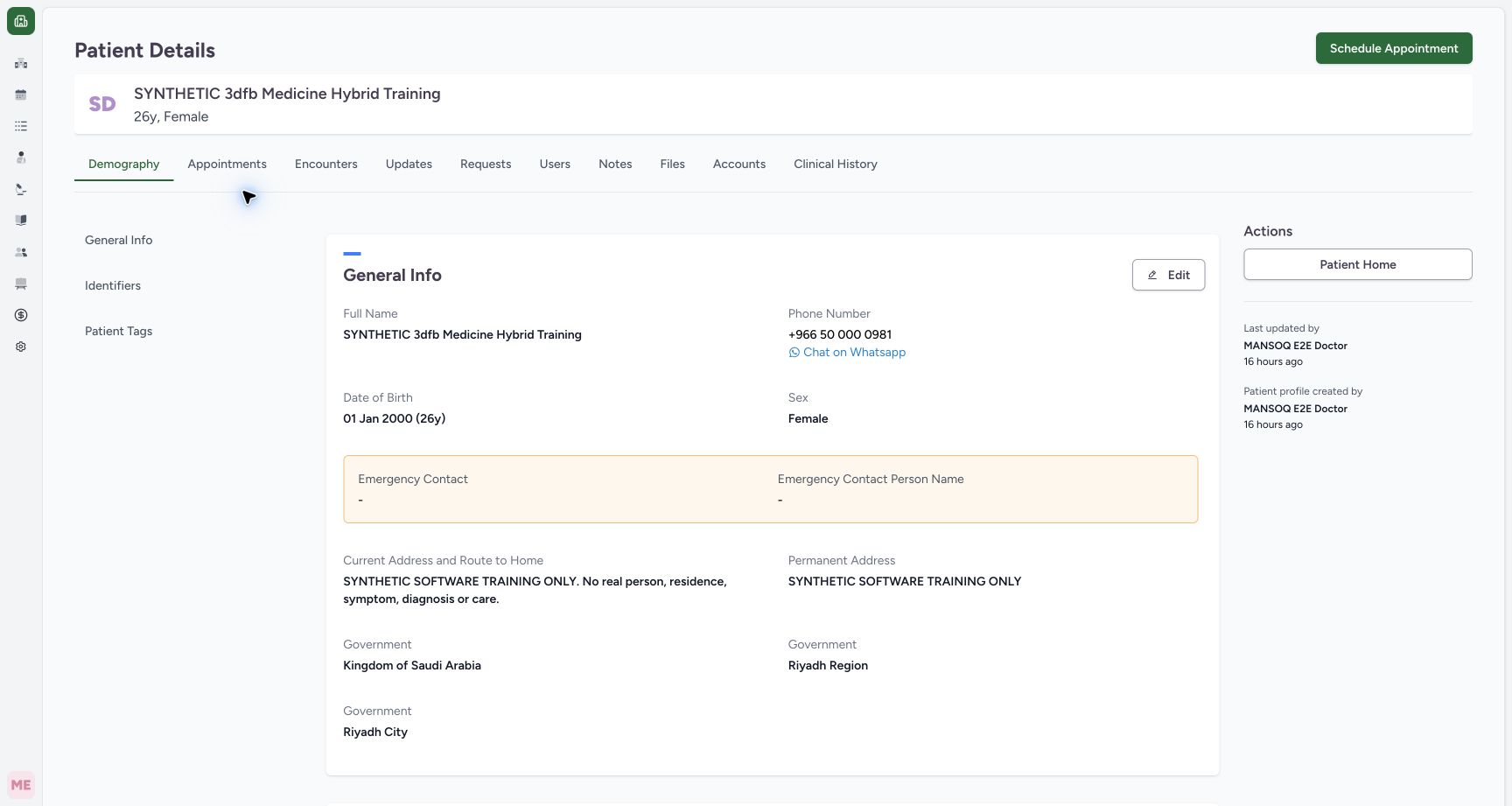
12Patient profile notes tab entry
Capture details
Observed committed 3dfb software and the Clinical profile qualified for 20 October 2026. Later read-only UI illustration after the four-stage SQL cutoff; no fresh SQL or HTTP measurement is claimed.
Image SHA-256 216c8ff9d28e0d8b9c5023f5712e3aaf76ce04b0b6c03b56678b9caaa6798876
- Confirm the same patient: Read the synthetic Medicine training patient name.
- Select patient Notes: Open the patient-only Notes view.
2. Open patient-only Notes
Select Notes on Patient Details. This example shows No discussions yet. Patient-only Notes excludes encounter discussions, so this empty view does not mean that the saved encounter message was deleted. Do not create a patient-only discussion in this exercise.
12Patient profile notes tab entry
Capture details
Observed committed 3dfb software and the Clinical profile qualified for 20 October 2026. Later read-only UI illustration after the four-stage SQL cutoff; no fresh SQL or HTTP measurement is claimed.
Image SHA-256 216c8ff9d28e0d8b9c5023f5712e3aaf76ce04b0b6c03b56678b9caaa6798876
- Confirm the same patient: Read the synthetic Medicine training patient name.
- Select patient Notes: Open the patient-only Notes view.
 12
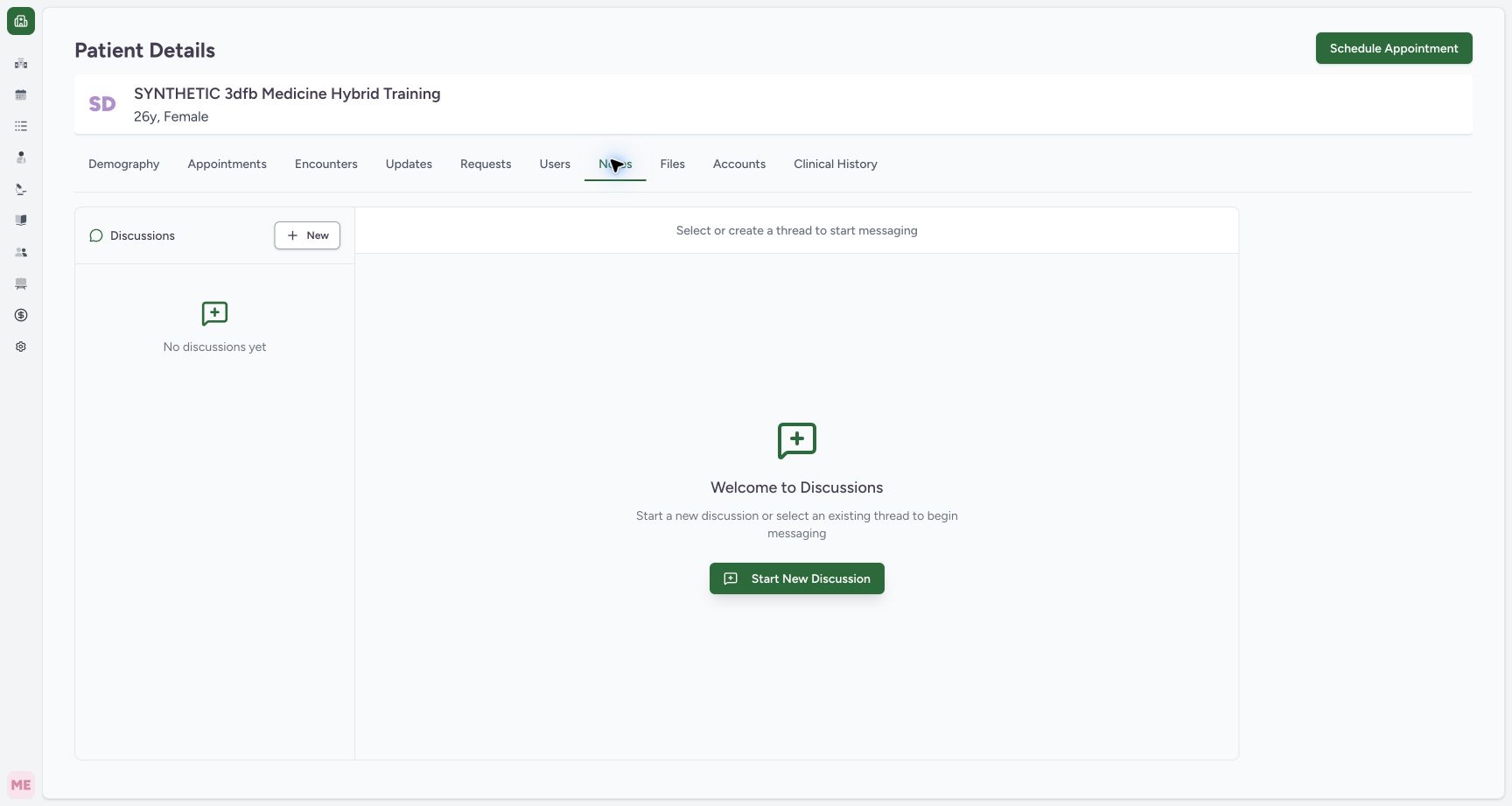
12Patient only notes empty separate scope
Capture details
Observed committed 3dfb software and the Clinical profile qualified for 20 October 2026. Later read-only UI illustration after the four-stage SQL cutoff; no fresh SQL or HTTP measurement is claimed.
Image SHA-256 00a55517c90fa57c5a9d65be6ff5bba15f2972c379aa0cab8aba94763f6e1b16
- Read No discussions yet: This is the separate patient-only Notes view.
- Select Encounters: Return to the existing encounter list.
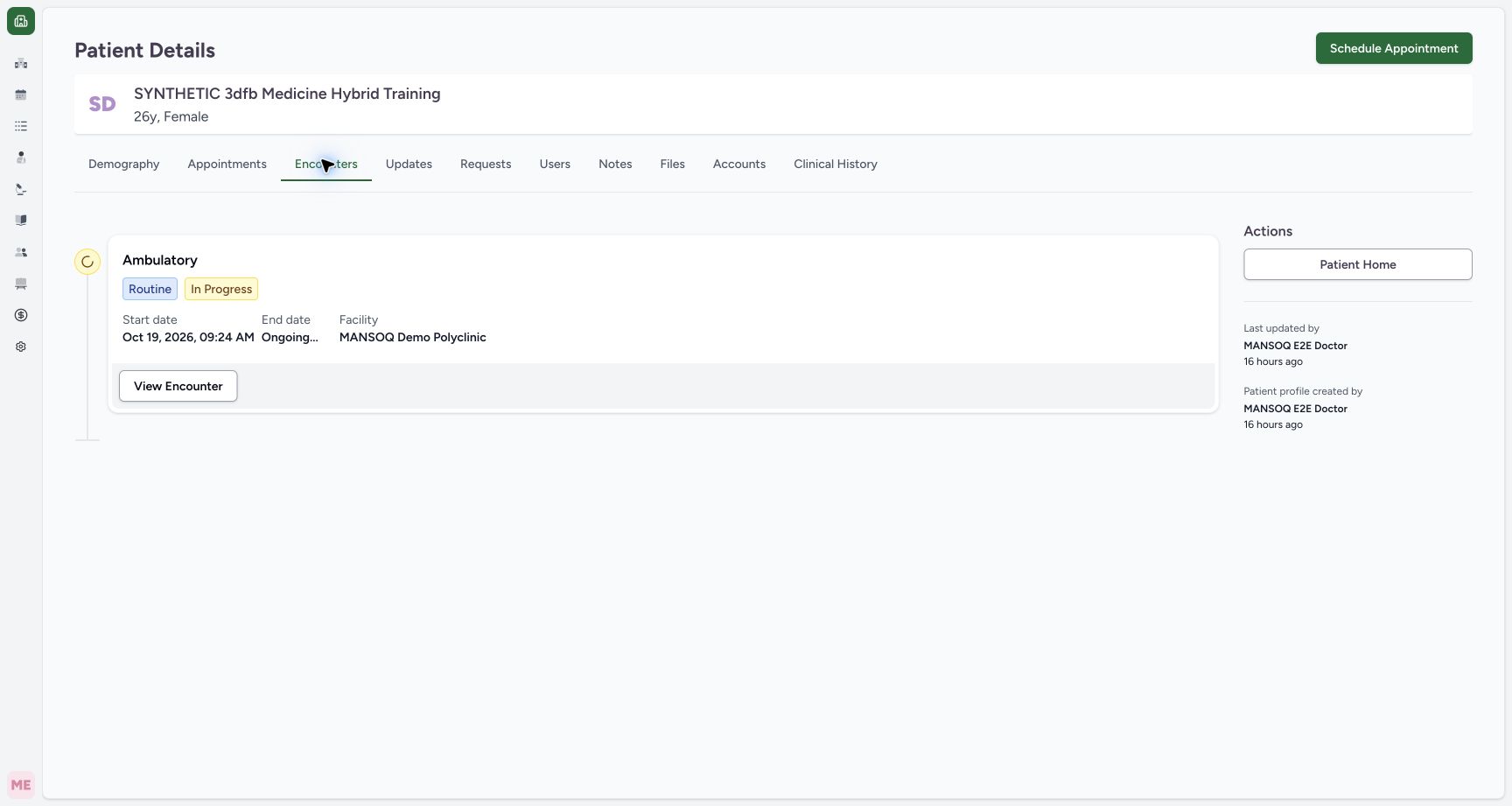
3. Find the original encounter
Select Encounters. Read the existing Ambulatory, In Progress entry with its start date and MANSOQ Demo Polyclinic. Select View Encounter on that entry.
12Patient only notes empty separate scope
Capture details
Observed committed 3dfb software and the Clinical profile qualified for 20 October 2026. Later read-only UI illustration after the four-stage SQL cutoff; no fresh SQL or HTTP measurement is claimed.
Image SHA-256 00a55517c90fa57c5a9d65be6ff5bba15f2972c379aa0cab8aba94763f6e1b16
- Read No discussions yet: This is the separate patient-only Notes view.
- Select Encounters: Return to the existing encounter list.
 123
123Patient encounters view same active encounter
Capture details
Observed committed 3dfb software and the Clinical profile qualified for 20 October 2026. Later read-only UI illustration after the four-stage SQL cutoff; no fresh SQL or HTTP measurement is claimed.
Image SHA-256 e8f4a7deebd6758d486f854d3c14ef54ab22591415387769ab346d941a8fdf03
- Read the Encounters tab: This list belongs to the same patient.
- Check In Progress: Use the original active Ambulatory encounter.
- Select View Encounter: Return to the selected existing encounter.
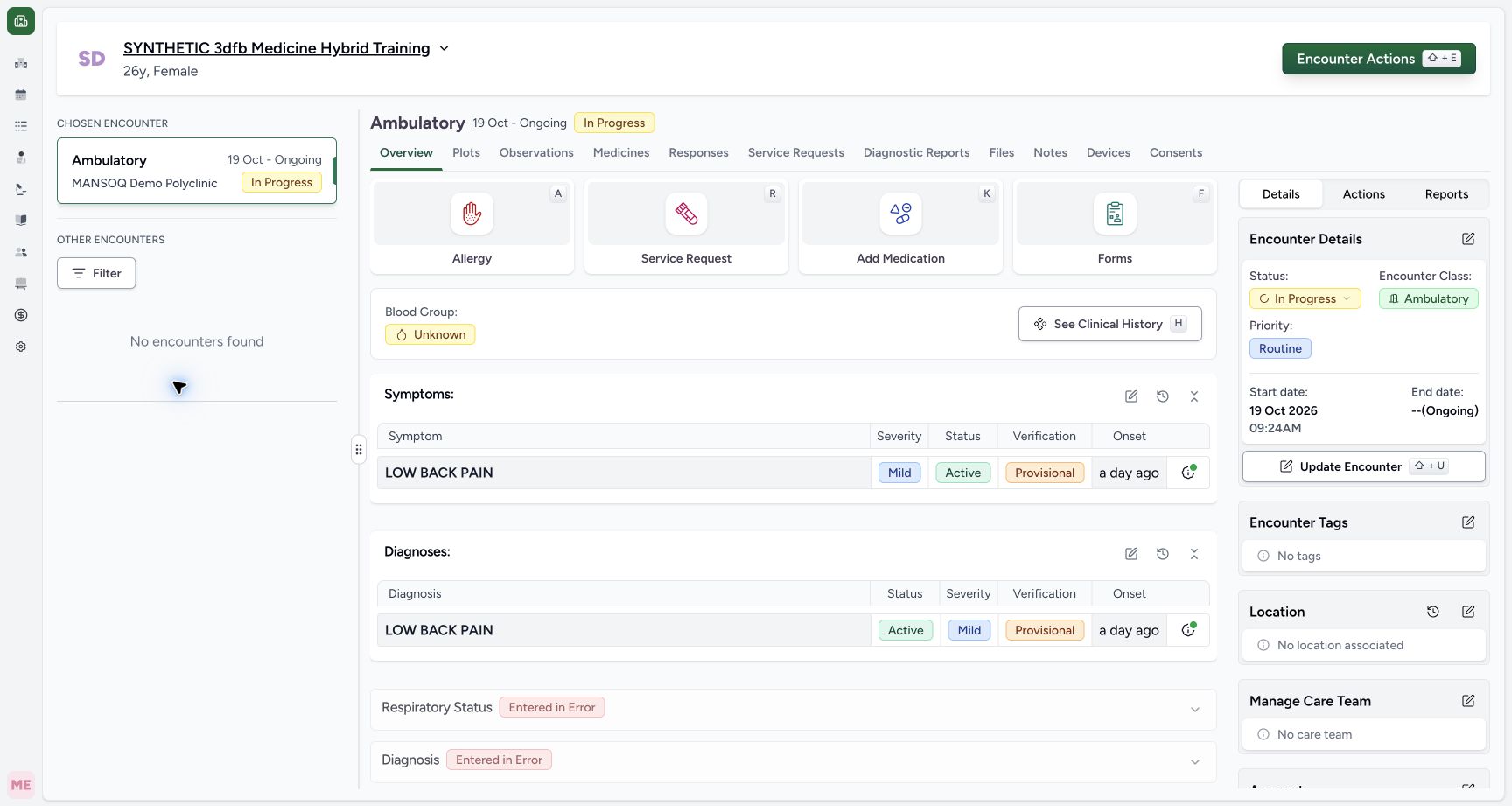
4. Open Notes in the encounter again
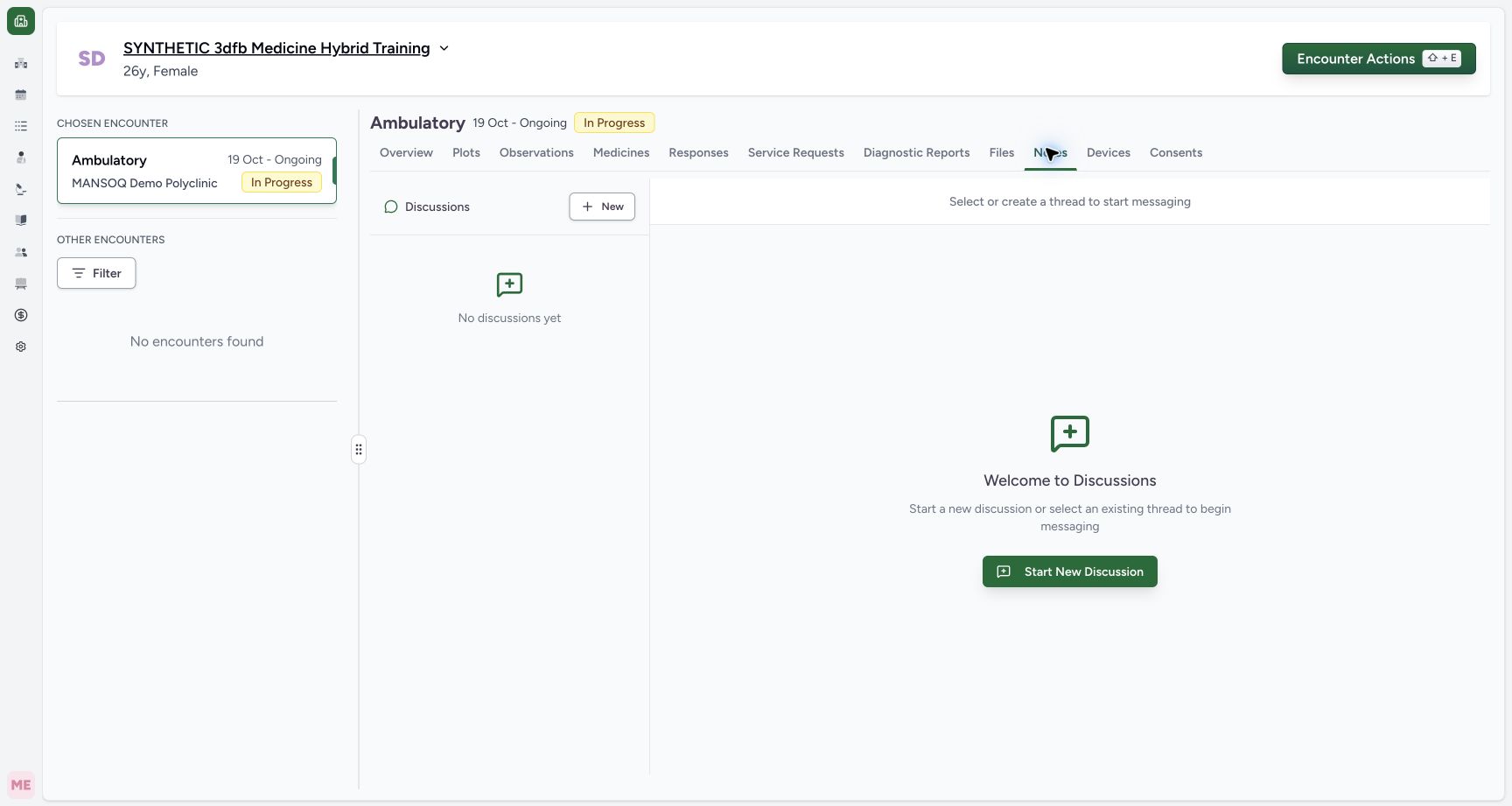
Check the selected In Progress encounter, then select its Notes tab.
 12
12Same encounter notes tab entry
Capture details
Observed committed 3dfb software and the Clinical profile qualified for 20 October 2026. Later read-only UI illustration after the four-stage SQL cutoff; no fresh SQL or HTTP measurement is claimed.
Image SHA-256 8d83544b46485ad440b9974320eb8e91370fb88266acbd60cfe2064da4dcfe53
- Check the selected encounter: Confirm In Progress on the selected encounter.
- Select encounter Notes: Open the encounter discussion view again.
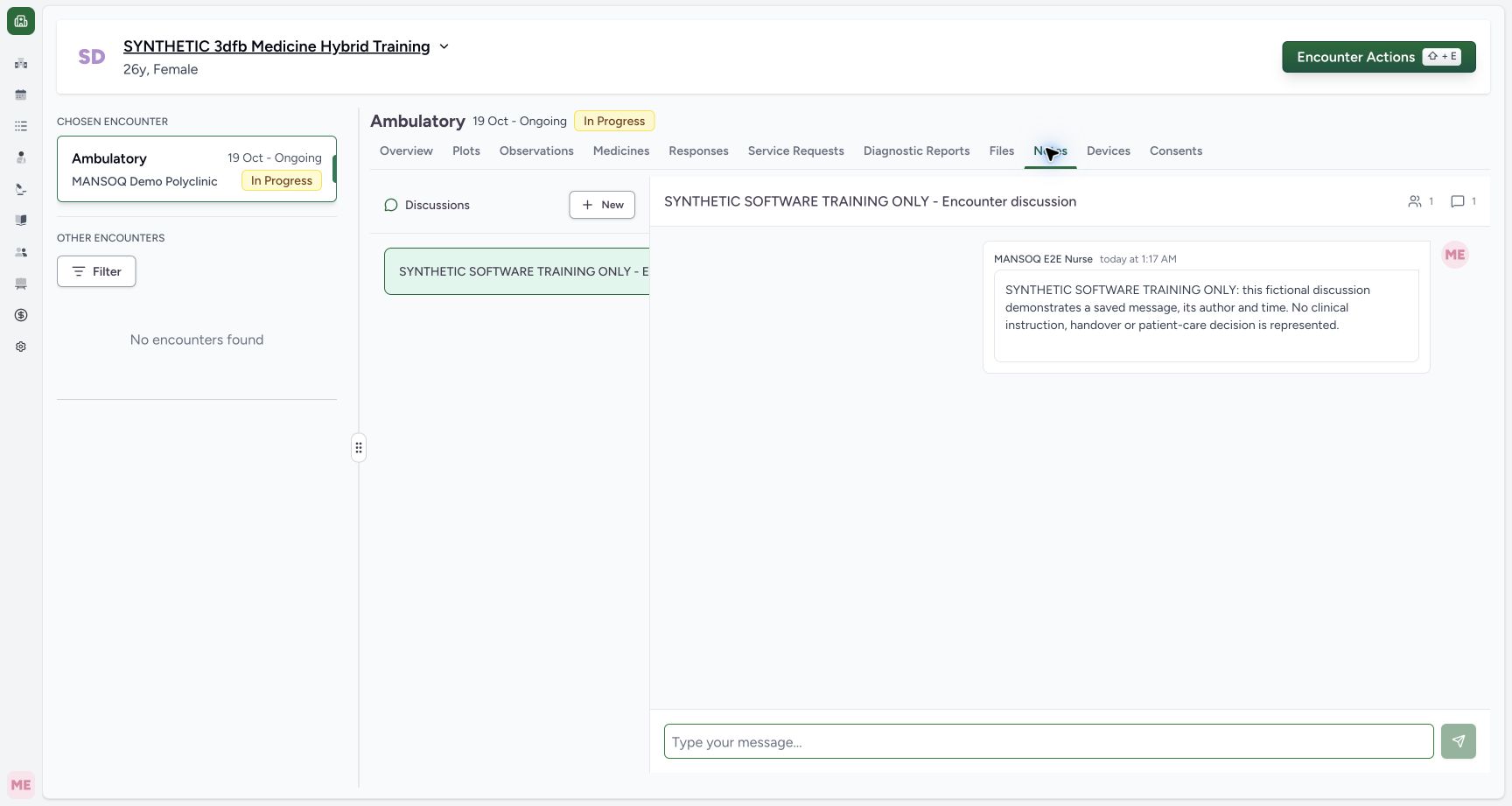
5. Compare the retained encounter message
Read the same discussion title and complete fictional message, MANSOQ E2E Nurse, original displayed time and one-participant/one-message counts. These encounter Notes remain separate from the empty patient-only Notes view.
 123
123Encounter thread retained after patient only view
Capture details
Observed committed 3dfb software and the Clinical profile qualified for 20 October 2026. Later read-only UI illustration after the four-stage SQL cutoff; no fresh SQL or HTTP measurement is claimed.
Image SHA-256 ee4157b4c8cc5935a0514344ede9b4990c3bfda4e6fe13e03d0905858c7f22d3
- Read the retained title: The encounter discussion remains present.
- Read the retained message: The full fictional message, author and time remain visible.
- Read the retained counts: This discussion still shows one participant and one message.
Keep the two locations distinct
Choose the location that matches your authorised work. This walkthrough creates only an encounter discussion. It does not demonstrate a patient-only message, a cross-encounter message, a formal handover, clinical decision or delivery acknowledgement.
12Patient only notes empty separate scope
Capture details
Observed committed 3dfb software and the Clinical profile qualified for 20 October 2026. Later read-only UI illustration after the four-stage SQL cutoff; no fresh SQL or HTTP measurement is claimed.
Image SHA-256 00a55517c90fa57c5a9d65be6ff5bba15f2972c379aa0cab8aba94763f6e1b16
- Read No discussions yet: This is the separate patient-only Notes view.
- Select Encounters: Return to the existing encounter list.
123Encounter thread retained after patient only view
Capture details
Observed committed 3dfb software and the Clinical profile qualified for 20 October 2026. Later read-only UI illustration after the four-stage SQL cutoff; no fresh SQL or HTTP measurement is claimed.
Image SHA-256 ee4157b4c8cc5935a0514344ede9b4990c3bfda4e6fe13e03d0905858c7f22d3
- Read the retained title: The encounter discussion remains present.
- Read the retained message: The full fictional message, author and time remain visible.
- Read the retained counts: This discussion still shows one participant and one message.
Source evidence
Every citation uses this exact committed version. The private source repository requires access.
- repositories/platform/mansoq-web/src/components/Notes/NoteManager.tsx:186 ·
3dfb7c9f519fb5b4cd4452439f3c12346bf58319Source file checksum
b54f71e2de82d823798c2d704758b7c41c057b0a9709fed81690f8f6fac9522e - repositories/platform/mansoq-web/src/pages/Encounters/tabs/notes.tsx:18 ·
3dfb7c9f519fb5b4cd4452439f3c12346bf58319Source file checksum
eb1bb24734ab4329e6b7997aa4fd7eaa694920731d439343494dbb713f263c98 - repositories/platform/mansoq-web/src/components/Patient/PatientDetailsTab/PatientNotes.tsx:13 ·
3dfb7c9f519fb5b4cd4452439f3c12346bf58319Source file checksum
7e6b14f7e73e37e090a19aa083e847797b865e30f10287adec6e28febdd0c3e9 - repositories/platform/mansoq-web/src/types/notes/threadApi.ts:5 ·
3dfb7c9f519fb5b4cd4452439f3c12346bf58319Source file checksum
e76339114d95217b9c3dbd80f75be24fa02262d70359404b0d84d709b1bc3a5c - repositories/platform/mansoq-web/src/types/notes/thread.ts:19 ·
3dfb7c9f519fb5b4cd4452439f3c12346bf58319Source file checksum
3accfa762fc1733b1dcfce0dacb599afdd8c3622b873556074752977d75a9bac - repositories/platform/mansoq-web/src/types/notes/messages.ts:1 ·
3dfb7c9f519fb5b4cd4452439f3c12346bf58319Source file checksum
756582fccfcce2f4f1feb272acddf62bc2566ff01d00c7a6ca7332631e0f696f - repositories/platform/mansoq-web/src/components/ui/auto-expanding-textarea.tsx:1 ·
3dfb7c9f519fb5b4cd4452439f3c12346bf58319Source file checksum
70c4c815e68cb12a32192b1c981ffaf9f8de555d1f76efb19db41da99c5c6d98 - repositories/platform/mansoq-web/src/pages/Encounters/utils/EncounterProvider.tsx:1 ·
3dfb7c9f519fb5b4cd4452439f3c12346bf58319Source file checksum
d2609fc0452c91c20104237bf02be40ecb3bf48225011aba1f4bca2d50620d75 - repositories/platform/mansoq-web/src/Utils/utils.ts:1 ·
3dfb7c9f519fb5b4cd4452439f3c12346bf58319Source file checksum
42db3c7a21342795ae94608ded05958c34844fb0004399c4360b94b45bde2357 - repositories/platform/mansoq-core/mansoq/emr/models/notes.py:6 ·
3dfb7c9f519fb5b4cd4452439f3c12346bf58319Source file checksum
af2ce458005a0bd051f28208de4db3b154933968ccd3fba13df42f5dffc6a906 - repositories/platform/mansoq-core/mansoq/emr/resources/notes/thread_spec.py:14 ·
3dfb7c9f519fb5b4cd4452439f3c12346bf58319Source file checksum
a5e07f034f951b494380ffd0306aceafd41d8929c1868a7d45e1e4786e7f8fac - repositories/platform/mansoq-core/mansoq/emr/resources/notes/notes_spec.py:8 ·
3dfb7c9f519fb5b4cd4452439f3c12346bf58319Source file checksum
f4b36a59ffc7840efe22bcb51d28521fabd45dde49f21a345c025dc06493f86b - repositories/platform/mansoq-core/mansoq/emr/api/viewsets/notes.py:6 ·
3dfb7c9f519fb5b4cd4452439f3c12346bf58319Source file checksum
b774fba7e44e354fa6e39471b42f8d846ab16588dc6fc07728abe195e6e1129b - repositories/platform/mansoq-core/mansoq/emr/api/viewsets/encounter_authz_base.py:1 ·
3dfb7c9f519fb5b4cd4452439f3c12346bf58319Source file checksum
852c308f990e192a1003e286be7dd57ddcc78840d218da1b90c1fab2eebec4f7 - repositories/platform/mansoq-core/mansoq/emr/api/viewsets/base.py:1 ·
3dfb7c9f519fb5b4cd4452439f3c12346bf58319Source file checksum
6a287dd315b8a4957b29c58e4bbc1bef7b8d9d257f9149f93045ff0adbdcae6c - repositories/platform/mansoq-core/mansoq/emr/models/base.py:1 ·
3dfb7c9f519fb5b4cd4452439f3c12346bf58319Source file checksum
61f50a19078c8a6435398e6b3e9174326038e9047129382c0d882f1e8f367b4c - repositories/platform/mansoq-core/mansoq/utils/models/base.py:1 ·
3dfb7c9f519fb5b4cd4452439f3c12346bf58319Source file checksum
1a5270f50188d1e0b044210773ca86a483b904f3a9724bb7b321d4ea463acfaf - repositories/platform/mansoq-core/config/api_router.py:1 ·
3dfb7c9f519fb5b4cd4452439f3c12346bf58319Source file checksum
36bd0555423f9dd86b0586dac6de8782c32f10017c954587a0c7dd65d0e608db - repositories/platform/mansoq-core/mansoq/security/authorization/encounter.py:1 ·
3dfb7c9f519fb5b4cd4452439f3c12346bf58319Source file checksum
0e7ff8afcfb57b2371201e16ee6fac26125d6e686af66ed7edd95e49bc07de78 - repositories/platform/mansoq-core/mansoq/security/authorization/patient.py:1 ·
3dfb7c9f519fb5b4cd4452439f3c12346bf58319Source file checksum
45de75f24e42fa30316a96efb92b23c577e2c3831e17ec96e7ff2c73d0d1973d - repositories/platform/mansoq-web/public/locale/en.json:1 ·
3dfb7c9f519fb5b4cd4452439f3c12346bf58319Source file checksum
96498c8b964dce856d43c09e4241708efdd175d935e7ebbd14fa2f8d62efa507 - repositories/platform/mansoq-web/src/components/ui/input.tsx:1 ·
3dfb7c9f519fb5b4cd4452439f3c12346bf58319Source file checksum
8a181820bcb1d94f9bd9fc6a6ca5872e772a29a3397667f657f3bdc23f34f9c9 - repositories/platform/mansoq-web/src/components/Patient/PatientInfoHoverCard.tsx:77 ·
3dfb7c9f519fb5b4cd4452439f3c12346bf58319Source file checksum
5fab1fac78f542b1cb08d072a373f5e954e0975db97f3d3e935957bcb5a187d8 - repositories/platform/mansoq-web/src/components/Patient/PatientDetailsTab/index.tsx:58 ·
3dfb7c9f519fb5b4cd4452439f3c12346bf58319Source file checksum
670a4110cfe5e8bea4d425997a61f36d098a9191281f792645e62aa806ddc7ad - repositories/platform/mansoq-web/src/components/Patient/PatientDetailsTab/EncounterHistory.tsx:150 ·
3dfb7c9f519fb5b4cd4452439f3c12346bf58319Source file checksum
a98c5ea91cd343d6212370c298a62a6297f7c6f998483d4d79f457fcbc7d14a8 - repositories/platform/mansoq-web/src/components/Facility/EncounterCard.tsx:146 ·
3dfb7c9f519fb5b4cd4452439f3c12346bf58319Source file checksum
5e9572f88aba61bd917500b1cd0e6fbb8f46dde4123639d935ee0d80a5c71068