 MANSOQ
 Clinical care · VERSION 3dfb7c9f
Practise three fictional Allergy selections and discard the draft
Find the assigned active training encounter, select three exact fictional terms, remove a new unsaved row and verify that Cancel discards the remaining draft.
Nurse
 1
1Nurse identity
Capture details
Observed committed 3dfb software on 20 October 2026. Captions distinguish discarded drafts, reviewed saves and read-only retained state. All pixels remain original.
Image SHA-256 3f974acb6b73a0c97c9e8683f3df6f6fbd149c41c6fe1d45417d8c84b813800b
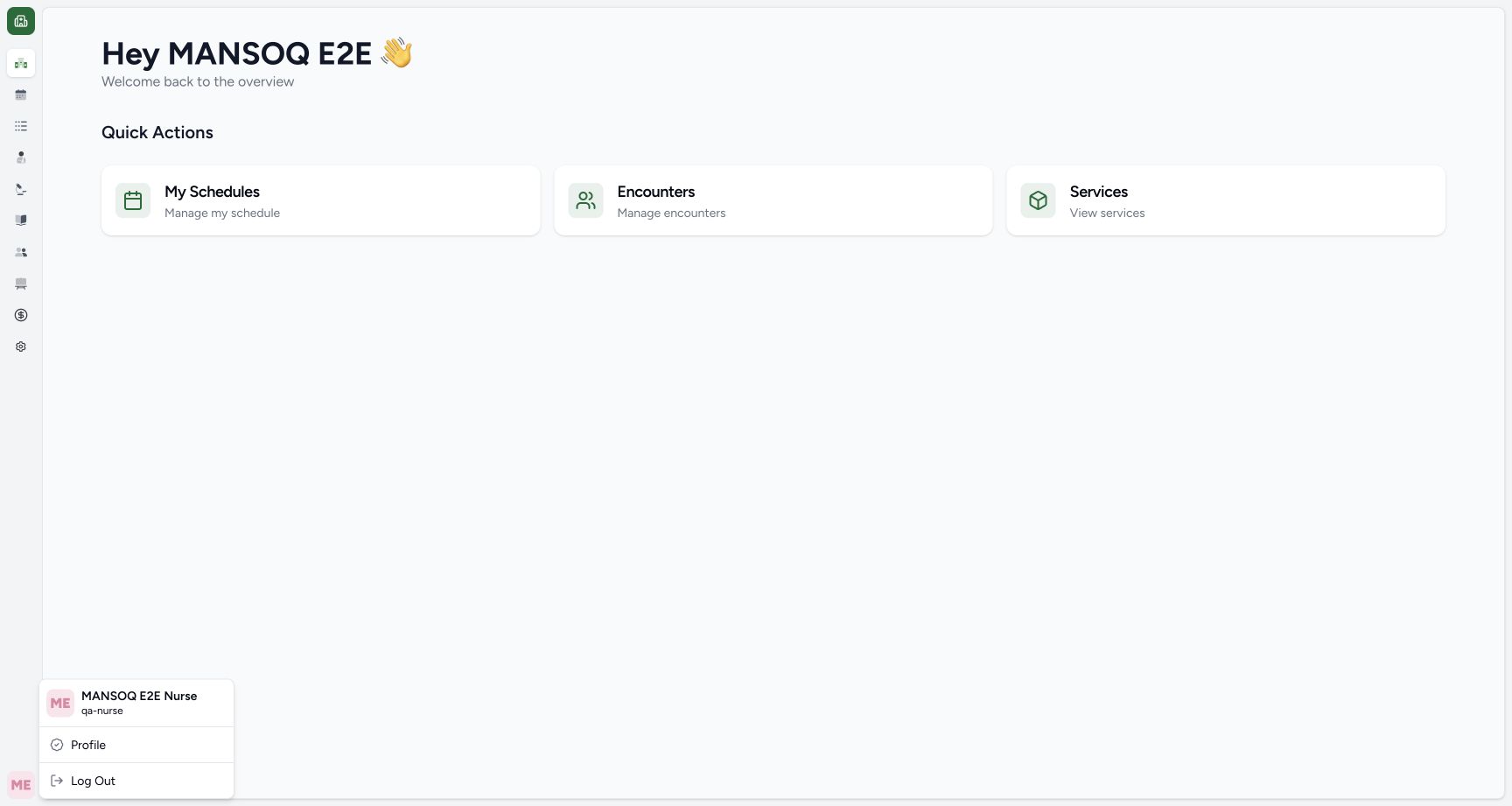
- Verify the Nurse account: Read qa-nurse beneath the MANSOQ E 2 E Nurse account name in the open menu.
13 of 13 content blocks have reviewed image alignment.
Before you begin
- Use an authorised Nurse account on the assigned active synthetic training encounter.1
Recorded release 3dfb7c9f · 2026-10-20T04:17:09.314Z · 1728 × 921 Nurse identity
Capture details
Observed committed 3dfb software on 20 October 2026. Captions distinguish discarded drafts, reviewed saves and read-only retained state. All pixels remain original.
Image SHA-256
3f974acb6b73a0c97c9e8683f3df6f6fbd149c41c6fe1d45417d8c84b813800b- Verify the Nurse account: Read qa-nurse beneath the MANSOQ E 2 E Nurse account name in the open menu.
- Use only the clearly fictional DEMO terms supplied in your organisation’s training environment. If they are unavailable, obtain the approved training setup rather than substituting a real clinical term.
 12
12Recorded release 3dfb7c9f · 2026-10-20T04:18:35.933Z · 1728 × 921 Food code search result
Capture details
Observed committed 3dfb software on 20 October 2026. Captions distinguish discarded drafts, reviewed saves and read-only retained state. All pixels remain original.
Image SHA-256
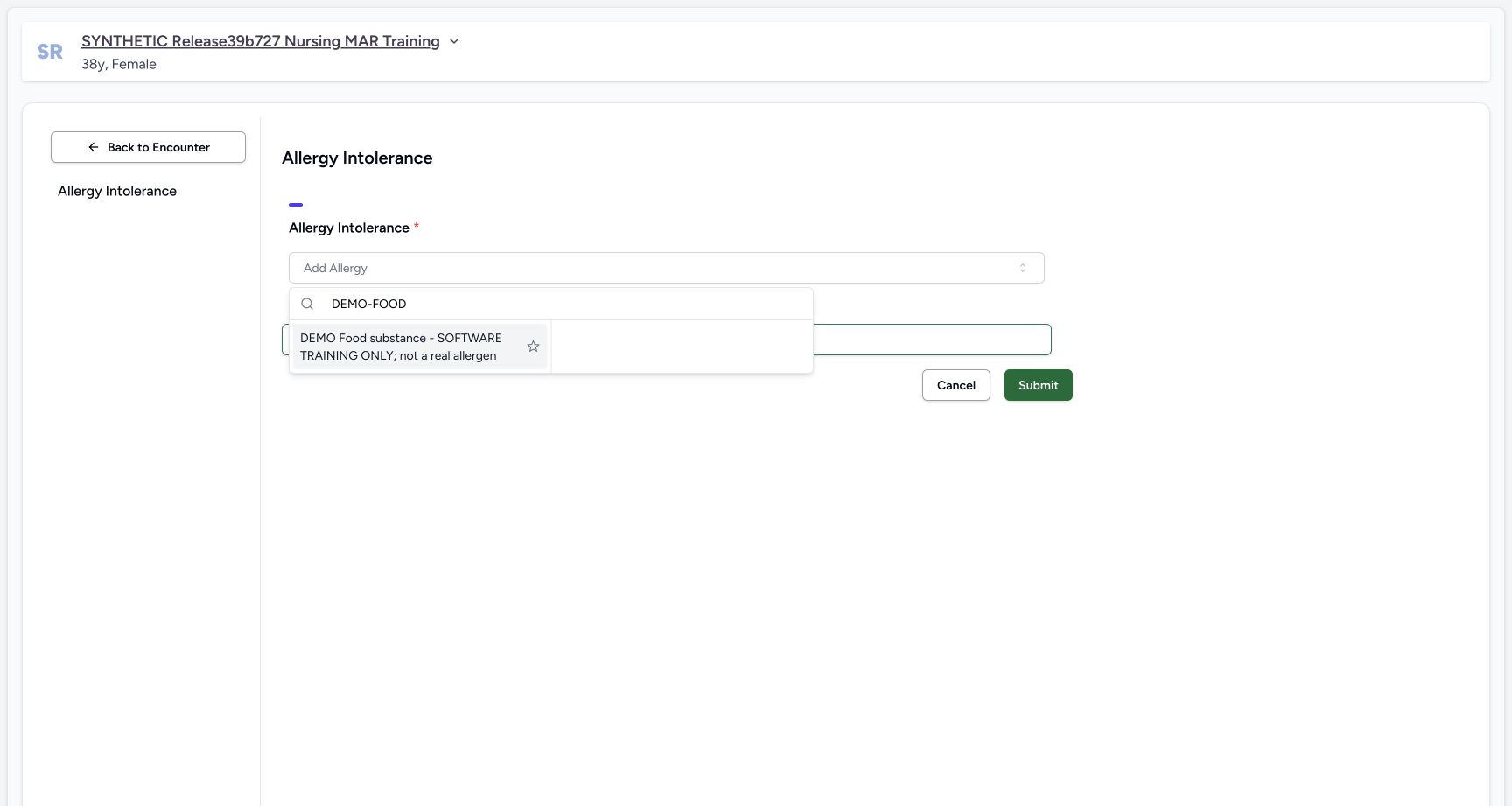
412f1862b8f8ae584c6295ee84af5a4e7ab7d8355c675bfb8c59f436e4522c95- Search DEMO-FOOD: Enter the exact fictional code DEMO-FOOD in the picker search field.
- Choose the exact training item: Select DEMO Food substance. This label is explicitly fictional and does not describe a real allergen.
- All substance names, categories, notes and values in this software example are fictional. They are not clinical assessment, advice, treatment or patient-care decisions.
 12
12Recorded release 3dfb7c9f · 2026-10-20T04:19:57.952Z · 1728 × 921 Three unsaved default rows
Capture details
Observed committed 3dfb software on 20 October 2026. Captions distinguish discarded drafts, reviewed saves and read-only retained state. All pixels remain original.
Image SHA-256
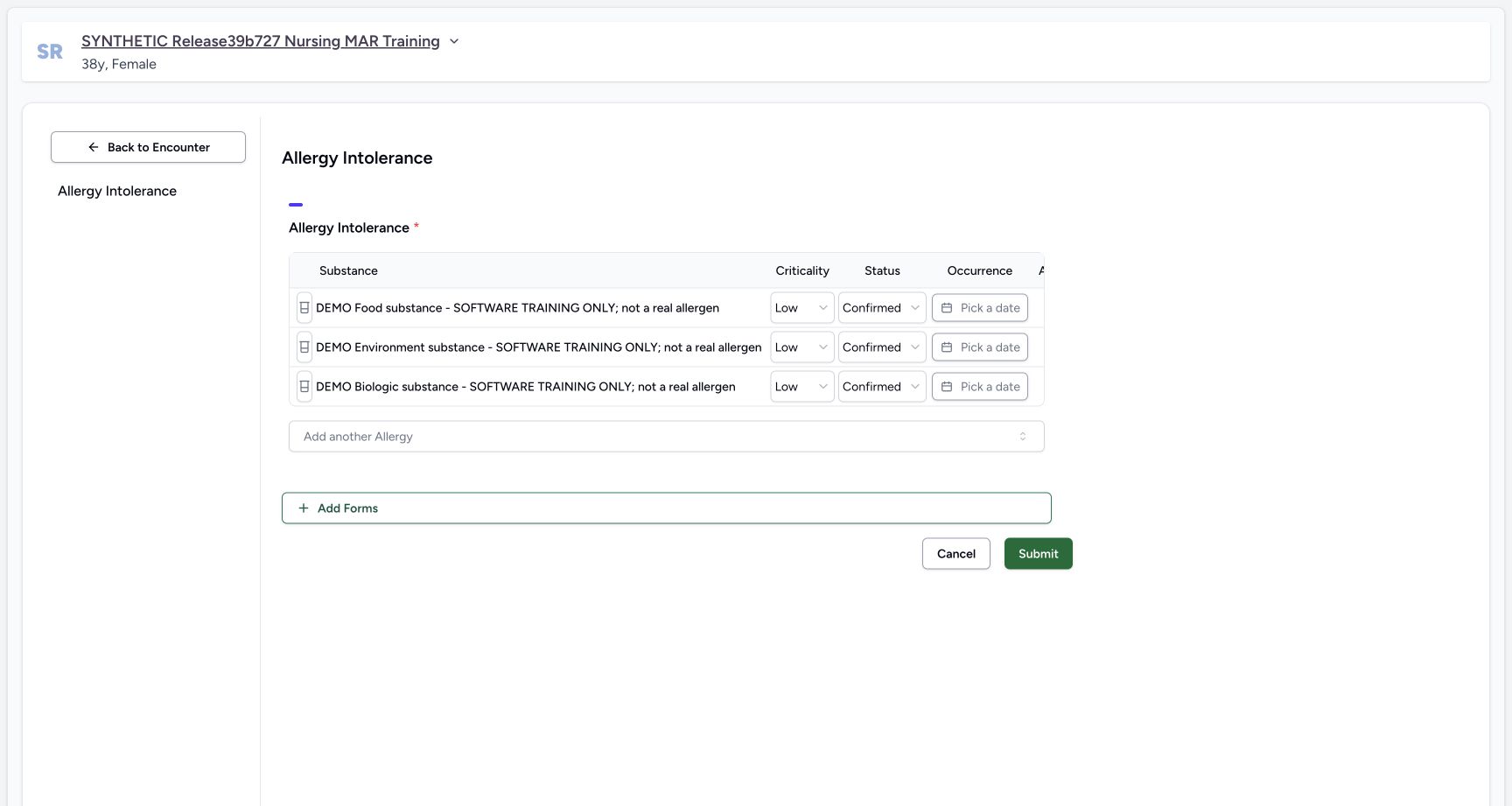
485c9ba802f13b782092c54abfb95957dee766e1eb116cf693f684f53bccf065- Three unsaved entries: All three selected fictional substances are present as separate draft rows. No Submit has occurred.
- Scroll the allergy table right: Use a horizontal scroll gesture over this table header to reveal the Action column beyond its right edge. This target is a noninteractive scroll area, not a date control or pictured scrollbar.
1. Verify the Nurse account and open Encounters
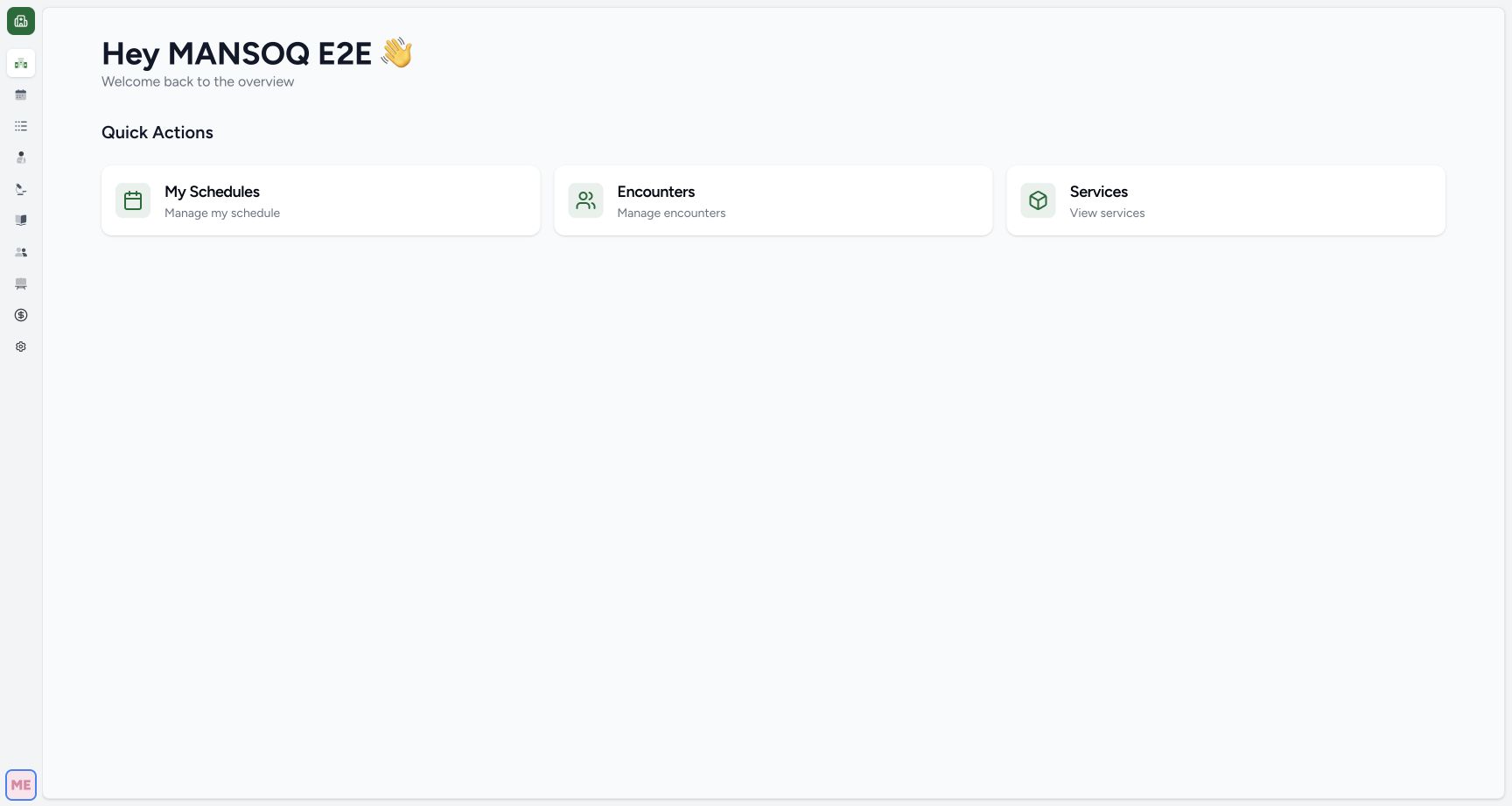
Read qa-nurse and the Nurse account name, then open Encounters from Quick Actions. Use the assigned synthetic case throughout this exercise.
1Nurse identity
Capture details
Observed committed 3dfb software on 20 October 2026. Captions distinguish discarded drafts, reviewed saves and read-only retained state. All pixels remain original.
Image SHA-256 3f974acb6b73a0c97c9e8683f3df6f6fbd149c41c6fe1d45417d8c84b813800b
- Verify the Nurse account: Read qa-nurse beneath the MANSOQ E 2 E Nurse account name in the open menu.
 1
1Overview encounters action
Capture details
Observed committed 3dfb software on 20 October 2026. Captions distinguish discarded drafts, reviewed saves and read-only retained state. All pixels remain original.
Image SHA-256 a4ba21799a95825217936dce664ab9d260623ff9f8d37cbee0e18cc3a563d265
- Open Encounters: Select Encounters from Quick Actions to find the training patient.
2. Find the older active training encounter
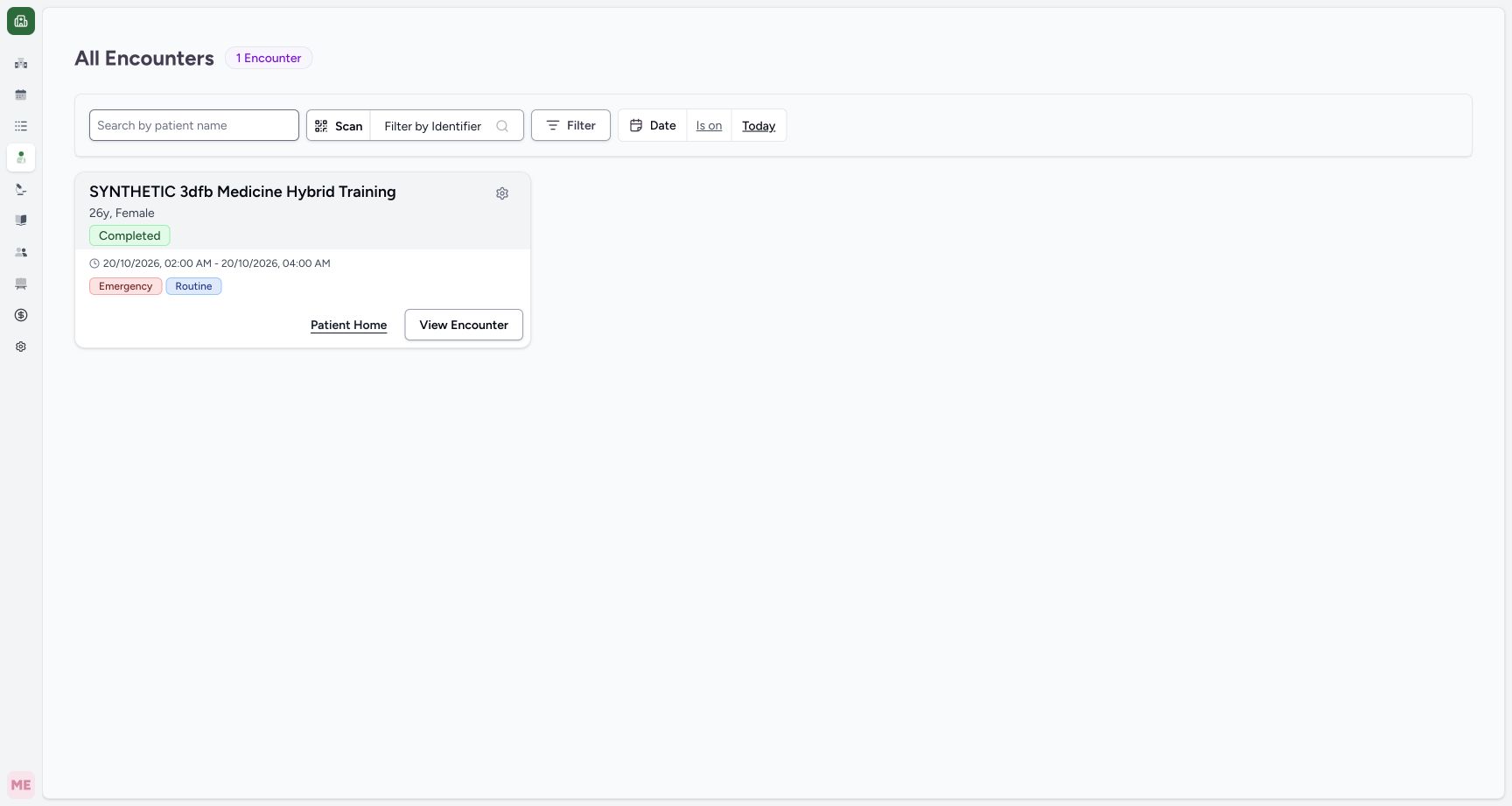
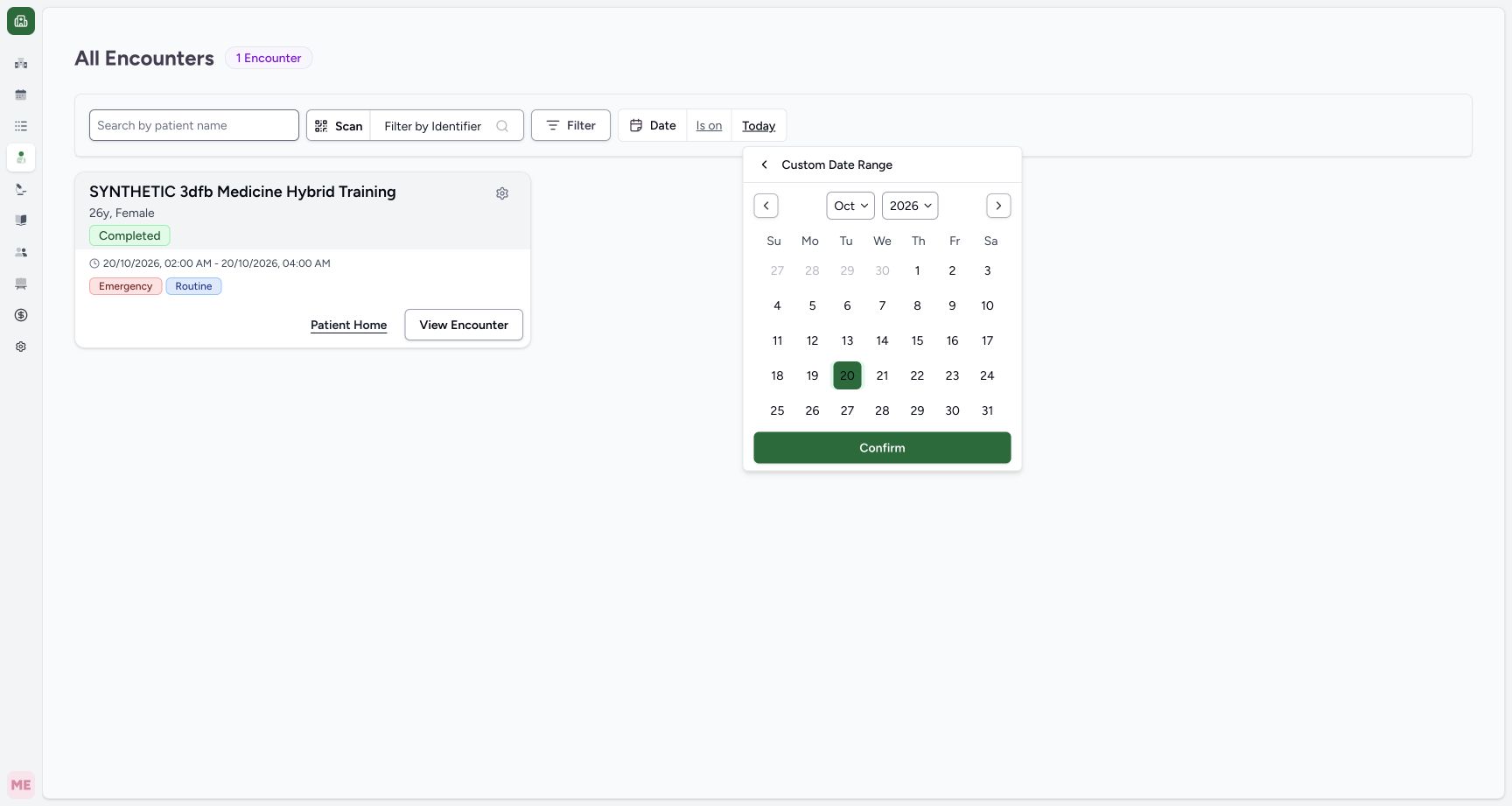
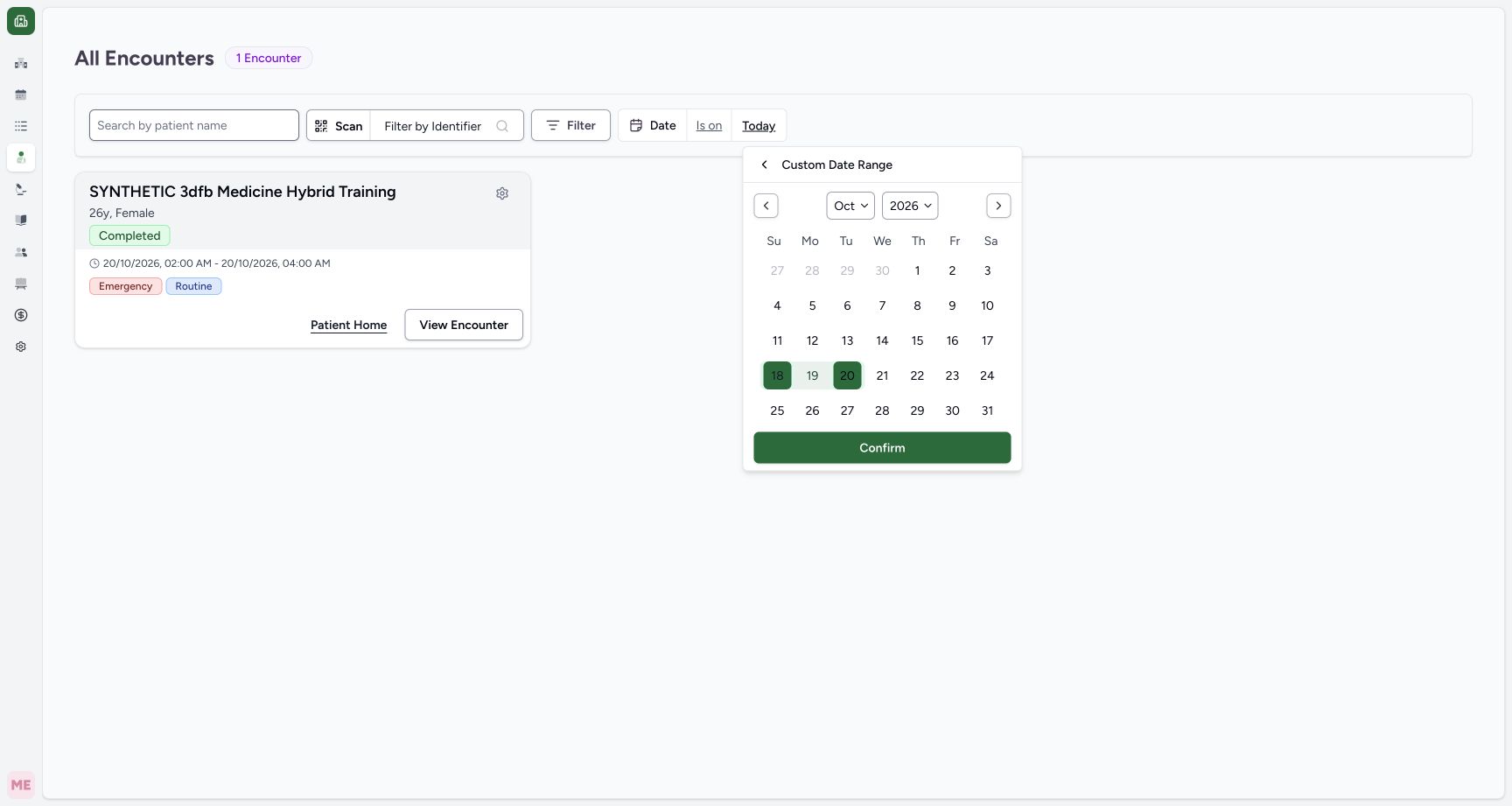
The captured Today list does not show the intended older active encounter. Open its date scope. In this October 2026 example, choose 18 October as the beginning; 20 October was already the end and was not clicked again. Review the highlighted 18–20 range, then Confirm.
 1
1Encounter date filter
Capture details
Observed committed 3dfb software on 20 October 2026. Captions distinguish discarded drafts, reviewed saves and read-only retained state. All pixels remain original.
Image SHA-256 57eccefce44713ce6ec8d1e92808db2353a4c3ab74148cd52bd3a9d634d6ce6f
- Check the date scope: Today shows only encounters created today. Open the date value to find an earlier training encounter.
 12
12Date range calendar
Capture details
Observed committed 3dfb software on 20 October 2026. Captions distinguish discarded drafts, reviewed saves and read-only retained state. All pixels remain original.
Image SHA-256 b047dbf2019182d678ca4b3f6e33f530b084e2af925c9c8554a466c93e83cc6a
- Choose 18 October: Choose 18 October 2026 as the beginning of the date range. This earlier frame initially has 20 selected.
- Review the retained 20 October end: 20 October 2026 was already the end of the range. The actual operator clicked only 18 to extend its beginning; no second click on 20 occurred. Review the resulting 18–20 range in frame 05 before Confirm.
 1
1Confirm earlier date range
Capture details
Observed committed 3dfb software on 20 October 2026. Captions distinguish discarded drafts, reviewed saves and read-only retained state. All pixels remain original.
Image SHA-256 38c2ae3f9d94f12019f69e0d64e78ff5197a069bbd211b6725eeca4694b6bbac
- Apply the date range: Confirm the selected 18–20 October range so the earlier training encounter can appear.
3. Match the active case
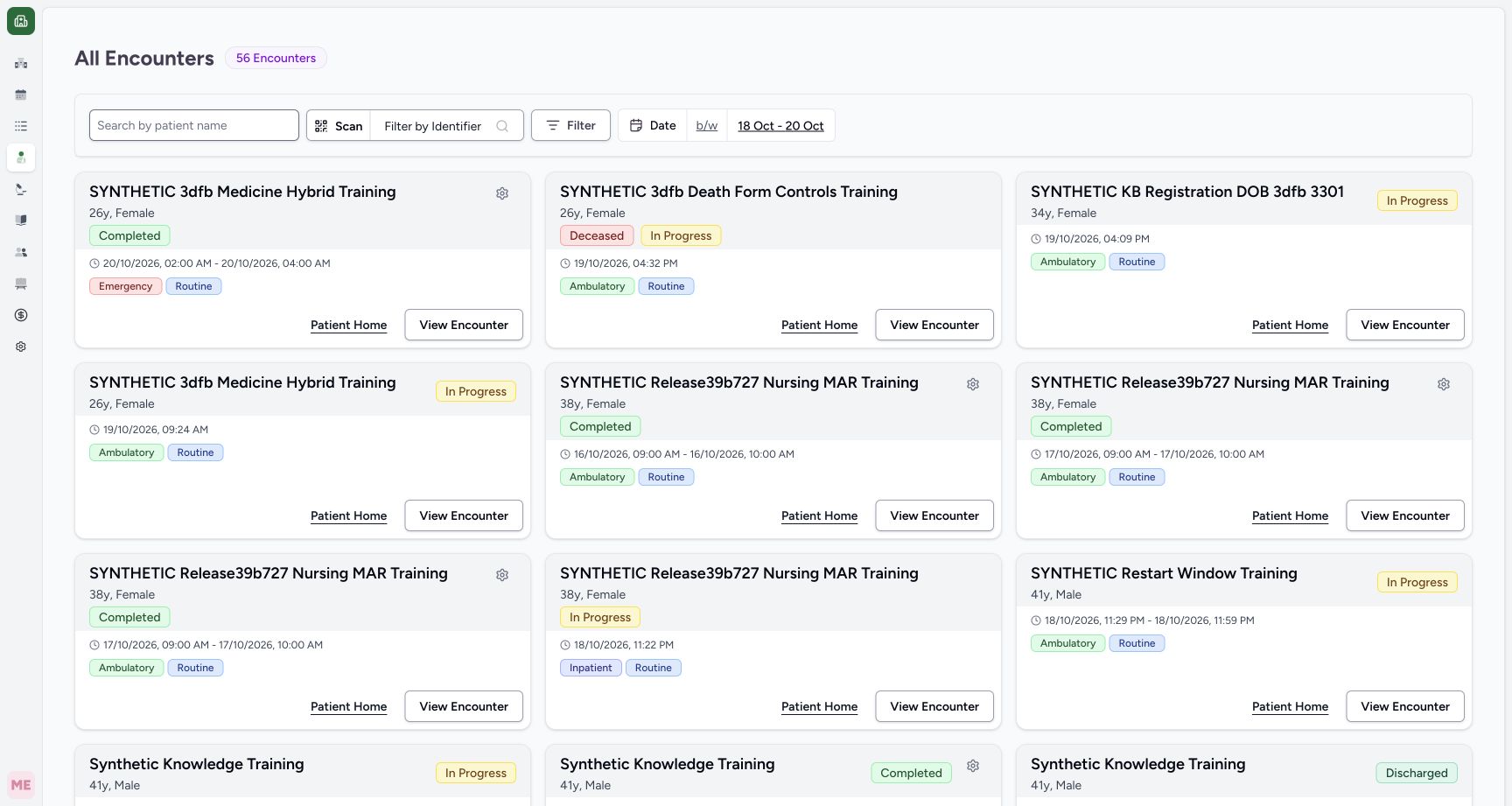
Check the synthetic nursing-training patient and the In Progress Inpatient card before View Encounter. Do not use the adjacent Completed Ambulatory cards. In the opened case, verify the same patient and active encounter, then use Allergy.
 123
123Select active training encounter
Capture details
Observed committed 3dfb software on 20 October 2026. Captions distinguish discarded drafts, reviewed saves and read-only retained state. All pixels remain original.
Image SHA-256 89ee1fbc2c1fcb545a9bb5265a67158e595d7bc0e2a3a59accf033b97d3872f3
- Verify the patient: Match the synthetic patient name and demographics before opening an encounter.
- Use the active encounter: This card is In Progress and Inpatient; the adjacent same-patient cards are completed examples.
- Open this encounter: Open View Encounter on the active card for this software demonstration.
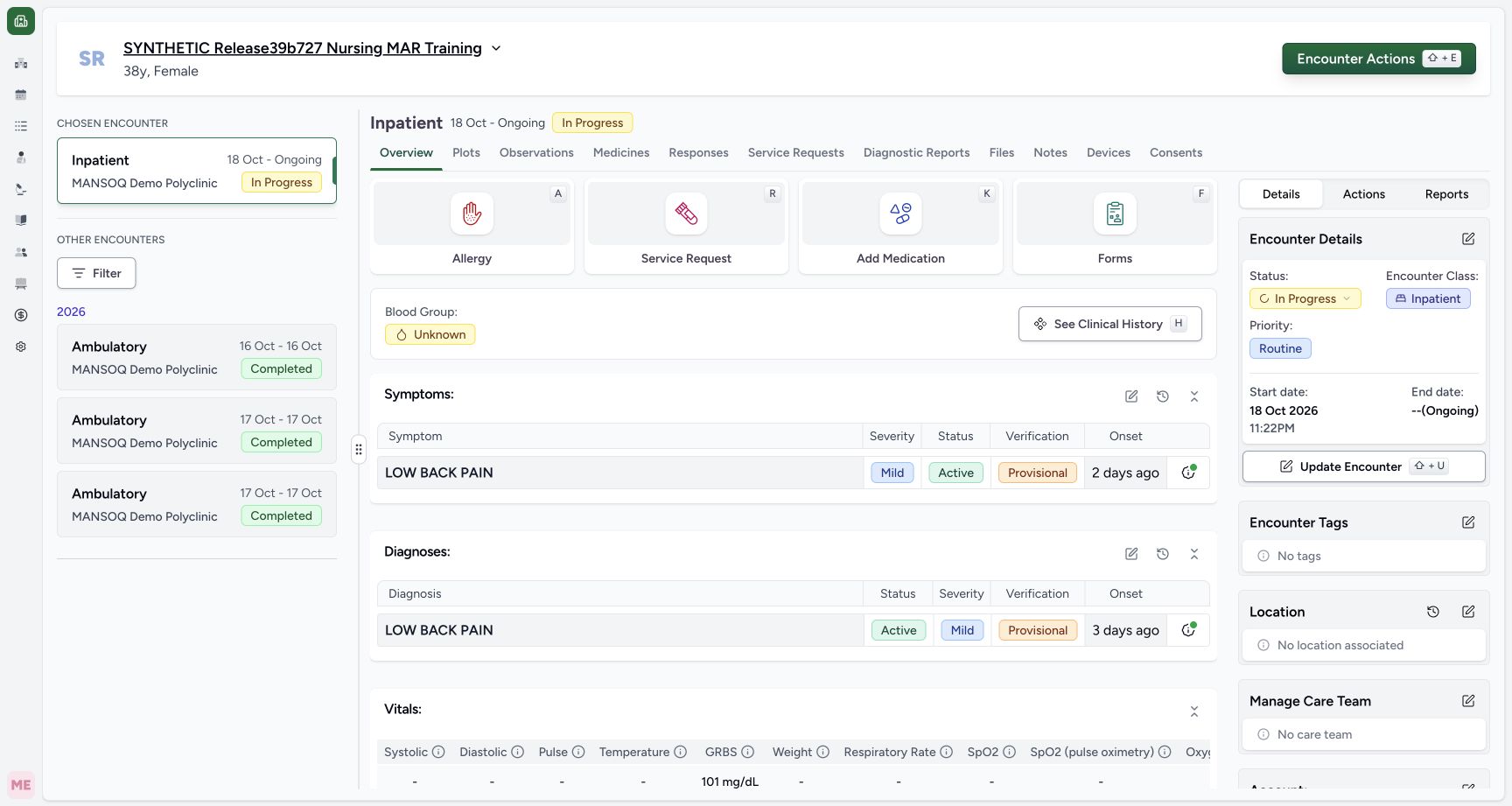 123
123Active encounter overview
Capture details
Observed committed 3dfb software on 20 October 2026. Captions distinguish discarded drafts, reviewed saves and read-only retained state. All pixels remain original.
Image SHA-256 58c0ace12aaa6bed64101e093bc19e757ef86c4c1e68abf2a85f61e83c71e22f
- Match the synthetic patient: Read the selected synthetic nursing-training patient and 38y,Female header.
- Check the active encounter: Read Inpatient 18 Oct–Ongoing and In Progress. This identifies the existing encounter without editing it.
- Open Allergy: Open the Allergy quick action on this chosen active encounter.
4. Search the first exact fictional term
The empty required Allergy form has Add Allergy. Open it, search DEMO-FOOD and select the result explicitly labelled SOFTWARE TRAINING ONLY, away from the star. The new unsaved row initially shows the Medication category icon, Low, Confirmed and Pick a date. The label does not set its category automatically.
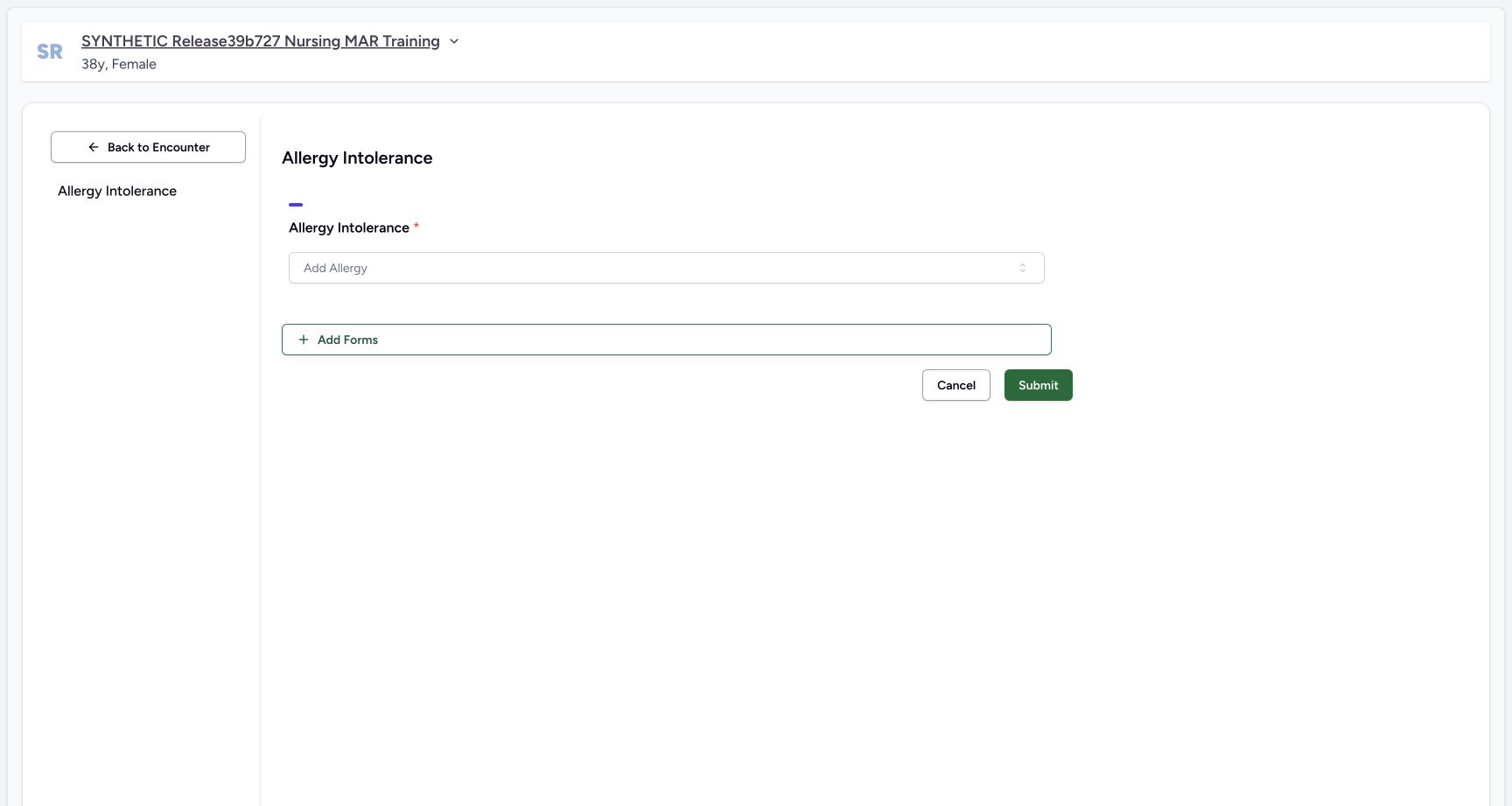 1
1Empty allergy form
Capture details
Observed committed 3dfb software on 20 October 2026. Captions distinguish discarded drafts, reviewed saves and read-only retained state. All pixels remain original.
Image SHA-256 03d47cb141780f3e5123113b03da4645933b6bbc0bc031a0e4165c560c38c3a5
- Open Add Allergy: Open the empty required Allergy picker before searching the first exact DEMO code.
12Food code search result
Capture details
Observed committed 3dfb software on 20 October 2026. Captions distinguish discarded drafts, reviewed saves and read-only retained state. All pixels remain original.
Image SHA-256 412f1862b8f8ae584c6295ee84af5a4e7ab7d8355c675bfb8c59f436e4522c95
- Search DEMO-FOOD: Enter the exact fictional code DEMO-FOOD in the picker search field.
- Choose the exact training item: Select DEMO Food substance. This label is explicitly fictional and does not describe a real allergen.
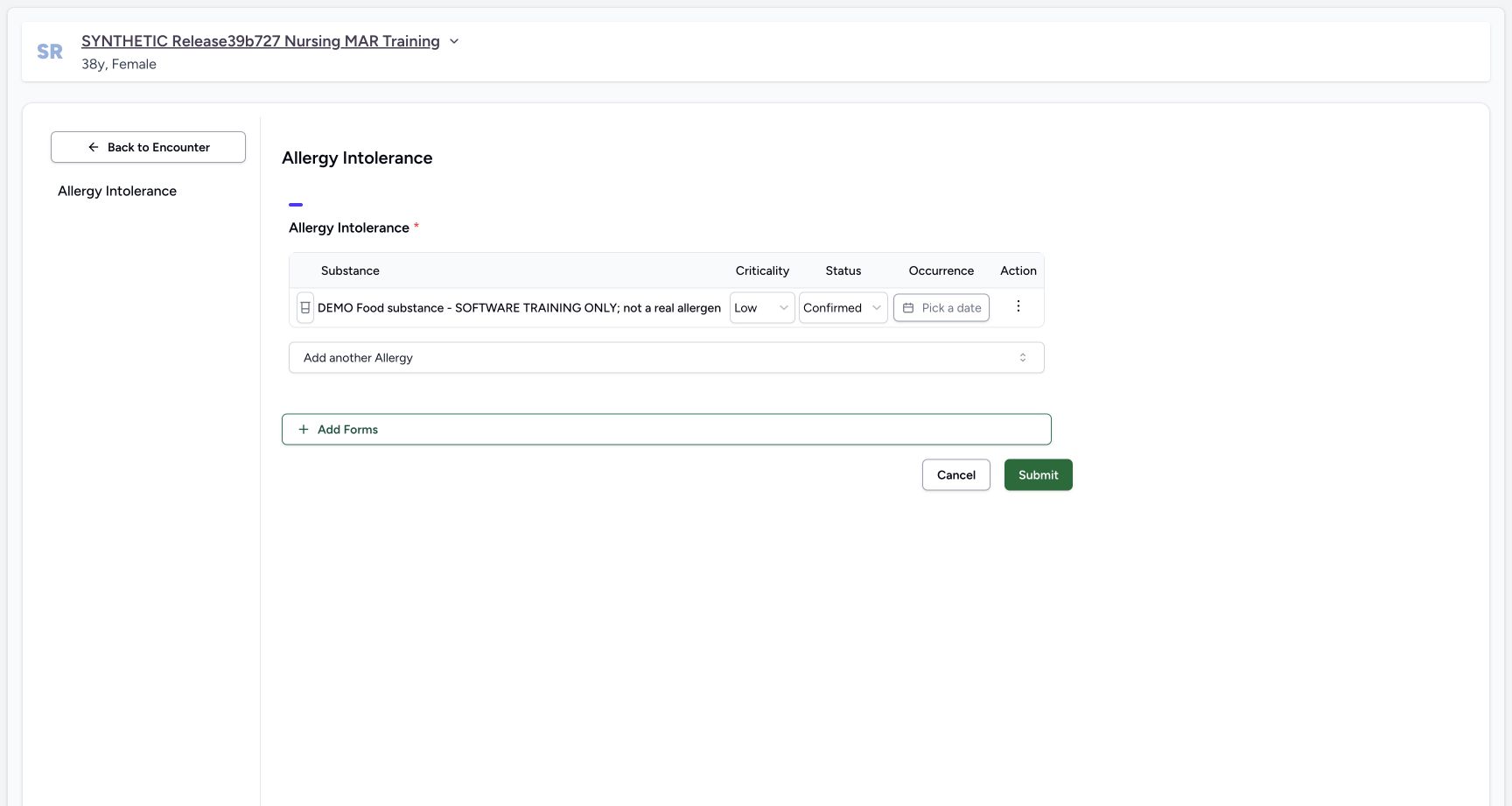 12345
12345First unsaved row defaults
Capture details
Observed committed 3dfb software on 20 October 2026. Captions distinguish discarded drafts, reviewed saves and read-only retained state. All pixels remain original.
Image SHA-256 44c30d4fbffdcb7247366bdd27d17852707d1e46fb3fb912ee97dc7a81c2a944
- Category is still a default: The new row initially uses Medication allergy. The fictional substance label does not set its category automatically.
- Add the next item: Open Add another Allergy to add the next separate demonstration entry.
- Read default Criticality: The new unsaved row displays Low. This is an observed default, not a risk assessment.
- Read default verification: The new unsaved row displays Confirmed; its later planned value has not been set yet.
- Read the blank occurrence: Pick a date shows that occurrence is initially blank; no date clear action happened.
5. Add Environment and Biologic as separate rows
Use Add another Allergy, search DEMO-ENVIRONMENT and select the exact fictional result. Repeat with DEMO-BIOLOGIC. Review the three unsaved rows in Food, Environment, Biologic order. Do not use the star controls or Submit.
12345First unsaved row defaults
Capture details
Observed committed 3dfb software on 20 October 2026. Captions distinguish discarded drafts, reviewed saves and read-only retained state. All pixels remain original.
Image SHA-256 44c30d4fbffdcb7247366bdd27d17852707d1e46fb3fb912ee97dc7a81c2a944
- Category is still a default: The new row initially uses Medication allergy. The fictional substance label does not set its category automatically.
- Add the next item: Open Add another Allergy to add the next separate demonstration entry.
- Read default Criticality: The new unsaved row displays Low. This is an observed default, not a risk assessment.
- Read default verification: The new unsaved row displays Confirmed; its later planned value has not been set yet.
- Read the blank occurrence: Pick a date shows that occurrence is initially blank; no date clear action happened.
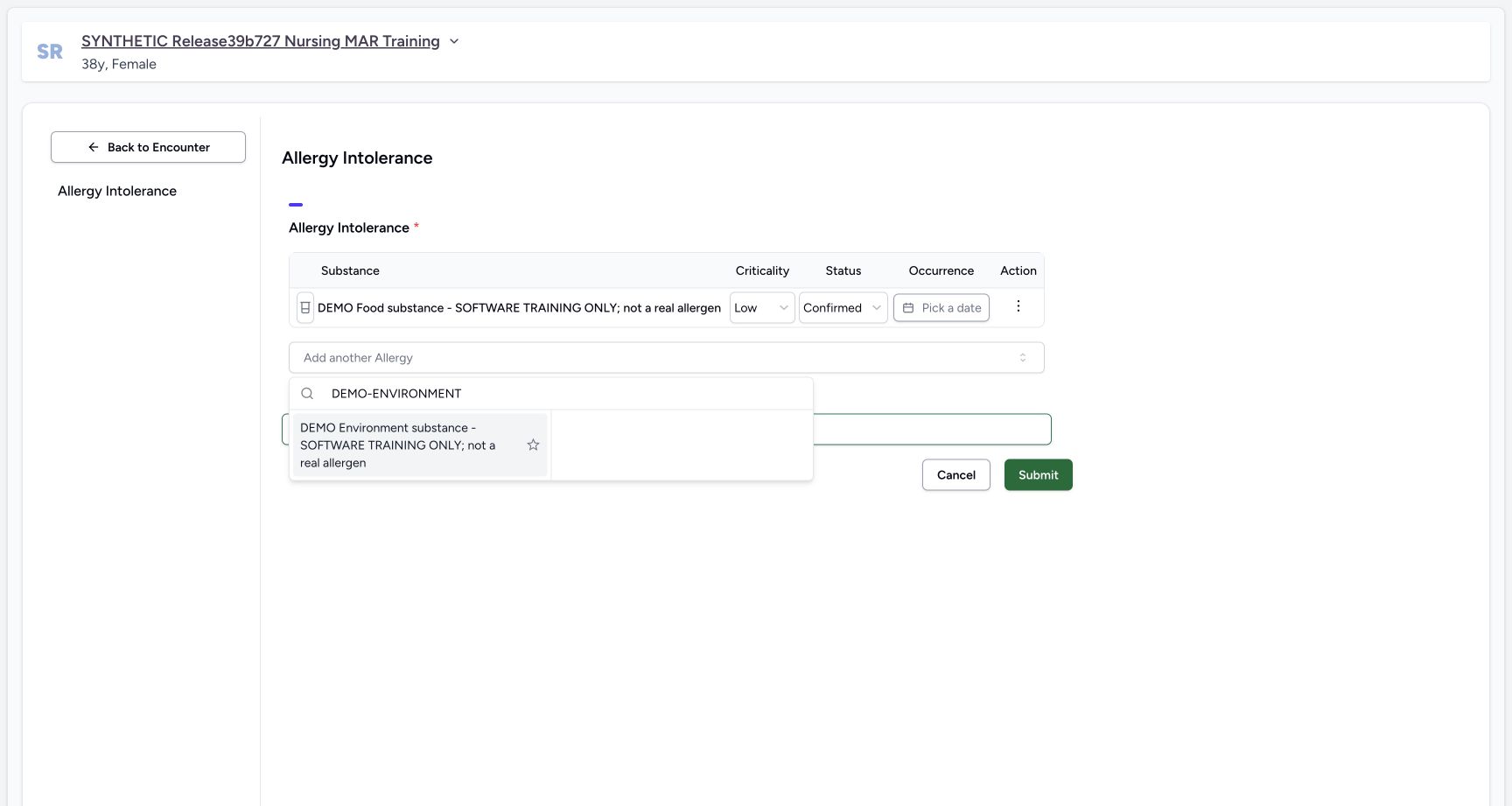 12
12Environment code search result
Capture details
Observed committed 3dfb software on 20 October 2026. Captions distinguish discarded drafts, reviewed saves and read-only retained state. All pixels remain original.
Image SHA-256 5fb17386cfe4ce465be573757946d91c6d7c3295046c3f479b19b9a8e761116d
- Search DEMO-ENVIRONMENT: Enter the second exact fictional code in this picker search field.
- Select the second distinct code: Choose the exact fictional DEMO Environment item, without using the star control.
 12
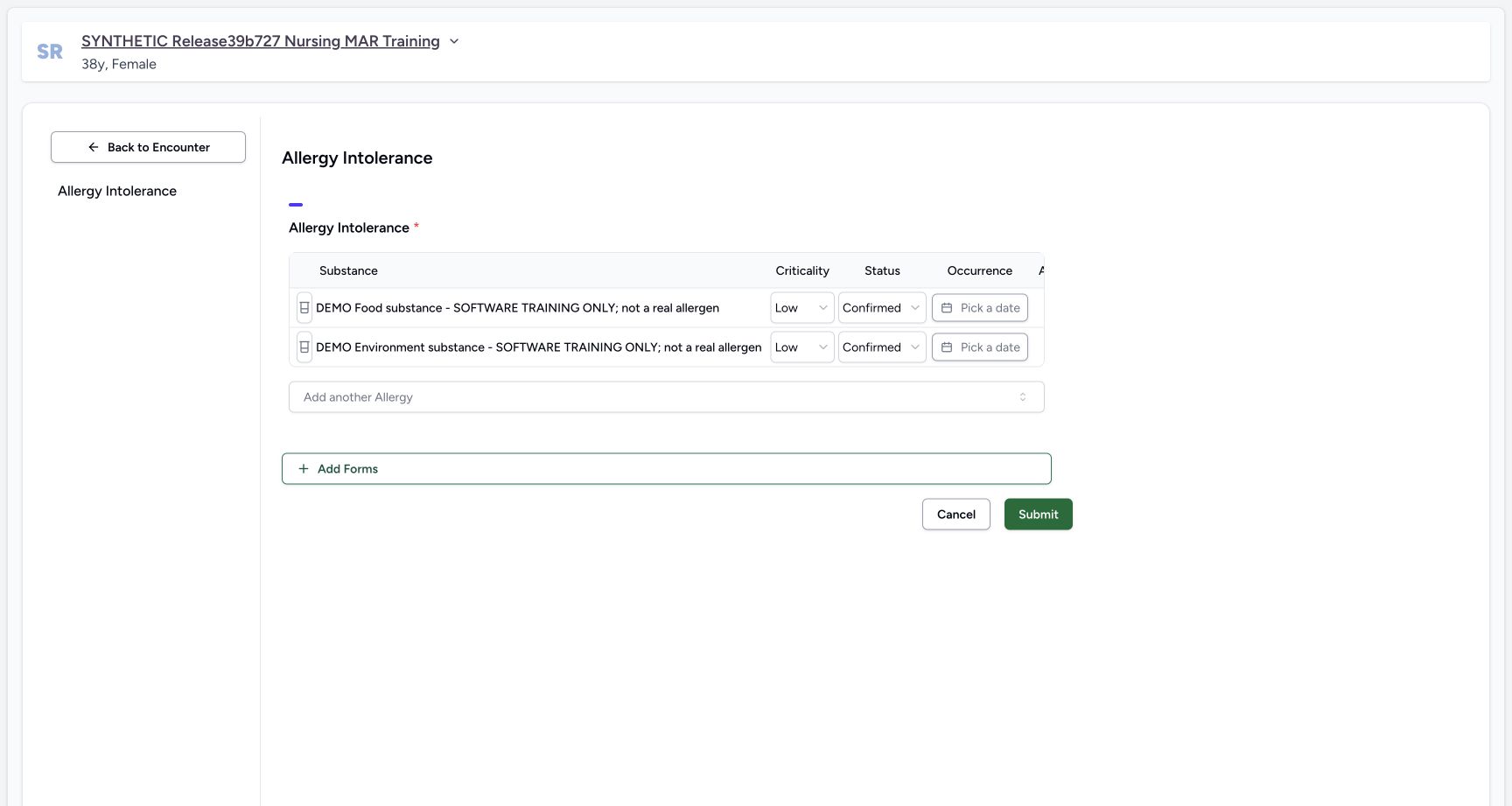
12Two unsaved entries
Capture details
Observed committed 3dfb software on 20 October 2026. Captions distinguish discarded drafts, reviewed saves and read-only retained state. All pixels remain original.
Image SHA-256 b063724248292cea3a0a45bd9b12651f8d6799cd702d99d1ac1cd2673f08f4bc
- Check the second draft row: Read the independent Environment row beneath Food. These remain unsaved.
- Add the third entry: Open Add another Allergy below the two existing draft rows.
 12
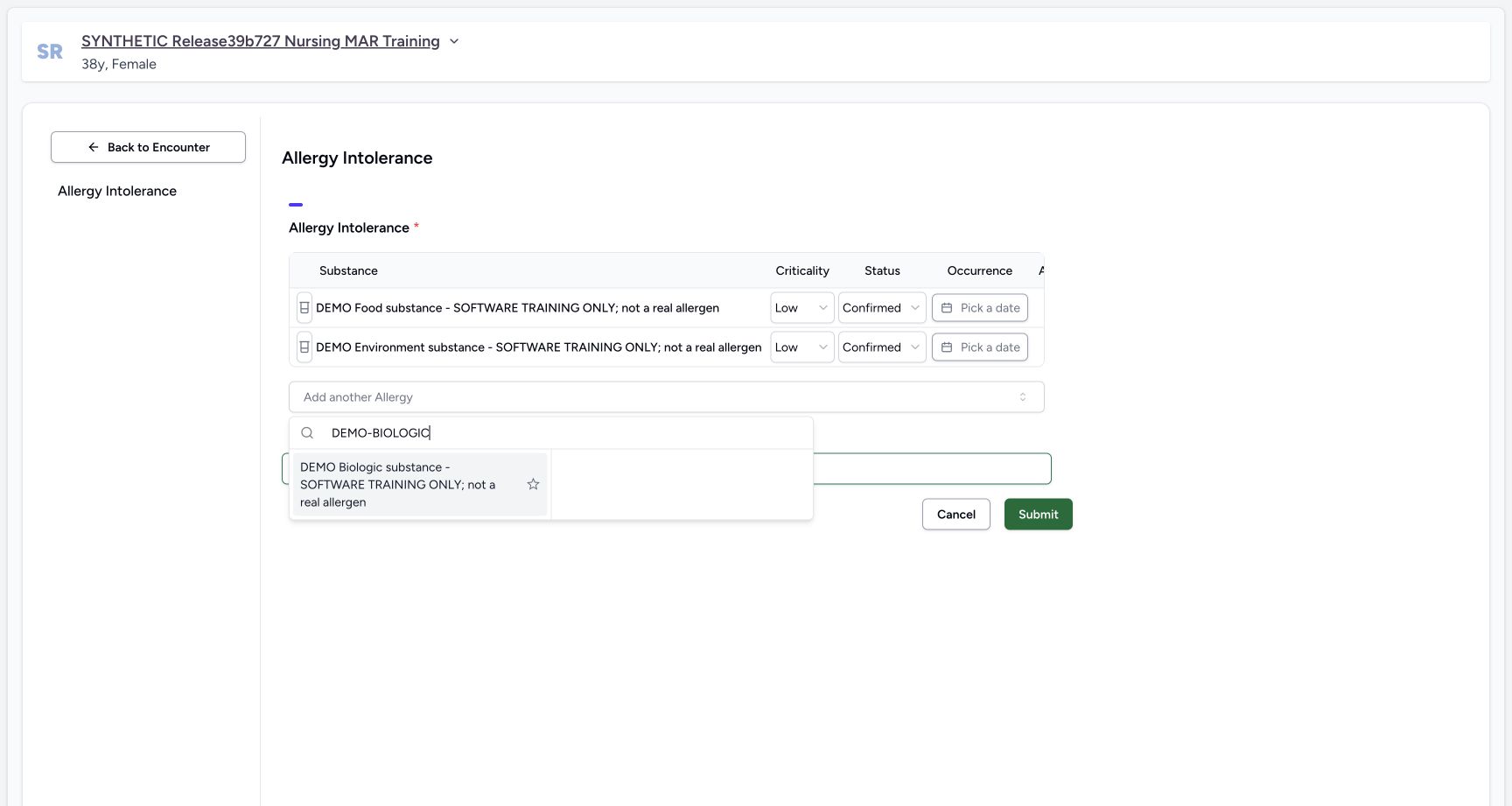
12Biologic code search result
Capture details
Observed committed 3dfb software on 20 October 2026. Captions distinguish discarded drafts, reviewed saves and read-only retained state. All pixels remain original.
Image SHA-256 53237fbbe596bdf2fc528a3d599a0cf058d6ad1a113b63195d2c636b437cac41
- Search DEMO-BIOLOGIC: Enter the third exact fictional code in this picker search field.
- Choose the third fictional item: Select DEMO Biologic substance once. Keep its fictional software-training label visible.
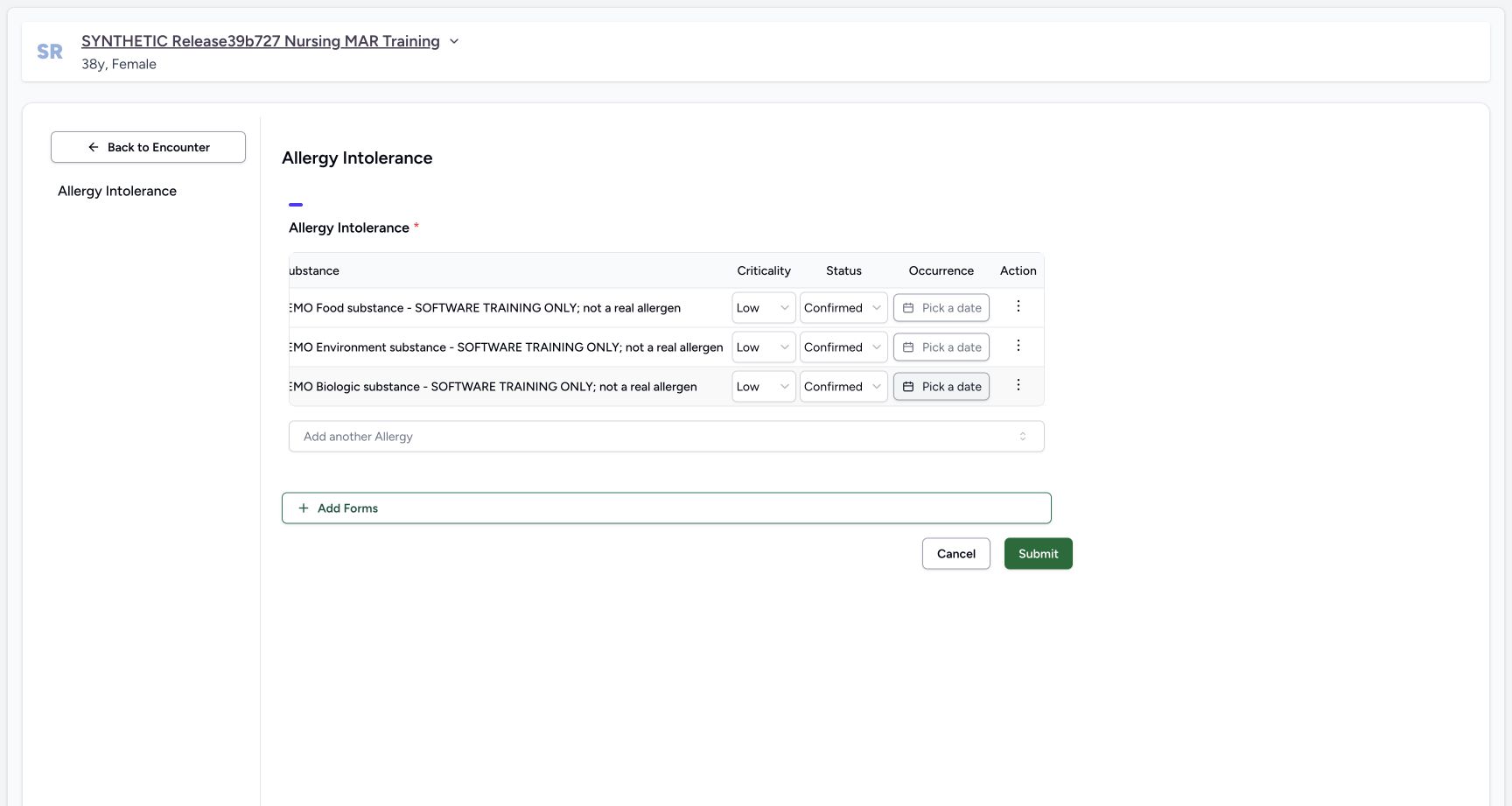
12Three unsaved default rows
Capture details
Observed committed 3dfb software on 20 October 2026. Captions distinguish discarded drafts, reviewed saves and read-only retained state. All pixels remain original.
Image SHA-256 485c9ba802f13b782092c54abfb95957dee766e1eb116cf693f684f53bccf065
- Three unsaved entries: All three selected fictional substances are present as separate draft rows. No Submit has occurred.
- Scroll the allergy table right: Use a horizontal scroll gesture over this table header to reveal the Action column beyond its right edge. This target is a noninteractive scroll area, not a date control or pictured scrollbar.
6. Remove only the new Biologic draft row
Scroll the table horizontally to reveal Action. Open the third, Biologic row menu and choose Remove Allergy. Only Food and Environment remain. For this new unsaved row, the action removes it locally; it does not delete a saved record.
12Three unsaved default rows
Capture details
Observed committed 3dfb software on 20 October 2026. Captions distinguish discarded drafts, reviewed saves and read-only retained state. All pixels remain original.
Image SHA-256 485c9ba802f13b782092c54abfb95957dee766e1eb116cf693f684f53bccf065
- Three unsaved entries: All three selected fictional substances are present as separate draft rows. No Submit has occurred.
- Scroll the allergy table right: Use a horizontal scroll gesture over this table header to reveal the Action column beyond its right edge. This target is a noninteractive scroll area, not a date control or pictured scrollbar.
 1
1Biologic row actions visible
Capture details
Observed committed 3dfb software on 20 October 2026. Captions distinguish discarded drafts, reviewed saves and read-only retained state. All pixels remain original.
Image SHA-256 ce34b5a5ba7c9ee09df2b4063943bb10133a133e4a1f3f332094124d4dc25cac
- Open this row’s Actions: Use the menu on the third, DEMO Biologic draft row. The table is scrolled right to make the control visible.
 1
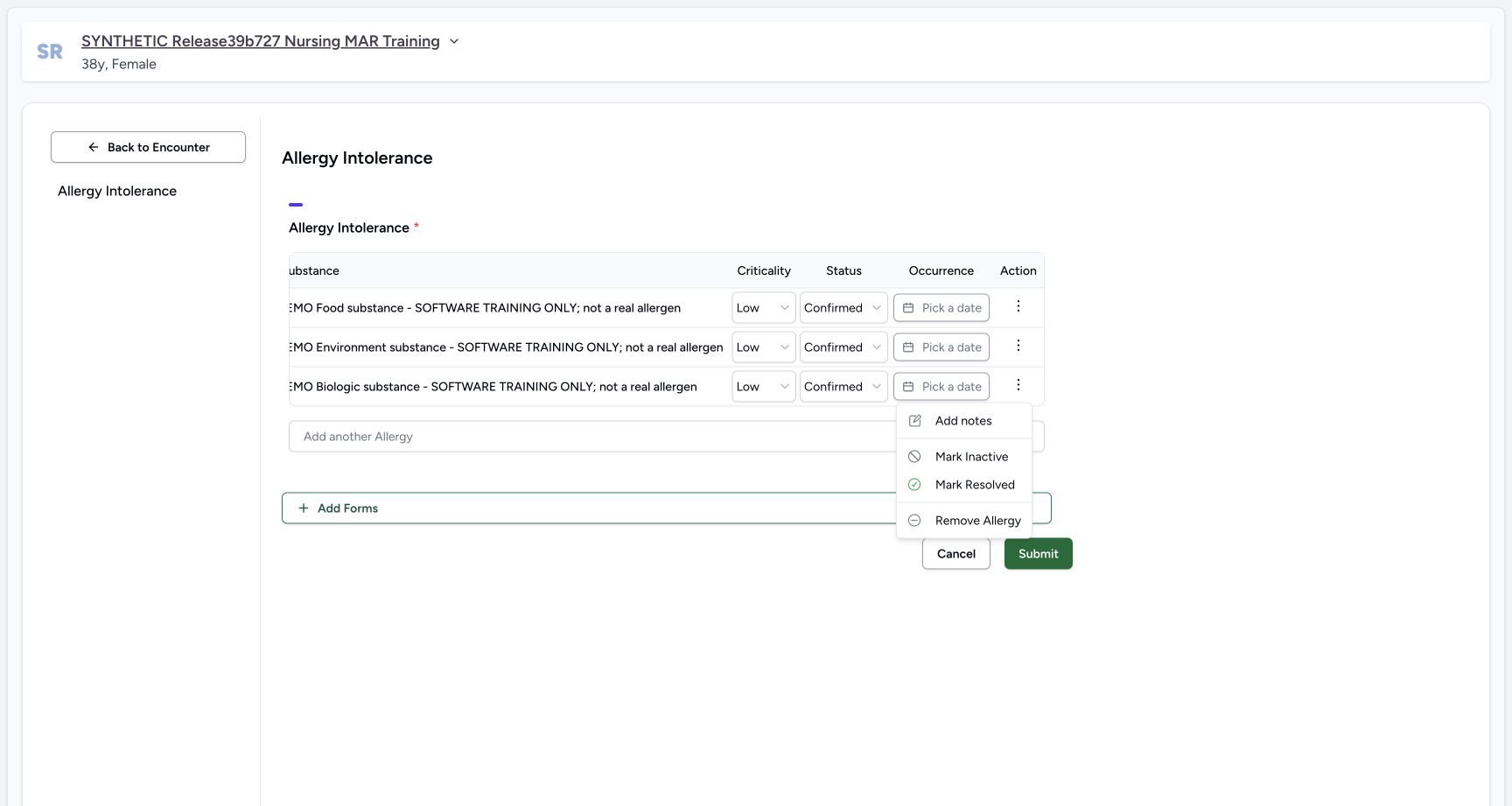
1New biologic remove menu
Capture details
Observed committed 3dfb software on 20 October 2026. Captions distinguish discarded drafts, reviewed saves and read-only retained state. All pixels remain original.
Image SHA-256 cf0ffd8e5cb1073a3cf7a8364580ef13f2e9d9533e837879f4e7b9bfad9b493e
- Remove this new Biologic row: Select Remove Allergy in this new unsaved Biologic row menu. This locally removes the draft row; it is not deleting a saved Allergy.
 12
12Two rows after local remove
Capture details
Observed committed 3dfb software on 20 October 2026. Captions distinguish discarded drafts, reviewed saves and read-only retained state. All pixels remain original.
Image SHA-256 a04db29b541639053a25cf83279472658f1cb9ba4149736c3fa1269dff2adb7f
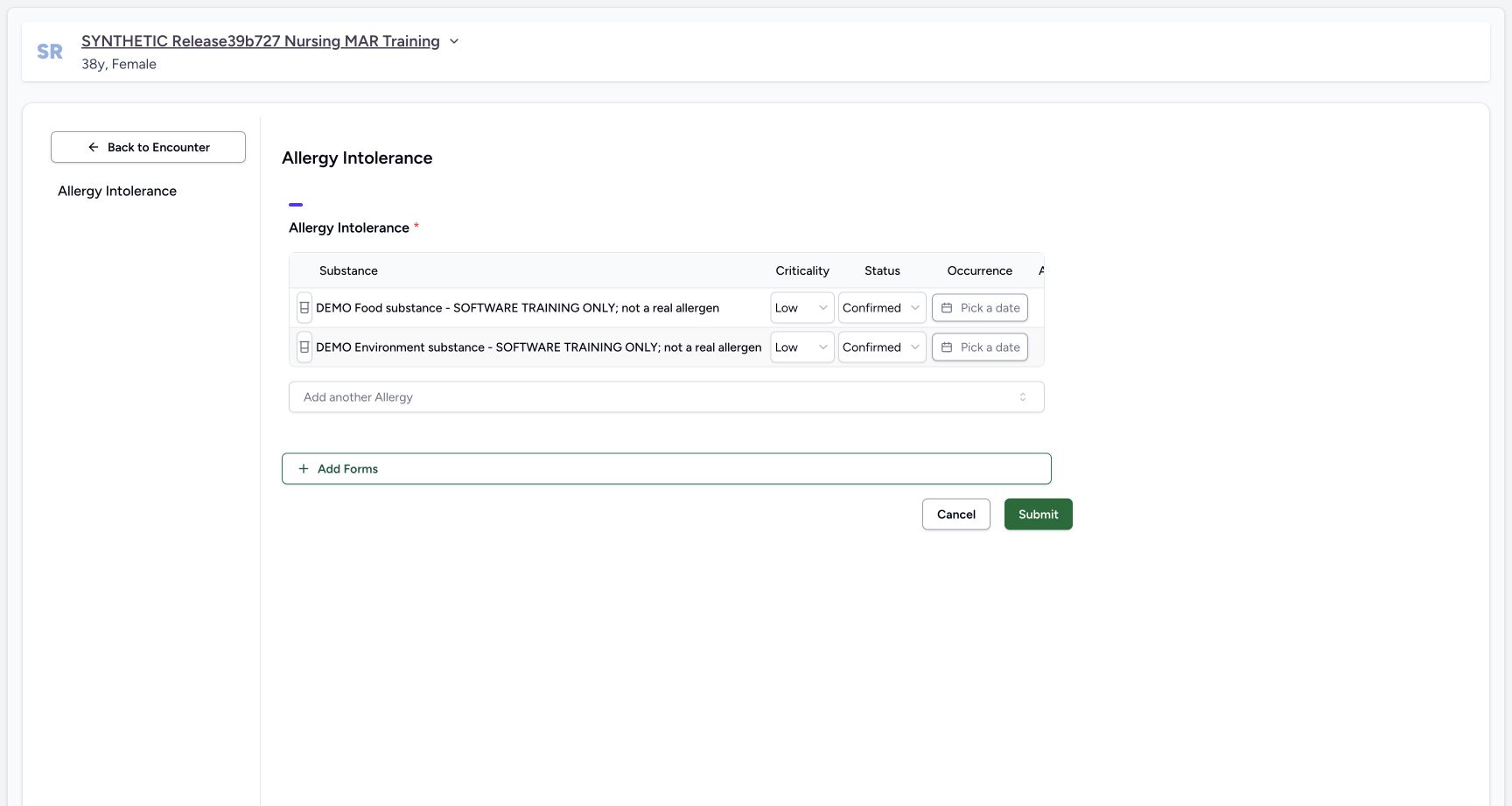
- Only two draft rows remain: The new Biologic row was removed locally. Food and Environment are still unsaved draft entries.
- Discard this draft: Select Cancel to leave the form without submitting these entries.
7. Cancel and leave the unsaved draft
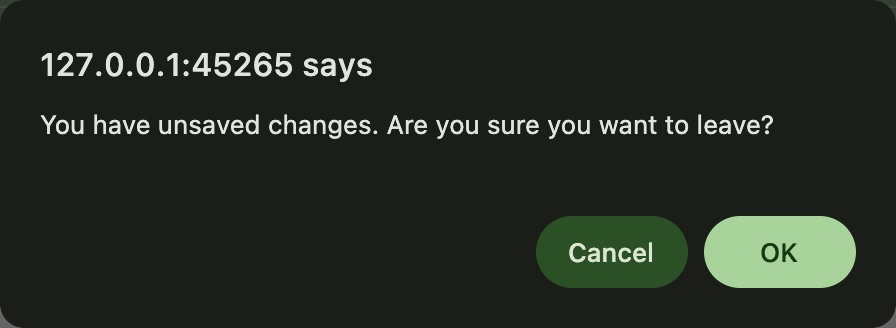
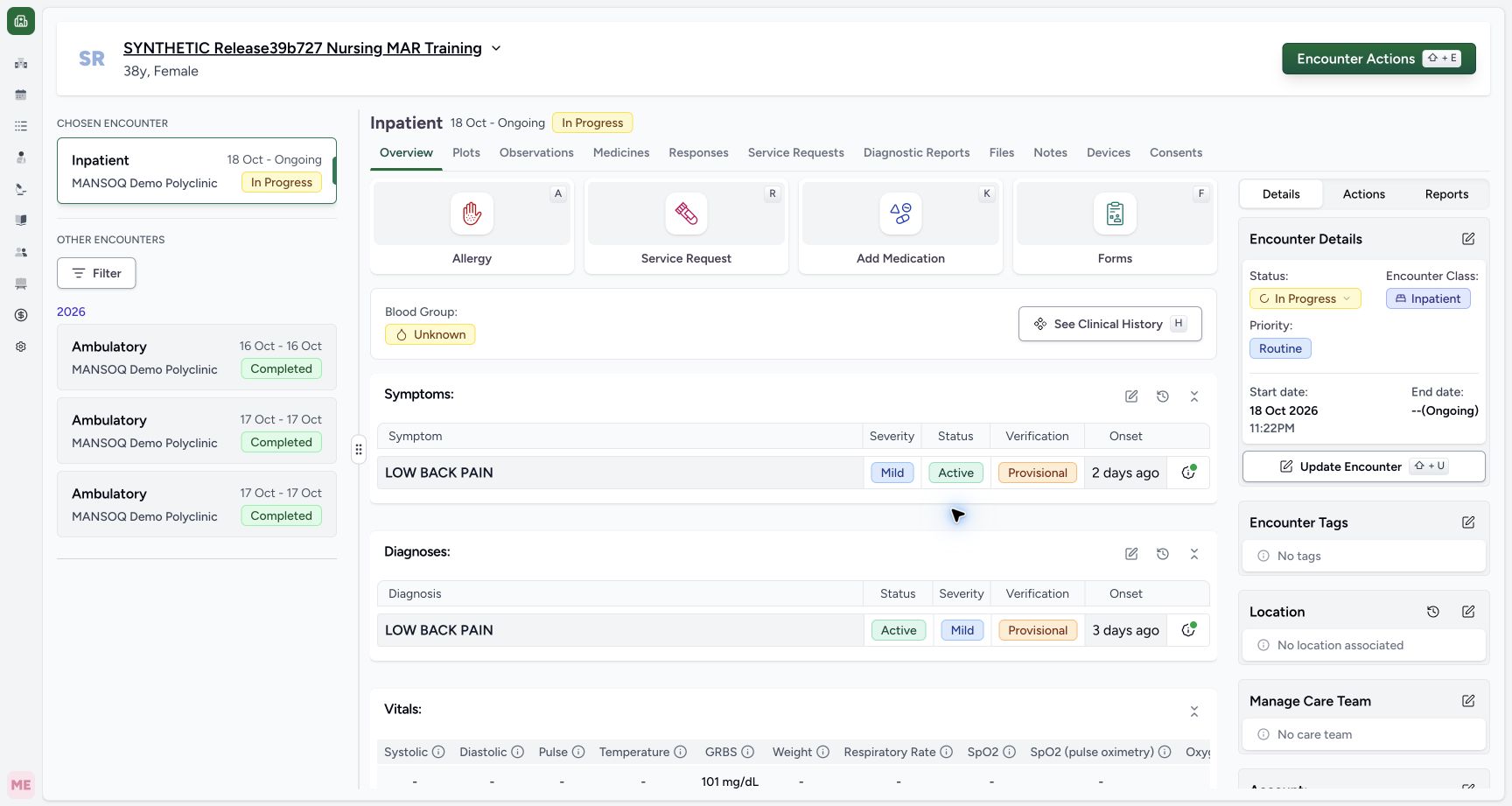
Choose the form footer Cancel. When the unsaved-change confirmation appears, OK leaves and discards the draft; Cancel would stay in the editor. The clear confirmation image here is from the later Doctor cancellation with the same message and buttons, used only as a control illustration. The actual Nurse draft was also discarded, and the following encounter image shows its return.
12Two rows after local remove
Capture details
Observed committed 3dfb software on 20 October 2026. Captions distinguish discarded drafts, reviewed saves and read-only retained state. All pixels remain original.
Image SHA-256 a04db29b541639053a25cf83279472658f1cb9ba4149736c3fa1269dff2adb7f
- Only two draft rows remain: The new Biologic row was removed locally. Food and Environment are still unsaved draft entries.
- Discard this draft: Select Cancel to leave the form without submitting these entries.
 12
12macOS unsaved changes confirmation with clear Cancel and OK
Native macOS confirmation dialog, shown in its original proportions.
Capture details
Observed committed 3dfb software on 20 October 2026. Captions distinguish discarded drafts, reviewed saves and read-only retained state. All pixels remain original.
Image SHA-256 5b2d2351fb6e2890463ebf9dadb448eb162c05d8e0eeacaae1d8dd5f1b06e2b0
- Confirm leaving with OK: The actual OK action discards the unsaved field previews and leaves the editor.
- Read the Cancel alternative: Cancel would keep the editor open; it was not clicked in this segment.
 1
1Overview after confirmed discard
Capture details
Observed committed 3dfb software on 20 October 2026. Captions distinguish discarded drafts, reviewed saves and read-only retained state. All pixels remain original.
Image SHA-256 97633ca5ffe29e0489d927d413b211478023b100505b1ca591692eb477df7477
- Reopen Allergy to check the result: After confirming the unsaved-change warning, return to the same encounter and reopen Allergy.
8. Reopen and check the discarded result
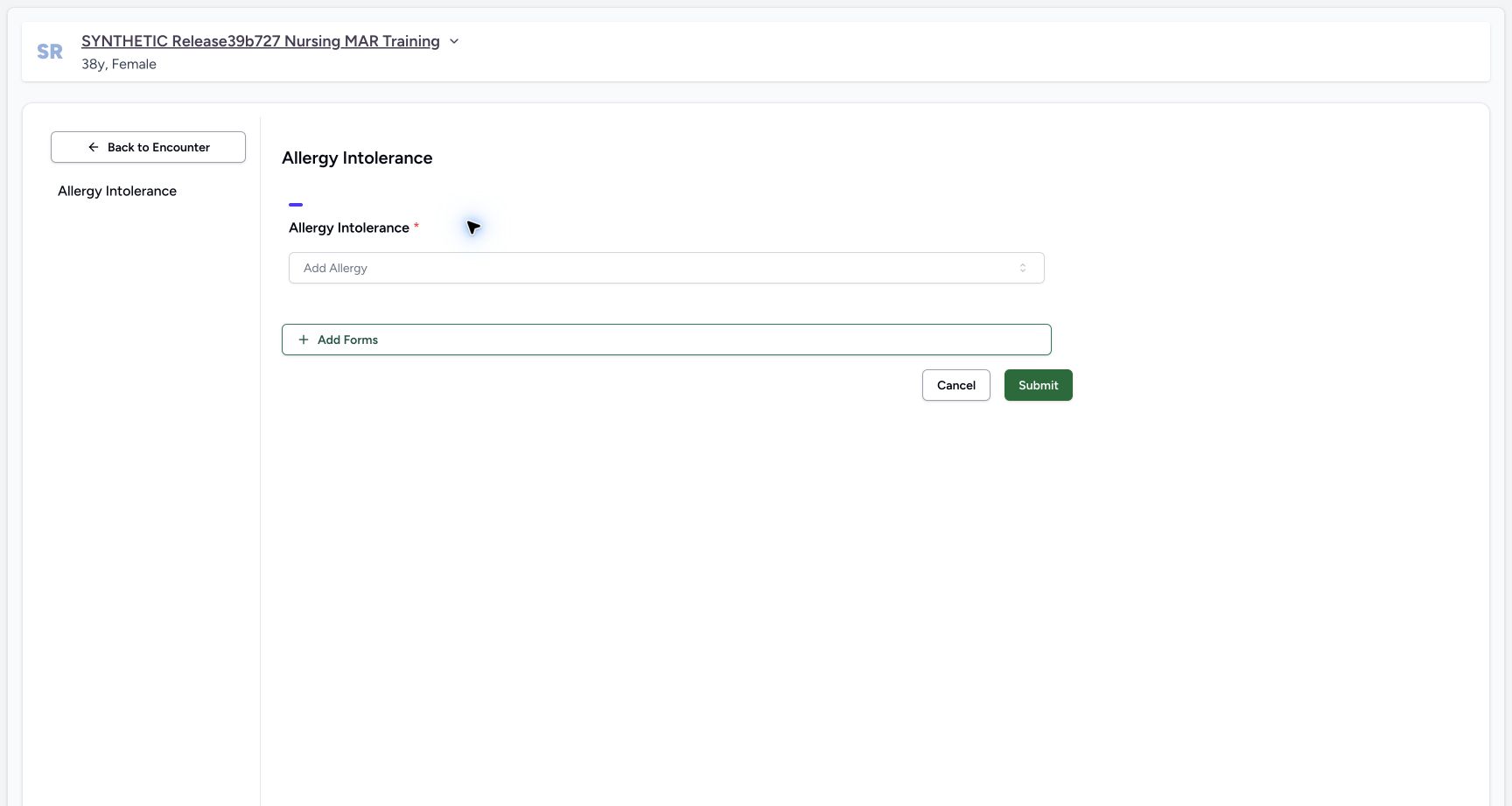
From the same encounter, open Allergy again. Add Allergy is empty and no draft rows remain. This confirms that this draft was discarded; it is not a clinical declaration that the patient has no allergies.
1Overview after confirmed discard
Capture details
Observed committed 3dfb software on 20 October 2026. Captions distinguish discarded drafts, reviewed saves and read-only retained state. All pixels remain original.
Image SHA-256 97633ca5ffe29e0489d927d413b211478023b100505b1ca591692eb477df7477
- Reopen Allergy to check the result: After confirming the unsaved-change warning, return to the same encounter and reopen Allergy.
 1
1Empty form after cancel and reopen
Capture details
Observed committed 3dfb software on 20 October 2026. Captions distinguish discarded drafts, reviewed saves and read-only retained state. All pixels remain original.
Image SHA-256 a2c8aa3f45f575e3cb0941cccea19d231d23eef326c884758117c0a946605023
- No draft rows were retained: The same encounter’s reopened Allergy form has an empty Add Allergy control. This verifies the draft was discarded; it is not a clinical no-allergy declaration.
Keep the example separate from clinical authoring
All three terms are fictional software examples. The observed new-row defaults are interface defaults, not assessments. The following guide starts a new three-row draft and explicitly sets its categories and values before saving.
12345First unsaved row defaults
Capture details
Observed committed 3dfb software on 20 October 2026. Captions distinguish discarded drafts, reviewed saves and read-only retained state. All pixels remain original.
Image SHA-256 44c30d4fbffdcb7247366bdd27d17852707d1e46fb3fb912ee97dc7a81c2a944
- Category is still a default: The new row initially uses Medication allergy. The fictional substance label does not set its category automatically.
- Add the next item: Open Add another Allergy to add the next separate demonstration entry.
- Read default Criticality: The new unsaved row displays Low. This is an observed default, not a risk assessment.
- Read default verification: The new unsaved row displays Confirmed; its later planned value has not been set yet.
- Read the blank occurrence: Pick a date shows that occurrence is initially blank; no date clear action happened.
12Three unsaved default rows
Capture details
Observed committed 3dfb software on 20 October 2026. Captions distinguish discarded drafts, reviewed saves and read-only retained state. All pixels remain original.
Image SHA-256 485c9ba802f13b782092c54abfb95957dee766e1eb116cf693f684f53bccf065
- Three unsaved entries: All three selected fictional substances are present as separate draft rows. No Submit has occurred.
- Scroll the allergy table right: Use a horizontal scroll gesture over this table header to reveal the Action column beyond its right edge. This target is a noninteractive scroll area, not a date control or pictured scrollbar.
1Empty form after cancel and reopen
Capture details
Observed committed 3dfb software on 20 October 2026. Captions distinguish discarded drafts, reviewed saves and read-only retained state. All pixels remain original.
Image SHA-256 a2c8aa3f45f575e3cb0941cccea19d231d23eef326c884758117c0a946605023
- No draft rows were retained: The same encounter’s reopened Allergy form has an empty Add Allergy control. This verifies the draft was discarded; it is not a clinical no-allergy declaration.
Source evidence
Every citation uses this exact committed version. The private source repository requires access.
- repositories/platform/mansoq-web/src/components/Questionnaire/QuestionTypes/AllergyQuestion.tsx:84 ·
3dfb7c9f519fb5b4cd4452439f3c12346bf58319Source file checksum
254d481b67a09bf7bb33fc18e6e7d92b1f4fb54d4b67e5d4aa6bda8fde7cea96 - repositories/platform/mansoq-web/src/components/Questionnaire/structured/handlers.ts:30 ·
3dfb7c9f519fb5b4cd4452439f3c12346bf58319Source file checksum
459ade48f77316279ab2978dc7b4466cb96acb8223c61b9a1f87ca9973be7c7f - repositories/platform/mansoq-web/src/components/Patient/allergy/list.tsx:88 ·
3dfb7c9f519fb5b4cd4452439f3c12346bf58319Source file checksum
bc8ef47eb25cf88a026260eb0bcd989b0f93cfae23acf9ecb7d35e5ffbb82fd7 - repositories/platform/mansoq-web/src/components/Patient/allergy/AllergyTable.tsx:183 ·
3dfb7c9f519fb5b4cd4452439f3c12346bf58319Source file checksum
90ad547be1793fbd6b7341e9ffa497337ecb227a623c95444d85c9e980dd2a84 - repositories/platform/mansoq-web/src/components/Patient/Common/ClinicalInformationRow.tsx:92 ·
3dfb7c9f519fb5b4cd4452439f3c12346bf58319Source file checksum
087ba137455f77d10d911c939b4123d81561668f5ec15f265af7f13d7ba72975 - repositories/platform/mansoq-web/src/components/Questionnaire/ValueSetSearchContent.tsx:334 ·
3dfb7c9f519fb5b4cd4452439f3c12346bf58319Source file checksum
d6adc1b84f5956cd554042aa8579a0a83b9a13c5337c64bd0ee6b7f9af5b8019 - repositories/platform/mansoq-web/src/components/ui/combined-date-picker.tsx:54 ·
3dfb7c9f519fb5b4cd4452439f3c12346bf58319Source file checksum
272caeefe90613a5018d1ff31b46cf3d37e557cbe988450a99a2c22da2522d04 - repositories/platform/mansoq-web/src/Utils/utils.ts:81 ·
3dfb7c9f519fb5b4cd4452439f3c12346bf58319Source file checksum
42db3c7a21342795ae94608ded05958c34844fb0004399c4360b94b45bde2357 - repositories/platform/mansoq-web/src/components/Questionnaire/QuestionnaireForm.tsx:587 ·
3dfb7c9f519fb5b4cd4452439f3c12346bf58319Source file checksum
ee6c2195f13e48f0896a2d3da566c2f2a67910adad08894df6b77862f9cfdeec - repositories/platform/mansoq-web/src/types/emr/allergyIntolerance/allergyIntolerance.ts:4 ·
3dfb7c9f519fb5b4cd4452439f3c12346bf58319Source file checksum
af5b8029b7b8cfc769fe108a02fa9566bf8df23723fc05b11bc9ec03461862f2 - repositories/platform/mansoq-web/src/types/emr/allergyIntolerance/allergyIntoleranceApi.ts:6 ·
3dfb7c9f519fb5b4cd4452439f3c12346bf58319Source file checksum
508e7c035908d31af3e1dde061e9cb25f6335492960a9a22bad52454a5c62c63 - repositories/platform/mansoq-core/mansoq/emr/api/viewsets/allergy_intolerance.py:81 ·
3dfb7c9f519fb5b4cd4452439f3c12346bf58319Source file checksum
d9ae1ae9e05ebe02fa61b89e71d10b371c7ca07d020d74875f449d80ce85ed54 - repositories/platform/mansoq-core/mansoq/emr/api/viewsets/base.py:269 ·
3dfb7c9f519fb5b4cd4452439f3c12346bf58319Source file checksum
6a287dd315b8a4957b29c58e4bbc1bef7b8d9d257f9149f93045ff0adbdcae6c - repositories/platform/mansoq-core/mansoq/emr/resources/allergy_intolerance/spec.py:28 ·
3dfb7c9f519fb5b4cd4452439f3c12346bf58319Source file checksum
54dfb856b2c10739e7a5a0d3761d501d25dcb0dca8d063412fd9d52eaff1fc06 - repositories/platform/mansoq-core/mansoq/emr/models/allergy_intolerance.py:16 ·
3dfb7c9f519fb5b4cd4452439f3c12346bf58319Source file checksum
dd9c7b0b3eaa442d09ebaa3cb3a665f1fab0a74792def3d7c76a3139dec0ba9f - repositories/platform/mansoq-core/mansoq/security/authorization/patient.py:58 ·
3dfb7c9f519fb5b4cd4452439f3c12346bf58319Source file checksum
45de75f24e42fa30316a96efb92b23c577e2c3831e17ec96e7ff2c73d0d1973d - repositories/platform/mansoq-core/mansoq/security/authorization/encounter.py:97 ·
3dfb7c9f519fb5b4cd4452439f3c12346bf58319Source file checksum
0e7ff8afcfb57b2371201e16ee6fac26125d6e686af66ed7edd95e49bc07de78 - repositories/platform/mansoq-core/mansoq/emr/models/valueset.py:40 ·
3dfb7c9f519fb5b4cd4452439f3c12346bf58319Source file checksum
36e46250876bf40cc74268c495bfd96b75784b7dc067a514ca0e572e8107a68d - repositories/platform/mansoq-core/mansoq/emr/utils/local_terminology.py:21 ·
3dfb7c9f519fb5b4cd4452439f3c12346bf58319Source file checksum
d1a9126bcc12e59f1efa2a4fa48585c2c98921f9e0f098b815b7ac8d3525837e - repositories/platform/mansoq-core/config/settings/base.py:55 ·
3dfb7c9f519fb5b4cd4452439f3c12346bf58319Source file checksum
34f8931a2bae5a35f45bf6247695ee6bac09ccada3be766773861b4245817d6f - repositories/platform/mansoq-core/mansoq/emr/api/viewsets/valueset.py:223 ·
3dfb7c9f519fb5b4cd4452439f3c12346bf58319Source file checksum
772841c50105d523530a79f758964537988b9366e3a8fb7ec90cef1fa3b13fe2 - repositories/platform/mansoq-core/mansoq/emr/fhir/resources/code_concept.py:24 ·
3dfb7c9f519fb5b4cd4452439f3c12346bf58319Source file checksum
0ca1b831d57391f8a47ab7dd44acddcfdba9f11ea2429f689f95467755105a6d - repositories/platform/mansoq-core/config/auth_views.py:89 ·
3dfb7c9f519fb5b4cd4452439f3c12346bf58319Source file checksum
2f6466c03f5102a08bf18968bf240dcd34f8c9f9b69311b0499e1c32765cb6e1 - repositories/platform/mansoq-web/src/pages/Encounters/tabs/overview/quick-actions.tsx:55 ·
3dfb7c9f519fb5b4cd4452439f3c12346bf58319Source file checksum
555331d2be0793af35974e2ac2b3642f222ebbb49ddbec83bdb74331a7d963d4 - repositories/platform/mansoq-web/src/components/Questionnaire/data/StructuredFormData.tsx:41 ·
3dfb7c9f519fb5b4cd4452439f3c12346bf58319Source file checksum
434386c27b8e583e1dbd0a6f506250e7a0fb3640963c572445123bae62880f0f