 MANSOQ
 Clinical care · VERSION 3dfb7c9f
Find the archived attachment and read its reason, author and time
Compare Active Files and Archived Files, then read the saved archive details and close them.
Nurse
 123
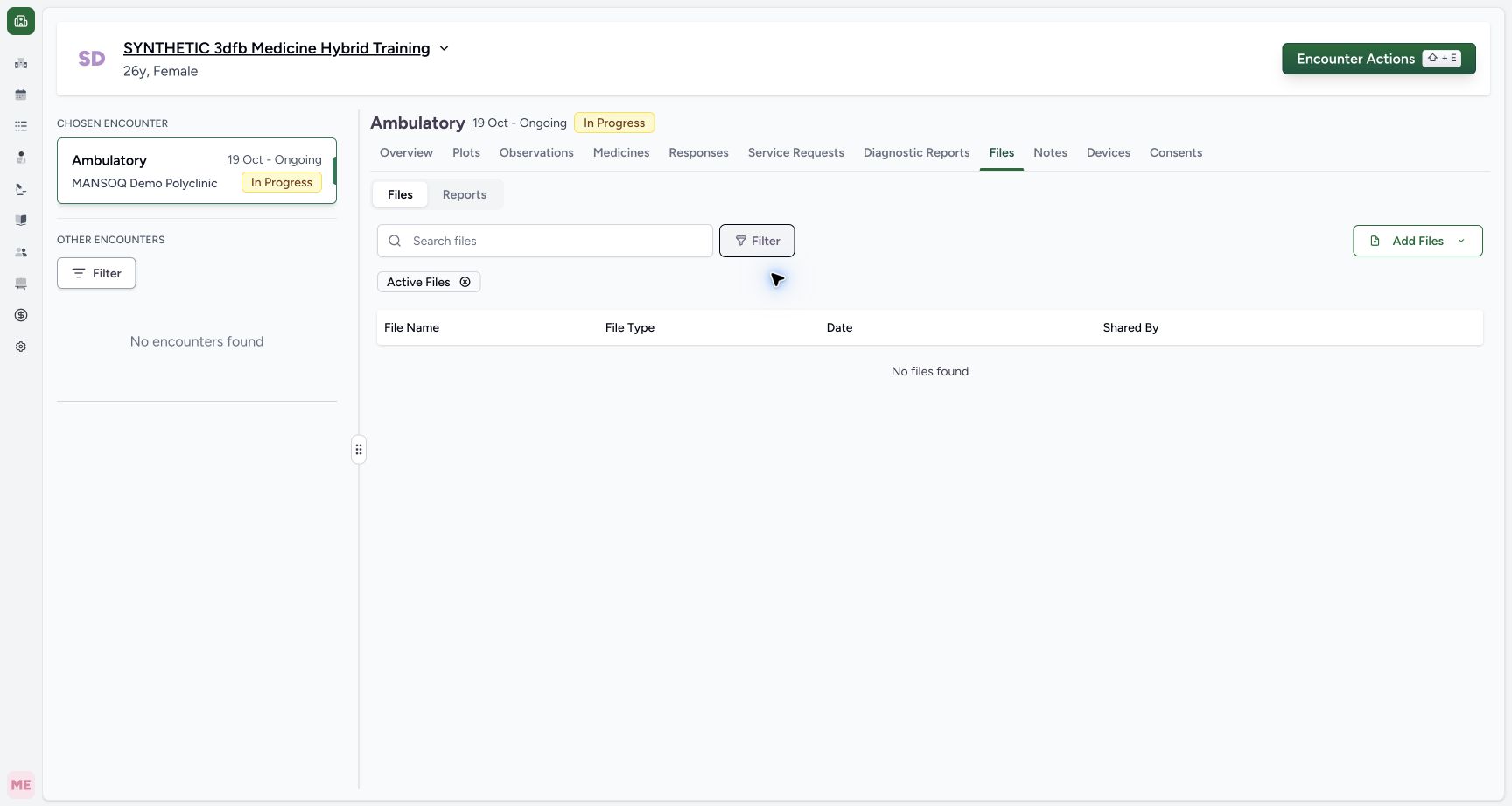
123Read the empty Active Files subset
Capture details
Observed committed 3dfb source on 20 October 2026 (Asia/Riyadh; captured 19 October UTC). Existing fictional encounter attachment; no real clinical document or consent.
Image SHA-256 b1abec070d4a833fefb55b3777cfa316b00819d8bfc5cc86923d31c6e8145398
- Read the Active Files filter: The Active Files badge identifies the current subset.
- Read No files found: This encounter has no row in the active subset after Archive.
- Open Filter to change the subset: Choose Archived Files from the file filter when ready.
 123
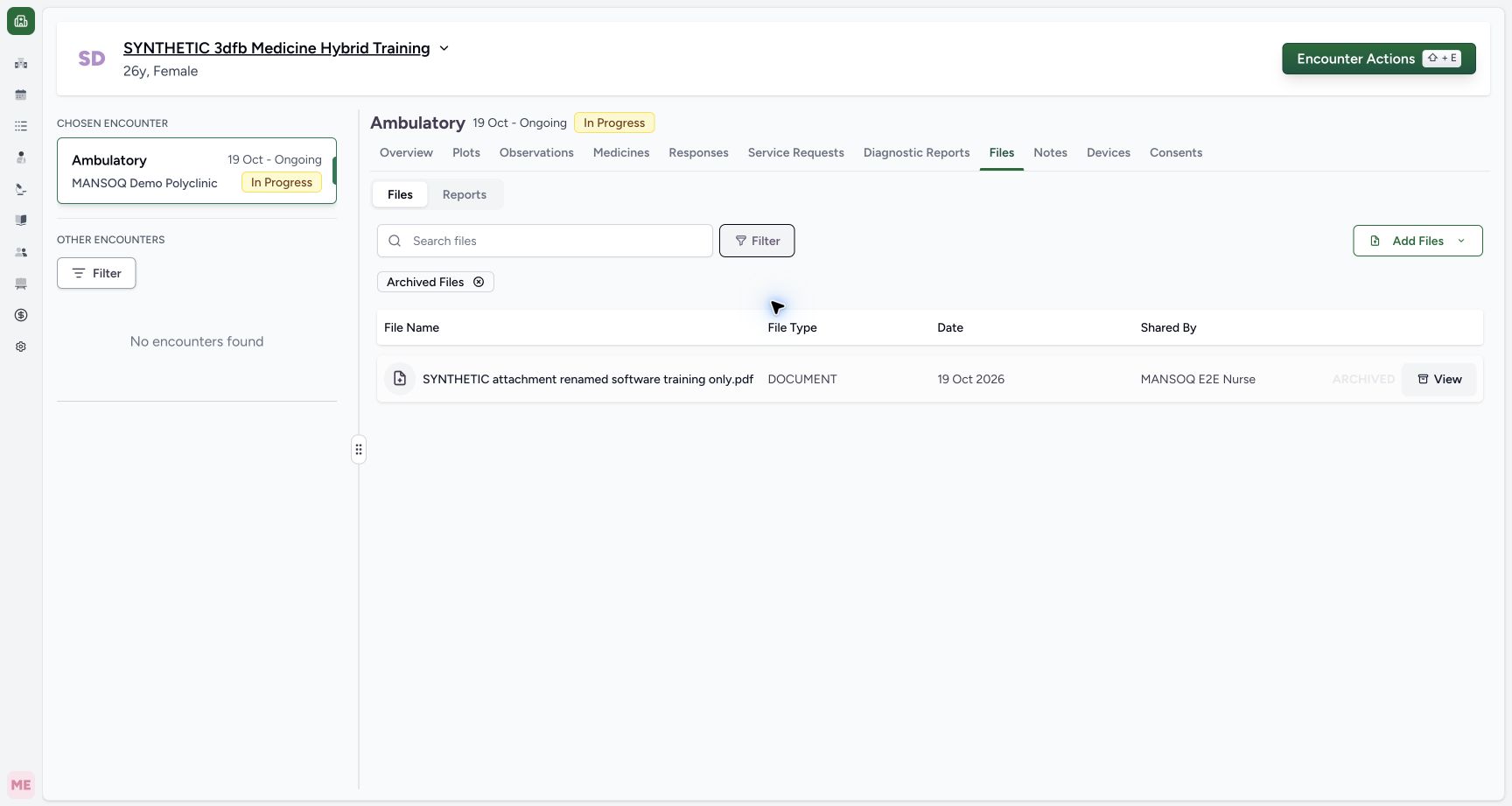
123Find the same file in Archived Files and use View
Capture details
Observed committed 3dfb source on 20 October 2026 (Asia/Riyadh; captured 19 October UTC). Existing fictional encounter attachment; no real clinical document or consent.
Image SHA-256 64f747ebb309651a87be50082e27c2d4cd80ecb9272760d91d74ebeecbbcb0e6
- Read the Archived Files filter: The Archived Files badge identifies the current subset.
- Identify the archived attachment: The same renamed attachment appears in Archived Files.
- View archive metadata: The archived row’s View opens its archive details.
 12345
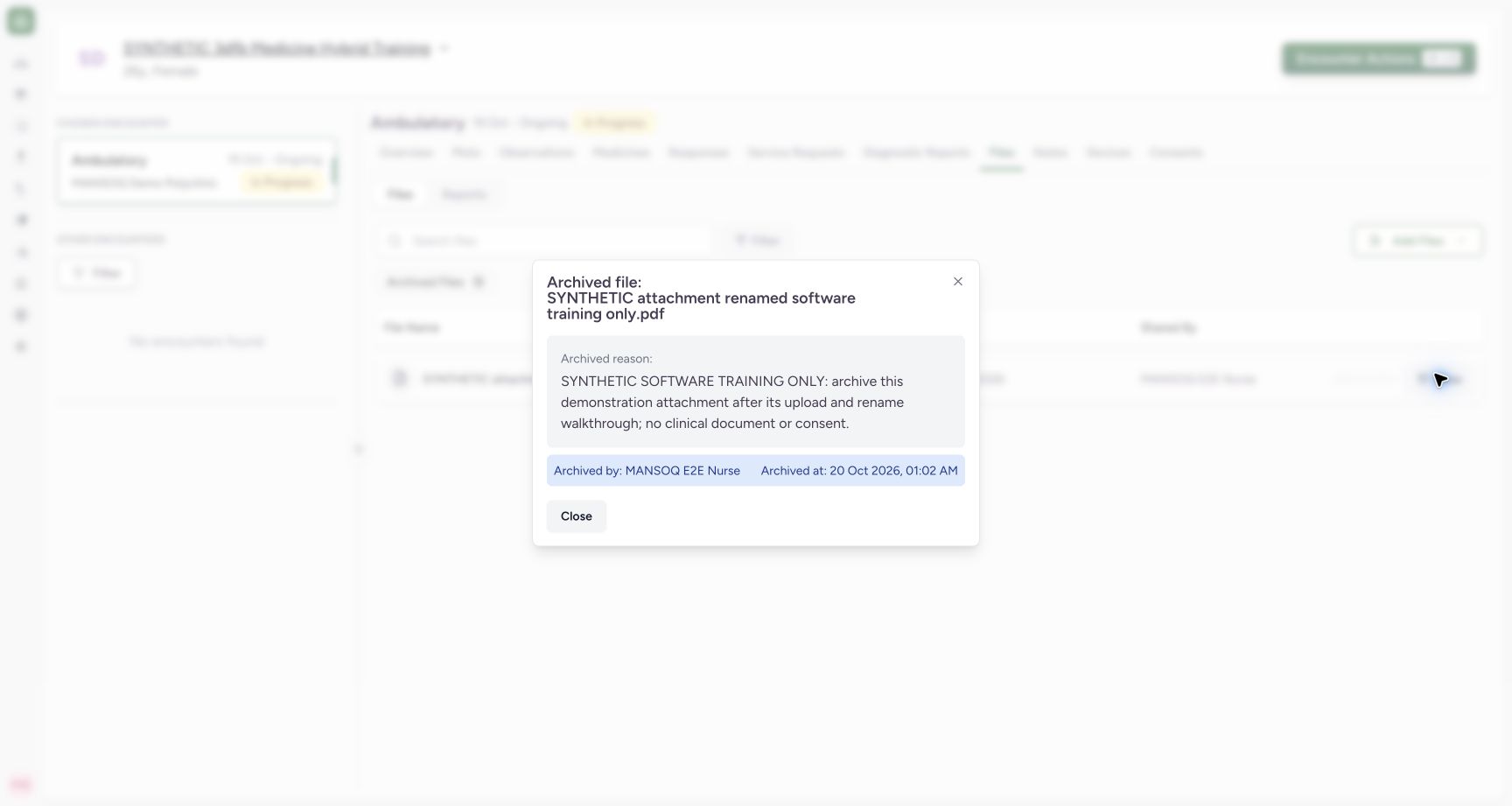
12345Read archive reason, author and time, then Close
Capture details
Observed committed 3dfb source on 20 October 2026 (Asia/Riyadh; captured 19 October UTC). Existing fictional encounter attachment; no real clinical document or consent.
Image SHA-256 d533b4eeb79e17fcb1579a7639825a2000957d92d69845cb242ffb9348518cb3
- Match the archived file name: Read the same renamed PDF in the dialog title.
- Read the retained reason: The saved software-only archive reason is displayed.
- Read Archived by: MANSOQ E2E Nurse is shown as the actor.
- Read Archived at: The dialog shows 20 Oct 2026, 01:02 AM.
- Close the archive details: Select Close to return to Archived Files.
11 of 11 content blocks have reviewed image alignment. Missing overview or prerequisite images remain open.
Before you begin
- Continue in the same authorized Nurse session on the same synthetic encounter after the archive was saved. The loaded row is already marked ARCHIVED.
 12
12Recorded release 3dfb7c9f · 2026-10-19T22:03:36.171Z · 1728 × 921 Check the archived row after reload
Capture details
Observed committed 3dfb source on 20 October 2026 (Asia/Riyadh; captured 19 October UTC). Existing fictional encounter attachment; no real clinical document or consent.
Image SHA-256
fae34efe6ed4a982d52c2493f5840c13e62b496f11ed67f44a99c8756cdf5dcf- Check the retained row after reload: The same renamed attachment remains in the loaded list.
- Check the persisted archive state: ARCHIVED remains visible after reload.
- Use the same renamed software-training PDF. This lesson reads its retained archive state and metadata; it does not restore, upload or delete a document.123
Recorded release 3dfb7c9f · 2026-10-19T22:03:51.868Z · 1728 × 921 Find the same file in Archived Files and use View
Capture details
Observed committed 3dfb source on 20 October 2026 (Asia/Riyadh; captured 19 October UTC). Existing fictional encounter attachment; no real clinical document or consent.
Image SHA-256
64f747ebb309651a87be50082e27c2d4cd80ecb9272760d91d74ebeecbbcb0e6- Read the Archived Files filter: The Archived Files badge identifies the current subset.
- Identify the archived attachment: The same renamed attachment appears in Archived Files.
- View archive metadata: The archived row’s View opens its archive details.
1. Check the archive after reload
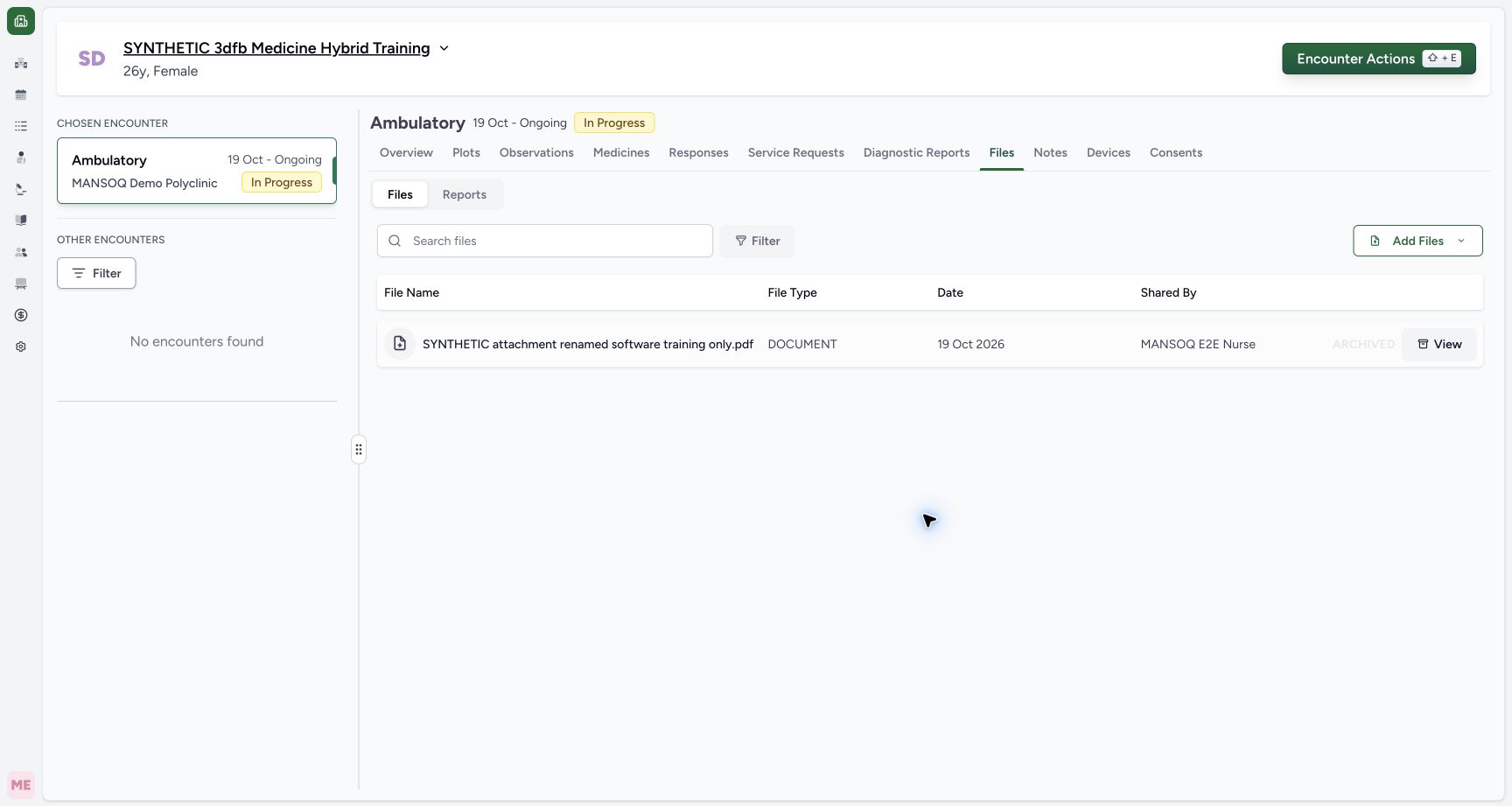
After the normal page reload, the same renamed file is still listed and marked ARCHIVED.
12Check the archived row after reload
Capture details
Observed committed 3dfb source on 20 October 2026 (Asia/Riyadh; captured 19 October UTC). Existing fictional encounter attachment; no real clinical document or consent.
Image SHA-256 fae34efe6ed4a982d52c2493f5840c13e62b496f11ed67f44a99c8756cdf5dcf
- Check the retained row after reload: The same renamed attachment remains in the loaded list.
- Check the persisted archive state: ARCHIVED remains visible after reload.
2. Read the Active Files subset
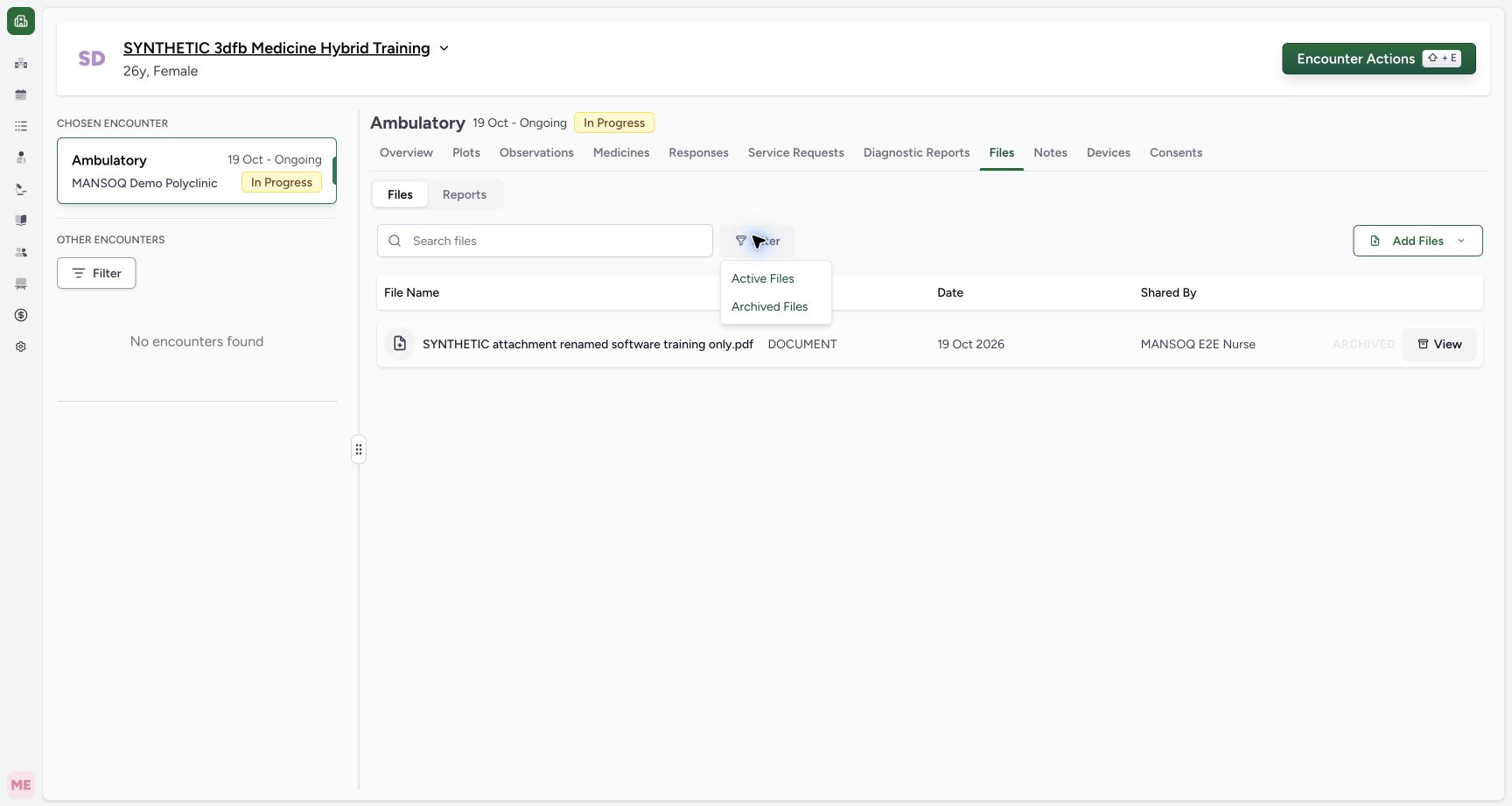
Open the file Filter beside Search files and select Active Files. Read its badge and No files found for this encounter’s active subset.
 123
123Choose Active Files or Archived Files from Filter
Capture details
Observed committed 3dfb source on 20 October 2026 (Asia/Riyadh; captured 19 October UTC). Existing fictional encounter attachment; no real clinical document or consent.
Image SHA-256 f694f138aac8ff9452e64a263199d980f78dc9ecd6aab49ac7dc2d41b9fb972e
- Open the file Filter: Use the Filter next to Search files.
- Choose Active Files: Limit this file list to active files.
- Choose Archived Files: Use this option later to view archived files.
123Read the empty Active Files subset
Capture details
Observed committed 3dfb source on 20 October 2026 (Asia/Riyadh; captured 19 October UTC). Existing fictional encounter attachment; no real clinical document or consent.
Image SHA-256 b1abec070d4a833fefb55b3777cfa316b00819d8bfc5cc86923d31c6e8145398
- Read the Active Files filter: The Active Files badge identifies the current subset.
- Read No files found: This encounter has no row in the active subset after Archive.
- Open Filter to change the subset: Choose Archived Files from the file filter when ready.
3. Choose Archived Files
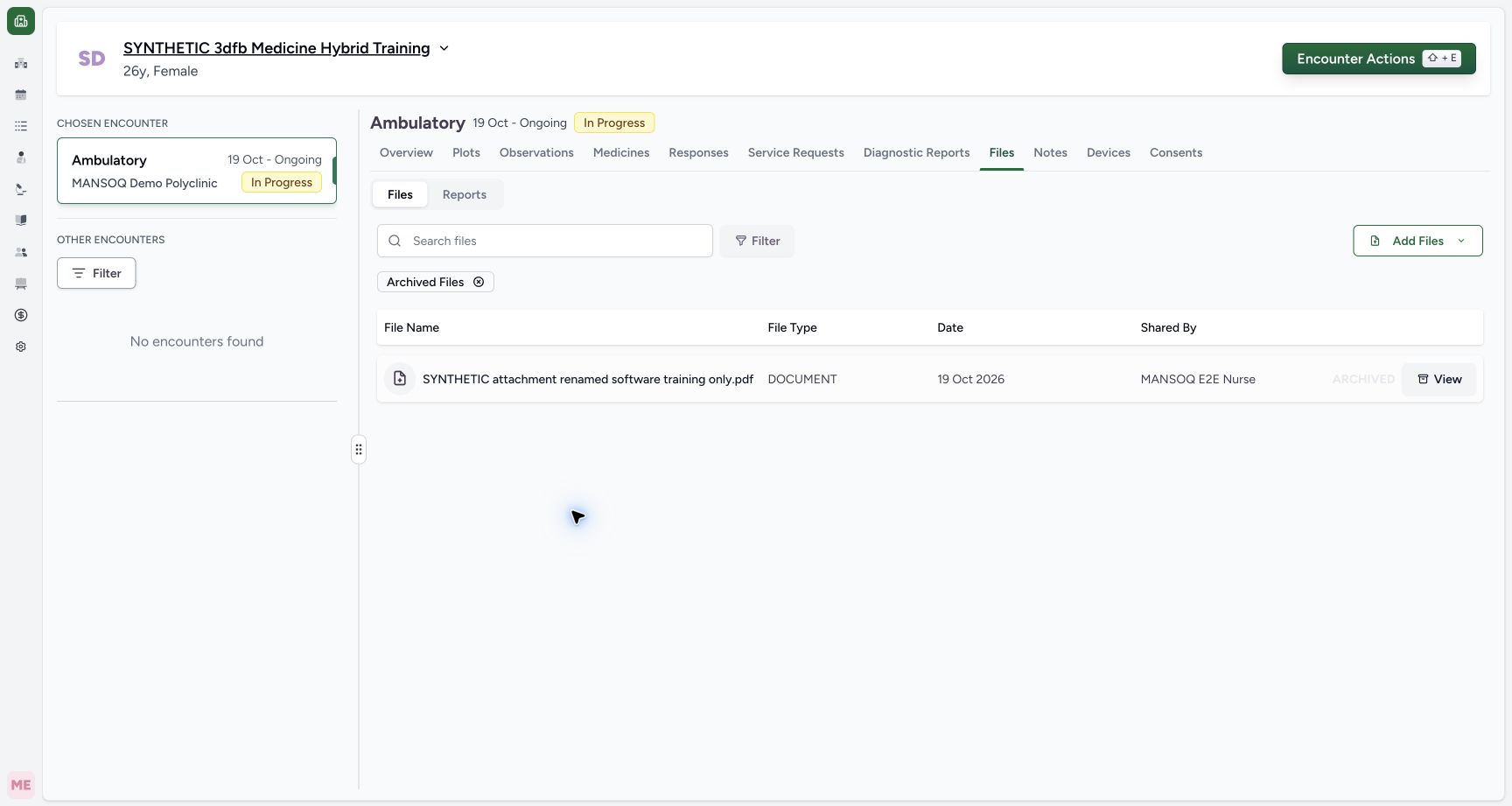
Open the same file Filter and select Archived Files. Read the badge and locate SYNTHETIC attachment renamed software training only.pdf with ARCHIVED.
123Choose Active Files or Archived Files from Filter
Capture details
Observed committed 3dfb source on 20 October 2026 (Asia/Riyadh; captured 19 October UTC). Existing fictional encounter attachment; no real clinical document or consent.
Image SHA-256 f694f138aac8ff9452e64a263199d980f78dc9ecd6aab49ac7dc2d41b9fb972e
- Open the file Filter: Use the Filter next to Search files.
- Choose Active Files: Limit this file list to active files.
- Choose Archived Files: Use this option later to view archived files.
123Find the same file in Archived Files and use View
Capture details
Observed committed 3dfb source on 20 October 2026 (Asia/Riyadh; captured 19 October UTC). Existing fictional encounter attachment; no real clinical document or consent.
Image SHA-256 64f747ebb309651a87be50082e27c2d4cd80ecb9272760d91d74ebeecbbcb0e6
- Read the Archived Files filter: The Archived Files badge identifies the current subset.
- Identify the archived attachment: The same renamed attachment appears in Archived Files.
- View archive metadata: The archived row’s View opens its archive details.
4. View the retained archive details
Select View on that archived row. The archive-details dialog names the same renamed PDF.
123Find the same file in Archived Files and use View
Capture details
Observed committed 3dfb source on 20 October 2026 (Asia/Riyadh; captured 19 October UTC). Existing fictional encounter attachment; no real clinical document or consent.
Image SHA-256 64f747ebb309651a87be50082e27c2d4cd80ecb9272760d91d74ebeecbbcb0e6
- Read the Archived Files filter: The Archived Files badge identifies the current subset.
- Identify the archived attachment: The same renamed attachment appears in Archived Files.
- View archive metadata: The archived row’s View opens its archive details.
12345Read archive reason, author and time, then Close
Capture details
Observed committed 3dfb source on 20 October 2026 (Asia/Riyadh; captured 19 October UTC). Existing fictional encounter attachment; no real clinical document or consent.
Image SHA-256 d533b4eeb79e17fcb1579a7639825a2000957d92d69845cb242ffb9348518cb3
- Match the archived file name: Read the same renamed PDF in the dialog title.
- Read the retained reason: The saved software-only archive reason is displayed.
- Read Archived by: MANSOQ E2E Nurse is shown as the actor.
- Read Archived at: The dialog shows 20 Oct 2026, 01:02 AM.
- Close the archive details: Select Close to return to Archived Files.
5. Read the reason, author and time
Read the complete saved software-only reason. Archived by shows MANSOQ E2E Nurse; Archived at shows 20 Oct 2026, 01:02 AM.
12345Read archive reason, author and time, then Close
Capture details
Observed committed 3dfb source on 20 October 2026 (Asia/Riyadh; captured 19 October UTC). Existing fictional encounter attachment; no real clinical document or consent.
Image SHA-256 d533b4eeb79e17fcb1579a7639825a2000957d92d69845cb242ffb9348518cb3
- Match the archived file name: Read the same renamed PDF in the dialog title.
- Read the retained reason: The saved software-only archive reason is displayed.
- Read Archived by: MANSOQ E2E Nurse is shown as the actor.
- Read Archived at: The dialog shows 20 Oct 2026, 01:02 AM.
- Close the archive details: Select Close to return to Archived Files.
6. Close the details
Select Close. The stable Archived Files list returns with the same retained row still marked ARCHIVED.
12345Read archive reason, author and time, then Close
Capture details
Observed committed 3dfb source on 20 October 2026 (Asia/Riyadh; captured 19 October UTC). Existing fictional encounter attachment; no real clinical document or consent.
Image SHA-256 d533b4eeb79e17fcb1579a7639825a2000957d92d69845cb242ffb9348518cb3
- Match the archived file name: Read the same renamed PDF in the dialog title.
- Read the retained reason: The saved software-only archive reason is displayed.
- Read Archived by: MANSOQ E2E Nurse is shown as the actor.
- Read Archived at: The dialog shows 20 Oct 2026, 01:02 AM.
- Close the archive details: Select Close to return to Archived Files.
 123
123Return to the retained Archived Files row after Close
Capture details
Observed committed 3dfb source on 20 October 2026 (Asia/Riyadh; captured 19 October UTC). Existing fictional encounter attachment; no real clinical document or consent.
Image SHA-256 e63a6256c2739e8c53713967a0bd491b397c97e7fe9615e0a6f3a0952212d0b7
- Check the returned Archived Files view: The Archived Files badge remains after Close.
- Read the retained archive state: The same file remains marked ARCHIVED.
- Check the retained renamed file: Closing the details did not restore or delete the row.
Distinguish upload Date from archive time
The file list keeps its original Date of 19 Oct 2026 and Shared By uploader. The archive-details dialog separately shows the person and time for the archive action.
12345Read archive reason, author and time, then Close
Capture details
Observed committed 3dfb source on 20 October 2026 (Asia/Riyadh; captured 19 October UTC). Existing fictional encounter attachment; no real clinical document or consent.
Image SHA-256 d533b4eeb79e17fcb1579a7639825a2000957d92d69845cb242ffb9348518cb3
- Match the archived file name: Read the same renamed PDF in the dialog title.
- Read the retained reason: The saved software-only archive reason is displayed.
- Read Archived by: MANSOQ E2E Nurse is shown as the actor.
- Read Archived at: The dialog shows 20 Oct 2026, 01:02 AM.
- Close the archive details: Select Close to return to Archived Files.
123Return to the retained Archived Files row after Close
Capture details
Observed committed 3dfb source on 20 October 2026 (Asia/Riyadh; captured 19 October UTC). Existing fictional encounter attachment; no real clinical document or consent.
Image SHA-256 e63a6256c2739e8c53713967a0bd491b397c97e7fe9615e0a6f3a0952212d0b7
- Check the returned Archived Files view: The Archived Files badge remains after Close.
- Read the retained archive state: The same file remains marked ARCHIVED.
- Check the retained renamed file: Closing the details did not restore or delete the row.
Troubleshooting
Does No files found mean the document was deleted?
No. In this example it describes the Active Files subset. Archived Files contains the retained row and its View dialog shows the saved reason, author and time. There is no Restore control in this inspected interface.
123Read the empty Active Files subset
Capture details
Observed committed 3dfb source on 20 October 2026 (Asia/Riyadh; captured 19 October UTC). Existing fictional encounter attachment; no real clinical document or consent.
Image SHA-256 b1abec070d4a833fefb55b3777cfa316b00819d8bfc5cc86923d31c6e8145398
- Read the Active Files filter: The Active Files badge identifies the current subset.
- Read No files found: This encounter has no row in the active subset after Archive.
- Open Filter to change the subset: Choose Archived Files from the file filter when ready.
123Find the same file in Archived Files and use View
Capture details
Observed committed 3dfb source on 20 October 2026 (Asia/Riyadh; captured 19 October UTC). Existing fictional encounter attachment; no real clinical document or consent.
Image SHA-256 64f747ebb309651a87be50082e27c2d4cd80ecb9272760d91d74ebeecbbcb0e6
- Read the Archived Files filter: The Archived Files badge identifies the current subset.
- Identify the archived attachment: The same renamed attachment appears in Archived Files.
- View archive metadata: The archived row’s View opens its archive details.
12345Read archive reason, author and time, then Close
Capture details
Observed committed 3dfb source on 20 October 2026 (Asia/Riyadh; captured 19 October UTC). Existing fictional encounter attachment; no real clinical document or consent.
Image SHA-256 d533b4eeb79e17fcb1579a7639825a2000957d92d69845cb242ffb9348518cb3
- Match the archived file name: Read the same renamed PDF in the dialog title.
- Read the retained reason: The saved software-only archive reason is displayed.
- Read Archived by: MANSOQ E2E Nurse is shown as the actor.
- Read Archived at: The dialog shows 20 Oct 2026, 01:02 AM.
- Close the archive details: Select Close to return to Archived Files.
Source evidence
Every citation uses this exact committed version. The private source repository requires access.
- repositories/platform/mansoq-web/src/components/Files/FileFilters.tsx:24 ·
3dfb7c9f519fb5b4cd4452439f3c12346bf58319Source file checksum
8d13fe99e66b7e1cbd45a9510b1e1e9382a33701aeff3f2da1a94f62388ee7d5 - repositories/platform/mansoq-web/src/components/Files/ArchivedFileDialog.tsx:56 ·
3dfb7c9f519fb5b4cd4452439f3c12346bf58319Source file checksum
ae837f6ae2d7f362f2c894431c38bdc811d2cb1732a58f9bf674e88c8eb435c1 - repositories/platform/mansoq-web/src/components/Files/FileSubTab.tsx:107 ·
3dfb7c9f519fb5b4cd4452439f3c12346bf58319Source file checksum
e7cd676bfc2ceae76a896c79def0cd5fbb280f7311809c1d6bd326c0c8ae1dd6 - repositories/platform/mansoq-core/mansoq/emr/api/viewsets/file_upload.py:164 ·
3dfb7c9f519fb5b4cd4452439f3c12346bf58319Source file checksum
330ee5dc9faed4ad1ba7153f9ddb3347d8595d146e4e687e022a641b5f3e8478 - repositories/platform/mansoq-core/mansoq/emr/models/file_upload.py:39 ·
3dfb7c9f519fb5b4cd4452439f3c12346bf58319Source file checksum
ebf811b496a25595a7d6ccb9db5181dff79aa6e6a3195819b4fff7292ba79692