 MANSOQ
 Nursing observations · VERSION 3dfb7c9f
Inspect a Pulse tooltip and distinguish retained source-error history
Read an actual plotted point, compare Recent Data with Full History, and inspect separate observation and source-response statuses without changing a record.
Nurse
 123
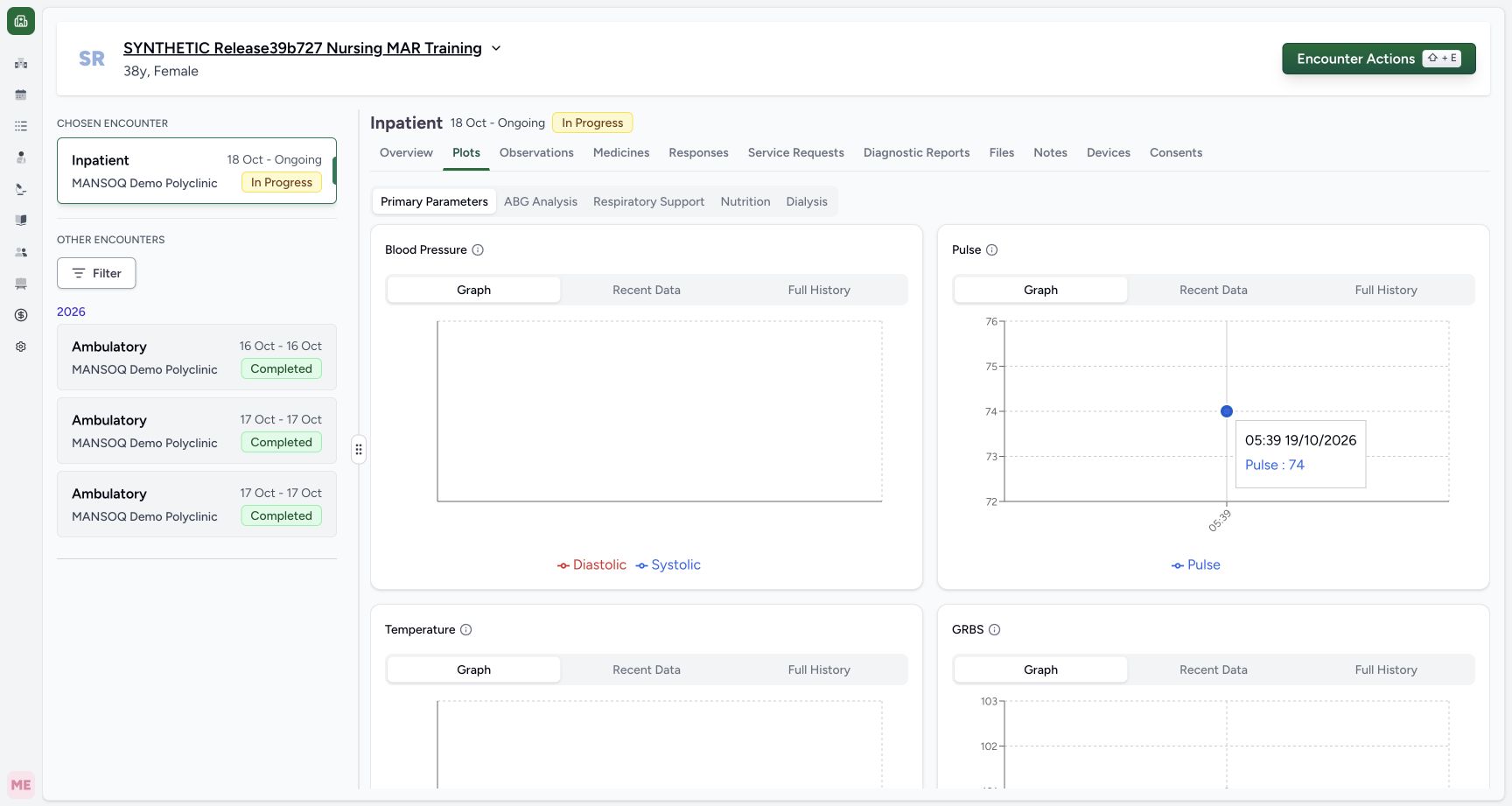
123Actual existing Pulse point tooltip
Capture details
Observed committed 3dfb software on 20 October 2026. Original wide frames and distinct capture times retained. This read-only review makes no new clinical entry, correction or database-conservation measurement.
Image SHA-256 df3a0686be68dc08de11e4b64a5ee1d0978d6762704f3c7fba1c4748157c8efd
- Inspect the real Pulse point: Position the pointer over the existing point; this chart interaction does not save a record.
- Read the tooltip date and time: The actual tooltip reads 05:39 19/10/2026.
- Read Pulse 74: The tooltip shows Pulse: 74, with no unit, author or note displayed.
 123456
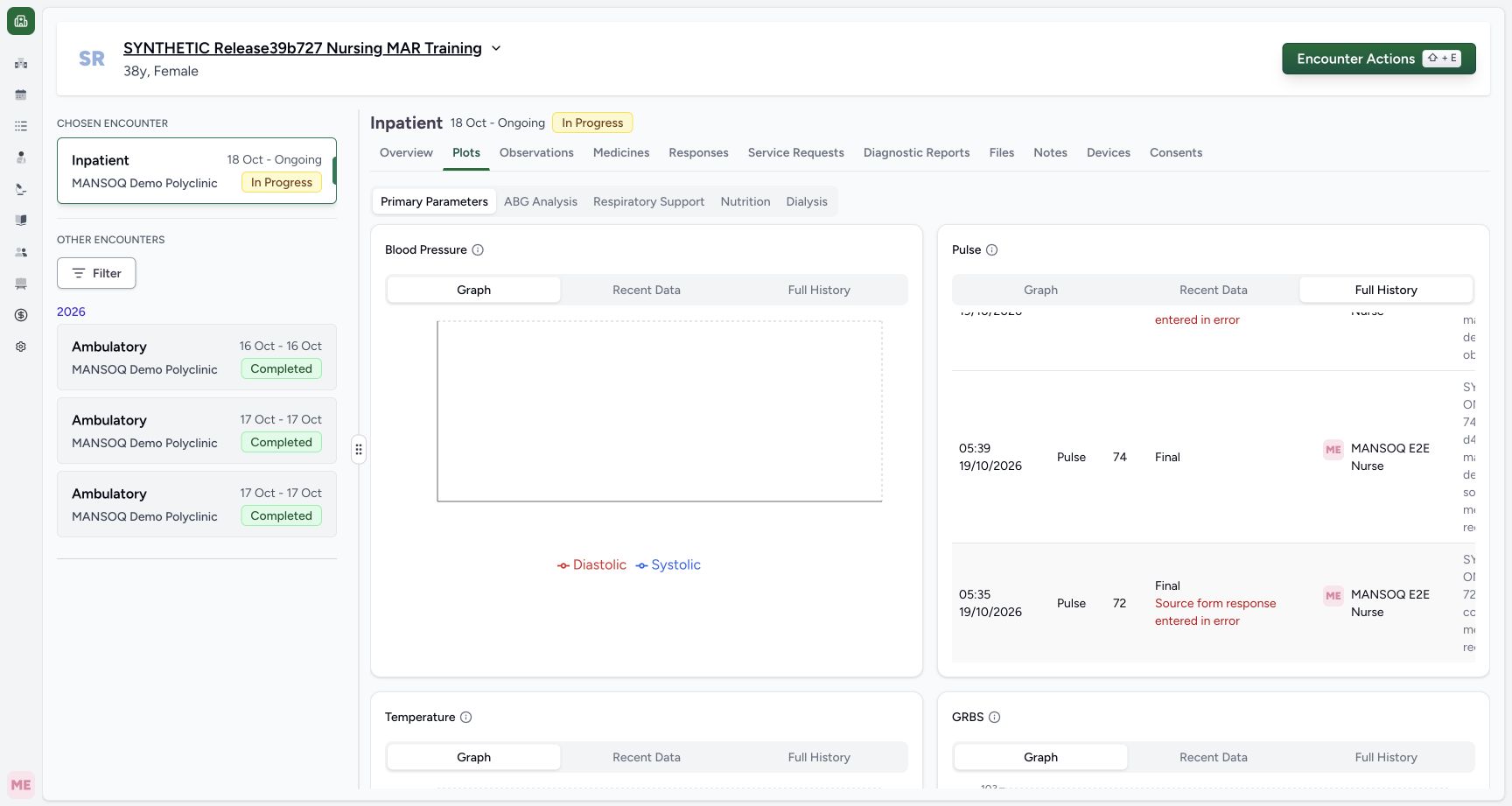
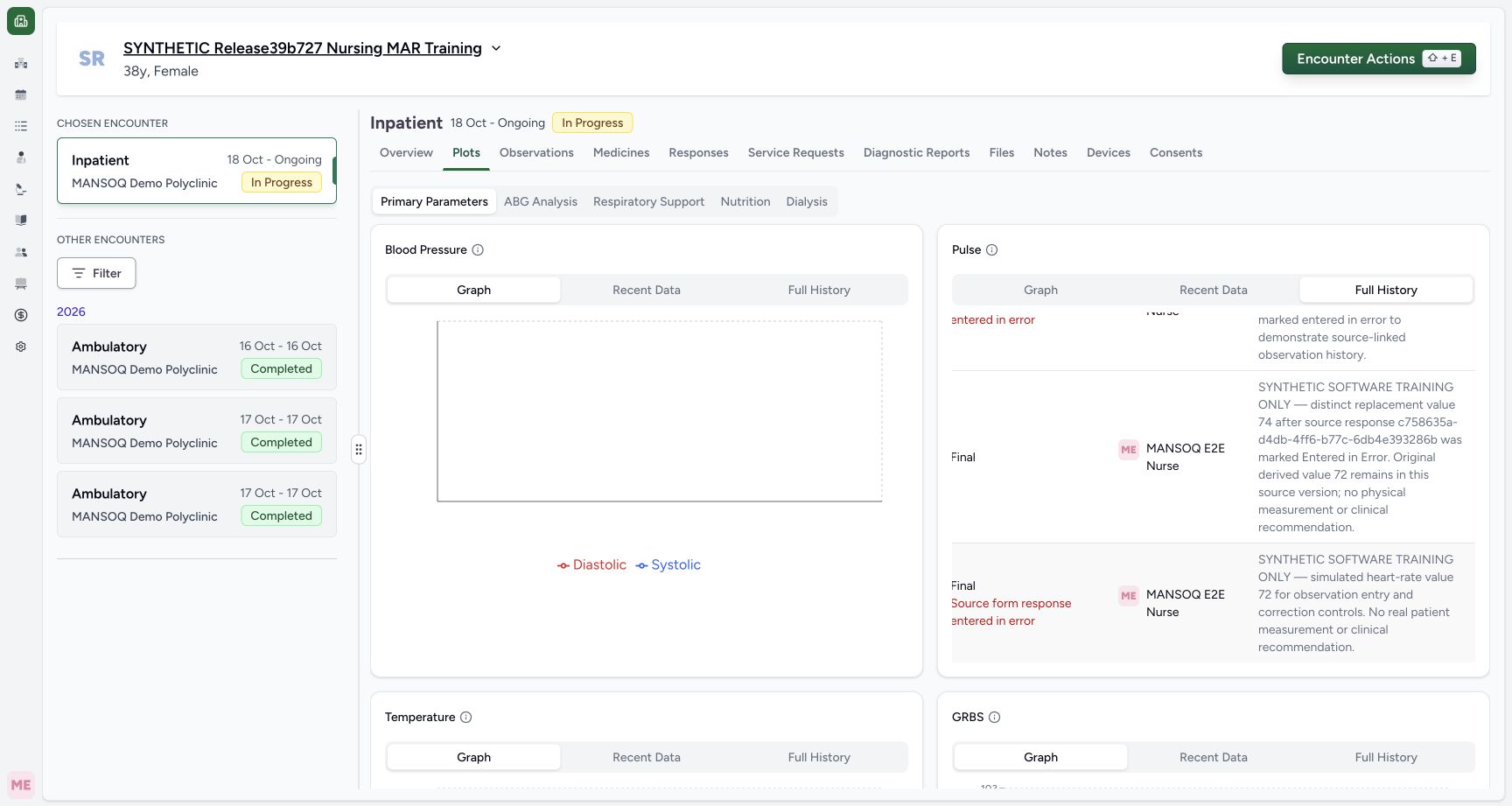
Left-scrolled lower history with retained 72 time and value
Capture details
Observed committed 3dfb software on 20 October 2026. Original wide frames and distinct capture times retained. This read-only review makes no new clinical entry, correction or database-conservation measurement.
Image SHA-256 918d2a8358e72b6cc61718d17e7981eb281ef89b67c60ee0df56459bc2f619c6
- Read the older effective time: The older row reads 05:35 on 19/10/2026.
- Identify the retained 72: The older retained value is 72.
- Read Final independently: Final is the observation status, not a statement that this row is current.
- Read the source-error warning: The void source keeps this retained 72 out of the current chart.
- Compare current 74: The current 74 remains a separate row above.
- Restore Pulse Graph: Choose Graph on the Pulse card after reviewing history.
13 of 13 content blocks have reviewed image alignment.
Before you begin
- Verify the authorised Nurse, synthetic patient and selected encounter before opening Plots. This example keeps the same ongoing Inpatient encounter.
 1234
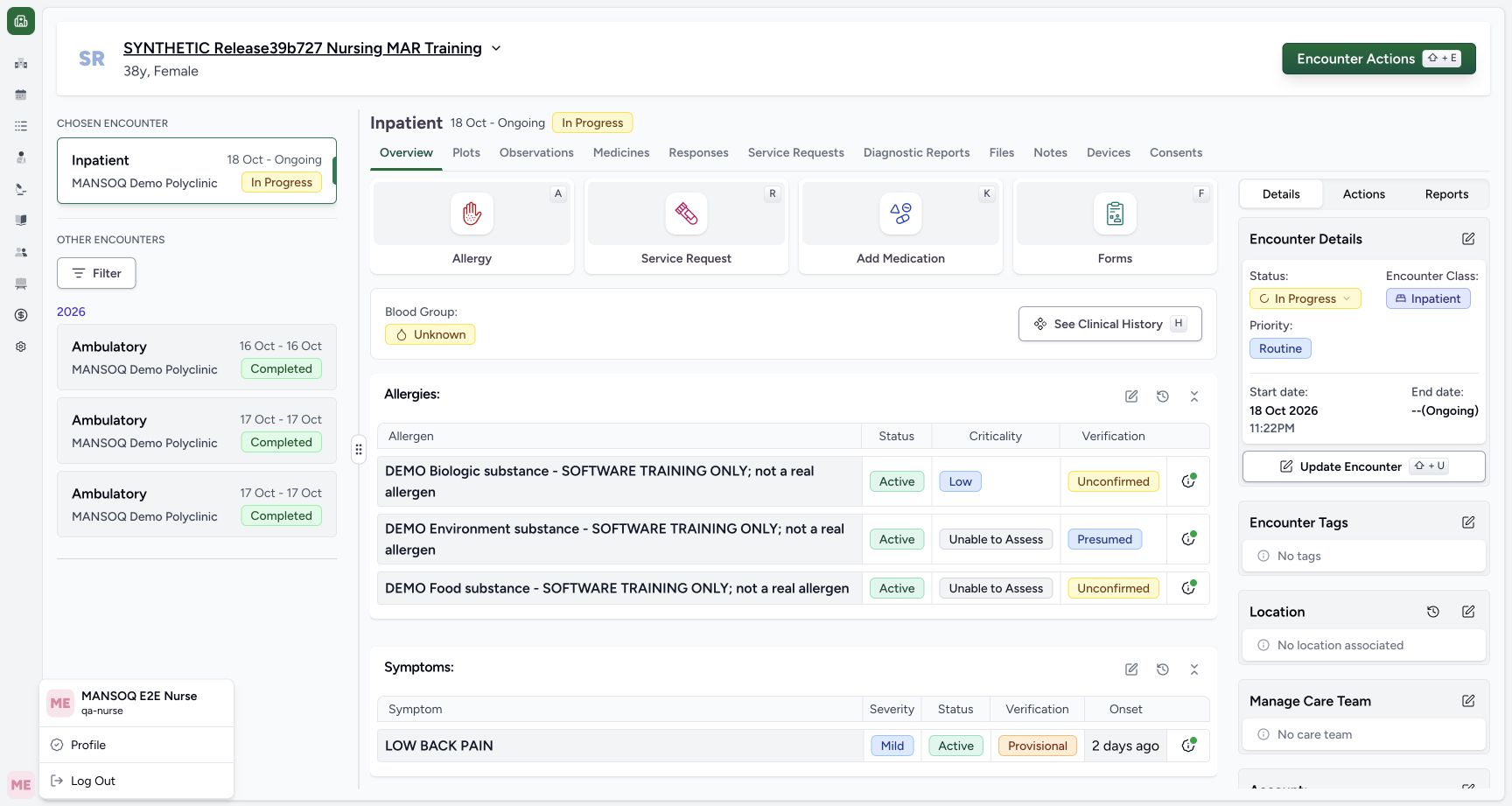
1234Recorded release 3dfb7c9f · 2026-10-20T06:54:09.561Z · 1728 × 921 Nurse identity and selected active synthetic encounter
Capture details
Observed committed 3dfb software on 20 October 2026. Original wide frames and distinct capture times retained. This read-only review makes no new clinical entry, correction or database-conservation measurement.
Image SHA-256
98ac1341590c5fe331c152483e9789fdd4586b68ecc6ceb2dd2434bf6b407f5d- Verify the synthetic patient: Read the assigned fictional patient name.
- Verify the selected encounter: The selected Inpatient encounter is In Progress, 18 October to Ongoing.
- Verify the Nurse account: The open account menu identifies MANSOQ E2E Nurse and qa-nurse.
- Locate Overview: The encounter navigation is separate from the patient account menu.
 12345
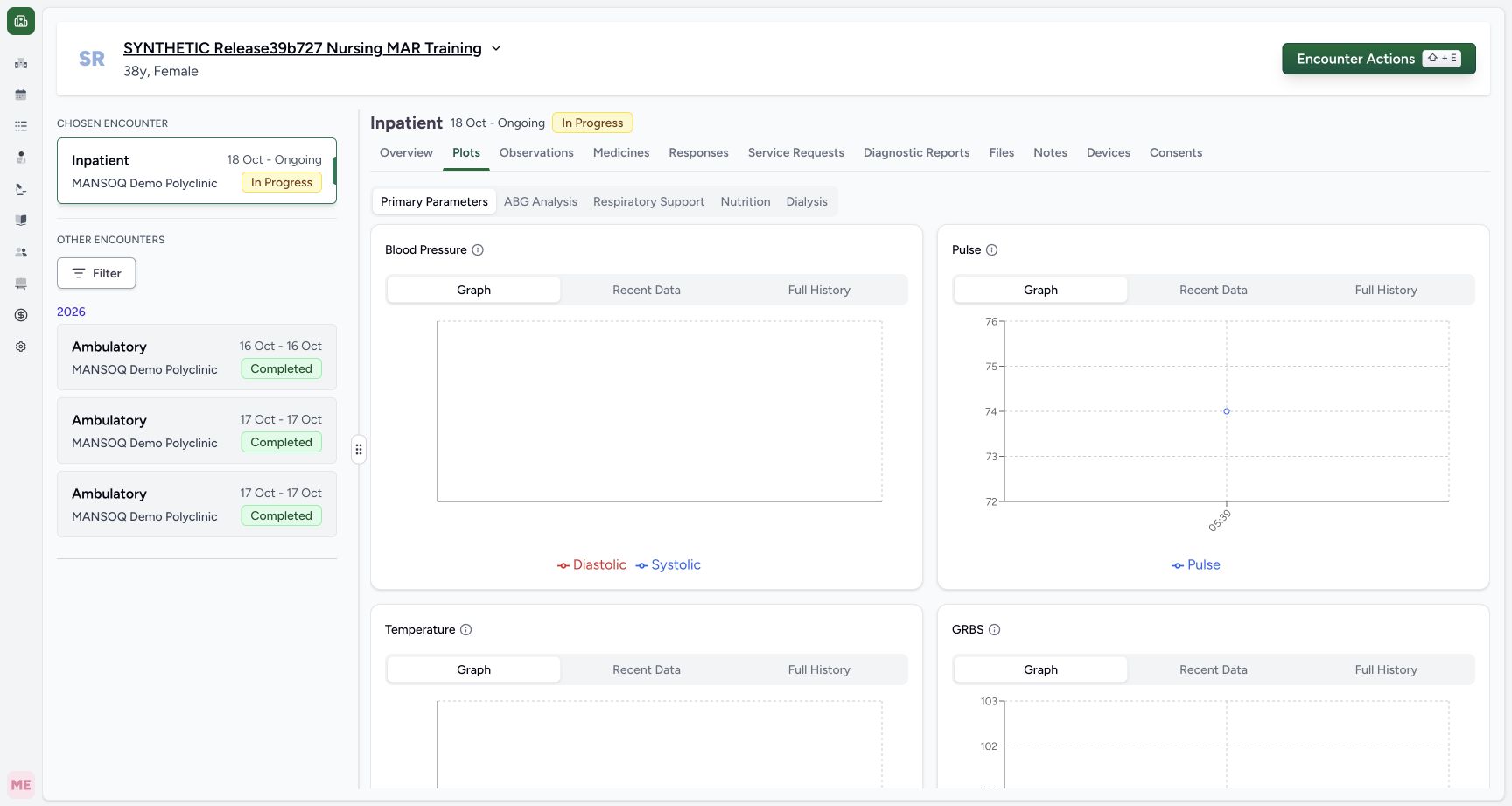
12345Recorded release 3dfb7c9f · 2026-10-20T06:59:16.994Z · 1728 × 921 Primary Parameters and the existing Pulse graph
Capture details
Observed committed 3dfb software on 20 October 2026. Original wide frames and distinct capture times retained. This read-only review makes no new clinical entry, correction or database-conservation measurement.
Image SHA-256
9f49681cb5e45cfa2c00a01b9af6d694d912c193f8b3987ac4b44c28c6c4ded7- Open Plots: Select Plots in the encounter navigation.
- Choose Primary Parameters: Use the configured Primary Parameters group.
- Locate the Pulse card: Use the Pulse card rather than another parameter card.
- Choose Pulse Graph: The Pulse card has its own Graph tab.
- Locate the existing Pulse point: Position the pointer at this actual plotted point to inspect its tooltip.
- Use the existing Pulse 74 point. If the intended point is absent, stop and check the selected context; do not create a reading to match this lesson.12345
Recorded release 3dfb7c9f · 2026-10-20T06:59:16.994Z · 1728 × 921 Primary Parameters and the existing Pulse graph
Capture details
Observed committed 3dfb software on 20 October 2026. Original wide frames and distinct capture times retained. This read-only review makes no new clinical entry, correction or database-conservation measurement.
Image SHA-256
9f49681cb5e45cfa2c00a01b9af6d694d912c193f8b3987ac4b44c28c6c4ded7- Open Plots: Select Plots in the encounter navigation.
- Choose Primary Parameters: Use the configured Primary Parameters group.
- Locate the Pulse card: Use the Pulse card rather than another parameter card.
- Choose Pulse Graph: The Pulse card has its own Graph tab.
- Locate the existing Pulse point: Position the pointer at this actual plotted point to inspect its tooltip.
123Recorded release 3dfb7c9f · 2026-10-20T06:59:29.892Z · 1728 × 921 Actual existing Pulse point tooltip
Capture details
Observed committed 3dfb software on 20 October 2026. Original wide frames and distinct capture times retained. This read-only review makes no new clinical entry, correction or database-conservation measurement.
Image SHA-256
df3a0686be68dc08de11e4b64a5ee1d0978d6762704f3c7fba1c4748157c8efd- Inspect the real Pulse point: Position the pointer over the existing point; this chart interaction does not save a record.
- Read the tooltip date and time: The actual tooltip reads 05:39 19/10/2026.
- Read Pulse 74: The tooltip shows Pulse: 74, with no unit, author or note displayed.
- Keep the review read-only. Existing simulated values 76 and 72 are retained history with source-error context, not new observations to submit or current measurements.
 1234567
Recorded release 3dfb7c9f · 2026-10-20T07:00:09.012Z · 1728 × 921 Full History with 76 Error and current 74 Final
Capture details
Observed committed 3dfb software on 20 October 2026. Original wide frames and distinct capture times retained. This read-only review makes no new clinical entry, correction or database-conservation measurement.
Image SHA-256
59ff035be61fa0e12de64b992b4189049f5317ba3f5f6225a45be0ac78ab99e2- Confirm Full History: The selected tab includes retained error history.
- Read the 76 time: The retained 76 row is dated 06:31 on 19/10/2026.
- Read retained 76: This historical value is not a current chart point.
- Read both error facts: The row shows Entered in Error and Source form response entered in error.
- Read current 74: The second visible row is 74.
- Read Final for 74: The current 74 row has Final without a source-error warning.
- Scroll the history table right: Horizontal-scroll gesture inside the table exposes Notes; this point is a gesture reference, not a button.
123456Recorded release 3dfb7c9f · 2026-10-20T07:00:58.219Z · 1728 × 921 Left-scrolled lower history with retained 72 time and value
Capture details
Observed committed 3dfb software on 20 October 2026. Original wide frames and distinct capture times retained. This read-only review makes no new clinical entry, correction or database-conservation measurement.
Image SHA-256
918d2a8358e72b6cc61718d17e7981eb281ef89b67c60ee0df56459bc2f619c6- Read the older effective time: The older row reads 05:35 on 19/10/2026.
- Identify the retained 72: The older retained value is 72.
- Read Final independently: Final is the observation status, not a statement that this row is current.
- Read the source-error warning: The void source keeps this retained 72 out of the current chart.
- Compare current 74: The current 74 remains a separate row above.
- Restore Pulse Graph: Choose Graph on the Pulse card after reviewing history.
1. Open the correct Pulse graph
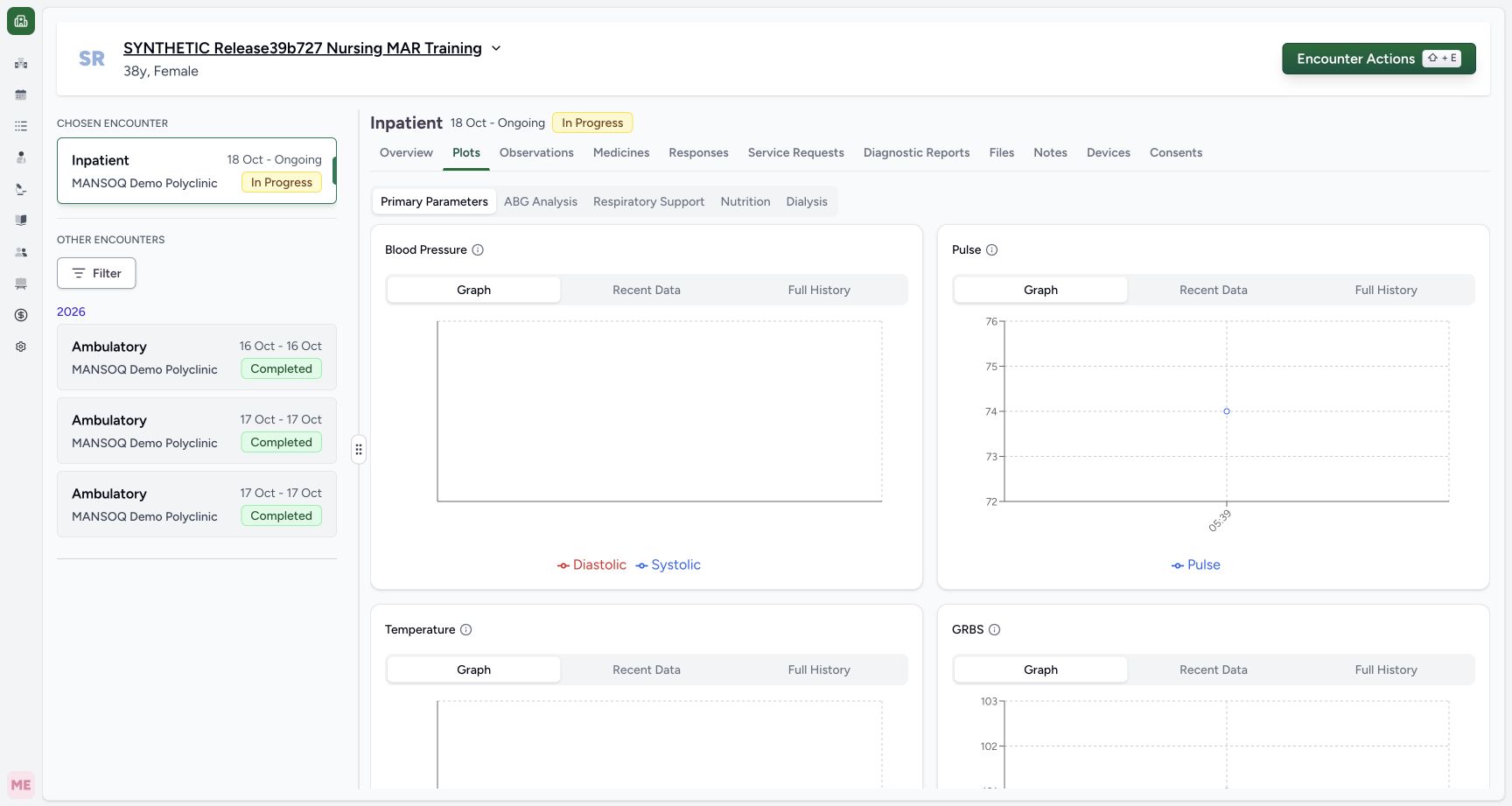
Select Plots, choose Primary Parameters, and locate the Pulse card. Select Graph within that card. The example shows one existing point at 74. Each parameter card has its own Graph, Recent Data and Full History controls.
 1234567891011
Observations with separate date groups and Heart rate note
Capture details
Observed committed 3dfb software on 20 October 2026. Original wide frames and distinct capture times retained. This read-only review makes no new clinical entry, correction or database-conservation measurement.
Image SHA-256 54123bd8ce58cc7056845dc794fb13ea3dda4e45267c38c14e1e2076795bfd9e
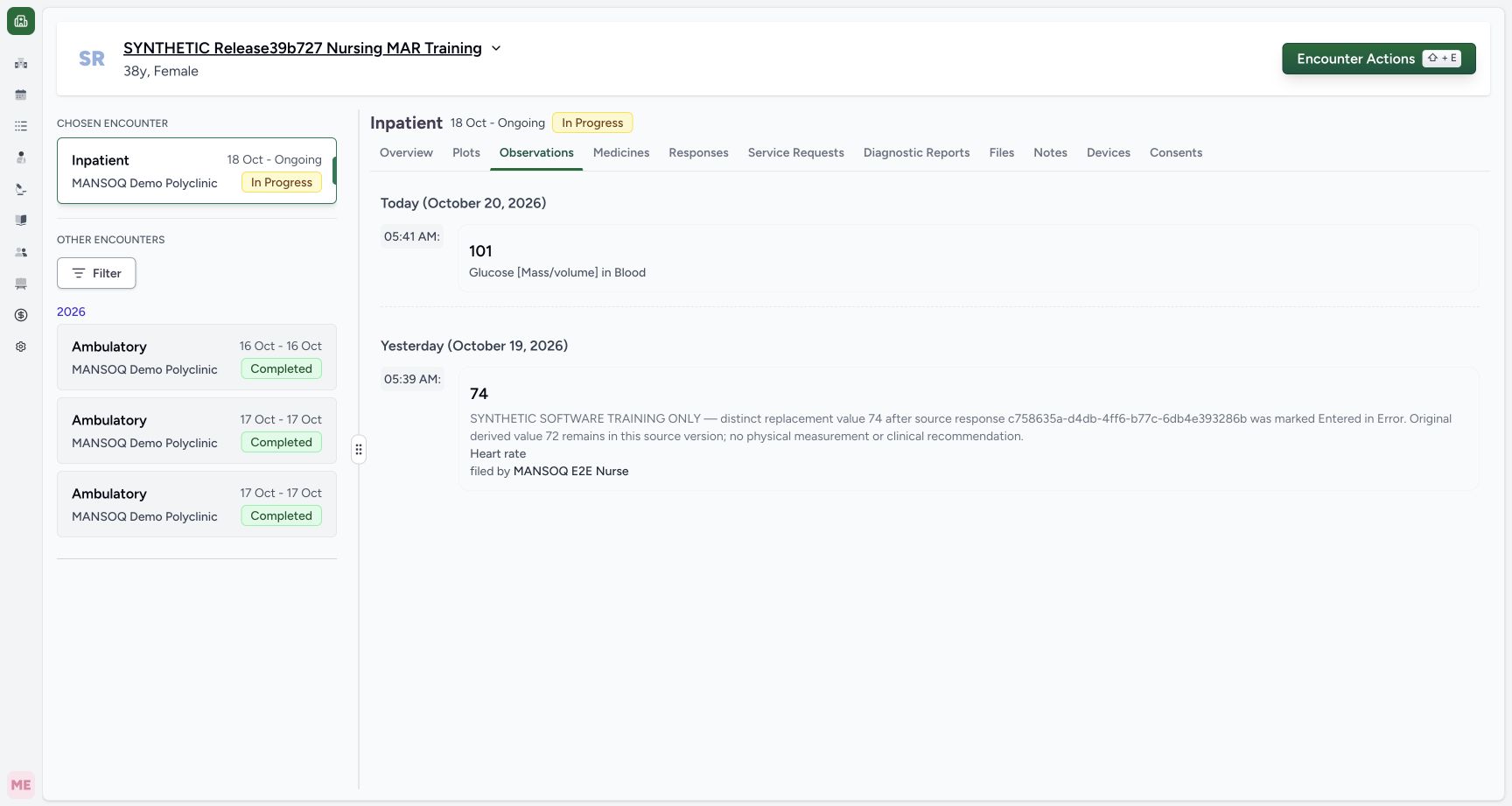
- Confirm Observations: This is the selected encounter Observations tab.
- Read the glucose date group: Today is October 20, 2026 in this capture.
- Read the glucose effective time: The displayed glucose time is 05:41 AM.
- Read the actual observation name: The stored result is labelled Glucose [Mass/volume] in Blood.
- Read the Heart rate date group: Yesterday is October 19, 2026 in this capture.
- Read the Heart rate effective time: The retained Heart rate value is shown at 05:39 AM.
- Read the retained value: The existing simulated Heart rate value is 74.
- Read the complete training note: The note describes an earlier fictional replacement exercise, not a new measurement.
- Read the filing author: The Heart rate card names MANSOQ E2E Nurse; the glucose card above shows no filing author here.
- Return to Overview: Use the same encounter tab and recheck its readings.
- Open Plots: Use this tab for the configured graph views.
12345Primary Parameters and the existing Pulse graph
Capture details
Observed committed 3dfb software on 20 October 2026. Original wide frames and distinct capture times retained. This read-only review makes no new clinical entry, correction or database-conservation measurement.
Image SHA-256 9f49681cb5e45cfa2c00a01b9af6d694d912c193f8b3987ac4b44c28c6c4ded7
- Open Plots: Select Plots in the encounter navigation.
- Choose Primary Parameters: Use the configured Primary Parameters group.
- Locate the Pulse card: Use the Pulse card rather than another parameter card.
- Choose Pulse Graph: The Pulse card has its own Graph tab.
- Locate the existing Pulse point: Position the pointer at this actual plotted point to inspect its tooltip.
2. Position the pointer on the actual point
Position the pointer over the existing Pulse point and wait for its tooltip. The actual example displays 05:39 19/10/2026 and Pulse: 74. This chart interaction reads a point; it does not save a record. The tooltip shown here contains no unit, filing author, note or status.
12345Primary Parameters and the existing Pulse graph
Capture details
Observed committed 3dfb software on 20 October 2026. Original wide frames and distinct capture times retained. This read-only review makes no new clinical entry, correction or database-conservation measurement.
Image SHA-256 9f49681cb5e45cfa2c00a01b9af6d694d912c193f8b3987ac4b44c28c6c4ded7
- Open Plots: Select Plots in the encounter navigation.
- Choose Primary Parameters: Use the configured Primary Parameters group.
- Locate the Pulse card: Use the Pulse card rather than another parameter card.
- Choose Pulse Graph: The Pulse card has its own Graph tab.
- Locate the existing Pulse point: Position the pointer at this actual plotted point to inspect its tooltip.
123Actual existing Pulse point tooltip
Capture details
Observed committed 3dfb software on 20 October 2026. Original wide frames and distinct capture times retained. This read-only review makes no new clinical entry, correction or database-conservation measurement.
Image SHA-256 df3a0686be68dc08de11e4b64a5ee1d0978d6762704f3c7fba1c4748157c8efd
- Inspect the real Pulse point: Position the pointer over the existing point; this chart interaction does not save a record.
- Read the tooltip date and time: The actual tooltip reads 05:39 19/10/2026.
- Read Pulse 74: The tooltip shows Pulse: 74, with no unit, author or note displayed.
3. Compare Recent Data
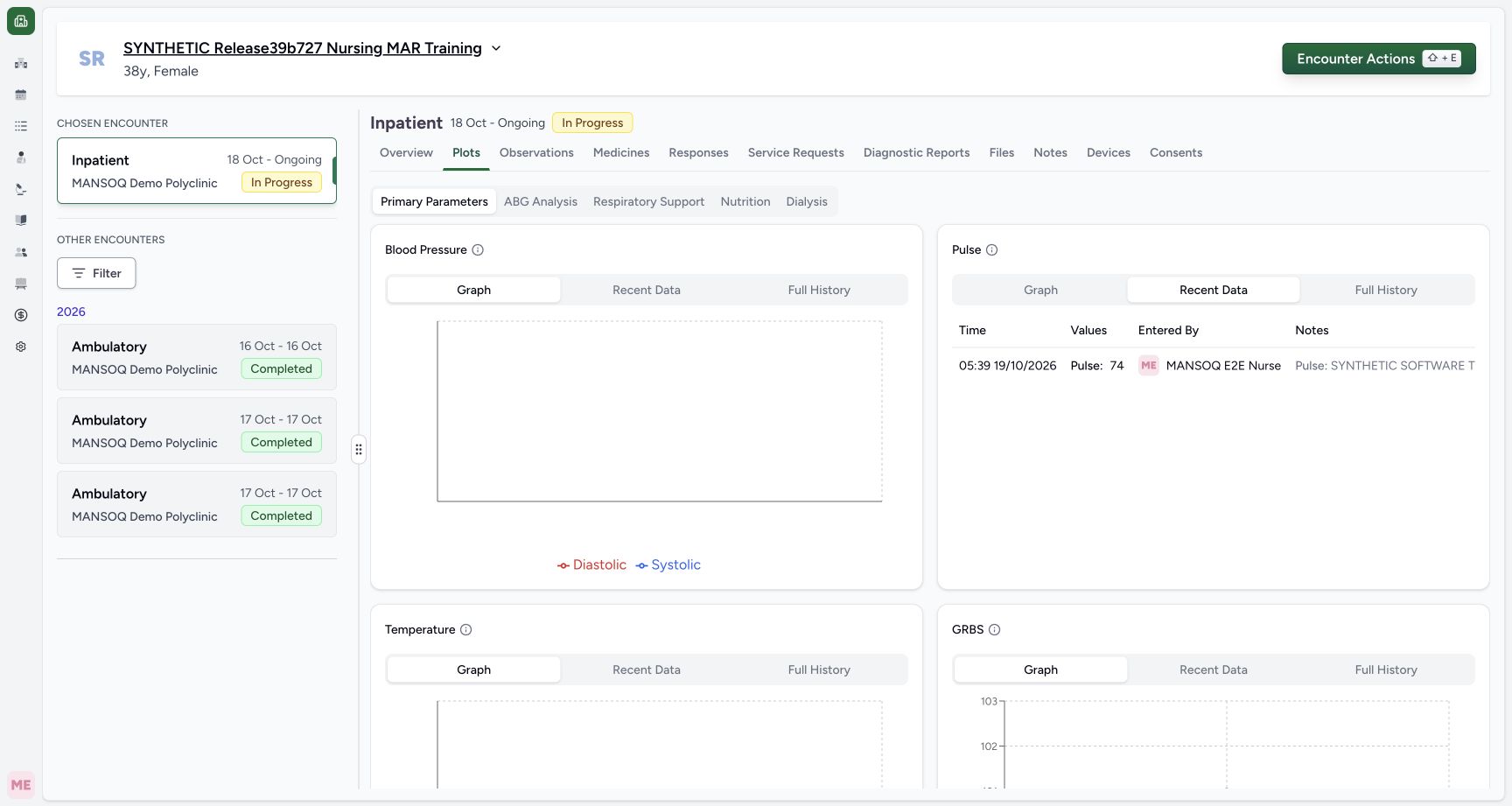
Choose Recent Data on the same Pulse card. Read 05:39 19/10/2026, Pulse: 74 and MANSOQ E2E Nurse. Only the beginning of the long note is visible at the right in this view. Use Observations for the complete current note, or inspect the separate right-scrolled history view below.
 123456
Pulse Recent Data with author and clipped note
Capture details
Observed committed 3dfb software on 20 October 2026. Original wide frames and distinct capture times retained. This read-only review makes no new clinical entry, correction or database-conservation measurement.
Image SHA-256 362d2a9da53ae50e0654415a3c66661142db6f7635d602e248f91387b14ed755
- Choose Recent Data: Use Recent Data on the Pulse card.
- Read the retained time: The row reads 05:39 19/10/2026.
- Read Pulse 74: This is the same current numeric series value.
- Read the entered-by name: The row names MANSOQ E2E Nurse.
- Recognize the clipped note: Only the beginning of the long note is visible in this original view.
- Open Full History: Choose Full History on the same Pulse card.
1234567891011Observations with separate date groups and Heart rate note
Capture details
Observed committed 3dfb software on 20 October 2026. Original wide frames and distinct capture times retained. This read-only review makes no new clinical entry, correction or database-conservation measurement.
Image SHA-256 54123bd8ce58cc7056845dc794fb13ea3dda4e45267c38c14e1e2076795bfd9e
- Confirm Observations: This is the selected encounter Observations tab.
- Read the glucose date group: Today is October 20, 2026 in this capture.
- Read the glucose effective time: The displayed glucose time is 05:41 AM.
- Read the actual observation name: The stored result is labelled Glucose [Mass/volume] in Blood.
- Read the Heart rate date group: Yesterday is October 19, 2026 in this capture.
- Read the Heart rate effective time: The retained Heart rate value is shown at 05:39 AM.
- Read the retained value: The existing simulated Heart rate value is 74.
- Read the complete training note: The note describes an earlier fictional replacement exercise, not a new measurement.
- Read the filing author: The Heart rate card names MANSOQ E2E Nurse; the glucose card above shows no filing author here.
- Return to Overview: Use the same encounter tab and recheck its readings.
- Open Plots: Use this tab for the configured graph views.
4. Open retained Full History
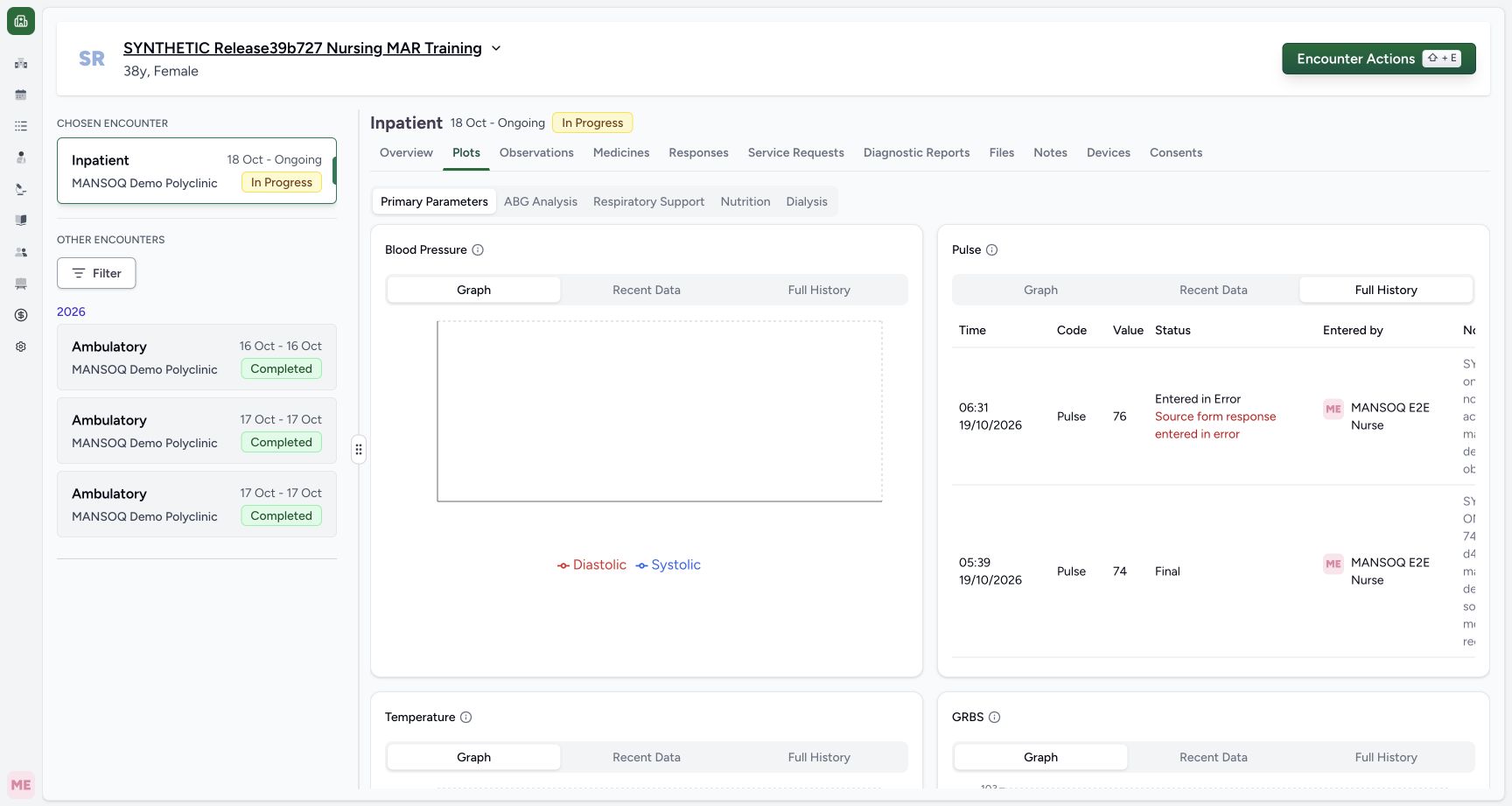
Choose Full History. The first visible row shows 76 at 06:31 on 19/10/2026, with Entered in Error and a separate Source form response entered in error warning. The 74 row below is Final without that warning. History retains records that the current graph omits.
123456Pulse Recent Data with author and clipped note
Capture details
Observed committed 3dfb software on 20 October 2026. Original wide frames and distinct capture times retained. This read-only review makes no new clinical entry, correction or database-conservation measurement.
Image SHA-256 362d2a9da53ae50e0654415a3c66661142db6f7635d602e248f91387b14ed755
- Choose Recent Data: Use Recent Data on the Pulse card.
- Read the retained time: The row reads 05:39 19/10/2026.
- Read Pulse 74: This is the same current numeric series value.
- Read the entered-by name: The row names MANSOQ E2E Nurse.
- Recognize the clipped note: Only the beginning of the long note is visible in this original view.
- Open Full History: Choose Full History on the same Pulse card.
1234567Full History with 76 Error and current 74 Final
Capture details
Observed committed 3dfb software on 20 October 2026. Original wide frames and distinct capture times retained. This read-only review makes no new clinical entry, correction or database-conservation measurement.
Image SHA-256 59ff035be61fa0e12de64b992b4189049f5317ba3f5f6225a45be0ac78ab99e2
- Confirm Full History: The selected tab includes retained error history.
- Read the 76 time: The retained 76 row is dated 06:31 on 19/10/2026.
- Read retained 76: This historical value is not a current chart point.
- Read both error facts: The row shows Entered in Error and Source form response entered in error.
- Read current 74: The second visible row is 74.
- Read Final for 74: The current 74 row has Final without a source-error warning.
- Scroll the history table right: Horizontal-scroll gesture inside the table exposes Notes; this point is a gesture reference, not a button.
5. Scroll right to read the notes
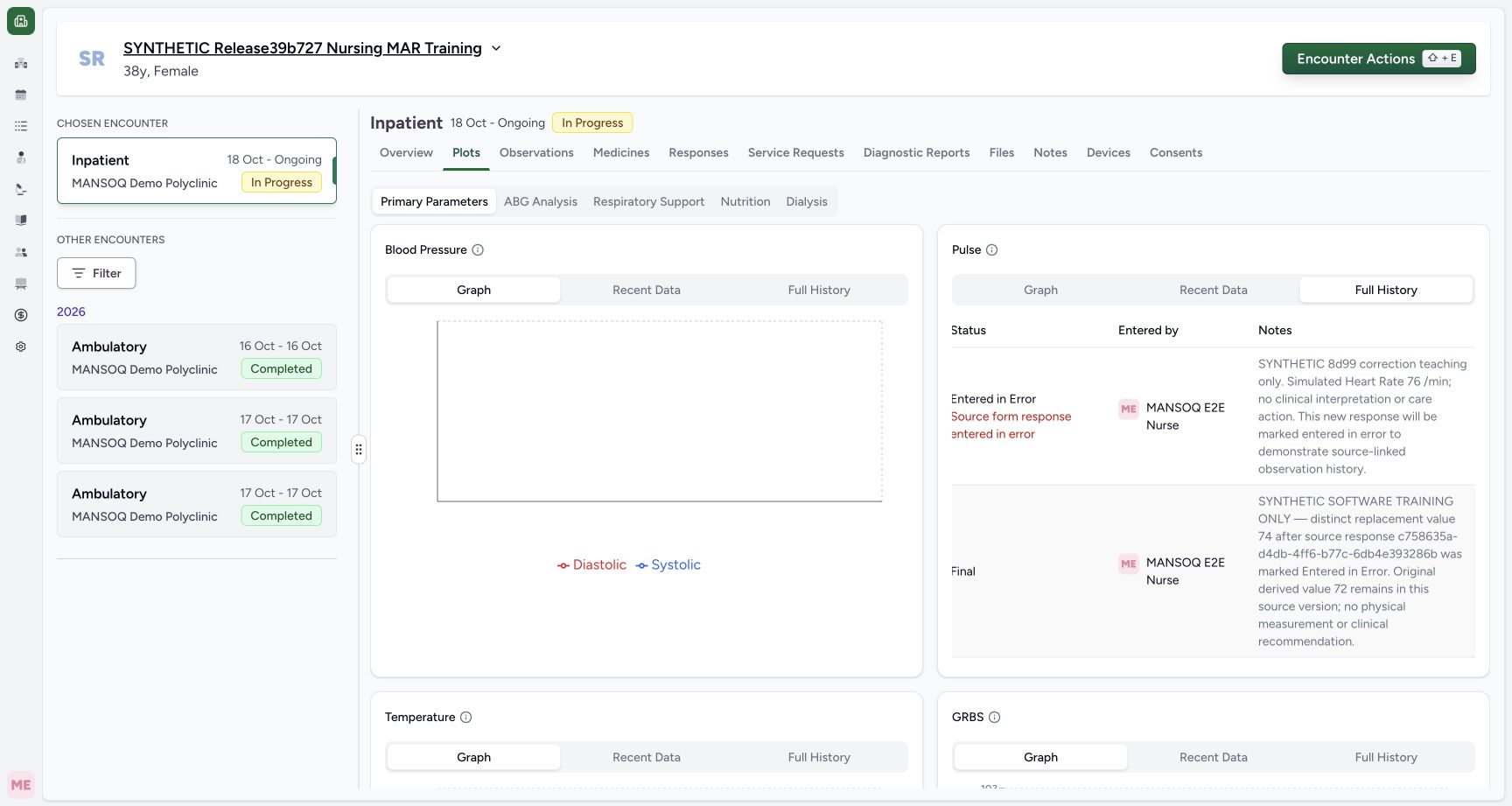
Scroll horizontally inside the history table to the right. Status, Entered by and the complete Notes become readable for the first two rows. Time and Value are then offscreen to the left. The left-column and right-column pictures are separate genuine views; compare them without assuming every column is visible at once.
1234567Full History with 76 Error and current 74 Final
Capture details
Observed committed 3dfb software on 20 October 2026. Original wide frames and distinct capture times retained. This read-only review makes no new clinical entry, correction or database-conservation measurement.
Image SHA-256 59ff035be61fa0e12de64b992b4189049f5317ba3f5f6225a45be0ac78ab99e2
- Confirm Full History: The selected tab includes retained error history.
- Read the 76 time: The retained 76 row is dated 06:31 on 19/10/2026.
- Read retained 76: This historical value is not a current chart point.
- Read both error facts: The row shows Entered in Error and Source form response entered in error.
- Read current 74: The second visible row is 74.
- Read Final for 74: The current 74 row has Final without a source-error warning.
- Scroll the history table right: Horizontal-scroll gesture inside the table exposes Notes; this point is a gesture reference, not a button.
 1234
1234Right-scrolled history with Status, author and full Notes
Capture details
Observed committed 3dfb software on 20 October 2026. Original wide frames and distinct capture times retained. This read-only review makes no new clinical entry, correction or database-conservation measurement.
Image SHA-256 fdcfefbc10952bea86fef037b68bea0ffe1273d23129c83ad69b93e8774a57a7
- Read the 76 source warning: This separate right-scrolled view retains the error status and source warning.
- Read the full 76 note: The note describes the earlier synthetic source-linked correction.
- Read the full 74 note: The retained 74 note is fully readable here; Time and Value are offscreen to the left.
- Scroll downward inside history: Scroll within the history table to reach the older row; this is a gesture reference, not a button.
6. Inspect the older source-error row
Scroll down within the history table. The older row has observation status Final and a separate Source form response entered in error warning. Its note identifies the simulated 72 example. Scroll the same table back left: the value is 72 at 05:35 on 19/10/2026, below the separate 74 at 05:39. Final alone does not make this retained row current when its source is marked in error.
1234Right-scrolled history with Status, author and full Notes
Capture details
Observed committed 3dfb software on 20 October 2026. Original wide frames and distinct capture times retained. This read-only review makes no new clinical entry, correction or database-conservation measurement.
Image SHA-256 fdcfefbc10952bea86fef037b68bea0ffe1273d23129c83ad69b93e8774a57a7
- Read the 76 source warning: This separate right-scrolled view retains the error status and source warning.
- Read the full 76 note: The note describes the earlier synthetic source-linked correction.
- Read the full 74 note: The retained 74 note is fully readable here; Time and Value are offscreen to the left.
- Scroll downward inside history: Scroll within the history table to reach the older row; this is a gesture reference, not a button.
 12345
12345Lower history with separate Final and source-error warning
Capture details
Observed committed 3dfb software on 20 October 2026. Original wide frames and distinct capture times retained. This read-only review makes no new clinical entry, correction or database-conservation measurement.
Image SHA-256 5e5e4d6db6fce4edd90ec4f5c1e40c0a35074ed14fae4418f47fcb5ad9d69655
- Read current Final: The middle row remains Final for the previously identified 74.
- Read the older observation status: The older row still says Final.
- Read the independent source warning: The older row also says Source form response entered in error.
- Read the older training note: The note identifies simulated 72; its clinical source warning remains a separate fact.
- Scroll the same history table left: Horizontal-scroll gesture back to Time and Value; this is not a button.
123456Left-scrolled lower history with retained 72 time and value
Capture details
Observed committed 3dfb software on 20 October 2026. Original wide frames and distinct capture times retained. This read-only review makes no new clinical entry, correction or database-conservation measurement.
Image SHA-256 918d2a8358e72b6cc61718d17e7981eb281ef89b67c60ee0df56459bc2f619c6
- Read the older effective time: The older row reads 05:35 on 19/10/2026.
- Identify the retained 72: The older retained value is 72.
- Read Final independently: Final is the observation status, not a statement that this row is current.
- Read the source-error warning: The void source keeps this retained 72 out of the current chart.
- Compare current 74: The current 74 remains a separate row above.
- Restore Pulse Graph: Choose Graph on the Pulse card after reviewing history.
7. Restore Graph and check its current scope
Select Graph on the Pulse card. The current graph returns to the single existing 74 point. The retained 76 and 72 rows are absent from the current graph but remain in Full History. This review makes no correction, deletion or replacement submission.
123456Left-scrolled lower history with retained 72 time and value
Capture details
Observed committed 3dfb software on 20 October 2026. Original wide frames and distinct capture times retained. This read-only review makes no new clinical entry, correction or database-conservation measurement.
Image SHA-256 918d2a8358e72b6cc61718d17e7981eb281ef89b67c60ee0df56459bc2f619c6
- Read the older effective time: The older row reads 05:35 on 19/10/2026.
- Identify the retained 72: The older retained value is 72.
- Read Final independently: Final is the observation status, not a statement that this row is current.
- Read the source-error warning: The void source keeps this retained 72 out of the current chart.
- Compare current 74: The current 74 remains a separate row above.
- Restore Pulse Graph: Choose Graph on the Pulse card after reviewing history.
 123
123Pulse Graph restored after retained-history review
Capture details
Observed committed 3dfb software on 20 October 2026. Original wide frames and distinct capture times retained. This read-only review makes no new clinical entry, correction or database-conservation measurement.
Image SHA-256 9f49681cb5e45cfa2c00a01b9af6d694d912c193f8b3987ac4b44c28c6c4ded7
- Confirm Graph restored: Graph is selected again on the same Pulse card.
- Recheck the single current point: The chart returns to the existing 74 point; retained 76 and 72 are not current plotted values.
- Return to Overview: Use the same encounter navigation to finish the read-only review.
Distinguish the two status facts
Observation status and source-response validity are different facts. The 76 row is itself Entered in Error and also has the source warning. The older 72 row still says Final but has the same source warning. In this release current observation and analysis queries exclude either an entered-in-error observation or one whose source response is entered in error; explicit Full History retains both.
1234567Full History with 76 Error and current 74 Final
Capture details
Observed committed 3dfb software on 20 October 2026. Original wide frames and distinct capture times retained. This read-only review makes no new clinical entry, correction or database-conservation measurement.
Image SHA-256 59ff035be61fa0e12de64b992b4189049f5317ba3f5f6225a45be0ac78ab99e2
- Confirm Full History: The selected tab includes retained error history.
- Read the 76 time: The retained 76 row is dated 06:31 on 19/10/2026.
- Read retained 76: This historical value is not a current chart point.
- Read both error facts: The row shows Entered in Error and Source form response entered in error.
- Read current 74: The second visible row is 74.
- Read Final for 74: The current 74 row has Final without a source-error warning.
- Scroll the history table right: Horizontal-scroll gesture inside the table exposes Notes; this point is a gesture reference, not a button.
12345Lower history with separate Final and source-error warning
Capture details
Observed committed 3dfb software on 20 October 2026. Original wide frames and distinct capture times retained. This read-only review makes no new clinical entry, correction or database-conservation measurement.
Image SHA-256 5e5e4d6db6fce4edd90ec4f5c1e40c0a35074ed14fae4418f47fcb5ad9d69655
- Read current Final: The middle row remains Final for the previously identified 74.
- Read the older observation status: The older row still says Final.
- Read the independent source warning: The older row also says Source form response entered in error.
- Read the older training note: The note identifies simulated 72; its clinical source warning remains a separate fact.
- Scroll the same history table left: Horizontal-scroll gesture back to Time and Value; this is not a button.
123456Left-scrolled lower history with retained 72 time and value
Capture details
Observed committed 3dfb software on 20 October 2026. Original wide frames and distinct capture times retained. This read-only review makes no new clinical entry, correction or database-conservation measurement.
Image SHA-256 918d2a8358e72b6cc61718d17e7981eb281ef89b67c60ee0df56459bc2f619c6
- Read the older effective time: The older row reads 05:35 on 19/10/2026.
- Identify the retained 72: The older retained value is 72.
- Read Final independently: Final is the observation status, not a statement that this row is current.
- Read the source-error warning: The void source keeps this retained 72 out of the current chart.
- Compare current 74: The current 74 remains a separate row above.
- Restore Pulse Graph: Choose Graph on the Pulse card after reviewing history.
123Pulse Graph restored after retained-history review
Capture details
Observed committed 3dfb software on 20 October 2026. Original wide frames and distinct capture times retained. This read-only review makes no new clinical entry, correction or database-conservation measurement.
Image SHA-256 9f49681cb5e45cfa2c00a01b9af6d694d912c193f8b3987ac4b44c28c6c4ded7
- Confirm Graph restored: Graph is selected again on the same Pulse card.
- Recheck the single current point: The chart returns to the existing 74 point; retained 76 and 72 are not current plotted values.
- Return to Overview: Use the same encounter navigation to finish the read-only review.
Keep the review within the displayed evidence
These views are filtered to the selected encounter in this version. The graph tooltip uses displayed local minute precision and does not establish exact seconds, units, an alert threshold or a clinical interpretation. The example demonstrates Nurse reading controls and existing saved context, not every vital type, device ingestion, new entry, correction or every facility role.
1234Nurse identity and selected active synthetic encounter
Capture details
Observed committed 3dfb software on 20 October 2026. Original wide frames and distinct capture times retained. This read-only review makes no new clinical entry, correction or database-conservation measurement.
Image SHA-256 98ac1341590c5fe331c152483e9789fdd4586b68ecc6ceb2dd2434bf6b407f5d
- Verify the synthetic patient: Read the assigned fictional patient name.
- Verify the selected encounter: The selected Inpatient encounter is In Progress, 18 October to Ongoing.
- Verify the Nurse account: The open account menu identifies MANSOQ E2E Nurse and qa-nurse.
- Locate Overview: The encounter navigation is separate from the patient account menu.
123Actual existing Pulse point tooltip
Capture details
Observed committed 3dfb software on 20 October 2026. Original wide frames and distinct capture times retained. This read-only review makes no new clinical entry, correction or database-conservation measurement.
Image SHA-256 df3a0686be68dc08de11e4b64a5ee1d0978d6762704f3c7fba1c4748157c8efd
- Inspect the real Pulse point: Position the pointer over the existing point; this chart interaction does not save a record.
- Read the tooltip date and time: The actual tooltip reads 05:39 19/10/2026.
- Read Pulse 74: The tooltip shows Pulse: 74, with no unit, author or note displayed.
123456Pulse Recent Data with author and clipped note
Capture details
Observed committed 3dfb software on 20 October 2026. Original wide frames and distinct capture times retained. This read-only review makes no new clinical entry, correction or database-conservation measurement.
Image SHA-256 362d2a9da53ae50e0654415a3c66661142db6f7635d602e248f91387b14ed755
- Choose Recent Data: Use Recent Data on the Pulse card.
- Read the retained time: The row reads 05:39 19/10/2026.
- Read Pulse 74: This is the same current numeric series value.
- Read the entered-by name: The row names MANSOQ E2E Nurse.
- Recognize the clipped note: Only the beginning of the long note is visible in this original view.
- Open Full History: Choose Full History on the same Pulse card.
123456Left-scrolled lower history with retained 72 time and value
Capture details
Observed committed 3dfb software on 20 October 2026. Original wide frames and distinct capture times retained. This read-only review makes no new clinical entry, correction or database-conservation measurement.
Image SHA-256 918d2a8358e72b6cc61718d17e7981eb281ef89b67c60ee0df56459bc2f619c6
- Read the older effective time: The older row reads 05:35 on 19/10/2026.
- Identify the retained 72: The older retained value is 72.
- Read Final independently: Final is the observation status, not a statement that this row is current.
- Read the source-error warning: The void source keeps this retained 72 out of the current chart.
- Compare current 74: The current 74 remains a separate row above.
- Restore Pulse Graph: Choose Graph on the Pulse card after reviewing history.
Source evidence
Every citation uses this exact committed version. The private source repository requires access.
- repositories/platform/mansoq-web/src/pages/Encounters/tabs/overview.tsx:38 ·
3dfb7c9f519fb5b4cd4452439f3c12346bf58319Source file checksum
c085d98e3b4b6e6cb2e217faa57398e57fcd00ae5e4839fc7151567991b78e4a - repositories/platform/mansoq-web/src/components/Patient/vitals/list.tsx:32 ·
3dfb7c9f519fb5b4cd4452439f3c12346bf58319Source file checksum
84466861199ba6e44f7a5982a109480a99aeb5f5fd18148f494e909f0023c030 - repositories/platform/mansoq-web/src/components/Patient/vitals/VitalsTable.tsx:29 ·
3dfb7c9f519fb5b4cd4452439f3c12346bf58319Source file checksum
fb5d6ea0be415e4e34204b03efa619d1dfc056ee34028ad73d37d55f8dd18aa4 - repositories/platform/mansoq-web/src/pages/Encounters/tabs/observations.tsx:71 ·
3dfb7c9f519fb5b4cd4452439f3c12346bf58319Source file checksum
652b6beefcdf45cd3b2813248c1d020583d7593fd0791819abd3fdc4f431f949 - repositories/platform/mansoq-web/src/pages/Encounters/tabs/plots.tsx:24 ·
3dfb7c9f519fb5b4cd4452439f3c12346bf58319Source file checksum
343dc44ffc4e98a0a1f78abf1940fea9216bc8f52374cf3da1c6fefce2da18f9 - repositories/platform/mansoq-web/src/components/Common/Charts/ObservationChart.tsx:118 ·
3dfb7c9f519fb5b4cd4452439f3c12346bf58319Source file checksum
dcfb2e78c7a32f179608af2bfbfc447914ec0768636453b97be6e9d04fd272d8 - repositories/platform/mansoq-web/src/components/Common/Charts/ObservationHistoryTable.tsx:59 ·
3dfb7c9f519fb5b4cd4452439f3c12346bf58319Source file checksum
fff5b8e4aa2317831c8e5eacdec43d734d21310b74955e6b13ee45fc857e343c - repositories/platform/mansoq-web/src/types/emr/observation/observationApi.ts:11 ·
3dfb7c9f519fb5b4cd4452439f3c12346bf58319Source file checksum
3936e5d92fc26df4fc215b75d518ab04e3ce10904ad1b12447c3c8732e46cdfa - repositories/platform/mansoq-core/mansoq/emr/api/viewsets/observation.py:60 ·
3dfb7c9f519fb5b4cd4452439f3c12346bf58319Source file checksum
4ba09107744a6081444385ab3b7917440595e41d94c9f7bca19d09e7e0694fcf - repositories/platform/mansoq-core/mansoq/emr/resources/observation/queries.py:6 ·
3dfb7c9f519fb5b4cd4452439f3c12346bf58319Source file checksum
98332703807886682e9a76f9f78f160c5d18bb06c4fd5c79389570ca584907ca - repositories/platform/mansoq-web/public/config/plots.json:1 ·
3dfb7c9f519fb5b4cd4452439f3c12346bf58319Source file checksum
8a38f72c6b3c55df726baf7d0091748838bdf77cbd9af78cd4324354dc3e7345