 MANSOQ
 Clinical care · VERSION 3dfb7c9f
Reset one selected administration draft while retaining another
See what deselecting and reselecting one request removes, and verify that the other request keeps its status, note and time.
Nurse
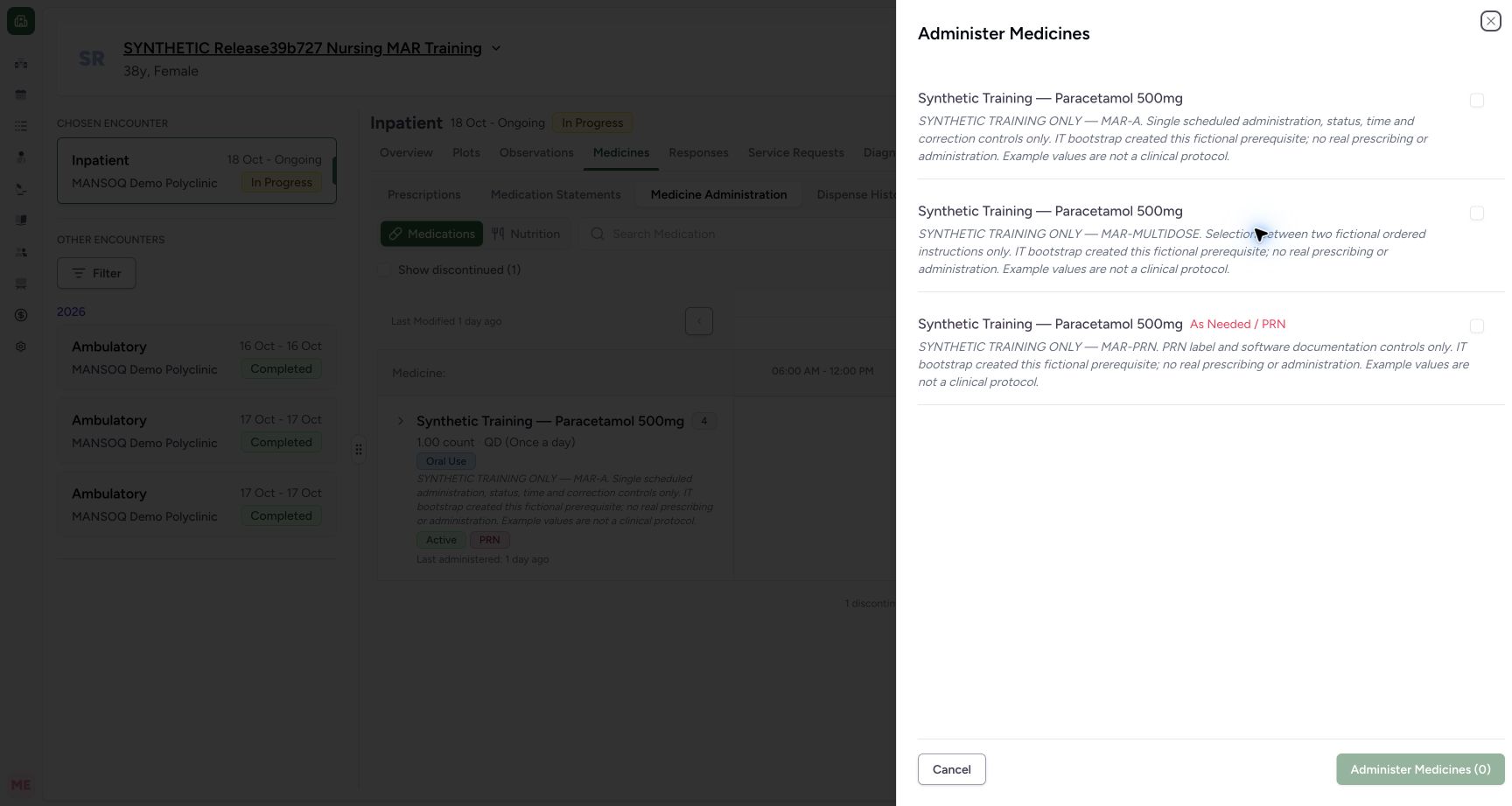 123
123Reopened sheet with zero selected requests
Capture details
Captured controls from committed release 3dfb. Fictional scheduled MAR-A and PRN requests; one mixed batch save, normal reload and unchanged saved-detail Cancels. No medicine was administered and no clinical omission, refusal, infusion or care decision is represented.
Image SHA-256 b659bc43673613198934108e588dcaee548bd66fbb41cf5526d65ae72e61bdfd
- Choose MAR-A again: Reopening after Cancel starts with unchecked requests.
- Choose the PRN request again: Select these two existing requests only.
- Read zero before selection: The new sheet has no selected items.
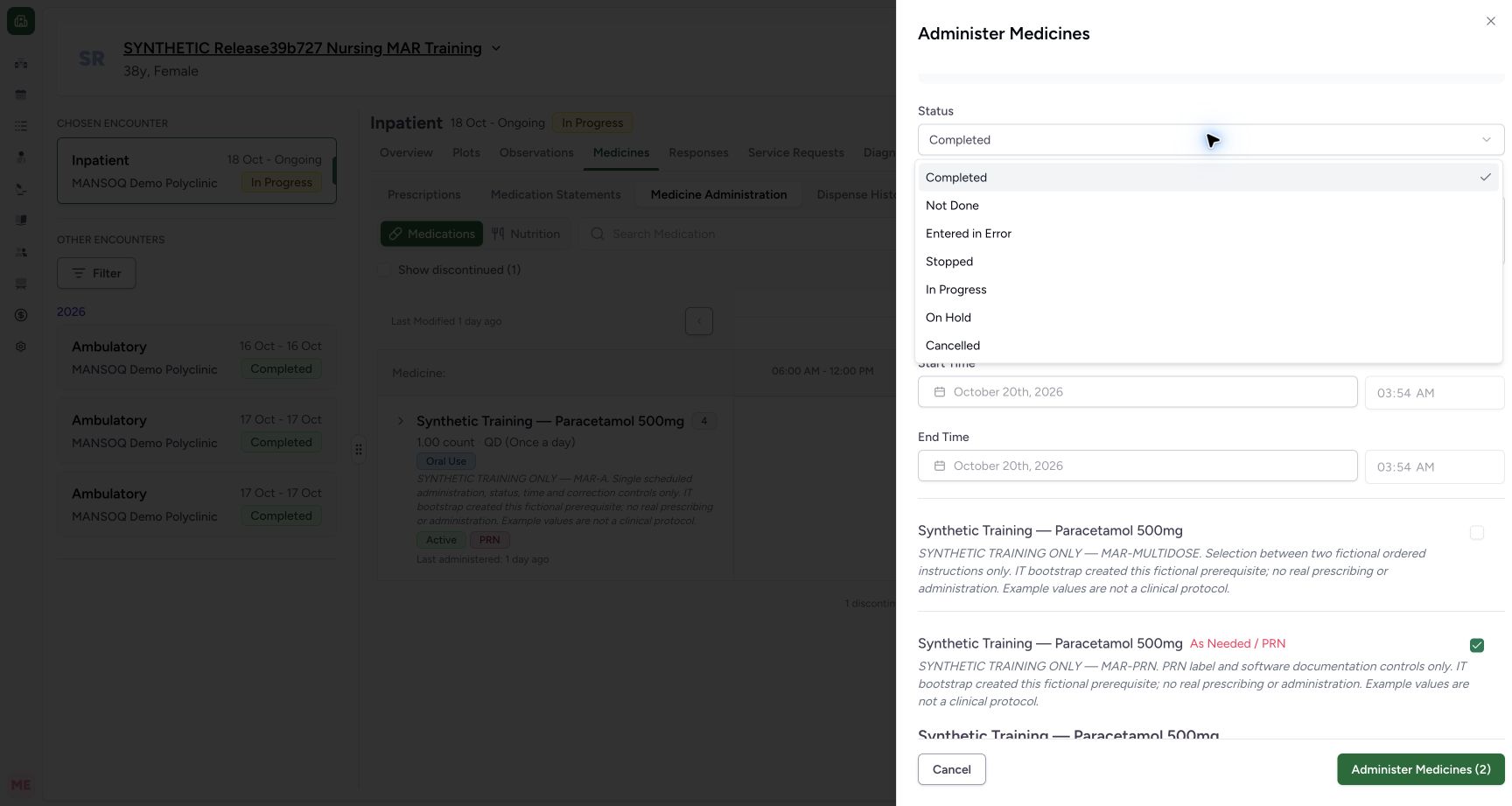 1
1MAR-A status options
Capture details
Captured controls from committed release 3dfb. Fictional scheduled MAR-A and PRN requests; one mixed batch save, normal reload and unchanged saved-detail Cancels. No medicine was administered and no clinical omission, refusal, infusion or care decision is represented.
Image SHA-256 3e8c8cb080bcb405d7bb9a94f89e1458c616e7c99465c6fdee5896ad814cdf49
- Choose Not Done for MAR-A: Only this selected request receives that draft status.
11 of 11 content blocks have reviewed image alignment. Missing overview or prerequisite images remain open.
Before you begin
- Use an authorised Nurse account on an assigned fictional software-training case with an active encounter and existing medication requests. The captured account is MANSOQ E2E Nurse / qa-nurse.
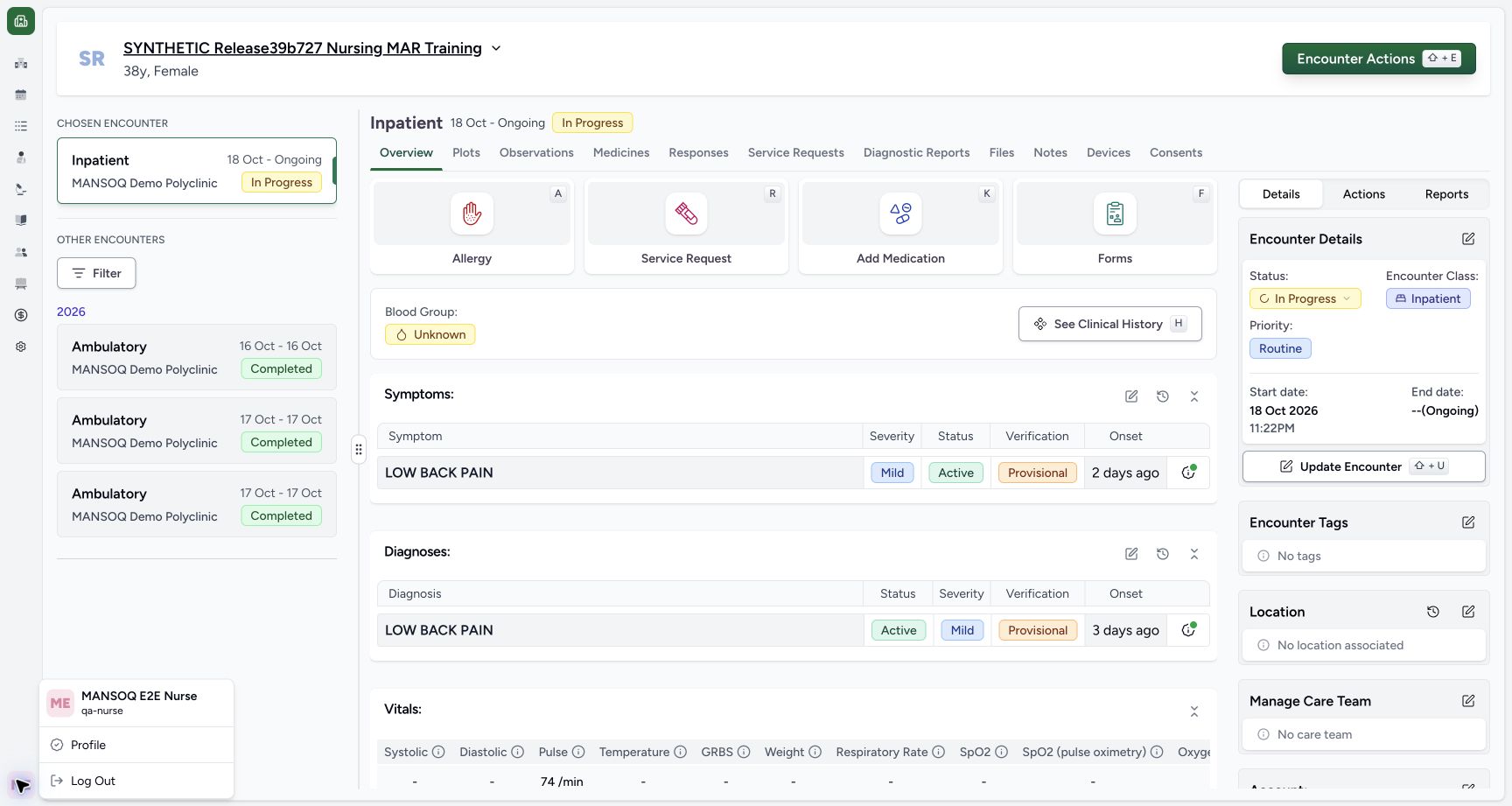 1234
1234Recorded release 3dfb7c9f · 2026-10-20T00:52:40.941Z · 1728 × 921 Nurse account and synthetic encounter context
Capture details
Captured controls from committed release 3dfb. Fictional scheduled MAR-A and PRN requests; one mixed batch save, normal reload and unchanged saved-detail Cancels. No medicine was administered and no clinical omission, refusal, infusion or care decision is represented.
Image SHA-256
ff9e1b43b6c84bf913c744173bc372d3dd2b54c28216a6d5ed86934723b6fedb- Check the ordinary Nurse account: The menu shows MANSOQ E2E Nurse and qa-nurse.
- Match the fictional training case: Use the assigned synthetic patient and active inpatient encounter.
- Check In Progress: Keep the same active inpatient encounter.
- Open Medicines: Use the encounter Medicines tab.
- All names, doses, times and notes here are software examples. No medicine administration, clinical omission, refusal, infusion or treatment decision is represented. Use your organisation’s approved training process; these examples are not clinical instructions.123
Recorded release 3dfb7c9f · 2026-10-20T00:53:59.987Z · 1728 × 921 Reopened sheet with zero selected requests
Capture details
Captured controls from committed release 3dfb. Fictional scheduled MAR-A and PRN requests; one mixed batch save, normal reload and unchanged saved-detail Cancels. No medicine was administered and no clinical omission, refusal, infusion or care decision is represented.
Image SHA-256
b659bc43673613198934108e588dcaee548bd66fbb41cf5526d65ae72e61bdfd- Choose MAR-A again: Reopening after Cancel starts with unchecked requests.
- Choose the PRN request again: Select these two existing requests only.
- Read zero before selection: The new sheet has no selected items.
1Recorded release 3dfb7c9f · 2026-10-20T00:54:08.302Z · 1728 × 921 MAR-A status options
Capture details
Captured controls from committed release 3dfb. Fictional scheduled MAR-A and PRN requests; one mixed batch save, normal reload and unchanged saved-detail Cancels. No medicine was administered and no clinical omission, refusal, infusion or care decision is represented.
Image SHA-256
3e8c8cb080bcb405d7bb9a94f89e1458c616e7c99465c6fdee5896ad814cdf49- Choose Not Done for MAR-A: Only this selected request receives that draft status.
1. Reopen and choose the same two requests
Open the top sheet again. Cancel has cleared the selection, so the count starts at 0. Select only the MAR-A and MAR-PRN requests.
123Reopened sheet with zero selected requests
Capture details
Captured controls from committed release 3dfb. Fictional scheduled MAR-A and PRN requests; one mixed batch save, normal reload and unchanged saved-detail Cancels. No medicine was administered and no clinical omission, refusal, infusion or care decision is represented.
Image SHA-256 b659bc43673613198934108e588dcaee548bd66fbb41cf5526d65ae72e61bdfd
- Choose MAR-A again: Reopening after Cancel starts with unchecked requests.
- Choose the PRN request again: Select these two existing requests only.
- Read zero before selection: The new sheet has no selected items.
1MAR-A status options
Capture details
Captured controls from committed release 3dfb. Fictional scheduled MAR-A and PRN requests; one mixed batch save, normal reload and unchanged saved-detail Cancels. No medicine was administered and no clinical omission, refusal, infusion or care decision is represented.
Image SHA-256 3e8c8cb080bcb405d7bb9a94f89e1458c616e7c99465c6fdee5896ad814cdf49
- Choose Not Done for MAR-A: Only this selected request receives that draft status.
2. Prepare MAR-A’s temporary draft
On MAR-A, choose Not Done. Enter this exact fictional note: SYNTHETIC SOFTWARE TRAINING ONLY - MIXED-BATCH-NOT-DONE: fictional per-request documentation. No medicine was administered and no real omission, refusal or clinical decision is represented. Choose Yes for a past time. In Start Time, use the native time segments to enter 03:00 AM on 20 October 2026, then leave the clock field. Keep End Time empty. This is an unsaved demonstration.
1MAR-A status options
Capture details
Captured controls from committed release 3dfb. Fictional scheduled MAR-A and PRN requests; one mixed batch save, normal reload and unchanged saved-detail Cancels. No medicine was administered and no clinical omission, refusal, infusion or care decision is represented.
Image SHA-256 3e8c8cb080bcb405d7bb9a94f89e1458c616e7c99465c6fdee5896ad814cdf49
- Choose Not Done for MAR-A: Only this selected request receives that draft status.
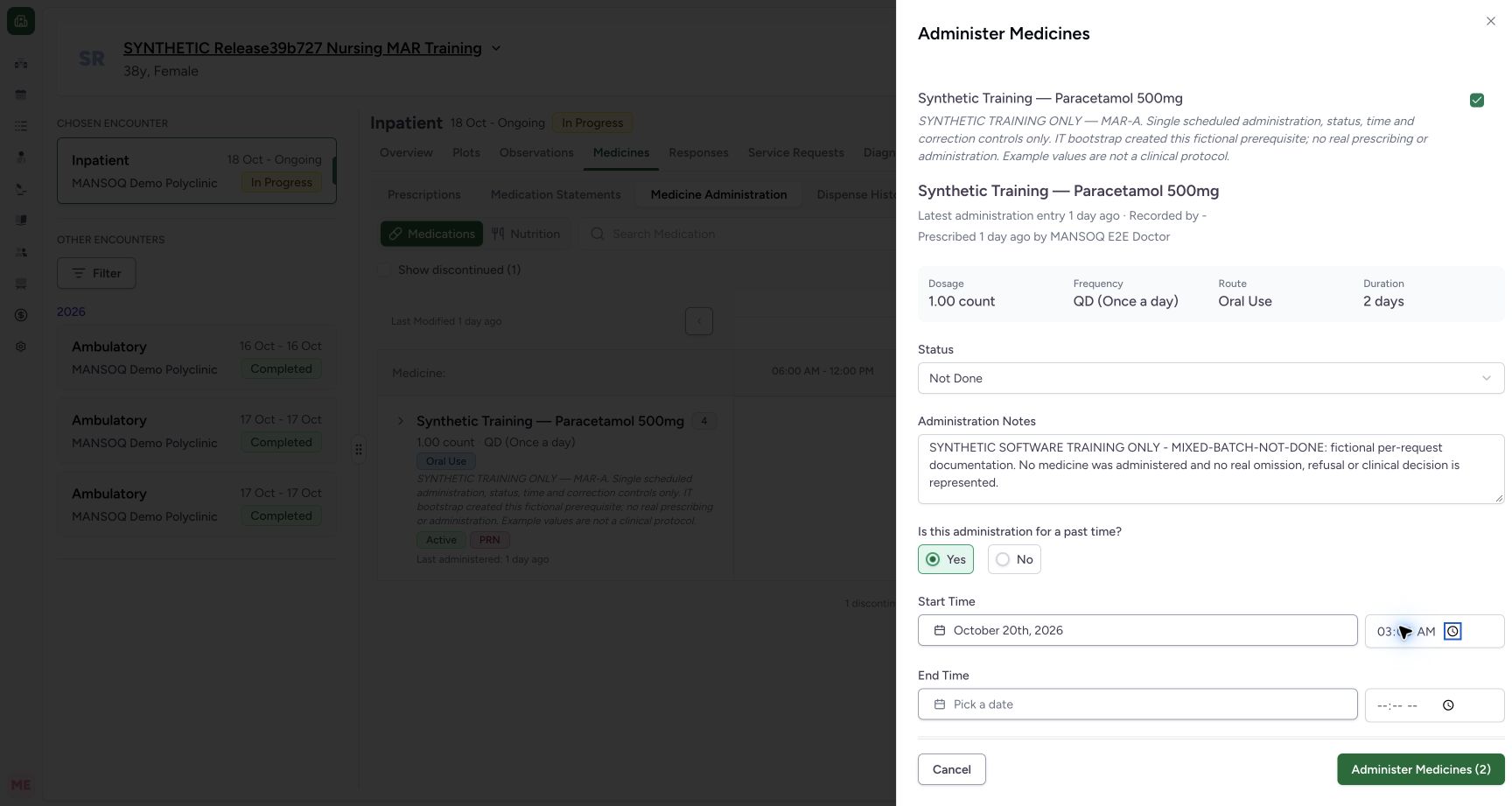 12345
12345Temporary Not Done draft for MAR-A
Capture details
Captured controls from committed release 3dfb. Fictional scheduled MAR-A and PRN requests; one mixed batch save, normal reload and unchanged saved-detail Cancels. No medicine was administered and no clinical omission, refusal, infusion or care decision is represented.
Image SHA-256 696fcee8e02349018996302cdd4a2420a0a55d8c64f002e8c6179ce567f7e80e
- Read MAR-A Not Done: This temporary draft will later be reset by deselection.
- Enter the fictional MAR-A note: The complete sample text is provided in the step.
- Choose Yes for past time: This enables the existing start controls.
- Use the native Start Time segments: Use the Start Time segments. The final review image shows 03:00 clearly.
- Leave End Time blank: Not Done does not require a filled end here.
3. Prepare the independent PRN draft
On MAR-PRN, choose In Progress. Enter: SYNTHETIC SOFTWARE TRAINING ONLY - MIXED-BATCH-IN-PROGRESS: fictional ongoing-entry control. No medicine is being administered and no clinical infusion, monitoring or care decision is represented. Choose Yes and use its own native Start Time segments for 03:01 AM on 20 October 2026, then leave the field. The In Progress end controls remain disabled and blank.
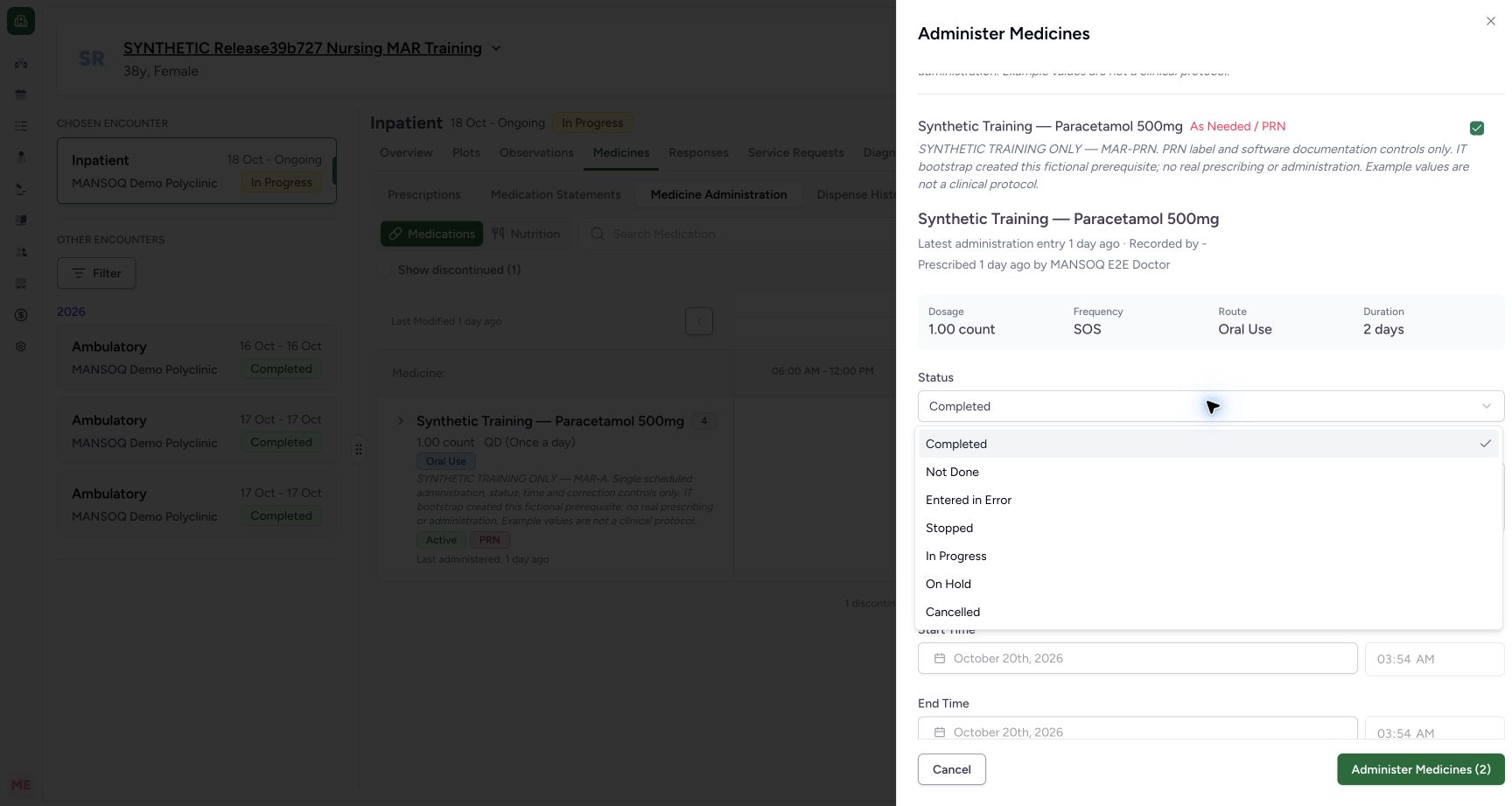 12
12PRN status options
Capture details
Captured controls from committed release 3dfb. Fictional scheduled MAR-A and PRN requests; one mixed batch save, normal reload and unchanged saved-detail Cancels. No medicine was administered and no clinical omission, refusal, infusion or care decision is represented.
Image SHA-256 75210053185f44e30243637aaeb1e590233ad0b125a6fe499e670e44c02a926e
- Choose In Progress for PRN: Use this request’s own status control.
- Match the selected PRN card: The As Needed / PRN label identifies this card.
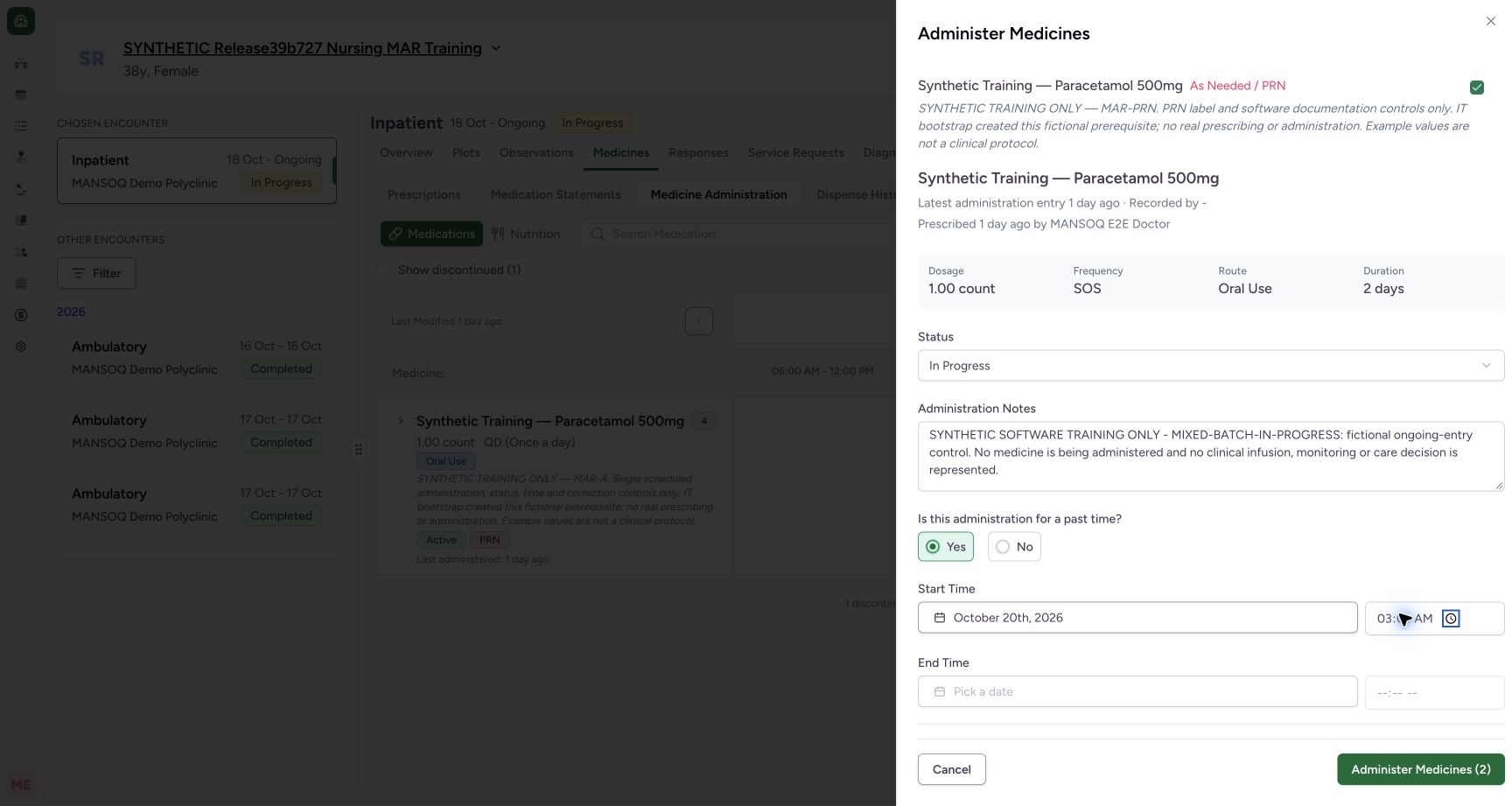 12345
12345Temporary In Progress draft for PRN
Capture details
Captured controls from committed release 3dfb. Fictional scheduled MAR-A and PRN requests; one mixed batch save, normal reload and unchanged saved-detail Cancels. No medicine was administered and no clinical omission, refusal, infusion or care decision is represented.
Image SHA-256 f56906905d8a18e40afcbd93f8ff7926264899906074533a019c35bfb1b69ce3
- Read PRN In Progress: This is the other selected request’s draft.
- Enter the fictional PRN note: This note belongs only to PRN.
- Choose Yes for PRN: Use its own past-time control.
- Use PRN Start Time: Enter 03:01 through the native time segments and blur.
- Keep PRN End Time empty: The end controls are disabled for In Progress.
4. Deselect only MAR-A
Uncheck the MAR-A box. Its form disappears and the button count becomes 1. The PRN request stays selected; its In Progress status, fictional note and 03:01 AM start remain. Scroll within the sheet to inspect those retained values.
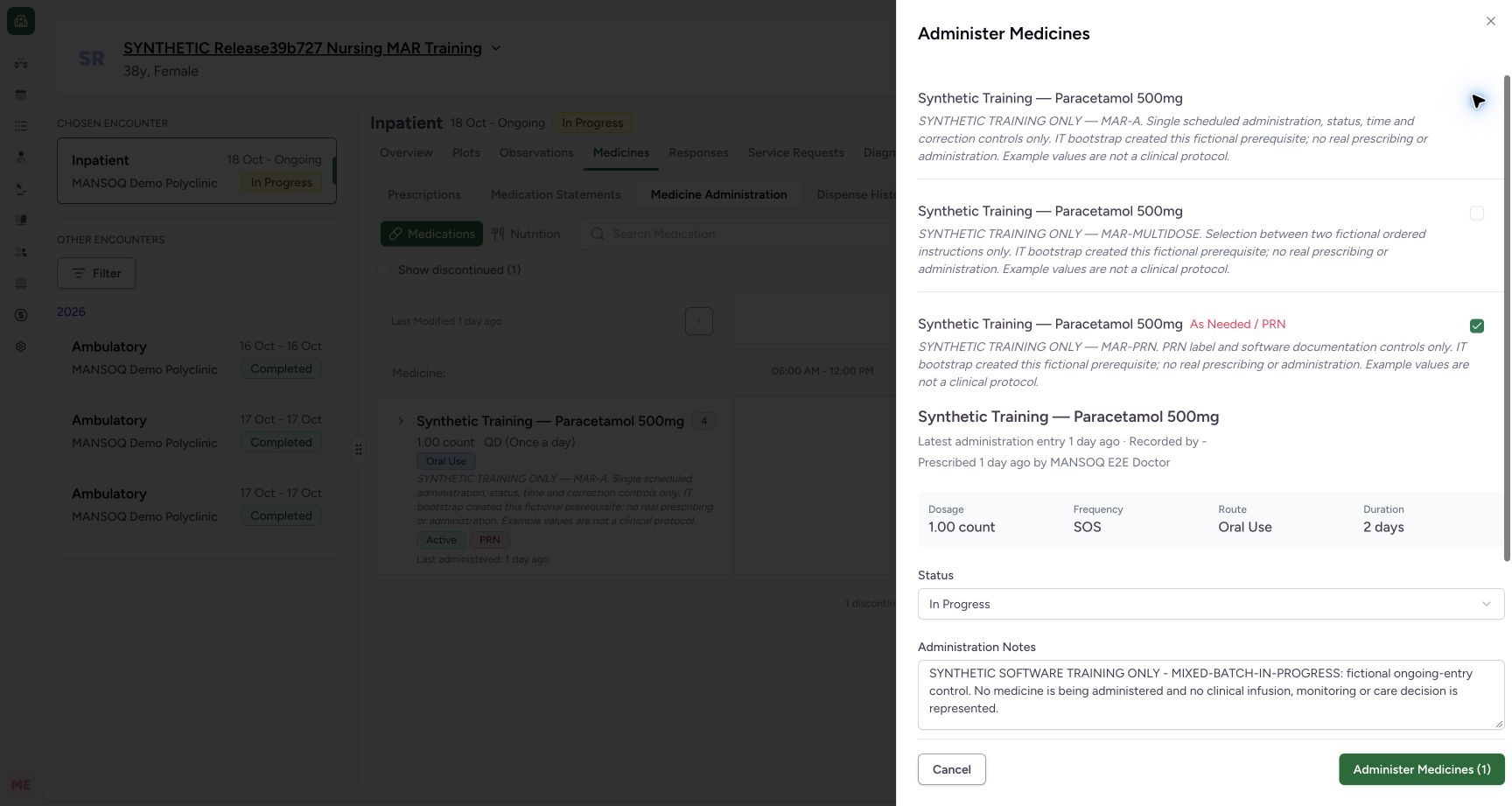 12345
12345MAR-A deselected while PRN remains selected
Capture details
Captured controls from committed release 3dfb. Fictional scheduled MAR-A and PRN requests; one mixed batch save, normal reload and unchanged saved-detail Cancels. No medicine was administered and no clinical omission, refusal, infusion or care decision is represented.
Image SHA-256 8afb9d5d26214112554b81fd2f5b255f44077763d5e17916401d83f484a365f4
- MAR-A is now unchecked: Its unsaved form has disappeared after deselection.
- PRN stays selected: The other request is still checked.
- Read PRN’s retained In Progress: Deselecting A did not reset this status.
- Read PRN’s retained note: The other draft text remains.
- Read one selected item: The batch count is now 1.
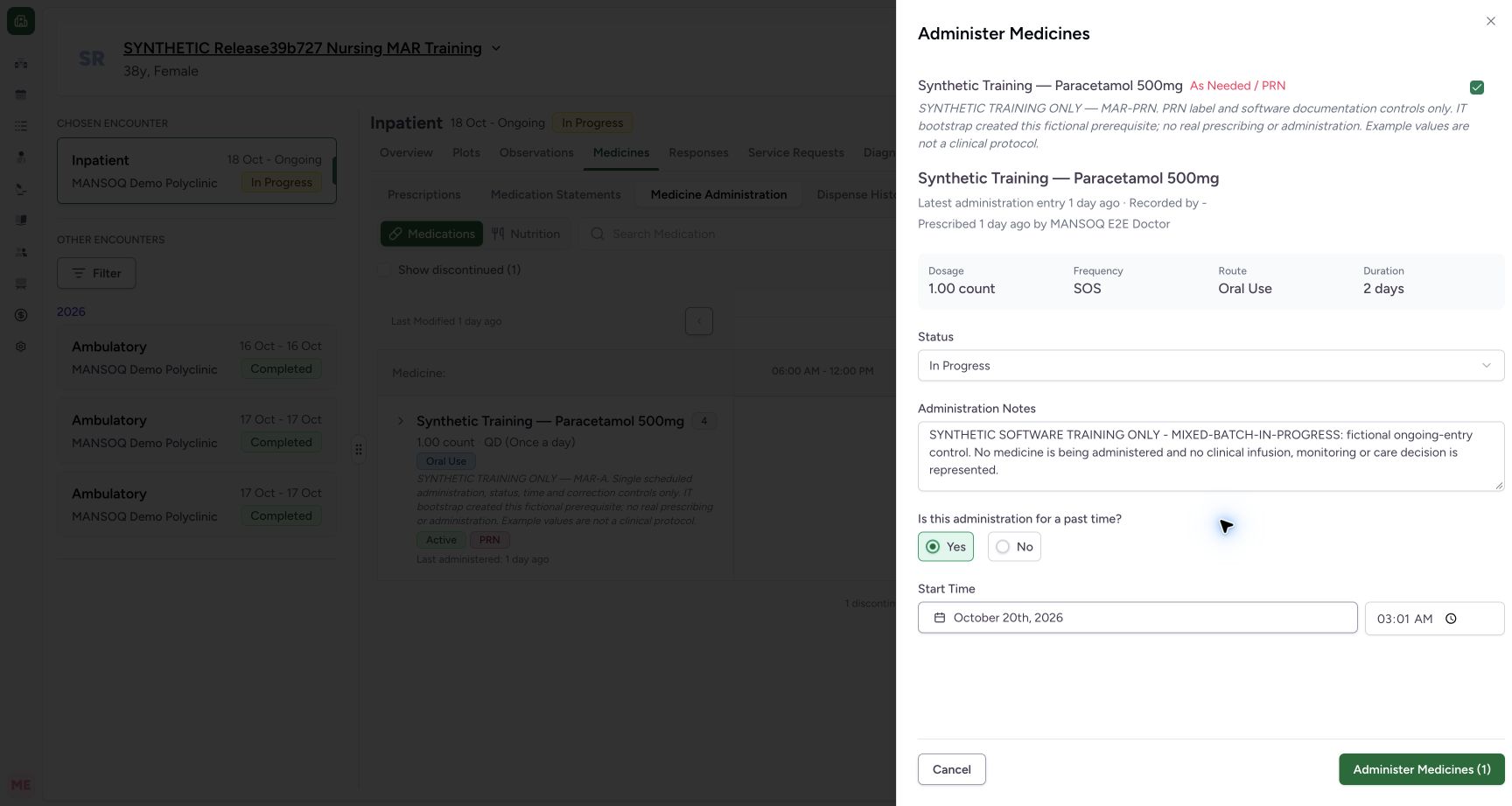 1234
1234PRN draft retained after MAR-A deselection
Capture details
Captured controls from committed release 3dfb. Fictional scheduled MAR-A and PRN requests; one mixed batch save, normal reload and unchanged saved-detail Cancels. No medicine was administered and no clinical omission, refusal, infusion or care decision is represented.
Image SHA-256 827147bb5d9fa275574795073868c3a24c8cd29279d9a97cc7801186ab719295
- Read retained PRN status: In Progress remains selected.
- Read retained PRN note: The fictional ongoing-entry note remains.
- Read retained 03:01 AM: The start date is still 20 October.
- Read the one-item count: Only PRN is selected at this point.
5. Reselect MAR-A and read the fresh defaults
Check MAR-A again. Its previous unsaved status, note and time have been discarded: the new form shows Completed, an empty note, No and the current minute. The image’s 03:55 AM is only that capture’s current time. The PRN form still retains its own In Progress status, note and 03:01 AM start.
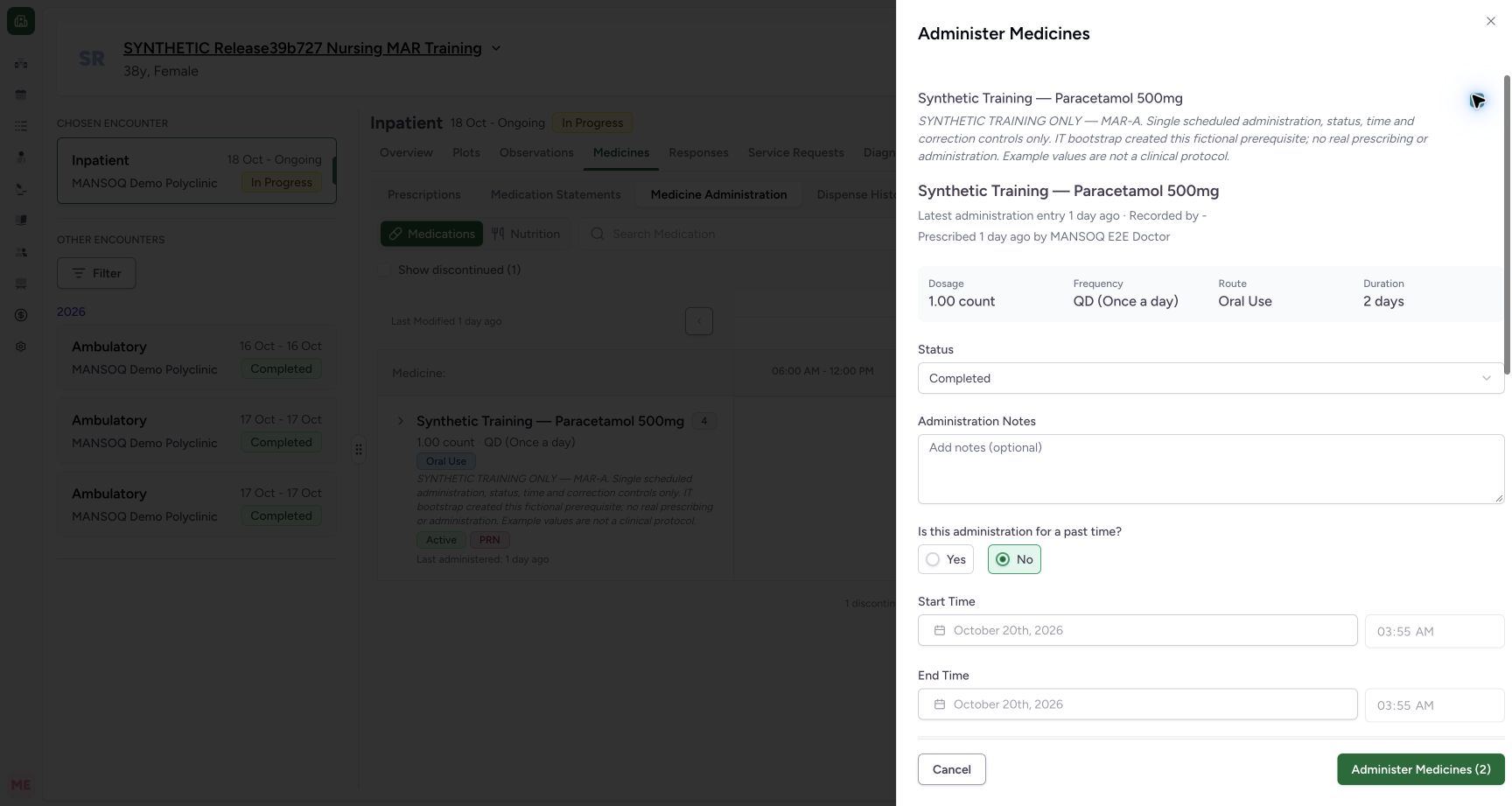 123456
Fresh MAR-A defaults after reselection
Capture details
Captured controls from committed release 3dfb. Fictional scheduled MAR-A and PRN requests; one mixed batch save, normal reload and unchanged saved-detail Cancels. No medicine was administered and no clinical omission, refusal, infusion or care decision is represented.
Image SHA-256 354919c4141e9dd898ef2d59761d608085567a8fda0a874b472c45566355d255
- MAR-A is reselected: Its own fresh draft is visible again.
- Read the fresh Completed default: The earlier Not Done choice was discarded for this request.
- Read the empty note: The old unsaved MAR-A note was removed.
- Read the fresh No default: The new draft initially uses current time.
- Read the fresh current minute: The example shows 03:55; your current minute will differ.
- Read two selected items again: PRN remains selected while MAR-A is restored.
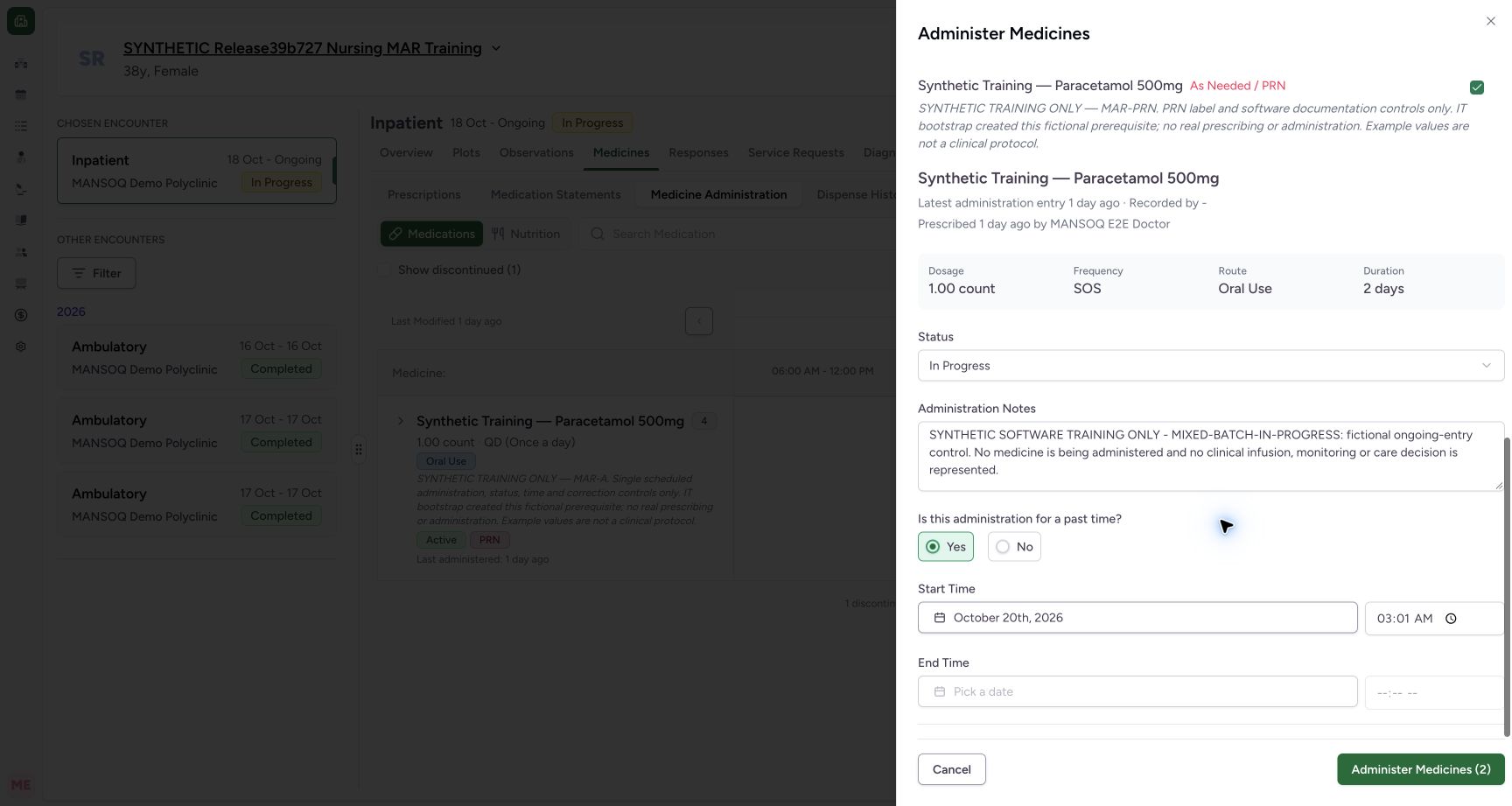 1234
1234PRN draft retained after MAR-A reselection
Capture details
Captured controls from committed release 3dfb. Fictional scheduled MAR-A and PRN requests; one mixed batch save, normal reload and unchanged saved-detail Cancels. No medicine was administered and no clinical omission, refusal, infusion or care decision is represented.
Image SHA-256 f037c7c238927fd911d634d61ec8e378813cefe09ef01009401e4b3a7d493edd
- PRN is still In Progress: Reselecting A did not reset B.
- PRN’s note is still present: The independent draft remains.
- PRN is still 03:01 AM: Its start was retained across A’s reset.
- Both requests are selected: The button count has returned to 2.
6. Restore MAR-A and recheck both forms
Restore MAR-A to Not Done, re-enter its full fictional note from step 2, choose Yes and set the start to 20 October 2026 at 03:00 AM through the native clock. Leave End Time blank. After leaving the field, inspect both forms again: PRN must still show In Progress, its full fictional note and 03:01 AM, with no end. The count is 2. Do not save a draft whose values differ from your reviewed training example.
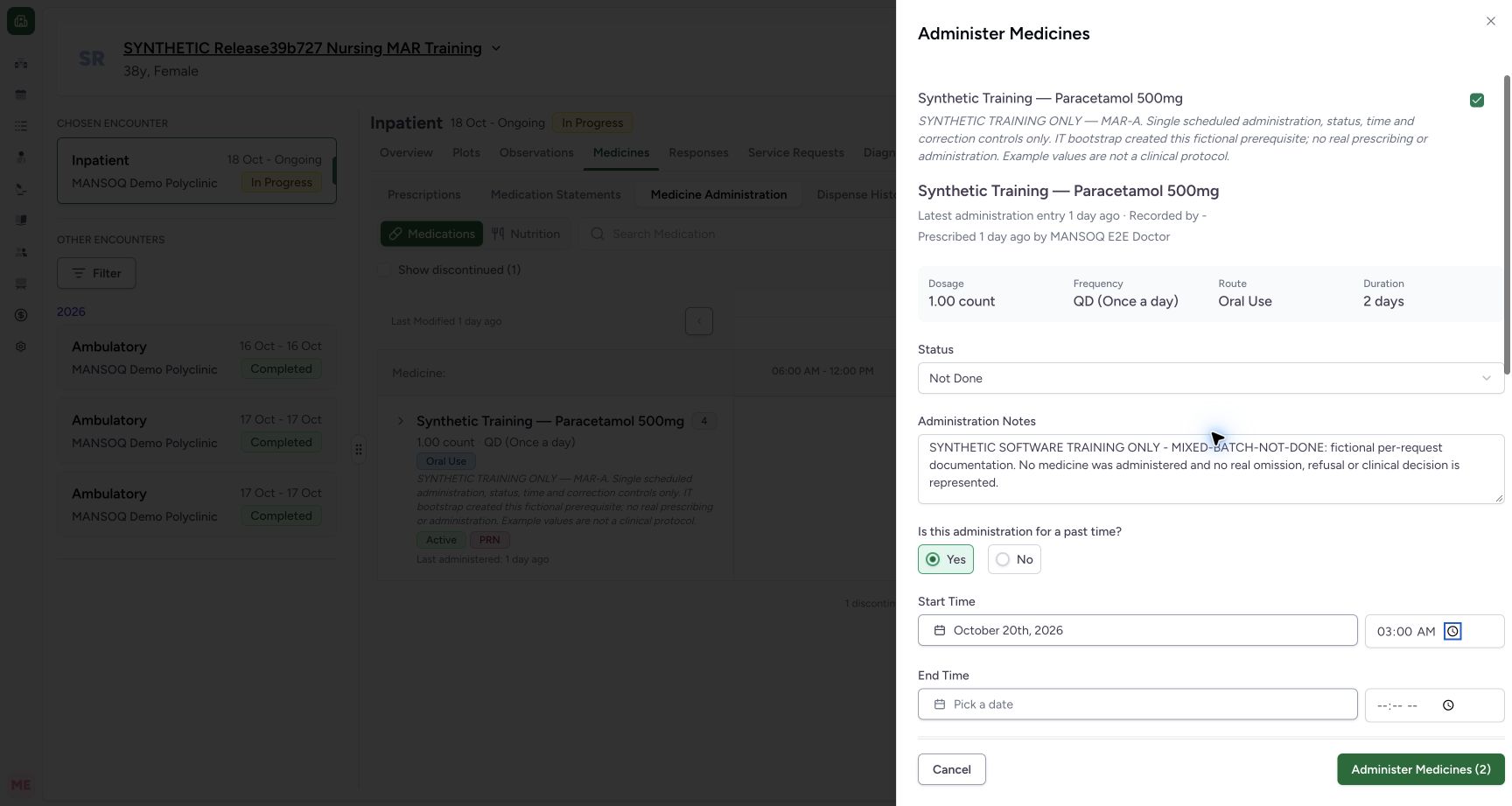 123456
Final MAR-A draft reviewed after blur
Capture details
Captured controls from committed release 3dfb. Fictional scheduled MAR-A and PRN requests; one mixed batch save, normal reload and unchanged saved-detail Cancels. No medicine was administered and no clinical omission, refusal, infusion or care decision is represented.
Image SHA-256 f0520690289465072cc2841e620d9cdf713c9b11c2f9afc1effcaf721448a9f1
- Review final MAR-A Not Done: Restore the intended status after its reset.
- Review the full fictional MAR-A note: This is documentation practice only.
- Review Yes: Past-time controls are enabled.
- Review 20 October at 03:00 AM: The value has been rechecked after blur.
- Review the blank end: Do not invent an end time.
- Locate the two-item save button: Review both requests before any save.
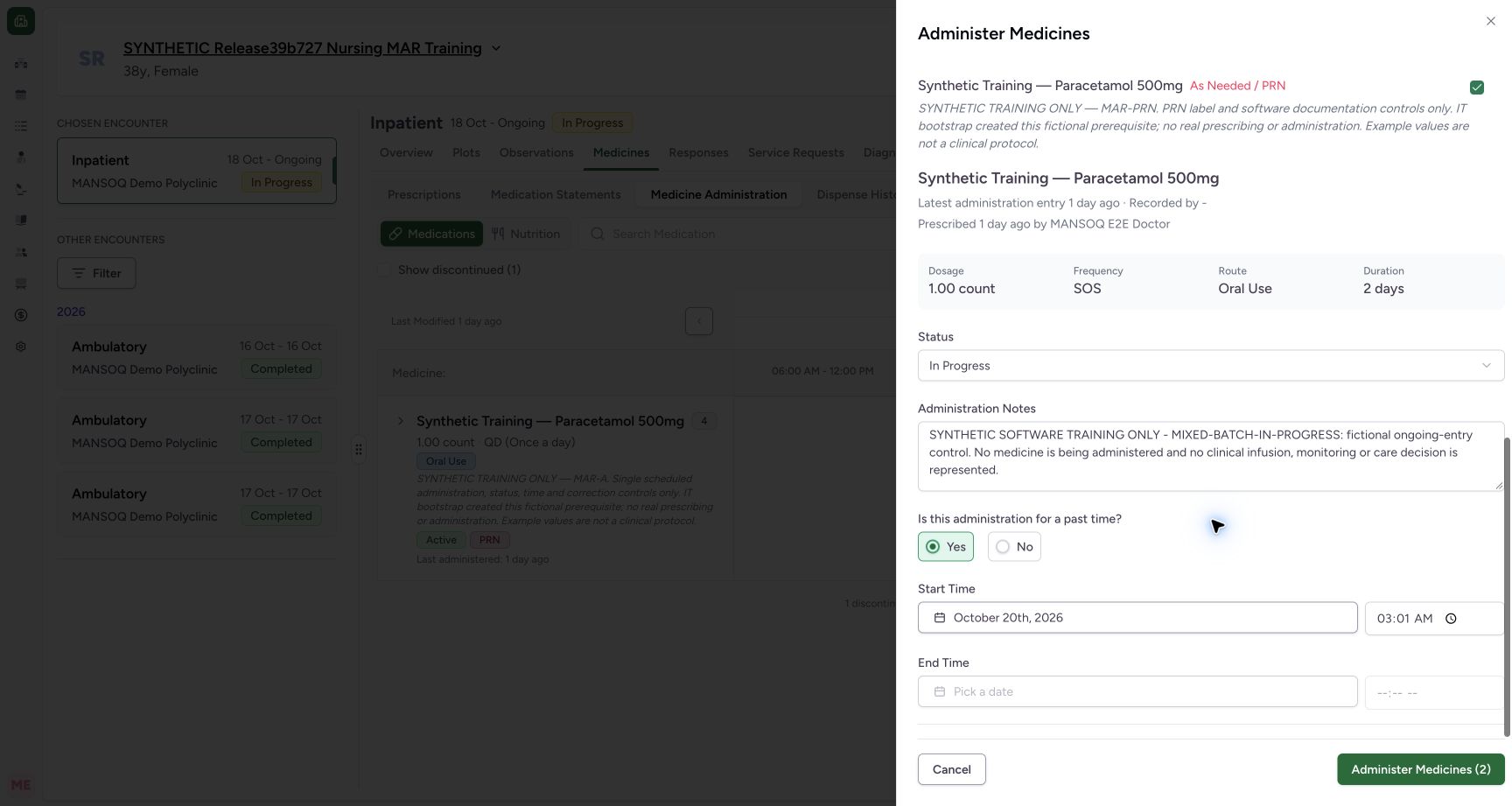 12345
12345Final PRN draft retained after the other form edit
Capture details
Captured controls from committed release 3dfb. Fictional scheduled MAR-A and PRN requests; one mixed batch save, normal reload and unchanged saved-detail Cancels. No medicine was administered and no clinical omission, refusal, infusion or care decision is represented.
Image SHA-256 f0f12cbd0fc8388374596644d243424eb7e735fa6c1938e682a1ca85892e0353
- Review final PRN In Progress: This status remains independent from MAR-A.
- Review the full fictional PRN note: This does not represent an actual infusion or care decision.
- Review 20 October at 03:01 AM: This value remains after MAR-A was edited.
- Review the disabled blank end: In Progress keeps no end value here.
- Locate Administer Medicines (2): Both exact requests are included.
Selection resets only the removed draft
Deselecting a request removes its unsaved form data. Reselecting it constructs a fresh draft for that request; it does not restore the removed note. The other selected request retains its own values in this demonstrated release.
12345MAR-A deselected while PRN remains selected
Capture details
Captured controls from committed release 3dfb. Fictional scheduled MAR-A and PRN requests; one mixed batch save, normal reload and unchanged saved-detail Cancels. No medicine was administered and no clinical omission, refusal, infusion or care decision is represented.
Image SHA-256 8afb9d5d26214112554b81fd2f5b255f44077763d5e17916401d83f484a365f4
- MAR-A is now unchecked: Its unsaved form has disappeared after deselection.
- PRN stays selected: The other request is still checked.
- Read PRN’s retained In Progress: Deselecting A did not reset this status.
- Read PRN’s retained note: The other draft text remains.
- Read one selected item: The batch count is now 1.
1234PRN draft retained after MAR-A deselection
Capture details
Captured controls from committed release 3dfb. Fictional scheduled MAR-A and PRN requests; one mixed batch save, normal reload and unchanged saved-detail Cancels. No medicine was administered and no clinical omission, refusal, infusion or care decision is represented.
Image SHA-256 827147bb5d9fa275574795073868c3a24c8cd29279d9a97cc7801186ab719295
- Read retained PRN status: In Progress remains selected.
- Read retained PRN note: The fictional ongoing-entry note remains.
- Read retained 03:01 AM: The start date is still 20 October.
- Read the one-item count: Only PRN is selected at this point.
123456Fresh MAR-A defaults after reselection
Capture details
Captured controls from committed release 3dfb. Fictional scheduled MAR-A and PRN requests; one mixed batch save, normal reload and unchanged saved-detail Cancels. No medicine was administered and no clinical omission, refusal, infusion or care decision is represented.
Image SHA-256 354919c4141e9dd898ef2d59761d608085567a8fda0a874b472c45566355d255
- MAR-A is reselected: Its own fresh draft is visible again.
- Read the fresh Completed default: The earlier Not Done choice was discarded for this request.
- Read the empty note: The old unsaved MAR-A note was removed.
- Read the fresh No default: The new draft initially uses current time.
- Read the fresh current minute: The example shows 03:55; your current minute will differ.
- Read two selected items again: PRN remains selected while MAR-A is restored.
1234PRN draft retained after MAR-A reselection
Capture details
Captured controls from committed release 3dfb. Fictional scheduled MAR-A and PRN requests; one mixed batch save, normal reload and unchanged saved-detail Cancels. No medicine was administered and no clinical omission, refusal, infusion or care decision is represented.
Image SHA-256 f037c7c238927fd911d634d61ec8e378813cefe09ef01009401e4b3a7d493edd
- PRN is still In Progress: Reselecting A did not reset B.
- PRN’s note is still present: The independent draft remains.
- PRN is still 03:01 AM: Its start was retained across A’s reset.
- Both requests are selected: The button count has returned to 2.
Troubleshooting
The reselected request has an empty note and current time
Those are the fresh defaults shown here. Re-enter the intended training values and inspect both forms before saving. Do not assume the earlier unsaved values survived.
123456Fresh MAR-A defaults after reselection
Capture details
Captured controls from committed release 3dfb. Fictional scheduled MAR-A and PRN requests; one mixed batch save, normal reload and unchanged saved-detail Cancels. No medicine was administered and no clinical omission, refusal, infusion or care decision is represented.
Image SHA-256 354919c4141e9dd898ef2d59761d608085567a8fda0a874b472c45566355d255
- MAR-A is reselected: Its own fresh draft is visible again.
- Read the fresh Completed default: The earlier Not Done choice was discarded for this request.
- Read the empty note: The old unsaved MAR-A note was removed.
- Read the fresh No default: The new draft initially uses current time.
- Read the fresh current minute: The example shows 03:55; your current minute will differ.
- Read two selected items again: PRN remains selected while MAR-A is restored.
123456Final MAR-A draft reviewed after blur
Capture details
Captured controls from committed release 3dfb. Fictional scheduled MAR-A and PRN requests; one mixed batch save, normal reload and unchanged saved-detail Cancels. No medicine was administered and no clinical omission, refusal, infusion or care decision is represented.
Image SHA-256 f0520690289465072cc2841e620d9cdf713c9b11c2f9afc1effcaf721448a9f1
- Review final MAR-A Not Done: Restore the intended status after its reset.
- Review the full fictional MAR-A note: This is documentation practice only.
- Review Yes: Past-time controls are enabled.
- Review 20 October at 03:00 AM: The value has been rechecked after blur.
- Review the blank end: Do not invent an end time.
- Locate the two-item save button: Review both requests before any save.
Source evidence
Every citation uses this exact committed version. The private source repository requires access.
- repositories/platform/mansoq-web/src/components/Medicine/MedicationAdministration/MedicineAdminSheet.tsx:64 ·
3dfb7c9f519fb5b4cd4452439f3c12346bf58319Source file checksum
342ae4e4635dedb808bada1db0ef95248184feb0fd548a99f1016e69d764f5ef - repositories/platform/mansoq-web/src/components/Medicine/MedicationAdministration/MedicineAdminForm.tsx:242 ·
3dfb7c9f519fb5b4cd4452439f3c12346bf58319Source file checksum
795ecc32c7a730e8d8eccf0285a14f84fedb89d3b0f3beab7e816934cbf84940 - repositories/platform/mansoq-web/src/components/Medicine/MedicationAdministration/MedicineAdminDialog.tsx:80 ·
3dfb7c9f519fb5b4cd4452439f3c12346bf58319Source file checksum
c6ccd39c46d4093d346e97987eebd9dd1b51ffae1c8688f5305a7eed5336d6f2 - repositories/platform/mansoq-web/src/components/Medicine/MedicationAdministration/AdministrationTab.tsx:354 ·
3dfb7c9f519fb5b4cd4452439f3c12346bf58319Source file checksum
170c246835ea1966b8512f5baf72ff0ea60635f28cbcec6a465bb8c17506555f - repositories/platform/mansoq-web/src/components/Medicine/MedicationAdministration/GroupedMedicationRow.tsx:61 ·
3dfb7c9f519fb5b4cd4452439f3c12346bf58319Source file checksum
e497c113ba63d31c09068cdab1ebe7c495794548f218112599914ef06cc191d2 - repositories/platform/mansoq-web/src/components/Medicine/MedicationAdministration/utils.ts:54 ·
3dfb7c9f519fb5b4cd4452439f3c12346bf58319Source file checksum
3df1d0c6fd4265ef3b0ea3d5704b463290b1f72b6ee0a77141f13d8debaccfbb - repositories/platform/mansoq-web/src/components/Medicine/MedicationAdministration/PrintMedicationAdministration.tsx:113 ·
3dfb7c9f519fb5b4cd4452439f3c12346bf58319Source file checksum
d7ad7b8001cc6e86026ad23fe1f2d7eacd5cd385d2fa9bb3f455a5ff360460dc - repositories/platform/mansoq-web/src/components/Medicine/MedicationRequestTable/index.tsx:59 ·
3dfb7c9f519fb5b4cd4452439f3c12346bf58319Source file checksum
031e169fb1f09e4559edb7b2ab0eba7c3c2a6fa9bd6ace44d1b05e1563106457 - repositories/platform/mansoq-web/src/pages/Encounters/utils/EncounterProvider.tsx:185 ·
3dfb7c9f519fb5b4cd4452439f3c12346bf58319Source file checksum
d2609fc0452c91c20104237bf02be40ecb3bf48225011aba1f4bca2d50620d75 - repositories/platform/mansoq-web/src/types/emr/medicationAdministration/medicationAdministration.ts:10 ·
3dfb7c9f519fb5b4cd4452439f3c12346bf58319Source file checksum
aba9ae9ba873b5da05a41e9188fcacf1d1f5169794a85c72652b570cfa1079d1 - repositories/platform/mansoq-web/src/types/emr/medicationAdministration/medicationAdministrationApi.ts:10 ·
3dfb7c9f519fb5b4cd4452439f3c12346bf58319Source file checksum
e83e9fcc1a40ca9e82e794772c643d669e8dbae9402b4a68ba10d8097a49454d - repositories/platform/mansoq-web/src/types/emr/medicationRequest/medicationRequest.ts:256 ·
3dfb7c9f519fb5b4cd4452439f3c12346bf58319Source file checksum
a39df63f9b7f2d976d4379511d7a2d4c8e3e284fd1e9b67c28e59392e8545b2b - repositories/platform/mansoq-web/src/types/emr/medicationRequest/medicationRequestApi.ts:6 ·
3dfb7c9f519fb5b4cd4452439f3c12346bf58319Source file checksum
2e18bb5bef449fb67b01d4b763e8ca1e57bad00a6381c5c0e3a2eac1d6a272c3 - repositories/platform/mansoq-core/mansoq/emr/api/viewsets/medication_administration.py:19 ·
3dfb7c9f519fb5b4cd4452439f3c12346bf58319Source file checksum
7e68ba6671f267ec29008e1aca6e8bfe594a2e510833ae5db5e0b18c39408072 - repositories/platform/mansoq-core/mansoq/emr/resources/medication/administration/spec.py:27 ·
3dfb7c9f519fb5b4cd4452439f3c12346bf58319Source file checksum
57ad204f4a0e2aa93376f8abff6f687e41fab8b3b90ea1dd136d5662f489f215 - repositories/platform/mansoq-core/mansoq/emr/models/medication_administration.py:8 ·
3dfb7c9f519fb5b4cd4452439f3c12346bf58319Source file checksum
ce47a759768ef80ccb64f70ba701ba6e4b5c038b392aef3788e65cf014e56324 - repositories/platform/mansoq-core/mansoq/emr/api/viewsets/encounter_authz_base.py:15 ·
3dfb7c9f519fb5b4cd4452439f3c12346bf58319Source file checksum
852c308f990e192a1003e286be7dd57ddcc78840d218da1b90c1fab2eebec4f7 - repositories/platform/mansoq-core/mansoq/security/authorization/encounter.py:97 ·
3dfb7c9f519fb5b4cd4452439f3c12346bf58319Source file checksum
0e7ff8afcfb57b2371201e16ee6fac26125d6e686af66ed7edd95e49bc07de78 - repositories/platform/mansoq-core/mansoq/emr/api/viewsets/base.py:94 ·
3dfb7c9f519fb5b4cd4452439f3c12346bf58319Source file checksum
6a287dd315b8a4957b29c58e4bbc1bef7b8d9d257f9149f93045ff0adbdcae6c - repositories/platform/mansoq-core/mansoq/emr/resources/base.py:82 ·
3dfb7c9f519fb5b4cd4452439f3c12346bf58319Source file checksum
bc406c723888997dd99fc408cb3c5dec51fb0b54d10272ca31bfd8c98c893229 - repositories/platform/mansoq-core/mansoq/emr/models/questionnaire.py:57 ·
3dfb7c9f519fb5b4cd4452439f3c12346bf58319Source file checksum
2e422990f996654b71999dd1303f0bf9b5706ffc38c4271cdcdc741faf1a08d0 - repositories/platform/mansoq-core/mansoq/emr/models/base.py:8 ·
3dfb7c9f519fb5b4cd4452439f3c12346bf58319Source file checksum
61f50a19078c8a6435398e6b3e9174326038e9047129382c0d882f1e8f367b4c - repositories/platform/mansoq-core/mansoq/utils/models/base.py:15 ·
3dfb7c9f519fb5b4cd4452439f3c12346bf58319Source file checksum
1a5270f50188d1e0b044210773ca86a483b904f3a9724bb7b321d4ea463acfaf