 MANSOQ
 Clinical care · VERSION 3dfb7c9f
Rename an existing encounter attachment and check its saved name
Change the display name of the assigned software-training PDF, then check the saved row after reload.
Nurse
 12
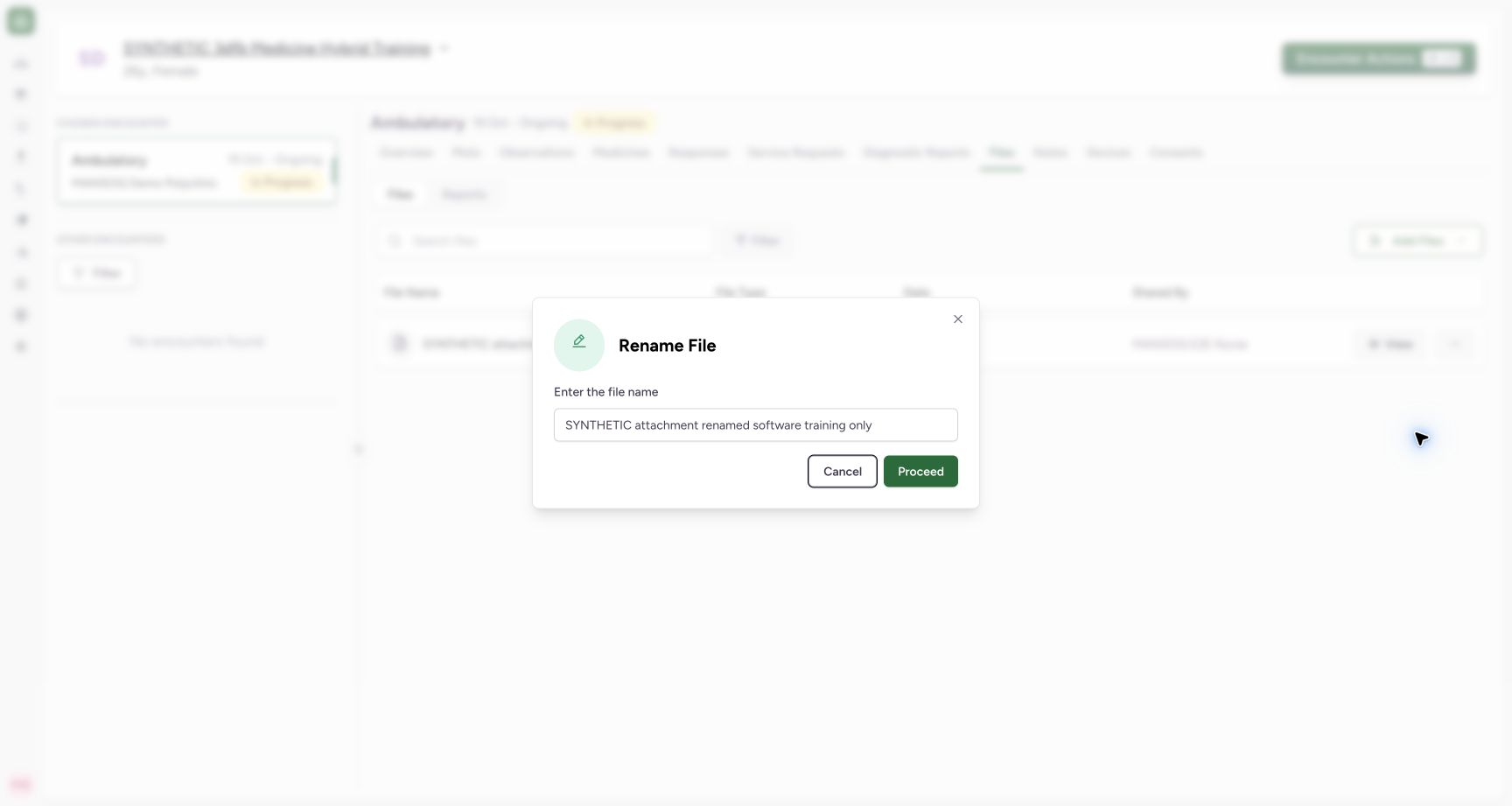
12Enter the new display name and use Proceed
Capture details
Observed committed 3dfb source on 20 October 2026 (Asia/Riyadh; captured 19 October UTC). Existing fictional encounter attachment; no real clinical document or consent.
Image SHA-256 4b8eb2956ee4263c85b3a98424a9e793f1759a2b0a02a3905304e07f34220748
- Enter the new display name: Use SYNTHETIC attachment renamed software training only without typing .pdf.
- Save the Rename: Select Proceed once after checking the name.
 1234
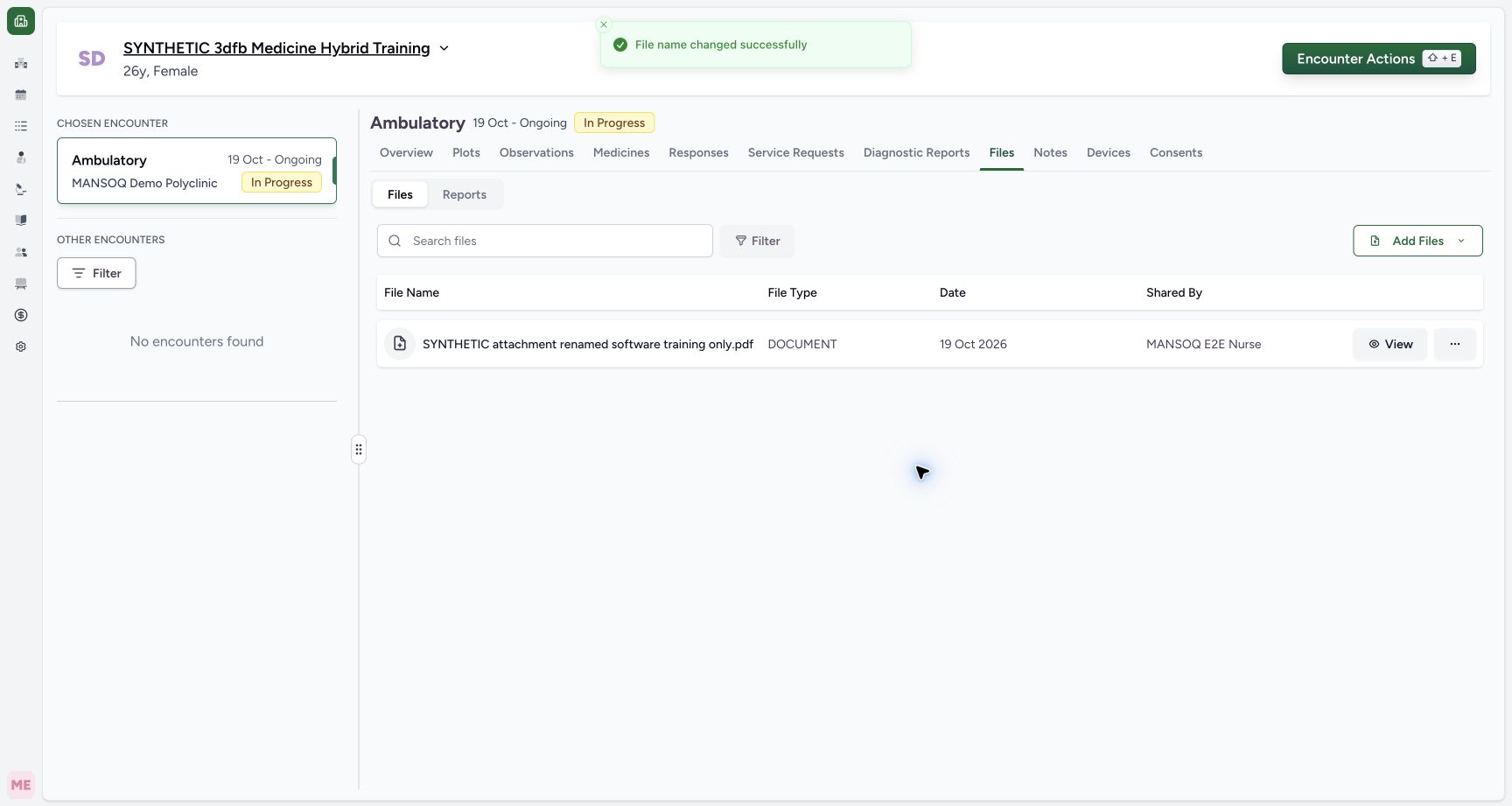
1234Read the successful Rename and original upload metadata
Capture details
Observed committed 3dfb source on 20 October 2026 (Asia/Riyadh; captured 19 October UTC). Existing fictional encounter attachment; no real clinical document or consent.
Image SHA-256 a83929c2f1c5f1cd5858792ef454109e9cd1aca1c793998bb9530d7769380cc6
- Read the Rename success message: File name changed successfully is visible.
- Check the renamed file: The row now shows SYNTHETIC attachment renamed software training only.pdf.
- Keep the original Date distinct: The list still shows 19 Oct 2026.
- Read the original Shared By: The uploader remains MANSOQ E2E Nurse.
11 of 11 content blocks have reviewed image alignment. Missing overview or prerequisite images remain open.
Before you begin
- Start in an already authenticated, authorized Nurse session for the assigned synthetic patient and In Progress encounter. Sign-in and opening the encounter are separate lessons.
 12345
12345Recorded release 3dfb7c9f · 2026-10-19T21:54:42.729Z · 1728 × 921 Identify the existing synthetic encounter attachment
Capture details
Observed committed 3dfb source on 20 October 2026 (Asia/Riyadh; captured 19 October UTC). Existing fictional encounter attachment; no real clinical document or consent.
Image SHA-256
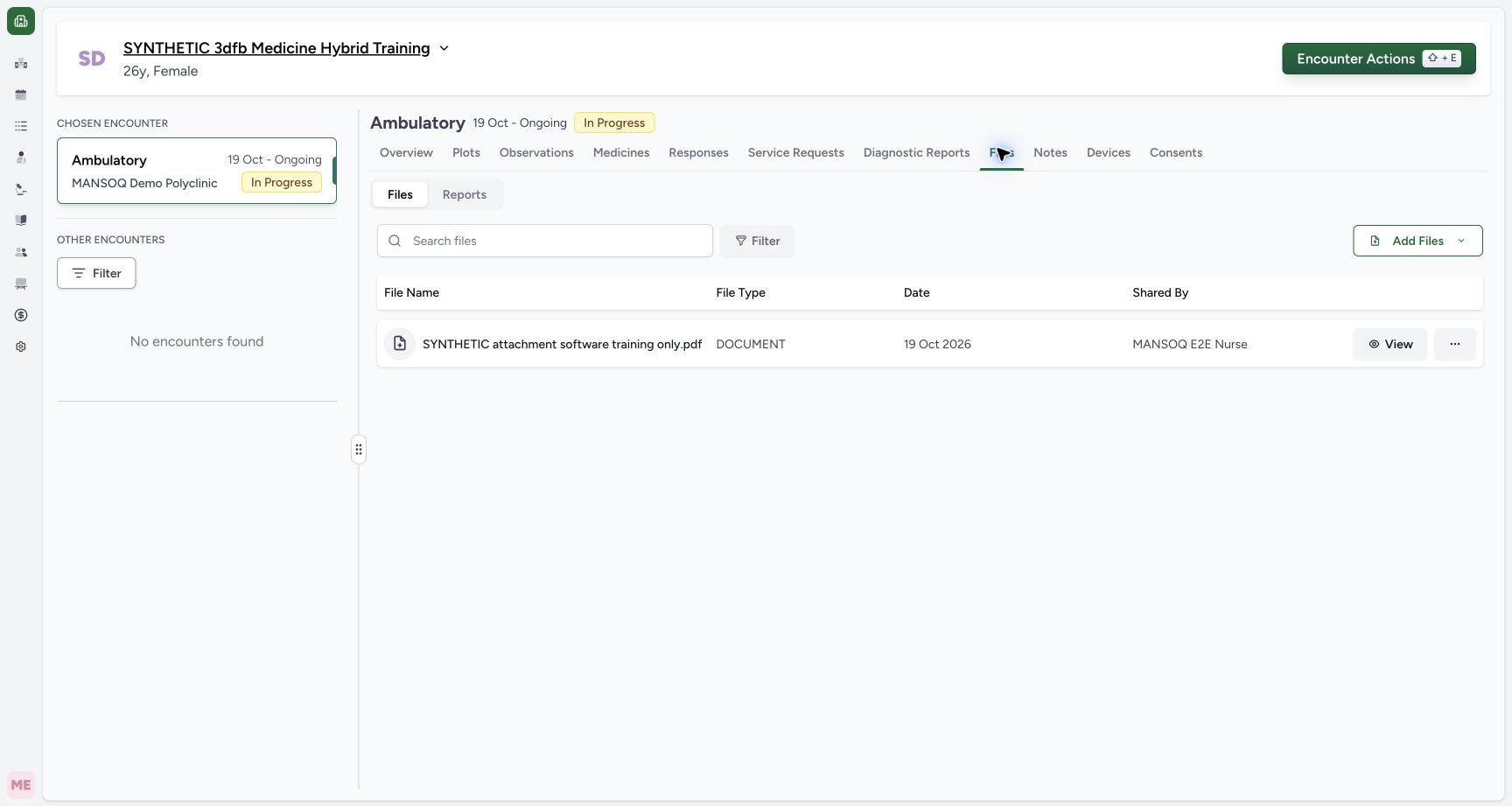
f92725acaaba68bd6ea9e262c2749eec7dbd6524b979839aa114591efccd3535- Check the synthetic patient: Use the displayed synthetic training patient.
- Check the chosen encounter: The chosen Ambulatory encounter is In Progress.
- Open encounter Files: Use Files for the chosen encounter.
- Identify the existing software PDF: Match the existing SYNTHETIC attachment software training only.pdf row.
- Open this row’s actions: Use the ellipsis on the same file row.
- Use the existing SYNTHETIC attachment software training only.pdf in encounter Files. This exercise renames that existing document; it does not upload another file.12345
Recorded release 3dfb7c9f · 2026-10-19T21:54:42.729Z · 1728 × 921 Identify the existing synthetic encounter attachment
Capture details
Observed committed 3dfb source on 20 October 2026 (Asia/Riyadh; captured 19 October UTC). Existing fictional encounter attachment; no real clinical document or consent.
Image SHA-256
f92725acaaba68bd6ea9e262c2749eec7dbd6524b979839aa114591efccd3535- Check the synthetic patient: Use the displayed synthetic training patient.
- Check the chosen encounter: The chosen Ambulatory encounter is In Progress.
- Open encounter Files: Use Files for the chosen encounter.
- Identify the existing software PDF: Match the existing SYNTHETIC attachment software training only.pdf row.
- Open this row’s actions: Use the ellipsis on the same file row.
1. Identify the existing attachment
In the chosen In Progress encounter, open Files and match SYNTHETIC attachment software training only.pdf. Read its Date and Shared By before changing its name.
12345Identify the existing synthetic encounter attachment
Capture details
Observed committed 3dfb source on 20 October 2026 (Asia/Riyadh; captured 19 October UTC). Existing fictional encounter attachment; no real clinical document or consent.
Image SHA-256 f92725acaaba68bd6ea9e262c2749eec7dbd6524b979839aa114591efccd3535
- Check the synthetic patient: Use the displayed synthetic training patient.
- Check the chosen encounter: The chosen Ambulatory encounter is In Progress.
- Open encounter Files: Use Files for the chosen encounter.
- Identify the existing software PDF: Match the existing SYNTHETIC attachment software training only.pdf row.
- Open this row’s actions: Use the ellipsis on the same file row.
2. Choose Rename for this row
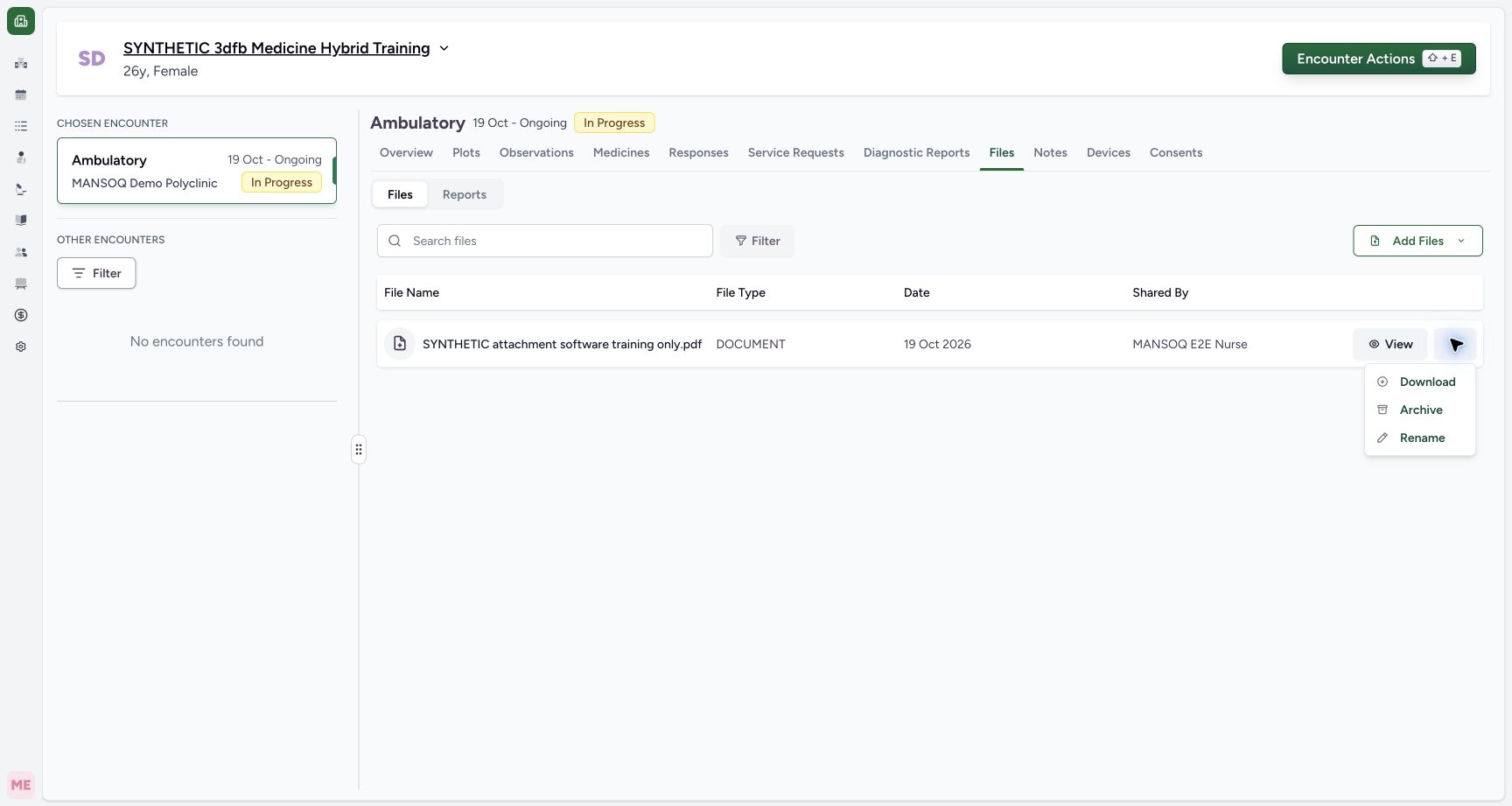
Open the ellipsis on that file row and select Rename. Keep the action on the same existing attachment.
12345Identify the existing synthetic encounter attachment
Capture details
Observed committed 3dfb source on 20 October 2026 (Asia/Riyadh; captured 19 October UTC). Existing fictional encounter attachment; no real clinical document or consent.
Image SHA-256 f92725acaaba68bd6ea9e262c2749eec7dbd6524b979839aa114591efccd3535
- Check the synthetic patient: Use the displayed synthetic training patient.
- Check the chosen encounter: The chosen Ambulatory encounter is In Progress.
- Open encounter Files: Use Files for the chosen encounter.
- Identify the existing software PDF: Match the existing SYNTHETIC attachment software training only.pdf row.
- Open this row’s actions: Use the ellipsis on the same file row.
 1
1Open Rename from the file actions
Capture details
Observed committed 3dfb source on 20 October 2026 (Asia/Riyadh; captured 19 October UTC). Existing fictional encounter attachment; no real clinical document or consent.
Image SHA-256 28e5789b500b21ef1a08c7de372ea2b251c801fba750237d83c7a19a434406f7
- Choose Rename: Open Rename for the selected existing attachment.
3. Read the existing name
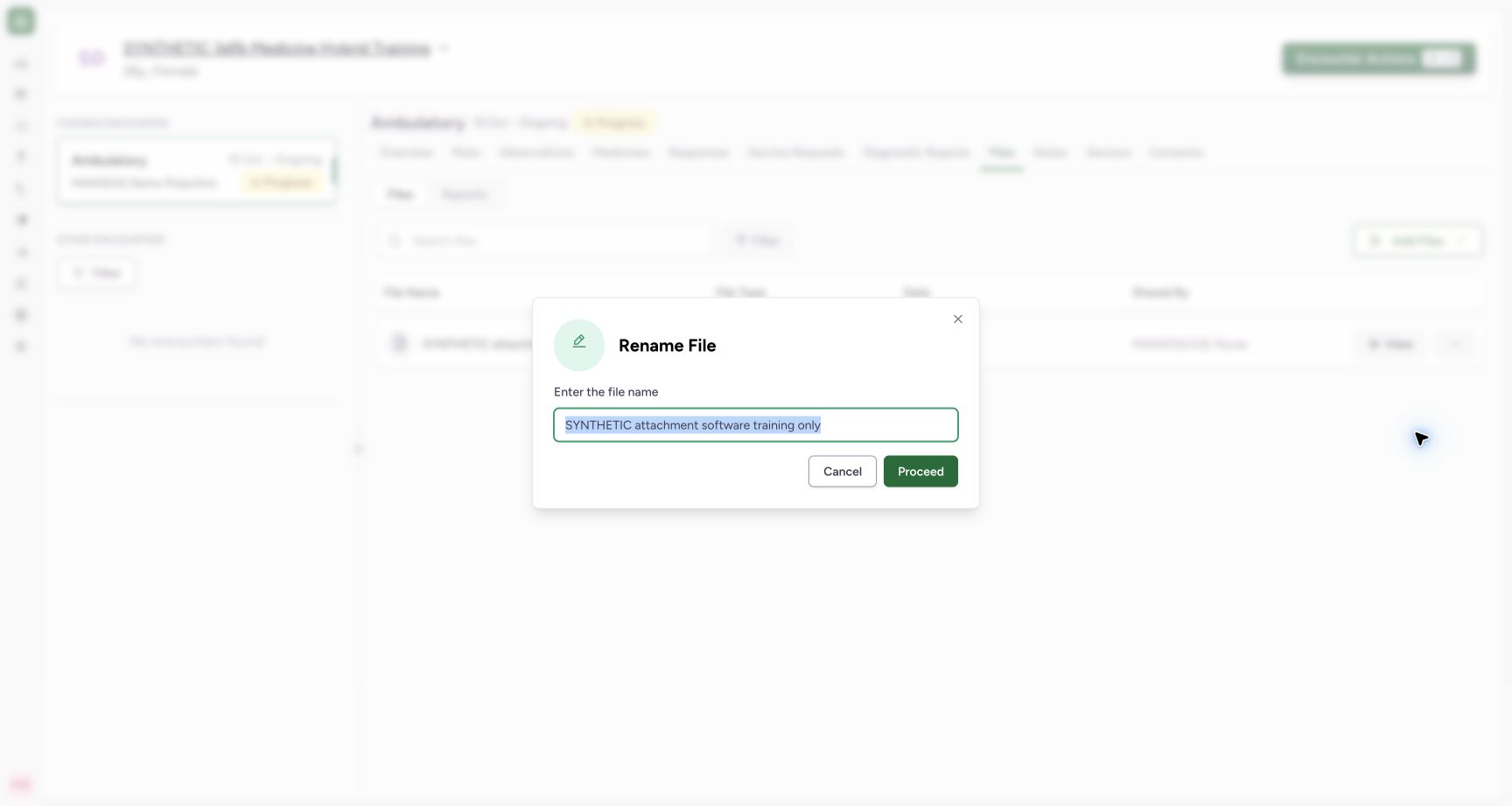
In Rename File, read the existing display name. The input omits the .pdf extension shown in the list.
 1
1Read the existing display name in Rename File
Capture details
Observed committed 3dfb source on 20 October 2026 (Asia/Riyadh; captured 19 October UTC). Existing fictional encounter attachment; no real clinical document or consent.
Image SHA-256 ac9b029980cf598cf73e279b034bae253966a994ad40f489582943089e2d928c
- Read the existing display name: Rename File shows the name without the .pdf extension.
4. Enter the new name and save
Replace only the display name with SYNTHETIC attachment renamed software training only. Do not type .pdf into this field. Check the text, then select Proceed once.
12Enter the new display name and use Proceed
Capture details
Observed committed 3dfb source on 20 October 2026 (Asia/Riyadh; captured 19 October UTC). Existing fictional encounter attachment; no real clinical document or consent.
Image SHA-256 4b8eb2956ee4263c85b3a98424a9e793f1759a2b0a02a3905304e07f34220748
- Enter the new display name: Use SYNTHETIC attachment renamed software training only without typing .pdf.
- Save the Rename: Select Proceed once after checking the name.
5. Read the successful result
Read File name changed successfully and the renamed .pdf row. The Date still reads 19 Oct 2026 and Shared By remains MANSOQ E2E Nurse.
1234Read the successful Rename and original upload metadata
Capture details
Observed committed 3dfb source on 20 October 2026 (Asia/Riyadh; captured 19 October UTC). Existing fictional encounter attachment; no real clinical document or consent.
Image SHA-256 a83929c2f1c5f1cd5858792ef454109e9cd1aca1c793998bb9530d7769380cc6
- Read the Rename success message: File name changed successfully is visible.
- Check the renamed file: The row now shows SYNTHETIC attachment renamed software training only.pdf.
- Keep the original Date distinct: The list still shows 19 Oct 2026.
- Read the original Shared By: The uploader remains MANSOQ E2E Nurse.
6. Check the name after reload
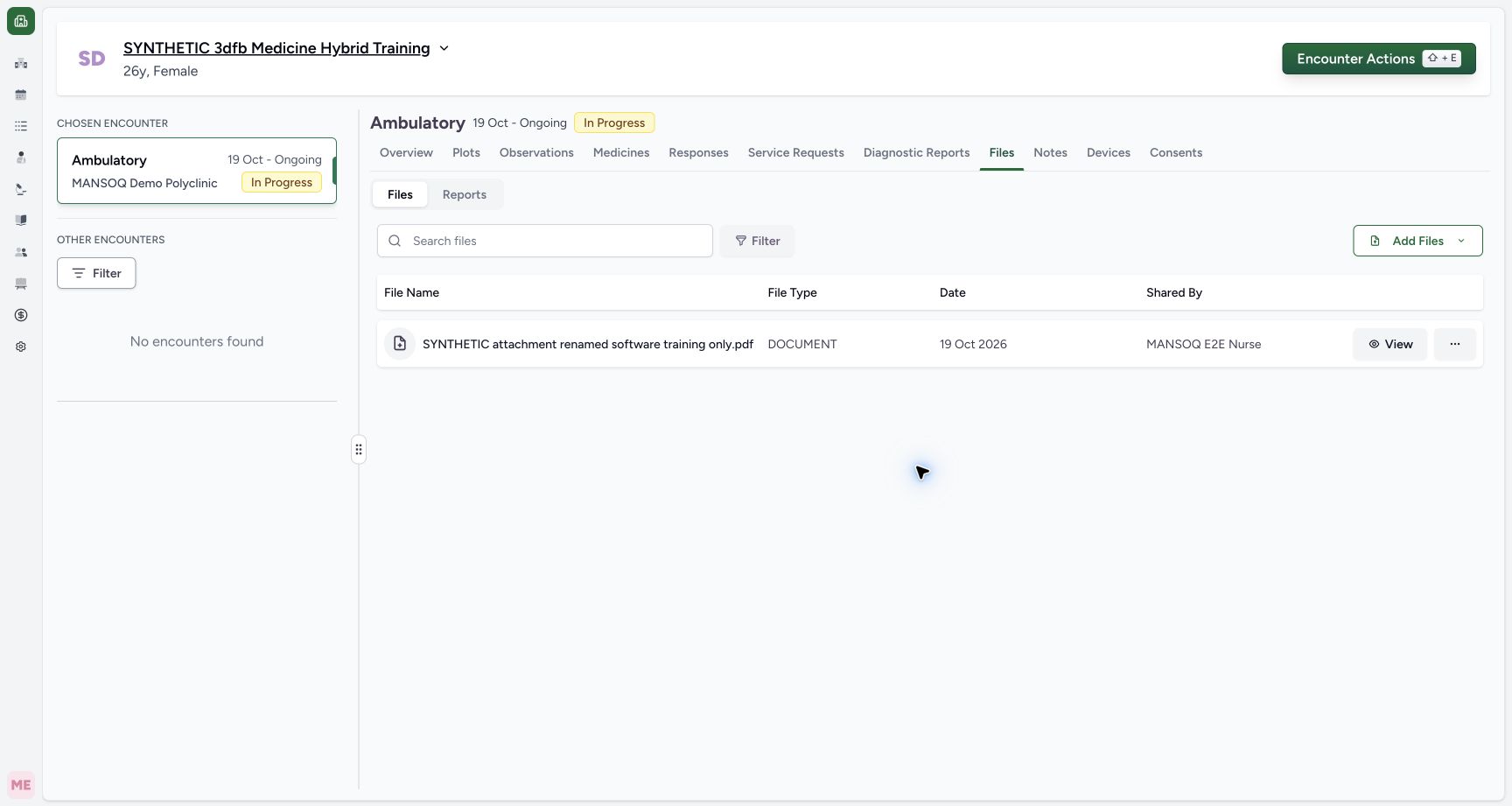
After the normal page reload, the loaded file list still shows SYNTHETIC attachment renamed software training only.pdf with the original Date and Shared By.
 123
123Check the saved name after reload
Capture details
Observed committed 3dfb source on 20 October 2026 (Asia/Riyadh; captured 19 October UTC). Existing fictional encounter attachment; no real clinical document or consent.
Image SHA-256 6fc71210f5f803063519a7210c427c65c4f2f8a3910b376cef0593f6077e141a
- Check the persisted name after reload: The loaded row keeps the saved display name and .pdf extension.
- Read the unchanged upload Date: The original file Date remains 19 Oct 2026.
- Read Shared By after reload: The original uploader remains MANSOQ E2E Nurse.
Keep the file and upload metadata distinct
This changes the displayed name of the existing attachment. The original upload Date and uploader remain on the list; the rename does not represent another upload.
1Read the existing display name in Rename File
Capture details
Observed committed 3dfb source on 20 October 2026 (Asia/Riyadh; captured 19 October UTC). Existing fictional encounter attachment; no real clinical document or consent.
Image SHA-256 ac9b029980cf598cf73e279b034bae253966a994ad40f489582943089e2d928c
- Read the existing display name: Rename File shows the name without the .pdf extension.
1234Read the successful Rename and original upload metadata
Capture details
Observed committed 3dfb source on 20 October 2026 (Asia/Riyadh; captured 19 October UTC). Existing fictional encounter attachment; no real clinical document or consent.
Image SHA-256 a83929c2f1c5f1cd5858792ef454109e9cd1aca1c793998bb9530d7769380cc6
- Read the Rename success message: File name changed successfully is visible.
- Check the renamed file: The row now shows SYNTHETIC attachment renamed software training only.pdf.
- Keep the original Date distinct: The list still shows 19 Oct 2026.
- Read the original Shared By: The uploader remains MANSOQ E2E Nurse.
123Check the saved name after reload
Capture details
Observed committed 3dfb source on 20 October 2026 (Asia/Riyadh; captured 19 October UTC). Existing fictional encounter attachment; no real clinical document or consent.
Image SHA-256 6fc71210f5f803063519a7210c427c65c4f2f8a3910b376cef0593f6077e141a
- Check the persisted name after reload: The loaded row keeps the saved display name and .pdf extension.
- Read the unchanged upload Date: The original file Date remains 19 Oct 2026.
- Read Shared By after reload: The original uploader remains MANSOQ E2E Nurse.
Troubleshooting
Should .pdf be added in Rename File?
No. The pictured input contains the display name without .pdf, and the saved list supplies the existing extension. Match the prepared name before Proceed.
1Read the existing display name in Rename File
Capture details
Observed committed 3dfb source on 20 October 2026 (Asia/Riyadh; captured 19 October UTC). Existing fictional encounter attachment; no real clinical document or consent.
Image SHA-256 ac9b029980cf598cf73e279b034bae253966a994ad40f489582943089e2d928c
- Read the existing display name: Rename File shows the name without the .pdf extension.
12Enter the new display name and use Proceed
Capture details
Observed committed 3dfb source on 20 October 2026 (Asia/Riyadh; captured 19 October UTC). Existing fictional encounter attachment; no real clinical document or consent.
Image SHA-256 4b8eb2956ee4263c85b3a98424a9e793f1759a2b0a02a3905304e07f34220748
- Enter the new display name: Use SYNTHETIC attachment renamed software training only without typing .pdf.
- Save the Rename: Select Proceed once after checking the name.
1234Read the successful Rename and original upload metadata
Capture details
Observed committed 3dfb source on 20 October 2026 (Asia/Riyadh; captured 19 October UTC). Existing fictional encounter attachment; no real clinical document or consent.
Image SHA-256 a83929c2f1c5f1cd5858792ef454109e9cd1aca1c793998bb9530d7769380cc6
- Read the Rename success message: File name changed successfully is visible.
- Check the renamed file: The row now shows SYNTHETIC attachment renamed software training only.pdf.
- Keep the original Date distinct: The list still shows 19 Oct 2026.
- Read the original Shared By: The uploader remains MANSOQ E2E Nurse.
Source evidence
Every citation uses this exact committed version. The private source repository requires access.
- repositories/platform/mansoq-web/src/hooks/useFileManager.tsx:233 ·
3dfb7c9f519fb5b4cd4452439f3c12346bf58319Source file checksum
85f27360ad717aa5e985901d3a3cbf9bcef2bddcc5a45ab0a92827adee518dbd - repositories/platform/mansoq-web/src/components/Files/FileSubTab.tsx:107 ·
3dfb7c9f519fb5b4cd4452439f3c12346bf58319Source file checksum
e7cd676bfc2ceae76a896c79def0cd5fbb280f7311809c1d6bd326c0c8ae1dd6 - repositories/platform/mansoq-web/src/components/Files/FilesTab.tsx:50 ·
3dfb7c9f519fb5b4cd4452439f3c12346bf58319Source file checksum
3974572fa14aff40efbde79775d1e0243ed06ceb93ccf6dcb06cdfb5e01ab282 - repositories/platform/mansoq-web/src/types/files/fileApi.ts:29 ·
3dfb7c9f519fb5b4cd4452439f3c12346bf58319Source file checksum
ad162efb04f604f840c58795f50aca61e038ef800c3fed19104933e284b37363 - repositories/platform/mansoq-core/mansoq/emr/resources/file_upload/spec.py:38 ·
3dfb7c9f519fb5b4cd4452439f3c12346bf58319Source file checksum
dede29be8edc2e03331ffb1d4c434ae67517acabfeb4585b6cd84a0c1210ec59 - repositories/platform/mansoq-core/mansoq/emr/api/viewsets/base.py:180 ·
3dfb7c9f519fb5b4cd4452439f3c12346bf58319Source file checksum
6a287dd315b8a4957b29c58e4bbc1bef7b8d9d257f9149f93045ff0adbdcae6c - repositories/platform/mansoq-core/mansoq/security/authorization/encounter.py:97 ·
3dfb7c9f519fb5b4cd4452439f3c12346bf58319Source file checksum
0e7ff8afcfb57b2371201e16ee6fac26125d6e686af66ed7edd95e49bc07de78