 MANSOQ
 Clinical care · VERSION 3dfb7c9f
Open Respiratory Status, cancel untouched and check required choices
Find the configured form and recover from its two missing required answers.
Nurse
 1234
1234Check the Nurse session, synthetic patient and encounter
Capture details
Observed committed 3dfb source on 19 October 2026. Fictional software inputs are not respiratory measurements, treatment advice or ventilator settings.
Image SHA-256 ce58e36060a1cac2f0cc70b09f312cc373dd5c62b629f84ce59e3ab5fd52a384
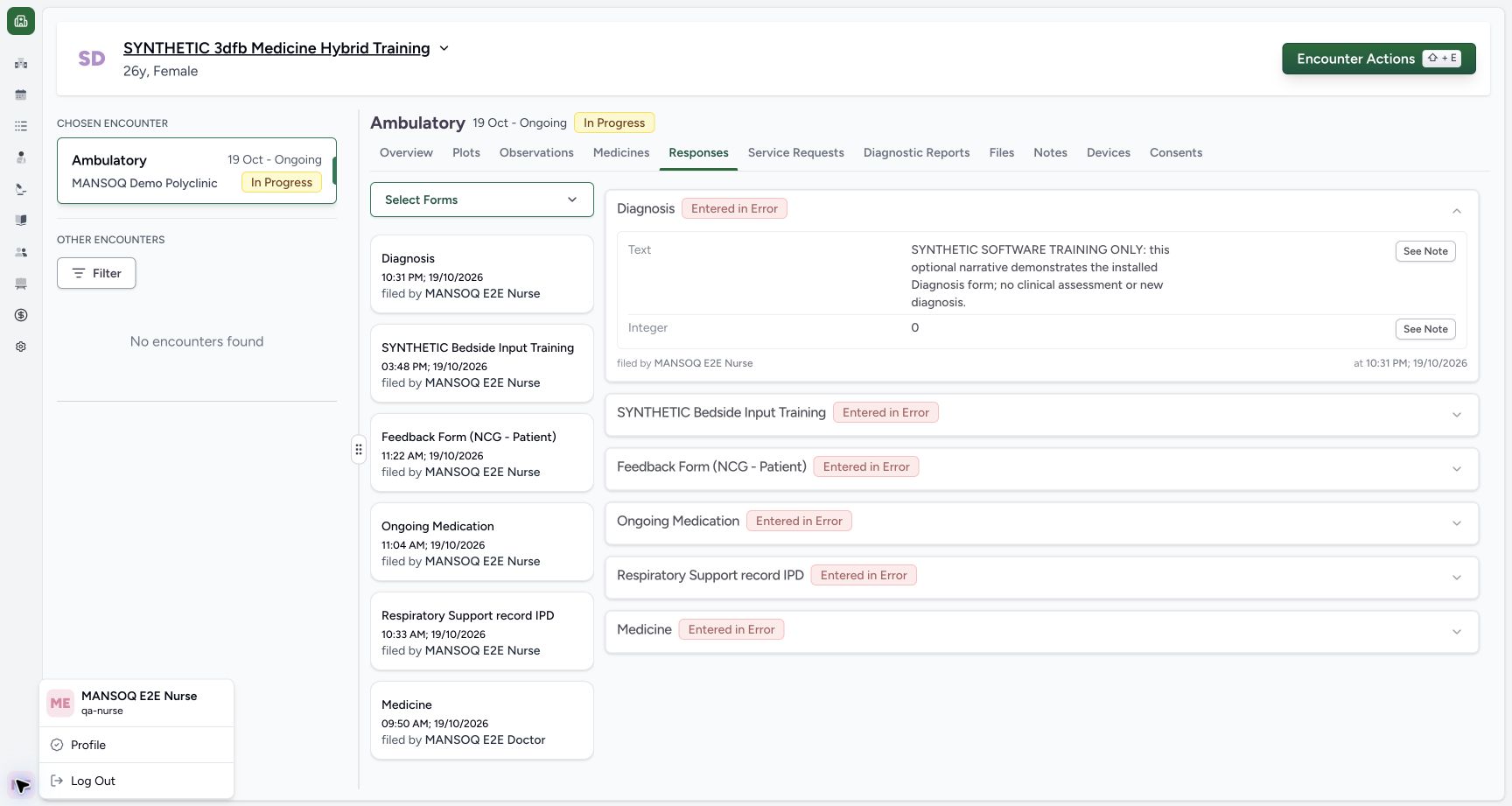
- Check the Nurse session: Read MANSOQ E2E Nurse and qa-nurse.
- Check the intended patient: Confirm the assigned synthetic training patient.
- Check the encounter: Confirm the selected Ambulatory encounter is In Progress.
- Open Encounter Actions: Open the encounter action search for the installed form.
10 of 10 content blocks have reviewed image alignment. Missing overview or prerequisite images remain open.
Before you begin
- Use an authorized Nurse session on the assigned active synthetic training encounter.1234
Recorded release 3dfb7c9f · 2026-10-19T20:11:42.820Z · 1728 × 921 Check the Nurse session, synthetic patient and encounter
Capture details
Observed committed 3dfb source on 19 October 2026. Fictional software inputs are not respiratory measurements, treatment advice or ventilator settings.
Image SHA-256
ce58e36060a1cac2f0cc70b09f312cc373dd5c62b629f84ce59e3ab5fd52a384- Check the Nurse session: Read MANSOQ E2E Nurse and qa-nurse.
- Check the intended patient: Confirm the assigned synthetic training patient.
- Check the encounter: Confirm the selected Ambulatory encounter is In Progress.
- Open Encounter Actions: Open the encounter action search for the installed form.
- Use only fictional software examples in this exercise. These samples are not clinical observations, treatment advice or ventilator settings.1234
Recorded release 3dfb7c9f · 2026-10-19T20:11:42.820Z · 1728 × 921 Check the Nurse session, synthetic patient and encounter
Capture details
Observed committed 3dfb source on 19 October 2026. Fictional software inputs are not respiratory measurements, treatment advice or ventilator settings.
Image SHA-256
ce58e36060a1cac2f0cc70b09f312cc373dd5c62b629f84ce59e3ab5fd52a384- Check the Nurse session: Read MANSOQ E2E Nurse and qa-nurse.
- Check the intended patient: Confirm the assigned synthetic training patient.
- Check the encounter: Confirm the selected Ambulatory encounter is In Progress.
- Open Encounter Actions: Open the encounter action search for the installed form.
1. Check your role and intended encounter
Confirm the Nurse session, the assigned synthetic patient and the selected In Progress encounter. Open Encounter Actions.
1234Check the Nurse session, synthetic patient and encounter
Capture details
Observed committed 3dfb source on 19 October 2026. Fictional software inputs are not respiratory measurements, treatment advice or ventilator settings.
Image SHA-256 ce58e36060a1cac2f0cc70b09f312cc373dd5c62b629f84ce59e3ab5fd52a384
- Check the Nurse session: Read MANSOQ E2E Nurse and qa-nurse.
- Check the intended patient: Confirm the assigned synthetic training patient.
- Check the encounter: Confirm the selected Ambulatory encounter is In Progress.
- Open Encounter Actions: Open the encounter action search for the installed form.
2. Find Respiratory Status
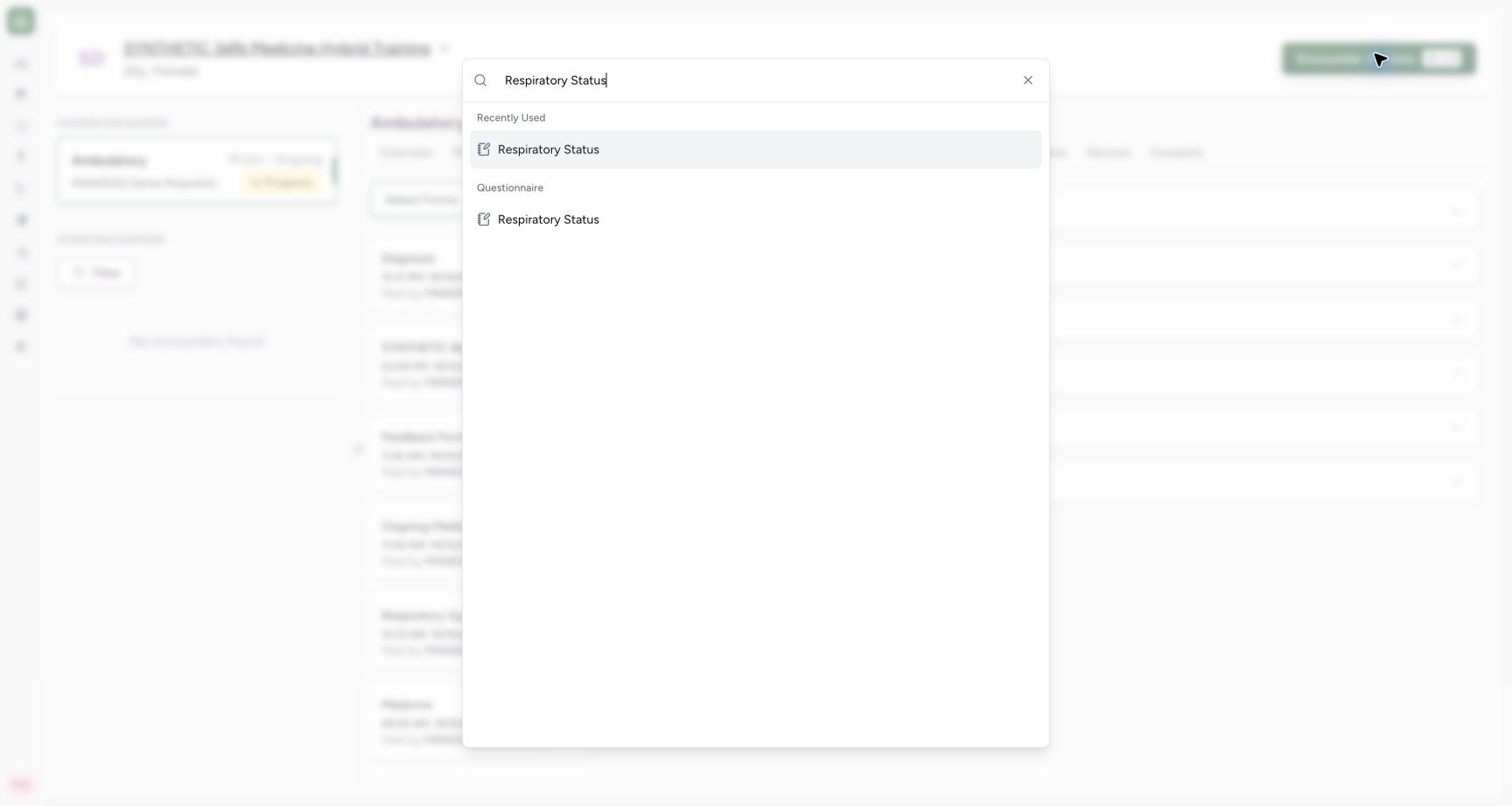
Search for Respiratory Status and select the result under Questionnaire.
 12
12Find the exact Respiratory Status form
Capture details
Observed committed 3dfb source on 19 October 2026. Fictional software inputs are not respiratory measurements, treatment advice or ventilator settings.
Image SHA-256 9a458026ff6526c11ffe1e43dc1b5e91993618c1495ee034bcb41ead0cb50654
- Search Respiratory Status: Enter the form title in the encounter action search.
- Open the questionnaire result: Select Respiratory Status under Questionnaire; the Recently Used entry is a separate visible shortcut.
3. Review the form sections
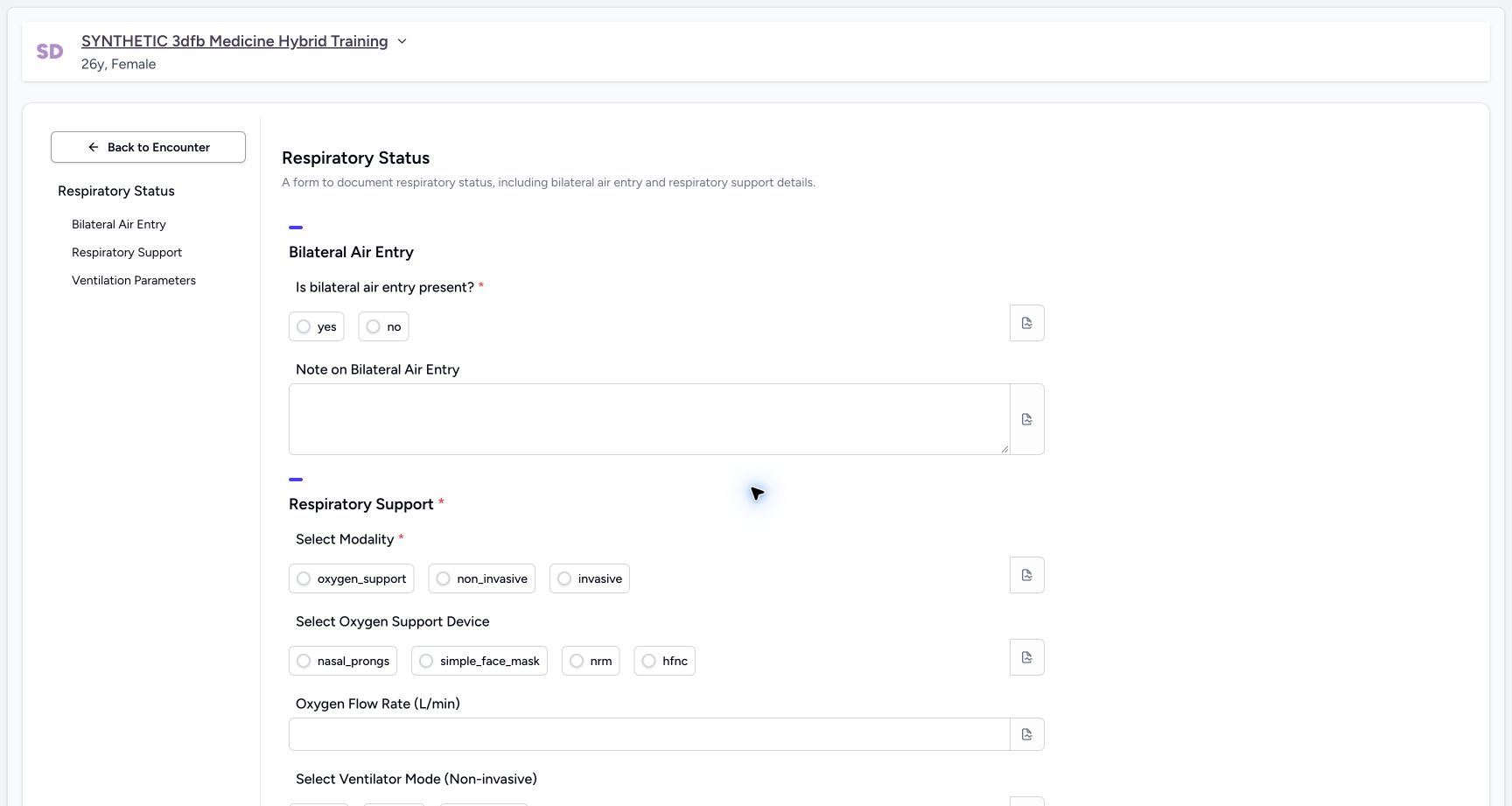
Read Bilateral Air Entry, Respiratory Support and Ventilation Parameters. The air-entry and modality inputs have required asterisks; the other input leaves are optional in this configuration.
 1234
1234Review the blank form and required choices
Capture details
Observed committed 3dfb source on 19 October 2026. Fictional software inputs are not respiratory measurements, treatment advice or ventilator settings.
Image SHA-256 18d3d9f93e582a03983980ac97644c18c19a62c7967bbc6a6571942059472f11
- Return to the encounter: Back to Encounter is separate from the bottom Cancel button.
- Read the required air-entry question: The asterisk marks this input as required.
- Read the required modality: Select Modality is the second required input.
- Use section navigation: The left labels identify the three form sections.
 123
123Read the optional parameters and Cancel
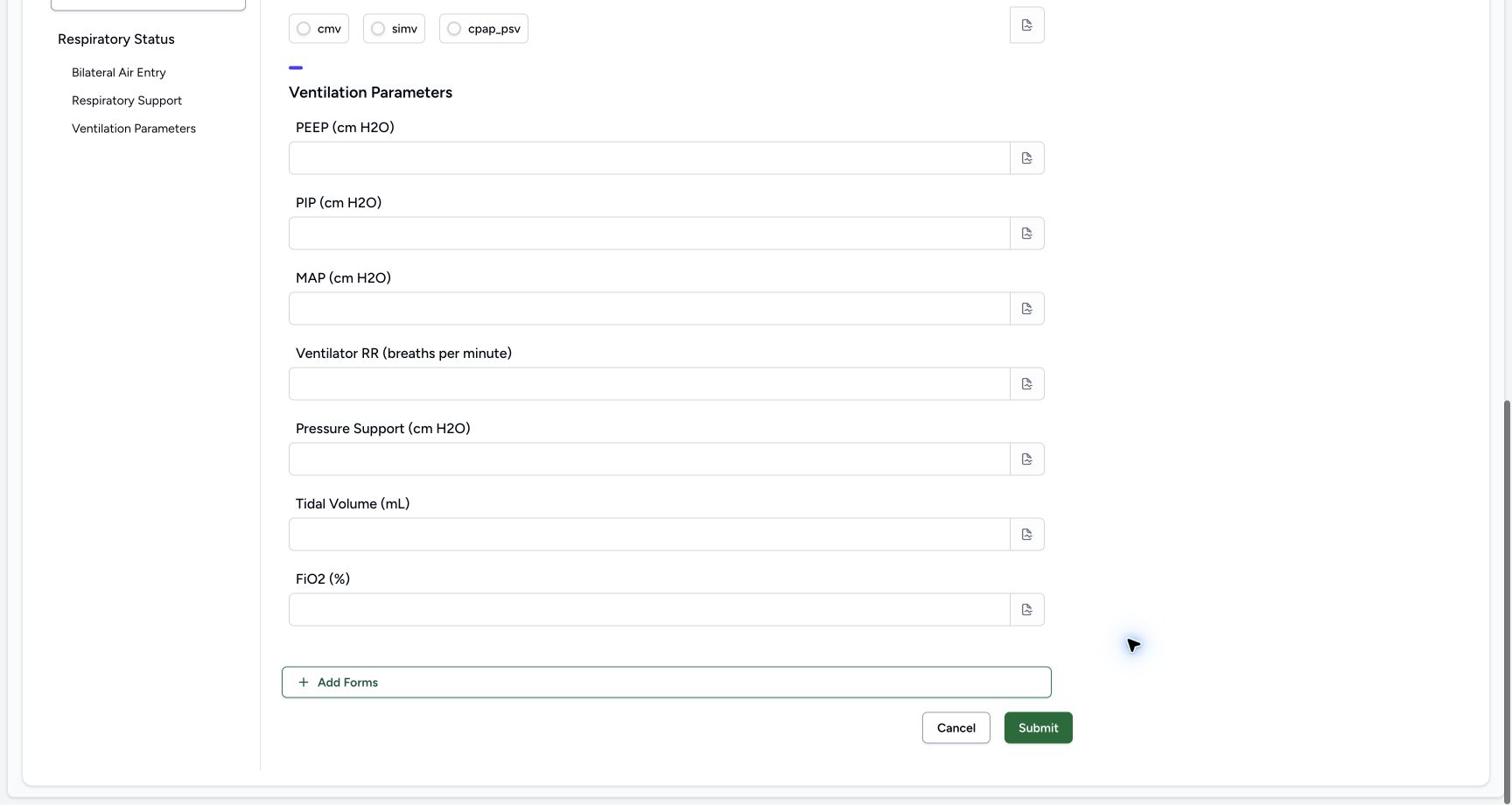
Capture details
Observed committed 3dfb source on 19 October 2026. Fictional software inputs are not respiratory measurements, treatment advice or ventilator settings.
Image SHA-256 5bf3fa08065e041990564ea2302af06c78b5c419db7a705ad1cd1aa60a0379f0
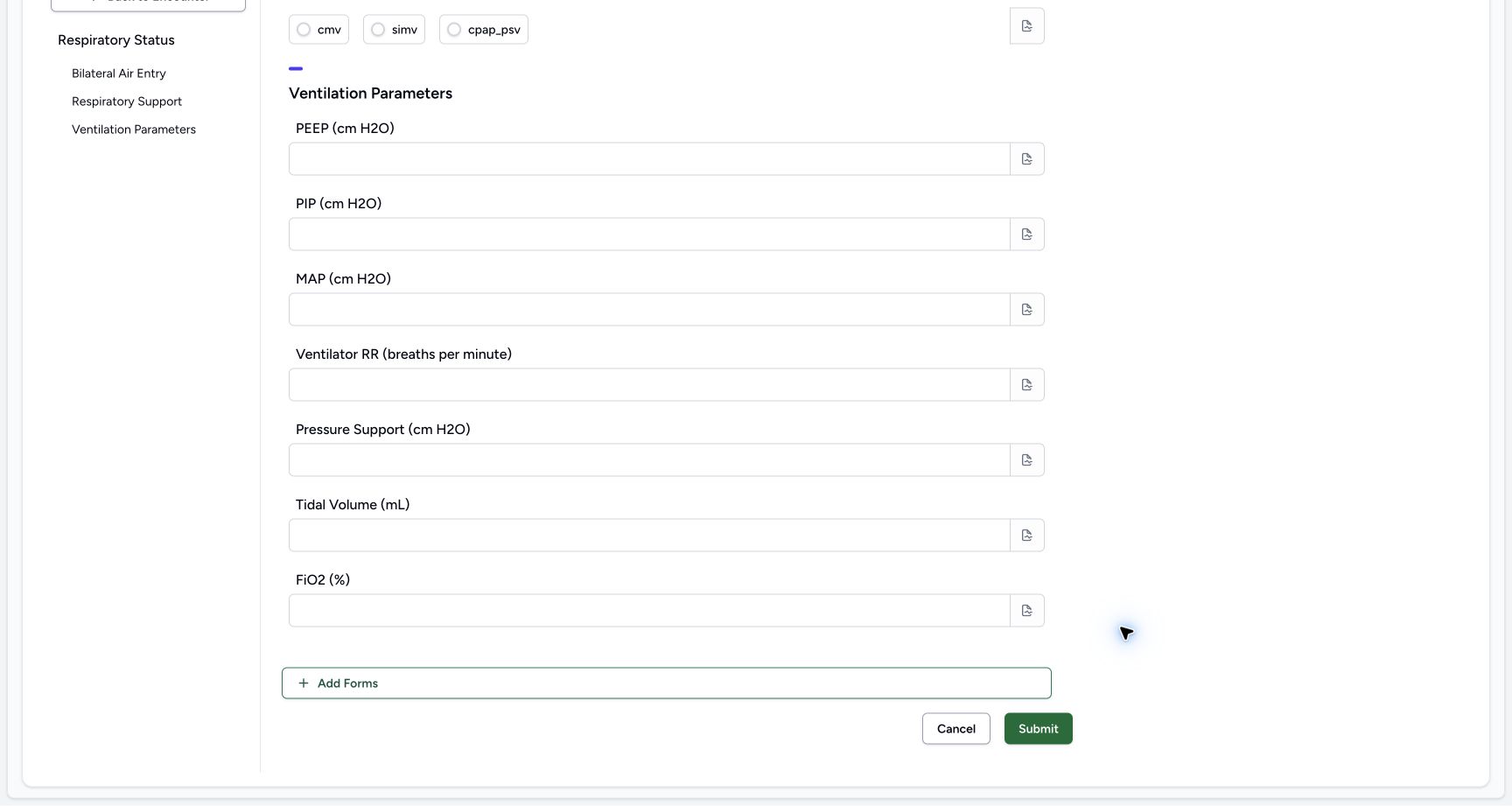
- Review Ventilation Parameters: These configured number inputs are optional.
- Cancel without changes: Select Cancel to leave the untouched form.
- Keep the form set unchanged: Add Forms is visible; adding another form is not part of this exercise.
4. Cancel the untouched form
Scroll to the footer and select Cancel without changing an input. Check the return to the same encounter Responses view.
123Read the optional parameters and Cancel
Capture details
Observed committed 3dfb source on 19 October 2026. Fictional software inputs are not respiratory measurements, treatment advice or ventilator settings.
Image SHA-256 5bf3fa08065e041990564ea2302af06c78b5c419db7a705ad1cd1aa60a0379f0
- Review Ventilation Parameters: These configured number inputs are optional.
- Cancel without changes: Select Cancel to leave the untouched form.
- Keep the form set unchanged: Add Forms is visible; adding another form is not part of this exercise.
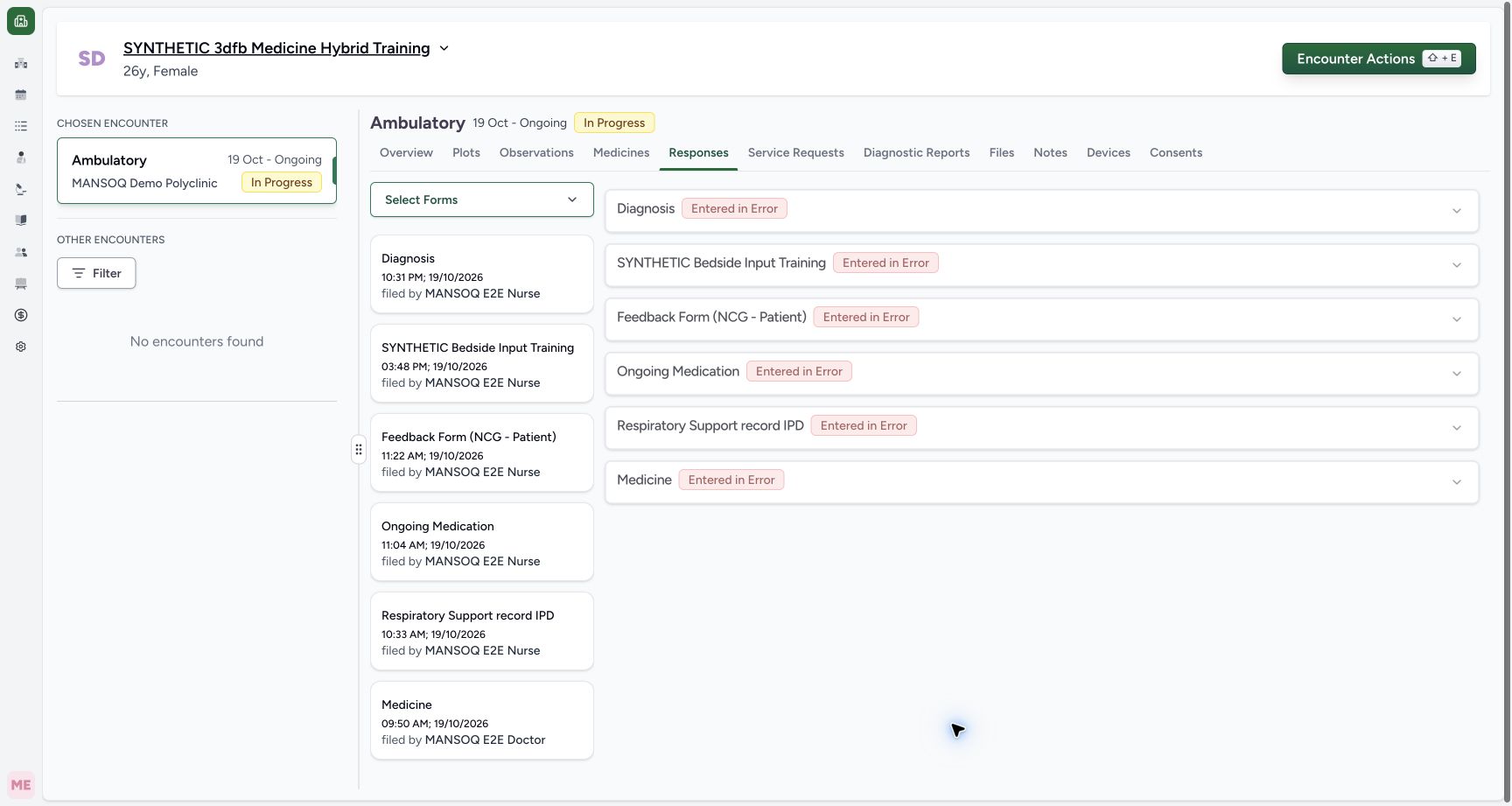 12
12Check the return after untouched Cancel
Capture details
Observed committed 3dfb source on 19 October 2026. Fictional software inputs are not respiratory measurements, treatment advice or ventilator settings.
Image SHA-256 a80dfb9208b8b07aa7ec19d2dc6a3a16c8b099c6a3511b82cd5c92d39050c8b6
- Read Responses: The same encounter Responses view is shown.
- Check existing responses: The existing Diagnosis card remains; no new Respiratory Status response was saved.
5. Reopen and try the required validation
Reopen the same form through the search result. In the software-training exercise, leave both required choices blank and select Submit once.
12Find the exact Respiratory Status form
Capture details
Observed committed 3dfb source on 19 October 2026. Fictional software inputs are not respiratory measurements, treatment advice or ventilator settings.
Image SHA-256 9a458026ff6526c11ffe1e43dc1b5e91993618c1495ee034bcb41ead0cb50654
- Search Respiratory Status: Enter the form title in the encounter action search.
- Open the questionnaire result: Select Respiratory Status under Questionnaire; the Recently Used entry is a separate visible shortcut.
 1
1Try Submit with the required choices blank
Capture details
Observed committed 3dfb source on 19 October 2026. Fictional software inputs are not respiratory measurements, treatment advice or ventilator settings.
Image SHA-256 7d7a3e7b7f6c86936b8e8d34d9a5af1fc5903369910a5fe2b58a530cb9798e2a
- Select Submit once: The training attempt leaves both required choices blank.
6. Read both missing-field messages
Read This field is required under the air-entry and modality choices. The required question is highlighted. Complete the required choices before the final submission. No response was saved by this client-validation attempt.
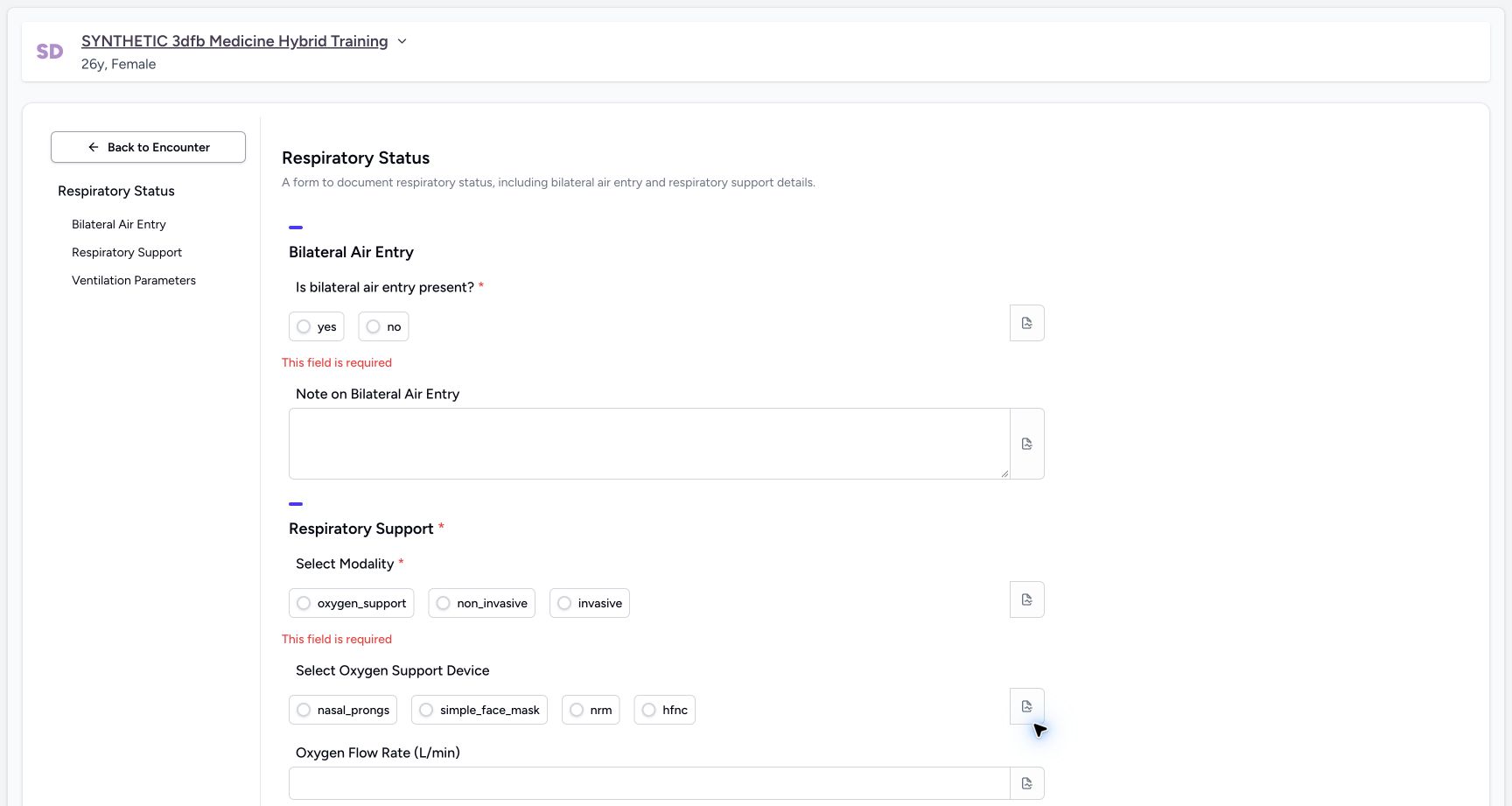 12
12Read both inline required-field errors
Capture details
Observed committed 3dfb source on 19 October 2026. Fictional software inputs are not respiratory measurements, treatment advice or ventilator settings.
Image SHA-256 303bf59a9e5f3880f433aaa0dd362afd6d235c4e6177f09b9686fadba8151d3a
- Read the first required error: This field is required appears below the air-entry choices.
- Read the second required error: The modality choices also show This field is required.
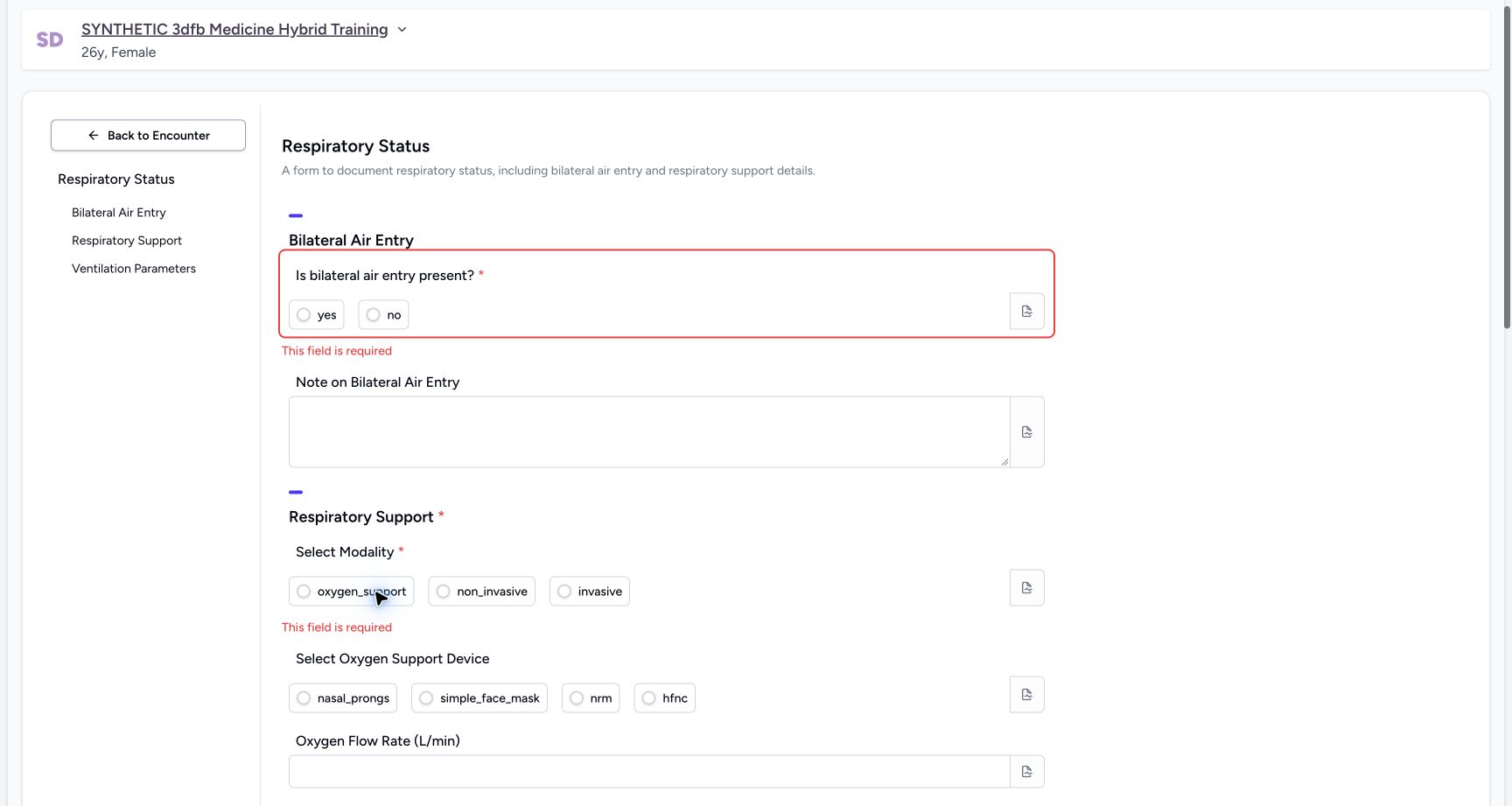 12
12Locate the highlighted required question
Capture details
Observed committed 3dfb source on 19 October 2026. Fictional software inputs are not respiratory measurements, treatment advice or ventilator settings.
Image SHA-256 e54f1196960eca4b29934403294c9d80b1e38209b3e71cf6096463a7a543aeaa
- Review the highlighted question: Validation draws attention to the unanswered required input.
- Read the inline error: The refusal is client validation; this view is not a backend error response.
Configured software scope
This lesson demonstrates the installed form and its required-input behaviour on a synthetic Ambulatory encounter. The Respiratory Support group heading does not make every optional child required. This is not a clinical respiratory assessment or a treatment protocol.
1234Review the blank form and required choices
Capture details
Observed committed 3dfb source on 19 October 2026. Fictional software inputs are not respiratory measurements, treatment advice or ventilator settings.
Image SHA-256 18d3d9f93e582a03983980ac97644c18c19a62c7967bbc6a6571942059472f11
- Return to the encounter: Back to Encounter is separate from the bottom Cancel button.
- Read the required air-entry question: The asterisk marks this input as required.
- Read the required modality: Select Modality is the second required input.
- Use section navigation: The left labels identify the three form sections.
123Read the optional parameters and Cancel
Capture details
Observed committed 3dfb source on 19 October 2026. Fictional software inputs are not respiratory measurements, treatment advice or ventilator settings.
Image SHA-256 5bf3fa08065e041990564ea2302af06c78b5c419db7a705ad1cd1aa60a0379f0
- Review Ventilation Parameters: These configured number inputs are optional.
- Cancel without changes: Select Cancel to leave the untouched form.
- Keep the form set unchanged: Add Forms is visible; adding another form is not part of this exercise.
Source evidence
Every citation uses this exact committed version. The private source repository requires access.
- repositories/platform/mansoq-web/src/components/Questionnaire/QuestionnaireForm.tsx:744 ·
3dfb7c9f519fb5b4cd4452439f3c12346bf58319Source file checksum
ee6c2195f13e48f0896a2d3da566c2f2a67910adad08894df6b77862f9cfdeec - repositories/platform/mansoq-web/src/components/Questionnaire/QuestionTypes/NumberQuestion.tsx:29 ·
3dfb7c9f519fb5b4cd4452439f3c12346bf58319Source file checksum
fd8183d93ed6c65e651dfc6b790c5ebc740fceef5cf6d0d5dc3d107f465b8dab - repositories/platform/mansoq-web/src/components/Questionnaire/QuestionTypes/ChoiceQuestion.tsx:45 ·
3dfb7c9f519fb5b4cd4452439f3c12346bf58319Source file checksum
0f6a5813b88385121e4d44682fb82fa0c3d65a57faf21b59ddda8e19995e446e - repositories/platform/mansoq-web/src/components/Questionnaire/QuestionTypes/QuestionInput.tsx:59 ·
3dfb7c9f519fb5b4cd4452439f3c12346bf58319Source file checksum
16bebfb11603d50cb219f5db55d93cd0bc2935630af0fc60a6d5732f04a33163 - repositories/platform/mansoq-web/src/components/Questionnaire/QuestionTypes/QuestionGroup.tsx:37 ·
3dfb7c9f519fb5b4cd4452439f3c12346bf58319Source file checksum
ea2f931a1329973d4b23ffee6f4581df62fc7d7092449142d03b73f61553bccc - repositories/platform/mansoq-web/src/components/Facility/ConsultationDetails/PrintQuestionnaireResponse.tsx:18 ·
3dfb7c9f519fb5b4cd4452439f3c12346bf58319Source file checksum
626d6b496a09058d94929bbec29bd34a3c91a95111466342a278e6bca0f2202e - repositories/platform/mansoq-web/src/components/Facility/ConsultationDetails/PrintAllQuestionnaireResponses.tsx:316 ·
3dfb7c9f519fb5b4cd4452439f3c12346bf58319Source file checksum
e7314df6d693bbd49e54e5f007521488cbc82b164dba4fc0ba2e317049b5cc1a - repositories/platform/mansoq-web/src/components/Facility/ConsultationDetails/QuestionnaireResponsesList.tsx:350 ·
3dfb7c9f519fb5b4cd4452439f3c12346bf58319Source file checksum
abcf7ab477238782e128a28bbd0b83562f900a41dcd1665a3df68e33fad1deac - repositories/platform/mansoq-core/mansoq/emr/api/viewsets/questionnaire.py:116 ·
3dfb7c9f519fb5b4cd4452439f3c12346bf58319Source file checksum
ccc0fe021d193e5d6de9540c256413da356895ceed0c71c5fdcba75ca6915d4e - repositories/platform/mansoq-core/mansoq/emr/api/viewsets/questionnaire_response.py:42 ·
3dfb7c9f519fb5b4cd4452439f3c12346bf58319Source file checksum
3a1e4e355e2f2ec25e82f5adc12ca9250c201b521098af8d1211bee95489fa2b - repositories/platform/mansoq-core/mansoq/emr/resources/questionnaire/utils.py:447 ·
3dfb7c9f519fb5b4cd4452439f3c12346bf58319Source file checksum
8425858d2179a66f482f38a3fd7f0fc0dcb70a4bcd85450fe7ce748b3081826c - repositories/platform/mansoq-core/mansoq/security/authorization/encounter.py:69 ·
3dfb7c9f519fb5b4cd4452439f3c12346bf58319Source file checksum
0e7ff8afcfb57b2371201e16ee6fac26125d6e686af66ed7edd95e49bc07de78 - repositories/platform/mansoq-web/src/components/ui/RadioInput.tsx:34 ·
3dfb7c9f519fb5b4cd4452439f3c12346bf58319Source file checksum
17b849d60a4f860fdb9f2384625fe43b2bc99fc1179019728c57511fce74813d - repositories/platform/mansoq-web/src/components/Questionnaire/QuestionTypes/TextQuestion.tsx:50 ·
3dfb7c9f519fb5b4cd4452439f3c12346bf58319Source file checksum
1ce4eb85780e351a42f155fc8a092fa921e6f4853f1efc91902365498b834aab