 MANSOQ
 Clinical care · VERSION 3dfb7c9f
Save and verify the final Respiratory Status example
Submit four fictional answers and two notes, then read them back after a normal reload.
Nurse
 123456
Read the four saved answers, Nurse and filing time
Capture details
Observed committed 3dfb source on 19 October 2026. Fictional software inputs are not respiratory measurements, treatment advice or ventilator settings.
Image SHA-256 3121b099ad8527d7d2ccc8cdea776f97a0394598651acf0882c49a66a1a89beb
- Check Respiratory Status: Read the intended form card.
- Read no: The saved air-entry answer is no.
- Read oxygen_support: The saved modality is oxygen_support.
- Read zero: The saved Integer answer remains 0.
- Read the original Nurse: The creator shown is MANSOQ E2E Nurse.
- Read the original filing time: Read the response filing time, not a new measurement time.
11 of 11 content blocks have reviewed image alignment. Missing overview or prerequisite images remain open.
Before you begin
- Use an authorized Nurse session on the assigned active synthetic training encounter.123456
Recorded release 3dfb7c9f · 2026-10-19T20:21:08.447Z · 1728 × 921 Read the four saved answers, Nurse and filing time
Capture details
Observed committed 3dfb source on 19 October 2026. Fictional software inputs are not respiratory measurements, treatment advice or ventilator settings.
Image SHA-256
3121b099ad8527d7d2ccc8cdea776f97a0394598651acf0882c49a66a1a89beb- Check Respiratory Status: Read the intended form card.
- Read no: The saved air-entry answer is no.
- Read oxygen_support: The saved modality is oxygen_support.
- Read zero: The saved Integer answer remains 0.
- Read the original Nurse: The creator shown is MANSOQ E2E Nurse.
- Read the original filing time: Read the response filing time, not a new measurement time.
- Use only fictional software examples in this exercise. These samples are not clinical observations, treatment advice or ventilator settings.123456
Recorded release 3dfb7c9f · 2026-10-19T20:21:08.447Z · 1728 × 921 Read the four saved answers, Nurse and filing time
Capture details
Observed committed 3dfb source on 19 October 2026. Fictional software inputs are not respiratory measurements, treatment advice or ventilator settings.
Image SHA-256
3121b099ad8527d7d2ccc8cdea776f97a0394598651acf0882c49a66a1a89beb- Check Respiratory Status: Read the intended form card.
- Read no: The saved air-entry answer is no.
- Read oxygen_support: The saved modality is oxygen_support.
- Read zero: The saved Integer answer remains 0.
- Read the original Nurse: The creator shown is MANSOQ E2E Nurse.
- Read the original filing time: Read the response filing time, not a new measurement time.
1. Review the final upper answers
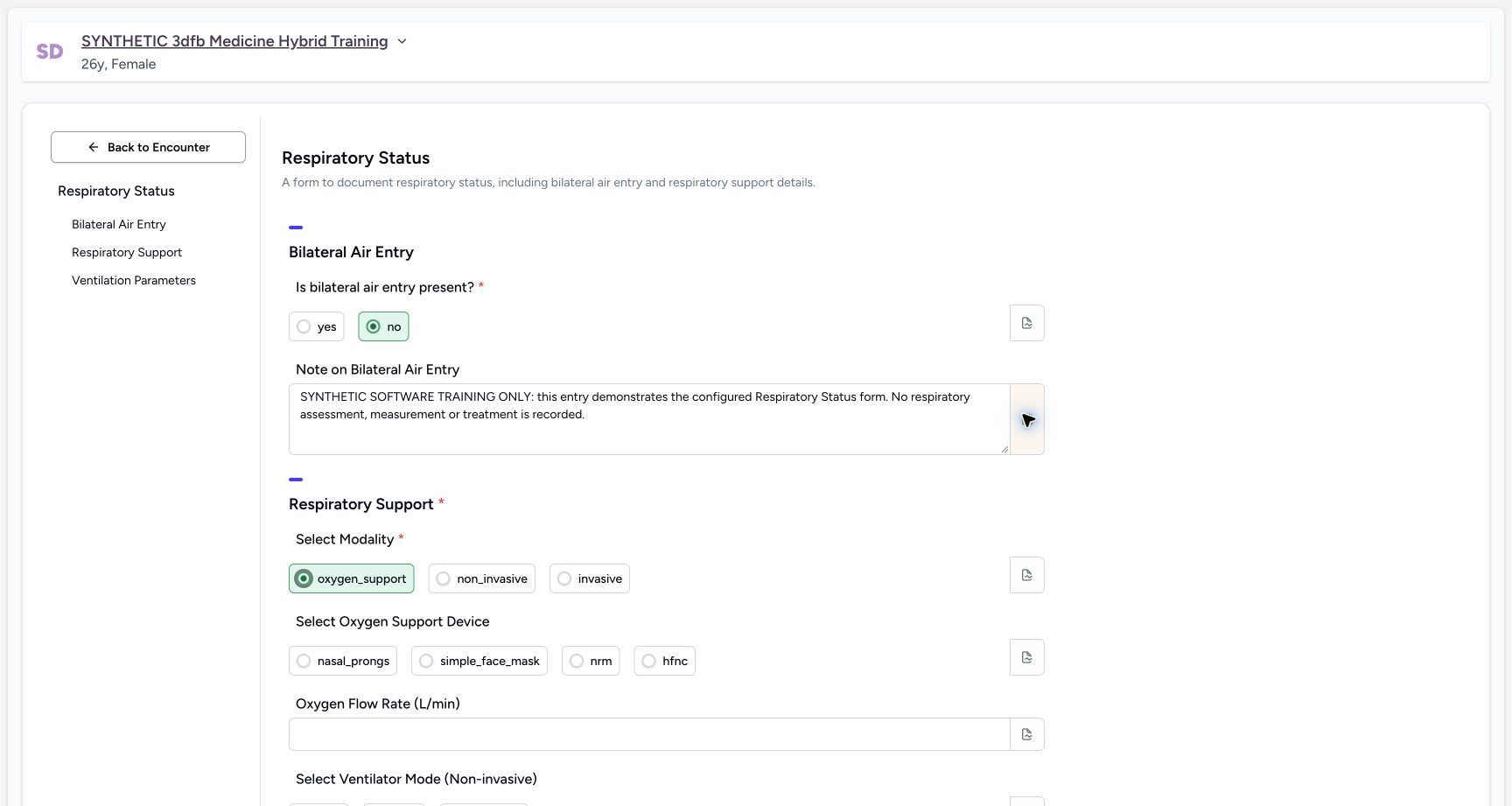
Check no, the complete fictional narrative and oxygen_support. Reopen the narrative note if needed and confirm its final explanation.
 1234
1234Review the final upper answers and narrative note indicator
Capture details
Observed committed 3dfb source on 19 October 2026. Fictional software inputs are not respiratory measurements, treatment advice or ventilator settings.
Image SHA-256 f9b8764f6111640e1390e3ac588a0d6f26bed07ffee6529311066da89c198ff2
- Check no is restored: The required air-entry choice has its final fictional answer.
- Read the final narrative: Read the complete software-only narrative before saving.
- Check the note indicator: The coloured icon indicates the narrative field has a note.
- Check oxygen_support: The required modality is restored to the final example.
 12
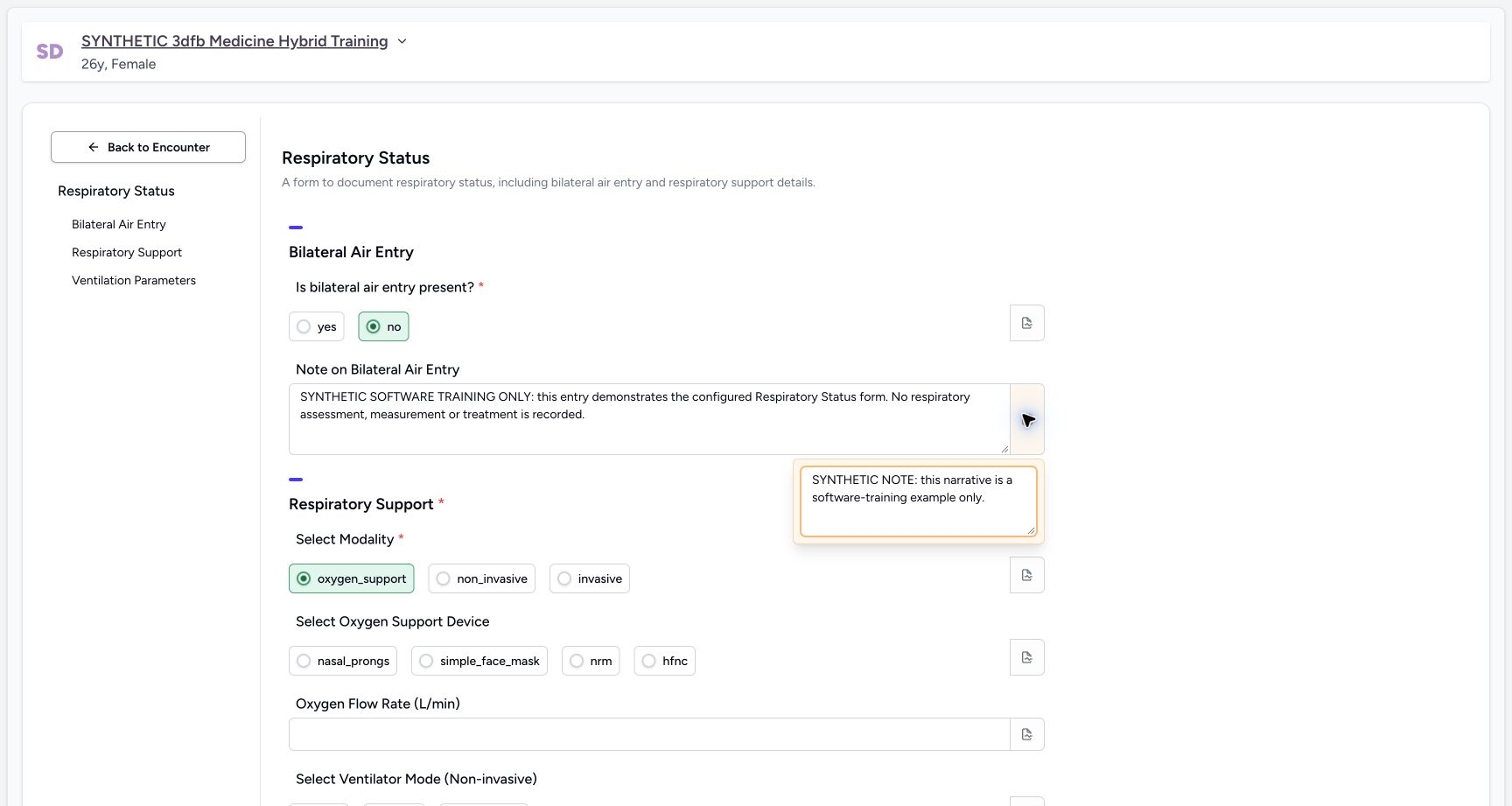
12Restore and reopen the final narrative note
Capture details
Observed committed 3dfb source on 19 October 2026. Fictional software inputs are not respiratory measurements, treatment advice or ventilator settings.
Image SHA-256 e78e3a5720e71e348659fe5b6ae0d994fbeea6b6b0cbc6c7b33596920d92dd13
- Use the narrative note icon: The separate note popover is already open.
- Read the note text: The main narrative answer stays separate from this note.
2. Check the optional middle inputs are clear
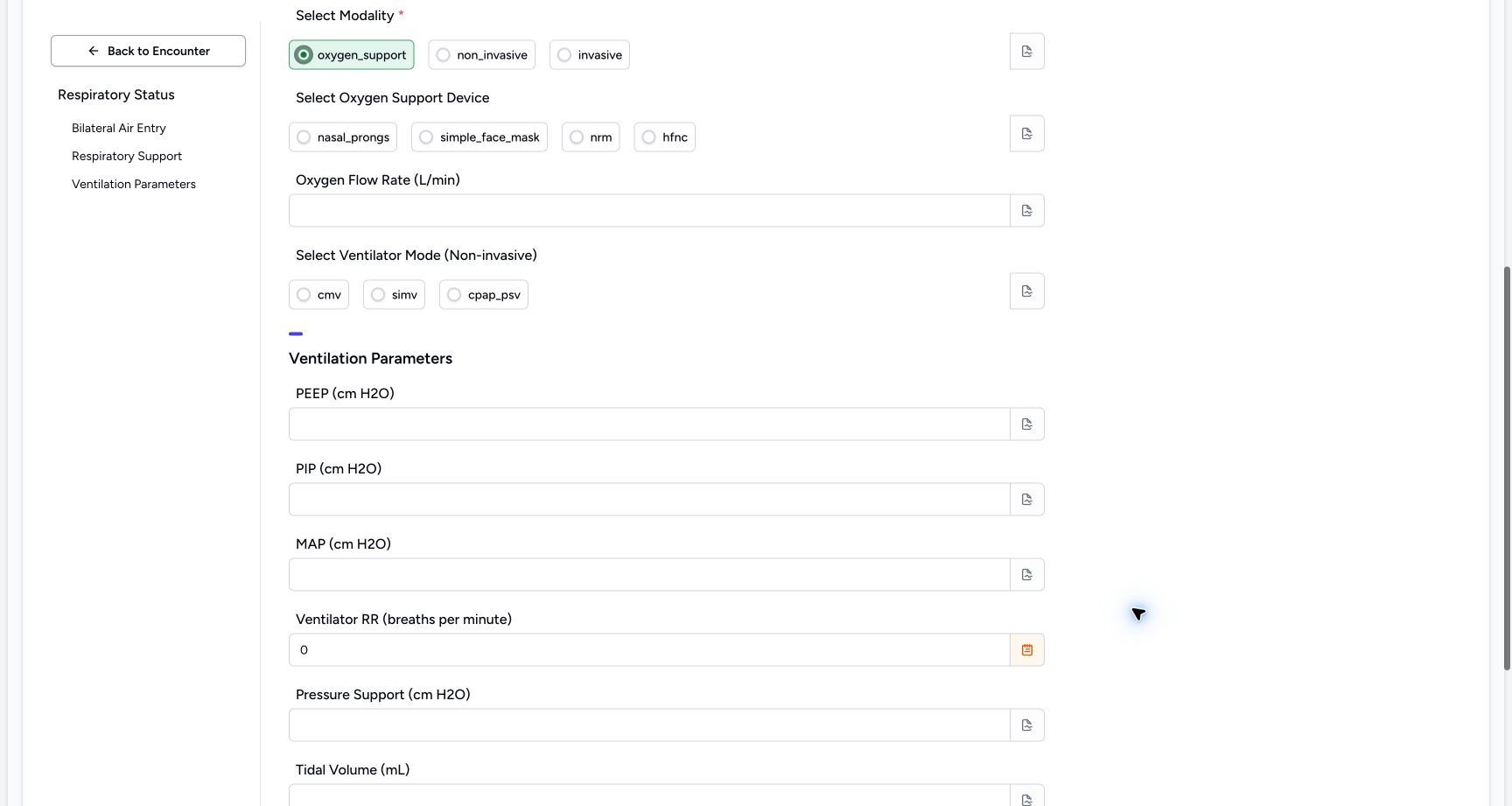
Check that device, Oxygen Flow Rate, non-invasive mode, PEEP, PIP and MAP are empty. The temporary cross-modality exercises are not part of the final response.
 12345
12345Review the cleared optional middle inputs
Capture details
Observed committed 3dfb source on 19 October 2026. Fictional software inputs are not respiratory measurements, treatment advice or ventilator settings.
Image SHA-256 53e447651ef270b8c3d88fad76ce46ab017d1c84b47bab8c1fb474412511b9bb
- Check the device choices are empty: No oxygen-device answer remains selected.
- Check Oxygen Flow Rate is empty: The temporary Decimal exercise is not part of the final response.
- Check the mode choices are empty: No non-invasive mode remains selected.
- Check cleared pressure inputs: PEEP, PIP and MAP are empty in this final review.
- Read the final zero: Only the fictional RR Integer 0 remains in the parameters.
3. Review zero, its note and the remaining fields
Check the fictional RR 0 and its explanation note. Pressure Support, Tidal Volume and FiO2 remain empty. Leave all popovers closed before submitting.
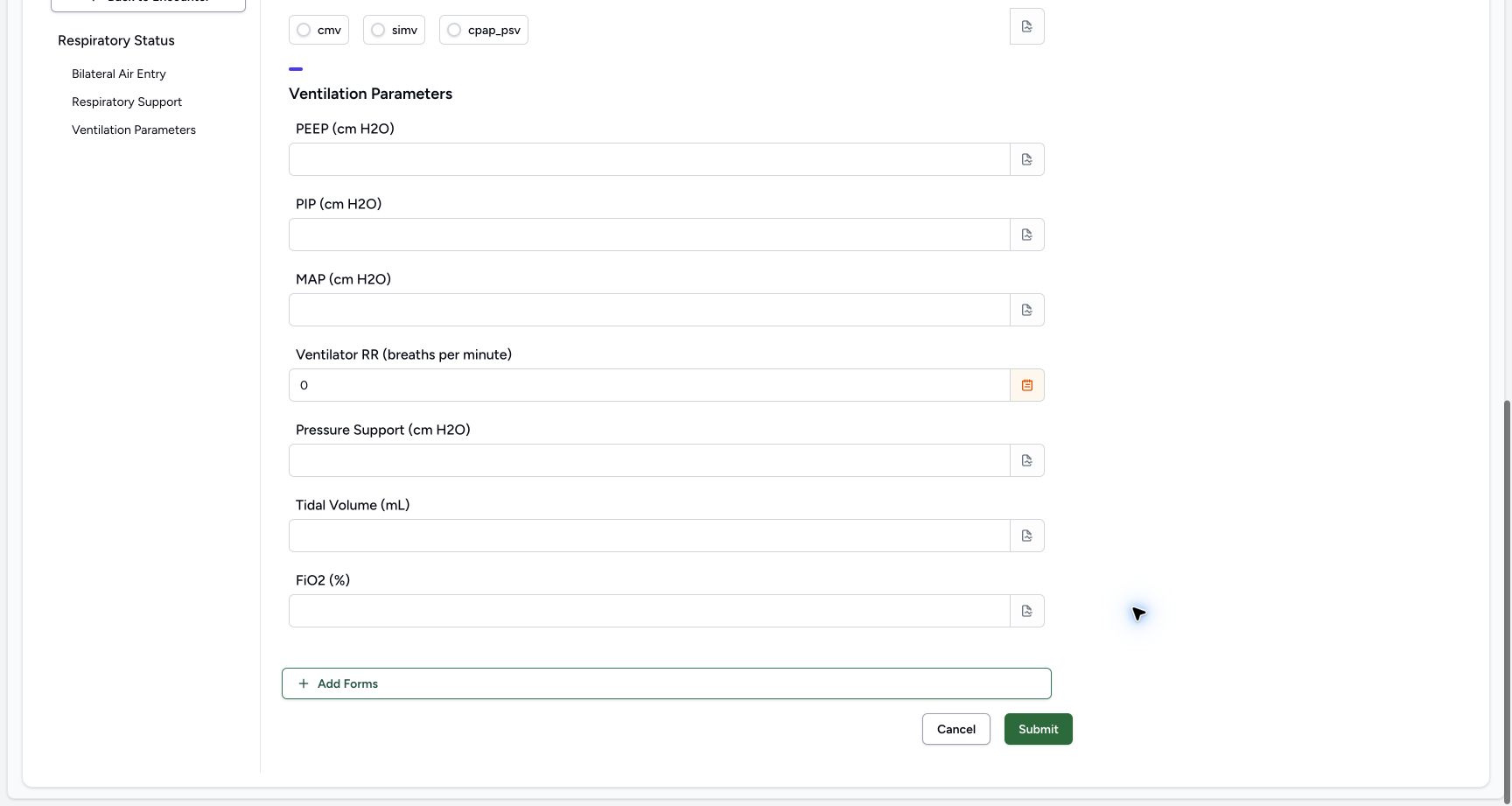 1234
1234Review the final lower fields and Submit once
Capture details
Observed committed 3dfb source on 19 October 2026. Fictional software inputs are not respiratory measurements, treatment advice or ventilator settings.
Image SHA-256 278292a816f4f9b3d130fa496a0c58593145121450f07a48caa022212f01730a
- Check the final RR 0: This is an explicit software input example, not a measured respiratory rate.
- Check the RR note indicator: The RR field has its separate explanation note.
- Check remaining optional fields: Pressure Support, Tidal Volume and FiO2 are empty.
- Submit the reviewed response once: Use Submit only after reviewing the final four answers and two notes.
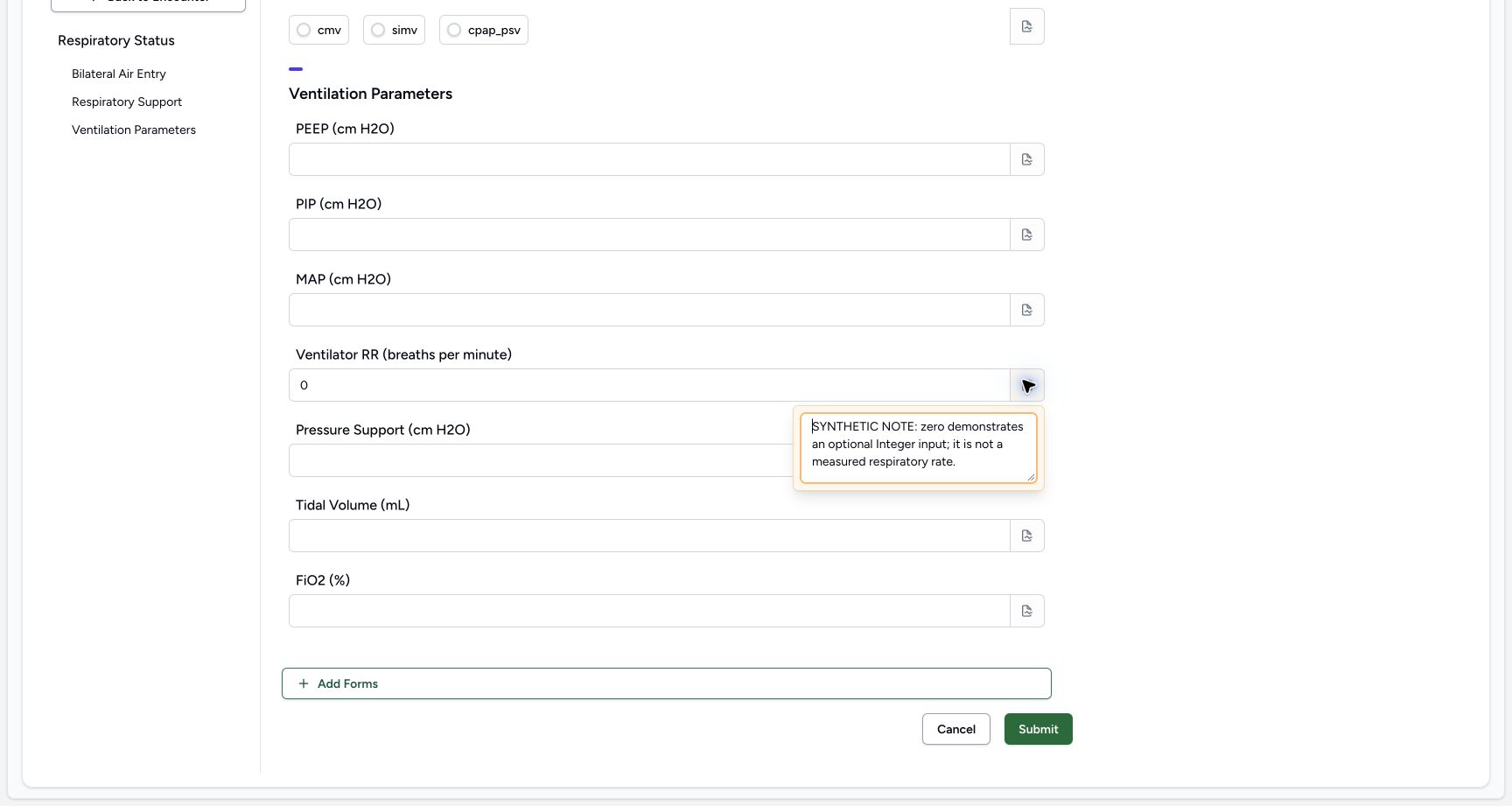 12
12Restore and reopen the final RR note
Capture details
Observed committed 3dfb source on 19 October 2026. Fictional software inputs are not respiratory measurements, treatment advice or ventilator settings.
Image SHA-256 767901c0794fd7f50ac424138c7bffb0d76e9c49fbaee9492acefee0e2c57a60
- Use the RR note icon: The RR-specific note popover is open in this image.
- Read the note text: The Integer value 0 remains separate from this field note.
4. Submit the reviewed response once
Select Submit once. The page returns to the same encounter Overview; open Responses to verify the complete saved record.
1234Review the final lower fields and Submit once
Capture details
Observed committed 3dfb source on 19 October 2026. Fictional software inputs are not respiratory measurements, treatment advice or ventilator settings.
Image SHA-256 278292a816f4f9b3d130fa496a0c58593145121450f07a48caa022212f01730a
- Check the final RR 0: This is an explicit software input example, not a measured respiratory rate.
- Check the RR note indicator: The RR field has its separate explanation note.
- Check remaining optional fields: Pressure Support, Tidal Volume and FiO2 are empty.
- Submit the reviewed response once: Use Submit only after reviewing the final four answers and two notes.
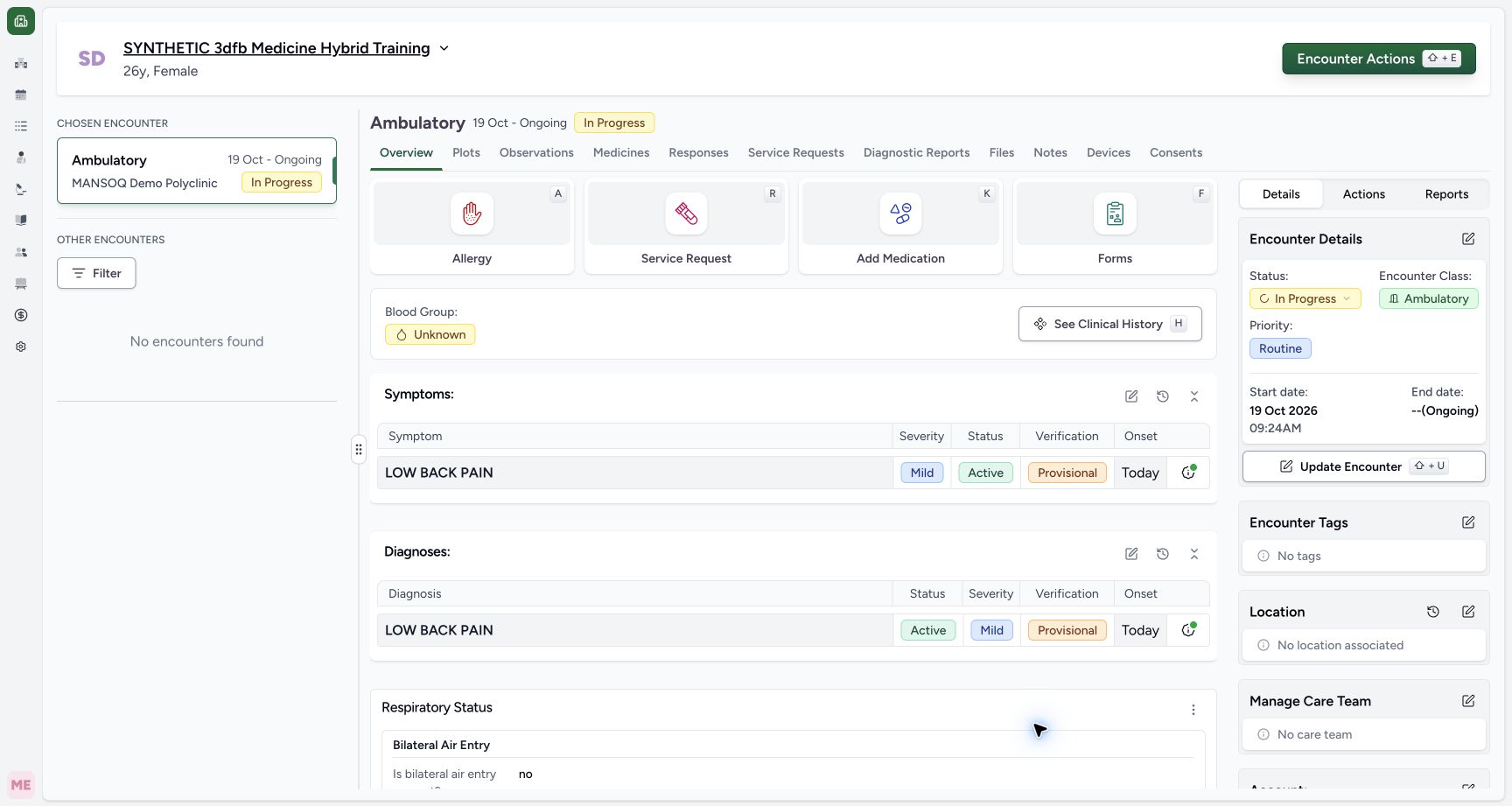 12
12Return to the encounter after the single Submit
Capture details
Observed committed 3dfb source on 19 October 2026. Fictional software inputs are not respiratory measurements, treatment advice or ventilator settings.
Image SHA-256 a3cce4a92264556bc99954fd97acfa44c388d0723816397a1e3e66e839ca2c1f
- Check the encounter Overview: The same patient and active encounter remain selected.
- Open Responses: Go to Responses to read the complete saved card.
5. Read the saved response and filing details
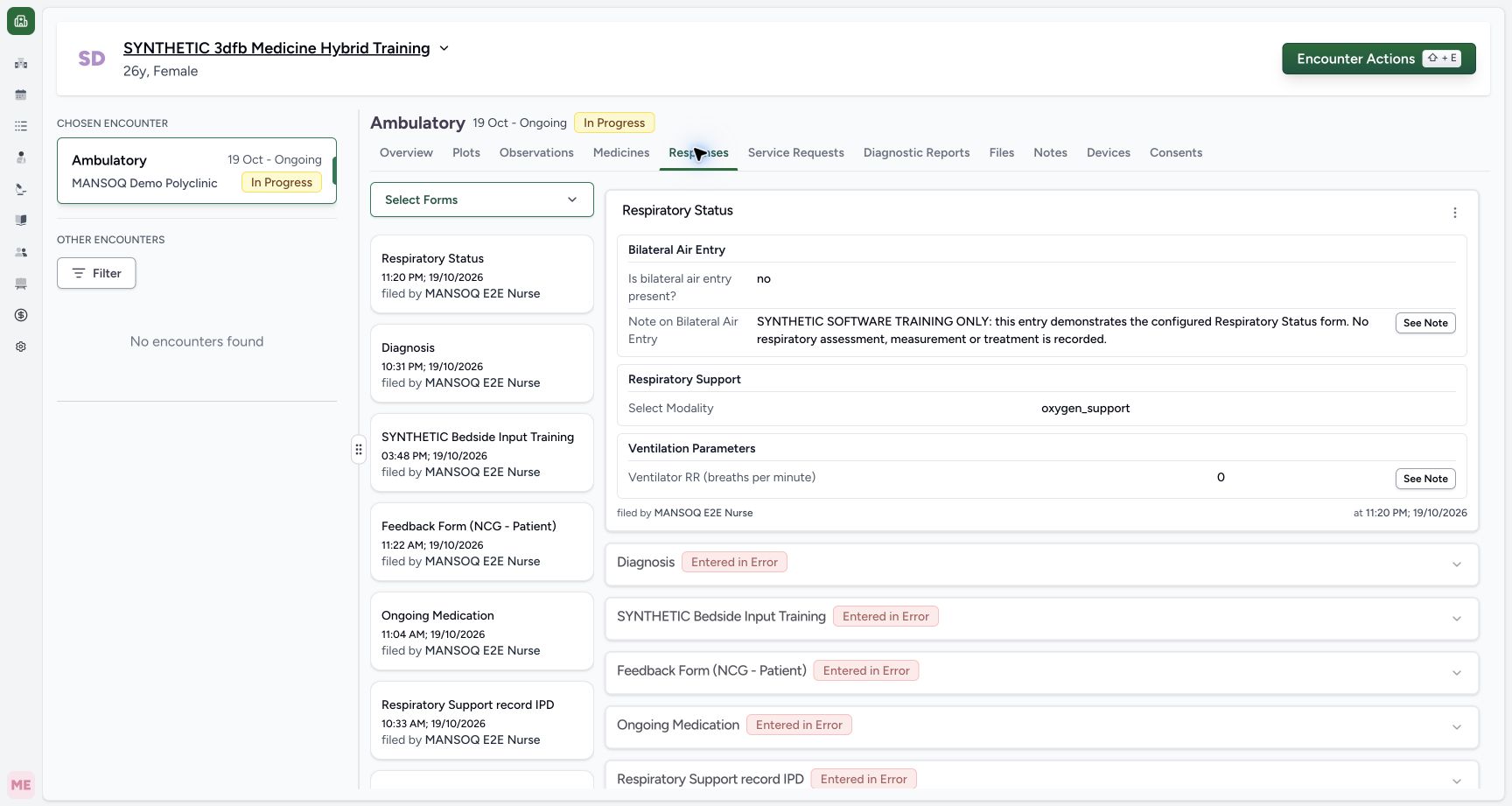
Find the new Respiratory Status card. Confirm the four answers no, the fictional narrative, oxygen_support and 0. Read MANSOQ E2E Nurse and the original filing time shown as 11:20 PM on 19/10/2026.
123456Read the four saved answers, Nurse and filing time
Capture details
Observed committed 3dfb source on 19 October 2026. Fictional software inputs are not respiratory measurements, treatment advice or ventilator settings.
Image SHA-256 3121b099ad8527d7d2ccc8cdea776f97a0394598651acf0882c49a66a1a89beb
- Check Respiratory Status: Read the intended form card.
- Read no: The saved air-entry answer is no.
- Read oxygen_support: The saved modality is oxygen_support.
- Read zero: The saved Integer answer remains 0.
- Read the original Nurse: The creator shown is MANSOQ E2E Nurse.
- Read the original filing time: Read the response filing time, not a new measurement time.
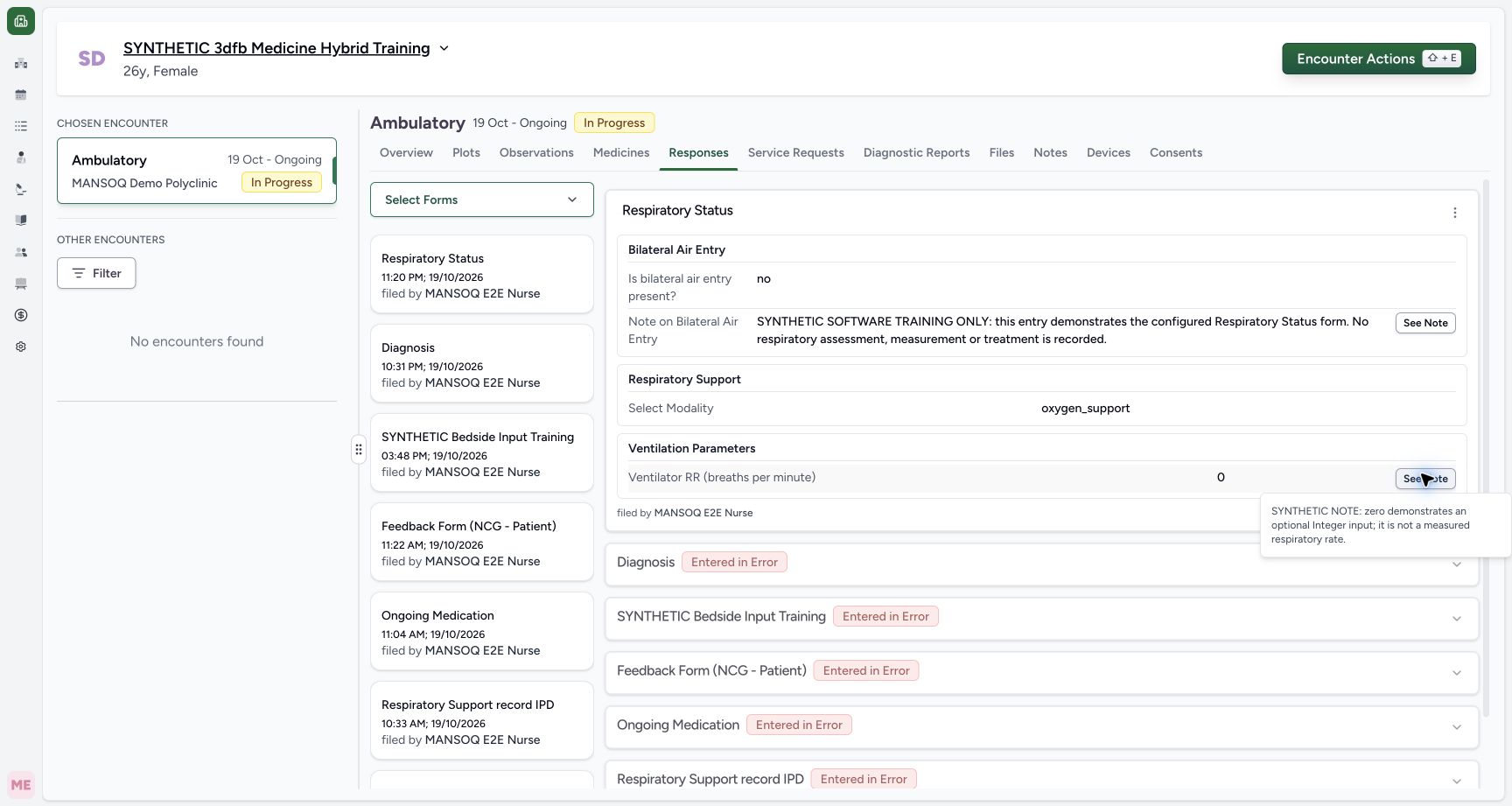
6. Read both saved notes
Open See Note beside the narrative, read the explanation and close it. Do the same beside the RR 0 answer.
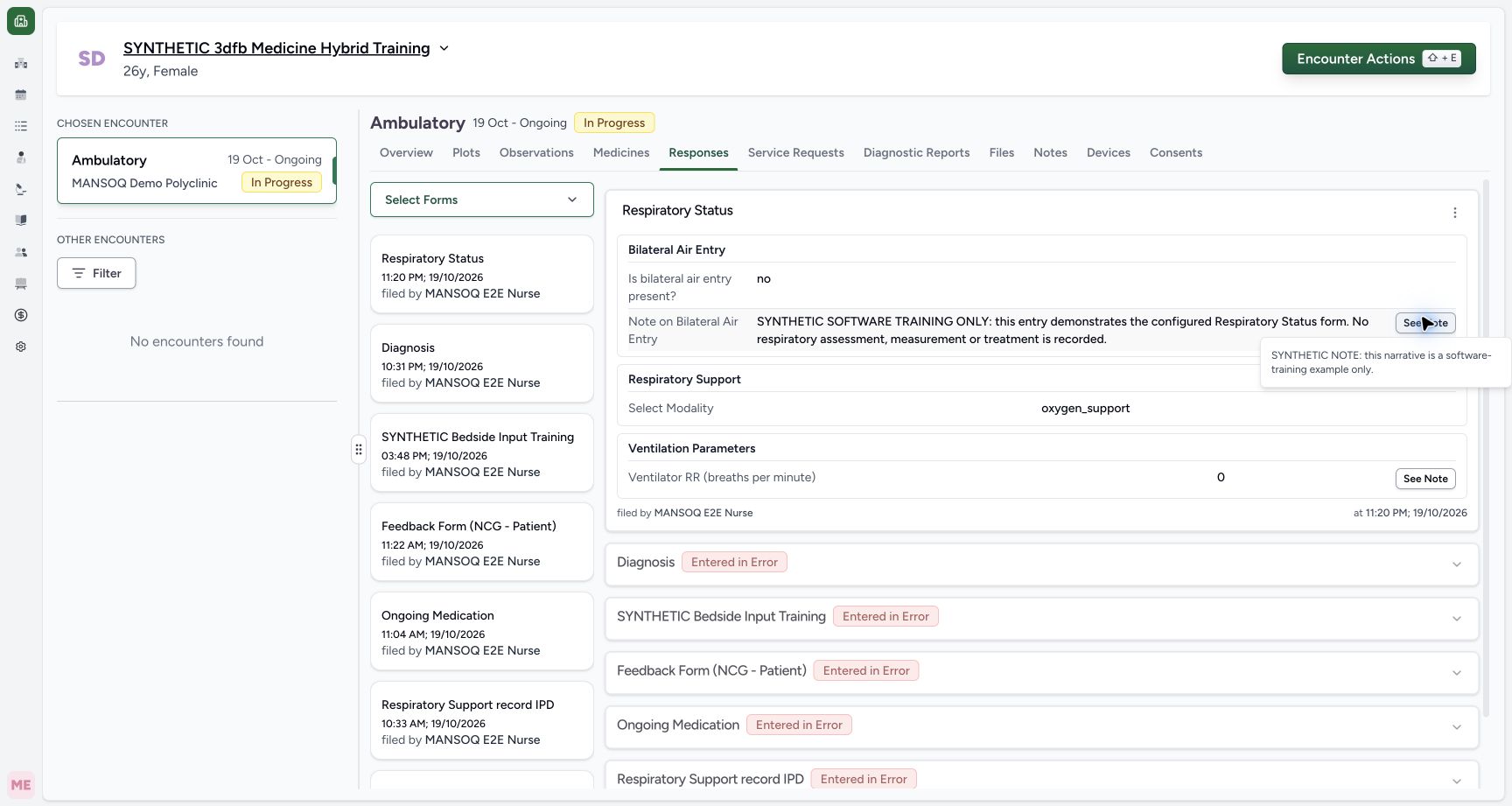 12
12Read the saved narrative note
Capture details
Observed committed 3dfb source on 19 October 2026. Fictional software inputs are not respiratory measurements, treatment advice or ventilator settings.
Image SHA-256 99d6410e55c182a00d7039a043457e99d1baa7ce7bb2d12d96791d981e94df5c
- Open See Note: The corresponding field note is already open.
- Read the retained note: Read the complete explanation and close the note when finished.
 12
12Read the saved zero note
Capture details
Observed committed 3dfb source on 19 October 2026. Fictional software inputs are not respiratory measurements, treatment advice or ventilator settings.
Image SHA-256 6c591713657bdf7d22e85f44e3049c8779f125872b8a01f661dd0a93d43ede67
- Open See Note: The corresponding field note is already open.
- Read the retained note: Read the complete explanation and close the note when finished.
7. Reload and verify the same response
Perform a normal browser reload, return to the same response and compare its answers, Nurse and filing time. Reopen both notes and read their retained text.
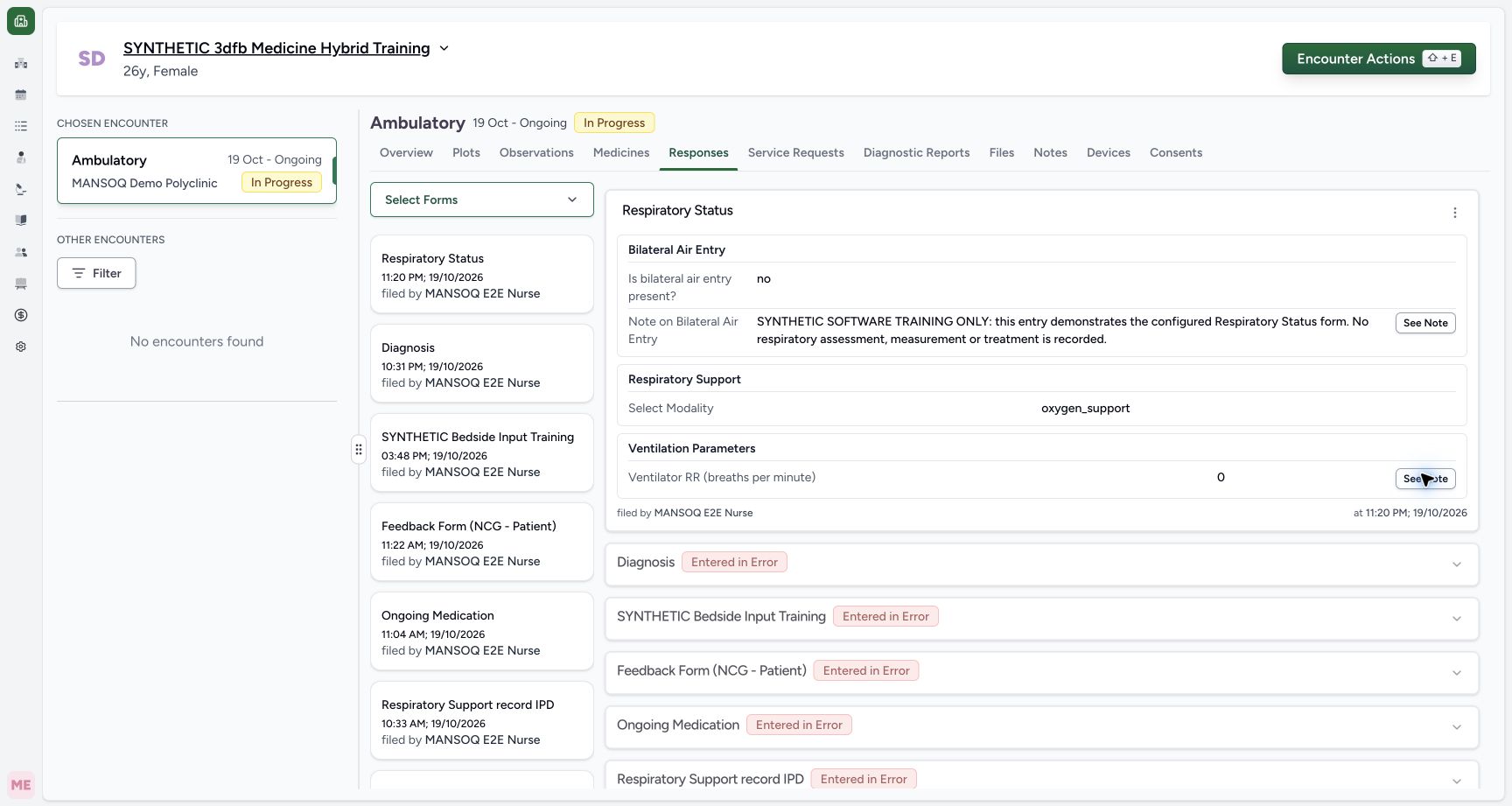 123456
Read the same response after normal reload
Capture details
Observed committed 3dfb source on 19 October 2026. Fictional software inputs are not respiratory measurements, treatment advice or ventilator settings.
Image SHA-256 8c1003c3624f5899f80195bf43acb63275947c96b4fc3592e07857858031fbc4
- Check Respiratory Status: Read the intended form card.
- Read no: The saved air-entry answer is no.
- Read oxygen_support: The saved modality is oxygen_support.
- Read zero: The saved Integer answer remains 0.
- Read the original Nurse: The creator shown is MANSOQ E2E Nurse.
- Read the original filing time: Read the response filing time, not a new measurement time.
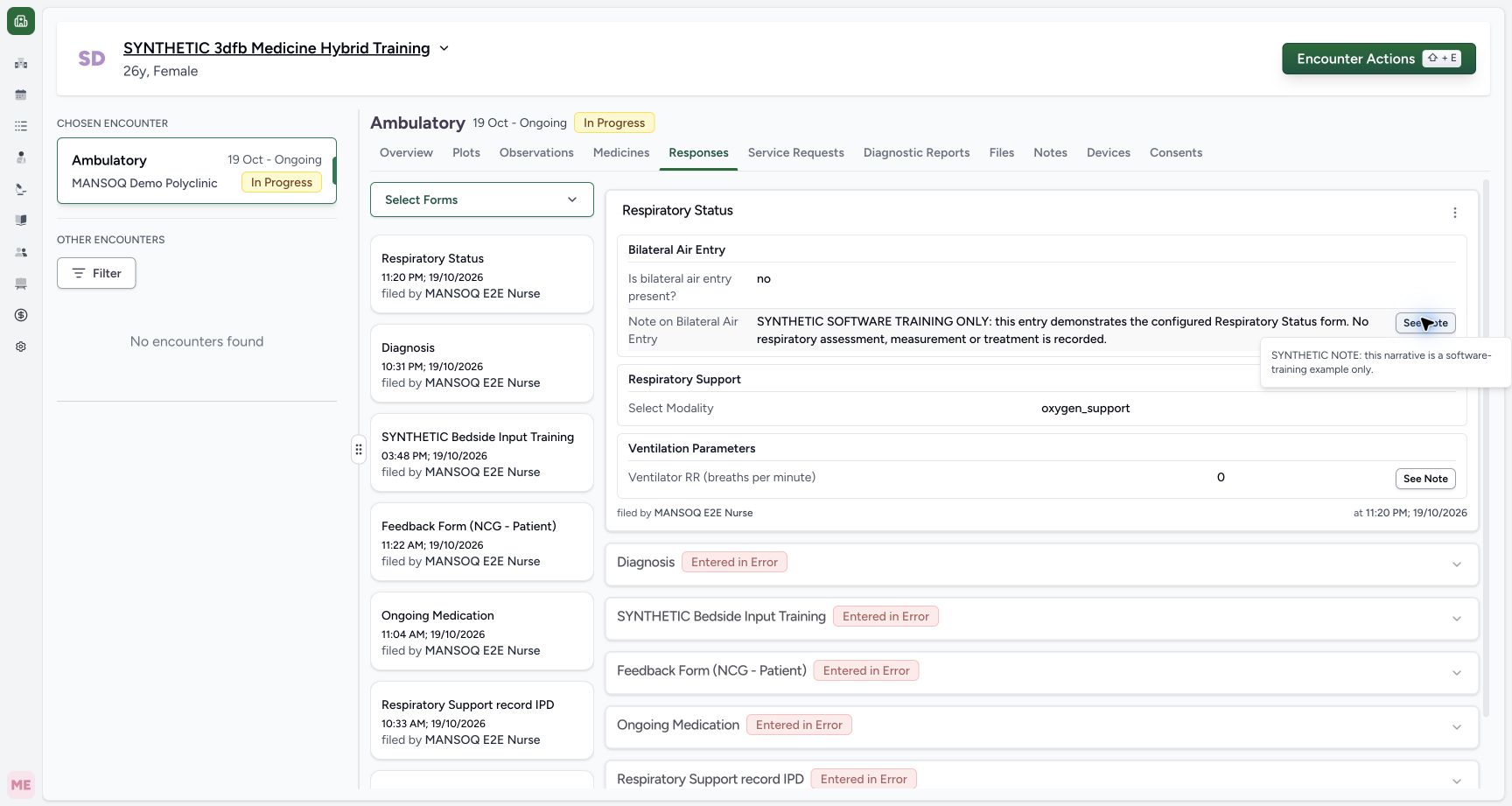 12
12Read the narrative note after reload
Capture details
Observed committed 3dfb source on 19 October 2026. Fictional software inputs are not respiratory measurements, treatment advice or ventilator settings.
Image SHA-256 b3bf302f9a6a5a300046362fabe0cc87833dc80dd1824a1f314bec9560b60a6f
- Open See Note: The corresponding field note is already open.
- Read the retained note: Read the complete explanation and close the note when finished.
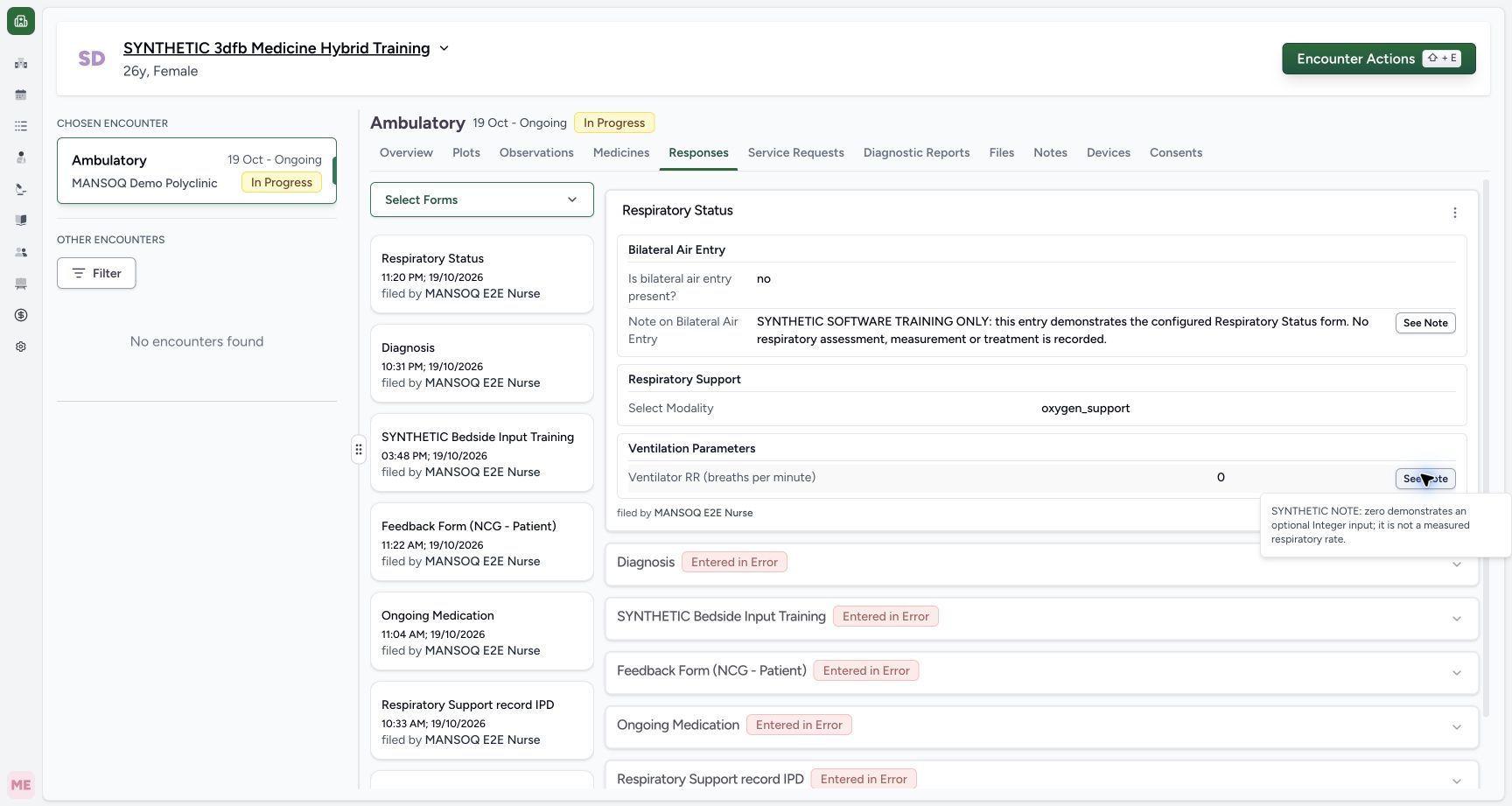 12
12Read the zero note after reload
Capture details
Observed committed 3dfb source on 19 October 2026. Fictional software inputs are not respiratory measurements, treatment advice or ventilator settings.
Image SHA-256 9f873de3f503f23d33813115d468dbc2f83846574e3ef896e4bd82c176ce07ad
- Open See Note: The corresponding field note is already open.
- Read the retained note: Read the complete explanation and close the note when finished.
A form response stays separate from other clinical records
This configured form saved one ordinary questionnaire response. It did not create an observation, medicine, service request or diagnosis. The Nurse workflow is pictured; an authorized Doctor’s normal read was independently checked, but no Doctor UI workflow is pictured here.
123456Read the four saved answers, Nurse and filing time
Capture details
Observed committed 3dfb source on 19 October 2026. Fictional software inputs are not respiratory measurements, treatment advice or ventilator settings.
Image SHA-256 3121b099ad8527d7d2ccc8cdea776f97a0394598651acf0882c49a66a1a89beb
- Check Respiratory Status: Read the intended form card.
- Read no: The saved air-entry answer is no.
- Read oxygen_support: The saved modality is oxygen_support.
- Read zero: The saved Integer answer remains 0.
- Read the original Nurse: The creator shown is MANSOQ E2E Nurse.
- Read the original filing time: Read the response filing time, not a new measurement time.
Source evidence
Every citation uses this exact committed version. The private source repository requires access.
- repositories/platform/mansoq-web/src/components/Questionnaire/QuestionnaireForm.tsx:744 ·
3dfb7c9f519fb5b4cd4452439f3c12346bf58319Source file checksum
ee6c2195f13e48f0896a2d3da566c2f2a67910adad08894df6b77862f9cfdeec - repositories/platform/mansoq-web/src/components/Questionnaire/QuestionTypes/NumberQuestion.tsx:29 ·
3dfb7c9f519fb5b4cd4452439f3c12346bf58319Source file checksum
fd8183d93ed6c65e651dfc6b790c5ebc740fceef5cf6d0d5dc3d107f465b8dab - repositories/platform/mansoq-web/src/components/Questionnaire/QuestionTypes/ChoiceQuestion.tsx:45 ·
3dfb7c9f519fb5b4cd4452439f3c12346bf58319Source file checksum
0f6a5813b88385121e4d44682fb82fa0c3d65a57faf21b59ddda8e19995e446e - repositories/platform/mansoq-web/src/components/Questionnaire/QuestionTypes/QuestionInput.tsx:59 ·
3dfb7c9f519fb5b4cd4452439f3c12346bf58319Source file checksum
16bebfb11603d50cb219f5db55d93cd0bc2935630af0fc60a6d5732f04a33163 - repositories/platform/mansoq-web/src/components/Questionnaire/QuestionTypes/QuestionGroup.tsx:37 ·
3dfb7c9f519fb5b4cd4452439f3c12346bf58319Source file checksum
ea2f931a1329973d4b23ffee6f4581df62fc7d7092449142d03b73f61553bccc - repositories/platform/mansoq-web/src/components/Facility/ConsultationDetails/PrintQuestionnaireResponse.tsx:18 ·
3dfb7c9f519fb5b4cd4452439f3c12346bf58319Source file checksum
626d6b496a09058d94929bbec29bd34a3c91a95111466342a278e6bca0f2202e - repositories/platform/mansoq-web/src/components/Facility/ConsultationDetails/PrintAllQuestionnaireResponses.tsx:316 ·
3dfb7c9f519fb5b4cd4452439f3c12346bf58319Source file checksum
e7314df6d693bbd49e54e5f007521488cbc82b164dba4fc0ba2e317049b5cc1a - repositories/platform/mansoq-web/src/components/Facility/ConsultationDetails/QuestionnaireResponsesList.tsx:350 ·
3dfb7c9f519fb5b4cd4452439f3c12346bf58319Source file checksum
abcf7ab477238782e128a28bbd0b83562f900a41dcd1665a3df68e33fad1deac - repositories/platform/mansoq-core/mansoq/emr/api/viewsets/questionnaire.py:116 ·
3dfb7c9f519fb5b4cd4452439f3c12346bf58319Source file checksum
ccc0fe021d193e5d6de9540c256413da356895ceed0c71c5fdcba75ca6915d4e - repositories/platform/mansoq-core/mansoq/emr/api/viewsets/questionnaire_response.py:42 ·
3dfb7c9f519fb5b4cd4452439f3c12346bf58319Source file checksum
3a1e4e355e2f2ec25e82f5adc12ca9250c201b521098af8d1211bee95489fa2b - repositories/platform/mansoq-core/mansoq/emr/resources/questionnaire/utils.py:447 ·
3dfb7c9f519fb5b4cd4452439f3c12346bf58319Source file checksum
8425858d2179a66f482f38a3fd7f0fc0dcb70a4bcd85450fe7ce748b3081826c - repositories/platform/mansoq-core/mansoq/security/authorization/encounter.py:69 ·
3dfb7c9f519fb5b4cd4452439f3c12346bf58319Source file checksum
0e7ff8afcfb57b2371201e16ee6fac26125d6e686af66ed7edd95e49bc07de78 - repositories/platform/mansoq-web/src/components/ui/RadioInput.tsx:34 ·
3dfb7c9f519fb5b4cd4452439f3c12346bf58319Source file checksum
17b849d60a4f860fdb9f2384625fe43b2bc99fc1179019728c57511fce74813d - repositories/platform/mansoq-web/src/components/Questionnaire/QuestionTypes/TextQuestion.tsx:50 ·
3dfb7c9f519fb5b4cd4452439f3c12346bf58319Source file checksum
1ce4eb85780e351a42f155fc8a092fa921e6f4853f1efc91902365498b834aab