 MANSOQ
 Clinical care · VERSION 3dfb7c9f
Save and inspect one Respiratory Status response PDF
Print this response, save one PDF and read the complete genuine page.
Nurse
 123
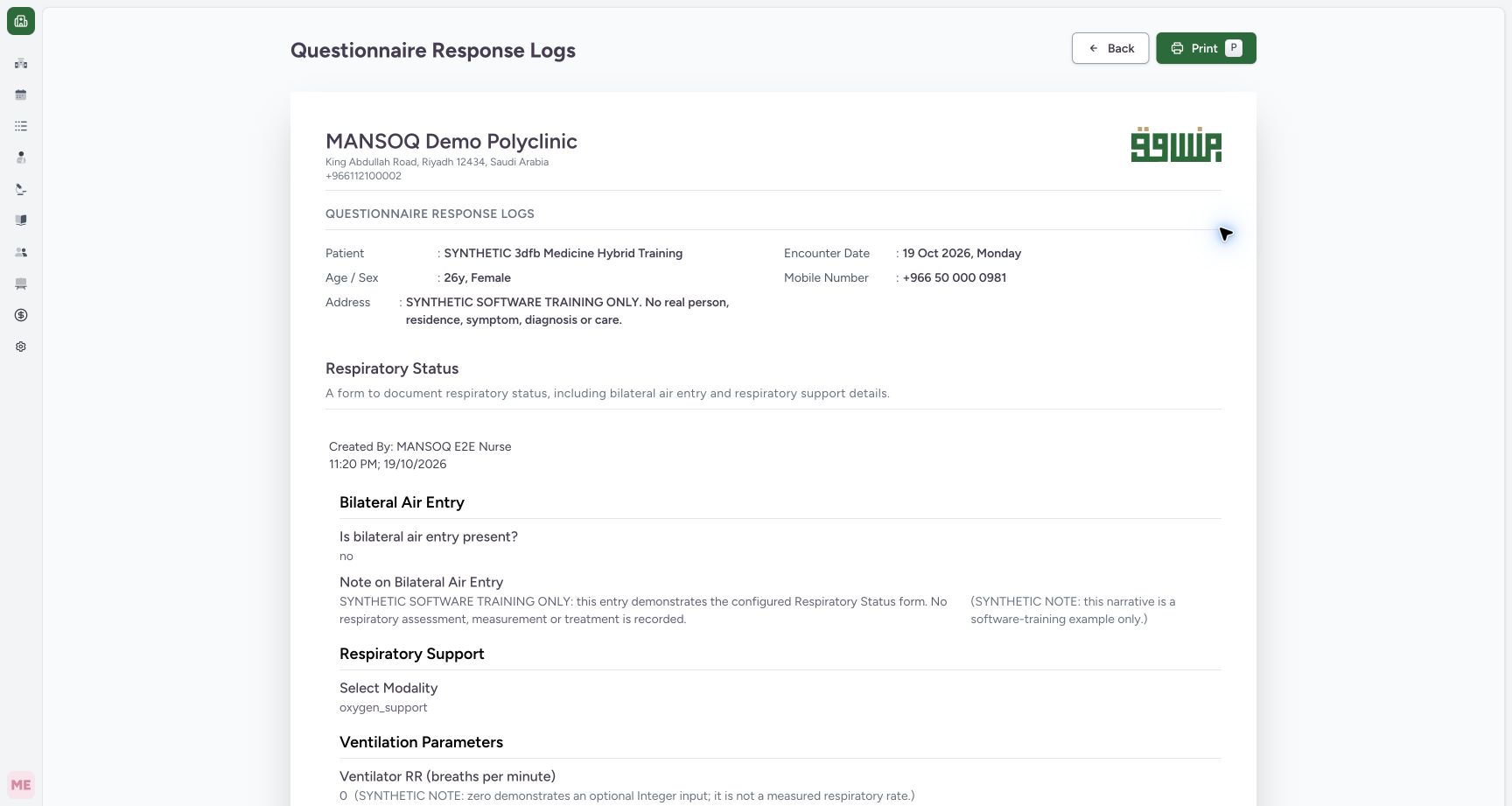
123Review the single-response browser print page
Capture details
Observed committed 3dfb source on 19 October 2026. Fictional software inputs are not respiratory measurements, treatment advice or ventilator settings.
Image SHA-256 8cb41f2ef4061126bb12becd67f22d518f370fec0407413ac6f0c2682f79911d
- Check the patient and encounter: Read the intended synthetic patient and encounter date.
- Read the original creator and time: The page prints MANSOQ E2E Nurse and the original response filing time.
- Open native Print: Select Print to review the native output settings.
9 of 9 content blocks have reviewed image alignment. Missing overview or prerequisite images remain open.
Before you begin
- Use an authorized Nurse session on the assigned active synthetic training encounter.123
Recorded release 3dfb7c9f · 2026-10-19T20:23:13.679Z · 1728 × 921 Review the single-response browser print page
Capture details
Observed committed 3dfb source on 19 October 2026. Fictional software inputs are not respiratory measurements, treatment advice or ventilator settings.
Image SHA-256
8cb41f2ef4061126bb12becd67f22d518f370fec0407413ac6f0c2682f79911d- Check the patient and encounter: Read the intended synthetic patient and encounter date.
- Read the original creator and time: The page prints MANSOQ E2E Nurse and the original response filing time.
- Open native Print: Select Print to review the native output settings.
- Use only fictional software examples in this exercise. These samples are not clinical observations, treatment advice or ventilator settings.123
Recorded release 3dfb7c9f · 2026-10-19T20:23:13.679Z · 1728 × 921 Review the single-response browser print page
Capture details
Observed committed 3dfb source on 19 October 2026. Fictional software inputs are not respiratory measurements, treatment advice or ventilator settings.
Image SHA-256
8cb41f2ef4061126bb12becd67f22d518f370fec0407413ac6f0c2682f79911d- Check the patient and encounter: Read the intended synthetic patient and encounter date.
- Read the original creator and time: The page prints MANSOQ E2E Nurse and the original response filing time.
- Open native Print: Select Print to review the native output settings.
1. Choose the single-response output
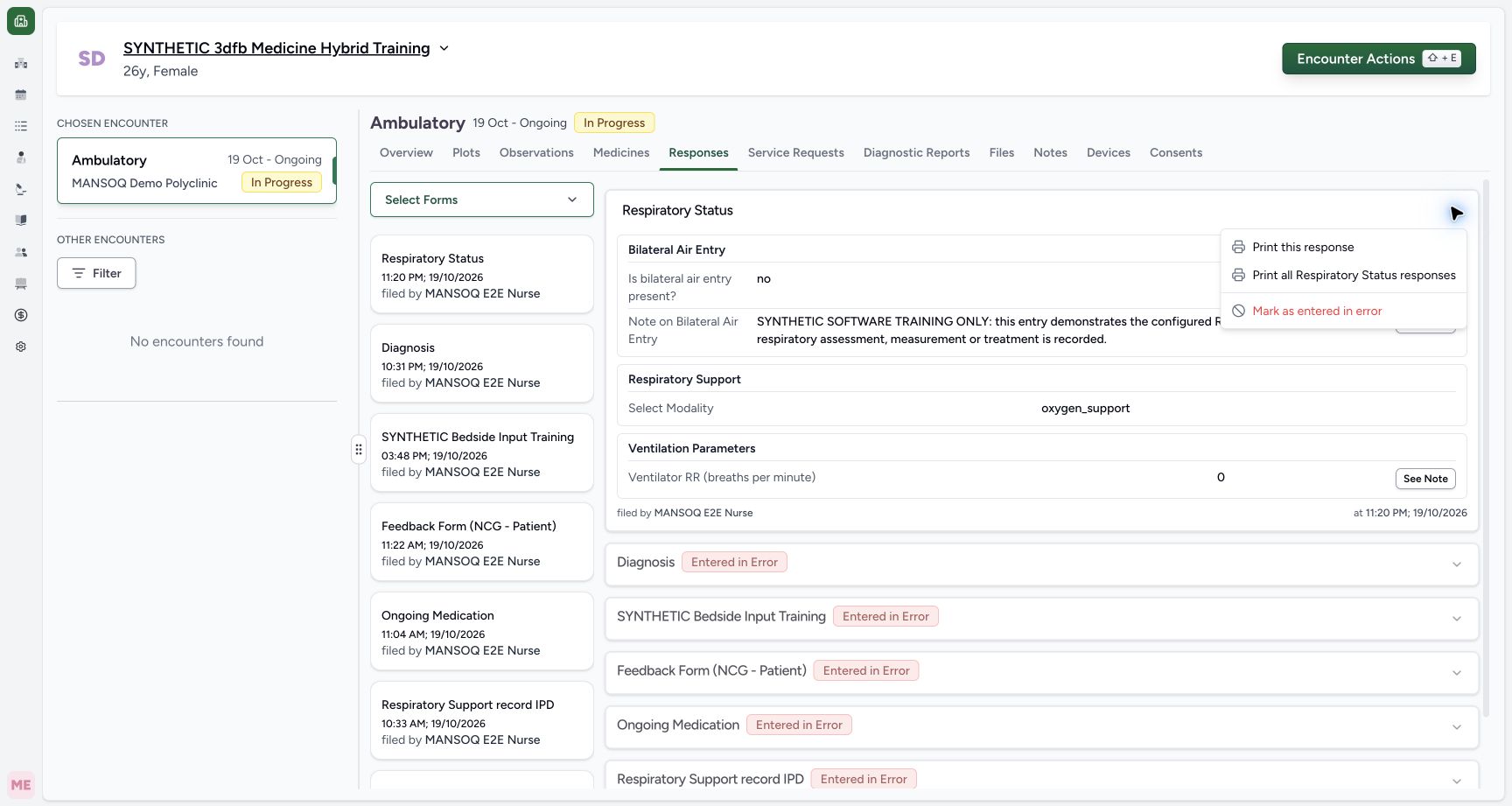
Open the actions on the intended saved Respiratory Status card and select Print this response. Print all Respiratory Status responses is a different visible option and is not demonstrated here.
 123
123Open actions for this saved response
Capture details
Observed committed 3dfb source on 19 October 2026. Fictional software inputs are not respiratory measurements, treatment advice or ventilator settings.
Image SHA-256 98c766915485cf5ab011b72e5d32911f81a5b2a3748f914dddb7bace6dcf5b77
- Open this response’s actions: Use the menu on the intended Respiratory Status card.
- Print this response: Select the single-response output, distinct from Print all Respiratory Status responses.
- Read the correction action: Mark as entered in error is a separate lifecycle action.
2. Review the browser print page
Check the patient, encounter date, form, creator and original filing time, then select Print.
123Review the single-response browser print page
Capture details
Observed committed 3dfb source on 19 October 2026. Fictional software inputs are not respiratory measurements, treatment advice or ventilator settings.
Image SHA-256 8cb41f2ef4061126bb12becd67f22d518f370fec0407413ac6f0c2682f79911d
- Check the patient and encounter: Read the intended synthetic patient and encounter date.
- Read the original creator and time: The page prints MANSOQ E2E Nurse and the original response filing time.
- Open native Print: Select Print to review the native output settings.
3. Review native print settings
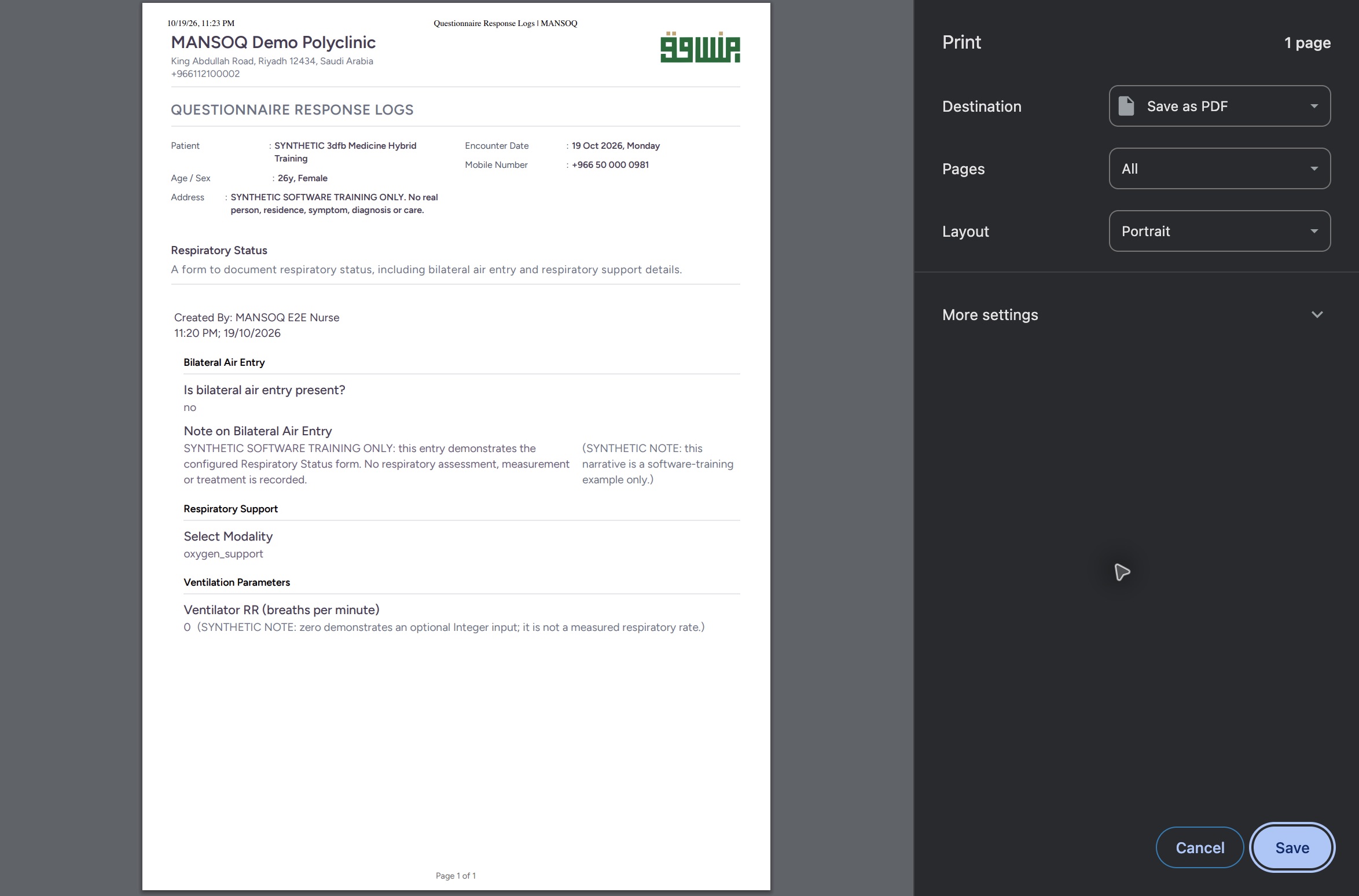
In the native macOS print dialog, check Save as PDF, All pages and Portrait. The preview shows one page. Select Save to open the filename and folder dialog.
 1234
1234Use native Save as PDF settings
Native macOS print/save dialog.
Capture details
Observed committed 3dfb source on 19 October 2026. Fictional software inputs are not respiratory measurements, treatment advice or ventilator settings.
Image SHA-256 f7c3e5a35540c867e57ebe6bd98920faf9241c9b5c3f6675e62a0979a32f567c
- Choose Save as PDF: The print destination shown is Save as PDF.
- Keep all pages: The shown output is one page.
- Check Portrait: Review the Portrait layout.
- Save the PDF: Select Save to choose the filename and folder.
4. Choose the filename and folder
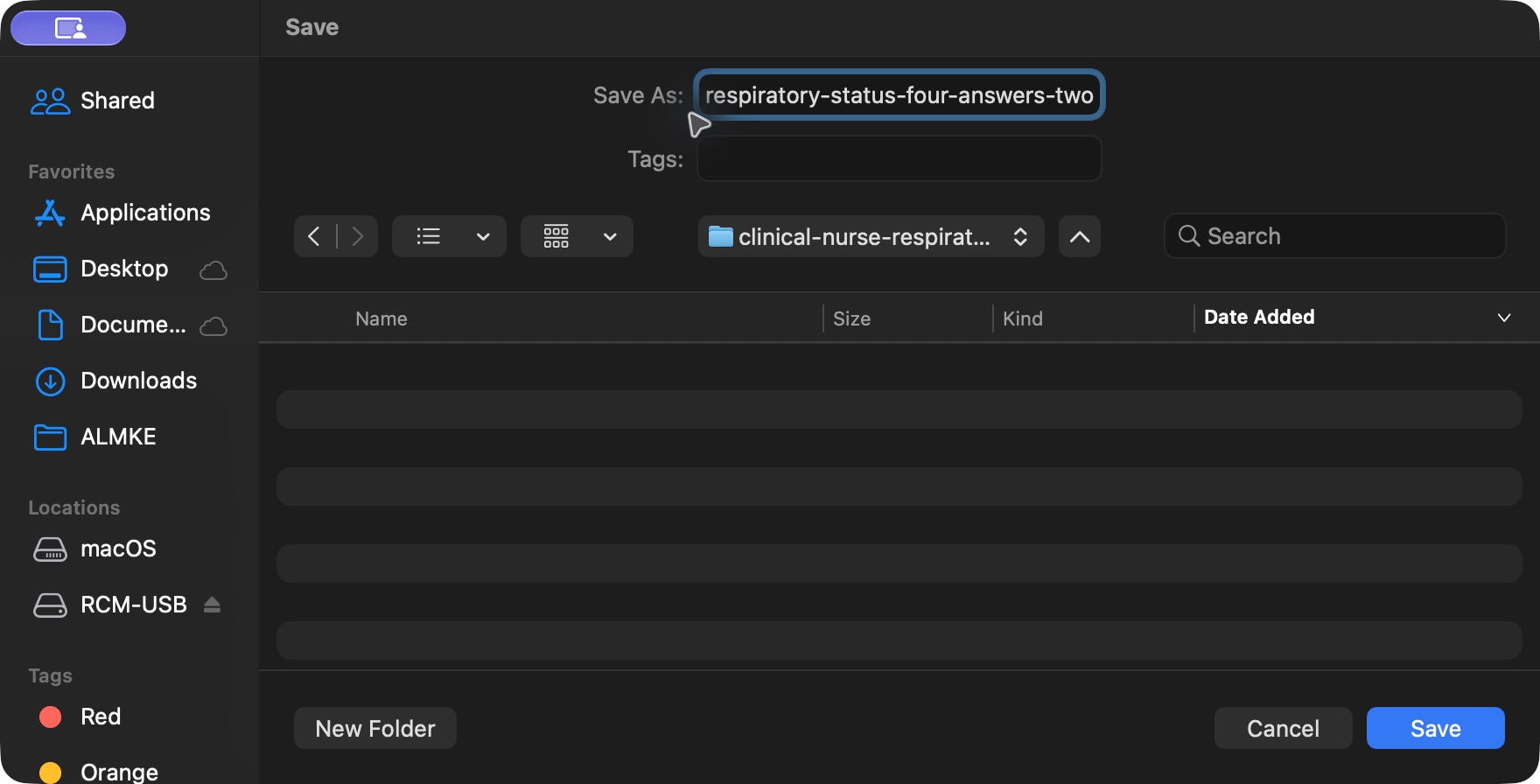
Choose an appropriate filename and local destination for the approved training output. Select Save once. The screenshots show the example filename respiratory-status-four-answers-two-notes.pdf.
 123
123Choose the native PDF filename and destination
Capture details
Observed committed 3dfb source on 19 October 2026. Fictional software inputs are not respiratory measurements, treatment advice or ventilator settings.
Image SHA-256 6772d96820efff1b4c9257e1b94cd85fb1069bb8a125e66ea5e3c440e9d6eece
- Choose the filename: Use an appropriate name for the approved training output.
- Check the destination folder: Choose the intended local folder.
- Save the named file once: Select Save to create this PDF.
5. Read the complete saved page
Open the actual saved PDF in macOS Preview. Read the patient and encounter, original Nurse and 11:20 PM filing time, all four answers, both complete notes and the Page 1 of 1 footer. This example produced one 41,330-byte A4 PDF.
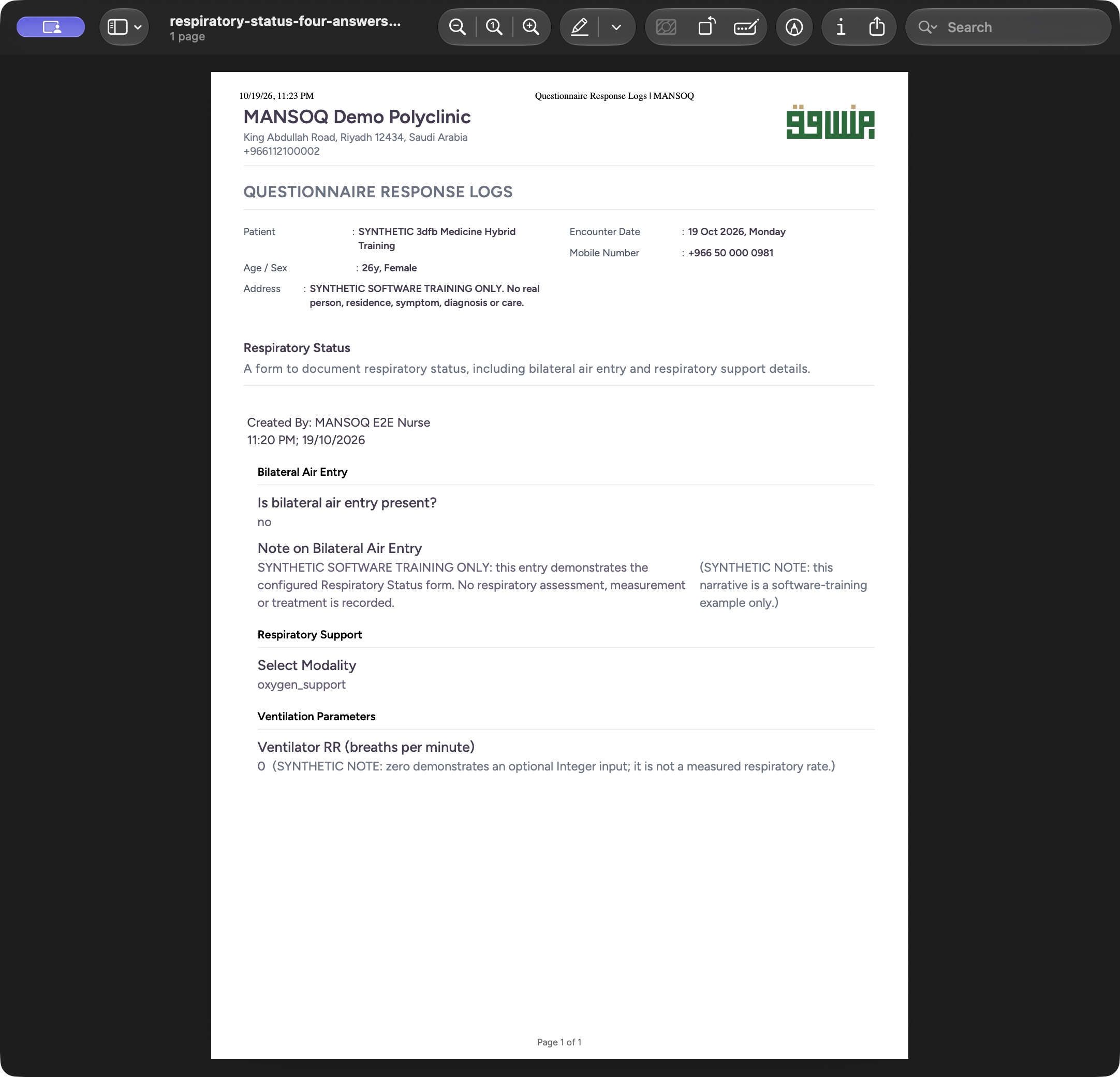 12345
12345Read the actual one-page PDF in macOS Preview
Saved PDF in Preview (macOS) · page 1 of 1.
Capture details
Observed committed 3dfb source on 19 October 2026. Fictional software inputs are not respiratory measurements, treatment advice or ventilator settings.
Image SHA-256 f472dc5b5e44295805e86d2b7dfa810b233b82b372874092be76d87e3b2fcf90
- Check the one-page document: Preview identifies the saved document as one page.
- Read the original Nurse and time: Read the creator and original filing time on the saved page.
- Read the narrative and its note: The full fictional narrative and field note are printed.
- Read zero and its note: Review the Integer answer 0 and its complete explanation.
- Read Page 1 of 1: The complete sole saved page is visible through its footer.
The PDF is a saved snapshot
The PDF was saved before the later entered-in-error correction. It is a separate output file and does not automatically change when the source response is corrected. The captured native platform is macOS; printer and filename controls can differ on another device.
12345Read the actual one-page PDF in macOS Preview
Saved PDF in Preview (macOS) · page 1 of 1.
Capture details
Observed committed 3dfb source on 19 October 2026. Fictional software inputs are not respiratory measurements, treatment advice or ventilator settings.
Image SHA-256 f472dc5b5e44295805e86d2b7dfa810b233b82b372874092be76d87e3b2fcf90
- Check the one-page document: Preview identifies the saved document as one page.
- Read the original Nurse and time: Read the creator and original filing time on the saved page.
- Read the narrative and its note: The full fictional narrative and field note are printed.
- Read zero and its note: Review the Integer answer 0 and its complete explanation.
- Read Page 1 of 1: The complete sole saved page is visible through its footer.
Source evidence
Every citation uses this exact committed version. The private source repository requires access.
- repositories/platform/mansoq-web/src/components/Questionnaire/QuestionnaireForm.tsx:744 ·
3dfb7c9f519fb5b4cd4452439f3c12346bf58319Source file checksum
ee6c2195f13e48f0896a2d3da566c2f2a67910adad08894df6b77862f9cfdeec - repositories/platform/mansoq-web/src/components/Questionnaire/QuestionTypes/NumberQuestion.tsx:29 ·
3dfb7c9f519fb5b4cd4452439f3c12346bf58319Source file checksum
fd8183d93ed6c65e651dfc6b790c5ebc740fceef5cf6d0d5dc3d107f465b8dab - repositories/platform/mansoq-web/src/components/Questionnaire/QuestionTypes/ChoiceQuestion.tsx:45 ·
3dfb7c9f519fb5b4cd4452439f3c12346bf58319Source file checksum
0f6a5813b88385121e4d44682fb82fa0c3d65a57faf21b59ddda8e19995e446e - repositories/platform/mansoq-web/src/components/Questionnaire/QuestionTypes/QuestionInput.tsx:59 ·
3dfb7c9f519fb5b4cd4452439f3c12346bf58319Source file checksum
16bebfb11603d50cb219f5db55d93cd0bc2935630af0fc60a6d5732f04a33163 - repositories/platform/mansoq-web/src/components/Questionnaire/QuestionTypes/QuestionGroup.tsx:37 ·
3dfb7c9f519fb5b4cd4452439f3c12346bf58319Source file checksum
ea2f931a1329973d4b23ffee6f4581df62fc7d7092449142d03b73f61553bccc - repositories/platform/mansoq-web/src/components/Facility/ConsultationDetails/PrintQuestionnaireResponse.tsx:18 ·
3dfb7c9f519fb5b4cd4452439f3c12346bf58319Source file checksum
626d6b496a09058d94929bbec29bd34a3c91a95111466342a278e6bca0f2202e - repositories/platform/mansoq-web/src/components/Facility/ConsultationDetails/PrintAllQuestionnaireResponses.tsx:316 ·
3dfb7c9f519fb5b4cd4452439f3c12346bf58319Source file checksum
e7314df6d693bbd49e54e5f007521488cbc82b164dba4fc0ba2e317049b5cc1a - repositories/platform/mansoq-web/src/components/Facility/ConsultationDetails/QuestionnaireResponsesList.tsx:350 ·
3dfb7c9f519fb5b4cd4452439f3c12346bf58319Source file checksum
abcf7ab477238782e128a28bbd0b83562f900a41dcd1665a3df68e33fad1deac - repositories/platform/mansoq-core/mansoq/emr/api/viewsets/questionnaire.py:116 ·
3dfb7c9f519fb5b4cd4452439f3c12346bf58319Source file checksum
ccc0fe021d193e5d6de9540c256413da356895ceed0c71c5fdcba75ca6915d4e - repositories/platform/mansoq-core/mansoq/emr/api/viewsets/questionnaire_response.py:42 ·
3dfb7c9f519fb5b4cd4452439f3c12346bf58319Source file checksum
3a1e4e355e2f2ec25e82f5adc12ca9250c201b521098af8d1211bee95489fa2b - repositories/platform/mansoq-core/mansoq/emr/resources/questionnaire/utils.py:447 ·
3dfb7c9f519fb5b4cd4452439f3c12346bf58319Source file checksum
8425858d2179a66f482f38a3fd7f0fc0dcb70a4bcd85450fe7ce748b3081826c - repositories/platform/mansoq-core/mansoq/security/authorization/encounter.py:69 ·
3dfb7c9f519fb5b4cd4452439f3c12346bf58319Source file checksum
0e7ff8afcfb57b2371201e16ee6fac26125d6e686af66ed7edd95e49bc07de78 - repositories/platform/mansoq-web/src/components/ui/RadioInput.tsx:34 ·
3dfb7c9f519fb5b4cd4452439f3c12346bf58319Source file checksum
17b849d60a4f860fdb9f2384625fe43b2bc99fc1179019728c57511fce74813d - repositories/platform/mansoq-web/src/components/Questionnaire/QuestionTypes/TextQuestion.tsx:50 ·
3dfb7c9f519fb5b4cd4452439f3c12346bf58319Source file checksum
1ce4eb85780e351a42f155fc8a092fa921e6f4853f1efc91902365498b834aab