 MANSOQ
 Clinical forms and response documents · VERSION 3dfb7c9f
Print and inspect one saved Doctor Notes response
Print the selected ordinary response, save a genuine PDF through Chrome and macOS, and inspect its one page in Preview. The shared structured Diagnosis rows are not included.
Doctor
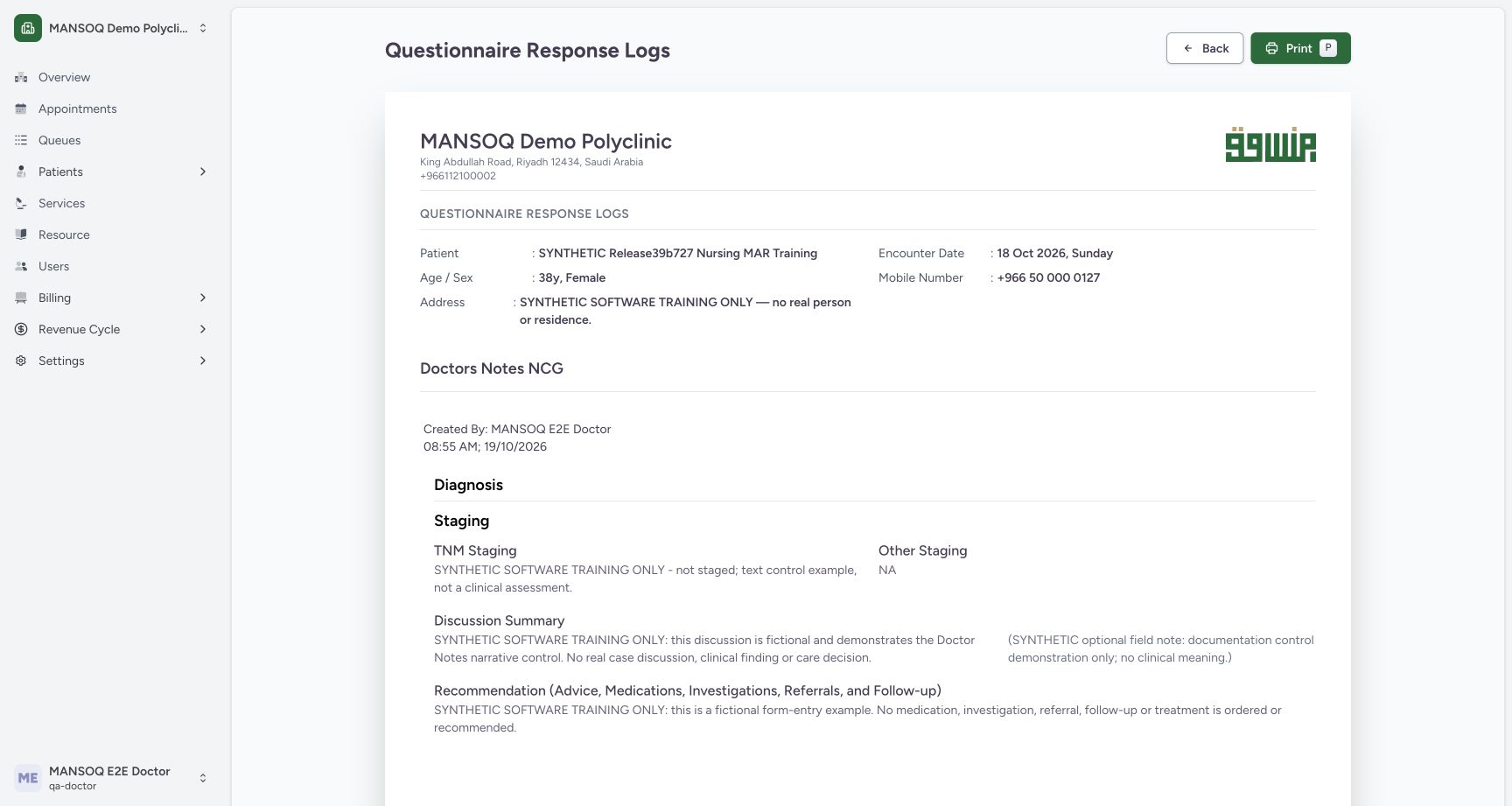 12
12Review the populated single-response print preview
Capture details
Exact committed 3dfb7c9f, 3401 verified core/web blobs and 139 built assets. Existing ordinary Doctor; the old release label in the fictional patient name is retained. No role, form or terminology change. The new ordinary source was saved Completed; only the four ordinary answers and optional note were authored.
Image SHA-256 e0db05651d7d1ef816b094fa9334f5a5d517fa12bdd2a8c742653bb17b2e1c19
- Open native Print: Choose Print after checking the patient, encounter and saved response.
- Verify the output title: Read Doctors Notes NCG in the populated single-response preview.
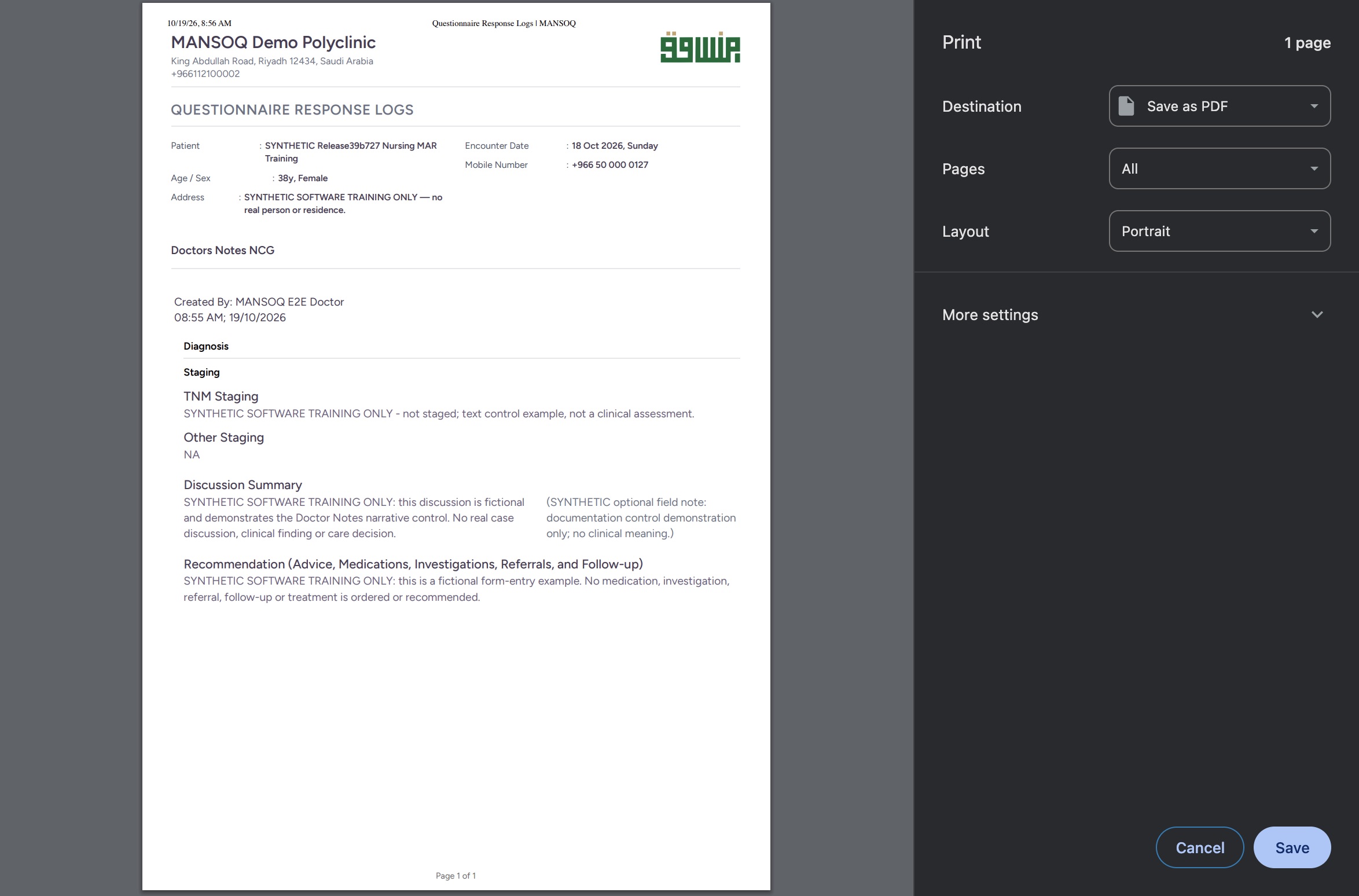 12
12Review the genuine Chrome Print dialog on macOS
Native macOS print/save dialog.
Capture details
Exact committed 3dfb7c9f, 3401 verified core/web blobs and 139 built assets. Existing ordinary Doctor; the old release label in the fictional patient name is retained. No role, form or terminology change. The new ordinary source was saved Completed; only the four ordinary answers and optional note were authored.
Image SHA-256 0cb80325bb3aa30a5955a7ab768048fbfe28d9eead87471305965f0c2e3b008a
- Save the PDF from Print: With Destination set to Save as PDF and the actual one-page preview checked, choose Save.
- Check Save as PDF destination: Read the selected Save as PDF destination before saving the local document.
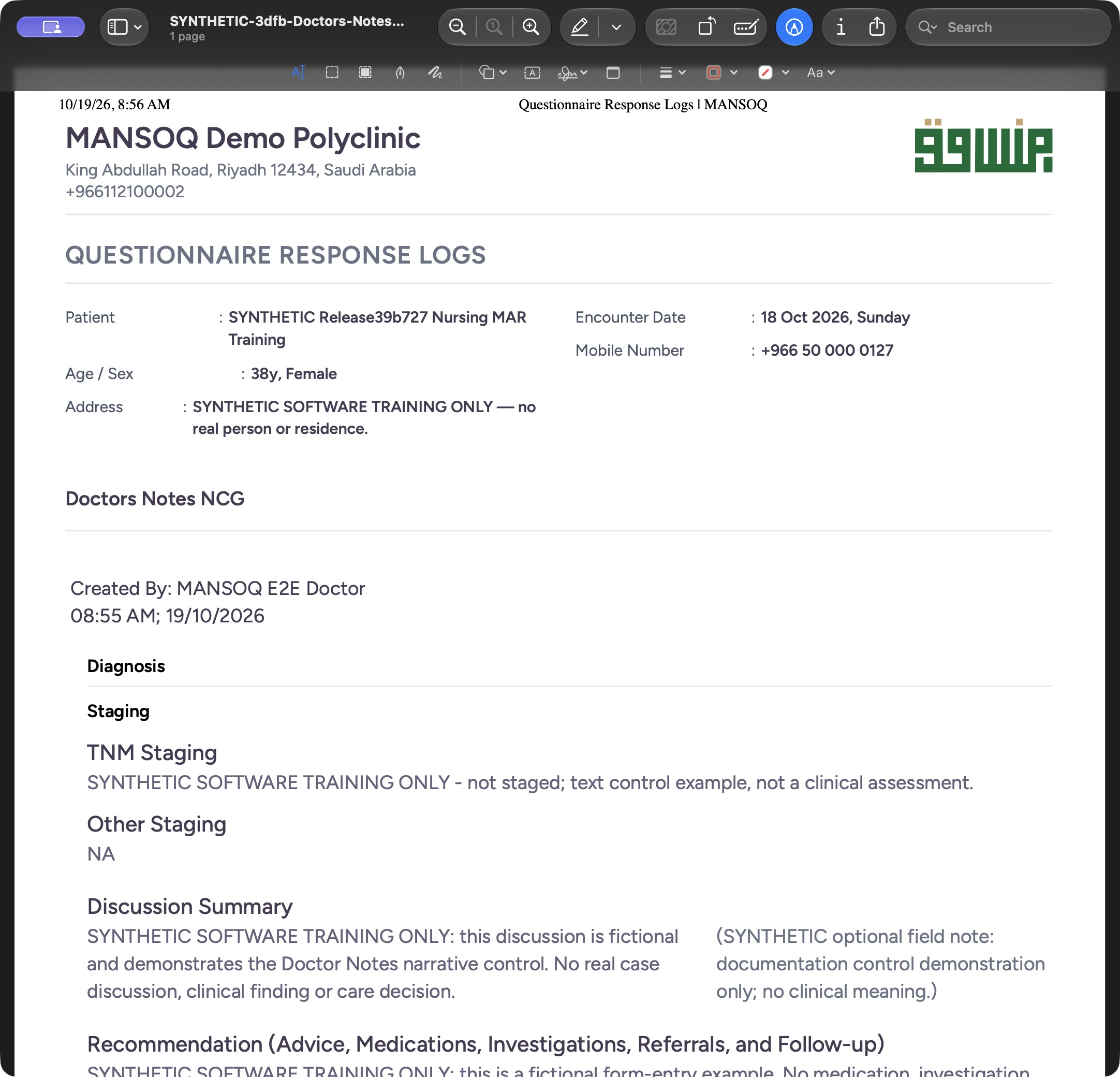 1
1Inspect the saved PDF upper page in macOS Preview
Saved PDF in Preview (macOS) · page 1 of 1.
Capture details
Exact committed 3dfb7c9f, 3401 verified core/web blobs and 139 built assets. Existing ordinary Doctor; the old release label in the fictional patient name is retained. No role, form or terminology change. The new ordinary source was saved Completed; only the four ordinary answers and optional note were authored.
Image SHA-256 8790bf6ce42b35c688dbae1471afbfdc11b371e099a9a69e2fa202439040cd66
- Verify the saved PDF has one page: Read the Preview title area and one-page count, then inspect the upper patient, encounter, Doctor and staging context.
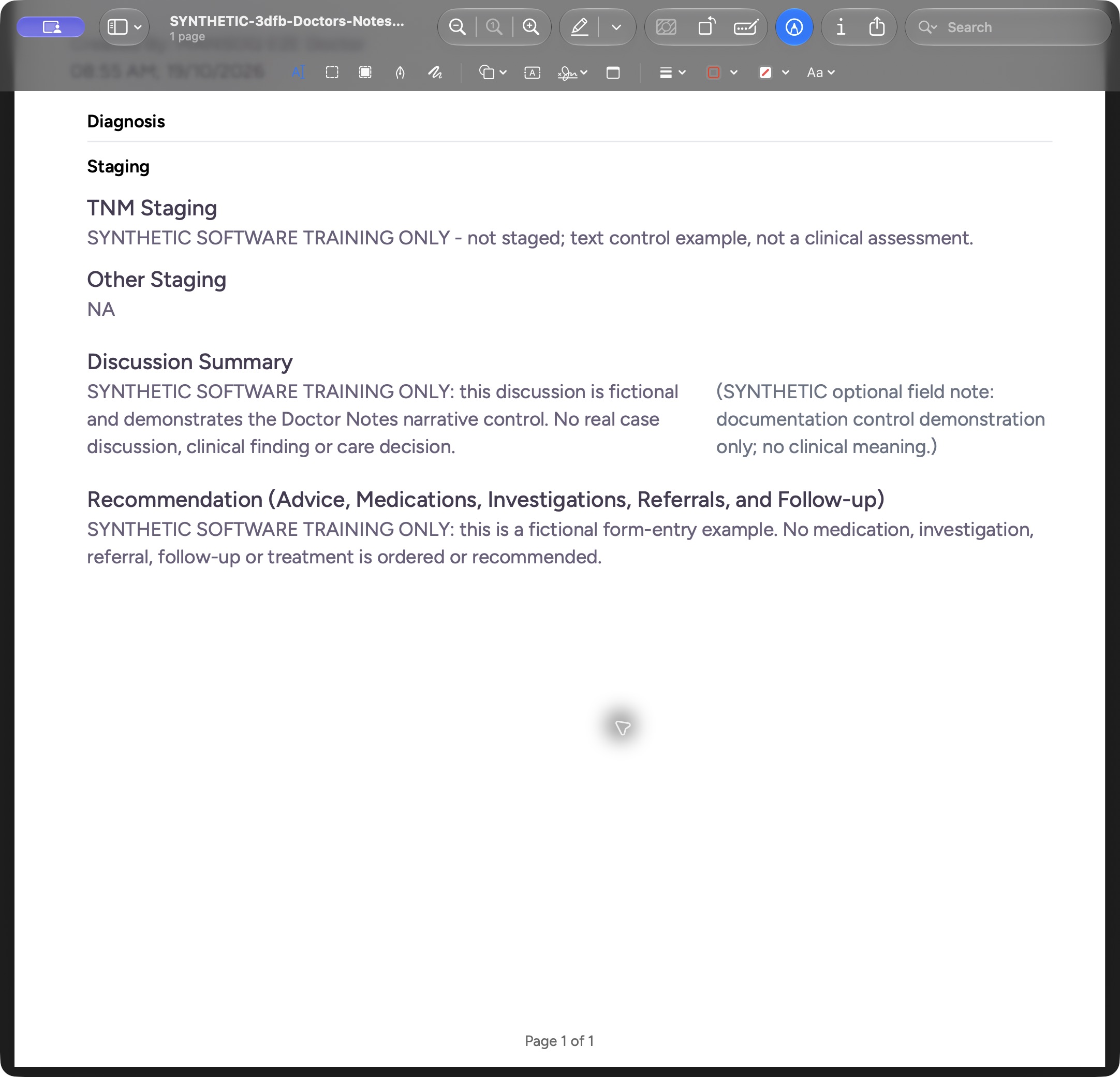 1
1Read the complete saved PDF lower page in macOS Preview
Saved PDF in Preview (macOS) · page 1 of 1.
Capture details
Exact committed 3dfb7c9f, 3401 verified core/web blobs and 139 built assets. Existing ordinary Doctor; the old release label in the fictional patient name is retained. No role, form or terminology change. This is the retained static PDF generated before the later source correction; it does not automatically change when the source becomes invalid.
Image SHA-256 adb82f55a66d8ee59effc511c568927e522e6da93b15d1e6f7b3d667c7639df7
- Verify Page 1 of 1 at the bottom: Scroll down to read the complete Recommendation and the Page 1 of 1 footer in the same saved PDF.
11 of 11 content blocks have reviewed image alignment. Missing overview or prerequisite images remain open.
Before you begin
- Use the same authorized Doctor and the newly saved Completed Doctors Notes NCG response. Verify the fictional patient, chosen encounter, form title, Doctor and 08:55 AM save time before printing. The response in this demonstration is 6b71633e-3f5b-421e-af76-d9c2347c7cd9.
 12
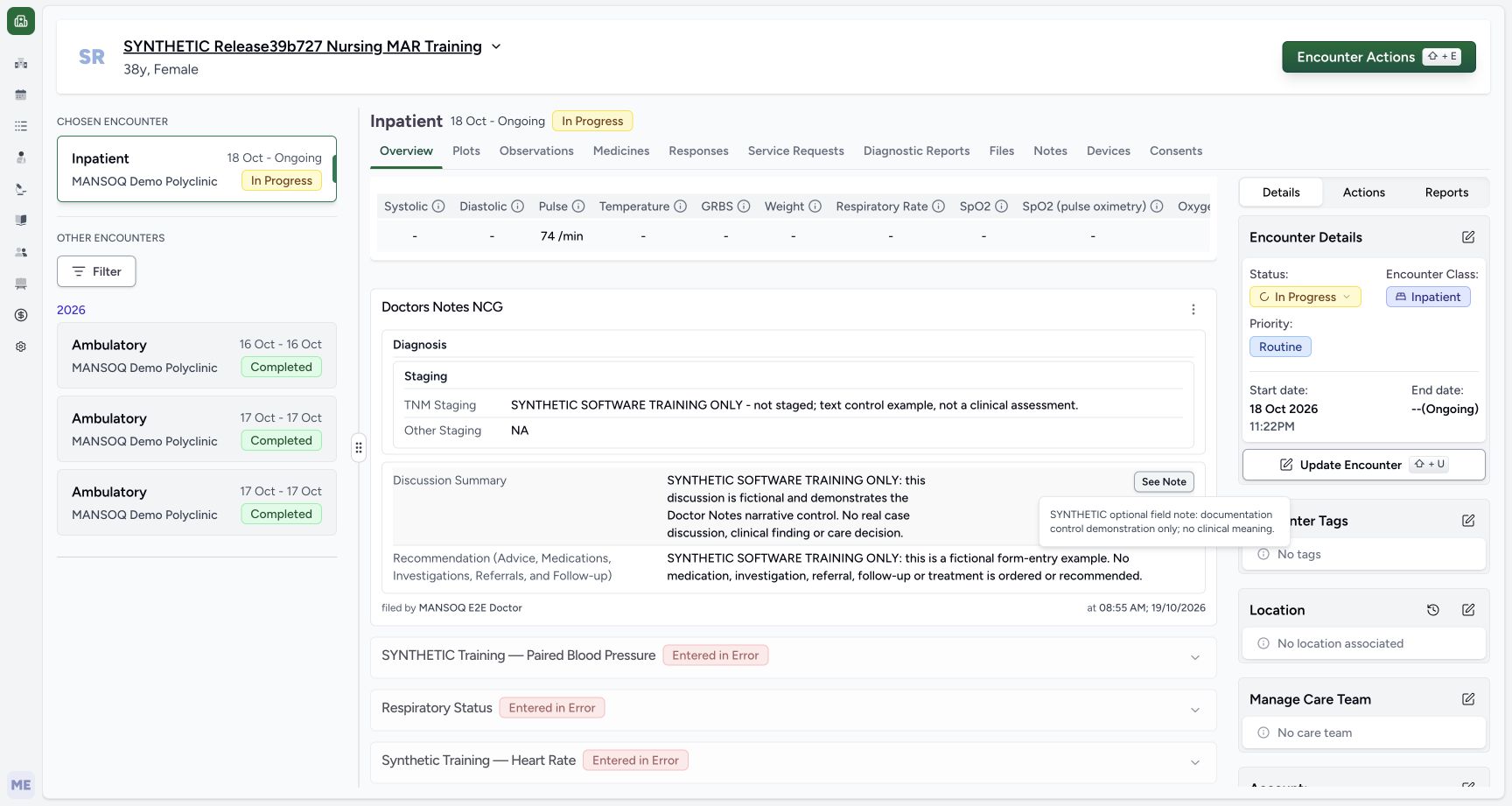
12Recorded release 3dfb7c9f · 2026-10-19T05:56:06.663Z · 1728 × 921 Read the saved response and optional note
Capture details
Exact committed 3dfb7c9f, 3401 verified core/web blobs and 139 built assets. Existing ordinary Doctor; the old release label in the fictional patient name is retained. No role, form or terminology change. The new ordinary source was saved Completed; only the four ordinary answers and optional note were authored.
Image SHA-256
879ce55c38ef38257070704fc60702e82647969591531e662dda4055da31b9ce- Open the saved Discussion note: Choose See Note beside Discussion Summary to read the retained optional field note.
- Read the retained optional note: Read the fictional field note in this saved popover; it is separate from the Discussion narrative.
 1
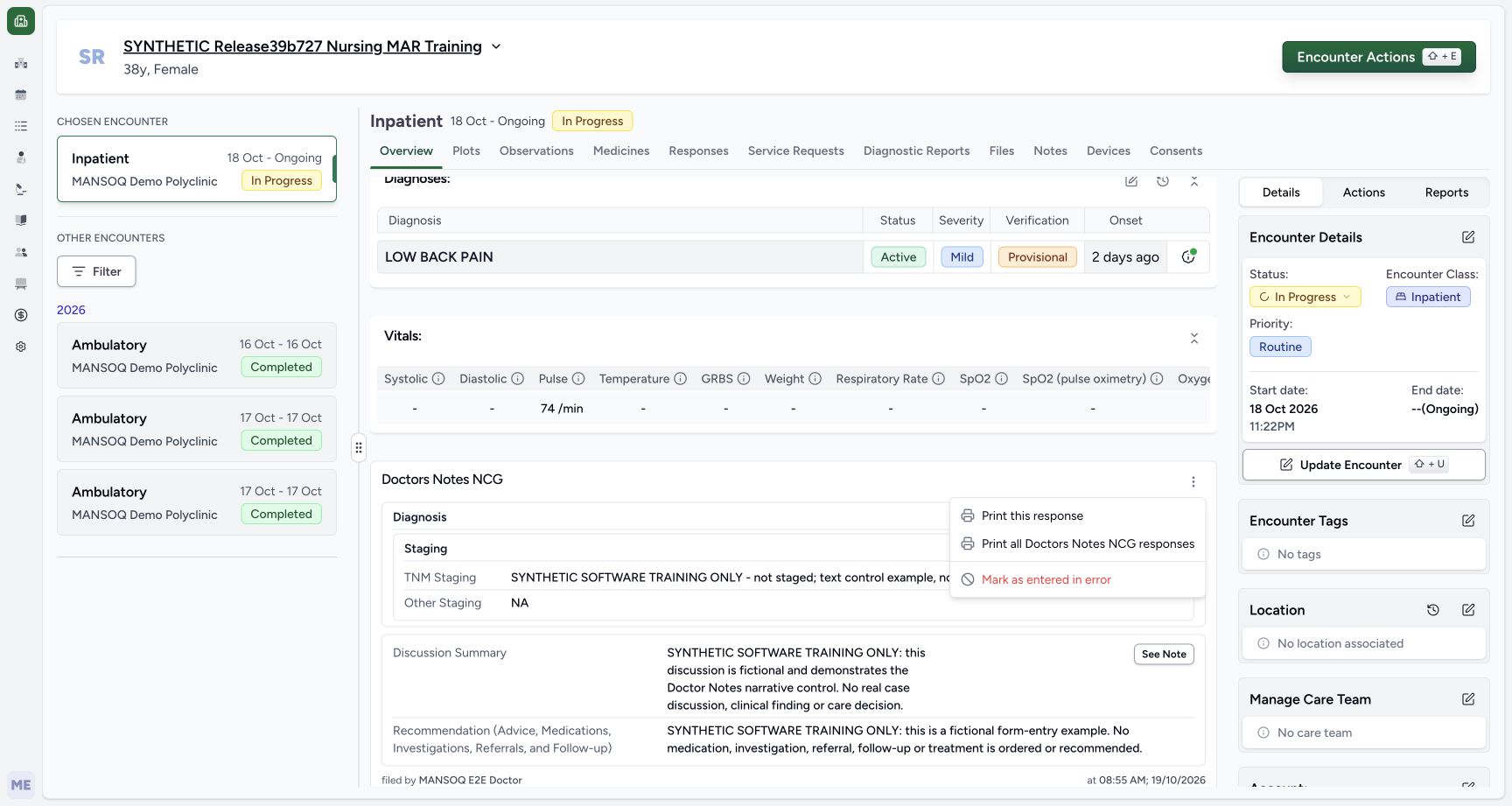
1Recorded release 3dfb7c9f · 2026-10-19T05:56:15.585Z · 1728 × 921 Choose Print this response for the saved note
Capture details
Exact committed 3dfb7c9f, 3401 verified core/web blobs and 139 built assets. Existing ordinary Doctor; the old release label in the fictional patient name is retained. No role, form or terminology change. The new ordinary source was saved Completed; only the four ordinary answers and optional note were authored.
Image SHA-256
2df89506078e1a3b6e6b36c04ff58157a3269302f65feb6c9f7e7a37fe1072fb- Print this response: Choose Print this response to print only this saved Doctor Notes entry.
- This is a single ordinary questionnaire-response document. It includes four ordinary answers and the optional Discussion note; the structured Diagnosis rows are omitted even though the Diagnosis group heading remains. The seven independent condition records and separate orders are not a complete medical-record export here.12
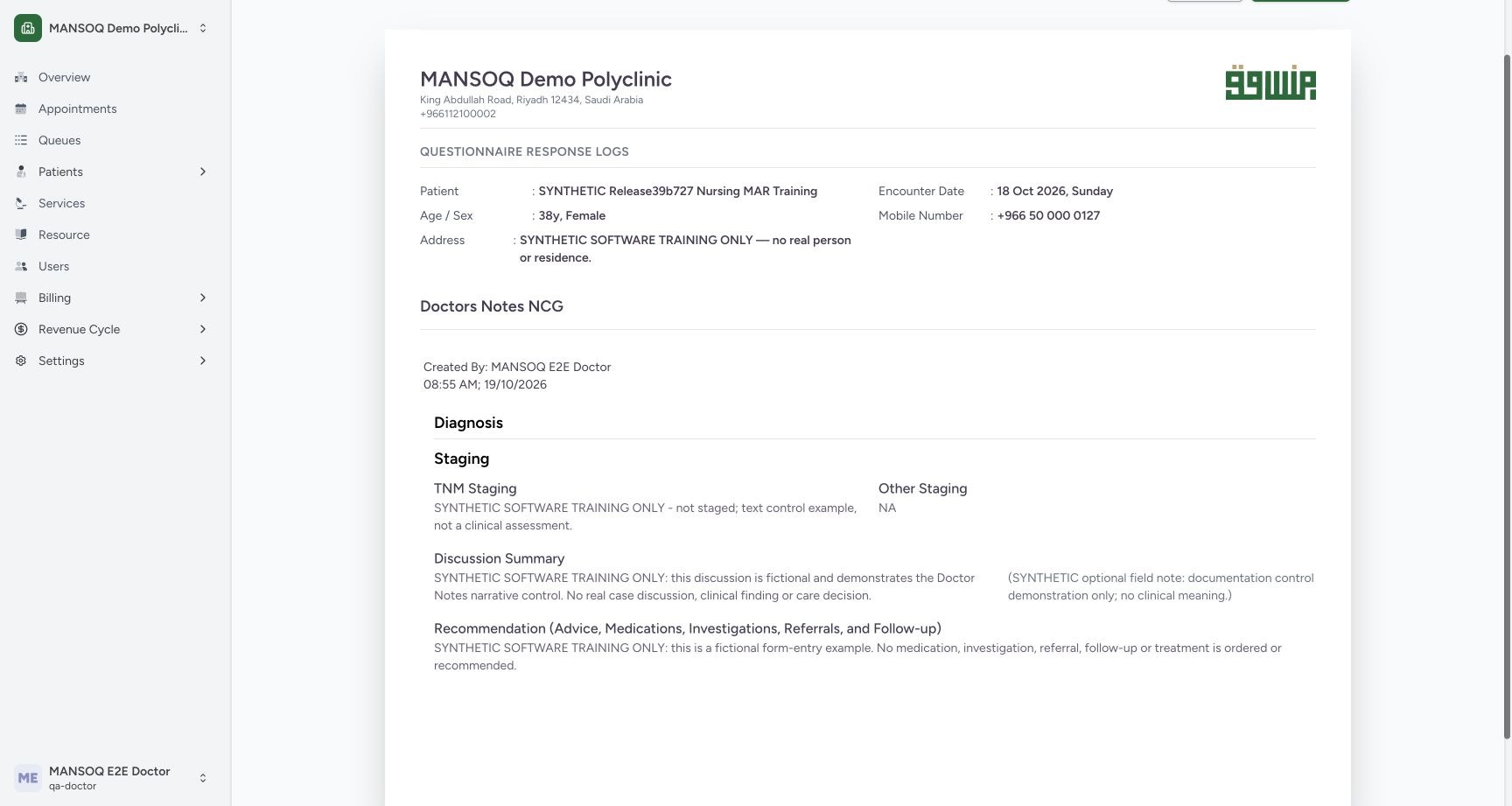
Recorded release 3dfb7c9f · 2026-10-19T05:56:26.609Z · 1728 × 921 Review the populated single-response print preview
Capture details
Exact committed 3dfb7c9f, 3401 verified core/web blobs and 139 built assets. Existing ordinary Doctor; the old release label in the fictional patient name is retained. No role, form or terminology change. The new ordinary source was saved Completed; only the four ordinary answers and optional note were authored.
Image SHA-256
e0db05651d7d1ef816b094fa9334f5a5d517fa12bdd2a8c742653bb17b2e1c19- Open native Print: Choose Print after checking the patient, encounter and saved response.
- Verify the output title: Read Doctors Notes NCG in the populated single-response preview.
 12
12Recorded release 3dfb7c9f · 2026-10-19T05:56:26.705Z · 1728 × 921 Read the four ordinary output fields and optional note
Capture details
Exact committed 3dfb7c9f, 3401 verified core/web blobs and 139 built assets. Existing ordinary Doctor; the old release label in the fictional patient name is retained. No role, form or terminology change. The new ordinary source was saved Completed; only the four ordinary answers and optional note were authored.
Image SHA-256
da176f091ef550a53001757edf7c205c275ddb7cfef58838e947006c3e7c7e82- Read Other Staging NA: The ordinary output retains the selected literal NA value.
- Read the printed optional note: Read the optional Discussion note alongside the ordinary narrative; independent structured diagnoses are omitted.
1. Choose Print this response
On the saved Doctor Notes card open its three-dot More Actions menu and select Print this response. The nearby Print all Doctors Notes NCG responses action is a different scope; this exercise opens the selected single response only.
12Read the saved response and optional note
Capture details
Exact committed 3dfb7c9f, 3401 verified core/web blobs and 139 built assets. Existing ordinary Doctor; the old release label in the fictional patient name is retained. No role, form or terminology change. The new ordinary source was saved Completed; only the four ordinary answers and optional note were authored.
Image SHA-256 879ce55c38ef38257070704fc60702e82647969591531e662dda4055da31b9ce
- Open the saved Discussion note: Choose See Note beside Discussion Summary to read the retained optional field note.
- Read the retained optional note: Read the fictional field note in this saved popover; it is separate from the Discussion narrative.
1Choose Print this response for the saved note
Capture details
Exact committed 3dfb7c9f, 3401 verified core/web blobs and 139 built assets. Existing ordinary Doctor; the old release label in the fictional patient name is retained. No role, form or terminology change. The new ordinary source was saved Completed; only the four ordinary answers and optional note were authored.
Image SHA-256 2df89506078e1a3b6e6b36c04ff58157a3269302f65feb6c9f7e7a37fe1072fb
- Print this response: Choose Print this response to print only this saved Doctor Notes entry.
2. Review the populated application preview
Check the facility, fictional patient, encounter date, Doctors Notes NCG title, Doctor and saved time. Read the four ordinary answers and the optional note alongside Discussion Summary. The Diagnosis heading is present without the shared clinical diagnosis rows. Choose Print after verifying this scope.
12Review the populated single-response print preview
Capture details
Exact committed 3dfb7c9f, 3401 verified core/web blobs and 139 built assets. Existing ordinary Doctor; the old release label in the fictional patient name is retained. No role, form or terminology change. The new ordinary source was saved Completed; only the four ordinary answers and optional note were authored.
Image SHA-256 e0db05651d7d1ef816b094fa9334f5a5d517fa12bdd2a8c742653bb17b2e1c19
- Open native Print: Choose Print after checking the patient, encounter and saved response.
- Verify the output title: Read Doctors Notes NCG in the populated single-response preview.
12Read the four ordinary output fields and optional note
Capture details
Exact committed 3dfb7c9f, 3401 verified core/web blobs and 139 built assets. Existing ordinary Doctor; the old release label in the fictional patient name is retained. No role, form or terminology change. The new ordinary source was saved Completed; only the four ordinary answers and optional note were authored.
Image SHA-256 da176f091ef550a53001757edf7c205c275ddb7cfef58838e947006c3e7c7e82
- Read Other Staging NA: The ordinary output retains the selected literal NA value.
- Read the printed optional note: Read the optional Discussion note alongside the ordinary narrative; independent structured diagnoses are omitted.
3. Review the genuine Chrome Print dialog
The macOS Chrome Print dialog shows Destination Save as PDF, Pages All, Portrait layout and one actual page. Review its preview and choose Save. This screenshot is native Chrome printing UI; it is separate from the application preview. The saved example retains Chrome’s page header and footer.
12Review the genuine Chrome Print dialog on macOS
Native macOS print/save dialog.
Capture details
Exact committed 3dfb7c9f, 3401 verified core/web blobs and 139 built assets. Existing ordinary Doctor; the old release label in the fictional patient name is retained. No role, form or terminology change. The new ordinary source was saved Completed; only the four ordinary answers and optional note were authored.
Image SHA-256 0cb80325bb3aa30a5955a7ab768048fbfe28d9eead87471305965f0c2e3b008a
- Save the PDF from Print: With Destination set to Save as PDF and the actual one-page preview checked, choose Save.
- Check Save as PDF destination: Read the selected Save as PDF destination before saving the local document.
4. Save a distinct synthetic PDF
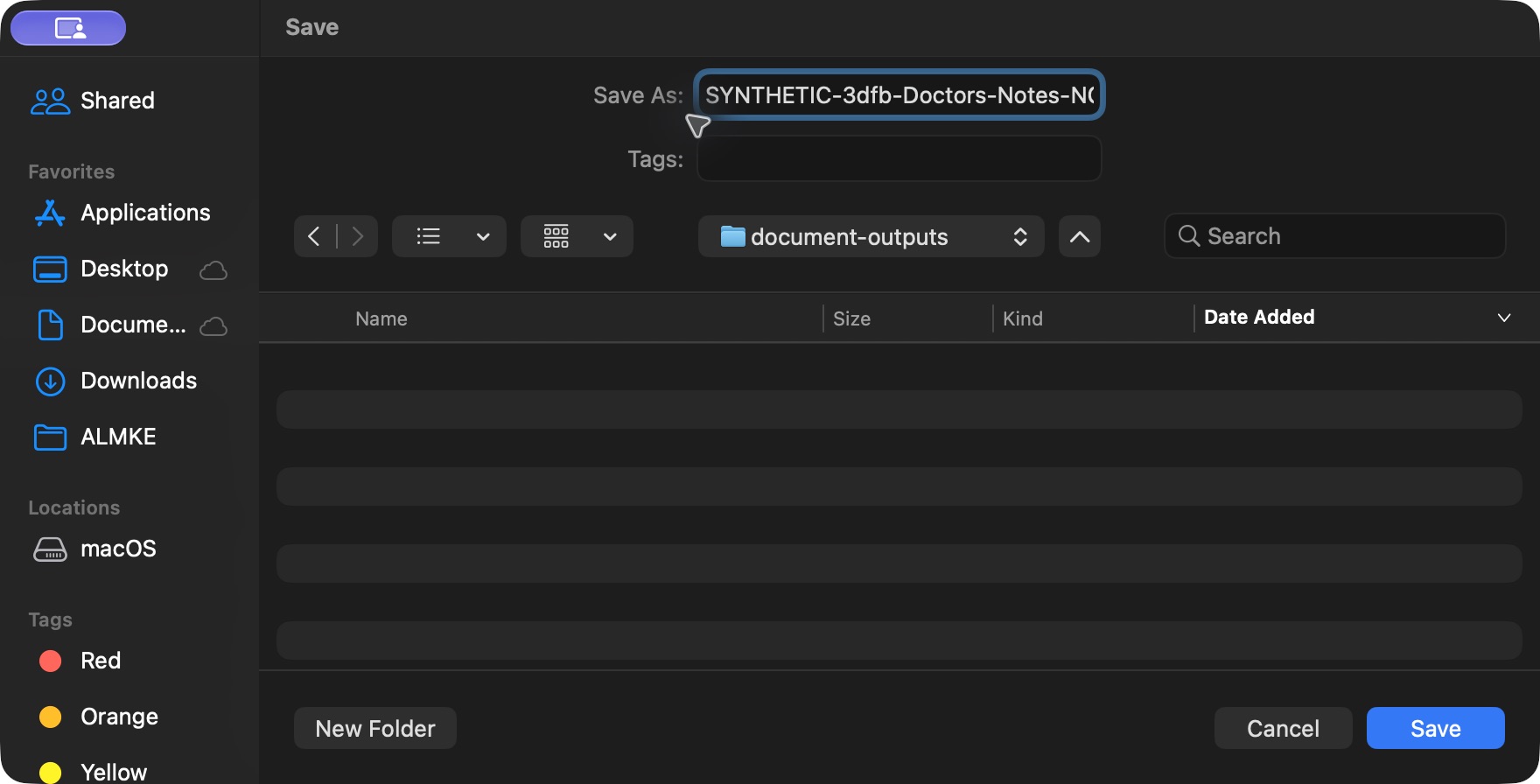
In the genuine macOS Save dialog choose a local destination and enter SYNTHETIC-3dfb-Doctors-Notes-NCG.pdf. The long filename may be truncated in the visible field. Choose Save once. The actual output is a 40,815-byte, one-page A4 portrait PDF, retained with its exact bytes for verification.
 12
12Save the synthetic PDF in the genuine macOS Save dialog
Native macOS print/save dialog.
Capture details
Exact committed 3dfb7c9f, 3401 verified core/web blobs and 139 built assets. Existing ordinary Doctor; the old release label in the fictional patient name is retained. No role, form or terminology change. The new ordinary source was saved Completed; only the four ordinary answers and optional note were authored.
Image SHA-256 b12741af9c7bd1c2157870fbd9cf0bd4b41fd69312f413971de3dd18097e36fa
- Name the synthetic PDF: Use a distinct synthetic filename in Save As; the long filename may be truncated in the field display.
- Save the actual PDF file: Choose Save in this genuine macOS dialog after checking the destination folder.
5. Open the actual saved file in Preview
Open that exact saved PDF through the normal macOS Preview Open workflow. Verify its filename and one-page count. Read the upper patient, encounter, Doctor, staging and Discussion context. The upper-page screenshot does not show the complete bottom Recommendation; scroll within the same page to inspect the rest.
1Inspect the saved PDF upper page in macOS Preview
Saved PDF in Preview (macOS) · page 1 of 1.
Capture details
Exact committed 3dfb7c9f, 3401 verified core/web blobs and 139 built assets. Existing ordinary Doctor; the old release label in the fictional patient name is retained. No role, form or terminology change. The new ordinary source was saved Completed; only the four ordinary answers and optional note were authored.
Image SHA-256 8790bf6ce42b35c688dbae1471afbfdc11b371e099a9a69e2fa202439040cd66
- Verify the saved PDF has one page: Read the Preview title area and one-page count, then inspect the upper patient, encounter, Doctor and staging context.
6. Inspect the complete lower page
Scroll to the bottom of the same saved page. Read the full fictional Recommendation and retained optional Discussion note, and confirm Page 1 of 1. The complete saved PDF was also independently extracted and rendered: all four authored strings and the optional note are present, with no shared diagnosis row text. Close Preview after checking the output.
1Read the complete saved PDF lower page in macOS Preview
Saved PDF in Preview (macOS) · page 1 of 1.
Capture details
Exact committed 3dfb7c9f, 3401 verified core/web blobs and 139 built assets. Existing ordinary Doctor; the old release label in the fictional patient name is retained. No role, form or terminology change. This is the retained static PDF generated before the later source correction; it does not automatically change when the source becomes invalid.
Image SHA-256 adb82f55a66d8ee59effc511c568927e522e6da93b15d1e6f7b3d667c7639df7
- Verify Page 1 of 1 at the bottom: Scroll down to read the complete Recommendation and the Page 1 of 1 footer in the same saved PDF.
A saved PDF is a snapshot
This file was generated while the new response was Completed. The separate correction lesson later marks that source Entered in Error. The already downloaded PDF remains a static pre-correction artifact and does not automatically reflect the new invalid status. Check the current application record before relying on an older output.
1Inspect the saved PDF upper page in macOS Preview
Saved PDF in Preview (macOS) · page 1 of 1.
Capture details
Exact committed 3dfb7c9f, 3401 verified core/web blobs and 139 built assets. Existing ordinary Doctor; the old release label in the fictional patient name is retained. No role, form or terminology change. The new ordinary source was saved Completed; only the four ordinary answers and optional note were authored.
Image SHA-256 8790bf6ce42b35c688dbae1471afbfdc11b371e099a9a69e2fa202439040cd66
- Verify the saved PDF has one page: Read the Preview title area and one-page count, then inspect the upper patient, encounter, Doctor and staging context.
1Read the complete saved PDF lower page in macOS Preview
Saved PDF in Preview (macOS) · page 1 of 1.
Capture details
Exact committed 3dfb7c9f, 3401 verified core/web blobs and 139 built assets. Existing ordinary Doctor; the old release label in the fictional patient name is retained. No role, form or terminology change. This is the retained static PDF generated before the later source correction; it does not automatically change when the source becomes invalid.
Image SHA-256 adb82f55a66d8ee59effc511c568927e522e6da93b15d1e6f7b3d667c7639df7
- Verify Page 1 of 1 at the bottom: Scroll down to read the complete Recommendation and the Page 1 of 1 footer in the same saved PDF.
 1
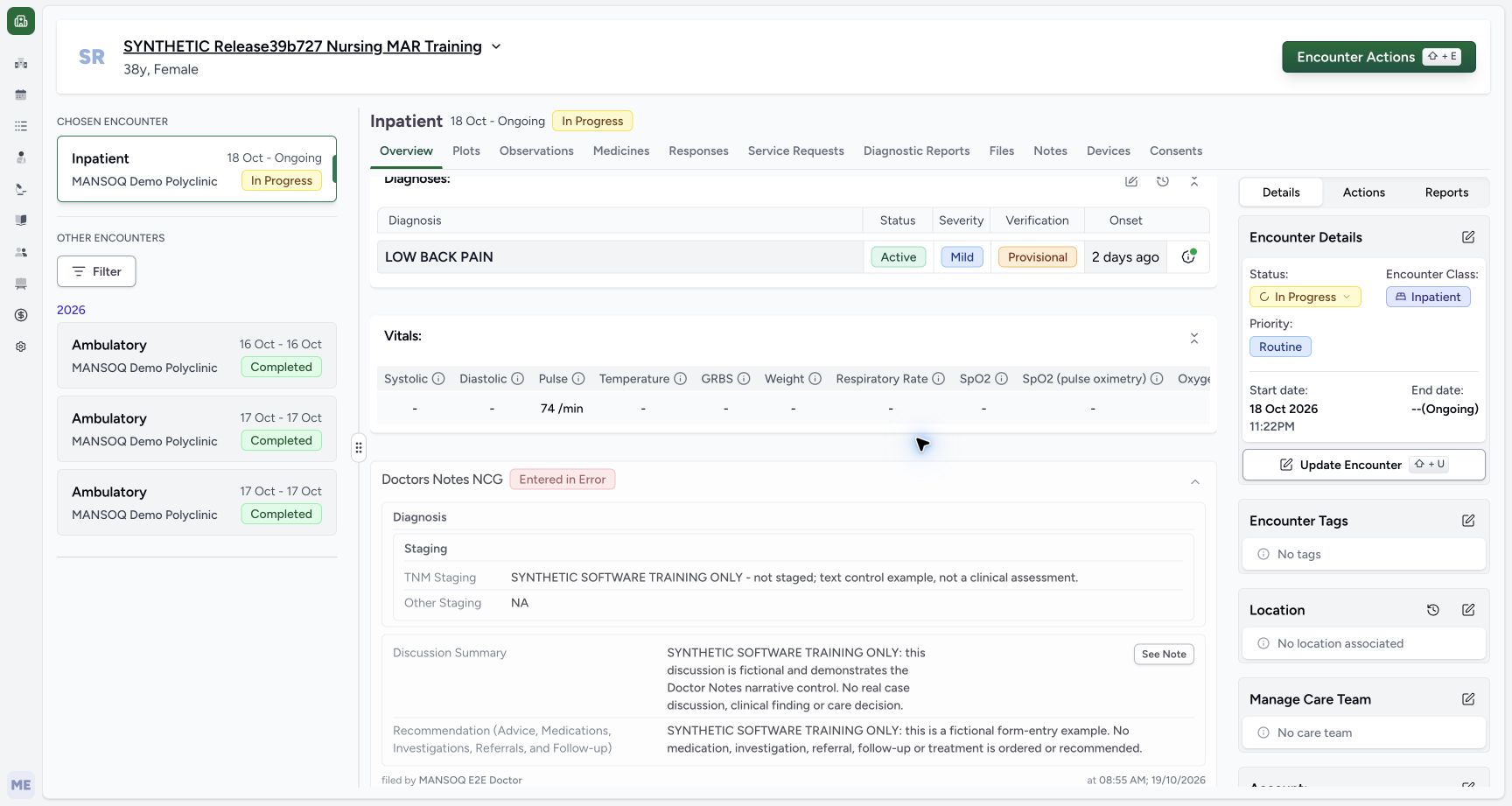
1Read the new source Entered in Error badge
Capture details
Exact committed 3dfb7c9f, 3401 verified core/web blobs and 139 built assets. Existing ordinary Doctor; the old release label in the fictional patient name is retained. No role, form or terminology change. The same new source is Entered in Error; all older clinical records remain unchanged.
Image SHA-256 c9c27de4ce7ee564254371a335ea8a70fe2708dc59a559b63073e276285e0e71
- Read Entered in Error: The new Doctor Notes source is retained and marked Entered in Error.
 1
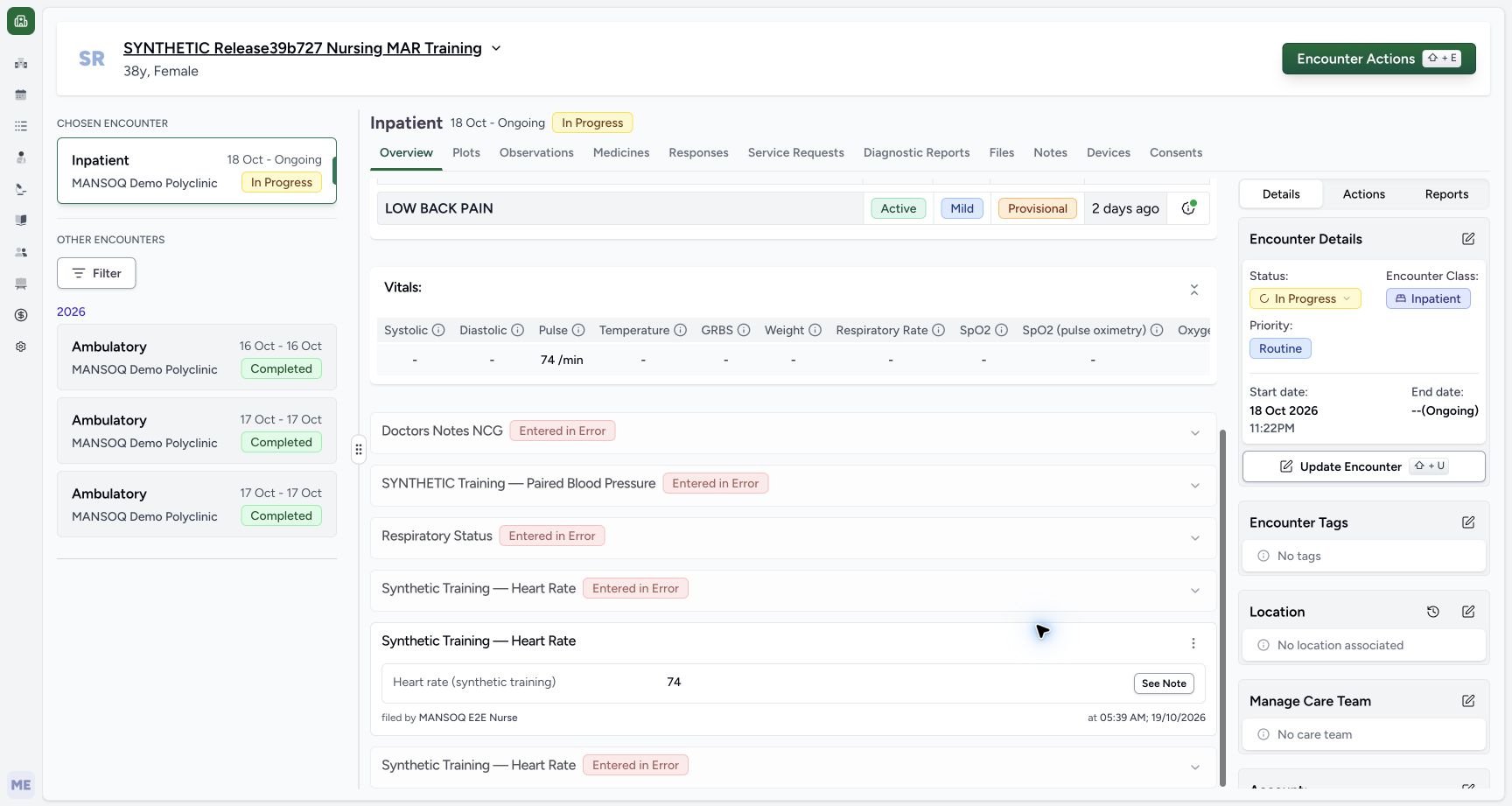
1Find the retained invalid response after reload
Capture details
Exact committed 3dfb7c9f, 3401 verified core/web blobs and 139 built assets. Existing ordinary Doctor; the old release label in the fictional patient name is retained. No role, form or terminology change. The same new source is Entered in Error; all older clinical records remain unchanged.
Image SHA-256 3b56f4197b4a73193d539faa499c843f8b442e95e630282e327c81b3d48b1323
- Expand the retained invalid note: Select the Doctors Notes NCG title to expand its retained invalid response.
Separate output branches
This lesson demonstrates only this single selected response, local Save as PDF and actual Preview reading. It does not demonstrate Print all responses, a physical printer, external delivery, editing or revoking a PDF, a general saved-answer editor, or a full clinical-record export.
1Choose Print this response for the saved note
Capture details
Exact committed 3dfb7c9f, 3401 verified core/web blobs and 139 built assets. Existing ordinary Doctor; the old release label in the fictional patient name is retained. No role, form or terminology change. The new ordinary source was saved Completed; only the four ordinary answers and optional note were authored.
Image SHA-256 2df89506078e1a3b6e6b36c04ff58157a3269302f65feb6c9f7e7a37fe1072fb
- Print this response: Choose Print this response to print only this saved Doctor Notes entry.
12Review the populated single-response print preview
Capture details
Exact committed 3dfb7c9f, 3401 verified core/web blobs and 139 built assets. Existing ordinary Doctor; the old release label in the fictional patient name is retained. No role, form or terminology change. The new ordinary source was saved Completed; only the four ordinary answers and optional note were authored.
Image SHA-256 e0db05651d7d1ef816b094fa9334f5a5d517fa12bdd2a8c742653bb17b2e1c19
- Open native Print: Choose Print after checking the patient, encounter and saved response.
- Verify the output title: Read Doctors Notes NCG in the populated single-response preview.
12Review the genuine Chrome Print dialog on macOS
Native macOS print/save dialog.
Capture details
Exact committed 3dfb7c9f, 3401 verified core/web blobs and 139 built assets. Existing ordinary Doctor; the old release label in the fictional patient name is retained. No role, form or terminology change. The new ordinary source was saved Completed; only the four ordinary answers and optional note were authored.
Image SHA-256 0cb80325bb3aa30a5955a7ab768048fbfe28d9eead87471305965f0c2e3b008a
- Save the PDF from Print: With Destination set to Save as PDF and the actual one-page preview checked, choose Save.
- Check Save as PDF destination: Read the selected Save as PDF destination before saving the local document.
1Read the complete saved PDF lower page in macOS Preview
Saved PDF in Preview (macOS) · page 1 of 1.
Capture details
Exact committed 3dfb7c9f, 3401 verified core/web blobs and 139 built assets. Existing ordinary Doctor; the old release label in the fictional patient name is retained. No role, form or terminology change. This is the retained static PDF generated before the later source correction; it does not automatically change when the source becomes invalid.
Image SHA-256 adb82f55a66d8ee59effc511c568927e522e6da93b15d1e6f7b3d667c7639df7
- Verify Page 1 of 1 at the bottom: Scroll down to read the complete Recommendation and the Page 1 of 1 footer in the same saved PDF.
Source evidence
Every citation uses this exact committed version. The private source repository requires access.
- repositories/platform/mansoq-web/src/components/Facility/ConsultationDetails/QuestionnaireResponsesList.tsx:324 ·
3dfb7c9f519fb5b4cd4452439f3c12346bf58319Source file checksum
abcf7ab477238782e128a28bbd0b83562f900a41dcd1665a3df68e33fad1deac - repositories/platform/mansoq-web/src/components/Facility/ConsultationDetails/PrintQuestionnaireResponse.tsx:99 ·
3dfb7c9f519fb5b4cd4452439f3c12346bf58319Source file checksum
626d6b496a09058d94929bbec29bd34a3c91a95111466342a278e6bca0f2202e - repositories/platform/mansoq-web/src/components/Facility/ConsultationDetails/PrintAllQuestionnaireResponses.tsx:316 ·
3dfb7c9f519fb5b4cd4452439f3c12346bf58319Source file checksum
e7314df6d693bbd49e54e5f007521488cbc82b164dba4fc0ba2e317049b5cc1a - repositories/platform/mansoq-web/src/pages/Encounters/tabs/overview/FormsDialog.tsx:163 ·
3dfb7c9f519fb5b4cd4452439f3c12346bf58319Source file checksum
94e423519145edb5e7895c4b2fa8eba6625db5a1d320fb35c37777f0876321a6 - repositories/platform/mansoq-web/src/components/Questionnaire/QuestionnaireForm.tsx:557 ·
3dfb7c9f519fb5b4cd4452439f3c12346bf58319Source file checksum
ee6c2195f13e48f0896a2d3da566c2f2a67910adad08894df6b77862f9cfdeec - repositories/platform/mansoq-web/src/components/Questionnaire/QuestionnaireForm.tsx:587 ·
3dfb7c9f519fb5b4cd4452439f3c12346bf58319Source file checksum
ee6c2195f13e48f0896a2d3da566c2f2a67910adad08894df6b77862f9cfdeec - repositories/platform/mansoq-web/src/components/Questionnaire/QuestionnaireForm.tsx:831 ·
3dfb7c9f519fb5b4cd4452439f3c12346bf58319Source file checksum
ee6c2195f13e48f0896a2d3da566c2f2a67910adad08894df6b77862f9cfdeec - repositories/platform/mansoq-web/src/components/Questionnaire/QuestionTypes/DiagnosisQuestion.tsx:320 ·
3dfb7c9f519fb5b4cd4452439f3c12346bf58319Source file checksum
56a14d11bcc3aef66d9dc2d220b29d4c22ff671eed6ed4c4676ddf59b7920159 - repositories/platform/mansoq-web/src/components/Questionnaire/QuestionTypes/DiagnosisQuestion.tsx:393 ·
3dfb7c9f519fb5b4cd4452439f3c12346bf58319Source file checksum
56a14d11bcc3aef66d9dc2d220b29d4c22ff671eed6ed4c4676ddf59b7920159 - repositories/platform/mansoq-web/src/components/Questionnaire/QuestionTypes/TextQuestion.tsx:207 ·
3dfb7c9f519fb5b4cd4452439f3c12346bf58319Source file checksum
1ce4eb85780e351a42f155fc8a092fa921e6f4853f1efc91902365498b834aab - repositories/platform/mansoq-web/src/components/Questionnaire/QuestionTypes/ChoiceQuestion.tsx:46 ·
3dfb7c9f519fb5b4cd4452439f3c12346bf58319Source file checksum
0f6a5813b88385121e4d44682fb82fa0c3d65a57faf21b59ddda8e19995e446e - repositories/platform/mansoq-web/src/components/Questionnaire/structured/handlers.ts:157 ·
3dfb7c9f519fb5b4cd4452439f3c12346bf58319Source file checksum
459ade48f77316279ab2978dc7b4466cb96acb8223c61b9a1f87ca9973be7c7f - repositories/platform/mansoq-core/mansoq/emr/resources/questionnaire/spec.py:143 ·
3dfb7c9f519fb5b4cd4452439f3c12346bf58319Source file checksum
360690dc0be252ca3508ca507a6b2fb3acc1f9a67377b24bac36c023dfb43458 - repositories/platform/mansoq-core/mansoq/emr/api/viewsets/questionnaire.py:116 ·
3dfb7c9f519fb5b4cd4452439f3c12346bf58319Source file checksum
ccc0fe021d193e5d6de9540c256413da356895ceed0c71c5fdcba75ca6915d4e - repositories/platform/mansoq-core/mansoq/security/authorization/encounter.py:69 ·
3dfb7c9f519fb5b4cd4452439f3c12346bf58319Source file checksum
0e7ff8afcfb57b2371201e16ee6fac26125d6e686af66ed7edd95e49bc07de78 - repositories/platform/mansoq-core/mansoq/emr/resources/questionnaire/utils.py:447 ·
3dfb7c9f519fb5b4cd4452439f3c12346bf58319Source file checksum
8425858d2179a66f482f38a3fd7f0fc0dcb70a4bcd85450fe7ce748b3081826c