 MANSOQ
 Revenue cycle tax configuration · VERSION 3dfb7c9f
Save one fictional unresolved tax rule as Draft
Complete all fifteen displayed fields for the synthetic example, preserve unknown values honestly and verify the saved Draft card.
Facility Admin · RCM · Finance
 12345678
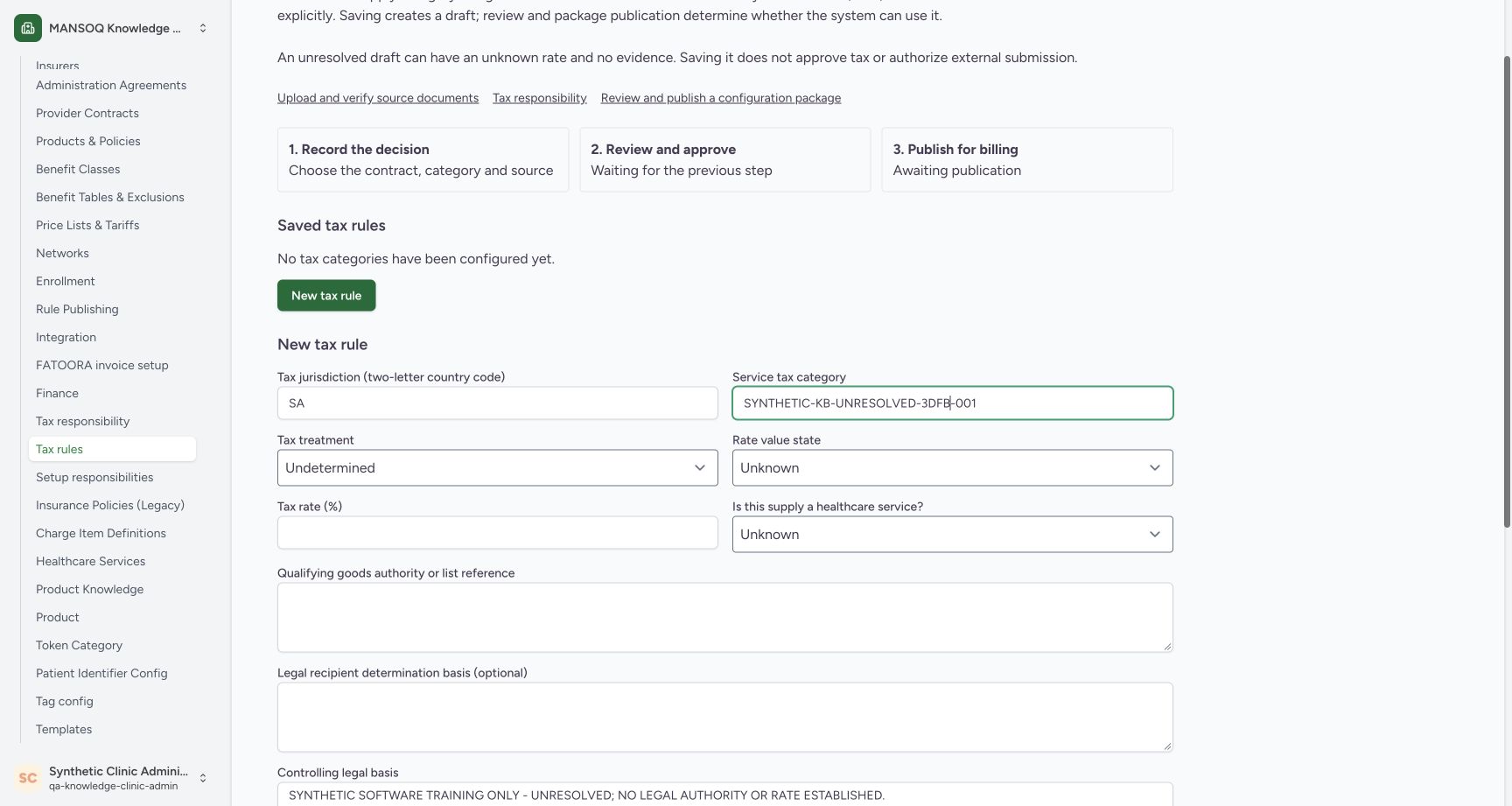
Review jurisdiction, category and unknown values
Capture details
Genuine original fictional Clinic tax-draft workflow. One unresolved Draft saved, then normal reload/View details only. Review, publication, activation and claim finalization are not demonstrated.
Image SHA-256 10e3658de298c77344e9ac7d62e8309317f0282b7ed4c9dcc1794720984789d8
- Tax jurisdiction — SA: Enter the two-letter jurisdiction shown in the practice example.
- Review the assigned category: Check the complete fictional category before Save.
- Tax treatment — Undetermined: The treatment remains Undetermined.
- Rate value state — Unknown: Unknown states that a rate has not been established.
- Tax rate — empty: Leave the percentage empty while the rate state is Unknown. An empty rate is different from an explicit zero.
- Healthcare service — Unknown: Keep the classification Unknown for this unresolved example.
- Qualifying goods reference — blank: No qualifying-goods authority or list is established in this example.
- Recipient determination basis — blank: Leave the optional recipient basis blank when it is unresolved.
 1234
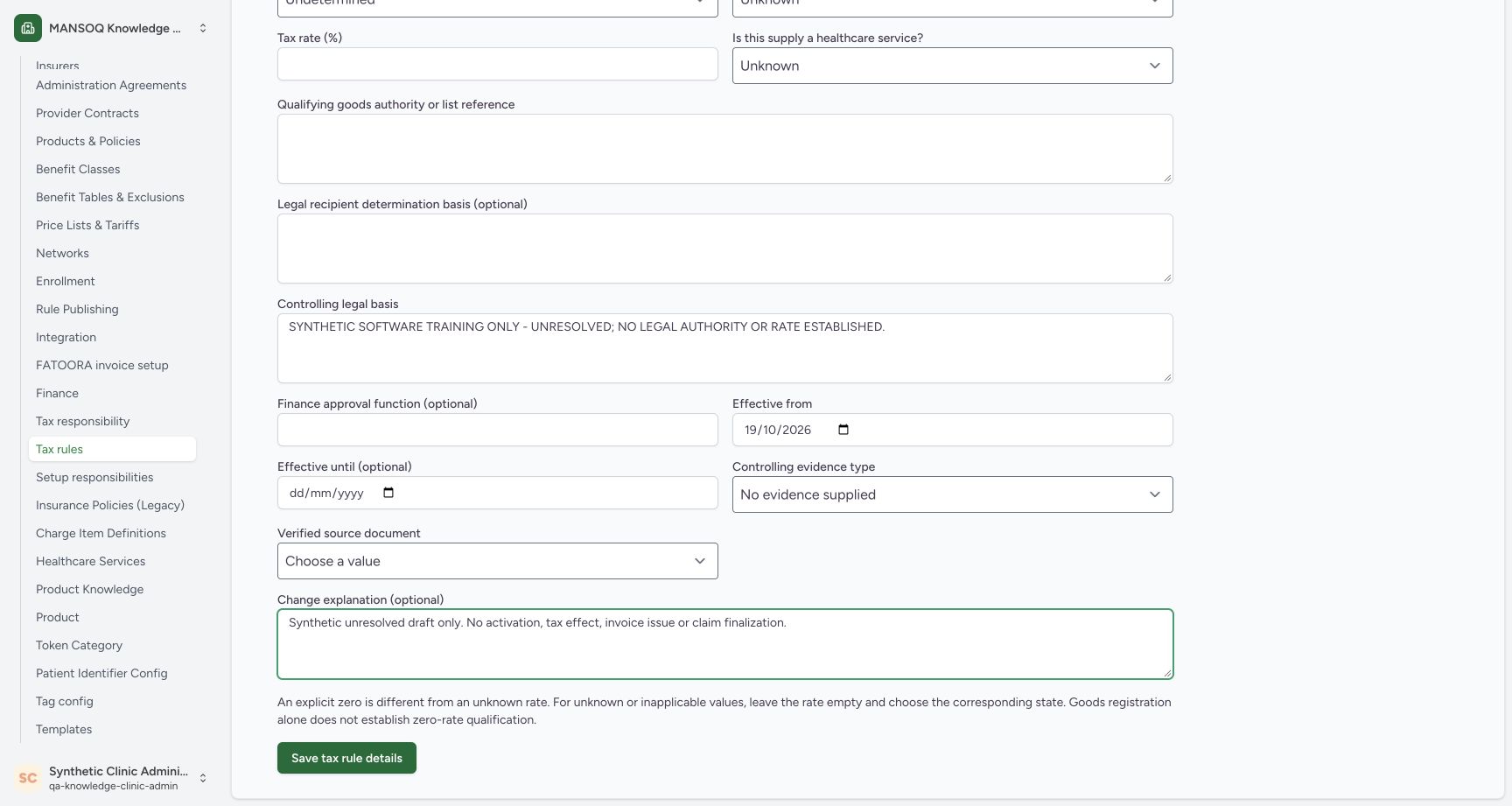
1234Review date, evidence and Save tax rule details
Capture details
Genuine original fictional Clinic tax-draft workflow. One unresolved Draft saved, then normal reload/View details only. Review, publication, activation and claim finalization are not demonstrated.
Image SHA-256 21dbb5b82a8ffeaba1d0fb02c03f169cbfebc5269fee92105911c38561d8cc77
- Retained effective date: The displayed effective date is still 19/10/2026 after focus has moved.
- Evidence remains absent: No evidence supplied is selected and no verified document is chosen.
- Review the change explanation: The fictional explanation remains populated before the single Save.
- Save tax rule details: After checking the fields, choose Save tax rule details once.
 12345
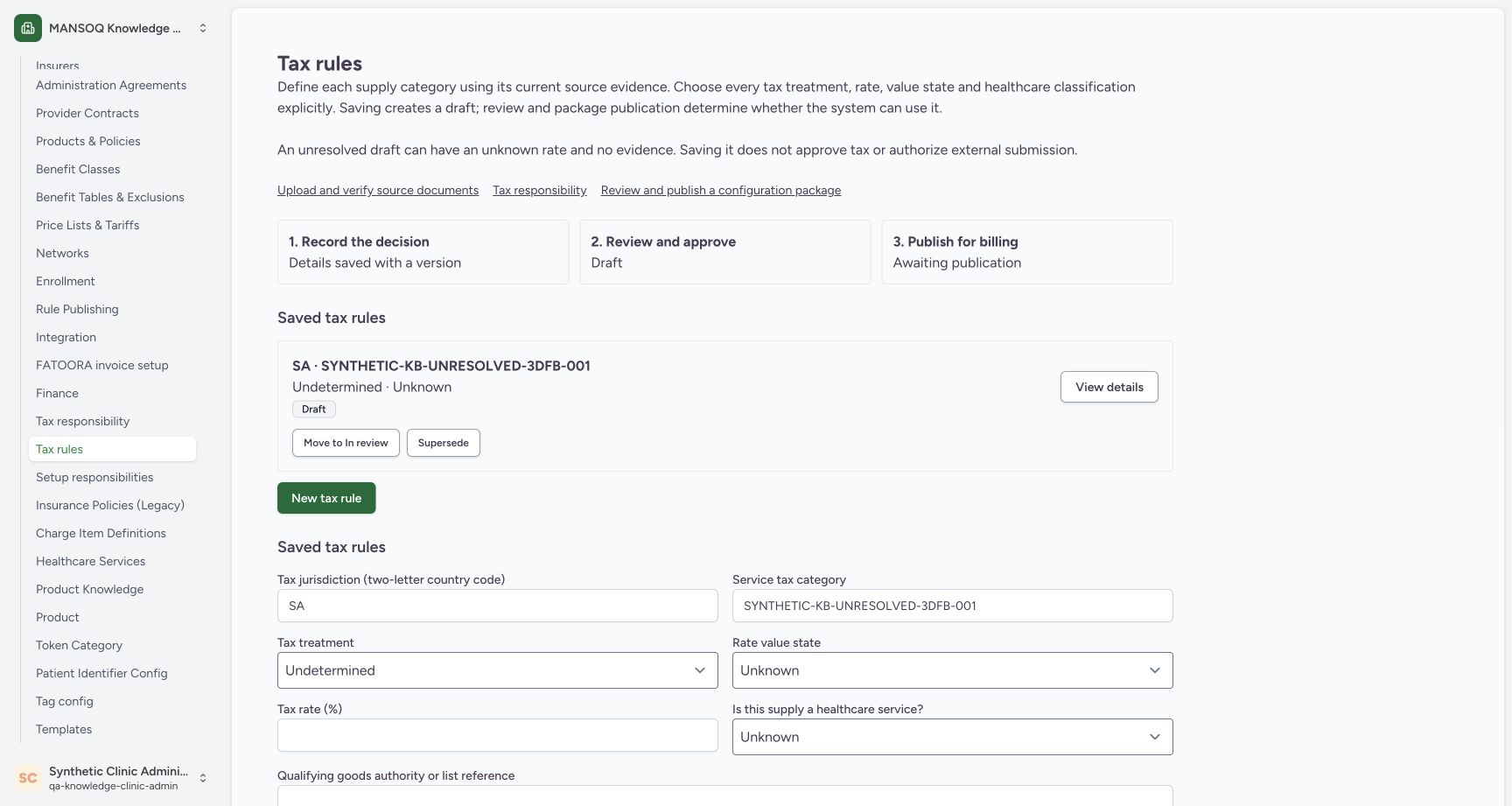
12345Saved category is Draft and awaiting publication
Capture details
Genuine original fictional Clinic tax-draft workflow. One unresolved Draft saved, then normal reload/View details only. Review, publication, activation and claim finalization are not demonstrated.
Image SHA-256 d38781236f7940189fefbe6e6eed5f872b286215a18b8a06b3fdcccc7b87769f
- Saved fictional category: The saved card names the category created in this example.
- Draft: The saved rule is Draft.
- Undetermined · Unknown: The saved list preserves the unresolved treatment and rate state.
- Review stage — Draft: The review stage is still Draft; the later workflow is outside this exercise.
- Awaiting publication: The saved draft has not been published for billing.
11 of 11 content blocks have reviewed image alignment. Missing overview or prerequisite images remain open.
Before you begin
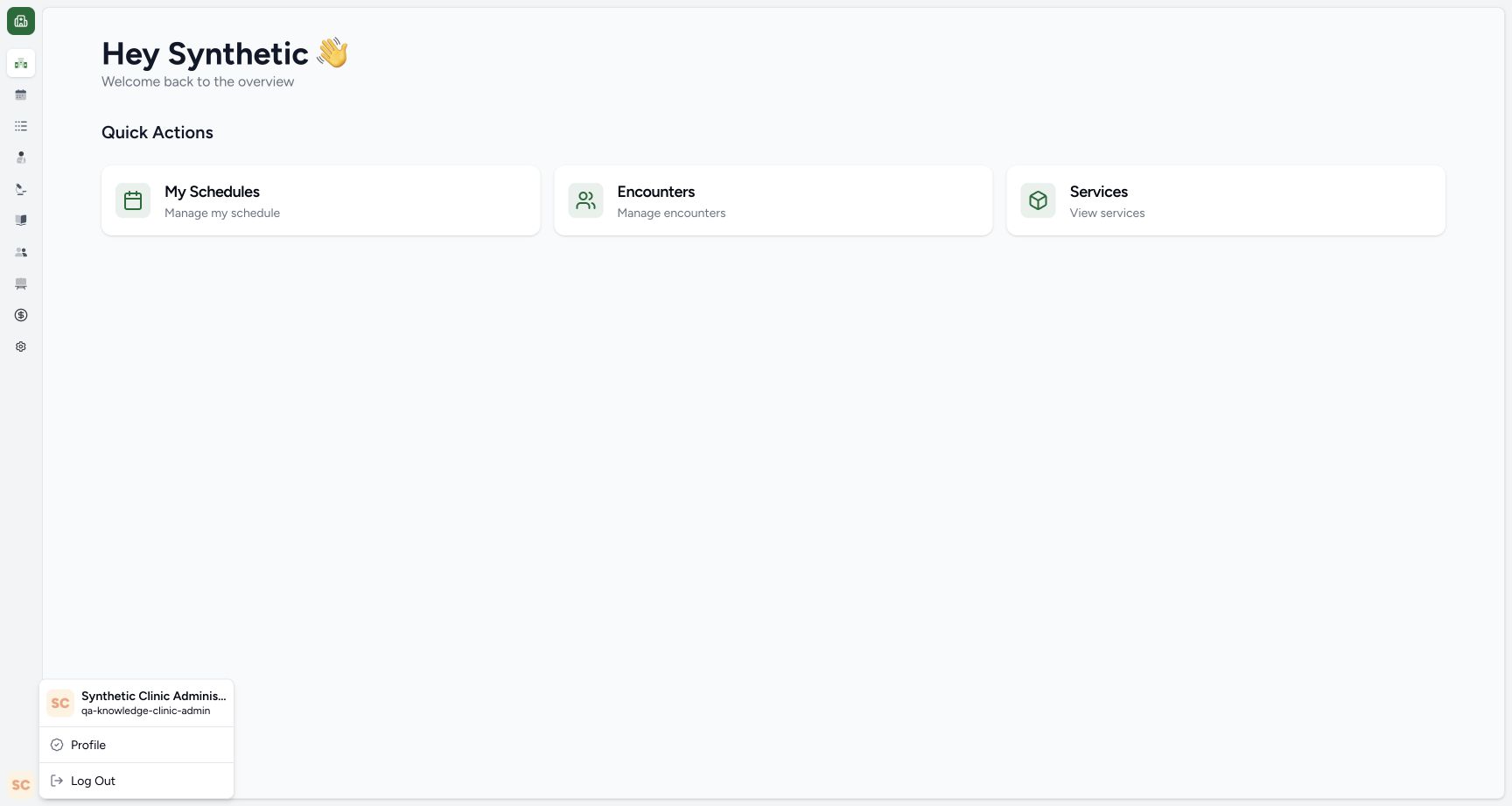
- Use an already authenticated, authorized Clinic administrator in the assigned synthetic environment with Tax rules open. This example created SYNTHETIC-KB-UNRESOLVED-3DFB-001 once. If it is already listed, open View details using the next lesson; do not create a second copy. No real legal basis, rate or approval is supplied by this exercise.
 1
1Recorded release 3dfb7c9f · 2026-10-19T18:56:31.410Z · 1728 × 921 Existing authorized Clinic administrator
Capture details
Genuine original fictional Clinic tax-draft workflow. One unresolved Draft saved, then normal reload/View details only. Review, publication, activation and claim finalization are not demonstrated.
Image SHA-256
8293f224e70a537e722689e1a5b3d99f0d43a11dd0204c555de9e1f75fb80428- Existing Clinic administrator account: The remaining example uses the already authorized qa-knowledge-clinic-admin account in the fictional Clinic.
 123
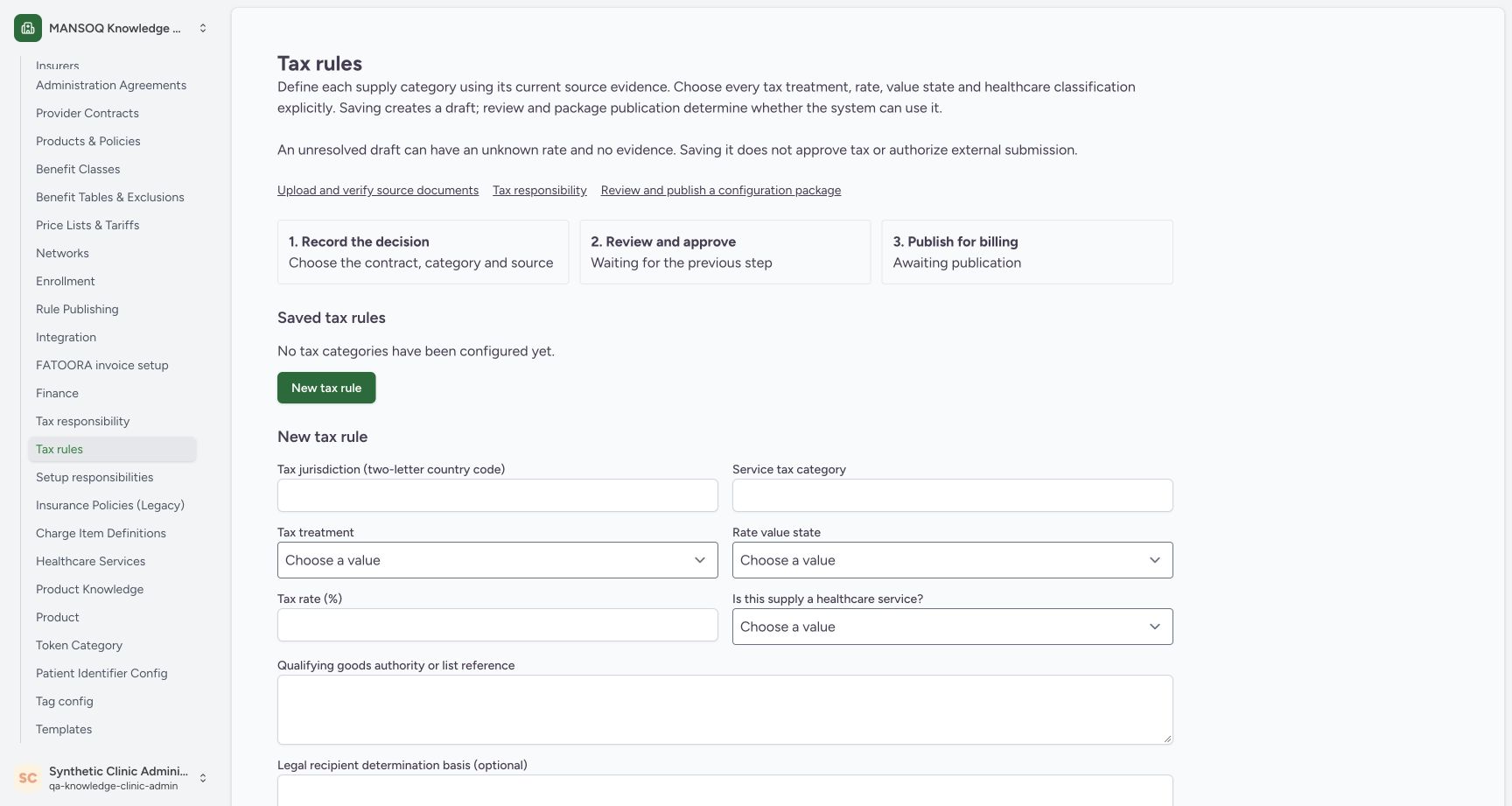
123Recorded release 3dfb7c9f · 2026-10-19T18:57:36.187Z · 1728 × 921 Empty tax-rule list and new-entry form
Capture details
Genuine original fictional Clinic tax-draft workflow. One unresolved Draft saved, then normal reload/View details only. Review, publication, activation and claim finalization are not demonstrated.
Image SHA-256
06e4dc6145a26fdd473f5c11346461b8c8c018b7bec849c93583dff05206cab6- Tax rules: The selected Tax rules entry is under facility settings.
- No tax categories configured yet: This is the empty saved list at the start of the captured example.
- New tax rule form: Use the new-entry form beneath the saved list.
 123
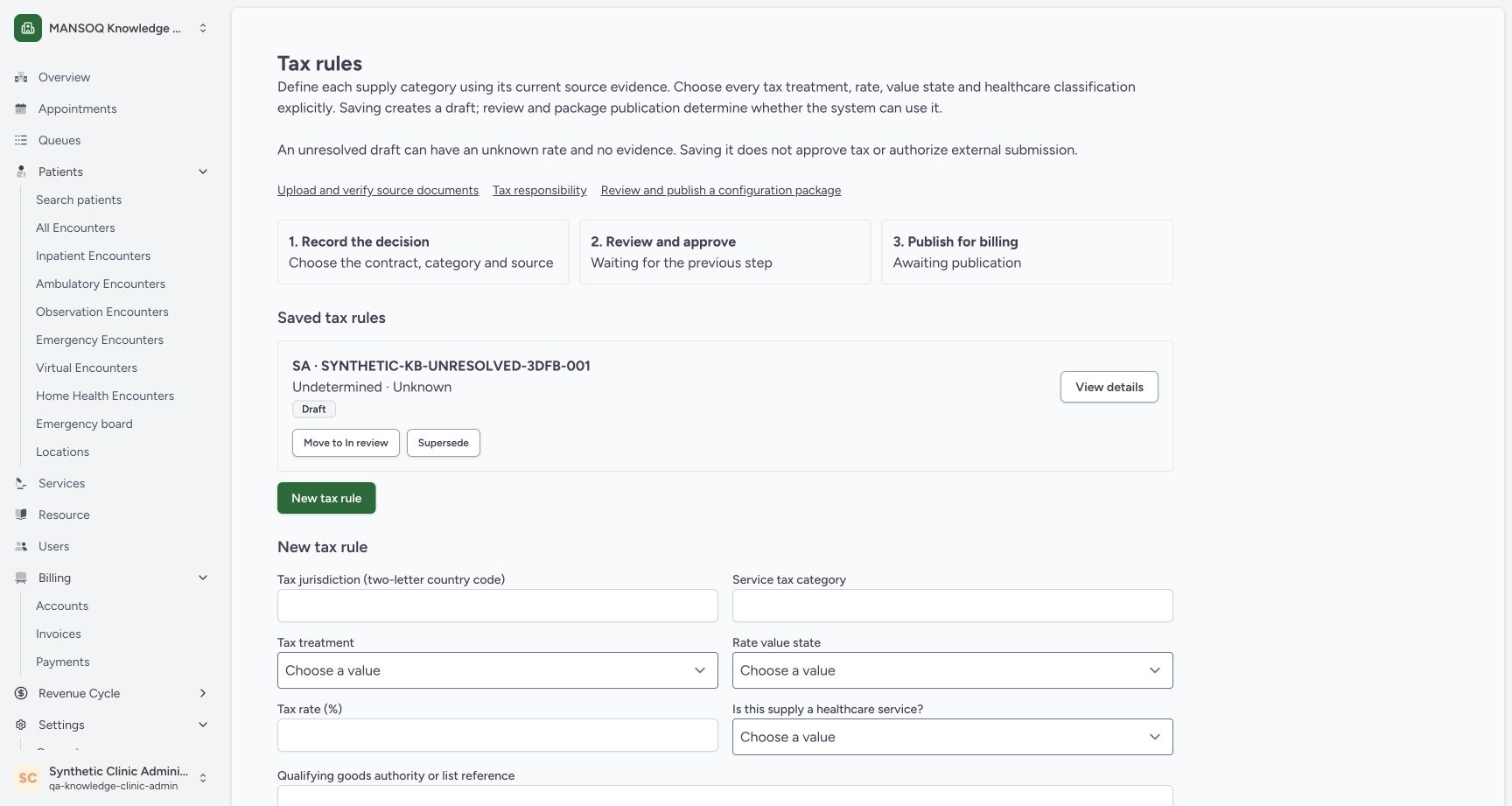
123Recorded release 3dfb7c9f · 2026-10-19T19:26:29.552Z · 1728 × 921 Reloaded list with View details and blank new-entry form
Capture details
Genuine original fictional Clinic tax-draft workflow. One unresolved Draft saved, then normal reload/View details only. Review, publication, activation and claim finalization are not demonstrated.
Image SHA-256
f3d33e6fd3460fb06e76677873c154cb73091219180ade8900b7b09f81437efb- Draft remains after reload: The same category is still listed with the Draft badge.
- View details: Open the saved card with View details.
- Blank new-entry form: The blank form below the list is a new-entry form; use View details to inspect the saved record.
1. Set the jurisdiction and fictional category
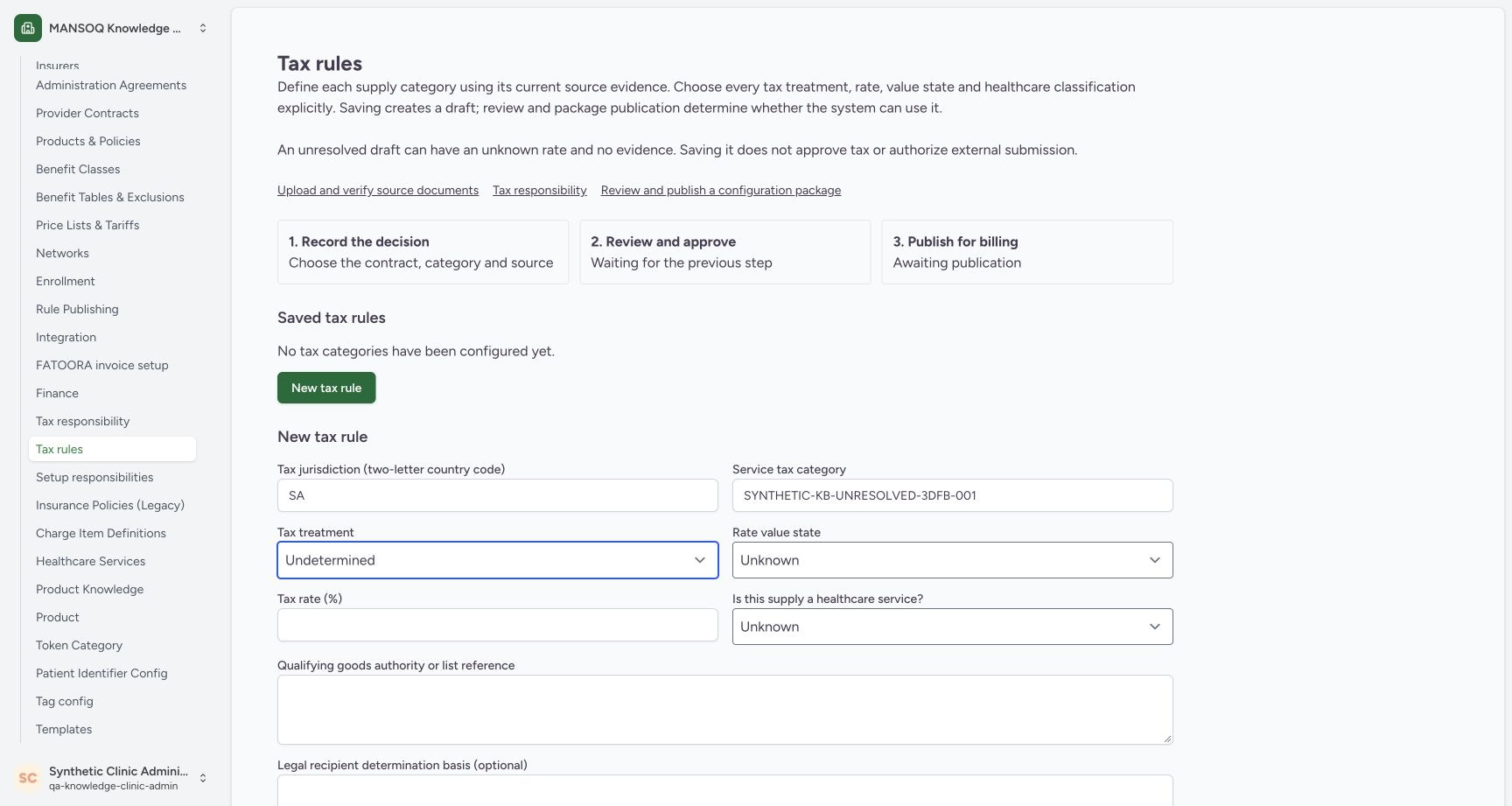
In the New tax rule form, enter SA for Tax jurisdiction and SYNTHETIC-KB-UNRESOLVED-3DFB-001 for Service tax category. Use this only in the assigned fictional exercise.
 123
123Enter the fictional category and unresolved states
Capture details
Genuine original fictional Clinic tax-draft workflow. One unresolved Draft saved, then normal reload/View details only. Review, publication, activation and claim finalization are not demonstrated.
Image SHA-256 02f1df272a436b2c306df968f0c9fa3022ddfc8ac38dedc15a7821ae1ea9189f
- Synthetic service tax category: Enter the assigned fictional category; this example uses SYNTHETIC-KB-UNRESOLVED-3DFB-001.
- Undetermined treatment: Select Undetermined for this unresolved practice draft.
- Unknown rate value state: Select Unknown rather than asserting a known rate or an explicit zero.
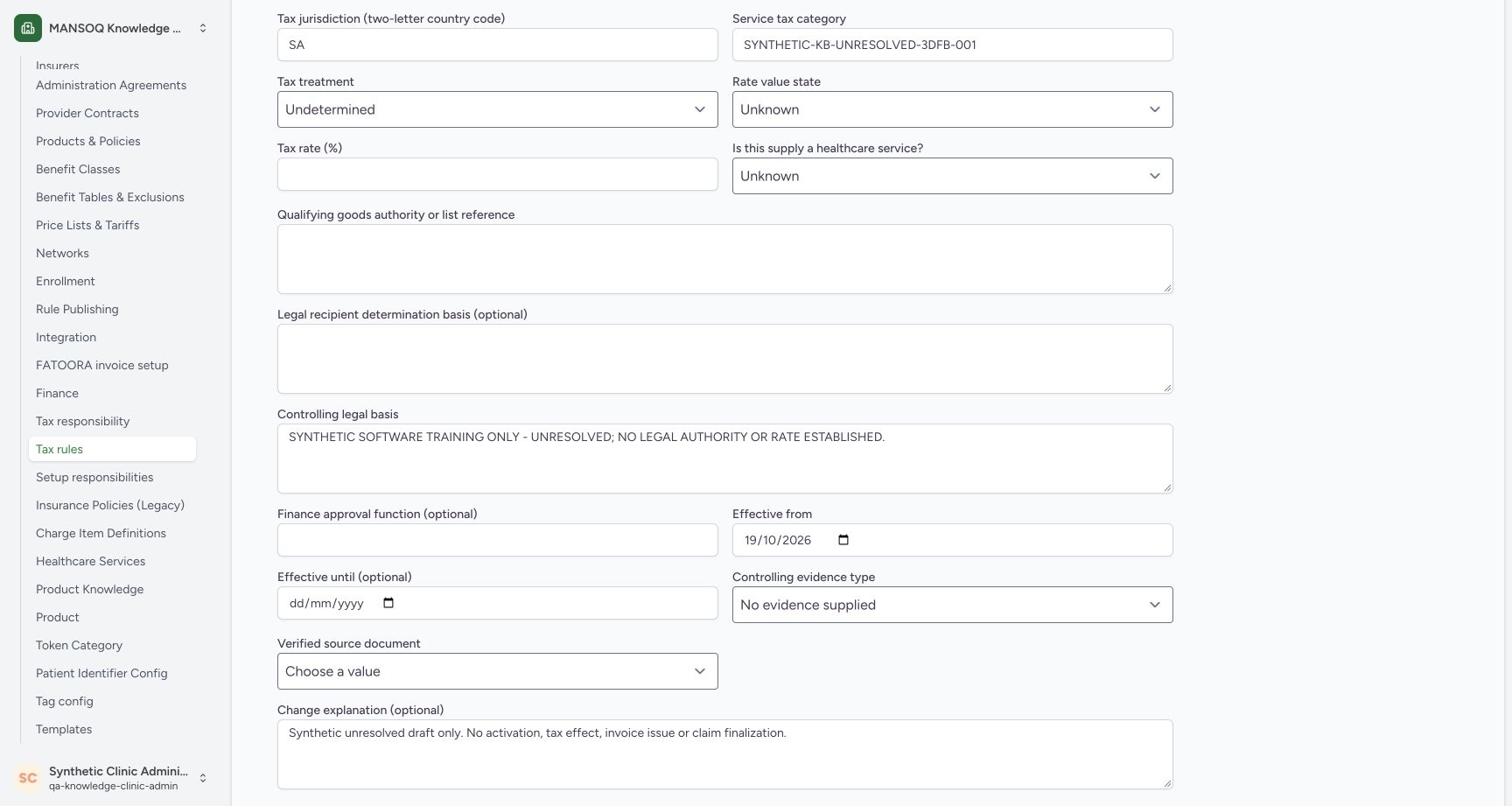
12345678Review jurisdiction, category and unknown values
Capture details
Genuine original fictional Clinic tax-draft workflow. One unresolved Draft saved, then normal reload/View details only. Review, publication, activation and claim finalization are not demonstrated.
Image SHA-256 10e3658de298c77344e9ac7d62e8309317f0282b7ed4c9dcc1794720984789d8
- Tax jurisdiction — SA: Enter the two-letter jurisdiction shown in the practice example.
- Review the assigned category: Check the complete fictional category before Save.
- Tax treatment — Undetermined: The treatment remains Undetermined.
- Rate value state — Unknown: Unknown states that a rate has not been established.
- Tax rate — empty: Leave the percentage empty while the rate state is Unknown. An empty rate is different from an explicit zero.
- Healthcare service — Unknown: Keep the classification Unknown for this unresolved example.
- Qualifying goods reference — blank: No qualifying-goods authority or list is established in this example.
- Recipient determination basis — blank: Leave the optional recipient basis blank when it is unresolved.
2. Keep the treatment and rate unresolved
Choose Undetermined for Tax treatment and Unknown for Rate value state. Leave Tax rate (%) empty. Unknown means a rate has not been established; it is different from entering an explicit zero.
123Enter the fictional category and unresolved states
Capture details
Genuine original fictional Clinic tax-draft workflow. One unresolved Draft saved, then normal reload/View details only. Review, publication, activation and claim finalization are not demonstrated.
Image SHA-256 02f1df272a436b2c306df968f0c9fa3022ddfc8ac38dedc15a7821ae1ea9189f
- Synthetic service tax category: Enter the assigned fictional category; this example uses SYNTHETIC-KB-UNRESOLVED-3DFB-001.
- Undetermined treatment: Select Undetermined for this unresolved practice draft.
- Unknown rate value state: Select Unknown rather than asserting a known rate or an explicit zero.
12345678Review jurisdiction, category and unknown values
Capture details
Genuine original fictional Clinic tax-draft workflow. One unresolved Draft saved, then normal reload/View details only. Review, publication, activation and claim finalization are not demonstrated.
Image SHA-256 10e3658de298c77344e9ac7d62e8309317f0282b7ed4c9dcc1794720984789d8
- Tax jurisdiction — SA: Enter the two-letter jurisdiction shown in the practice example.
- Review the assigned category: Check the complete fictional category before Save.
- Tax treatment — Undetermined: The treatment remains Undetermined.
- Rate value state — Unknown: Unknown states that a rate has not been established.
- Tax rate — empty: Leave the percentage empty while the rate state is Unknown. An empty rate is different from an explicit zero.
- Healthcare service — Unknown: Keep the classification Unknown for this unresolved example.
- Qualifying goods reference — blank: No qualifying-goods authority or list is established in this example.
- Recipient determination basis — blank: Leave the optional recipient basis blank when it is unresolved.
3. Record the remaining unresolved classifications
Choose Unknown for Is this supply a healthcare service? Leave Qualifying goods authority or list reference and the optional Legal recipient determination basis blank in this fictional draft.
12345678Review jurisdiction, category and unknown values
Capture details
Genuine original fictional Clinic tax-draft workflow. One unresolved Draft saved, then normal reload/View details only. Review, publication, activation and claim finalization are not demonstrated.
Image SHA-256 10e3658de298c77344e9ac7d62e8309317f0282b7ed4c9dcc1794720984789d8
- Tax jurisdiction — SA: Enter the two-letter jurisdiction shown in the practice example.
- Review the assigned category: Check the complete fictional category before Save.
- Tax treatment — Undetermined: The treatment remains Undetermined.
- Rate value state — Unknown: Unknown states that a rate has not been established.
- Tax rate — empty: Leave the percentage empty while the rate state is Unknown. An empty rate is different from an explicit zero.
- Healthcare service — Unknown: Keep the classification Unknown for this unresolved example.
- Qualifying goods reference — blank: No qualifying-goods authority or list is established in this example.
- Recipient determination basis — blank: Leave the optional recipient basis blank when it is unresolved.
4. State the fictional legal-basis boundary
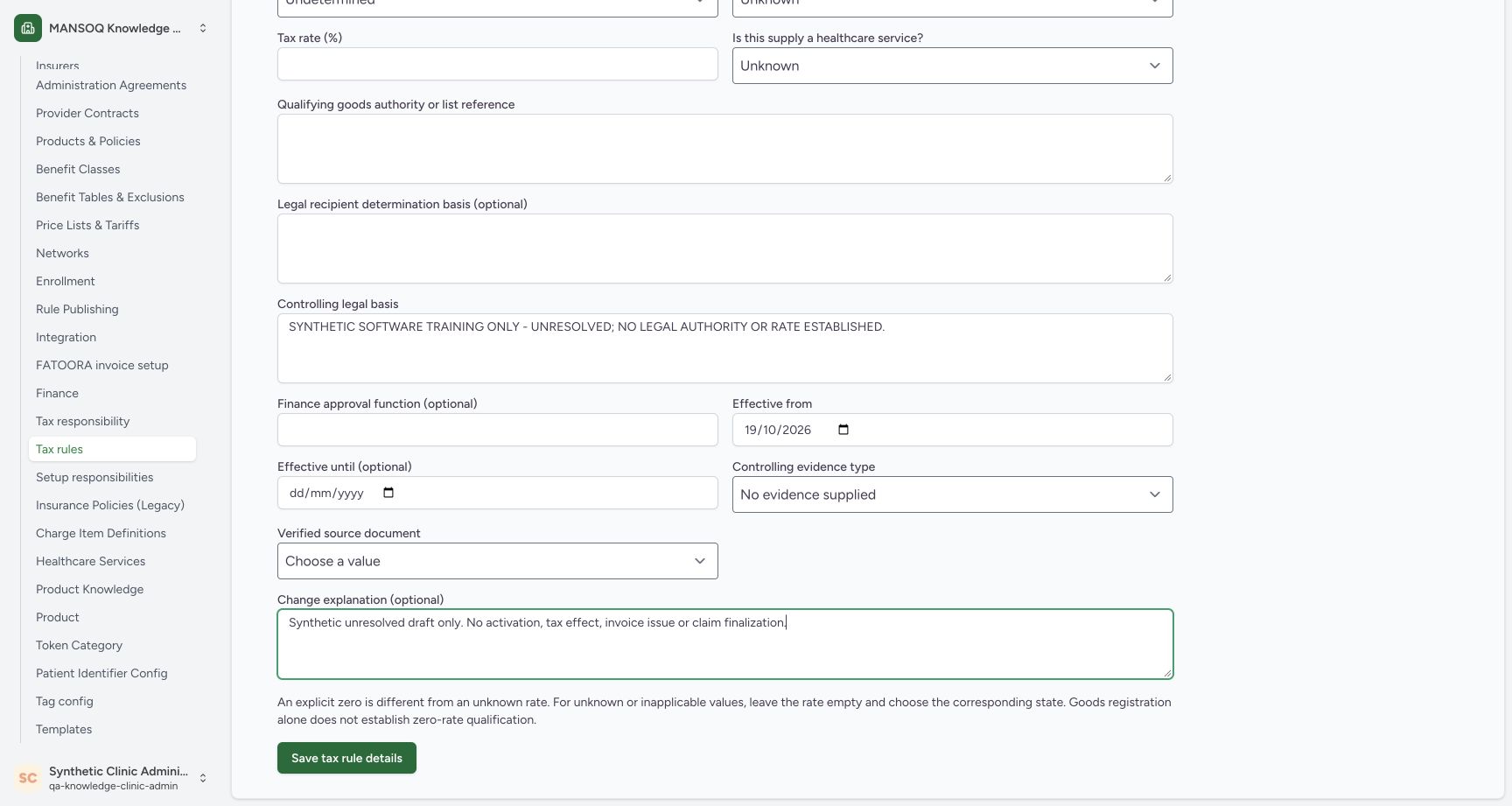
In Controlling legal basis, enter “SYNTHETIC SOFTWARE TRAINING ONLY - UNRESOLVED; NO LEGAL AUTHORITY OR RATE ESTABLISHED.” Leave the optional Finance approval function blank. This text records the unresolved practice boundary.
 1234567
Complete the unresolved date and evidence fields
Capture details
Genuine original fictional Clinic tax-draft workflow. One unresolved Draft saved, then normal reload/View details only. Review, publication, activation and claim finalization are not demonstrated.
Image SHA-256 ee881827aaa19607aeae8da0479c1b9f21a82d5f3077119ce88ba5978d0bface
- Controlling legal basis: Use the explicit fictional unresolved statement shown here; no legal authority or rate has been established.
- Finance approval function — blank: The optional approval-function field is left blank in this unresolved example.
- Effective from — 19/10/2026: Check the displayed calendar date after leaving the date field.
- Effective until — blank: No end date is supplied for this practice draft.
- No evidence supplied: Choose No evidence supplied for this unresolved draft.
- Verified source document — unselected: Keep the source document unselected while no verified evidence is supplied.
- Fictional change explanation: Record that this is a synthetic unresolved draft with no activation, issue or finalization.
5. Verify the effective dates
Enter 19/10/2026 in Effective from for this captured practice example. Move focus away and confirm that the displayed date remains. Leave Effective until blank. These controls show calendar dates, not appointment times.
1234567Complete the unresolved date and evidence fields
Capture details
Genuine original fictional Clinic tax-draft workflow. One unresolved Draft saved, then normal reload/View details only. Review, publication, activation and claim finalization are not demonstrated.
Image SHA-256 ee881827aaa19607aeae8da0479c1b9f21a82d5f3077119ce88ba5978d0bface
- Controlling legal basis: Use the explicit fictional unresolved statement shown here; no legal authority or rate has been established.
- Finance approval function — blank: The optional approval-function field is left blank in this unresolved example.
- Effective from — 19/10/2026: Check the displayed calendar date after leaving the date field.
- Effective until — blank: No end date is supplied for this practice draft.
- No evidence supplied: Choose No evidence supplied for this unresolved draft.
- Verified source document — unselected: Keep the source document unselected while no verified evidence is supplied.
- Fictional change explanation: Record that this is a synthetic unresolved draft with no activation, issue or finalization.
1234Review date, evidence and Save tax rule details
Capture details
Genuine original fictional Clinic tax-draft workflow. One unresolved Draft saved, then normal reload/View details only. Review, publication, activation and claim finalization are not demonstrated.
Image SHA-256 21dbb5b82a8ffeaba1d0fb02c03f169cbfebc5269fee92105911c38561d8cc77
- Retained effective date: The displayed effective date is still 19/10/2026 after focus has moved.
- Evidence remains absent: No evidence supplied is selected and no verified document is chosen.
- Review the change explanation: The fictional explanation remains populated before the single Save.
- Save tax rule details: After checking the fields, choose Save tax rule details once.
6. Keep absent evidence explicit
Choose No evidence supplied for Controlling evidence type. Leave Verified source document at Choose a value; no verified document is being asserted.
1234567Complete the unresolved date and evidence fields
Capture details
Genuine original fictional Clinic tax-draft workflow. One unresolved Draft saved, then normal reload/View details only. Review, publication, activation and claim finalization are not demonstrated.
Image SHA-256 ee881827aaa19607aeae8da0479c1b9f21a82d5f3077119ce88ba5978d0bface
- Controlling legal basis: Use the explicit fictional unresolved statement shown here; no legal authority or rate has been established.
- Finance approval function — blank: The optional approval-function field is left blank in this unresolved example.
- Effective from — 19/10/2026: Check the displayed calendar date after leaving the date field.
- Effective until — blank: No end date is supplied for this practice draft.
- No evidence supplied: Choose No evidence supplied for this unresolved draft.
- Verified source document — unselected: Keep the source document unselected while no verified evidence is supplied.
- Fictional change explanation: Record that this is a synthetic unresolved draft with no activation, issue or finalization.
1234Review date, evidence and Save tax rule details
Capture details
Genuine original fictional Clinic tax-draft workflow. One unresolved Draft saved, then normal reload/View details only. Review, publication, activation and claim finalization are not demonstrated.
Image SHA-256 21dbb5b82a8ffeaba1d0fb02c03f169cbfebc5269fee92105911c38561d8cc77
- Retained effective date: The displayed effective date is still 19/10/2026 after focus has moved.
- Evidence remains absent: No evidence supplied is selected and no verified document is chosen.
- Review the change explanation: The fictional explanation remains populated before the single Save.
- Save tax rule details: After checking the fields, choose Save tax rule details once.
7. Explain the draft and review before Save
Enter “Synthetic unresolved draft only. No activation, tax effect, invoice issue or claim finalization.” in Change explanation. Review the jurisdiction, category, unknown states, blank rate, dates and absent evidence.
12345678Review jurisdiction, category and unknown values
Capture details
Genuine original fictional Clinic tax-draft workflow. One unresolved Draft saved, then normal reload/View details only. Review, publication, activation and claim finalization are not demonstrated.
Image SHA-256 10e3658de298c77344e9ac7d62e8309317f0282b7ed4c9dcc1794720984789d8
- Tax jurisdiction — SA: Enter the two-letter jurisdiction shown in the practice example.
- Review the assigned category: Check the complete fictional category before Save.
- Tax treatment — Undetermined: The treatment remains Undetermined.
- Rate value state — Unknown: Unknown states that a rate has not been established.
- Tax rate — empty: Leave the percentage empty while the rate state is Unknown. An empty rate is different from an explicit zero.
- Healthcare service — Unknown: Keep the classification Unknown for this unresolved example.
- Qualifying goods reference — blank: No qualifying-goods authority or list is established in this example.
- Recipient determination basis — blank: Leave the optional recipient basis blank when it is unresolved.
1234Review date, evidence and Save tax rule details
Capture details
Genuine original fictional Clinic tax-draft workflow. One unresolved Draft saved, then normal reload/View details only. Review, publication, activation and claim finalization are not demonstrated.
Image SHA-256 21dbb5b82a8ffeaba1d0fb02c03f169cbfebc5269fee92105911c38561d8cc77
- Retained effective date: The displayed effective date is still 19/10/2026 after focus has moved.
- Evidence remains absent: No evidence supplied is selected and no verified document is chosen.
- Review the change explanation: The fictional explanation remains populated before the single Save.
- Save tax rule details: After checking the fields, choose Save tax rule details once.
8. Save once and inspect the result
Choose Save tax rule details once. The form remains populated after the save action. Check the saved card for the fictional category, Undetermined · Unknown and the Draft badge.
1234Review date, evidence and Save tax rule details
Capture details
Genuine original fictional Clinic tax-draft workflow. One unresolved Draft saved, then normal reload/View details only. Review, publication, activation and claim finalization are not demonstrated.
Image SHA-256 21dbb5b82a8ffeaba1d0fb02c03f169cbfebc5269fee92105911c38561d8cc77
- Retained effective date: The displayed effective date is still 19/10/2026 after focus has moved.
- Evidence remains absent: No evidence supplied is selected and no verified document is chosen.
- Review the change explanation: The fictional explanation remains populated before the single Save.
- Save tax rule details: After checking the fields, choose Save tax rule details once.
 12
12Populated form after the single Save
Capture details
Genuine original fictional Clinic tax-draft workflow. One unresolved Draft saved, then normal reload/View details only. Review, publication, activation and claim finalization are not demonstrated.
Image SHA-256 79c1b1221132019922c0ac2ab7ba5db25b6225783d705690da64ffd134081107
- Form values after Save: The form remains populated after the save action; verify the resulting Draft card next.
- Effective date after Save: The displayed date remains 19/10/2026.
12345Saved category is Draft and awaiting publication
Capture details
Genuine original fictional Clinic tax-draft workflow. One unresolved Draft saved, then normal reload/View details only. Review, publication, activation and claim finalization are not demonstrated.
Image SHA-256 d38781236f7940189fefbe6e6eed5f872b286215a18b8a06b3fdcccc7b87769f
- Saved fictional category: The saved card names the category created in this example.
- Draft: The saved rule is Draft.
- Undetermined · Unknown: The saved list preserves the unresolved treatment and rate state.
- Review stage — Draft: The review stage is still Draft; the later workflow is outside this exercise.
- Awaiting publication: The saved draft has not been published for billing.
9. Stop at Draft
The saved rule is Draft and publication is still awaiting completion. Leave Move to In review, Supersede and publication actions untouched in this exercise. A saved unresolved draft does not clear claim holds or establish a tax rate.
12345Saved category is Draft and awaiting publication
Capture details
Genuine original fictional Clinic tax-draft workflow. One unresolved Draft saved, then normal reload/View details only. Review, publication, activation and claim finalization are not demonstrated.
Image SHA-256 d38781236f7940189fefbe6e6eed5f872b286215a18b8a06b3fdcccc7b87769f
- Saved fictional category: The saved card names the category created in this example.
- Draft: The saved rule is Draft.
- Undetermined · Unknown: The saved list preserves the unresolved treatment and rate state.
- Review stage — Draft: The review stage is still Draft; the later workflow is outside this exercise.
- Awaiting publication: The saved draft has not been published for billing.
Source evidence
Every citation uses this exact committed version. The private source repository requires access.
- repositories/platform/mansoq-web/src/pages/Facility/settings/rcm/TaxRuleSettings.tsx:84 ·
3dfb7c9f519fb5b4cd4452439f3c12346bf58319Source file checksum
f1e8279cd8a8c81e5db560c438020bd6c484f222825a7c3079f54d073a39feb1 - repositories/platform/mansoq-web/src/pages/Facility/settings/rcm/TaxRuleSettings.tsx:126 ·
3dfb7c9f519fb5b4cd4452439f3c12346bf58319Source file checksum
f1e8279cd8a8c81e5db560c438020bd6c484f222825a7c3079f54d073a39feb1 - repositories/platform/mansoq-web/src/pages/Facility/settings/rcm/TaxRuleSettings.tsx:149 ·
3dfb7c9f519fb5b4cd4452439f3c12346bf58319Source file checksum
f1e8279cd8a8c81e5db560c438020bd6c484f222825a7c3079f54d073a39feb1 - repositories/platform/mansoq-web/src/pages/Facility/settings/rcm/TaxRuleSettings.tsx:174 ·
3dfb7c9f519fb5b4cd4452439f3c12346bf58319Source file checksum
f1e8279cd8a8c81e5db560c438020bd6c484f222825a7c3079f54d073a39feb1 - repositories/platform/mansoq-web/src/pages/Facility/settings/rcm/TaxRuleSettings.tsx:190 ·
3dfb7c9f519fb5b4cd4452439f3c12346bf58319Source file checksum
f1e8279cd8a8c81e5db560c438020bd6c484f222825a7c3079f54d073a39feb1 - repositories/platform/mansoq-web/src/pages/Facility/settings/rcm/TaxRuleSettings.tsx:191 ·
3dfb7c9f519fb5b4cd4452439f3c12346bf58319Source file checksum
f1e8279cd8a8c81e5db560c438020bd6c484f222825a7c3079f54d073a39feb1 - repositories/platform/mansoq-web/src/types/rcm/taxRules.ts:59 ·
3dfb7c9f519fb5b4cd4452439f3c12346bf58319Source file checksum
6ba829669a733108bce2a6233e8b9f5f2ae29b809773b2550f27c7f031d62a26 - repositories/platform/mansoq-web/src/components/ui/sidebar/facility/facility-nav.tsx:309 ·
3dfb7c9f519fb5b4cd4452439f3c12346bf58319Source file checksum
26a257157ad5c4272295c13ac63f349cc4f2ba61ede92af64e671a0eb9be5d95 - repositories/platform/mansoq-core/mansoq/emr/api/viewsets/rcm/tax_setup.py:56 ·
3dfb7c9f519fb5b4cd4452439f3c12346bf58319Source file checksum
64a19cf9f732a3d61796e8af876eb257bfbd92067a1fa9041df2a9248b8f8d43 - repositories/platform/mansoq-core/mansoq/emr/api/serializers/rcm/common.py:123 ·
3dfb7c9f519fb5b4cd4452439f3c12346bf58319Source file checksum
b6fdaf1858f3997abfcee9d69204c7f83216e55d4b2976199e98b11a8743eceb - repositories/platform/mansoq-core/mansoq/emr/api/serializers/rcm/common.py:170 ·
3dfb7c9f519fb5b4cd4452439f3c12346bf58319Source file checksum
b6fdaf1858f3997abfcee9d69204c7f83216e55d4b2976199e98b11a8743eceb - repositories/platform/mansoq-core/mansoq/emr/api/serializers/rcm/common.py:336 ·
3dfb7c9f519fb5b4cd4452439f3c12346bf58319Source file checksum
b6fdaf1858f3997abfcee9d69204c7f83216e55d4b2976199e98b11a8743eceb - repositories/platform/mansoq-core/mansoq/emr/api/viewsets/rcm/organization.py:591 ·
3dfb7c9f519fb5b4cd4452439f3c12346bf58319Source file checksum
0e160f39d0eeac946b761309e46be759946ddbe66a471ee4c60e6f3c01b13310 - repositories/platform/mansoq-web/public/locale/en.json:9428 ·
3dfb7c9f519fb5b4cd4452439f3c12346bf58319Source file checksum
96498c8b964dce856d43c09e4241708efdd175d935e7ebbd14fa2f8d62efa507