 MANSOQ
 Appointments and registration handoff · VERSION 3dfb7c9f
Choose a future date and the intended schedule before booking
Use an existing Clinic practitioner, choose the intended future day and schedule, review the selected time and save one fictional appointment.
Staff
 12
12Move from the current day to 20 October
Capture details
Exact committed 3dfb source after USB recovery, existing ordinary Clinic Staff 111 and existing fictional Reception patient 69/Doctor 112. The pictured existing schedule name retains its historical 664f fixture label; it is not a claim that the running source is 664f. This flow uses existing materialized 20 October slots, then one saved Booked appointment. No new patient, schedule, slot, role, grant, token, care or charge is created.
Image SHA-256 6854252f881b18e6d9315bf80b23af104c8a9bcb4883fe1c5cba175979609d61
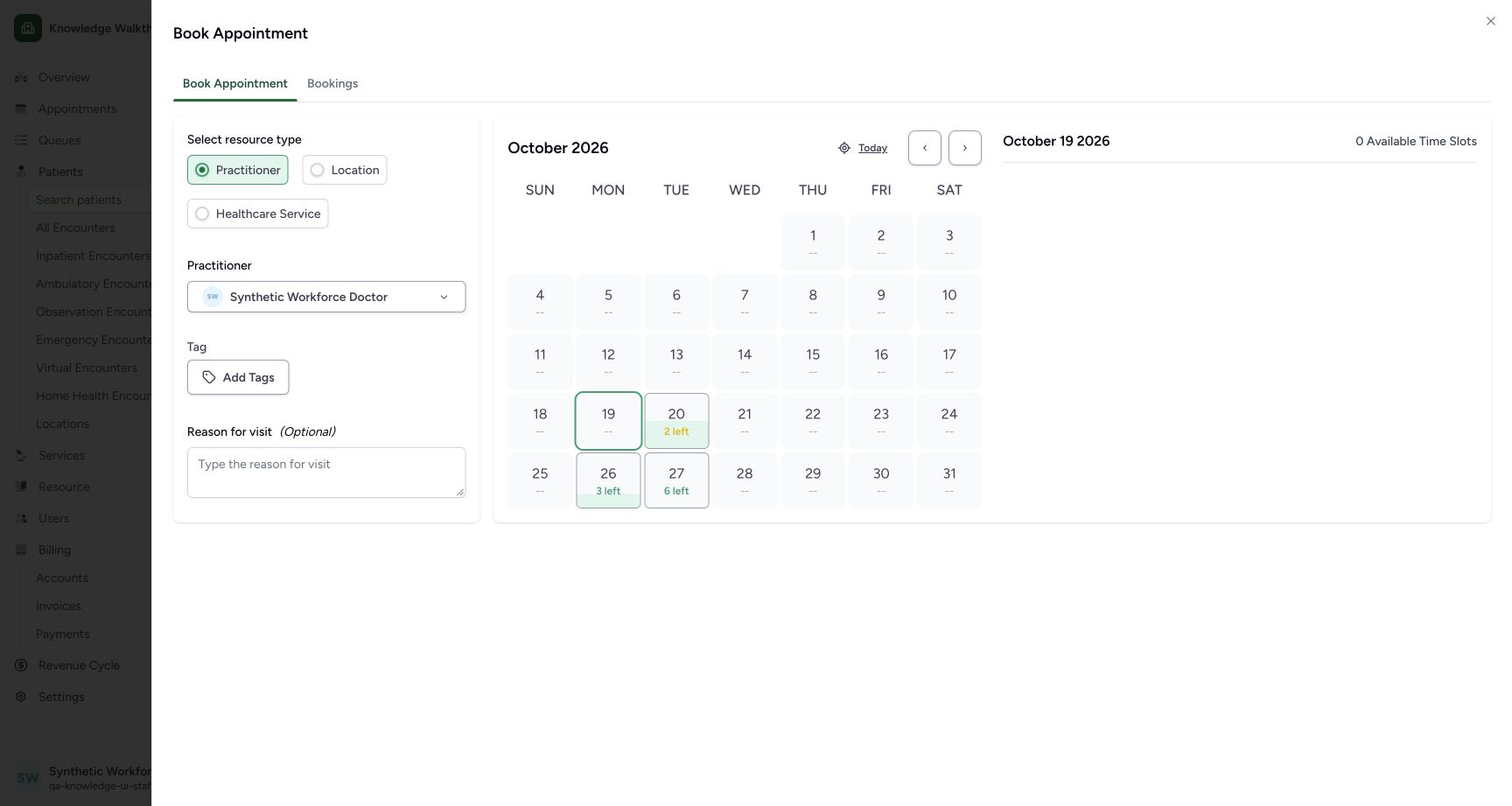
- 20 October, 2 left: Choose 20 October from the current month.
- Current selected day 19 October: The sheet initially shows 19 October with no available time slots.
 12
12Choose the intended existing schedule
Capture details
Exact committed 3dfb source after USB recovery, existing ordinary Clinic Staff 111 and existing fictional Reception patient 69/Doctor 112. The pictured existing schedule name retains its historical 664f fixture label; it is not a claim that the running source is 664f. This flow uses existing materialized 20 October slots, then one saved Booked appointment. No new patient, schedule, slot, role, grant, token, care or charge is created.
Image SHA-256 a280b4bed46951cfae4ad5cbbee2719816b810309b6e94286efa7c16c6d7ab62
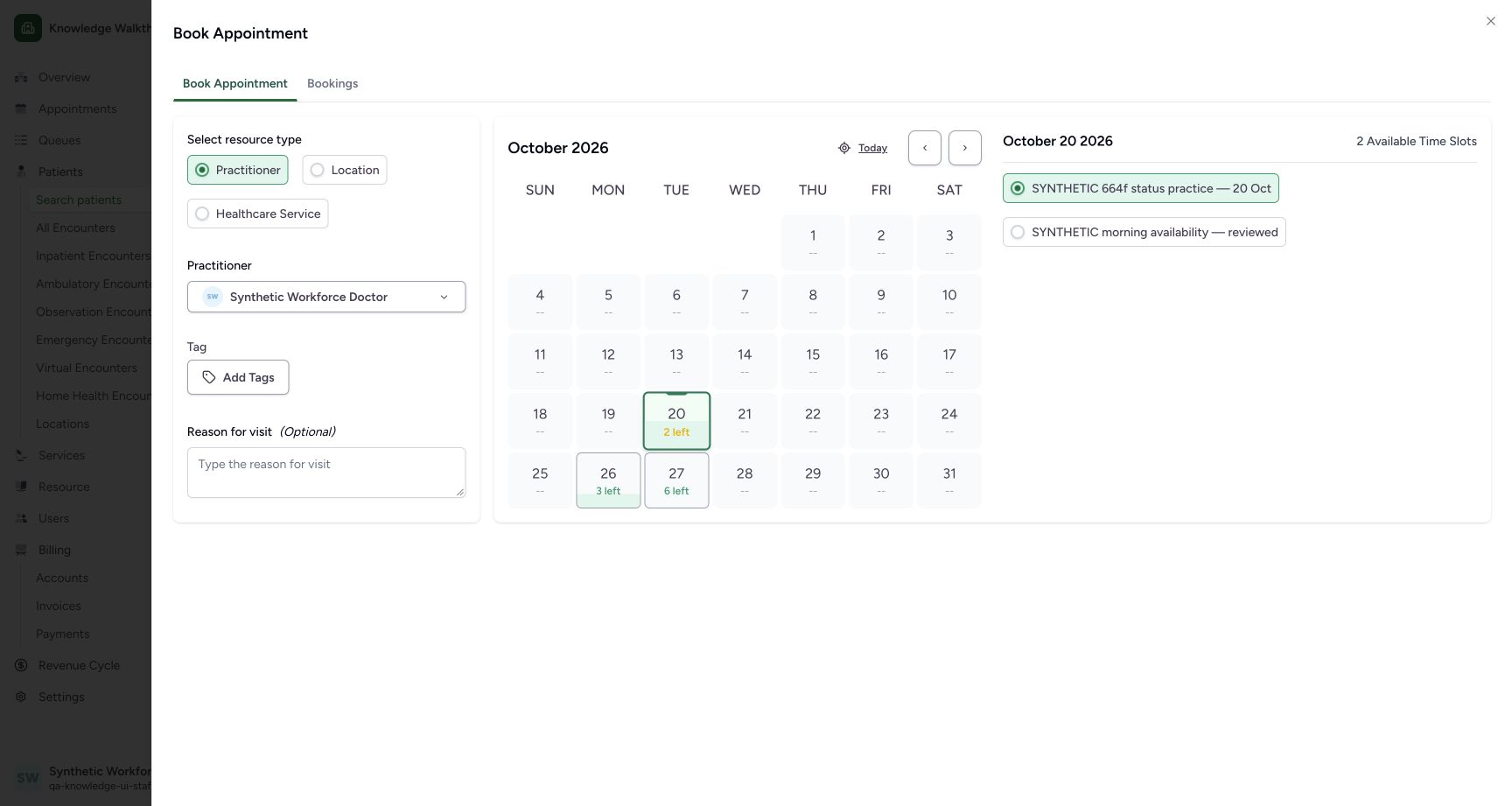
- Reviewed morning schedule: Choose this existing schedule to see its 14:00 and 14:15 times.
- Initially checked practice schedule: This different existing schedule is initially checked. Check the intended schedule before booking.
 12345
12345Review the selected date, time and complete fictional reason
Capture details
Exact committed 3dfb source after USB recovery, existing ordinary Clinic Staff 111 and existing fictional Reception patient 69/Doctor 112. The pictured existing schedule name retains its historical 664f fixture label; it is not a claim that the running source is 664f. This flow uses existing materialized 20 October slots, then one saved Booked appointment. No new patient, schedule, slot, role, grant, token, care or charge is created.
Image SHA-256 843319a8f3e44fc700265188e30b5f4f6c9307d38b97507706f414109823db23
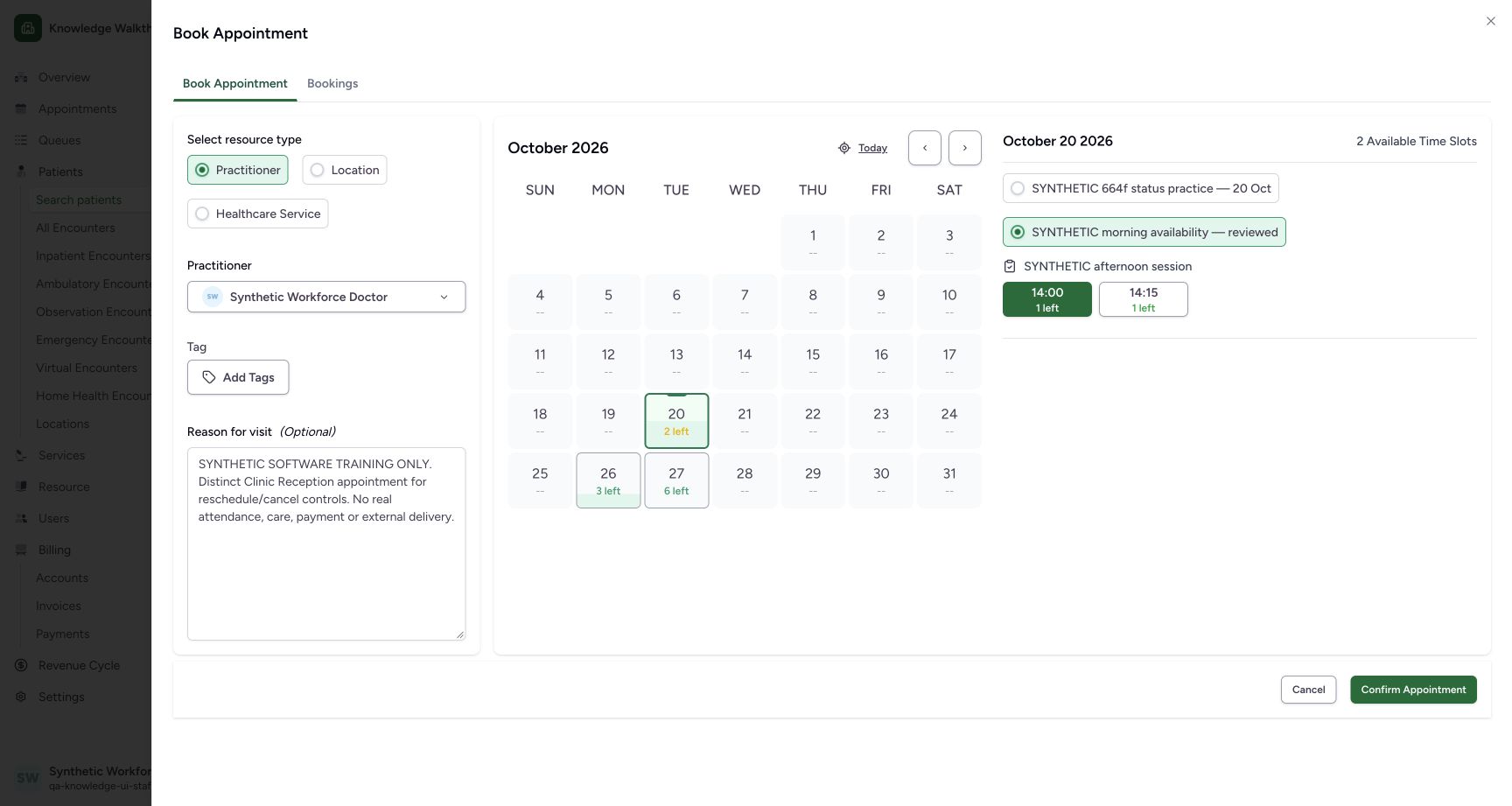
- Selected practitioner: Confirm the intended existing Doctor.
- Selected 20 October date: Review the future appointment date.
- Selected 14:00 slot: The filled green 14:00 option is selected with 1 left.
- Complete fictional reason: Read the complete explicit software-training-only note.
- Confirm Appointment: After reviewing the intended patient, practitioner, date, time and reason, confirm once. If the outcome is uncertain, read the saved record before confirming again.
 1234
1234Read the reloaded note and actual Staff audit
Capture details
Exact committed 3dfb source after USB recovery, existing ordinary Clinic Staff 111 and existing fictional Reception patient 69/Doctor 112. The pictured existing schedule name retains its historical 664f fixture label; it is not a claim that the running source is 664f. This flow uses existing materialized 20 October slots, then one saved Booked appointment. No new patient, schedule, slot, role, grant, token, care or charge is created.
Image SHA-256 45fb03bcb53e93716ca51e21b8376156d7ed584435f795a95d7c1a235a3f9f21
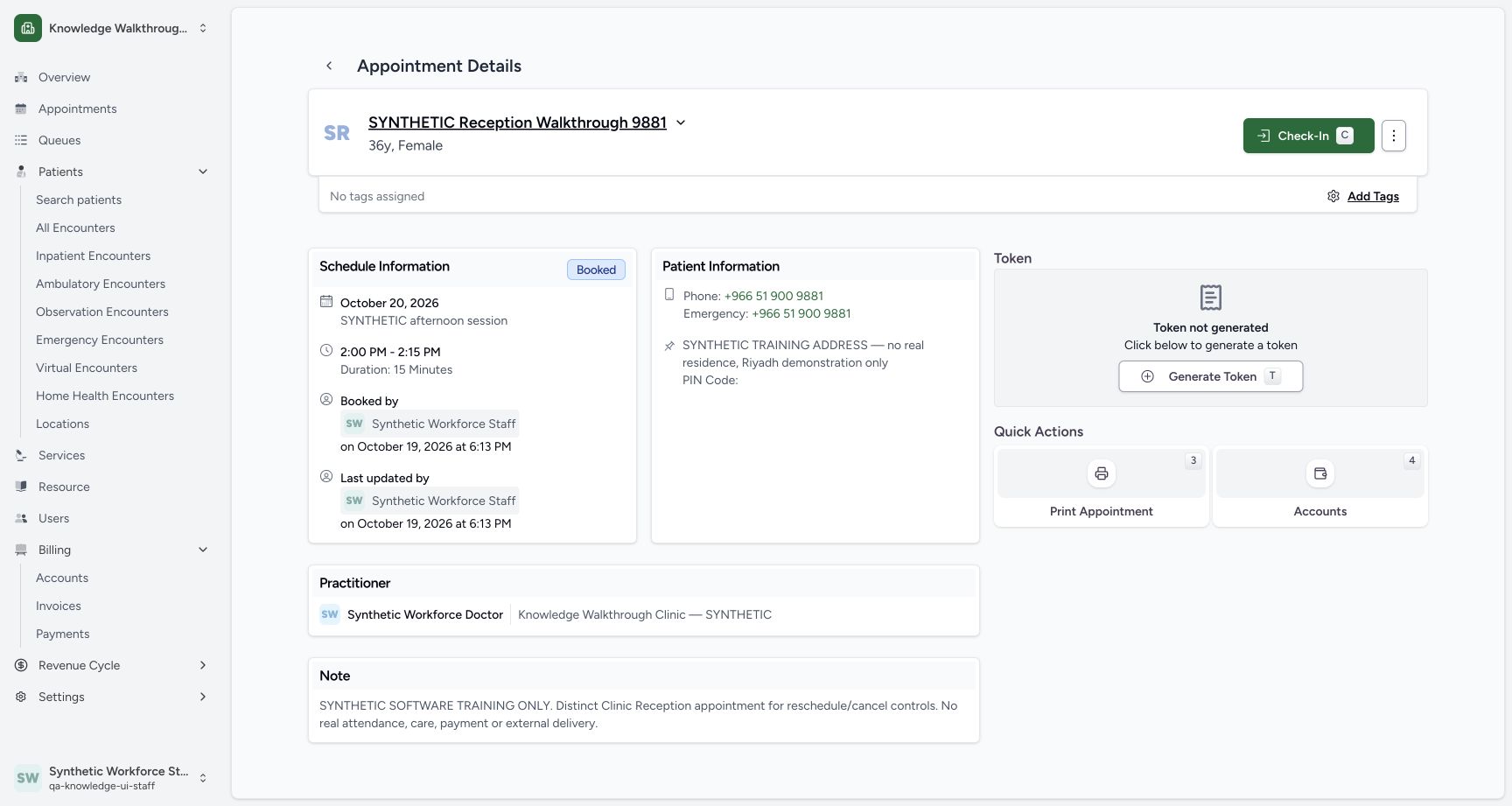
- Reloaded Booked status: The same saved appointment remains Booked after reload.
- Complete saved fictional note: Verify the complete note was retained.
- Booked by: Read the actual Staff actor and 6:13 PM save time below this label.
- Token not generated: Generating a token is a separate action and is not performed here.
11 of 11 content blocks have reviewed image alignment. Missing overview or prerequisite images remain open.
Before you begin
- Use an already authenticated authorized Staff session in the assigned fictional Clinic. Begin in the existing verified patient’s Book Appointment sheet with Practitioner selected and Select Practitioner open. This example reuses the saved synthetic Reception patient ending 9881 and the existing Synthetic Workforce Doctor; no patient or practitioner is registered here. The pictured 20 October 2026 time 14:00–14:15 matches stored 11:00–11:15 UTC in Asia/Riyadh UTC+03. Screens do not print the timezone: confirm the configured scheduling/browser date context. Other timezone combinations remain unverified.
 1
1Recorded release 3dfb7c9f · 2026-10-19T15:03:06.351Z · 1728 × 921 Choose the existing outpatient department
Capture details
Exact committed 3dfb source after USB recovery, existing ordinary Clinic Staff 111 and existing fictional Reception patient 69/Doctor 112. The pictured existing schedule name retains its historical 664f fixture label; it is not a claim that the running source is 664f. This flow uses existing materialized 20 October slots, then one saved Booked appointment. No new patient, schedule, slot, role, grant, token, care or charge is created.
Image SHA-256
f4bd3366bcedf55aa155f434d1c93e68626b7b788f83c673e11bc438a9fa2cb8- SYNTHETIC Outpatient Department: Choose the existing department that contains the intended practitioner.
 1
1Recorded release 3dfb7c9f · 2026-10-19T15:03:39.532Z · 1728 × 921 Choose the existing Clinic Doctor
Capture details
Exact committed 3dfb source after USB recovery, existing ordinary Clinic Staff 111 and existing fictional Reception patient 69/Doctor 112. The pictured existing schedule name retains its historical 664f fixture label; it is not a claim that the running source is 664f. This flow uses existing materialized 20 October slots, then one saved Booked appointment. No new patient, schedule, slot, role, grant, token, care or charge is created.
Image SHA-256
28147bb885f6b13bbb931fa052b1d9cc8cd1730b43f7d4aabe2d0050e8afa949- Synthetic Workforce Doctor: Select this existing practitioner to load its availability.
12Recorded release 3dfb7c9f · 2026-10-19T15:03:53.138Z · 1728 × 921 Move from the current day to 20 October
Capture details
Exact committed 3dfb source after USB recovery, existing ordinary Clinic Staff 111 and existing fictional Reception patient 69/Doctor 112. The pictured existing schedule name retains its historical 664f fixture label; it is not a claim that the running source is 664f. This flow uses existing materialized 20 October slots, then one saved Booked appointment. No new patient, schedule, slot, role, grant, token, care or charge is created.
Image SHA-256
6854252f881b18e6d9315bf80b23af104c8a9bcb4883fe1c5cba175979609d61- 20 October, 2 left: Choose 20 October from the current month.
- Current selected day 19 October: The sheet initially shows 19 October with no available time slots.
12345Recorded release 3dfb7c9f · 2026-10-19T15:12:59.447Z · 1728 × 921 Review the selected date, time and complete fictional reason
Capture details
Exact committed 3dfb source after USB recovery, existing ordinary Clinic Staff 111 and existing fictional Reception patient 69/Doctor 112. The pictured existing schedule name retains its historical 664f fixture label; it is not a claim that the running source is 664f. This flow uses existing materialized 20 October slots, then one saved Booked appointment. No new patient, schedule, slot, role, grant, token, care or charge is created.
Image SHA-256
843319a8f3e44fc700265188e30b5f4f6c9307d38b97507706f414109823db23- Selected practitioner: Confirm the intended existing Doctor.
- Selected 20 October date: Review the future appointment date.
- Selected 14:00 slot: The filled green 14:00 option is selected with 1 left.
- Complete fictional reason: Read the complete explicit software-training-only note.
- Confirm Appointment: After reviewing the intended patient, practitioner, date, time and reason, confirm once. If the outcome is uncertain, read the saved record before confirming again.
1. Choose the existing department and practitioner
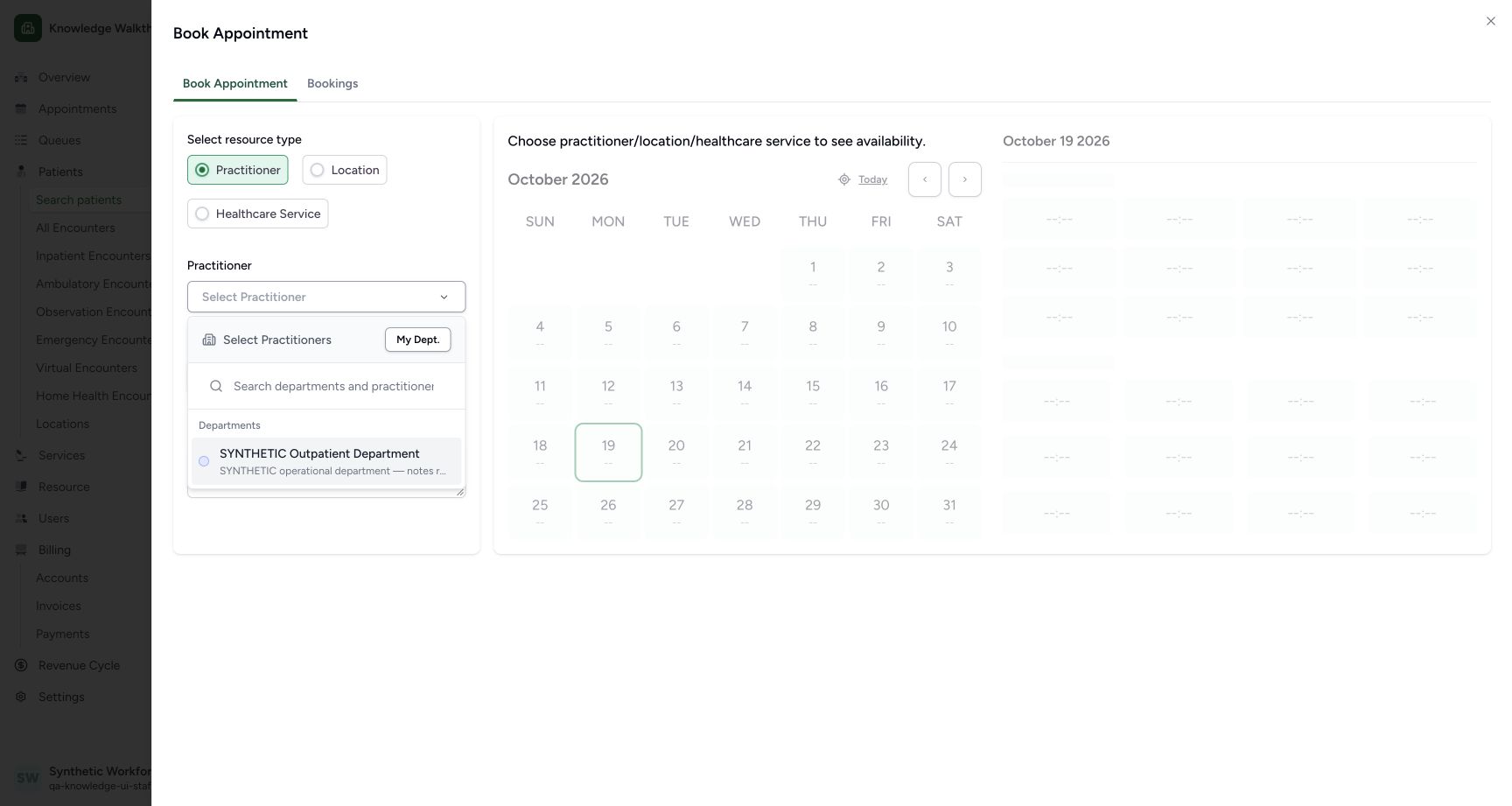
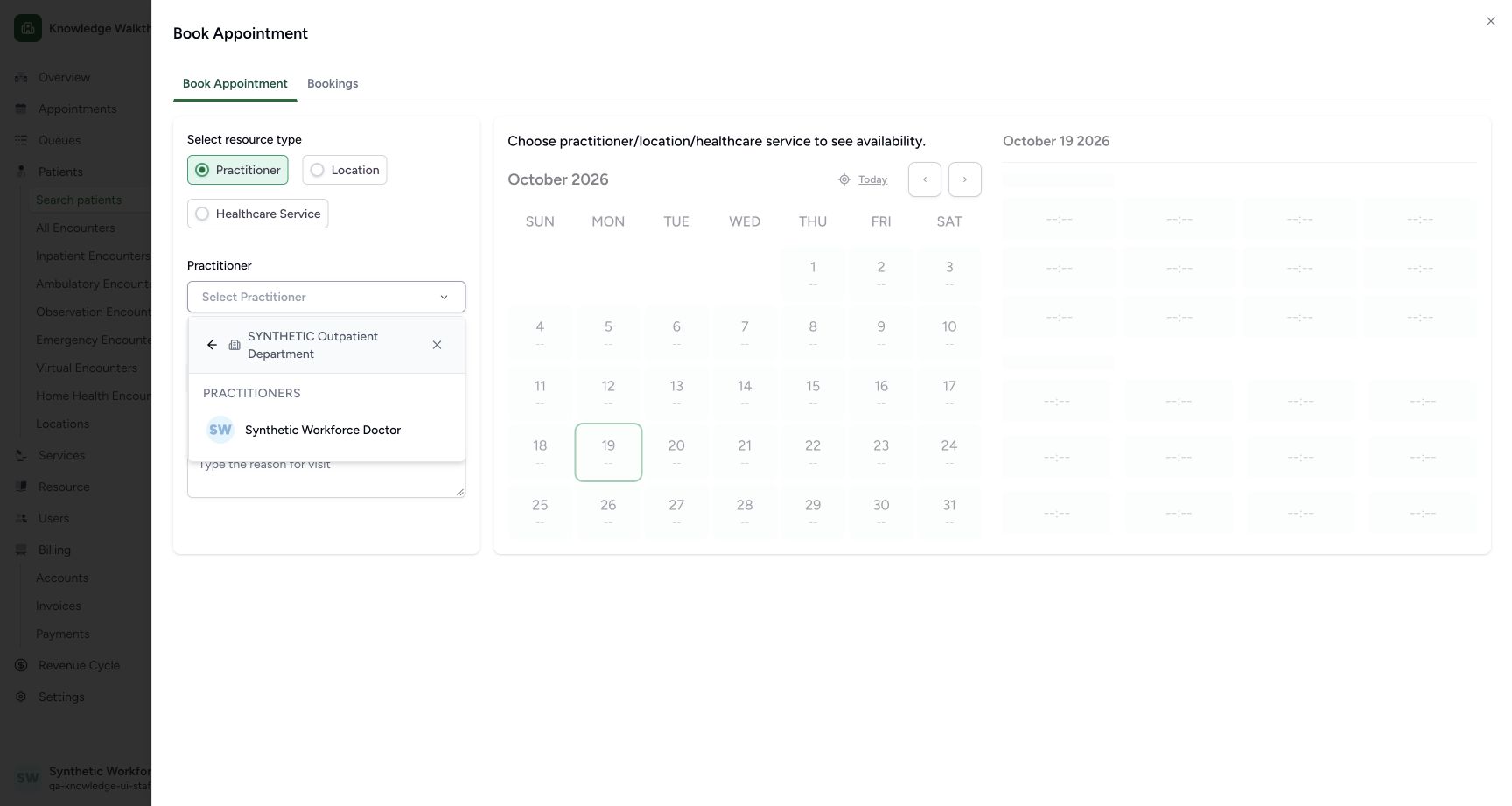
Choose SYNTHETIC Outpatient Department, then Synthetic Workforce Doctor. These are existing entries in the assigned Clinic; choosing the practitioner loads its availability.
1Choose the existing outpatient department
Capture details
Exact committed 3dfb source after USB recovery, existing ordinary Clinic Staff 111 and existing fictional Reception patient 69/Doctor 112. The pictured existing schedule name retains its historical 664f fixture label; it is not a claim that the running source is 664f. This flow uses existing materialized 20 October slots, then one saved Booked appointment. No new patient, schedule, slot, role, grant, token, care or charge is created.
Image SHA-256 f4bd3366bcedf55aa155f434d1c93e68626b7b788f83c673e11bc438a9fa2cb8
- SYNTHETIC Outpatient Department: Choose the existing department that contains the intended practitioner.
1Choose the existing Clinic Doctor
Capture details
Exact committed 3dfb source after USB recovery, existing ordinary Clinic Staff 111 and existing fictional Reception patient 69/Doctor 112. The pictured existing schedule name retains its historical 664f fixture label; it is not a claim that the running source is 664f. This flow uses existing materialized 20 October slots, then one saved Booked appointment. No new patient, schedule, slot, role, grant, token, care or charge is created.
Image SHA-256 28147bb885f6b13bbb931fa052b1d9cc8cd1730b43f7d4aabe2d0050e8afa949
- Synthetic Workforce Doctor: Select this existing practitioner to load its availability.
2. Change from the current day to the intended future day
The sheet initially displays 19 October 2026 with 0 Available Time Slots. Choose 20, marked 2 left, in the October calendar. Review 20 October 2026 on the time-slot panel before continuing.
12Move from the current day to 20 October
Capture details
Exact committed 3dfb source after USB recovery, existing ordinary Clinic Staff 111 and existing fictional Reception patient 69/Doctor 112. The pictured existing schedule name retains its historical 664f fixture label; it is not a claim that the running source is 664f. This flow uses existing materialized 20 October slots, then one saved Booked appointment. No new patient, schedule, slot, role, grant, token, care or charge is created.
Image SHA-256 6854252f881b18e6d9315bf80b23af104c8a9bcb4883fe1c5cba175979609d61
- 20 October, 2 left: Choose 20 October from the current month.
- Current selected day 19 October: The sheet initially shows 19 October with no available time slots.
12Choose the intended existing schedule
Capture details
Exact committed 3dfb source after USB recovery, existing ordinary Clinic Staff 111 and existing fictional Reception patient 69/Doctor 112. The pictured existing schedule name retains its historical 664f fixture label; it is not a claim that the running source is 664f. This flow uses existing materialized 20 October slots, then one saved Booked appointment. No new patient, schedule, slot, role, grant, token, care or charge is created.
Image SHA-256 a280b4bed46951cfae4ad5cbbee2719816b810309b6e94286efa7c16c6d7ab62
- Reviewed morning schedule: Choose this existing schedule to see its 14:00 and 14:15 times.
- Initially checked practice schedule: This different existing schedule is initially checked. Check the intended schedule before booking.
3. Check which schedule is selected
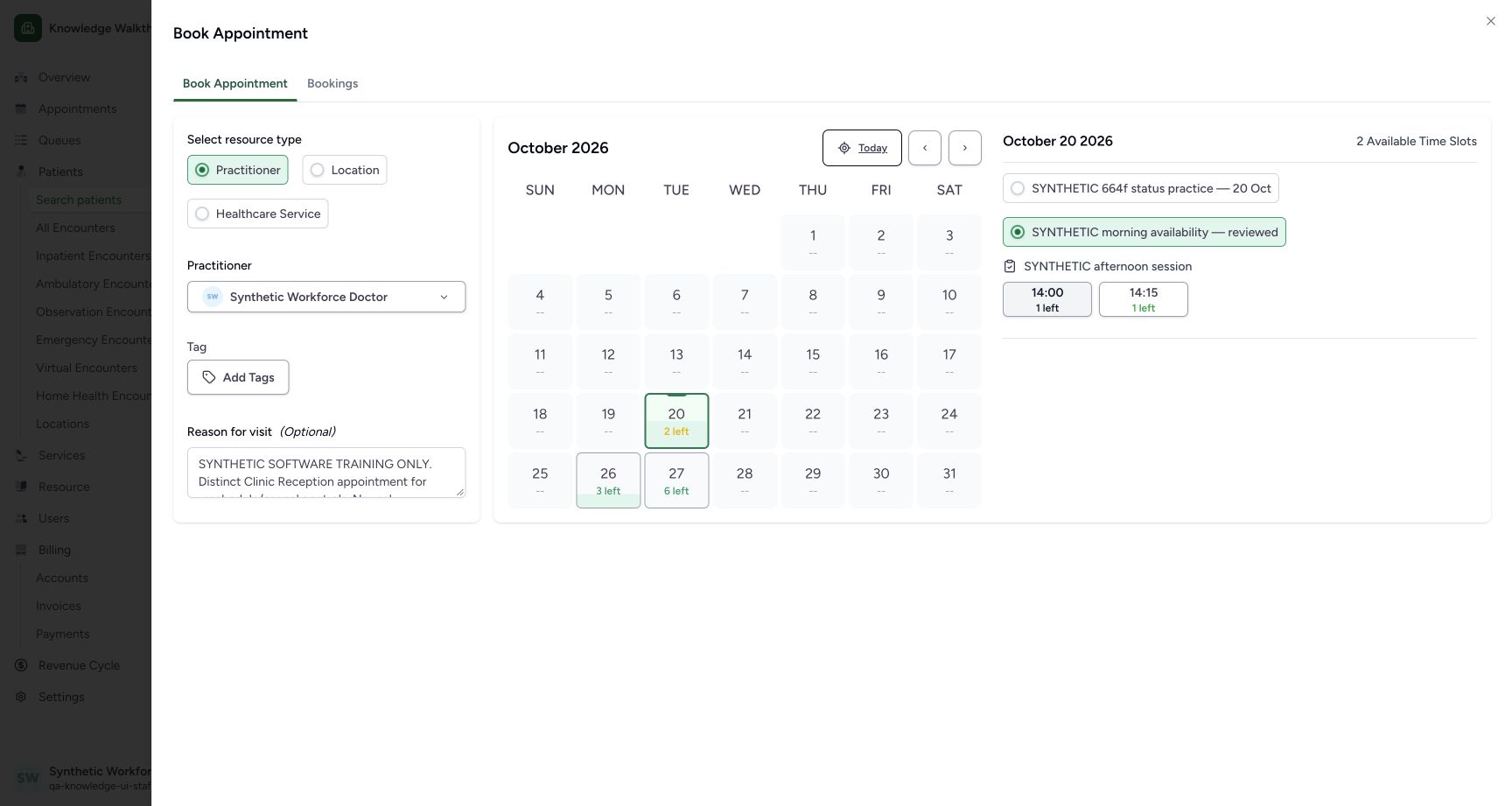
The existing SYNTHETIC 664f status practice — 20 Oct schedule is initially checked, while the day total shows 2 Available Time Slots. Choose SYNTHETIC morning availability — reviewed to display its 14:00 and 14:15 options. Read the actual times for the intended schedule, rather than relying only on the day total.
12Choose the intended existing schedule
Capture details
Exact committed 3dfb source after USB recovery, existing ordinary Clinic Staff 111 and existing fictional Reception patient 69/Doctor 112. The pictured existing schedule name retains its historical 664f fixture label; it is not a claim that the running source is 664f. This flow uses existing materialized 20 October slots, then one saved Booked appointment. No new patient, schedule, slot, role, grant, token, care or charge is created.
Image SHA-256 a280b4bed46951cfae4ad5cbbee2719816b810309b6e94286efa7c16c6d7ab62
- Reviewed morning schedule: Choose this existing schedule to see its 14:00 and 14:15 times.
- Initially checked practice schedule: This different existing schedule is initially checked. Check the intended schedule before booking.
12345Review the selected date, time and complete fictional reason
Capture details
Exact committed 3dfb source after USB recovery, existing ordinary Clinic Staff 111 and existing fictional Reception patient 69/Doctor 112. The pictured existing schedule name retains its historical 664f fixture label; it is not a claim that the running source is 664f. This flow uses existing materialized 20 October slots, then one saved Booked appointment. No new patient, schedule, slot, role, grant, token, care or charge is created.
Image SHA-256 843319a8f3e44fc700265188e30b5f4f6c9307d38b97507706f414109823db23
- Selected practitioner: Confirm the intended existing Doctor.
- Selected 20 October date: Review the future appointment date.
- Selected 14:00 slot: The filled green 14:00 option is selected with 1 left.
- Complete fictional reason: Read the complete explicit software-training-only note.
- Confirm Appointment: After reviewing the intended patient, practitioner, date, time and reason, confirm once. If the outcome is uncertain, read the saved record before confirming again.
4. Make sure the intended time is selected
Review 14:00 with 1 left. A filled green option is selected; an outlined option is not. The first time can be selected automatically when the schedule changes. Clicking an already selected time clears it, as shown in the unselected view. Select 14:00 again if needed and review the green state before confirming.
 12
12Recognize an unselected time slot
Capture details
Exact committed 3dfb source after USB recovery, existing ordinary Clinic Staff 111 and existing fictional Reception patient 69/Doctor 112. The pictured existing schedule name retains its historical 664f fixture label; it is not a claim that the running source is 664f. This flow uses existing materialized 20 October slots, then one saved Booked appointment. No new patient, schedule, slot, role, grant, token, care or charge is created.
Image SHA-256 c25fee50de9d9a28cf3d71e14c534935607b8757d9814f339112b83d971115d6
- Select 14:00: When 14:00 is outlined and no time is selected, choose 14:00 to select it.
- Fictional reason retained: The note stays in this unsaved draft while the time selection is cleared.
12345Review the selected date, time and complete fictional reason
Capture details
Exact committed 3dfb source after USB recovery, existing ordinary Clinic Staff 111 and existing fictional Reception patient 69/Doctor 112. The pictured existing schedule name retains its historical 664f fixture label; it is not a claim that the running source is 664f. This flow uses existing materialized 20 October slots, then one saved Booked appointment. No new patient, schedule, slot, role, grant, token, care or charge is created.
Image SHA-256 843319a8f3e44fc700265188e30b5f4f6c9307d38b97507706f414109823db23
- Selected practitioner: Confirm the intended existing Doctor.
- Selected 20 October date: Review the future appointment date.
- Selected 14:00 slot: The filled green 14:00 option is selected with 1 left.
- Complete fictional reason: Read the complete explicit software-training-only note.
- Confirm Appointment: After reviewing the intended patient, practitioner, date, time and reason, confirm once. If the outcome is uncertain, read the saved record before confirming again.
5. Review the complete fictional reason and empty tags
Review the explicit SYNTHETIC SOFTWARE TRAINING ONLY reason shown. It describes a software demonstration with no real attendance, care, payment or external delivery. No tag is chosen. Recheck the existing Doctor, 20 October and selected 14:00 time.
12345Review the selected date, time and complete fictional reason
Capture details
Exact committed 3dfb source after USB recovery, existing ordinary Clinic Staff 111 and existing fictional Reception patient 69/Doctor 112. The pictured existing schedule name retains its historical 664f fixture label; it is not a claim that the running source is 664f. This flow uses existing materialized 20 October slots, then one saved Booked appointment. No new patient, schedule, slot, role, grant, token, care or charge is created.
Image SHA-256 843319a8f3e44fc700265188e30b5f4f6c9307d38b97507706f414109823db23
- Selected practitioner: Confirm the intended existing Doctor.
- Selected 20 October date: Review the future appointment date.
- Selected 14:00 slot: The filled green 14:00 option is selected with 1 left.
- Complete fictional reason: Read the complete explicit software-training-only note.
- Confirm Appointment: After reviewing the intended patient, practitioner, date, time and reason, confirm once. If the outcome is uncertain, read the saved record before confirming again.
6. Confirm once and read the saved result
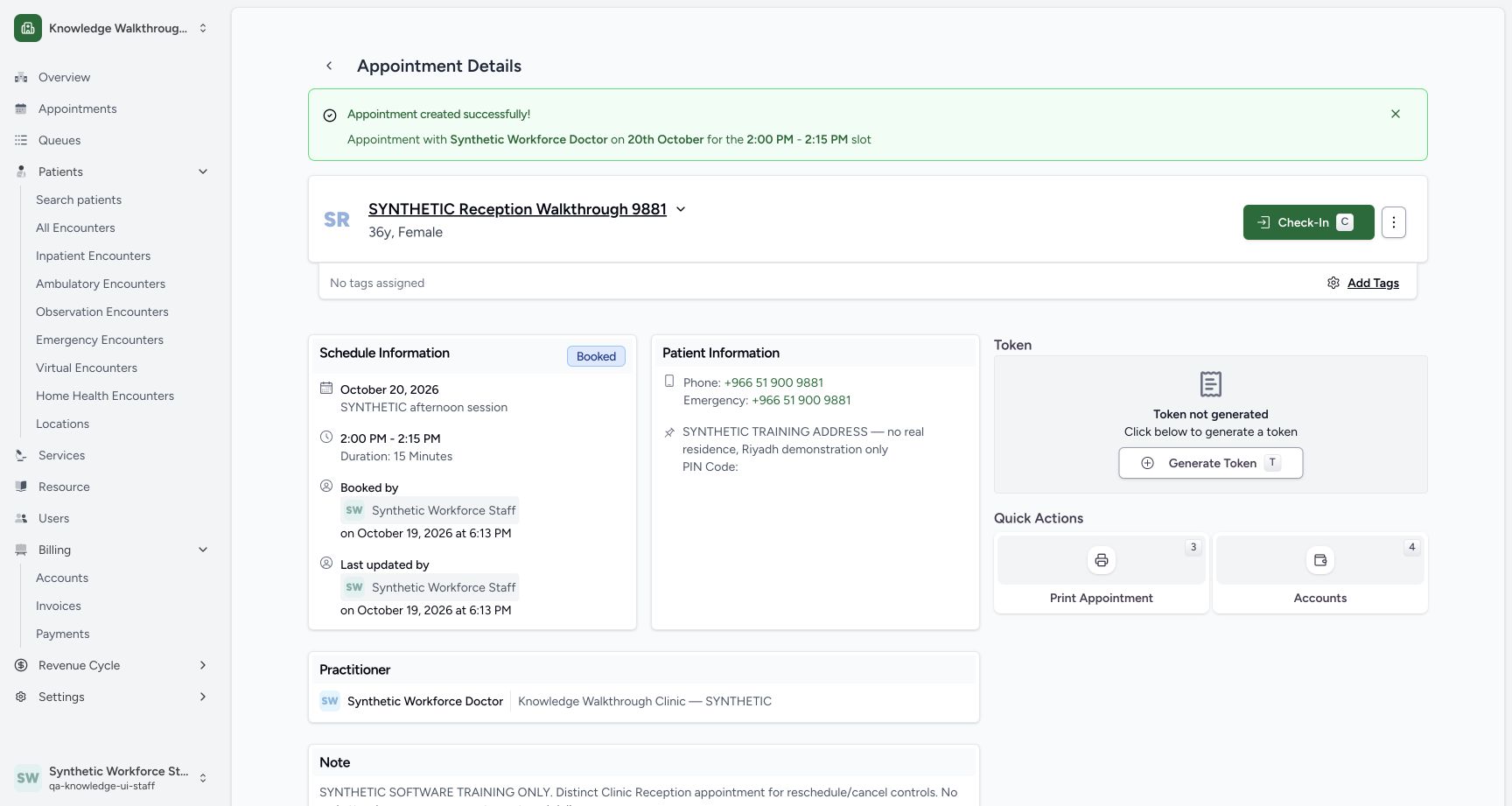
After reviewing the intended patient and draft, choose Confirm Appointment once. The resulting detail shows the existing synthetic Reception patient, 20 October 2026, 2:00 PM–2:15 PM and Booked. If the outcome is unclear, check the saved record before attempting another confirmation.
12345Review the selected date, time and complete fictional reason
Capture details
Exact committed 3dfb source after USB recovery, existing ordinary Clinic Staff 111 and existing fictional Reception patient 69/Doctor 112. The pictured existing schedule name retains its historical 664f fixture label; it is not a claim that the running source is 664f. This flow uses existing materialized 20 October slots, then one saved Booked appointment. No new patient, schedule, slot, role, grant, token, care or charge is created.
Image SHA-256 843319a8f3e44fc700265188e30b5f4f6c9307d38b97507706f414109823db23
- Selected practitioner: Confirm the intended existing Doctor.
- Selected 20 October date: Review the future appointment date.
- Selected 14:00 slot: The filled green 14:00 option is selected with 1 left.
- Complete fictional reason: Read the complete explicit software-training-only note.
- Confirm Appointment: After reviewing the intended patient, practitioner, date, time and reason, confirm once. If the outcome is uncertain, read the saved record before confirming again.
 123
123Verify the new saved Booked appointment
Capture details
Exact committed 3dfb source after USB recovery, existing ordinary Clinic Staff 111 and existing fictional Reception patient 69/Doctor 112. The pictured existing schedule name retains its historical 664f fixture label; it is not a claim that the running source is 664f. This flow uses existing materialized 20 October slots, then one saved Booked appointment. No new patient, schedule, slot, role, grant, token, care or charge is created.
Image SHA-256 9433dc7112f3ac7261a87c65149d3b9ec8a2110958b41efe27b986d0b0b198de
- Existing Reception patient: Verify the same synthetic patient.
- Booked: The saved status is Booked.
- Saved 20 October date: Check the saved date and nearby 2:00 PM–2:15 PM time.
7. Reload and verify the saved note and Staff audit
Reload the saved appointment. Verify Booked, the same date and 15-minute time, the complete retained note, and the actual Staff actor under Booked by and Last updated by. This dated example shows Synthetic Workforce Staff at 6:13 PM on 19 October 2026.
1234Read the reloaded note and actual Staff audit
Capture details
Exact committed 3dfb source after USB recovery, existing ordinary Clinic Staff 111 and existing fictional Reception patient 69/Doctor 112. The pictured existing schedule name retains its historical 664f fixture label; it is not a claim that the running source is 664f. This flow uses existing materialized 20 October slots, then one saved Booked appointment. No new patient, schedule, slot, role, grant, token, care or charge is created.
Image SHA-256 45fb03bcb53e93716ca51e21b8376156d7ed584435f795a95d7c1a235a3f9f21
- Reloaded Booked status: The same saved appointment remains Booked after reload.
- Complete saved fictional note: Verify the complete note was retained.
- Booked by: Read the actual Staff actor and 6:13 PM save time below this label.
- Token not generated: Generating a token is a separate action and is not performed here.
An available day can contain more than one schedule
The calendar’s 2 left and the day’s 2 Available Time Slots do not identify a particular schedule. This example shows a different schedule initially checked. Choose the intended existing schedule and inspect its visible time options before confirming.
12Move from the current day to 20 October
Capture details
Exact committed 3dfb source after USB recovery, existing ordinary Clinic Staff 111 and existing fictional Reception patient 69/Doctor 112. The pictured existing schedule name retains its historical 664f fixture label; it is not a claim that the running source is 664f. This flow uses existing materialized 20 October slots, then one saved Booked appointment. No new patient, schedule, slot, role, grant, token, care or charge is created.
Image SHA-256 6854252f881b18e6d9315bf80b23af104c8a9bcb4883fe1c5cba175979609d61
- 20 October, 2 left: Choose 20 October from the current month.
- Current selected day 19 October: The sheet initially shows 19 October with no available time slots.
12Choose the intended existing schedule
Capture details
Exact committed 3dfb source after USB recovery, existing ordinary Clinic Staff 111 and existing fictional Reception patient 69/Doctor 112. The pictured existing schedule name retains its historical 664f fixture label; it is not a claim that the running source is 664f. This flow uses existing materialized 20 October slots, then one saved Booked appointment. No new patient, schedule, slot, role, grant, token, care or charge is created.
Image SHA-256 a280b4bed46951cfae4ad5cbbee2719816b810309b6e94286efa7c16c6d7ab62
- Reviewed morning schedule: Choose this existing schedule to see its 14:00 and 14:15 times.
- Initially checked practice schedule: This different existing schedule is initially checked. Check the intended schedule before booking.
12345Review the selected date, time and complete fictional reason
Capture details
Exact committed 3dfb source after USB recovery, existing ordinary Clinic Staff 111 and existing fictional Reception patient 69/Doctor 112. The pictured existing schedule name retains its historical 664f fixture label; it is not a claim that the running source is 664f. This flow uses existing materialized 20 October slots, then one saved Booked appointment. No new patient, schedule, slot, role, grant, token, care or charge is created.
Image SHA-256 843319a8f3e44fc700265188e30b5f4f6c9307d38b97507706f414109823db23
- Selected practitioner: Confirm the intended existing Doctor.
- Selected 20 October date: Review the future appointment date.
- Selected 14:00 slot: The filled green 14:00 option is selected with 1 left.
- Complete fictional reason: Read the complete explicit software-training-only note.
- Confirm Appointment: After reviewing the intended patient, practitioner, date, time and reason, confirm once. If the outcome is uncertain, read the saved record before confirming again.
Booked remains separate from later actions
The reloaded record remains Booked and Token not generated is visible. Check-In and Generate Token are separate actions and are not selected in this lesson. No consultation, charge, payment or real attendance is demonstrated.
1234Read the reloaded note and actual Staff audit
Capture details
Exact committed 3dfb source after USB recovery, existing ordinary Clinic Staff 111 and existing fictional Reception patient 69/Doctor 112. The pictured existing schedule name retains its historical 664f fixture label; it is not a claim that the running source is 664f. This flow uses existing materialized 20 October slots, then one saved Booked appointment. No new patient, schedule, slot, role, grant, token, care or charge is created.
Image SHA-256 45fb03bcb53e93716ca51e21b8376156d7ed584435f795a95d7c1a235a3f9f21
- Reloaded Booked status: The same saved appointment remains Booked after reload.
- Complete saved fictional note: Verify the complete note was retained.
- Booked by: Read the actual Staff actor and 6:13 PM save time below this label.
- Token not generated: Generating a token is a separate action and is not performed here.
Source evidence
Every citation uses this exact committed version. The private source repository requires access.
- repositories/platform/mansoq-web/src/pages/Appointments/components/PractitionerSelector.tsx:116 ·
3dfb7c9f519fb5b4cd4452439f3c12346bf58319Source file checksum
fbff1cae7ee20060cda82aff258844a6a4040444176b5c0df23c6e90de1d0790 - repositories/platform/mansoq-web/src/pages/Appointments/components/PractitionerSelector.tsx:214 ·
3dfb7c9f519fb5b4cd4452439f3c12346bf58319Source file checksum
fbff1cae7ee20060cda82aff258844a6a4040444176b5c0df23c6e90de1d0790 - repositories/platform/mansoq-web/src/pages/Appointments/components/PractitionerSelector.tsx:403 ·
3dfb7c9f519fb5b4cd4452439f3c12346bf58319Source file checksum
fbff1cae7ee20060cda82aff258844a6a4040444176b5c0df23c6e90de1d0790 - repositories/platform/mansoq-web/src/components/Schedule/ResourceSelector.tsx:40 ·
3dfb7c9f519fb5b4cd4452439f3c12346bf58319Source file checksum
39301e210d1d05c37d2509ee40db51a3360bf2c74041120fc7a64e354834da90 - repositories/platform/mansoq-web/src/pages/Appointments/BookAppointment/AppointmentDateSelection.tsx:42 ·
3dfb7c9f519fb5b4cd4452439f3c12346bf58319Source file checksum
074e85911458d3e6756aa3510707e85a086dd5ce5f370e69adc4306355efb42f - repositories/platform/mansoq-web/src/pages/Appointments/BookAppointment/AppointmentSlotPicker.tsx:49 ·
3dfb7c9f519fb5b4cd4452439f3c12346bf58319Source file checksum
d2211acfcae4cf531e0b30aad5c9141c71caaaed7f04cc9dad2b32750f0ef1cc - repositories/platform/mansoq-web/src/pages/Appointments/BookAppointment/AppointmentSlotPicker.tsx:99 ·
3dfb7c9f519fb5b4cd4452439f3c12346bf58319Source file checksum
d2211acfcae4cf531e0b30aad5c9141c71caaaed7f04cc9dad2b32750f0ef1cc - repositories/platform/mansoq-web/src/pages/Appointments/BookAppointment/AppointmentSlotPicker.tsx:129 ·
3dfb7c9f519fb5b4cd4452439f3c12346bf58319Source file checksum
d2211acfcae4cf531e0b30aad5c9141c71caaaed7f04cc9dad2b32750f0ef1cc - repositories/platform/mansoq-web/src/pages/Appointments/BookAppointment/AppointmentSlotPicker.tsx:237 ·
3dfb7c9f519fb5b4cd4452439f3c12346bf58319Source file checksum
d2211acfcae4cf531e0b30aad5c9141c71caaaed7f04cc9dad2b32750f0ef1cc - repositories/platform/mansoq-web/src/pages/Appointments/BookAppointment/BookAppointmentDetails.tsx:90 ·
3dfb7c9f519fb5b4cd4452439f3c12346bf58319Source file checksum
10a7aab902525f4669d7219477e1ca6b7e333f38fbecc8552f608fbc721023f2 - repositories/platform/mansoq-web/src/types/scheduling/scheduleApi.ts:127 ·
3dfb7c9f519fb5b4cd4452439f3c12346bf58319Source file checksum
09bef9454cad793d68a19beeffa4db57fbb9b56f70577abbcaf3dc70fd30ed51 - repositories/platform/mansoq-web/src/pages/Appointments/AppointmentDetail.tsx:197 ·
3dfb7c9f519fb5b4cd4452439f3c12346bf58319Source file checksum
8fc77ee6f1f7b145e2987ba272e80f35631e17907ea91cd305738250b137b839 - repositories/platform/mansoq-core/mansoq/emr/api/viewsets/scheduling/availability.py:126 ·
3dfb7c9f519fb5b4cd4452439f3c12346bf58319Source file checksum
1370c5b5f5cad98b4cceba59929dc88e82c70350615d5a3125d60cab54deec2c - repositories/platform/mansoq-core/mansoq/emr/signals/patient/facility_name_identifier.py:37 ·
3dfb7c9f519fb5b4cd4452439f3c12346bf58319Source file checksum
dd72b45263ce4c61a552f3d461eba4b4cd49ac295e2b31c9e2e5a84c11e26c34