 MANSOQ
 Appointments and registration handoff · VERSION 3dfb7c9f
Book an already registered patient with an existing practitioner
Verify the saved identity, choose the existing Doctor and current-day slot, review a fictional reason and save one appointment with its actual Staff audit.
Staff
 12
12Use the verified identity home booking control
Capture details
Exact 3dfb source with the existing ordinary non-superuser Staff actor. This example uses one already registered fictional A patient and the existing public no-charge Doctor schedule. Missing current-day slots were materialized through the normal UI, then one Booked appointment was saved. This lesson includes no check-in, encounter, token, charge, grant or configuration change.
Image SHA-256 b06cb1096639ff513ed12ee0870a4b68b5c9ca8cf145e93ff1d247303bf09180
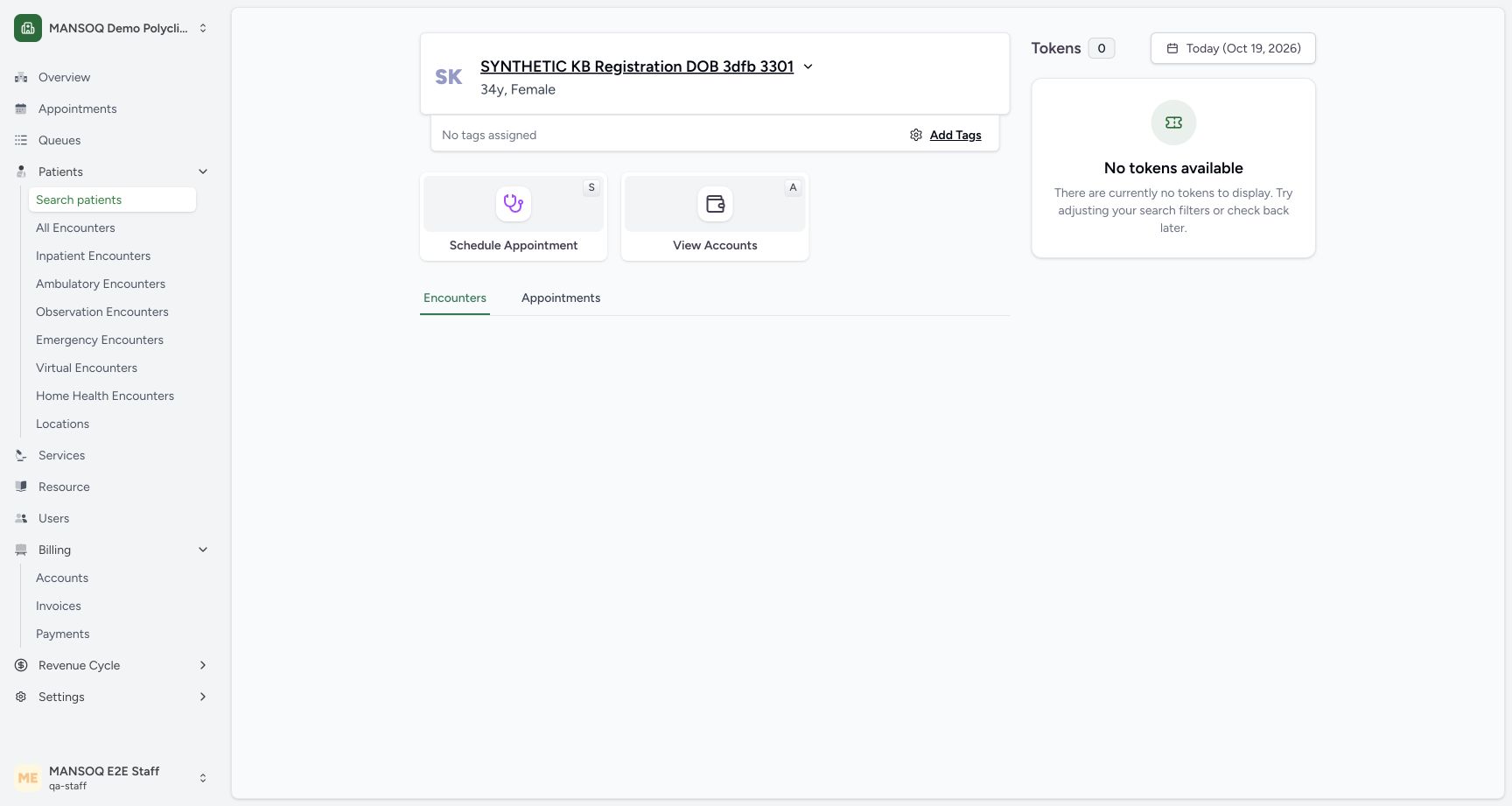
- Open Schedule Appointment: This control belongs to the verified identity home, separate from the restricted full patient profile.
- Verify the intended existing patient: Confirm the previously registered fictional DOB patient before selecting a practitioner.
 123
123Review the exact fictional booking before confirming once
Capture details
Exact 3dfb source with the existing ordinary non-superuser Staff actor. This example uses one already registered fictional A patient and the existing public no-charge Doctor schedule. Missing current-day slots were materialized through the normal UI, then one Booked appointment was saved. This lesson includes no check-in, encounter, token, charge, grant or configuration change.
Image SHA-256 b904f0c8a7e285128fce2d19af5921bb36a1b69a05dc1db2b57b290afe1ff94c
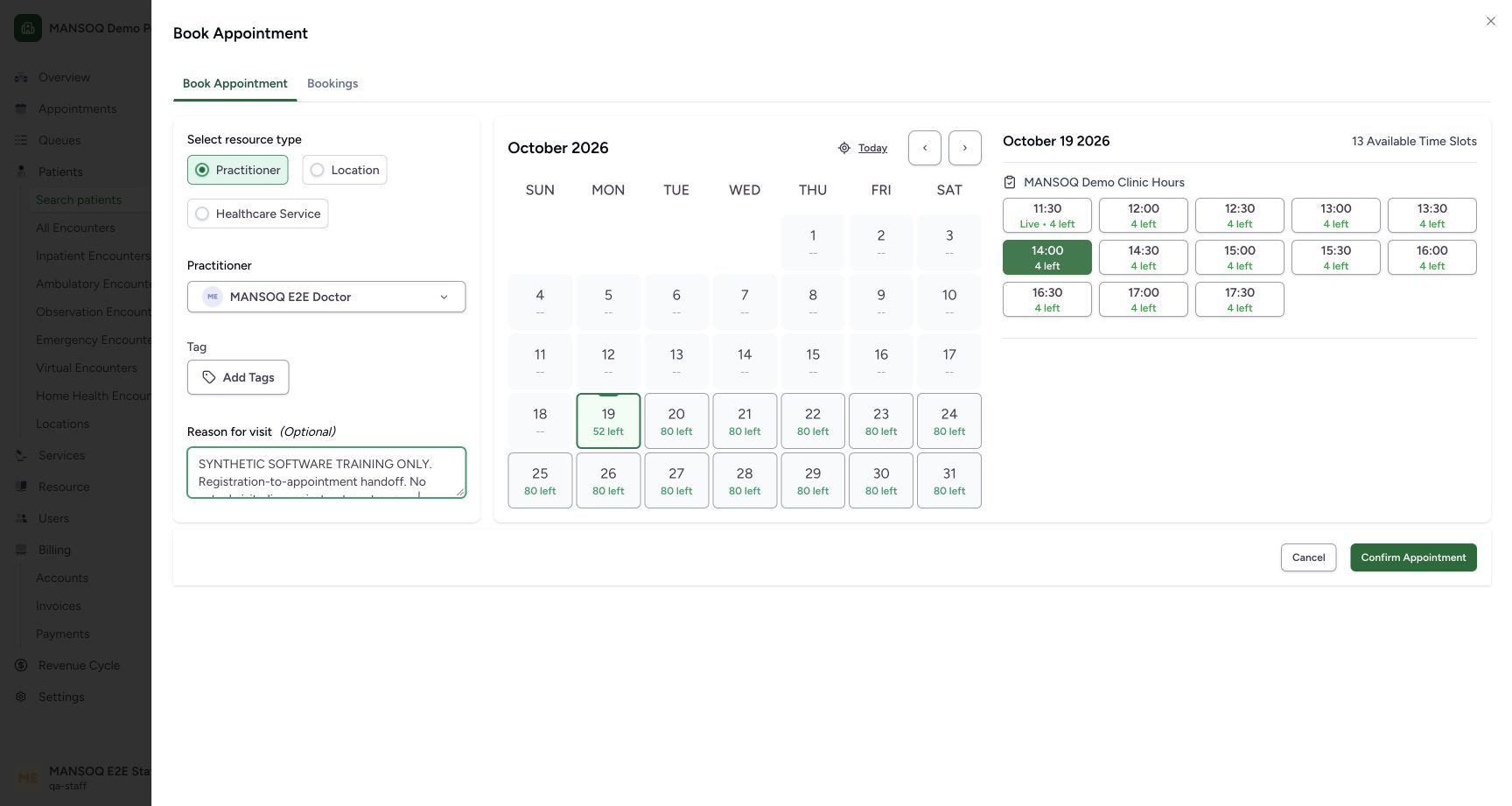
- Review the fictional reason: The optional note explicitly labels this as software training, with no actual visit or care.
- Review the selected future 14:00 slot: The highlighted 14:00 slot is the approved 14:00–14:30 Asia/Riyadh window; saved allocation is still zero.
- Confirm this appointment once: After verifying the intended patient, Doctor, day, selected slot and fictional note, confirm once.
 12345
12345Verify the saved booked appointment and its actual Staff audit
Capture details
Exact 3dfb source with the existing ordinary non-superuser Staff actor. This example uses one already registered fictional A patient and the existing public no-charge Doctor schedule. Missing current-day slots were materialized through the normal UI, then one Booked appointment was saved. This lesson includes no check-in, encounter, token, charge, grant or configuration change.
Image SHA-256 caf29a296ae91aecdc79abe23724d53b148351f8f4322ea7acc6fbd9f25b1c2d
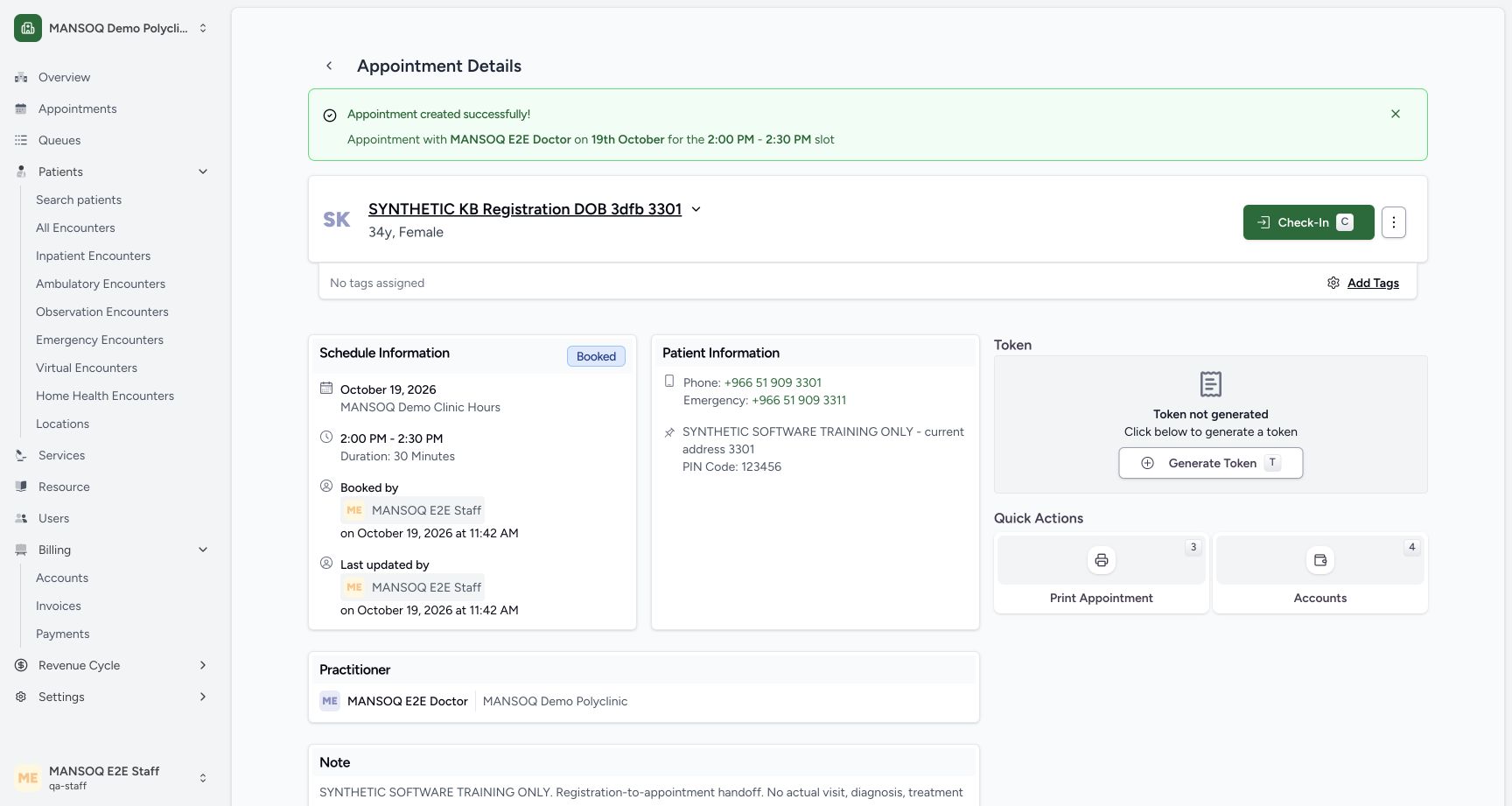
- Verify the saved patient: This is the already registered fictional DOB patient, not a new registration.
- Verify Booked status: The normal confirmation saved this appointment as Booked.
- Verify the saved appointment window: The display is 2:00–2:30 PM on 19 October; stored time is 11:00–11:30Z, matching Asia/Riyadh UTC+03.
- Read who booked the appointment: The saved card records the existing MANSOQ E2E Staff actor and actual booking time.
- Read the actual latest updater: The same Staff actor is the current updater immediately after this creation.
14 of 14 content blocks have reviewed image alignment. Missing overview or prerequisite images remain open.
Before you begin
- Use an already authenticated authorized Staff session in the assigned fictional Polyclinic. This example reuses the saved DOB patient ending 3301 and existing MANSOQ E2E Doctor. The pictured 19 October 2026 time 14:00–14:30 matches stored 11:00–11:30 UTC, Asia/Riyadh UTC+03. Screens do not display the timezone; confirm the configured scheduling/browser date context. Other timezone combinations remain unverified.12
Recorded release 3dfb7c9f · 2026-10-19T08:36:40.516Z · 1728 × 921 Use the verified identity home booking control
Capture details
Exact 3dfb source with the existing ordinary non-superuser Staff actor. This example uses one already registered fictional A patient and the existing public no-charge Doctor schedule. Missing current-day slots were materialized through the normal UI, then one Booked appointment was saved. This lesson includes no check-in, encounter, token, charge, grant or configuration change.
Image SHA-256
b06cb1096639ff513ed12ee0870a4b68b5c9ca8cf145e93ff1d247303bf09180- Open Schedule Appointment: This control belongs to the verified identity home, separate from the restricted full patient profile.
- Verify the intended existing patient: Confirm the previously registered fictional DOB patient before selecting a practitioner.
 123
123Recorded release 3dfb7c9f · 2026-10-19T08:37:37.059Z · 1728 × 921 Review the actual current-day Doctor availability
Capture details
Exact 3dfb source with the existing ordinary non-superuser Staff actor. This example uses one already registered fictional A patient and the existing public no-charge Doctor schedule. Missing current-day slots were materialized through the normal UI, then one Booked appointment was saved. This lesson includes no check-in, encounter, token, charge, grant or configuration change.
Image SHA-256
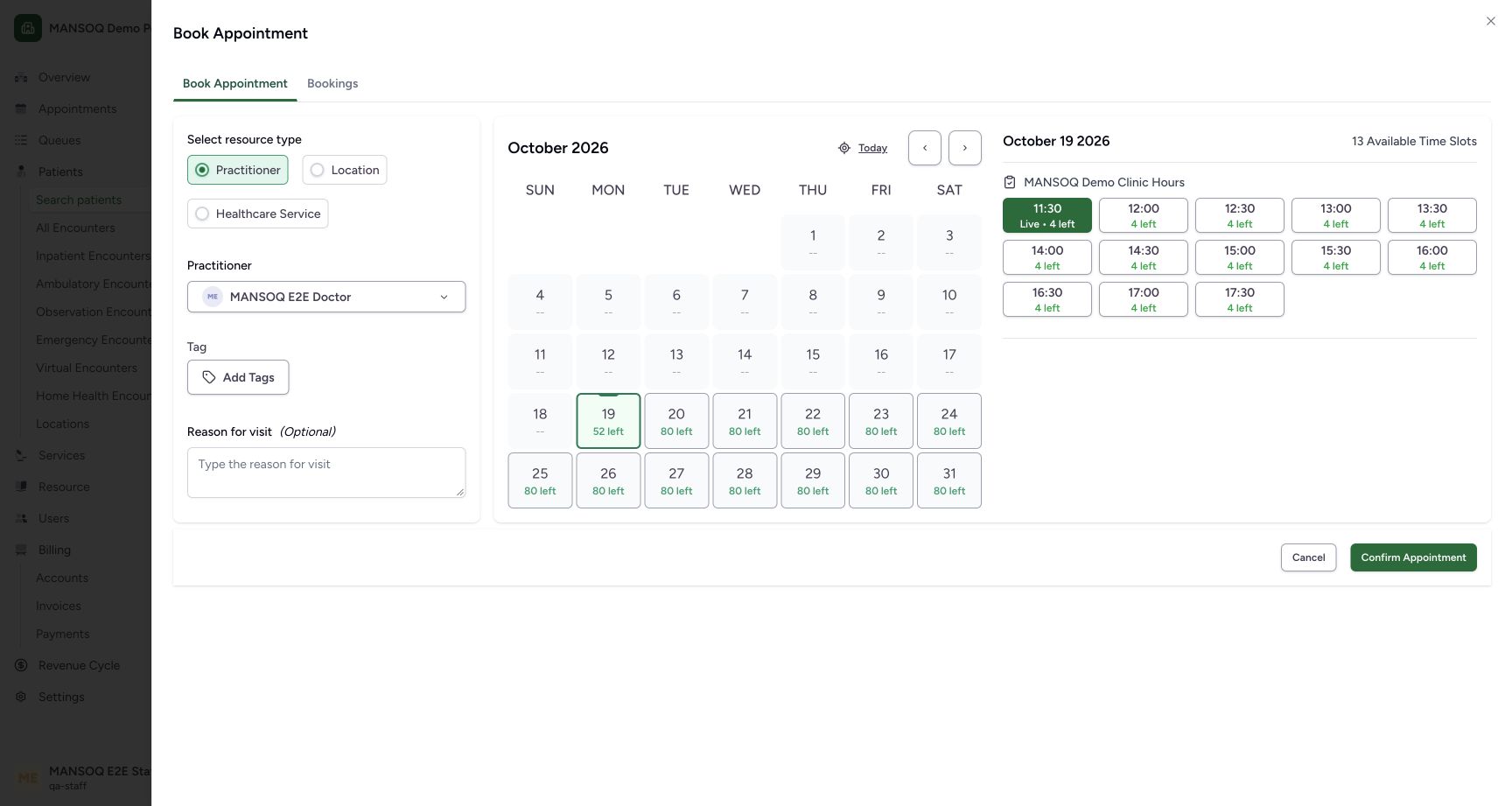
1c90b07063f4c0c3f22bd3db7f5f7c0604f1b35430cd58b0c5bffcbd7dbed111- Verify the selected Doctor: The loaded slots belong to the existing MANSOQ E2E Doctor.
- Verify 19 October: The current-day calendar shows 52 remaining places across 13 slots, each with capacity four.
- Choose the future 14:00 slot: This existing-template slot is 14:00–14:30 Asia/Riyadh, with four places still available. Selecting is not confirmation.
12345Recorded release 3dfb7c9f · 2026-10-19T08:43:21.537Z · 1728 × 921 Verify the saved booked appointment and its actual Staff audit
Capture details
Exact 3dfb source with the existing ordinary non-superuser Staff actor. This example uses one already registered fictional A patient and the existing public no-charge Doctor schedule. Missing current-day slots were materialized through the normal UI, then one Booked appointment was saved. This lesson includes no check-in, encounter, token, charge, grant or configuration change.
Image SHA-256
caf29a296ae91aecdc79abe23724d53b148351f8f4322ea7acc6fbd9f25b1c2d- Verify the saved patient: This is the already registered fictional DOB patient, not a new registration.
- Verify Booked status: The normal confirmation saved this appointment as Booked.
- Verify the saved appointment window: The display is 2:00–2:30 PM on 19 October; stored time is 11:00–11:30Z, matching Asia/Riyadh UTC+03.
- Read who booked the appointment: The saved card records the existing MANSOQ E2E Staff actor and actual booking time.
- Read the actual latest updater: The same Staff actor is the current updater immediately after this creation.
1. Find the already registered patient
From Patients → Search patients, use the existing phone-number search. Verify the exact saved synthetic name, phone and Female result. Choose that existing patient row; do not use Add New Patient.
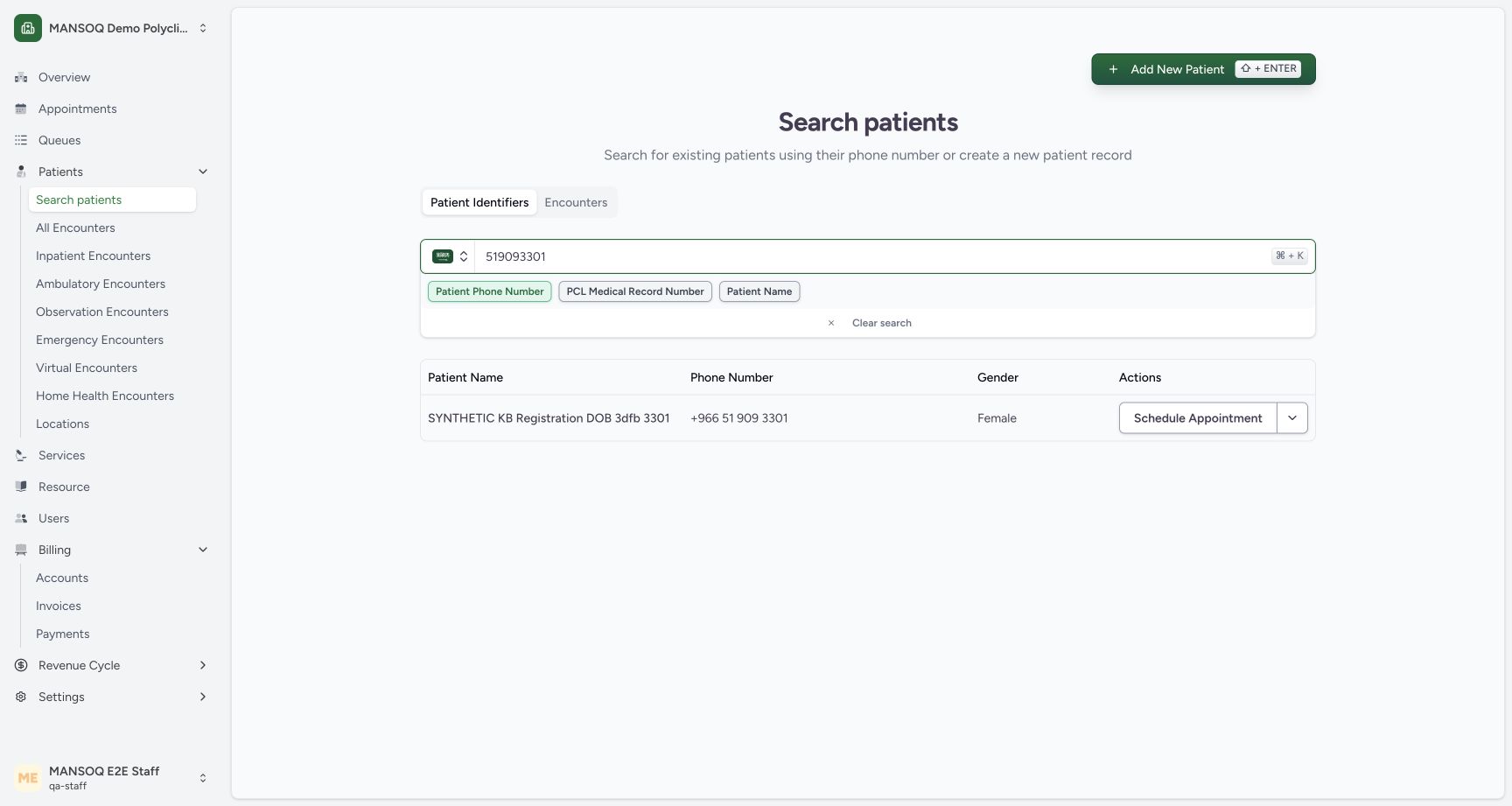 12
12Find the already registered synthetic DOB patient
Capture details
Exact 3dfb source with the existing ordinary non-superuser Staff actor. This example uses one already registered fictional A patient and the existing public no-charge Doctor schedule. Missing current-day slots were materialized through the normal UI, then one Booked appointment was saved. This lesson includes no check-in, encounter, token, charge, grant or configuration change.
Image SHA-256 86682385611cd55b459d0a010512ca772c015cf0628bdefa62e556070a203f7c
- Open the saved patient identity: Select this existing synthetic patient row; do not register another patient.
- Existing booking entry: The ordinary Staff search result also offers Schedule Appointment for this saved identity.
2. Verify the known birth year
Enter 1992 for this fictional DOB patient and choose Verify. This identifies the already saved record without registering another patient.
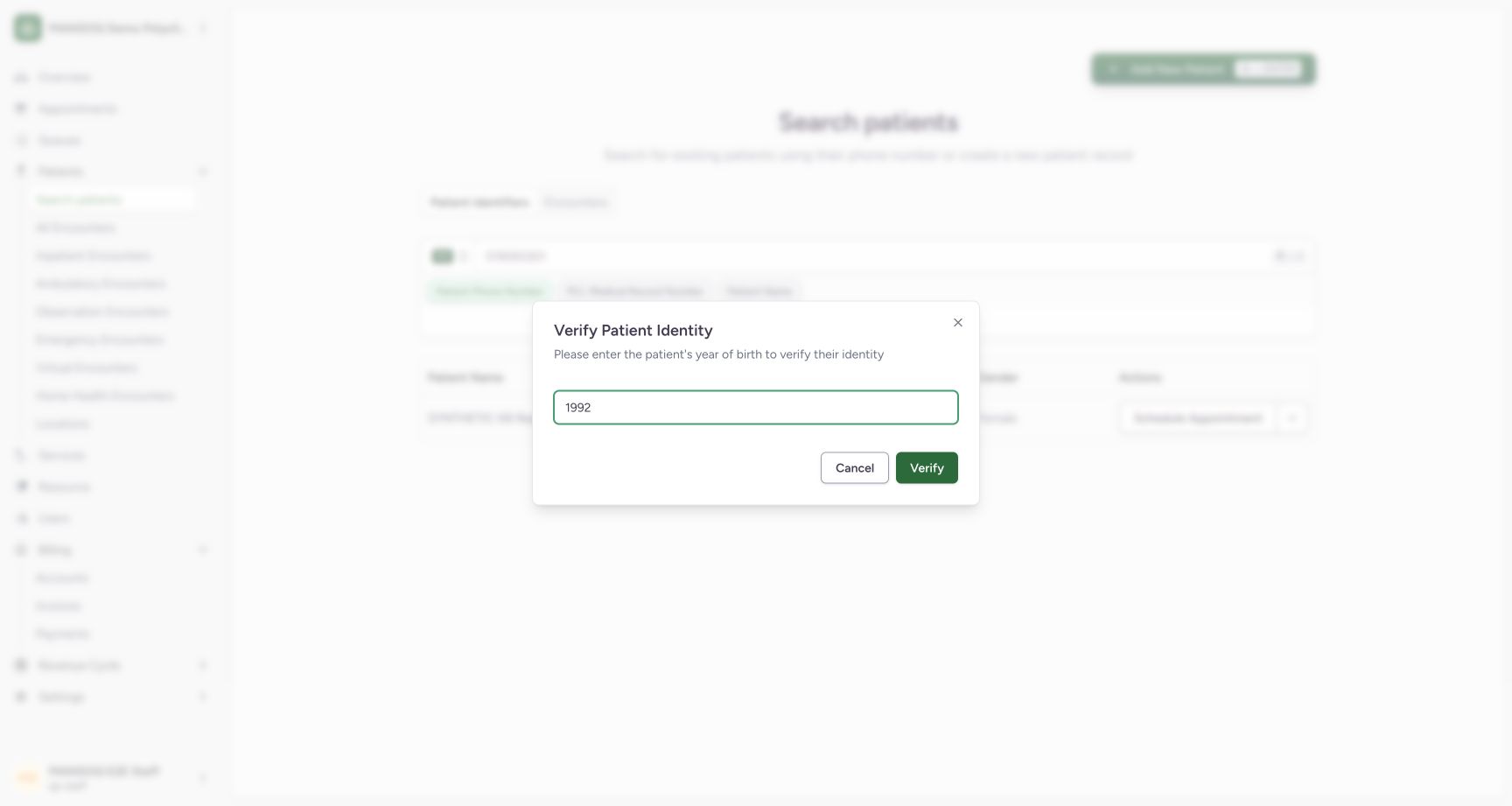 12
12Verify the existing saved patient using the known birth year
Capture details
Exact 3dfb source with the existing ordinary non-superuser Staff actor. This example uses one already registered fictional A patient and the existing public no-charge Doctor schedule. Missing current-day slots were materialized through the normal UI, then one Booked appointment was saved. This lesson includes no check-in, encounter, token, charge, grant or configuration change.
Image SHA-256 4e10f2ec29dbfabf45e814b15097547283f7294da8420f40a001bfa9b03a565b
- Enter year of birth 1992: Use the known birth year for this fictional saved patient.
- Verify this existing identity: Verify the existing record; this does not register a new patient.
3. Use the verified identity home
Confirm the synthetic patient name, then choose Schedule Appointment. This verified identity home is a separate entry from View Profile; the earlier full-profile refusal remains a different scope.
12Use the verified identity home booking control
Capture details
Exact 3dfb source with the existing ordinary non-superuser Staff actor. This example uses one already registered fictional A patient and the existing public no-charge Doctor schedule. Missing current-day slots were materialized through the normal UI, then one Booked appointment was saved. This lesson includes no check-in, encounter, token, charge, grant or configuration change.
Image SHA-256 b06cb1096639ff513ed12ee0870a4b68b5c9ca8cf145e93ff1d247303bf09180
- Open Schedule Appointment: This control belongs to the verified identity home, separate from the restricted full patient profile.
- Verify the intended existing patient: Confirm the previously registered fictional DOB patient before selecting a practitioner.
4. Keep Practitioner and choose the existing Doctor
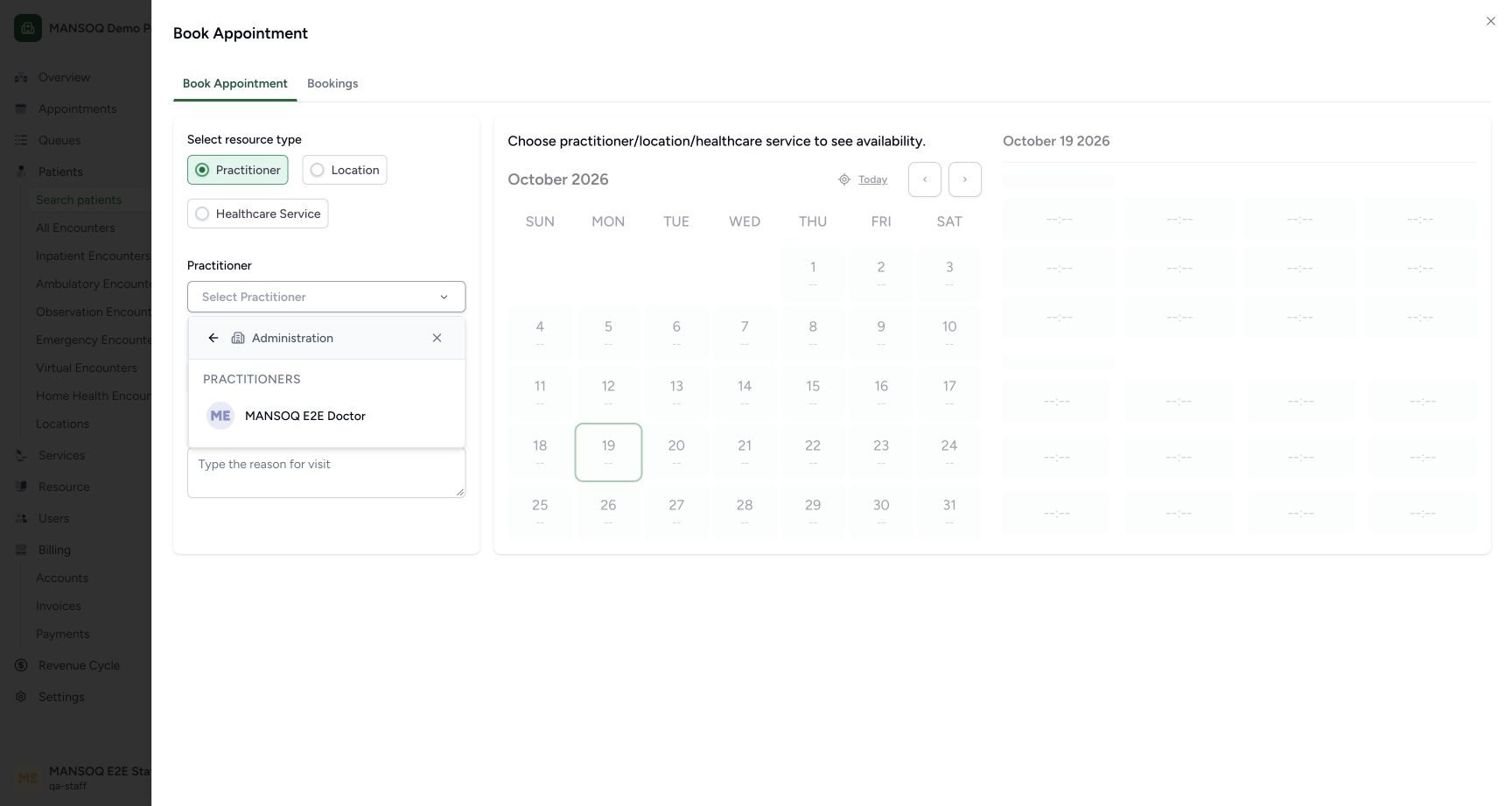
In Book Appointment keep Practitioner selected. Open Select Practitioner, choose the existing Administration department and then MANSOQ E2E Doctor. No new practitioner, department, membership or schedule is created.
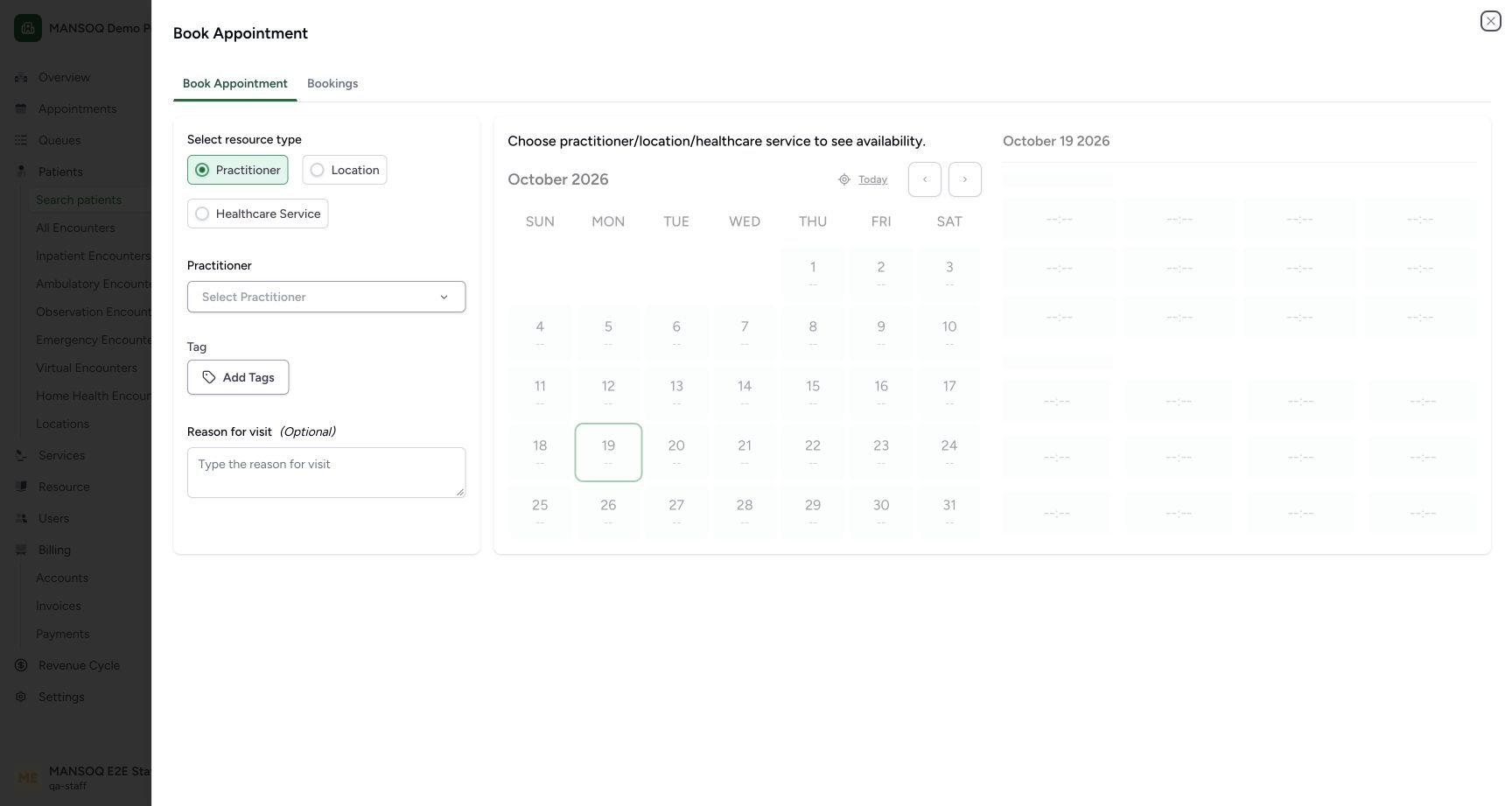 12
12Choose the existing practitioner before viewing current-day slots
Capture details
Exact 3dfb source with the existing ordinary non-superuser Staff actor. This example uses one already registered fictional A patient and the existing public no-charge Doctor schedule. Missing current-day slots were materialized through the normal UI, then one Booked appointment was saved. This lesson includes no check-in, encounter, token, charge, grant or configuration change.
Image SHA-256 96e8bb0bcbe6493025053fff5c99b73ed1a21aedd4745c56780277329f7221e4
- Choose the existing practitioner: Selecting a practitioner loads current-day availability; this can materialize missing schedule slots.
- Practitioner resource selected: This lesson uses the existing practitioner schedule, not a new location or healthcare-service schedule.
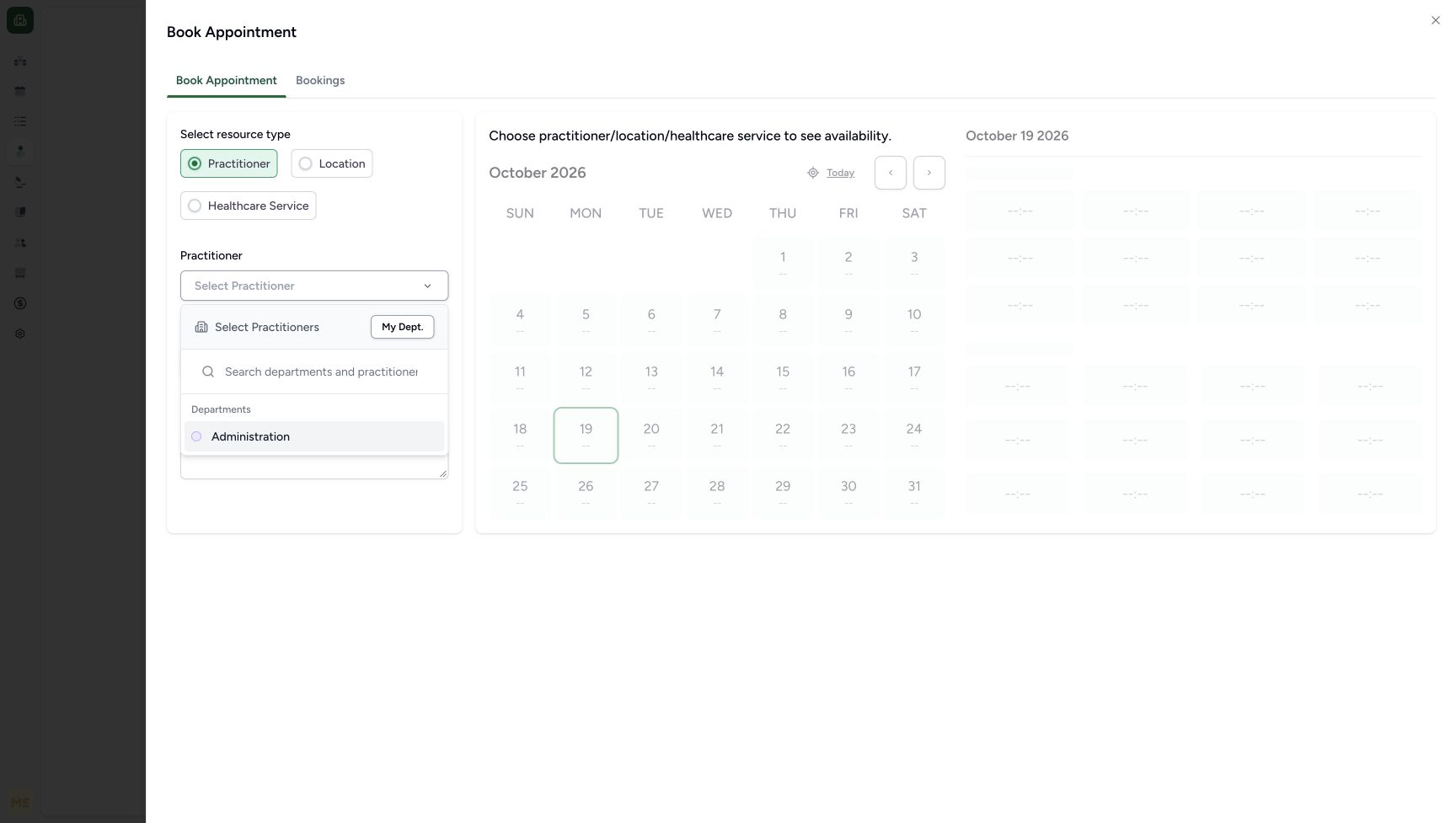 1
1Choose the actual Administration department option
Capture details
Same exact 3dfb source and existing ordinary Staff actor. This supplementary no-save image was captured after the earlier appointment had been checked in; it illustrates the same Administration option used in the earlier booking sequence. The practitioner was not selected during this review, and no slot, booking, patient or identifier changed.
Image SHA-256 0f55f8a61c095010cf948ec4ef19e2b4b828abb50ffb8d1ff64688e5ec02d5a8
- Administration: Choose the existing Administration department to show its available practitioners.
 12
12Select the existing ordinary Doctor practitioner
Capture details
Exact 3dfb source with the existing ordinary non-superuser Staff actor. This example uses one already registered fictional A patient and the existing public no-charge Doctor schedule. Missing current-day slots were materialized through the normal UI, then one Booked appointment was saved. This lesson includes no check-in, encounter, token, charge, grant or configuration change.
Image SHA-256 ee19b3b2da1f1f99927421fe941c3c52d835fea8f3ddfcb0216367ead14cfb20
- Select the existing Doctor: Use the existing MANSOQ E2E Doctor from Administration. This loads only that practitioner’s current-day slots.
- Verify the existing department: The practitioner is already assigned to this Administration department; no membership is added.
5. Read the actual current-day availability
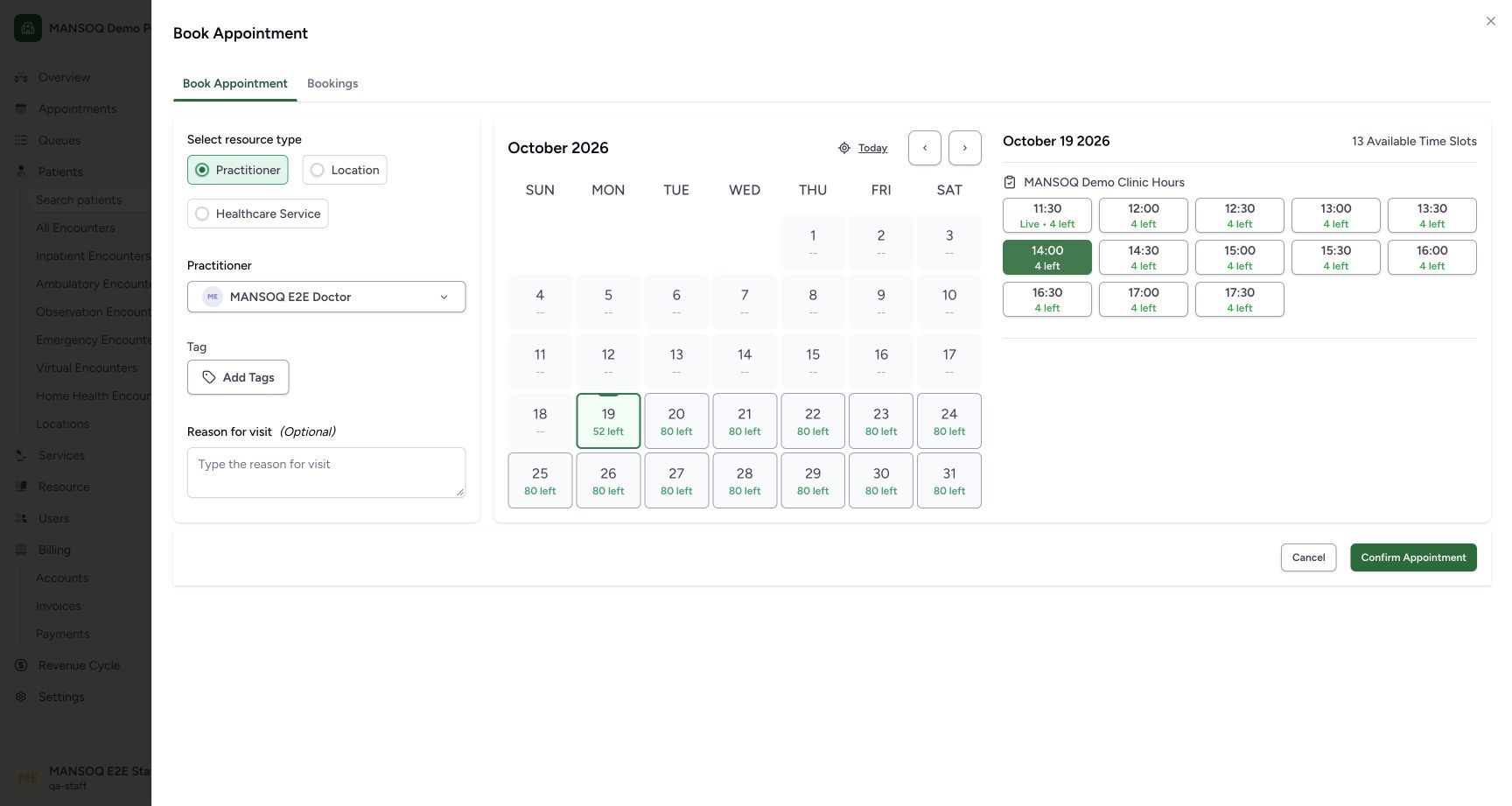
Review 19 October 2026, MANSOQ Demo Clinic Hours and the 13 available time slots. Selecting this existing practitioner loads the day and can create missing schedule-slot rows. It does not itself create a patient appointment.
123Review the actual current-day Doctor availability
Capture details
Exact 3dfb source with the existing ordinary non-superuser Staff actor. This example uses one already registered fictional A patient and the existing public no-charge Doctor schedule. Missing current-day slots were materialized through the normal UI, then one Booked appointment was saved. This lesson includes no check-in, encounter, token, charge, grant or configuration change.
Image SHA-256 1c90b07063f4c0c3f22bd3db7f5f7c0604f1b35430cd58b0c5bffcbd7dbed111
- Verify the selected Doctor: The loaded slots belong to the existing MANSOQ E2E Doctor.
- Verify 19 October: The current-day calendar shows 52 remaining places across 13 slots, each with capacity four.
- Choose the future 14:00 slot: This existing-template slot is 14:00–14:30 Asia/Riyadh, with four places still available. Selecting is not confirmation.
6. Select and review the intended future slot
Choose 14:00 with 4 left. Confirm that 14:00 is highlighted instead of the initially selected 11:30 live slot. The selection is not a saved appointment; Confirm Appointment is a separate action.
123Review the actual current-day Doctor availability
Capture details
Exact 3dfb source with the existing ordinary non-superuser Staff actor. This example uses one already registered fictional A patient and the existing public no-charge Doctor schedule. Missing current-day slots were materialized through the normal UI, then one Booked appointment was saved. This lesson includes no check-in, encounter, token, charge, grant or configuration change.
Image SHA-256 1c90b07063f4c0c3f22bd3db7f5f7c0604f1b35430cd58b0c5bffcbd7dbed111
- Verify the selected Doctor: The loaded slots belong to the existing MANSOQ E2E Doctor.
- Verify 19 October: The current-day calendar shows 52 remaining places across 13 slots, each with capacity four.
- Choose the future 14:00 slot: This existing-template slot is 14:00–14:30 Asia/Riyadh, with four places still available. Selecting is not confirmation.
 123
123Review the selected future slot before any confirmation
Capture details
Exact 3dfb source with the existing ordinary non-superuser Staff actor. This example uses one already registered fictional A patient and the existing public no-charge Doctor schedule. Missing current-day slots were materialized through the normal UI, then one Booked appointment was saved. This lesson includes no check-in, encounter, token, charge, grant or configuration change.
Image SHA-256 7d7bffa1530aea26f0cc1ea62c92168bae0ade765bc35c2324fc75d67d109ef0
- Selected future 14:00 slot: The highlighted slot is selected in the form only; its saved allocation remains zero.
- Confirmation is a separate action: This control is visible but has not been selected in this preparation checkpoint.
- Cancel this selection if needed: Cancel clears the unsaved selected slot without creating an appointment.
7. Review a clearly fictional optional reason
In Reason for visit enter the explicit SYNTHETIC SOFTWARE TRAINING ONLY note shown. Review the existing Doctor, current date and selected 14:00 slot. This note records a software demonstration with no actual visit, diagnosis, treatment or care.
123Review the exact fictional booking before confirming once
Capture details
Exact 3dfb source with the existing ordinary non-superuser Staff actor. This example uses one already registered fictional A patient and the existing public no-charge Doctor schedule. Missing current-day slots were materialized through the normal UI, then one Booked appointment was saved. This lesson includes no check-in, encounter, token, charge, grant or configuration change.
Image SHA-256 b904f0c8a7e285128fce2d19af5921bb36a1b69a05dc1db2b57b290afe1ff94c
- Review the fictional reason: The optional note explicitly labels this as software training, with no actual visit or care.
- Review the selected future 14:00 slot: The highlighted 14:00 slot is the approved 14:00–14:30 Asia/Riyadh window; saved allocation is still zero.
- Confirm this appointment once: After verifying the intended patient, Doctor, day, selected slot and fictional note, confirm once.
8. Confirm the intended appointment once
Choose Confirm Appointment once after reviewing the intended identity and selection. The resulting appointment detail shows Appointment created successfully and a Booked badge. If the outcome is unclear, check the saved record before attempting another confirmation.
123Review the exact fictional booking before confirming once
Capture details
Exact 3dfb source with the existing ordinary non-superuser Staff actor. This example uses one already registered fictional A patient and the existing public no-charge Doctor schedule. Missing current-day slots were materialized through the normal UI, then one Booked appointment was saved. This lesson includes no check-in, encounter, token, charge, grant or configuration change.
Image SHA-256 b904f0c8a7e285128fce2d19af5921bb36a1b69a05dc1db2b57b290afe1ff94c
- Review the fictional reason: The optional note explicitly labels this as software training, with no actual visit or care.
- Review the selected future 14:00 slot: The highlighted 14:00 slot is the approved 14:00–14:30 Asia/Riyadh window; saved allocation is still zero.
- Confirm this appointment once: After verifying the intended patient, Doctor, day, selected slot and fictional note, confirm once.
12345Verify the saved booked appointment and its actual Staff audit
Capture details
Exact 3dfb source with the existing ordinary non-superuser Staff actor. This example uses one already registered fictional A patient and the existing public no-charge Doctor schedule. Missing current-day slots were materialized through the normal UI, then one Booked appointment was saved. This lesson includes no check-in, encounter, token, charge, grant or configuration change.
Image SHA-256 caf29a296ae91aecdc79abe23724d53b148351f8f4322ea7acc6fbd9f25b1c2d
- Verify the saved patient: This is the already registered fictional DOB patient, not a new registration.
- Verify Booked status: The normal confirmation saved this appointment as Booked.
- Verify the saved appointment window: The display is 2:00–2:30 PM on 19 October; stored time is 11:00–11:30Z, matching Asia/Riyadh UTC+03.
- Read who booked the appointment: The saved card records the existing MANSOQ E2E Staff actor and actual booking time.
- Read the actual latest updater: The same Staff actor is the current updater immediately after this creation.
9. Check the saved identity, time and Staff audit
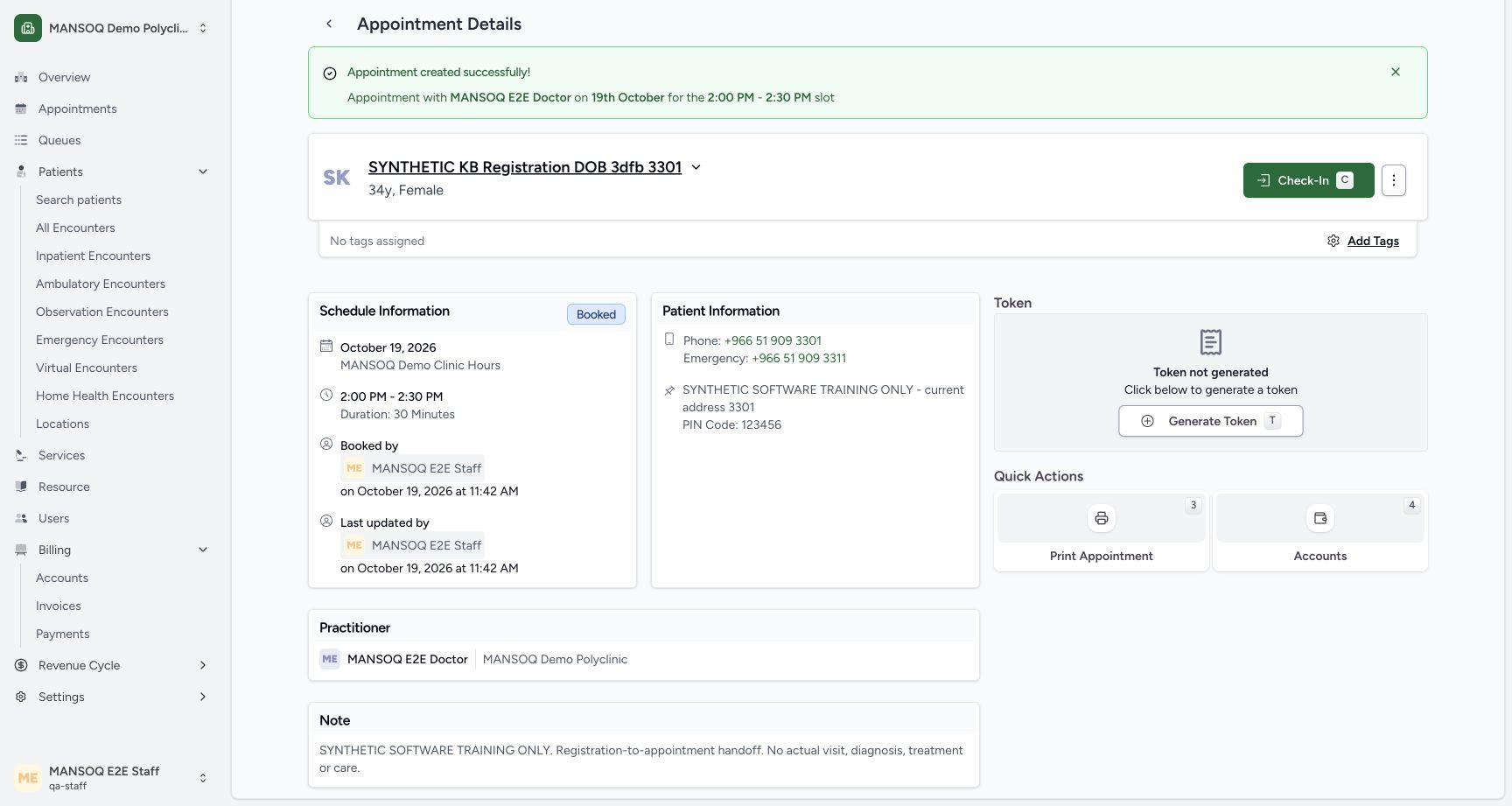
Verify the saved synthetic DOB patient, 19 October 2026 and 2:00 PM–2:30 PM. Read Booked by and Last updated by: both show the actual MANSOQ E2E Staff actor and 11:42 AM save time in this dated example.
12345Verify the saved booked appointment and its actual Staff audit
Capture details
Exact 3dfb source with the existing ordinary non-superuser Staff actor. This example uses one already registered fictional A patient and the existing public no-charge Doctor schedule. Missing current-day slots were materialized through the normal UI, then one Booked appointment was saved. This lesson includes no check-in, encounter, token, charge, grant or configuration change.
Image SHA-256 caf29a296ae91aecdc79abe23724d53b148351f8f4322ea7acc6fbd9f25b1c2d
- Verify the saved patient: This is the already registered fictional DOB patient, not a new registration.
- Verify Booked status: The normal confirmation saved this appointment as Booked.
- Verify the saved appointment window: The display is 2:00–2:30 PM on 19 October; stored time is 11:00–11:30Z, matching Asia/Riyadh UTC+03.
- Read who booked the appointment: The saved card records the existing MANSOQ E2E Staff actor and actual booking time.
- Read the actual latest updater: The same Staff actor is the current updater immediately after this creation.
10. Read the saved note and separate token state
Read the complete retained fictional note and existing practitioner. Token not generated is still shown: generating a token is a separate action and is not selected here.
 123
123Read the retained fictional note and separate token state
Capture details
Exact 3dfb source with the existing ordinary non-superuser Staff actor. This example uses one already registered fictional A patient and the existing public no-charge Doctor schedule. Missing current-day slots were materialized through the normal UI, then one Booked appointment was saved. This lesson includes no check-in, encounter, token, charge, grant or configuration change.
Image SHA-256 9b6ef3f9f914c39cbc71f9da4a37a4718b91d3fb114e5bea29cab4c9c43c95f2
- Read the saved fictional note: The exact reviewed optional note is retained on the new appointment.
- Verify the saved practitioner: The appointment belongs to the existing MANSOQ E2E Doctor in the fictional Polyclinic.
- Token remains ungenerated: Booking alone did not create a token, encounter or charge in this observed no-charge flow.
Identity home and full profile remain distinct
The successful verified identity home offers Schedule Appointment even while the separate full patient profile is not accessible in the earlier registration lesson. Use the actual verified-identity entry; this lesson does not change patient grants or claim registration alone enables full-profile editing.
12Find the already registered synthetic DOB patient
Capture details
Exact 3dfb source with the existing ordinary non-superuser Staff actor. This example uses one already registered fictional A patient and the existing public no-charge Doctor schedule. Missing current-day slots were materialized through the normal UI, then one Booked appointment was saved. This lesson includes no check-in, encounter, token, charge, grant or configuration change.
Image SHA-256 86682385611cd55b459d0a010512ca772c015cf0628bdefa62e556070a203f7c
- Open the saved patient identity: Select this existing synthetic patient row; do not register another patient.
- Existing booking entry: The ordinary Staff search result also offers Schedule Appointment for this saved identity.
12Verify the existing saved patient using the known birth year
Capture details
Exact 3dfb source with the existing ordinary non-superuser Staff actor. This example uses one already registered fictional A patient and the existing public no-charge Doctor schedule. Missing current-day slots were materialized through the normal UI, then one Booked appointment was saved. This lesson includes no check-in, encounter, token, charge, grant or configuration change.
Image SHA-256 4e10f2ec29dbfabf45e814b15097547283f7294da8420f40a001bfa9b03a565b
- Enter year of birth 1992: Use the known birth year for this fictional saved patient.
- Verify this existing identity: Verify the existing record; this does not register a new patient.
12Use the verified identity home booking control
Capture details
Exact 3dfb source with the existing ordinary non-superuser Staff actor. This example uses one already registered fictional A patient and the existing public no-charge Doctor schedule. Missing current-day slots were materialized through the normal UI, then one Booked appointment was saved. This lesson includes no check-in, encounter, token, charge, grant or configuration change.
Image SHA-256 b06cb1096639ff513ed12ee0870a4b68b5c9ca8cf145e93ff1d247303bf09180
- Open Schedule Appointment: This control belongs to the verified identity home, separate from the restricted full patient profile.
- Verify the intended existing patient: Confirm the previously registered fictional DOB patient before selecting a practitioner.
Booking remains separate from later workflow states
The saved appointment is Booked. Check-In is visible as a separate next action, and Token not generated remains visible. This lesson stops at the saved booking; it does not demonstrate arrival, consultation, encounter creation, patient-profile editing or token generation.
12345Verify the saved booked appointment and its actual Staff audit
Capture details
Exact 3dfb source with the existing ordinary non-superuser Staff actor. This example uses one already registered fictional A patient and the existing public no-charge Doctor schedule. Missing current-day slots were materialized through the normal UI, then one Booked appointment was saved. This lesson includes no check-in, encounter, token, charge, grant or configuration change.
Image SHA-256 caf29a296ae91aecdc79abe23724d53b148351f8f4322ea7acc6fbd9f25b1c2d
- Verify the saved patient: This is the already registered fictional DOB patient, not a new registration.
- Verify Booked status: The normal confirmation saved this appointment as Booked.
- Verify the saved appointment window: The display is 2:00–2:30 PM on 19 October; stored time is 11:00–11:30Z, matching Asia/Riyadh UTC+03.
- Read who booked the appointment: The saved card records the existing MANSOQ E2E Staff actor and actual booking time.
- Read the actual latest updater: The same Staff actor is the current updater immediately after this creation.
123Read the retained fictional note and separate token state
Capture details
Exact 3dfb source with the existing ordinary non-superuser Staff actor. This example uses one already registered fictional A patient and the existing public no-charge Doctor schedule. Missing current-day slots were materialized through the normal UI, then one Booked appointment was saved. This lesson includes no check-in, encounter, token, charge, grant or configuration change.
Image SHA-256 9b6ef3f9f914c39cbc71f9da4a37a4718b91d3fb114e5bea29cab4c9c43c95f2
- Read the saved fictional note: The exact reviewed optional note is retained on the new appointment.
- Verify the saved practitioner: The appointment belongs to the existing MANSOQ E2E Doctor in the fictional Polyclinic.
- Token remains ungenerated: Booking alone did not create a token, encounter or charge in this observed no-charge flow.
Source evidence
Every citation uses this exact committed version. The private source repository requires access.
- repositories/platform/mansoq-web/src/pages/Patient/PatientHome.tsx:84 ·
3dfb7c9f519fb5b4cd4452439f3c12346bf58319Source file checksum
c89e83e3e910337d0df6445d984f41d331f79ea5962212fff64709dec6809b7d - repositories/platform/mansoq-web/src/pages/Patient/PatientHome.tsx:180 ·
3dfb7c9f519fb5b4cd4452439f3c12346bf58319Source file checksum
c89e83e3e910337d0df6445d984f41d331f79ea5962212fff64709dec6809b7d - repositories/platform/mansoq-web/src/components/Patient/PatientIndex.tsx:640 ·
3dfb7c9f519fb5b4cd4452439f3c12346bf58319Source file checksum
b7f38ea49ab4aee4872fd6f35263f9a23a609f9cb2622332ea741192fb3013de - repositories/platform/mansoq-web/src/pages/Appointments/BookAppointment/BookAppointmentDetails.tsx:43 ·
3dfb7c9f519fb5b4cd4452439f3c12346bf58319Source file checksum
10a7aab902525f4669d7219477e1ca6b7e333f38fbecc8552f608fbc721023f2 - repositories/platform/mansoq-web/src/pages/Appointments/BookAppointment/BookAppointmentDetails.tsx:95 ·
3dfb7c9f519fb5b4cd4452439f3c12346bf58319Source file checksum
10a7aab902525f4669d7219477e1ca6b7e333f38fbecc8552f608fbc721023f2 - repositories/platform/mansoq-web/src/pages/Appointments/BookAppointment/AppointmentSlotPicker.tsx:59 ·
3dfb7c9f519fb5b4cd4452439f3c12346bf58319Source file checksum
d2211acfcae4cf531e0b30aad5c9141c71caaaed7f04cc9dad2b32750f0ef1cc - repositories/platform/mansoq-core/mansoq/emr/api/viewsets/scheduling/availability.py:212 ·
3dfb7c9f519fb5b4cd4452439f3c12346bf58319Source file checksum
1370c5b5f5cad98b4cceba59929dc88e82c70350615d5a3125d60cab54deec2c - repositories/platform/mansoq-core/mansoq/emr/api/viewsets/scheduling/availability.py:126 ·
3dfb7c9f519fb5b4cd4452439f3c12346bf58319Source file checksum
1370c5b5f5cad98b4cceba59929dc88e82c70350615d5a3125d60cab54deec2c - repositories/platform/mansoq-core/mansoq/emr/api/viewsets/scheduling/availability.py:151 ·
3dfb7c9f519fb5b4cd4452439f3c12346bf58319Source file checksum
1370c5b5f5cad98b4cceba59929dc88e82c70350615d5a3125d60cab54deec2c - repositories/platform/mansoq-core/mansoq/emr/api/viewsets/scheduling/availability.py:332 ·
3dfb7c9f519fb5b4cd4452439f3c12346bf58319Source file checksum
1370c5b5f5cad98b4cceba59929dc88e82c70350615d5a3125d60cab54deec2c - repositories/platform/mansoq-core/mansoq/emr/signals/patient/facility_name_identifier.py:37 ·
3dfb7c9f519fb5b4cd4452439f3c12346bf58319Source file checksum
dd72b45263ce4c61a552f3d461eba4b4cd49ac295e2b31c9e2e5a84c11e26c34 - repositories/platform/mansoq-web/src/pages/Appointments/components/PractitionerSelector.tsx:403 ·
3dfb7c9f519fb5b4cd4452439f3c12346bf58319Source file checksum
fbff1cae7ee20060cda82aff258844a6a4040444176b5c0df23c6e90de1d0790