 MANSOQ
 Appointments and registration handoff · VERSION 3dfb7c9f
Check in an existing booked appointment as Staff
Review the already saved fictional booking, choose the enabled Check-In action once and verify the retained status and Staff audit.
Staff
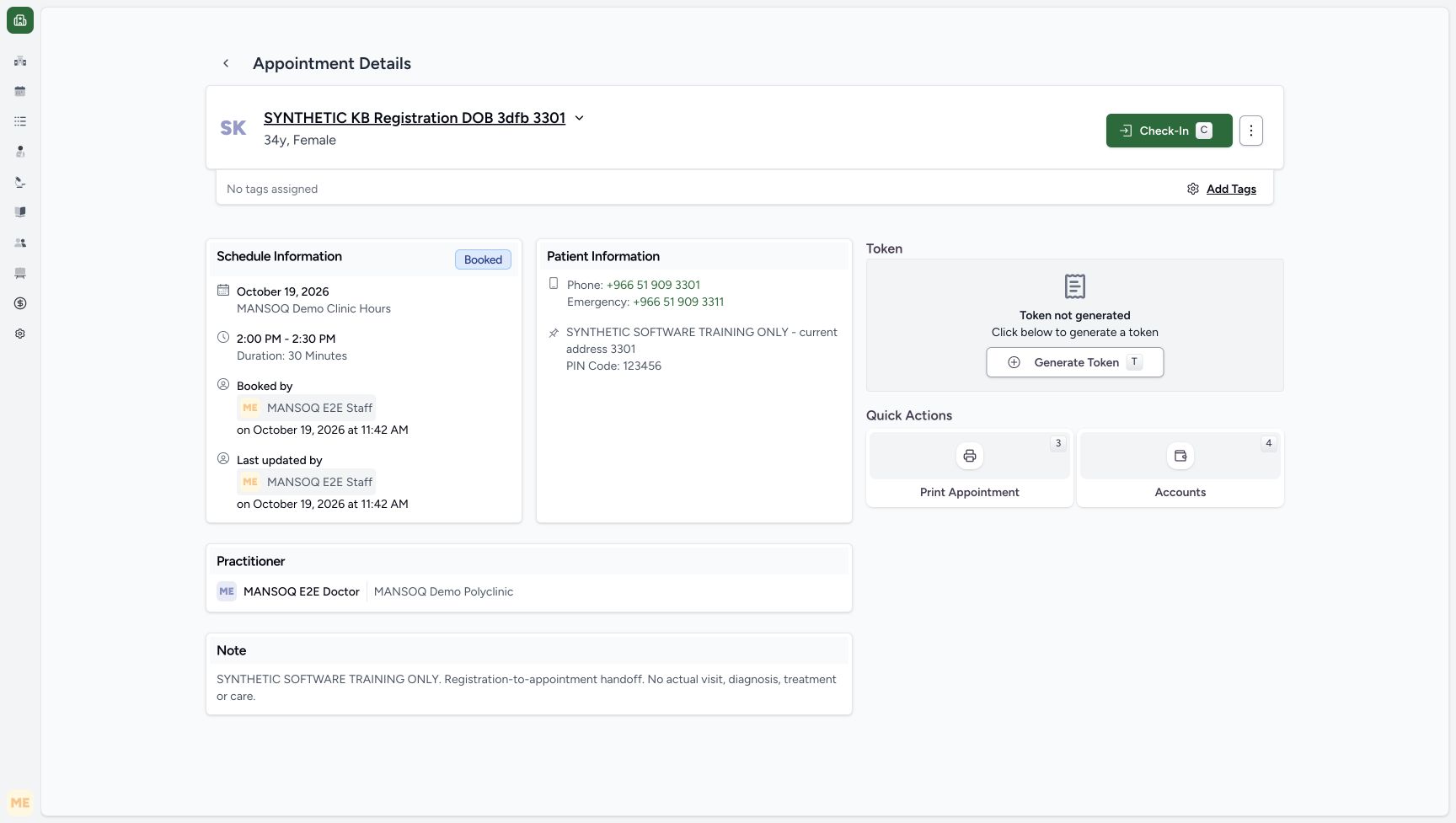 123
123Review the saved synthetic booking before Staff Check-In
Capture details
Exact 3dfb committed source. Original ordinary Staff capture before the one saved Check-In; genuine pixels retained through macOS and USB recovery. This is fictional software-state teaching, not real attendance or care.
Image SHA-256 8d5781c6a00cb3abb13b66afca4d1bf20c641b50e1e23ed898eec1a63d9b8091
- Check-In: This enabled Staff action changes the saved appointment software state.
- Saved synthetic patient: Confirm the intended already registered patient.
- Current Booked state: The appointment remains Booked before the separate Check-In action.
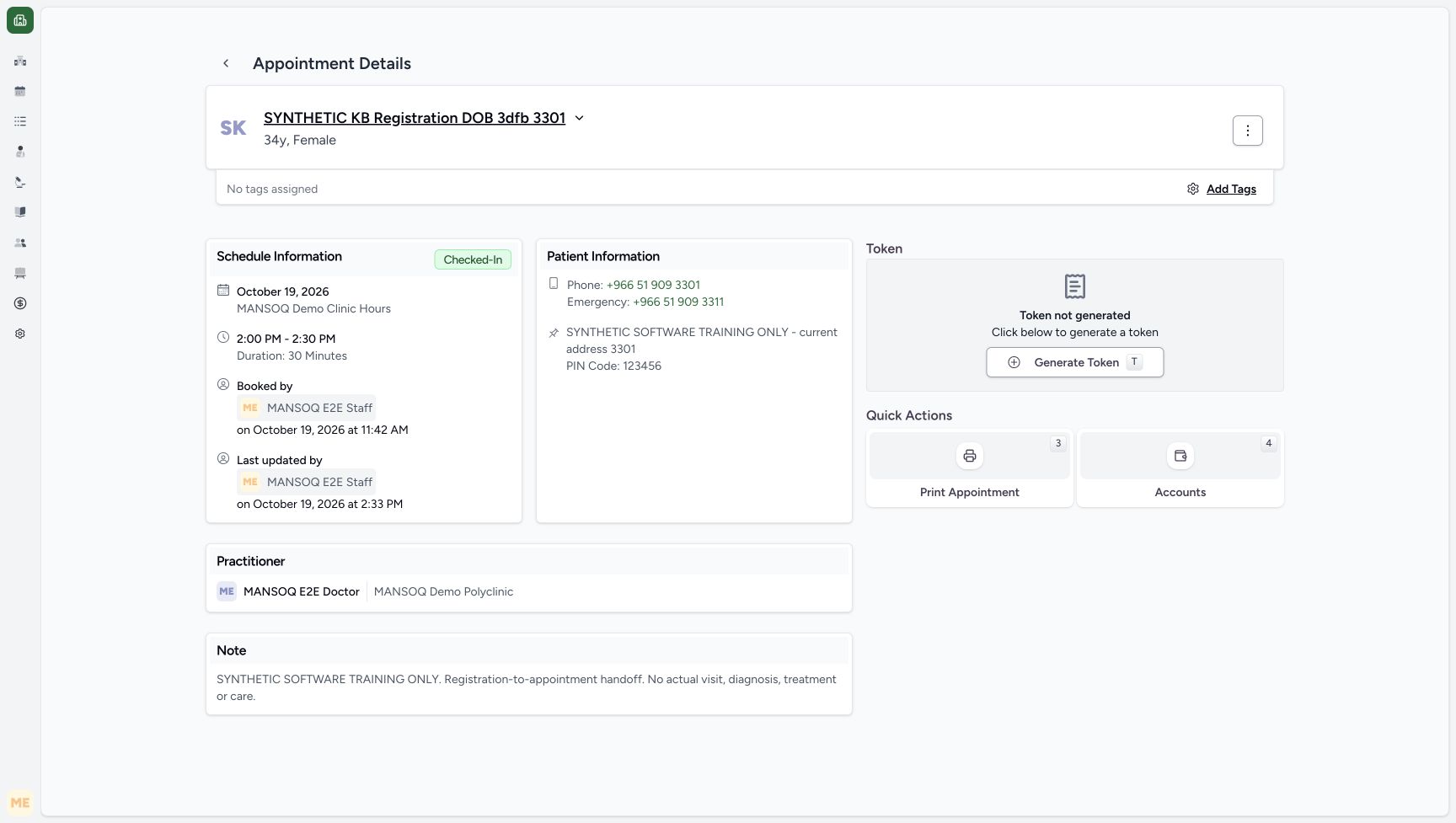 123
123Saved Staff Check-In after migration
Capture details
Exact same 3dfb committed source/build after USB migration. Normal existing Staff actor; saved Check-In was not replayed. Doctor captures inspect and cancel an unsaved form only. No new encounter, token, charge or appointment is submitted.
Image SHA-256 2397cf9e4acdda2d78cbbe0dc0d3bf48909cd1f62f4ef71a10f9b74499bf8884
- Checked-In: The appointment saved as Checked-In before migration; this is its current saved readback.
- Staff update context: The adjacent saved actor and time identify MANSOQ E2E Staff at 2:33 PM on October 19.
- Token not generated: No token was generated by Check-In.
7 of 7 content blocks have reviewed image alignment. Missing overview or prerequisite images remain open.
Before you begin
- Use an already authenticated authorized Staff session in the assigned fictional Polyclinic and an existing Booked appointment. This dated example uses synthetic DOB patient ending 3301 and 19 October 2026 at 2:00 PM–2:30 PM, matching 11:00–11:30 UTC in Asia/Riyadh UTC+03. Confirm the configured scheduling/browser date context; the screens do not print a timezone. Other timezone combinations remain unverified.123
Recorded release 3dfb7c9f · 2026-10-19T11:32:57.002Z · 1728 × 977 Review the saved synthetic booking before Staff Check-In
Capture details
Exact 3dfb committed source. Original ordinary Staff capture before the one saved Check-In; genuine pixels retained through macOS and USB recovery. This is fictional software-state teaching, not real attendance or care.
Image SHA-256
8d5781c6a00cb3abb13b66afca4d1bf20c641b50e1e23ed898eec1a63d9b8091- Check-In: This enabled Staff action changes the saved appointment software state.
- Saved synthetic patient: Confirm the intended already registered patient.
- Current Booked state: The appointment remains Booked before the separate Check-In action.
1. Review the intended saved booking
Open the existing appointment and confirm the exact synthetic patient, practitioner, date, time and Booked badge. Read the retained fictional note before choosing any action.
123Review the saved synthetic booking before Staff Check-In
Capture details
Exact 3dfb committed source. Original ordinary Staff capture before the one saved Check-In; genuine pixels retained through macOS and USB recovery. This is fictional software-state teaching, not real attendance or care.
Image SHA-256 8d5781c6a00cb3abb13b66afca4d1bf20c641b50e1e23ed898eec1a63d9b8091
- Check-In: This enabled Staff action changes the saved appointment software state.
- Saved synthetic patient: Confirm the intended already registered patient.
- Current Booked state: The appointment remains Booked before the separate Check-In action.
2. Choose the enabled Check-In action once
Choose Check-In only when it is visible and enabled for the intended Booked appointment. This example changes the saved software state; do not repeat the action when the outcome is uncertain—read the saved appointment first.
123Review the saved synthetic booking before Staff Check-In
Capture details
Exact 3dfb committed source. Original ordinary Staff capture before the one saved Check-In; genuine pixels retained through macOS and USB recovery. This is fictional software-state teaching, not real attendance or care.
Image SHA-256 8d5781c6a00cb3abb13b66afca4d1bf20c641b50e1e23ed898eec1a63d9b8091
- Check-In: This enabled Staff action changes the saved appointment software state.
- Saved synthetic patient: Confirm the intended already registered patient.
- Current Booked state: The appointment remains Booked before the separate Check-In action.
3. Verify Checked-In and the Staff audit
Read the Checked-In badge. Last updated by shows the actual MANSOQ E2E Staff actor at 2:33 PM on 19 October 2026. The previously saved appointment time and fictional note remain visible.
123Saved Staff Check-In after migration
Capture details
Exact same 3dfb committed source/build after USB migration. Normal existing Staff actor; saved Check-In was not replayed. Doctor captures inspect and cancel an unsaved form only. No new encounter, token, charge or appointment is submitted.
Image SHA-256 2397cf9e4acdda2d78cbbe0dc0d3bf48909cd1f62f4ef71a10f9b74499bf8884
- Checked-In: The appointment saved as Checked-In before migration; this is its current saved readback.
- Staff update context: The adjacent saved actor and time identify MANSOQ E2E Staff at 2:33 PM on October 19.
- Token not generated: No token was generated by Check-In.
4. Keep token generation separate
Token not generated remains visible. Check-In did not generate a token, and Generate Token is not selected in this lesson.
123Saved Staff Check-In after migration
Capture details
Exact same 3dfb committed source/build after USB migration. Normal existing Staff actor; saved Check-In was not replayed. Doctor captures inspect and cancel an unsaved form only. No new encounter, token, charge or appointment is submitted.
Image SHA-256 2397cf9e4acdda2d78cbbe0dc0d3bf48909cd1f62f4ef71a10f9b74499bf8884
- Checked-In: The appointment saved as Checked-In before migration; this is its current saved readback.
- Staff update context: The adjacent saved actor and time identify MANSOQ E2E Staff at 2:33 PM on October 19.
- Token not generated: No token was generated by Check-In.
A software status is distinct from clinical care
This demonstration stops at the saved Checked-In appointment. It does not establish real arrival, assessment or treatment, and it does not create an encounter or charge.
123Saved Staff Check-In after migration
Capture details
Exact same 3dfb committed source/build after USB migration. Normal existing Staff actor; saved Check-In was not replayed. Doctor captures inspect and cancel an unsaved form only. No new encounter, token, charge or appointment is submitted.
Image SHA-256 2397cf9e4acdda2d78cbbe0dc0d3bf48909cd1f62f4ef71a10f9b74499bf8884
- Checked-In: The appointment saved as Checked-In before migration; this is its current saved readback.
- Staff update context: The adjacent saved actor and time identify MANSOQ E2E Staff at 2:33 PM on October 19.
- Token not generated: No token was generated by Check-In.
Source evidence
Every citation uses this exact committed version. The private source repository requires access.
- repositories/platform/mansoq-web/src/pages/Appointments/AppointmentDetail.tsx:197 ·
3dfb7c9f519fb5b4cd4452439f3c12346bf58319Source file checksum
8fc77ee6f1f7b145e2987ba272e80f35631e17907ea91cd305738250b137b839 - repositories/platform/mansoq-web/src/pages/Appointments/AppointmentDetail.tsx:203 ·
3dfb7c9f519fb5b4cd4452439f3c12346bf58319Source file checksum
8fc77ee6f1f7b145e2987ba272e80f35631e17907ea91cd305738250b137b839 - repositories/platform/mansoq-web/src/pages/Appointments/AppointmentDetail.tsx:282 ·
3dfb7c9f519fb5b4cd4452439f3c12346bf58319Source file checksum
8fc77ee6f1f7b145e2987ba272e80f35631e17907ea91cd305738250b137b839 - repositories/platform/mansoq-web/src/pages/Appointments/AppointmentDetail.tsx:959 ·
3dfb7c9f519fb5b4cd4452439f3c12346bf58319Source file checksum
8fc77ee6f1f7b145e2987ba272e80f35631e17907ea91cd305738250b137b839 - repositories/platform/mansoq-core/mansoq/emr/api/viewsets/scheduling/booking.py:124 ·
3dfb7c9f519fb5b4cd4452439f3c12346bf58319Source file checksum
b648e5cd1211dcb659ba74969e4efbce3ff31ae65eef3a9a756ec3a34c782d5b