 MANSOQ
 Patient registration and identification · VERSION 3dfb7c9f
Find an existing patient with Patient Name search
Choose the name identifier, compare a saved result and recover from an unmatched search without creating another patient.
Staff
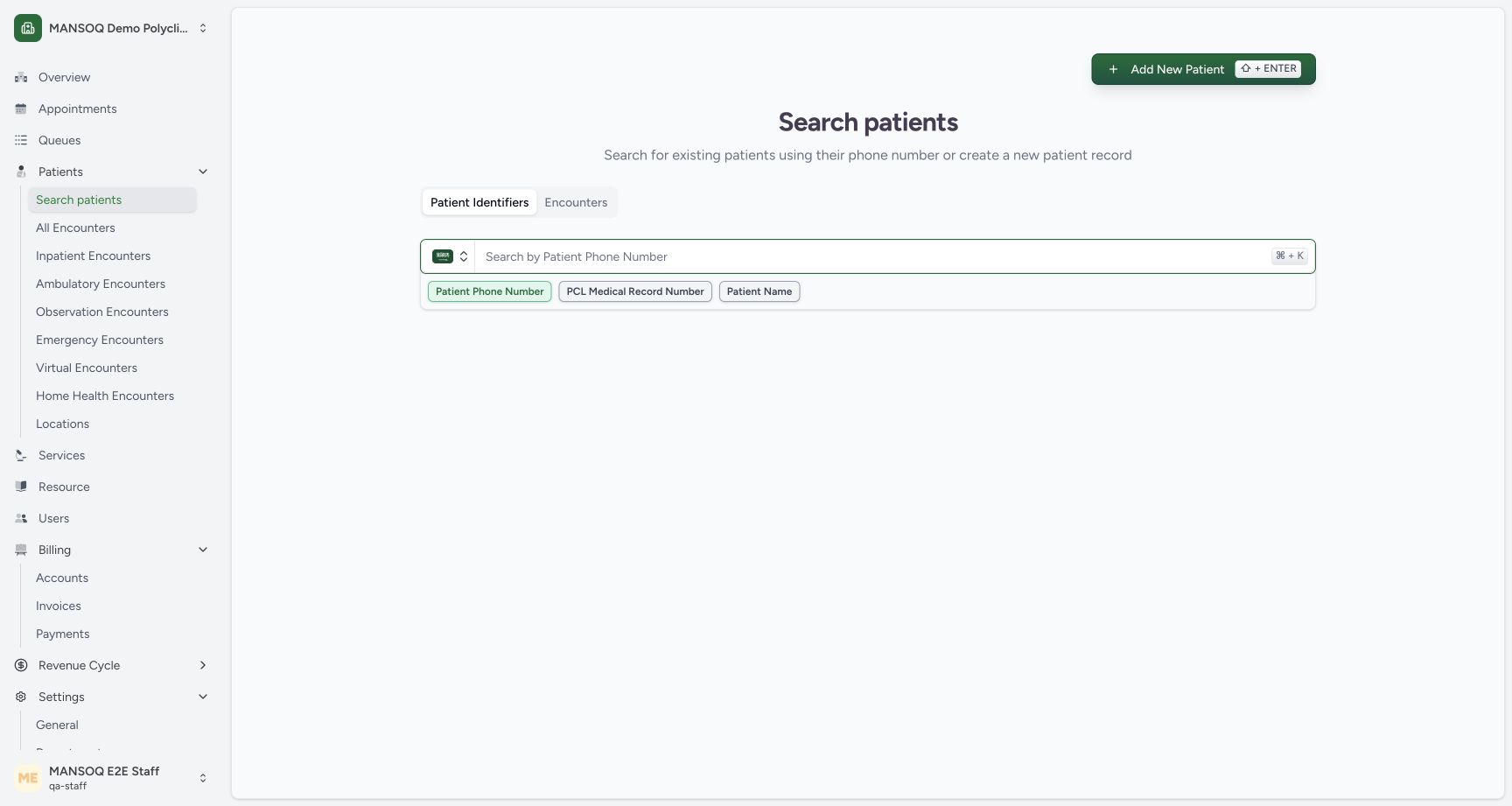 123
123Choose the Patient Name identifier
Capture details
Observed committed3dfb training profile on20 October2026 (Asia/Riyadh). Name identifier searches only; no patient, encounter or appointment saved.
Image SHA-256 ef6cef2fdb18585c301387e8ff275163e3035d9654dd8b7a482b21186fe12811
- Use Patient Identifiers: Keep the Patient Identifiers tab selected.
- Choose Patient Name: Select the Patient Name option below the input.
- Name-search input: The search field changes to the selected identifier type.
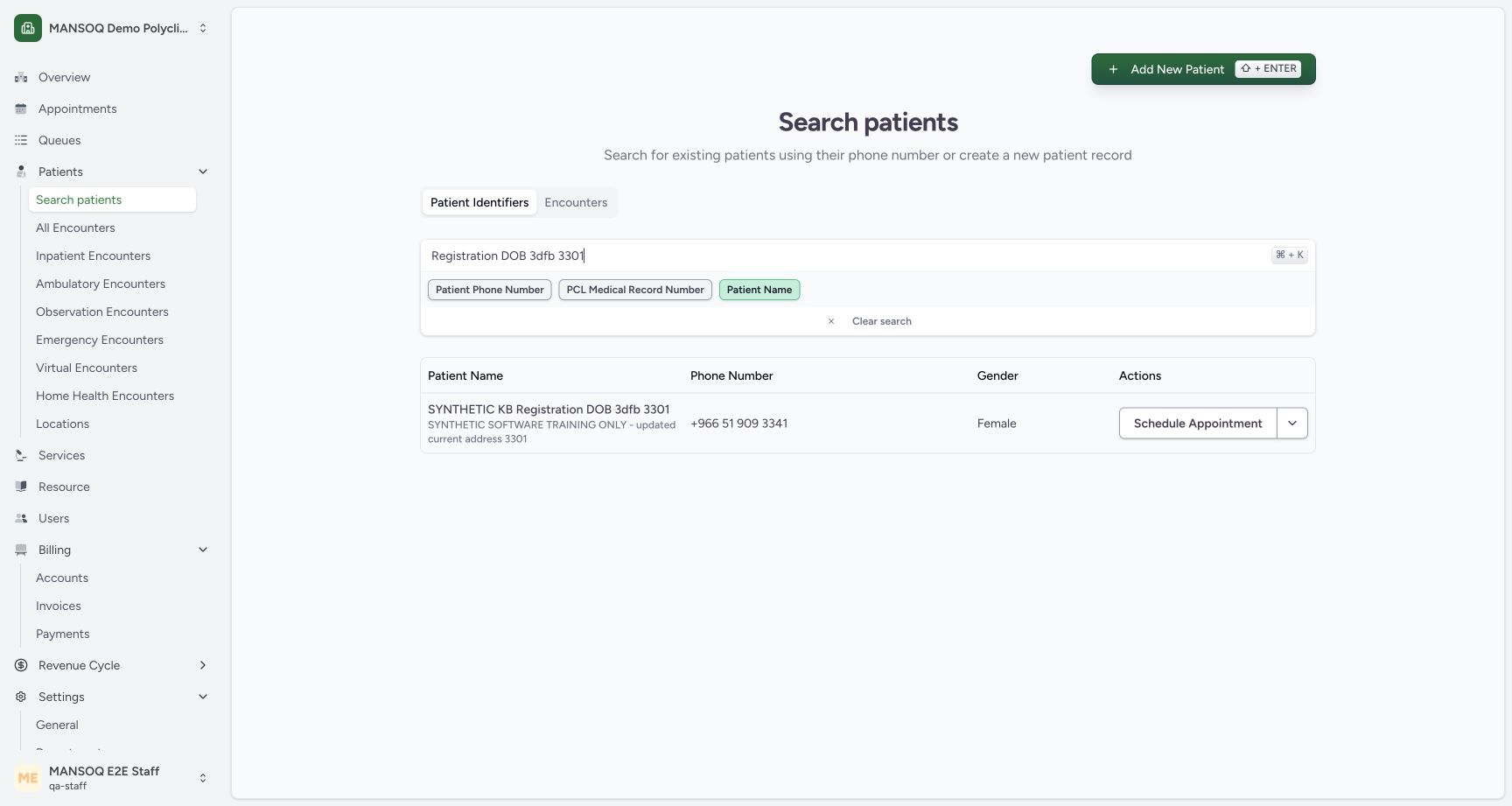 1234
1234Read a matching patient-name result
Capture details
Observed committed3dfb training profile on20 October2026 (Asia/Riyadh). Name identifier searches only; no patient, encounter or appointment saved.
Image SHA-256 7ba9bce11080d4679241e8722d8190a3f6caa95eae07e68a82c63711099a2088
- Read the name query: This example searches Registration DOB 3dfb 3301.
- Compare the full patient name: Match the complete synthetic name rather than relying on a short name fragment.
- Compare the phone number: The current saved phone is +966 51 909 3341.
- Clear search: This clears the input; the following image shows the prior result remains visible in this build.
13 of 13 content blocks have reviewed image alignment. Missing overview or prerequisite images remain open.
Before you begin
- Use an already authenticated, authorized Staff session in the assigned Polyclinic. The pictured account is qa-staff; sign-in is a separate procedure.
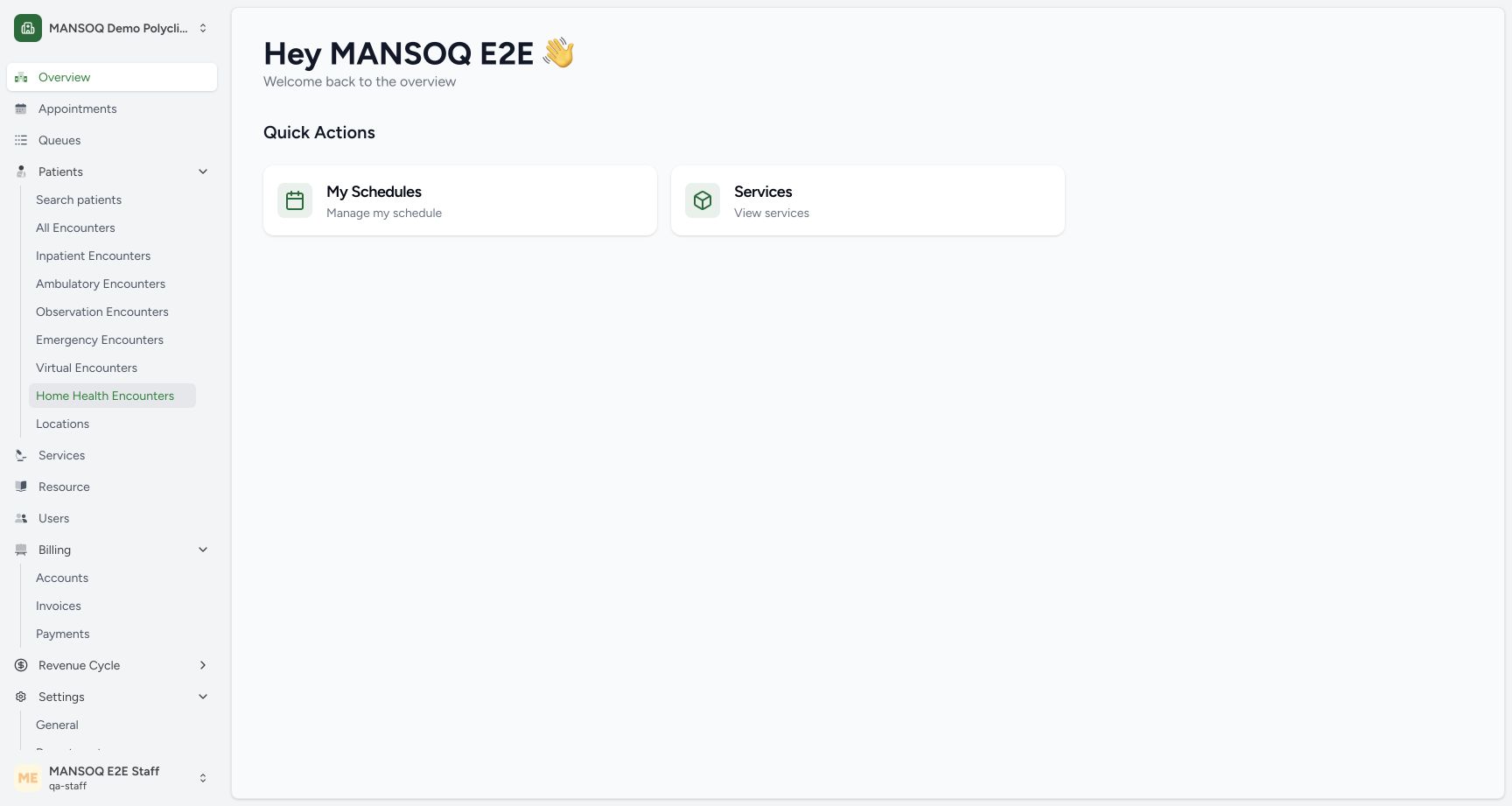 123
123Recorded release 3dfb7c9f · 2026-10-19T22:55:53.032Z · 1728 × 921 Open Search patients as Staff
Capture details
Observed committed3dfb training profile on20 October2026 (Asia/Riyadh). Name identifier searches only; no patient, encounter or appointment saved.
Image SHA-256
4200891f3cfdcc5872099693bd0cec86ed783c9f49d654ce5d38b06086c89135- Confirm the Staff account: The pictured account is qa-staff.
- Check the facility: Use the assigned Polyclinic context.
- Open Search patients: Open Search patients under Patients.
- For this synthetic exercise, use the existing SYNTHETIC KB Registration DOB 3dfb 3301 patient and its current phone ending 3341. Do not create another patient to follow the lesson.1234
Recorded release 3dfb7c9f · 2026-10-19T22:56:09.879Z · 1728 × 921 Read a matching patient-name result
Capture details
Observed committed3dfb training profile on20 October2026 (Asia/Riyadh). Name identifier searches only; no patient, encounter or appointment saved.
Image SHA-256
7ba9bce11080d4679241e8722d8190a3f6caa95eae07e68a82c63711099a2088- Read the name query: This example searches Registration DOB 3dfb 3301.
- Compare the full patient name: Match the complete synthetic name rather than relying on a short name fragment.
- Compare the phone number: The current saved phone is +966 51 909 3341.
- Clear search: This clears the input; the following image shows the prior result remains visible in this build.
1. Open Search patients
Under Patients, open Search patients. Check the facility and account before looking for a record.
123Open Search patients as Staff
Capture details
Observed committed3dfb training profile on20 October2026 (Asia/Riyadh). Name identifier searches only; no patient, encounter or appointment saved.
Image SHA-256 4200891f3cfdcc5872099693bd0cec86ed783c9f49d654ce5d38b06086c89135
- Confirm the Staff account: The pictured account is qa-staff.
- Check the facility: Use the assigned Polyclinic context.
- Open Search patients: Open Search patients under Patients.
2. Choose Patient Name
Keep Patient Identifiers selected. Choose Patient Name below the search input; the field now accepts a name rather than a phone number.
123Choose the Patient Name identifier
Capture details
Observed committed3dfb training profile on20 October2026 (Asia/Riyadh). Name identifier searches only; no patient, encounter or appointment saved.
Image SHA-256 ef6cef2fdb18585c301387e8ff275163e3035d9654dd8b7a482b21186fe12811
- Use Patient Identifiers: Keep the Patient Identifiers tab selected.
- Choose Patient Name: Select the Patient Name option below the input.
- Name-search input: The search field changes to the selected identifier type.
3. Enter a known name query
Type “Registration DOB 3dfb 3301” and wait for the result.
1234Read a matching patient-name result
Capture details
Observed committed3dfb training profile on20 October2026 (Asia/Riyadh). Name identifier searches only; no patient, encounter or appointment saved.
Image SHA-256 7ba9bce11080d4679241e8722d8190a3f6caa95eae07e68a82c63711099a2088
- Read the name query: This example searches Registration DOB 3dfb 3301.
- Compare the full patient name: Match the complete synthetic name rather than relying on a short name fragment.
- Compare the phone number: The current saved phone is +966 51 909 3341.
- Clear search: This clears the input; the following image shows the prior result remains visible in this build.
4. Compare the saved identity
Read the full patient name, phone number and address in the result. This row shows SYNTHETIC KB Registration DOB 3dfb 3301 and current phone +966 51 909 3341. Compare the complete identity before using any row action.
1234Read a matching patient-name result
Capture details
Observed committed3dfb training profile on20 October2026 (Asia/Riyadh). Name identifier searches only; no patient, encounter or appointment saved.
Image SHA-256 7ba9bce11080d4679241e8722d8190a3f6caa95eae07e68a82c63711099a2088
- Read the name query: This example searches Registration DOB 3dfb 3301.
- Compare the full patient name: Match the complete synthetic name rather than relying on a short name fragment.
- Compare the phone number: The current saved phone is +966 51 909 3341.
- Clear search: This clears the input; the following image shows the prior result remains visible in this build.
5. Recognize what Clear search changed
Select Clear search. In this captured build, the input becomes empty while the previous patient result remains visible. Treat that row as a previous result, not a new search result.
1234Read a matching patient-name result
Capture details
Observed committed3dfb training profile on20 October2026 (Asia/Riyadh). Name identifier searches only; no patient, encounter or appointment saved.
Image SHA-256 7ba9bce11080d4679241e8722d8190a3f6caa95eae07e68a82c63711099a2088
- Read the name query: This example searches Registration DOB 3dfb 3301.
- Compare the full patient name: Match the complete synthetic name rather than relying on a short name fragment.
- Compare the phone number: The current saved phone is +966 51 909 3341.
- Clear search: This clears the input; the following image shows the prior result remains visible in this build.
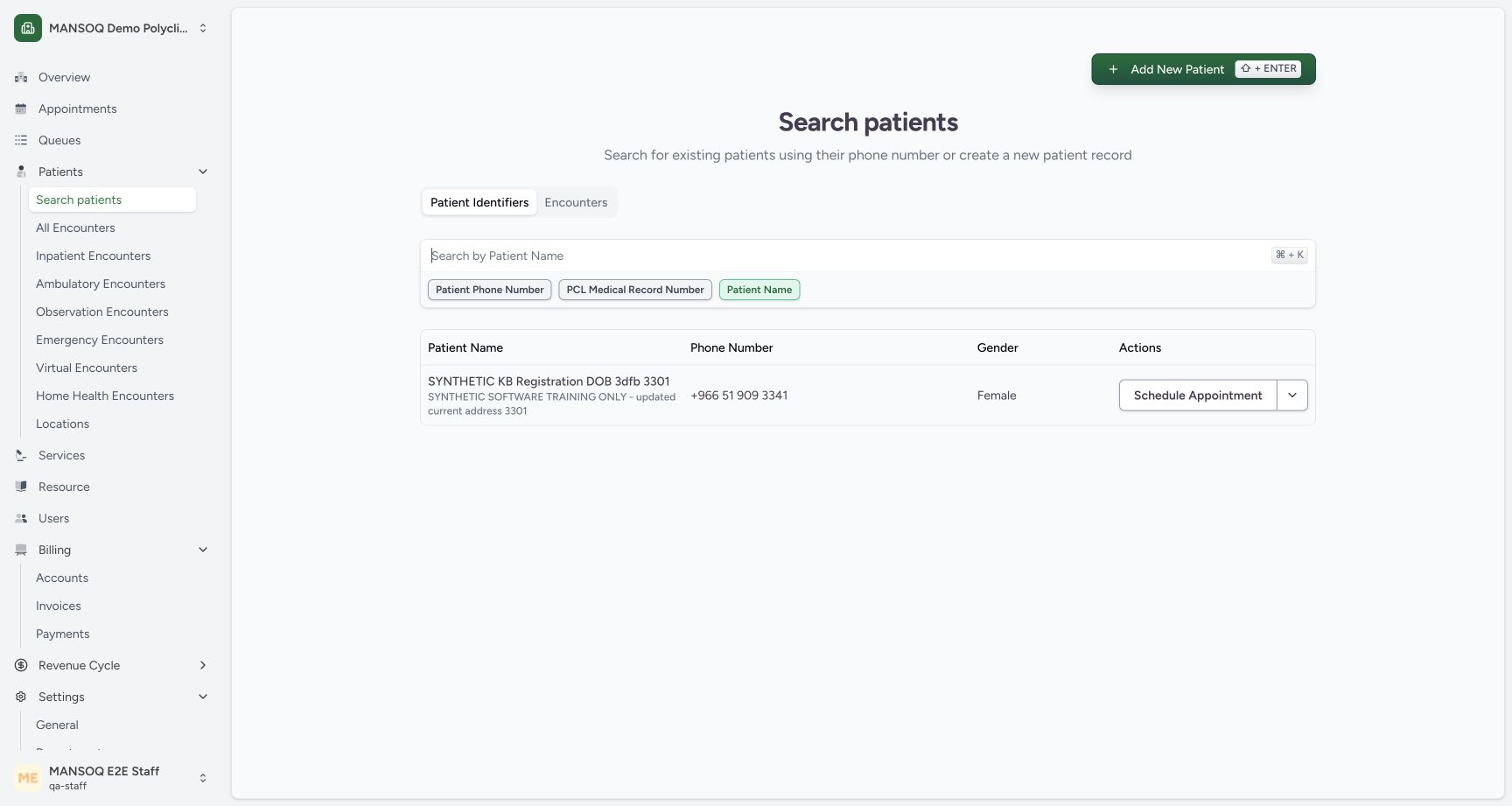 12
12Clear input with the previous result retained
Capture details
Observed committed3dfb training profile on20 October2026 (Asia/Riyadh). Name identifier searches only; no patient, encounter or appointment saved.
Image SHA-256 09f4a13af82620443877ad5127b2926df06f99102cabd68cb08f952ecf43c46b
- Input is empty: The Patient Name placeholder is visible after Clear search.
- Prior result remains visible: This old result is still displayed although the query input is empty.
6. Read an unmatched result carefully
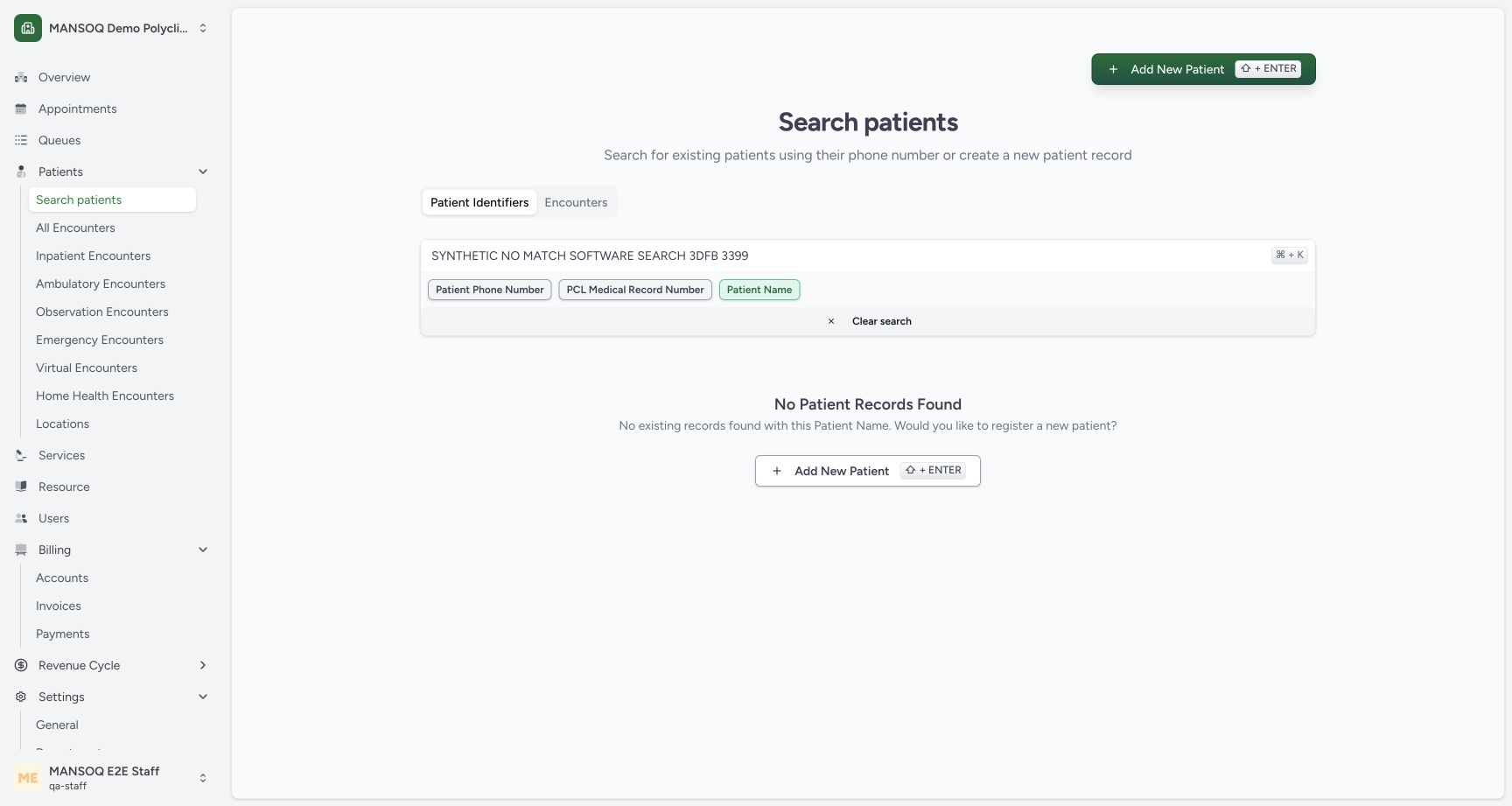
Enter the deliberately fictional query “SYNTHETIC NO MATCH SOFTWARE SEARCH 3DFB 3399”. No Patient Records Found means no result for that query; it does not prove that a patient was never registered.
 12
12Read an unmatched patient-name result
Capture details
Observed committed3dfb training profile on20 October2026 (Asia/Riyadh). Name identifier searches only; no patient, encounter or appointment saved.
Image SHA-256 e488329dea13c839e402a0f6c438108963f426887f81f4cd158742e1717bd9ce
- Read the unmatched query: This deliberately fictional query has no matching patient.
- No Patient Records Found: This message applies to the entered Patient Name query.
7. Recover the known result
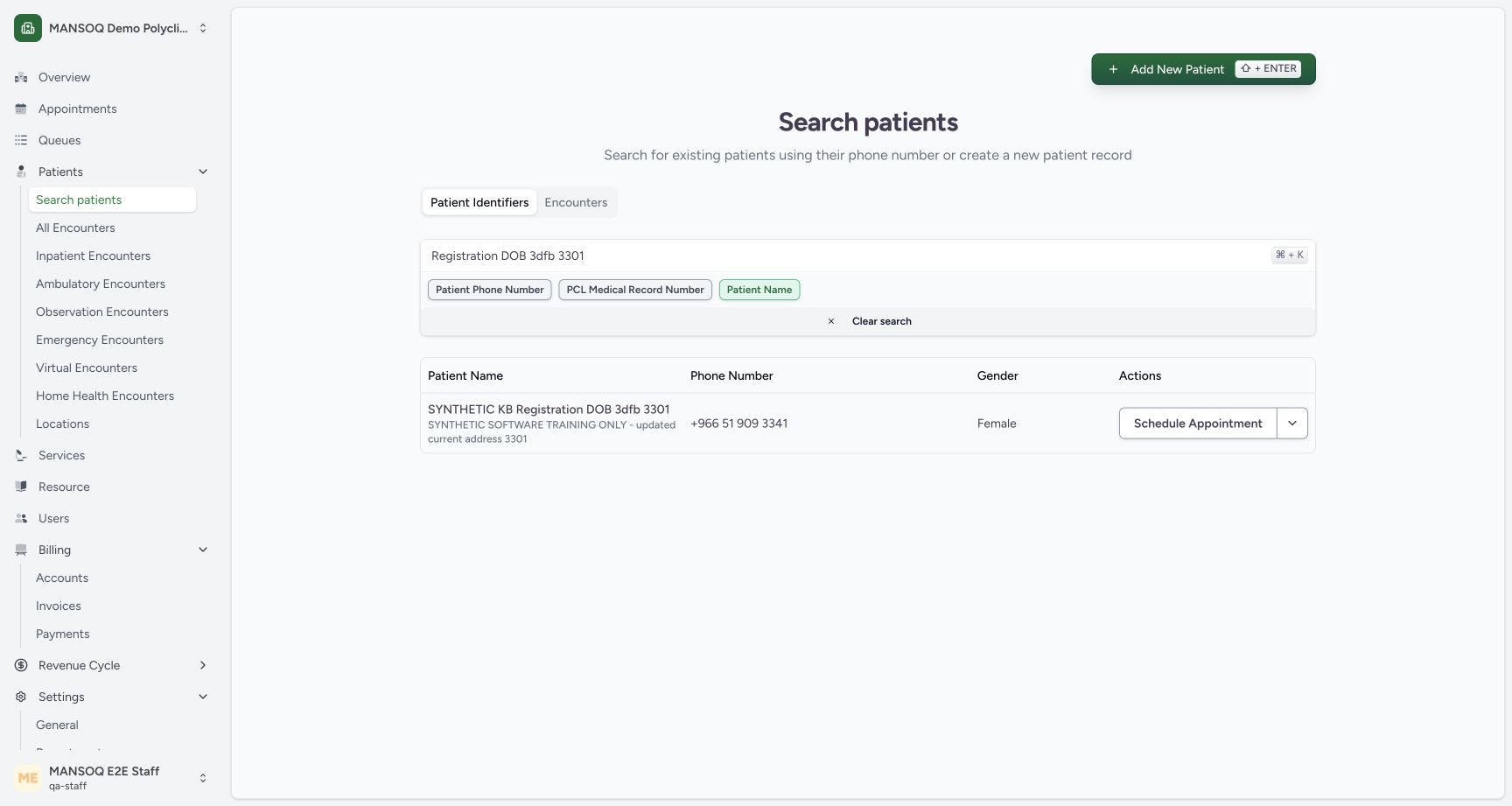
Select the unmatched query text and replace it with “Registration DOB 3dfb 3301”. Wait for the same complete name and current phone number to reappear.
 123
123Recover the known matching result
Capture details
Observed committed3dfb training profile on20 October2026 (Asia/Riyadh). Name identifier searches only; no patient, encounter or appointment saved.
Image SHA-256 5e684ecd3fe2640f802dda8eb8477c922fcde54a28d4f2845aa8a46fdeb80905
- Restore the known query: Replace the unmatched text with the known training name query.
- Verify the recovered result: The same full synthetic name appears again.
- Verify the current phone: The recovered row retains +966 51 909 3341.
8. Finish with an empty search
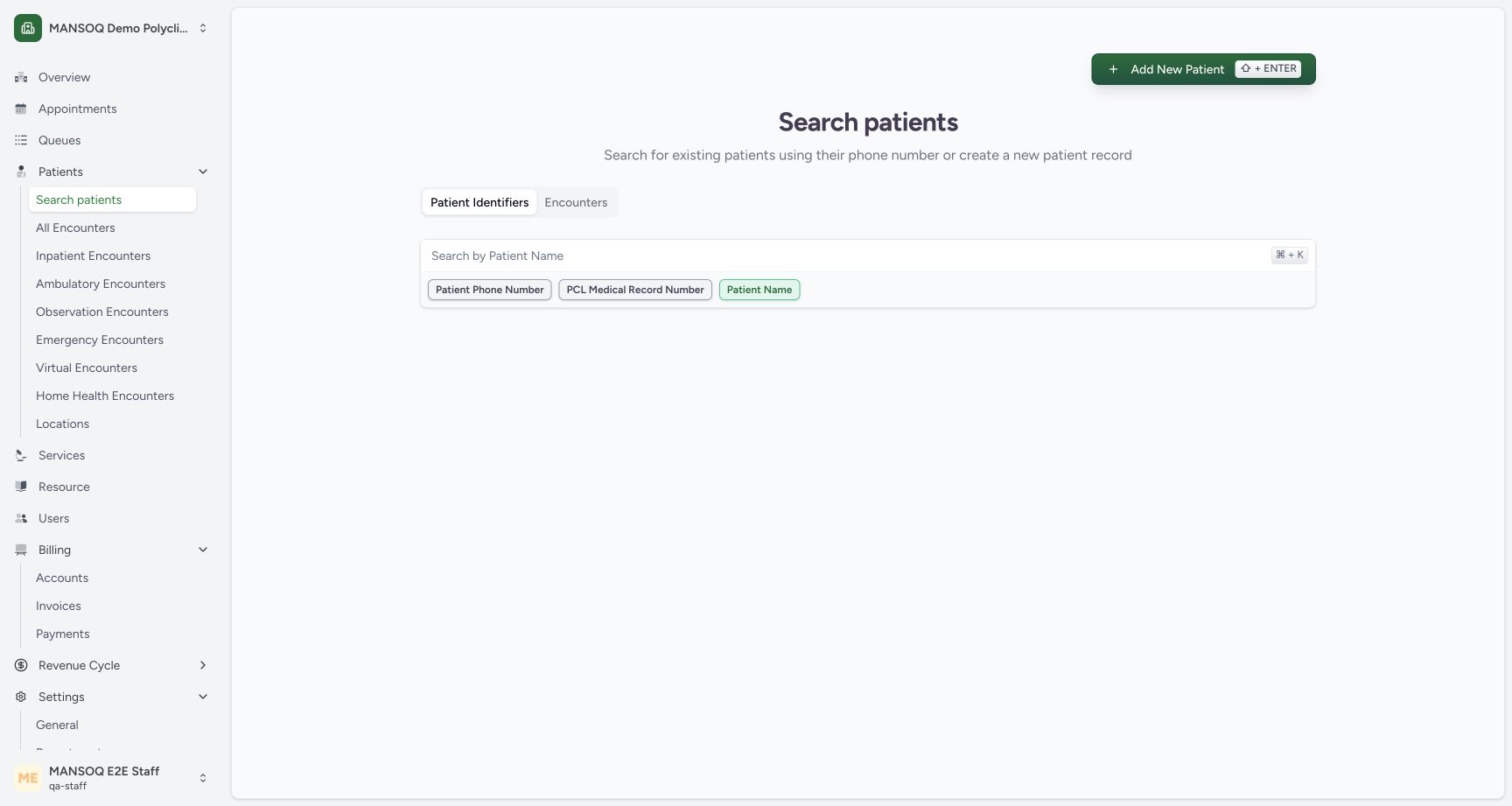
Select all text in the search input and delete it. Verify that the placeholder returns and the result table is gone. Patient Name remains selected; no patient record is changed.
 12
12Leave a clean Patient Name search
Capture details
Observed committed3dfb training profile on20 October2026 (Asia/Riyadh). Name identifier searches only; no patient, encounter or appointment saved.
Image SHA-256 5d6891f22f19e435069befb1725315ff8a259819626861c9cbf3eb200d061a4c
- Confirm the empty query: Select all text in the input and delete it to remove the query and its results.
- Patient Name remains selected: The search type stays Patient Name for the next search.
Use the current search input as context
An empty input after Clear search can coexist with a previous result in this build. Enter a new query or delete the query through the input to reset the displayed search state.
12Clear input with the previous result retained
Capture details
Observed committed3dfb training profile on20 October2026 (Asia/Riyadh). Name identifier searches only; no patient, encounter or appointment saved.
Image SHA-256 09f4a13af82620443877ad5127b2926df06f99102cabd68cb08f952ecf43c46b
- Input is empty: The Patient Name placeholder is visible after Clear search.
- Prior result remains visible: This old result is still displayed although the query input is empty.
12Leave a clean Patient Name search
Capture details
Observed committed3dfb training profile on20 October2026 (Asia/Riyadh). Name identifier searches only; no patient, encounter or appointment saved.
Image SHA-256 5d6891f22f19e435069befb1725315ff8a259819626861c9cbf3eb200d061a4c
- Confirm the empty query: Select all text in the input and delete it to remove the query and its results.
- Patient Name remains selected: The search type stays Patient Name for the next search.
An empty result is query-specific
If the name query finds nothing, review the entered words or use another authorized identifier search. The pictured recovery finds the existing record, so this exercise uses no Add New Patient action.
12Read an unmatched patient-name result
Capture details
Observed committed3dfb training profile on20 October2026 (Asia/Riyadh). Name identifier searches only; no patient, encounter or appointment saved.
Image SHA-256 e488329dea13c839e402a0f6c438108963f426887f81f4cd158742e1717bd9ce
- Read the unmatched query: This deliberately fictional query has no matching patient.
- No Patient Records Found: This message applies to the entered Patient Name query.
123Recover the known matching result
Capture details
Observed committed3dfb training profile on20 October2026 (Asia/Riyadh). Name identifier searches only; no patient, encounter or appointment saved.
Image SHA-256 5e684ecd3fe2640f802dda8eb8477c922fcde54a28d4f2845aa8a46fdeb80905
- Restore the known query: Replace the unmatched text with the known training name query.
- Verify the recovered result: The same full synthetic name appears again.
- Verify the current phone: The recovered row retains +966 51 909 3341.
Source evidence
Every citation uses this exact committed version. The private source repository requires access.
- repositories/platform/mansoq-web/src/components/Patient/PatientIndex.tsx:90 ·
3dfb7c9f519fb5b4cd4452439f3c12346bf58319Source file checksum
b7f38ea49ab4aee4872fd6f35263f9a23a609f9cb2622332ea741192fb3013de - repositories/platform/mansoq-web/src/components/Common/SearchInput.tsx:115 ·
3dfb7c9f519fb5b4cd4452439f3c12346bf58319Source file checksum
be1b2efd035091f6a47853f5022bec2bf89cef015661c5feedbd2e4f2e8cf6d1 - repositories/platform/mansoq-web/src/types/emr/patient/patientApi.ts:39 ·
3dfb7c9f519fb5b4cd4452439f3c12346bf58319Source file checksum
a4753ed5f4f627fd85b2b01f2cb3d67a494fc8b8c3c5212ae627f8ba834bcb4c - repositories/platform/mansoq-core/mansoq/emr/api/viewsets/patient.py:204 ·
3dfb7c9f519fb5b4cd4452439f3c12346bf58319Source file checksum
4d3204a488bd87a6092ef1457cde56548e35e5c56901b8324d7a7272a519fb1f - repositories/platform/mansoq-core/mansoq/security/authorization/patient_identifier_config.py:9 ·
3dfb7c9f519fb5b4cd4452439f3c12346bf58319Source file checksum
0b0e5289c4ed602ea7dfe38e5a1e0c436ff01c727de1768ea72db4939a8694cf - repositories/platform/mansoq-core/mansoq/security/permissions/encounter.py:39 ·
3dfb7c9f519fb5b4cd4452439f3c12346bf58319Source file checksum
06b74efb763810e425de8529660f748ebd56509c729ebc532c8d115102b29218 - repositories/platform/mansoq-core/mansoq/security/authorization/encounter.py:181 ·
3dfb7c9f519fb5b4cd4452439f3c12346bf58319Source file checksum
0e7ff8afcfb57b2371201e16ee6fac26125d6e686af66ed7edd95e49bc07de78