 MANSOQ
 Patient registration · VERSION 3dfb7c9f
Find a patient, verify the birth year and recognize the profile-access boundary
Search by phone, review the matching row, handle an incorrect birth year and open the verified identity without confusing it with full profile access.
Staff
 12
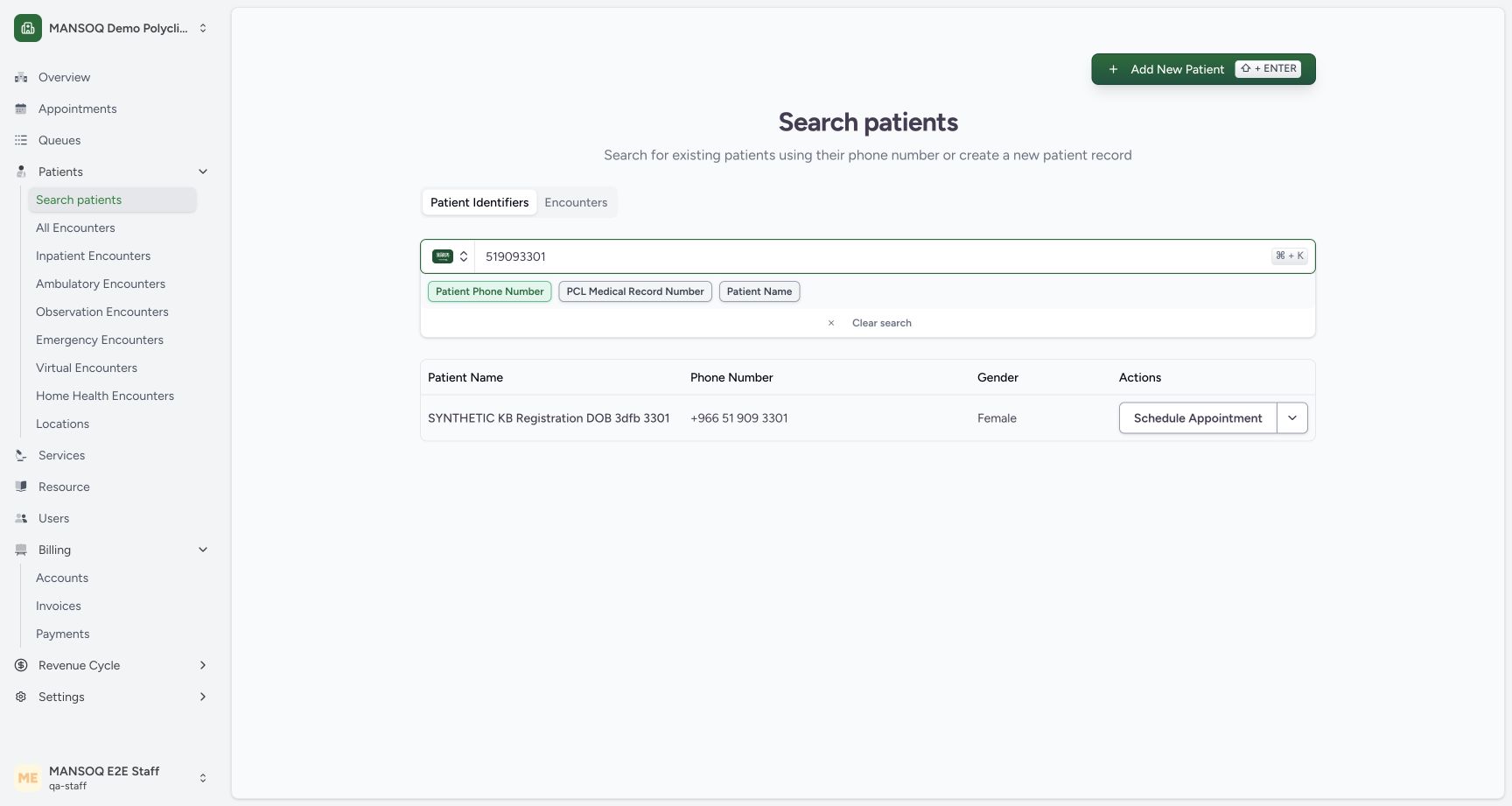
12Find the saved patient by phone number
Capture details
Exact committed 3dfb source, existing non-superuser qa-staff and fictional Polyclinic. Two distinct fictional patients only. Genuine unchanged desktop pixels; native confirmation retains its actual smaller window. No care, admission, booking, grant or configuration mutation.
Image SHA-256 88153034ca02c4139b845661ad36d97306e37b85fb5299f7bdb5f478832740fd
- Matching saved identity: Open the matching identity after checking its name, phone and sex.
- Clear search: Clear the current identifier search before looking up another patient.
 12
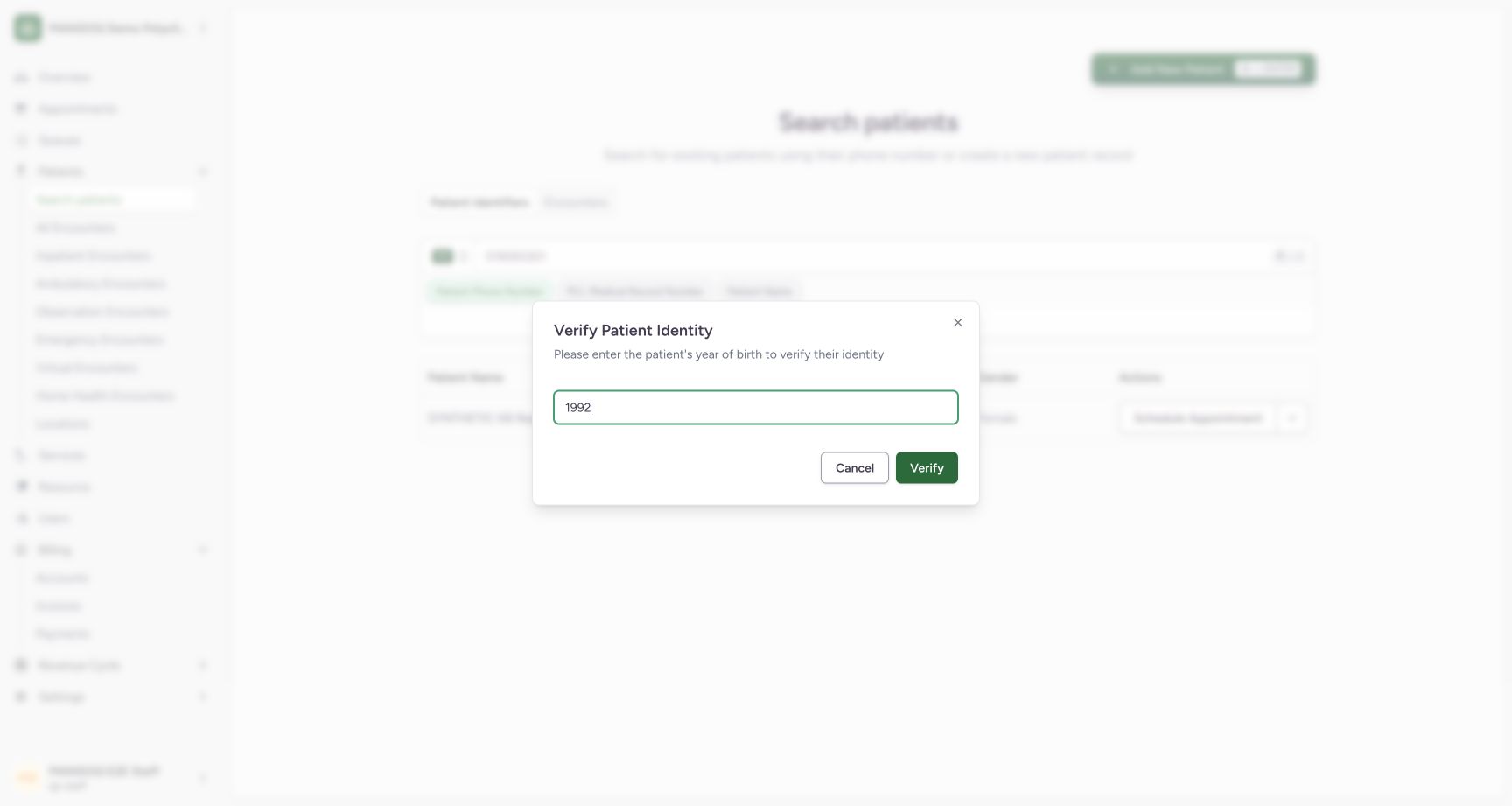
12Verify the saved patient with correct year 1992
Capture details
Exact committed 3dfb source, existing non-superuser qa-staff and fictional Polyclinic. Two distinct fictional patients only. Genuine unchanged desktop pixels; native confirmation retains its actual smaller window. No care, admission, booking, grant or configuration mutation.
Image SHA-256 da7d5041aef78c7b2f16f3c08145187e95ae28740b6ae42f378a09204453fa46
- Correct year 1992: Use the saved patient year of birth1992.
- Verify identity: Verify using the correct saved year.
 12
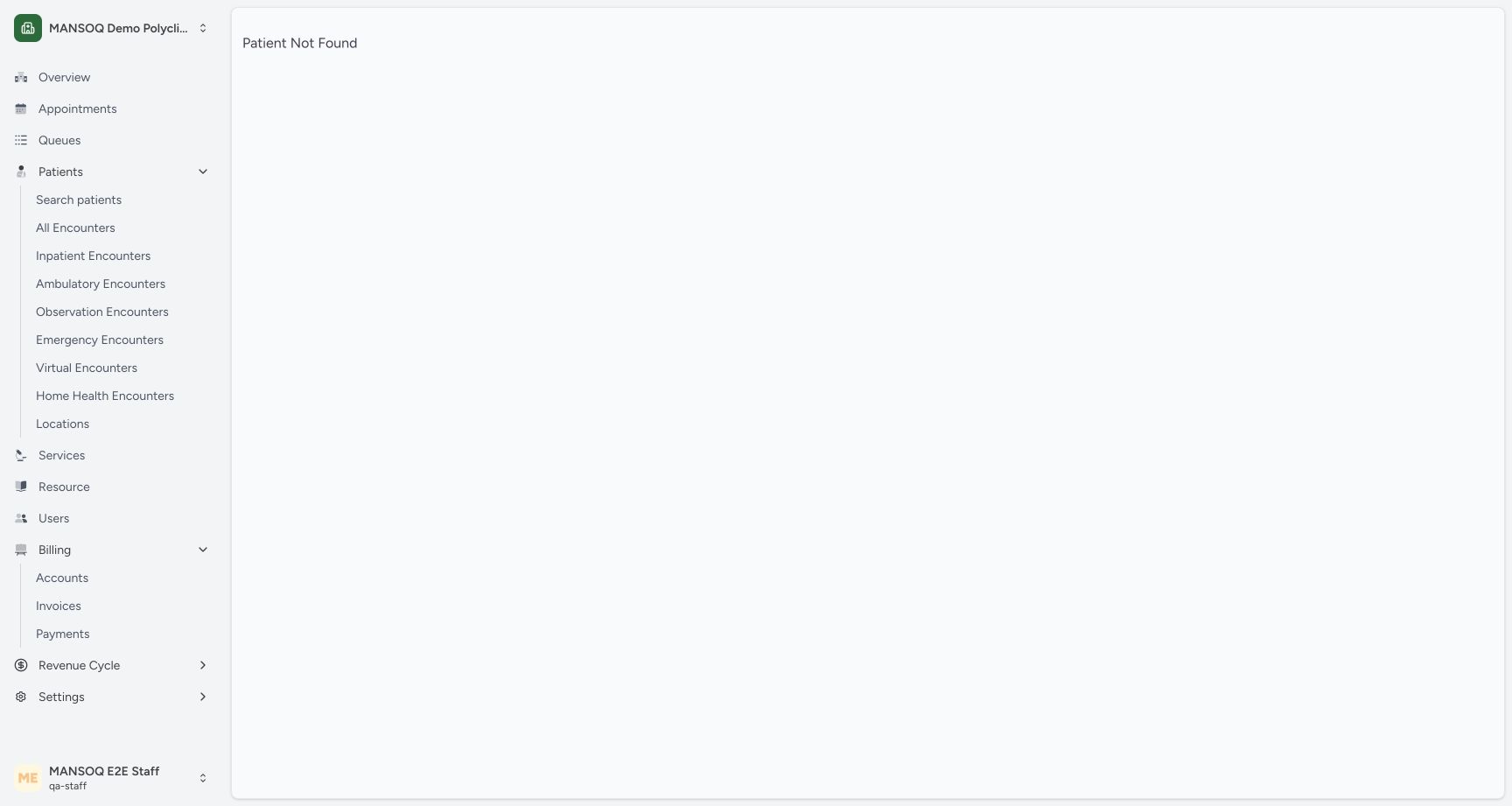
12Full profile is unavailable to this Staff scope
Capture details
Exact committed 3dfb source, existing non-superuser qa-staff and fictional Polyclinic. Two distinct fictional patients only. Genuine unchanged desktop pixels; native confirmation retains its actual smaller window. No care, admission, booking, grant or configuration mutation.
Image SHA-256 4530543f4a348148a1cd44712726b6d1715da1458e4fdbe91029ec9e230020ac
- Patient Not Found: Registration and identity search succeeded, but the full profile is unavailable in this current Staff patient scope.
- Return to Search patients: Return to the authorized identity search workflow.
7 of 7 content blocks have reviewed image alignment. Missing overview or prerequisite images remain open.
Before you begin
- Use an already authenticated authorized Staff session in the assigned fictional Polyclinic. The DOB example is already registered with year of birth 1992 and phone ending 3301.
 12
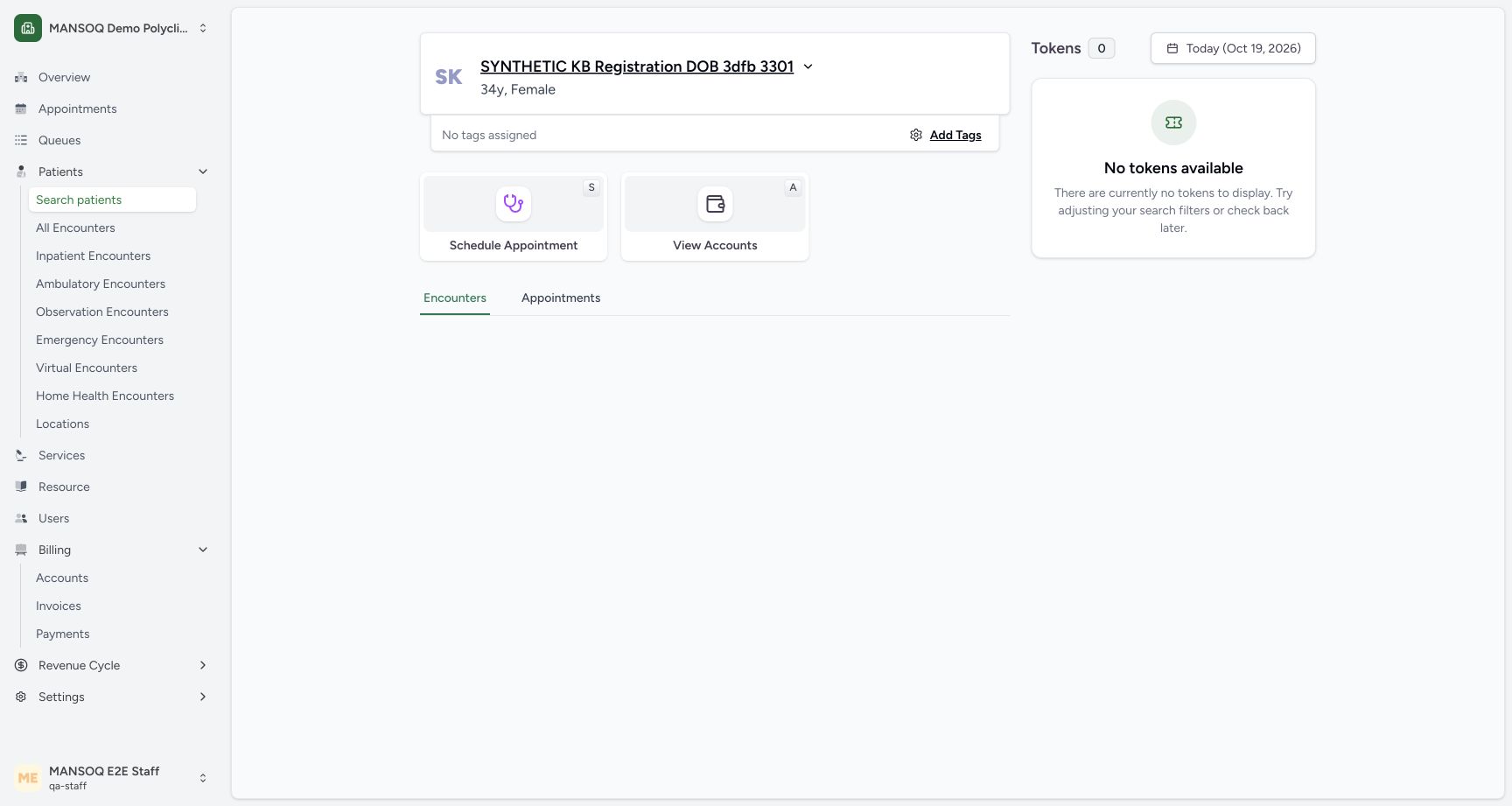
12Recorded release 3dfb7c9f · 2026-10-19T07:54:24.418Z · 1728 × 921 Registered synthetic DOB patient home
Capture details
Exact committed 3dfb source, existing non-superuser qa-staff and fictional Polyclinic. Two distinct fictional patients only. Genuine unchanged desktop pixels; native confirmation retains its actual smaller window. No care, admission, booking, grant or configuration mutation.
Image SHA-256
b06cb1096639ff513ed12ee0870a4b68b5c9ca8cf145e93ff1d247303bf09180- Registered patient: The saved patient home displays the newly registered synthetic identity.
- No tags assigned: This example was registered without selecting a patient tag.
12Recorded release 3dfb7c9f · 2026-10-19T07:55:19.195Z · 1728 × 921 Find the saved patient by phone number
Capture details
Exact committed 3dfb source, existing non-superuser qa-staff and fictional Polyclinic. Two distinct fictional patients only. Genuine unchanged desktop pixels; native confirmation retains its actual smaller window. No care, admission, booking, grant or configuration mutation.
Image SHA-256
88153034ca02c4139b845661ad36d97306e37b85fb5299f7bdb5f478832740fd- Matching saved identity: Open the matching identity after checking its name, phone and sex.
- Clear search: Clear the current identifier search before looking up another patient.
1. Find the saved matching identity
Open Search patients, enter the phone and review the returned name, phone and gender. Select the matching table row to open Verify Patient Identity. The Clear search control removes the lookup text.
12Find the saved patient by phone number
Capture details
Exact committed 3dfb source, existing non-superuser qa-staff and fictional Polyclinic. Two distinct fictional patients only. Genuine unchanged desktop pixels; native confirmation retains its actual smaller window. No care, admission, booking, grant or configuration mutation.
Image SHA-256 88153034ca02c4139b845661ad36d97306e37b85fb5299f7bdb5f478832740fd
- Matching saved identity: Open the matching identity after checking its name, phone and sex.
- Clear search: Clear the current identifier search before looking up another patient.
2. Recognize the controlled incorrect-year result
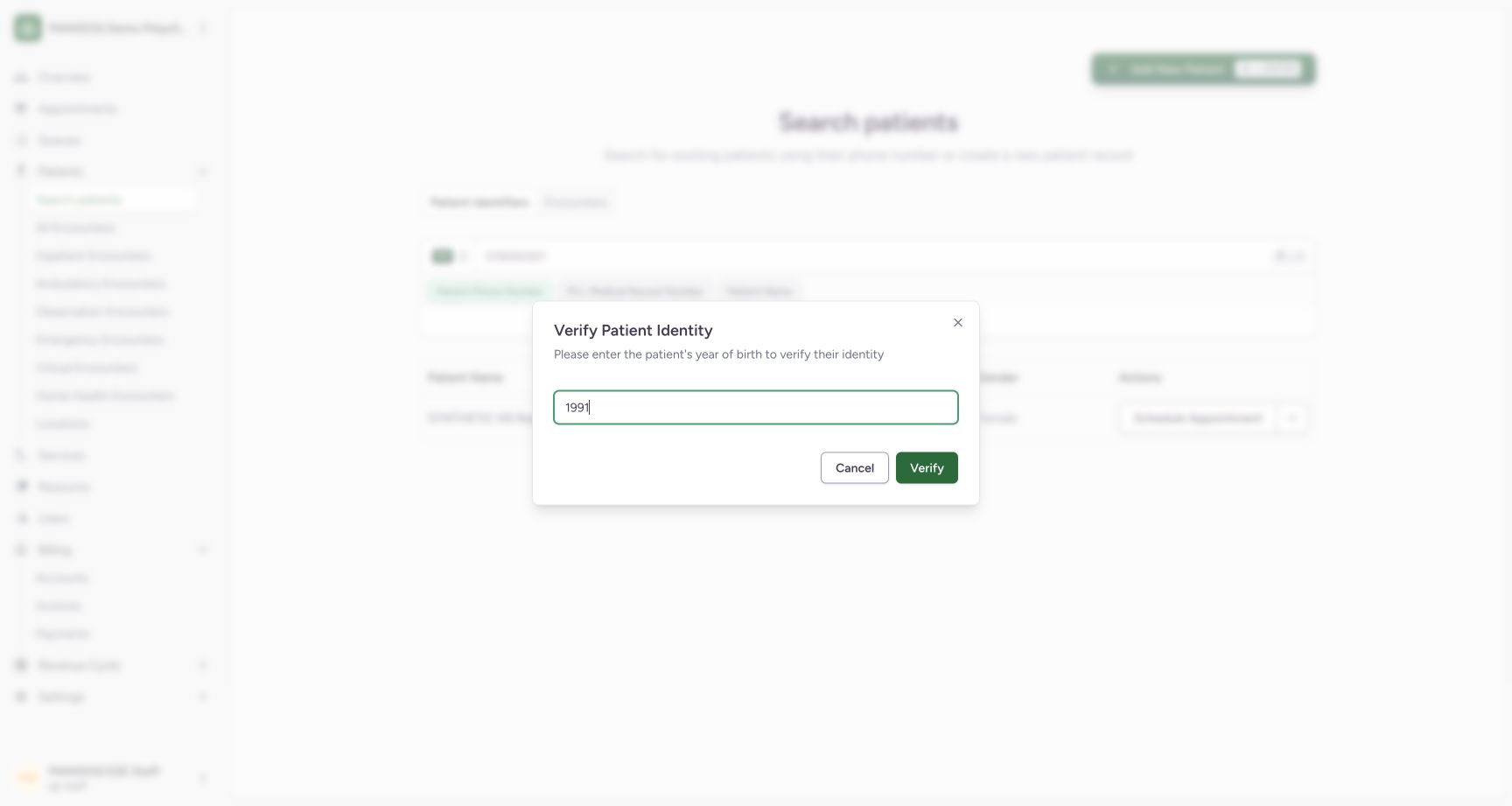
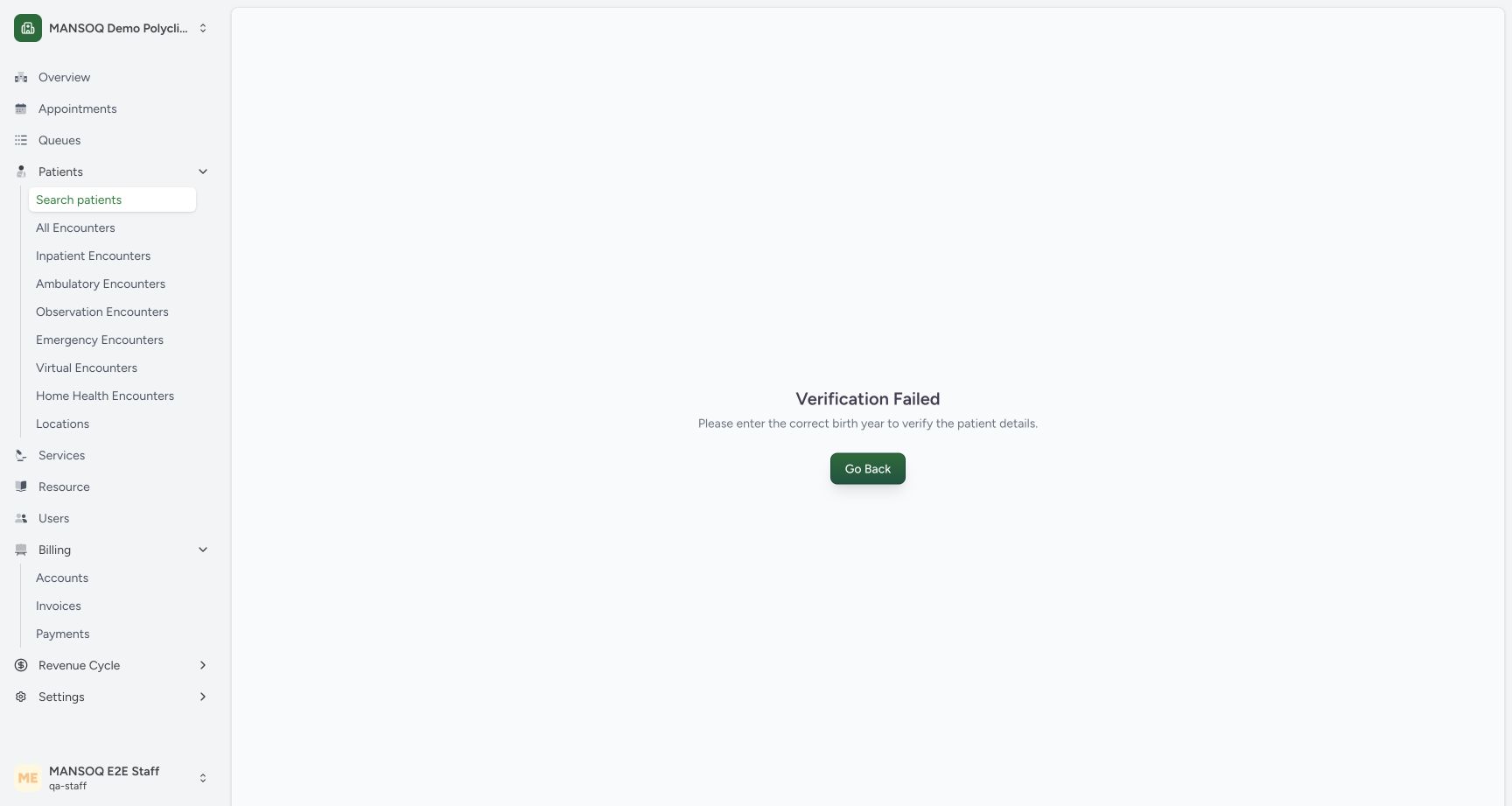
The teaching example deliberately enters 1991, then selects Verify once. The result is Verification Failed with a request to enter the correct birth year. This does not create a new patient.
 123
123Verify identity using year of birth
Capture details
Exact committed 3dfb source, existing non-superuser qa-staff and fictional Polyclinic. Two distinct fictional patients only. Genuine unchanged desktop pixels; native confirmation retains its actual smaller window. No care, admission, booking, grant or configuration mutation.
Image SHA-256 5a392f3366667c10e14b497ea8a2913c5d0cc2a539852a78824a7256907a9265
- Year of birth: Enter the patient year of birth. This unsaved test value1991 is deliberately incorrect for the synthetic example.
- Verify: Verify the selected identity using the entered year.
- Cancel verification: Cancel to return without opening the identity.
 12
12Incorrect birth year fails identity verification
Capture details
Exact committed 3dfb source, existing non-superuser qa-staff and fictional Polyclinic. Two distinct fictional patients only. Genuine unchanged desktop pixels; native confirmation retains its actual smaller window. No care, admission, booking, grant or configuration mutation.
Image SHA-256 13efa5f5bd578ece241bfd66b9177eaac998b63beaf4bb1b307b101007b88d73
- Verification Failed: The incorrect year did not verify the selected patient identity.
- Go Back: Return to search and verify the correct year.
3. Return and verify the correct year
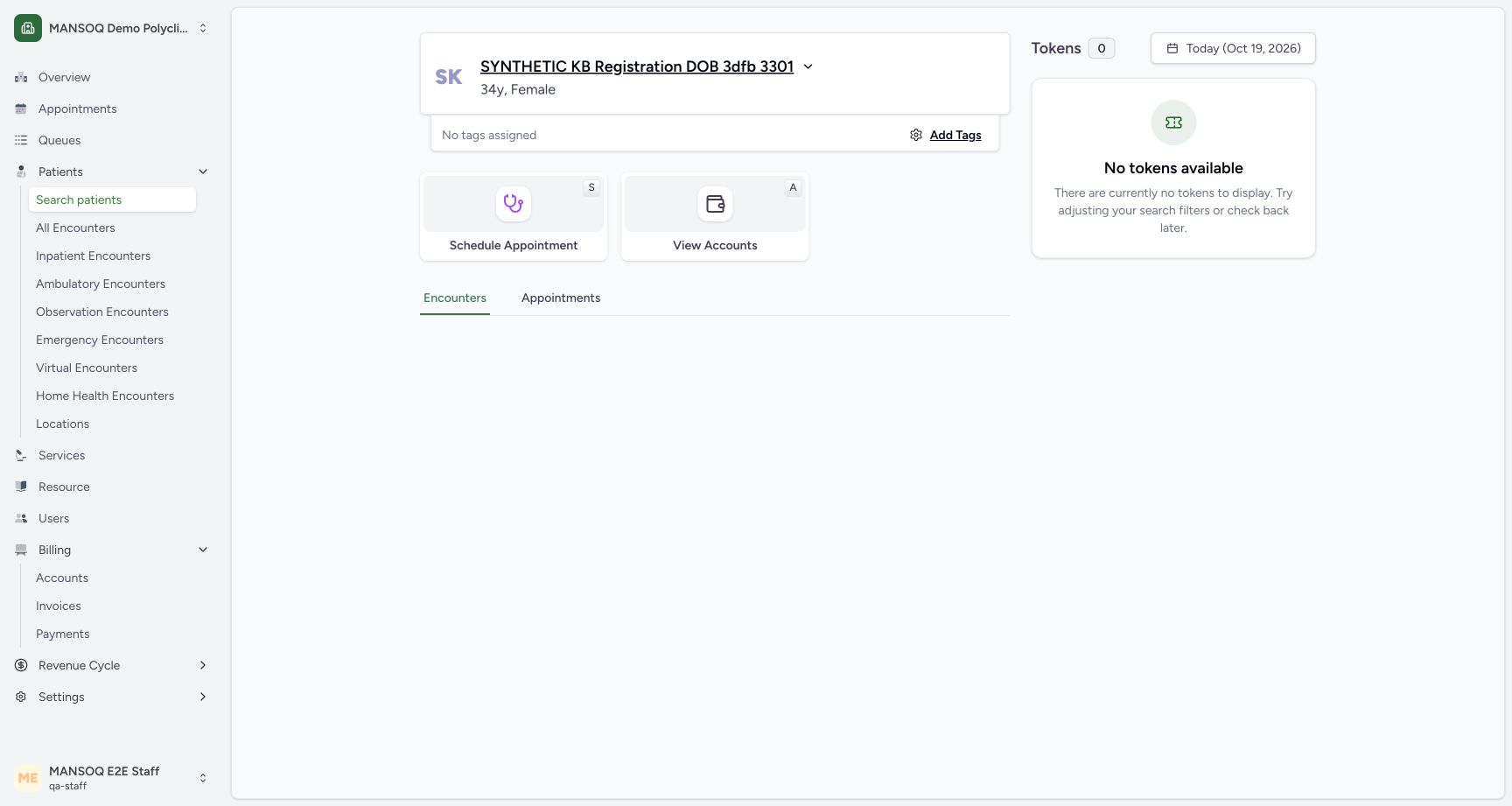
Select Go Back, search for the same saved identity again and select its row. Enter 1992 and choose Verify. The same saved patient home opens.
12Incorrect birth year fails identity verification
Capture details
Exact committed 3dfb source, existing non-superuser qa-staff and fictional Polyclinic. Two distinct fictional patients only. Genuine unchanged desktop pixels; native confirmation retains its actual smaller window. No care, admission, booking, grant or configuration mutation.
Image SHA-256 13efa5f5bd578ece241bfd66b9177eaac998b63beaf4bb1b307b101007b88d73
- Verification Failed: The incorrect year did not verify the selected patient identity.
- Go Back: Return to search and verify the correct year.
12Verify the saved patient with correct year 1992
Capture details
Exact committed 3dfb source, existing non-superuser qa-staff and fictional Polyclinic. Two distinct fictional patients only. Genuine unchanged desktop pixels; native confirmation retains its actual smaller window. No care, admission, booking, grant or configuration mutation.
Image SHA-256 da7d5041aef78c7b2f16f3c08145187e95ae28740b6ae42f378a09204453fa46
- Correct year 1992: Use the saved patient year of birth1992.
- Verify identity: Verify using the correct saved year.
 12
12Correct year opens the saved identity home
Capture details
Exact committed 3dfb source, existing non-superuser qa-staff and fictional Polyclinic. Two distinct fictional patients only. Genuine unchanged desktop pixels; native confirmation retains its actual smaller window. No care, admission, booking, grant or configuration mutation.
Image SHA-256 b06cb1096639ff513ed12ee0870a4b68b5c9ca8cf145e93ff1d247303bf09180
- Verified identity: The correct year opens this same saved synthetic identity.
- Search patients: Return to Search patients when starting another registration.
4. Review saved identity contact details
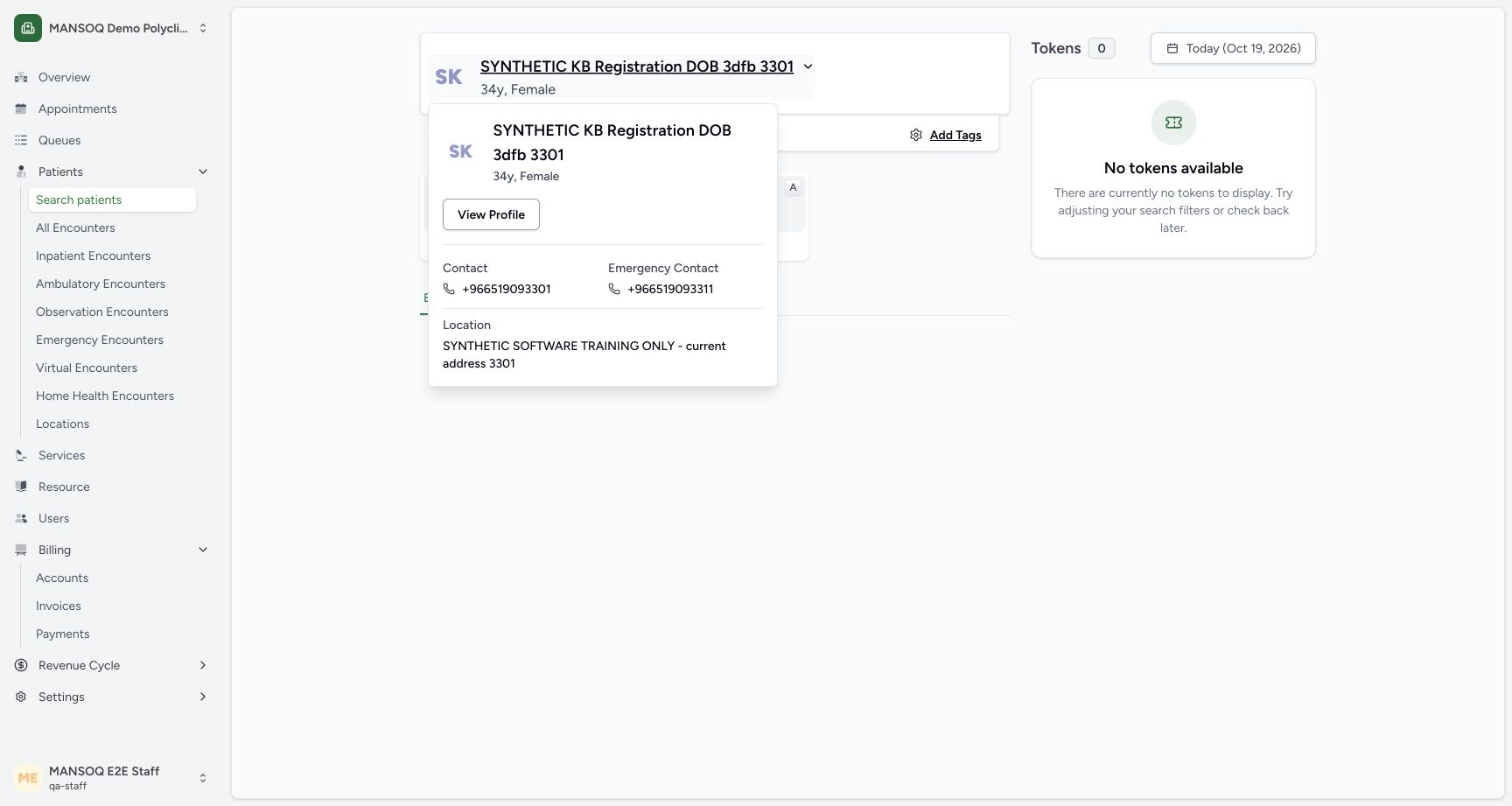
Select the saved patient-name heading to open its identity menu. This menu shows Contact, Emergency Contact and the synthetic address. Review the intended identity before choosing another action.
12Registered synthetic DOB patient home
Capture details
Exact committed 3dfb source, existing non-superuser qa-staff and fictional Polyclinic. Two distinct fictional patients only. Genuine unchanged desktop pixels; native confirmation retains its actual smaller window. No care, admission, booking, grant or configuration mutation.
Image SHA-256 b06cb1096639ff513ed12ee0870a4b68b5c9ca8cf145e93ff1d247303bf09180
- Registered patient: The saved patient home displays the newly registered synthetic identity.
- No tags assigned: This example was registered without selecting a patient tag.
 123
123Saved identity menu with contact and profile entry
Capture details
Exact committed 3dfb source, existing non-superuser qa-staff and fictional Polyclinic. Two distinct fictional patients only. Genuine unchanged desktop pixels; native confirmation retains its actual smaller window. No care, admission, booking, grant or configuration mutation.
Image SHA-256 b7dc61fa5ee5915dd4a7d38bb9df5c744b6354f755a658b4c7dd573309bea645
- View Profile: This entry opens the full patient profile, subject to separate patient-scope authorization.
- Saved contact: The identity menu displays the saved contact number.
- Saved emergency contact: The identity menu distinguishes the saved emergency contact.
5. Recognize the separate full-profile boundary
Choose View Profile from that menu. In this current Staff scope, the full profile displays Patient Not Found even though registration and year verification succeeded. Return through Patients → Search patients. The displayed failure is not evidence that registration was lost.
123Saved identity menu with contact and profile entry
Capture details
Exact committed 3dfb source, existing non-superuser qa-staff and fictional Polyclinic. Two distinct fictional patients only. Genuine unchanged desktop pixels; native confirmation retains its actual smaller window. No care, admission, booking, grant or configuration mutation.
Image SHA-256 b7dc61fa5ee5915dd4a7d38bb9df5c744b6354f755a658b4c7dd573309bea645
- View Profile: This entry opens the full patient profile, subject to separate patient-scope authorization.
- Saved contact: The identity menu displays the saved contact number.
- Saved emergency contact: The identity menu distinguishes the saved emergency contact.
12Full profile is unavailable to this Staff scope
Capture details
Exact committed 3dfb source, existing non-superuser qa-staff and fictional Polyclinic. Two distinct fictional patients only. Genuine unchanged desktop pixels; native confirmation retains its actual smaller window. No care, admission, booking, grant or configuration mutation.
Image SHA-256 4530543f4a348148a1cd44712726b6d1715da1458e4fdbe91029ec9e230020ac
- Patient Not Found: Registration and identity search succeeded, but the full profile is unavailable in this current Staff patient scope.
- Return to Search patients: Return to the authorized identity search workflow.
12Find the saved patient by phone number
Capture details
Exact committed 3dfb source, existing non-superuser qa-staff and fictional Polyclinic. Two distinct fictional patients only. Genuine unchanged desktop pixels; native confirmation retains its actual smaller window. No care, admission, booking, grant or configuration mutation.
Image SHA-256 88153034ca02c4139b845661ad36d97306e37b85fb5299f7bdb5f478832740fd
- Matching saved identity: Open the matching identity after checking its name, phone and sex.
- Clear search: Clear the current identifier search before looking up another patient.
Source evidence
Every citation uses this exact committed version. The private source repository requires access.
- repositories/platform/mansoq-web/src/components/Patient/PatientIndex.tsx:640 ·
3dfb7c9f519fb5b4cd4452439f3c12346bf58319Source file checksum
b7f38ea49ab4aee4872fd6f35263f9a23a609f9cb2622332ea741192fb3013de - repositories/platform/mansoq-web/src/components/Patient/PatientIndex.tsx:186 ·
3dfb7c9f519fb5b4cd4452439f3c12346bf58319Source file checksum
b7f38ea49ab4aee4872fd6f35263f9a23a609f9cb2622332ea741192fb3013de - repositories/platform/mansoq-web/src/pages/Patient/PatientHome.tsx:84 ·
3dfb7c9f519fb5b4cd4452439f3c12346bf58319Source file checksum
c89e83e3e910337d0df6445d984f41d331f79ea5962212fff64709dec6809b7d - repositories/platform/mansoq-web/src/pages/Patient/PatientHome.tsx:274 ·
3dfb7c9f519fb5b4cd4452439f3c12346bf58319Source file checksum
c89e83e3e910337d0df6445d984f41d331f79ea5962212fff64709dec6809b7d - repositories/platform/mansoq-core/mansoq/emr/api/viewsets/patient.py:278 ·
3dfb7c9f519fb5b4cd4452439f3c12346bf58319Source file checksum
4d3204a488bd87a6092ef1457cde56548e35e5c56901b8324d7a7272a519fb1f - repositories/platform/mansoq-core/mansoq/emr/api/viewsets/patient.py:93 ·
3dfb7c9f519fb5b4cd4452439f3c12346bf58319Source file checksum
4d3204a488bd87a6092ef1457cde56548e35e5c56901b8324d7a7272a519fb1f - repositories/platform/mansoq-core/mansoq/security/authorization/patient.py:16 ·
3dfb7c9f519fb5b4cd4452439f3c12346bf58319Source file checksum
45de75f24e42fa30316a96efb92b23c577e2c3831e17ec96e7ff2c73d0d1973d