 MANSOQ
 Appointments and registration handoff · VERSION 3dfb7c9f
Review practitioners and close without booking
Inspect a department’s existing practitioner, leave the practitioner unselected and close the unsaved Book Appointment sheet.
Staff
 1
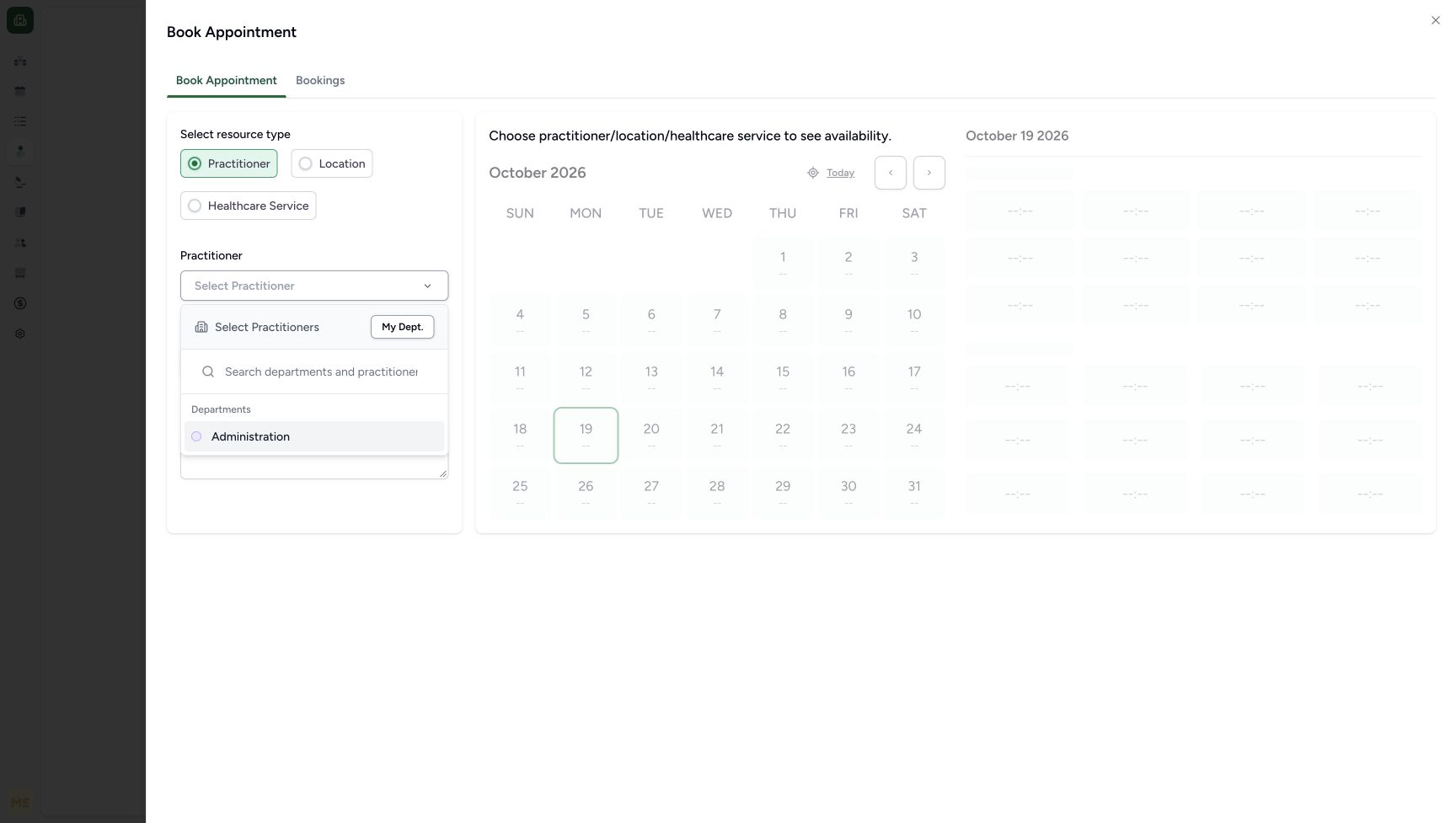
1Choose the actual Administration department option
Capture details
Same exact 3dfb source and existing ordinary Staff actor. This supplementary no-save image was captured after the earlier appointment had been checked in; it illustrates the same Administration option used in the earlier booking sequence. The practitioner was not selected during this review, and no slot, booking, patient or identifier changed.
Image SHA-256 0f55f8a61c095010cf948ec4ef19e2b4b828abb50ffb8d1ff64688e5ec02d5a8
- Administration: Choose the existing Administration department to show its available practitioners.
 1
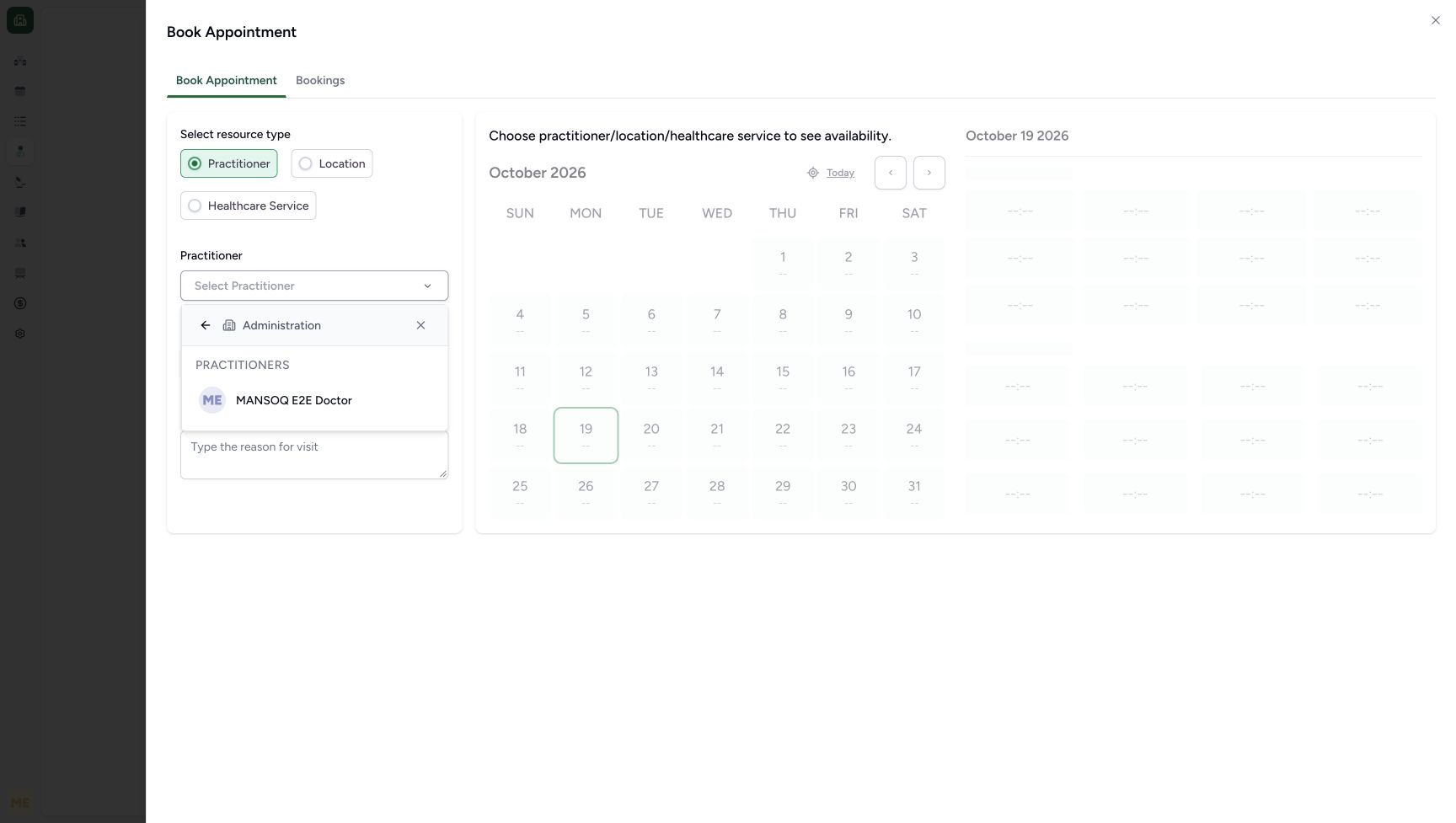
1Inspect the existing Doctor without selecting it
Capture details
Genuine later no-save review on exact 3dfb source with the existing ordinary Staff actor and saved fictional A identity. Department inspection leaves the practitioner unselected. Original readbacks preserve all four monitored patient/identifier/booking/slot table multisets and all 308 sequence states. This image precedes Close; no post-close screenshot is claimed.
Image SHA-256 1ce1aa3afcecde6c6ebd11e28b12c5fbe43ea27241b6fc7475bb6ab8e3ca50e2
- Existing Doctor option: Read the existing practitioner name without selecting the row.
 12
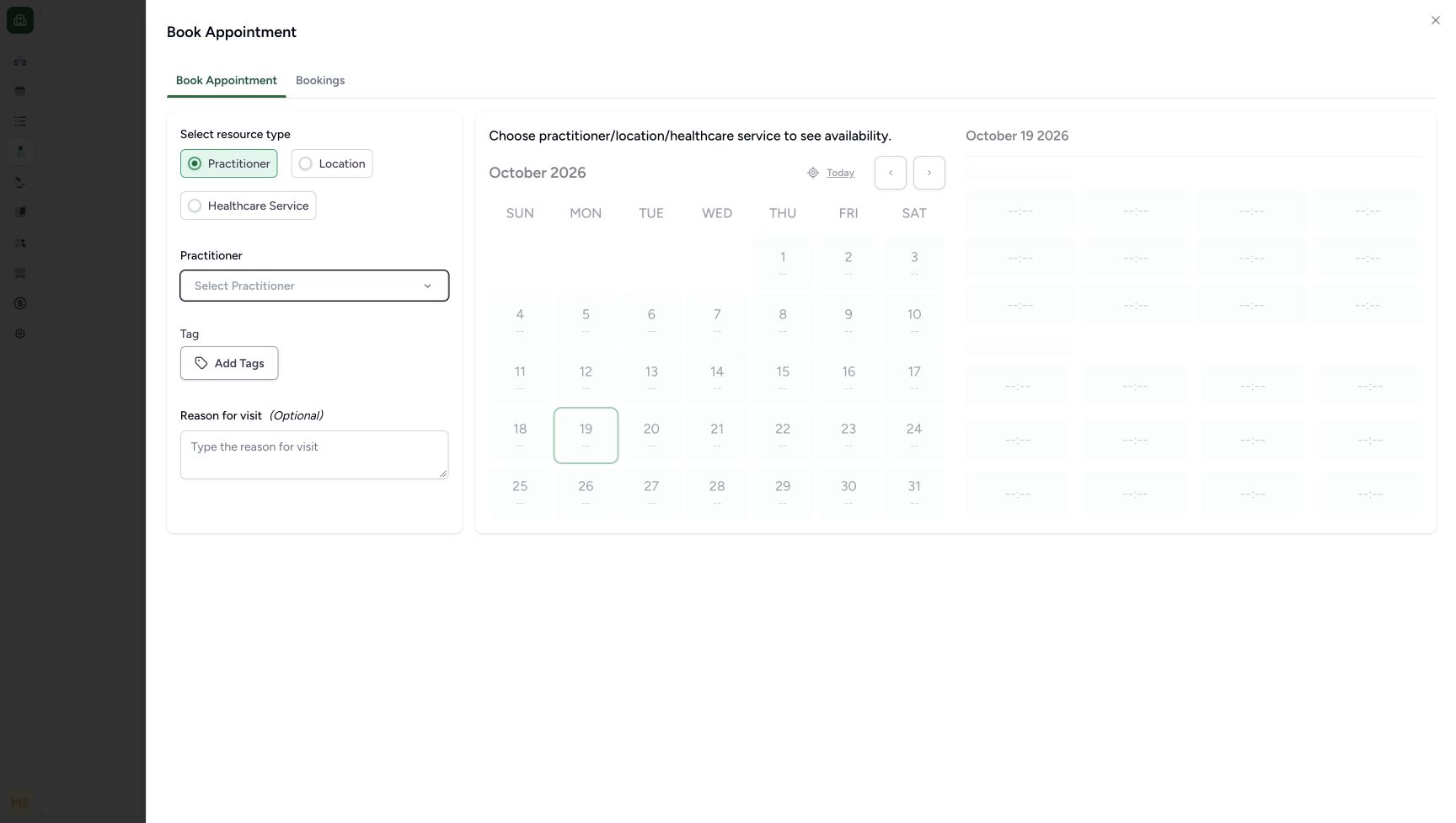
12Close the sheet with no practitioner selected
Capture details
Genuine later no-save review on exact 3dfb source with the existing ordinary Staff actor and saved fictional A identity. Department inspection leaves the practitioner unselected. Original readbacks preserve all four monitored patient/identifier/booking/slot table multisets and all 308 sequence states. This image precedes Close; no post-close screenshot is claimed.
Image SHA-256 95376fd4281b06b838525aded194531db77d88267537c95e666cdd02c00fe425
- Close: Use the upper-right Close control to leave this unsaved booking sheet.
- No practitioner selected: Select Practitioner is still empty; no practitioner has been chosen.
6 of 6 content blocks have reviewed image alignment. Missing overview or prerequisite images remain open.
Before you begin
- Use an already authenticated authorized Staff session in the assigned fictional Polyclinic. Begin in the existing patient’s Book Appointment sheet with Practitioner selected and the Select Practitioner picker open. The related booking lesson covers finding and verifying the saved patient and opening this sheet. This dated example uses the fictional DOB patient with phone ending 3301; sign-in is not illustrated here.1
Recorded release 3dfb7c9f · 2026-10-19T12:29:16.808Z · 1728 × 977 Choose the actual Administration department option
Capture details
Same exact 3dfb source and existing ordinary Staff actor. This supplementary no-save image was captured after the earlier appointment had been checked in; it illustrates the same Administration option used in the earlier booking sequence. The practitioner was not selected during this review, and no slot, booking, patient or identifier changed.
Image SHA-256
0f55f8a61c095010cf948ec4ef19e2b4b828abb50ffb8d1ff64688e5ec02d5a8- Administration: Choose the existing Administration department to show its available practitioners.
12Recorded release 3dfb7c9f · 2026-10-19T12:29:43.074Z · 1728 × 977 Close the sheet with no practitioner selected
Capture details
Genuine later no-save review on exact 3dfb source with the existing ordinary Staff actor and saved fictional A identity. Department inspection leaves the practitioner unselected. Original readbacks preserve all four monitored patient/identifier/booking/slot table multisets and all 308 sequence states. This image precedes Close; no post-close screenshot is claimed.
Image SHA-256
95376fd4281b06b838525aded194531db77d88267537c95e666cdd02c00fe425- Close: Use the upper-right Close control to leave this unsaved booking sheet.
- No practitioner selected: Select Practitioner is still empty; no practitioner has been chosen.
1. Open the existing Administration department
In the open practitioner picker, choose Administration. This displays the department’s practitioners; it does not yet choose a practitioner.
1Choose the actual Administration department option
Capture details
Same exact 3dfb source and existing ordinary Staff actor. This supplementary no-save image was captured after the earlier appointment had been checked in; it illustrates the same Administration option used in the earlier booking sequence. The practitioner was not selected during this review, and no slot, booking, patient or identifier changed.
Image SHA-256 0f55f8a61c095010cf948ec4ef19e2b4b828abb50ffb8d1ff64688e5ec02d5a8
- Administration: Choose the existing Administration department to show its available practitioners.
2. Inspect the Doctor without selecting the row
Read MANSOQ E2E Doctor under Administration. Leave this row unselected during the review. The main field still reads Select Practitioner.
1Inspect the existing Doctor without selecting it
Capture details
Genuine later no-save review on exact 3dfb source with the existing ordinary Staff actor and saved fictional A identity. Department inspection leaves the practitioner unselected. Original readbacks preserve all four monitored patient/identifier/booking/slot table multisets and all 308 sequence states. This image precedes Close; no post-close screenshot is claimed.
Image SHA-256 1ce1aa3afcecde6c6ebd11e28b12c5fbe43ea27241b6fc7475bb6ab8e3ca50e2
- Existing Doctor option: Read the existing practitioner name without selecting the row.
3. Close the unsaved booking sheet
Leave Select Practitioner empty. Use the Close (×) control at the upper-right of Book Appointment to leave the sheet without confirming an appointment.
12Close the sheet with no practitioner selected
Capture details
Genuine later no-save review on exact 3dfb source with the existing ordinary Staff actor and saved fictional A identity. Department inspection leaves the practitioner unselected. Original readbacks preserve all four monitored patient/identifier/booking/slot table multisets and all 308 sequence states. This image precedes Close; no post-close screenshot is claimed.
Image SHA-256 95376fd4281b06b838525aded194531db77d88267537c95e666cdd02c00fe425
- Close: Use the upper-right Close control to leave this unsaved booking sheet.
- No practitioner selected: Select Practitioner is still empty; no practitioner has been chosen.
An empty practitioner field keeps this review before slot selection
With Select Practitioner empty, the screen still asks you to choose a practitioner, location or healthcare service to see availability. The calendar and time-slot area remain muted. This review stops before choosing a practitioner or an appointment time.
12Close the sheet with no practitioner selected
Capture details
Genuine later no-save review on exact 3dfb source with the existing ordinary Staff actor and saved fictional A identity. Department inspection leaves the practitioner unselected. Original readbacks preserve all four monitored patient/identifier/booking/slot table multisets and all 308 sequence states. This image precedes Close; no post-close screenshot is claimed.
Image SHA-256 95376fd4281b06b838525aded194531db77d88267537c95e666cdd02c00fe425
- Close: Use the upper-right Close control to leave this unsaved booking sheet.
- No practitioner selected: Select Practitioner is still empty; no practitioner has been chosen.
Source evidence
Every citation uses this exact committed version. The private source repository requires access.
- repositories/platform/mansoq-web/src/pages/Appointments/components/PractitionerSelector.tsx:116 ·
3dfb7c9f519fb5b4cd4452439f3c12346bf58319Source file checksum
fbff1cae7ee20060cda82aff258844a6a4040444176b5c0df23c6e90de1d0790 - repositories/platform/mansoq-web/src/pages/Appointments/components/PractitionerSelector.tsx:184 ·
3dfb7c9f519fb5b4cd4452439f3c12346bf58319Source file checksum
fbff1cae7ee20060cda82aff258844a6a4040444176b5c0df23c6e90de1d0790 - repositories/platform/mansoq-web/src/pages/Appointments/components/PractitionerSelector.tsx:214 ·
3dfb7c9f519fb5b4cd4452439f3c12346bf58319Source file checksum
fbff1cae7ee20060cda82aff258844a6a4040444176b5c0df23c6e90de1d0790 - repositories/platform/mansoq-web/src/pages/Appointments/components/PractitionerSelector.tsx:403 ·
3dfb7c9f519fb5b4cd4452439f3c12346bf58319Source file checksum
fbff1cae7ee20060cda82aff258844a6a4040444176b5c0df23c6e90de1d0790 - repositories/platform/mansoq-web/src/components/Schedule/ResourceSelector.tsx:40 ·
3dfb7c9f519fb5b4cd4452439f3c12346bf58319Source file checksum
39301e210d1d05c37d2509ee40db51a3360bf2c74041120fc7a64e354834da90 - repositories/platform/mansoq-web/src/pages/Appointments/BookAppointment/BookAppointmentDetails.tsx:46 ·
3dfb7c9f519fb5b4cd4452439f3c12346bf58319Source file checksum
10a7aab902525f4669d7219477e1ca6b7e333f38fbecc8552f608fbc721023f2 - repositories/platform/mansoq-web/src/pages/Appointments/BookAppointment/BookAppointmentDetails.tsx:90 ·
3dfb7c9f519fb5b4cd4452439f3c12346bf58319Source file checksum
10a7aab902525f4669d7219477e1ca6b7e333f38fbecc8552f608fbc721023f2 - repositories/platform/mansoq-web/src/pages/Appointments/BookAppointment/AppointmentSlotPicker.tsx:49 ·
3dfb7c9f519fb5b4cd4452439f3c12346bf58319Source file checksum
d2211acfcae4cf531e0b30aad5c9141c71caaaed7f04cc9dad2b32750f0ef1cc - repositories/platform/mansoq-web/src/pages/Appointments/BookAppointment/AppointmentDateSelection.tsx:42 ·
3dfb7c9f519fb5b4cd4452439f3c12346bf58319Source file checksum
074e85911458d3e6756aa3510707e85a086dd5ce5f370e69adc4306355efb42f - repositories/platform/mansoq-web/src/pages/Appointments/BookAppointment/BookAppointmentSheet.tsx:46 ·
3dfb7c9f519fb5b4cd4452439f3c12346bf58319Source file checksum
b0be7b6ec08868a767fb921a1992c20bcaaa068dddf94db1882e8601c555db5a - repositories/platform/mansoq-web/src/components/ui/sheet.tsx:67 ·
3dfb7c9f519fb5b4cd4452439f3c12346bf58319Source file checksum
f24f80ee5607e9214330ad2f65300daa7bf324ad6d91142af174841beb77fe88