 MANSOQ
 Patient registration and profile management · VERSION 3dfb7c9f
Keep an unsaved patient edit by choosing Cancel
Open the unsaved-changes warning and choose Cancel to remain in the editor with the draft still present.
Staff
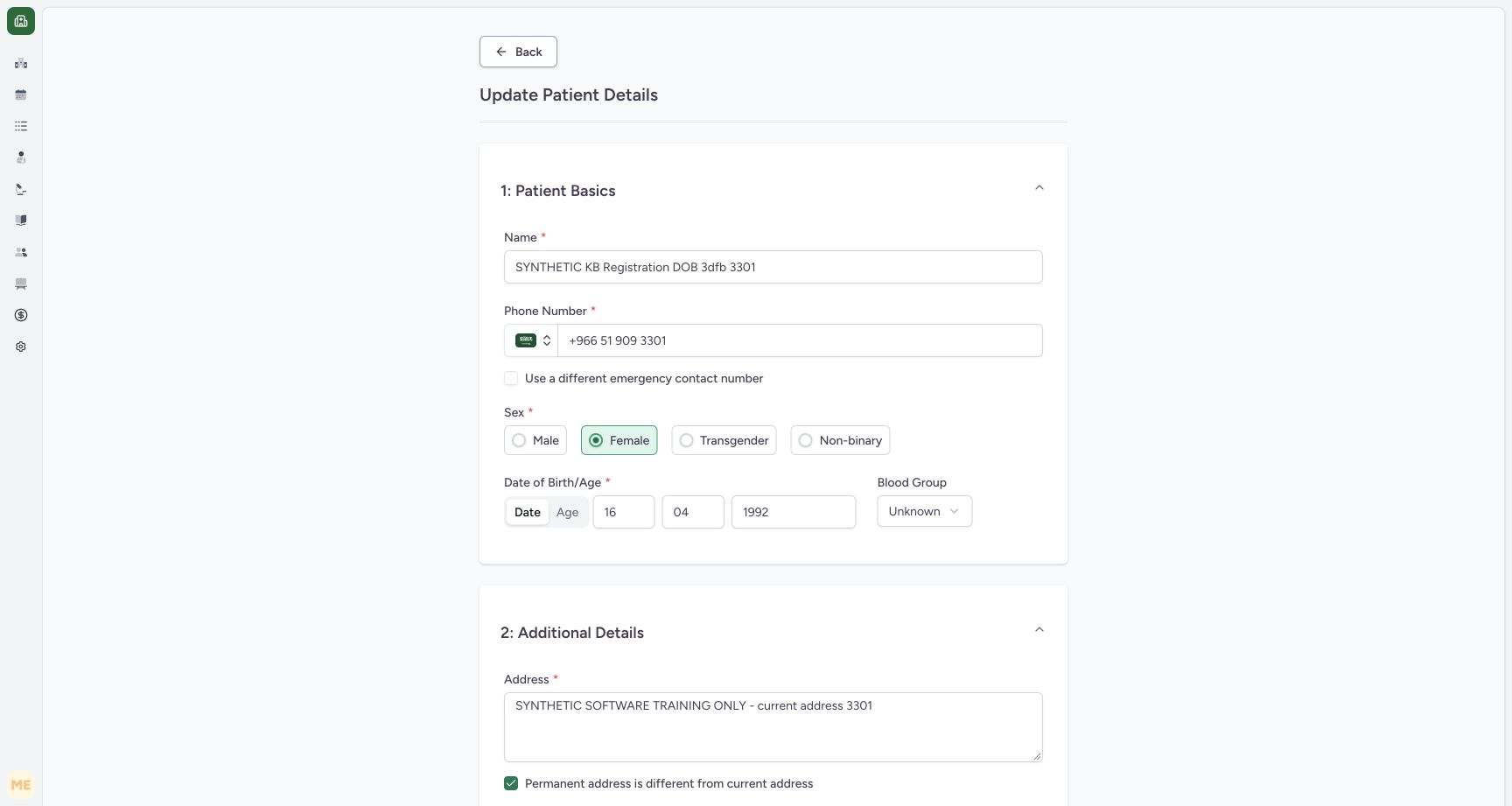 123
123Restored name with a temporary unsaved checkbox change
Capture details
Genuine original synthetic Staff profile pixels. Required validation and unsaved-draft exits only; no valid patient update was saved.
Image SHA-256 6c48a1e1f83d7eb7313cbccffcb0b17ba3e485a783ee873508dafb702fd6b04e
- Original name restored: The complete synthetic name is restored without another Update.
- Separate emergency checkbox — unchecked: This temporary unsaved choice hides the separate emergency input.
- Back: Leave the dirty editor to display its unsaved-changes warning.
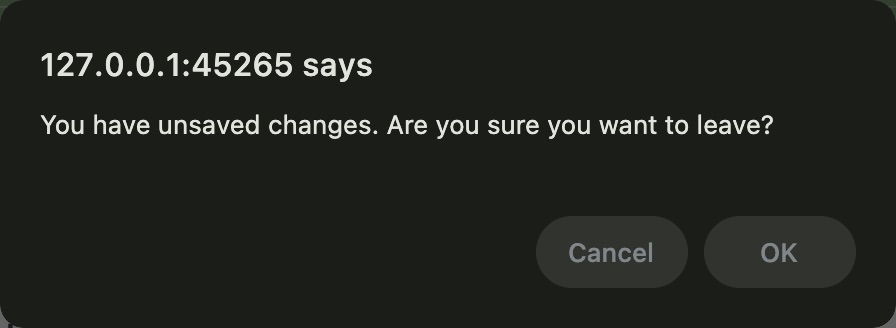 123
123Native unsaved changes confirmation: Cancel or OK
Native macOS confirmation dialog, shown in its original proportions.
Capture details
Genuine original synthetic Staff profile pixels. Required validation and unsaved-draft exits only; no valid patient update was saved.
Image SHA-256 57f9f54950017ec2c8ad2a43bb2c474012ceab5146141a6c30d388493e734d2b
- Unsaved changes warning: Review the confirmation before leaving the editor.
- Cancel: Cancel keeps the editor open with its unsaved values.
- OK: OK leaves the editor and discards its unsaved values.
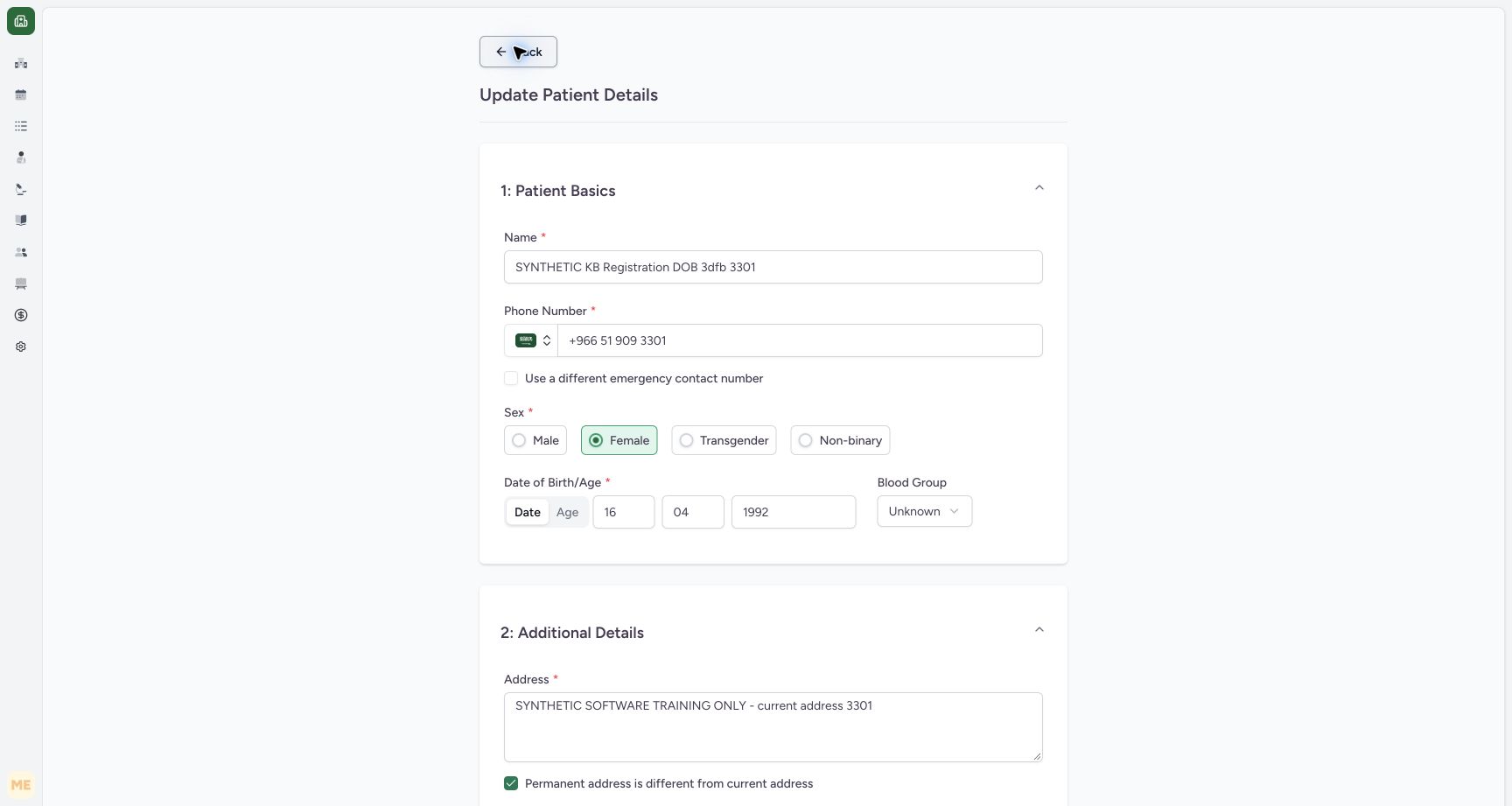 12
12Cancel keeps the unsaved editor open
Capture details
Genuine original synthetic Staff profile pixels. Required validation and unsaved-draft exits only; no valid patient update was saved.
Image SHA-256 8cb611fa65f3e50655321c108de9ffee6a8917253075c9f13ced69b217c13fd8
- Unsaved checkbox choice remains: After Cancel, the checkbox is still unchecked and the separate input remains hidden.
- Editor remains open: You are still in Update Patient Details; Cancel did not save or discard the draft.
6 of 6 content blocks have reviewed image alignment. Missing overview or prerequisite images remain open.
Before you begin
- Continue in the same authorized Staff editor for the synthetic patient ending 3301, with the original Name restored and the separate emergency-contact checkbox already cleared for practice. Keep this unsaved draft and do not submit Update.
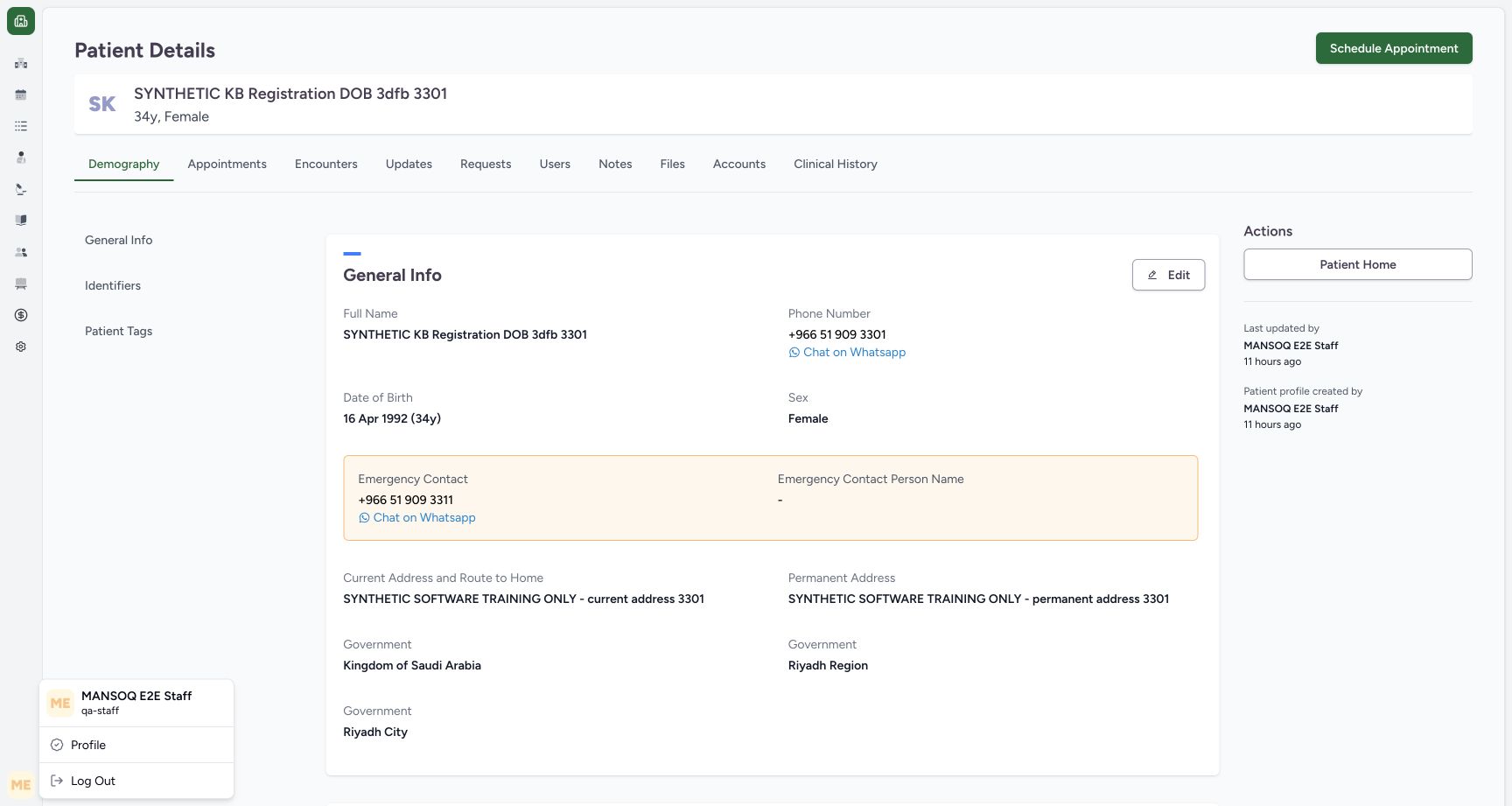 1
1Recorded release 3dfb7c9f · 2026-10-19T18:32:22.317Z · 1728 × 921 Existing Staff account beside the saved patient profile
Capture details
Genuine original synthetic Staff profile pixels. Required validation and unsaved-draft exits only; no valid patient update was saved.
Image SHA-256
05097d5ecde095f5e305277b392bd88639261b36f07b6d53fbb5683cc4b0fba1- Existing qa-staff account: This already authenticated account is the ordinary Staff actor used in this example.
123Recorded release 3dfb7c9f · 2026-10-19T18:42:02.734Z · 1728 × 921 Restored name with a temporary unsaved checkbox change
Capture details
Genuine original synthetic Staff profile pixels. Required validation and unsaved-draft exits only; no valid patient update was saved.
Image SHA-256
6c48a1e1f83d7eb7313cbccffcb0b17ba3e485a783ee873508dafb702fd6b04e- Original name restored: The complete synthetic name is restored without another Update.
- Separate emergency checkbox — unchecked: This temporary unsaved choice hides the separate emergency input.
- Back: Leave the dirty editor to display its unsaved-changes warning.
1. Review the temporary checkbox choice
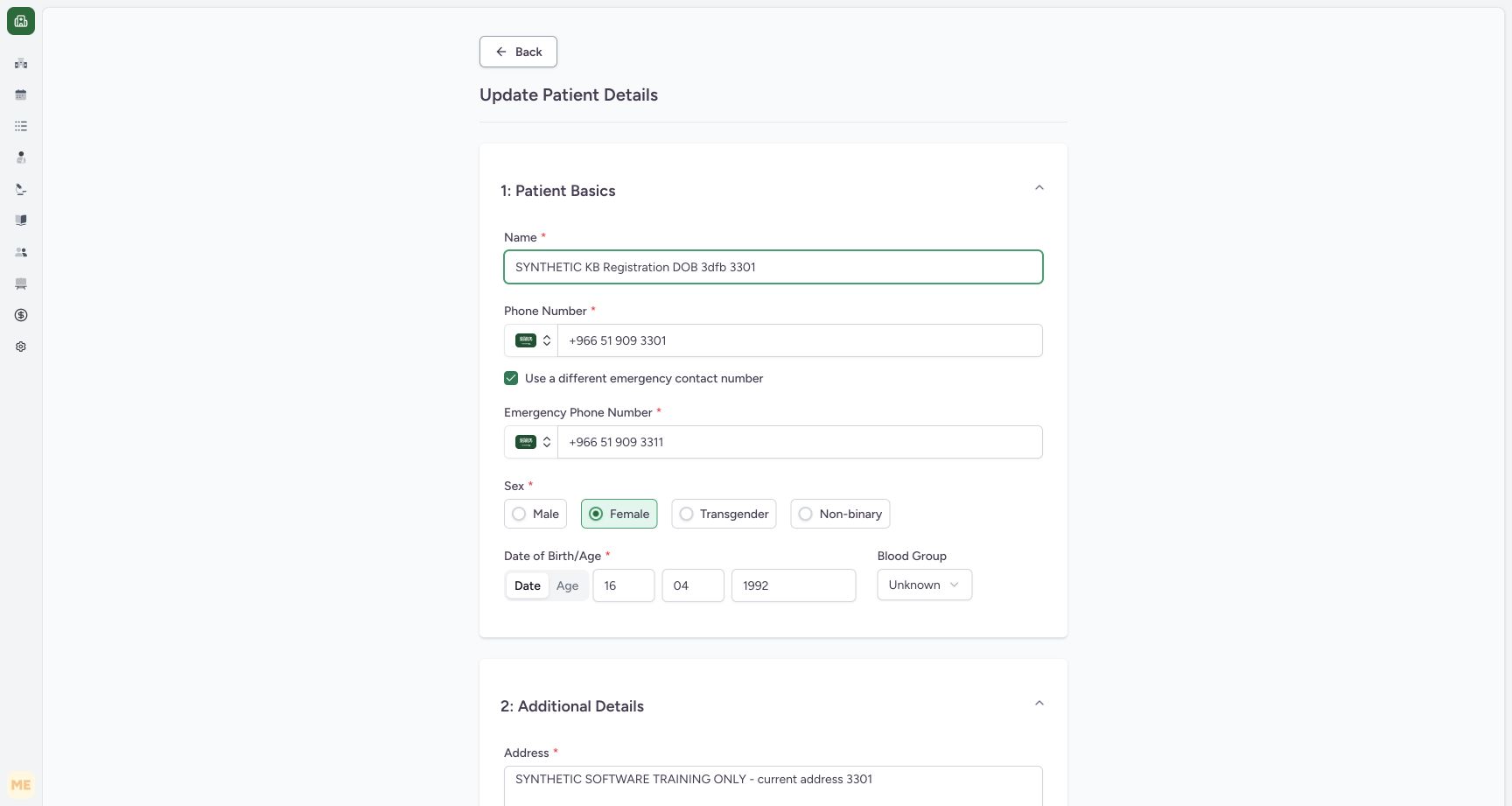
Use a different emergency contact number is now unchecked and the separate input is hidden. The original name and main phone stay loaded. Leave this temporary choice as it is and do not choose Update.
 123
123Review the original name and separate emergency contact
Capture details
Genuine original synthetic Staff profile pixels. Required validation and unsaved-draft exits only; no valid patient update was saved.
Image SHA-256 8351be876c266f674581289825dcaf731c51584a49f1d57c7c97f4bf19fd00da
- Name: For the required-field exercise, clear this synthetic patient name.
- Use a different emergency contact number — checked: The original form has a separate emergency contact.
- Original emergency phone number: The loaded separate contact ends in 3311.
123Restored name with a temporary unsaved checkbox change
Capture details
Genuine original synthetic Staff profile pixels. Required validation and unsaved-draft exits only; no valid patient update was saved.
Image SHA-256 6c48a1e1f83d7eb7313cbccffcb0b17ba3e485a783ee873508dafb702fd6b04e
- Original name restored: The complete synthetic name is restored without another Update.
- Separate emergency checkbox — unchecked: This temporary unsaved choice hides the separate emergency input.
- Back: Leave the dirty editor to display its unsaved-changes warning.
2. Choose Back
Choose Back at the top of the dirty editor.
123Restored name with a temporary unsaved checkbox change
Capture details
Genuine original synthetic Staff profile pixels. Required validation and unsaved-draft exits only; no valid patient update was saved.
Image SHA-256 6c48a1e1f83d7eb7313cbccffcb0b17ba3e485a783ee873508dafb702fd6b04e
- Original name restored: The complete synthetic name is restored without another Update.
- Separate emergency checkbox — unchecked: This temporary unsaved choice hides the separate emergency input.
- Back: Leave the dirty editor to display its unsaved-changes warning.
3. Read the warning and choose Cancel
The native warning says you have unsaved changes and asks whether you want to leave. Choose Cancel to stay in the editor.
123Native unsaved changes confirmation: Cancel or OK
Native macOS confirmation dialog, shown in its original proportions.
Capture details
Genuine original synthetic Staff profile pixels. Required validation and unsaved-draft exits only; no valid patient update was saved.
Image SHA-256 57f9f54950017ec2c8ad2a43bb2c474012ceab5146141a6c30d388493e734d2b
- Unsaved changes warning: Review the confirmation before leaving the editor.
- Cancel: Cancel keeps the editor open with its unsaved values.
- OK: OK leaves the editor and discards its unsaved values.
4. Verify that the draft remains
Update Patient Details stays open. The temporary checkbox choice is still unchecked and the separate emergency input remains hidden. Cancel did not discard the draft or save a patient update.
12Cancel keeps the unsaved editor open
Capture details
Genuine original synthetic Staff profile pixels. Required validation and unsaved-draft exits only; no valid patient update was saved.
Image SHA-256 8cb611fa65f3e50655321c108de9ffee6a8917253075c9f13ced69b217c13fd8
- Unsaved checkbox choice remains: After Cancel, the checkbox is still unchecked and the separate input remains hidden.
- Editor remains open: You are still in Update Patient Details; Cancel did not save or discard the draft.
Source evidence
Every citation uses this exact committed version. The private source repository requires access.
- repositories/platform/mansoq-web/src/components/Patient/PatientDetailsTab/Demography.tsx:166 ·
3dfb7c9f519fb5b4cd4452439f3c12346bf58319Source file checksum
cd33fb513c56360e5b3c1c754507acf6fa6fbbff2e2249b66ae30ce498b84fd3 - repositories/platform/mansoq-web/src/components/Patient/PatientRegistration.tsx:205 ·
3dfb7c9f519fb5b4cd4452439f3c12346bf58319Source file checksum
8a8dd34cad6ec2a2da6b43dbf55869a696cf7dc50f6d16af623bf7a4d9c2f92c - repositories/platform/mansoq-web/src/components/Patient/PatientRegistration.tsx:1090 ·
3dfb7c9f519fb5b4cd4452439f3c12346bf58319Source file checksum
8a8dd34cad6ec2a2da6b43dbf55869a696cf7dc50f6d16af623bf7a4d9c2f92c - repositories/platform/mansoq-web/src/components/Patient/PatientRegistration.tsx:309 ·
3dfb7c9f519fb5b4cd4452439f3c12346bf58319Source file checksum
8a8dd34cad6ec2a2da6b43dbf55869a696cf7dc50f6d16af623bf7a4d9c2f92c - repositories/platform/mansoq-web/src/components/Patient/PatientRegistration.tsx:563 ·
3dfb7c9f519fb5b4cd4452439f3c12346bf58319Source file checksum
8a8dd34cad6ec2a2da6b43dbf55869a696cf7dc50f6d16af623bf7a4d9c2f92c - repositories/platform/mansoq-web/src/components/Patient/PatientRegistration.tsx:576 ·
3dfb7c9f519fb5b4cd4452439f3c12346bf58319Source file checksum
8a8dd34cad6ec2a2da6b43dbf55869a696cf7dc50f6d16af623bf7a4d9c2f92c - repositories/platform/mansoq-web/src/components/Patient/PatientRegistration.tsx:457 ·
3dfb7c9f519fb5b4cd4452439f3c12346bf58319Source file checksum
8a8dd34cad6ec2a2da6b43dbf55869a696cf7dc50f6d16af623bf7a4d9c2f92c - repositories/platform/mansoq-web/src/components/Common/BackButton.tsx:23 ·
3dfb7c9f519fb5b4cd4452439f3c12346bf58319Source file checksum
56a741eff730a7b18a5fae594374068bab2d5413993c32dbbaf3625e14743ca3 - repositories/platform/mansoq-web/public/locale/en.json:9726 ·
3dfb7c9f519fb5b4cd4452439f3c12346bf58319Source file checksum
96498c8b964dce856d43c09e4241708efdd175d935e7ebbd14fa2f8d62efa507 - repositories/platform/mansoq-core/mansoq/security/authorization/patient.py:58 ·
3dfb7c9f519fb5b4cd4452439f3c12346bf58319Source file checksum
45de75f24e42fa30316a96efb92b23c577e2c3831e17ec96e7ff2c73d0d1973d